Payment Systems For Electronic
Commerce
Online Payment Basics
 Cash, checks, credit cards, and
debit cards account for more
than 90 percent of all
consumer payments in the
India
 Most popular consumer
electronic transfers are
automated payments of:
 Auto loans/Payments
 Insurance payments
 Mortgage payments made
from consumers’ checking
accounts
 Scrip
 Digital cash minted by a
company instead of by a
government
 Cannot be exchanged for
cash
 Like a gift certificate that
is good at more than one
store
E-payment systems
 To transfer money over the Internet
 Methods of traditional payment
 Check, credit card, or cash
 Methods of electronic payment
 Electronic cash, software wallets, smart cards, and
credit/debit cards
 Scrip is digital cash minted by third-party
organizations
Payment Cards
 The term payment card describes
all types of plastic cards used to
make purchases
 Credit card
 Has a spending limit based on
a user’s credit history
 Debit card
 Removes an amount from a
cardholder’s bank account
 Transfers it to the seller’s
bank account
 Charge card
 Carries no spending limit
 Amount charged is due at the
end of the billing period
 Advantages:
 Worldwide acceptance
 Built-in security for
merchants
 Disadvantage:
 Payment card service
companies charge merchants
per-transaction fees and
monthly processing fees
Payment Acceptance and Processing
 Steps followed once a
merchant receives a
consumer’s payment card
information:
 Merchant authenticates
payment card
 Merchant checks with
payment card issuer
 To ensure that credit
or funds are available
 Puts a hold on the
credit line or the funds
needed to cover the
charge
 Settlement occurs
 Closed loop systems
 Card issuer pays the
merchants that accept the
card directly and does not
use an intermediary
 Open loop systems
 Involve three or more
parties
 Systems using Visa or
MasterCard are examples
Desirable Properties of Digital Money
 Universally accepted
 Transferable electronically
 Divisible
 Non-forgeable, non-stealable
 Private (no one except parties know the amount)
 Anonymous (no one can identify the payer)
 Work off-line (no on-line verification needed)
Merchant Accounts
 To process payment cards for Internet transactions an online
merchant must set up a merchant account
 New merchants must supply:
 Business plans
 Details about existing bank accounts
 Business and personal credit histories
Why are controls needed?
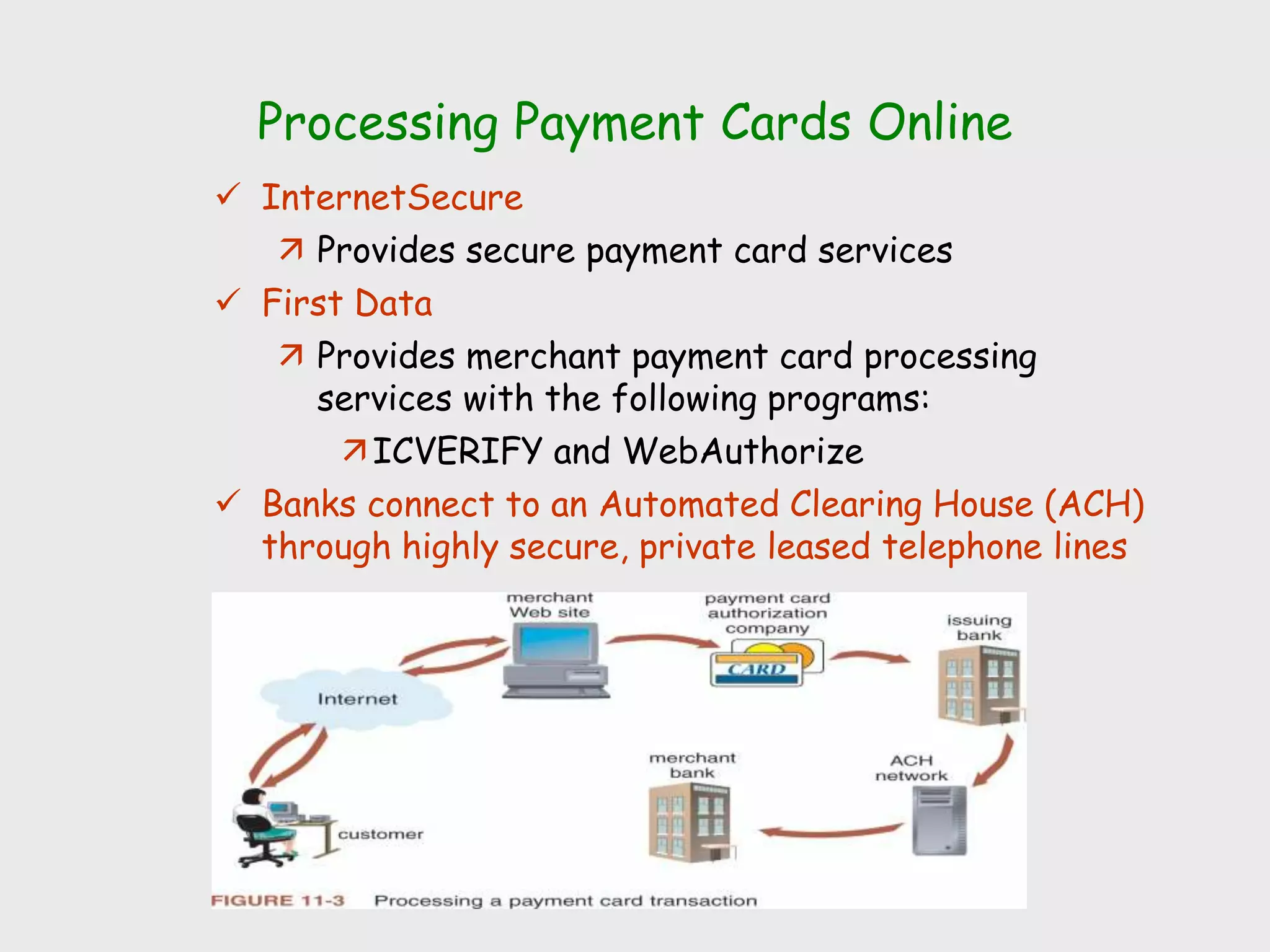
Processing Payment Cards Online
 InternetSecure
 Provides secure payment card services
 First Data
 Provides merchant payment card processing
services with the following programs:
ICVERIFY and WebAuthorize
 Banks connect to an Automated Clearing House (ACH)
through highly secure, private leased telephone lines
Electronic Cash
 Term that describes any value
storage and exchange system
created by a private entity
that:
 Does not use paper
documents or coins
 Can serve as a substitute
for government-issued
physical currency
 Attractive in two arenas:
 Sale of goods and services
of less than $10
 Sale of goods and services
to those without credit
cards
 Concerns about electronic
payment methods include:
 Privacy and security
 Independence
 Portability
 Convenience
 Advantages of electronic cash
include being:
 Independent and portable
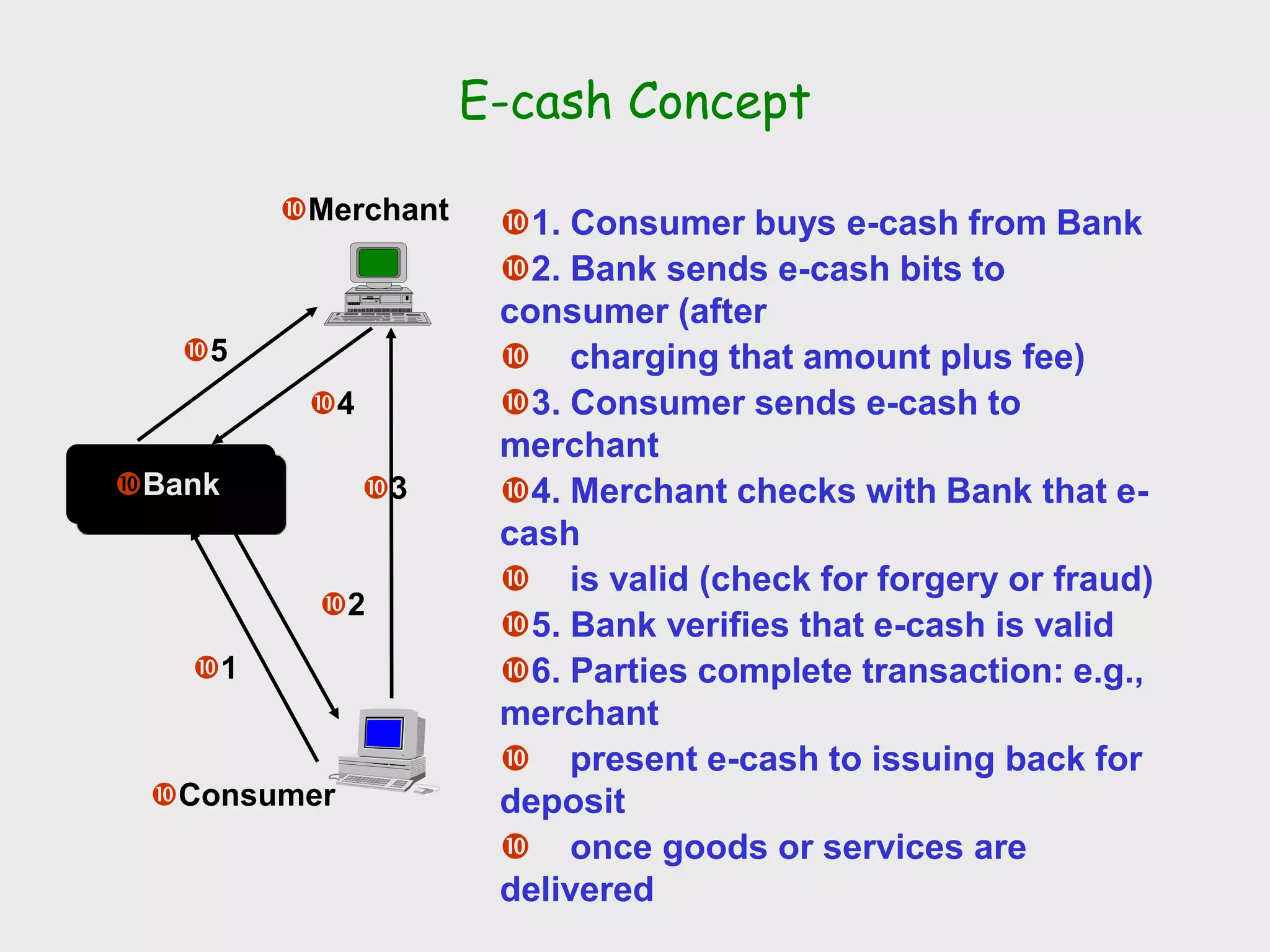
E-cash Concept
Merchant
Consumer
Bank
1
2
3
4
5
1. Consumer buys e-cash from Bank
2. Bank sends e-cash bits to
consumer (after
 charging that amount plus fee)
3. Consumer sends e-cash to
merchant
4. Merchant checks with Bank that e-
cash
 is valid (check for forgery or fraud)
5. Bank verifies that e-cash is valid
6. Parties complete transaction: e.g.,
merchant
 present e-cash to issuing back for
deposit
 once goods or services are
delivered
Advantages and Disadvantages of
Electronic Cash
 Advantages
 More efficient, eventually meaning lower prices
 Lower transaction costs
 Anybody can use it, unlike credit cards, and does not
require special authorization
 Disadvantages
 Tax trail non-existent, like regular cash
 Money laundering
 Susceptible to forgery
Micropayments and Small Payments
 Micropayments
 Internet payments for items costing from a few
cents to approximately a dollar
 Small payments
 Payments of less than $10
Holding Electronic Cash: Online and Offline Cash
 Online cash storage
 Trusted third party is
involved in all transfers of
electronic cash
 Holds consumers’ cash
accounts
 Offline cash storage
 Virtual equivalent of money
kept in a wallet
 No third party is involved
in the transaction
 Double-spending
 Spending electronic cash
twice
 Advantages of electronic cash:
 Transactions are more
efficient
 Transfer on the Internet
costs less than processing
credit card transactions
 Disadvantages of electronic
cash:
 Use provides no audit trail
 Problem of money
laundering arises
 Susceptible to forgery
Providing Security for Electronic Cash
 Cryptographic algorithms
 Keys to creating tamperproof electronic cash that can be
traced back to its origins
 Anonymous electronic cash
 Electronic cash that cannot be traced back to the person
who spent it
 Creating truly anonymous electronic cash
 Requires a bank to issue electronic cash with embedded
serial numbers
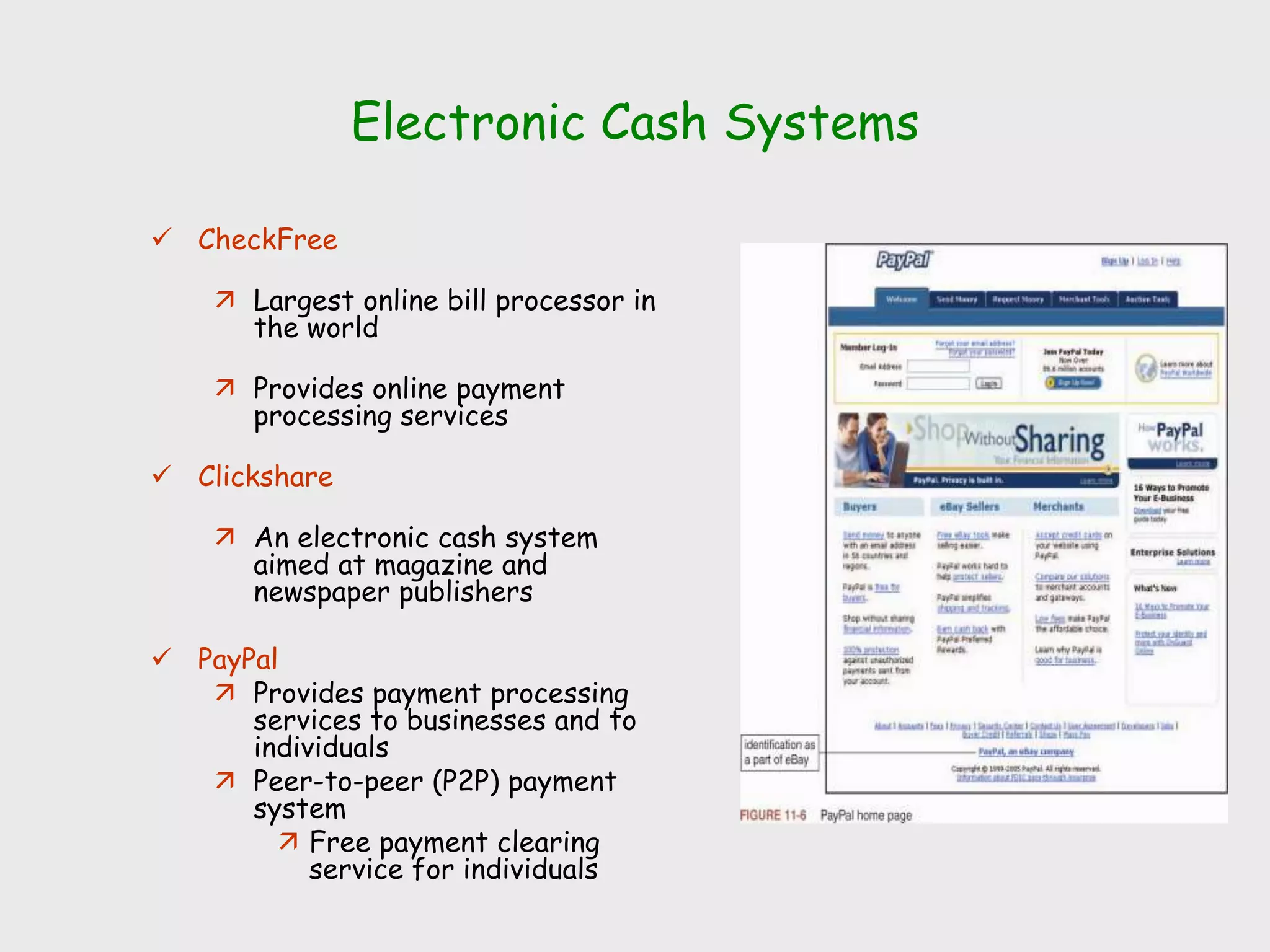
Electronic Cash Systems
 CheckFree
 Largest online bill processor in
the world
 Provides online payment
processing services
 Clickshare
 An electronic cash system
aimed at magazine and
newspaper publishers
 PayPal
 Provides payment processing
services to businesses and to
individuals
 Peer-to-peer (P2P) payment
system
 Free payment clearing
service for individuals
Electronic Wallets
 Stores credit card, electronic cash, owner identification and
address
 Makes shopping easier and more efficient
Eliminates need to repeatedly enter identifying
information into forms to purchase
Works in many different stores to speed checkout
 Amazon.com one of the first online merchants to
eliminate repeat form-filling for purchases
Electronic Wallets
 Hold credit card numbers,
electronic cash, owner
identification, and contact
information
 Give consumers the benefit of
entering their information just
once
 Make shopping more efficient
 Server-side electronic wallet
 Stores a customer’s
information on a remote
server belonging to a
particular merchant or
wallet publisher
 Client-side electronic wallet
 Stores a consumer’s
information on his or her
own computer
The ECML Standard
 Electronic Commerce Modeling Language (ECML) proposed
standards for electronic wallets
 Companies forming the consortium are America Online,
IBM, Microsoft, Visa, and MasterCard
 Ultimate goal is for all commerce sites to accept ECML
 Unclear how this standard will incorporate privacy
standards W3C set forth
 Electronic Commerce Modeling Language (ECML)
Wallet/Merchant Standards Initiative, July 1999
(Next four slides)
Smart Cards
 Magnetic stripe
 140 bytes, cost $0.20-0.75
 Memory cards
 1-4 KB memory, no processor, cost $1.00-2.50
 Optical memory cards
 4 megabytes read-only (CD-like), cost $7.00-12.00
 Microprocessor cards
 Embedded microprocessor
(OLD) 8-bit processor, 16 KB ROM, 512 bytes RAM
Equivalent power to IBM XT PC, cost $7.00-15.00
32-bit processors now available
Smart Cards
 Plastic card containing an embedded microchip
 Available for over 10 years
 So far not successful in U.S., but popular in Europe,
Australia, and Japan
 Unsuccessful in U.S. partly because few card readers
available
 Smart cards gradually reappearing in U.S.; success depends
on:
 Critical mass of smart cards that support applications
 Compatibility between smart cards, card-reader devices,
and applications
Smart Card Applications
 Ticketless travel
 Seoul bus system: 4M cards, 1B transactions since 1996
 Planned the SF Bay Area system
 Authentication, ID
 Medical records
 Ecash
 Store loyalty programs
 Personal profiles
 Government
 Licenses
 Mall parking
. . .
Advantages and Disadvantages of Smart Cards
 Advantages:
1. Atomic, debt-free transactions
2. Feasible for very small transactions (information commerce)
3. (Potentially) anonymous
4. Security of physical storage
5. (Potentially) currency-neutral
 Disadvantages:
1. Low maximum transaction limit (not suitable for B2B or most
B2C)
2. High Infrastructure costs (not suitable for C2C)
3. Single physical point of failure (the card)
4. Not (yet) widely used
Other Cards
 Stored Value Cards
 Stored-value cards can be an elaborate smart card with a
microchip that records currency balance
 Common stored-value cards include: Prepaid phone, copy, subway,
and bus cards
 Magnetic strip cards
 Cannot send or receive information
 Cannot increment or decrement value of cash stored on the card
 Processing must be done on a device into which the card is
inserted
 Smart cards are better suited for Internet payment transactions
 Are stored-value cards
 Can hold private user data, such as financial facts
 Can store about 100 times more information than a magnetic
strip plastic card
 Safer than conventional credit cards
Phishing Attacks
 Basic structure:
 Attacker sends e-mail
messages to a large
number of recipients
 Message states that an
account has been
compromised and the
matter should be
corrected
 Message includes a link
 User enters a login name
and password, which the
perpetrator captures
 Once inside a victim’s
account, the perpetrator
can access personal
information
 Countermeasures
 Most important step that
companies can take today
is to educate Web site
users
 Many companies contract
consulting firms that
specialize in anti-phishing
work
 Anti-phishing technique is
to monitor online chat
rooms used by criminals
Query Session
Ask Ask Ask … and you will never Ask

Payment systems for electronic commerce

  • 1.
    Payment Systems ForElectronic Commerce
  • 2.
    Online Payment Basics Cash, checks, credit cards, and debit cards account for more than 90 percent of all consumer payments in the India  Most popular consumer electronic transfers are automated payments of:  Auto loans/Payments  Insurance payments  Mortgage payments made from consumers’ checking accounts  Scrip  Digital cash minted by a company instead of by a government  Cannot be exchanged for cash  Like a gift certificate that is good at more than one store
  • 3.
    E-payment systems  Totransfer money over the Internet  Methods of traditional payment  Check, credit card, or cash  Methods of electronic payment  Electronic cash, software wallets, smart cards, and credit/debit cards  Scrip is digital cash minted by third-party organizations
  • 4.
    Payment Cards  Theterm payment card describes all types of plastic cards used to make purchases  Credit card  Has a spending limit based on a user’s credit history  Debit card  Removes an amount from a cardholder’s bank account  Transfers it to the seller’s bank account  Charge card  Carries no spending limit  Amount charged is due at the end of the billing period  Advantages:  Worldwide acceptance  Built-in security for merchants  Disadvantage:  Payment card service companies charge merchants per-transaction fees and monthly processing fees
  • 5.
    Payment Acceptance andProcessing  Steps followed once a merchant receives a consumer’s payment card information:  Merchant authenticates payment card  Merchant checks with payment card issuer  To ensure that credit or funds are available  Puts a hold on the credit line or the funds needed to cover the charge  Settlement occurs  Closed loop systems  Card issuer pays the merchants that accept the card directly and does not use an intermediary  Open loop systems  Involve three or more parties  Systems using Visa or MasterCard are examples
  • 6.
    Desirable Properties ofDigital Money  Universally accepted  Transferable electronically  Divisible  Non-forgeable, non-stealable  Private (no one except parties know the amount)  Anonymous (no one can identify the payer)  Work off-line (no on-line verification needed)
  • 7.
    Merchant Accounts  Toprocess payment cards for Internet transactions an online merchant must set up a merchant account  New merchants must supply:  Business plans  Details about existing bank accounts  Business and personal credit histories Why are controls needed?
  • 8.
    Processing Payment CardsOnline  InternetSecure  Provides secure payment card services  First Data  Provides merchant payment card processing services with the following programs: ICVERIFY and WebAuthorize  Banks connect to an Automated Clearing House (ACH) through highly secure, private leased telephone lines
  • 9.
    Electronic Cash  Termthat describes any value storage and exchange system created by a private entity that:  Does not use paper documents or coins  Can serve as a substitute for government-issued physical currency  Attractive in two arenas:  Sale of goods and services of less than $10  Sale of goods and services to those without credit cards  Concerns about electronic payment methods include:  Privacy and security  Independence  Portability  Convenience  Advantages of electronic cash include being:  Independent and portable
  • 10.
    E-cash Concept Merchant Consumer Bank 1 2 3 4 5 1. Consumerbuys e-cash from Bank 2. Bank sends e-cash bits to consumer (after  charging that amount plus fee) 3. Consumer sends e-cash to merchant 4. Merchant checks with Bank that e- cash  is valid (check for forgery or fraud) 5. Bank verifies that e-cash is valid 6. Parties complete transaction: e.g., merchant  present e-cash to issuing back for deposit  once goods or services are delivered
  • 11.
    Advantages and Disadvantagesof Electronic Cash  Advantages  More efficient, eventually meaning lower prices  Lower transaction costs  Anybody can use it, unlike credit cards, and does not require special authorization  Disadvantages  Tax trail non-existent, like regular cash  Money laundering  Susceptible to forgery
  • 12.
    Micropayments and SmallPayments  Micropayments  Internet payments for items costing from a few cents to approximately a dollar  Small payments  Payments of less than $10
  • 13.
    Holding Electronic Cash:Online and Offline Cash  Online cash storage  Trusted third party is involved in all transfers of electronic cash  Holds consumers’ cash accounts  Offline cash storage  Virtual equivalent of money kept in a wallet  No third party is involved in the transaction  Double-spending  Spending electronic cash twice  Advantages of electronic cash:  Transactions are more efficient  Transfer on the Internet costs less than processing credit card transactions  Disadvantages of electronic cash:  Use provides no audit trail  Problem of money laundering arises  Susceptible to forgery
  • 14.
    Providing Security forElectronic Cash  Cryptographic algorithms  Keys to creating tamperproof electronic cash that can be traced back to its origins  Anonymous electronic cash  Electronic cash that cannot be traced back to the person who spent it  Creating truly anonymous electronic cash  Requires a bank to issue electronic cash with embedded serial numbers
  • 15.
    Electronic Cash Systems CheckFree  Largest online bill processor in the world  Provides online payment processing services  Clickshare  An electronic cash system aimed at magazine and newspaper publishers  PayPal  Provides payment processing services to businesses and to individuals  Peer-to-peer (P2P) payment system  Free payment clearing service for individuals
  • 16.
    Electronic Wallets  Storescredit card, electronic cash, owner identification and address  Makes shopping easier and more efficient Eliminates need to repeatedly enter identifying information into forms to purchase Works in many different stores to speed checkout  Amazon.com one of the first online merchants to eliminate repeat form-filling for purchases
  • 17.
    Electronic Wallets  Holdcredit card numbers, electronic cash, owner identification, and contact information  Give consumers the benefit of entering their information just once  Make shopping more efficient  Server-side electronic wallet  Stores a customer’s information on a remote server belonging to a particular merchant or wallet publisher  Client-side electronic wallet  Stores a consumer’s information on his or her own computer
  • 18.
    The ECML Standard Electronic Commerce Modeling Language (ECML) proposed standards for electronic wallets  Companies forming the consortium are America Online, IBM, Microsoft, Visa, and MasterCard  Ultimate goal is for all commerce sites to accept ECML  Unclear how this standard will incorporate privacy standards W3C set forth  Electronic Commerce Modeling Language (ECML) Wallet/Merchant Standards Initiative, July 1999 (Next four slides)
  • 19.
    Smart Cards  Magneticstripe  140 bytes, cost $0.20-0.75  Memory cards  1-4 KB memory, no processor, cost $1.00-2.50  Optical memory cards  4 megabytes read-only (CD-like), cost $7.00-12.00  Microprocessor cards  Embedded microprocessor (OLD) 8-bit processor, 16 KB ROM, 512 bytes RAM Equivalent power to IBM XT PC, cost $7.00-15.00 32-bit processors now available
  • 20.
    Smart Cards  Plasticcard containing an embedded microchip  Available for over 10 years  So far not successful in U.S., but popular in Europe, Australia, and Japan  Unsuccessful in U.S. partly because few card readers available  Smart cards gradually reappearing in U.S.; success depends on:  Critical mass of smart cards that support applications  Compatibility between smart cards, card-reader devices, and applications
  • 21.
    Smart Card Applications Ticketless travel  Seoul bus system: 4M cards, 1B transactions since 1996  Planned the SF Bay Area system  Authentication, ID  Medical records  Ecash  Store loyalty programs  Personal profiles  Government  Licenses  Mall parking . . .
  • 22.
    Advantages and Disadvantagesof Smart Cards  Advantages: 1. Atomic, debt-free transactions 2. Feasible for very small transactions (information commerce) 3. (Potentially) anonymous 4. Security of physical storage 5. (Potentially) currency-neutral  Disadvantages: 1. Low maximum transaction limit (not suitable for B2B or most B2C) 2. High Infrastructure costs (not suitable for C2C) 3. Single physical point of failure (the card) 4. Not (yet) widely used
  • 23.
    Other Cards  StoredValue Cards  Stored-value cards can be an elaborate smart card with a microchip that records currency balance  Common stored-value cards include: Prepaid phone, copy, subway, and bus cards  Magnetic strip cards  Cannot send or receive information  Cannot increment or decrement value of cash stored on the card  Processing must be done on a device into which the card is inserted  Smart cards are better suited for Internet payment transactions  Are stored-value cards  Can hold private user data, such as financial facts  Can store about 100 times more information than a magnetic strip plastic card  Safer than conventional credit cards
  • 24.
    Phishing Attacks  Basicstructure:  Attacker sends e-mail messages to a large number of recipients  Message states that an account has been compromised and the matter should be corrected  Message includes a link  User enters a login name and password, which the perpetrator captures  Once inside a victim’s account, the perpetrator can access personal information  Countermeasures  Most important step that companies can take today is to educate Web site users  Many companies contract consulting firms that specialize in anti-phishing work  Anti-phishing technique is to monitor online chat rooms used by criminals
  • 25.
    Query Session Ask AskAsk … and you will never Ask