Partner Map View in Odoo 13
www.cybrosys.com
INTRODUCTION
● Odoo 13 introduce a new feature to view the Partner location in map.
● To enable this feature we want to install an additional module named
Google Maps.

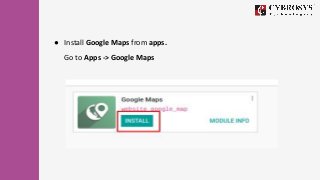
● Install Google Maps from apps.
Go to Apps -> Google Maps
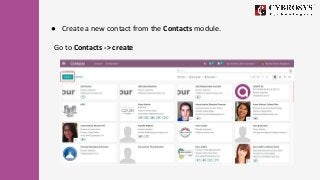
● Create a new contact from the Contacts module.
Go to Contacts -> create
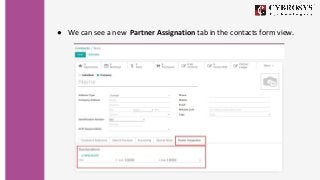
● We can see a new Partner Assignation tab in the contacts form view.
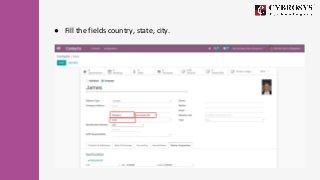
● Fill the fields country, state, city.
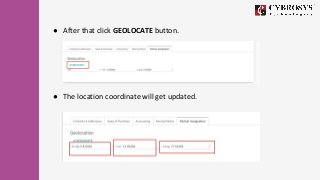
● After that click GEOLOCATE button.
● The location coordinate will get updated.
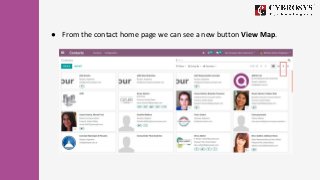
● From the contact home page we can see a new button View Map.
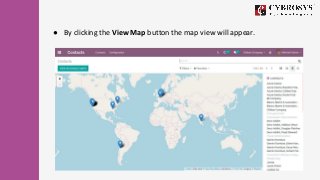
● By clicking the View Map button the map view will appear.
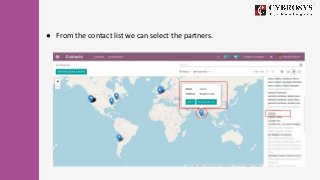
● From the contact list we can select the partners.
For more information, Watch the video: Partner Map View in Odoo 13
Cybrosys Technologies
Pvt. Ltd.
1st Floor, Thapasya
Building,
Infopark, Kakkanad,
Kochi, Kerala,
India-682030.
Cybrosys Technologies
Pvt. Ltd.
1st Floor, Thapasya Building,
Infopark, Kakkanad,
Kochi, Kerala,
India-682030.
Cybrosys Technologies Pvt. Ltd.
Neospace, Kinfra Techno Park,
Kakkancherry,
Calicut University P.O.
Calicut Kerala, India - 673635.
Cybrosys Ltd
Cybrosys Limited
Alpha House, 100 Borough High
Street, London, Greater London,
SE1 1LB, United Kingdom
Thank You !
Cybrosys Technologies Pvt. Ltd.
1st Floor, Thapasya Building,
Infopark, Kakkanad, Kochi,
India - 682030.

Partner Map View in Odoo 13

  • 1.
    Partner Map Viewin Odoo 13 www.cybrosys.com
  • 2.
    INTRODUCTION ● Odoo 13introduce a new feature to view the Partner location in map. ● To enable this feature we want to install an additional module named Google Maps.
  • 3.
    ● Install GoogleMaps from apps. Go to Apps -> Google Maps
  • 4.
    ● Create anew contact from the Contacts module. Go to Contacts -> create
  • 5.
    ● We cansee a new Partner Assignation tab in the contacts form view.
  • 6.
    ● Fill thefields country, state, city.
  • 7.
    ● After thatclick GEOLOCATE button. ● The location coordinate will get updated.
  • 8.
    ● From thecontact home page we can see a new button View Map.
  • 9.
    ● By clickingthe View Map button the map view will appear.
  • 10.
    ● From thecontact list we can select the partners.
  • 11.
    For more information,Watch the video: Partner Map View in Odoo 13
  • 12.
    Cybrosys Technologies Pvt. Ltd. 1stFloor, Thapasya Building, Infopark, Kakkanad, Kochi, Kerala, India-682030. Cybrosys Technologies Pvt. Ltd. 1st Floor, Thapasya Building, Infopark, Kakkanad, Kochi, Kerala, India-682030. Cybrosys Technologies Pvt. Ltd. Neospace, Kinfra Techno Park, Kakkancherry, Calicut University P.O. Calicut Kerala, India - 673635. Cybrosys Ltd Cybrosys Limited Alpha House, 100 Borough High Street, London, Greater London, SE1 1LB, United Kingdom Thank You ! Cybrosys Technologies Pvt. Ltd. 1st Floor, Thapasya Building, Infopark, Kakkanad, Kochi, India - 682030.