「iOSで丸いボタン」
              Satoshi Yamada


12年8月25日土曜日
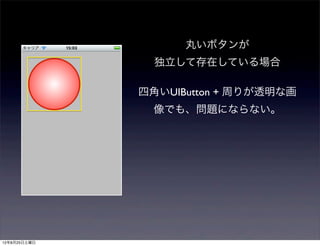
丸いボタンが
              独立して存在している場合


12年8月25日土曜日
丸いボタンが
                独立して存在している場合

              四角いUIButton + 周りが透明な画
                像でも、問題にならない。


12年8月25日土曜日
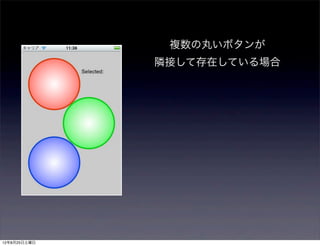
複数の丸いボタンが
              隣接して存在している場合


12年8月25日土曜日
複数の丸いボタンが
                隣接して存在している場合


              四角いUIButton + 周りが透明な画
              像だと反応エリアが重なり合い、
              タップしたのと別のボタンが反応
                  する場合も発生する


12年8月25日土曜日
複数の丸いボタンが
               隣接して存在している場合


              反応エリアを重なり合わないよう
                   にしたい。


12年8月25日土曜日
必要な処理

              1. 反応する領域を定義

              2. タップした位置が定義した領域に入っ
               ているか判定

              3. 領域に入っていればタップを受け入
               れ、入っていなければイベントを他の
               オブジェクトへ

12年8月25日土曜日
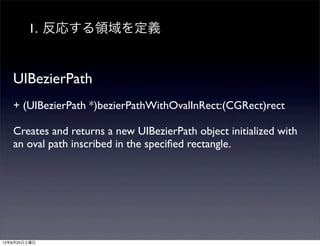
1. 反応する領域を定義


   UIBezierPath
   + (UIBezierPath *)bezierPathWithOvalInRect:(CGRect)rect

   Creates and returns a new UIBezierPath object initialized with
   an oval path inscribed in the specified rectangle.


12年8月25日土曜日
2. タップした位置が定義した領域に入っ
              ているか判定

   UIBezierPath
   - (BOOL)containsPoint:(CGPoint)point

   Returns a Boolean value indicating whether the area enclosed
   by the receiver contains the specified point.


12年8月25日土曜日
3. タップイベント受け入れ


   UIView
   - (UIView *)hitTest:(CGPoint)point withEvent:(UIEvent *)event

   Returns the farthest descendant of the receiver in the view
   hierarchy (including itself) that contains a specified point.


12年8月25日土曜日
demo


12年8月25日土曜日
問題点

               丸以外は?


12年8月25日土曜日
タップした点のアルファ値を見れば
               汎用的に使えるのではないか


12年8月25日土曜日
demo


12年8月25日土曜日

Oval button

  • 1.
    「iOSで丸いボタン」 Satoshi Yamada 12年8月25日土曜日
  • 2.
    丸いボタンが 独立して存在している場合 12年8月25日土曜日
  • 3.
    丸いボタンが 独立して存在している場合 四角いUIButton + 周りが透明な画 像でも、問題にならない。 12年8月25日土曜日
  • 4.
    複数の丸いボタンが 隣接して存在している場合 12年8月25日土曜日
  • 5.
    複数の丸いボタンが 隣接して存在している場合 四角いUIButton + 周りが透明な画 像だと反応エリアが重なり合い、 タップしたのと別のボタンが反応 する場合も発生する 12年8月25日土曜日
  • 6.
    複数の丸いボタンが 隣接して存在している場合 反応エリアを重なり合わないよう にしたい。 12年8月25日土曜日
  • 7.
    必要な処理 1. 反応する領域を定義 2. タップした位置が定義した領域に入っ ているか判定 3. 領域に入っていればタップを受け入 れ、入っていなければイベントを他の オブジェクトへ 12年8月25日土曜日
  • 8.
    1. 反応する領域を定義 UIBezierPath + (UIBezierPath *)bezierPathWithOvalInRect:(CGRect)rect Creates and returns a new UIBezierPath object initialized with an oval path inscribed in the specified rectangle. 12年8月25日土曜日
  • 9.
    2. タップした位置が定義した領域に入っ ているか判定 UIBezierPath - (BOOL)containsPoint:(CGPoint)point Returns a Boolean value indicating whether the area enclosed by the receiver contains the specified point. 12年8月25日土曜日
  • 10.
    3. タップイベント受け入れ UIView - (UIView *)hitTest:(CGPoint)point withEvent:(UIEvent *)event Returns the farthest descendant of the receiver in the view hierarchy (including itself) that contains a specified point. 12年8月25日土曜日
  • 11.
  • 12.
    問題点  丸以外は? 12年8月25日土曜日
  • 13.
    タップした点のアルファ値を見れば 汎用的に使えるのではないか 12年8月25日土曜日
  • 14.