강의 08/16:
형상관리 (2)
신정규
2016년 11월 2일
git
오픈소스계의 de facto standard DVCS 소프트웨어
햣 (git)
▪ 리눅스 커널 개발
▪ patch (with diff) 기반의 관리
▪ 2002년
▪ BitKeeper의 리눅스 커뮤니티로의 DVCS 기여
▪ 2005년
▪ BitKeeper의 유료화 정책
▪ 새로운 도구의 필요성
Git의 목표
▪ 빠른 속도
▪ 단순한 구조
▪ 비선형적인 개발(수천 개의 동시 다발적인 브랜치)
▪ 완벽한 분산
▪ 리눅스 커널 같은 대형 프로젝트에서의 사용 편의
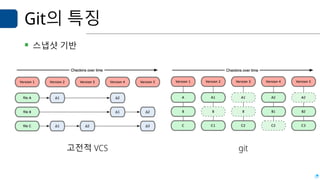
Git의 특징
▪ 스냅샷 기반
고전적 VCS git
▪ 로컬 단독 실행 지원
▪ 무결성 저장: 체크섬 기반의 무결성 관리
▪ Git의 파일: 파일명 기반이 아닌 SHA-1 체크섬 기반의 이름으로 저장
▪ 삭제가 없음
▪ Git에서는 삭제가 없음: 삭제하면 포인터만 사라질 뿐임
▪ 프로젝트 트리를 복구하기가 용이함
Git 의 개념 및 구조
Git의 개념 및 파일 상태
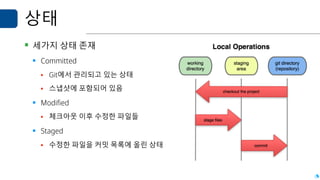
상태
▪ 세가지 상태 존재
▪ Committed
▪ Git에서 관리되고 있는 상태
▪ 스냅샷에 포함되어 있음
▪ Modified
▪ 체크아웃 이후 수정한 파일들
▪ Staged
▪ 수정한 파일을 커밋 목록에 올린 상태
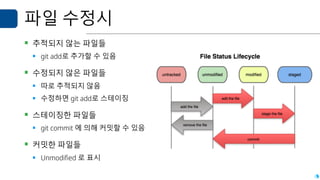
파일 수정시
▪ 추적되지 않는 파일들
▪ git add로 추가할 수 있음
▪ 수정되지 않은 파일들
▪ 따로 추적되지 않음
▪ 수정하면 git add로 스테이징
▪ 스테이징한 파일들
▪ git commit 에 의해 커밋할 수 있음
▪ 커밋한 파일들
▪ Unmodified 로 표시
구조
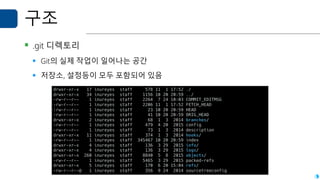
▪ .git 디렉토리
▪ Git의 실제 작업이 일어나는 공간
▪ 저장소, 설정등이 모두 포함되어 있음
drwxr-xr-x 17 inureyes staff 578 11 1 17:52 ./
drwxr-xr-x 34 inureyes staff 1156 10 20 20:59 ../
-rw-r--r-- 1 inureyes staff 2264 7 24 10:03 COMMIT_EDITMSG
-rw-r--r-- 1 inureyes staff 2206 11 1 17:52 FETCH_HEAD
-rw-r--r-- 1 inureyes staff 23 10 20 20:59 HEAD
-rw-r--r-- 1 inureyes staff 41 10 20 20:59 ORIG_HEAD
drwxr-xr-x 2 inureyes staff 68 1 3 2014 branches/
-rw-r--r-- 1 inureyes staff 479 4 20 2015 config
-rw-r--r-- 1 inureyes staff 73 1 3 2014 description
drwxr-xr-x 11 inureyes staff 374 1 3 2014 hooks/
-rw-r--r-- 1 inureyes staff 345467 10 20 20:59 index
drwxr-xr-x 4 inureyes staff 136 3 29 2015 info/
drwxr-xr-x 4 inureyes staff 136 3 29 2015 logs/
drwxr-xr-x 260 inureyes staff 8840 5 8 2015 objects/
-rw-r--r-- 1 inureyes staff 5465 3 29 2015 packed-refs
drwxr-xr-x 5 inureyes staff 170 6 20 15:04 refs/
-rw-r--r--@ 1 inureyes staff 356 9 24 2014 sourcetreeconfig
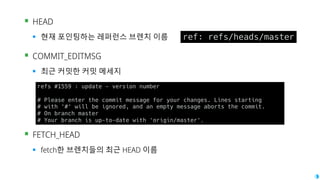
▪ HEAD
▪ 현재 포인팅하는 레퍼런스 브렌치 이름
▪ COMMIT_EDITMSG
▪ 최근 커밋한 커밋 메세지
▪ FETCH_HEAD
▪ fetch한 브렌치들의 최근 HEAD 이름
ref: refs/heads/master
refs #1559 : update - version number
# Please enter the commit message for your changes. Lines starting
# with '#' will be ignored, and an empty message aborts the commit.
# On branch master
# Your branch is up-to-date with 'origin/master'.
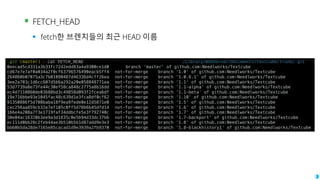
▪ FETCH_HEAD
▪ fetch한 브렌치들의 최근 HEAD 이름
.git (master) » cat FETCH_HEAD /Library/WebServer/Documents/textcube/trunk/.git
0eecad5cd331a3b33fc72d2edd83a4a9300ce1d0 branch 'master' of github.com:Needlworks/Textcube
cd67e7e7af0a034a2f0cf63796576490eacb5ff4 not-for-merge branch '1.0' of github.com:Needlworks/Textcube
264860b07075a3c7b01090487d46336d4cff26ea not-for-merge branch '1.0.6.1' of github.com:Needlworks/Textcube
3ee2a703c1d6cc607d5b6a292a20e058848771ea not-for-merge branch '1.1' of github.com:Needlworks/Textcube
53d7739a8e73fe44c30ef58ca848c2775a8b16dd not-for-merge branch '1.1-alpha' of github.com:Needlworks/Textcube
ec4d7110860de03688bd3c49858d093f2fcea6df not-for-merge branch '1.1-beta' of github.com:Needlworks/Textcube
19e716bbe93e1045fac48c639d1e3fca8df0cf62 not-for-merge branch '1.10' of github.com:Needlworks/Textcube
91350886f5d708baba18f9ea9fede0e12d5871e0 not-for-merge branch '1.5' of github.com:Needlworks/Textcube
cec256aa859cb32e7ef105c0ff5d78b6b45dfd14 not-for-merge branch '1.6' of github.com:Needlworks/Textcube
166e4a208a7f3e1719faf34ddbcfe5e3f792740c not-for-merge branch '1.7' of github.com:Needlworks/Textcube
50e04ac16320b3ee9a3d1835c0e5b94d33dc37b6 not-for-merge branch '1.7-backport' of github.com:Needlworks/Textcube
ec111d0bb28c2feb44ae3b510b5b1d87add9e3e3 not-for-merge branch '1.8' of github.com:Needlworks/Textcube
bb60b5da28de7165e85cacad1d9e3939a2fb9370 not-for-merge branch '1.8-blackhistory1' of github.com:Needlworks/Textcube
▪ config
▪ 현재 저장소의 설정
▪ packed-refs
▪ 태그, 로컬 및 원격 브렌치의
체크섬 레퍼런스
[core]
repositoryformatversion = 0
filemode = true
bare = false
logallrefupdates = true
ignorecase = true
precomposeunicode = false
[remote "origin"]
url = git@github.com:Needlworks/Textcube.git
fetch = +refs/heads/*:refs/remotes/origin/*
[branch "master"]
remote = origin
merge = refs/heads/master
[branch "1.9"]
remote = origin
merge = refs/heads/1.9
[branch "1.10"]
remote = origin
merge = refs/heads/1.10
[branch "2.0"]
remote = origin
merge = refs/heads/2.0
▪ Hooks 디렉토리
▪ 특정 동작 후에 실행할 동작을 지정할 수 있음
▪ Applypatch
▪ (pre/post) update, (pre/post)commit, (pre/post)push, (pre/post) rebase
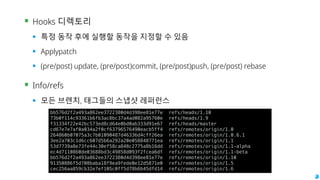
▪ Info/refs
▪ 모든 브렌치, 태그들의 스냅샷 레퍼런스
bb576d2f2a493a862ee3722380d4d398ee81e77e refs/heads/1.10
73b0f114c93361b6fb3ac8bc37a4ad082a95760e refs/heads/1.9
f31334f22e42bc573ed8cd64e0bd0ab333d91e67 refs/heads/master
cd67e7e7af0a034a2f0cf63796576490eacb5ff4 refs/remotes/origin/1.0
264860b07075a3c7b01090487d46336d4cff26ea refs/remotes/origin/1.0.6.1
3ee2a703c1d6cc607d5b6a292a20e058848771ea refs/remotes/origin/1.1
53d7739a8e73fe44c30ef58ca848c2775a8b16dd refs/remotes/origin/1.1-alpha
ec4d7110860de03688bd3c49858d093f2fcea6df refs/remotes/origin/1.1-beta
bb576d2f2a493a862ee3722380d4d398ee81e77e refs/remotes/origin/1.10
91350886f5d708baba18f9ea9fede0e12d5871e0 refs/remotes/origin/1.5
cec256aa859cb32e7ef105c0ff5d78b6b45dfd14 refs/remotes/origin/1.6
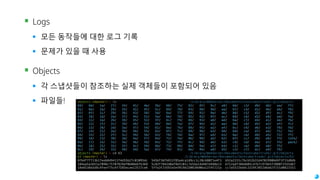
▪ Logs
▪ 모든 동작들에 대한 로그 기록
▪ 문제가 있을 때 사용
▪ Objects
▪ 각 스냅샷들이 참조하는 실제 객체들이 포함되어 있음
▪ 파일들! objects (master) » ls /Library/WebServer/Documents/textcube/trunk/.git/objects
00/ 0d/ 1a/ 27/ 34/ 41/ 4e/ 5b/ 68/ 75/ 82/ 8f/ 9c/ a9/ b6/ c3/ d0/ dd/ ea/ f7/
01/ 0e/ 1b/ 28/ 35/ 42/ 4f/ 5c/ 69/ 76/ 83/ 90/ 9d/ aa/ b7/ c4/ d1/ de/ eb/ f8/
02/ 0f/ 1c/ 29/ 36/ 43/ 50/ 5d/ 6a/ 77/ 84/ 91/ 9e/ ab/ b8/ c5/ d2/ df/ ec/ f9/
03/ 10/ 1d/ 2a/ 37/ 44/ 51/ 5e/ 6b/ 78/ 85/ 92/ 9f/ ac/ b9/ c6/ d3/ e0/ ed/ fa/
04/ 11/ 1e/ 2b/ 38/ 45/ 52/ 5f/ 6c/ 79/ 86/ 93/ a0/ ad/ ba/ c7/ d4/ e1/ ee/ fb/
05/ 12/ 1f/ 2c/ 39/ 46/ 53/ 60/ 6d/ 7a/ 87/ 94/ a1/ ae/ bb/ c8/ d5/ e2/ ef/ fc/
06/ 13/ 20/ 2d/ 3a/ 47/ 54/ 61/ 6e/ 7b/ 88/ 95/ a2/ af/ bc/ c9/ d6/ e3/ f0/ fd/
07/ 14/ 21/ 2e/ 3b/ 48/ 55/ 62/ 6f/ 7c/ 89/ 96/ a3/ b0/ bd/ ca/ d7/ e4/ f1/ fe/
08/ 15/ 22/ 2f/ 3c/ 49/ 56/ 63/ 70/ 7d/ 8a/ 97/ a4/ b1/ be/ cb/ d8/ e5/ f2/ ff/
09/ 16/ 23/ 30/ 3d/ 4a/ 57/ 64/ 71/ 7e/ 8b/ 98/ a5/ b2/ bf/ cc/ d9/ e6/ f3/ info/
0a/ 17/ 24/ 31/ 3e/ 4b/ 58/ 65/ 72/ 7f/ 8c/ 99/ a6/ b3/ c0/ cd/ da/ e7/ f4/ pack/
0b/ 18/ 25/ 32/ 3f/ 4c/ 59/ 66/ 73/ 80/ 8d/ 9a/ a7/ b4/ c1/ ce/ db/ e8/ f5/
0c/ 19/ 26/ 33/ 40/ 4d/ 5a/ 67/ 74/ 81/ 8e/ 9b/ a8/ b5/ c2/ cf/ dc/ e9/ f6/
objects (master) » cd 63 /Library/WebServer/Documents/textcube/trunk/.git/objects
63 (master) » ls /Library/WebServer/Documents/textcube/trunk/.git/objects/63
0764f7f713b17eeb849411f4d55b27c01095dc 545bf36fb913785a4ca1d9cc1c20c680f1e4f3 b52a2151c7bcb52b31d4702990b69f3f15d8db
184aa5a2b51a7098c75707829ef0b88e6fb369 5c82f7842d0af8e5101c7e54a14d487e9d8e13 b712adf386db05c47b7c974b5f2880f2555d67
18e6538e5d8c9feef75c6f7585ecae13527ce6 5ffa3f33591e5ef019d250839d06a1374f221a cc7a5515bddc3329f3852d6dd2f151d0821552
Git 응용예
Git을 이용한 개발 방법론
Git flow
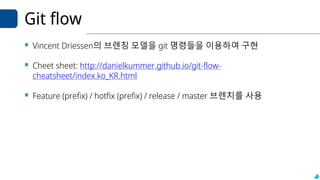
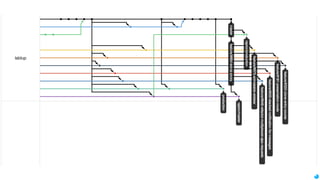
▪ Vincent Driessen의 브렌칭 모델을 git 명령들을 이용하여 구현
▪ Cheet sheet: http://danielkummer.github.io/git-flow-
cheatsheet/index.ko_KR.html
▪ Feature (prefix) / hotfix (prefix) / release / master 브렌치를 사용
오늘의 Learn by run:
Learn by run: git advanced
▪ Git 확장 강의 (2/2)
▪ 강의 진행자: 한홍근 (OSS 개발자 포럼 / git 세미나 강사)
▪ 준비작업: 통합 학습 환경
▪ https://www.codeonweb.com 로그인
▪ https://codeonweb.com/course/@oss-basics-hu 에 가입
임무 #4
▪ Google Summer of Code의 2016년 프로젝트 디렉토리에서 관심있는
학생 프로젝트를 찾아 레포트를 작성하세요.
▪ 단체 소개 페이지:
https://summerofcode.withgoogle.com/archive/2016/organizations/
▪ 학생 참여 프로젝트 페이지:
https://summerofcode.withgoogle.com/archive/2016/projects/
▪ 마감: 11월 8일 23시 59분
임무 #4
▪ 프로젝트 찾는 방법 (예)
▪ https://summerofcode.withgoogle.com/archive/2016/organizations/ 에서 관심있는 기관 찾기
▪ https://summerofcode.withgoogle.com/archive/2016/organizations/5632763172487168/ 에서 기관
정보를 보고, 오른쪽의 ‘VIEW PROJECT’ 를 선택하기
▪ 학생들이 수행한 프로젝트들을 확인하고 관심있는 것 고르기
▪ 이렇게 찾지 않고, 상단의 PROJECT 탭에서 바로 찾아도 됩니다. (그런데 프로젝트 갯수가 많습니다)
▪ 레포트 내용
▪ 프로젝트 담당 기관, 해당 학생 프로젝트 수행 개요, 해당 학생 프로젝트의 내용등
▪ 관련하여 내가 참여할 경우 해 보고 싶은 일 및 기여하고 싶은 일 등
▪ 형식은 자유입니다.
▪ 11pt로 A4 기준 한 장의 분량으로 작성하세요.
Next is...
9/16: Communication in
Open-source developments
@inureyes
Questions? inureyes@gmail.com
OR
https://www.codeonweb.com/circle/@oss-basics-hu


OSS SW Basics Lecture 08: Software Configuration Management (2)

  • 1.
  • 2.
    git 오픈소스계의 de factostandard DVCS 소프트웨어
  • 3.
    햣 (git) ▪ 리눅스커널 개발 ▪ patch (with diff) 기반의 관리 ▪ 2002년 ▪ BitKeeper의 리눅스 커뮤니티로의 DVCS 기여 ▪ 2005년 ▪ BitKeeper의 유료화 정책 ▪ 새로운 도구의 필요성
  • 4.
    Git의 목표 ▪ 빠른속도 ▪ 단순한 구조 ▪ 비선형적인 개발(수천 개의 동시 다발적인 브랜치) ▪ 완벽한 분산 ▪ 리눅스 커널 같은 대형 프로젝트에서의 사용 편의
  • 5.
    Git의 특징 ▪ 스냅샷기반 고전적 VCS git
  • 6.
    ▪ 로컬 단독실행 지원 ▪ 무결성 저장: 체크섬 기반의 무결성 관리 ▪ Git의 파일: 파일명 기반이 아닌 SHA-1 체크섬 기반의 이름으로 저장 ▪ 삭제가 없음 ▪ Git에서는 삭제가 없음: 삭제하면 포인터만 사라질 뿐임 ▪ 프로젝트 트리를 복구하기가 용이함
  • 7.
    Git 의 개념및 구조 Git의 개념 및 파일 상태
  • 8.
    상태 ▪ 세가지 상태존재 ▪ Committed ▪ Git에서 관리되고 있는 상태 ▪ 스냅샷에 포함되어 있음 ▪ Modified ▪ 체크아웃 이후 수정한 파일들 ▪ Staged ▪ 수정한 파일을 커밋 목록에 올린 상태
  • 9.
    파일 수정시 ▪ 추적되지않는 파일들 ▪ git add로 추가할 수 있음 ▪ 수정되지 않은 파일들 ▪ 따로 추적되지 않음 ▪ 수정하면 git add로 스테이징 ▪ 스테이징한 파일들 ▪ git commit 에 의해 커밋할 수 있음 ▪ 커밋한 파일들 ▪ Unmodified 로 표시
  • 10.
    구조 ▪ .git 디렉토리 ▪Git의 실제 작업이 일어나는 공간 ▪ 저장소, 설정등이 모두 포함되어 있음 drwxr-xr-x 17 inureyes staff 578 11 1 17:52 ./ drwxr-xr-x 34 inureyes staff 1156 10 20 20:59 ../ -rw-r--r-- 1 inureyes staff 2264 7 24 10:03 COMMIT_EDITMSG -rw-r--r-- 1 inureyes staff 2206 11 1 17:52 FETCH_HEAD -rw-r--r-- 1 inureyes staff 23 10 20 20:59 HEAD -rw-r--r-- 1 inureyes staff 41 10 20 20:59 ORIG_HEAD drwxr-xr-x 2 inureyes staff 68 1 3 2014 branches/ -rw-r--r-- 1 inureyes staff 479 4 20 2015 config -rw-r--r-- 1 inureyes staff 73 1 3 2014 description drwxr-xr-x 11 inureyes staff 374 1 3 2014 hooks/ -rw-r--r-- 1 inureyes staff 345467 10 20 20:59 index drwxr-xr-x 4 inureyes staff 136 3 29 2015 info/ drwxr-xr-x 4 inureyes staff 136 3 29 2015 logs/ drwxr-xr-x 260 inureyes staff 8840 5 8 2015 objects/ -rw-r--r-- 1 inureyes staff 5465 3 29 2015 packed-refs drwxr-xr-x 5 inureyes staff 170 6 20 15:04 refs/ -rw-r--r--@ 1 inureyes staff 356 9 24 2014 sourcetreeconfig
  • 11.
    ▪ HEAD ▪ 현재포인팅하는 레퍼런스 브렌치 이름 ▪ COMMIT_EDITMSG ▪ 최근 커밋한 커밋 메세지 ▪ FETCH_HEAD ▪ fetch한 브렌치들의 최근 HEAD 이름 ref: refs/heads/master refs #1559 : update - version number # Please enter the commit message for your changes. Lines starting # with '#' will be ignored, and an empty message aborts the commit. # On branch master # Your branch is up-to-date with 'origin/master'.
  • 12.
    ▪ FETCH_HEAD ▪ fetch한브렌치들의 최근 HEAD 이름 .git (master) » cat FETCH_HEAD /Library/WebServer/Documents/textcube/trunk/.git 0eecad5cd331a3b33fc72d2edd83a4a9300ce1d0 branch 'master' of github.com:Needlworks/Textcube cd67e7e7af0a034a2f0cf63796576490eacb5ff4 not-for-merge branch '1.0' of github.com:Needlworks/Textcube 264860b07075a3c7b01090487d46336d4cff26ea not-for-merge branch '1.0.6.1' of github.com:Needlworks/Textcube 3ee2a703c1d6cc607d5b6a292a20e058848771ea not-for-merge branch '1.1' of github.com:Needlworks/Textcube 53d7739a8e73fe44c30ef58ca848c2775a8b16dd not-for-merge branch '1.1-alpha' of github.com:Needlworks/Textcube ec4d7110860de03688bd3c49858d093f2fcea6df not-for-merge branch '1.1-beta' of github.com:Needlworks/Textcube 19e716bbe93e1045fac48c639d1e3fca8df0cf62 not-for-merge branch '1.10' of github.com:Needlworks/Textcube 91350886f5d708baba18f9ea9fede0e12d5871e0 not-for-merge branch '1.5' of github.com:Needlworks/Textcube cec256aa859cb32e7ef105c0ff5d78b6b45dfd14 not-for-merge branch '1.6' of github.com:Needlworks/Textcube 166e4a208a7f3e1719faf34ddbcfe5e3f792740c not-for-merge branch '1.7' of github.com:Needlworks/Textcube 50e04ac16320b3ee9a3d1835c0e5b94d33dc37b6 not-for-merge branch '1.7-backport' of github.com:Needlworks/Textcube ec111d0bb28c2feb44ae3b510b5b1d87add9e3e3 not-for-merge branch '1.8' of github.com:Needlworks/Textcube bb60b5da28de7165e85cacad1d9e3939a2fb9370 not-for-merge branch '1.8-blackhistory1' of github.com:Needlworks/Textcube
  • 13.
    ▪ config ▪ 현재저장소의 설정 ▪ packed-refs ▪ 태그, 로컬 및 원격 브렌치의 체크섬 레퍼런스 [core] repositoryformatversion = 0 filemode = true bare = false logallrefupdates = true ignorecase = true precomposeunicode = false [remote "origin"] url = git@github.com:Needlworks/Textcube.git fetch = +refs/heads/*:refs/remotes/origin/* [branch "master"] remote = origin merge = refs/heads/master [branch "1.9"] remote = origin merge = refs/heads/1.9 [branch "1.10"] remote = origin merge = refs/heads/1.10 [branch "2.0"] remote = origin merge = refs/heads/2.0
  • 14.
    ▪ Hooks 디렉토리 ▪특정 동작 후에 실행할 동작을 지정할 수 있음 ▪ Applypatch ▪ (pre/post) update, (pre/post)commit, (pre/post)push, (pre/post) rebase ▪ Info/refs ▪ 모든 브렌치, 태그들의 스냅샷 레퍼런스 bb576d2f2a493a862ee3722380d4d398ee81e77e refs/heads/1.10 73b0f114c93361b6fb3ac8bc37a4ad082a95760e refs/heads/1.9 f31334f22e42bc573ed8cd64e0bd0ab333d91e67 refs/heads/master cd67e7e7af0a034a2f0cf63796576490eacb5ff4 refs/remotes/origin/1.0 264860b07075a3c7b01090487d46336d4cff26ea refs/remotes/origin/1.0.6.1 3ee2a703c1d6cc607d5b6a292a20e058848771ea refs/remotes/origin/1.1 53d7739a8e73fe44c30ef58ca848c2775a8b16dd refs/remotes/origin/1.1-alpha ec4d7110860de03688bd3c49858d093f2fcea6df refs/remotes/origin/1.1-beta bb576d2f2a493a862ee3722380d4d398ee81e77e refs/remotes/origin/1.10 91350886f5d708baba18f9ea9fede0e12d5871e0 refs/remotes/origin/1.5 cec256aa859cb32e7ef105c0ff5d78b6b45dfd14 refs/remotes/origin/1.6
  • 15.
    ▪ Logs ▪ 모든동작들에 대한 로그 기록 ▪ 문제가 있을 때 사용 ▪ Objects ▪ 각 스냅샷들이 참조하는 실제 객체들이 포함되어 있음 ▪ 파일들! objects (master) » ls /Library/WebServer/Documents/textcube/trunk/.git/objects 00/ 0d/ 1a/ 27/ 34/ 41/ 4e/ 5b/ 68/ 75/ 82/ 8f/ 9c/ a9/ b6/ c3/ d0/ dd/ ea/ f7/ 01/ 0e/ 1b/ 28/ 35/ 42/ 4f/ 5c/ 69/ 76/ 83/ 90/ 9d/ aa/ b7/ c4/ d1/ de/ eb/ f8/ 02/ 0f/ 1c/ 29/ 36/ 43/ 50/ 5d/ 6a/ 77/ 84/ 91/ 9e/ ab/ b8/ c5/ d2/ df/ ec/ f9/ 03/ 10/ 1d/ 2a/ 37/ 44/ 51/ 5e/ 6b/ 78/ 85/ 92/ 9f/ ac/ b9/ c6/ d3/ e0/ ed/ fa/ 04/ 11/ 1e/ 2b/ 38/ 45/ 52/ 5f/ 6c/ 79/ 86/ 93/ a0/ ad/ ba/ c7/ d4/ e1/ ee/ fb/ 05/ 12/ 1f/ 2c/ 39/ 46/ 53/ 60/ 6d/ 7a/ 87/ 94/ a1/ ae/ bb/ c8/ d5/ e2/ ef/ fc/ 06/ 13/ 20/ 2d/ 3a/ 47/ 54/ 61/ 6e/ 7b/ 88/ 95/ a2/ af/ bc/ c9/ d6/ e3/ f0/ fd/ 07/ 14/ 21/ 2e/ 3b/ 48/ 55/ 62/ 6f/ 7c/ 89/ 96/ a3/ b0/ bd/ ca/ d7/ e4/ f1/ fe/ 08/ 15/ 22/ 2f/ 3c/ 49/ 56/ 63/ 70/ 7d/ 8a/ 97/ a4/ b1/ be/ cb/ d8/ e5/ f2/ ff/ 09/ 16/ 23/ 30/ 3d/ 4a/ 57/ 64/ 71/ 7e/ 8b/ 98/ a5/ b2/ bf/ cc/ d9/ e6/ f3/ info/ 0a/ 17/ 24/ 31/ 3e/ 4b/ 58/ 65/ 72/ 7f/ 8c/ 99/ a6/ b3/ c0/ cd/ da/ e7/ f4/ pack/ 0b/ 18/ 25/ 32/ 3f/ 4c/ 59/ 66/ 73/ 80/ 8d/ 9a/ a7/ b4/ c1/ ce/ db/ e8/ f5/ 0c/ 19/ 26/ 33/ 40/ 4d/ 5a/ 67/ 74/ 81/ 8e/ 9b/ a8/ b5/ c2/ cf/ dc/ e9/ f6/ objects (master) » cd 63 /Library/WebServer/Documents/textcube/trunk/.git/objects 63 (master) » ls /Library/WebServer/Documents/textcube/trunk/.git/objects/63 0764f7f713b17eeb849411f4d55b27c01095dc 545bf36fb913785a4ca1d9cc1c20c680f1e4f3 b52a2151c7bcb52b31d4702990b69f3f15d8db 184aa5a2b51a7098c75707829ef0b88e6fb369 5c82f7842d0af8e5101c7e54a14d487e9d8e13 b712adf386db05c47b7c974b5f2880f2555d67 18e6538e5d8c9feef75c6f7585ecae13527ce6 5ffa3f33591e5ef019d250839d06a1374f221a cc7a5515bddc3329f3852d6dd2f151d0821552
  • 16.
  • 17.
    Git flow ▪ VincentDriessen의 브렌칭 모델을 git 명령들을 이용하여 구현 ▪ Cheet sheet: http://danielkummer.github.io/git-flow- cheatsheet/index.ko_KR.html ▪ Feature (prefix) / hotfix (prefix) / release / master 브렌치를 사용
  • 19.
  • 20.
    Learn by run:git advanced ▪ Git 확장 강의 (2/2) ▪ 강의 진행자: 한홍근 (OSS 개발자 포럼 / git 세미나 강사) ▪ 준비작업: 통합 학습 환경 ▪ https://www.codeonweb.com 로그인 ▪ https://codeonweb.com/course/@oss-basics-hu 에 가입
  • 21.
    임무 #4 ▪ GoogleSummer of Code의 2016년 프로젝트 디렉토리에서 관심있는 학생 프로젝트를 찾아 레포트를 작성하세요. ▪ 단체 소개 페이지: https://summerofcode.withgoogle.com/archive/2016/organizations/ ▪ 학생 참여 프로젝트 페이지: https://summerofcode.withgoogle.com/archive/2016/projects/ ▪ 마감: 11월 8일 23시 59분
  • 22.
    임무 #4 ▪ 프로젝트찾는 방법 (예) ▪ https://summerofcode.withgoogle.com/archive/2016/organizations/ 에서 관심있는 기관 찾기 ▪ https://summerofcode.withgoogle.com/archive/2016/organizations/5632763172487168/ 에서 기관 정보를 보고, 오른쪽의 ‘VIEW PROJECT’ 를 선택하기 ▪ 학생들이 수행한 프로젝트들을 확인하고 관심있는 것 고르기 ▪ 이렇게 찾지 않고, 상단의 PROJECT 탭에서 바로 찾아도 됩니다. (그런데 프로젝트 갯수가 많습니다) ▪ 레포트 내용 ▪ 프로젝트 담당 기관, 해당 학생 프로젝트 수행 개요, 해당 학생 프로젝트의 내용등 ▪ 관련하여 내가 참여할 경우 해 보고 싶은 일 및 기여하고 싶은 일 등 ▪ 형식은 자유입니다. ▪ 11pt로 A4 기준 한 장의 분량으로 작성하세요.
  • 23.
    Next is... 9/16: Communicationin Open-source developments @inureyes Questions? inureyes@gmail.com OR https://www.codeonweb.com/circle/@oss-basics-hu