OPTIMICA TESTING TOOLKIT
Anders Tilly Victor Johnsson Jon Sten
Alexander Perlman Johan Åkesson
2015-09-29 © Modelon 1
MOTIVATION
• Why do we need software testing?
 Ensure consistent functionality over time
 Software without tests can not be updated safely
 Safe migration between platforms and tool
versions
 Quality software development requires testing
• Modelica code is just like any other software, it
needs testing
2015-09-29 © Modelon 2
BACKGROUND
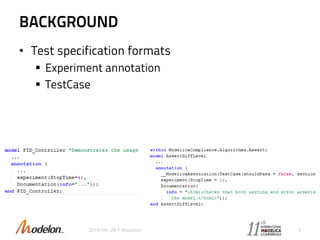
• Test specification formats
 Experiment annotation
 TestCase
2015-09-29 © Modelon 3
BACKGROUND
• Additional requirements on test specification
 Specification of reference variables
 Model structure
• Equation system structure
• Analytic Jacobians
 Tool specific options
 Setup and teardown scripts
 Ability to override reference results for specific
tools
2015-09-29 © Modelon 4
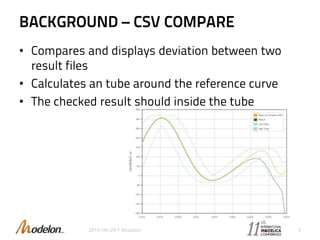
BACKGROUND – CSV COMPARE
• Compares and displays deviation between two
result files
• Calculates an tube around the reference curve
• The checked result should inside the tube
2015-09-29 © Modelon 5
PREVIOUS WORK
• UnitTesting
 Modelica based library
• MoUnit
 Used in OneModelica
 Support for multiple Modelica and FMI tools
• RegressionTest
 For Dymola testing
2015-09-29 © Modelon 6
OPTIMICA TESTING TOOLKIT
• Key features
 Modelica and FMI cross testing platform
 Flexible test authoring
 Automated test execution and reporting
• Architecture
 Core
• Command line tool for running tests
• Uses OPTIMICA compiler toolkit for test retrieval
 GUI
• Tool for creating, updating and running tests
• Reviewing and updating results
2015-09-29 © Modelon 7
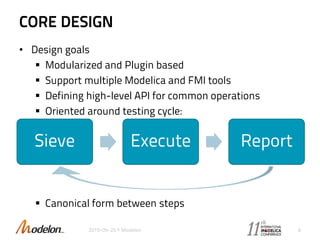
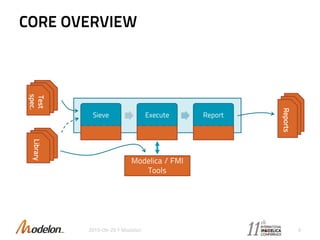
CORE DESIGN
• Design goals
 Modularized and Plugin based
 Support multiple Modelica and FMI tools
 Defining high-level API for common operations
 Oriented around testing cycle:
 Canonical form between steps
2015-09-29 © Modelon 8
Sieve Execute Report
CORE OVERVIEW
2015-09-29 © Modelon 9
.mo.mo
Test
spec.
.m
o
.m
o
Reports
Modelica / FMI
Tools
Sieve Execute Report
.mo.mo
Library
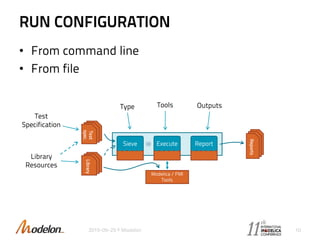
RUN CONFIGURATION
• From command line
• From file
2015-09-29 © Modelon 10
.
m
o
.
m
o
Test
spec.
.
m
o
.
m
o
Reports
Modelica / FMI
Tools
Sieve Execute Report
.
m
o
.
m
o
Library
OutputsToolsType
Test
Specification
Library
Resources
SEIVES
• Find models to test
• Extracts test settings (start-, stop-time,
tolerance, signals, etc.)
• Translate to canonical form
• Examples of sieves:
 Experiment annotations
 All models
 TestCase annotations
2015-09-29 © Modelon 11
SIEVE CORE
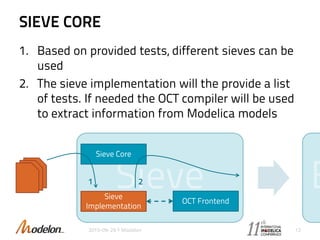
1. Based on provided tests, different sieves can be
used
2. The sieve implementation will the provide a list
of tests. If needed the OCT compiler will be used
to extract information from Modelica models
2015-09-29 © Modelon 12
Sieve Core
Sieve
Implementation
OCT Frontend
.mo.mo
1 2
SIEVE EXAMPLE
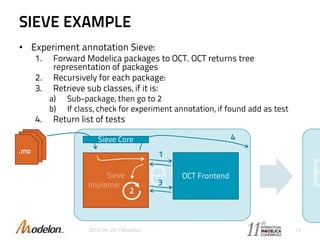
• Experiment annotation Sieve:
1. Forward Modelica packages to OCT. OCT returns tree
representation of packages
2. Recursively for each package:
3. Retrieve sub classes, if it is:
a) Sub-package, then go to 2
b) If class, check for experiment annotation, if found add as test
4. Return list of tests
2015-09-29 © Modelon 13
OCT Frontend
.mo.mo.mo 1
2
3
Sieve Core 4
TEST EXECUTION
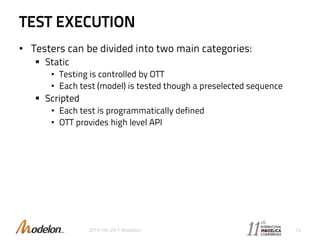
• Testers can be divided into two main categories:
 Static
• Testing is controlled by OTT
• Each test (model) is tested though a preselected sequence
 Scripted
• Each test is programmatically defined
• OTT provides high level API
2015-09-29 © Modelon 14
STATIC TESTING
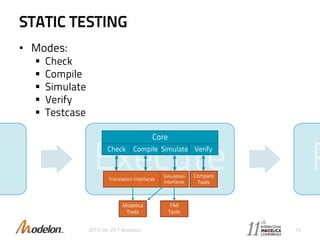
• Modes:
 Check
 Compile
 Simulate
 Verify
 Testcase
2015-09-29 © Modelon 15
Core
Check Compile Simulate Verify
Compare
Tools
Translation Interfaces
Simulation
Interfaces
Modelica
Tools
FMI
Tools
STATIC TESTING EXAMPLE
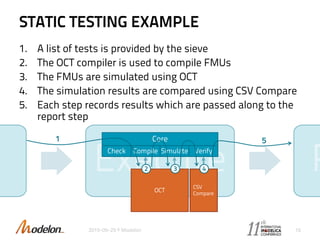
1. A list of tests is provided by the sieve
2. The OCT compiler is used to compile FMUs
3. The FMUs are simulated using OCT
4. The simulation results are compared using CSV Compare
5. Each step records results which are passed along to the
report step
2015-09-29 © Modelon 16
Core
Check Compile Simulate Verify
CSV
Compare
OCT
51
2 3 4
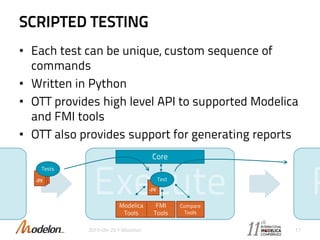
SCRIPTED TESTING
• Each test can be unique, custom sequence of
commands
• Written in Python
• OTT provides high level API to supported Modelica
and FMI tools
• OTT also provides support for generating reports
2015-09-29 © Modelon 17
Core
Compare
Tools
Modelica
Tools
FMI
Tools
.py
Tests
.py
Test
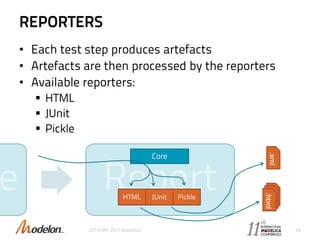
REPORTERS
• Each test step produces artefacts
• Artefacts are then processed by the reporters
• Available reporters:
 HTML
 JUnit
 Pickle
2015-09-29 © Modelon 18
.html.html.html
.xml
Core
HTML JUnit Pickle
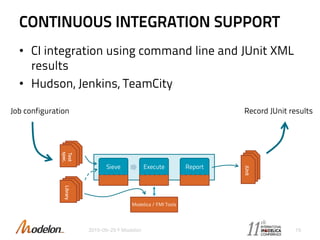
CONTINUOUS INTEGRATION SUPPORT
• CI integration using command line and JUnit XML
results
• Hudson, Jenkins, TeamCity
2015-09-29 © Modelon 19
.m
o
.m
o
Test
spec.
.
m
o
.
m
o
JUnit
Modelica / FMI Tools
Sieve Execute Report
.m
o
.m
o
Library
Job configuration Record JUnit results
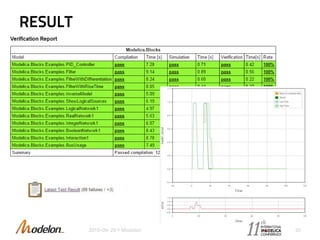
RESULT
2015-09-29 © Modelon 20
GUI
• Test authoring
• Test execution
• Test run configuration
• Test result reviewing
• Still work in progress!
2015-09-29 © Modelon 21
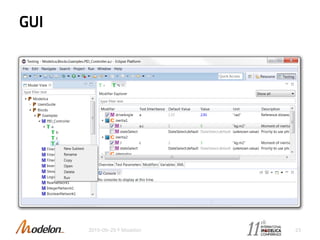
GUI
• Developed with usability in mind
 Easy to specify modifications and variables to
compare
 Easy to review and update result differences
 Inheritance between test cases
2015-09-29 © Modelon 22
GUI
2015-09-29 © Modelon 23
BACKLOG
• New test specification format
 Possibility to specify compare variables
 Tool specific options
 Comparing test model structure
 …
• Run configuration
• Traceability and reproducibility support
• Extend GUI functionality
• Additional Modelica and FMI tools
2015-09-29 © Modelon 24
jon.sten@modelon.com
2015-09-29 © Modelon 25

Optimica Testing Toolkit

  • 1.
    OPTIMICA TESTING TOOLKIT AndersTilly Victor Johnsson Jon Sten Alexander Perlman Johan Åkesson 2015-09-29 © Modelon 1
  • 2.
    MOTIVATION • Why dowe need software testing?  Ensure consistent functionality over time  Software without tests can not be updated safely  Safe migration between platforms and tool versions  Quality software development requires testing • Modelica code is just like any other software, it needs testing 2015-09-29 © Modelon 2
  • 3.
    BACKGROUND • Test specificationformats  Experiment annotation  TestCase 2015-09-29 © Modelon 3
  • 4.
    BACKGROUND • Additional requirementson test specification  Specification of reference variables  Model structure • Equation system structure • Analytic Jacobians  Tool specific options  Setup and teardown scripts  Ability to override reference results for specific tools 2015-09-29 © Modelon 4
  • 5.
    BACKGROUND – CSVCOMPARE • Compares and displays deviation between two result files • Calculates an tube around the reference curve • The checked result should inside the tube 2015-09-29 © Modelon 5
  • 6.
    PREVIOUS WORK • UnitTesting Modelica based library • MoUnit  Used in OneModelica  Support for multiple Modelica and FMI tools • RegressionTest  For Dymola testing 2015-09-29 © Modelon 6
  • 7.
    OPTIMICA TESTING TOOLKIT •Key features  Modelica and FMI cross testing platform  Flexible test authoring  Automated test execution and reporting • Architecture  Core • Command line tool for running tests • Uses OPTIMICA compiler toolkit for test retrieval  GUI • Tool for creating, updating and running tests • Reviewing and updating results 2015-09-29 © Modelon 7
  • 8.
    CORE DESIGN • Designgoals  Modularized and Plugin based  Support multiple Modelica and FMI tools  Defining high-level API for common operations  Oriented around testing cycle:  Canonical form between steps 2015-09-29 © Modelon 8 Sieve Execute Report
  • 9.
    CORE OVERVIEW 2015-09-29 ©Modelon 9 .mo.mo Test spec. .m o .m o Reports Modelica / FMI Tools Sieve Execute Report .mo.mo Library
  • 10.
    RUN CONFIGURATION • Fromcommand line • From file 2015-09-29 © Modelon 10 . m o . m o Test spec. . m o . m o Reports Modelica / FMI Tools Sieve Execute Report . m o . m o Library OutputsToolsType Test Specification Library Resources
  • 11.
    SEIVES • Find modelsto test • Extracts test settings (start-, stop-time, tolerance, signals, etc.) • Translate to canonical form • Examples of sieves:  Experiment annotations  All models  TestCase annotations 2015-09-29 © Modelon 11
  • 12.
    SIEVE CORE 1. Basedon provided tests, different sieves can be used 2. The sieve implementation will the provide a list of tests. If needed the OCT compiler will be used to extract information from Modelica models 2015-09-29 © Modelon 12 Sieve Core Sieve Implementation OCT Frontend .mo.mo 1 2
  • 13.
    SIEVE EXAMPLE • Experimentannotation Sieve: 1. Forward Modelica packages to OCT. OCT returns tree representation of packages 2. Recursively for each package: 3. Retrieve sub classes, if it is: a) Sub-package, then go to 2 b) If class, check for experiment annotation, if found add as test 4. Return list of tests 2015-09-29 © Modelon 13 OCT Frontend .mo.mo.mo 1 2 3 Sieve Core 4
  • 14.
    TEST EXECUTION • Testerscan be divided into two main categories:  Static • Testing is controlled by OTT • Each test (model) is tested though a preselected sequence  Scripted • Each test is programmatically defined • OTT provides high level API 2015-09-29 © Modelon 14
  • 15.
    STATIC TESTING • Modes: Check  Compile  Simulate  Verify  Testcase 2015-09-29 © Modelon 15 Core Check Compile Simulate Verify Compare Tools Translation Interfaces Simulation Interfaces Modelica Tools FMI Tools
  • 16.
    STATIC TESTING EXAMPLE 1.A list of tests is provided by the sieve 2. The OCT compiler is used to compile FMUs 3. The FMUs are simulated using OCT 4. The simulation results are compared using CSV Compare 5. Each step records results which are passed along to the report step 2015-09-29 © Modelon 16 Core Check Compile Simulate Verify CSV Compare OCT 51 2 3 4
  • 17.
    SCRIPTED TESTING • Eachtest can be unique, custom sequence of commands • Written in Python • OTT provides high level API to supported Modelica and FMI tools • OTT also provides support for generating reports 2015-09-29 © Modelon 17 Core Compare Tools Modelica Tools FMI Tools .py Tests .py Test
  • 18.
    REPORTERS • Each teststep produces artefacts • Artefacts are then processed by the reporters • Available reporters:  HTML  JUnit  Pickle 2015-09-29 © Modelon 18 .html.html.html .xml Core HTML JUnit Pickle
  • 19.
    CONTINUOUS INTEGRATION SUPPORT •CI integration using command line and JUnit XML results • Hudson, Jenkins, TeamCity 2015-09-29 © Modelon 19 .m o .m o Test spec. . m o . m o JUnit Modelica / FMI Tools Sieve Execute Report .m o .m o Library Job configuration Record JUnit results
  • 20.
  • 21.
    GUI • Test authoring •Test execution • Test run configuration • Test result reviewing • Still work in progress! 2015-09-29 © Modelon 21
  • 22.
    GUI • Developed withusability in mind  Easy to specify modifications and variables to compare  Easy to review and update result differences  Inheritance between test cases 2015-09-29 © Modelon 22
  • 23.
  • 24.
    BACKLOG • New testspecification format  Possibility to specify compare variables  Tool specific options  Comparing test model structure  … • Run configuration • Traceability and reproducibility support • Extend GUI functionality • Additional Modelica and FMI tools 2015-09-29 © Modelon 24
  • 25.

Editor's Notes

  • #2 Welcome Jon sten, software engineer at Modelon Today I’m going to give an introduction and insight into Optimica testing toolkit
  • #3 Why do we need testing Functionality over time Able to update software Ensure compliance between platforms and tools Quality Modelica code is the same
  • #4 Look for experiment annotation, TestCase annotations used in ModelicaCompliance library ways for retrieving and specify good tests, especially for tool testing, find simulateable models….
  • #5 Additional requirements needed by Modelon library- and tool-testing Specification of variables Check structure of model, equation system, jacobians Set tool options for compilation or simulation Tool specific scripts for setup and teardown between tests steps Have tool specific references results for problematic tests
  • #6 One tool used by OTT is CSV Compare, open source, provided by ITI GmbH, financed by Modelica Association Used for comparing two result files, reference and actual curve Works by, constructing a tube around reference Checks if actual is inside tube
  • #7 UnitTesting Modelica based Looking for models which extends models from test library Provides component-, condition-, and static-coverage MoUnit Used in OneModelica Plugin based Supports multiple tools RegressionTest * Tool for testing in dymola
  • #8 Initial goal OTT – replace and unify inhouse tools for testing There for identified key features… Cross platform testing Flexible test authoring, allowing for different senarios Automated test execution and reporting, and ability to integrate into continuous integration systems Two parts
  • #9 Modularized, Plugin Multiple tools High-level API for common operations Testing cycle: Sieve Execute Report Canonical form
  • #10 With that in mind we have a rough overview of OTT, will go in to details over next slides Color coded Blue is core in blue box Red, is plugin, input, built in or user provided As mentioned Three parts Sieve Execute report. Input: is test spec and libraries, might be the same Output: reports Connection to Modelica and FMI tools
  • #11 Run configuration is the “input” to test run Configuration can come from command line or a conf. file Input is everything needed for completing a run, we have the: Test spec. Libraries, might be same as test spec. Type of the tests Tools to use, compiler, simulator Output processors to use
  • #12 Slide solver, compare variables,
  • #13 Internals of sieve Different sieves for different test types Goal, extract tests and test information In case of Modelica library - OCT front end used, package structure and annotations
  • #14 Detailed example: A Modelica library is provided The sieve will forward to oct fronted Oct returns representation of lib Recurse through lib and Is sub package, recurse Is class with experiment annotation, create test case Return test case
  • #15 Tester depend on test type Two main types, static, scripted Static Ott controls Each model is tested in the same predefined sequence Scripted Each test is programmatically defined OTT provides high level API
  • #16 Different modes: Check model Compile model Compile and simulate Compile, simulate and verify (TestCase) Point to illustration
  • #17 Example of using OCT for compilation and verification. CSV compare used for verification Results are passed to next step
  • #18 Each test unique, more like classic unit tests Test written in python OTT provides common API to Modelica / FMI tools Provides support for report generation
  • #19 Report step responsible for processing and producing results Different reporters HTML, for humans JUNIT, xml for computers Pickle, used for reconstructing and general post processing
  • #20 With the junit xml it is possible to integrate to build systems
  • #21 Examples
  • #22 slide
  • #23 Usability Easy: Modifications Compare variables Review, update result Test case inheritance
  • #25 Finalize new test specification format Finalize run configuration format Leaving traceability files after run, which contains version history and run configuration More GUI Support more tools