To my children, Lemar, Sivan, and Aaron
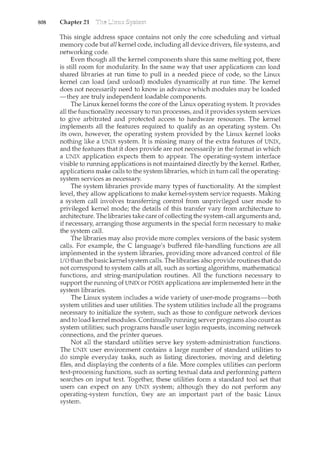
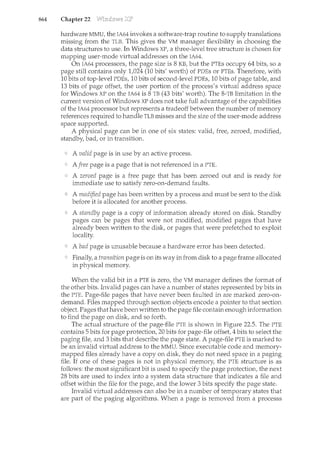
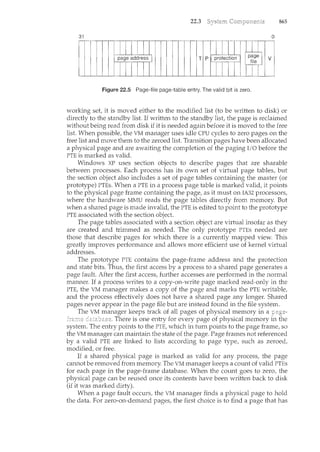
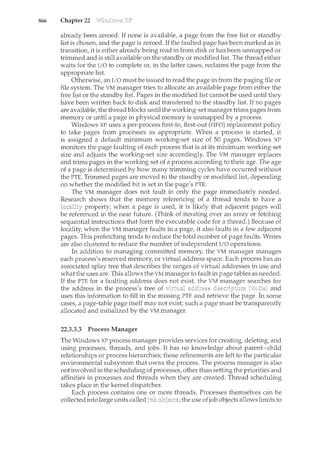
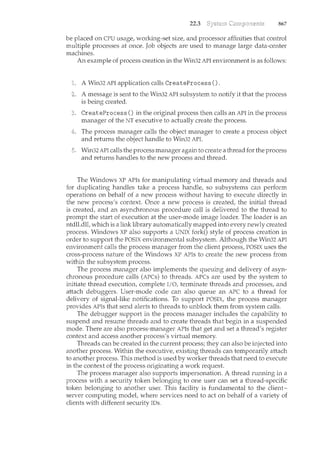
and my Nicolette
Avi Silberschatz
To my wife, Carla,
and my children, Gwen, Owen, and Maddie
Peter Baer Galvin
To my wife, Pat,
and our sons, Tom and Jay
Greg Gagne
Abraham Silberschatz is the Sidney J. Weinberg Professor & Chair of Com-
puter Science at Yale University. Prior to joining Yale, he was the Vice President
of the Information Sciences Research Center at Bell Laboratories. Prior to that,
he held a chaired professorship in the Department of Computer Sciences at the
University of Texas at Austin.
Professor Silberschatz is an ACM Fellow and an IEEE Fellow. He received
the 2002 IEEE Taylor L. Booth Education Award, the 1998 ACM Karl V. Karl-
strom Outstanding Educator Award, and the 1997ACM SIGMOD Contribution
Award. In recognition of his outstanding level of innovation and technical
excellence, he was awarded the Bell Laboratories President's Award for three
different projects-the QTM Project (1998), the DataBlitz Project (1999), and
the Netlnventory Project (2004).
Professor Silberschatz' writings have appeared in numerous ACM and
IEEE publications and other professional conferences and journals. He is a
coauthor of the textbook Database System Concepts. He has also written Op-Ed
articles for the New York Times, the Boston Globe, and the Hartford Courant,
among others.
Peter Baer Galvin is the chief technologist for Corporate Technologies
(www.cptech.com), a computer facility reseller and integrator. Before that, Mr.
Galvin was the systems manager for Brown University's Computer Science
Department. He is also Sun columnist for ;login: magazine. Mr. Galvin has
written articles for Byte and other magazines, and has written columns for
SunWorld and SysAdmin magazines. As a consultant and trainer, he has given
talks and taught tutorials on security and system administration worldwide.
Greg Gagne is chair of the Computer Science department at Westminster
College in Salt Lake City where he has been teaching since 1990. In addition
to teaching operating systems, he also teaches computer networks, distributed
systems, and software engineering. He also provides workshops to computer
science educators and industry professionals.
Operating systems are an essential part of any computer system. Similarly,
a course on operating systems is an essential part of any computer-science
education. This field is undergoing rapid change, as computers are now
prevalent in virtually every application, from games for children through the
most sophisticated planning tools for governments and multinational firms.
Yet the fundamental concepts remain fairly clear, and it is on these that we base
this book.
We wrote this book as a text for an introductory course in operating systems
at the junior or senior undergraduate level or at the first-year graduate level.
We hope that practitioners will also find it useful. It provides a clear description
of the concepts that underlie operating systems. As prerequisites, we assume
that the reader is familiar with basic data struchues, computer organization,
and a high-level language, such as C or Java. The hardware topics required
for an understanding of operating systems are included in Chapter 1. For code
examples, we use predominantly C, with some Java, but the reader can still
understand the algorithms without a thorough knowledge of these languages.
Concepts are presented using intuitive descriptions. Important theoretical
results are covered, but formal proofs are omitted. The bibliographical notes
at the end of each chapter contain pointers to research papers in which results
were first presented and proved, as well as references to material for further
reading. In place of proofs, figures and examples are used to suggest why we
should expect the result in question to be true.
The fundamental concepts and algorithms covered in the book are often
based on those used in existing conunercial operating systems. Our aim
is to present these concepts and algorithms in a general setting that is
not tied to one particular operating system. We present a large number of
examples that pertain to the most popular and the most im1.ovative operating
systems, including Sun Microsystems' Solaris; Linux; Microsoft Windows
Vista, Windows 2000, and Windows XP; and Apple Mac OS X. When we refer
to Windows XP as an example operating system, we are implying Windows
Vista, Windows XP, and Windows 2000. If a feature exists in a specific release,
we state this explicitly.
vii
viii
The organization of this text reflects our many years of teaching courses on
operating systems. Consideration was also given to the feedback provided by
the reviewers of the text, as well as comments submitted by readers of earlier
editions. In addition, the content of the text corresponds to the suggestions
from Computing Curricula 2005 for teaching operating systems, published by
the Joint Task Force of the IEEE Computing Society and the Association for
Computing Machinery (ACM).
On the supporting Web site for this text, we provide several sample
syllabi that suggest various approaches for using the text in both introductory
and advanced courses. As a general rule, we encourage readers to progress
sequentially through the chapters, as this strategy provides the most thorough
study of operating systems. However, by using the sample syllabi, a reader can
select a different ordering of chapters (or subsections of chapters).
On-line support for the text is provided by WileyPLUS. On this site, students
can find sample exercises and programming problems, and instructors can
assign and grade problems. In addition, in WileyPLUS, students can access new
operating-system simulators, which are used to work through exercises and
hands-on lab activities. References to the simulators and associated activities
appear at the ends of several chapters in the text.
The text is organized in nine major parts:
Overview. Chapters 1 and 2 explain what operating systems are, what they
do, and how they are designed and constructed. These chapters discuss what
the common features of an operating system are, what an operating system
does for the user, and what it does for the computer-system operator. The
presentation is motivational and explanatory in nature. We have avoided a
discussion of how things are done internally in these chapters. Therefore,
they are suitable for individual readers or for students in lower-level classes
who want to learn what an operating system is without getting into the
details of the internal algorithms.
Process management and Process coordination. Chapters 3 through 7
describe the process concept and concurrency as the heart of modern
operating systems. A process is the unit of work in a system.. Such
a system consists of a collection of concurrently executing processes,
some of which are operating-system processes (those that execute system
code) and the rest of which are user processes (those that execute user
code). These chapters cover n1.ethods for process scheduling, interprocess
communication, process synchronization, and deadlock handling. Also
included is a discussion of threads, as well as an examination of issues
related to multicore systems.
Memory management. Chapters 8 and 9 deal with the management of
main memory during the execution of a process. To improve both the
utilization of the CPU and the speed of its response to its users, the
computer must keep several processes in memory. There are many different
ix
management, and the effectiveness of a particular algorithm depends on
the situation.
Storage management. Chapters 10 through 13 describe how the file system,
mass storage, and I/0 are handled in a modern computer system. The
file system provides the mechanism for on-line storage of and access
to both data and programs. We describe the classic internal algorithms
and structures of storage management and provide a firm practical
understanding of the algorithms used-their properties, advantages, and
disadvantages. Our discussion of storage also includes matters related
to secondary and tertiary storage. Since the I/0 devices that attach to a
computer vary widely, the operating system needs to provide a wide range
of functionality to applications to allow them to control all aspects of these
devices. We discuss system I/O in depth, including I/O system design,
interfaces, and internal system structures and functions. In many ways,
I/O devices are the slowest major components of the computer. Because
they represent a performance bottleneck, we also examine performance
issues associated with I/0 devices.
Protection and security. Chapters 14 and 15 discuss the mechanisms
necessary for the protection and security of computer systems. The
processes in an operating system must be protected from one another's
activities, and to provide such protection, we must ensure that only
processes that have gained proper authorizationfrom the operating system
can operate on the files, memory, CPU, and other resources of the system.
Protectionis a mechanism for controlling the access of programs, processes,
or users to the resources defined by a computer system. This mechanism
must provide a means of specifying the controls to be imposed, as
well as a means of enforcement. Security protects the integrity of the
information stored in the system (both data and code), as well as the
physical resources of the system, from 1.mauthorized access, malicious
destruction or alteration, and accidental introduction of inconsistency.
Distributed systems. Chapters 16 through 18 deal with a collection of
processors that do not share memory or a clock-a distributed system. By
providing the user with access to the various resources that it maintains, a
distributed system can improve computation speed and data availability
and reliability. Such a system also provides the user with a distributed file
system, which is a file-service system whose users, servers, and storage
devices are dispersed among the sites of a distributed system. A distributed
system must provide various mechanisms for process synchronization
and communication, as well as for dealing with deadlock problems and a
variety of failures that are not encountered in a centralized system.
Special-purpose systems. Chapters 19 and 20 deal with systems used for
specific purposes, including real-time systems and multimedia systems.
These systems have specific requirements that differ from those of the
general-purpose systems that are the focus of the remainder of the text.
Real-time systems may require not only that computed results be "correct"
but also that the results be produced within a specified deadline period.
Multimedia systems require quality-of-service guarantees ensuring that
the multimedia data are delivered to clients within a specific time frame.
X
Case studies. Chapters 21 through 23 in the book, and Appendices A
through C (which are available onwww.wiley.comJgoI global/silberschatz
and in WileyPLUS), integrate the concepts described in the earlier chapters
by describing real operating systems. These systems include Linux,
Windows XP, FreeBSD, Mach, and Windows 2000. We chose Linux
and FreeBSD because UNIX-at one time-was almost small enough
to understand yet was not a "toy" operating system. Most of its
internal algorithms were selected for simplicity, rather than for speed
or sophistication. Both Linux and FreeBSD are readily available to
computer-science departments, so many students have access to these
systems. We chose Windows XP and Windows 2000 because they provide
an opporhmity for us to study a modern operating system with a design
and implementation drastically different from those of UNIX. Chapter 23
briefly describes a few other influential operating systems.
This book uses examples of many real-world operating systems to illustrate
fundamental operating-system concepts. However, particular attention is paid
to the Microsoft family of operating systems (including Windows Vista,
Windows 2000, and Windows XP) and various versions of UNIX (including
Solaris, BSD, and Mac OS X). We also provide a significant amount of coverage
of the Linux operating system reflecting the most recent version of the kernel
-Version 2.6-at the time this book was written.
The text also provides several example programs written in C and
Java. These programs are intended to run in. the following programming
environments:
Windows systems. The primary programming environment for Windows
systems is the Win32 API (application programming interface), which pro-
vides a comprehensive set of functions for managing processes, threads,
memory, and peripheral devices. We provide several C programs illustrat-
ing the use of the Win32 API. Example programs were tested on systems
rum1.ing Windows Vista, Windows 2000, and Windows XP.
POSIX. POSIX (which stands for Portable Operating System Inte1jace) repre-
sents a set of standards implemented primarily for UNIX-based operating
systems. Although Windows Vista, Windows XP, and Windows 2000 sys-
tems can also run certain POSIX programs, our coverage of POSIX focuses
primarily on UNIX and Linux systems. POSIX-compliant systems must
implement the POSIX core standard (POSIX.1): Linux, Solaris, and Mac OS
X are examples of POSIX-compliant systems. POSIX also defines several
extensions to the standards, including real-time extensions (POSIXl.b) and
an extension for a threads library (POSIX1.c, better known as Pthreads). We
provide several programn1.ing examples written inC illustrating the POSIX
base API, as well as Pthreads and the extensions for real-time programming.
These example programs were tested on Debian Linux 2.4 and 2.6 systems,
Mac OS X10.5, and Solaris 10 using the gee 3.3 and 4.0 compilers.
Java. Java is a widely used programming language with a rich API and
built-in language support for thread creation and management. Java
xi
programs run on any operating system supporting a Java virtual machine
(or JVM). We illustrate various operating system and networking concepts
with several Java programs tested using the Java 1.5 JVM.
We have chosen these three programming environments because it is our
opinion that they best represent the two most popular models of operating
systems: Windows and UNIX/Linux, along with the widely used Java environ-
ment. Most programming examples are written in C, and we expect readers to
be comfortable with this language; readers familiar with both the C and Java
languages should easily understand most programs provided in this text.
In some instances-such as thread creation-we illustrate a specific
concept using all three programming environments, allowing the reader
to contrast the three different libraries as they address the same task. In
other situations, we may use just one of the APis to demonstrate a concept.
For example, we illustrate shared memory using just the POSIX API; socket
programming in TCP/IP is highlighted using the Java API.
As we wrote the Eighth Edition of Operating System Concepts, we were guided
by the many comments and suggestions we received from readers of our
previous editions, as well as by our own observations about the rapidly
changing fields of operating systems and networking. We have rewritten
material in most of the chapters by bringing older material up to date and
removing material that was no longer of interest or relevance.
We have made substantive revisions and organizational changes in many
of the chapters. Most importantly, we have added coverage of open-source
operating systems in Chapter 1. We have also added more practice exercises
for students and included solutions in WileyPLUS, which also includes new
simulators to provide demonstrations of operating-system operation. Below,
we provide a brief outline of the major changes to the various chapters:
Chapter 1, Introduction, has been expanded to include multicore CPUs,
clustered computers, and open-source operating systems.
Chapter 2, System Structures, provides significantly updated coverage of
virtual machines, as well as multicore CPUs, the GRUB boot loader, and
operating-system debugging.
Chapter 3, Process Concept, provides new coverage of pipes as a form of
interprocess communication.
Chapter 4, Multithreaded Programming, adds new coverage of program-
ming for multicore systems.
Chapter 5, Process Scheduling, adds coverage of virtual machine schedul-
ing and multithreaded, multicore architectures.
Chapter 6, Synchronization, adds a discussion of mutual exclusion locks,
priority inversion, and transactional memory.
Chapter 8, Memory-Management Strategies, includes discussion of
NUMA.
xii
Chapter 9, Virtual-Memory Management, updates the Solaris example to
include Solaris 10 memory managernent.
Chapter 10, File System, is updated with current technologies and
capacities.
Chapter 11, Implementing File Systems, includes a full description of
Sun's ZFS file system and expands the coverage of volumes and directories.
Chapter 12, Secondary-Storage Structure, adds coverage of iSCSI, vol-
umes, and ZFS pools.
Chapter 13, I/0 Systems, adds coverage of PCIX PCI Express, and Hyper-
Transport.
Chapter 16, Distributed Operating Systems, adds coverage of 802.11
wireless networks.
Chapter 21, The LimiX System,has beenupdated to cover the latestversion
of the LimiX kernel.
Chapter 23, Influential Operating Systems, increases coverage of very
early computers as well as TOPS-20, CP/M, MS-DOS, Windows, and the
original Mac OS.
To emphasize the concepts presented in the text, we have added several
programming problems and projects that use the POSIX and Win32 APis, as
well as Java. We have added more than 15 new programming problems, which
emphasize processes, threads, shared memory, process synchronization, and
networking. In addition, we have added or modified several programming
projects that are more involved than standard programming exercises. These
projects include adding a system call to the Linux kernel, using pipes on
both UNIX and Windows systems, using UNIX message queues, creating
multithreaded applications, and solving the producer-consumer problem
using shared memory.
The Eighth Edition also incorporates a set of operating-system simulators
designed by Steven Robbins of the University of Texas at San Antonio. The
simulators are intended to model the behavior of an operating system as it
performs various tasks, such as CPU and disk-head schedulil1.g, process creation
and interprocess communication, starvation, and address translation. These
simulators are written in Java and will run on any computer systern with
Java 1.4. Students can download the simulators from WileyPLUS and observe
the behavior of several operating system concepts in various scenarios. In
addition, each simulator includes several exercises that ask students to set
certain parameters of the simulator, observe how the system behaves, and then
explain this behavior. These exercises can be assigned through WileyPLUS. The
WileyPLUS course also includes algorithmic problems and tutorials developed
by Scott M. Pike of Texas A&M University.
xiii
The following teaching supplencents are available in WileyPLUS and on
www.wiley.comlgoI global/silberschatz: a set of slides to accompany the
book, model course syllabi, all C and Java source code, up-to-date errata,
three case study appendices and the Distributed Communication appendix.
The WileyPLUS course also contains the simulators and associated exercises,
additional practice exercises (with solutions) not found in the text, and a
testbank of additional problems. Students are encouraged to solve the practice
exercises on their own and then use the provided solutions to check their own
answers.
To obtain restricted supplements, such as the solution guide to the exercises
in the text, contact your local Jorne Wiley & Sons sales representative. Note that
these supplements are available only to faculty who use this text.
We use the mailman system for communication among the users of Operating
System Concepts. If you wish to use this facility, please visit the following URL
and follow the instructions there to subscribe:
http:I I mailman.cs.yale.edulmailmanllistinfoI os-book
The mailman mailing-list system provides many benefits, such as an archive
of postings, as well as several subscription options, including digest and Web
only. To send messages to the list, send e-mail to:
os-book@cs.yale.edu
Depending on the message, we will either reply to you personally or forward
the message to everyone on the mailing list. The list is moderated, so you will
receive no inappropriate mail.
Students who are using this book as a text for class should not use the list
to ask for answers to the exercises. They will not be provided.
We have attempted to clean up every error in this new edition, but-as
happens with operating systems-a few obscure bugs may remain. We would
appreciate hearing from you about any textual errors or omissions that you
identify.
If you would like to suggest improvements or to contribute exercises,
we would also be glad to hear from you. Please send correspondence to
os-book-authors@cs.yale.edu.
This book is derived from the previous editions, the first three of which
were coauthored by James Peterson. Others who helped us with previous
editions include Hamid Arabnia, Rida Bazzi, Randy Bentson, David Black,
xiv
Joseph Boykin, Jeff Brumfield, Gael Buckley, Roy Campbell, P. C. Capon, John
Carpenter, Gil Carrick, Thomas Casavant, Bart Childs, Ajoy Kum.ar Datta,
Joe Deck, Sudarshan K. Dhall, Thomas Doeppner, Caleb Drake, M. Racsit
Eskicioglu, Hans Flack, Robert Fowler, G. Scott Graham, Richard Guy, Max
Hailperin, Rebecca I-Iartncan, Wayne Hathaway, Christopher Haynes, Don
Heller, Bruce Hillyer, Mark Holliday, Dean Hougen, Michael Huangs, Ahmed
Kamet Marty Kewstet Richard Kieburtz, Carol Kroll, Marty Kwestet Thomas
LeBlanc, John Leggett, Jerrold Leichter, Ted Leung, Gary Lippman, Carolyn
Miller, Michael Molloy, Euripides Montagne, Yoichi Muraoka, Jim M. Ng,
Banu Ozden, Ed Posnak, Boris Putanec, Charles Qualline, John Quarterman,
Mike Reiter, Gustavo Rodriguez-Rivera, Carolyn J. C. Schauble, Thomas P.
Skimcer, Yannis Smaragdakis, Jesse St. Laurent, John Stankovic, Adam Stauffer,
Steven Stepanek, John Sterling, Hal Stern, Louis Stevens, Pete Thomas, David
Umbaugh, Steve Vinoski, Tommy Wagner, Larry L. Wear, Jolm Werth, James
M. Westall, J. S. Weston, and Yang Xiang
Parts of Chapter 12 were derived from a paper by Hillyer and Silberschatz
[1996]. Parts of Chapter 17were derived from a paper by Levy and Silberschatz
[1990]. Chapter 21 was derived from an unpublished manuscript by Stephen
Tweedie. Chapter 22 was derived from an unpublished manuscript by Dave
Probert, Cliff Martin, and Avi Silberschatz. Appendix C was derived from
an unpublished manuscript by Cliff Martin. Cliff Martin also helped with
updating the UNIX appendix to cover FreeBSD. Some of the exercises and
accompanying solutions were supplied by Arvind Krishnamurthy.
Mike Shapiro, Bryan Cantrill, and Jim Mauro answered several Solaris-
related questions. Bryan Cantrill from Sun Microsystems helped with the ZFS
coverage. Steve Robbins of the University of Texas at San Antonio designed
the set of simulators that we incorporate in WileyPLUS. Reece Newman
of Westminster College initially explored this set of simulators and their
appropriateness for this text. Josh Dees and Rob Reynolds contributed coverage
of Microsoft's .NET. The project for POSIX message queues was contributed by
John Trona of Saint Michael's College in Colchester, Vermont.
Marilyn Turnamian helped generate figures and presentation slides. Mark
Wogahn has made sure that the software to produce the book (e.g., Latex
macros, fonts) works properly.
Our Associate Publisher, Dan Sayre, provided expert guidance as we
prepared this edition. He was assisted by Carolyn Weisman, who managed
many details of this project smoothly. The Senior Production Editor Ken
Santor, was instrumental in handling all the production details. Lauren Sapira
and Cindy Jolmson have been very helpful with getting material ready and
available for WileyPlus.
Beverly Peavler copy-edited the manuscript. The freelance proofreader was
Katrina Avery; the freelance indexer was WordCo, Inc.
Abraham Silberschatz, New Haven, CT, 2008
Peter Baer Galvin, Burlington, MA 2008
Greg Gagne, Salt Lake City, UT, 2008
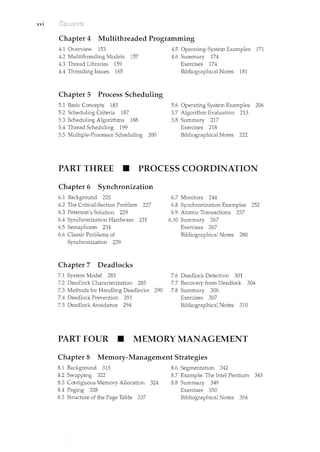
PART ONE • OVERVIEW
Chapter 1 Introduction
1.1 What Operating Systems Do 3
1.2 Computer-System Organization 6
1.3 Computer-System Architecture 12
1.4 Operating-System Sh·ucture 18
1.5 Operating-System Operations 20
1.6 Process Management 23
1.7 Memory Management 24
1.8 Storage Management 25
Chapter 2 System Structures
2.1 Operating-System Services 49
2.2 User Operating-System Interface 52
2.3 System Calls 55
2.4 Types of System Calls 58
2.5 System Programs 66
2.6 Operating-System Design and
Implementation 68
2.7 Operating-System Structure 70
1.9 Protection and Security 29
1.10 Distributed Systems 30
1.11 Special-Purpose Systems 32
1.12 Computing Environments 34
1.13 Open-Source Operating Systems 37
1.14 Summary 40
Exercises 42
Bibliographical Notes 46
2.8 Virtual Machines 76
2.9 Operating-System Debugging 84
2.10 Operating-System Generation 88
2.11 System Boot 89
2.12 Summary 90
Exercises 91
Bibliographical Notes 97
PART TWO • PROCESS MANAGEMENT
Chapter 3 Process Concept
3.1 Process Concept 101
3.2 Process Scheduling 105
3.3 Operations on Processes 110
3.4 Interprocess Communication 116
3.5 Examples of IPC Systems 123
3.6 Communication in Client-
Server Systems 128
3.7 Summary 140
Exercises 141
Bibliographical Notes 152
XV
xvi
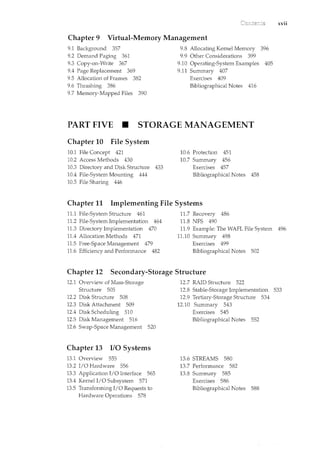
Chapter 4 Multithreaded Programming
4.1 Overview 153
4.2 Multithreading Models 157
4.3 Thread Libraries 159
4.4 Threading Issues 165
Chapter 5 Process Scheduling
5.1 Basic Concepts 183
5.2 Scheduling Criteria 187
5.3 Scheduling Algorithms 188
5.4 Thread Scheduling 199
5.5 Multiple-Processor Scheduling 200
4.5 Operating-System Examples 171
4.6 Summary 174
Exercises 174
Bibliographical Notes 181
5.6 Operating System Examples 206
5.7 Algorithm Evaluation 213
5.8 Summary 217
Exercises 218
Bibliographical Notes 222
PART THREE • PROCESS COORDINATION
Chapter 6 Synchronization
6.1 Backgrmmd 225
6.2 The Critical-Section Problem 227
6.3 Peterson's Solution 229
6.4 Synchronization Hardware 231
6.5 Semaphores 234
6.6 Classic Problems of
Synchronization 239
Chapter 7 Deadlocks
7.1 System Model 283
7.2 Deadlock Characterization 285
7.3 Methods for Handling Deadlocks 290
7.4 Deadlock Prevention 291
7.5 Deadlock Avoidance 294
6.7 Monitors 244
6.8 Synchronization Examples 252
6.9 Atomic Transactions 257
6.10 Summary 267
Exercises 267
Bibliographical Notes 280
7.6 Deadlock Detection 301
7.7 Recovery from Deadlock 304
7.8 Summary 306
Exercises 307
Bibliographical Notes 310
PART FOUR • MEMORY MANAGEMENT
Chapter 8 Memory-Management Strategies
8.1 Background 315
8.2 Swapping 322
8.3 Contiguous Memory Allocation 324
8.4 Paging 328
8.5 Structure of the Page Table 337
8.6 Segmentation 342
8.7 Example: The Intel Pentium 345
8.8 Summary 349
Exercises 350
Bibliographical Notes 354
xvii
Chapter 9 Virtual-Memory Management
9.1 Background 357
9.2 Demand Paging 361
9.3 Copy-on-Write 367
9.4 Page Replacement 369
9.5 Allocation of Frames 382
9.6 Thrashing 386
9.7 Memory-Mapped Files 390
9.8 Allocating Kernel Memory 396
9.9 Other Considerations 399
9.10 Operating-System Examples 405
9.11 Summary 407
Exercises 409
Bibliographical Notes 416
PART FIVE • STORAGE MANAGEMENT
Chapter 10 File System
10.1 File Concept 421
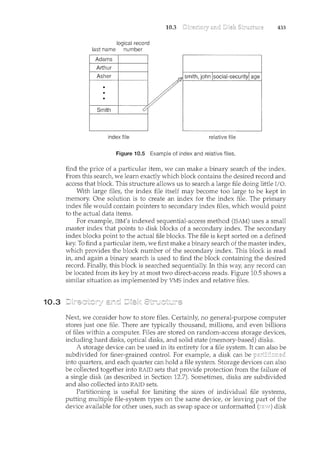
10.2 Access Methods 430
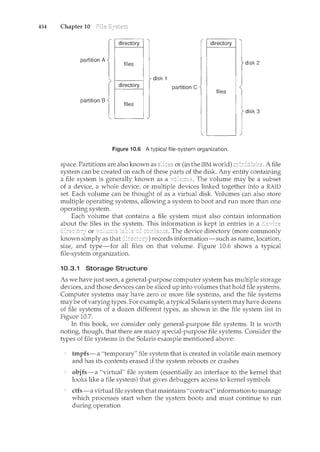
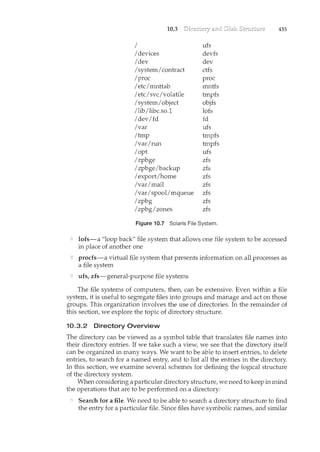
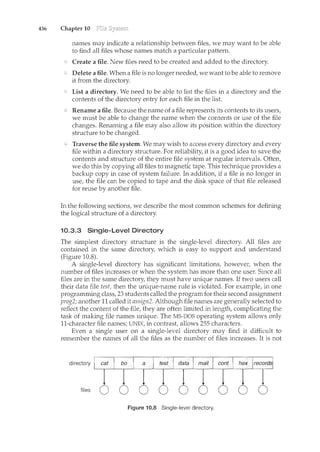
10.3 Directory and Disk Structure 433
10.4 File-System Mounting 444
10.5 File Sharing 446
10.6 Protection 451
10.7 Summary 456
Exercises 457
Bibliographical Notes 458
Chapter 11 Implementing File Systems
11.1 File-System Structure 461
11.2 File-System Implementation 464
11.3 Directory Implementation 470
11.4 Allocation Methods 471
11.5 Free-Space Management 479
11.6 Efficiency and Performance 482
11.7 Recovery 486
11.8 NFS 490
11.9 Example: The WAFL File System 496
11.10 Summary 498
Exercises 499
Bibliographical Notes 502
Chapter 12 Secondary-Storage Structure
12.1 Overview of Mass-Storage
Structure 505
12.2 Disk Structure 508
12.3 Disk Attachment 509
12.4 Disk Scheduling 510
12.5 Disk Man.agement 516
12.6 Swap-Space Management 520
Chapter 13 I/0 Systems
13.1 Overview 555
13.2 I/0 Hardware 556
13.3 Application I/0 Interface 565
13.4 Kernel I/0 Subsystem 571
13.5 Transforming I/0 Requests to
Hardware Operations 578
12.7 RAID Structure 522
12.8 Stable-Storage Implementation 533
12.9 Tertiary-Storage Struchue 534
12.10 Summary 543
Exercises 545
Bibliographical Notes 552
13.6 STREAMS 580
13.7 Performance 582
13.8 Summary 585
Exercises 586
Bibliographical Notes 588
xviii
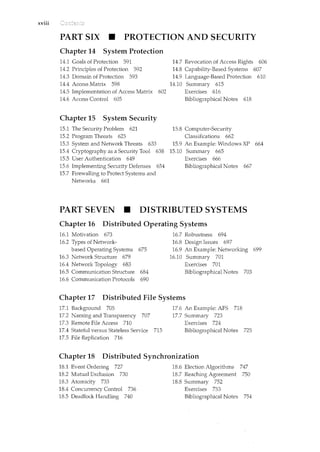
PART SIX • PROTECTION AND SECURITY
Chapter 14 System Protection
14.1 Goals of Protection 591
14.2 Principles of Protection 592
14.3 Domain of Protection 593
14.4 Access Matrix 598
14.5 Implementation of Access Matrix 602
14.6 Access Control 605
Chapter 15 System Security
15.1 The Security Problem 621
15.2 Program Threats 625
15.3 System and Network Threats 633
15.4 Cryptography as a Security Tool 638
15.5 User Authentication 649
15.6 Implementing Security Defenses 654
15.7 Firewalling to Protect Systems and
Networks 661
14.7 Revocation of Access Rights 606
14.8 Capability-Based Systems 607
14.9 Language-Based Protection 610
14.10 Surnmary 615
Exercises 616
Bibliographical Notes 618
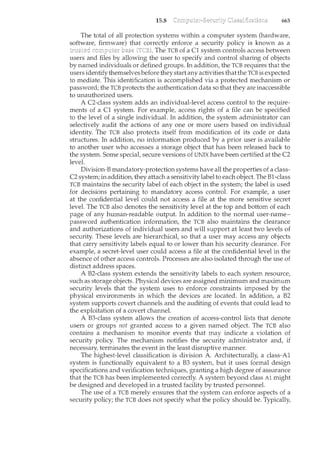
15.8 Computer-Security
Classifications 662
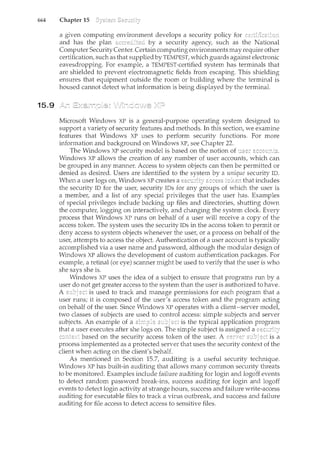
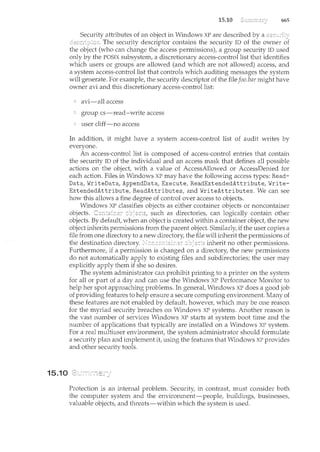
15.9 An Example: Windows XP 664
15.10 Summary 665
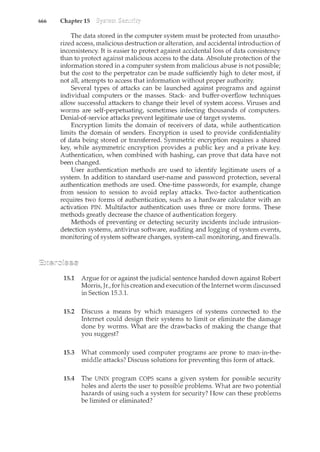
Exercises 666
Bibliographical Notes 667
PART SEVEN • DISTRIBUTED SYSTEMS
Chapter 16 Distributed Operating Systems
16.1 Motivation 673
16.2 Types of Network-
based Operating Systems 675
16.3 Network Structure 679
16.4 Network Topology 683
16.5 Communication Structure 684
16.6 Communication Protocols 690
16.7 Robustness 694
16.8 Design Issues 697
16.9 An Example: Networking 699
16.10 Summary 701
Exercises 701
Bibliographical Notes 703
Chapter 17 Distributed File Systems
17.1 Background 705
17.2 Naming and Transparency 707
17.3 Remote File Access 710
17.4 Stateful versus Stateless Service 715
17.5 File Replication 716
17.6 An Example: AFS 718
17.7 Summary 723
Exercises 724
Bibliographical Notes 725
Chapter 18 Distributed Synchronization
18.1 Event Ordering 727
18.2 Mutual Exclusion 730
18.3 Atomicity 733
18.4 Concurrency Control 736
18.5 Deadlock Handling 740
18.6 Election Algorithms 747
18.7 Reaching Agreement 750
18.8 Summary 752
Exercises 753
Bibliographical Notes 754
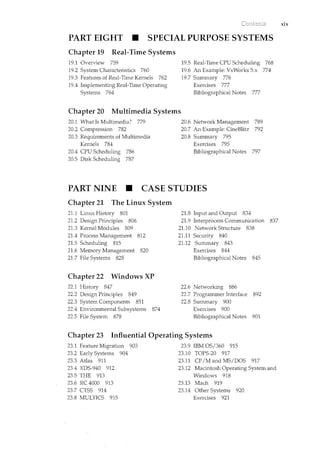
PART EIGHT • SPECIAL PURPOSE SYSTEMS
Chapter 19 Real-Time Systems
19.1 Overview 759
19.2 System Characteristics 760
19.3 Features of Real-Time Kernels 762
19.4 Implementing Real-Time Operating
Systems 764
19.5 Real-Time CPU Scheduling 768
19.6 An Example: VxWorks 5.x 774
19.7 Summary 776
Exercises 777
Bibliographical Notes 777
Chapter 20 Multimedia Systems
20.1 What Is Multimedia? 779
20.2 Compression 782
20.3 Requirements of Multimedia
Kernels 784
20.4 CPU Scheduling 786
20.5 Disk Scheduling 787
20.6 Network Management 789
20.7 An Example: CineBlitz 792
20.8 Summary 795
Exercises 795
Bibliographical Notes 797
PART NINE • CASE STUDIES
Chapter 21 The Linux System
21.1 Linux History 801
21.2 Design Principles 806
21.3 Kernel Modules 809
21.4 Process Management 812
21.5 Scheduling 815
21.6 Memory Management 820
21.7 File Systems 828
Chapter 22 Windows XP
22.1 History 847
22.2 Design Principles 849
22.3 System Components 851
22.4 Environmental Subsystems 874
22.5 File System 878
21.8 Input and Output 834
21.9 Interprocess Communication 837
21.10 Network Structure 838
21.11 Security 840
21.12 Summary 843
Exercises 844
Bibliographical Notes 845
22.6 Networking 886
22.7 Programmer Interface 892
22.8 Sum.mary 900
Exercises 900
Bibliographical Notes 901
Chapter 23 Influential Operating Systems
23.1 Feature Migration 903
23.2 Early Systems 904
23.3 Atlas 911
23.4 XDS-940 912
23.5 THE 913
23.6 RC 4000 913
23.7 CTSS 914
23.8 MULTICS 915
23.9 IBM OS/360 915
23.10 TOPS-20 917
23.11 CP/M and MS/DOS 917
23.12 Macintosh Operating System and
Windows 918
23.13 Mach 919
23.14 Other Systems 920
Exercises 921
xix
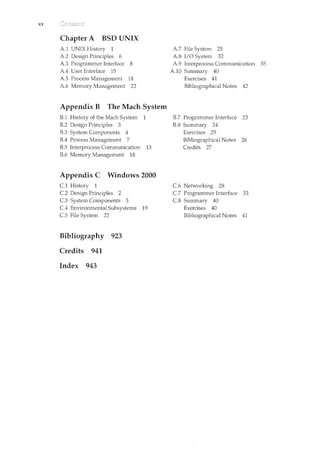
XX
Chapter A BSD UNIX
A1 UNIX History 1
A2 Design Principles 6
A3 Programmer Interface 8
A.4 User Interface 15
AS Process Management 18
A6 Memory Management 22
Appendix B The Mach System
B.l History of the Mach System 1
B.2 Design Principles 3
B.3 System Components 4
B.4 Process Management 7
B.S Interprocess Conununication 13
B.6 Memory Management 18
Appendix C Windows 2000
C.1 History 1
C.2 Design Principles 2
C.3 System Components 3
C.4 Enviromnental Subsystems 19
C.S File System 22
Bibliography 923
Credits 941
Index 943
A7 File System 25
AS I/0 System 32
A9 Interprocess Communication 35
AlO Summary 40
Exercises 41
Bibliographical Notes 42
B.7 Programmer Interface 23
B.S Summary 24
Exercises 25
Bibliographical Notes 26
Credits 27
C.6 Networking 28
C.7 Programmer Interface 33
C.S Summary 40
Exercises 40
Bibliographical Notes 41
Part One
An operating system acts as an intermediary between the user of a
computer and the computer hardware. The purpose of an operating
system is to provide an environment in which a user can execute
programs in a convenient and efficient manner.
An operating system is software that manages the computer hard-
ware. The hardware must provide appropriate mechanisms to ensure the
correct operation of the computer system and to prevent user programs
from interfering with the proper operation of the system.
Internally, operating systems vary greatly in their makeup, since they
are organized along many different lines. The design of a new operating
system is a major task. It is impmtant that the goals of the system be well
defined before the design begins. These goals form the basis for choices
among various algorithms and strategies.
Because an operating system is large and complex, it must be created
piece by piece. Each of these pieces should be a well delineated portion
of the system, with carefully defined inputs, outputs, and functions.
1.1
CH ER
An is a program that manages the computer hardware. It
also provides a basis for application programs and acts as an intermediary
between the computer user and the computer hardware. An amazing aspect
of operating systems is how varied they are in accomplishing these tasks.
Mainframe operating systems are designed primarily to optimize utilization
of hardware. Personal computer (PC) operating systems support complex
games, business applications, and everything in between. Operating systems
for handheld computers are designed to provide an environment in which a
user can easily interface with the computer to execute programs. Thus, some
operating systems are designed to be convenient, others to be efficient, and others
some combination of the two.
Before we can explore the details of computer system operation, we need
to know something about system structure. We begin by discussing the basic
functions of system startup, I/0, and storage. We also describe the basic
computer architecture that makes it possible to write a functional operating
system.
Because an operating system is large and complex, it must be created
piece by piece. Each of these pieces should be a well-delineated portion of the
system, with carefully defined inputs, outputs, and functions. In this chapter,
we provide a general overview of the major components of an operating
system.
To provide a grand tour of the major components of operating systems.
To describe the basic organization of computer systems.
We begin our discussion by looking at the operating system's role in the
overall computer system. A computer system can be divided roughly into
3
4 Chapter 1
compiler assembler text editor
operating system
database
system
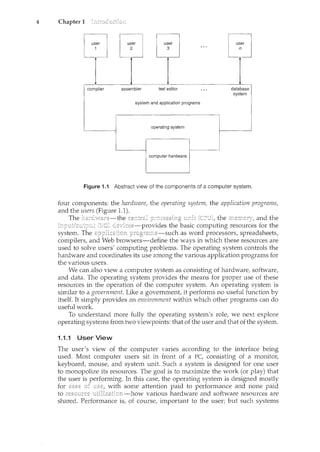
Figure 1.1 Abstract view of the components of a computer system.
four components: the hardware/ the operating system, the application programs/
and the users (Figure 1.1).
The hardwa.te-the the and the
<ievices-provides the basic computing resources for the
system. The as word processors/ spreadsheets/
compilers, and Web browsers-define the ways in which these resources are
used to solve users' computing problems. The operating system controls the
hardware and coordinates its use among the various application programs for
the various users.
We can also view a computer system as consisting of hardware/ software/
and data. The operating system provides the means for proper use of these
resources in the operation of the computer system. An operating system is
similar to a government. Like a government, it performs no useful function by
itself. It simply provides an environment within which other programs can do
useful work.
To understand more fully the operating systemfs role, we next explore
operating systems from two viewpoints: that of the user and that of the system.
1.1.1 User View
The user's view of the computer varies according to the interface being
used. Most computer users sit in front of a PC, consisting of a monitor/
keyboard/ mouse, and system unit. Such a system is designed for one user
to monopolize its resources. The goal is to maximize the work (or play) that
the user is performing. In this case/ the operating system is designed mostly
for with some attention paid to performance and none paid
to various hardware and software resources are
shared. Performance is, of course, important to the user; but such systems
1.1 5
are optimized for the single-user experience rather than the requirements of
multiple users.
In other cases, a user sits at a terminal connected to a or a
Other users are accessing the sance computer through other
terminals. These users share resources and may exchange information. The
operating system in S"Llclc cases is designed to maximize resource utilization-
to assure that all available CPU time, memory, and I/0 are used efficiently and
tbat no individual user takes more than her fair share.
In still otber cases, users sit at connected to networks of
other workstations and These users have dedicated resources at their
disposal, but they also share resources such as networking and servers-file,
compute, and print servers. Therefore, their operating system is designed to
compromise between individual usability and resource utilization.
Recently, many varieties of handheld computers have come into fashion.
Most of these devices are standalone units for individual users. Some are
connected to networks, either directly by wire or (more often) through wireless
modems and networking. Because of power, speed, and interface limitations,
they perform relatively few remote operations. Their operating systems are
designed mostly for individual usability, but performance per unit of battery
life is important as well.
Some computers have little or no user view. For example, embedded
computers in home devices and automobiles may have numeric keypads and
may turn indicator lights on or off to show status, but they and their operating
systems are designed primarily to run without user intervention.
1.1.2 System View
From the computer's point of view, the operating system is the program
most intimately involved with the hardware. In this context, we can view
an operating system as a . A computer system has many
resources that may be required to solve a problem: CPU time, memory space,
file-storage space, I/0 devices, and so on. The operating system acts as the
manager of these resources. Facing numerous and possibly conflicting requests
for resources, the operating system must decide how to allocate them to specific
programs and users so that it can operate the computer system efficiently and
fairly. As we have seen, resource allocation is especially important where many
users access the same mainframe or minicomputer.
A slightly different view of an operating system emphasizes the need to
control the various I/0 devices and user programs. An operating system is a
control program. A manages the execution of user programs
to prevent errors and improper use of the computer. It is especially concerned
with the operation and control of I/O devices.
1.1.3 Defining Operating Systems
We have looked at the operating system's role from the views of the user
and of the system. How, though, can we define what an operating system
is? In general, we have no completely adequate definition of an operating
system. Operating systems exist because they offer a reasonable way to solve
the problem of creating a usable computing system. The fundamental goal
of computer systems is to execute user programs and to make solving user
6 Chapter 1
1.2
STORAGE DEFINITIONS AND NOTATION
A is the basic unit of computer storage. It can contain one of two values,
zero and one. All other storage in a computer is based on collections of bits.
Given enough bits, it is amazing how many things a computer can represent:
numbers, letters,images, movies, sounds, documents, and programs, to name
a few. A is 8 bits, and on most computers it is the smallest convenient
chunk of storage. For example, most computers don't have an instruction
to move a bit but do have one to move a byte. A less common term is
which is a given computer architecture's native storage unit. A word is
generally made up of one or more bytes. For example, a computer may have
instructions to move 64-bit (8-byte) words.
A kilobyte, or KB, is 1,024 bytes; a megabyte, or MB, is 1,0242 bytes; and
a gigabyte, or GB, !s 1,0243 bytes. Computer manufacturers often round off
these numbers and say that a megabyte is 1 million bytes and a gigabyte is 1
billion bytes.
problems easier. Toward this goal, computer hardware is constructed. Since
bare hardware alone is not particularly easy to use, application programs are
developed. These programs require certain common operations, such as those
controlling the II0 devices. The common functions of controlling and allocating
resources are then brought together into one piece of software: the operating
system.
In addition, we have no universally accepted definition of what is part ofthe
operating system. A simple viewpoint is that it includes everything a vendor
ships when you order "the operating system." The features included, however,
vary greatly across systems. Some systems take up less than 1 megabyte of
space and lack even a full-screen editor, whereas others require gigabytes of
space and are entirelybased on graphical windowing systems. A more common
definition, and the one that we usually follow, is that the operating system
is the one program running at all times on the computer-usually called
the . (Along with the kernel, there are two other types of programs:
which are associated with the operating system but are not
part of the kernel, and which include all programs not
associated with the operation of the system.)
The matter of what constitutes an operating system has become increas-
ingly important. In 1998, the United States Deparhnent of Justice filed suit
against Microsoft, in essence claiming that Microsoft included too much func-
tionality in its operating systems and thus prevented application vendors from
competing. For example, a Web browser was an integral part of the operating
systems. As a result, Microsoft was found guilty of using its operating-system
monopoly to limit competition.
Before we can explore the details of how computer systems operate, we need
general knowledge of the structure of a computer system. In this section,
we look at several parts of this structure. The section is mostly concerned
1.2
THE STUDY OFOPERATING SYSTEMS
Therehas neverbeenarnore interestirighnwtostudyoperatingsystems:·and
ithas neverb.een.e~sier.Theopen-sourc;e movernent has overtaken.operating
systems, caJ.tsing marlyofthenctobemadeavailable inbothsourceand binary
(e~ecuta]Jle) fonnat.·.This Iistindud~~Linu)(, BSDUNIX/Solat•is,and part of•
]II~cos.x. Th~availa~ilityqf·source.code.q,llowsus.tostudyoperq,til}.gsy?tems
frorrt theinsid,eout' ..Questionsthat previo)1sly could onlyb~ answerecL~y
lookingatdocumentaticmor thebehayior.ofan op~rating systemc.annow be
answered byexamining the codeitself.
In additi?n,.therise of virtualization as a ll}.ainsfreafll. (andfrequelltlyfree)
cmnp)1ter ftmctionmakesitpos;~i1Jlet()runnmnyoperqtingsystems.ontop.of
onecoresystem..Forexample,VMware(J:lttp.://www .•vmwarE:).com):provides
afree·''player'' onwhich hundreds.of free .''virtualappliilnces'' cann.m.Using
this method,students call tryolit hundreds.ofoperatingsystems.withintheir
existing operatingsystems .atno cost. ...··. ... .·. ·.. ·...·
Operating .sy~temsthat are no lortge~ ~ofllmerci~lly viableltave been
opell-~o}lrced asvvell, ·enablirtg·.usto study how system~ pperated i~<
time.of•.•f~v.r~r CPU, ll}.emory,•·•etnd.storcrge•·•·.resoJ.trces,·····.An...exten~iye.b).It·•not
complete.•.list ()f 9pen'-sourct operafirtg-"system pr?j~?ts is..availa~le £rom
ht~p ://dm()~ ' org/C:omp)1ters/Softp(lre/Operati»g:-Systems/p~~m._Sourc~/-
S.i.m
..•..•·..·.u.l·a·t·o
..rs.•·..o··.f······s··..P
...e
...c
..i.fi
..·.·c··
..··. ·•.h
.....a
...·.r
...·.d
...•w
...•·.a.•.r
...e
.....·.·....ar..e·
... ·.a·l·s·o
..·......a·.··v
...•·...a.il
..·<1.b
...·.·.le··
...·.i·n···.·
..·
...·...s
..om
.•.·. ·..e. •.·.c.·.·....a····.·s·e·s.'····...al..I.·.o
.......w.·
.•..m.·
.•··.g
..
th~ operat~<g systell}.to.runon.''na~ve''.hardware, ...all~ithrrtthec?l}.fines
of a modem CO!TIPJ-Iter and moderJ1 OPf/'atirtg ~ystem. For: example, a
DECSYSTEMc20 simulator running on Mac OS Xcan boot TOPS-20, loa~. the
~ource.tages;.·and modify al'ld comp~le·<l·.J:t.evvTOPS-20 .k~rneL ··Art·interested
stltdent ~ar• search theint~rnet to find the origillal papers that de~cribe the
operating systemand..the.origipa~ manuals:
Tl<e adve~t?fogen-source operafirtg sy~te1Tis also l}."lal<es it easyt?··.make
the move fromstu~enttooper<:lting~systemdeveloper.With some knov.rledge,
som~ effo1't, a11d an Internet connection,a student c;al'leven create a new
operating-systemdistribution! Justa. fev.r years, ~go itwas diffic]_llt or
if1Lpossible ··to. get acce~s·. to ·source co?e. .N?v.r·.that access is.·liJnited only
bylt()wmuchtimeand disk spacea student has. ·
7
with computer-system organization, so you can skim or skip it if you already
understand the concepts.
1.2.1 Computer-System Operation
A modern general-purpose computer system consists of one or more CPUs
and a number of device controllers connected through a common bus that
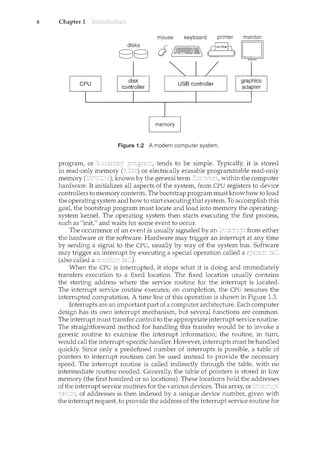
provides access to shared memory (Figure 1.2). Each device controller is in
charge of a specific type of device (for example, disk drives, audio devices, and
video displays). The CPU and the device controllers can execute concurrently,
competing for memory cycles. To ensure orderly access to the shared memory,
a memory controller is provided whose function is to synchronize access to the
memory.
For a computer to start rum<ing-for instance, when it is powered
up or rebooted-it needs to have an initial program to run. This initial
8 Chapter 1
mouse keyboard printer monitor
O ~~~ (_rlo•i-nneh b
Figure 1.2 A modern computer system.
program, or tends to be simple. Typically, it is stored
in read-only memory or electrically erasable programmable read-only
memory known by the general term within the computer
hardware. It initializes all aspects of the system, from CPU registers to device
controllers to memory contents. The bootstrap program must know how to load
the operating system and how to start executing that system. To accomplish this
goal, the bootstrap program must locate and load into memory the operating-
system kernel. The operating system then starts executing the first process,
such as "init," and waits for some event to occur.
The occurrence of an event is usually signaled by an from either
the hardware or the software. Hardware may trigger an interrupt at any time
by sending a signal to the CPU, usually by way of the system bus. Software
may trigger an interrupt executing a special operation called a
(also called a
When the CPU is interrupted, it stops what it is doing and immediately
transfers execution to a fixed location. The fixed location usually contains
the starting address where the service routine for the interrupt is located.
The interrupt service routine executes; on completion, the CPU resumes the
interrupted computation. A time line of this operation is shown in Figure 1.3.
Interrupts are an important part of a computer architecture. Each computer
design has its own interrupt mechanism, but several functions are common.
The interrupt must transfer control to the appropriate interrupt service routine.
The straightforward method for handling this transfer would be to invoke a
generic routine to examine the interrupt information; the routine, in turn,
would call the interrupt-specific handler. However, interrupts must be handled
quickly. Since only a predefined number of interrupts is possible, a table of
pointers to interrupt routines can be used instead to provide the necessary
speed. The interrupt routine is called indirectly through the table, with no
intermediate routine needed. Generally, the table of pointers is stored in low
memory (the first hundred or so locations). These locations hold the addresses
of the interrupt service routines for the various devices. This array, or
of addresses is then indexed by a unique device number, given with
the interrupt request, to provide the address of the interrupt service routine for
CPU user
1/0
device
process
executing
1/0 interrupt
processing
idle "~""~-~-
tmcefeniog I L
..
1/0
request
1.2
ll v
-~~'"''''''~'"''"-~~ -~~-"] t---~---
''m'] L,~"~~~
transfer
done
1/0 transfer
request done
Figure 1.3 Interrupt time line for a single process doing output.
9
the interrupting device. Operating systems as different as Windows and UNIX
dispatch interrupts in this manner.
The interrupt architecture must also save the address of the interrupted
instruction. Many old designs simply stored the interrupt address in a
fixed location or in a location indexed by the device number. More recent
architectures store the return address on the system stack. If the interrupt
routine needs to modify the processor state-for instance, by modifying
register values-it must explicitly save the current state and then restore that
state before returning. After the interrupt is serviced, the saved return address
is loaded into the program counter, and the interrupted computation resumes
as though the interrupt had not occurred.
1.2.2 Storage Structure
The CPU can load instructions only from memory, so any programs to run must
be stored there. General-purpose computers run most of their programs from
rewriteable memory, called main memory (also called
or RAM). Main commonly is implemented in a semiconductor
technology called Computers use
other forms of memory as well. Because the read-only memory (ROM) camwt
be changed, only static programs are stored there. The immutability of ROM
is of use in game cartridges. EEPROM camwt be changed frequently and so
contains mostly static programs. For example, smartphones have EEPROM to
store their factory-il<stalled programs.
All forms of memory provide an array of words. Each word has its
own address. Interaction is achieved through a sequence of load or store
instructions to specific memory addresses. The load instruction moves a word
from main memory to an internal register within the CPU, whereas the store
instruction moves the content of a register to main memory. Aside from explicit
loads and stores, the CPU automatically loads instructions from main memory
for execution.
A typical instruction-execution cycle, as executed on a system with a
architecture, first fetches an il1struction from memory and stores
that instruction in the . The instruction is then decoded
and may cause operands to be fetched from memory and stored in some
10 Chapter 1
internal register. After the instruction on the operands has been executed, the
result may be stored back in memory. Notice that the memory unit sees only
a stream of memory addresses; it does not know how they are generated (by
the instruction counter, indexing, indirection, literal addresses, or some other
means) or what they are for (instructions or data). Accordingly, we can ignore
how a memory address is generated by a program. We are interested only in
the sequence of memory addresses generated by the running program.
Ideally, we want the programs and data to reside in main ncemory
permanently. This arrangement usually is not possible for the following two
reasons:
Main memory is usually too small to store all needed programs and data
permanently.
Main memory is a volatile storage device that loses its contents when
power is turned off or otherwise lost.
Thus, most computer systems provide as an extension
of main memory. The main requirement for secondary storage is that it be able
to hold large quantities of data permanently.
The most common secondary-storage device is a which
provides storage for both programs and data. Most programs (system and
application) are stored on a disk until they are loaded into memory. Many
programs then use the disk as both the source and the destination of their
processing. Hence, the proper management of disk storage is of central
importance to a computer system, as we discuss in Chapter 12.
In a larger sense, however, the storage structure that we have described-
consisting ofregisters, main memory, and magnetic disks-is only one ofmany
possible storage systems. Others include cache memory, CD-ROM, magnetic
tapes, and so on. Each storage system provides the basic functions of storing
a datum and holding that datum until it is retrieved at a later time. The main
differences among the various storage systems lie in speed, cost, size, and
volatility.
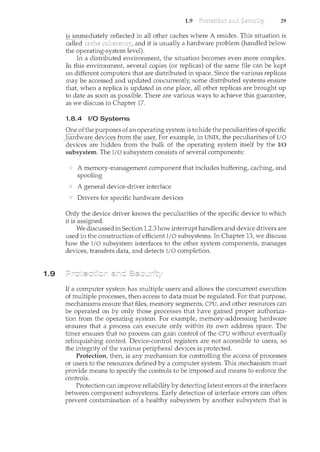
The wide variety of storage systems in a computer system can be organized
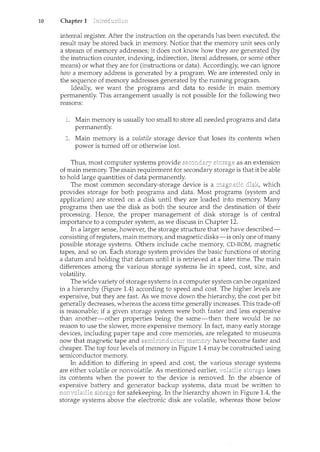
in a hierarchy (Figure 1.4) according to speed and cost. The higher levels are
expensive, but they are fast. As we move down the hierarchy, the cost per bit
generally decreases, whereas the access time generally increases. This trade-off
is reasonable; if a given storage system were both faster and less expensive
than another-other properties being the same-then there would be no
reason to use the slower, more expensive memory. In fact, many early storage
devices, including paper tape and core memories, are relegated to museums
now that magnetic tape and have become faster and
cheaper. The top four levels of memory in Figure 1.4 may be constructed using
semiconductor memory.
In addition to differing in speed and cost, the various storage systems
are either volatile or nonvolatile. As mentioned earlier, loses
its contents when the power to the device is removed. In the absence of
expensive battery and generator backup systems, data must be written to
for safekeeping. In the hierarchy shown in Figure 1.4, the
the electronic disk are volatile, whereas those below
1.3 15
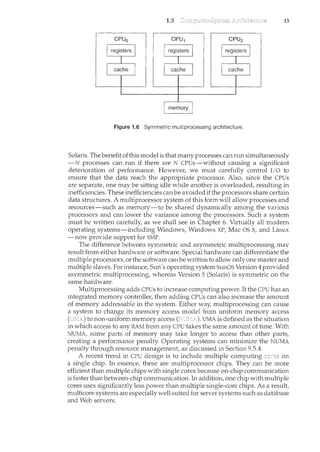
Figure 1.6 Symmetric multiprocessing architecture.
Solaris. The benefit of this model is that many processes can run simultaneously
-N processes can run if there are N CPUs-without causing a significant
deterioration of performance. However, we must carefully control I/0 to
ensure that the data reach the appropriate processor. Also, since the CPUs
are separate, one may be sitting idle while another is overloaded, resulting in
inefficiencies. These inefficiencies canbe avoided if the processors share certain
data structures. A multiprocessor system of this form will allow processes and
resources-such as memory-to be shared dynamically among the various
processors and can lower the variance among the processors. Such a system
must be written carefully, as we shall see in Chapter 6. Virtually all modern
operating systems-including Windows, Windows XP, Mac OS X, and Linux
-now provide support for SMP.
The difference between symmetric and asymmetric multiprocessing may
result from either hardware or software. Special hardware can differentiate the
multiple processors, or the software canbe written to allow only one master and
multiple slaves. For instance, Sun's operating system SunOS Version 4 provided
asymmetric multiprocessing, whereas Version 5 (Solaris) is symmetric on the
same hardware.
Multiprocessing adds CPUs to increase computing power. If the CPU has an
integrated memory controller, then adding CPUs can also increase the amount
of memory addressable in the system. Either way, multiprocessing can cause
a system to change its memory access model from uniform memory access
to non-uniform memory access UMA is defined as the situation
in which access to any RAM from any CPU takes the same amount of time. With
NUMA, some parts of memory may take longer to access than other parts,
creating a performance penalty. Operating systems can minimize the NUMA
penalty through resource management_, as discussed in Section 9.5.4.
A recent trend in CPU design is to in.clude multiple computing on
a single chip. In essence, these are multiprocessor chips. They can be more
efficient than multiple chips with single cores because on-chip communication
is faster than between-chip communication. In addition, one chip with multiple
cores uses significantly less power than multiple single-core chips. As a result,
multicore systems are especially well suited for server systems such as database
and Web servers.
16 Chapter 1
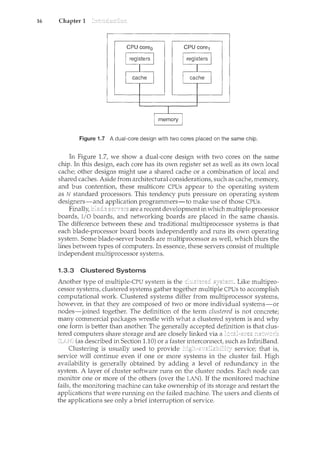
Figure 1.7 A dual-core design with two cores placed on the same chip.
In Figure 1.7, we show a dual-core design with two cores on the same
chip. In this design, each core has its own register set as well as its own local
cache; other designs might use a shared cache or a combination of local and
shared caches. Aside from architectural considerations, such as cache, memory,
and bus contention, these multicore CPUs appear to the operating system
as N standard processors. This tendency puts pressure on operating system
designers-and application programmers-to make use of those CPUs.
Finally, are a recent development in which multiple processor
boards, I/0 boards, and networking boards are placed in the same chassis.
The difference between these and traditional multiprocessor systems is that
each blade-processor board boots independently and runs its own operating
system. Some blade-server boards are n1.ultiprocessor as well, which blurs the
lines between types of computers. In essence, these servers consist of multiple
independent multiprocessor systems.
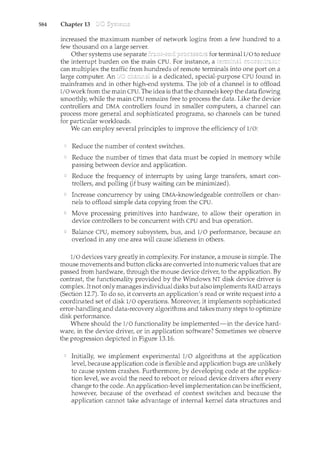
1.3.3 Clustered Systems
Another type of multiple-CPU system is the Like multipro-
cessor systems, clustered systems gather together multiple CPUs to accomplish
computational work. Clustered systems differ from multiprocessor systems,
however, in that they are composed of two or more individual systems-or
nodes-joined together. The definition of the term clustered is not concrete;
many commercial packages wrestle with what a clustered system is and why
one form is better than another. The generally accepted definition is that clus-
tered computers share storage and are closely linked via a JC'.H.a,,·o.x
(as described in Section 1.10) or a faster interconnect, such as InfiniBand.
Clustering is usually used to provide service; that is,
service will continue even if one or more systems in the cluster faiL High
availability is generally obtained by adding a level of redundancy in the
system. A layer of cluster software runs on the cluster nodes. Each node can
monitor one or more of the others (over the LAN). If the monitored machine
fails, the monitoring machine can take ownership of its storage and restart the
applications that were running on the failed machine. The users and clients of
the applications see only a brief interruption of service.
1.3
BEOWULF CLUSTERS
Beowulf clusters are designed for solving high-performance computing
tasks. These clusters are built using comm.odity hardware-such as.personal
computers-that areconnected via a simple local area network Interestingly,
a Beowulf duster uses no one specific software package but rather consists
of a set of open-source software libraries that allow the con1puting nodes
in the cluster to communicate with one another..Thus,.there are a variety of
approaches for constructinga Beowulfcluster, although Beowulf computing
nodes typically run the Linux operating system. Since Beowulf clusters
require no special hardware and operate using open~source software that
is freely available, they offer a low-cost strategy for building a high~
performance computing cluster. In fact, some Beowulf clusters built from
collectionsof discarded personal computers are using ht.mdreds ofcornputing
nodes to solve computationally expensive problemsin scientific computing.
Clusterin.g can be structured or symmetrically. In
17
one machine is in while the other is
rmming the applications. The hot-standby host machine does nothing but
monitor the active server. If that server fails, the hot-standby host becomes the
active server. In two or more hosts are rmming applications
and are monitoring each other. This mode is obviously more efficient, as it uses
all of the available hardware. It does require that more than one application be
available to run.
As a cluster consists of several
clusters may also be used to provide environ-
ments. Such systems can supply significantly greater computational power
than single-processor or even SMP systems because they are capable of running
an application concurrently on all computers in the cluster. However, appli-
cations must be written to take advantage of the cluster by using
a technique known as which consists of dividing a program
into separate components that run in parallel on individual computers in the
cluster. Typically, these applications are designed so that once each computing
node in the cluster has solved its portion of the problem, the results from all
the nodes are combined into a final solution.
Other forms of clusters include parallel clusters and clustering over a
wide-area network (WAN) (as described in Section 1.10). Parallel clusters allow
multiple hosts to access the same data on the shared storage. Because most
operating systems lack support for simultaneous data access by multiple hosts,
parallel clusters are usually accomplished by use of special versions of software
and special releases of applications. For example, Oracle Real Application
Cluster is a version of Oracle's database that has been designed to run on
a parallel cluster. Each machine runs Oracle, and a layer of software tracks
access to the shared disk. Each machine has full access to all data in the
database. To provide this shared access to data, the system must also supply
access control and locking to ensure that no conflicting operations occur. This
function, commonly known as a is included
in some cluster technology.
18 Chapter 1
1.4
interconnect interconnect
computer computer computer
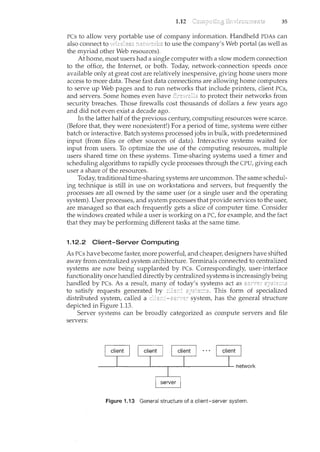
Figure 1.8 General structure of a clustered system.
Cluster technology is changing rapidly. Some cluster products support
dozens of systems in a cluster, as well as clustered nodes that are separated
by miles. Many of these improvements are made possible by
(SAJ·~Is), as described in Section 12.3.3, which allow many systems
to attach to a pool of storage. If the applications and their data are stored on
the SAN, then the cluster software can assign the application to run on any
host that is attached to the SAN. If the host fails, then any other host can take
over. In a database cluster, dozens of hosts can share the same database, greatly
increasing performance and reliability. Figure 1.8 depicts the general structure
of a clustered system.
Now that we have discussed basic information about computer-system orga-
nization and architecture, we are ready to talk about operating systems.
An operating system provides the envirorunent within which programs are
executed. Internally, operating systems vary greatly in their makeup, since
they are organized along many different lines. There are, however, many
commonalities, which we consider in this section.
One of the most important aspects of operating systems is the ability
to multiprogram. A single program cannot, in generat k~~p~ith_er thg CPU
ortbt?J/Qgey:ic:es 1Jusy_C1t all times: Single users frequently have multiple
programs running. Il.ul increases CPU utilization byorganizing
jobs(codeand datafso . . ... . . _ hasoi1(0tO execl1te. - ·
---- fhe idea is as follows: The op-ei:atlng system keeps several jobs in memory
simultaneously (Figure 1.9). Since, in generat main memory is too small to
accommodate all jobs, the jobs are kept initially on the disk in the
This pool consists of all processes residing on disk awaiting allocation of main
memory.
Ih~ setofjobs inmemg_ry_canbe asubt:;et of the jobs kept in thejql:Jpoo1.
The operating system picks and begins to execute one of the jobs in memory.
Eventually, the job may have to wait for some task, such as an I/O operation,
1.4 19
Figure 1.9 Memory layout for a multiprogramming system.
!()_C()_tnpl~te: In a non-multiprogrammed system, the CPU would sit idle. In
a multiprogrammed system, the operatilcg system simply switches to, and
executes, another job. When that job needs to wait, the CPU is switched to
another job, and so on. Eventually the first job finishes waiting and gets the
CPU back. As long as at least one job needs to execute, the CPU is never idle.
This idea is common in other life situations. A lawyer does not work for
only one client at a time, for example. While one case is waiting to go to trial
or have papers typed, the lawyer can work on another case. If he has enough
clients, the lawyer will never be idle for lack of work. (Idle lawyers tend to
become politicians, so there is a certain social value in keeping lawyers busy.)
Multiprogrammed systems provide an environment in which the various
system resources (for example, CPU, memory, and peripheral devices) are
utilized effectively, but they do not provide for user interaction with the
computer system. is_~l()gi~alex_tension of
multiprogramming. ~' time-s!caring syste~s,the CPl] execu~eslnl1ltiplejobs
by switcll.Ing~ainong them, but the switches occur so frequently that the ~1sers
canh~teract with eachprograffi~vEre l.t1sil.mning.--····
-Ti1ne shar:il~g requi.i-es an .. (or -
which provides direct communication between the user and the system. The
user gives instructions to the operating system or to a program directly, using a
input device such as a keyboard or a mouse, and waits for immediate results on
an output device. Accordingly, !!'te sho~1ld be sh()rt=typically
less than one second.
A time-shared operating system allows many users to share the computer
simultaneously. Since each action or command in a time-shared system tends
to be short, only a little CPU time is needed for each user. As the system switches
rapidly from one user to the next, each user is given the impression that the
entire computer system is dedicated to his use, even though it is being shared
among many users.
A time-shared operating system 11ses CPU scheduling and multiprogram-
ming to provide each user with a small portion of a time-shared computer.
Eachuserhas atleast or:t_e S§parateprogra111inmemory. A program loaded into
20
1.5
Chapter 1
memory and executing is called a When a process executes, it typically
executes for only a short tirne it either finishes or needs to perform I/0.
I/0 may be interactive; that is, output goes to a display for the user, and input
comes from a user keyboard, mouse, or other device. Since interactive I/0
typically runs at "people speeds," it may take a long time to complete. Input,
for example, may be bounded by the user's typing speed; seven characters per
second is fast for people but incredibly slow for computers. Rather than let
the CPU sit idle as this interactive input takes place, the operating system will
rapidly switch the CPU to the program of some other user.
Time sharing and multiprogramming require that several jobs be kept
simultaneously in memory. If several jobs are ready to be brought into memory,
and if there is not enough room for all of them, then the system must choose
among them. Making this decision is which is discussed in
Chapter 5. When the operating system selects a job from the job pool, it loads
that job into memory for execution. Having several programs in memory at the
same time requires some form of memory management, which is covered in
Chapters 8 and 9. In addition, !f_s~veraJjq}Jsaxere(lclY to rw~at the same time,
the system must choose among them. Making this decision i~ _ _
sd1,2dviii·lg,
which is discussed in Chapter 5. Finally, running multiple jobscoi~cl.lrl:ei1Hy
requires that their ability to affect one another be limited in all phases of the
operating system, including process scheduling, disk storage, and memory
management. These considerations are discussed throughout the text.
In a time-sharing system, the operating system must ensure reasonable
response time, which is sometimes accomplished through where
processes are swapped in and out of main memory to the disk. A more common
method for achieving this goal tec:hDiql1~_fuC!t__CillQws._
the execution of aprocessthat isnot completely inl1le1Yl_clD~- (Chapter 9).
The main advai1tage of the virtual-memory scheme is that it enables users
to run programs that are larger than actual . Further, it
abstracts main memoryinto a large, uniform array of storage, separatinglogical
as viewed by the user from physical memory. This arrangement frees
programmers from concern over memory-storage limitations.
Time-sharing systems must also provide a file system (Chapters 10 and 11).
The file system resides on a collection of disks; hence, disk management must
be provided (Chapter 12). Also, time-sharing systems provide a mechanism for
protecting resources from inappropriate use (Chapter 14). To ensure orderly
execution, the system must provide mechanisms for job synchronization and
communication (Chapter 6), and it may ensure that jobs do not get stuck in a
deadlock, forever waiting for one another (Chapter 7).
}SI1[e11tio11ecl ~arlier, rn()clETnopexatli1KSYStems_m~e _ If there
are no processes to execute, no I/0 devices to service, and no users to whom
to respond, an operating system will sit quietly waiting for something to
happen. Events are almost always signaled by the occurrence of an interrupt
or a trap. (or an is_ a software~generated interruptca~seci
~it[ler byan error (for division byzero or invalid memory acc~ss_)
or by a specific request from a user program that an operating-system service
1.5 21
be performed. The interrupt-driven nature of an operating system defines
that system's general structure. For each type of interrupt, separate segments
of code in the operating system determine what action should be taken. An
interrupt service routine is provided that is responsible for dealing with the
interrupt.
Since the operating system and the users share the hardware and software
resources of the computer system, we need to make sure that an error in a
user program could cause problems only for the one program running. With
sharing, many processes could be adversely affected by a bug in one program.
For example, if a process gets stuck in an infinite loop, this loop could prev.ent
the correct operation of many other processes. More subtle errors can occur
in a multiprogramming system, where one erroneous program might modify
another program, the data of another program, or even the operating system
itself.
Without protection against these sorts of errors, either the computer must
execute only one process at a time or all output must be suspect. A properly
designed operating system must ensure that an incorrect (or malicious)
program cannot cause other program~ to .~X.t;cute incorrectly.
~~,;~,_C: ·· ;·..c·~
1.5.1 Dual-Mode Operation ·
In order to ensure the proper execution of the operating system, we must be
able to distinguish between the execution of operating-system code and user-
defined code. The approach taken by most computer systems is to provide
hardware support that allows us to differentiate among various modes of
execution.
At the very least we need two
and (also called or
A bit, called the is added to the hardware of the computer to
indicate the current mode: kernel (0) or user (1). !Viththeplode1:Jit!Ve2lrea]Jle
to distinguishbetween a task that is executed onbehalf of the operatingsystem
aicd one that is executeci on behalfoftheJJser, When tl~e computer systel.n1s
executing on behalf of a user application, the system is in user mode. However,
when a user application requests a service from the operating system (via a
.. system call), it must transition from user to kernel mode to fulfill the request.
/ This is shown in Figure 1.10. As we shall see, this architectural enhancement is
useful for many other aspects of system operation as well.
execute system call
Figure 1.i 0 Transition from user to kernel mode.
user mode
(mode bit =I)
kernel mode
(mode bit = 0)
22 Chapter 1
At system boot time, the hardware starts in kernel mode. The operating
system is then loaded and starts user applications in user mode. Whenever a
trap or interrupt occurs, the hardware switches from user mode to kernel mode
(that is, changes the state of the mode bit to 0). Thus, whenever the operating
system gains control of the computer, it is in kernel mode. The system always
switches to user mode (by setting the mode bit to 1) before passing control to
a user program.
The dual mode of operation provides us with the means for protecting the
operating system from errant users-and errant users from one another. }Ye
_(!CC011lplishthis protectionby designating someofthemachineinE;tructions~ha!
:trliJjT cal1_seJ~i:i~l11 ins trucrci}]<§l: Il1e hardware all~<'Spl·iyileg~d
instrl]ctionsto be o11ly inkern~Ll11QQ_~, If an attempt is made to
execute a privileged instruction in user mode, the hardware does not execute
the instruction but rather treats it as illegal and traps it to the operating system.
The instruction to switch to kernel mode is an example of a privileged
instruction. Some other examples include I/0 controt timer management and
interrupt management. As we shall see throughout the text, there are many
additional privileged instructions.
We can now see the life cycle of instruction execution in a computer system.
Initial control resides in the operating system, where instructions are executed
in kernel mode. When control is given to a user application, the mode is set to
user mode. Eventually, control is switched back to the operating system via an
interrupt, a trap, or a system call.
_5ysiemcalls proyide the means for auser program to ask the operating
2}'St~m to perforp:t tasks re_?erved forjhe operating syst~m gr1 the 1.lser
.12l.:Qgra1ll'sbeha,lf A system call is invoked in a variety of ways, depending
on the functionality provided by the underlying processor. In all forms, it is the
method used by a process to request action by the operating system. A system
call usually takes the form of a trap to a specific location in the interrupt vector.
This trap can be executed by a generic trap instruction, although some systems
(such as the MIPS R2000 family) have a specific syscall instruction.
When asystep1 calljs e)(ecutect it is treated by the hardware as a software
-i:rlt~rr:l.l:[if:C()iltrol passes through the interrupt vector to a service routine in
theoperating system/ and the m()de bit is set to kernel mode. The system-
caflserv1ce routine is apart of the operating system. The-kernel examines
the interrupting instruction to determine what system call has occurred; a
~ parameter indicates what type of service the user program is requesting.
Additional information needed forthe r~quest_may be passed in registers,
on the stack/ or in memory (with pointers to the memory locations passed in
registers). The kernel vedfies that the parameters are correct and legat executes
ti1erequest, and returns control to the instruction following the system call. We
describe system calls more fully in Section 2.3.
The lack of a hardware-supported dual mode can cause serious shortcom-
ings in an operating system. For instance, MS-DOS was written for the Intel
8088 architecture, which has no mode bit and therefore no dual mode. A user
program rum1ing awry can wipe out the operating system by writing over it
with data; and multiple programs are able to write to a device at the same time,
with potentially disastrous results. Recent versions of the Intel CPU do provide
dual-mode operation. Accordingly, most contemporary operating systems-
such as Microsoft Vista and Windows XP, as well as Unix, Linux, and Solaris
1.6
1.6 23
-take advantage of this dual-mode feature and provide greater protection for
the operating system.
Once hardware protection is in place, it detects errors that violate modes.
These errors are normally handled by the operating system. If a user program
fails in some way-such as by making an attempt either to execute an illegal
instruction or to access memory that is not in the user's address space-then
the hardware traps to the operating system. The trap transfers control through
the interrupt vector to the operating system, just as an interrupt does. When
a program error occurs, the operating system must terminate the program
abnormally. This situation is handled by the same code as a user-requested
abnormal termination. An appropriate error message is given, and the memory
of the program may be dumped. The memory dump is usually written to a
file so that the user or programmer can examine it and perhaps correct it and
restart the program.
1.5.2 Timer
Wer:r1,_ust ensure th<t! the ope:J;atil}gsystemiJ:taintains t:ontrol overthe C}J_!:l_~
We cam1.ot allow a userp~ogram to_ get stuc:kin e1ninfinite loop or to fail
to call syste1n seryices and never retltrn control to the c:>perating system. To
~c<:9!ll£1I:S~ tl1.1s=g~at we_can usea _A_tirn~r_can beset to interrupt
th~ c:c:>mp_ut~r af_t~ril §p~c:ified peri()d. The period may be fixed (for example,
1/60 second) or variable (for example, from 1 millisecond to 1 second). A
is generally implemented by a fixed-rate clock and a counter.
The operating system sets the counter. Every time the clock ticks, the counter
is decremented. When the counter reaches 0, an interrupt occurs. For instance,
a 10-bit counter with a 1-millisecond clock allows interrupts at intervals from
1 millisecond to 1,024 milliseconds, in steps of 1 millisecond.
Before turning over control to the user, the operating system ensures
that the timer is set to interrupt. lL~ll.~__tiJ11e_£_il1t~rrl1pts/control transfers
automatically totll.e ()pel:9:t~~Y§!epl,_"Thicfl__!l-1(1Ytreat the interrupt as a faiaf
error or n:taygi-y_etll.ep_rograrn rnc:>r~!i:rn~:.Clearly,il~structions that modify the
content of the timer are privileged.
Thus, we can use the timer to prevent a user program from running too
long. A simple technique is to il1.itialize a counter with the amount of time that a
program is allowed to run. A program with a 7-minute time limit, for example,
would have its counter initialized to 420. Every second, the timer interrupts
and the counter is decremented by 1. As long as the counter is positive, control
is returned to the user program. When the counter becomes negative, the
operating system terminates the program for exceeding the assigned time
limit.
A program does nothing unless its instructions are executed by a CPU. A
program in execution, as mentioned, is a process. A time-shared user program
such as a compiler is a process. A word-processing program being run by an
individual user on a PC is a process. A system task, such as sending output
to a printer, can also be a process (or at least part of one). For now, you can
consider a process to be a job or a time-shared program, but later you will learn
24 Chapter 1
1.7
that the concept is more general. As we shall see in Chapter 3, it is possible
to provide system calls that allow processes to create subprocesses to execute
concurrent!y.
A process needs certain resources---including CPU time, me111ory, files,
and-I;o devices:::_:_to accomplish its:task These i·esources are e!tl1er given to
the process when it is created or-allocated to it while it is running. In addition
to the various physical and logical resources that a process obtains when it is
created, various initialization data (input) may be passed along. For example,
consider a process whose function is to display the status of a file on the screen
of a terminal. The process will be given as an input the name of the file and will
execute the appropriate instructions and system calls to obtain and display
on the terminal the desired information. When the process terminates, the
operating system will reclaim any reusable resources.
l"Ve ~_111pl:t21size that a program by itselfis nota process; a program is a
·y_assive er~!~ty, likt:tl1e C()I1terltsof a fil(?storecl_m1 c!iskL~A.ThereasC_pr(Jce~~s_1s 21~1
aCtive entity. A si-Dgl~::1hr:eaded proc~ss has on~_pr_ogra111 cou11!er s:eecifying the
nexf1il~r:Uc_tiogt()_eX~ClJte. (Threads are covered in Chapter 4.) The-execi.rtioil.
of such a process must be sequential. The CPU executes one instruction of the
process after another, until the process completes. Further, at any time, one
instruction at most is executed on behalf of the process. Thus, although two
processes may be associated with the same program, they are nevertheless
considered two separate execution sequences. A multithreaded process has
multiple program counters, each pointing to the next instruction to execute for
a given thread.
A process is the unit of work in a system. Such a system consists of a
collection of processes, some of which are operating-system processes (those
that execute system code) and the rest of which are user processes (those that
execute user code). Al]Jheseprocesses canp()t~!ltially execute concurrently-
_llY.IJ:lli}!p_l~)(_i!lg ()I'a sir1gle_C:Pl],for_~)(ample. - - - --- ----
The operating system is responsible for the following activities in connec-
tion with process management:
Scheduling processes and threads on the CPUs
Creating and deleting both user and system processes
Suspending and resuming processes
Providing mechanisms for process synchronization
Providing mechanisms for process communication
We discuss process-management techniques in Chapters 3 through 6.
As we discussed in Section 1.2.2, the main memory is central to the operation
of a modern computer system. Main memory is a large array of words or bytes,
ranging in size from hundreds of thousands to billions. Each word or byte has
its own address. Main memory is a repository of quickly accessible data shared
by the CPU and I/0 devices. The central processor reads instructions from main
1.8
1.8 25
memory during the instruction-fetch cycle and both reads and writes data from
main memory during the data-fetch cycle (on a von Neumann architecture).
As noted earlier, the main memory is generallythe only large storage device
that the CPU is able to address and access directly. For example, for the CPU to
process data from disk, those data mu.st first be transferred to main n"lemory
by CPU-generated I/0 calls. In the same way, instructions must be in memory
for the CPU to execute them.
For a program to be executed, it must be mapped to absolute addresses and
loaded into memory. As the program executes, it accesses program instructions
and data from memory by generating these absolute addresses. Eventually,
the program terminates, its memory space is declared available, and the next
program can be loaded and executed.
To improve both the utilization of the CPU and the speed of the computer's
response to its users, general-purpose computers must keep several programs
in memory, creating a need for memory management. Many different memory-
management schemes are used. These schemes reflect various approaches, and
the effectiveness of any given algorithm depends on the situation. In selecting a
memory-management scheme for a specific system, we must take into account
many factors-especially the hardware design of the system. Each algorithm
requires its own hardware support.
The operating system is responsible for the following activities in connec-
tion with memory management:
Keeping track of which parts of memory are currently being used and by
whom
Deciding which processes (or parts thereof) and data to move into and out
of memory
Allocating and deallocating memory space as needed
Memory-management techniques are discussed il1 Chapters 8 and 9.
To make the computer system convenient for users, the operating system
provides a uniform, logical view of information storage. The operating system
abstracts from the physical properties of its storage devices to define a logical
storage unit, the file. The operating system maps files onto physical media and
accesses these files via the storage devices.
1.8.1 File-System Management
Pile management is one of the most visible components of an operating system.
Computers can store information on several different types of physical media.
Magnetic disk, optical disk, and magnetic tape are the most common. Each
of these media has its own characteristics and physical organization. Each
medium is controlled by a device, such as a disk drive or tape drive, that
also has its own unique characteristics. These properties include access speed,
capacity, data-transfer rate, and access method (sequential or randmn).
26 Chapter 1
A file is a collection of related information defined by its creator. Commonly,
files represent programs (both source and object forms) and data. Data files may
be numeric, alphabetic, alphanumeric, or binary. Files may be free-form (for
example, text files), or they may be formatted rigidly (for example, fixed fields).
Clearly, the concept of a file is an extremely general one.
The operating system implements the abstract concept of a file by managing
mass-storage media, such as tapes and disks, and the devices that control them.
Also, files are normally organized into directories to make them easier to use.
Finally, when multiple users have access to files, it may be desirable to control
by whom and in what ways (for example, read, write, append) files may be
accessed.
The operating system is responsible for the following activities in connec-
tion with file management:
Creating and deleting files
Creating and deleting directories to organize files
Supporting primitives for manipulating files and directories
Mapping files onto secondary storage
Backing up files on stable (nonvolatile) storage media
File-management teclmiques are discussed in Chapters 10 and 11.
1.8.2 Mass-Storage Management
As we have already seen, because main memory is too small to accommodate
all data and programs, and because the data that it holds are lost when power
is lost, the computer system must provide secondary storage to back up main
memory. Most modern computer systems use disks as the principal on-line
storage medium for both programs and data. Most programs-including
compilers, assemblers, word processors, editors, and formatters-are stored
on a disk until loaded into memory and then use the disk as both the source
and destination of their processing. Hence, the proper management of disk
storage is of central importance to a computer system. The operating system is
responsible for the following activities in connection with disk management:
Free-space management
Storage allocation
Disk scheduling
Because secondary storage is used frequently, it must be used efficiently. The
entire speed of operation of a computer may hinge on the speeds of the disk
subsystem and the algorithms that manipulate that subsystem.
There are, however, many uses for storage that is slower and lower in cost
(and sometimes of higher capacity) than secondary storage. Backups of disk
data, seldom-used data, and long-term archival storage are some examples.
Magnetic drives and their tapes and CD and DVD drives and platters are
typical devices. The media (tapes and optical platters) vary
between (write-once, read-many-times) and (read-write) formats.
1.8 27
Tertiary storage is not crucial to systern performance, but it still must
be managed. Some operating systems take on this task, while others leave
tertiary-storage management to application progran1s. Some of the functions
that operating systerns can provide include mounting and unmounting rnedia
in devices, allocating and freeing the devices for exclusive use by processes,
and migrating data from secondary to tertiary storage.
Techniques for secondary and tertiary storage management are discussed
in Chapter 12.
1.8.3 Caching
is an important principle of computer systems. Information is
normally kept in some storage system (such as main memory). As it is used,
it is copied into a faster storage system-the cache-on a temporary basis.
When we need a particular piece of information, we first check whether it is
in the cache. If it is, we use the information directly from the cache; if it is not,
we use the information from the source, putting a copy in the cache under the
assumption that we will need it again soon.
In addition, internal programmable registers, .such as index registers,
provide a high-speed cache for main memory. The programmer (or compiler)
implements the register-allocation and register-replacement algorithms to
decide which information to keep in registers and which to keep in main
memory. There are also caches that are implemented totally in hardware.
For instance, most systems have an instruction cache to hold the instructions
expected to be executed next. Without this cache, the CPU would have to wait
several cycles while an instruction was fetched from main memory. For similar
reasons, most systems have one or more high-speed data caches in the memory
hierarchy. We are not concerned with these hardware-only caches in this text,
since they are outside the control of the operating system.
Because caches have limited size, is an important
design problem. Careful selection of the cache size and of a replacement policy
can result in greatly increased performance. Figure 1.11 compares storage
performance in large workstations and small servers. Various replacement
algorithms for software-controlled caches are discussed in Chapter 9.
Typical size <16MB <64GB >100GB
Implementation custom memory with on-chip.or off-chip CMOS DRAM magnetic disk
technology multiple ports, CMOS CMOSSRAM
Access time (ns) 0.25-0.5 0.5-25 80-250 5,000.000
Bandwidth (MB/sec) 20,000 ~ 100,000 5000- 10,000 1000-5000 20-150
Managed by compiler hardware operating system operating system
Backed by cache main memory disk CD or tape
Figure 1.11 Performance of various levels of storage.
28 Chapter 1
Main memory can be viewed as a fast cache for secondary storage, since
data in secondary storage must be copied into main memory for use, and
data must be in main memory before being moved to secondary storage for
safekeeping. The file-system data, which resides permanently on secondary
storage, may appear on several levels in the storage hierarchy. At the highest
level, the operating system may maintain a cache of file-system data in main
memory. In addition, electronic RAM disks (also known as
may be used for high-speed storage that is accessed through the file-system
interface. The bulk of secondary storage is on magnetic disks. The magnetic-
disk storage, in turn, is often backed up onto magnetic tapes or removable
disks to protect against data loss in case of a hard-disk failure. Some systems
autoinatically archive old file data from secondary storage to tertiary storage,
such as tape jukeboxes, to lower the storage cost (see Chapter 12).
The movement of information between levels of a storage hierarchy may
be either explicit or implicit, depending on the hardware design and the
controlling operating-system software. f_o].')!LStilnce,datatransfe~ from cache
_l~CPU
~'11~cl_!"~g~~!~:r-_s _is__~1sually ahardvvarefunction, with no op-erat[ii.g=sy-stern
intervention. In contrast, transfer of daTa-from- aisk to memory is usually
controlledby the-op~ra-t!:ri.g"system. -
- fn a 11ier2rrchical storage structure, the same data may appear in different
levels of the storage system. For example, suppose that an integer A that is to
be incremented by 1 is located in file B, and file B resides on magnetic disk.
The increment operation proceeds by first issuing an I/O operation to copy the
disk block on which A resides to main memory. This operation is followed by
copying A to the cache and to an internal register. Thus, the copy of A appears
in several places: on the magnetic disk, in main memory, in the cache, and in an
internal register (see Figure 1.12). Once the increment takes place in the internal
register, the value of A differs in the various storage systems. The value of A
becomes the same only after the new value of A is written from the internal
register back to the magnetic disk.
In a computing environment where only one process executes at a tim.e,
this arrangement poses no difficulties, since an access to integer A will always
be to the copy at the highest level of the hierarchy. However, in a multitasking
environment, where the CPU is switched back and -forth-among var1ous
processes~ extreme care must be taken to ensure that, if several processe~vv:is}l
i:o-accessA, then each of these processes will obtain the most recently updated
___c_=--.C. of A. - - - -
The situation becomes more complicated in a multiprocessor environment
where, in addition to maintaining internal registers, each of the CPUs also
contains a local cache (Figure 1.6). ~'"1_ su~bC1:.1l_<:_n~i£o!_l:_Il'l_~1lt,~S<2EY()f_A IJ.t~y
exist simultaneouslyinseyeral caches. Since the variousCPUs can all execute
.S:2~1c~r~~l~tly,",Ve-must1nake surethat an to the value ofA in one cache
Figure 1.12 Migration of integer A from disk to register.
1.9
1.9 29
1.8.4 1/0 Systems
Oneofthe purposes of a11operating system is to hide the peculiaritiesofspecific
hardware d~~ic:~Jro1n th~l1S~J:: For example, in UNIX, the peculiarities of I/O
devices are hidden from the bulk of the operating system itself by the I/0
subsystem. The I/O subsystem consists of several components:
A memory-management component that includes buffering, caching, and
spooling
A general device-driver interface
Drivers for specific hardware devices
Only the device driver knows the peculiarities of the specific device to which
it is assigned.
We discussed in Section 1.2.3 how interrupt handlers and device drivers are
used in the construction of efficient I/O subsystems. In Chapter 13, we discuss
how the I/O subsystem interfaces to the other system components, manages
devices, transfers data, and detects I/0 completion.
If a computer system has multiple users and allows the concurrent execution
of multiple processes, then access to data must be regulated. For that purpose,
mechanisms ensure that files, memory segments, CPU, and other resources can
be operated on by only those processes that have gained proper authoriza-
tion from the operating system. For example, memory-addressing hardware
ensures that a process can execute only within its own address space. The
timer ensures that no process can gain control of the CPU without eventually
relinquishing control. Device-control registers are not accessible to users, so
the integrity of the various peripheral devices is protected.
Protection, then, is any mechanism for controlling the access of processes
or users-to the resourcesdefined bya computer system. This mechanism rni1st
providemeans to speCify the confrols to be imposed and means to enforce the
controls.
Protection can improve reliability by detecting latent errors at the interfaces
between component subsystems. Early detection of interface errors can often
prevent contamination of a healthy subsystem by another subsystem that is
30 Chapter 1
1.10
malfunctioning. Furthermore, an unprotected resource cannot defend against
use (or n<isuse) by an unauthorized or incompetent user. A protection-oriented
system provides a means to distinguish between authorized and unauthorized
usage, as we discuss in Chapter 14.
6§yt:;terl<_ca1lhave adequateprotection but still be prone to failure and
aDo_w inappr()priat~ acs~s~: Consider a user whose authentication information
(her means of identifying herself to the system) is stolen. Her data could be
copied or deleted, even though file and memory protection are working. It is
the job of to defend a system from external and internal attacks. Such
attacks spread across a huge range and include viruses and worms, denial-of-
service attacks (which use all of a system's resources and so keep legitimate
users out of the system), identity theft, and theft of service (unauthorized use
of a system). Prevention of some of these attacks is considered an operating-
system function on some systems, while other systems leave the prevention to
policy or additional software. Due to the alarming rise in security incidents,
operating-system security features represent a fast-growing area of research
and implementation. Security is discussed in Chapter 15.
Protection and security require the system to be able to distinguish among
all its users. Most maintain a list of user names and
--·-- -
In Windows Vista parlance, this is _<1_
These numerical IDs are unique, one per user. When a user
logs in system, the authentication stage determines the appropriate user
ID for the user. That user ID is associated with all of the user's processes and
threads. When an ID needs to be user readable, it is translated back to the user
name via the user name list.
In some circumstances, we wish to distinguish among sets of users rather
than individual users. For example, the owner of a file on a UNIX system may be
allowed to issue all operations on that file, whereas a selected set of users may
only be allowed to read the file. To accomplish this, we need to define a group
name and the set of users belonging to that group. Group functionality can
be implemented as a system-wide list of group names and ic'1entifiers.
A user can be in one or more groups, depending on operating-system design
decisions. The user's group IDs are also included in every associated process
and thread.
In the course of normal use of a system, the user ID and
are s-l.iffici.e11t. HoVTever; a user sometimes needs to to gain
extra permissions for an activity. The user may need access to a fhatis
resh;icted,for examp1e.Operatmg systems provide various methods to allow
privilege escalation. On UNIX, for example, the setuid attribute on a program
causes that program to run with the user ID of the owner of the file, rather than
the current user's ID. The process runs with this until it turns off
the extra privileges or terminates.
A distributed system is a collection of physically separate, possibly heteroge-
neous, computer systems that are networked to provide the users with access
to the various resources that the system maintains. Access to a shared resource
1.10 31
increases computation speed, functionality, data availability, and reliability.
Some operating systems generalize network access as a form of file access, with
the details of networking contained in the network interface's device driver.
Others make users specifically invoke network functions. Generally, systems
contain a mix of the two modes-for example FTP and NFS. The protocols
that create a distributed system can greatly affect that system's utility and
popularity.
A in the simplest terms, is a communication path between
two or more systems. Distributed systems depend on networking for their
functionality. Networks vary by the protocols used, the distances between
nodes, and the transport media. TCP/IP is the most common network protocol,
although ATM and other protocols are in widespread use. Likewise, operating-
system support of protocols varies. Most operating systems support TCP/IP,
including the Windows and UNIX operating systems. Some systems support
proprietary protocols to suit their needs. To an operating system, a network
protocol simply needs an interface device-a network adapter, for example-
with a device driver to manage it, as well as software to handle data. These
concepts are discussed throughout this book.
Networks are characterized based on the distances between their nodes.
A computers within a room, a floor,
or a building. A N) usually links buildings, cities,
or countries. A global company may have a WAN to com1ect its offices
worldwide. These networks may run one protocol or several protocols. The
continuing advent of new technologies brings about new forms of networks.
For example, a {]'/!Al··I} could link buildings within
'.::a city. BlueTooth and 802.11 devices use wireless technology to commt.micate
over a distance of several feet, in essence creating a such
as might be found in a home.
The media to carry networks are equally varied. They include copper wires,
fiber strands, and wireless transmissions between satellites, microwave dishes,
and radios. When computing devices are connected to cellular phones, they
create a network. Even very short-range infrared communication can be used
for networking. At a rudimentary level, whenever computers communicate,
they use or create a network. These networks also vary in their performance
and reliability.
Some operating systems have taken the concept of networks and dis-
tributed systems further than the notion of providing network connectivity. A
is an operating system that provides features such
as file sharing across the network and that includes a communication scheme
that allows different processes on different computers to exchange messages.
A computer rmming a network operating system acts autonomously from all
other computers on the network, although it is aware of the network and is
able to communicate with other networked computers. A distributed operat-
ing system provides a less autonomous envirorunent: The different operating
systems comm"Lmicate closely enough to provide the illusion that only a single
operating system controls the network.
We cover computer networks and distributed systems in Chapters 16
through 18.
32 Chapter 1
1.11
The discussion thus far has focused on the general-purpose computer systems
that we are all familiar with. There are, however, other classes of computer
systems whose functions are more limited and whose objective is to deal with
limited computation domains.
1.11.1 Real-Time Embedded Systems
Embedded computers are the most prevalent form of computers in existence.
These devices are found everywhere, from car engines and manufacturing
robots to DVDs and microwave ovens. They tend to have very specific tasks.
The systencs they run on are usually primitive, and so the operating systems
provide limited features. Usually, they have little or no user interface, preferring
to spend their time monitoring and managing hardware devices, such as
automobile engines and robotic arms.
These embedded systems vary considerably. Some are general-purpose
computers, running standard operating systems-such as UNIX-with
special-purpose applications to implement the functionality. Others are
hardware devices with a special-purpose embedded operating system
providing just the functionality desired. Yet others are hardware devices
with application-specific integrated circuits that perform their tasks
without an operating system.
The use of embedded systems continues to expand. The power of these
devices, both as standalone units and as elements of networks and the Web,
is sure to increase as well. Even now, entire houses can be computerized, so
that a central computer-either a general-purpose computer or an embedded
system-can control heating and lighting, alarm systems, and even coffee
makers. Web access can enable a home owner to tell the house to heat up
before she arrives home. Someday, the refrigerator may call the grocery store
when it notices the milk is gone.
Embedded systems almost always run A
real-time system is used when rigid time requirements been placed on
the operation of a processor or the flow of data; thus, it is often used as a
control device in a dedicated application. Sensors bring data to the computer.
The computer must analyze the data and possibly adjust controls to modify
the sensor inputs. Systems that control scientific experiments, medical imaging
systems, industrial control systems, and certain display systems are real-
time systems. Some automobile-engine fuel-injection systems, home-appliance
controllers, and weapon systems are also real-time systems.
A real-time system has well-defined, fixed time constraints. Processing
mustbe done within the defined constraints, or the systemwill fail. For instance,
it would not do for a robot arm to be instructed to halt after it had smashed
into the car it was building. A real-time system functions correctly only if it
returns the correct result within its time constraints. Contrast this system with
a time-sharing system, where it is desirable (but not mandatory) to respond
quickly or a batch system, which may have no time constraints at all.
In Chapter 19, we cover real-time embedded systems in great detail. In
Chapter 5, we consider the scheduling facility needed to implement real-time
functionality in an operating system. In Chapter 9, we describe the design
1.11 33
of memory management for real-time computing. Finally, in Chapter 22, we
describe the real-time components of the Windows XP operating system.
1.11.2 Multimedia Systems
Most operating systems are designed to handle conventional data such as
text files, progran'ls, word-processing documents, and spreadsheets. However,
a recent trend in technology is the incorporation of multimedia data into
computer systems. Multimedia data consist of audio and video files as well as
conventional files. These data differ from conventional data in that multimedia
data-such as frames of video-must be delivered (streamed) according to
certain time restrictions (for example, 30 frames per second).
Multimedia describes a wide range of applications in popular use today.
These include audio files such as MP3, DVD movies, video conferencing, and
short video clips of movie previews or news stories downloaded over the
Internet. Multimedia applications may also include live webcasts (broadcasting
over the World Wide Web) of speeches or sporting events and even live
webcams that allow a viewer in Manhattan to observe customers at a cafe
in Paris. Multimedia applications need not be either audio or video; rather, a
multimedia application often includes a combination of both. For example, a
movie may consist of separate audio and video tracks. Nor must multimedia
applications be delivered only to desktop personal computers. Increasingly,
they are being directed toward smaller devices, including PDAs and cellular
telephones. For example, a stock trader may have stock quotes delivered
wirelessly and in real time to his PDA.
In Chapter 20, we explore the demands of multimedia applications,
describe how multimedia data differ from conventional data, and explain how
the nature of these data affects the design of operating systems that support
the requirements of multimedia systems.
1.11.3 Handheld Systems
include personal digital assistants (PDAs), such as Palm
and Pocket-Pes, and cellular telephones, many of which use special-purpose
embedded operating systems. Developers of handheld systems and applica-
tions face many challenges, most of which are due to the limited size of such
devices. For example, a PDA is typically about 5 inches in height and 3 inches
in width, and it weighs less than one-half pound. Because of their size, most
handheld devices have small amounts of memory, slow processors, and small
display screens. We take a look now at each of these limitations.
The amount of physical memory in a handheld depends on the device, but
typically it is somewhere between 1 MB and 1 GB. (Contrast this with a typical
PC or workstation, which may have several gigabytes of memory.) As a result,
the operating system and applications must manage memory efficiently. This
includes returning all allocated memory to the memory manager when the
memory is not being used. In Chapter 9, we explore virtual memory, which
allows developers to write programs that behave as if the system has more
memory than is physically available. Currently, not many handheld devices
use virtual memory techniques, so program developers must work within the
confines of limited physical memory.
34 Chapter 1
1.12
A second issue of concern to developers of handheld devices is the speed
of the processor used in the devices. Processors for most handheld devices
run at a fraction of the speed of a processor in a PC. Faster processors require
more power. To include a faster processor in a handheld device would require
a larger battery, which would take up more space and would have to be
replaced (or recharged) more frequently. Most handheld devices use smaller,
slower processors that consume less power. Therefore, the operating system
and applications must be designed not to tax the processor.
The last issue confronting program designers for handheld devices is l/0.
A lack of physical space limits input methods to small keyboards, handwriting
recognition, or small screen-based keyboards. The small display screens limit
output options. Whereas a monitor for a home computer may measure up to
30 inches, the display for a handheld device is often no more than 3 inches
square. Familiar tasks, such as reading e-mail and browsing Web pages, must
be condensed into smaller displays. One approach for displaying the content
in Web pages is where only a small subset of a Web page is
delivered and displayed on the handheld device.
Some handheld devices use wireless technology, such as BlueTooth or
802.11, allowing remote access to e-mail and Web browsing. Cellular telephones
with connectivity to the Internet fall into this category. However, for PDAs that
do not provide wireless access, downloading data typically requires the user
first to download the data to a PC or workstation and then download the data
to the PDA. Some PDAs allow data to be directly copied from one device to
another using an infrared link
Generally, the limitations in the functionality of PDAs are balanced by
their convenience and portability. Their use continues to expand as network
com1ections become more available and other options, such as digital cameras
and MP3 players, expand their utility.
So far, we have provided an overview of computer-system organization and
major operating-system components. We conclude with a brief overview of
how these are used in a variety of computing environments.
1.12.1 Traditional Computing
As computing matures, the lines separating many of the traditional computing
environments are blurring. Consider the "typical office environment." Just a
few years ago, this environment consisted of PCs connected to a network,
with servers providing file and print services. Remote access was awkward,
and portability was achieved by use of laptop computers. Terminals attached
to mainframes were prevalent at many companies as well, with even fewer
remote access and portability options.
The current trend is toward providing more ways to access these computing
environments. Web technologies are stretching the boundaries of traditional
computing. Companies establish which provide Web accessibility
to their internal servers. ccxEpu1as are essentially terminals that
understand Web-based computing. Handheld computers can synchronize with
1.12 35
PCs to allow very portable use of con1pany information. Handheld PDAs can
also connect to to use the company's Web portal (as well as
the myriad other Web resources).
At home, most users had a single computer with a slow modem connection
to the office, the Internet, or both. Today, network-connection speeds once
available only at great cost are relatively inexpensive, giving home users more
access to more data. These fast data connections are allowing home computers
to serve up Web pages and to run networks that include printers, client PCs,
and servers. Some homes even have to protect their networks from
security breaches. Those firewalls cost thousands of dollars a few years ago
and did not even exist a decade ago.
In the latter half of the previous century, computing resources were scarce.
(Before that, they were nonexistent!) For a period of time, systems were either
batch or interactive. Batch systems processed jobs in bulk, with predetermined
input (from files or other sources of data). Interactive systems waited for
input from users. To optimize the use of the computing resources, multiple
users shared time on these systems. Time-sharing systems used a timer and
scheduling algorithms to rapidly cycle processes through the CPU, giving each
user a share of the resources.
Today, traditional time-sharing systems are uncommon. The same schedul-
ing technique is still in use on workstations and servers, but frequently the
processes are all owned by the same user (or a single user and the operating
system). User processes, and system processes that provide services to the user,
are managed so that each frequently gets a slice of computer time. Consider
the windows created while a user is working on a PC, for example, and the fact
that they may be performing different tasks at the same time.
1.12.2 Client-Server Computing
As PCs have become faste1~ more powerful, and cheaper, designers have shifted
away from centralized system architecture. Terminals connected to centralized
systems are now being supplanted by PCs. Correspondingly, user-interface
functionality once handled directly by centralized systems is increasinglybeing
handled by PCs. As a result, many of today's systems act as
to satisfy requests generated by This form of specialized
distributed system, called a system, has the general structure
depicted in Figure 1.13.
Server systems can be broadly categorized as compute servers and file
servers:
Figure 1.13 General structure of a client-server system.
36 Chapter 1
The provides an interface to which a client can
send a request to perform an action (for example, read data); in response,
the server executes the action and sends back results to the client A server
running a database that responds to client requests for data is an example
of such a system.
The provides a file-system interface where clients can
create, update, read, and delete files. An example of such a system is a Web
server that delivers files to clients running Web browsers.
1.12.3 Peer-to-Peer Computing
Another structure for a distributed system is the peer-to-peer (P2P) system
model. In this model, clients and servers are not distinguished from one
another; instead, all nodes within the system are considered peers, and each
ncay act as either a client or a server, depending on whether it is requesting or
providing a service. Peer-to-peer systems offer an advantage over traditional
client-server systems. In a client-server system, the server is a bottleneck; but
in a peer-to-peer system, services can be provided by several nodes distributed
throughout the network.
To participate in a peer-to-peer system, a node must first join the network
of peers. Once a node has joined the network, it can begin providing services
to-and requesting services from-other nodes in the network. Determining
what services are available is accomplished in one of two general ways:
When a node joins a network, it registers its service with a centralized
lookup service on the network. Any node desiring a specific service first
contacts this centralized lookup service to determine which node provides
the service. The remainder of the communication takes place between the
client and the service provider.
A peer acting as a client must first discover what node provides a desired
service by broadcasting a request for the service to all other nodes in the
network. The node (or nodes) providing that service responds to the peer
making the request. To support this approach, a discovery protocol must be
provided that allows peers to discover services provided by other peers in
the network.
Peer-to-peer networks gained widespread popularity in the late 1990s with
several file-sharing services, such as Napster and Gnutella, that enable peers
to exchange files with one another. The Napster system uses an approach
similar to the first type described above: a centralized server maintains an
index of all files stored on peer nodes in the Napster network, and the actual
exchanging of files takes place between the peer nodes. The Gnutella system
uses a technique similar to the second type: a client broadcasts file requests
to other nodes in the system, and nodes that can service the request respond
directly to the client. The future of exchanging files remains uncertain because
many of the files are copyrighted (music, for example), and there are laws
governing the distribution of copyrighted material. In any case, though, peer-
to-peer technology undoubtedly will play a role in the future of many services,
such as searching, file exchange, and e-mail.
1.13
1.13 37
1.12.4 Web-Based Computing
The Web has become ubiquitous/ leading to more access by a wider variety of
devices than was dreamt of a few years ago. PCs are still the most prevalent
access devices/ with workstations/ handheld PDAs1 and even cell phones also
providing access.
Web computing has increased the emphasis on networking. Devices that
were not previously networked now include wired or wireless access. Devices
that were networked now have faster network connectivity/ provided by either
improved networking technology optimized network implementation code/
or both.
The implementation of Web-based computing has given rise to new
categories of devices/ such as which distribute network
connections an1.ong a pool of similar servers. Operating systems like Windows
951 which acted as Web clients/ have evolved into Linux and Windows XP1 which
can act as Web servers as well as clients. Generally/ the Web has increased the
complexity of devices because their users require them to be Web-enabled.
The study of operating systems/ as noted earlier/ is made easier by the
availability of a vast number of open-source releases.
are those made available in source-code format rather than as
compiledbinary code. Linux is the most famous open- source operating system,
while Microsoft Windows is a well-known example of the opposite dosed-
approach. Starting with the source code allows the programmer to
produce binary code that can be executed on a system. Doing the opposite-
the source code from the binaries-is quite a lot of work1
and useful items such as comments are never recovered. Learning operating
systems by examining the actual source code1 rather than reading summaries of
that code/ can be extremely useful. With the source code in hand/ a student can
modify the operating system and then compile and nm the code to try out those
changes1 which is another excellent learning tool. This text indudes projects
that involve modifying operating system source code/ while also describing
algorithms at a high level to be sure all important operating system topics are
covered. Throughout the text1 we provide pointers to examples of open-source
code for deeper study.
There are many benefits to open-source operating systems/ including a
commtmity of interested (and usually unpaid) programmers who contribute
to the code by helping to debug it analyze it/ provide support/ and suggest
changes. Arguably/ open-source code is more secure than closed-source code
because many more eyes are viewing the code. Certainly open-source code has
bugs/ but open-source advocates argue that bugs tend to be found and fixed
faster owing to the number of people using and viewing the code. Companies
that earn revenue from selling their programs tend to be hesitant to open-source
their code/ but Red Hat/ SUSE1 Sun/ and a myriad of other companies are doing
just that and showing that commercial companies benefit/ rather than suffer/
when they open-source their code. Revenue can be generated through support
contracts and the sale of hardware on which the software runs/ for example.
38 Chapter 1
1.13.1 History
In the early days of modern computing (that is, the 1950s), a great deal of
software was available in open-source format. The original hackers (computer
enthusiasts) at MIT's Tech Model Railroad Club left their programs in drawers
for others to work on. "Homebrew" user groups exchanged code during their
meetings. Later, company-specific user groups, such as Digital Equipment
Corporation's DEC, accepted contributions of source-code programs, collected
them onto tapes, and distributed the tapes to interested ncembers.
Computer and software companies eventually sought to limit the use
of their software to authorized computers and paying customers. Releasing
only the binary files compiled from the source code, rather than the source
code itself, helped them to achieve this goal, as well as protecting their code
and their ideas from their competitors. Another issue involved copyrighted
material. Operating systems and other programs can limit the ability to play
back movies and music or display electronic books to authorized computers.
Such or Digital would not be
effective if the source code that implemented these limits were published.
Laws in many countries, including the U.S. Digital Millennium Copyright
Act (DMCA), make it illegal to reverse-engineer DRM code or otherwise try to
circumvent copy protection.
To counter the move to limit software use and redistribution, Richard
Stallman in 1983 started the GNU project to create a free, open-source UNIX-
compatible operating system. In 1985, he published the GNU Manifesto, which
argues that all software should be free and open-sourced. He also formed
the with the goal of encouraging the free
exchange of software source code and the free use of that software. Rather than
copyright its software, the FSF "copylefts" the software to encourage sharing
and improvement. The Gercera:! codifies copylefting
and is a common license under which free software is released. Ftmdamentally,
GPL requires that the source code be distributed with any binaries and that any
changes made to the source code be released under the same GPL license.
1.13.2 Linux
As an example of an open-source operating system, consider
The GNU project produced many UNIX-compatible tools, including compilers,
editors, and utilities, but never released a kernel. In 1991, a student in
Finland, Linus Torvalds, released a rudimentary UNIX-like kernel using the
GNU compilers and tools and invited contributions worldwide. The advent of
the Internet meant that anyone interested could download the source code,
modify it, and submit changes to Torvalds. Releasing updates once a week
allowed this so-called Linux operating system to grow rapidly, enhanced by
several thousand programmers.
The GNU/Linux operating system has spawned hundreds of
unique or custom builds, of the system. Major distributions
include RedHat, SUSE, Fedora, Debian, Slackware, and Ubuntu. Distributions
vary in function, utility, installed applications, hardware support, user inter-
face, and purpose. For example, RedHat Enterprise Lim1X is geared to large
commercial use. PCLinuxOS is a [jvc:"CD-an operating system that can be
booted and run from a CD-ROM without being installed on a system's hard
1.13 39
disk. One variant of PCLinuxOS, "PCLinuxOS Supergamer DVD," is a
that includes graphics drivers and games. A gamer can run it on any compatible
system simply by booting from the DVD. When the gamer is finished, a reboot
of the system resets it to its installed operating system.
Access to the Linux source code varies by release. Here, we consider
Ubuntu Linux. Ubuntu is a popular Linux distribution that comes in a variety
of types, including those tuned for desktops, servers, and students. Its founder
pays for the printing and mailing of DVDs containing the binary and source
code (which helps to make it popular). The following steps outline a way
to explore the Ubuntu kernel source code on systems that support the free
"VMware Player" tool:
Download the player from http: I /www. vrnware. com/download/playerI
and install it on your system.
Download a virtual machine containing Ubuntu. Hundreds of
"appliances", or virtual machirte images, pre-installed with oper-
ating systems and applications, are available from VMware at
http://www.vmware.com/appliances/.
Boot the virtual machine within VMware Player.
Get the source code of the kernel release ofinterest, such as 2.6, by executing
wget http://www.kernel.org/pub/linux/kernel/v2.6/linux-
2. 6. 18. 1. tar. bz2 within the Ubuntu virtual machine.
Uncompress and untar the downloaded file via tar xj f linux-
2.6.18.1.tar.bz2.
Explore the source code of the Ubuntu kernel, which is now in . /linux-
2. 6.18 .1.
For more about Linux, see Chapter 21. For more about virtual machines, see
Section 2.8.
1.13.3 BSD UNIX
has a longer and more complicated history than Linux. It started in
1978 as a derivative of AT&T's UNIX. Releases from the University of California
at Berkeley (UCB) came in source and binary form, but they were not open-
source because a license from AT&T was required. BSD UNIX's development was
slowed by a lawsuit by AT&T, but eventually a fully functional, open-source
version, 4.4BSD-lite, was released in 1994.
Just as with Lim.IX, there are many distributions of BSD UNIX, including
FreeBSD, NetBSD, OpenBSD, and DragonflyBSD. To explore the source code
of FreeBSD, simply download the virtual machine image of the version of
interest and boot it within VMware, as described above for Ubuntu Linux. The
source code comes with the distribution and is stored in /usrI src/. The kernel
source code is in /usr/src/sys. For example, to examine the virtual-memory
implementation code in the FreeBSD kernel, see the files in /usr/src/sys/vrn.
Darwin, the core kernel component of MAC, is based on BSD
UNIX and is open-sourced as well. That source code is available from
http: I /www. opensource. apple. corn/darwinsource/. Every MAC release
40 Chapter 1
1.14
has its open-source components posted at that site. The name of the
package that contains the kernel is "xnu." The source code for MAC
kernel revision 1228 (the source code to MAC Leopard) can be found at
www.opensource.apple.comldarwinsourceI tarballsI apsllxnu-1228.tar.gz.
Apple also provides extensive developer tools, documentation, and support
at http: I I connect. apple. com. For more information, see Appendix A.
1.13.4 Solaris
is the commercial UNIX-based operating system. of Sun Microsystems.
Originally, Sun's operating system was based on BSD UNIX. Sun moved
to AT&T's System V UNIX as its base in 1991. In 2005, Sun open-sourced some
of the Solaris code, and over time, the company has added more and more to
that open-source code base. Unfortunately, not all of Solaris is open-sourced,
because some of the code is still owned by AT&T and other companies. However,
Solaris can be compiled from the open source and linked with binaries of the
close-sourced components, so it can still be explored, modified, compiled, and
tested.
The source code is available from http: I I opensolaris. org/os/downloads/.
Also available there are pre-compiled distributions based on the source code,
docun1.entation, and discussion groups. It is not necessary to download the
entire source-code bundle from the site, because Sun allows visitors to explore
the source code on-line via a source code browser.
1.13.5 Utility
The free software movement is driving legions of programmers to create
thousands of open-source projects, including operating systems. Sites like
http: I /freshmeat. net/ and http: I I distrowatch. com/ provide portals to
many of these projects. Open-source projects enable students to use source
code as a learning tool. They can modify programs and test them, help find
and fix bugs, and otherwise explore mature, full-featured operating systems,
compilers, tools, user interfaces, and other types of programs. The availability
of source code for historic projects, such as Multics, can help students to
understand those projects and to build knowledge that will help in the
implementation of new projects.
GNUILinux, BSD UNIX, and Solaris are all open-source operating sys-
tems, but each has its own goals, utility, licensing, and purpose. Sometimes
licenses are not mutually exclusive and cross-pollination occurs, allowing
rapid improvements in operating-system projects. For example, several major
components of Solaris have been ported to BSD UNIX. The advantages of free
software and open sourcing are likely to increase the number and quality of
open-source projects, leading to an increase in the number of individuals and
companies that use these projects.
An operating system is software that manages the cornputer hardware, as well
as providing an environment for application programs to run. Perhaps the
1.14 41
most visible aspect of an operating system is the interface to the computer
system it provides to the human user.
For a computer to do its job of executing programs, the program.s must be
in main memory. Main memory is the only large storage area that the processor
can access directly. It is an array of words or bytes, ranging in size from millions
to billions. Each word in memory has its own address. The main mem.ory is
usually a volatile storage device that loses its contents when power is turned
off or lost. Most computer systems provide secondary storage as an extension
of main memory. Secondary storage provides a form of nonvolatile storage that
is capable of holding large quantities of data permanently. The most common
secondary-storage device is a magnetic disk, which provides storage of both
programs and data.
The wide variety of storage systems in a computer system can be organized
in a hierarchy according to speed and cost. The higher levels are expensive,
but they are fast. As we move down the hierarchy, the cost per bit generally
decreases, whereas the access time generally increases.
There are several different strategies for designing a computer system.
Uniprocessor systems have only a single processor, while multiprocessor
systems contain two or more processors that share physical memory and
peripheral devices. The most common multiprocessor design is symmetric
multiprocessing (or SMP), where all processors are considered peers and run
independently of one another. Clustered systems are a specialized form of
multiprocessor systems and consist of multiple computer systems connected
by a local area network.
To best utilize the CPU, modern operating systems employ multiprogram-
ming, which allows severaljobs to be in memory at the same time, thus ensuring
that the CPU always has a job to execute. Time-sharing systems are an exten-
sion of multiprogramming wherein CPU scheduling algorithms rapidly switch
between jobs, thus providing the illusion that each job is nmning concurrently.
The operating system must ensure correct operation of the computer
system. To prevent user programs from interfering with the proper operation of
the system, the hardware has two modes: user mode and kernel mode. Various
instructions (such as I/0 instructions and halt instructions) are privileged and
can be executed only in kernel mode. The memory in which the operating
system resides must also be protected from modification by the user. A tin1.er
prevents infinite loops. These facilities (dual mode, privileged instructions,
memory protection, and timer interrupt) are basic building blocks used by
operating systems to achieve correct operation.
A process (or job) is the fundamental unit of work in an operating system.
Process management includes creating and deleting processes and providing
mechanisms for processes to communicate and synchronize with each other.
An operating system manages memory by keeping track of what parts of
memory are being used and by whom. The operating system is also responsible
for dynamically allocating and freeing memory space. Storage space is also
managed by the operating system; this includes providing file systems for
representing files and directories and managing space on mass-storage devices.
Operating systems must also be concerned with protecting and securing
the operating system and users. Protection measures are mechanisms that
control the access of processes or users to the resources made available by the
42 Chapter 1
computer system. Security measures are responsible for defending a computer
system from external or internal attacks.
Distributed systems allow users to share resources on geographically
dispersed hosts connected via a computer network. Services may be provided
through either the client-server model or the peer-to-peer n10del. In a clustered
system, multiple machines can perform computations on data residing on
shared storage, and computing can continue even when some subset of cluster
members fails.
LANs and WANs are the two basic types of networks. LANs enable
processors distributed over a small geographical area to communicate, whereas
WANs allow processors distributed over a larger area to communicate. LANs
typically are faster than WANs.
There are several computer systems that serve specific purposes. These
include real-time operating systems designed for embedded environments
such as consumer devices, automobiles, and robotics. Real-time operating
systems have well-defined, fixed-time constraints. Processing must be done
within the defined constraints, or the system will fail. Multimedia systems
involve the delivery of multimedia data and often have special requirements
of displaying or playing audio, video, or synchronized audio and video
streams.
Recently, the influence of the Internet and the World Wide Web has
encouraged the development of operating systems that include Web browsers
and networking and communication software as integral features.
The free software movement has created thousands of open-source projects,
including operating systems. Because of these projects, students are able to use
source code as a learning tool. They can modify programs and test them,
help find and fix bugs, and otherwise explore mature, full-featured operating
systems, compilers, tools, user interfaces, and other types of programs.
GNU/Linux, BSD UNIX, and Solaris are all open-source operating systems.
The advantages of free software and open sourcing are likely to increase the
number and quality of open-source projects, leadi.J.1.g to an increase in the
number of individuals and companies that use these projects.
1.1 How are network computers different from traditional personal com-
puters? Describe some usage scenarios in which it is advantageous to
use network computers.
1.2 What network configuration would best suit the following environ-
ments?
a. A dormitory floor
b. A university campus
c. A state
d. A nation
43
1.3 Give two reasons why caches are useful. What problems do they solve?
vVbat problems do they cause? If a cache can be made as large as the
device for which it is caching (for instance, a cache as large as a disk),
why not make it that large and eliminate the device?
1.4 Under what circumstances would a user be better off using a time-
sharing system rather than a PC or a single-user workstation?
1.5 List the four steps that are necessary to run a program on a completely
dedicated machine-a computer that is running only that program.
1.6 How does the distinction between kernel mode and user mode function
as a rudimentary form of protection (security) system?
1.7 In a multiprogramming and time-sharing environment, several users
share the system simultaneously. This situation can result in various
security problems.
a. What are two such problems?
b. Can we ensure the same degree of security in a time-shared
machine as in a dedicated machine? Explain your answer.
1.8 Describe a mechanism for enforcing memory protection in order to
prevent a program from modifying the memory associated with other
programs.
1.9 What are the tradeoffs inherent in handheld computers?
1.10 Distinguish between the client-server and peer-to-peer models of
distributed systems.
1.11 Some computer systems do not provide a privileged mode of operation
in hardware. Is it possible to construct a secure operating system for
these computer systems? Give arguments both that it is and that it is not
possible.
1.12 What are the main differences between operating systems for mainframe
computers and personal computers?
1.13 Which of the following instructions should be privileged?
a. Set value of timer.
b. Read the clock.
44 Chapter 1
c. Clear memory.
d. Issue a trap instruction.
e. Turn off interrupts.
f. Modify entries in device-status table.
g. Switch from user to kernel mode.
h. Access I/O device.
1.14 Discuss, with examples, how the problem of maintaining coherence of
cached data manifests itself in the following processing environments:
a. Single-processor systems
b. Multiprocessor systems
c. Distributed systems
1.15 Identify several advantages and several disadvantages of open-source
operating systems. Include the types of people who would find each
aspect to be an advantage or a disadvantage.
1.16 How do clustered systems differ from multiprocessor systems? What is
required for two machines belonging to a cluster to cooperate to provide
a highly available service?
1.17 What is the main difficulty that a programmer must overcome in writing
an operating system for a real-time environment?
1.18 Direct memory access is used for high-speed I/O devices in order to
avoid increasing the CPU's execution load.
a. How does the CPU interface with the device to coordinate the
transfer?
b. How does the CPU know when the memory operations are com-
plete?
c. The CPU is allowed to execute other programs while the DMA
controller is transferring data. Does this process interfere with
the execution of the user programs? If so, describe what forms
of interference are caused.
1.19 Identifywhich of the functionalities listed below need to be supported by
the operating system for (a) handheld devices and (b) real-time systems.
a. Batch programming
b. Virtual memory
c. Time sharing
45
1.20 Some CPUs provide for more than two modes of operation. What are
two possible uses of these multiple modes?
1.21 Define the essential properties of the following types of operating
systems:
a. Batch
b. Interactive
c. Time sharing
d. Real time
e. Network
f. Parallel
a Distributed
b"
h. Clustered
1. Handheld
1.22 Describe the differences between symmetric and asymmetric multipro-
cessing. What are three advantages and one disadvantage of multipro-
cessor systems?
1.23 The issue of resource utilization shows up in different forms in different
types of operating systems. List what resources must be managed
carefully in the following settings:
a. Mainframe or minicomputer systems
b. Workstations connected to servers
c. Handheld computers
1.24 What is the purpose of interrupts? What are the differences between a
trap and an interrupt? Can traps be generated intentionally by a user
program? If so, for what purpose?
1.25 Consider an SMP system sincilar to what is shown in Figure 1.6. Illustrate
with an example how data residing in memory could in fact have two
different values in each of the local caches.
1.26 Consider a computing cluster consisting of two nodes running a
database. Describe two ways in which the cluster software can manage
access to the data on the disk. Discuss the benefits and disadvantages of
each.
46 Chapter 1
Brookshear [2003] provides an overview of computer science in generaL
An overview of the Linux operating system is presented in Bovet and
Cesati [2006]. Solomon and Russinovich [2000] give an overview of Microsoft
Windows and considerable technical detail abmrt the systern internals and
components. Russinovich and Solomon [2005] update this information to
Windows Server 2003 and Windows XP. McDougall and Mauro [2007] cover
the internals of the Solaris operating system. Mac OS X is presented at
http: I /www. apple. com/macosx. Mac OS X internals are discussed in Singh
[2007].
Coverage of peer-to-peer systems includes Parameswaran et al. [2001],
Gong [2002], Ripeanu et al. [2002], Agre [2003], Balakrishnan et al. [2003], and
Loo [2003]. A discussion of peer-to-peer file-sharing systems can be found in
Lee [2003]. Good coverage of cluster computing is provided by Buyya [1999].
Recent advances in cluster computing are described by Ahmed [2000]. A survey
of issues relating to operating-system support for distributed systems can be
found in Tanenbaum and Van Renesse [1985].
Many general textbooks cover operating systems, including Stallings
[2000b], Nutt [2004], and Tanenbaum [2001].
Hamacher et al. [2002] describe cmnputer organization, and McDougall
and Laudon [2006] discuss multicore processors. Hennessy and Patterson
[2007] provide coverage of I/O systems and buses, and of system archi-
tecture in general. Blaauw and Brooks [1997] describe details of the archi-
tecture of many computer systems, including several from IBM. Stokes
[2007] provides an illustrated introduction to microprocessors and computer
architecture.
Cache memories, including associative memory, are described and ana-
lyzed by Smith [1982]. That paper also includes an extensive bibliography on
the subject.
Discussions concerning magnetic-disk technology are presented by Freed-
man [1983] and by Harker et al. [1981]. Optical disks are covered by Kenville
[1982], Fujitani [1984], O'Leary and Kitts [1985], Gait [1988], and Olsen and
Kenley [1989]. Discussions offloppy disks are offered by Pechura and Schoeffler
[1983] and by Sarisky [1983]. General discussions concerning mass-storage
technology are offered by Chi [1982] and by Hoagland [1985].
Kurose and Ross [2005] and Tanenbaum [2003] provide general overviews
of computer networks. Fortier [1989] presents a detailed discussion ofnetwork-
ing hardware and software. Kozierok [2005] discuss TCP in detail. Mullender
[1993] provides an overview of distributed systems. [2003] discusses
recent developments in developing embedded systems. Issues related to hand-
held devices can be found in Myers and Beigl [2003] and DiPietro and Mancini
[2003].
A full discussion of the history of open sourcing and its benefits and chal-
lenges is found in Raymond [1999]. The history of hacking is discussed in Levy
[1994]. The Free Software Foundation has published its philosophy on its Web
site: http://www.gnu.org/philosophy/free-software-for-freedom.html.
Detailed instructions on how to build the Ubuntu Linux kernel are on
47
http: I /www. howtof orge. com/kerneLcompilation_ubuntu. The open-source
components of MAC are available from http: I I developer. apple. com/open-
source/index.html.
Wikipedia (http: I I en. wikipedia. org/wiki/Richard_Stallman) has an
informative entry about Richard Stallman.
The source code of Multics is available at http: I /web .mit. edu/multics-
history/source/Multics_Internet_Server/Multics_sources.html.
2.1
An operating system provides the environment within which programs are
executed. Internally, operating systems vary greatly in their makeup, since
they are organized along many different lines. The design of a new operating
system is a major task. It is important that the goals of the system be well
defined before the design begins. These goals form the basis for choices among
various algorithms and strategies.
We can view an operating system from several vantage points. One view
focuses on the services that the system provides; another, on the interface that
it makes available to users and programmers; a third, on its components and
their interconnections. In this chapter, we explore all three aspects of operating
systems, showin.g the viewpoints of users, programmers, and operating-system
designers. We consider what services an operating system provides, how
they are provided, how they are debugged, and what the various method-
ologies are for designing such systems. Finally, we describe how operating
systems are created and how a computer starts its operating system.
To describe the services an operating system provides to users, processes,
and other systems.
To discuss the various ways of structuring an operating system.
To explain how operating systems are installed and customized and how
they boot.
An operating system provides an environment for the execution of programs.
It provides certain services to programs and to the users of those programs.
The specific services provided, of course, differ from one operating system to
another, but we can identify common classes. These operating-system services
are provided for the convenience of the programmer, to n1.ake the programming
49
50 Chapter 2
user and other system programs
hardware
Figure 2.i A view of operating system services.
task easier. Figure 2.1 shows one view of the various operating-system services
and how they interrelate.
One set of operating-system services provides functions that are helpfuJ to
the user. ~ ~
User interface. Almost all operating systems have a
This interface can take several forms. One is a Dcfr'":c;~,
which uses text commands and a method for entering them
(say, a program to allow entering and editing of commands). Another is
a batch in which commands and directives to control those
commands are entered into files, and those files are executed. Most
commonly, a is used. Here, the interface
is a window system with a pointing device to direct I/0, choose from
menus, and make selections and a keyboard to enter text. Some systems
provide two or all three of these variations.
Program execution. The system must be able to load a program into
memory and to run that program. The program must be able to end its
execution, either normally or abnormally (indicating error).
I/O operations. A running program may require I/0, which may involve a
file or an I/0 device. For specific devices, special functions may be desired
(such as recording to a CD or DVD drive or blanking a display screen). For
efficiency and protection, users usually cannot control I/0 devices directly.
Therefore, the operating system must provide a means to do I/0.
File-system manipulation. The file system is of particular interest. Obvi-
ously, programs need to read and write files and directories. They also
need to create and delete them by name, search for a given file, and list file
information. Finally, some programs include permissions management to
allow or deny access to files or directories based on file ownership. Many
operating systems provide a variety of file systems, sometimes to allow
personal choice, and sometimes to provide specific features or performance
characteristics.
2.1 51
Communications. There are many circumstances in which one process
needs to exchange information with another process. Such communication
ncay occur between processes that are executing on the same computer
or between processes that are executing on different computer systems
tied together by a computer network. Communications may be imple-
mented via shared rnenwry or through message passing, in which packets of
information are moved between processes by the operating system.
Error detection. The operating system needs to be constantly aware of
possible errors. Errors may occur in the CPU and memory hardware (such
as a memory error or a power failure), in I/0 devices (such as a parity error
on tape, a connection failure on a network, or lack of paper in the printer),
and in the user program (such as an arithmetic overflow, an attempt to
access an illegal memory location, or a too-great use of CPU time). For each
type of error, the operating system should take the appropriate action to
ensure correct and consistent computing. Of course, there is variation in
how operating systems react to and correct errors. Debugging facilities can
greatly enhance the user's and programmer's abilities to use the system
efficiently.
Another set of operating-system functions exists not for helping the user
but rather for ensuring the efficient operation of the system itself. Systems with
multiple users can gain efficiency by sharing the computer resources among
the users.
Resource allocation. When there are I}lultiple usersormultiple jobs
rmuung at the sametime,resources must be allocated to each of them.
Many d1Herent -types of resources are managed by the operating system.
Some (such as CPU cycles, main memory, and file storage) may have special
allocation code, whereas others (such as I/0 devices) may have much more
general request and release code. For instance, in determining how best to
use the CPU, operating systems have CPU-scheduling routines that take into
account the speed of the CPU, the jobs that must be executed, the number of
registers available, and other factors. There may also be routines to allocate
printers, modems, USB storage drives, and other peripheral devices.
Accounting. Vl[e want to_keeptrack of whichusers use}lovy rnL1C:hand
what kindsofcomputer resources. This record keeping may be used for
accoun:tii1g (so thai: users can be billed) or simply for accumulating usage
statistics. Usage statistics may be a valuable tool for researchers who wish
to reconfigure the system to improve computing services.
Protection and security. The owners ofinformation stored in a multiuser or
networked computer system may want to control use of that information.
When. several separate processes execute concurrently,it ~hould not be
possible for one process to interfere with the others or with the operating
system itself. Protection iiwolves ensuring thatall access to systerr1-
resources 1S -controlled. Security of the system from outsiders is also
important. Such security starts with requiring each user to authenticate
himself or herself to the system, usually by means of a password, to gain
access to system resources. It extends to defending external I/0 devices,
52 Chapter 2
2.2
including modems and network adapters, from invalid access attempts
and to recording all such connections for detection of break-ins. If a system
is to be protected and secure, precautions must be instituted throughout
it. A chain is only as strong as its weakest link.
We mentioned earlier that there are several ways for users to interface with
the operating system. Here, we discuss two fundamental approaches. One
provides a command-line interface, or that allows users
to directly enter commands to be performed by the operating system. The
other allows users to interface with the operating system via a graphical user
interface, or GUI.
2.2.1 Command Interpreter
Some operating systems include the command interpreter in the kernel. Others,
such as Windows XP and UNIX, treat the command interpreter as a special
program that is rmming when a job is initiated or when a user first logs on
(on interactive systems). On systems with multiple command interpreters to
choose from, the interpreters are known as shells. For example, on UNIX and
Linux systems, a user may choose among several different shells, including
the Bourne shell, C shell, Bourne-Again shell, Korn shell, and others. Third-party
shells and free user-written shells are also available. Most shells provide similar
functionality, and a user's choice of which shell to use is generally based on
personal preference. Figure 2.2 shows the Bourne shell command interpreter
being used on Solaris 10.
The main function of the command interpreter is to get and execute the next
user-specified command. Many of the commands given at this level manipulate
files: create, delete, list, print, copy, execute, and so on. The MS-DOS and UNIX
shells operate in this way. These commands can be implemented in two general
ways.
In one approach, the command interpreter itself contains the code to
execute the command. For example, a command to delete a file may cause
the command interpreter to jump to a section of its code that sets up the
parameters and makes the appropriate system call. In this case, the number of
comn'lands that can be given determines the size of the command interpreter,
since each command requires its own implementing code.
An alternative approach-used by UNIX, among other operating systems
-implements most commands through system programs. In this case, the
command interpreter does not understand the cmnmand in any way; it merely
uses the command to identify a file to be loaded into memory and executed.
Thus, the UNIX command to delete a file
rm file.txt
would search for a file called rm, load the file into memory, and execute it with
the parameter file. txt. The function associated with the rm command would
be defined completely by the code in the file rm. In this way, programmers can
add new commands to the system easily by creating new files with the proper
0.0
0.0
r/s
0.0
0.6
console
2.2
0.2 0.0 0.2 0
0.0 0.0 0.0 0.0 0.0 0.0 0 0
extended device statistics
w/s
0.0
0.0
kr./s klv/s
0.0 0.0
0.0
1ogi nell idle
1SJ un0718days
wai ·t actv svc_t 9{tN 1i~b
0.0 0.0 0.0 0 0
0 0
0
load average: 0.09, 0.11, 8.66
JCPU PCPU what
1 /usr/bin/ssh-agent -- /usr/bi
18 4 w
Figure 2.2 The Bourne shell command interpreter in Solaris I 0.
53
names. The command-interpreter program, which can be small, does not have
to be changed for new commands to be added.
2.2.2 Graphical User Interfaces
A second strategy for interfacing with the operating system is through a user-
friendly graphical user interface, or CUI. Here, rather than entering commands
directly via a command-line interface, users employ a mouse-based window-
and-nl.enu system characterized by a metaphor. The user moves the
mouse to position its pointer on images, or on the screen (the desktop)
that represent programs, files, directories, and system functions. Depending
on the mouse pointer's location, clicking a button on the mouse can invoke a
program, select a file or directory-known as a folder-or pull down a menu
that contains commands.
Graphical user interfaces first appeared due in part to research taking place
in the early 1970s at Xerox PARC research facility. The first CUI appeared on
the Xerox Alto computer in 1973. However, graphical interfaces became more
widespread with the advent of Apple Macintosh computers in the 1980s. The
user interface for the Macintosh operating system (Mac OS) has undergone
various changes over the years, the most significant being the adoption of
the Aqua interface that appeared with Mac OS X. Microsoft's first version of
Windows-Version 1.0-was based on the addition of a CUI interface to the
MS-DOS operating system. Later versions of Windows have made cosmetic
changes in the appearance of the CUI along with several enhancements in its
functionality, including Windows Explorer.
54 Chapter 2
Traditionally, UNIX systencs have been dominated by command-line inter-
faces. Various GUl interfaces are available, however, including the Common
Desktop Environment (CDE) and X-Windows systems, which are common
on commercial versions of UNIX, such as Solaris and IBM's AIX system. In
addition, there has been significant development in GUI designs from various
projects, such as I< Desktop Environment (or KDE) and the GNOME
desktop by the GNU project. Both the KDE and GNOME desktops run on Linux
and various UNIX systems and are available under open-source licenses, which
means their source code is readily available for reading and for modification
under specific license terms.
The choice of whether to use a command-line or GUI interface is mostly
one of personal preference. As a very general rule, many UNIX users prefer
command-line interfaces, as they often provide powerful shell interfaces.
In contrast, most Windows users are pleased to use the Windows GUI
environment and almost never use the MS-DOS shell interface. The various
changes undergone by the Macintosh operating systems provide a nice study
in contrast. Historically, Mac OS has not provided a command-line interface,
always requiring its users to interface with the operating system using its GUI.
However, with the release of Mac OS X (which is in part implemented using a
UNIX kernel), the operating system now provides both a new Aqua interface
and a command-line interface. Figure 2.3 is a screenshot of the Mac OS X GUI.
The user interface can vary from system to system and even from user
to user within a system. It typically is substantially removed from the actual
system structure. The design of a useful and friendly user interface is therefore
Figure 2.3 The Mac OS X GUI.
2.3
2.3 55
not a direct function of the operating systenc. In this book, we concentrate on
the fundamental problems of providing adequate service to user programs.
From the point of view of the operating system, we do not distinguish between
user programs and systern programs.
System calls provide an interface to the services made available by an operating
system. These calls are generally available as routines written in C and
C++, although certain low-level tasks (for example, tasks where hardware
must be accessed directly), may need to be written using assembly-language
instructions.
Before we discuss how an operating system makes system calls available,
let's first use an example to illustrate how system calls are used: writing a
simple program to read data from one file and copy them to another file. The
first input that the program will need is the names of the two files: the input file
and the output file. These names can be specified in many ways, depending
on the operating-system design. One approach is for the program to ask the
user for the names of the two files. In an interactive system, this approach will
require a sequence of system calls, first to write a prompting message on the
screen and then to read from the keyboard the characters that define the two
files. On mouse-based and icon-based systems, a menu of file names is usually
displayed in a window. The user can then use the mouse to select the source
name, and a window can be opened for the destination name to be specified.
This sequence requires many I/0 system calls.
Once the two file names are obtained, the program must open the input file
and create the output file. Each of these operations requires another system call.
There are also possible error conditions for each operation. When the program
tries to open the input file, it may find that there is no file of that name or that
the file is protected against access. In these cases, the program should print a
message on the console (another sequence of system calls) and then terminate
abnormally (another system call). If the input file exists, then we must create a
new output file. We may find that there is already an output file with the same
name. This situation may cause the program to abort (a system call), or we
may delete the existing file (another system call) and create a new one (another
system call). Another option, in an interactive system, is to ask the user (via
a sequence of system calls to output the prompting message and to read the
response from the termin.al) whether to replace the existing file or to abort the
program.
Now that both files are set up, we enter a loop that reads from the input
file (a system call) and writes to the output file (another system call). Each read
and write must return status information regarding various possible error
conditions. On input, the program may find that the end of the file has been
reached or that there was a hardware failure in the read (such as a parity error).
The write operation may encounter various errors, depending on the output
device (no more disk space, printer out of paper, and so on).
Finally, after the entire file is copied, the program may close both files
(another system call), write a message to the console or window (more
system calls), and finally terminate normally (the final system call). As we
56 Chapter 2
can see1 even simple programs may make heavy use of the operating system.
Frequently/ systems execute thousands of system calls per second. This system-
call sequence is shown in Figure 2A.
Most programmers never see this level of detail however. Typically/ appli-
caTiol1 developers design program.s accordir1g to an
---·-----~Jl~J'I}. Tl1e AJ'Ispecifies a set of functions
application programmer/ including the parameters that are passed to each
function and the return values the programmer can expect. Three of the most
common APis available to application programmers are the Win32 API for Win-
dows systems, the POSIX API for POSIX-based systems (which include virtually
all versions of UNIX, Linux/ and Mac OS X), and the Java API for designing
programs that run on the Java virtual machine. Note that-unless specified
-the system-call names used throughout this text are generic examples. Each
operating system has its own name for each system call.
Behind the scenes/ the functions that make up an API typically invoke the
actual system calls on behalf of the application programmer. For example, the
Win32 function CreateProcess () (which unsurprisingly is used to create
a new process) actually calls the NTCreateProcess () system call in the
Windows kernel. Why would an application programnl.er prefer programming
according to an API rather than invoking actual system calls? There are several
reasons for doing so. One benefit of programming according to an API concerns
program portability: An application programmer designing a program using
an API can expect her program to compile and run on any system that supports
the same API (although in reality/ architectural differences often make this
more difficult than it may appear). Furthermore/ actual system calls can often
be more detailed and difficult to work with than the API available to an
application programmer. Regardless/ there often exists a strong correlation
between a function in the API and its associated system call within the kernel.
Example System Call Sequence
Acquire input file name
Write prompt to screen
Accept input
Acquire output file name
Write prompt to screen
Accept input
Open the input file
if file doesn't exist, abort
Create output file
if file exists, abort
Loop
Read from input file
Write to output file
Until. read fails
Close output file
Write completion message to screen
Terminate normally
Figure 2.4 Example of how system calls are used.
2.3
EXAMPLE OF STANDARD API
As an example of a standard APT, consider the ReadFile 0 £unction in the
Win32 API-a function for reading £rom a file. The API for this function
appears in Figure 2.5.
.. ·
return value
~
BOOL ReadFile c
t
function name
(HANDLE
LPVOID
DWORD
LPDWORD
LPOVERLAPPED
file, ~
buffer,
bytes To Read, parameters
bytes Read,
ovl);
Figure 2.5 The API for the ReadFile () function.
A description of the parameters passed to ReadFile 0 is as follows:
HANDLE file-the file to be read
LPVOID buffer-a buffer where the data will be read into and written
from
DWORD bytesToRead-the number of bytes to be read into the buffer
LPDWORD bytesRead-thenumber of bytes read during the last read
LPOVERLAPPED ovl-indicates if overlapped I/0 is being used
57
In fact, many of the POSIX and Win32 APis are similar to the native system calls
provided by the UNIX, Linux, and Windows operating systems.
The run-time support system (a set of functions built into libraries included
with a compiler) for most programming languages provides a system-call
interface that serves as the link to system calls made available by the operating
system. The system-call interface intercepts function calls in the API and
invokes the necessary system calls within the operating system. Typically,
a number is associated with each system call, and the system-call interface
maintains a table indexed according to these nun'lbers. The system call interface
then invokes the intended system call in the operating-system kernel and
returns the status of the system call and any return values.
The caller need know nothing about how the system call is implemented or
what it does during execution. Rathel~ it need only obey the API and understand
what the operating system will do as a result of the execution of that system
calL Thus, most of the details of the operating-system interface are hidden from
the programmer by the API and are managed by the run-time support library.
The relationship between an API, the system-call interface, and the operating
58 Chapter 2
2.4
user
mode
kernel
mode
user application
opeo () (
J
open ()
Implementation
of open ()
system call
return
Figure 2.6 The handling of a user application invoking the open() system call.
system is shown in Figure 2.6, which illustrates how the operating system
handles a user application invoking the open() system call.
System calls occur in different ways, depending onthe COJ:rlpl1te.rjJlll§e.
Often, more information is required than simply the identity of the desired
system call. The exact type and ammmt of information vary according to the
particular operating system and call. For example, to get input, we may need
to specify the file or device to use as the source, as well as the address and
length of the memory buffer into which the input should be read. Of course,
the device or file and length may be implicit in the call.
Three general methods are used to pass parameters to the operating
system. The simplest approach is to pass the param.eters in registers. In some
cases, however, there may be more parameters than registers. In these cases,
the parameters are generally stored in a block, or table, in memory, and the
address of the block is passed as a parameter in a register (Figure 2.7). This
is the approach taken by Linux and Solaris. Parameters also can beplaced, or
pushed, onto the stack by the program and popped oH the stacl( by the operatirl:g
~yste111: Some operating syste1ns prefer the block or stackmethod becausethose
approaches do not limit the number or length of parameters being passed.
System calls can be grouped ~oughly intc) six major categories: process
control, file manipuJation, device manipulation, information maintenance,
coinmuiii~a1ioii.~; <:lndpr{}tediol}. In Seci:lo:ri.s 2.4.l.~Hi.i=o~l.gli 2.L[6~·we diSCllSS
briefly the types of system calls that may be provided by an operating system.
Most of these system calls support, or are supported by, concepts and functions
X: parameters
for call
load address X
system call 13 +-~---
user program
2.4
register
operating system
Figure 2.7 Passing of parameters as a table.
59
that are discussed in later chapters. Figure 2.8 summarizes the types of system
calls normally provided by an operating system.
2.4.1 Process Control
A running program needs to be able to halt its execution either normally (end)
or abnormally (abort). If a system call is made to terminate the currently
ruru1il1g program abnormally, or if the program runs into a problem and
causes an error trap, a dump of memory is sometimes taken and an error
message generated. The dump is written to disk and may be examined by a
system program designed to aid the programmer in finding and
correcting bugs-to determine the cause of the problem. Under either normal
or abnormal circumstances, the operating system must transfer control to the
invoking command mterpreter. The command interpreter then reads the next
cominand. In an interactive system, the command interpreter simply continues
with the next command; it is assumed that the user will issue an appropriate
command to respond to any error. In a GUI system, a pop-up wmdow might
alert the user to the error and ask for guidance. In a batch system, the command
interpreter usually terminates the entire job and continues with the next job.
Some systems allow control cards to indicate special recovery actions in case
an error occurs. A is a batch-system concept. It is a command to
manage the execution of a process. If the program discovers an error in its input
and wants to terminate abnormally, it may also want to define an error level.
More severe errors can be indicated by a higher-level error parameter. It is then
possible to combi11e normal and abnormal termination by defining a normal
termination as an error at level 0. The command interpreter or a following
program can use this error level to determine the next action automatically.
A process or jobexecutingone P!()gral11_11l<:ly__;'(ll1tto Joad andexecut~
anotEer pro-gra1:n:.-Th1s feafl:11:e allows the cmnmand i11terpreter to execute a
programas directed by, for example, a user command, the click of a mouse,
or a batch command. An interesting question is where to return control when
the loaded program terminates. This question is related to the problem of
60 Chapter 2
Process control
o end, abort
o load, execute
o create process, terminate process
o get process attributes, set process attributes
o wait for time
o wait event, signal event
o allocate and free memory
File management
o create file, delete file
o open, close
o read, write, reposition
o get file attributes, set file attributes
e: Device management
o request device, release device
o read, write, reposition
o get device attributes, set device attributes
o logically attach or detach devices
Information maintenance
o get time or date, set time or date
o get system data, set system data
o get process, file, or device attributes
o set process, file, or device attributes
Communications
o create, delete communication connection
o send, receive messages
o transfer status information
o attach or detach remote devices
Figure 2.8 Types of system calls.
whether the existing program is lost, saved, or allowed to continue execution
concurrently with the new program.
If control returns to the existing program when the new program termi-
nates, we must save the memory image of the existing program; thus, we have
effectively created a mechanism for one program to call another program. If
both programs continue concurrently, we have created a new job or process to
2.4 61
EXAMPLES OF WINDOWS AND UNIX SYSTEM CALLS
Windows Unix
Process CreateProcessO fork()
Control ExitProcess () exit()
WaitForSingleObject() wait()
File CreateFile () open()
Manipulation ReadFile() read()
WriteFile () write()
CloseHandle () close()
Device SetConsoleMode() ioctl()
Manipulation ReadConsole() read()
WriteConsole() write()
Information GetCurrentProcessiD() getpid()
Maintenance SetTimerO alarm()
Sleep() sleep()
Communication CreatePipe () pipe()
CreateFileMapping() shmget()
MapViewOfFile () mmapO
Protection SetFileSecurity() chmod()
InitlializeSecurityDescriptor() umask()
SetSecurityDescriptorGroup() chown()
be multiprogrammed. Often, there is a system call specifically for this purpose
(create process or submit job).
If we create a new job or process, or perhaps even a set of jobs or processes,
we should be able to control its execution. This control requires the ability
to determine and reset the attributes of a job or process, including the job's
priority, its maximum allowable execution time, and so on (get process
attributes and set process attributes). We may also want to terminate
a job or process that we created (terminate process) if we find that it is
incorrect or is no longer needed.
Having created new jobs or processes, we may need to wait for them
to finish their execution. We may want to wait for a certain amount of time
to pass (wait time); more probably, we will want to wait for a specific event to
occur (wait event). The jobs or processes should then signal when that event
has occurred (signal event). Quite often, two or more processes may share
data. To ensure the integrity of the data being shared, operating systems often
provide system calls allowing a process to lock shared data, thus preventing
another process from accessing the data while it is locked. Typically such
system calls include acquire lock and release lock. System calls of these
62 Chapter 2
EXAMPLE OF STANDARD C LIBRARY
The standard C library provides a portion o£ the system-call interface for
many versions of UNIX and Linux. As an example, let's assume a C program
invokes the printf () statement The C library intercepts this call and
invokes thenecessary system call(s) in the operating system-in this instance,
the write() system call. The C library takes the value returned by write()
and passes it back to the user program. This is shown in Figure 2.9.
user
mode
kernel
mode
I
I
#include <stdio.h>
int main ()
{
- printf ("Greetings"); I+
return 0;
standard C library
write ( )
system call
I
I
)
Figure 2.9 Standard C library handling of write().
types, dealilcg with the coordination of concurrent processes, are discussed in
great detail in Chapter 6.
There are so many facets of and variations in process and job control that
we next use two examples-one involving a single-tasking system and the
other a multitasking system-to clarify these concepts. The MS-DOS operating
system is an example of a single-tasking system. It has a command interpreter
that is invoked when the computer is started (Figure 2.10(a)). Because MS-DOS
is single-tasking, it uses a sincple method to run a program and does not create
a new process. It loads the program into memory, writing over most of itself to
give the program as much memory as possible (Figure 2.10(b)). Next, it sets the
instruction pointer to the first instruction of the program. The program then
runs, and either an error causes a trap, or the program executes a system call
to terminate. In either case, the error code is saved in the system memory for
later use. Following this action, the small portion of the command interpreter
that was not overwritten resumes execution. Its first task is to reload the rest
free memory
command
interpreter
(a)
2.4
free memory
process
command
interpreter
(b)
Figure 2.10 MS-DOS execution. (a) At system startup. (b) Running a program.
63
of the command interpreter from disk Then the command interpreter makes
the previous error code available to the user or to the next program.
Fre~_J?_S_I)(der_i_'~c!Jr()In B(:>J,"~eley UNIX) is an example ofa multitasking
syst(:'~ When a user logs on to the system~ the shell oTthe user's-choice-
is run. This shell is similar to the MS-DOS shell in that it accepts commands
and executes programs that the user requests. However, since FreeBSD is a
multitasking system, the command interpreter may continue running while
another program is executed (Figure 2.11). Io startanew:__process,_th_es1w1L
execu~£2_:for-k()sy~tem call. Then, the selected program is loaded into
memory via an exec() system call, and the program is executed. Depending
on the way the command was issued, the shell then either waits for the process
to finish or runs the process "in the background." In the latter case, the shell
immediately requests another command. When a process is rmming in the
background, it cannot receive input directly fron1. the keyboard, because the
process D
free memory
process c
interpreter
Figure 2.11 FreeBSD running multiple programs.
64 Chapter 2
shell is using this resource. I/O is therefore done through files or through a CUI
interface. Meanwhile, the user is free to ask the shell to run other programs, to
monitor the progress of the running process, to change that program's priority,
and so on. When the process is done, it executes an exit () system call to
terminate, returning to the invoking process a status code of 0 or a nonzero
error code. This status or error code is then available to the shell or other
programs. Processes are discussed in Chapter 3 with a program example using
thefork() and exec() systemcalls.
2.4.2 File Management
The file system is discussed in more detail in Chapters 10 and 11. We can,
however, identify several common system calls dealing with files.
We first need to be able to create and delete files. Either system call
requires the name of the file and perhaps some of the file's attributes. Once the
file is created, we need to open it and to use it. We may also read, write, or
reposition (rewinding or skipping to the end of the file, for example). Finally,
we need to close the file, indicating that we are no longer using it.
We may need these same sets of operations for directories if we have a
directory structure for organizing files in the file system. In addition, for either
files or directories, we need to be able to determine the values of various
attributes and perhaps to reset them if necessary. File attributes include the
file name, file type, protection codes, accounting information, and so on. At
least two system calls, get file attribute and set file attribute, are
required for this function. Some operating systems provide many more calls,
such as calls for file move and copy. Others might provide an API that performs
those operations using code and other system calls, and others might just
provide system programs to perform those tasks. If the system programs are
callable by other programs, then each can be considered an API by other system
programs.
2.4.3 Device Management
A process may need several resources to execute-main memory, disk drives,
access to files, and so on. If the resources are available, they can be granted,
and control can be returned to the user process. Otherwise, the process will
have to wait until sufficient resources are available.
The various resources controlled by the operating system can be thought
of as devices. Some of these devices are physical devices (for example, disk
drives), while others can be thought of as abstract or virtual devices (for
example, files). A system with multiple users may require us to first request
the device, to ensure exclusive use of it. After we are finished with the device,
we release it. These functions are similar to the open and close system
calls for files. Other operating systems allow Llnmanaged access to devices.
The hazard then is the potential for device contention and perhaps deadlock,
which is described in Chapter 7.
Once the device has been requested (and allocated to us), we can read,
write, and (possibly) reposition the device, just as we can with files. In fact,
the similarity between I/0 devices and files is so great that many operating
systems, including UNIX, merge the two into a combined file-device structure.
In this case, a set of system calls is used on both files and devices. Sometimes,
2.4 65
l/0 devices are identified by special file names, directory placement, or file
attributes.
The user interface can also ncake files and devices appear to be similar1 even
though the underlying system calls are dissimilar. This is another example of
the many design decisions that go into building an operating system and user
interface.
2.4.4 Information Maintenance
Many system calls exist simply for the purpose of transferring information
between the user program and the operating system. For example, most
systems have a system call to return the current time and date. Other system
calls may return information about the system, such as the number of current
users, the version number of the operating system, the amount of free memory
or disk space, and so on.
Another set of system calls is helpful in debugging a program. Many
systems provide system calls to dump memory. This provision is useful for
debugging. A program trace lists each system call as it is executed. Even
microprocessors provide a CPU mode known as single step, in which a trap is
executed by the CPU after every instruction. The trap is usually caught by a
debugger.
Many operating systems provide a time profile of a program to indicate
the amount of time that the program executes at a particular location or set
of locations. A time prof~~~~(C_92:1i!~~~i!!'ceE a t~(lC~Ki2l<:ility_S?E!:egl1lar_tii"!'_eE
interrupts. At every occurrence of the timer interrupt, the value of the program
c6l-i:i~te1·-ls recorded. With sufficiently frequent timer interrupts, a statistical
picture of the time spent on various parts of the program can be obtained.
In addition, the operating system keeps information about all its processes,
and system calls are used to access this information. Generally, calls are
also used to reset the process information (get process attributes and
set process attributes). In Section 3.1.3, we discuss what information is
normally kept.
2.4.5 Communication
Th~~e~e two C()ll1l~cJ:JI1__mod_e_l~_()fi!'!e_!El·()_c~ss_col'rll"!'~~nication: the..l"!'~ssag_e::_
passing model and the shared-memory model. !nth~Il!~S~~g_e..pa,s~iJ1gl"!'()'leL
t_l:t_~_C():rrtll12InJfa_fii~gpr§c~~§:~~-e)(c£lailg~ Il'l-es~~ges with one another to transfer
i:tcfo_rillaJi()J}. Messages can be exchanged between the processes either directly
or indirectly through a common mailbox. Before communication can take
place, a connection must be opened. The name of the other communicator
must be known, be it another process on the same system or a process on
another computer comcected by a communications network. Each computer
in a network has a host name by which it is commonly known. A host also
has a network identifier, such as an IP address. Similarly, each process has
a process narne, and this name is translated into an identifier by which the
operating systemcanrefertotheprocess. The get hostidand get processid
system calls do this translation. The identifiers are then passed to the general-
purpose open and close calls provided by the file system or to specific
open connection and close connection system calls, depending on the
system's model of communication. The recipient process usually must give its
66 Chapter 2
2.5
permission for comnmnication to take place with an accept connection call.
Most processes that will be receiving connections are special-purpose daemons,
which are systems programs provided for that purpose. They execute a wait
for connection call and are awakened when a connection is rnade. The source
ofthe communication, known as the client, and the receiving daenwn, known as
a server, then exchange messages by using read message and write message
system calls. The close connection call terminates the communication.
_!11 the shared-me_1llorytllodel,proc~sses use s:tlared memorycreate and
shared memory attach system calls to create 2rt1d gainaccess toi·egions oT
n1emory owned by other processes. Recall that, normally, the operatinisystein
hiesf() prevei1foiie process-from accessing another process's memory. Shared
memory requires that two or more processes agree to remove this restriction.
They can then exchange information by reading and writing data in the shared
areas. The form of the data is determined by the processes and are not under
the operating system's control. The processes are also responsible for ensuring
that they are not writing to the same location sirnultaneously. Such mechanisms
are discussed in Chapter 6. In Chapter 4, we look at a variation of the process
scheme-threads-in which memory is shared by default.
Both of the models just discussed are common in operating systems,
and most systems implement both. Message passing is useful for exchanging
smaller amounts of data, because no conflicts need be avoided. Itis also easier to
implement than is shared memory for intercomputer communication. Shared
memory allows maximum speed and convenience of communication, since it
can be done at memory transfer speeds when it takes place within a computer.
Problems exist, however, in the areas of protection and synchronization
between the processes sharing memory.
2.4.6 Protection
Protection provides a mechanism for controlling access to the resources
provided by a computer system. Historically, protection was a concern only on
multiprogrammed computer systems with several users. However, with the
advent of networking and the Internet, all computer systems, from servers to
PDAs, must be concerned with protection.
Typically, system calls providing protection include set permission and
get permission, which manipulate the permission settings of resources
such as files and disks. The allow user and deny user system calls spec-
ify whether particular users can-or cannot-be allowed access to certain
resources.
We cover protection in Chapter 14 and the much larger issue of security in
Chapter 15.
Another aspect of a modern system is the collection of system programs. Recall
Figure 1.1, which depicted the logical computer hierarchy. At the lowest level is
hardware. Next is the operating system, then the system programs, and finally
the application programs. System programs, also known as system utilities,
provide a convenient enviromnenf1orprograrn-aevelopmeiiTa1inexecuhon.
2.5 67
Some of them are simply user interfaces to system calls; others are considerably
more complex. They can be divided into these categories:
File management. These programs create, delete, copy, rename, print,
dump, list, and generally ncanipulate files and directories.
Status information. Some programs simply ask the system for the date,
time, amount of available memory or disk space, number of users, or
similar status information. Others are more complex, providing detailed
performance, logging, and debugging information. Typically, these pro-
grams format and print the output to the terminal or other output devices
or files or display it in a window of the GUI. Some systems also support a
which is used to store and retrieve configuration information.
File modification. Several text editors may be available to create and
modify the content of files stored on disk or other storage devices. There
may also be special commands to search contents of files or perform
transformations of the text.
Programming-language support. Compilers, assemblers, debuggers, and
interpreters for common programming languages (such as C, C++, Java,
Visual Basic, and PERL) are often provided to the user with the operating
system.
Program loading and execution. Once a program is assembled or com-
piled, it must be loaded into memory to be executed. The system may
provide absolute loaders, relocatable loaders, linkage editors, and overlay
loaders. Debugging systems for either higher-level languages or machine
language are needed as well.
Communications. These programs provide the mechanism for creating
virtual comcections among processes, users, and computer systems. They
allow users to send rnessages to one another's screens, to browse Web
pages, to send electronic-mail messages, to log in remotely, or to transfer
files from one machine to another.
In addition to systems programs, most operating systems are supplied
with programs that are useful in solving common problems or performing
common operations. Such application]JJ:"Ogr!lJ1lS iitclLlde'ifT~l:l l:Jrg_wsf2r~, worg
processors an<i text f6-rinattEis,spreadsheets, database systems, compilers,
plott1i1g ana s-tafistica]-analysis packages, ancl gan1es~ - -- - - -------- -----
___ Tne viewoClne Opei;ating-sysrerri-seen b)T inost users is defined by the
application and system programs, rather than by the actual systern calls.
Consider a user's PC. When a user's computer is rumcing the Mac OS X
operating system, the user might see the GUI, featuring a mouse-and-windows
interface. Alternatively, or even in one of the windows, the user might have
a command-line UNIX shell. Both use the same set of system calls, but the
system calls look different and act in different ways. Further confusing the
user view, consider the user dual-booting from Mac OS X into Windows Vista.
Now the same user on the same hardware has two entirely different interfaces
and two sets of applications using the same physical resources. On the same
68 Chapter 2
2.6
hardware, then, a user can be exposed to multiple user interfaces sequentially
or concurrently.
In this section, we discuss problems we face in designing and implementing an
operating system. There are, of course, no complete solutions to such problems,
but there are approaches that have proved successful.
2.6.1 Design Goals
The first problem in designing a system is to define goals and specifications.
At the highest level, the design of the system will be affected by the choice of
hardware and the type of system: batch, time shared, single user, multiuser,
distributed, real time, or general purpose.
Beyond this highest design level, the requirements may be much harder to
specify. The requirements can, however, be divided into two basic groups: user
goals and system goals.
Users desire certain obvious properties in a system. The system should be
convenient to use, easy to learn and to use, reliable, safe, and fast. Of course,
these specifications are not particularly useful in the system design, since there
is no general agreement on how to achieve them.
A similar set of requirements can be defined by those people who must
design, create, maintain, and operate the system. The system should be easy to
design, implement, and maintain; and it should be flexible, reliable, error free,
and efficient. Again, these requirements are vague and may be interpreted in
various ways.
There is, in short, no unique solution to the problem of defining the
requirements for an operating system. The wide range of systems in existence
shows that different requirements can result in a large variety of solutions for
different environments. For example, the requirements for VxWorks, a real-
time operating system for embedded systems, must have been substantially
different from those for MVS, a large multiuser, multiaccess operating system
for IBM mainframes.
Specifying and designing an operating system is a highly creative task.
Although no textbook can tell you how to do it, general principles have
been developed in the field of software engineering, and we turn now to
a discussion of some of these principles. c -
2.6.2 Mechanisms and Policies .,
I
One important principle is the separation of policy from mechanisiil~echa::
1'lis~s (:leter111il1e hcnu !Q_c:@-son'l~tl-til1g; p()lic:les (i~termir<e .zul1dTwilCbe done.
For example, the timer construct (see Section 1.5.2) is a mechani.sril:-forensill1ng
CPU protection, but deciding how long the timer is to be set for a particular
user is a policy decision.
_]'h~_S_§122l!Cl_tig!l:()fP.Qli_cy_an_ci~T1_echanism is imp()rtant for flexibility. Policies
are likely to change across places o1:'over- time. 'rri tll'e worst case, each change
in policy would require a change in the underlying mechanism. A general
mechanism insensitive to changes in policy would be more desirable. A change
2.6 69
in policy would then require redefinition of only certain parameters of the
system. For instance, consider a mechanism for giving priority to certain types
of programs over others. If the mechanism. is properly separated from policy,
it can be used either to support a policy decision that I/O-intensive progran1.s
should have priority over CPU-intensive ones or to support the opposite policy.
Microkernel=based operati1lg sy_sh:~ms(Section 2-?.3)take the separation of
mechai~1Sinai~Cfp?Hcyto one extreme byimplementing a basicset()j_pri111.iti_y~
1Jiwding bfocks. These blocks are almost policy free, allowing more advanced
-1necharnsms and policies to be added via user-created kernel modules or via
user programs themselves. As an example, consider the history of UNIX. At
first, it had a time-sharing scheduler. In the latest version of Solaris, scheduling
is controlled by loadable tables. Depending on the table currently loaded,
the system can be time shared, batch processing, real time, fair share, or
any combination. Making the scheduling mechanism general purpose allows
vast policy changes to be made with a single load-new-table command. At
th_~ ()th~r extreme is_il_~~~t~l"Il ~:ttC:l~-as_1t'i_!l_t:l()!YJ'c_~ 1T~~icJ:l ~Qt~ J1"leC:!'.c:l~~~1l~
and_p()_1i_c_y__a_:r~_epc:()ciec:lj~1._!he sy~te~_ t(J_e_Ilforce__~gl()~~l()Ok an_cl_ fe_eL All
applications have similar interfaces, because the interface itself is built into
the kernel and system libraries. The Mac OS X operating system has similar
functionality.
Policy decisions are important for all resource allocation. Whenever it is
necessary to decide whether or not to allocate a resource, a policy decision must
be made. Whenever the question is how rather than what, it is a mechanism that
must be determined.
2.6.3 Implementation
Once an operating system is designed, it must be implemented. Traditionally,
operating systems have been written in assembly language. Now, however,
they are most commonly written in higher-level languages such as Cor C++.
The first system that was not written in assembly language was probably
the Master Control Program (MCP) for Burroughs computers. MCP was written
in a variant of ALGOL. MULTICS, developed at MIT, was written mainly in
PL/1. The Linux and Windows XP operating systems are written mostly in C,
although there are some small sections of assembly code for device drivers and
for saving and restoring the state of registers.
The advantages of using a higher-level language, or at least a systems-
implementation language, for implementing operating systems are the same
as those accrued when the language is used for application programs: the
code can be written faster, is more compact, and is easier to understand and
debug. In addition, improvements in compiler technology will improve the
generated code for the entire operating systemby simple recompilation. Finally,
an operating system is far easier to port-to move to some other hardware-if
it is written in a higher-level language. For example, MS-DOS was written in Intel
8088 assembly language. Consequently, it runs natively only on the Intel X86
family of CPUs. (Although MS-DOS runs natively only on Intel X86, emulators
of the X86 instruction set allow the operating system to run non-natively-
slower, with more resource use-on other CPUs. are programs that
duplicate the functionality of one system with another system.) The Linux
70 Chapter 2
2.7
operating system, in contrast, is written mostly inC and is available natively on
a number of different CPUs, including Intel X86, Sun SPARC, and IBMPowerPC.
The only possible disadvantages of implementing an operating system in a
higher-level language are reduced speed and increased storage requirements.
This, howeve1~ is no longer a major issue in today's systems. Although an
expert assembly-language programmer can produce efficient small routines,
for large programs a modern compiler can perform complex analysis and apply
sophisticated optimizations that produce excellent code. Modern processors
have deep pipelining and n1.ultiple functional units that can handle the details
of complex dependencies much more easily than can the human mind.
As is true in other systems, major performance improvements in operating
systems are more likely to be the result of better data structures and algorithms
than of excellent assembly-language code. In addition, although operating sys-
tems are large, only a small amount of the code is critical to high performance;
the memory manager and the CPU scheduler are probably the most critical rou-
tines. After the system is written and is working correctly, bottleneck routines
can be identified and can be replaced with assembly-language equivalents.
A system as large and complex as a modern operating system must be
engineered carefully if it is to function properly and be modified easily. A
common approach is to partition the task into small components rather than
have one monolithic system. Each of these modules should be a well-defined
portion of the system, with carefully defined inputs, outputs, and functions.
We have already discussed briefly in Chapter 1 the common components
of operating systems. In this section, we discuss how these components are
interconnected and melded into a kernel.
2.7.1 Simple Structure
Many commercial operating systen1.s do not have well-defined structures.
Frequently, such systems started as small, simple, and limited systems and
then grew beyond their original scope. MS-DOS is an example of such a systen1..
It was originally designed and implemented by a few people who had no
idea that it would become so popular. It was written to provide the most
functionality in the least space, so it was not divided into modules carefully.
Figure 2.12 shows its structure.
In MS-DOS, theinterfaces and levels of functionality are not wellseparated.
Forrnstai1.ce, appii.cat1on programs aie able to access the basic I)b1:outiri.es
to write directly to the display and disk drives. Such freedom leaves MS-DOS
vulnerable to errant (or malicio"LlS) programs, causing entire system crashes
when user programs fail. Of course, MS-DOS was also limited by the hardware
of its era. Because the Intel 8088 for which it was written provides no dual
mode and no hardware protection, the designers of MS-DOS had no choice but
to leave the base hardware accessible.
Another example of limited structuring is the original UNIX operating
systein. Like MS~Dc5S, UNix initially was limited· by hardwareft1il.cfionali.ty. ft
consistsoftwo separahlepai;fS: thei<:eril.el ai1d the system prograrns:·Thekei:nel
2.7 71
ROM BIOS device drivers
Figure 2.12 MS-DOS layer structure.
is further separated into a series of interfaces and device drivers, which have
been added and expanded over the years as UNIX has evolved. We can view the
traditional UNIX operating system as being layered, as shown in Figure 2.13.
Everything below the system-call interface and above the physical hardware
is the kernel. Tb~l<(Ol"ll~Lp:rgvides__i:h~_fil~syste:rn, C::P_l!_s~h~duLiJl,g, memory
management, and other operating-system fm1ctions through system calls.
Taken i.n sum~thatl.sai1 enormousan1ol.lnt of functionality to be combined into
one level. This monolithic structure was difficult to implement and maintain.
2.7.2 Layered Approach
Withproper J:tarc:lA!<lre support, operating systems can be brokeninto pieces
that are smaller and more app1:opriate thar:t}hose allowed by the__2!i2;g~af
(the users)
shells and commands
compilers and. interpreters
system libraries
signals terminal
handling
character 1/0 system
terminal drivers
file system
swapping block 1/0
system
disk and tape drivers
CPU scheduling
page replacement
demand paging
virtual memory
Figure 2.13 Traditional UNIX system structure.
72 Chapter 2
Figure 2.14 A layered operating system.
M~-:.QOi'ilncil]l'J_IX systeill~· The operating system can then retain much greater
control over the computer and over the applications that make use of that
computer. Implementers have more freedom in changing the inner workin.gs
of the system and in creating modular operating systems. Under a top-
down approach, the overall functionality and features are determined and
are separated into components. Information hiding is also important, because
it leaves programmers free to implement the low-level routines as they see fit,
provided that the external interface of the routine stays unchanged and that
the routine itself performs the advertised task.
A system can be made modular in many ways. Qne method is the layered
approach, in which the operating system is broken ii1to a 1l.umberoflayers
""(lever8J.TI1eoottom.Iiiyer.(layer 0).1stheTiarawai;e; the nig:Ytesl: (layerN)..1sfhe
user interface. This layering structure is depicted in Figure 2.14.
An operating-system layer is an implementation of an abstract object made
up of data and the operations that can manipulate those data. A typical
operating-system layer-say, layer M -consists of data structures and a set
of routines that can be invoked by higher-level layers. Layer M, in turn, can
invoke operations on lower-level layers.
The main advantage of the layered approach is simplicity of construction
and debugging. The layers are selected so that each uses functions (operations)
and services of only lower-level layers. This approach simplifies debugging
and .system verification. The first layer can be debugged without any concern
for the rest of the system, because, by definition, it uses only the basic hardware
(which is assumed correct) to implement its functions. Once the first layer is
debugged, its correct functioning can be assumed while the second layer is
debugged, and so on. If an error is found during the debugging of a particular
layer, the error must be on that layer, because the layers below it are already
debugged. Thus, the design and implementation of the system are simplified.
2.7 73
Each layer is implemented with only those operations provided by lower-
level layers. A layer does not need to know how these operations are
implemented; it needs to know only what these operations do. Hence, each
layer hides the existence of certain data structures, operations, and hardware
from higher-level layers.
The major difficulty with the layered approach involves appropriately
defining the various layers. Because a layer can use only lower-level layers,
careful planning is necessary. For example, the device driver for the backing
store (disk space used by virtual-memory algorithms) must be at a lower
level than the memory-management routines, because memory management
requires the ability to use the backing store.
Other requirements may not be so obvious. The backing-store driver would
normally be above the CPU scheduler, because the driver may need to wait for
I/0 and the CPU can be rescheduled during this time. However, on a large
system, the CPU scheduler m.ay have more information about all the active
processes than can fit in memory. Therefore, this u1.formation may need to be
swapped u1. and out of memory, requiring the backu1.g-store driver routine to
be below the CPU scheduler.
A final problem with layered implementations is that they tend to be less
efficient than other types. For instance, when a user program executes an I/0
operation, it executes a system call that is trapped to the I/0 layer, which calls
the memory-management laye1~ which in tum calls the CPU-scheduling layer,
which is then passed to the hardware. At each layer, the parameters may be
modified, data may need to be passed, and so on. Each layer adds overhead to
the system call; the net result is a system call that takes longer than does one
on a nonlayered system.
These limitations have caused a small backlash against layering in recent
years. Fewer layers with more functionality are beu1.g designed, providu1.g most
of the advantages of modularized code while avoidu1.g the difficult problems
of layer definition and interaction.
2.7.3 Microkernels
We have already seen that as UNIX expanded, the kernel became large
and difficult to manage. In the mid-1980s, researchers at Carnegie Mellon
University developed an operatu1.g system called Mach that modularized
the kernel using the ~i~roke~ll:~_!_~EE1~()2lC:~~I.b~._gL~!b_()_<:!_0ructl.~~~~--t!~e
operatingsystemby removing all nonessential cornponentsfrom thekemel and
1mp~e_l?:l~-ll:!~~~itil~!?::t~~s-~~fe_l"Il~~~~rl.ls_~l:~i~r~}:Jr()greili~~:·the.reslinis-asmarrei:
kernel. There is little consensus regarding which services should remain u1. the
kernel and which should be implemented in user space. Typically, however,
microkernels provide minimal process and memory management, in addition
to a communication facility.
The main function of the microkernel is to provide a communication facility
between the client program and the various services that are also rum1.ing
in user space. Communication is provided by message passing, which was
described in Section 2.4.5. For example, if the client program wishes to access
a file, it must interact with the file server. The client program and service never
interact directly. Rathel~ they communicate indirectly by exchanging messages
with the microkemel.
74 Chapter 2
One benefit of the microkernel approach is ease of extending the operating
system. All new services are added to user space and consequently do not
require modification of the kernel. When the kernel does have to be modified,
the changes tend to be fewer, because the microkernel is a smaller kernel.
The resulting operating system is easier to port from one hardware design
to another. The microkernel also provides more security and reliability, since
most services are running as user-rather than kernel-processes. If a service
fails, the rest of the operating system remains untouched.
Several contemporary operating systems have used the microkernel
approach. Tru64 UNIX (formerly Digital UNIX) provides a UNIX interface to the
user, but it is implemented with a Mach kernel. The Mach kernel maps UNIX
system calls into messages to the appropriate user-level services. The Mac OS
X kernel (also known as Darwin) is also based on the Mach microkernel.
Another example is QNX, a real-time operating system. The QNX nl.icro-
kernel provides services for message passing and process scheduling. It also
handles low-level network communication and hardware interrupts. All other
services in QNX are provided by standard processes that run outside the kernel
in user mode.
Unfortunately, microkernels can suffer from performance decreases due
to increased system function overhead. Consider the history of Windows NT.
The first release had a layered microkernel organization. However, this version
delivered low performance compared with that of Windows 95. Windows NT
4.0 partially redressed the performance problem by moving layers from user
space to kernel space and integrating them more closely. By the time Windows
XP was designed, its architecture was more monolithic than microkernel.
2.7.4 Modules
Perhaps the best current methodology for operating-system design involves
using object-oriented programming techniques to create a modular kernel.
Here, the kernel has a set of core components and links in additional services
either during boot time or during run time. Such a strategy uses dynamically
loadable modules and is common in modern implementations of UNIX, such
as Solaris, Linux, and Mac OS X. For example, the Solaris operating system
structure, shown in Figure 2.15, is organized armmd a core kernel with seven
types of loadable kernel modules:
Scheduling classes
File systems
Loadable system calls
Executable formats
STREAMS modules
Miscellaneous
Device and bus drivers
Such a design allows the kernel to provide core services yet also allows
certain features to be implemented dynamically. For example, device and
2.7
file systems
Figure 2.15 Solaris loadable modules.
loadable
system calls
75
bus drivers for specific hardware can be added to the kernel, and support
for different file systems can be added as loadable modules. The overall
result resembles a layered system in that each kernel section has defined,
protected interfaces; but it is more flexible than a layered system in that any
module can call any other module. Furthermore, the approach is like the
microkernel approach in that the primary module has only core functions
and knowledge of how to load and communicate with other modules; but it
is more efficient, because modules do not need to invoke message passing in
order to communicate.
The Apple Mac OS Xoperating system uses a hybrid structure. It is a layered
system in which one layer consists of the Mach microkernel. The structure of
Mac OS X appears in Figure 2.16. The top layers include application environ-
ments and a set of services providing a graphical interface to applications.
Below these layers is the kernel environment, which consists primarily of the
Mach microkernel and the BSD kernel. Mach provides memory management;
support for remote procedure calls (RPCs) and interprocess communication
(IPC) facilities, including message passing; and thread scheduling. The BSD
component provides a BSD command line interface, support for networking
and file systems, and an implementation of POSIX APis, including Pthreads.
kernel
environment
application environments
and common services
Figure 2.16 The Mac OS X structure.
76 Chapter 2
2.8
In addition to Mach and BSD, the kernel environment provides an I/0 kit for
development of device drivers and dynamically loadable modules (which Mac
OS X refers to as kernel extensions). As shown in the figure, applications and
comn:10n services can make use of either the Mach or BSD facilities directly.
The layered approach described in Section 2.7.2 is taken to its logical conclusion
in the concept of a The fundamental idea behind a virtual
machine is to abstract the hardware of a si11.gle computer (the CPU, memory,
disk drives, network interface cards, and so forth) into several different
execution environments, thereby creating the illusion that each separate
execution environment is run.ning its own private computer.
By using CPU scheduling (Chapter 5) and virtual-memory techniques
(Chapter 9), an operating system can create the illusion that a process
has its own processor with its own (virtual) memory. The virtual machine
provides an interface that is identical to the underlying bare hardware. Each
process is provided with a (virtual) copy of the underlying computer
(Figure 2.17). Usually, the guest process is in fact an operating system, and
that is how a single physical machine can run multiple operating systems
concurrently, each in its own virtual machine.
2.8.1 History
Virtual machines first appeared commercially on IBM mainframes via the VM
operating system in 1972. VM has evolved and is still available, and many of
processes
programming/
/ interface
1----~-----1
kernel
(a)
processes
processes
processes
kernel kernel kernel
VM1 VM2 VM3
virtual-machine
implementation
(b)
Figure 2.17 System models. (a) Nonvirtual machine. (b) Virtual machine.
2.8 77
the original concepts are found in other systems, making this facility worth
exploring.
IBM VM370 divided a mainframe into nmltiple virtual machines, each
numing its own operating system. A ncajor difficulty with the VM virtual-
machine approach involved disk systems. Suppose that the physical machine
had three disk drives but wanted to support seven virtual machines. Clearly, it
could not allocate a disk drive to each virtual machine, because the virtual-
machine software itself needed substantial disk space to provide virtual
memory and spooling. The solution was to provide virtual disks-termed
minidislcs in IBM's VM operating system-that are identical in all respects except
size. The system implemented each minidisk by allocating as many tracks on
the physical disks as the minidisk needed.
Once these virtual machines were created, users could run any of the
operating systems or software packages that were available on the underlying
machine. For the IBM VM system, a user normally ran CMS-a single-user
interactive operating system.
2.8.2 Benefits
There are several reasons for creating a virtual machine. Most of them are
fundarnentally related to being able to share the same hardware yet run
several different execution environments (that is, different operating systems)
concurrently.
One important advantage is that the host system is protected from the
virtual machines, just as the virtual machines are protected from each other. A
virus inside a guest operating system might damage that operating system but
is unlikely to affect the host or the other guests. Because each virtual machine
is completely isolated from all other virtual machines, there are no protection
problems. At the same time, however, there is no direct sharing of resources.
Two approaches to provide sharing have been implemented. First, it is possible
to share a file-system volume and thus to share files. Second, it is possible to
define a network of virtual machines, each of which can send information over
the virtual communications network. The network is modeled after physical
communication networks but is implemented in software.
A virtual-machine system is a perfect vehicle for operating-systems
research and development. Normally, changing an operating system is a diffi-
cult task. Operating systems are large and complex programs, and it is difficult
to be sure that a change in one part will not cause obscure bugs to appear
in some other part. The power of the operating system makes changing it
particularly dangerous. Because the operating system executes in kernel mode,
a wrong change in a pointer could cause an error that would destroy the entire
file system. Thus, it is necessary to test all changes to the operating system
carefully.
The operating system, however, runs on and controls the entire machine.
Therefore, tlle current system must be stopped and taken out of use while
changes are made and tested. This period is comnconly called system-
development time. Since it makes the system unavailable to users, system-
development time is often scheduled late at night or onweekends, when system
load is low.
78 Chapter 2
A virtual-machine system can eliminate much of this problem. System
programmers are given their own virtual machine, and system development is
done on the virtual machine instead of on a physical machine. Normal system
operation seldom needs to be disrupted for system development.
Another advantage of virtual machines for developers is that multiple
operating systems can be running on the developer's workstation concur-
rently. This virtualized workstation allows for rapid porting and testing of
programs in varying enviromnents. Sin'lilarly, quality-assurance engineers can
test their applications in multiple environments without buying, powering,
and maintaining a computer for each environment.
A major advantage of virtual machines in production data-center use is
system which involves taking two or more separate systems
and running them in virtual machines on one system. Such physical-to-virtual
conversions result in resource optimization, as many lightly used systems can
be combined to create one more heavily used system.
If the use of virtual machines continues to spread, application deployment
will evolve accordingly. If a system can easily add, remove, and move a
virtual machine, then why install applications on that system directly? Instead,
application developers would pre-install the application on a tuned and
customized operating system in a virh1al machine. That virtual environment
would be the release mechanism for the application. This method would be
an improvement for application developers; application management would
become easier, less tuning would required, and technical support of the
application would be more straightforward. System administrators would
find the environment easier to manage as well. Installation would be simple,
and redeploying the application to another system would be much easier
than the usual steps of uninstalling and reinstalling. For widespread adoption
of this methodology to occur, though, the format of virtual machines must
be standardized so that any virtual machine will run on any virtualization
platform. The "Open Virtual Machine Format" is an attempt to do just that,
and it could succeed in unifying virtual-machine formats.
2.8.3 Simulation
System virtualization as discussed so far is just one of many system-emulation
methodologies. Virtualization is the most common because it makes guest
operating systems and applications "believe" they are running on native
hardware. Because only the system's resources need to be virtualized, these
guests run at almost full speed.
Another methodology is in which the host system has one
system architecture and the guest system was compiled for a different archi-
tecture. For example, suppose a company has replaced its outdated computer
system with a new system but would like to continue to run certain important
programs that were compiled for the old system. The programs could be run
in an e1nulator that translates each of the outdated system's instructions into
the native instruction set of the new system. Emulation can increase the life of
programs and allow us to explore old architectures without having an actual
old machine, but its major challenge is performance. Instruction-set emulation
can run an order of magnitude slower than native instructions. Thus, unless
the new machine is ten times faster than the old, the program running on
2.8 79
the new machine will run slower than it did on its native hardware. Another
challenge is that it is difficult to create a correct emulator because, in essence,
this involves writing an entire CPU in software.
2.8.4 Para-virtualization
is another vanat10n on this theme. Rather than try to
trick a guest operating system into believing it has a system to itself, para-
virtualization presents the guest with a system that is similar but not identical
to the guest's preferred system. The guest must be modified to run on the
paravirtualized hardware. The gain for this extra work is more efficient use of
resources and a smaller virtualization layer.
Solaris 10 includes or that create a virtual layer between
the operating system and the applications. In this system, only one kernel is
installed, and the hardware is not virtualized. Rather, the operating system
and its devices are virtualized, providing processes within a container with
the impression that they are the only processes on the system. One or more
containers can be created, and each can have its own applications, network
stacks, network address and ports, user accounts, and so on. CPU resources
can be divided up among the containers and the systemwide processes. Figure
2.18 shows a Solaris 10 system with two containers and the standard "global"
user space.
user programs
system programs
CPU resources
memory resources
global zone
user programs
system programs
network addresses
device access
CPU resources
user programs
system programs
network addresses
device access
CPU resources
memory resources memory resources
zone 1 zone 2
virtual platform
device management
Figure 2.18 Solaris I 0 with two containers.
80 Chapter 2
2.8.5 Implementation
Although the virtual-machine concept is usefut it is difficult to implement.
Much work is required to provide an exact duplicate of the underlying machine.
Remember that the underlying machine typically has two modes: user mode
and kernel mode. The virtual-machine software can run in kernel mode, since
it is the operating system. The virtual machine itself can execute in only user
mode. Just as the physical machine has two modes, however, so must the virtual
machine. Consequently, we must have a virtual user mode and a virtual kernel
mode, both of which run in a physical user mode. Those actions that cause a
transfer from user mode to kernel mode on a real machine (such as a system
call or an attempt to execute a privileged instruction) must also cause a transfer
from virtual user mode to virtual kernel mode on a virtual machine.
Such a transfer can be accomplished as follows. When a system calt for
example, is made by a program running on a virtual machine in virtual user
mode, it will cause a transfer to the virtual-machine monitor in the real machine.
When the virtual-machine monitor gains controt it can change the register
contents and program counter for the virtual machine to simulate the effect of
the system calL It can then restart the virtual machine, noting that it is now in
virtual kernel mode.
The major difference, of course, is time. Whereas the real I/O might have
taken 100 milliseconds, the virtual I/O might take less time (because it is
spooled) or more time (because it is interpreted). In addition, the CPU is
being multiprogrammed among many virtual machines, further slowing down
the virtual machines in unpredictable ways. In the extreme case, it may be
necessary to simulate all instructions to provide a true virtual machine. VM,
discussed earlier, works for IBM machines because normal instructions for the
virtual machines can execute directly on the hardware. Only the privileged
instructions (needed mainly for I/0) must be simulated and hence execute
more slowly.
Without some level of hardware support, virtualization would be impos-
sible. The more hardware support available within a system, the more feature
rich, stable, and well performing the virtual machines canbe. All major general-
purpose CPUs provide some amount of hardware support for virtualization.
For example, AMD virtualization technology is found in several AMD proces-
sors. It defines two new modes of operation-host and guest. Virtual machine
software can enable host mode, define the characteristics of each guest virtual
machine, and then switch the system to guest mode, passing control of the
system to the guest operating system that is running in the virtual machine.
In guest mode, the virtualized operating system thinks it is rum1.ing on native
hardware and sees certain devices (those included in the host's definition of
the guest). If the guest tries to access a virtualized resource, then control is
passed to the host to manage that interaction.
2.8.6 Examples
Despite the advantages of virtual machines, they received little attention for
a number of years after they were first developed. Today, however, virtual
machines are coming into fashion as a means of solving system compatibility
problems. In this section, we explore two popular contemporary virtual
machines: the VMware Workstation and the Java virtual machine. As you
2.8 81
will see, these virtual machines can typically run on top of operating systems
of any of the design types discussed earlier. Thus, operating system design
methods-simple layers, microkernels, n:wdules, and virtual machines-are
not mutually exclusive.
2.8.6.1 VMware
Most of the virtualization techniques discussed in this section require virtual-
ization to be supported by the kernel. Another method involves writing the
virtualization tool to run in user mode as an application on top of the operating
system. Virtual machines running within this tool believe they are rum<ing on
bare hardware but in fact are running inside a user-level application.
is a popular commercial application that abstracts
Intel X86 and compatible hardware into isolated virtual machines. VMware
Workstation runs as an application on a host operating system such as Windows
or Linux and allows this host system to concurrently run several different guest
operating systems as independent virtual machines.
The architecture of such a system is shown in Figure 2.19. In this scenario,
Linux is running as the host operating system; and FreeBSD, Windows NT, and
Windows XP are rum<ing as guest operating systems. The virtualization layer is
the heart of VMware, as it abstracts the physical hardware into isolated virtual
machines running as guest operating systems. Each virtual machine has its
own virtual CPU, memory, disk drives, network interfaces, and so forth.
The physical disk the guest owns and manages is really just a file within the
file system of the host operating system. To create an identical guest instance,
we can simply copy the file. Copying the file to another location protects the
guest instance against a disaster at the original site. Moving the file to another
application application application application
guest operating guest operating guest operating
system system system
(free BSD) (Windows NT) (Windows XP)
virtual CPU virtual CPU virtual CPU
virtual memory virtual memory virtual memory
virtual devices virtual devices virtual devices
virtualization layer
hardware
I· QPU·•..·•[ I r!Jemgfy
Figure 2.19 VMware architecture.
82 Chapter 2
location moves the guest system. These scenarios show how virtualization can
improve the efficiency of system administration as well as system resource use.
2.8.6.2 The Java Virtual Machine
Java is a popular object-oriented programming language introduced by Sun
Microsystems in 1995. In addition to a language specification and a large API
library, Java also provides a specification for a Java virtual machine-or JVM.
Java objects are specified with the class construct; a Java program
consists of one or more classes. For each Java class, the compiler produces
an architecture-neutral bytecode output (.class) file that will run on any
implementation of the JVM.
The JVM is a specification for an abstract computer. It consists of a class
loader and a Java interpreter that executes the architecture-neutral bytecodes,
as diagrammed in Figure 2.20. The class loader loads the compiled . class
files from both the Java program and the Java API for execution by the Java
interpreter. After a class is loaded, the verifier checks that the . class file is
valid Java bytecode and does not overflow or underflow the stack It also
ensures that the bytecode does not perform pointer arithmetic, which could
provide illegal memory access. If the class passes verification, it is run by the
Java interpreter. The JVM also automatically manages memory by performing
garbage collection-the practice of reclaiming memory from objects no longer
in use and returning it to the system. Much research focuses on garbage
collection algorithms for increasing the performance of Java programs in the
virtual machine.
The JVM may be implemented in software on top of a host operating
system, such as Windows, Linux, or Mac OS X, or as part of a Web browser.
Alternatively, the JVM may be implemented in hardware on a chip specifically
designed to nm Java programs. If the JVM is implemented in. software, the
Java interpreter interprets the bytecode operations one at a time. A faster
software technique is to use a just-in-time (JIT) compiler. Here, the first time a
Java method is invoked, the bytecodes for the method are turned into native
machine language for the host system. These operations are then cached so that
subsequent invocations of a method are performed using the native machine
instructions and the bytecode operations need not be interpreted all over again.
A technique that is potentially even faster is to nm the JVM in hardware on a
Java program
.class files -•I class loader 1-+-
+
I Java I
interpreter
t
host system
(Windows, Linux, etc.)
Figure 2.20 The Java virtual machine.
2.8
THE .NET FRAMEWORK
The .NET Framework is a collection of technologies, including a set of class
libraries, and an execution environment that come together to provide a
platform for developing software. This platform allows programs to be
written to target the .NET Framework instead of a specific architecture. A
program written for the .NET Framework need not worry aboutthe specifics
of the hardware or the operating system on which it will run. Thus, any
architecture implementing .NET will be able to successfully execute the
program. This is because the execution environment abstracts these details
and provides a virtual machine as an intermediary between the executing
program and the underlying architecture.
At the core of the .NET Framework is the Common Language Runtime
(CLR). The CLR is the implementation of the .NET virtual machine. Itprovides
an environment for execution of programs written in any of the languages
targeted at the .NET Framework. Programs written in languages such as
C# (pronounced C-sharp) and VB.NET are compiled into an intermediate,
architecture-independent language called Microsoft Intermediate Language
(MS-IL). These compiled files, called assemblies, include MS-IL instructions
and metadata. They have file extensions of either .EXE or .DLL. Upon
execution of a program, the CLR loads assemblies into what .is known as
the Application Domain. As instructions are requested by the executing
program, the CLR converts the MS-IL instructions inside the assemblies into
native code that is specific to the underlying architecture using just-in-time
compilation. Once instructions have been converted to native code, they are
kept and will continue to run as native code for the CPU. The architecture of
the CLR for the .NET framework is shown in Figure 2.21.
compilation
CLR
C++
source
MS-IL
assembly
VB.Net
source
MS-IL
assembly
host system
Figure 2.21 ArchiteCture ofthe.CLR for the .NET Framework.
83
84 Chapter 2
2.9
special Java chip that executes the Java bytecode operations as native code, thus
bypassing the need for either a software interpreter or a just-in-tim.e compiler.
Broadly, is the activity of finding and fixing errors, or in a
system. Debugging seeks to find and fix errors in both hardware and software.
Performance problems are considered bugs, so debugging can also include
which seeks to improve performance by removing
-""'-·"'-·-···" in the processing taking place within a system. A discussion of
hardware debugging is outside of the scope of this text. In this section, we
explore debugging kernel and process errors and performance problems.
2.9.1 Failure Analysis
If a process fails, most operating systems write the error information to a
to alert system operators or users that the problem occurred. The operating
system can also take a capture of the memory (referred to as the
"core" in the early days of computing) of the process. This core image is stored
in a file for later analysis. Running programs and core dumps can be probed
by a a tool designed to allow a programmer to explore the code and
memory a process.
Debugging user-level process code is a challenge. Operating system kernel
debugging even more complexbecause of the size and complexity ofthe kernel,
its control of the hardware, and the lack of user-level debugging tools. A kernel
failure is called a As with a process failure, error information is saved to
a log file, and the memory state is saved to a
Operating system debugging frequently uses different tools and techniques
than process debugging due to the very different nature of these two tasks.
Consider that a kernel failure in the file-system code would make it risky for
the kernel to try to save its state to a file on the file system before rebooting.
A common technique is to save the kernel's memory state to a section of disk
set aside for this purpose that contains no file system.. If the kernel detects
an unrecoverable error, it writes the entire contents of memory, or at least the
kernel-owned parts of the system memory, to the disk area. When the system
reboots, a process runs to gather the data from that area and write it to a crash
dump file within a file system for analysis.
2.9.2 Performance Tuning
To identify bottlenecks, we must be able to monitor system performance. Code
must be added to compute and display measures of system behavior. In a
number of systems, the operating system does this task by producing trace
listings of systembehavior. All interesting events are logged with their time and
important parameters and are written to a file. Later, an analysis program can
process the log file to determine systemperformance and to identify bottlenecks
and inefficiencies. These same traces can be run as input for a simulation of
a suggested improved system. Traces also can help people to find errors in
operating-system behavior.
2.9
Kernighan's Law
"Debugging is twice as hard as writing the code in the first place. Therefore,
if you write the code as cleverly as possible, you are, by definition, not smart
enough to debug it."
85
Another approach to performance tuning is to include interactive tools
with the system that allow users and administrators to question the state of
various components of the system to look for bottlenecks. The UNIX command
top displays resources used on the system, as well as a sorted list of the "top"
resource-using processes. Other tools display the state of disk I/0, memory
allocation, and network traffic. The authors of these single-purpose tools try to
guess what a user would want to see while analyzing a system and to provide
that information.
Making running operating systems easier to understand, debug, and tune
is an active area of operating system research and implementation. The cycle
of enabling tracing as system problems occur and analyzing the traces later
is being broken by a new generation of kernel-enabled performance analysis
tools. Further, these tools are not single-purpose or merely for sections of code
that were written to emit debugging data. The Solaris 10 DTrace dynamic
tracing facility is a leading example of such a tool.
2.9.3 DTrace
is a facility that dynamically adds probes to a running system, both
i11 user processes and in the kernel. These probes can be queried via the D
programming language to determine an astonishing amount about the kernel,
the system state, and process activities. For example, Figure 2.22 follows an
application as it executes a system call (ioctl) and further shows the functional
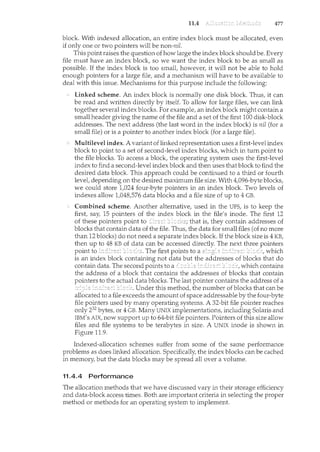
calls within the kernel as they execute to perform the system call. Lines ending
with "U" are executed in user mode, and lines ending in "K" in kernel mode.
Debugging the interactions between user-level and kernel code is nearly
impossible without a toolset that understands both sets of code and can
instrument the interactions. For that toolset to be truly useful, it must be able
to debug any area of a system, including areas that were not written with
debugging in mind, and do so without affecting system reliability. This tool
must also have a minimum performance impact-ideally it should have no
impact when not in use and a proportional impact during use. The DTrace tool
meets these requirements and provides a dynamic, safe, low-impact debugging
environncent.
Until the DTrace framework and tools became available with Solaris 10,
kernel debugging was usually shrouded in mystery and accomplished via
happenstance and archaic code and tools. For example, CPUs have a breakpoint
feature that will halt execution and allow a debugger to examine the state of the
system. Then execution can continue until the next breakpoint or termination.
This method cannot be used in a multiuser operating-system kernel without
negatively affecting all of the users on the system. Pn:rEEn,g, which periodically
samples the instruction pointer to determine which code is being executed, can
show statistical trends but not individual activities. Code can be included in
the kernel to emit specific data under specific circumstances, but that code
86 Chapter 2
# ./all.d 'pgrep xclock' XEventsQueued
dtrace: script './all.d' matched 52377 probes
CPU FUNCTION
0 -> XEventsQueued
0 -> _XEventsQueued
u
u
0 -> _XllTransBytesReadable U
0 <- _XllTransBytesReadable U
0 -> _XllTransSocketBytesReadable U
0 <- _XllTransSocketBytesreadable U
0 -> ioctl U
0
0
0
0
0
0
0
0
0
0
0
0
0
0
0
0
0 <-
<-
<-
-
-> ioctl
<-
-> getf
-> set active fd
<- set active fd
<- getf
-> get udatamodel
<- get udatamodel
-> releasef
-> clear active
-
<- clear active
-> cv broadcast
<- cv broadcast
<- releasef
ioctl
ioctl
XEventsQueued
XEventsQueued
fd
fd
K
K
K
K
K
K
K
K
K
K
K
K
K
K
u
u
u
Figure 2.22 Solaris 10 dtrace follows a system call within the kernel.
slows down the kernel and tends not to be included in the part of the kernel
where the specific problem being debugged is occurring.
In contrast, DTrace runs on production systems-systems that are running
important or critical applications-and causes no harm to the system. It
slows activities while enabled, but after execution it resets the system to its
pre-debugging state. It is also a broad and deep tool. It can broadly debug
everything happening in the system (both at the user and kernel levels and
between the user and kernel layers). DTrace can also delve deeply into code,
showing individual CPU instructions or kernel subroutine activities.
is composed of a compiler, a framework, of
written within that framework, and of those probes. DTrace
providers create probes. Kernel structures exist to keep track of all probes that
the providers have created. The probes are stored in a hash table data structure
that is hashed by name and indexed according to unique probe identifiers.
When a probe is enabled, a bit of code in the area to be probed is rewritten
to call dtrace_probe (probe identifier) and then continue with the code's
original operation. Different providers create different kinds of probes. For
example, a kernel system-call probe works differently from a user-process
probe, and that is different from an I/O probe.
DTrace features a compiler that generates a byte code that is run in the
kernel. This code is assured to be "safe" by the compiler. For example, no
2.9 87
loops are allowed, and only specific kernel state modifications are allowed
when specifically requested. Only users with the DTrace "privileges" (or "root"
users) are allowed to use DT!·ace, as it can retrieve private kernel data (and
modify data if requested). The generated code runs in the kernel and enables
probes. It also enables consumers in user mode and enables communications
between the two.
A DT!·ace consumer is code that is interested in a probe and its results.
A consumer requests that the provider create one or more probes. When a
probe fires, it emits data that are managed by the kernel. Within the kernel,
actions called or are performed when probes
fire. One probe can cause multiple ECBs to execute if more than one consumer
is interested in that probe. Each ECB contains a predicate ("if statement") that
can filter out that ECB. Otherwise, the list of actions in the ECB is executed. The
most usual action is to capture some bit of data, such as a variable's value at
that point of the probe execution. By gathering such data, a complete picture of
a user or kernel action can be built. Further, probes firing from both user space
and the kernel can show how a user-level action caused kernel-level reactions.
Such data are invaluable for performance monitoril1.g and code optimization.
Once the probe consumer tennil1.ates, its ECBs are removed. If there are no
ECBs consuming a probe, the probe is removed. That involves rewriting the
code to remove the dtrace_probe call and put back the original code. Thus,
before a probe is created and after it is destroyed, the system is exactly the
same, as if no probing occurred.
DTrace takes care to assure that probes do not use too much memory or
CPU capacity, which could harm the running system. The buffers used to hold
the probe results are monitored for exceeding default and maximum limits.
CPU time for probe execution is monitored as well. If limits are exceeded, the
consumer is terminated, along with the offending probes. Buffers are allocated
per CPU to avoid contention and data loss.
An example ofD code and its output shows some ofits utility. The following
program shows the DTrace code to enable scheduler probes and record the
amount of CPU time of each process running with user ID 101 while those
probes are enabled (that is, while the program nms):
sched:: :on-cpu
uid == 101
{
self->ts timestamp;
}
sched: : :off-cpu
self->ts
{
}
©time [execname]
self->ts = 0;
sum(timestamp- self->ts);
The output of the program, showing the processes and how much time (in
nanoseconds) they spend running on the CPUs, is shown in Figure 2.23.
88 Chapter 2
2.10
# dtrace -s sched.d
dtrace: script 'sched.d' matched 6 probes
Ac
grwme-settings-d
gnome-vfs-daemon
dsdm
wnck-applet
gnome-panel
clock-applet
mapping-daemon
xscreensaver
metacity
Xorg
gnome-terminal
mixer_applet2
Java
142354
158243
189804
200030
277864
374916
385475
514177
539281
2579646
5007269
7388447
10769137
Figure 2.23 Output of the 0 code.
Because DTrace is part of the open-source Solaris 10 operating system,
it is being added to other operating systems when those systems do not
have conflicting license agreements. For example, DTrace has been added to
Mac OS X 10.5 and FreeBSD and will likely spread further due to its unique
capabilities. Other operating systems, especially the Linux derivatives, are
adding kernel-tracing functionality as well. Still other operating systems are
beginning to include performance and tracing tools fostered by research at
various institutions, including the Paradyn project.
It is possible to design, code, and implement an operating system specifically
for one machine at one site. More commonly, however, operating systems
are designed to nm on any of a class of machines at a variety of sites with
a variety of peripheral configurations. The system must then be configured
or generated for each specific computer site, a process sometimes known as
system generation (SYSGEN).
The operating system is normally distributed on disk, on CD-ROM or
DVD-ROM, or as an "ISO" image, which is a file in the format of a CD-ROM
or DVD-ROM. To generate a system, we use a special program. This SYSGEN
program reads from a given file, or asks the operator of the system for
information concerning the specific configuration of the hardware systenc, or
probes the hardware directly to determine what components are there. The
following kinds of information must be determined.
What CPU is to be used? What options (extended instruction sets, floating-
point arithmetic, and so on) are installed? For multiple CPU systems, each
CPU may be described.
2.11
2.11 89
How will the boot disk be formatted? How many sections, or "partitions,"
will it be separated into, and what will go into each partition?
How much memory is available? Some systems will determine this value
themselves by referencing memory location after memory location until an
"illegal address" fault is generated. This procedure defines the final legal
address and hence the amount of available memory.
What devices are available? The system will need to know how to address
each device (the device number), the device interrupt number, the device's
type and model, and any special device characteristics.
What operating-system options are desired, or what parameter values are
to be used? These options or values might include how many buffers of
which sizes should be used, what type of CPU-scheduling algorithm is
desired, what the maximum number of processes to be supported is, and
so on.
Once this information is determined, it can be used in several ways. At one
extreme, a system administrator can use it to modify a copy ofthe source code of
the operating system. The operating system then is completely compiled. Data
declarations, initializations, and constants, along with conditional compilation,
produce an output-object version of the operating system that is tailored to the
system described.
At a slightly less tailored level, the system description can lead to the
creation of tables and the selection of modules from a precompiled library.
These modules are linked together to form the generated operating system.
Selection allows the library to contain the device drivers for all supported I/0
devices, but only those needed are linked into the operating system. Because
the system is not recompiled, system generation is faster, but the resulting
system may be overly general.
At the other extreme, it is possible to construct a system that is completely
table driven. All the code is always part of the system, and selection occurs at
execution time, rather than at compile or lil1.k time. System generation involves
simply creating the appropriate tables to describe the system.
The major differences among these approaches are the size and generality
of the generated system and the ease of modifying it as the hardware
configuration changes. Consider the cost of modifying the system to support a
newly acquired graphics termil1.al or another disk drive. Balanced against that
cost, of course, is the frequency (or infrequency) of such changes.
After an operating system is generated, it must be made available for use by
the hardware. But how does the hardware know where the kernel is or how to
load that kernel? The procedure of starting a computer by loading the kernel
is known as booting the system. On most computer systems, a small piece of
code known as the bootstrap program or bootstrap loader locates the kernel,
loads it into main memory, and starts its execution. Some computer systems,
such as PCs, use a two-step process in which a simple bootstrap loader fetches
a more complex boot program from disk, which in turn loads the kernel.
90 Chapter 2
2.12
When a CPU receives a reset event-for instance, when it is powered up
or rebooted-the instruction register is loaded with a predefined memory
location, and execution starts there. At that location is the initial bootstrap
program. This program is in the form of read-only memory (ROM), because
the RAM is in an unknown state at system startup. ROM is convenient because
it needs no initialization and cannot easily be infected by a computer virus.
The bootstrap program can perform a variety of tasks. Usually, one task
is to run diagnostics to determine the state of the machine. If the diagnostics
pass, the program can continue with the booting steps. It can also initialize all
aspects of the system, from CPU registers to device controllers and the contents
of main memory. Sooner or later, it starts the operating system.
Some systems-such as cellular phones, PDAs, and game consoles-store
the entire operating system in ROM. Storing the operating system in ROM is
suitable for small operating systems, simple supporting hardware, and rugged
operation. A problem with this approach is that changing the bootstrap code
requires changing the ROM hardware chips. Some systems resolve this problem
by using erasable programmable read-only memory (EPROM), which is read-
only except when explicitly given a command to become writable. All forms
of ROM are also known as firmware, since their characteristics fall somewhere
between those of hardware and those of software. A problem with firmware
in general is that executing code there is slower thart executing code in RAM.
Some systems store the operating system in firmware and copy it to RAM for
fast execution. A final issue with firmware is that it is relatively expensive, so
usually only small ammmts are available.
For large operating systems (including most general-purpose operating
systems like Windows, Mac OS X, and UNIX) or for systems that change
frequently, the bootstrap loader is stored in firmware, and the operating system
is on disk. In this case, the bootstrap nms diagnostics and has a bit of code
that can read a single block at a fixed location (say block zero) from disk into
memory and execute the code from that b!ock. The program stored in the
boot block may be sophisticated enough to load the entire operating system
into memory and begin its execution. More typically, it is simple code (as it fits
in a single disk block) and knows only the address on disk and length of the
remainder of the bootstrap program. is an example of an open-source
bootstrap program for Linux systems. All of the disk-bound bootstrap, and the
operating system itself, can be easily changed by writing new versions to disk.
A disk that has a boot partition (more on that in Section 12.5.1) is called a boot
disk or system disk.
Now that the full bootsh·ap program has been loaded, it can traverse the
file system to find the operating system kernel, load it into memory, and start
its execution. It is only at this point that the system is said to be running.
Operating systems provide a number of services. At the lowest level, system
calls allow a running program to make requests from the operating system
directly. At a higher level, the command interpreter or shell provides a
mechanism for a user to issue a request without writing a program. Commands
may come from files during batch-mode execution or directly from a terminal
91
when in an interactive or time-shared mode. System programs are provided to
satisfy many common u.ser requests.
The types of requests vary accord:ilcg to level. The system-call level must
provide the basic functions, such as process control and file and device
manipulation. Higher-level requests, satisfied by the command interpreter or
system programs, are translated into a sequence ofsystem calls. System services
can be classified into several categories: program controt status requests,
and I/0 requests. Program errors can be considered implicit requests for
service.
Once the system services are defined, the structure of the operating system
can be developed. Various tables are needed to record the information that
defines the state of the computer system and the status of the system's jobs.
The design of a new operating system is a major task. It is important that
the goals of the system be well def:ilced before the design begins. The type of
system desired is the foundation for choices among various algorithms and
strategies that will be needed.
S:iiLCe an operating system is large, modularity is important. Designing a
system as a sequence of layers or using a microkernel is considered a good
technique. The virtual-machine concept takes the layered approach and treats
both the kernel of the operat:ilcg system and the hardware as though they were
hardware. Even other operating systems may be loaded on top of this virtual
machine.
Throughout the entire operating-system design cycle, we must be careful
to separate policy decisions from implementation details (mechanisms). This
separation allows maximum flexibility if policy decisions are to be changed
later.
Operating systems are now almost always written in a systems-
implementation language or in a higher-level language. This feature improves
their implementation, maintenance, and portability. To create an operating
system for a particular machine configuration, we must perform system
generation.
Debugging process and kernel failures can be accomplished through the
use of debuggers and other tools that analyze core dumps. Tools such as DTrace
analyze production systems to fucd bottlenecks and understand other system
behavior.
For a computer system to begin running, the CPU must initialize and start
executing the bootstrap program in firmware. The bootstrap can execute the
operating system directly if the operating system is also in the firmware, or
it can complete a sequence in which it loads progressively smarter programs
from firmware and disk until the operating system itself is loaded into memory
and executed.
2.1 What are the five major activities of an operat:ilcg system with regard to
file management?
2.2 What are the three major activities of an operating system with regard
to memory management?
92 Chapter 2
2.3 Why is a just-in-time compiler useful for executing Java programs?
2.4 The services and functions provided by an operating system can be
divided into two main categories. Briefly describe the two categories
and discuss how they differ.
2.5 Why is the separation of mechanism and policy desirable?
2.6 Would it be possible for the user to develop a new command interpreter
using the system-call interface provided by the operating system?
2.7 What is the purpose of the command interpreter? Why is it usually
separate from the kernel?
2.8 What is the main advantage for an operating-system designer of using
a virtual-machine architecture? What is the main advantage for a user?
2.9 It is sometimes difficult to achieve a layered approach if two components
of the operating system are dependent on each other. Identify a scenario
in which it is unclear how to layer two system components that require
tight coupling of their functionalities.
2.10 What is the main advantage of the layered approach to system design?
What are the disadvantages of using the layered approach?
2.11 What is the relationship between a guest operating system and a host
operating system in. a system like VMware? What factors need to be
considered in choosing the host operating system?
2.12 Describe three general methods for passing parameters to the operating
system.
2.13 What is the main advantage of the microkemel approach to system
design? How do user programs and system services interact in a
microkernel architecture? What are the disadvantages of usil1.g the
microkernel approach?
2.14 What system calls have to be executed by a command interpreter or shell
in order to start a new process?
2.15 What are the two models of interprocess conununication? What are the
strengths and weaknesses of the two approaches?
2.16 The experimental Synthesis operating system has an assembler incor-
porated in the kernel. To optimize system-call performance, the kernel
assembles routines within kernel space to minimize the path that the
system call must take through the kernel. This approach is the antithesis
of the layered approach, in which the path through the kernel is extended
to make buildu1.g the operating system easier. Discuss the pros and cons
of the Synthesis approach to kernel design and system-performance
optimization.
2.17 In what ways is the modular kernel approach similar to the layered
approach? In what ways does it differ from the layered approach?
2.18 How could a system be designed to allow a choice of operating systems
from which to boot? What would the bootstrap program need to do?
93
2.19 What are the advantages and disadvantages of using the same system-
call interface for manipulating both files and devices?
2.20 Describe how you could obtain a statistical profile of the amount of time
spent by a program executing different sections of its code. Discuss the
importance of obtaining such a statistical profile.
2.21 Why do some systems store the operating system in firmware, while
others store it on disk?
2.22 In Section 2.3, we described a program that copies the contents of one file
to a destination file. This program works by first prompting the user for
the name of the source and destilcation files. Write this program using
either the Win32 or POSIX API. Be sure to include all necessary error
checking, including ensuring that the source file exists.
Once you have correctly designed and tested the program, if
you used a system that supports it, run the program using a utility
that traces system calls. Linux systems provide the ptrace utility, and
Solaris systems use the truss or dtrace command. On Mac OS X, the
ktrace facility provides similar functionality. As Windows systems do
not provide such features, you will have to trace through the Win32
version of this program using a debugger.
2.23 Adding a system call to the Linux Kernel
In this project you will study the system-call interface provided by the
Linux operating system and learnhow user programs communicate with
the operating system kernel via this interface. Your task is to i11corporate
a new system call into the kernet thereby expanding the functionality
of the operating system.
Part 1: Getting Started
A user-mode procedure call is performed by passing arguments to the
called procedure either on the stack or through registers, saving the
current state and the value of the program counter, and jumping to
the beginning of the code corresponding to the called procedure. The
process continues to have the same privileges as before.
System calls appear as procedure calls to user programs but result i11
a change in execution context and privileges. In Linux on the Intel386
architecture, a system call is accomplished by storing the system-call
number into the EAX register, storing arguments to the system call in
other hardware registers, and executing a trap instruction (which is the
94 Chapter 2
INT Ox80 assembly instruction). After the trap is executed, the system-
call number is used to index into a table of code pointers to obtain the
starting address for the handler code implementing the system call. The
process then juxnps to this address, and the privileges of the process
are switched from user to kernel mode. With the expanded privileges,
the process can now execute kernel code, which may include privileged
instructions that cannot be executed in user mode. The kernel code
can then carry out the requested services, such as interacting with I/O
devices, and can perform process management and other activities that
cannot be performed in user mode.
The system call numbers for recent versions of the Linux ker-
nel are listed in lusrI src/linux-2. xlinclude/asm-i386/unistd. h.
(For instance, __NR_close corresponds to the system call close 0, which
is invoked for closin.g a file descriptor, and is defined as value 6.) The
list of pointers to system-call handlers is typically stored in the file
lusrlsrcllinux-2.x/arch/i386/kernel/entry.S under the head-
ing ENTRY (sys_calLtable). Notice that sys_close is stored at entry
number 6 in the table to be consistent with the system-call number
defined in the unistd. h file. (The keyword .long denotes that the entry
will occupy the same number of bytes as a data value of type long.)
Part 2: Building a New Kernel
Before adding a system call to the kernel, you must familiarize yourself
with the task of building the binary for a kernel from its source code and
booting the machine with the newly built kernel. This activity comprises
the following tasks, some of which depend on the particular installation
of the Linux operating system in use.
Obtain the kernel source code for the Linux distribution. If the
source code package has already been installed on your machine,
the corresponding files might be available under lusrI srcllinux
or /usrI src/linux-2. x (where the suffix corresponds to the kernel
version number). If the package has not yet been installed, it can be
downloaded from the provider of your Linux distribution or from
http:l/www.kernel.org.
Learn how to configure, compile, and install the kernel binary. This
will vary among the different kernel distributions, but some typical
commands for building the kernel (after entering the directory
where the kernel source code is stored) include:
o make xconfig
o make dep
o make bzimage
Add a new entry to the set of boatable kernels supported by the
system. The Linux operating system typically uses utilities such as
lilo and grub to maintain a list ofbootable kernels from which the
95
user can choose during machine boot-up. If your system supports
lilo, add an entry to lilo. conf, such as:
image=/boot/bzimage.mykernel
label=mykernel
root=/dev/hda5
read-only
where lbootlbzimage. mykernel is the kernel image and mykernel
is the label associated with the new kernel. This step will allow
you to choose the new kernel during the boot-up process. You will
then have the option of either booting the new kernel or booting
the unmodified kernel if the newly built kernel does not ftmction
properly.
Part 3: Extending the Kernel Source
You can now experiment with adding a new file to the set of source
files used for compiling the kernel. Typically, the source code is stored
in the lusrI srcllinux-2. xlkernel directory, although that location
may differ in your Linux distribution. There are two options for adding
the system call. The first is to add the system call to an existing source file
in this directory. The second is to create a new file in the source directory
and modify lusrI srcllinux-2. xlkerneliMakefile to include the
newly created file in the compilation process. The advantage of the first
approach is that when you modify an existing file that is already part of
the compilation process, the Makefile need not be modified.
Part 4: Adding a System Call to the Kernel
Now that you are familiar with the various background tasks corre-
sponding to building and booting Linux kernels, you can begin the
process of adding a new system call to the Linux kernel. In this project,
the system call will have limited functionality; it will simply transition
from user mode to kernel mode, print a message that is logged with the
kernel messages, and transition back to user mode. We will call this the
helloworld system call. While ithas only limited functionality, it illustrates
the system-call mechanism and sheds light on the interaction between
user programs and the kernel.
Create a new file called helloworld. c to define your system call.
Include the header files linuxllinkage. h and linuxlkernel. h.
Add the following code to this file:
#include <linuxllinkage.h>
#include <linuxlkernel.h>
asmlinkage int sysJhelloworld() {
printk(KERN_EMERG "hello world!");
return 1;
}
96 Chapter 2
This creates a system call with the name sys_helloworld (). If you
choose to add this system call to an existing file in the source
directory, all that is necessary is to add the sys_helloworld ()
function to the file you choose. In the code, asmlinkage is
a rellli<ant from the days when Linux used both C++ and C
code and is used to indicate that the code is written in C. The
printk () function is used to print messages to a kernel log file
and therefore may be called only from the kernel. The kernel mes-
sages specified in the parameter to printk () are logged in the
file /var/log/kernel/warnings. The function prototype for the
printk () call is defined in /usr/include/linux/kernel. h.
Define a new system call number for __NR_helloworld in
/usr/src/linux-2.x/include/asm-i386/unistd.h. A user
program can use this number to identify the newly added system
call. Also be sure to increment the value for __NR_syscalls, which
is stored in the same file. This constant tracks the number of system
calls currently defuced in the kernel.
Add an entry .long sys_helloworld to the sys_calLtable
definedinthe/usr/src/linux-2.x/arch/i386/kernel/entry.S
file. As discussed earlier, the system-call number is used to index
into this table to find the position of the handler code for the
invoked system call.
Add your file helloworld. c to the Makefile (if you created a new
file for your system call.) Save a copy of your old kernel binary
image (in case there are problems with your newly created kernel).
You can now build the new kernet rename it to distinguish it from
the unmodified kernet and add an entry to the loader configuration
files (such as lilo. conf). After completing these steps, you can boot
either the old kernel or the new kernel that contains your system
call.
Part 5: Using the System Call from a User Program
When you boot with the new kernet it will support the newly defined
system call; you now simply need to invoke this system call from a
user program. Ordinarily, the standard C library supports an interface
for system calls defined for the Linux operating system. As your new
system call is not linked into the standard C library, however, invoking
your system call will require manual intervention.
As noted earlie1~ a system call is invoked by storing the appropriate
value in a hardware register and performing a trap instruction. Unfortu-
nately, these low-level operations cannot be performed using C language
statements and instead require assembly instructions. Fortunately, Linux
provides macros for instantiating wrapper functions that contain the
appropriate assembly instructions. For instance, the following C pro-
gram uses the _syscallO () macro to invoke the newly defined system
call:
#include <linux/errno.h>
#include <sys/syscall.h>
#include <linux/unistd.h>
_syscallO(int, helloworld);
main()
{
helloworld();
}
97
The _syscallO macro takes two arguments. The first specifies the
type of the value returned by the system call; the second is the
name of the system call. The name is used to identify the system-
call number that is stored in the hardware register before the trap
instruction is executed. If your system call requires arguments, then
a different macro (such as _syscallO, where the suffix indicates the
number of arguments) could be used to instantiate the assembly
code required for performing the system call.
Compile and execute the program with the newly built kernel.
There should be a message "hello world!" in the kernel log file
/var/log/kernel/warnings to indicate that the system call has
executed.
As a next step, consider expanding the functionality of your system call.
How would you pass an integer value or a character string to the system
call and have it printed illto the kernel log file? What are the implications
of passing pointers to data stored in the user program's address space
as opposed to simply passing an integer value from the user program to
the kernel using hardware registers?
Dijkstra [1968] advocated the layered approach to operating-system desigll".
Brinch-Hansen [1970] was an early proponent of constructing an operating
system as a kernel (or nucleus) on which more complete systems can be built.
System instrumentation and dynamic tracing are described in Tamches and
Miller [1999]. DTrace is discussed in Cantrill et al. [2004]. The DTrace source
code is available at http: I I src. opensolaris. org/source/" Cheung and
Loong [1995] explore issues of operating-system structure from microkernel
to extensible systems.
MS-DOS, Version 3.1, is described in Microsoft [1986]. Windows NT and
Windows 2000 are described by Solomon [1998] and Solomon and Russinovich
[2000]. Windows 2003 and Windows XP internals are described in Russinovich
and Solomon [2005]. Hart [2005] covers Windows system$ programming in
detail. BSD UNIX is described in McKusick et al. [1996]. Bovet and Cesati
[2006] thoroughly discuss the Linux kernel. Several UNIX systems-including
Mach-are treated in detail in Vahalia [1996]. Mac OS X is presented at
98 Chapter 2
http: I lwww. apple. comlmacosx and in Singh [2007]. Solaris is fully described
in McDougall and Mauro [2007].
The first operating system to provide a virtual machine was the CPI 67 on
an IBM 360167. The commercially available IBM VMI370 operating system was
derived from CP167. Details regarding Mach, a microkernel-based operating
system, canbe found in Young et al. [1987]. Kaashoeket al. [1997] present details
regarding exokernel operating systems, wherein the architecture separates
management issues from protection, thereby giving untrusted software the
ability to exercise control over hardware and software resources.
The specifications for the Java language and the Java virtual machine are
presented by Gosling et al. [1996] and by Lindholm and Yellin [1999], respec-
tively. The internal workings of the Java virtual machine are fully described
by Ven11ers [1998]. Golm et al. [2002] highlight the JX operating system; Back
et al. [2000] cover several issues in the design of Java operating systems. More
information on Java is available on the Web at http: I lwww. j avasoft. com.
Details about the implementation of VMware can be found in Sugerman et al.
[2001]. Information about the Open Virh1al Machine Format can be found at
http:llwww.vmware.comlappliancesllearnlovf.html.
Part Two
A process can be thought of as a program in execution. A process will
need certain resources-such as CPU time, memory, files, and 1/0 devices
-to accomplish its task. These resources are allocated to the process
either when it is created or while it is executing.
A process is the unit of work in most systems. Systems consist of
a collection of processes: Operating-system processes execute system
code, and user processes execute user code. All these processes may
execute concurrently.
Although traditionally a process contained only a single thread of
control as it ran, most modem operating systems now support processes
that have multiple threads.
The operating system is responsible for the following activities in
connection with process and thread management: the creation and
deletion of both user and system processes; the scheduling of processes;
and the provision of mechanisms for synchronization, communication,
and deadlock handling for processes.
3.1
CHAPTER
Early computer systems allowed only one program to be executed at a
time. This program had complete control of the system and had access to
all the system's resources. In contrast, current-day computer systems allow
multiple programs to be loaded into memory and executed concurrently.
This evolution required firmer control and more compartmentalization of the
various programs; and these needs resulted in the notion of a process/ which is
a program in execution. A process is the unit of work in a modern time-sharing
system.
The more complex the operating system is, the more it is expected to do on
behalf of its users. Although its main concern is the execution of user programs,
it also needs to take care of various system tasks that are better left outside the
kernel itself. A system therefore consists of a collection of processes: operating-
system processes executing system code and user processes executing user
code. Potentially/ all these processes can execute concurrently/ with the CPU (or
CPUs) multiplexed among them. By switching the CPU between processes, the
operating system can make the computer more productive. In this chapter/ you
will read about what processes are and how they work.
To introduce the notion of a process- a program in execution, which forms
the basis of all computation.
To describe the various features of processes, including scheduling,
creation and termination, and communication.
To describe communication in client-server systems.
A question that arises in discussing operating systems involves what to call all
the CPU activities,_f_QCIJ:C:hJ3ystem~xeq_l_~§_LQQ.S_;.I''b§'X{C9::?_
_2l_!_i_!11_e:-::?_l<(it~ds_ys!~:r:tl
has user programs, or tas~~- Even on a single-user system such as Microsoft
101
102 Chapter 3
Windows, a user may be able to run several programs at one time: a word
processor, a Web browse1~ and an e-mail package. And even if the user can
execute only one program at a time, the operating system may need to support
its own internal programmed activities, such as memory management. In many
respects, all these activities are similar, so we call all of them processes.
_The ten:ns~Job i:!DQ pL~e~.s etif:'_lised almost interchangeably in this te)(t.
Although we personally prefer the term process, much of operat1ng-system
theory and terminology was developed during a time when the major activity
of operating systems was job processing. It would be misleading to avoid
the use of commonly accepted terms that include the word job (such as job
scheduling) simply because process has superseded job.
3.1.1 The Process
Informally, as mentioned earlier, a process is a program in execution. A process
is more than the program code, which is sometimes known as the text section.
It also includes the current activity, as represented by the value of the program
counter and the contents of the processor's registers. A process generally also
includes the process stack, which contains temporary data (such as function
parameters, return addresses, and local variables), and a data section, which
contains global variables. A process may also include a heap, which is memory
thatis dynamically allocated during process run time. The structure of a process
in memory is shown in Figure 3.1.
We emphasize that a programby itself is not a process; a program is a passive
entity, such as a file containing a list of instructions stored on disk (often called
an executable file), whereas a process is an active entity, with a program counter
specifying the next instruction to execute and a set of associated resources. A
program becomes a process when an executable file is loaded into memory.
Two common techniques for loading executable files are double-clicking an
icon representing the executable file and entering the name of the executable
file on the command line (as in prog. exe or a. out.)
0
figure 3.1 Process in memory.<
3.1 103
1/0 or event completion
Figure 3.2 Diagram of process state.
Although two processes may be associated with the same program, they
are nevertheless considered two separate execution sequences. For instance,
several users may be running different copies of the mail program, or the same
user may invoke many copies of the Web browser program. Each of these is a
separate process; and although the text sections are equivalent, the data, heap,
and stack sections vary. It is also common to have a process that spawns many
processes as it runs. We discuss such matters in Section 3.4.
3.1.2 Process State
As a proces::; excr:utes, it changes state. The state of a process is defil1.ed in
part by the current activity of that process. Each process may be in one of the
following states:
New. The process is being created.
Running. Instructions are being executed.
Waiting. The process is waiting for some event to occur (such as an I/0
completion or reception of a signal).
Ready. The process is waiting to be assigned to a processor.
Terminated. The process has finished execution.
These names are arbitrary, and they vary across operating systems. The states
that they represent are found on all systems, however. Certain operating
systems also more finely delineate process states. It is important to realize
that only one process can be running on any processor at any instant. Many
processes may be ready and waiting, however. The state diagram corresponding
to these states is presented in Figure 3.2.
3.1.3 Process Control Block
"§_(1cb pr()cess isrepreserlt~pjnthe operatir1,g system l:Jy a process_coptrol blo_ck _
(PCB)-alsocalled a taskcontroZbloclc. A PCB is shown in Figure 3.3. It contains
mi:my pieces of iil.format1o11assodated with a specific process, including these:
104 Chapter 3
• • •
Figure 3.3 Process control block (PCB).
Process state. The state may be new, ready runnil•g, waiting, halted, and
so on.
Program counter. The counter indicates the address of the next instruction
to be executed for this process.
CPU registers. The registers vary in number and type, depending on
the computer architecture. They mclude accumulators, index registers,
stack pointers, and general-purpose registers, plus any condition-code
information. Along with the program counter, this state information must
be saved when an mterrupt occurs, to allow the process to be continued
correctly afterward (Figure 3.4).
CPU-scheduling information. This information includes a process priority,
pointers to scheduling queues, and any other scheduling parameters.
(Chapter 5 describes process scheduling.)
Memory-management information. This information may include such
information as the value of the base and limit registers, the page tables,
or the segment tables, dependmg on the memory system used by the
operating system (Chapter 8).
Accounting information. This mformation includes the amount of CPU
and real time used, time limits, account numbers, job or process numbers,
and so on.
I/O status information. This information includes the list of I/O devices
allocated to the process, a list of open files, and so on.
In briet the PCB simply serves as the repository for any information that may
vary from process to process.
3.1.4 Threads
The process model discussed so far has implied that a process is a program
that performs a single thread of execution. For example, when a process is
running a word-processor program, a single thread of instructions is being
executed. This single thread of control allows the process to perform only one
3.2
process P0
idle
3.2
operating system
interrupt or system call
•
•
process P1
executing
idle
Figure 3.4 Diagram showing CPU switch from process to process.
105
task at one time. The user cannot simultaneously type in characters and run the
spell checker within the same process, for example. Many modern operatin.g
systems have extended the process concept to allow a process to have multiple
threads of execution and thus to perform more than one task at a time. On a
system that supports threads, the PCB is expanded to include information for
each thread. Other changes throughout the system are also needed to support
threads. Chapter 4 explores multithreaded processes in detail.
The objective of multiprogramming is to have some process nnming at all
times, to maximize CPU utilization. The objective of time sharing is to switch the
CPU among processes so frequently that users can interact with each program
while it is run.ning. To meet these objectives, the process scheduler selects
an available process (possibly from a set of several available processes) for
program execution on the CPU. For a single-processor system, there will never
be more than one running process. If there are more processes, the rest will
have to wait until the CPU is free and can be rescheduled.
3.2.1 Scheduling Queues
As processes enter the system, they are put into a job queue, which consists
of all processes in the system. The processes that are residing in main memory
and are ready and waiting to execute are kept on a list called the ready queue.
106 Chapter 3
PROCESS REPRESENTATION IN LINUX
The process control block in the Linux operating system is represented
by the C struch1re task_struct. This structure contains all the necessary
information for representing a process, including the state of the process,
scheduling and memory-management information, list of open files, and
pointers to the process's parent and any of its children. (A process's parent is
the process that created it; its children are any processes that it creates.) Some
of these fields include:
pid_t pid; I* process identifier *I
long state; I* state of the process *I
unsigned int time_slice I* scheduling information *I
struct task_struct *parent; I* this process's parent *I
struct list__head children; I* this process's children *I
struct files_struct *files; I* list of open files *I
struct mm_struct *mm; I* address space of this process *I
For example, the state of a process isrepresented by the field long state
in this structure. Within the Linux kernel, all active processes are represented
using a doubly linked list of task_struct, and the kernel maintains a pointer
-current-to the process currently executing on the system. This is shown
in Figure 3.5.
struct task_struct
process information
struct task_struct
process information
t
current
(currently executing proccess)
Figure 3.5 Active processes in Linux.
struct task_struct
process information
As an illustration of how the kernel might manipulate one of the fields in
the task_struct for a specified process, let's assume the system would like
to change the state of the process currently running to the value new_state.
If currentis a pointer to the process currently executing,its state is changed
with the following:
current->state = new_state;
This queue is generally stored as a linked list. A ready-queue header contains
pointers to the first and final PCBs in the list. Each PCB includes a pointer field
that points to the next PCB in the ready queue.
3.2 107
queue header
mag
tape ~=7:C""77~"""""
unit 0 k:t_82_11~~il-==
Figure 3.6 The ready queue and various 1/0 device queues.
The system also includes other queues. When a process is allocated the
CPU, it executes for a while and eventually quits, is interrupted, or waits for
the occurrence of a particular event, such as the completion of an I/0 request.
Suppose the process makes an I/O request to a shared device, such as a disk.
Since there are many processes in the system, the disk may be busy with the
I/0 request of some other process. The process therefore may have to wait for
the disk. The list of processes waiting for a particular I/0 device is called a
device queue. Each device has its own device queue (Figure 3.6).
A common representation of process scheduling is a queueing diagram,
such as that in Figure 3.7. Each rectangular box represents a queue. Two types
of queues are present: the ready queue and a set of device queues. The circles
represent the resources that serve the queues, and the arrows indicate the flow
of processes in the system.
A new process is initially put in the ready queue. It waits there until it is
selected for execution, or is dispatched. Once the process is allocated the CPU
and is executing, one of several events could occur:
The process could issue an I/0 request and then be placed in an I/0 queue.
The process could create a new subprocess and wait for the subprocess's
termination.
The process could be removed forcibly from the CPU, as a result of an
interrupt, and be put back in the ready queue.
108 Chapter 3
Figure 3.7 Queueing-diagram representation of process scheduling.
In the first two cases, the process eventually switches from the waiting state
to the ready state and is then put back in the ready queue. A process continues
this cycle until it terminates, at which time it is removed from all queues and
has its PCB and resources deallocated.
3.2.2 Schedulers
A process migrates among the various scheduling queues throughout its
lifetime. The operating system must select, for scheduling purposes, processes
from these queues in some fashion. The selection process is carried out by the
appropriate scheduler.
Often, in a batch system, more processes are submitted than canbe executed
immediately. These processes are spooled to a mass-storage device (typically a
disk), where they are kept for later execution. The long-term scheduler, or job
scheduler, selects processes from this pool and loads them into memory for
execution. The short-term scheduler, or CPU scheduler, selects from among
the processes that are ready to execute and allocates the CPU to one of them.
The primary distinction between these two schedulers lies in frequency
of execution. The short-term scheduler must select a new process for the CPU
frequently. A process may execute for only a few milliseconds before waiting
for an I/0 request. Often, the short-term scheduler executes at least once every
100 milliseconds. Because of the short time between executions, the short-term
scheduler must be fast. If it takes 10 milliseconds to decide to execute a process
for 100 milliseconds, then 10I (100 + 10) = 9 percent of the CPU is being used
(wasted) simply for scheduling the work.
The long-term scheduler executes much less freqvently; minutes may sep-
arate the creation of one new process and the next. The long-term scheduler
controls the degree of multiprogramming (the number of processes in mem-
ory). If the degree of multiprogramming is stable, then the average rate of
process creation must be equal to the average departure rate of processes
leaving the system. Thus, the long-term scheduler may need to be invoked
3.2 109
only when a process leaves the system. Because of the longer interval between
executions, the long-term scheduler can afford to take more tin<e to decide
which process should be selected for execution.
It is important that the long-term scheduler make a careful selection. In
general, most processes can be described as either I/0 bound or CPU bound. An
I/O-bound process is one that spends more of its time doing I/O than it spends
doing computations. A CPU-bound process, in contrast, generates I/0 requests
infrequently, using more of its time doing computations. It is important that the
long-term scheduler select a good process mix of I/O-bound and CPU-bound
processes. If all processes are I/0 bound, the ready queue will almost always
be empty, and the short-term scheduler will have little to do. If all processes
are CPU bound, the I/0 waiting queue will almost always be empty, devices
will go unused, and again the system will be unbalanced. The system with the
best performance will thus have a combination of CPU-bound and I/O-bound
processes.
On some systems, the long-term scheduler may be absent or minimal.
For example, time-sharing systems such as UNIX and Microsoft Windows
systems often have no long-term scheduler but simply put every new process in
memory for the short-term scheduler. The stability of these systems depends
either on a physical limitation (such as the number of available terminals)
or on the self-adjusting nature of human users. If performance declines to
m<acceptable levels on a multiuser system, some users will simply quit.
Some operating systems, such as time-sharing systems, may introduce an
additional, intermediate level of scheduling. This medium-term scheduler is
diagrammed in Figure 3.8. The key idea behind a medium-term scheduler
is that sometimes it can be advantageous to remove processes from mem-
ory (and from active contention for the CPU) and thus reduce the degree
of multiprogramrning. Later, the process can be reintroduced into memory,
and its execution can be continued where it left off. This scheme is called
swapping. The process is swapped out, and is later swapped in, by the
medium-term scheduler. Swapping may be necessary to improve the pro-
cess mix or because a change in memory requirements has overcommitted
available memory, requiring memory to be freed up. Swapping is discussed in
Chapter 8.
swap in .·.····••·.·•.··.partiaii}' exec~t~d
•sw11pped-out processes·.
swap out
Figure 3.8 Addition of medium-term scheduling to the queueing diagram.
110 Chapter 3
3.3
3.2.3 Context Switch
As mentioned in Section 1.2.1, interrupts cause the operating system to change
a CPU from its current task and to run a kernel routine. Such operations happen
frequently on general-purpose systems. When an interrupt occurs, the system
needs to save the current of the process running on the CPU so that
it can restore that context when its processing is done, essentially suspending
the process and then resuming it. The context is represented in the PCB of the
process; it includes the value of the CPU registers, the process state (see Figure
3.2), and memory-management information. Generically, we perform a
of the current state of the CPU, be it in kernel or user mode, and then a
to resu.me operations.
Switching the CPU to another process requires performing a state save
of the current process and a state restore of a different process. This task is
known as a When a context switch occurs, the kernel saves the
context of the old process in its PCB and loads the saved context of the new
process scheduled to run. Context-switch time is pure overhead, because the
system does no useful work while switching. Its speed varies from machine to
machine, depending on the memory speed, the number of registers that must
be copied, and the existence of special instructions (such as a single instruction
to load or store all registers). Typical speeds are a few milliseconds.
Context-switch times are highly dependent on hardware support. For
instance, some processors (such as the Sun UltraSPARC) provide multiple sets
of registers. A context switch here simply requires changing the pointer to the
current register set. Of course, if there are more active processes than there are
register sets, the system resorts to copying register data to and from memory,
as before. Also, the more complex the operating system, the more work must
be done during a context switch. As we will see in Chapter 8, advanced
memory-management techniques may require extra data to be switched with
each context. For instance, the address space of the current process must be
preserved as the space of the next task is prepared for use. How the address
space is preserved, and what amount of work is needed to preserve it, depend
on the memory-management method of the operating system.
The processes in most systems can execute concurrently, and they may
be created and deleted dynamically. Thus, these systems must provide a
mechanism for process creation and termination. In this section, we explore
the n1.echanisms involved in creating processes and illustrate process creation
on UNIX and Windows systems.
3.3.1 Process Creation
A process may create several new processes, via a create-process system call,
during the course of execution. The creating process is called a parent process,
and the new processes are called the children of that process. Each of these
new processes may in turn create other processes, forming a tree of processes.
Most operating systems (including UNIX and the Windows family of
operating systems) identify processes according to a unique process identifier
3.3 111
(or pid), which is typically an integer number. Figure 3.9 illustrates a typical
process tree for the Solaris operating system, showing the name of each process
and its pid. In Solaris, the process at the top of the tree is the sched process,
with pid of 0. The sched process creates several children processes-including
pageout and fsflush. These processes are responsible for managing memory
and file systems. The sched process also creates the init process, which serves
as the root parent process for all user processes. In Figure 3.9, we see two
children of init-inetd and dtlogin. inetd is responsible for networking
services such as telnet and ftp; dtlogin is the process representing a user
login screen. When a user logs in, dtlogin creates an X-windows session
(Xsession), which in turns creates the sdt_shel process. Below sdLshel, a
user's command-line shell-the C-shell or csh-is created. In this command-
line interface, the user can then invoke various child processes, such as the ls
and cat commands. We also see a csh process with pid of 7778 representing a
user who has logged onto the system using telnet. This user has started the
Netscape browser (pid of 7785) and the emacs editor (pid of 8105).
On UNIX, we can obtain a listing of processes by using the ps command. For
example, the command ps -el will list complete information for all processes
currently active in the system. It is easy to construct a process tree similar to
what is shown in Figure 3.9 by recursively tracing parent processes all the way
to the init process.
In general, a process will need certain resources (CPU time, memory, files,
I/0 devices) to accomplish its task. When a process creates a subprocess, that
inetd
pid=140
dtlogin
pid = 251
Figure 3.9 A tree of processes on a typical Solaris system.
112 Chapter 3
subprocess may be able to obtain its resources directly from the operating
system, or it may be constrained to a subset of the resources of the parent
process. The parent may have to partition its resources among its children,
or it may be able to share some resources (such as ncemory or files) among
several of its children. Restricting a child process to a subset of the parent's
resources prevents any process from overloading the system by creating too
many subprocesses.
In addition to the various physical and logical resources that a process
obtains when it is created, initialization data (input) may be passed along by
the parent process to the child process. For example, consider a process whose
function is to display the contents of a file-say, img.jpg-on the screen of a
terminal. When it is created, it will get, as an input from its parent process,
the name of the file img.jpg, and it will use that file name, open the file, and
write the contents out. It may also get the name of the output device. Some
operating systems pass resources to child processes. On such a system, the
new process may get two open files, img.jpg and the terminal device, and may
simply transfer the datum between the two.
When a process creates a new process, two possibilities exist in terms of
execution:
The parent continues to execute concurrently with its children.
The parent waits until some or all of its children have terminated.
There are also two possibilities in terms of the address space of the new process:
The child process is a duplicate of the parent process (it has the same
program and data as the parent).
The child process has a new program loaded into it.
To illustrate these differences, let's first consider the UNIX operating system.
In UNIX, as we've seen, each process is identified by its process identifier,
which is a tmique integer. A new process is created by the fork() system
call. The new process consists of a copy of the address space of the original
process. This mechanism allows the parent process to communicate easily with
its child process. Both processes (the parent and the child) continue execution
at the instruction after the fork () , with one difference: the return code for
the fork() is zero for the new (child) process, whereas the (nonzero) process
identifier of the child is returned to the parent.
Typically, the exec() system call is used after a fork() system call by
one of the two processes to replace the process's memory space with a new
program. The exec() system call loads a binary file into memory (destroying
the memory image of the program containing the exec() system call) and
starts its execution. In this manner, the two processes are able to communicate
and then go their separate ways. The parent can then create more children; or,
if it has nothing else to do while the child runs, it can issue await() system
call to move itself off the ready queue until the termination of the child.
The C program shown in Figure 3.10 illustrates the UNIX system calls
previously described. We now have two different processes running copies of
the same program. The only difference is that the value of pid (the process
3.3
#include <sysltypes.h>
#include <stdio.h>
#include <unistd.h>
int main()
{
pid_t pid;
}
I* fork a child process *I
pid =fork();
if (pid < 0) { I* error occurred *I
fprintf(stderr, "Fork Failed");
return 1;
}
else if (pid == 0) { I* child process *I
execlp("lbinlls","ls",NULL);
}
else { I* parent process *I
}
I* parent will wait for the child to complete *I
wait (NULL) ;
printf("Child Complete");
return 0;
Figure 3.10 Creating a separate process using the UNIX fork() system call.
113
identifier) for the child process is zero, while that for the parent is an integer
value greater than zero (in fact, it is the actual pid of the child process). The
child process inherits privileges and scheduling attributes from the parent,
as well certain resources, such as open files. The child process then overlays
its address space with the UNIX command lbin/ls (used to get a directory
listing) using the execlp() system call (execlp() is a version of the exec()
system call). The parent waits for the child process to complete with the wait()
system call. When the child process completes (by either implicitly or explicitly
invoking exit ()) the parent process resumes from the call to wait (),where it
completes using the exit() system call. This is also illustrated in Figure 3.11.
parent
wait
resumes
child ~--------+( exit()
Figure 3.11 Process creation using fork() system call.
114 Chapter 3
#include <stdio.h>
#include <windows.h>
int main(VOID)
{
STARTUPINFO si;
PROCESS_INFORMATION pi;
}
II allocate memory
ZeroMemory(&si, sizeof(si));
si.cb = sizeof(si);
ZeroMemory(&pi, sizeof(pi));
II create child process
if (!CreateProcess(NULL, II use command line
"C:WINDOWSsystem32mspaint.exe", II command line
NULL, II don't inherit process handle
{
}
NULL, II don't inherit thread handle
FALSE, II disable handle inheritance
0, II no creation flags
NULL, II use parent's environment block
NULL, II use parent's existing directory
&si,
&pi))
fprintf(stderr, "Create Process Failed");
return -1;
II parent will wait for the child to complete
WaitForSingleObject(pi.hProcess, INFINITE);
printf("Child Complete");
II close handles
CloseHandle(pi.hProcess);
CloseHandle(pi.hThread);
Figure 3.12 Creating a separate process using the Win32 API.
As an alternative examplef we next consider process creation in Windows.
Processes are created in the Win32 API using the CreateProcess () functionf
which is similar to fork () in that a parent creates a new child process. Howeverf
whereas fork() has the child process inheriting the address space of its parent
CreateProcess () requires loading a specified program into the address space
of the child process at process creation. Furthermoref whereas fork() is passed
no parametersf CreateProcess () expects no fewer than ten parameters.
The C program shown in Figure 3.12 illustrates the CreateProcess ()
functionf which creates a child process that loads the application mspaint. exe.
We opt for many of the default values of the ten parameters passed to
CreateProcess (). Readers interested in pursuing the details of process
3.3 115
creation and management in the Win32 API are encouraged to consult the
bibliographical notes at the end of this chapter.
Two parameters passed to CreateProcess () are instances of the START-
UPINFO and PROCESS_INFORMATION structures. STARTUPINFO specifies many
properties of the new process, such as window size and appearance and han-
dles to standard input and output files. The PROCESS_INFORMATION structure
contains a handle and the identifiers to the newly created process and its thread.
We invoke the ZeroMemory () function to allocate memory for each of these
structures before proceeding with CreateProcess ().
The first two parameters passed to CreateProcess () are the application
name and command-line parameters. If the application name is NULL (as
it is in this case), the command-line parameter specifies the application to
load. In this instance, we are loading the Microsoft Windows mspaint.exe
application. Beyond these two initial parameters, we use the default parameters
for inheriting process and thread handles as well as specifying no creation flags.
We also use the parent's existing environment block and starting directory.
Last, we provide two pointers to the STARTUPINFO and PROCESS.lNFORMATION
structures created at the beginning of the program. In Figure 3.10, the parent
process waits for the child to complete by invoking the wait () system
calL The equivalent of this in Win32 is WaitForSingleObj ect (), which is
passed a handle of the child process-pi. hProcess-and waits for this
process to complete. Once the child process exits, control returns from the
WaitForSingleObj ect () function in the parent process.
3.3.2 Process Termination
A process terminates when it finishes executing its final statement and asks the
operating system to delete it by using the exit () system calL At that point, the
process may return a status value (typically an integer) to its parent process
(via the wait() system call). All the resources of the process-including
physical and virtual memory, open files, and I/0 buffers-are deallocated
by the operating system.
Termination can occur in other circumstances as welL A process can cause
the termination of another process via an appropriate system call (for example,
TerminateProcess () in Win32). Usually, such a system call can be invoked
only by the parent of the process that is to be terminated. Otherwise, users
could arbitrarily kill each other's jobs. Note that a parent needs to know the
identities of its children. Thus, when one process creates a new process, the
identity of the newly created process is passed to the parent.
A parent may terminate the execution of one of its children for a variety of
reasons, such as these:
The child has exceeded its usage of some of the resources that it has been
allocated. (To determine whether this has occurred, the parent m.ust have
a mechanism to inspect the state of its children.)
The task assigned to the child is no longer required.
The parent is exiting, and the operating system does not allow a child to
continue if its parent terminates.
116 Chapter 3
3.4
Some systencs, including VMS, do not allow a child to exist if its parent
has terminated. In such systems, if a process terminates (either normally or
abnormally), then all its children must also be terminated. This phenomenon,
referred to as cascading termination, is normally initiated by the operating
system.
To illustrate process execution and termination, consider that, in UNIX, we
can terminate a process by using the exit() system call; its parent process
may wait for the termination of a child process by using the wait() system
call. The wait() system call returns the process identifier of a terminated child
so that the parent can tell which of its children has terminated. If the parent
terminates, however, all its children have assigned as their new parent the
init process. Thus, the children still have a parent to collect their status and
execution statistics.
Processes executing concurrently in the operating system may be either
independent processes or cooperating processes. A process is independent
if it cannot affect or be affected by the other processes executing in the system.
Any process that does not share data with any other process is independent. A
process is cooperating if it can affect or be affected by the other processes
executing in the system. Clearly, any process that shares data with other
processes is a cooperating process.
There are several reasons for providing an environment that allows process
cooperation:
Information sharing. Since several users may be interested in the same
piece of information (for instance, a shared file), we must provide an
environment to allow concurrent access to such information.
Computation speedup. If we want a particular task to run faster, we must
break it into subtasks, each of which will be executing in parallel with the
others. Notice that such a speedup can be achieved only if the computer
has multiple processing elements (such as CPUs or I/O channels).
Modularity. We may want to construct the system in a modular fashion,
dividing the system functions into separate processes or threads, as we
discussed in Chapter 2.
Convenience. Even an individual user may work on many tasks at the
same time. For instance, a user may be editing, printing, and compiling in
parallel.
Cooperatingprocesses require an interprocess communication (IPC) mech-
anism that will allow them to exchange data and information. There are two
fundamental models of interprocess communication: (1) shared memory and
(2) message passing. In the shared-memory model, a region of memory that
is shared by cooperating processes is established. Processes can then exchange
information by reading and writing data to the shared region. In the message-
passing model, communication takes place by means of messages exchanged
3.4 117
process A process A
2
2
kernel
(a) (b)
Figure 3.13 Communications models. (a) Message passing. (b) Shared memory.
between the cooperating processes. The two communications models are
conh·asted in Figure 3.13.
Both of the models just discussed are common in operating systems, and
many systems implement both. Message passing is useful for exchanging
smaller ammmts of data, because no conflicts need be avoided. Message
passing is also easier to implement than is shared memory for intercomputer
communication. Shared memory allows maximum speed and convenience of
communication. Shared memory is faster than message passing, as message-
passing system.s are typically implemented using system calls and thus require
the more time-consuming task of kernel irttervention. In contrast, in shared-
memory systems, system calls are required only to establish shared-memory
regions. Once shared memory is established, all accesses are treated as routine
memory accesses, and no assistance from the kernel is required. In the
ren1.ainder of this section, we explore each of these IPC models in more detail.
3.4.1 Shared-Memory Systems
Interprocess communication using shared memory requires communicating
processes to establish a region of shared memory. Typically, a shared-memory
region resides in the address space of the process creating the shared-
memory segment. Other processes that wish to communicate using this shared-
memory segment must attach it to their address space. Recall that, normally, the
operating system tries to prevent one process from accessing another process's
memory. Shared memory requires that two or more processes agree to remove
this restriction. They can then excbange information by reading and writing
data in the shared areas. The form of the data and the location are determined by
these processes and are not under the operating system's control. The processes
are also responsible for ensuring that they are not writing to the same location
simultaneously.
118 Chapter 3
To illustrate the concept of cooperating processes, let's consider the
producer-consumer problem, which is a common paradigm for cooperating
processes. A producer process produces information that is consumed by a
consumer process. For example, a compiler may produce assembly code,
which is consumed by an assembler. The assembler, in turn, ncay produce
object modules, which are consumed by the loader. The producer-consumer
problem also provides a useful metaphor for the client-server paradigm. We
generally think of a server as a producer and a client as a consumer. For
example, a Web server produces (that is, provides) HTML files and images,
which are consumed (that is, read) by the client Web browser requesting the
resource.
One solution to the producer-consumer problem uses shared memory. To
allow producer and consumer processes to run concurrently, we must have
available a buffer of items that can be filled by the producer and emptied by
the consumer. This buffer will reside in a region of memory that is shared
by the producer and consumer processes. A producer can produce one item
while the consumer is consuming another item. The producer and consumer
must be synchronized, so that the consumer does not try to consume an item
that has not yet been produced.
Two types ofbuffers canbe used. The places no practical
limit on the size of the buffer. The consumer may have to wait for new items,
but the producer can always produce new items. The assumes
a fixed buffer size. In this case, the consumer must wait if the buffer is empty,
and the producer must wait if the buffer is full.
Let's look more closely at how the bounded buffer can be used to enable
processes to share memory. The following variables reside in a region of
memory shared by the producer and consumer processes:
#define BUFFER_SIZE 10
typedef struct
}item;
item buffer[BUFFER_SIZE];
int in = 0;
int out = 0;
The shared buffer is implemented as a circular array with two logical
pointers: in and out. The variable in points to the next free position in the
buffer; out points to the first full position in the buffer. The buffer is empty
when in== out; the buffer is full when ((in+ 1)% BUFFER_SIZE) == out.
The code for the producer and consumer processes is shown in Figures 3.14
and 3.15, respectively. The producer process has a local variable nextProduced
in which the new item to be produced is stored. The consumer process has a
local variable nextConsumed in which the item to be consumed is stored.
This scheme allows at most BUFFER_SIZE - 1 items in the buffer at the same
time. We leave it as an exercise for you to provide a solution where BUFFER_SIZE
items can be in the buffer at the same time. In Section 3.5.1, we illustrate the
POSIX API for shared memory.
3.4
item nextProduced;
while (true) {
}
I* produce an item in nextProduced *I
while ( ((in + 1) % BUFFER_SIZE) == out)
; I* do nothing *I
buffer[in] = nextProduced;
in = (in + 1) % BUFFER_SIZE;
Figure 3.'14 The producer process.
119
One issue this illustration does not address concerns the situation in which
both the producer process and the consumer process attempt to access the
shared buffer concurrently. In Chapter 6, we discuss how synchronization
among cooperating processes can be implemented effectively in a shared-
memory environment.
3.4.2 Message-Passing Systems
lrt Section 3.4.1, we showed how cooperating processes can communicate in a
shared-memory environment. The scheme requires that these processes share a
region of memory and that the code for accessing and manipulating the shared
memory be written explicitly by the application programmer. Another way to
achieve the same effect is for the operating system to provide the means for
cooperating processes to comm"Lmicate with each other via a message-passing
facility.
Message passing provides a mechanism to allow processes to communicate
and to synchronize their actions without sharing the same address space and
is particularly useful in a distributed environment, where the communicating
processes may reside on different computers connected by a network. For
example, a chat program used on the World Wide Web could be designed so
that chat participants communicate with one another by exchanging messages.
A message-passing facility provides at least two operations: send(message)
and receive(message). Messages sent by a process can be of either fixed
or variable size. If only fixed-sized messages can be sent, the system-level
implementation is straightforward. This restriction, however, makes the task
item nextConsumed;
while (true) {
}
while (in == out)
; II do nothing
nextConsumed = buffer[out];
out = (out + 1) % BUFFER_SIZE;
I* consume the item in nextConsumed *I
Figure 3.15 The consumer process.
120 Chapter 3
of programming more difficult. Conversely, variable-sized messages require
a 1nore complex system-level implementation, but the programming task
becomes simpler. This is a COITlmon kind of tradeoff seen throughout operating-
system design.
Ifprocesses P and Qwant to communicate, they must send messages to and
receive messages from each other; a communication link must exist between
them. This link can be implemented in a variety ofways. We are concerned here
not with the link's physical implementation (such as shared memory, hardware
bus, or network, which are covered in Chapter 16) but rather with its logical
implementation. Here are several methods for logically implementing a link
and the send 0 I receive() operations:
Direct or indirect communication
Synchronous or asynchronous communication
Automatic or explicit buffering
We look at issues related to each of these features next.
3.4.2.1 Naming
Processes that want to communicate must have a way to refer to each other.
They can use either direct or indirect communication.
Under direct communication, each process that wants to comm"Lmicate
must explicitly name the recipient or sender of the communication. In this
scheme, the send() and receive() primitives are defined as:
send(P, message) -Send a message to process P.
receive (Q, message)-Receive a message from process Q.
A communication link in this scheme has the following properties:
A link is established automatically between every pair of processes that
want to communicate. The processes need to know only each other's
identity to communicate.
A link is associated with exactly two processes.
Between each pair of processes, there exists exactly one link.
This scheme exhibits symmetry in addressing; that is, both the sender
process and the receiver process must name the other to communicate. A
variant of this scheme employs asymmetry in addressing. Here, only the sender
names the recipient; the recipient is not required to name the sender. In this
scheme, the send() and receive() primitives are defined as follows:
send(P, message) -Send a message to process P.
receive (id, message) -Receive a message from any process; the vari-
able id is set to the name of the process with which communication has
taken place.
The disadvantage in both of these schemes (symmetric and asymmetric)
is the limited modularity of the resulting process definitions. Changing the
identifier of a process may necessitate examining all other process definitions.
All references to the old identifier must be found, so that they can be modified
3.4 121
to the new identifier. In general, any such hard-coding techniques, where
identifiers mustbe explicitly stated, are less desirable than techniques involving
indirection, as described next.
With indirect communication, the messages are sent to and received from
mailboxes, or ports. A mailbox can be viewed abstractly as an object into which
messages canbe placedby processes and from which messages canbe removed.
Each mailbox has a w1.ique identification. For example, POSIX message queues
use an integer value to identify a mailbox. In this scheme, a process can
communicate with some other process via a number of different mailboxes.
Two processes can communicate only if the processes have a shared mailbox,
however. The send() and receive 0 primitives are defined as follows:
send (A, message) -Send a message to mailbox A.
receive (A, message)-Receive a message from mailbox A.
In this scheme, a communication link has the following properties:
A link is established between a pair of processes only if both members of
the pair have a shared mailbox.
A link may be associated with more than two processes.
Between each pair of communicating processes, there may be a number of
different links, with each link corresponding to one mailbox.
Now suppose that processes P1, P2, and P3 all share mailbox A. Process
P1 sends a message to A, while both P2 and P3 execute a receive 0 from A.
Which process will receive the message sent by P1? The answer depends on
which of the following methods we choose:
Allow a link to be associated with two processes at most.
Allow at most one process at a time to execute a receive 0 operation.
Allow the system to select arbitrarily which process will receive the
message (that is, either P2 or P3, but not both, will receive the message).
The system also may define an algorithm for selecting which process
will receive the message (that is, round robin, where processes take turns
receiving messages). The system may identify the receiver to the sender.
A mailbox may be owned eith~r by a process or by the operating system.
If the mailbox is owned by a process (that is, the mailbox is part of the address
space of the process), then we distinguish between the owner (which can
only receive messages through this mailbox) and the user (which can only
send messages to the mailbox). Since each mailbox has a unique owner, there
can be no confusion about which process should receive a message sent to
this mailbox. When a process that owns a mailbox terminates, the mailbox
disappears. Any process that subsequently sends a message to this mailbox
must be notified that the mailbox no longer exists.
In contrast, a mailbox that is owned by the operating system has an
existence of its own. It is independent and is not attached to any particular
process. The operating system then must provide a mechanism that allows a
process to do the following:
122 Chapter 3
Create a new mailbox.
Send and receive messages through the mailbox.
Delete a mailbox.
The process that creates a new mailbox is that mailbox's owner by default.
Initially, the owner is the only process that can receive messages through this
n:tailbox. However, the ownership and receiving privilege may be passed to
other processes through appropriate system calls. Of course, this provision
could result in multiple receivers for each mailbox.
3.4.2.2 Synchronization
Communication between processes takes place through calls to send() and
receive () primitives. There are different design options for implementing
each primitive. Message passing may be either blocking or nonblocking-
also known as synchronous and asynchronous.
Blocking send. The sending process is blocked until the message is
received by the receiving process or by the mailbox.
Nonblocking send. The sending process sends the message and resumes
operation.
Blocking receive. The receiver blocks until a message is available.
Nonblocking receive. The receiver retrieves either a valid message or a
null.
Different combinations of send() and receive() are possible. When both
send() and receive() are blocking, we have a rendezvous between the
sender and the receiver. The solution to the producer-consumer problem
becomes trivial when we use blocking send() and receive() statements.
The producer merely invokes the blocking send() call and waits until the
message is delivered to either the receiver or the mailbox. Likewise, when the
consumer invokes receive(), it blocks until a message is available.
Note that the concepts of synchronous and asynchronous occur frequently
in operating-system I/0 algorithms, as you will see throughout this text.
3.4.2.3 Buffering
Whether communication is direct or indirect, messages exchanged by commu-
nicating processes reside in a temporary queue. Basically, such queues can be
implemented in three ways:
Zero capacity. The queue has a maximum length of zero; thus, the link
cannot have any messages waiting in it. In this case, the sender must block
until the recipient receives the message.
Bounded capacity. The que~ue has finite length n; thus, at most n messages
can reside in it. If the queue is not full when a new message is sent, the
message is placed in the queue (either the message is copied or a pointer
to the message is kept), and the sender can continue execution without
3.5
3.5 123
waiting. The link's capacity is finite, however. If the link is full, the sender
must block until space is available in the queLie.
Unbounded capacity. The queue's length is potentially infinite; thus, any
number of messages can wait in it. The sender never blocks.
The zero-capacity case is sometimes referred to as a message system with no
buffering; the other cases are referred to as systems with automatic buffering.
In this section, we explore three different IPC systems. We first cover the
POSIX API for shared memory and then discuss message passing in the Mach
operating system. We conclude with Windows XP, which interestingly uses
shared memory as a mechanism for providing certain types ofmessage passing.
3.5.1 An Example: POSIX Shared Memory
Several IPC mechanisms are available for POSIX systems, including shared
memory and message passing. Here, we explore the POSIX API for shared
memory.
A process must first create a shared memory segment using the shmget ()
system call (shmget () is derived from SHared Memory GET). The following
example illustrates the use of shmget ():
segment_id = shmget (IPCPRIVATE, size, S_lRUSR I S_lWUSR) ;
This first parameter specifies the key (or identifier) of the shared-memory
segment. If this is set to IPCPRIVATE, a new shared-memory segment is created.
The second parameter specifies the size (in bytes) of the shared-memory
segment. Finally, the third parameter identifies the mode, which indicates
how the shared-memory segment is to be used-that is, for reading, writing,
or both. By setting the mode to S_lRUSR 1 S_lWUSR, we are indicating that the
owner may read or write to the shared-memory segment. A successful call to
shmget () returns an integer identifier for the shared-memory segment. Other
processes that want to use this region of shared memory must specify this
identifier.
Processes that wish to access a shared-memory segment must attach it to
their address space using the shmat () (SHared Memory ATtach) system call.
The call to shmat () expects three parameters as well. The first is the integer
identifier of the shared-memory segment being attached, and the second is
a pointer location in memory indicating where the shared ncemory will be
attached. If we pass a value of NULL, the operating system selects the location
on the user's behalf. The third parameter identifies a flag that allows the shared-
memory region to be attached in read-only or read-write mode; by passing a
parameter of 0, we allow both reads and writes to the shared region. We attach
a region of shared memory using shmat () as follows:
shared_memory =(char*) shmat(id, NULL, 0);
If successful, shmat () returns a pointer to the beginning location in memory
where the shared-memory region has been attached.
124 Chapter 3
Once the region of shared ncemory is attached to a process's address space,
the process can access the shared memory as a routine memory access using
the pointer returned from shmat (). In this example, shmat () returns a pointer
to a character string. Thus, we could write to the shared-memory region as
follows:
sprintf(shared_memory, "Writing to shared memory");
Other processes sharing this segment would see the updates to the shared-
memory segment.
Typically, a process using an existing shared-memory segment first attaches
the shared-memory region to its address space and then accesses (and possibly
updates) the region of shared memory. When a process no longer requires
access to the shared-memory segment it detaches the segment from its address
space. To detach a region of shared memory, the process can pass the pointer
of the shared-memory region to the shmdt () system call, as follows:
shmdt(shared_memory);
Finally, a shared-memory segment can be removed from the system with the
shmctl () system call, which is passed the identifier of the shared segrnent
along with the flag IPCRMID.
The program shown in Figure 3.16 illustrates the POSIX shared-memory
API just discussed. This program creates a 4,096-byte shared-memory segment.
Once the region of shared memory is attached, the process writes the message
Hi There! to shared memory. After outputting the contents of the updated
memory, it detaches and removes the shared-memory region. We provide
further exercises using the POSIX shared-memory API in the programming
exercises at the end of this chapter.
3.5.2 An Example: Mach
As an example of a message-based operating system, we next consider
the Mach operating system, developed at Carnegie Mellon University. We
introduced Mach in Chapter 2 as part of the Mac OS X operating system. The
Mach kernel supports the creation and destruction of multiple tasks, which are
similar to processes but have multiple threads of control. Most communication
in Mach-including most of the system calls and all intertask information-
is carried out by messages. Messages are sent to and received from mailboxes,
called ports in Mach.
Even system calls are made by messages. When a task is created, two special
n:tailboxes-the Kernel mailbox and the Notify mailbox-are also created. The
Kernel mailbox is used by the kernel to communicate with the task. The kernel
sends notification of event occurrences to the Notify port. Only three system
calls are needed for message transfer. The msg_send () call sends a message
to a mailbox. A message is received via msg_receive (). Remote procedure
calls (RPCs) are executed via msg_rpc (),which sends a message and waits for
exactly one return message from the sender. In this way, the RPC models a
typical subroutine procedure call but can work between systems-hence the
term remote.
The porLallocate () system call creates a new mailbox and allocates
space for its queue of messages. The maximum size of the message queue
#include <stdio.h>
#include <syslshm.h>
#include <syslstat.h>
int main()
{
3.5
I* the identifier for the shared memory segment *I
int segmenLid;
I* a pointer to the shared memory segment *I
char *shared_memory;
I* the size (in bytes) of the shared memory segment *I
canst int size = 4096;
I* allocate a shared memory segment *I
125
segment_id = shmget(IPC_PRIVATE, size, s_IRUSR I s_IWUSR);
}
I* attach the shared memory segment *I
shared_memory = (char*) shmat(segment_id, NULL, 0);
I* write a message to the shared memory segment *I
sprint£ (shared_memory, "Hi there!");
I* now print out the string from shared memory *I
printf (" *%sn" , shared_memory) ;
I* now detach the shared memory segment *I
shmdt(shared_memory);
I* now remove the shared memory segment *I
shmctl(segment_id, IPC_RMID, NULL);
return 0;
Figure 3.16 C program illustrating POSIX shared-memory API.
defaults to eight messages. The task that creates the mailbox is that mailbox's
owner. The owner is also allowed to receive from the mailbox. Only one task
at a time can either own or receive from a mailbox, but these rights can be sent
to other tasks if desired.
The mailbox's message queue is initially empty. As messages are sent to
the mailbox, the messages are copied into the mailbox. All messages have the
same priority. Mach guarantees that multiple messages from the same sender
are queued in first-in, first-out (FIFO) order but does not guarantee an absolute
ordering. For instance, messages from two senders may be queued in any order.
The messages themselves consist of a fixed-length header followed by a
variable-length data portion. The header indicates the length of the message
and :indudes two mailbox names. One mailbox name is the mailbox to which
the message is being sent. Commonly, the sending thread expects a reply; so
126 Chapter 3
the mailbox name of the sender is passed on to the receiving task, which can
use it as a "return address."
The variable part of a message is a list of typed data items. Each entry
in the list has a type, size, and value. The type of the objects specified in the
message is important, since objects defined by the operating system-such as
ownership or receive access rights, task states, and memory segments-n<ay
be sent in messages.
The send and receive operations themselves are flexible. For instance, when
a message is sent to a mailbox, the mailbox may be full. If the mailbox is not
full, the message is copied to the mailbox, and the sending thread continues. If
the mailbox is full, the sending thread has four options:
Wait indefinitely until there is room in the mailbox.
Wait at most n milliseconds.
Do not wait at all but rather return immediately.
Temporarily cache a message. One message can be given to the operating
system to keep, even though the mailbox to which that message is being
sent is full. When the message can be put in the mailbox, a message is
sent back to the sender; only one such message to a full mailbox can be
pending at any time for a given sending thread.
The final option is meant for server tasks, such as a line-printer driver. After
finishing a request, such tasks may need to send a one-time reply to the task
that had requested service; but they must also continue with other service
requests, even if the reply mailbox for a client is full.
The receive operation must specify the mailbox or mailbox set from which a
message is to be received. A mailbox set is a collection ofmailboxes, as declared
by the task, which can be grouped together and treated as one mailbox for the
purposes of the task. Threads in a task can receive only from a mailbox or
mailbox set for which the task has receive access. A porLstatus () system
call returns the number of messages in a given mailbox. The receive operation
attempts to receive from (1) any mailbox in a mailbox set or (2) a specific
(named) mailbox. If no message is waiting to be received, the receiving thread
can either wait at most n milliseconds or not wait at all.
The Mach system was especially designed for distributed systems, which
we discuss in Chapters 16 through 18, but Mach is also suitable for single-
processor systems, as evidenced by its inclusion in the Mac OS X system. The
major problem with message systems has generally been poor performance
caused by double copying of messages; the message is copied first from
the sender to the mailbox and then from the mailbox to the receiver. The
Mach message system attempts to avoid double-copy operations by using
virtual-memory-management techniques (Chapter 9). Essentially, Mach maps
the address space containing the sender's message into the receiver's address
space. The message itself is never actually copied. This message-management
technique provides a large performance boost but works for only intrasystem
messages. The Mach operating system is discussed in an extra chapter posted
on our website.
3.5 127
3.5.3 An Example: Windows XP
The Windows XP operating system is an example of modern design that
employs modularity to increase functionality and decrease the time needed
to implement new features. Windows XP provides support for multiple
operating environments/ or subsystems/ with which application programs
communicate via a n1.essage-passing mechanism. The application programs
can be considered clients of the Windows XP subsystem server.
The message-passing facility in Windows XP is called the
facility. The LPC in Windows XP communicates between two
processes on the same machine. It is similar to the standard RPC mechanism that
is widely used/ but it is optimized for and specific to Windows XP. Like Mach/
Windows XP uses a port object to establish and maintain a connection between
two processes. Every client that calls a subsystem needs a communication
channet which is provided by a port object and is never inherited. Windows
XP uses two types of ports: connection ports and communication ports. They
are really the same but are given different names according to how they are
used.
Cmmection ports are named objects and are visible to all processes; they
give applications a way to set up communication channels (Chapter 22). The
communication works as follows:
The client opens a handle to the subsystem/s connection port object.
The client sends a cmmection request.
The server creates two private conimunication ports and returns the handle
to one of them to the client.
The client and server use the corresponding port handle to send messages
or callbacks and to listen for replies.
Windows XP uses two types of rnessage-passing techniques over a port that
the client specifies when it establishes the channel. The simplest/ which is used
for small messages/ uses the port's message queue as intermediate storage and
copies the message from one process to the other. Under this method, messages
of up to 256 bytes can be sent.
If a client needs to send a larger message, it passes the message through
a which sets up a region of shared memory. The client has to
decide when it sets up the channel whether or not it will need to send a large
message. If the client determines that it does want to send large messages/ it
asks for a section object to be created. Similarly, if the server decides that replies
will be large, it creates a section object. So that the section object can be used,
a small message is sent that contains a pointer and size information about the
section object. This method is more complicated than the first method, but it
avoids data copying. In both cases, a callback mechanism can be used when
either the client or the server cannot respond immediately to a request. The
callback mechanism allows them to perform asynchronous message handling.
The structure of local procedure calls in Windows XP is shown in Figure 3.17.
It is important to note that the LPC facility in Windows XP is not part of
the Win32 API and hence is not visible to the application programmer. Rather,
applications using the Win32 API invoke standard remote procedure calls.
128 Chapter 3
3.6
Client Server
Connection
request JConnection I Handle
I Port
I
Handle I Client I
1 Communication Port
i ~
I Server. I Handle
Communication Port I
Shared
Section Object
(<= 256 bytes)
Figure 3.17 Local procedure calls in Windows XP.
When the RPC is being invoked on a process on the same system, the RPC is
indirectly handled through a local procedure call. LPCs are also used in a few
other functions that are part of the Win32 API.
In Section 3.4, we described how processes can communicate using shared
memory and message passing. These techniques can be used for communica-
tion in client-server systems (Section 1.12.2) as well. In this section, we explore
three other strategies for communication ir1 client-server systems: sockets,
remote procedure calls (RPCs), and pipes.
3.6.1 Sockets
A is defined as an endpoint for communication. A pair of processes
communicating over a network employ a pair of sockets-one for each process.
A socket is identified by an IP address concatenated with a port number. In
general, sockets use a client-server architecture. The server waits for incoming
client requests by listening to a specified port. Once a request is received, the
server accepts a cmmection from the client socket to complete the com1ection.
Servers implementing specific services (such as telnet, FTP, and I-HTP) listen
to well-known ports (a telnet server listens to port 23; an FTP server listens to
port 21; and a Web, or HTTP, server listens to port 80). All ports below 1024 are
considered ·well known; we can use them to implement standard services.
When a client process initiates a request for a connection, it is assigned
a port by its host computer. This port is some arbitrary number greater than
1024. For example, if a client on host Xwith IP address 146.86.5.20 wishes to
establish a connection with a Web server (which is listening on port 80) at
address 161.25.19.8, host X may be assigned port 1625. The connection will
consist of a pair of sockets: (146.86.5.20:1625) on host X and (161.25.19.8:80)
on the Web server. This situation is illustrated in Figure 3.18. The packets
traveling between the hosts are delivered to the appropriate process based on
the destination port number.
3.6 129
host X
(I 46.86.5.20)
socket
(I 46.86.5.20:1 625)
web server
(I 61 .25. I 9.8)
socket
(I 61 .25. I 9.8:80)
Figure 3.18 Communication using sockets.
All com1.ections must be unique. Therefore, if another process also on host
Xwished to establish another connection with the same Web server, it would be
assigned a port number greater than 1024 and not equal to 1625. This ensures
that all com1.ections consist of a unique pair of sockets.
Although most program examples in this text use C, we will illustrate
sockets using Java, as it provides a much easier interface to sockets and has a
rich library for networking utilities. Those interested in socket programming
inC or C++ should consult the bibliographical notes at the end of the chapter.
Java provides three different types of sockets.
are implemented with the Socket class.
use the Datagram.Socket class. Finally, the MulticastSocket class is a subclass
of the Datagram.Socket class. A multicast socket allows data to be sent to
multiple recipients.
Our example describes a date server that uses connection-oriented TCP
sockets. The operation allows clients to request the current date and time from
the server. The server listens to port 6013, although the port could have any
arbitrary number greater than 1024. When a cmmection is received, the server
returns the date and time to the client.
The date server is shown in Figure 3.19. The server creates a ServerSocket
that specifies it will listen to port 6013. The server then begins listening to the
port with the accept() method. The server blocks on the accept() method
waiting for a client to request a com1.ection. When a connection request is
received, accept() returns a socket that the server can use to communicate
with the client
The details of how the server communicates with the socket are as follows.
The server first establishes a PrintWriter objectthatitwill use to communicate
with the client A PrintWriter object allows the server to write to the socket
using the routine print() and println () methods for output. The server
process sends the date to the client, calling the method println (). Once it
has written the date to the socket, the server closes the socket to the client and
resumes listening for more requests.
A client communicates with the server by creating a socket and connecting
to the port on which the server is listening. We implement such a client in the
130 Chapter 3
import java.net.*;
import java.io.*;
public class DateServer
{
}
public static void main(String[] args) {
try {
}
}
ServerSocket sock= new ServerSocket(6013);
II now listen for connections
while (true) {
}
Socket client= sock.accept();
PrintWriter pout = new
PrintWriter(client.getOutputStream(), true);
II write the Date to the socket
pout.println(new java.util.Date().toString());
II close the socket and resume
II listening for connections
client. close() ;
catch (IOException ioe) {
System.err.println(ioe);
}
Figure 3.19 Date server.
Java program shown in Figure 3.20. The client creates a Socket and requests
a connection with the server at IP address 127.0.0.1 on port 6013. Once the
connection is madef the client can read from the socket using normal stream
I/0 statements. After it has received the date from the serverf the client closes
the socket and exits. The IP address 127.0.0.1 is a special IP address known as the
When a computer refers to IP address 127.0.0.t it is referring to itself.
This mechanism allows a client and server on the same host to communicate
using the TCP/IP protocol. The IP address 127.0.0.1 could be replaced with the
IP address of another host running the date server. In addition to an IP addressf
an actual host namef such as www.westminstercollege.eduf can be used as well.
Communication using sockets-although common and efficient-is con-
sidered a low-level form of communication between distributed processes.
One reason is that sockets allow only an unstructured stream of bytes to be
exchanged between the communicating threads. It is the responsibility of the
client or server application to impose a structure on the data. In the next two
subsectionsf we look at two higher-level methods of communication: remote
procedure calls (RPCs) and pipes.
3.6
import java.net.*;
import java.io.*;
public class DateClient
{
}
public static void main(String[] args) {
try {
}
}
//make connection to server socket
Socket sock= new Socket("127.0.0.1",6013);
InputStream in= sock.getinputStream();
BufferedReader bin = new
BufferedReader(new InputStreamReader(in));
II read the date from the socket
String line;
while ( (line = bin.readLine()) !=null)
System.out.println(line);
II close the socket connection
sock. close() ;
catch (IDException ioe) {
System.err.println(ioe);
}
Figure 3.20 Date client.
3.6.2 Remote Procedure Calls
131
One of the most common forms of remote service is the RPC paradigm, which
we discussed briefly in Section 3.5.2. The RPC was designed as a way to
abstract the procedure-call mechanism for use between systems with network
connections. It is similar in many respects to the IPC mechanism described in
Section 3.4, and it is usually built on top of such a system. Here, howeve1~
because we are dealing with an environment in which the processes are
executing on separate systems, we must use a message-based communication
scheme to provide remote service. In contrast to the IPC facility, the messages
exchanged in RPC communication are well structured and are thus no longer
just packets of data. Each message is addressed to an RPC daemon listening to
a port on the remote system, and each contains an identifier of the ftmction
to execute and the parameters to pass to that function. The function is then
executed as requested, and any output is sentback to the requester in a separate
message.
A port is simply a number included at the start of a message packet. Whereas
a system normally has one network address, it can have many ports within
that address to differentiate the many network services it supports. If a rencote
process needs a service, it addresses a message to the proper port. For instance,
132 Chapter 3
if a system wished to allow other systems to be able to list its current users, it
would have a daemon supporting such an RPC attached to a port-say port
3027. Any remote system could obtain the needed information (that is, the list
of current users) by sending an RPC message to port 3027 Oil the server; the
data would be received in a reply message.
The semantics of RPCs allow a client to invoke a procedure on a remote
host as it would invoke a procedure locally. The RPC system hides the details
that allow comnmnication to take place by providing a on the client side.
Typically, a separate stub exists for each separate remote procedure. When the
client invokes a remote procedure, the RPC system calls the appropriate stub,
passing it the parameters provided to the remote procedure. This stub locates
the port on the server and marshals the parameters. Parameter marshalling
involves packaging the parameters into a form that can be transmitted over
a network. The stub then transmits a message to the server using message
passing. A similar stub on the server side receives this message and invokes
the procedure on the server. If necessary, return values are passed back to the
client using the same teclu1.ique.
One issue that must be dealt with concerns differences in data representa-
tion on the client and server machines. Consider the representation of 32-bit
integers. Some systems (known as big-endian) store the most significant byte
first, while other systems (known as little-endian) store the least significant
byte first. Neither order is "better" per se; rather, the choice is arbitrary within
a computer architecture. To resolve differences like this, many RPC systems
define a machine-independent representation of data. One such representation
is known as data On the client side, parameter
marshalling involves converting the machine-dependent data into XDR before
they are sent to the server. On the server side, the XDR data are m1.marshalled
and converted to the machine-dependent representation for the server.
Another important issue involves the semantics of a call. Whereas local
procedure calls fail only under extreme circumstances, RPCs can fait or be
duplicated and executed more than once, as a result of common network
errors. One way to address this problem is for the operating system to ensure
that messages are acted on exactly once, rather than at most once. Most local
procedure calls have the "exactly once" functionality, but it is more difficult to
implement.
First, consider "at most once". This semantic can be implemented by
attaching a timestamp to each message. The server must keep a history of
all the timestamps of messages it has already processed or a history large
enough to ensure that repeated messages are detected. Incoming messages
that have a timestamp already in the history are ignored. The client can then
send a message one or more times and be assured that it only executes once.
(Generation of these timestamps is discussed in Section 18.1.)
For "exactly once/' we need to remove the risk that the server will never
receive the reqLiest. To accomplish this, the server must implement the "at
most once" protocol described above but must also acknowledge to the client
that the RPC call was received and executed. These ACK messages are common
throughout networking. The client must resend each RPC call periodically until
it receives the ACK for that call.
Another important issue concerns the communication between a server
and a client. With standard procedure calls, some form of binding takes place
3.6 133
during link, load, or execution time (Chapter 8) so that a procedure call's name
is replaced by the memory address of the procedure call. The RPC scheme
requires a similar binding of the client and the server port, but how does a client
know the port numbers on the server? Neither system has full information
about the other because they do not share memory.
Two approaches are common. First, the binding information may be
predetermined, in the form of fixed port addresses. At compile time, an RPC
call has a fixed port number associated with it. Once a program is compiled,
the server cannot change the port number of the requested service. Second,
binding can be done dynamically by a rendezvous mechanism. an
operating system provides a rendezvous (also called a daemon
on a fixed RPC port. A client then sends a message containing the name of
the RPC to the rendezvous daemon requesting the port address of the RPC it
needs to execute. The port number is returned, and the RPC calls can be sent
to that port until the process terminates (or the server crashes). This method
requires the extra overhead of the initial request but is more flexible than the
first approach. Figure 3.21 shows a sample interaction.
client
kEJYt"!.C3)Sends
rness<tQe:t()..••.
matchrnaKecto
fit:1d pgrtpuml:)er
messages
From: client
To: server
f--------Port: matchmakerf-------+1.>:
Re: address
for RPC X
From: server
To: client
Port: kernel
Re: RPCX
Port: P
server
Figure 3.21 Execution of a remote procedure call (RPC).
134 Chapter 3
The RPC scheme is useful in implementing a distribLited file system
(Chapter 17). Such a system can be implemented as a set of RPC daemons
and clients. The messages are addressed to the distributed file system port on a
server on which a file operation is to take place. The message contains the disk
operation to be performed. The disk operation might be read, write, rename,
delete, or status, corresponding to the usual file-related system calls. The
return message contains any data resulting from that call, which is executed by
the DFS daemon on behalf of the client. For instance, a message might contain
a request to transfer a whole file to a client or be limited to a simple block
request. In the latter case, several such requests may be needed if a whole file
is to be transferred.
3.6.3 Pipes
A acts as a conduit allowin.g two processes to communicate. Pipes were
one of the first IPC mechanisms in early UNIX systems and typically provide one
of the simpler ways for processes to communicate with one another, although
they also have some limitations. In implementing a pipe, four issues must be
considered:
Does the pipe allow unidirectional communication or bidirectional com-
munication?
If two-way communication is allowed, is it half duplex (data can travel
only one way at a time) or full duplex (data can travel in both directions
at the same time)?
Must a relationship (such as parent-child) exist between the commLmicat-
ing processes?
Can the pipes communicate over a network, or must the communicating
processes reside on the same machine?
In the following sections, we explore two common types of pipes used on both
UNIX and Windows systems.
3.6.3.1 Ordinary Pipes
Ordinary pipes allow two processes to communicate in standard producer-
consumer fashion; the producer writes to one end of the (the
and the consumer reads from the other end (the a result, ordinary
pipes are unidirectional, allowing only one-way communication. If two-way
communication is required, two pipes must be used, with each pipe sending
data in a different direction. We next illustrate constructing ordinary pipes
on both UNIX and Windows systems. In both program examples, one process
writes the message Greetings to the pipe, while the other process reads this
message front the pipe.
On UNIX systems, ordinary pipes are constructed using the function
pipe (int fd [])
This function creates a pipe that is accessed through the int fd [] file
descriptors: fd [0] is the read-end of the pipe, and fd [1] is the write end.
3.6 135
parent child
fd(O) fd(1) fd(O) fd(1)
U-(- p i p - e-oU
Figure 3.22 File descriptors for an ordinary pipe.
UNIX treats a pipe as a special type of file; thus, pipes can be accessed using
ordinary read() and write() system calls.
An ordinary pipe cannot be accessed from outside the process that creates
it. Thus, typically a parent process creates a pipe and uses it to comnmnicate
with a child process it creates via fork(). Recall from Section 3.3.1 that a child
process inherits open files from its parent. Since a pipe is a special type of file,
the child inherits the pipe from its parent process. Figure 3.22 illustrates the
relationship of the file descriptor fd to the parent and child processes.
In the UNIX progranc shown in Figure 3.23, the parent process creates a
pipe and then sends a fork() call creating the child process. What occurs after
the fork() call depends on how the data are to flow through the pipe. In this
instance, the parent writes to the pipe and the child reads from it. It is important
to notice that both the parent process and the child process initially close their
unused ends of the pipe. Although the program shown in Figure 3.23 does not
require this action, it is an important step to ensure that a process reading from
the pipe can detect end-of-file (read() returns 0) when the writer has closed
its end of the pipe.
#include <sys/types.h>
#include <stdio.h>
#include <string.h>
#include <unistd.h>
#define BUFFER_SIZE 25
#define READ_END 0
#define WRITE_END 1
int main(void)
{
char write_msg[BUFFER_SIZE]
char read_msg[BUFFER_SIZE];
int fd[2];
pid_t pid;
"Greetings";
program continues in Figure 3.24
Figure 3.23 Ordinary pipes in UNIX.
136 Chapter 3
}
I* create the pipe *I
if (pipe(fd) == -1) {
fprintf(stderr,"Pipe failed");
return 1;
}
I* fork a child process *I
pid = fork();
if (pid < 0) { I* error occurred *I
fprintf(stderr, "Fork Failed");
return 1;
}
if (pid > 0) { I* parent process *I
}
I* close the unused end of the pipe *I
close(fd[READ_END]);
I* write to the pipe *I
write(fd[WRITE_END], write_msg, strlen(write_msg)+1);
I* close the write end of the pipe *I
close(fd[WRITE_END]);
else { I* child process *I
}
I* close the unused end of the pipe *I
close(fd[WRITE_END]);
I* read from the pipe *I
read(fd[READ_END], read_msg, BUFFER_SIZE);
printf ("read %s", read_msg) ;
I* close the write end of the pipe *I
close(fd[READ_END]);
return 0;
Figure 3.24 Continuation of Figure 3.23 program.
Ordinary pipes on Windows systems are termed and
they behave similarly to their UNIX counterparts: they are unidirectional and
employ parent-child relationships between the communicating processes.
In addition, reading and writing to the pipe can be accomplished with the
ordinary ReadFile () and WriteFile () functions. The Win32 API for creating
pipes is the CreatePipe () function, which is passed four parameters: separate
handles for (1) reading and (2) writing to the pipe, as well as (3) an instance of
the STARTUPINFO structure, which is used to specify that the child process is to
3.6
#include <stdio.h>
#include <stdlib.h>
#include <windows.h>
#define BUFFER_SIZE 25
int main(VOID)
{
HANDLE ReadHandle, WriteHandle;
STARTUPINFO si;
PROCESS_INFORMATION pi;
char message [BUFFER_SIZE] "Greetings";
DWORD written;
program continues in Figure 3.26
Figure 3.25 Windows anonymous pipes- parent process.
137
inherit the handles of the pipe. Furthermore, (4) the size of the pipe (in bytes)
may be specified.
Figure 3.25 illustrates a parent process creating an anonymous pipe for
communicating with its child. Unlike UNIX systems, in which a child process
automatically inherits a pipe created by its parent, Windows requires the
programmer to specify which attributes the child process will inherit. This is
accomplished by first initializing the SECURITY--ATTRIBUTES structure to allow
handles to be inherited and then redirecting the child process's handles for
standard input or standard output to the read or write handle of the pipe.
Since the child will be reading from the pipe, the parent must redirect the
child's standard input to the read handle of the pipe. Furthermore, as the pipes
are half duplex, it is necessary to prohibit the child from inheriting the write
end of the pipe. Creating the child process is similar to the program in Figure
3.12, except that the fifth parameter is set to TRUE, indicating that the child
process is to inherit designated handles from its parent. Before writing to the
pipe, the parent first closes its unused read end of the pipe. The child process
that reads from the pipe is shown in Figure 3.27. Before reading from the pipe,
this program obtains the read handle to the pipe by invoking GetStdHandle ().
Note that ordinary pipes require a parent-child relationship between the
communicating processes on both UNIX and Windows systems. This means
that these pipes can be used only for communication between processes on the
same machine.
3.6.3.2 Named Pipes
Ordinary pipes provide a simple communication mechanism between a pair
of processes. However, ordinary pipes exist only while the processes are
communicating with one another. On both UNIX and Windows systems, once
the processes have finished communicating and terminated, the ordinary pipe
ceases to exist.
138 Chapter 3
I* set up security attributes allowing pipes to be inherited *I
SECURI1YATTRIBUTES sa = { sizeof(SECURITYATTRIBUTES) ,NULL, TRUE};
I* allocate memory *I
ZeroMemory(&pi, sizeof(pi));
I* create the pipe *I
if (!CreatePipe(&ReadHandle, &WriteHandle, &sa, 0)) {
fprintf(stderr, "Create Pipe Failed");
return 1;
}
I* establish the STARTJNFO structure for the child process *I
GetStartupinfo(&si);
si.hStdOutput = GetStdHandle(STD_OUTPUTJHANDLE);
I* redirect standard input to the read end of the pipe *I
si.hStdinput = ReadHandle;
si. dwFlags = STARTF_USESTDHANDLES;
I* don't allow the child to inherit the write end of pipe *I
SetHandleinformation(WriteHandle, HANDLE_FLAGJNHERIT, 0);
I* create the child process *I
CreateProcess(NULL, "child.exe", NULL,NULL,
TRUE, I* inherit handles *I
0, NULL, NULL, &si, &pi);
I* close the unused end of the pipe *I
CloseHandle(ReadHandle);
I* the parent writes to the pipe *I
if (! WriteFile (WriteHandle, message, BUFFER_SIZE, &written, NULL))
fprintf (stderr, "Error writing to pipe.");
I* close the write end of the pipe *I
CloseHandle(WriteHandle);
I* wait for the child to exit *I
WaitForSingleObj ect (pi. hProcess, INFINITE);
CloseHandle(pi.hProcess);
CloseHandle(pi.hThread);
return 0;
}
Figure 3.26 Continuation of Figure 3.25 program.
Named pipes provide a much more powerful communication tool;
communication can be bidirectional, and no parent-child relationship is
required. Once a named pipe is established, several processes can use it for
3.6
#include <stdio.h>
#include <windows.h>
#define BUFFER_STZE 25
int main(VOID)
{
HANDLE Readhandle;
CHAR buffer [BUFFER_SIZE] ;
DWORD read;
I* get the read handle of the pipe *I
ReadHandle GetStdHandle (STD_INPULI-IANDLE) ;
I* the child reads from the pipe *I
139
if (ReadFile (ReadHandle, buffer, BUFFER_SIZE, &read, NULL))
printf("child read %s",buffer);
else
fprintf(stderr, "Error reading from pipe");
return 0;
}
Figure 3.27 Windows anonymous pipes -child process.
communication. In fact, in a typical scenario, a named pipe has several
writers. Additionally, named pipes continue to exist after communicating
processes have finished. Both UNIX and Windows systems support named
pipes, although the details of implementation vary greatly. Next, we explore
named pipes in each of these systems.
Named pipes are referred to as FIFOs in UNIX systems. Once created, they
appear as typical files in the file system. A FIFO is created with the mkfifo ()
system call and manipulated with the ordinary open(), read(), write(),
and close () system calls. It will contirme to exist m<til it is explicitly deleted
from the file system. Although FIFOs allow bidirectional communication, only
half-duplex transmission is permitted. If data must travel in both directions,
two FIFOs are typically used. Additionally, the communicating processes must
reside on the same machine; sockets (Section 3.6.1) mustbe used ifintermachine
communication is required.
Named pipes on Windows systems provide a richer communication mech-
anism than their UNIX counterparts. Full-duplex communication is allowed,
and the communicating processes may reside on either the same or different
machines. Additionally, only byte-oriented data may be transmitted across a
UNIX FTFO, whereas Windows systems allow either byte- or message-oriented
data. Named pipes are created with the CreateNamedPipe () function, and a
client can connect to a named pipe using ConnectNamedPipe (). Communi-
cation over the named pipe can be accomplished using the ReadFile () and
WriteFile () functions.
140 Chapter 3
3.7
PIPES IN PRACTICE
Pipes are used quite often in. the UNIX command-line environment for
situations in which the output of one command serves as input to the
second. For example; the UNIX ls command produces a directory listing.
For especially long directory listings; the output may scroll through several
screens. The command more manages output by displaying only one screen
of output at a time; the user must press the space bar to move from one screen
to the next. Setting up a pipe between the ls and more commands (which
are running as individual processes) allows the output of ls to be delivered
as the input to moref enabling the user to display a large directory listing a
screen at a time. A pipe can be constructed on the command line using the I
character. The complete command is
ls I more
In this scenario; the ls corrm1and serves as the producer, and its output is
consumed by the more command.
Windows systems provide a more command for the DOS shell with
functionality similar to that of its UNIX cmmterpart. The DOS shell also uses
the I character for establishing a pipe. The only difference is that to get a
directory listing, DOS uses the dir command rather than ls. The equivalent
command in DOS to what is shown above is
dir I more
A process is a program in execution. As a process executes/ it changes state. The
state of a process is defined by that process's current activity. Each process may
be in one of the following states: new, readyf running, waiting; or terminated.
Each process is represented in the operating system by its own process control
block (PCB).
A process; when it is not executing; is placed in some waiting queue. There
are two major classes of queues in an operating system: I/0 request queuecc
and the ready queue. The ready queue contains all the processes that are ready
to execute and are waiting for the CPU. Each process is represented by a PCBf
and the PCBs can be linked together to form a ready queue. Long-term (job)
scheduling is the selection of processes that will be allowed to contend for
the CPU. Normally, long-term scheduling is heavily influenced by resource-
allocation considerations, especially memory management. Short-term (CPU)
scheduling is the selection of one process from the ready queue.
Operating systems must provide a mechanism for parent processes to
create new child processes. The parent may wait for its children to terminate
before proceeding, or the parent and children may execute concurrently. There
are several reasons for allowing concurrent execution: information sharing,
computation speedup, modularity, and convenience.
141
The processes executing in the operating system may be either independent
processes or cooperating processes. Cooperating processes require an interpro-
cess communication mechanisnc to commLmicate with each other. Principally,
communication is achieved through two schemes: shared mernory and mes-
sage passing. The shared-memory method requires communicating processes
to share some variables. The processes are expected to exchange information
through the use of these shared variables. In a shared-memory system, the
responsibility for providing communication rests with the application pro-
grammers; the operating system needs to provide only the shared memory.
The message-passing method allows the processes to exchange messages.
The responsibility for providing communication may rest with the operating
system itself. These two schemes are not mutually exclusive and can be used
simultaneously within a single operating system.
Communication in client-server systems may use (1) sockets, (2) remote
procedure calls (RPCs), or (3) pipes. A socket is defined as an endpoint for
communication. A connection between a pair of applications consists of a
pair of sockets, one at each end of the communication chamcel. RPCs are
another form of distributed commLmication. An RPC occurs when a process
(or thread) calls a procedure on a remote application. Ordinary pipes allow
communicationbetween parent and child processes, while named pipes permit
unrelated processes to communicate with one another.
3.1 What are the benefits and the disadvantages of each of the following?
Consider both the system level and the programmer level.
a. Synchronous and asynchronous commmucation
b. Automatic and explicit buffering
c. Send by copy and send by reference
d. Fixed-sized and variable-sized messages
3.2 Consider the RPC mechanism. Describe the undesirable consequences
that could arise from not enforcing either the "at most once" or "exactly
once" semantic. Describe possible uses for a mechanism that has neither
of these guarantees.
3.3 With respect to the RPC mechanism, consider the "exactly once" semantic.
Does the algorithm for implementing this semantic execute correctly
even if the ACK message back to the client is lost due to a network
problem? Describe the sequence of messages and discuss whether
"exactly once" is still preserved.
3.4 Palm OS provides no means of concurrent processing. Discuss three
major complications that concurrent processing adds to an operating
system.
142 Chapter 3
3.5 Describe the actions taken by a kernel to context-switch between
processes.
3.6 The Sun UltraSPARC processor has multiple register sets. Describe what
happens when a context switch occurs if the new context is already
loaded into one of the register sets. What happens if the new context is
in memory rather than in a register set and all the register sets are in
use?
3.7 Construct a process tree similar to Figure 3.9. To obtain process informa-
tion for the UNIX or Linux system, use the command ps -ael. Use the
command man ps to get more information about the ps command. On
Windows systems, you will have to use the task manager.
3.8 Give an example of a situation in which ordinary pipes are more suitable
than named pipes and an example of a situation in which named pipes
are more suitable than ordinary pipes.
3.9 Describe the differences among short-term, medium-term, and long-
term scheduling.
3.10 Including the initial parent process, how many processes are created by
the program shown in Figure 3.28?
3.11 Using the program in Figure 3.29, identify the values of pid at lines A, B,
C, and D. (Assume that the actual pids of the parent and child are 2600
and 2603, respectively.)
#include <stdio.h>
#include <unistd.h>
int main()
{
}
I* fork a child process *I
fork();
I* fork another child process *I
fork();
I* and fork another *I
fork();
return 0;
Figure 3.28 How many processes are created?
#include <sysltypes.h>
#include <stdio. h>
#include <unistd.h>
int main()
{
pid_t pid' pid1;
}
I* fork a child process *I
pid = fork();
if (pid < 0) { I* error occurred *I
fprintf(stderr, "Fork Failed");
return 1;
}
else if (pid == 0) { I* child process *I
pid1 = getpid();
}
printf("child: pid = %d",pid); I* A *I
printf("child: pid1 = %d",pid1); I* B *I
else { I* parent process *I
pid1 = getpid() ;
}
printf("parent: pid = %d",pid); I* C *I
printf("parent: pid1 = %d" ,pid1); I* D *I
wait(NULL);
return 0;
Figure 3.29 What are the pid values?
143
3.12 Using the program shown in Figure 3.30, explain what the output will
be at Line A.
3.13 The Fibonacci sequence is the series of numbers 0, 1, 1, 2, 3, 5, 8, ....
Formally, it can be expressed as:
fib 0 = 0
fibl = 1
jibn = jibn-l + jibn-2
Write a C program using the fork() system call that generates the
Fibonacci sequence in the child process. The number of the sequence
will be provided in the comm_and line. For example, if 5 is provided, the
first five numbers in the Fibonacci sequence will be output by the child
144 Chapter 3
#include <sysltypes.h>
#include <stdio.h>
#include <unistd.h>
int value = 5;
int main()
{
pid_t pid;
}
pid = fork();
if (pid == 0) { I* child process *I
value += 15;
return 0;
}
else if (pid > 0) { I* parent process *I
wait(NULL);
}
printf("PARENT: value= %d",value); I* LINE A *I
return 0;
Figure 3.30 What output will be at Line A?
process. Because the parent and child processes have their own copies
of the dataf it will be necessary for the child to output the sequence.
Have the parent invoke the wait () call to wait for the child process to
complete before exiting the program. Perform necessary error checking
to ensure that a non-negative number is passed on the command
line.
3.14 Repeat the preceding exercisef this time using the CreateProcess ()
function in the Win32 API. In this instancef you will need to specify
a separate program to be invoked from CreateProcess (). It is this
separate program that will run as a child process outputting the
Fibonacci sequence. Perform necessary error checking to ensure that
a non-negative number is passed on the command line.
3.15 Modify the date server shown in Figure 3.19 so that it delivers random
jokes rather than the current date. Allow the jokes to contain multiple
lines. The date client shown in Figure 3.20 can be used to read the
multi-line jokes returned by the joke server.
3.16 An echo server echoes back whatever it receives from a client. For
examplef if a client sends the server the string Hello there! the server
will respond with the exact data it received from the client-that isf
Hello there!
145
Write an echo server using the Java networking API described in
Section 3.6.1. This server will wait for a client connection using the
accept () method. When a client connection is received, the server will
loop, perfonning the following steps:
Read data from the socket into a buffer.
Write the contents of the buffer back to the client.
The server will break out of the loop only when it has determined that
the client has closed the connection.
The server shown in Figure 3.19 uses the java. io. BufferedReader
class. BufferedReader extends the java. io. Reader class, which is
used for reading character streams. However, the echo server cannot
guarantee that it will read characters from clients; it may receive binary
data as well. The class java. io. InputStream deals with data at the byte
level rather than the character level. Thus, this echo server must use an
object that extends java. io. InputStrearn. The read() method in the
java. io. InputStrearn class returns -1 when the client has closed its
end of the socket connection.
3.17 In Exercise 3.13, the child process must output the Fibonacci sequence,
since the parent and child have their own copies of the data. Another
approach to designing this program is to establish a shared-memory
segment between the parent and child processes. This technique allows
the child to write the contents of the Fibonacci sequence to the shared-
memory segment and has the parent output the sequence when the child
completes. Because the memory is shared, any changes the child makes
will be reflected in the parent process as well.
This program will be structured using POSIX shared memory
as described in Section 3.5.1. The program first requires creating the
data structure for the shared-memory segment. This is most easily
accomplished using a struct. This data structure will contain two items:
(1) a fixed-sized array of size MALSEQUENCE that will hold the Fibonacci
values and (2) the size of the sequence the child process is to generate-
sequence_size, where sequence_size :::: MALSEQUENCE. These items
can be represented in a struct as follows:
#define MAX_SEQUENCE 10
typedef struct {
long fib_sequence[MAX_SEQUENCE];
int sequence_size;
} shared_data;
The parent process will progress thmugh the following steps:
a. Accept the parameter passed on the command line and perform
error checking to ensure that the parameter is :::: MAX_SEQUENCE.
b. Create a shared-memory segment of size shared_data.
c. Attach the shared-memory segment to its address space.
146 Chapter 3
d. Set the value of sequence_size to the parameter on the command
line.
e. Fork the child process and invoke the wait() systen1. call to wait
for the child to finish.
f. Output the value of the Fibonacci sequence in the shared-memory
segment.
g. Detach and remove the shared-memory segment.
Because the child process is a copy of the parent, the shared-memory
region will be attached to the child's address space as well as the
parent's. The child process will then write the Fibonacci sequence to
shared memory and finally will detach the segment.
One issue of concern with cooperating processes involves synchro-
nization issues. In this exercise, the parent and child processes must be
synchronized so that the parent does not output the Fibonacci sequence
until the child finishes generating the sequence. These two processes
will be synchronized using the wait () system call; the parent process
will invoke wait (), which will cause it to be suspended until the child
process exits.
3.18 Design a program using ordinary pipes in which one process sends a
string message to a second process, and the second process reverses
the case of each character in the message and sends it back to the first
process. For example, if the first process sends the message Hi There,
the second process will return hi tHERE. This will require using two
pipes, one for sending the original message from the first to the second
process, and the other for sending the modified message from the second
back to the first process. You may write this program using either UNIX
or Windows pipes.
3.19 Design a file-copying program named FileCopy using ordinary pipes.
This program will be passed two parameters: the first is the name of
the file to be copied, and the second is the name of the copied file. The
program will then create an ordinary pipe and write the contents of the
file to be copied to the pipe. The child process will read this file from
the pipe and write it to the destination file. For example, if we invoke
the program as follows:
FileCopy input.txt copy.txt
the file input. txt will be written to the pipe. The child process will
read the contents of this file and write it to the destination file copy. txt.
You may write this program using either UNIX or Windows pipes.
3.20 Most UNIX and Linux systems provide the ipcs command. This com-
mand lists the status of various POSIX interprocess communication
mechanisms, including shared-memory segments. Much of the informa-
tion for the command comes from the data structure struct shmid_ds,
147
which is available in the /usr/include/sys/shm.h file. Some of the
fields in this structure include:
int shm_segsz-size of the shared-memory segment
short shm__nattch-number of attaches to the shared-memory
segment
struct ipc_perm shm_perm-permission structure of the shared-
memory segment
The struct ipc_perm data structure (which is available in the file
/usr/include/sys/ipc .h) contains the fields:
unsigned short uid-identifier ofthe user ofthe shared-memory
segment
unsigned short mode-permission modes
key_t key (on Linux systems, __key)-user-specified key identifier
The permission modes are set according to how the shared-memory
segment is established with the shmget () system call. Permissions are
identified according to the following:
Write permission of owner.
0040 Read permission of group.
0020 Write permission of group.
0004 Read permission of. world.
0002 Write permissionof world.
Permissions can be accessed by using the bitwise AND operator &.
For example, if the statement mode & 0400 evaluates to "true," the
permission mode gives read permission to the owner of the shared-
memory segment.
A shared-memory segment can be identified according to a user-
specified key or according to the integer value returned from the
shmget () system call, which represents the integer identifier of the
shared-memory segment created. The shm_ds structure for a given
integer segment identifier can be obtained with the following shmctl ()
system call:
I* identifier of the shared memory segment*/
int segment_id;
shm_ds shmbuffer;
shmctl(segment_id, IPC_STAT, &shmbuffer);
148 Chapter 3
If successful, shmctl () returns 0; otherwise, it returns -1 indicating an
error condition (the global variable errno can be accessed to determine
the error condition).
Write a C program that is passed an identifier for a shared-memory
segment. This program will invoke the shmctl () function to obtain
its shm_ds structure. It will then output the following values of the
shared-memory segment:
SegmentiD
Key
Mode
Owner DID
Size
Number of attaches
3.21 POSIX Message Passing.
This project consists of using POSIX message queues for communicating
temperatures between each of four external processes and a central
process. The project can be completed on systems that support POSIX
message passing, such as UNIX, Linux, and Mac OS X.
Part 1: Overview
Four external processes will communicate temperatures to a central
process, which in turn will reply with its own temperature and will
indicate whether the entire system has stabilized. Each process will
receive its initial temperature upon creation and will recalculate a new
temperature according to two formulas:
new external temp =
(myTemp * 3 + 2 * centralTemp) I 5;
new central temp =
(2 * centralTemp +four temps receivedfrom external processes) I 6;
Initially, each external process will send its temperature to the mailbox
for the central process. If all four temperatures are exactly the same as
those sent by the four processes during the last iteration, the system
has stabilized. In this case, the central process will notify each external
process that it is now finished (along with the central process itself),
and each process will output the final stabilized temperature. If the
system has not yet become stable, the central process will send its new
temperature to the mailbox for each of the outer processes and await
their replies. The processes will continue to run until the temperature
has stabilized.
149
Part 2: The Message Passing System
Processes can exchange messages by using four system calls: msgget (),
msgsnd (), msgrcv (), and msgctl (). The msgget () function converts
a mailbox name to a message queue id, msqid. (A mailbox name
is an externally known message queue name that is shared among
the cooperating processes.) msqid, the internal identifier returned by
msgget (), must be passed to all subsequent system calls using this
message queue to facilitate interprocess communication. A typical
invocation of msgget ()is seen below:
msqid = msgget(1234, 0600 I IPC_CREAT);
The first parameter is the name of the mailbox, and the second parameter
instructs the operating system to create the message queue if it does not
already exist, with read and write privileges only for processes with the
same user id as this process. If a message queue already exists for this
mailbox name, msgget () returns the msqid of the existing mailbox. To
avoid attaching to an existing message queue, a process can first attempt
to attach to the mailbox by omitting IPC_CREAT and then checking the
return value from msgget (). If msqid is negative, an error has occurred
during the system calt and the globally accessible variable errno can be
consulted to determine whether the error occurred because the message
queue already exists or for some other reason. If the process determines
that the mailbox does not currently exist it can then create it by including
IPC_CREAT. (For the current project, this strategy should not be necessary
if students are using standalone PCs or are assigned unique ranges of
mailbox names by the instructor.)
Once a valid msqid has been established, a process can begin to
use msgsnd () to send messages and msgrcv () to receive messages.
The messages being sent and received are similar in format to those
described in Section 3.5.2, as they include a fixed-length portion at the
beginning followed by a variable-length portion. Obviously, the senders
and receivers must agree on the format of the messages being exchanged.
Since the operating system specifies one field in the fixed-length portion
of every message format and at least one piece of information will
be sent to the receiving process, it is logical to create a data aggregate
for each type of message using a struct. The first field of any such
struct must be a long, and it will contain the priority of the message.
(This project does not use this functionality; we recommend that you
simply make the first field in every message equal to the same integral
value, such as 2.) Other fields in the messages contain the information
to be shared between the communicating processes. Three additional
fields are recommended: (1) the temperature being sent, (2) the process
number of the external process sending the message (0 for the central
process), and (3) a flag that is set to 0 but that the central process will
set to 1 when it notices stability. A recommended struct appears as
follows:
150 Chapter 3
struct {
long priority;
int temp;
int pid;
int stable;
} msgp;
Assuming the msqid has been established, examples of msgsnd() and
msgrcv () appear as such:
int stat, msqid;
stat = msgsnd(msqid, &msgp,
sizeof(msgp)-sizeof(long), 0);
stat msgrcv(msqid, &msgp,
sizeof(msgp)-sizeof(long), 2, 0);
The first parameter in both system calls must be a valid msqid; otherwise
a negative value is returned. (Both functions return the number of
bytes sent or received upon successful completion of the operation.)
The second parameter is the address of where to find or store the
message to be sent or received, followed by the number of information
bytes to be sent or received. The final parameter of 0 indicates that the
operations will be synchronous and that the sender will block if the
message queue is full. (IPC_NOWAIT would be used if asynchronous, or
nonblocking, operations were desired. Each individual message queue
can hold a maximum number of messages-or bytes-so it is possible
for the queue to become filled, which is one reason a sender may block
when attempting to transmit a message.) The 2 that appears before this
final parameter in msgrcv () indicates the minimum priority level of
the messages the process wishes to receive; the receiver will wait until
a message of that priority (or higher) is sent to the msqid if this is a
synchronous operation.
Once a process is finished using a message queue, it must be
removed so that the mailbox can be reused by other processes. Unless
it is removed, the message queue-and any messages that have not yet
been received-will remain in the storage space that has been provided
for this mailbox by the kernel. To remove the message queue, and delete
any unread messages therein, it is necessary to invoke msgctl (), as
follows:
struct msgid_ds dummyParam;
status= msgctl(msqid, IPC_RMID, &dummyParam);
The third parameter is necessary because this function requires it but it
is used only if it the programmer wishes to collect some statistics about
the usage of the message queue. This is accomplished by substituting
IPC_STAT as the second parameter.
All programs should include the following three header files, which
are found in /usr/include/sys: ipc.h, types.h, and msg.h. One
possibly confusing artifact of the message queue implementation bears
151
mentioning at this point. After a mailbox is removed via msgctl (),any
subsequent attempts to create another mailbox with that same name
using msgget () will typically generate a different msqid.
Part 3: Creating the Processes
Each external process, as well as the central server, will create its own
mailbox with the name X+ i, where i is a numeric identifier of the
external process 1..4 or zero for the central process. Thus, if X were 70,
then the central process would receive messages in the mailbox named
70, and it would send its replies to mailboxes 71-74. Outer process 2
would receive in mailbox 72 and would send to mailbox 70, and so forth.
Thus, each external process will attach to two mailboxes, and the central
process will attach to five. If each process specifies IPC_CREAT when
invoking msgget (), the first process that invokes msgget () actually
creates the mailbox; subsequent calls to msgget () attach to the existing
mailbox. The protocol for removal should be that the mailbox/message
queue that each process is listening to should be the only one it removes
-via msgctl () .)
Each external process will be uniquely identified by a command-line
parameter. The first parameter to each external process will be its initial
temperature, and the second parameter will be its unique number: 1,
2, 3, or 4. The central server will be passed one parameter-its initial
temperature. Assuming the executable name of the external process is
external and the central server is central, invoking all five processes
will be done as follows:
./external 100 1 &
./external 22 2 &
./external 50 3 &
./external 40 4 &
./central 60 &
Part 4: Implementation Hints
It might be best to start by sending one message successfully from
the central process to a single outer process, and vice versa, before
trying to write all the code to solve this problem. It is also wise to
check all the return values from the four message queue system calls
for possible failed requests and to output a message to the screen after
each one successfully completes. The message should indicate what was
accomplished and by whom-for instance, "mailbox 71 has been created
by outer process 1/' "message received by central process from external
process 2/' and so forth. These messages can be removed or commented
out after the problem is solved. Processes should also verify that they
were passed the correct number of command-line parameters (via the
argc parameter in main()). Finally, extraneous messages residing in
a queue can cause a collection of cooperating processes that function
correctly to appear erroneous. For that reason, it is wise to remove all
mailboxes relevant to this project to ensure that mailboxes are empty
before the processes begin. The easiest way to do this is to use the
152 Chapter 3
ipcs command to list all message queues and the ipcrm command to
remove existing message queues. The ipcs command lists the msqid of
all message queues on the system. Use ipcrm to remove message queues
according to their msqid. For example, if msqid 163845 appears with the
output of ipcs, it can be deleted with the following command:
ipcrm -q 163845
Interprocess communication in the RC 4000 system is discussed by Brinch-
Hansen [1970]. Schlichting and Schneider [1982] discuss asynchronous
message-passing prirnitives. The IPC facility implemented at the user level is
described by Bershad et al. [1990].
Details of interprocess communication in UNIX systems are presented by
Gray [1997]. Barrera [1991] and Vahalia [1996] describe interprocess commu-
nication in the Mach system. Russinovich and Solomon [2005], Solomon and
Russinovich [2000], and Stevens [1999] outline interprocess communication
in Windows 2003, Windows 2000 and UNIX respectively. Hart [2005] covers
Windows systems programming in detail.
The implementation of RPCs is discussed by Birrell and Nelson [1984].
Shrivastava and Panzieri [1982] describes the design of a reliable RPC mecha-
nism, and Tay and Ananda [1990] presents a survey of RPCs. Stankovic [1982]
and Stmmstrup [1982] discuss procedure calls versus message-passing com-
munication. Harold [2005] provides coverage of socket programming in Java.
Hart [2005] and Robbins and Robbins [2003] cover pipes in Windows and UNIX
systems, respectively.
4.1
CHAPTER
The process model introduced in Chapter 3 assumed that a process was an
executing program with a single thread of control. Most modern operating
systems now provide features enabling a process to contain multiple threads of
control. This chapter introduces many concepts associated with multithreaded
computer systems, including a discussion of the APis for the Pthreads, Win32,
and Java thread libraries. We look at many issues related to multithreaded
programming and its effect on the design of operating systems. Finally, we
explore how the Windows XP and Linux operating systems support threads at
the kernel level.
To introduce the notion of a thread- a fundamental unit of CPU utilization
that forms the basis of multithreaded computer systems.
To discuss the APis for the Pthreads, Win32, and Java thread libraries.
To examine issues related to multithreaded programming.
A thread is a basic unit of CPU utilization; it comprises a thread ID, a program
counter, a register set, and a stack. It shares with other threads belonging
to the same process its code section, data section, and other operating-system
resources, such as openfiles and signals. A traditional (or heavrvveighl:) process
has a single thread of control. If a process has multiple threads of control, it
can perform more than one task at a time. Figure 4.1 illustrates the difference
between a traditional process and a process.
4.1.1 Motivation
Many software packages that run on modern desktop PCs are multithreaded.
An application typically is implemented as a separate process with several
threads of control. A Web browser might have one thread display images or
153
154 Chapter 4
thread--+
single-threaded process multithreaded process
Figure 4.1 Single-threaded and multithreaded processes.
text while another thread retrieves data from the network, for example. A
word processor may have a thread for displaying graphics, another thread
for responding to keystrokes from the user, and a third thread for performing
spelling and grammar checking in the background.
In certain situations, a single application may be required to perform
several similar tasks. For example, a Web server accepts client requests for
Web pages, images, sound, and so forth. A busy Web server may have several
(perhaps thousands of) clients concurrently accessing it. If the Web server ran
as a traditional single-tlu·eaded process, it would be able to service only one
client at a time, artd a client might have to wait a very long time for its request
to be serviced.
One solution is to have the server run as a single process that accepts
requests. When the server receives a request, it creates a separate process
to service that request. In fact, this process-creation method was in common
use before threads became popular. Process creation is time consuming and
resource intensive, however. If the new process will perform the same tasks as
the existing process, why incur all that overhead? It is generally more efficient
to use one process that contains multiple threads. If the Web-server process
is multithreaded, the server will create a separate thread that listens for client
requests. When a request is made, rather than creating another process, the
server will create a new thread to service the request and resume listening for
additional requests. This is illustrated in Figure 4.2.
Threads also play a vital role in remote procedure call (RPC) systems. Recall
from Chapter 3 that RPCs allow interprocess communication by providing a
communication mechanism similar to ordinary function or procedure calls.
Typically, RPC servers are multithreaded. When a server receives a message, it
services the message using a separate thread. This allows the server to service
several concurrent requests.
Finally, most operating system kernels are now multithreaded; several
threads operate in the kernel, and each thread performs a specific task, such
client
(1) request
4.1
(2) create new
thread to service
the request
1-------•1 thread
'------.--r---10
server
(3) resume listening
for additional
client requests
Figure 4.2 Multithreaded server architecture.
155
as managing devices or interrupt handling. For examplef Solaris creates a set
of threads in the kernel specifically for interrupt handling; Linux uses a kernel
thread for managing the amount of free memory in the system.
4.1.2 Benefits
The benefits of multithreaded programming can be broken down into four
major categories:
Responsiveness. Multithreading an interactive application may allow a
program to continue running even if part of it is blocked or is performing
a lengthy operation, thereby increasing responsiveness to the user. For
instancef a multithreaded Web browser could allow user interaction in
one thread while an image was being loaded in another thread.
Resource sharing. Processes may only share resources through tech-
niques such as shared memory or message passing. Such techniques must
be explicitly arranged by the programmer. However, threads share the
memory and the resources of the process to which they belong by default.
The benefit of sharing code and data is that it allows an application to
have several different threads of activity within the same address space.
3. Economy. Allocating memory and resources for process creation is costly.
Because threads share the resources of the process to which they belong,
it is more economical to create and context-switch threads. Empirically
gauging the difference in overhead can be difficult, but in general it is
much more time consuming to create and manage processes than threads.
In Solarisf for example, creating a process is about thirty times slower than
is creating a thread, and context switching is about five times slower.
Scalability. The benefits of multithreading can be greatly increased in a
multiprocessor architecture, where threads may be running in parallel
on different processors. A single-threaded process can only run on one
processor, regardless how many are available. Multithreading on a multi-
CPU machine increases parallelism. We explore this issue further in the
following section.
156 Chapter 4
time
Figure 4.3 Concurrent execution on a single-core system.
4.1.3 Multicore Programming
A recent trend in system design has been to place multiple computing cores on
a single chip, where each core appears as a separate processor to the operating
system (Section 1.3.2). Multithreaded programming provides a mechanism
for more efficient use of multiple cores and improved concurrency. Consider
an application with four threads. On a system with a single computing core,
concurrency merely means that the execution of the threads will be interleaved
over time (Figure 4.3), as the processing core is capable of executing only one
thread at a time. On a system with multiple cores, however, concurrency means
that the threads can run in parallel, as the system can assign a separate thread
to each core (Figure 4.4).
The trend towards multicore systems has placed pressure on system
designers as well as application programmers to make better use ofthe multiple
computing cores. Designers of operating systems must write scheduling
algorithms that use multiple processing cores to allow the parallel execution
shown in Figure 4.4. For application programmers, the challenge is to modify
existing programs as well as design new programs that are multithreaded to
take advantage of multicore systems. In general, five areas present challenges
in programming for multicore systems:
Dividing activities. This involves examining applications to find areas
that can be divided into separate, concurrent tasks and thus can run in
parallel on individual cores.
Balance. While identifying tasks that can run in parallel, programmers
must also ensure that the tasks perform equal work of equal value. In
some instances, a certain task may not contribute as much value to the
overall process as other tasks; using a separate execution core to run that
task may not be worth the cost.
Data splitting. Just as applications are divided into separate tasks, the
data accessed and manipulated by the tasks must be divided to run on
separate cores.
core 1
l<T1 I T3 T1 T3
I Ti
core 2
[i] T4 T2 T4
I
Tz
time
Figure 4.4 Parallel execution on a multicore system.
4.2
4.2 157
Data dependency. The data accessed by the tasks must be examined
for dependencies between two or more tasks. In instances where one
task depends on data from another, programmers must ensure that
the execution of the tasks is synchronized to accommodate the data
dependency. We examine such strategies in Chapter 6.
Testing and debugging. When a program is running in parallel on
multiple cores, there are many different execution paths. Testing and
debugging such concurrent programs is inherently more difficult than
testing and debugging single-threaded applications.
Because of these challenges, many software developers argue that the advent of
multicore systems will require an entirely new approach to designing software
systems in the future.
Our discussion so far has treated threads in a generic sense. However, support
for threads may be provided either at the user level, for or by the
kernel, for threads. User threads are supported above the kernel and
are managed without kernel support, whereas kernel threads are supported
and managed directly by the operating system. Virtually all contemporary
operating systems-including Wiridows XP, Linux, Mac OS X, Solaris, and
Tru64 UNIX (formerly Digital UNIX)-support kernel threads.
Ultimately, a relationship must exist between user threads and kernel
threads. In this section, we look at three common ways of establishing such a
relationship.
4.2.1 Many-to-One Model
The many-to-one model (Figure 4.5) maps many user-level threads to one
kernel thread. Thread management is done by the thread library in user
Figure 4.5 Many-to-one model.
158 Chapter 4
- user thread
Figure 4.6 One-to-one model.
space, so it is efficient; but the entire process will block if a thread makes a
blocking system call. Also, because only one thread can access the kernel at a
time, multiple threads are unable to nm in parallel on multiprocessors.
-a thread library available for Solaris-uses this modet as does GNU
4.2.2 One-to-One Model
The one-to-one model (Figure 4.6) maps each user thread to a kernel thread. It
provides more concurrency than the many-to-one model by allowing another
thread to run when a thread makes a blocking system call; it also allows
multiple threads to run in parallel on multiprocessors. The only drawback to
this model is that creating a user thread requires creating the corresponding
kernel thread. Because the overhead of creating kernel threads can burden the
performance of an application, most implementations of this model restrict the
number of threads supported by the system. Linux, along with the family of
Windows operating systems, implement the one-to-one model.
4.2.3 Many-to-Many Model
The many-to-many model (Figure 4.7) multiplexes many user-level threads to
a smaller or equal number of kernel threads. The number of kernel threads
may be specific to either a particular application or a particular machine (an
application may be allocated more kernel threads on a multiprocessor than
on a uniprocessor). Whereas the many-to-one model allows the developer to
user thread
k +--- kernel thread
Figure 4.7 Many-to-many model.
4.3
4.3 159
2 ::.,
( I
~
( ( /
'
' /
( ') ......._ user thread
( ( (
0 -kernel thread
Figure 4.8 Two-level model.
create as many user threads as she wishes, true concurrency is not gained
because the kernel can schedule only one thread at a time. The one-to-one
model allows for greater concurrency, but the developer has to be careful not
to create too many threads within an application (and in some instances may
be limited in the number of threads she can create). The many-to-many model
suffers from neither of these shortcomings: developers can create as many user
threads as necessary, and the corresponding kernel threads can run in parallel
on a multiprocessor. Also, when a thread performs a blocking system call, the
kernel can schedule another thread for execution.
One popular variation on the many-to-many model still multiplexes many
user-level threads to a smaller or equalnumber ofkernel threads but also allows
a user-level thread to be bound to a kernel thread. This variation, sometimes
referred to as the two-level model (Figure 4.8), is supported by operating systems
such as IRlX, HP-UX, and Tru64 UNIX. The Solaris operating system supported
the two-level model in versions older than Solaris 9. However, beginning with
Solaris 9, this system uses the one-to-one model.
A provides the programmer with an API for creating and
managing threads. There are two primary ways of implementii<g a thread
library. The first approach is to provide a library entirely in user space with no
kernel support. All code and data structures for the library exist ii< user space.
This means that invoking a function in the library results in a local function
call in user space and not a system call.
The second approach is to implement a kernel-level library supported
directly by the operating system. In this case, code and data structures for
the library exist in kernel space. Invoking a function in the API for the library
typically results in a system call to the kernel.
Three main thread libraries are in use today: (1) POSIX Pthreads, (2) Win32,
and (3) Java. Pthreads, the threads extension of the POSIX standard, may be
provided as either a user- or kernel-level library. The Win32 thread library
is a kernel-level library available on Windows systems. The Java thread API
allows threads to be created and managed directly in Java programs. However,
because in most instances the JVM is running on top of a host operating system,
160 Chapter 4
the Java thread API is generally implemented using a thread library available
on the host system. This means that on Windows systems, Java threads are
typically implemented using the Win32 API; UNIX and Linux systems often use
Pthreads.
In the remainder of this section, we describe basic thread creation using
these three thread libraries. As an illustrative example, we design a multi-
threaded program that performs the summation of a non-negative integer in a
separate thread using the well-known summation function:
N
sum= I~>
i=O
For example, if N were 5, this function would represent the summation of
integers from 0 to 5, which is 15. Each of the three programs will be n.m with
the upper bounds of the summation entered on the command line; thus, if the
user enters 8, the summation of the integer values from 0 to 8 will be output.
4.3.1 Pthreads
refers to the POSIX standard (IEEE 1003.lc) defining an API for thread
creation and synchronization. This is a specification for thread behavim~ not an
implementation. Operating system designers may implement the specification in
any way they wish. Numerous systems implement the Pthreads specification,
including Solaris, Linux, Mac OS X, and Tru64 UNIX. Shareware implementations
are available in the public domain for the various Windows operating systems
as well.
The C program shown in Figure 4.9 demonstrates the basic Pthreads API for
constructing a multithreaded program that calculates the summation of a non-
negative integer in a separate thread. In a Pthreads program, separate threads
begin execution in a specified function. In Figure 4.9, this is the runner()
function. When this program begins, a single thread of control begins in
main (). After some initialization, main () creates a second thread that begins
control in the runner () function. Both threads share the global data sum.
Let's look more closely at this program. All Pthreads programs must
include the pthread. h header file. The statement pthread_t tid declares
the identifier for the thread we will create. Each thread has a set of attributes,
including stack size and scheduling information. The pthread_attr_t attr
declaration represents the attributes for the thread. We set the attributes in the
function call pthread_attr_init (&attr). Because we did not explicitly set
any attributes, we use the default attributes provided. (In Chapter 5, we discuss
some of the scheduling attributes provided by the Pthreads API.) A separate
thread is created with the pthread_create () function call. In addition to
passirtg the thread identifier and the attributes for the thread, we also pass the
name of the function where the new thread will begin execution-in this case,
the runner () function. Last, we pass the integer parameter that was provided
on the command line, argv [1].
At this point, the program has two threads: the initial (or parent) thread
in main() and the summation (or child) thread performing the summation
4.3
#include <pthread.h>
#include <stdio.h>
int sum; I* this data is shared by the thread(s) *I
void *runner(void *param); I* the thread *I
int main(int argc, char *argv[])
{
}
pthread_t tid; I* the thread identifier *I
pthread_attr_t attr; I* set of thread attributes *I
if (argc != 2) {
}
fprintf(stderr,"usage: a.out <integer value>n");
return -1;
if (atoi(argv[1]) < 0) {
}
fprintf(stderr,"%d must be>= 0n",atoi(argv[1]));
return -1;
I* get the default attributes *I
pthread_attr_init(&attr);
I* create the thread *I
pthread_create(&tid,&attr,runner,argv[1]);
I* wait for the thread to exit *I
pthread_join(tid,NULL);
printf("sum = %dn",sum);
I* The thread will begin control in this function *I
void *runner(void *param)
{
}
inti, upper= atoi(param);
sum = 0;
for (i = 1; i <= upper; i++)
sum += i;
pthread_exit (0) ;
Figure 4.9 Multithreaded C program using the Pthreads API.
161
operation in the runner() function. After creating the summation threadf
the parent thread will wait for it to complete by calling the pthread_j oin ()
function. The summation thread will complete when it calls the function
pthread_exit (). Once the summation thread has returnedf the parent thread
will output the value of the shared data sum.
162 Chapter 4
4.3.2 Win32 Threads
The technique for creating threads using the Win32 thread library is similar
to the Pthreads technique in several ways. We illustrate the Win32 thread
API in the C program shown in Figure 4.10. Notice that we must include the
windows .h header file when using the Win32 API.
Just as in the Pthreads version shown in Figure 4.9, data shared by the
separate threads-in this case, Sum-are declared globally (the DWORD data
type is an unsigned 32-bit integer). We also define the Summation() function
that is to be performed in a separate thread. This function is passed a pointer to
a void, which Win32 defines as LPVOID. The thread performing this function
sets the global data Sum to the value of the summation from 0 to the parameter
passed to Summation() .
Threads are created in the Win32 API using the CreateThread () function,
and-just as in Pthreads-a set of attributes for the thread is passed to this
function. These attributes il1.clude security information, the size of the stack,
and a flag that can be set to indicate if the thread is to start in a suspended
state. In this program, we use the default values for these attributes (which do
not initially set the thread to a suspended state and instead make it eligible
to be rm1. by the CPU scheduler). Once the summation thread is created, the
parent must wait for it to complete before outputting the value of Sum, as
the value is set by the summation thread. Recall that the Pthread program
(Figure 4.9) had the parent thread wait for the summation thread using the
pthread_j oin () statement. We perform the equivalent of this in the Win32 API
using the WaitForSingleObj ect ()function, which causes the creatil1.gthread
to block until the summation thread has exited. (We cover synchronization
objects in more detail in Chapter 6.)
4.3.3 Java Threads
Tlu·eads are the fundamental model of program execution in a Java program,
and the Java language and its API provide a rich set of features for the creation
and management ofthreads. AllJava programs comprise at least a single thread
of control-even a simple Java program consisting of only a main() method
runs as a single thread in the JVM.
There are two teclmiques for creating threads in a Java program. One
approach is to create a new class that is derived from the Thread class and
to override its run() method. An alternative-and more commonly used-
teclmique is to define a class that implements the Runnable interface. The
Runnable interface is defined as follows:
public interface Runnable
{
public abstract void run();
When a class implements Runnable, it must define a run() method. The code
implementing the run() method is what runs as a separate thread.
Figure 4.11 shows the Java version of a multithreaded program that
determines the summation of a non-negative integer. The Summation class
implements the Runnable interface. Thread creation is performed by creating
4.3
#include <Windows.h>
#include <stdio.h>
DWORD Sum; I* data is shared by the thread(s) *I
I* the thread runs in this separate function *I
DWORD WINAPI Sumrnation(LPVOID Param)
{
}
DWORD Upper = *(DWORD*)Param;
for (DWORD i = 0; i <= Upper; i++)
Sum += i;
return 0;
int main(int argc, char *argv[])
{
}
DWORD Threadid;
HANDLE ThreadHandle;
int Param;
I* perform some basic error checking *I
if (argc != 2) {
}
fprintf(stderr,"An integer parameter is requiredn");
return -1;
Param = atoi(argv[1]);
if (Param < 0) {
}
fprintf(stderr,"An integer>= 0 is requiredn");
return -1;
II create the thread
ThreadHandle = CreateThread(
NULL, II default security attributes
0, II default stack size
Summation, II thread function
&Param, II parameter to thread function
0, II default creation flags
&Threadid); II returns the thread identifier
if (ThreadHandle != NULL) {
}
II now wait for the thread to finish
WaitForSingleObject(ThreadHandle,INFINITE);
II close the thread handle
CloseHandle(ThreadHandle);
printf("surn = %dn" ,Sum);
Figure 4.10 Multithreaded C program using the Win32 API.
163
164 Chapter 4
class Sum
{
}
private int sum;
public int getSum() {
return sum;
}
public void setSum(int sum) {
this.sum sum;
}
class Summation implements Runnable
{
}
private int upper;
private Sum sumValue;
public Summation(int upper, Sum sumValue) {
this.upper = upper;
this.sumValue = sumValue;
}
public void run() {
int sum = 0;
}
for (int i = 0; i <= upper; i++)
sum += i;
sumValue.setSum(sum);
public class Driver
{
}
public static void main(String[] args) {
if (args.length > 0) {
}
if (Integer.parseint(args[O]) < 0)
System.err.println(args[O] + "must be>= 0.");
else {
II create the object to be shared
Sum sumObject = new Sum();
int upper= Integer.parseint(args[O]);
Thread thrd =new Thread(new Summation(upper, sumObject));
thrd.start();
try {
thrd. join () ;
System.out.println
("The sum of "+upper+" is "+sumObject.getSum());
} catch (InterruptedException ie) { }
}
else
System.err.println("Usage: Summation <integer value>"); }
Figure 4.11 Java program for the summation of a non-negative integer.
4.4
4.4 165
an object instance of the Thread class and passing the constructor a Runnable
object.
Creating a Thread object does not specifically create the new thread; rather,
it is the start() method that creates the new thread. Calling the start()
method for the new object does two things:
It allocates memory and initializes a new thread in the JVM.
It calls the run() method, making the thread eligible to be run by the
JVM. (Note that we never call the run() method directly. Rathel~ we call
the start() method, and it calls the run() method on our behalf.)
When the summation program runs, two threads are created by the JVM.
The first is the parent thread, which starts execution in the main () method.
The second thread is created when the start() method on the Thread object
is invoked. This child thread begins execution in the run () method of the
Summation class. After outputting the value of the summation, this thread
terminates when it exits from its run() method.
Sharing of data between threads occurs easily in Win32 and Pthreads, since
shared data are simply declared globally. As a pure object-oriented language,
Java has no such notion of global data; if two or more threads are to share
data in a Java program, the sharing occurs by passing references to the shared
object to the appropriate threads. In. the Java program shown in Figure 4.11,
the main thread and the summation thread share the object instance of the Sum
class. This shared object is referenced through the appropriate getSum () and
setSum() methods. (You might wonder why we don't use an Integer object
rather than designing a new sum class. The reason is that the Integer class is
immutable-that is, once its value is set, it cannot change.)
Recall that the parent threads in the Pthreads and Win32 libraries use
pthread_j oin () and WaitForSingleDbj ect () (respectively) to wait for
the summation threads to finish before proceeding. The join() method
in Java provides similar functionality. (Notice that join() can throw an
InterruptedException, which we choose to ignore.)
In this section, we discuss some of the issues to consider with multithreaded
programs.
4.4.1 The fork() and exec() System Calls
In Chapter 3, we described how the fork() system call is used to create a
separate, duplicate process. The semantics of the fork() and exec() system
calls change in a multithreaded program.
If one thread in a program calls fork(), does the new process duplicate
all threads, or is the new process single-threaded? Some UNIX systems have
chosen to have two versions of fork(), one that duplicates all threads and
another that duplicates only the thread that invoked the fork() system call.
The exec() system call typically works in the same way as described
in Chapter 3. That is, if a thread invokes the exec() system call, the program
166 Chapter 4
The JVM and the Host Operating System
The JVM is typically implemented on top of a host operating system (see
Figure 2.20). This setup allows the JVM to hide the implementation details
of the underlying operating system and to provide a consistent, abstract
environment that allows Java programs to operate on any platform that
supports a JVM. The specification for the JVM does not indicate how Java
threads are to be mapped tothe underlying operating system, instead leaving
that decision to the particular implementation of the JVM. For example, the
Windows XP operating system uses the one-to-one model; therefore, each
Java thread for a JVM running on such a. system maps to .a kernel thread: On
operating systems that use the many-to-many model (such as Tru64 UNIX), a
Java thread is mapped according to the many-to-manymodel. Solaris initially
implemented theJVM using themany~to-one model (the greenthreads library,
mentioned earlier). Later releases of the JVM were implementedusing the
many-to-:inany model. Beginning with Solaris 9, Java threads were mapped
using the one~to-one model. Inaddition, there maybe a relationship between
the Java thread library and the thread library on the host operating system.
For.example, implementations of a JVM for the Windows family of operating
systems might use the Win32 API when creating Java threads; Linux, Solaris,
and Mac OS Xsystems might use the Pthreads API.
specified in the parameter to exec () will replace the entire process-including
all threads.
Which of the two versions of fork() to use depends on the application.
If exec() is called immediately after forking, then duplicating all threads is
unnecessary, as the program specified in the parameters to exec() will replace
the process. In this instance, duplicating only the calling thread is appropriate.
If, however, the separate process does not call exec () after forking, the separate
process should duplicate all threads.
4.4.2 Cancellation
""·"'''-'C'"''"·""'"" is the task of terminating a thread before it has completed.
For example, if multiple threads are concurrently searching through a database
and one thread returns the result, the remaining threads might be canceled.
Another situation might occur when a user presses a button on a Web browser
that stops a Web page from loading any further. Often, a Web page is loaded
using several threads-each image is loaded in a separate thread. When a
user presses the stop button on the browser, all threads loading the page are
canceled.
A thread that is to be canceled is often referred to as the
Cancellation of a target thread may occur in two different scenarios:
Asynchronous cancellation. One thread immediately terminates the
target thread.
4.4 167
Deferred cancellation. The target thread periodically checks whether it
should terminate, allowing it an opportunity to terminate itself in an
orderly fashion.
The difficulty with cancellation occurs in situations where resources have
been allocated to a canceled thread or where a thread is canceled while in
the midst of updating data it is sharing with other threads. This becomes
especially troublesome with asynchronous cancellation. Often, the operating
system will reclaim system resources from a canceled thread but will not
reclaim all resources. Therefore, canceling a thread asynchronously may not
free a necessary system-wide resource.
With deferred cancellation, in contrast, one thread indicates that a target
thread is to be canceled, but cancellation occurs only after the target thread has
checked a flag to determine whether or not it should be canceled. The thread
can perform this check at a at which it can be canceled safely. Pthreads
refers to such points as
4.4.3 Signal Handling
A is used in UNIX systems to notify a process that a particular event has
occurred. A signal may be received either synchronously or asynchronously,
depending on the source of and the reason for the event being signaled. All
signals, whether synchronous or asynchronous, follow the same pattern:
A signal is generated by the occurrence of a particular event.
A generated signal is delivered to a process.
Once delivered, the signal must be handled.
Examples of synchronous signals include illegal memory access and
division by 0. If a running program performs either of these actions, a signal
is generated. Synchronous signals are delivered to the same process that
performed the operation that caused the signal (that is the reason they are
considered synchronous).
When a signal is generated by an event external to a running process, that
process receives the signal asynchronously. Examples of such signals include
terminating a process with specific keystrokes (such as <control> <C>) and
having a timer expire. Typically, an asynchronous signal is sent to another
process.
A signal may be handled by one of two possible handlers:
A default signal handler
A user-defilced signal handler
Every signal has a that is run by the kernel when
handling that signal. This default action can be overridden by a
signal handle~ that is called to handle the signal. Signals are handled in
different ways. Some signals (such as changing the size of a window) are
simply ignored; others (such as an illegal memory access) are handled by
terminating the program.
168 Chapter 4
Handling signals in single-threaded programs is straightforward: signals
are always delivered to a process. However, delivering signals is more
complicated in multithreaded programs, where a process may have several
threads. Where, then, should a signal be delivered?
In generat the following options exist:
Deliver the signal to the thread to which the signal applies.
Deliver the signal to every thread in the process.
Deliver the signal to certain threads in the process.
Assign a specific thread to receive all signals for the process.
The method for delivering a signal depends on the type of signal generated.
For example, synchronous signals need to be delivered to the thread causing
the signal and not to other threads in the process. However, the situation with
asynchronous signals is not as clear. Some asynchronous signals-such as a
signal that terminates a process (<control><C>, for example)-should be
sent to all threads.
Most multithreaded versions of UNIX allow a thread to specify which
signals it will accept and which it will block. Therefore, in some cases, an
asynchronous signal may be delivered only to those threads that are not
blocking it. However, because signals need to be handled only once, a signal
is typically delivered only to the first thread found that is not blocking it.
The standard UNIX function for delivering a signal is kill (pid_t pid, int
signal), which specifies the process (pid) to which a particular signal is to be
delivered. POSIX Pthreads provides the pthread_kill (pthread_t tid, int
signal) function, which allows a signal to be delivered to a specified thread
(tid).
Although Windows does not explicitly support for signals, they
can be emulated using (APCs). The APC facility
allows a user thread to specify a function that is to be called when the user
thread receives notification of a particular event. As indicated by its name,
an APC is roughly equivalent to an asynchronous signal in UNIX. However,
whereas UNIX must contend with how to deal with signals in a multithreaded
environment, the APC facility is more straightforward, since an APC is delivered
to a particular thread rather than a process.
4.4.4 Thread Pools
In Section 4.1, we mentioned multithreading in a Web server. In this situation,
whenever the server receives a request, it creates a separate thread to service
the request. Whereas creating a separate thread is certainly superior to creating
a separate process, a multithreaded server nonetheless has potential problems.
The first issue concerns the amount of time required to create the thread prior
to servicing the request, together with the fact that this thread will be discarded
once it has completed its work. The second issue is more troublesome: if we
allow all concurrent requests to be serviced in a new thread, we have not placed
a bound on the number of threads concurrently active in the system. Unlimited
threads could exhaust system resources, such as CPU tince or memory. One
solution to this problem is to use a
4.4 169
The general idea beh_ind a thread pool is to create a number of threads at
process startup and place them into a pool, where they sit and wait for work.
When a server receives a request, it awakens a thread from this pool-if one
is available-and passes it the request for service. Once the thread completes
its service, it returns to the pool and awaits more work. If the pool contains no
available thread, the server waits until one becomes free.
Thread pools offer these benefits:
Servicing a request with an existing thread is usually faster than waiting
to create a thread.
A thread pool limits the number of threads that exist at any one point.
This is particularly important on systems that cannot support a large
number of concurrent threads.
The number of threads in the pool can be set heuristically based on factors
such as the number of CPUs in the system, the amount of physical memory,
and the expected number of concurrent client requests. More sophisticated
thread-pool architectures can dynamically adjust the number of threads in the
pool according to usage patterns. Such architectures provide the further benefit
of having a smaller pool-thereby consuming less memory-when the load
on the system is low.
The Win32 API provides several functions related to thread pools. Using
the thread pool API is similar to creating a thread with the Thread Create()
function, as described in Section 4.3.2. Here, a function that is to run as a
separate thread is defin_ed. Such a function may appear as follows:
DWORD WINAPI PoolFunction(AVOID Param)
/**
* this function runs as a separate thread.
**/
A pointer to PoolFunction() is passed to one of the functions in the thread
pool API, and a thread from the pool executes this function. One such member
in the thread pool API is the QueueUserWorkitemO function, which is passed
three paranceters:
LPTHREAD_STARLROUTINE Function-a pointer to the function that is to
nm as a separate thread
PVOID Param-the parameter passed to Function
ULONG Flags-flags indicating how the thread pool is to create and
manage execution of the thread
An example of invoking a function is:
QueueUserWorkitem(&PoolFunction, NULL, 0);
This causes a thread from the thread pool to invoke PoolFunction()
on behalf of the programmer. In this instance, we pass no parameters to
170 Chapter 4
- lightweight process
'-----'-'-----"
d0~kamalthcead
Figure 4.12 Lightweight process (LWP).
PoolFunction(). Because we specify 0 as a flag, we provide the thread pool
with no special instructions for thread creation.
Other members in the Win32 thread pool API include utilities that invoke
functions at periodic intervals or when an asynchronous I/0 request completes.
The java. util. concurrent package in Java 1.5 provides a thread pool utility
as welL
4.4.5 Thread-Specific Data
Threads belonging to a process share the data of the process. Indeed, this
sharing of data provides one of the benefits of multithreaded programming.
However, in some circumstances, each thread need its own copy of
certain data. We will call such data For example, in a
transaction-processing system, we might service each transaction in a separate
thread. Furthermore, each transaction might be assigned a unique identifier. To
associate each thread with its unique identifier, we could use thread-specific
data. Most thread libraries-including Win32 and Pthreads-provide some
form of support for thread-specific data. Java provides support as well.
4.4.6 Scheduler Activations
A final issue to be considered with multithreaded programs concerns com-
munication between the kernel and the thread library, which may be required
by the many-to-many and two-level models discussed in Section 4.2.3. Such
coordination allows the number of kernel threads to be dynamically adjusted
to help ensure the best performance.
Many systems implementing either the many-to-many or the two-level
model place an intermediate data structure between the user and kernel
threads. This data structure-typically known as a lightweight process, or
LWP-is shown in Figure 4.12. To the user-thread library, the LWP appears to
be a virtual processor on which the application can schedule a user thread to
run. Each LWP is attached to a kernel thread, and it is kernel threads that the
operating system schedules to run on physical processors. If a kernel thread
blocks (such as while waiting for an I/0 operation to complete), the LWP blocks
as well. Up the chain, the user-level thread attached to the LWP also blocks.
An application may require any number of LWPs to run efficiently. Consider
a CPU-bound application running on a single processor. In this scenario, only
4.5
4.5 171
one thread can run at once, so one LWP is sufficient. An application that is I/O-
intensive may require multiple LWPs to execute, however. Typically, an LWP is
required for each concurrent blocking system call. Suppose, for example, that
five different file-read requests occur simultaneously. Five LWPs are needed,
because all could be waiting for I/0 completion in the kernel. If a process has
only four LWPs, then the fifth request must wait for one of the LWPs to return
from the kernel.
One scheme for communication between the user-thread library and the
kernel is known as It works as follows: The kernel
provides an application with a set of virtual processors (LWPs), and the
application can schedule user threads onto an available virtual processor.
Furthermore, the kernel must inform an application about certain events. This
procedure is known as an Upcalls are handled by the thread library
with an and upcall handlers must run on a virtual processor.
One event that triggers an upcall occurs when an application thread is about to
block. In this scenario, the kernel makes an upcall to the application informing
it that a thread is about to block and identifying the specific thread. The kernel
then allocates a new virtual processor to the application. The application runs
an upcall handler on this new virtual processor, which saves the state of the
blocking thread and relinquishes the virtual processor on which the blocking
thread is running. The upcall handler then schedules another thread that is
eligible to run on the new virtual processor. When the event that the blocking
thread was waiting for occurs, the kernel makes another upcall to the thread
library informilcg it that the previously blocked thread is now eligible to run.
The upcallhandler for this event also requires a virtual processor, and the kernel
may allocate a new virtual processor or preempt one of the user threads and
run the upcall handler on its virtual processor. After marking the 1-mblocked
thread as eligible to run, the application schedules an eligible thread to run on
an available virtual processor.
In this section, we explore how threads are implemented in Windows XP and
Linux systems.
4.5.1 Windows XP Threads
Windows XP implements the Win32 API, which is the primary API for the
family of Microsoft operating systems (Windows 95, 98, NT, 2000, and XP).
Indeed, much of what is mentioned in this section applies to this entire family
of operating systems.
A Windows XP application runs as a separate process, and each process
may contain one or more threads. The Win32 API for creating threads is
covered in Section 4.3.2. Windows XP uses the one-to-one mapping described
in Section 4.2.2, where each user-level thread maps to an associated kernel
thread. However, Windows XP also provides support for a library, which
provides the functionality of the many-to-many model (Section 4.2.3). By using
the thread library, any thread belonging to a process can access the address
space of the process.
172 Chapter 4
The general components of a thread include:
A thread ID uniquely identifying the thread
A register set representing the status of the processor
A user stack, employed when the thread is running in user mode, and a
kernel stack, employed when the thread is running in kernel mode
A private storage area used by various run-time libraries and dynamic link
libraries (DLLs)
The register set, stacks, and private storage area are known as the rcc::nw<YT
of the thread. The primary data structures of a thread include:
ETHREAD-executive thread block
KTHREAD-kernel thread block
TEE-thread environment block
The key components of the ETHREAD include a pointer to the process
to which the thread belongs and the address of the routine in which the
thread starts control. The ETHREAD also contains a pointer to the corresponding
KTHREAD.
ETHREAD
kernel space user space
Figure 4.13 Data structures of a Windows XP thread.
4.5 173
The KTHREAD includes scheduling and synchronization inforn1.ation for
the thread. In addition, the KTHREAD includes the kernel stack (used when the
thread is running in kernel mode) and a pointer to the TEB.
The ETHREAD and the KTHREAD exist entirely in kernel space; this means
that only the kernel can access thern. The TEB is a user-space data structure that
is accessed when the thread is running in user mode. Among other fields, the
TEB contains the thread identifie1~ a user-mode stack, and an array for thread-
specific data (which Windows XP terms The structure of
a Windows XP thread is illustrated in Figure 4.13.
4.5.2 Linux Threads
Linux provides the fork() system call with the traditional functionality of
duplicating a process, as described in Chapter 3. Linux also provides the ability
to create threads using the clone() system call. However, Linux does not
distinguish between processes and threads. In fact, Linux generally uses the
term task-rather than process or thread-when referring to a flow of control
within a program.
When clone() is invoked, it is passed a set of flags, which determine how
much sharing is to take place between the parent and child tasks. Some of these
flags are listed below:
flag meaning
CLONE FS
-
File-system information is shared.
CLONE VM
-
The same memory space is shared.
CLONE SIGHAND Signal handlers are shared.
-
CLONE FILES The set of open files is shared.
For example, if clone() is passed the flags CLONE_FS, CLONE_VM,
CLONE_SIGHAND, and CLONE_FILES, the parent and child tasks will share
the same file-system information (such as the current working directory), the
same memory space, the same signal handlers, and the same set of open files.
Using clone() in this fashion is equivalent to creating a thread as described
in this chapter, since the parent task shares most of its resources with its child
task. However, if none of these flags is set when clone() is invoked, no
sharing takes place, resulting in functionality similar to that provided by the
fork() system call.
The varying level of sharing is possible because of the way a task is
represented in the Linux kernel. A unique kernel data structure (specifically,
struct task_struct) exists for each task in the system. This data structure,
instead of storing data for the task, contains pointers to other data structures
where these data are stored-for example, data structures that represent the list
of open files, signal-handling information, and virtual memory. When fork()
is invoked, a new task is created, along with a copy of all the associated data
structures of the parent process. A new task is also created when the clone()
system call is made. Howevet~ rather than copying all data structures, the new
174 Chapter 4
4.6
task points to the data structures of the parent task, depending on the set of
flags passed to clone().
Several distributions of the Linux kernel now include the NPTL thread
library. NPTL (which stands for Native POSIX Thread Library) provides a
POSIX-compliant thread model for Linux systems along with several other
features, such as better support for SMP systems, as well as taking advantage
of NUMA support. In addition, the start-up cost for creating a thread is
lower with NPTL than with traditional Linux threads. Finally, with NPTL, the
system has the potential to support hundreds of thousands of threads. Such
support becomes more important with the growth of multicore and other SMP
systems.
A thread is a flow of control within a process. A multithreaded process contains
several different flows of control within the same address space. The benefits of
multithreading include increased responsiveness to the use1~ resource sharing
within the process, economy, and scalability issues such as more efficient use
of multiple cores.
User-level threads are threads that are visible to the programmer and are
unknown to the kernel. The operating-system kernel supports and manages
kernel-level threads. In general, user-level threads are faster to create and
manage than are kernel threads, as no intervention from the kernel is required.
Three different types of models relate user and kernel threads: The many-to-one
model maps many user threads to a single kernel thread. The one-to-one model
maps each user thread to a corresponding kernel thread. The many-to-many
model multiplexes many user threads to a smaller or equal number of kernel
threads.
Most modern operating systems provide kernel support for threads; among
these are Windows 98, NT, 2000, and XP, as well as Solaris and Linux.
Thread libraries provide the application programmer with an API for
creating and managing threads. Three primary thread libraries are in com-
mon use: POSIX Pthreads, Win32 threads for Windows systems, and Java
threads.
Multithreaded programs introduce many challenges for the programmer,
including the semantics of the fork() and exec() system calls. Other issues
include thread cancellation, signal handling, and thread-specific data.
4.1 Provide two programming examples in which multithreading does not
provide better performance than a single-threaded solution.
4.2 Write a ncultithreaded Java, Pthreads, or Win32 program that outputs
prime numbers. This program should work as follows: The user will
run the program and will enter a number on the command line. The
175
program will then create a separate thread that outputs all the prime
numbers less than or equal to the number entered by the user.
4.3 Which of the following components of program state are shared across
threads in a multithreaded process?
a. Register values
b. Heap memory
c. Global variables
d. Stack memory
4.4 The program shown in Figure 4.14 uses the Pthreads API. What would
be the output from the program at LINE c and LINE P?
#include <pthread.h>
#include <stdio.h>
int value = 0;
void *runner(void *param); I* the thread *I
int main(int argc, char *argv[])
{
int pid;
pthread_t tid;
pthread_attr_t attr;
}
pid = fork();
if (pid == 0) { I* child process *I
pthread_attr_init(&attr);
pthread_create(&tid,&attr,runner,NULL);
pthread_join(tid,NULL);
printf("CHILD: value= %d",value); I* LINE C *I
}
else if (pid > 0) { I* parent process *I
wait(NULL);
printf("PARENT: value= %d",value); I* LINE P *I
}
void *runner(void *param) {
value = 5;
pthread_exit (0);
}
Figure 4.14 C program for Exercise 4.4.
176 Chapter 4
4.5 Consider a multiprocessor system and a multithreaded program written
using the many-to-many threading rnodel. Let the number of user-level
threads in the program be more than the number of processors in the
system. Discuss the performance implicatiorts of the following scenarios.
a. The number of kernel threads allocated to the program is less than
the number of processors.
b. The number of kernel threads allocated to the program is equal to
the number of processors.
c. The number of kernel threads allocated to the program is greater
than the number of processors but less than the number of user-
level threads.
4.6 What are two differences between user-level threads and kernel-level
threads? Under what circumstances is one type better than the other?
4.7 Exercise 3.16 in Chapter 3 involves designing an echo server using the
Java threading API. However, this server is single-threaded, meaning
that the server cannot respond to concurrent echo clients until the current
client exits. Modify the solution to Exercise 3.16 so that the echo server
services each client in a separate request.
4.8 Modify the socket-based date server (Figure 3.19) in Chapter 3 so that
the server services each client request in a separate thread.
4.9 Can a multithreaded solution using multiple user-level threads achieve
better performance on a multiprocessor system than on a single-
processor system? Explain.
4.10 What resources are used when a thread is created? How do they differ
from those used when a process is created?
4.11 Under what circumstances does a multithreaded solution using multi-
ple kernel threads provide better performance than a single-threaded
solution on a single-processor system?
4.12 The Fibonacci sequence is the series of numbers 0, 1, 1, 2, 3, 5. 8, ....
Formally, it can be expressed as:
fib0 = 0
fih = 1
Jibn = Jibn-1 + Jibn-2
Write a multithreaded program that generates the Fibonacci sequence
using either the Java, Pthreads, or Win32 thread library. This program
177
should work as follows: The user will enter on the command line
the number of Fibonacci numbers that the program~ is to generate.
The program will then create a separate thread that will generate the
Fibonacci numbers, placing the sequence in data that can be shared by
the threads (an array is probably the most convenient data structure).
When the thread finishes execution, the parent thread will output the
sequence generated by the child thread. Because the parent thread cannot
begin outputting the Fibonacci sequence until the child thread finishes,
this will require having the parent thread wait for the child thread to
finish, using the techniques described in Section 4.3.
4.13 A Pthread program that performs the smmnation function was provided
in Section 4.3.1. Rewrite this program in Java.
4.14 As described in Section 4.5.2, Linux does not distinguish between
processes and threads. Instead, Linux treats both in the same way,
allowing a task to be more akin to a process or a thread depending
on the set of flags passed to the clone() system call. However, many
operating systems-such as Windows XP and Solaris-treat processes
and threads differently. Typically, such systems use a notation wherein
the data structure for a process contains pointers to the separate threads
belonging to the process. Contrast these two approaches for modeling
processes and threads within the kernel.
4.15 Describe the actions taken by a thread library to context-switch between
user-level threads.
The set of projects below deal with two distinct topics-naming service and
matrix muliplication.
Project 1: Naming Service Project
A naming service such as DNS (for domain name system) can be used to
resolve IP names to IP addresses. For example, when someone accesses the host
www. westminstercollege. edu, a naming service is used to determine the
IP address that is mapped to the IP name www. westminstercollege. edu.
This assignment consists of writing a multithreaded nan"ling service in Java
using sockets (see Section 3.6.1).
The java. net API provides the following mechanism for resolving IP names:
InetAddress hostAddress =
InetAddress.getByName("www.westminstercollege.edu");
String IPaddress = hostAddress.getHostAddress();
where getByName () throws an UnknownHostException if it is unable to
resolve the host name.
178 Chapter 4
The Server
The server will listen to port 6052 waiting for client connections. When
a client connection is made, the server will service the connection in a separate
thread and will resume listening for additional client connections. Once a
client makes a connection to the server, the client will write the IP name it
wishes the server to resolve-such as www. westminstercollege. edu-
to the socket. The server thread will read this IP name from the socket and
either resolve its IP address or, if it cannot locate the host address, catch an
UnknownHostException. The server will write the IP address back to the
client or, in the case of an UnknownHostException, will write the message
"Unable to resolve host <host name>." Once the server has written
to the client, it will close its socket connection.
The Client
Initially, write just the server application and connect to it via telnet.
For example, assuming the server is running on the localhost a telnet session
would appear as follows. (Client responses appear in
telnec localhost 6052
Connected to localhost.
Escape character is 'A]'.
i~/VVH "'destrninstercollege. edu
146.86.1.17
Connection closed by foreign host.
By initiallyhaving telnet act as a client, you can more easily debug any problems
you may have with your server. Once you are convinced your server is working
properly, you can write a client application. The client will be passed the IP
name that is to be resolved as a parameter. The client will open a socket
connection to the server and then write the IF name that is to be resolved. It
will then read the response sent back by the server. As an example, if the client
is named NSClient, it is invoked as follows:
java NSClient www.westminstercollege.edu
and the server will respond with the corresponding IF address or "unknown
host" message. Once the client has output the IF address, it will close its socket
connection.
Project 2: Matrix Multiplication Project
Given two matrices, A and B, where matrix A contains M rows and K columns
and matrix B contains K rows and N columns, the of A and B
is matrix C, where C contains M rows and N coh.11m1s. The entry in matrix C
for row i, column j (C.j) is the sum of the products of the elements for row i
in matrix A and column j in matrix B. That is,
179
K
C,j = L A;,11 X Bn,j
11=:1
For example, if A is a 3-by-2 matrix and B is a 2-by-3 m.atrix, element C3,1 is
the sum of A3,1 x B1.1 and A3,2 x B2,1·
For this project, calculate each element C;,j in a separate worker thread. This
will involve creating M x N worker threads. The main-or parent-thread
will initialize the matrices A and B and allocate sufficient memory for matrix
C, which will hold the product of matrices A and B. These matrices will be
declared as global data so that each worker thread has access to A, B, and C.
Matrices A and B can be initialized statically, as shown below:
#define M3
#define K 2
#define N 3
int A [M] [K]
int B [K] [N]
int C [M] [N] ;
{ {1,4}, {2,5}, {3,6} };
{ {8,7,6}, {5,4,3} };
Alternatively, they can be populated by reading in values from a file.
Passing Parameters to Each Thread
The parent thread will create M x N worker threads, passing each worker the
values of row i and column j that it is to use in calculating the matrix product.
This requires passing two parameters to each thread. The easiest approach with
Pthreads and Win32 is to create a data structure using a struct. The members
of this structure are i and j, and the structure appears as follows:
I* structure for passing data to threads *I
struct v
{
};
int i; I* row *I
int j; I* column *I
Both the Pthreads and Win32 programs will create the worker threads
using a strategy similar to that shown below:
I* We have to create M * N worker threads *I
for (i = 0; i < M, i++)
}
for (j = 0; j < N; j++ ) {
}
struct v *data= (struct v *) rnalloc(sizeof(struct v));
data->i = i;
data->j = j;
I* Now create the thread passing it data as a parameter *I
180 Chapter 4
public class WorkerThread implements Runnable
{
}
private int row;
private int col;
private int [] [] A;
private int [] [] B;
private int[] [] C;
public WorkerThread(int row, int col, int[] [] A,
}
int [] [] B, int [] [] C) {
this.row =row;
this.col = col;
this.A A;
this.B
this.C
B·
'
C;
public void run() {
I* calculate the matrix product in C[row] [col] *I
}
Figure 4.15 Worker thread in Java.
The data pointer will be passed to either the pthread_create () (Pthreads)
function or the CreateThread () (Win32) function, which in turn will pass it
as a parameter to the function that is to run as a separate thread.
Sharing of data between Java threads is different from sharing between
threads in Pthreads or Win32. One approach is for the main thread to create
and initialize the matrices A, B, and C. This main thread will then create the
worker threads, passing the three matrices-along with row i and column j-
to the constructor for each worker. Thus, the outline of a worker thread appears
in Figure 4.15.
Waiting for Threads to Complete
Once all worker threads have completed, the main thread will output the
product contained in matrix C. This requires the main thread to wait for
all worker threads to finish before it can output the value of the matrix
product. Several different strategies can be used to enable a thread to wait
for other threads to finish. Section 4.3 describes how to wait for a child
thread to complete using the Win32, Pthreads, and Java thread libraries.
Win32 provides the WaitForSingleObj ect () function, whereas Pthreads
and Java use pthread_j oin () and join(), respectively. However, in these
programming examples, the parent thread waits for a single child thread to
finish; completing this exercise will require waiting for multiple threads.
In Section 4.3.2, we describe the WaitForSingleObj ect () function, which
is used to wait for a single thread to finish. However, the Win32 API also
provides the WaitForMultipleDbj ects () function, which is used when
waiting for multiple threads to complete. WaitForMultipleObjectsO is
passed four parameters:
#define NUM_THREADS 10
I* an array of threads to be joined upon *I
pthread_t workers[NUM_THREADS];
for (int i = 0; i < NUM_THREADS; i++)
pthread_join(workers[i], NULL);
Figure 4.16 Pthread code for joining ten threads.
The num.ber of objects to wait for
A pointer to the array of objects
A flag indicating if all objects have been signaled
A timeout duration (or INFINITE)
181
For example, if THandles is an array of thread HANDLE objects of size N, the
parent thread can wait for all its child threads to complete with the statement:
WaitForMultipleObjects(N, THandles, TRUE, INFINITE);
A simple strategy for waiting on several threads using the Pthreads
pthread_join() or Java's join() is to enclose the join operation within a
simple for loop. For example, you could join on ten threads using the Pthread
code depicted in Figure 4.16. The equivalent code using Java threads is shown
in Figure 4.17.
final static int NUM_THREADS = 10;
I* an array of threads to be joined upon *I
Thread[] workers = new Thread[NUM_THREADS];
for (int i = 0; i < NUM_THREADS; i++) {
try {
workers [i] . join() ;
} catch (InterruptedException ie) { }
}
Figure 4.17 Java code for joining ten threads.
Threads have had a long evolution, starting as "cheap concurrency" in
programming languages and moving to "lightweight processes", with early
examples that included the Thotll. system (Cheriton et al. [1979]) and the Pilot
system (Redell et al. [1980]). Binding [1985] described moving threads into
the UNIX kernel. Mach (Accetta et al. [1986], Tevanian et al. [1987a]) and V
(Cheriton [1988]) made extensive use of threads, and eventually almost all
major operating systems implemented them in some form or another.
182 Chapter 4
Thread performance issues were discussed by Anderson et al. [1989], who
continued their work in Anderson et al. [1991] by evaluating the performance
of user-level threads with kernel support. Bershad et al. [1990] describe
combining threads with RPC. Engelschall [2000] discusses a technique for
supporting user-level threads. An analysis of an optimal thread-pool size can
be found in Ling et al. [2000]. Scheduler activations were first presented in
Anderson et al. [1991], and Williams [2002] discusses scheduler activations in
the NetBSD system_. Other mechanisms by which the user-level thread library
and the kernel cooperate with each other are discussed in Marsh et al. [1991],
Govindan and Anderson [1991], Draves et al. [1991], and Black [1990]. Zabatta
and Young [1998] compare Windows NT and Solaris threads on a symmetric
multiprocessor. Pinilla and Gill [2003] compare Java thread performance on
Lim1X, Windows, and Solaris.
Vahalia [1996] covers threading in several versions of UNIX. McDougall
and Mauro [2007] describe recent developments in threading the Solaris kernel.
Russinovich and Solomon [2005] discuss threading in the Windows operating
system family. Bovet and Cesati [2006] and Love [2004] explain how Linux
handles threading and Singh [2007] covers threads in Mac OS X.
Information on Pthreads programming is given in Lewis and Berg [1998]
and Butenhof [1997]. Oaks and Wong [1999], Lewis and Berg [2000], and Holub
[2000] discuss multithreading in Java. Goetz et al. [2006] present a detailed
discussion of concurrent programming in Java. Beveridge and Wiener [1997]
and Cohen and Woodring [1997] describe multithreading using Win32.
5.1
CPU scheduling is the basis of multiprogrammed operating systems. By
switching the CPU among processes, the operating system can make the
computer more productive. In this chapter, we introduce basic CPU-scheduling
concepts and present several CPU-scheduling algorithms. We also consider the
problem of selecting an algorithm for a particular system.
In Chapter 4, we introduced threads to the process model. On operating
systems that support them., it is kernel-level threads-not processes-that are
in fact being scheduled by the operating system. However, the terms process
scheduling and thread scheduling are often used interchangeably. In this
chapter, we use process scheduling when discussing general scheduling concepts
and thread scheduling to refer to thread-specific ideas.
To introduce CPU scheduling, which is the basis for multiprogrammed
operating systems.
To describe various CPU-scheduling algorithms.
To discuss evaluation criteria for selecting a CPU-scheduling algorithm for
a particular system.
In a single-processor system, only one process can run at a time; any others
must wait until the CPU is free and can be rescheduled. The objective of
multiprogramming is to have some process rum1ing at all times, to maximize
CPU utilization. The idea is relatively simple. A process is executed until
it must wait, typically for the completion of some I/O request. In a simple
computer system, the CPU then just sits idle. All this waiting time is wasted;
no useful work is accomplished. With multiprogramming, we try to use this
time productively. Several processes are kept in memory at one time. When
one process has to wait, the operating system takes the CPU away from that
183
184 Chapter 5
load store
add store
read from file
wait for 110
store increment
index
write to file
wait for 1/0
load store
add store
read from file
[ Wait.tor;l/0
CPU burst
1/0 burst
CPU burst
1/0 burst
CPU burst
1/0 burst
Figure 5.i Alternating sequence of CPU and 1/0 bursts.
process and gives the CPU to another process. This pattern continues. Every
time one process has to wait, another process can take over use of the CPU.
Scheduling of this kind is a fundamental operating-system function.
Almost all computer resources are scheduled before use. The CPU is, of course,
one of the primary computer resources. Thus, its scheduling is central to
operating-system design.
5.1.1 CPU-i/O Burst Cycle
The success of CPU scheduling depends on an observed property of processes:
process execution consists of a cycle of CPU execution and I/0 wait. Processes
alternate between these two states. Process execution begins with a CPU burst.
That is followed by an I/O burst, which is followed by another CPU burst, then
another I/0 burst, and so on. Eventually, the final CPU burst ends with a system
request to terminate execution (Figure 5.1).
The durations of CPU bursts have been measured extensively. Although
they vary greatly from process to process and from computer to compute1~
they tend to have a frequency curve similar to that shown in Figure 5.2. The
curve is generally characterized as exponential or hyperexponential, with a
large number of short CPU bursts and a small number of long CPU bursts.
An I/O-bound program typically has many short CPU bursts. A CPU-bound
5.1 185
160
140
120
>- 100
0
c
aJ
:::l
u 80
~
60
40
20
0 8 16 24 32 40
burst duration (milliseconds)
Figure 5.2 Histogram of CPU-burst durations.
program might have a few long CPU bursts. This distribution can be important
in the selection of an appropriate CPU-scheduling algorithm.
5.1.2 CPU Scheduler
Whenever the CPU becomes idle, the operating system must select one of the
processes in the ready queue to be executed. The selection process is carried
out by the short-term scheduler (or CPU scheduler). The scheduler selects a
process from the processes in memory that are ready to execute and allocates
the CPU to that process.
Note that the ready queue is not necessarily a first-in, first-out (FIFO) queue.
As we shall see when we consider the various scheduling algorithms, a ready
queue can be implen<ented as a FIFO queue, a priority queue, a tree, or sirnply
an unordered linked list. Conceptually, howeve1~ all the processes in the ready
queue are lined up waiting for a chance to run on the CPU. The records in the
queues are generally process control blocks (PCBs) of the processes.
5.1.3 Preemptive Scheduling
CPU-scheduling decisions may take place under the following four circum-
stances:
When a process switches from the running state to the waiting state (for
example, as the result of an I/0 request or an invocation of wait for the
termination of one of the child processes)
When a process switches from the numing state to the ready state (for
example, when an interrupt occurs)
186 Chapter 5
When a process switches from the waiting state to the ready state (for
example, at completion of I/0)
When a process terminates
For situations 1 and 4, there is no choice in terms of scheduling. A new process
(if one exists in the ready queue) must be selected for execution. There is a
choice, however, for situations 2 and 3.
When scheduling takes place only under circumstances 1 and 4, we say
that the scheduling scheme is nonpreemptive or cooperative; otherwise, it
is preemptive. Under nonpreemptive scheduling, once the CPU has been
allocated to a process, the process keeps the CPU until it releases the CPU either
by terminating or by switching to the waiting state. This scheduling method
was used by Microsoft Windows 3.x; Windows 95 introduced preemptive
scheduling, and all subsequent versions of Windows operating systems have
used preemptive scheduling. The Mac OS X operating system for the Macintosh
also uses preemptive scheduling; previous versions of the Macintosh operating
system relied on cooperative scheduling. Cooperative scheduling is the only
method that can be used on certain hardware platforms, because it does not
require the special hardware (for example, a timer) needed for preemptive
scheduling.
Unfortunately, preemptive scheduling incurs a cost associated with access
to shared data. Consider the case of two processes that share data. While one
is updating the data, it is preempted so that the second process can run. The
second process then tries to read the data, which are in an inconsistent state. In
such situations, we need new mechanisms to coordinate access to shared data;
we discuss this topic in Chapter 6.
Preemption also affects the design of the operating-system kernel. During
the processing of a system call, the kernel may be busy with an activity on
behalf of a process. Such activities may involve changing important kernel
data (for instance, I/0 queues). What happens if the process is preempted
in the middle of these changes and the kernel (or the device driver) needs
to read or modify the same structure? Chaos ensues. Certain operating sys-
tems, including most versions of UNIX, deal with this problem by waiting
either for a system call to com.plete or for an I/O block to take place before
doing a context switch. This scheme ensures that the kernel structure is
simple, since the kernel will not preempt a process while the kernel data
structures are in an inconsistent state. Unfortunately, this kernel-execution
model is a poor one for supportil1g real-time computing and multipro-
cessing. These problems, and their solutions, are described i.J.1 Sections 5.5
and 19.5.
Because interrupts can, by definition, occur at any time, and because
they cannot always be ignored by the kernel, the sections of code affected
by interrupts must be guarded from simultaneous use. The operating system
needs to accept interrupts at almost all times; otherwise, input might be lost or
output overwritten. So that these sections of code are not accessed concurrently
by several processes, they disable interrupts at entry and reenable interrupts
at exit. It is important to note that sections of code that disable interrupts do
not occur very often and typically contain few instructions.
5.2
5.2 187
5.1.4 Dispatcher
Another component involved in the CPU-scheduling function is the dispatcher.
The dispatcher is the module that gives control of the CPU to the process selected
by the short-term scheduler. This function involves the following:
Switching context
Switching to user mode
Jumping to the proper location in the user program to restart that program
The dispatcher should be as fast as possible, since it is invoked during every
process switch. The time it takes for the dispatcher to stop one process and
start another running is known as the dispatch latency.
Different CPU-scheduling algorithms have different properties, and the choice
of a particular algorithm may favor one class of processes over another. In
choosing which algorithm to use in a particular situation, we must consider
the properties of the various algorithms.
Many criteria have been suggested for comparing CPU-scheduling algo-
rithms. Which characteristics are used for comparison can make a substantial
difference in which algorithm is judged to be best. The criteria include the
following:
CPU utilization. We want to keep the CPU as busy as possible. Concep-
tually, CPU utilization can range from 0 to 100 percent. In a real system, it
should range from 40 percent (for a lightly loaded system) to 90 percent
(for a heavily used system).
Throughput. If the CPU is busy executing processes, then work is being
done. One measure of work is the number of processes that are completed
per time unit, called throughput. For long processes, this rate may be one
process per hour; for short transactions, it may be ten processes per second.
Turnaround time. From the point of view of a particular process, the
important criterion is how long it takes to execute that process. The interval
from the time of submission of a process to the time of completion is the
turnaround time. Turnaround tim.e is the sum of the periods spent waiting
to get into memory, waiting in the ready queue, executing on the CPU, and
doing I/0.
Waiting time. The CPU-scheduling algorithm does not affect the amount
of time during which a process executes or does I/0; it affects only the
an1.ount of time that a process spends waiting in the ready queue. Waiting
time is the sum of the periods spent waiting in the ready queue.
Response time. In an interactive system, turnaround time may not be
the best criterion. Often, a process can produce some output fairly early
and can continue computing new results while previous results are being
188 Chapter 5
5.3
output to the user. Thus, another measure is the time from the submission
of a request until the first response is produced. This measure, called
response time, is the tince it takes to start responding, not the time it takes
to output the response. The turnaround time is generally limited by the
speed of the output device.
It is desirable to maximize CPU utilization and throughput and to minirnize
turnaround time, waiting time, and response time. In most cases, we optimize
the average measure. However, under some circumstances, it is desirable
to optimize the minimum or maximum values rather than the average. For
example, to guarantee that all users get good service, we may want to minirnize
the maximum response time.
Investigators have suggested that, for interactive systems (such as time-
sharing systerns), it is more important to minimize the variance in the response
time than to minimize the average response time. A system with reasonable
and predictable response time may be considered more desirable than a system
that is faster on the average but is highly variable. Howeve1~ little work has
been done on CPU-scheduling algorithms that minimize variance.
As we discuss various CPU-scheduling algorithms in the following section,
we illustrate their operation. An accurate illustration should involve many
processes, each a sequence of several hundred CPU bursts and I/O bursts.
For simplicity, though, we consider only one CPU burst (in milliseconds) per
process in our examples. Our measure of comparison is the average waiting
time. More elaborate evaluation mechanisms are discussed in Section 5.7.
CPU scheduling deals with the problem of deciding which of the processes in the
ready queue is to be allocated the CPU. There are many different CPU-scheduling
algorithms. In this section, we describe several of them.
5.3.1 First-Come, First-Served Scheduling
By far the simplest CPU-scheduling algorithm is the first-come, first-served
(FCFS) scheduling algorithm. With this scheme, the process that requests the
CPU first is allocated the CPU first. The implementation of the FCFS policy is
easily managed with a FIFO queue. When a process enters the ready queue, its
PCB is linked onto the tail of the queue. When the CPU is free, it is allocated to
the process at the head of the queue. The running process is then removed from
the queue. The code for FCFS scheduling is simple to write and understand.
On the negative side, the average waiting time under the FCFS policy is
often quite long. Consider the following set of processes that arrive at time 0,
with the length of the CPU burst given in milliseconds:
Process Burst Time
- - - - -
p] 24
p2 3
Po
:) 3
5.3 189
If the processes anive in the order P1, P2, P3, and are served in FCFS order,
we get the result shown in the following Gantt chart, which is a bar chart that
illustrates a particular schedule, including the start and finish times of each of
the participating processes:
0 24 27 30
The waiting time is 0 milliseconds for process P1, 24 milliseconds for process
P2, and 27 milliseconds for process P3 . Thus, the average waiting time is (0
+ 24 + 27)/3 = 17 ncilliseconds. If the processes arrive in the order P2, P3, P1,
however, the results will be as shown in the following Gantt chart:
0 3 6 30
The average waiting time is now (6 + 0 + 3)/3 = 3 milliseconds. This reduction
is substantial. Thus, the average waiting time under an FCFS policy is generally
not minimal and may vary substantially if the processes CPU burst times vary
greatly.
In addition, consider the performance of FCFS scheduling in a dynamic
situation. Assume we have one CPU-bound process and many I/O-bound
processes. As the processes flow armmd the system, the following scenario
may result. The CPU-bound process will get and hold the CPU. During this
time, all the other processes will finish their I/0 and will move into the ready
queue, waiting for the CPU. While the processes wait in the ready queue, the
I/0 devices are idle. Eventually, the CPU-bound process finishes its CPU burst
and moves to an I/0 device. All the I/O-bound processes, which have short
CPU bursts, execute quickly and move back to the I/0 queues. At this point,
the CPU sits idle. The CPU-bound process will then move back to the ready
queue and be allocated the CPU. Again, all the I/0 processes end up waiting in
the ready queue until the CPU-bound process is done. There is a convoy effect
as all the other processes wait for the one big process to get off the CPU. This
effect results in lower CPU and device utilization than might be possible if the
shorter processes were allowed to go first.
Note also that the FCFS scheduling algorithm is nonpreemptive. Once the
CPU has been allocated to a process, that process keeps the CPU until it releases
the CPU, either by terminating or by requesting I/0. The FCFS algorithm is thus
particularly troublesome for time-sharing systems, where it is important that
each user get a share of the CPU at regular intervals. It would be disastrous to
allow one process to keep the CPU for an extended period.
5.3.2 Shortest-Job-First Scheduling
A different approach to CPU scheduling is the shortest-job-first (SJF) schedul-
ing algorithm. This algorithm associates with each process the length of the
process's next CPU burst. When the CPU is available, it is assigned to the process
190 Chapter 5
that has the smallest next CPU burst. If the next CPU bursts of two processes are
the same, FCFS scheduling is used to break the tie. Note that a more appropriate
term for this scheduling method would be the shortest-next-CPU-burst algorithm,
because scheduling depends on the length of the next CPU burst of a process,
rather than its total length. We use the term SJF because m.ost people and
textbooks use this term to refer to this type of scheduling.
As an example of SJF scheduling, consider the following set of processes,
with the length of the CPU burst given in milliseconds:
Process Burst Time
pl 6
p2 8
p3 7
p4 3
Using SJF scheduling, we would schedule these processes according to the
following Gantt chart:
0 3 9 16 24
The waiting time is 3 milliseconds for process P1, 16 milliseconds for process
P2, 9 milliseconds for process P3, and 0 milliseconds for process P4 . Thus, the
average waiting time is (3 + 16 + 9 + 0)I 4 = 7 milliseconds. By comparison, if
we were using the FCFS scheduling scheme, the average waiting time would
be 10.25 milliseconds.
The SJF scheduling algorithm is provably optimal, in that it gives the
minimum average waiting time for a given set of processes. Moving a short
process before a long one decreases the waiting time of the short process more
than it increases the waiting time of the long process. Consequently, the average
waiting time decreases.
The real difficulty with the SJF algorithm is knowing the length of the next
CPU request. For long-term (job) scheduling in a batch system, we can use as
the length the process time limit that a user specifies when he submits the
job. Thus, users are motivated to estimate the process time limit accurately,
since a lower value may mean faster response. (Too low a value will cause
a time-limit-exceeded error and require resubmission.) SJF scheduling is used
frequently in long-term scheduling.
Although the SJF algorithm is optimal, it cannotbe implemented at the level
of short-term CPU scheduling. With short-term scheduling, there is no way to
know the length of the next CPU burst. One approach is to try to approximate
SJF scheduling. We may not know the length of the next CPU burst, but we may
be able to predict its value. We expect that the next CPU burst will be similar
in length to the previous ones. By computing an approximation of the length
of the next CPU burst, we can pick the process with the shortest predicted CPU
burst.
5.3 191
The next CPU burst is generally predicted as an exponential average of
the measured lengths of previous CPU bursts. We can define the exponential
average with the following formula. Let t11 be the length of the nth CPU burst,
and let T11 +t be our predicted value for the next CPU burst. Then, for a, 0 :s a <
1, define
The value of tn contains our most recent information; T11 stores the past history.
The parameter a controls the relative weight of recent and past history in
our prediction. If a= 0, then Tn+l = T11, and recent history has no effect (current
conditions are assumed to be transient). If a= 1, then Tn+l = t11 , and only the most
recent CPU burst matters (history is assumed to be old and irrelevant). More
commonly, a= 1/2, so recent history and past history are equally weighted.
The initial To can be defined as a constant or as an overall system average.
Figure 5.3 shows an exponential average with a= 1/2 and To= 10.
To Lmderstand the behavior of the exponential average, we can expand the
formula for Tn+l by substituting for T11, to find
) j JJ ' 1
Tn+l = atn + (1 - a atn-1 + ···+ (1- a) atn-j + ···+ (1- a) 'To.
Since both a and (1 - a) are less than or equal to 1, each successive term has
less weight than its predecessor.
The SJF algorithm can be either preemptive or nonpreemptive. The choice
arises when a new process arrives at the ready queue while a previous process is
still executing. The next CPU burst of the newly arrived process may be shorter
time---+
CPU burst (f) 6 4 6 4 13 13 13
"guess" (T;) 10 8 6 6 5 9 11 12
Figure 5.3 Prediction of the length of the next CPU burst.
192 Chapter 5
than what is left of the currently executing process. A preemptive SJF algorithm
will preempt the currently executing process, whereas a nonpreemptive SJF
algorithm will allow the currently running process to finish its CPU burst.
Preemptive SJF scheduling is sometimes called shortest-remaining-time-first
scheduling.
As an example, consider the following four processes, with the length of
the CPU burst given in milliseconds:
Process Arrival Time Burst Time
pl 0 8
p2 1 4
p3 2 9
p4 3 5
If the processes arrive at the ready queue at the times shown and need the
indicated burst times, then the resulting preemptive SJF schedule is as depicted
in the following Gantt chart:
0 5 10 17 26
Process P1 is started at time 0, since it is the only process in the queue. Process
P2 arrives at time 1. The remaining time for process P1 (7 milliseconds) is
larger than the time required by process P2 (4 milliseconds), so process P1 is
preempted, and process P2 is scheduled. The average waiting time for this
example is [(10- 1) + (1 - 1) + (17- 2) +(5-3)]/4 = 26/4 = 6.5 milliseconds.
Nonpreemptive SJF scheduling would result in an average waiting time of 7.75
milliseconds.
5.3.3 Priority Scheduling
The SJF algorithm is a special case of the general priority scheduling algorithm.
A priority is associated with each process, and the CPU is allocated to the process
with the highest priority. Equal-priority processes are scheduled in FCFS order.
An SJF algorithm is simply a priority algorithm where the priority (p) is the
inverse of the (predicted) next CPU burst. The larger the CPU burst, the lower
the priority, and vice versa.
Note that we discuss scheduling in terms of high priority and low priority.
Priorities are generally indicated by some fixed range of numbers, such as 0
to 7 or 0 to 4,095. However, there is no general agreement on whether 0 is the
highest or lowest priority. Some systems use low numbers to represent low
priority; others use low numbers for high priority. This difference can lead to
confusion. In this text, we assume that low numbers represent high priority.
As an example, consider the following set of processes, assumed to have
arrived at time 0 in the order P1, P2, · · ·, Ps, with the length of the CPU burst
given in milliseconds:
5.3 193
Process Burst Time ~[~()rity
pl 10
,.,
0
p2 1 1
p3 2 4
p4 1 5
Ps 5 2
Using priority scheduling, we would schedule these processes according to the
following Gantt chart:
0 6 16 18 19
The average waiting time is 8.2 milliseconds.
Priorities can be defined either internally or externally. Internally defined
priorities use some nceasurable quantity or quantities to compute the priority
of a process. For example, time limits, memory requirements, the number of
open files, and the ratio of average I/0 burst to average CPU burst have been
used in computing priorities. External priorities are set by criteria outside the
operating system, such as the importance of the process, the type and amount
of funds being paid for computer use, the department sponsoring the work,
and other, often politicat factors.
Priority scheduling can be either preemptive or nonpreemptive. When a
process arrives at the ready queue, its priority is compared with the priority
of the currently running process. A preemptive priority scheduling algorithm
will preempt the CPU if the priority of the newly arrived process is higher
than the priority of the currently running process. A nonpreemptive priority
scheduling algorithm will simply put the new process at the head of the ready
queue.
A rnajor problem with priority scheduling algorithms is indefinite block-
ing, or starvation. A process that is ready to run but waiting for the CPU can
be considered blocked. A priority scheduling algorithm can leave some low-
priority processes waiting indefinitely. In a heavily loaded computer system, a
steady stream of higher-priority processes can prevent a low-priority process
from ever getting the CPU. Generally, one of two things will happen. Either the
process will eventually be run (at 2 A.M. Sunday, when the system is finally
lightly loaded), or the cornputer systern will eventually crash and lose all
unfinished low-priority processes. (Rumor has it that when they shut down
the IBM 7094 at MIT in 1973, they found a low-priority process that had been
submitted in 1967 and had not yet been run.)
A solution to the problem of indefinite blockage of low-priority processes
is aging. Aging is a techniqtJe of gradually increasing the priority of processes
that wait in the system for a long time. For example, if priorities range from
127 (low) to 0 (high), we could increase the priority of a waiting process by
1 every 15 minutes. Eventually, even a process with an initial priority of 127
would have the highest priority in the system and would be executed. In fact,
it would take no more than 32 hours for a priority-127 process to age to a
priority-0 process.
194 Chapter 5
5.3.4 Round-Robin Scheduling
The round-robin (RR) scheduling algorithm is designed especially for time-
sharing systems. It is similar to FCFS scheduling, but preemption is added to
enable the system to switch between processes. A small unit of time, called a
time quantum or time slice, is defined. A time quantum is generally fronc 10
to 100 milliseconds in length. The ready queue is treated as a circular queue.
The CPU scheduler goes around the ready queue, allocating the CPU to each
process for a time interval of up to 1 time quantum.
To implement RR scheduling, we keep the ready queue as a FIFO queue o£
processes. New processes are added to the tail of the ready queue. The CPU
scheduler picks the first process from the ready queue, sets a timer to interrupt
after 1 time quantum, and dispatches the process.
One of two things will then happen. The process may have a CPU burst of
less than 1 time quantum. In this case, the process itself will release the CPU
voluntarily. The scheduler will then proceed to the next process in the ready
queue. Otherwise, if the CPU burst of the currently running process is longer
than 1 time quantum, the timer will go off and will cause an interrupt to the
operating system. A context switch will be executed, and the process will be
put at the tail o£ the ready queue. The CPU scheduler will then select the next
process in the ready queue.
The average waiting time under the RR policy is often long. Consider the
following set of processes that arrive at time 0, with the length of the CPU burst
given in milliseconds:
Process Burst Time
If we use a time quantum of 4 milliseconds, then process P1 gets the first 4
milliseconds. Since it requires another 20 milliseconds, it is preempted after
the first time quantum, and the CPU is given to the next process in the queue,
process P2 . Process P2 does not need 4 milliseconds, so it quits before its time
quantum expires. The CPU is then given to the next process, process P3. Once
each process has received 1 time quantum, the CPU is returned to process P1
for an additional time quantum. The resulting RR schedule is as follows:
0 4 7 10 14 18 22 26 30
Let's calculate the average waiting time for the above schedule. P1 waits for 6
millisconds (10- 4), P2 waits for 4 millisconds, and P3 waits for 7 millisconds.
Thus, the average waiting time is 17/3 = 5.66 milliseconds.
In the RR scheduling algorithm, no process is allocated the CPU for more
than 1 time quantum in a row (unless it is the only runnable process). If a
5.3 195
process's CPU burst exceeds 1 time quantum, that process is preempted and is
p11t back in the ready queue. The RR scheduling algorithm is thus preemptive.
If there are n. processes in the ready queue and the time quantum is q,
then each process gets 1In of the CPU time in chunks of at most q time units.
Each process must wait no longer than (11 - 1) x q time units until its
next time quantum. For example, with five processes and a time quantum of 20
milliseconds, each process will get up to 20 milliseconds every 100 milliseconds.
The performance of the RR algorithm depends heavily on the size of the
time quantum. At one extreme, if the time quantum is extremely large, the
RR policy is the same as the FCFS policy. In contrast, if the time quantum
is extremely small (say, 1 millisecond), the RR approach is called processor
sharing and (in theory) creates the appearance that each of 11 processes has its
own processor running at 1I 11 the speed of the real processor. This approach
was used in Control Data Corporation (CDC) hardware to implement ten
peripheral processors with only one set of hardware and ten sets of registers.
The hardware executes one instruction for one set of registers, then goes on to
the next. This cycle continues, resulting in ten slow processors rather than one
fast one. (Actually, since the processor was much faster than memory and each
instruction referenced memory, the processors were not much slower than ten
real processors would have been.)
In software, we need also to consider the effect of context switching on the
performance of RR scheduling. Assume, for example, that we have only one
process of 10 time units. If the quantum is 12 time units, the process finishes
in. less than 1 time quantum, with no overhead. If the quantum is 6 time units,
however, the process requires 2 quanta, resulting in a context switch. If the
time quantum is 1 time unit, then nine context switches will occur, slowing the
execution of the process accordingly (Figure 5.4).
Thus, we want the time quantum to be large with respect to the context-
switch time. If the context-switch time is approximately 10 percent of the
time quantum, then about 10 percent of the CPU time will be spent in context
switching. In practice, most modern systems have time quanta ranging from
10 to 100 milliseconds. The time required for a context switch is typically less
than 10 microseconds; thus, the context-switch time is a small fraction of the
time quantum.
process time = 10 quantum context
switches
12 0
0 10
6
0 6 10
r.r >r-.·... r •.·r.•.·-···.r· r-···-lr·-··-r··•··r 9
0 2 3 4 5 6 7 8 9 10
Figure 5.4 How a smaller time quantum increases context switches.
196 Chapter 5
process time
12.5
.P1 6
12.0 Pz 3
p3 1
Q)
11.5 P4. 7
E
·.;::;
"0
c 11.0
::J
0
(a
10.5
E
.2
Q)
10.0
en
~
Q)
> 9.5
C1l
9.0
2 3 4 5 6 7
time quantum
Figure 5.5 How turnaround time varies with the time quantum.
Turnaround time also depends on the size of the time quantum. As we
can see from Figure 5.5, the average turnaround time of a set of processes
does not necessarily improve as the time-quantum size increases. In general,
the average turnaround time can be improved if most processes finish their
next CPU burst in a single time quantum. For example, given three processes
of 10 time units each and a quantum of 1 time unit, the average turnaround
time is 29. If the time quantum is 10, however, the average turnaround time
drops to 20. If context-switch time is added in, the average turnaround time
increases even more for a smaller time quantum, since more context switches
are required.
Although the time quantum should be large compared with the context-
switch time, it should not be too large. If the time quantum is too large, RR
scheduling degenerates to an FCFS policy. A rule of thumb is that 80 percent of
the CPU bursts should be shorter than the time quantum.
5.3.5 Multilevel Queue Scheduling
Another class of scheduling algorithms has been created for situations in
which processes are easily classified into different groups. For example, a
common division is made between foreground (interactive) processes and
background (batch) processes. These two types of processes have different
response-time requirements and so may have different scheduling needs. In
addition, foreground processes may have priority (externally defined) over
background processes.
A multilevel queue scheduling algorithm partitions the ready queue into
several separate queues (Figure 5.6). The processes are permanently assigned to
one queue, generally based on some property of the process, such as memory
5.3 197
highest priority
====~'-------'i-'-n_te_r~ac_t_iv_e_e...:.d_it~in_g'-'-p~r-.o'-c_·e'---ss~e-s"--------"--'-'---l====i>
======~'---------'b_a_tc_h_p_r_o_ce_s_s_e_s_______J======~>
======·~'-------s_tu_d_e_n_t_p_ro_c_e_s_s_es
_______jl======i>
lowest priority
Figure 5.6 Multilevel queue scheduling.
size, process priority, or process type. Each queue has its own scheduling
algorithm. For example, separate queues might be used for foreground and
background processes. The foreground queue might be scheduled by an RR
algorithm, while the background queue is scheduled by an FCFS algorithm.
In addition, there must be scheduling among the queues, which is com-
monly implemented as fixed-priority preemptive scheduling. For example, the
foreground queue may have absolute priority over the background queue.
Let's look at an example of a multilevel queue scheduling algorithm with
five queues, listed below in order of priority:
System processes
Interactive processes
Interactive editing processes
Batch processes
Student processes
Each queue has absolute priority over lower-priority queues. No process in the
batch queue, for example, could run unless the queues for system processes,
interactive processes, and interactive editing processes were all empty. If an
interactive editing process entered the ready queue while a batch process was
running, the batch process would be preempted.
Another possibility is to time-slice among the queues. Here, each queue gets
a certain portion of the CPU time, which it can then schedule among its various
processes. For instance, in the foreground-background queue example, the
foreground queue can be given 80 percent of the CPU time for RR scheduling
among its processes, whereas the background queue receives 20 percent of the
CPU to give to its processes on an FCFS basis.
198 Chapter 5
5.3.6 Multilevel Feedback Queue Scheduling
Normally, when the multilevel queue scheduling algorithm is used, processes
are permanently assigned to a queue when they enter the system. If there
are separate queues for foreground and background processes, for example,
processes do not move from one queue to the other, since processes do not
change their foreground or background nature. This setup has the advantage
of low scheduling overhead, but it is inflexible.
The multilevel feedback queue scheduling algorithm, in contrast, allows
a process to move between queues. The idea is to separate processes according
to the characteristics of their CPU bursts. If a process uses too much CPU time,
it will be moved to a lower-priority queue. This scheme leaves I/O-bound and
interactive processes in the higher-priority queues. In addition, a process that
waits too long in a lower-priority queue may be moved to a higher-priority
queue. This form of aging prevents starvation.
For example, consider a multilevel feedback queue scheduler with three
queues, numbered from 0 to 2 (Figure 5.7). The scheduler first executes all
processes in queue 0. Only when queue 0 is empty will it execute processes
in queue 1. Similarly, processes in queue 2 will only be executed if queues 0
and 1 are empty. A process that arrives for queue 1 will preempt a process in
queue 2. A process in queue 1 will in turn be preempted by a process arriving
for queue 0.
A process entering the ready queue is put in queue 0. A process in queue 0
is given a time quantum of 8 milliseconds. If it does not filcish within this time,
it is moved to the tail of queue 1. If queue 0 is empty, the process at the head
of queue 1 is given a quantum of 16 milliseconds. If it does not complete, it is
preempted and is put into queue 2. Processes in queue 2 are run on an FCFS
basis but are run only when queues 0 and 1 are empty.
This scheduling algorithm gives highest priority to any process with a CPU
burst of 8 milliseconds or less. Such a process will quickly get the CPU, finish
its CPU burst, and go off to its next I/0 burst. Processes that need more than
8 but less than 24 milliseconds are also served quickly, although with lower
priority than shorter processes. Long processes automatically sink to queue
2 and are served in FCFS order with any CPU cycles left over from queues 0
and 1.
Figure 5.7 Multilevel feedback queues.
5.4
5.4 199
In general, a multilevel feedback queue scheduler is defined by the
following parameters:
The number of queues
The scheduling algorithm for each queue
The method used to determine when to upgrade a process to a higher-
priority queue
The method used to determine when to demote a process to a lower-
priority queue
The method used to determine which queue a process will enter when that
process needs service
The definition of a multilevel feedback queue scheduler makes it the most
general CPU-scheduling algorithm. It can be configured to match a specific
system under design. Unfortunately, it is also the most complex algorithm,
since defining the best scheduler requires some means by which to select
values for all the parameters.
In Chapter 4, we introduced threads to the process model, distinguishing
between user-level and kernel-level threads. On operating systems that support
them, it is kernel-level threads-not processes-that are being scheduled by
the operating system. User-level threads are managed by a thread library,
and the kernel is unaware of them. To run on a CPU, user-level threads
must ultimately be mapped to an associated kernel-level thread, although
this mapping may be indirect and may use a lightweight process (LWP). In this
section, we explore scheduling issues involving user-level and kernel-level
threads and offer specific examples of scheduling for Pthreads.
5.4.1 Contention Scope
One distinction between user-level and kernel-level threads lies in how they
are scheduled. On systems implementing the many-to-one (Section 4.2.1) and
many-to-many (Section 4.2.3) models, the thread library schedules user-level
threads to run on an available LWP, a scheme known as process-contention
scope (PCS), since competition for the CPU takes place among threads belonging
to the same process. When we say the thread library schedules user threads onto
available LWPs, we do not mean that the thread is actually running on a CPU;
this would require the operating system to schedule the kernel thread onto
a physical CPU. To decide which kernel thread to schedule onto a CPU, the
kernel uses system-contention scope (SCS). Competition for the CPU with SCS
scheduling takes place among all threads in the system. Systems usilcg the
one-to-one model (Section 4.2.2), such as Windows XP, Solaris, and Linux,
schedule threads using only SCS.
Typically, PCS is done according to priority-the scheduler selects the
runnable thread with the highest priority to run. User-level thread priorities
200 Chapter 5
5.5
are set by the programmer and are not adjusted by the thread library, although
some thread libraries may allow the programmer to change the priority of
a thread. It is important to note that PCS will typically preempt the thread
currently running in favor of a higher-priority thread; however, there is no
guarantee of time slicing (Section 5.3.4) among threads of equal priority.
5.4.2 Pthread Scheduling
We provided a sample POSTX Pthread program in Section 4.3.1, along with an
introduction to thread creation with Pthreads. Now, we highlight the POSIX
Pthread API that allows specifying either PCS or SCS during thread creation.
Pthreads identifies the following contention scope values:
PTHREAD_SCOPE_PROCESS schedules threads using PCS scheduling.
PTHREAD_SCOPE_SYSTEM schedules threads using SCS scheduling.
On systems implementing the many-to-many model, the
PTHREAD_SCOPE_PROCESS policy schedules user-level threads onto available
LWPs. The number of LWPs is maintained by the thread library, perhaps using
scheduler activations (Section 4.4.6). The PTHREAD_SCOPE_SYSTEM scheduling
policy will create and bind an LWP for each user-level thread on many-to-many
systems, effectively mapping threads using the one-to-one policy.
The Pthread IPC provides two functions for getting-and setting-the
contention scope policy:
pthread_attr_setscope(pthread_attr_t *attr, int scope)
pthread_attr_getscope(pthread_attr_t *attr, int *scope)
The first parameter for both functions contains a pointer to the attribute set for
the thread. The second parameter for the pthread_attr_setscope () function
is passed either the PTHREAD_SCOPE_SYSTEM or the PTHREAD_SCOPE_PROCESS
value, indicating how the contention scope is to be set. In the case of
pthread_attr_getscope (), this second parameter contaiilS a pointer to an
int value that is set to the current value of the contention scope. If an error
occurs, each of these functions returns a non-zero value.
In Figure 5.8, we illustrate a Pthread scheduling API. The pro-
gram first determines the existing contention scope and sets it to
PTHREAD_SCOPLPROCESS. It then creates five separate threads that will
run using the SCS scheduling policy. Note that on some systems, only certain
contention scope values are allowed. For example, Linux and Mac OS X
systems allow only PTHREAD_SCOPE_SYSTEM.
Our discussion thus far has focused on the problems of scheduling the CPU in
a system with a single processor. If multiple CPUs are available, load sharing
becomes possible; however, the scheduling problem becomes correspondingly
505
#include <pthreadoh>
#include <stdiooh>
#define NUM_THREADS 5
int main(int argc, char *argv[])
{
}
int i, scope;
pthread_t tid[NUM_THREADS];
pthread_attr_t attr;
I* get the default attributes *I
pthread_attr_init(&attr);
I* first inquire on the current scope *I
if (pthread_attr_getscope(&attr, &scope) != 0)
fprintf(stderr, "Unable to get scheduling scopen");
else {
}
if (scope == PTHREAD_SCOPE_PROCESS)
printf("PTHREAD_SCOPLPROCESS");
else if (scope == PTHREAD_SCOPE_SYSTEM)
printf("PTHREAD_SCOPE_SYSTEM");
else
fprintf(stderr, "Illegal scope valueon");
I* set the scheduling algorithm to PCS or SCS *I
pthread_attr_setscope(&attr, PTHREAD_SCOPE_SYSTEM);
I* create the threads *I
for (i = 0; i < NUM_THREADS; i++)
pthread_create(&tid[i] ,&attr,runner,NULL);
I* now join on each thread *I
for (i = 0; i < NUM_THREADS; i++)
pthread_join(tid[i], NULL);
I* Each thread will begin control in this function *I
void *runner(void *param)
{
I* do some work 000 *I
pthread_exit (0) ;
}
Figure 508 Pthread scheduling API.
201
more complex. Many possibilities have been tried; and as we saw with single-
processor CPU scheduling, there is no one best solution. Here, we discuss
several concerns in multiprocessor scheduling. We concentrate on systems
202 Chapter 5
in which the processors are identical-homogeneous-in terms of their
functionality; we can then use any available processor to run any process
in the queue. (Note, however, that even with homogeneous multiprocessors,
there are sometimes limitations on scheduling. Consider a system with an l/0
device attached to a private bus of one processor. Processes that wish to use
that device must be scheduled to run on that processor.)
5.5.1 Approaches to Multiple-Processor Scheduling
One approach to CPU scheduling in a n1.ultiprocessor system has all scheduling
decisions, I/O processing, and other system activities handled by a single
processor-the master server. The other processors execute only user code.
This asymmetric multiprocessing is simple because only one processor
accesses the system data structures, reducing the need for data sharing.
A second approach uses symmetric multiprocessing (SMP), where each
processor is self-scheduling. All processes may be in a common ready queue, or
each processor may have its own private queue of ready processes. Regardless,
scheduling proceeds by having the scheduler for each processor examine the
ready queue and select a process to execute. As we shall see in Chapter 61
if we have multiple processors trying to access and update a common data
structure, the scheduler must be programmed carefully. We must ensure that
two processors do not choose the same process and that processes are not lost
from the queue. Virtually all modern operating systems support SMP, including
Windows XP, Windows 2000, Solaris, Linux, and Mac OS X. In the remainder of
this section, we discuss issues concerning SMP systems.
5.5.2 Processor Affinity
Consider what happens to cache memory when a process has been running on
a specific processor. The data most recently accessed by the process populate
the cache for the processor; and as a result, successive memory accesses by
the process are often satisfied in cache memory. Now consider what happens
if the process migrates to another processor. The contents of cache memory
must be invalidated for the first processor, and the cache for the second
processor must be repopulated. Because of the high cost of invalidating and
repopulating caches, most SMP systems try to avoid migration of processes
from one processor to another and instead attempt to keep a process rumung
on the same processor. This is known as processor affinity-that is, a process
has an affinity for the processor on which it is currently rumting.
Processor affinity takes several forms. When an operating system has a
policy of attempting to keep a process running on the same processor-but
not guaranteeing that it will do so-we have a situation known as soft affinity.
Here, it is possible for a process to migrate between processors. Some systems
-such as Lim.IX-also provide system calls that support hard affinity, thereby
allowing a process to specify that it is not to migrate to other processors. Solaris
allows processes to be assigned to limiting which processes can
run on which CPUs. It also implements soft affinity.
The main-memory architecture of a system can affect processor affinity
issues. Figure 5.9 illustrates an architecture featuring non-uniform memory
access (NUMA), in which a CPU has faster access to some parts of main memory
than to other parts. Typically, this occurs in systems containing combined CPU
5.5 203
computer
Figure 5.9 NUMA and CPU scheduling.
and memory boards. The CPUs on a board can access the memory on that board
with less delay than they can access memory on other boards in the system.
If the operating system's CPU scheduler and memory-placement algorithms
work together, then a process that is assigned affinity to a particular CPU
can be allocated memory on the board where that CPU resides. This example
also shows that operating systems are frequently not as cleanly defined and
implemented as described in operating-system textbooks. Rather, the "solid
lines" between sections of an operating system are frequently only "dotted
lines," with algorithms creating connections in ways aimed at optimizing
performance and reliability.
5.5.3 Load Balancing
On SMP systems, it is important to keep the workload balanced among all
processors to fully utilize the benefits of having more than one processor.
Otherwise, one or more processors may sit idle while other processors have
high workloads, along with lists of processes awaiting the CPU. Load balancing
attempts to keep the workload evenly distributed across all processors in
an SMP system. It is important to note that load balancing is typically only
necessary on systems where each processor has its own private queue of eligible
processes to execute. On systems with a common run queue, load balancing
is often unnecessary, because once a processor becomes idle, it immediately
extracts a rmmable process from the common run queue. It is also important to
note, howeve1~ that in most contemporary operating systems supporting SMP,
each processor does have a private queue of eligible processes.
There are two general approaches to load balancing: push migration and
pull migration. With push migration, a specific task periodically checks the
load on each processor and-if it finds an imbalance-evenly distributes the
load by moving (or pushing) processes from overloaded to idle or less-busy
processors. Pull migration occurs when an idle processor pulls a waiting task
from a busy processor. Push and pull migration need not be mutually exclusive
and are in fact often implemented in parallel on load-balancing systems. For
example, the Linux scheduler (described in Section 5.6.3) and the ULE scheduler
204 Chapter 5
available for FreeBSD systems implement both techniqL1es. Linux runs its load-
balancing algorithm every 200 milliseconds (push migration) or whenever the
run queue for a processor is empty (pull migration).
Interestingly, load balancing often counteracts the benefits of processor
affinity, discussed in Section 5.5.2. That is, the benefit of keeping a process
running on the same processor is that the process can take advantage of its data
being in that processor's cache memory. Either pulling or pushing a process
from one processor to another invalidates this benefit. As is often the case
in systems engineering, there is no absolute rule concerning what policy is
best. Thus, in some systems, an idle processor always pulls a process from
a non-idle processor; and in other systems, processes are moved only if the
imbalance exceeds a certain threshold.
5.5.4 Multicore Processors
Traditionally, SMP systems have allowed several threads to run concurrently by
providing multiple physical processors. However, a recent trend in computer
hardware has been to place multiple processor cores on the same physical chip,
resulting in a . Each core has a register set to maintain its
architectural state and appears to the operating system to be a separate
physical processor. SMP systems that use multicore processors are faster and
consume less power than systems in which each processor has its own physical
chip.
Multicore processors may complicate scheduling issues. Let's consider how
this can happen. Researchers have discovered that when a processor accesses
memory, it spends a significant amount of time waiting for the data to become
available. This situation, known as a may occur for various
reasons, such as a cache miss (accessing data that is not in cache memory).
Figure 5.10 illustrates a memory stall. In this scenario, the processor can spend
up to 50 percent of its time waiting for data to become available from memory.
To remedy this situation, many recent hardware designs have implemented
multithreaded processor cores in which two (or more) hardware threads are
assigned to each core. That way, if one thread stalls while waiting for memory,
the core can switch to another thread. Figure 5.11 illustrates a dual-threaded
processor core on which the execution of thread 0 and the execution of thread 1
are interleaved. From an operating-system perspective, each hardware thread
appears as a logical processor that is available to run a software thread. Thus,
on a dual-threaded, dual-core system, four logical processors are presented to
the operating system. The UltraSPARC Tl CPU has eight cores per chip and four
0 compute cycle ~memory stall cycle
thread
c M c M c M c M
time
Figure 5.10 Memory stall.
5.5 205
thread1
c M c M c M c
thread0
c M c M c M c
time
Figure 5.11 Multithreaded multicore system.
hardware threads per core; from the perspective of the operating system, there
appear to be 32 logical processors.
In general, there are two ways to multithread a processor: ~__u.,u."·c-).;u:•cHccu
multithreading. With coarse-grained multithreading, a thread
executes on a processor until a long-latency event such as a memory stall occurs.
Because of the delay caused by the long-latency event, the processor must
switch to another thread to begin execution. However, the cost of switching
between threads is high, as the instruction pipeline must be flushed before
the other thread can begin execution on the processor core. Once this new
thread begins execution, it begins filling the pipeline with its instructions.
Fine-grained (or interleaved) multithreading switches between threads at a
much finer level of granularity-typically at the boundary of an instruction
cycle. However, the architectural design of fine-grained systems includes logic
for thread switching. As a result, the cost of switchingbetween threads is small.
Notice that a multithreaded multicore processor actually requires two
different levels of scheduling. On one level are the scheduling decisions that
must be made by the operating system as it chooses which software thread to
run on each hardware thread (logical processor). For this level of scheduling,
the operating system may choose any scheduling algorithm, such as those
described in Section 5.3. A second level of scheduling specifies how each core
decides which hardware thread to run. There are several strategies to adopt
in this situation. The UltraSPARC Tl, mentioned earlier, uses a simple round-
robin algorithm to schedule the four hardware threads to each core. Another
example, the Intel Itanium, is a dual-core processor with hvo hardware-
managed threads per core. Assigned to each hardware thread is a dynamic
urgency value ranging from 0 to 7, with 0 representing the lowest urgency,
and 7 the highest. The Itanium. identifies five different events that may trigger
a thread switch. When one of these events occurs, the thread-switching logic
compares the urgency of the two threads and selects the thread with the highest
urgency value to execute on the processor core.
5.5.5 Virtualization and Scheduling
A system with virtualization, even a single-CPU system, frequently acts like
a multiprocessor system. The virtualization software presents one or more
virtual CPUs to each of the virtual machines rum1.ing on the system and
then schedules the use of the physical CPUs among the virtual machines.
The significant variations between virtualization technologies make it difficult
to summarize the effect of virtualization on scheduling (see Section 2.8).
In general, though, most virtualized environments have one host operating
206 Chapter 5
5.6
system and many guest operating systems. The host operating system creates
and manages the virtual machines, and each virtual n<achine has a guest
operating system installed and applications running within that guest. Eacb
guest operating system may be fine-tuned for specific use cases, applications,
and users, including time sharing or even real-time operation.
Any guest operating-system scheduling algorithm that assumes a certain
amount of progress in a given amount of time will be negatively impacted by
virtualization. Consider a time-sharing operating system that tries to allot 100
milliseconds to each time slice to give users a reasonable response time. Within
a virtual machine, this operating system is at the mercy of the virtualization
system as to what CPU resources it actually receives. A given 100-millisecond
time slice may take much more than 100 milliseconds of virtual CPU time.
Depending on how busy the system is, the time slice may take a second or more,
resulting in very poor response times for users logged into that virtual machine.
The effect on a real-time operating system would be even more catastrophic.
The net effect of such scheduling layering is that individual virtualized
operating systems receive only a portion of the available CPU cycles, even
though they believe they are receiving all of the cycles and indeed that they
are scheduling all of those cycles. Commonly, the time-of-day clocks in virtual
machines are incorrect because timers take longer to trigger than they would on
dedicated CPUs. Virtualization can thus "Lmdo the good scheduling-algorithm
efforts of the operating systems within virtual machines.
We turn next to a description of the scheduling policies of the Solaris, Windows
XP, and Linux operating systems. It is important to remember that we are
describing the scheduling of kernel tlueads with Solaris and Windows XP.
Recall that Linux does not distinguish between processes and threads; thus,
we use the term task when discussing the Linux scheduler.
5.6.1 Example: Solaris Scheduling
Solaris uses priority-based thread scheduling where each thread belongs to
one of six classes:
Time sharing (TS)
Interactive (IA)
Real time (RT)
System (SYS)
Fair share (FSS)
Fixed priority (FP)
Within each class there are different priorities and different scheduling algo-
rithms.
The default scheduling class for a process is time sharing. The scheduling
policy for the time-sharing class dynamically alters priorities and assigns time
5.6 207
10 160 0 51
15 160 5 51
20 120 10 52
25 120 15 52
30 80 20 53
35 80 25 54
40 40 30 55
45 40 35 56
50 40 40 58
55 40 45 58
59 20 49 59
Figure 5.12 Solaris dispatch table for time-sharing and interactive threads.
slices of different lengths using a multilevel feedback queue. By default, there
is an inverse relationship between priorities and time slices. The higher the
priority, the smaller the time slice; and the lower the priority, the larger the
time slice. Interactive processes typically have a higher priority; CPU-bound
processes, a lower priority. This scheduling policy gives good response time
for interactive processes and good throughput for CPU-bound processes. The
interactive class uses the same scheduling policy as the time-sharing class, but
it gives windowing applications-such as those created by the KDE or GNOME
window managers-a higher priority for better performance.
Figure 5.12 shows the dispatch table for scheduling time-sharing and
interactive threads. These two scheduling classes include 60 priority levels,
but for brevity, we display only a handful. The dispatch table shown in Figure
5.12 contains the following fields:
Priority. The class-dependent priority for the time-sharing and interactive
classes. A higher number indicates a higher priority.
Time quantum. The time quantum for the associated priority. This illus-
trates the inverse relationship between priorities and time quanta: the
lowest priority (priority 0) has the highest tince quantum (200 millisec-
onds), and the highest priority (priority 59) has the lowest time quantum
(20 milliseconds).
Time quantum expired. The new priority of a thread that has used
its entire time quantum without blocking. Such threads are considered
208 Chapter 5
CPU-intensive. As shown in the table, these threads have their priorities
lowered.
Return from sleep. The priority of a thread that is returning from sleeping
(such as waiting for I/0). As the table illustrates, when I/0 is available
for a waiting thread, its priority is boosted to between 50 and 59, thus
supporting the scheduling policy of providing good response time for
interactive processes.
Threads in the real-time class are given the highest priority. This assignment
allows a real-time process to have a guaranteed response from the system
within a bounded period of time. A real-time process will run before a process
in any other class. In general, however, few processes belong to the real-time
class.
Solaris uses the system class to run kernel threads, such as the scheduler
and paging daemon. Once established, the priority of a system thread does not
change. The system class is reserved for kernel use (user processes rum1ing in
kernel mode are not in the system class).
The fixed-priority and fair-share classes were introduced with Solaris 9.
Threads in the fixed-priority class have the same priority range as those in
the time-sharing class; however, their priorities are not dynamically adjusted.
The fair-share scheduling class uses CPU instead of priorities to
make scheduling decisions. CPU shares indicate entitlement to available CPU
resources and are allocated to a set of processes (known as a project).
Each scheduling class includes a set of priorities. However, the scheduler
converts the class-specific priorities into global priorities and selects the thread
with the highest global priority to n.m. The selected thread n.ms on the CPU
until it (1) blocks, (2) uses its time slice, or (3) is preempted by a higher-priority
thread. If there are multiple threads with the same priority, the scheduler uses
a round-robin queue. Figure 5.13 illustrates how the six scheduling classes
relate to one another and how they map to global priorities. Notice that the
kernel maintains 10 threads for servicing interrupts. These threads do not
belong to any scheduling class and execute at the highest priority (160-169).
As mentioned, Solaris has traditionally used the many-to-many model (Section
4.2.3) but switched to the one-to-one model (Section 4.2.2) beginning with
Solaris 9.
5.6.2 Example: Windows XP Scheduling
Windows XP schedules threads using a priority-based, preemptive scheduling
algorithm. The Windows XP scheduler ensures that the highest-priority thread
will always run. The portion of the Windows XP kernel that handles scheduling
is called the dispatcher. A thread selected to run by the dispatcher will run until
it is preempted by a higher-priority thread, until it terminates, until its time
quantum ends, or until it calls a blocking system call, such as for I/0. If a
higher-priority real-time thread becomes ready while a lower-priority thread
is running, the lower-priority thread will be preempted. This preemption gives
a real-time thread preferential access to the CPU when the thread needs such
access.
The dispatcher uses a 32-level priority scheme to determine the order of
thread execution. Priorities are divided into two classes. The
global
priority
highest
lowest
169
160
159
100
99
60
59
0
5.6
Figure 5.13 Solaris scheduling.
scheduling
order
first
last
209
contains threads having priorities from 1 to 15, and the contains
threads with priorities ranging from 16 to 31. (There is also a thread running at
priority 0 that is used for memory management.) The dispatcher uses a queue
for each scheduling priority and traverses the set of queues from highest to
lowest until it finds a thread that is ready to run. If no thread is found,
the dispatcher will execute a special thread called the
There is a relationship between the numeric priorities of the Windows XP
kernel and the Win32 API. The Win32 API identifies several priority classes to
which a process can belong. These include:
REALTIME_PRIORITY_CLASS
HIGf-LPRIORITY_CLASS
ABOVKNORMALPRIORITY_CLASS
NORMALPRIORITY_CLASS
210 Chapter 5
.15 12 10
14 11 9
13 10 8
12 9 7
22 1.1 8 6
16
Figure 5.14 Windows XP priorities.
BELOW_NORMAL...PRIORITY_CLASS
IDLE...PRIORITY_CLASS
8 6
7 5
6 4
5 3
4 2
Priorities in all classes except the REALTIME...PRIORITY_CLASS are variable,
meaning that the priority of a thread belonging to one of these classes can
change.
A thread within a given priority classes also has a relative priority. The
values for relative priorities include:
TIME_CRITICAL
HIGHEST
ABOVE_NORMAL
NORMAL
BELOW_NORMAL
LOWEST
IDLE
The priority of each thread is based on both the priority class it belongs to and its
relative priority within that class. This relationship is shown in Figure 5.14. The
values of the priority classes appear in the top row. The left column contains the
values for the relative priorities. For example, if the relative priority of a thread
in the ABOVE_NORMAL...PRIORITY_CLASS is NORMAL, the nunceric priority of
that thread is 10.
Furthermore, each thread has a base priority representing a value in the
priority range for the class the thread belongs to. By default, the base priority
is the value of the NORMAL relative priority for that class. The base priorities
for each priority class are:
REALTIME...PRIORITY_CLASS-24
HIGrLPRIORITY_CLASS-13
5.6
ABOVE_NORMALPRIORITY_CLASS-10
NORMALPRIORITY_CLASS-8
BELOW_NORMALPRIORITY_CLASS-6
IDLE_PRIORITY_CLASS-4
211
Processes are typically members of the NORMALPRIORITY_CLASS. A pro-
cess belongs to this class unless the parent of the process was of the
IDLE_PRIORITY_CLASS or unless another class was specified when the process
was created. The initial priority of a thread is typically the base priority of the
process the thread belongs to.
When a thread's time quantun1 runs out, that thread is interrupted; if the
thread is in the variable-priority class, its priority is lowered. The priority is
never lowered below the base priority, however. Lowering the priority tends
to limit the CPU consumption of compute-bound threads. When a variable-
priority thread is released from a wait operation, the dispatcher boosts the
priority. The amount of the boost depends on what the thread was waiting
for; for example, a thread that was waiting for keyboard I/0 would get a large
increase, whereas a thread waiting for a disk operation would get a moderate
one. This strategy tends to give good response times to interactive threads that
are using the mouse and windows. It also enables I/O-bound threads to keep
the I/0 devices busy while permitting compute-bound threads to use spare
CPU cycles in the background. This strategy is used by several time-sharing
operating systems, including UNIX. In addition, the window with which the
user is currently interacting receives a priority boost to enhance its response
time.
When a user is running an interactive program, the systemneeds to provide
especially good performance. For this reason, Windows XP has a special
scheduling rule for processes in the NORMALPRIORITY_CLASS. Windows XP
distinguishes between the foreground process that is currently selected on the
screen and the background processes that are not currently selected. When a
process moves into the foreground, Windows XP increases the scheduling
quantum by some factor-typically by 3. This increase gives the foreground
process three times longer to run before a time-sharing preemption occurs.
5.6.3 Example: Linux Scheduling
Prior to Version 2.5, the Linux kernel ran a variation of the traditional UNIX
scheduling algorithm. Two problems with the traditional UNIX scheduler are
that it does not provide adequate support for SMP systems and that it does
not scale well as the number of tasks on the system grows. With Version 2.5,
the scheduler was overhauled, and the kernel now provides a scheduling
algorithm that runs in constant time-known as 0(1)-regardless of the
number of tasks on the system. The new scheduler also provides increased
support for SMP, including processor affinity and load balancing, as well as
providing fairness and support for interactive tasks.
The Linux scheduler is a preemptive, priority-based algorithm with two
separate priority ranges: a real-time range from 0 to 99 and a nice value ranging
from 100 to 140. These two ranges map into a global priority scheme wherein
numerically lower values indicate higher priorities.
212 Chapter 5
numeric
priority
0
99
100
140
relative
priority
highest
lowest
time
quantum
200 ms
10 ms
Figure 5.15 The relationship between priorities and time-slice length.
Unlike schedulers for many other systems, including Solaris (Section 5.6.1)
and Windows XP (Section 5.6.2), Lim1X assigns higher-priority tasks longer time
quanta and lower-priority tasks shorter time quanta. The relationship between
priorities and tim.e-slice length is shown in Figure 5.15.
A runnable task is considered eligible for execution on the CPU as long
as it has time remaining in its time slice. When a task has exhausted its time
slice, it is considered expired and is not eligible for execution again until all
other tasks have also exhausted their time quanta. The kernel maintains a list
of all runnable tasks in a data structure. Because of its support for
SMP, each processor maintains its own nmqueue and schedules itself indepen-
dently. Each runqueue contains two priority arrays: and The
active array contains all tasks with time remaining in their time slices, and the
expired array contains all expired tasks. Each of these priority arrays contains a
list of tasks indexed according to priority (Figure 5.16). The scheduler chooses
the task with the highest priority from the active array for execution on the
CPU. On multiprocessor machines, this means that each processor is scheduling
the highest-priority task from its own runqueue structure. When all tasks have
exhausted their time slices (that is, the active array is empty), the two priority
arrays are exchanged; the expired array becomes the active array, and vice
versa.
Linux implements real-time scheduling as defined by POSIX.1b, which is
described in Section 5.4.2. Real-time tasks are assigned static priorities. All
active
array
priority
[0]
[1]
[140]
task lists
o-o
0--0--0
0
expired
array
priority
[0]
[1]
•
[140]
task lists
o--o-o
0
Figure 5.16 List of tasks indexed according to priority.
5.7
5.7 213
other tasks have dynamic priorities that are based on their nice values plus or
minus the value 5. The interactivity of a task determines whether the value
5 will be added to or subtracted from the nice value. A task's interactivity is
deterncined by how long it has been sleeping while waiting for I/0. Tasks that
are more interactive typically have longer sleep times and therefore are more
likely to have adjustments closer to -5, as the scheduler favors interactive
tasks. The result of such adjustments will be higher priorities for these tasks.
Conversely, tasks with shorter sleep times are often more CPU-bound and thus
will have their priorities lowered.
A task's dynamic priority is recalculated when the task has exhausted its
time quantum and is to be moved to the expired array. Thus, when the two
arrays are exchanged, all tasks in the new active array have been assigned new
priorities and corresponding time slices.
How do we select a CPU-scheduling algorithm for a particular system? As we
saw in Section 5.3, there are many scheduling algorithms, each with its own
parameters. As a result, selecting an algorithm can be difficult.
The first problem is defining the criteria to be used in selecting an algorithm.
As we saw in Section 5.2, criteria are often defined in terms of CPU utilization,
response time, or thxoughput. To select an algorithm, we must first define
the relative importance of these elements. Our criteria may include several
measures, such as:
Maximizing CPU utilization under the constraint that the maximum
response time is 1 second
Maximizing throughput such that turnaround time is (on average) linearly
proportional to total execution time
Once the selection criteria have been defined, we want to evaluate the
algorithms under consideration. We next describe the various evaluation
methods we can use.
5.7.1 Deterministic Modeling
One major class of evaluation methods is analytic evaluation. Analytic
evaluation uses the given algorithm and the system workload to produce a
formula or number that evaluates the performance of the algorithm for that
workload.
Deterministic modeling is one type of analytic evaluation. This method
takes a particular predetermined workload and defines the performance of each
algorithm for that workload. For example, assume that we have the workload
shown below. All five processes arrive at time 0, in the order given, with the
length of the CPU burst given in milliseconds:
214 Chapter 5
Process Burst Time
------~
PJ 10
p2 29
Po C)
J 0
p4 7
Ps 12
Consider the FCFS, SJF, and RR (quantum = 10 milliseconds) scheduling
algorithms for this set of processes. Which algorithm would give the minimum
average waiting time?
For the FCFS algorithm, we would execute the processes as
0 10 39 42 49 61
The waiting time is 0 milliseconds for process P1, 10 milliseconds for process
P2, 39 milliseconds for process P3, 42 milliseconds for process P4, and 49
milliseconds for process P5 . Thus, the average waiting time is (0 + 10 + 39
+ 42 + 49)/5 = 28 milliseconds.
With nonpreemptive SJF scheduling, we execute the processes as
0 3 10 20
p
5
32 61
The waiting time is 10 milliseconds for process P11 32 milliseconds for process
P2, 0 milliseconds for process P3, 3 milliseconds for process P4, and 20
milliseconds for process P5. Thus, the average waiting time is (10 + 32 + 0
+ 3 + 20)I 5 = 13 milliseconds.
0
With the RR algorithm, we execute the processes as
p
1
10 20 23 30 40 50 52 61
The waiting time is 0 milliseconds for process P1, 32 milliseconds for process
P2, 20 milliseconds for process P3, 23 milliseconds for process P4, and 40
milliseconds for process P5. Thus, the average waiting time is (0 + 32 + 20
+ 23 + 40)/5 = 23 milliseconds.
We see that, in this case, the average waiting time obtained with the SJF
policy is less than half that obtained with FCFS scheduling; the RR algorithm
gives us an intermediate value.
Deterministic modeling is simple and fast. It gives us exact numbers,
allowing us to compare the algorithms. However, it requires exact numbers for
input, and its answers apply only to those cases. The main uses of deterministic
modeling are in describing scheduling algorithms and providing examples. In
5.7 215
cases where we are running the same program over and over again and can
measure the program's processing requirements exactly, we may be able to use
deterministic modeling to select a scheduling algorithm. Furthermore, over a
set of examples, deterministic modeling may indicate trends that can then be
analyzed and proved separately. For example, it can be shown that, for the
environment described (all processes and their times available at tirne 0), the
SJF policy will always result in the rninimum waiting time.
5.7.2 Queueing Models
On many systems, the processes that are run vary from day to day, so there
is no static set of processes (or times) to use for deterministic modeling. What
can be determined, however, is the distribution of CPU and I/0 bursts. These
distributions canbe measured and then approximated or simply estimated. The
result is a mathematical formula describing the probability of a particular CPU
burst. Commonly, this distribution is exponential and is described by its mean.
Similarly, we can describe the distribution of times when processes arrive in
the system (the arrival-time distribution). Fron1. these two distributions, it is
possible to compute the average throughput, utilization, waiting time, and so
on for most algorithms.
The computer system is described as a network of servers. Each server has
a queue of waiting processes. The CPU is a server with its ready queue, as is
the I/0 system with its device queues. Knowing arrival rates and service rates,
we can compute utilization, average queue length, average wait time, and so
on. This area of study is called queueing-network analysis.
As an example, let n be the average queue length (excluding the process
being serviced), let W be the average waiting time in the queue, and let A be
the average arrival rate for new processes in the queue (such as three processes
per second). We expect that during the time W that a process waits, A x W
new processes will arrive in the queue. If the system is in a steady state, then
the number of processes leaving the queue must be equal to the number of
processes that arrive. Thus,
n =Ax W.
This equation, known as Little's formula, is particularly useful because it is
valid for any scheduling algorithm and arrival distribution.
We can use Little's formula to compute one of the three variables if we
know the other two. For example, if we know that 7 processes arrive every
second (on average), and that there are normally 14 processes in the queue,
then we can compute the average waiting time per process as 2 seconds.
Queueing analysis can be useful in comparing scheduling algorithms,
but it also has limitations. At the moment, the classes of algorithms and
distributions that can be handled are fairly limited. The mathematics of
complicated algorithms and distributions can be difficult to work with. Thus,
arrival and service distributions are often defined in mathematically tractable
-but unrealistic-ways. It is also generally necessary to make a number of
independent assumptions, which may not be accurate. As a result of these
difficulties, queueing models are often only approximations of real systems,
and the accuracy of the computed results may be questionable.
216 Chapter 5
performance
statistics
for FCFS
performance
statistics
for SJF
performance
statistics
for RR (q = 14)
Figure 5.17 Evaluation of CPU schedulers by simulation.
5.7.3 Simulations
To get a more accurate evaluation of scheduling algorithms, we can use
simulations. Rumung simulations involves programming a model of the
computer system. Software data structures represent the major components
of the system. The simulator has a variable representing a clock; as this
variable's value is increased, the simulator modifies the system state to reflect
the activities of the devices, the processes, and the scheduler. As the simulation
executes, statistics that indicate algorithm performance are gathered and
printed.
The data to drive the simulation can be generated in several ways. The
most commonmethod uses a random-number generator that is programmed to
generate processes, CPU burst times, arrivals, departures, and so on, according
to probability distributions. The distributions can be defined mathematically
(uniform, exponential, Poisson) or empirically. If a distribution is to be defined
empirically, measurements of the actual system under study are taken. The
results define the distribution of events in the real system; this distribution can
then be used to drive the simulation.
A distribution-driven simulation may be inaccurate, however, because of
relationships between successive events in the real system. The frequency
distribution indicates only how many instances of each event occur; it does not
indicate anything about the order of their occurrence. To correct this problem,
we can use trace tapes. We create a trace tape by monitoring the real system and
recording the sequence of actual events (Figure 5.17). We then use this sequence
to drive the simulation. Trace tapes provide an excellent way to compare two
algorithms on exactly the same set of real inputs. This method can produce
accurate results for its inputs.
Simulations can be expensive, often requiring hours of computer time. A
more detailed simulation provides more accurate results, but it also takes more
computer time. In addition, trace tapes can require large amounts of storage
5.8
5.8 217
space. Finally, the design, coding, and debugging of the simulator can be a
major task.
5.7.4 Implementation
Even a simulation is of limited accuracy. The only con'lpletely accurate way
to evaluate a scheduling algorithm is to code it up, put it in the operating
system, and see how it works. This approach puts the actual algorithm in the
real system for evaluation under real operating conditions.
The major difficulty with this approach is the high cost. The expense is
incurred not only in coding the algorithm and modifying the operating system
to support it (along with its required data structures) but also in the reaction
of the users to a constantly changing operating system. Most users are not
interested in building a better operating system; they merely want to get their
processes executed and use their results. A constantly changing operating
system does not help the users to get their work done.
Another difficulty is that the environment in which the algorithm is used
will change. The environment will change not only in the usual way, as new
programs are written and the types of problems change, but also as a result
of the performance of the scheduler. If short processes are given priority, then
users may break larger processes into sets of smaller processes. If interactive
processes are given priority over noninteractive processes, then users may
switch to interactive use.
For example, researchers designed one system that classified interactive
and noninteractive processes automatically by looking at the amount of
terminal I/0. If a process did not input or output to the terminal in a 1-second
interval, the process was classified as noninteractive and was moved to a
lower-priority queue. In response to this policy, one programmer modified his
programs to write an arbitrary character to the terminal at regular intervals of
less than 1 second. The system gave his programs a high priority, even though
the terminal output was completely meaningless.
The most flexible scheduling algorithms are those that can be altered
by the system managers or by the users so that they can be tuned for
a specific application or set of applications. A workstation that performs
high-end graphical applications, for instance, may have scheduling needs
different from those of a Web server or file server. Some operating systems-
particularly several versions of UNIX-allow the system manager to fine-tune
the scheduling parameters for a particular system configuration. For example,
Solaris provides the dispadmin command to allow the system administrator
to modify the parameters of the scheduling classes described :in Section 5.6.1.
Another approach is to use APis that modify the priority of a process or
thread. The Java, /POSIX, and /WinAPI/ provide such functions. The downfall
of this approach is that performance-tuning a system or application most often
does not result in improved performance in more general situations.
CPU scheduling is the task of selecting a waiting process from the ready queue
and allocating the CPU to it. The CPU is allocated to the selected process by the
dispatcher.
218 Chapter 5
First-come, first-served (FCFS) scheduling is the simplest scheduling algo-
rithm, but it can cause short processes to wait for very long processes. Shortest-
job-first (SJF) scheduling is provably optimal, providing the shortest average
waiting time. Implementing SJF scheduling is difficult, howeve1~ because pre-
dicting the length of the next CPU burst is difficult. The SJF algorithm is a special
case of the general priority scheduling algorithm, which simply allocates the
CPU to the highest-priority process. Both priority and SJF scheduling may suffer
from starvation. Aging is a technique to prevent starvation.
Round-robin (RR) scheduling is more appropriate for a time-shared (inter-
active) system. RR scheduling allocates the CPU to the first process in the ready
queue for q time units, where q is the time quantum. After q time units, if
the process has not relinquished the CPU, it is preem.pted, and the process is
put at the tail of the ready queue. The major problem is the selection of the
time quantum. If the quantum is too large, RR scheduling degenerates to FCFS
scheduling; if the quantum is too small, scheduling overhead in the form of
context-switch time becomes excessive.
The FCFS algorithm is nonpreemptive; the RR algorithm is preemptive. The
SJF and priority algorithms may be either preemptive or nonpreemptive.
Multilevel queue algorithms allow different algorithms to be used for
different classes of processes. The most common model includes a foreground
interactive queue that uses RR scheduling and a background batch queue that
uses FCFS scheduling. Multilevel feedback queues allow processes to move
from one queue to another.
Many contemporary computer systems support multiple processors and
allow each processor to schedule itself independently. Typically, each processor
maintains its own private queue of processes (or threads), all of which
are available to run. Additional issues related to multiprocessor scheduling
include processor affinity, load balancing, and multicore processing as well as
scheduling on virtualization systems.
Operating systems supporting threads at the kernel level must schedule
threads-not processes-for execution. This is the case with Solaris and
Windows XP. Both of these systems schedule threads using preemptive,
priority-based scheduling algorithms, including support for real-time threads.
The Linux process scheduler uses a priority-based algorithm with real-time
support as well. The scheduling algorithms for these three operating systems
typically favor interactive over batch and CPU-bound processes.
The wide variety of scheduling algorithms demands that we have methods
to select among algorithms. Analytic methods use mathematical analysis to
determine the performance of an algorithm. Simulation methods determine
performance by imitating the scheduling algorithm on a "representative"
sample of processes and computing the resulting performance. However, sim-
ulation can at best provide an approximation of actual system performance;
the only reliable technique for evaluating a scheduling algorithm is to imple-
ncent the algorithm on an actual system and monitor its performance in a
"real-world" environment.
5.1 Why is it important for the scheduler to distinguish T
/0-bound programs
from CPU-bound programs?
219
5.2 A CPU-scheduling algorithm determines an order for the execution
of its scheduled processes. Given n processes to be scheduled on one
processor, how many different schedules are possible? Give a formula
in tenTlS of n.
5.3 Consider a systenc running ten I/O-bound tasks and one CPU-bound
task. Assume that the I/O-bound tasks issue an I/O operation once for
every millisecond of CPU computing and that each I/0 operation takes
10 milliseconds to complete. Also assume that the context-switching
overhead is 0.1 millisecond and that all processes are long-running tasks.
Describe the CPU utilization for a round-robin scheduler when:
a. The time quantum is 1 millisecond
b. The time quantum is 10 milliseconds
5.4 What advantage is there in having different time-quantum sizes at
different levels of a multilevel queueing system?
5.5 Consider a system implementing multilevel queue scheduling. What
strategy can a computer user employ to maximize the amount of CPU
time allocated to the user's process?
5.6 Consider the scheduling algorithm in the Solaris operating system for
time-sharing threads.
a. What is the time quantum (in milliseconds) for a thread with
priority 10? With priority 55?
b. Assume that a thread with priority 35 has used its entire time
quantum without blocking. What new priority will the scheduler
assign this thread?
c. Assume that a thread with priority 35 blocks for I/0 before its time
quantum has expired. What new priority will the scheduler assign
this thread?
5.7 Explain the differences in how much the following scheduling algo-
rithms discriminate in favor of short processes:
a. FCFS
b. RR
c. Multilevel feedback queues
5.8 Consider the exponential average formula used to predict the length of
the next CPU burst. What are the implications of assigning the following
values to the parameters used by the algorithm?
a. ex = 0 and To = 100 milliseconds
b. ex= 0.99 and To = 10 milliseconds
220 Chapter 5
5.9 Which of the following scheduling algorithms could result in starvation?
a. First-come, first-served
b. Shortest job first
c. Round robin
d. Priority
5.10 Suppose that a scheduling algorithm (at the level of short-term CPU
scheduling) favors those processes that have used the least processor
time in the recent past. Why will this algorithm favor I/O-bound
programs and yet not permanently starve CPU-bound programs?
5.11 Using the Windows XP scheduling algorithm, determine the numeric
priority of each of the following threads.
a. A thread in the REALTIMEYRIORITY_CLASS with a relative priority
of HIGHEST
b. A thread in the NORMALYRIORITY_CLASS with a relative priority
of NORMAL
c. A thread in the HIGHYRIORITY_CLASS with a relative priority of
ABOVE..NORMAL
5.12 Consider a variant of the RR scheduling algorithm in which the entries
in the ready queue are pointers to the PCBs.
a. What would be the effect of putting two pointers to the same
process in the ready queue?
b. What would be two major advantages and two disadvantages of
this scheme?
c. How would you modify the basic RR algorithm to achieve the same
effect without the duplicate pointers?
5.13 Consider the following set of processes, with the length of the CPU burst
given in milliseconds:
Process Burst Time Priority
- - - -
Pt 10 3
p2 1 1
p3 2 3
p4 1 4
Ps 5 2
221
The processes are assumed to have arrived in the order P1, P2, P3, P4, Ps,
all at time 0.
a. Draw four Gantt charts that illustrate the execution of these
processes using the following scheduling algorithms: FCFS, SJF,
nonpreemptive priority (a smaller prioritynumber implies a higher
priority), and RR (quantum= 1).
b. What is the turnaround time of each process for each of the
scheduling algorithms in part a?
c. What is the waiting ti1r1e of each process for each of these schedul-
ing algorithms?
d. Which of the algorithms results in the minimum average waiting
time (over all processes)?
5.14 The traditional UNIX scheduler enforces an inverse relationship between
priority numbers and priorities: the higher the numbe1~ the lower the
priority. The scheduler recalculates process priorities once per second
using the following function:
Priority = (recent CPU usage I 2) + base
where base = 60 and recent CPU usage refers to a value indicating how
often a process has used the CPU since priorities were last recalculated.
Assume that recent CPU usage for process P1 is 40, for process P2 is 18,
and for process P3 is 10. What will be the new priorities for these three
processes when priorities are recalculated? Based on this information,
does the traditional UNIX scheduler raise or lower the relative priority
of a CPU-bound process?
5.15 Discuss how the following pairs of scheduling criteria conflict in certain
settings.
a. CPU utilization and response time
b. Average turnaround time and maximum waiting time
c. I/0 device utilization and CPU utilization
5.16 Consider a preemptive priority scheduling algorithm based on dynami-
cally changing priorities. Larger priority numbers imply higher priority.
When a process is waiting for the CPU (in the ready queue, but not
running), its priority changes at a rate a; when it is running, its priority
changes at a rate ~- All processes are given a priority of 0 when they
enter the ready queue. The parameters a and ~ can be set to give many
different scheduling algorithms.
a. What is the algorithm that results from ~ > a > 0?
b. What is the algorithm that results from a < ~ < 0?
5.17 Suppose that the following processes arrive for execution at the times
indicated. Each process will run for the amount of time listed. In
answering the questions, use nonpreemptive scheduling, and base all
222 Chapter 5
decisions on the information you have at the time the decision must be
made.
Process Arrival Time Burst Time
- - - - - -
pl 0.0 8
p2 0.4 4
p3 1.0 1
a. What is the average turnaround time for these processes with the
FCFS scheduling algorithm?
b. What is the average turnaround time for these processes with the
SJF scheduling algorithm?
c. The SJF algorithm is supposed to improve performance, but notice
that we chose to run process P1 at time 0 because we did not k11ow
that two shorter processes would arrive soon. Compute what the
average turnaround time will be if the CPU is left idle for the first
1 unit and then SJF scheduling is used. Remember that processes
P1 and P2 are waiting durirtg this idle time, so their waiting time
may increase. This algorithm could be known as future-knowledge
scheduling.
Feedback queues were originally implemented on the CTSS system described
in Corbato et al. [1962]. This feedback queue scheduling system was analyzed
by Schrage [1967]. The preemptive priority scheduling algorithm of Exercise
5.16 was suggested by Kleinrock [1975].
Anderson et al. [1989], Lewis and Berg [1998], and Philbin et al. [1996]
discuss thread scheduling. Multicore scheduling is examined in McNairy and
Bhatia [2005] and Kongetira et al. [2005].
Scheduling techniques that take into account information regarding pro-
cess execution times from previous runs are described in Fisher [1981], Hall
et al. [1996], and Lowney et al. [1993].
Fair-share schedulers are covered by Henry [1984], Woodside [1986], and
Kay and La·uder [1988].
Scheduling policies used in the UNIX V operating system are described
by Bach [1987]; those for UNIX FreeBSD 5.2 are presented by McKusick and
Neville-Neil [2005]; and those for the Mach operating system are discussed
by Black [1990]. Love [2005] covers scheduling in Lim.IX. Details of the ULE
scheduler can be found in Roberson [2003]. Solaris scheduling is described
by Mauro and McDougall [2007]. Solomon [1998], Solomon and Russinovich
[2000], and Russinovich and Solomon [2005] discuss scheduling in Windows
internals. Butenhof [1997] and Lewis and Berg [1998] describe scheduling
in Pthreads systems. Siddha et al. [2007] discuss scheduling challenges on
multicore systems.
Part Three
6.1
c ER
A cooperating process is one that can affect or be affected by other processes
executing in the system. Cooperating processes can either directly share a
logical address space (that is, both code and data) or be allowed to share data
only through files or messages. The former case is achieved through the use of
threads, discussed in Chapter 4. Concurrent access to shared data may result in
data inconsistency, however. In this chapter, we discuss various mechanisms
to ensure the orderly execution of cooperating processes that share a logical
address space, so that data consistency is maintained.
To introduce the critical-section problem, whose solutions can be used to
ensure the consistency of shared data.
To present both software and hardware solutions of the critical-section
problem.
To introduce the concept of an atomic transaction and describe mecha-
nisms to ensure atomicity.
In Chapter 3, we developed a model of a system consisting of cooperating
sequential processes or threads, all running asynchronously and possibly
sharing data. We illustrated this model with the producer-consumer problem,
which is representative of operating systems. Specifically, in Section 3.4.1, we
described how a bounded buffer could be used to enable processes to share
memory.
Let's return to our consideration of the bounded buffer. As we pointed
out, our original solution allowed at most BUFFER_SIZE - 1 items in the buffer
at the same time. Suppose we want to modify the algorithm to remedy this
deficiency. One possibility is to add an integer variable counter, initialized to
0. counter is incremented every time we add a new item to the buffer and is
225
226 Chapter 6
decremented every time we remove one item from the buffer. The code for the
producer process can be modified as follows:
while (true) {
}
I* produce an item in nextProduced *I
while (counter == BUFFER_SIZE)
; I* do nothing *I
buffer[in] = nextProduced;
in = (in + 1) % BUFFER_SIZE ;
counter++;
The code for the consumer process can be modified as follows:
while (true) {
}
while (counter == 0)
; I* do nothing *I
nextConsumed = buffer[out];
out = (out + 1) % BUFFER_SIZE;
counter--;
I* consume the item in nextConsumed *I
Although both the producer and consumer routines shown above are
correct separately, they may not function correctly when executed concurrently.
As an illustration, suppose that the value of the variable counter is currently
5 and that the producer and consumer processes execute the statements
"counter++" and "counter--" concurrently. Following the execution of these
two statements, the value of the variable counter may be 4, 5, or 6! The only
correct result, though, is counter == 5, which is generated correctly if the
producer and consumer execute separately.
We can show that the value of counter may be incorrect as follows. Note
that the statement"counter++" may be implemented in machine language (on
a typical machine) as
register1= counter
register1=register1+ 1
counter= register1
where register1 is one of the local CPU registers. Similarly, the statement
register2"counter--" is implemented as follows:
register2= counter
register2=register2 ~ 1
counter= register2
where again register2is on eo£ the local CPU registers. Even though register1and
register2 may be the same physical register (an accumulator, say), remember
that the contents of this register will be saved and restored by the interrupt
handler (Section 1.2.3).
6.2
6.2 227
The concurrent execution of "counter++" and "counter--" is equivalent
to a sequential execution in which the lower-level statements presented
previously are interleaved in some arbitrary order (but the order within each
high-level statement is preserved). One such interleaving is
To: producer execute register1 =counter {register1 = 5}
T1: producer execute register1 = register1 + 1 {register1 = 6}
T2: consumer execute register2 = counter {register2= 5}
T3: consumer execute register2 = register2 1 {register2= 4}
T4: producer execute counter= register1 {counter = 6}
Ts: consumer execute counter = register2 {counter = 4}
Notice that we have arrived at the incorrect state "counter == 4", indicating
that four buffers are full, when, in fact, five buffers are full. If we reversed the
order of the statements at T4 and T5, we would arrive at the incorrect state
"counter== 6".
We would arrive at this incorrect state because we allowed both processes
to manipulate the variable counter concurrently. A situation like this, where
several processes access and manipulate the same data concurrently and the
outcome of the execution depends on the particular order in which the access
takes place, is called a To guard against the race condition
above, we need to ensure that only one process at a time can be manipulating
the variable counter. To make such a guarantee, we require that the processes
be synchronized in some way.
Situations such as the one just described occur frequently in operating
systems as different parts of the system manipulate resources. Furthermore,
with the growth of multicore systems, there is an increased emphasis on
developing multithreaded applications wherein several threads-which are
quite possibly sharing data-are rmming in parallel on different processing
cores. Clearly, we want any changes that result from such activities not
to interfere with one another. Because of the importance of this issue, a
major portion of this chapter is concerned with and
amongst cooperating processes.
Consider a system consisting of n processes {Po, P1 , ... , P11 _ I}. Each process
has a segment of code, called a cdticall in which the process may
be changing common variables, updating a table, writing a file, and so on.
The important feature of the system is that, when one process is executing in
its critical section, no other process is to be allowed to execute in its critical
section. That is, no two processes are executing in their critical sections at the
same time. The critical-section problem is to design a protocol that the processes
can use to cooperate. Each process must request permission to enter its critical
section. The section of code implementing this request is the The
critical section may be followed by an exit The remaining code is the
The general structure of a typical process Pi is shown in
228 Chapter 6
do {
I entry section I
critical section
I exit section I
remainder section
} while (TRUE);
Figure 6.1 General structure of a typical process A.
Figure 6.1. The entry section and exit section are enclosed in boxes to highlight
these important segments of code.
A solution to the critical-section problem must satisfy the following three
requirements:
1. Mutual exclusion. If process Pi is executing in its critical section, then no
other processes can be executing in their critical sections.
2. Progress. If no process is executing in its critical section and some
processes wish to enter their critical sections, then only those processes
that are not executing in their remainder sections can participate in
deciding which will enter its critical section next, and this selection carmot
be postponed indefinitely.
Bounded waiting. There exists a bound, or limit, on the number of times
that other processes are allowed to enter their critical sections after a
process has made a request to enter its critical section and before that
request is granted.
We assume that each process is executing at a nonzero speed. However, we can
make no assumption concerning the relative of the n processes.
At a given point in time, many kernel-mode processes may be active in the
operating system. As a result, the code implementing an operating system
(kernel code) is subject to several possible race conditions. Consider as an
example a kernel data structure that maintains a list of all open files in the
system. This list must be modified when a new file is opened or closed (adding
the file to the list or removing it from the list). If two processes were to open files
simultaneously, the separate updates to this list could result in a race condition.
Other kernel data structures that are prone to possible race conditions include
structures for maintaining memory allocation, for maintaining process lists,
and for interrupt handling. It is up to kernel developers to ensure that the
operating system is free from such race conditions.
Two general approaches are used to handle critical sections in operating
systems: (1) preemptive kernels and (2) nonpreemptive kernels. A preemptive
kernel allows a process to be preempted while it is running in kernel mode.
A nonpreemptive kernel does not allow a process running in kernel mode
6.3
6.3 229
to be preempted; a kernel-mode process will run until it exits kernel mode,
blocks, or voluntarily yields control of the CPU. Obviously, a nonpreemptive
kernel is essentially free from race conditions on kernel data structures, as only
one process is active in the kernel at a time. We cannot say the same about
preemptive kernels, so they must be carefully designed to ensure that shared
kernel data are free from race conditions. Preemptive kernels are especially
difficult to design for SMP architectures, since in these environments it is
possible for two kernel-mode processes to run simultaneously on different
processors.
Why, then, would anyone favor a preemptive kernel over a nonpreemptive
one? A preemptive kernel is more suitable for real-time programming, as it will
allow a real-time process to preempt a process currently running in the kernel.
Furthermore, a preemptive kernel may be more responsive, since there is less
risk that a kernel-mode process will run for an arbitrarily long period before
relinquishing the processor to waiting processes. Of course, this effect can be
minimized by designing kernel code that does not behave in this way. Later in
this chapter, we explore how various operating systems manage preemption
within the kernel.
Next, we illustrate a classic software-based solution to the critical-section
problem known as Peterson's solution. Because of the way modern computer
architectures perform basic machine-language instructions, such as load and
store, there are no guarantees that Peterson's solution will work correctly on
such architectures. Howeve1~ we present the solutionbecause it provides a good
algorithmic description of solving the critical-section problem and illustrates
some of the complexities involved in designing software that addresses the
requirements of mutual exclusion, progress, and bomcded waiting.
Peterson's solution is restricted to two processes that alternate execution
between their critical sections and remainder sections. The processes are
numbered Po and P1. For convenience, when presenting Pi, we use Pj to
denote the other process; that is, j equals 1 - i.
Peterson's solution requires the two processes to share two data items:
int turn;
boolean flag[2];
The variable turn indicates whose turn it is to enter its critical section. That is,
if turn == i, then process Pi is allowed to execute in its critical section. The
flag array is used to indicate if a process is ready to enter its critical section.
For example, if flag [i] is true, this value indicates that Pi is ready to enter
its critical section. With an explanation of these data structures complete, we
are now ready to describe the algorithm shown in Figure 6.2.
To enter the critical section, process Pi first sets flag [i] to be true and
then sets turn to the value j, thereby asserting that if the other process wishes
to enter the critical section, it can do so. If both processes try to enter at the same
time, turn will be set to both i and j at roughly the sance time. Only one of these
assignments will last; the other will occur but will be overwritten immediately.
230 Chapter 6
do {
flag [i] = TRUE;
turn= j;
while (flag[j] && turn j);
critical section
I flag [i] = FALSE; I
remainder section
} while (TRUE);
Figure 6.2 The structure of process A in Peterson's solution.
The eventual value of turn determines which of the two processes is allowed
to enter its critical section first.
We now prove that this solution is correct. We need to show that:
Mutual exclusion is preserved.
The progress requirement is satisfied.
The bounded-waiting requirement is met.
To prove property 1, we note that each P; enters its critical section only
if either flag [j] == false or turn == i. Also note that, if both processes
can be executing in their critical sections at the same time, then flag [0] ==
flag [1] ==true. These two observations imply that Po and P1 could not have
successfully executed their while statements at about the same time, since the
value of turn canbe either 0 or 1but camwt be both. Hence, one of the processes
-say, Pi -must have successfully executed the while statencent, whereas P;
had to execute at least one additional statement ("turn== j"). However, at
that time, flag [j] == true and turn == j, and this condition will persist as
long as Pi is in its critical section; as a result, mutual exclusion is preserved.
To prove properties 2 and 3, we note that a process P; can be prevented from
entering the critical section only if it is stuck in the while loop with the condition
flag [j] ==true and turn=== j; this loop is the only one possible. If Pi is not
ready to enter the critical section, then flag [j] ==false, and P; can enter its
critical section. If Pj has set flag [j] to true and is also executing in its while
statement, then either turn === i or turn === j. If turn == i, then P; will enter
the critical section. If turn== j, then Pi will enter the critical section. However,
once Pi exits its critical section, it will reset flag [j] to false, allowing P; to
enter its critical section. If Pi resets flag [j] to true, it must also set turn to i.
Thus, since P; does not change the value of the variable turn while executing
the while statement, P; will enter the critical section (progress) after at most
one entry by P1 (bounded waiting).
6.4
6.4 231
do {
acquire lock
critical section
I release lock I
remainder section
} while (TRUE);
Figure 6.3 Solution to the critical-section problem using locks.
We have just described one software-based solution to the critical-section
problem. However, as mentioned, software-based solutions such as Peterson's
are not guaranteed to work on modern computer architectures. Instead, we
can generally state that any solution to the critical-section problem requires a
simple tool-a lock. Race conditions are prevented by requiring that critical
regions be protected by locks. That is, a process must acquire a lock before
entering a critical section; it releases the lock when it exits the critical section.
This is illustrated in Figure 6.3.
In the following discussions, we explore several more solutions to the
critical-section problem using techniques ranging from hardware to software-
based APis available to application programmers. All these solutions are based
on the premise of locking; however, as we shall see, the designs of such locks
can be quite sophisticated.
We startby presenting some simple hardware instructions that are available
on many systems and showing how they can be used effectively in solving the
critical-section problem. Hardware features can make any programming task
easier and improve system efficiency.
The critical-section problem could be solved simply in a uniprocessor envi-
ronment if we could prevent interrupts from occurring while a shared variable
was being modified. In this manner, we could be sure that the current sequence
of instructions would be allowed to execute in order without preemption. No
other instructions would be run, so no unexpected modifications could be
made to the shared variable. This is often the approach taken by nonpreemptive
kernels.
Unfortunately, this solution is not as feasible in a multiprocessor environ-
ment. Disabling interrupts on a multiprocessor can be time consuming, as the
boolean TestAndSet(boolean *target) {
boolean rv = *target;
*target = TRUE;
return rv;
}
Figure 6.4 The definition of the TestAndSet () instruction.
232 Chapter 6
do {
while (TestAndSet(&lock))
; II do nothing
II critical section
lock = FALSE;
II remainder section
} while (TRUE);
Figure 6.5 Mutual-exclusion implementation with TestAndSet ().
message is passed to all the processors. This message passing delays entry into
each critical section, and system efficiency decreases. Also consider the effect
on a system's clock if the clock is kept updated by interrupts.
Many modern computer systems therefore provide special hardware
instructions that allow us either to test and modify the content of a word or
to swap the contents of two words is, as one unin.terruptible
unit. We can use these special instructions to solve the critical-section problem
in a relatively simple manner. Rather than discussing one specific instruction
for one specific machine, we abstract the main concepts behind these types of
instructions by describing the TestAndSet () and Swap() instructions.
The TestAndSet () instruction can be defined as shown in Figure 6.4. The
important characteristic of this instruction is that it is executed atomically.
Thus, if two TestAndSet () instructions are executed simultaneously (each on
a different CPU), they will be executed sequentially in some arbitrary order. If
the machine supports the TestAndSet () instruction, then we can implement
mutual exclusion by declaring a Boolean variable lock, initialized to false.
The structure of process P; is shown in Figure 6.5.
The Swap() instruction, in contrast to the TestAndSet () instruction,
operates on the contents of two words; it is defined as shown in Figure 6.6.
Like the TestAndSet () instruction, it is executed atomically. If the machine
supports the Swap() instruction, then mutual exclusion can be provided as
follows. A global Boolean variable lock is declared and is initialized to false.
In addition, each process has a local Boolean variable key. The structure of
process P; is shown in Figure 6.7.
Although these algorithms satisfy the mutual-exclusion requirement, they
do not satisfy the bounded-waiting requirement. In Figure 6.8, we present
another algorithm using the TestAndSet () instruction that satisfies all the
critical-section requirements. The common data structures are
void Swap(boolean *a, boolean *b) {
boolean temp = *a;
*a *b;
*b = temp;
}
Figure 6.6 The definition of the Swap () instruction.
6.4
do {
key = TRUE;
while (key == TRUE)
Swap(&lock, &key);
II critical section
lock = FALSE;
II remainder section
} while (TRUE);
Figure 6.7 Mutual-exclusion implementation with the Swap() instruction.
boolean waiting[n];
boolean lock;
233
These data structures are initialized to false. To prove that the mutual-
exclusion requirement is met, we note that process P; can enter its critical
section only if either waiting [i] == false or key == false. The value
of key can become false only if the TestAndSet () is executed. The first
process to execute the TestAndSet () will find key== false; all others must
wait. The variable waiting [i] can become false only if another process
leaves its critical section; only one waiting [i] is set to false, maintaining the
mutual-exclusion requirement.
do {
waiting[i] = TRUE;
key = TRUE;
while (waiting[i] && key)
key= TestAndSet(&lock);
waiting[i] = FALSE;
II critical section
j = (i + 1) %n;
while ((j != i) && !waiting[j])
j = (j + 1) %n;
if (j == i)
lock = FALSE;
else
waiting[j] = FALSE;
II remainder section
} while (TRUE) ;
Figure 6.8 Bounded-waiting mutual exclusion with TestAndSet ().
234 Chapter 6
6.5
To prove that the progress requirement is met, we note that the arguments
presented for mutual exclusion also apply here, since a process exiting the
critical section either sets lock to false or sets waiting[j] to false. Both
allow a process that is waiting to enter its critical section to proceed.
To prove that the bounded-waiting requirement is met, we note that, when
a process leaves its critical section, it scans the array waiting in the cyclic
ordering (i + 1, i + 2, ..., n 1, 0, ..., i 1). It designates the first process in this
ordering that is in the entry section (waiting[j] ==true) as the next one to
enter the critical section. Any process waiting to enter its critical section will
thus do so within n - 1 turns.
Unfortunately for hardware designers, implementing atomic TestAnd-
Set () instructions on multiprocessors is not a trivial task. Such implementa-
tions are discussed in books on computer architecture.
The hardware-based solutions to the critical-section problem presented in
Section 6.4 are complicated for application programmers to use. To overcmrte
this difficulty, we can use a synchronization tool called a
A semaphore S is an integer variable that, apart from initialization, is
accessed only through two standard atomic operations: wait () and signal ().
The wait () operation was originally termed P (from the Dutch proberen, "to
test"); signal() was originally called V (from verhogen, "to increment"). The
definition of wait () is as follows:
wait(S) {
}
while S <= 0
II no-op
s--·'
The definition of signal() is as follows:
signal(S) {
S++;
}
All modifications to the integer value of the semaphore in the wait () and
signal() operations must be executed indivisibly. That is, when one process
modifies the semaphore value, no other process can simultaneously modify
that same semaphore value. In addition, in the case of wait (S), the testing of
the integer value of S (S :S 0), as well as its possible modification (S--), must
be executed without interruption. We shall see how these operations can be
implemented in Section 6.5.2; first, let us see how semaphores can be used.
6.5.1 Usage
Operating systems often distinguish between counting and binary semaphores.
The value of a counting semaphore can range over an unrestricted domain.
The value of a binary semaphore can range only between 0 and 1. On some
6.5 235
systems, binary semaphores are lmown as mutex locks, as they are locks that
provide mutual exclusion.
We can use binary semaphores to deal with the critical-section problem £or
mlJltiple processes. Then processes share a semaphore, mutex, initialized to 1.
Each process Pi is organized as shown in Figure 6.9.
Counting semaphores can be used to control access to a given resource
consisting of a finite number o£ instances. The semaphore is initialized to the
number of resources available. Each process that wishes to use a resource
performs a wait() operation on the semaphore (thereby decrementing the
count). When a process releases a resource, it performs a signal() operation
(incrementing the count). When the count for the semaphore goes to 0, all
resources are being used. After that, processes that wish to use a resource will
block until the count becomes greater than 0.
We can also use semaphores to solve various synchronization problems.
For example, consider two concurrently numing processes: P1 with a statement
51 and P2 with a statement 52. Suppose we require that 52 be executed only
after 51 has completed. We can implement this scheme readily by letting P1
and P2 share a common semaphore synch, initialized to 0, and by inserting the
statements
51;
signal(synch) ;
in process P1 and the statements
wait(synch);
52;
in process P2. Because synch is initialized to 0, P2 will execute 52 only after P1
has invoked signal (synch), which is after statement 51 has been executed.
6.5.2 Implementation
The main disadvantage of the semaphore definition given here is thatit requires
While a process is in its critical section, any other process that
tries to enter its critical section must loop continuously in the entry code. This
continual looping is clearly a problem in a real multiprogramming system,
do {
wait (mutex) ;
II critical section
signal(mutex);
II remainder section
} while (TRUE);
Figure 6.9 Mutual-exclusion implementation with semaphores.
236 Chapter 6
where a single CPU is shared among ncany processes. Busy waiting wastes
CPU cycles that some other process might be able to use productively. This
type of semaphore is also called a because the process "spins" while
waiting for the lock. (Spinlocks do have an advantage in that no context switch
is required when a process must wait on a lock, and a context switch may
take considerable time. Thus, when locks are expected to be held for short
times, spinlocks are useful; they are often employed on multiprocessor systems
where one thread can "spin" on one processor while another thread performs
its critical section on another processor.)
To overcome the need for busy waiting, we can modify the definition of
the wait() and signal() semaphore operations. When a process executes the
wait () operation and finds that the semaphore value is not positive, it must
wait. However, rather than engaging in busy waiting, the process can block
itself. The block operation places a process into a waiting queue associated
with the semaphore, and the state of the process is switched to the waiting
state. Then control is transferred to the CPU scheduler, which selects another
process to execute.
A process that is blocked, waiting on a semaphore S, should be restarted
when some other process executes a signal() operation. The process is
restarted by a wakeup () operation, which changes the process from the waiting
state to the ready state. The process is then placed in the ready queue. (The
CPU may or may not be switched from the running process to the newly ready
process, depending on the CPU-scheduling algorithm.)
To implement semaphores under this definition, we define a semaphore as
a "C' struct:
typedef struct {
int value;
struct process *list;
} semaphore;
Each semaphore has an integer value and a list of processes list. When
a process must wait on a semaphore, it is added to the list of processes. A
signal() operation removes one process from the list of waiting processes
and awakens that process.
The wait() semaphore operation can now be defined as
wait(semaphore *S) {
S->value--;
}
if (S->value < 0) {
}
add this process to S->list;
block();
The signal () semaphore operation can now be defined as
signal(semaphore *S) {
S->value++;
if (S->value <= 0) {
6.5
remove a process P fron< S->list;
wakeup(P);
}
}
237
The block() operation suspends the process that invokes it. The wakeup(P)
operation resumes the execution of a blocked process P. These two operations
are provided by the operating system as basic system calls.
Note that in this implementation, semaphore values may be negative,
although semaphore values are never negative under the classical definition of
semaphores with busy waiting. If a semaphore value is negative, its magnitude
is the number of processes waiting on that semaphore. This fact results from
switching the order of the decrement and the test in the implementation of the
wait () operation.
The list of waiting processes can be easily implemented by a link field in
each process control block (PCB). Each semaphore contains an integer value and
a pointer to a list of PCBs. One way to add and rernove processes from the list
so as to ensure bounded waiting is to use a FIFO queue, where the semaphore
contains both head and tail pointers to the queue. In general, howeve1~ the list
can use any queueing strategy. Correct usage of semaphores does not depend
on a particular queueing strategy for the semaphore lists.
It is critical that semaphores be executed atomically. We must guarantee
that no two processes can execute wait() and signal() operations on the
same semaphore at the same time. This is a critical-section problem; and
in a single-processor environment (that is, where only one CPU exists), we
can solve it by simply inhibiting interrupts during the time the wait() and
signal() operations are executing. This scheme works in a single-processor
environment because, once interrupts are inhibited, instructions from different
processes cannot be interleaved. Only the currently running process executes
until interrupts are reenabled and the scheduler can regain control.
In a multiprocessor environment, interrupts must be disabled on every
processor; otherwise, instructions from different processes (running on differ-
ent processors) may be interleaved in some arbitrary way. Disabling interrupts
on every processor can be a difficult task and furthermore can seriously dimin-
ish performance. Therefore, SMP systems must provide alternative locking
techniques-such as spinlocks-to ensure that wait() and signal() are
performed atomically.
It is important to admit that we have not completely eliminated busy
waiting with this definition of the wait () and signal () operations. Rather,
we have moved busy waiting from the entry section to the critical sections
of application programs. Furthermore, we have limited busy waiting to the
critical sections of the wait () and signal () opera times, and these sections are
short (if properly coded, they sbould be no more than about ten instructions).
Thus, the critical section is almost never occupied, and busy waiting occurs
rarely, and then for only a short time. An entirely different situation exists
with application programs whose critical sections may be long (minutes or
238 Chapter 6
even hours) or may almost always be occupied. In such casesf busy waiting is
extremely inefficient.
6.5.3 Deadlocks and Starvation
The implementation of a semaphore with a waiting queue may result in a
situation where two or more processes are waiting indefinitely for an event
that can be caused only by one of the waiting processes. The event in question
is the execution of a signal() When such a state is reached, these
processes are said to be
To illustrate this, we consider a system consisting of two processes, Po and
P1, each accessing two semaphores, S and Q, set to the value 1:
Po
wait(S);
wait(Q);
signal(S);
signal(Q);
pl
wait(Q);
wait(S);
signal(Q);
signal(S);
Suppose that Po executes wait (S) and then P1 executes wait (Q). When Po
executes wait (Q), it must wait until P1 executes signal (Q). Similarly, when
P1 executes wait (S), it must wait until Po executes signal(S). Since these
signal() operations cam1ot be executed, Po and P1 are deadlocked.
We say that a set of processes is in a deadlock state when every process
in the set is waiting for an event that can be caused only by another process
in the set. The events with which we are mainly concerned here are resource
acquisition and release. However, other types of events may result in deadlocks,
as we show in Chapter 7. In that chapter, we describe various mechanisms for
dealing with the deadlock problem.
Another problem related to deadlocks is or
a situation in which processes wait indefinitely within the semaphore.
Indefinite blocking may occur if we remove processes from the list associated
with a semaphore in LIFO (last-in, first-out) order.
6.5.4 Priority Inversion
A scheduling challenge arises when a higher-priority process needs to read
or modify kernel data that are currently being accessed by a lower-priority
process-or a chain of lower-priority processes. Since kernel data are typically
protected with a lock, the higher-priority process will have to wait for a
lower-priority one to finish with the resource. The situation becomes more
complicated if the lower-priority process is preempted in favor of another
process with a higher priority. As an example, assume we have three processes,
Lf M, and H, whose priorities follow the order L < M < H. Assume that
process H requires resource R, which is currently being accessed by process L.
Ordinarily, process H would wait for L to finish using resource R. However,
now suppose that process M becomes runnable, thereby preempting process
6.6
6.6 239
PRIORITY INVERSION AND THE MARS PATHFINDER
Priority inversion can be more than a scheduling inconvenience. On systems
with tight time constraints (such as real-time systems-see Chapter 19),
priority inversion can cause a process to take longer than it should to
accomplish a task. When that happens, other failures can cascade, resulting
in system failure.
Consider the Mars Pathfinde1~ a NASA space probe that landed a robot, the
Sojourner rove1~ on Mars in 1997 to conduct experiments. Shortly after the
Sojourner began operating, it started to experience frequent computer resets.
Each reset reinitialized all hardware and software, including communica-
tions. If the problem had not been solved, the Sojourner would have failed in
its mission.
The problem was caused by the fact that one high-priority task, "bcdist,"
was taking longer than expected to complete its work. This task was being
forced to wait for a shared resource that was held by the lower-priority
"ASI/MET" task, which in turn was preempted by multiple medium-priority
tasks. The "bcdist" task would stall waiting for the shared resource, and
ultimately the "bc_sched" task would discover the problem and perform the
reset. The Sojourner was suffering from a typical case of priority inversion.
The operating system on the Sojourner was VxWorks (see Section 19.6),
which had a global variable to enable priority inheritance on all semaphores.
After testing, the variable was set on the Sojourner (on Mars!), and the
problem was solved.
A full description of the problem, its detection, and its solu-
tion was written by the software team lead and is available at
research.microsoft.com/mbj /MarsYathfinderI Authoritative_Account.html.
L. Indirectly, a process with a lower priority-process M-has affected how
long process H must wait for L to relinquish resource R.
This problem is known as It occurs only in systems with
more than two priorities, so one solution is to have only two priorities. That is
insufficient for most general-purpose operating systems, however. Typically
these systems solve the problem by implementing a 2Tic?x,u"
:. According to this protocol, all processes that are accessing resources
needed by a higher-priority process inherit the higher priority until they are
finished with the resources in question. When they are finished, their priorities
revert to their original values. In the exan1.ple above, a priority-inheritance
protocol would allow process L to temporarily inherit the priority of process
H, thereby preventing process M from preempting its execution. When process
L had finished using resource R, it would relinquish its inherited priority from
Hand assume its original priority. Because resource R would now be available,
process H-not M-would run next.
In this section, we present a number of synchronization problems as examples
of a large class of concurrency-control problems. These problems are used for
240 Chapter 6
do {
II produce an item in nextp
wait(empty);
wait(mutex);
II add nextp to buffer
signal(mutex);
signal(full);
} while (TRUE);
Figure 6.10 The structure of the producer process.
testing nearly every newly proposed synchronization scheme. In our solutions
to the problems, we use semaphores for synchronization.
6.6.1 The Bounded-Buffer Problem
The bounded-buffer problem was introduced in Section 6.1; it is commonly used
to illustrate the power of synchronization primitives. Here, we present a
general structure of this scheme without committing ourselves to any particular
implementation; we provide a related programming project in the exercises at
the end of the chapter.
We assume that the pool consists of n buffers, each capable of holding
one item. The mutex semaphore provides mutual exclusion for accesses to the
buffer pool and is initialized to the value 1. The empty and full semaphores
comct the number of empty and full buffers. The semaphore empty is initialized
to the value n; the semaphore full is initialized to the value 0.
The code for the producer process is shown in Figure 6.10; the code for
the consumer process is shown in Figure 6.11. Note the symmetry between
the producer and the consumer. We can interpret this code as the producer
producing full buffers for the consumer or as the consumer producing empty
buffers for the producer.
do {
wait (full);
wait (mutex) ;
II remove an item from buffer to nextc
signal(mutex);
signal(empty);
II consume the item in nextc
} while (TRUE);
Figure 6.11 The structure of the consumer process.
6.6 241
6.6.2 The Readers-Writers Problem
Suppose that a database is to be shared among several concurrent processes.
Some of these processes may want only to read the database, whereas others
may want to update (that is, to read and write) the database. We distinguish
between these two types of processes by referring to the former as readers
and to the latter as writers. Obviously, if two readers access the shared data
simultaneously, no adverse effects will result. However, if a writer and some
other process (either a reader or a writer) access the database simultaneously,
chaos may ensue.
To ensure that these difficulties do not arise, we require that the writers
have exclusive access to the shared database while writing to the database. This
synchronization problem is referred to as the readers-writers problem. Since it
was originally stated, it has been used to test nearly every new synchronization
primitive. The readers-writers problem has several variations, all involving
priorities. The simplest one, referred to as the first readers-writers problem,
requires that no reader be kept waiting unless a writer has already obtained
permission to use the shared object. In other words, no reader should wait for
other readers to finish simply because a writer is waiting. The second readers-
writers problem requires that, once a writer is ready, that writer performs its
write as soon as possible. In other words, if a writer is waiting to access the
object, no new readers may start reading.
A solution to either problem may result in starvation. In the first case,
writers may starve; in the second case, readers may starve. For this reason,
other variants of the problem have been proposed. Next, we present a solution
to the first readers-writers problem. Refer to the bibliographical notes at the
end of the chapter for references describing starvation-free solutions to the
second readers-writers problem.
In the solution to the first readers-writers problem, the reader processes
share the following data structures:
semaphore mutex, wrt;
int readcount;
The semaphores mutex and wrt are initialized to 1; readcount is initialized
to 0. The semaphore wrt is common to both reader and writer processes.
The mutex semaphore is used to ensure mutual exclusion when the variable
readcount is updated. The readcount variable keeps track of how many
processes are currently reading the object. The semaphore wrt functions as a
mutual-exclusion semaphore for the writers. It is also used by the first or last
reader that enters or exits the critical section. It is not used by readers who
enter or exit while other readers are in their critical sections.
The code for a writer process is shown in Figure 6.12; the code for a reader
process is shown in Figure 6.13. Note that, if a writer is in the critical section
and n readers are waiting, then one reader is queued on wrt, and n- 1 readers
are queued on mutex. Also observe that, when a writer executes signal (wrt),
we may resume the execution of either the waiting readers or a single waiting
writer. The selection is made by the scheduler.
The readers-writers problem and its solutions have been generalized to
provide locks on some systems. Acquiring a reader-writer lock
242 Chapter 6
do {
wait(wrt);
II writing is performed
signal(wrt);
} while (TRUE);
Figure 6.i 2 The structure of a writer process.
requires specifying the mode of the lock either read or write access. When a
process wishes only to read shared data, it requests the reader-writer lock
in read mode; a process wishing to modify the shared data must request the
lock in write mode. Multiple processes are permitted to concurrently acquire
a reader-writer lock in read mode, but only one process may acquire the lock
for writing, as exclusive access is required for writers.
Reader-writer locks are most useful in the following situations:
In applications where it is easy to identifywhich processes only read shared
data and which processes only write shared data.
In applications that have more readers than writers. This is because reader-
writer locks generally require more overhead to establish than semaphores
or mutual-exclusion locks. The increased concurrency of allowing multiple
readers compensates for the overhead involved in setting up the reader-
writer lock.
6.6.3 The Dining-Philosophers Problem
Consider five philosophers who spend their lives thinking and eating. The
philosophers share a circular table surrounded by five chairs, each belonging
do {
wait (mutex);
readcount++;
if (readcount 1)
wait (wrt);
signal(mutex);
II reading is performed
wait(mutex);
readcount--;
if (readcount 0)
signal(wrt);
signal(mutex);
} while (TRUE);
Figure 6.13 The structure of a reader process.
6.6 243
Figure 6.14 The situation of the dining philosophers.
to one philosopher. In the center of the table is a bowl of rice, and the table is laid
with five single chopsticks (Figure 6.14). When a philosopher thinks, she does
not interact with her colleagues. From time to time, a philosopher gets hungry
and tries to pick up the two chopsticks that are closest to her (the chopsticks
that are between her and her left and right neighbors). A philosopher may pick
up only one chopstick at a time. Obviously, she cam1ot pick up a chopstick that
is already in the hand of a neighbor. When a htmgry philosopher has both her
chopsticks at the same time, she eats without releasing her chopsticks. When
she is finished eating, she puts down both of her chopsticks and starts thinking
again.
The dining-philosophers problem is considered a classic synchronization
problem neither because of its practical importance nor because computer
scientists dislike philosophers but because it is an example of a large class
of concurrency-control problems. It is a simple representation of the need
to allocate several resources among several processes in a deadlock-free and
starvation-free mam1er.
One simple solution is to represent each chopstick with a semaphore. A
philosopher tries to grab a chopstick by executing await () operation on that
semaphore; she releases her chopsticks by executing the signal() operation
on the appropriate semaphores. Thus, the shared data are
semaphore chopstick[5];
where all the elements of chopstick are initialized to 1. The structure of
philosopher i is shown in Figure 6.15.
Although this solution guarantees that no two neighbors are eating
simultaneously, it nevertheless must be rejected because it could create a
deadlock. Suppose that all five philosophers become hungry simultaneously
and each grabs her left chopstick. All the elements of chopstick will now be
equal to 0. When each philosopher tries to grab her right chopstick, she will be
delayed forever.
Several possible remedies to the deadlock problem are listed next.
Allow at most four philosophers to be sitting simultaneously at the table.
244 Chapter 6
6.7
do {
wait(chopstick[i]);
wait(chopstick[(i+l) %5]);
I I eat
signal(chopstick[i]);
signal(chopstick[(i+l) %5]);
II think
} while (TRUE);
Figure 6.15 The structure of philosopher i.
Allow a philosopher to pick up her chopsticks only if both chopsticks are
available (to do this, she must pick them up in a critical section).
Use an asymmetric solution; that is, an odd philosopher picks up first her
left chopstick and then her right chopstick, whereas an even philosopher
picks up her right chopstick and then her left chopstick
In Section 6.7, we present a solution to the dining-philosophers problem
that ensures freedom from deadlocks. Note, however, that any satisfactory
solution to the dining-philosophers problem must guard against the possibility
that one of the philosophers will starve to death. A deadlock-free solution does
not necessarily eliminate the possibility of starvation.
Although semaphores provide a convenient and effective mechanism for
process synchronization, using them incorrectly can result in timing errors
that are difficult to detect, since these errors happen only if some particular
execution sequences take place and these sequences do not always occur.
We have seen an example of such errors in the use of counters in our
solution to the producer-consumer problem (Section 6.1). In that example,
the timing problem happened only rarely, and even then the counter value
appeared to be reasonable-off by only 1. Nevertheless, the solution is
obviously not an acceptable one. It is for this reason that semaphores were
introduced in the first place.
Unfortunately, such timing errors can still occur when semaphores are
used. To illustrate how, we review the semaphore solution to the critical-section
problem. All processes share a semaphore variable mutex, which is initialized
to 1. Each process must execute wait (mutex) before entering the critical section
and signal (mutex) afterward. If this sequence is not observed, two processes
may be in their critical sections simultaneously. Next, we examine the various
difficulties that may result. Note that these difficulties will arise even if a
single process is not well behaved. This situation may be caused by an honest
programming error or an uncooperative programmer.
6.7 245
Suppose that a process interchanges the order in which the wait() and
signal() operations on the semaphore mutex are executed, resulting in
the following execution:
signal(mutex);
critical section
wait(mutex);
In this situation, several processes may be executing in their critical sections
simultaneously, violating the mutual-exclusion requirement. This error
may be discovered only if several processes are simultaneously active
in their critical sections. Note that this situation may not always be
reproducible.
Suppose that a process replaces signal (mutex) with wait (mutex). That
is, it executes
wait(mutex);
critical section
wait(mutex);
In this case, a deadlock will occur.
Suppose that a process omits the wait (mutex), or the signal (mutex), or
both. In this case, either mutual exclusion is violated or a deadlock will
occur.
These examples illustrate that various types of errors can be generated easily
when programmers use sencaphores incorrectly to solve the critical-section
problem. Similar problems may arise in the other synchronization models
discussed in Section 6.6.
To deal with such errors, researchers have developed high-level language
constructs. In this section, we describe one fundamental high-level synchro-
nization construct-the monitor type.
6.7.1 Usage
A abstract data type- or ADT- encapsulates private data with public methods
to operate on that data. A monitor type is an ADT which presents a set of
programmer-defined operations that are provided mutual exclusion within
the monitor. The monitor type also contains the declaration of variables whose
values define the state of an instance of that type, along with the bodies of
procedures or functions that operate on those variables. The syntax of a monitor
type is shown in Figure 6.16. The representation of a monitor type cannot be
used directly by the various processes. Thus, a procedure defined within a
monitor can access only those variables declared locally within the monitor
and its formal parameters. Similarly, the local variables of a monitor can be
accessed by only the local procedures.
246 Chapter 6
monitor rrwnitor name
{
II shared variable declarations
procedure P1 ( . . . ) {
}
procedure P2 ( . . . ) {
}
procedure Pn ( . . . ) {
}
initialization code ( . . . ) {
}
}
Figure 6.16 Syntax of a monitor.
The monitor construct ensures that only one process at a time is active
within the monitor. Consequently, the programmer does not need to code
this synchronization constraint explicitly (Figure 6.17). Howeve1~ the monitor
construct, as defined so fa1~ is not sufficiently powerful for modeling some
synchronization schemes. For this purpose, we need to define additional syn-
chronization mechanisms. These mechanisms are provided by the condition
construct. A programmer who needs to write a tailor-made synchronization
scheme can define one or more variables of type condition:
condition x, y;
The only operations that can be invoked on a condition variable are wait ()
and signal(). The operation
x. wait();
means that the process invoking this operation is suspended until another
process invokes
x. signal();
The x. signal() operation resumes exactly one suspended process. If no
process is suspended, then the signal() operation has no effect; that is, the
state of x is the same as if the operation had never been executed (Figure
shared data
operations
initialization
code
6.7
Figure 6.17 Schematic view of a monitor.
247
6.18). Contrast this operation with the signal() operation associated with
semaphores, which always affects the state of the semaphore.
Now suppose that, when the x. signal () operation is invoked by a process
P, there exists a suspended process Qassociated with condition x. Clearly, if the
suspended process Qis allowed to resume its execution, the signaling process P
must wait. Otherwise, both P and Qwould be active simultaneously within the
monitor. Note, however, that both processes can conceptually continue with
their execution. Two possibilities exist:
Signal and wait. P either waits until Q leaves the monitor or waits for
another condition.
Signal and continue. Q either waits until P leaves the monitor or waits
for another condition.
There are reasonable arguments in favor of adopting either option. On the
one hand, since P was already executing in the monitor, the signal-and-continue
method seems more reasonable. On the other hand, if we allow thread P to
continue, then by the time Q is resumed, the logical condition for which Q
was waiting may no longer hold. A compromise between these two choices
was adopted in the language Concurrent Pascal. When thread P executes the
signal operation, it imncediately leaves the monitor. Hence, Q is immediately
resumed.
Many programming languages have incorporated the idea of the monitor
as described in this section, including Concurrent Pascal, Mesa, C# (pro-
nounced C-sharp), and Java. Other languages-such as Erlang-provide some
type of concurrency support using a similar mechanism.
248 Chapter 6
queues associated with {
x, y conditions ;-_:__----~-~-------
...
operations
initialization
code
Figure 6.18 Monitor with condition variables.
6.7.2 Dining-Philosophers Solution Using Monitors
Next, we illustrate monitor concepts by presenting a deadlock-free solution to
the dining-philosophers problem. This solution imposes the restriction that a
philosopher may pick up her chopsticks only if both of them are available. To
code this solution, we need to distinguish among three states in which we may
find a philosopher. For this purpose, we introduce the following data structure:
enum{THINKING, HUNGRY, EATING}state[5];
Philosopher i can set the variable state [i] = EATING only if her two
neighbors are not eating: (state [ (i+4) % 5] ! = EATING) and (state [ (i+1)
% 5] '= EATING).
We also need to declare
condition sel£[5];
in which philosopher i can delay herself when she is hungry but is unable to
obtain the chopsticks she needs.
We are now in a position to describe our solution to the dining-philosophers
problem. The distribution of the chopsticks is controlled by the monitor Din-
ingPhilosophers, whose definition is shown in Figure 6.19. Each philosopher,
before starting to eat, must invoke the operation pickup(). This act n'lay result
in the suspension of the philosopher process. After the successful completion of
the operation, the philosopher may eat. Following this, the philosopher invokes
6.7
monitor dp
{
}
enum {THINKING, HUNGRY, EATING} state[5];
condition self[5];
void pickup(int i) {
state[i] =HUNGRY;
test(i);
}
if (state [i] ! = EATING)
self [i] .wait() ;
void putdown(int i) {
state[i] =THINKING;
test((i + 4) %5);
test((i + 1) %5);
}
void test(int i) {
}
if ((state[(i + 4) % 5] !=EATING) &&
(state[i] ==HUNGRY) &&
}
(state[(i + 1) % 5] !=EATING)) {
state[i] =EATING;
self[i] .signal();
initialization_code() {
}
for (int i = 0; i < 5; i++)
state[i] =THINKING;
Figure 6.19 A monitor solution to the dining-philosopher problem.
249
the putdown() operation. Thus, philosopher i must invoke the operations
pickup() and putdown() in the following sequence:
DiningPhilosophers.pickup(i);
eat
DiningPhilosophers.putdown(i);
It is easy to show that this solution ensures that no two neighbors are eating
simultaneously and that no deadlocks will occur. We note, however, that it is
possible for a philosopher to starve to death. We do not present a solution to
this problem but rather leave it as an exercise for you.
250 Chapter 6
6.7.3 Implementing a Monitor Using Semaphores
We now consider a possible implementation of the nwnitor mechanism using
semaphores. For each lTlonitor, a semaphore mutex (initialized to 1) is provided.
A process must execute wait (mutex) before entering the n1onitor and must
execute signal (mutex) after leaving the monitor.
Since a signaling process must wait until the resumed process either leaves
or waits, an additional sernaphore, next, is introduced, initialized to 0. The
signaling processes can use next to suspend themselves. An integer variable
next_count is also provided to count the number of processes suspended on
next. Thus, each external procedure F is replaced by
wait(mutex);
body ofF
if (next_count > 0)
signal(next);
else
signal(mutex);
Mutual exclusion within a monitor is ensured.
We can now describe how condition variables are implemented as well.
For each condition x, we introduce a semaphore x_sem and an integer
variable x_count, both initialized to 0. The operation x. wait() can now be
implemented as
x_count++;
if (next_count > 0)
signal(next);
else
signal(mutex);
wait (x_sem) ;
x_count--;
The operation x. signal() can be implemented as
if (x_count > 0) {
next_count++;
signal(x_sem);
wait(next);
next_count--;
}
This implementation is applicable to the definitions of monitors given by
both Hoare and Brinch-Hansen. In some cases, however, the generality of the
implementation is unnecessary, and a significant improvement in efficiency is
possible. We leave this problem to you in Exercise 6.35.
6.7.4 Resuming Processes within a Monitor
We turn now to the subject of process-resumption order within a monitor. If
several processes are suspended on condition x, and an x. signal() operation
monitor ResourceAllocator
{
}
boolean busy;
condition x;
void acquire(int time) {
if (busy)
x.wait(time);
busy = TRUE;
}
void release() {
busy = FALSE;
x. signal() ;
}
initialization_code() {
busy = FALSE;
}
6.7
Figure 6.20 A monitor to allocate a single resource.
251
is executed by some process, then how do we determine which of the
suspended processes should be resumed next? One simple solution is to use an
FCFS ordering, so that the process that has been waiting the longest is resumed
first. In many circumstances, however, such a simple scheduling scheme is not
adequate. For this purpose, the construct can be used; it has
the form
x.wait(c);
where c is an integer expression that is evaluated when the wait () operation
is executed. The value of c, which is called a pdos!ty is then stored
with the name of the process that is suspended. When x. signal () is executed,
the process with the smallest priority number is resumed next.
To illustrate this new mechanism, consider the ResourceAllocator mon-
itor shown in Figure 6.20, which controls the allocation of a single resource
among competing processes. Each process, when requesting an allocation of
this resource, specifies the maximum time it plans to use the resource. The mon-
itor allocates the resource to the process that has the shortest time-allocation
request. A process that needs to access the resource in question must observe
the following sequence:
R.acquire(t);
access the resource;
R. release() ;
where Ris an instance of type ResourceAllocator.
252 Chapter 6
6.8
Unfortunately, the monitor concept cannot guarantee that the preceding
access sequence will be observed. In particular, the following problems can
occur:
A process might access a resource without first gaining access permission
to the resource.
A process ntight never release a resource once it has been granted access
to the resource.
A process might attempt to release a resource that it never requested.
A process might request the same resource twice (without first releasing
the resource).
The same difficulties are encountered with the use of semaphores, and
these difficulties are similar in nature to those that encouraged us to develop
the monitor constructs in the first place. Previously, we had to worry about
the correct use of semaphores. Now, we have to worry about the correct use of
higher-level programmer-defined operations, with which the compiler can no
longer assist us.
One possible solution to the current problem is to include the resource-
access operations within the ResourceAllocator monitor. However, using
this solution will mean that scheduling is done according to the built-in
monitor-scheduling algorithm rather than the one we have coded.
To ensure that the processes observe the appropriate sequences, we must
inspect all the programs that make use of the ResourceAllocator monitor
and its managed resource. We must check two conditions to establish the
correctness of this system. First, user processes must always make their calls
on the monitor in a correct sequence. Second, we must be sure that an
uncooperative process does not simply ignore the mutual-exclusion gateway
provided by the monitor and try to access the shared resource directly, without
using the access protocols. Only if these two conditions can be ensured can we
guarantee that no time-dependent errors will occur and that the scheduling
algorithm will not be defeated.
Although this inspection may be possible for a small, static system, it is
not reasonable for a large system or a dynamic system. This access-control
problem can be solved only through the use of additional mechanisms that are
described in Chapter 14.
Many programming languages have incorporated the idea of the monitor
as described in this section, including Concurrent Pascal, Mesa, C# (pro-
nounced C-sharp), and Java. Other languages-such as Erlang-provide some
type of concurrency support using a similar mechanism.
We next describe the synchronization mechanisms provided by the Solaris,
Windows XP, and Linux operating systems, as well as the Pthreads API. We have
chosen these three operating systems because they provide good examples of
different approaches for synchronizing the kernel, and we have included the
6.8 253
JAVA MONITORS
Java provides a monitor-like concurrency mechanisn1 for thread synchro-
nization. Every object in Java has associated with it a single lock. When a
method is declared to be synchronized, calling the method requires owning
the lock for the object. We declare a synchronized method by placing the
synchronized keyword in the method definition. The following defines the
safeMethod() as synchronized, for example:
public class SimpleClass {
}
public synchronized void safeMethod() {
I* Implementation of safeMethod() *I
}
Next, assume we create an object instance of SimpleClass, such as:
SimpleClass sc =new SimpleClass();
Invoking the sc. safeMethod() method requires owning the lock on the
object instance sc. If the lock is already owned by another thread, the thread
calling the synchronized method blocks and is placed in the entry set for the
object's lock. The entry set represents the set of threads waiting for the lock
to become available. If the lock is available when a synchronized method
is called, the calling thread becomes the owner of the object's lock and can
enter the method. The lock is released when the thread exits the method; a
thread from the entry set is then selected as the new owner of the lock.
Java also provides wait() and notify() methods, which are similar
in function to the wait() and signal 0 statements for a monitor. Release
1.5 of the Java language provides API support for semaphores, condition
variables, and mutex locks (among other concurrency mechanisms) in the
java. util. concurrent package.
Pthreads API because it is widely used for thread creation and synchronization
by developers on UNIX and Linux systems. As you will see in this section, the
synchronization methods available in these differing systems vary in subtle
and significant ways.
6.8.1 Synchronization in Solaris
To control access to critical sections, Solaris provides adaptive mutexes, condi-
tion variables, sernaphores, reader-writer locks, and turnstiles. Solaris imple-
ments semaphores and condition variables essentially as they are presented
in Sections 6.5 and 6.7. In this section, we describe adaptive mLltexes, reader-
writer locks, and turnstiles.
254 Chapter 6
An protects access to every critical data item. On a
multiprocessor system, an adaptive mutex starts as a standard semaphore
implemented as a spinlock. If the data are locked and therefore already in use,
the adaptive mutex does one of two things. If the lock is held by a thread that
is currently running on another CPU, the thread spins while waiting for the
lock to become available, because the thread holding the lock is likely to finish
soon. If the thread holding the lock is not currently in run state, the thread
blocks, going to sleep until it is awakened by the release of the lock. It is put
to sleep so that it will not spin while waiting, since the lock will not be freed
very soon. A lock held by a sleeping thread is likely to be in this category. On
a single-processor system, the thread holding the lock is never rwming if the
lock is being tested by another thread, because only one thread can run at a
time. Therefore, on this type of system, threads always sleep rather than spin
if they encounter a lock.
Solaris uses the adaptive-mutex method to protect only data that are
accessed by short code segments. That is, a mutex is used if a lock will be
held for less than a few hundred instructions. If the code segment is longer
than that, the spin-waiting method is exceedingly inefficient. For these longer
code segments, condition variables and semaphores are used. If the desired
lock is already held, the thread issues a wait and sleeps. When a thread frees
the lock, it issues a signal to the next sleeping thread in the queue. The extra
cost of putting a thread to sleep and waking it, and of the associated context
switches, is less than the cost of wasting several hundred instructions waiting
in a spinlock.
Reader-writer locks are used to protect data that are accessed frequently
but are usually accessed in a read-only manner. In these circumstances,
reader-writer locks are more efficient than semaphores, because multiple
threads canread data concurrently, whereas semaphores always serialize access
to the data. Reader-writer locks are relatively expensive to implement, so again
they are used only on long sections of code.
Solaris uses turnstiles to order the list of threads waiting to acquire either
an adaptive n1.utex or a reader-writer lock. A is a queue structure
containing threads blocked on a lock. For example, if one thread currently
owns the lock for a synchronized object, all other threads trying to acquire the
lock will block and enter the turnstile for that lock. When the lock is released,
the kernel selects a thread from the turnstile as the next owner of the lock.
Each synchronized object with at least one thread blocked on the object's lock
requires a separate turnstile. However, rather than associating a turnstile with
each synchronized object, Solaris gives each kernel thread its own turnstile.
Because a thread can be blocked only on one object at a time, this is more
efficient than having a turnstile for each object.
The turnstile for the first thread to block on a synchronized object becomes
the turnstile for the object itself. Threads subsequently blocking on the lock will
be added to this turnstile. When the initial thread ultimately releases the lock,
it gains a new turnstile from a list of free turnstiles maintained by the kernel. To
prevent a priority inversion, turnstiles are organized according to a priority-
inheritance protocol. This means that if a lower-priority thread currently holds
a lock on which a higher-priority thread is blocked, the thread with the lower
prioritywill temporarily inherit the priority of the higher-priority thread. Upon
releasing the lock, the thread will revert to its original priority.
6.8 255
Note that the locking mechanisms used by the kernel are implemented
for user-level threads as well, so the same types of locks are available inside
and outside the kernel. A crucial implementation difference is the priority-
inheritance protocol. Kernel-locking routines adhere to the kernel priority-
inheritance methods used by the scheduler, as described in Section 19.4;
user-level thread-locking mechanisms do not provide this functionality.
To optimize Solaris performance, developers have refined and fine-tuned
the locking methods. Because locks are used frequently and typically are used
for crucial kernel functions, tuning their implem.entation and use can produce
great performance gains.
6.8.2 Synchronization in Windows XP
The Windows XP operating system is a multithreaded kernel that provides
support for real-time applications and multiple processors. When the Windows
XP kernel accesses a global resource on a uniprocessor system, it temporarily
masks interrupts for all interrupt handlers that may also access the global
resource. On a multiprocessor system, Windows XP protects access to global
resources using spinlocks. Just as in Solaris, the kernel uses spinlocks only to
protect short code segments. Furthermore, for reasons of efficiency, the kernel
ensures that a thread will never be preempted while holding a spinlock.
For thread synchronization outside the kernel, Windows XP provides
"~,: Using a dispatcher object, threads synchronize according
to several different mechanisms, including mutexes, semaphores, events, and
timers. The system protects shared data by requiring a tluead to gain ownership
of a mutex to access the data and to release ownership when it is finished.
Semaphores behave as described in Section 6.5. are similar to condition
variables; that is, they may notify a waiting thread when a desired condition
occurs. Finally, timers are used to notify one (or more than one) thread that a
specified amount of time has expired.
Dispatcher objects may be in either a signaled state or a nonsignaled state.
A si§,7'2led indicates that an object is available and a thread will not block
when acquiring the object. A indicates that an object is not
available and a thread will block when attempting to acquire the object. We
illustrate the state transitions of a mutex lock dispatcher object in Figure 6.21.
A relationship exists between the state of a dispatcher object and the state
of a thread. When a thread blocks on a nonsignaled dispatcher object, its state
changes frmn ready to waiting, and the thread is placed in a waiting queue
for that object. When the state for the dispatcher object moves to signaled,
the kernel checks whether any threads are waiting on the object. If so, the
owner thread releases mutex lock
thread acquires mutex lock
Figure 6.21 Mutex dispatcher object.
256 Chapter 6
kernel moves one thread-or possibly nlOre threads-from the waiting state
to the ready state, where they can resume executing. The number of threads
the kernel selects from the waiting queue depends on the type of dispatcher
object for which it is waiting. The kernel will select only one thread from the
waiting queue for a mutex, since a mutex object may be "owned" by only a
single thread. For an event object, the kernel will select all threads that are
waiting for the event.
We can use a mutex lock as an illustration of dispatcher objects and
thread states. If a thread tries to acquire a mutex dispatcher object that is in a
nonsignaled state, that thread will be suspended and placed in a waiting queue
for the mutex object. When the mutex moves to the signaled state (because
another thread has released the lock on the mutex), the thread waiting at the
front of the queue will be moved from the waiting state to the ready state and
will acquire the mutex lock.
We provide a programming project at the end of this chapter that uses
mutex locks and semaphores in the Win32 API.
6.8.3 Synchronization in Linux
Prior to Version 2.6, Linux was a nonpreemptive kernel, meaning that a process
running in kernel mode could not be preempted-even if a higher-priority
process became available to run. Now, however, the Linux kernel is fully
preemptive, so a task can be preempted when it is running in the kerneL
The Linux kernel provides spinlocks and semaphores (as well as reader-
writer versions of these two locks) for locking in the kerneL On SMP machines,
the fundamental locking mechanism is a spinlock, and the kernel is designed so
that the spinlock is held only for short durations. On single-processor machines,
spinlocks are inappropriate for use and are replaced by enabling and disabling
kernel preemption. That is, on single-processor machines, rather than holding
a spinlock, the kernel disables kernel preemption; and rather than releasing
the spinlock, it enables kernel preemption. This is summarized below:
Disable kernel preemption, Acquirespin lock.
Enable kernel preemption. Release spin lock.
Linux uses an interesting approach to disable and enable kernel preemp-
tion. It provides two simple system calls-preempLdisable () and pre-
empt_enable ()-for disabling and enabling kernel preemption. In addition,
however, the kernel is not preemptible if a kernel-mode task is holding a lock.
To enforce this rule, each task irl the system has a thread-info structure
containing a counter, preempLcount, to indicate the number of locks being
held by the task. When a lock is acquired, preempLcount is incremented. It
is decremented when a lock is released. If the value of preempt_count for the
task currently running is greater than zero, it is not safe to preempt the kernel,
as this task currently holds a lock If the count is zero, the kernel can safely be
interrupted (assuncing there are no outstanding calls to preempLdisable () ).
6.9
6.9 257
Spinlocks-along with enabling and disabling kernel preemption-are
used in the kernel only when a lock (or disabling kernel preemption) is held
for a short duration. When a lock must be held for a longer period, semaphores
are appropriate for use.
6.8.4 Synchronization in Pthreads
The Pthreads API provides mutex locks, condition variables, and read-write
locks for thread synchronization. This API is available for programmers and
is not part of any particular kernel. Mutex locks represent the fundamental
synchronization technique used with Pthreads. A mutex lock is used to protect
critical sections of code-that is, a thread acquires the lock before entering
a critical section and releases it upon exiting the critical section. Condition
variables in Pthreads behave much as described in Section 6.7. Read-write
locks behave similarly to the locking mechanism described in Section 6.6.2.
Many systems that implement Pthreads also provide semaphores, although
they are not part of the Pthreads standard and instead belong to the POSIX SEM
extension. Other extensions to the Pthreads API include spinlocks, but not all
extensions are considered portable from one implementation to another. We
provide a programming project at the end of this chapter that uses Pthreads
mutex locks and semaphores.
The mutual exclusion of critical sections ensures that the critical sections are
executed atomically-that is, as one uninterruptible unit. Iftwo critical sections
are instead executed concurrently, the result is equivalent to their sequential
execution in some unknown order. Although this property is useful in many
application domains, in many cases we would like to make sure that a critical
section forms a single logical unit of work that either is performed in its entirety
or is not performed at all. An example is funds transfer, in which one account
is debited and another is credited. Clearly, it is essential for data consistency
either that both the credit and debit occur or that neither occurs.
Consistency of data, along with storage and retrieval of data, is a concern
often associated with Recently, there has been an upsurge of
interest in using database-systems techniques in operating systems. Operating
systems can be viewed as manipulators of data; as such, they can benefit from
the advanced techniques and models available from database research. For
instance, many of the ad hoc techniques used in operating systems to manage
files could be more flexible and powerful if more formal database methods
were used in their place. In Sections 6.9.2 to 6.9.4, we describe some of these
database techniques and explain how they can be used by operating systems.
First, however, we deal with the general issue of transaction atomicity. It is this
property that the database techniques are meant to address.
6.9.1 System Model
A collection of instructions (or operations) that performs a single logical
function is called a A major issue in processing transactions is the
258 Chapter 6
preservation of atomicity despite the possibility of failures within the computer
system.
We can think of a transaction as a program unit that accesses and perhaps
updates various data items that reside on a disk within some files. From our
point of view, such a transaction is simply a sequence of read and write
operations terminated by either a commit operation or an abort operation.
A commit operation signifies that the transaction has terminated its execution
successfully, whereas an abort operation signifies that the transaction has
TRANSACTIONAL MEMORY
With the emergence of multicore systems has come increased pressure to
develop multithreaded applications that take advantage of multiple process-
ing cores. However, multithreaded applications present an increased risk
of race conditions and deadlocks. Traditionally, techniques such as locks,
semaphores, and monitors have been used to address these issues. How-
ever, provides an alternative strategy fordeveloping
thread-safe concurrent applications.
A is a sequence of memory read-write operations
that are atomic. If all operations in a transaction are completed, the memory
transaction is committed; otherwise, the operations must be aborted and
rolled back. The benefits of transactional memory can be obtained through
features added to a programming language.
Consider an example. Suppose we have a function update () that
modifies shared data. Traditionally, this function would be written using
locks such as the following:
update () {
acquire();
}
I* modify shared data *I
release();
However, using synchronization mechanisms such as locks and semaphores
involves many potential problems, including deadlocks. Additionally, as the
number of threads increases, traditional locking does not scale well.
As an alternative to traditional methods, new features that take advantage
of transactional memory can be added to a programming language. In our
example, suppose we add the construct atomic{s}, which ensures that
the operations in s execute as a transaction. This allows us to rewrite the
update () method as follows:
update () {
atomic {
I* modify shared data *I
}
}
Continued on following page.
6.9 259
TRANSACTIONAL MEMORY(Continued)
The advantage of using such a mechanism rather than locks is that. the
transactional memoi"y system~not the developer-isrespon.sible for guar-
anteeing atomicityAdditionally, the system can identify which statements in
atomic blocks can be executed concurrently, suchas concurrent read access to
a shared variable. It is, of course, possible for a programmer to identify these
situations and use reader-writer locks, but the task becomes increasingly
difficult as the number ofthreads within anapplicationgrows.
Transactional memory can be implemented in either software or hard-
ware. Software transactional memory (STM), as the nam~ suggests, implee
ments transactional memory exclusivelyin software~nospecial hardware
is needed. STM works by inserting instrumentationcode inside transaction
blocks. The code is inserted by a compiler and manages each transaction by
examining where statements may run concurrently and where specific low-
levellockingis required. Hardware transactional memory(small HTM) uses
hardware cache hierarchies and cache coherency protocols to manage and
resolve conflicts involving shared data residing in separate processors caches.
HTM requires no special code instmmentation and thus has less overhead
than STM. However, HTM does require that existing cache hierarchies and
cachecoherencyprotocolsbe modified to support transactional memory.
Transactional memory has existed for several years Without widespread
implementation. However, the growth of multicore systems and the asso-
ciated emphasis on concurrent programming have prompted a significant
amoLmt ofresearch in this area on the part of both academics and hardware
vendors, including Intel and Sun Microsystems.
ended its normal execution due to some logical error or a system failure.
If a terminated transaction has completed its execution successfully, it is
otherwise, it is
Since an aborted transaction may already have modified the data that it
has accessed, the state of these data may not be the same as it would have
been if the transaction had executed atomically. So that atomicity is ensured,
an aborted transaction must have no effect on the state of the data that it has
already modified. Thus, the state of the data accessed by an aborted transaction
must be restored to what it was justbefore the transaction started executing. We
say that such a transaction has been It is part of the responsibility
of the system to ensure this property.
To determ.ine how the system should ensure atomicity, we need first to
identify the properties of devices used for storing the various data accessed
by the transactions. Various types of storage media are distinguished by their
relative speed, capacity, and resilience to failure.
Volatile storage. Information residing in volatile storage does not usually
survive system crashes. Examples of such storage are main and cache
merrwry. Access to volatile storage is extremely fast, both because of the
speed of the memory access itself and because it is possible to access
directly any data item in volatile storage.
260 Chapter 6
Nonvolatile storage. Information residing in nonvolatile storage usually
survives system crashes. Examples of m.edia for such storage are disks and
magnetic tapes. Disks are more reliable than main memory but less reliable
than magnetic tapes. Both disks and tapes, however, are subject to failure,
which may result in loss of inform.ation. Currently, nonvolatile storage is
slower than volatile storage by several orders of magnitude, becm1se disk
and tape devices are electromechanical and require physical motion to
access data.
Stable storage. Information residing in stable storage is never lost (never
should be taken with a grain of salt, since theoretically such absolutes
cannotbe guaranteed). To implement an approximation of such storage, we
need to replicate information in several nonvolatile storage caches (usually
disk) with independent failure modes and to update the inform.ation in a
controlled manner (Section 12.8).
Here, we are concerned only with ensuring transaction atomicity in an
environment where failures result in the loss of inform.ation on volatile storage.
6.9.2 Log-Based Recovery
One way to ensure atomicity is to record, on stable storage, information
describing all the modifications made by the transaction to the various data it
accesses. The most widely used method for achieving this form of recording
is Here, the system maintains, on stable storage, a data
structure called the Each log record describes a single operation of a
transaction write and has the following fields:
Transaction name. The unique name of the transaction that performed the
write operation
Data item name. The unique name of the data item written
Old value. The value of the data item prior to the write operation
New value. The value that the data item will have after the write
Other special log records exist to record significant events during transac-
tion processing, such as the start of a transaction and the commit or abort of a
transaction.
Before a transaction T; starts its execution, the record < T; starts> is
written to the log. During its execution, any write operation by T; is preceded
by the writing of the appropriate new record to the log. When T; commits, the
record< T; commits> is written to the log.
Because the information in the log is used in reconstructing the state of the
data items accessed by the various transactions, we cannot allow the actual
update to a data item to take place before the corresponding log record is
written out to stable storage. We therefore require that, prior to execution of a
write(X) operation, the log records corresponding to X be written onto stable
storage.
Note the performance penalty inherent in this system. Two physical writes
are required for every logical write requested. Also, more storage is needed,
both for the data themselves and for the log recording the changes. In cases
6.9 261
where the data are extremely important and fast failure recovery is necessary,
however, the functionality is worth tl1e price.
Using the log, the system can handle any failure that does not result in the
loss of information on nonvolatile storage. The recovery algorithm uses two
procedures:
undo(T; ), which restores the value of all data updated by transaction T; to
the old values
redo(T; ), which sets the value of all data updated by transaction T; to the
new values
The set of data updated by T; and the appropriate old and new values can be
found in the log. Note that the undo and redo operations must be idempotent
(that is, multiple executions must have the same result as does one execution) to
guarantee correct behavior even if a failure occurs during the recovery process.
If a transaction T; aborts, then we can restore the state of the data that
it has updated by simply executing undo(T; ). If a system failure occurs, we
restore the state of all updated data by consulting the log to determine which
transactions need to be redone and which need to be Lmdone. This classification
of transactions is accomplished as follows:
Transaction T; needs to be undone if the log contains the < I; starts>
record but does not contain the< T; corrnnits> record.
Transaction T; needs to be redone if the log contains both the< T; starts>
and the< T; corrnnits> records.
6.9.3 Checkpoints
When a system failure occurs, we must consult the log to determine which
transactions need to be redone and which need to be undone. In. principle, we
need to search the entire log to make these determinations. There are two major
drawbacks to this approach:
The searching process is time consuming.
Most of the transactions that, according to our algorithm, need to be
redone have already actually updated the data that the log says they
need to modify. Although redoing the data modifications will cause no
harm (due to idempotency), it will nevertheless cause recovery to take
longer.
To reduce these types of overhead, we introduce the concept of
During execution, the system maintains the write-ahead log. In addi-
tion, the system periodically performs checkpoints that require the following
sequence of actions to take place:
Output all log records currently residing in volatile storage (usually main
memory) onto stable storage.
Output all modified data residing in volatile storage to the stable storage.
Output a log record <checkpoint> onto stable storage.
262 Chapter 6
The presence of a <checkpoint> record in the log allows the systen'l
to streamline its recovery procedure. Consider a transaction I; that committed
prior to the checkpoint. The < T; commits> record appears in the log before the
<checkpoint> record. Any modifications made by T; must have been written
to stable storage either prior to the checkpoint or as part of the checkpoint
itself. Thus, at recovery time, there is no need to perform a redo operation
on T;.
This observation allows us to refine our previous recovery algorithm. After
a failure has occurred, the recovery routine examines the log to determine
the most recent transaction T; that started executing before the most recent
checkpoint took place. It finds such a transaction by searching the log backward
to find the first <checkpoint> record and then finding the subsequent
< T; start> record.
Once transaction T; has been identified, the redo and undo operations need
be applied only to transaction T; and all transactions T1 that started executing
after transaction I;·. We'll call these transactions set T. The remainder of the log
can be ignored. The recovery operations that are required are as follows:
For all transactions 'nc in T for which the record < Tic commits> appears in
the log, execute redo(T/c)·
For all transactions 'nc in T that have no < Tic commits> record in the log,
execute undo(T;c).
6.9.4 Concurrent Atomic Transactions
We have been considering an environment in which only one transaction can
be executing at a time. We now turn to the case where multiple transactions
are active simultaneously. Because each transaction is atomic, the concurrent
execution of transactions must be equivalent to the case where these trans-
actions are executed serially in some arbih·ary order. This property, called
can be maintained by simply executing each transaction within
a critical section. That is, all transactions share a common semaphore mutex,
which is initialized to 1. When a transaction starts executing, its first action is to
execute wait(mutex). After the transaction either commits or aborts, it executes
signal(mutex).
Although this scheme ensures the atomicity of all concurrently executing
transactions, it is nevertheless too restrictive. As we shall see, in many
cases we can allow transactions to overlap their execution while maintaining
serializability. A number of different ensure
serializability, and we describe these algorithms next.
6.9.4.1 Serializability
Consider a system with two data items, A and B, that are both read and written
by two transactions, To and T1. Suppose that these transactions are executed
atomically in the order T0 followed by T1. This execution sequence, which is
called a schedule, is represented in Figure 6.22. In schedule 1 of Figure 6.22, the
sequence of instruction steps is in chronological order from top to bottom, with
instructions of To appearing in the left column and instructions of T1 appearing
in the right colunm.
6.9 263
To T1
read(A)
write(A)
read(B)
write(B)
read(A)
write(A)
read(B)
write(B)
Figure 6.22 Schedule I: A serial schedule in which To is followed by T1 •
A schedule in which each transaction is executed atomically is called
a A serial schedule consists of a sequence of instructions
from various transactions wherein the instructions belonging to a particular
transaction appear together. Thus, for a set of n transactions, there exist n!
different valid serial schedules. Each serial schedule is correct, because it is
equivalent to the atomic execution of the various participating transactions in
some arbitrary order.
If we allow the two transactions to overlap their execution, then the result-
ing schedule is no longer serial. A :•cJ,sef'i:al does not necessarily
imply an incorrect execution (that is, an execution that is not equivalent to one
represented by a serial schedule). To see that this is the case, we need to define
the notion of nflic;cing
Consider a schedule S in which there are two consecutive operations 0;
and Oi of transactions~ and Ti, respectively. We say that 0; and Oj conflict if
they access the same data item and at least one of them is a write operation.
To illustrate the concept of conflicting operations, we consider the nonserial
schedule 2 of Figure 6.23. The write(A) operation of To conflicts with the
read(A) operation of T1. However, the write(A) operation of T1 does not
conflict with the read(B) operation of To, because the two operations access
different data items.
To T1
read(A)
write(A)
read(A)
write(A)
read(B)
write(B)
read(B)
write(B)
Figure 6.23 Schedule 2: A concurrent serializable schedule.
264 Chapter 6
Let 0; and 0; be consecutive operations of a schedule 5. If 0; and Oi are
operations of different transactions and 0; and Oi do not conflict then we can
swap the order of 0; and 0; to produce a new schedule 5'. We expect 5 to be
equivalent to 5', as all operations appear in the same order in both schedules,
except for 0; and 0 1, whose order does not matter.
We can illustrate the swapping idea by considering again schedule 2 of
Figure 6.23. As the write(A) operation of T1 does not conflict with the read(B)
operation of T0, we can swap these operations to generate an equivalent
schedule. Regardless of the initial system state, both schedules produce
the same final system state. Continuing with this procedure of swapping
nonconflicting operations, we get:
Swap the read(B) operation of To with the read(A) operation of T1.
Swap the write(B) operation of To with the write(A) operation of T1.
Swap the write(B) operation of To with the read(A) operation of T1.
The final result of these swaps is schedule 1 in Figure 6.22, which is a
serial schedule. Thus, we have shown that schedule 2 is equivalent to a serial
schedule. This result implies that regardless of the initial system state, schedule
2 will produce the same final state as will some serial schedule.
If a schedule 5 can be transformed into a serial schedule 5'
swaps of nonconflicting operations, we say that a schedule 5 is
izable. Thus, schedule 2 is conflict serializable, because it can be transformed
into the serial schedule 1.
6.9.4.2 Locking Protocol
One way to ensure serializability is to associate a lock with each data item and
to require that each transaction follow a that governs how
locks are acquired and released. There are various modes in which a data item
can be locked. In this section, we restrict our attention to two modes:
Shared. If a transaction 7i has obtained a shared-mode lock (denoted by
S) on data item Q, then 1i can read this item but cannot write Q.
Exclusive. If a transaction T; has obtained an exclusive-mode lock (denoted
by X) on data item Q, then 7i can both read and write Q.
We require that every transaction request a lock in an appropriate m.ode on
data item Q, depending on the type of operations it will perform on Q.
To access data item Q, transaction 1i must first lock Q in the appropriate
mode. If Q is not currently locked, then the lock is granted, and T; can now
access it. However, if the data item Q is currently locked by some other
transaction, then T; may have to wait. More specifically, suppose that 1i requests
an exclusive lock on Q. In this case, 1i must wait until the lock on Q is released.
If T; requests a shared lock on Q, then T; must wait if Q is locked in exclusive
mode. Otherwise, it can obtain the lock and access Q. Notice that this scheme
is quite similar to the readers-writers algorithm discussed in Section 6.6.2.
A transaction may unlock a data item that it locked at an earlier point.
It must, however, hold a lock on a data item as long as it accesses that item.
6.9 265
Moreove1~ it is not always desirable for a transaction to unlock a data item
immediately after its last access of that data item, because serializability may
not be ensured.
One protocol that ensures serializability is the
This protocol requires that each transaction issue lock and unlock requests in
two phases:
Growing phase. A transaction may obtain locks but may not release any
locks.
Shrinking phase. A transaction may release locks but may not obtain any
new locks.
Initially a transaction is in the growing phase. The transaction acquires locks
as needed. Once the transaction releases a lock, it enters the shrinking phase,
and no more lock requests can be issued.
The two-phase locking protocol ensures conflict serializability (Exercise
6.14). It does not, however, ensure freedom from deadlock. In addition, it
is possible that, for a given set of transactions, there are conflict-serializable
schedules that cannot be obtained by use of the two-phase locking protocol.
To improve performance over two-phase locking, we need either to have
additional information about the transactions or to impose some structure
or ordering on the set of data.
6.9.4.3 Timestamp-Based Protocols
In the locking protocols described above, the order followed by pairs of
conflicting transactions is determined at execution time. Another method for
determining the serializability order is to select an order in advance. The most
common method for doing so is to use a ordering scheme.
With each transaction ~ in the system, we associate a unique fixed
timestamp, denoted by TS(T;). This timestamp is assigned by the system
before the transaction T; starts execution. If a transaction ~ has been assigned
timestamp TS(~ ), and later a new transaction Ti enters the system, then TS(T;)
< TS(TJ ). There are two simple methods for implementing this scheme:
Use the value of the system clock as the timestamp; that is, a transaction's
timestamp is equal to the value of the clock when the transaction enters the
system. This method will not work for transactions that occur on separate
systems or for processors that do not share a clock.
Use a logical counter as the timestamp; that is, a transaction's timestamp
is equal to the value of the counter when the transaction enters the system.
The counter is incremented after a new timestamp is assigned.
The timestamps of the transactions determine the serializability order.
Thus, if TS(Ti) < TS(Tj ), then the system must ensure that the schedule
produced is equivalent to a serial schedule in which transaction ~ appears
before transaction Tj.
To implement this scheme, we associate with each data item. Q two
timestamp values:
266 Chapter 6
W-timestamp(Q) denotes the largest timestamp of any transaction that
successfully executed write(Q).
R-timestamp(Q) denotes the largest timestamp of any transaction that
successfully executed read(Q).
These timestamps are updated whenever a new read(Q) or write(Q) instruc-
tion is executed.
The timestamp ordering protocol ensures that any conflicting read and
write operations are executed in timestamp order. This protocol operates as
follows:
Suppose that transaction T; issues read(Q):
o If TS(Ti) < W-timestamp(), then T; needs to read a value of Q that was
already overwritten. Hence, the read operation is rejected, and T; is
rolled back.
o If TS(T;) 2:: W-timestamp(Q), then the read operation is executed, and
R-timestamp(Q) is set to the maximum of R-timestamp(Q) and TS(T;).
Suppose that transaction T; issues write(Q):
o If TS(T;) < R-timestamp(Q), then the value of Q that T; is producing
was needed previously and T; assumed that this value would never be
produced. Hence, the write operation is rejected, and T; is rolled back.
o If TS(T;) < W-timestamp(Q), then T; is attempting to write an obsolete
value of Q. Hence, this write operation is rejected, and T; is rolled back.
o Otherwise, the write operation is executed.
A transaction T; that is rolled back as a result of either a read or write operation
is assigned a new timestamp and is restarted.
To illustrate this protocol, consider schedule 3in Figure 6.24, which includes
transactions T2 and T3. We assume that a transaction is assigned a timestamp
immediately before its first instruction. Thus, in schedule 3, TS(T2) < TS(T3),
and the schedule is possible under the timestamp protocol.
This execution can also be produced by the two-phase locking protocol.
Howeve1~ some schedules are possible under the two-phase locking protocol
but not under the timestamp protocol, and vice versa.
T2 T3
read(B)
read(B)
write(B)
read(A)
read(A)
write(A)
Figure 6.24 Schedule 3: A schedule possible under the timestamp protocol.
6.10
267
The timestamp protocol ensures conflict serializability. This capability
follows from the fact that conflicting operations are processed in timestamp
order. The protocol also ensures freedom fron1 deadlocl<:, because no transaction
ever waits.
Given a collection of cooperating sequential processes that share data, mutual
exclusion must be provided to ensure that a critical section of code is used
by only one process or thread at a tince. Typically, computer hardware
provides several operations that ensure mutual exclusion. However, such
hardware-based solutions are too complicated for most developers to use.
Semaphores overcome this obstacle. Semaphores can be used to solve various
synchronization problems and can be implemented efficiently, especially if
hardware support for atomic operations is available.
Various synchronization problems (such as the bounded-buffer problem,
the readers-writers problem, and the dining-philosophers problem) are impor-
tant mainly because they are examples of a large class of concurrency-control
problems. These problems are used to test nearly every newly proposed
synchronization scheme.
The operating system must provide the means to guard against timing
errors. Several language constructs have been proposed to deal with these prob-
lems. Monitors provide the synchronization mechanism for sharing abstract
data types. A condition variable provides a method by which a monitor
procedure can block its execution until it is signaled to continue.
Operating systems also provide support for synchronization. For example,
Solaris, Windows XP, and Linux provide mechanisms such as semaphores,
mutexes, spinlocks, and condition variables to control access to shared data.
The Pthreads API provides support for mutexes and condition variables.
A transaction is a program unit that must be executed atomically; that
is, either all the operations associated with it are executed to completion, or
none are performed. To ensure atomicity despite system failure, we can use a
write-ahead log. All updates are recorded on the log, which is kept in stable
storage. If a system crash occurs, the information in the log is used in restoring
the state of the updated data items, which is accomplished by use of the undo
and redo operations. To reduce the overhead in searching the log after a system
failure has occurred, we can use a checkpoint scheme.
To ensure serializability when the execution of several transactions over-
laps, we must use a concurrency-control scheme. Various concurrency-control
schemes ensure serializability by delaying an operation or aborting the trans-
action that issued the operation. The most common ones are locking protocols
and timestamp ordering schemes.
6.1 The first known correct software sohJtion to the critical-section problem
for two processes was developed by Dekker. The two processes, P0 and
P1, share the following variables:
boolean flag[2]; I* initially false *I
int turn;
268 Chapter 6
do {
flag[i] = TRUE;
while (flag[j]) {
}
if (turn == j) {
flag [i] = false;
while (turn == j)
; II do nothing
flag [i] = TRUE;
}
II critical section
turn= j;
flag [i] = FALSE;
II remainder section
} while (TRUE);
Figure 6.25 The structure of process A in Dekker's algorithm.
The structure of process Pi (i == 0 or 1) is shown in Figure 6.25; the other
process is P1 (j == 1 or 0). Prove that the algorithm satisfies all three
requirements for the critical-section problem.
6.2 Explain why interrupts are not appropriate for implementing synchro-
nization primitives in multiprocessor systems.
6.3 The first known correct software solution to the critical-section problem
for n processes with a lower bound on waiting of n - 1 turns was
presented by Eisenberg and McGuire. The processes share the following
variables:
enum pstate {idle, want_in, in_cs};
pstate flag [n] ;
int turn;
All the elements of flag are initially idle; the initial value of turn is
immaterial (between 0 and n-1). The structure of process Pi is shown in
Figure 6.26. Prove that the algorithm satisfies all three requiren'lents for
the critical-section problem.
6.4 Write a monitor that implements an alarm clock that enables a calling
program to delay itself for a specified number of tirne units (ticks).
You may assume the existence of a real hardware clock that invokes
a procedure hclc in your monitor at regular intervals.
6.5 A file is to be shared among different processes, each of which has
a unique number. The file can be accessed simultaneously by several
processes, subject to the following constraint: The sum of all unique
do {
while (TRUE) {
flag[i] = want_in;
j = turn;
}
while (j != i) {
}
if (flag [j] I= idle) {
j = turn;
else
j = (j + 1) %n;
flag [i]
j = 0;
in_cs;
while ( (j < n) && (j
j++;
if ( (j >= n) && (turn
break;
II critical section
j = (turn + 1) %n;
while (flag[j] == idle)
j = (j + 1) %n;
turn= j;
flag [i] = idle;
II remainder section
} while (TRUE);
i II flag[j] != in_cs))
i I I flag [turn] idle))
Figure 6.26 The structure of process A in Eisenberg and McGuire's algorithm.
269
numbers associated with all the processes currently accessing the file
must be less than n. Write a monitor to coordinate access to the file.
6.6 The decrease_count () function in the previous exercise currently
returns 0 if sufficient resources are available and -1 otherwise. This
leads to awkward programming for a process that wishes to obtain a
number of resources:
while (decrease_count(count) == -1)
Rewrite the resource-manager code segment using a monitor and
condition variables so that the decrease_count () function suspends
270 Chapter 6
the process until sufficient resources are available. This will allow a
process to invoke decrease_count () by simply calling
decrease_count(count);
The process will return from this function call only when sufficient
resources are available.
6.7 Exercise 4.12 requires the parent thread to wait for the child thread to
finish its execution before printing out the computed values. If we let
the parent thread access the Fibonacci numbers as soon as they have
been computed by the child thread - rather than waiting for the child
thread to terminate- Explain what changes would be necessary to the
solution for this exercise? Implement your modified solution.
6.8 In Section 6.4, we mentioned that disabling interrupts frequently can
affect the system's clock. Explain why this can occur and how such
effects can be mil1.imized.
6.9 Servers can be designed to limit the number of open coru1.ections. For
example, a server may wish to have only N socket com1.ections at any
point in time. As soon as N connections are made, the server will
not accept another incoming connection until an existing connection
is released. Explain how semaphores can be used by a server to limit the
number of concurrent connections.
6.10 Why do Solaris, Lil1.ux, and Windows XP use spinlocks as a syn-
chronization mechanism only on multiprocessor systems and not on
single-processor systems?
6.11 Show that, if the wait () and signal () semaphore operations are not
executed atomically, then mutual exclusion may be violated.
6.12 Show how to implement the wait() and signal() semaphore opera-
tions in multiprocessor environments using the TestAndSet () instruc-
tion. The solution should exhibit minimal busy waiting.
6.13 Suppose we replace the wait() and signal() operations of moni-
tors with a single construct await (B), where B is a general Boolean
expression that causes the process executing it to wait until B becomes
true.
a. Write a monitor using this scheme to implement the readers-
writers problem.
b. Explain why, in general, this construct cannot be implemented
efficiently.
c. What restrictions need to be put on the await statement so that it
can be implemented efficiently? (Hint: Restrict the generality of B;
see Kessels [1977].)
271
6.14 Show that the two-phase locking protocol ensures conflict serializability.
6.15 How does the signal() operation associated with monitors differ from
the corresponding operation defined for semaphores?
6.16 Describe how volatile, nonvolatile, and stable storage differ in cost.
6.17 Explain why implementing synchronization primitives by disabling
interrupts is not appropriate in a single-processor system if the syn-
chronization primitives are to be used in user-level programs.
6.18 Consider a system consisting of processes P1, P2, ... , P11, each of which
has a unique priority number. Write a monitor that allocates three
identical line printers to these processes, using the priority numbers
for deciding the order of allocation.
6.19 Describe two kernel data structures in which race conditions are possible.
Be sure to include a description of how a race condition can occur.
6.20 Assume that a finite number of resources of a single resource type must
be managed. Processes may ask for a number of these resources and
-once finished-will return them. As an example, many commercial
software packages provide a given number of licenses, indicating the
number of applications that may run concurrently. When the application
is started, the license count is decremented. When the application is
terminated, the license count is incremented. If all licenses are in use,
requests to start the application are denied. Such requests will only be
granted when an existing license holder terminates the application and
a license is returned.
The following program segment is used to manage a finite number of
instances of an available resource. The maximum number of resources
and the number of available resources are declared as follows:
#define MAX_RESOURCES 5
int available_resources = MAX_RESOURCES;
When a process wishes to obtain a number of resources, it invokes the
decrease_count () function:
I* decrease available_resources by count resources *I
I* return 0 if sufficient resources available, *I
I* otherwise return -1 *I
int decrease_count(int count) {
}
if (available_resources < count)
return -1;
else {
available_resources count;
return 0;
}
272 Chapter 6
When a process wants to return a number of resourcesf it calls the
increase_count () function:
I* increase available_resources by count *I
int increase_count(int count) {
available_resources += count;
return 0;
}
The preceding program segment produces a race condition. Do the
following:
a. Identify the data involved in the race condition.
b. Identify the location (or locations) in the code where the race
condition occurs.
c. Using a semaphoref fix the race condition. It is ok to modify the
decrease_count () fun.ction so that the calling process is blocked
until sufficient resources are available.
6.21 Explain why spinlocks are not appropriate for single-processor systems
yet are often used in multiprocessor systems.
6.22 The Cigarette-Smokers Problem. Consider a system with three smoker
processes and one agent process. Each smoker continuously rolls a
cigarette and then smokes it. But to roll and smoke a cigarettef the
smoker needs three ingredients: tobaccof paperf and matches. One of
the smoker processes has paperf another has tobaccof and the third has
matches. The agent has an infinite supply of all three materials. The
agent places two of the ingredients on the table. The smoker who has
the remaining iJ.l.gredient then makes and smokes a cigarette, signaling
the agent on completion. The agent then puts out another two of the three
ingredients, and the cycle repeats. Write a program to synchronize the
agent and the smokers using Java synchronization.
6.23 Describe how the Swap () instruction can be used to provide mutual
exclusion that satisfies the bounded-waiting requirement.
6.24 a new lightweight synchronization tool called
locks. Whereas most implementations of reader-
writer locks favor either readers or writers, or perhaps order waiting
threads using a FIFO policy, slim reader-writer locks favor neither
readers nor writers, nor are waiting threads ordered in a FIFO queue.
Explain the benefits of providing such a synchronization tool.
6.25 What are the implications of assigning a new timestamp to a transaction
that is rolled back? How does the system process transactions that were
issued after the rolled-back transaction b-ut that have timestamps smaller
than the new timestamp of the rolled-back transaction?
273
6.26 Discuss the tradeoff between fairness and throughput of operations
in the readers-writers problem. Propose a method for solving the
readers-writers problem without causing starvation.
6.2'7 When a signal is performed on a condition inside a monitor, the signaling
process can either continue its execution or transfer control to the process
that is signaled. How would the solution to the preceding exercise differ
with these two different ways in which signaling can be performed?
6.28 What is the meaning of the term busy waiting? What other kinds of
waiting are there in an operating system? Can busy waiting be avoided
altogether? Explain your answer.
6.29 Demonstrate that monitors and semaphores are equivalent insofar as
they can be used to implement the same types of synchronization
problems.
6.30 In log-based systems that provide support for transactions, updates to
data items cannot be performed before the corresponding entries are
logged. Why is this restriction necessary?
6.31 Explain the purpose of the checkpoint mechanism. How often should
checkpoints be performed? Describe how the frequency of checkpoints
affects:
System performance when no failure occurs
The time it takes to recover from a system crash
The time it takes to recover from a disk crash
6.32 Write a bounded-buffer monitor in which the buffers (portions) are
embedded within the monitor itself.
6.33 The strict mutual exclusion within a monitor makes the bounded-buffer
monitor of Exercise 6.32 mainly suitable for small portions.
a. Explain why this is true.
b. Design a new scheme that is suitable for larger portions.
6.34 Race conditions are possible in many computer systems. Consider
a banking system with two functions: deposit (amount) and with-
draw (amount). These two functions are passed the amount that is to
be deposited or withdrawn from a bank account. Assume a shared
bank account exists between a husband and wife and concurrently the
husband calls the withdraw() function and the wife calls deposit().
Describe how a race condition is possible and what might be done to
prevent the race condition from occurring.
274 Chapter 6
6.35 Suppose the signal() statement can appear only as the last statement
in a monitor procedure. Suggest how the implementation described in
Section 6.7 can be simplified in this situation.
6.36 The Sleeping-Barber Problem. A barbershop consists of a waiting room
with n chairs and a barber roorn with one barber chair. If there are no
customers to be served, the barber goes to sleep. If a customer enters
the barbershop and all chairs are occupied, then the customer leaves the
shop. If the barber is busy but chairs are available, then the customer sits
in one of the free chairs. If the barber is asleep, the customer wakes up
the barber. Write a program to coordinate the barber and the customers.
6.37 Producer-Consumer Problem
In Section 6.6.1, we had presented a semaphore-based solution to the
producer-consumer problem using a bounded buffer. In this project,
we will design a programming solution to the bounded-buffer problem
using the producer and consumer processes shown in Figures 6.10 and
6.11. The solution presented in Section 6.6.1 uses three semaphores:
empty and full, which count the number of empty and full slots in the
buffer, and mutex, which is a binary (or mutual-exclusion) semaphore
that protects the actual insertion or removal of items in the buffer. For
this project, standard counting semaphores will be used for empty and
full, and a mutex lock, rather than a binary semaphore, will be used
to represent mutex. The producer and consumer-running as separate
threads-will move items to and from a buffer that is synchronized with
these empty, full, and mutex structures. You can solve this problem
using either Pthreads or the Win32 API.
The Buffer
Internally, the buffer will consist of a fixed-size array of type
buffer_itern (which will be defined using a typedef). The array of
buffer_itern objects will be manipulated as a circular queue. The
definition of buffer_itern, along with the size of the buffer, can be
stored in a header file such as the following:
I* buffer.h *I
typedef int buffer_item;
#define BUFFER_SIZE 5
The buffer will be manipulated with two functions, insert_itern () and
remove_itern (),which are called bythe producer and consumer threads,
respectively. A skeleton outlining these functions appears in Figure 6.27.
#include "buffer.h"
I* the buffer *I
buffer_item buffer[BUFFER_SIZE];
int insert_item(buffer_item item) {
I* insert item into buffer
return 0 if successful, otherwise
return -1 indicating an error condition *I
}
int remove_item(buffer_item *item) {
}
I* remove an object from buffer
placing it in item
return 0 if successful, otherwise
return -1 indicating an error condition *I
Figure 6.27 Askeleton program.
275
The insert_item() and remove_item() functions will synchronize
the producer and consumer using the algorithms outlined in Figures
6.10 and 6.11. The buffer will also require an initialization function that
initializes the mutual-exclusion object mutex along with the empty and
full semaphores.
The main() f-Lmction will initialize the buffer and create the separate
producer and consumer threads. Once it has created the producer
and consumer threads, the main() function will sleep for a period of
time and, upon awakening, will terminate the application. The main ()
function will be passed three parameters on the command line:
a. How long to sleep before terminating
b. The number of producer threads
c. The nuncber of consumer threads
A skeleton for this function appears in Figure 6.28.
#include "buffer.h"
int main(int argc, char *argv[]) {
}
I* 1. Get command line arguments argv[1] ,argv[2] ,argv[3] *I
I* 2. Initialize buffer *I
I* 3. Create producer thread(s) *I
I* 4. Create consumer thread(s) *I
I* 5. Sleep *I
I* 6. Exit *I
Figure 6.28 Askeleton program.
276 Chapter 6
Producer and Consumer Threads
The producer thread will alternate between sleeping for a random period
of time and inserting a random integer into the buffer. Random numbers
will be produced using the rand () function, which produces random
integers between 0 and RAND..MAX. The consumer will also sleep for a
random period of time and, upon awakening, will attempt to remove an
item from the buffer. An outline of the producer and consumer threads
appears in Figure 6.29.
In the following sections, we first cover details specific to Pthreads
and then describe details of the Win32 API.
Pthreads Thread Creation
Creating threads using the Pthreads API is discussed in Chapter 4. Please
refer to that chapter for specific instructions regarding creation of the
producer and consumer using Pthreads.
#include <stdlib.h> I* required for rand() *I
#include "buffer.h"
void *producer(void *pararn) {
buffer_item item;
}
while (TRUE) {
I* sleep for a random period of time *I
sleep( ... );
I* generate a random number *I
item = rand();
if (insert_item(item))
fprintf("report error condition");
else
printf("producer produced %dn",item);
void *consumer(void *pararn) {
buffer_item item;
}
while (TRUE) {
I* sleep for a random period of time *I
sleep( ... );
if (remove_item(&item))
fprintf("report error condition");
else
printf("consumer consumed %dn",item);
Figure 6.29 An outline of the producer and consumer threads.
#include <pthread.h>
pthread_mutex_t mutex;
I* create the mutex lock *I
pthread_mutex_init(&mutex,NULL);
I* acquire the mutex lock *I
pthread_mutex_lock(&mutex);
I*** critical section ***I
I* release the mutex lock *I
pthread_mutex_unlock(&mutex);
Figure 6.30 Code sample.
Pthreads Mutex Locks
277
The code sample depicted in Figure 6.30 illustrates how mutex locks
available in the Pthread API can be used to protect a critical section.
Pthreads uses the pthread_mutex_t data type for mutex locks.
A mutex is created with the pthread_mutex_init (&mutex, NULL)
function, with the first parameter being a pointer to the mutex.
By passing NULL as a second parameter, we initialize the mutex to
its default attributes. The mutex is acquired and released with the
pthread_mutex_lock() and pthread_mutex_unlock() functions.
If the mutex lock is unavailable when pthread_mutex_lock() is
invoked, the callil1.g thread is blocked until the owner invokes
pthread_mutex_unlock 0. All mutex ftmctions return a value of 0 with
correct operation; if an error occurs, these functions return a nonzero
error code.
Pthreads Semaphores
Pthreads provides two types of semaphores-named and unnamed. For
this project, we use unnamed semaphores. The code below illush·ates
how a semaphore is created:
#include <semaphore.h>
sem_t sem;
I* Create the semaphore and initialize it to 5 *I
sem_init(&sem, 0, 5);
The sem_init () creates and initializes a semaphore. This function is
passed three parameters:
a. A pointer to the semaphore
b. A flag indicating the level of sharing
c. The semaphore's initial value
278 Chapter 6
#include <semaphore.h>
sem_t mutex;
I* create the semaphore *I
sem_init(&mutex, 0, 1);
I* acquire the semaphore *I
sem_wait(&mutex);
I*** critical section ***I
I* release the semaphore *I
sem_post(&mutex);
Figure 6.31 AAA5.
In this example, by passing the flag 0, we are indicating that this
semaphore can only be shared by threads belonging to the same
process that created the semaphore. A nonzero value would allow other
processes to access the semaphore as well. In this example, we initialize
the semaphore to the value 5.
In Section 6.5, we described the classical wait() and signal()
semaphore operations. Pthreads names the wait() and signal()
operations sem_wait () and sem_post (),respectively. The code example
shown in Figure 6.31 creates a binary semaphore mutex with an initial
value of 1 and illustrates its use in protecting a critical section.
Win32
Details concerning thread creation using the Win32 API are available in
Chapter 4. Please refer to that chapter for specific instructions.
Win32 Mutex Locks
Mutex locks are a type of dispatcher object, as described in Section
6.8.2. The following illustrates how to create a mutex lock using the
CreateMutex () function:
#include <windows.h>
HANDLE Mutex;
Mutex = CreateMutex(NULL, FALSE, NULL);
The first parameter refers to a security attribute for the mutex lock. By
setting this attribute to NULL, we are disallowing any children of the
process creating this mutex lock to inherit the handle of the mutex.
The second parameter indicates whether the creator of the mutex is the
initial owner of the mutex lock. Passing a value ofFALSE indicates that
the thread creating the mutex is not the initial owner; we shall soon see
how mutex locks are acquired. The third parameter allows naming of
279
the mutex. However, because we provide a value of NULL, we do not
name the mutex. If successful, CreateMutex () returns a HANDLE to the
mutex lock; otherwise, it returns NULL.
In Section 6.8.2, we identified dispatcher objects as being either
signaled or nonsignaled. A signaled object is available for ownership;
once a dispatcher object (such as a mutex lock) is acquired, it moves to
the nonsignaled state. When the object is released, it returns to signaled.
Mutex locks are acquired by invoking the WaitForSingleObj ect ()
function, passing the function the HANDLE to the lock and a flag indicating
how long to wait. The following code demonstrates how the mutex lock
created above can be acquired:
WaitForSingleObject(Mutex, INFINITE);
The parameter value INFINITE indicates that we will wait an infinite
amount of time for the lock to become available. Other values could
be used that would allow the calling thread to time out if the lock
did not become available within a specified time. If the lock is in a
signaled state, WaitForSingleObj ect () returns immediately, and the
lock becomes nonsignaled. A lock is released (moves to the signaled
state) by invoking ReleaseMut ex () , such as:
ReleaseMutex(Mutex);
Win32 Semaphores
Semaphores in the Win32 API are also dispatcher objects and thus use
the same signaling mechanism as mutex locks. Semaphores are created
as follows:
#include <Windows.h>
HANDLE Sem;
Sem = CreateSemaphore(NULL, 1, 5, NULL);
The first and last parameters identify a security attribute and a name for
the semaphore, similar to what was described for mutex locks. The sec-
ond and third parameters indicate the initial value and maximum value
of the semaphore. In this instance, the initial value of the semaphore is 1,
and its maximum value is 5. If successful, CreateSemaphore () returns
a HANDLE to the mutex lock; otherwise, it returns NULL.
Semaphores are acquired with the same WaitForSingleObj ect ()
function as mutex locks. We acquire the semaphore Sem created in this
example by using the statement:
WaitForSingleObject(Semaphore, INFINITE);
If the value of the semaphore is > 0, the semaphore is in the signaled
state and thus is acquired by the calling thread. Otherwise, the calling
thread blocks indefinitely-as we are specifying INFINITE-until the
semaphore becomes signaled.
280 Chapter 6
The equivalent of the signal () operation on Win32 semaphores is the
ReleaseSemaphore () function. This function is passed three parame-
ters:
a. The HANDLE of the semaphore
b. The amount by which to increase the value of the semaphore
c. A pointer to the previous value of the semaphore
We can increase Sem by 1 using the following statement:
ReleaseSemaphore(Sem, 1, ~LL);
Both ReleaseSemaphore () and ReleaseMutex() return nonzero if
successful and zero otherwise.
The mutual-exclusion problem was first discussed in a classic paper by Dijkstra
[1965a]. Dekker's algorithm (Exercise 6.1)-the first correct software solution
to the two-process mutual-exclusion problem-was developed by the Dutch
mathematician T. Dekker. This algorithm also was discussed by Dijkstra
[1965a]. A simpler solution to the two-process mutual-exclusion problem has
since been presented by Peterson [1981] (Figure 6.2).
Dijkstra [1965b] presented the first solution to the mutual-exclusion prob-
lem for n processes. This solution, however, does not have an upper bound on
the amount of time a process must wait before it is allowed to enter the critical
section. Knuth [1966] presented the first algorithm with a bound; his bound
was 211 turns. A refinement of Knuth's algorithm by deBruijn [1967] reduced the
waiting time to n2 turns, after which Eisenberg and McGuire [1972] succeeded
in reducing the time to the lower bound of n-1 turns. Another algorithm
that also requires n-1 turns but is easier to program and to understand is
the bakery algorithm, which was developed by Lamport [1974]. Burns [1978]
developed the hardware-solution algorithm that satisfies the bounded-waiting
requirement.
General discussions concerning the mutual-exclusion problem were
offered by Lamport [1986] and Lamport [1991]. A collection of algorithms for
mutual exclusion was given by Raynal [1986].
The semaphore concept was suggested by Dijkstra [1965a]. Patil [1971]
examined the question of whether semaphores can solve all possible syn-
chronization problems. Parnas [1975] discussed some of the flaws in Patil's
arguments. Kosaraju [1973] followed up on Patil's work to produce a problem
that cannot be solved by wait() and signal() operations. Lipton [1974]
discussed the limitations of various synchronization primitives.
The classic process-coordination problems that we have described are
paradigms for a large class of concurrency-control problems. The bounded-
buffer problem, the dining-philosophers problem, and the sleeping-barber
problem (Exercise 6.36) were suggested by Dijkstra [1965a] and Dijkstra [1971].
The cigarette-smokers problem (Exercise 6.22 was developed by Patil [1971].
The readers-writers problem was suggested by Courtois et al. [1971]. The
281
issue of concurrent reading and writing was discussed by Lamport [1977].
The problem of synchronization of independent processes was discussed by
Lamport [1976].
The critical-region concept was suggested by Hoare [1972] and by Brinch-
Hansen [1972]. The monitor concept was developed by Brinch-Hansen [1973].
A complete description of the monitor was given by Hoare [1974]. Kessels
[1977] proposed an extension to the monitor to allow automatic signalil1.g.
Experience obtained from the use of monitors in concurrent programs was
discussed by Lampson and Redell [1979]. They also examined the priority
inversion problem. General discussions concerning concurrent programming
were offered by Ben-Ari [1990] and Birrell [1989].
Optimizing the performance of lockil1.g primitives has been discussed in
many works, such as Lamport [1987], Mellor-Crummey and Scott [1991], and
Anderson [1990]. The use of shared objects that do not require the use of critical
sections was discussed in Herlihy [1993], Bershad [1993], and Kopetz and
Reisinger [1993]. Novel hardware instructions and their utility in implementing
synchronization primitives have been described in works such as Culler et al.
[1998], Goodman et al. [1989], Barnes [1993], and Herlihy and Moss [1993].
Some details of the locking mechanisms used in Solaris were presented
in Mauro and McDougall [2007]. Note that the locking mechanisms used by
the kernel are implemented for user-level threads as well, so the same types
of locks are available inside and outside the kernel. Details of Windows 2000
synchronization can be found in Solomon and Russinovich [2000]. Goetz et al.
[2006] presents a detailed discussion of concurrent programming in Java as
well as the java. util. concurrent package.
The write-ahead log scheme was first mtroduced in System Rby Gray et al.
[1981]. The concept of serializability was formulated by Eswaran et al. [1976] in
connectionwith their work on concurrency control for System R. The two-phase
locking protocol was introduced by Eswaran et al. [1976]. The timestamp-
based concurrency-control scheme was provided by Reed [1983]. Various
timestamp-based concurrency-control algorithms were explail1.ed by Bernstem
and Goodman [1980]. Adl-Tabatabai et al. [2007] discusses transactional
memory.
7.1
CH ER
In a multiprogramming environment, several processes may compete for a
finite number of resources. A process requests resources; if the resources are
not available at that time, the process enters a waiting state. Sometimes, a
waiting process is never again able to change state, because the resources it
has requested are held by other waiting processes. This situation is called
a deadlock We discussed this issue briefly in Chapter 6 in cmmection with
semaphores.
Perhaps the best illustration of a deadlock can be drawn from a law passed
by the Kansas legislature early in the 20th century. It said, in part: "When two
trains approach each other at a crossing, both shall come to a full stop and
neither shall start up again until the other has gone."
In this chapter, we describe methods that an operating system can use
to prevent or deal with deadlocks. Although some applications can identify
programs that may deadlock, operating systems typically do not provide
deadlock-prevention facilities, and it remains the responsibility of program-
mers to ensure that they design deadlock-free programs. Deadlock problems
can only become more common, given current trends, including larger num-
bers of processes, multithreaded programs, many more resources withirt a
system, and an emphasis on long-lived file and database servers rather than
batch systems.
To develop a description of deadlocks, which prevent sets of concurrent
processes from completing their tasks.
To present a number of different methods for preventing or avoiding
deadlocks in a computer system.
A system consists of a finite number of resources to be distributed among
a number of competing processes. The resources are partitioned into several
283
284 Chapter 7
types, each consisting of some number of identical instances. Memory space,
CPU cycles, files, and I/0 devices (such as printers and DVD drives) are examples
of resource types. If a system has two CPUs, then the resource type CPU has
two instances. Similarly, the resource type printer may have five instances.
If a process requests an instance of a resource type, the allocation of any
instance of the type will satisfy the request. If it will not, then the instances are
not identical, and the resource type classes have not been defined properly. For
example, a system may have two printers. These two printers may be defined to
be in the same resource class if no one cares which printer prints which output.
However, if one printer is on the ninth floor and the other is in the basement,
then people on the ninth floor may not see both printers as equivalent, and
separate resource classes may need to be defined for each printer.
A process must request a resource before using it and must release the
resource after using it. A process may request as many resources as it requires
to carry out its designated task. Obviously, the number of resources requested
may not exceed the total number of resources available in the system. In other
words, a process cannot request three printers if the system has only two.
Under the normal mode of operation, a process may utilize a resource in
only the following sequence:
Request. The process requests the resource. If the request cannot be
granted immediately (for example,ifthe resource is being used by another
process), then the requesting process must wait until it can acquire the
resource.
Use. The process can operate on the resource (for example, if the resource
is a printer, the process can print on the printer).
Release. The process releases the resource.
The request and release of resources are system calls, as explained in
Chapter 2. Examples are the request() and release() device, open() and
close() file, and allocate() and free() memory system calls. Request and
release of resources that are not managed by the operating system can be
accomplished through the wait() and signal() operations on semaphores
or through acquisition and release of a mutex lock. For each use of a kernel-
managed resource by a process or thread, the operating system checks to
make sure that the process has requested and has been allocated the resource.
A system table records whether each resource is free or allocated; for each
resource that is allocated, the table also records the process to which it is
allocated. If a process requests a resource that is currently allocated to another
process, it can be added to a queue of processes waiting for this resource.
A set of processes is in a deadlocked state when every process in the set is
waiting for an event that can be caused only by another process in the set. The
events with which we are mainly concerned here are resource acquisition and
release. The resources may be either physical resources (for example, printers,
tape drives, memory space, and CPU cycles) or logical resources (for example,
files, semaphores, and monitors). However, other types of events may result in
deadlocks (for example, the IPC facilities discussed in Chapter 3).
To illustrate a deadlocked state, consider a system with three CD RW drives.
Suppose each of three processes holds one ofthese CD RW drives. If each process
7.2
7.2 285
now requests another drive, the three processes will be in a deadlocked state.
Each is waiting for the event "CD RW is released," which can be caused only
by one of the other waiting processes. This example illustrates a deadlock
involving the same resource type.
Deadlocks may also involve different resource types. For example, consider
a system with one printer and one DVD drive. Suppose that process P; is holding
the DVD and process Pi is holding the printer. If P; requests the printer and P1
requests the DVD drive, a deadlock occurs.
A programmer who is developing multithreaded applications must pay
particular attention to this problem. Multithreaded programs are good candi-
dates for deadlock because multiple threads can compete for shared resources.
In a deadlock, processes never finish executing, and system resources are tied
up, preventing other jobs from starting. Before we discuss the various methods
for dealing with the deadlock problem, we look more closely at features that
characterize deadlocks.
7.2.1 Necessary Conditions
A deadlock situation can arise if the following four conditions hold simultane-
ously in a system:
Mutual exclusion. At least one resource must be held in a nonsharable
mode; that is, only one process at a time can use the resource. If another
DEADLOCK WITH MUTEX LOCKS
Let's see how deadlock can occur in a multithreaded Pthread program
using mutex locks. The pthread....mutex_init () function initializes
an unlocked mutex. Mutex locks are acquired and released using
pthread....mutex_lock() and pthread....mutex_unlock (), respec-
tively. If a thread attempts to acquire a locked mutex, the call to
pthread....mutex_lock 0 blocks the thread until the owner of the mutex
lock invokes pthread....mutex_unlock ().
Two mutex locks are created in the following code example:
I* Create and initialize the mutex locks *I
pthread....mutex_t first....mutex;
pthread....mutex_t second_nmtex;
pthread....mutex_init (&first....mutex, NULL) ;
pthread....mutex_init (&second....mutex, NULL) ;
Next, two threads-thread_one and thread_two-'-are created, and both
these threads have access to both mutex locks. thread_one and thread_two
run in the functions do_work_one () and do_work_two (), respectively, as
shown in Figure 7.1.
286 Chapter 7
DEADLOCK WITH MUTEX LOCKS (Continued)
I* thread_one runs in this function *I
void *do_work_one(void *param)
{
}
pthread_mutex_lock(&first_mutex);
pthread_mutex_lock(&second_mutex);
I**
* Do some work
*I
pthread_mutex:_unlock (&second_mutex) ;
pthread_mutex_unlock(&first_mutex);
pthread_exit (0) ;
I* thread_two runs in this function *I
void *do_work_two(void *param)
{
}
pthread_mutex_lock (&second_mutex) ;
pthread_mutex_lock(&first_mutex);
I**
* Do some work
*I
pthread_mutex_unlock (&first_mutex) ;
pthread_mutex_unlock (&second_mutex) ;
pthread_exit (0) ;
Figure 7.1 Deadlock example.
In this example, thread_one attempts to acquire the mutex locks in the
order (1) first_mutex, (2) second_mutex, while thread_two attempts to
acquire the mutex locks in the order (1) second__mutex, (2) first_mutex.
Deadlock is possible if thread_one acquires first __mutex while thread_two
aacquites second__mutex.
Note that, even though deadlock is possible, it will not occur if thread_one
is able to acquire and release the mutex locks for first_mutex and sec-
ond_mutex before thread_two attemptsto acquire the locks. This example
illustrates a problem with handling deadlocks: it is difficult to identify and
test for deadlocks that may occur only under certain circumstances.
process requests that resource, the requesting process must be delayed
until the resource has been released.
Hold and wait. A process must be holding at least one resource and
waiting to acquire additional resources that are cmrently being held by
other processes.
7.2 287
No preemption. Resources cannot be preempted; that is, a resource can
be released only voluntarily by the process holding it, after that process
has completed its task.
Circular wait. A set {P0, Pl, ..., P11 } of waiting processes must exist such
that Po is waiting for a resource held by P1, P1 is waiting for a resource
held by P2, ..., Pn-1 is waiting for a resource held by P,v and P11 is waiting
for a resource held by Po.
We emphasize that all four conditions must hold for a deadlock to
occur. The circular-wait condition implies the hold-and-wait condition, so the
four conditions are not completely independent. We shall see in Section 7.4,
however, that it is useful to consider each condition separately.
7.2.2 Resource-Allocation Graph
Deadlocks can be described more precisely in terms of a directed graph called
a graph. This graph consists of a set of vertices V
and a set of edges E. The set of vertices Vis partitioned into two different types
of nodes: P == {P1, P2, ..., Pn}, the set consisting of all the active processes in the
system, and R == {R1, R2, ..., RmL the set consisting of all resource types in the
system.
A directed edge from process g to resource type Rj is denoted by P; -+ Rj;
it signifies that process P; has requested an instance of resource type Rj and
is currently waiting for that resource. A directed edge from resource type Rj
to process P; is denoted by R1 -+ P;; it signifies that an instance of resource
type R1 has been allocated to process P;. A directed edge P; -+ Rj is called a
edge; a directed edge R1 -+ P; is called an
Pictorially we represent each process P; as a circle and each resource type
Rj as a rectangle. Since resource type Ri may have more than one instance, we
represent each such instance as a dot within the rectangle. Note that a request
edge points to only the rectangle R1, whereas an assignment edge must also
designate one of the dots in the rectangle.
When process P; requests an instance of resource type Ri, a request edge
is inserted in the resource-allocation graph. When this request can be fulfilled,
the request edge is instantaneously transformed to an assignment edge. When
the process no longer needs access to the resource, it releases the resource; as a
result, the assignment edge is deleted.
The resource-allocation graph shown in Figure 7.2 depicts the following
situation.
The sets P, K and E:
o P == {P1, P2, P3}
oR== {R1, R2, R3, ~}
0 E == {Pl-+ RlF p2-+ R3F Rl-+ p2F R2-+ p2F R2-+ Pl, R3-+ P3}
Resource instances:
o One instance of resource type R1
o Two instances of resource type R2
288 Chapter 7
Figure 7.2 Resource-allocation graph.
o One instance of resource type R3
o Three instances of resource type ~
Process states:
o Process P1 is holding an instance of resource type R2 and is waiting for
an instance of resource type R1 .
o Process P2 is holding an instance of R1 and an instance of R2 and is
waiting for an instance of R3.
o Process P3 is holding an instance of R3.
Given the definition of a resource-allocation graph, it can be shown that, if
the graph contains no cycles, then no process in the system is deadlocked. If
the graph does contain a cycle, then a deadlock may exist.
If each resource type has exactly one instance, then a cycle implies that a
deadlock has occurred. If the cycle involves only a set of resource types, each
of which has only a single instance, then a deadlock has occurred. Each process
involved in the cycle is deadlocked. In this case, a cycle in the graph is both a
necessary and a sufficient condition for the existence of deadlock.
Ifeach resource type has several instances, then a cycle does not necessarily
imply that a deadlock has occurred. In this case, a cycle in. the graph is a
necessary but not a sufficient condition for the existence of deadlock.
To illustrate this concept, we return to the resource-allocation graph
depicted in Figure 7.2. Suppose that process P3 requests an instance of resource
type R2. Since no resource instance is currently available, a request edge P3 ---+
R2 is added to the graph (Figure 7.3). At this point, two minimal cycles exist in
the system:
P1 ---+ R1 ---+ P2 ---+ R3 ---+ P3 ---+ R2 ---+ P1
P2 ---+ R3 ---+ P3 ---+ R2 ---+ P2
7.2 Deadlock Characterization 289
Figure 7.3 Resource-allocation graph with a deadlock.
Processes P1, Pz, and P3 are deadlocked. Process Pz is waiting for the resource
R3, which is held by process P3. Process P3 is waiting for either process P1 or
process Pz to release resource R2. In addition, process P1is waiting for process
Pz to release resource R1.
Now consider the resource-allocation graph in Figure 7.4. In this example,
we also have a cycle:
However, there is no deadlock. Observe that process P4 may release its instance
ofresource type R2. Thatresource can thenbe allocated to P3, breaking the cycle.
In summary, if a resource-allocation graph does not have a cycle, then the
system is not in a deadlocked state. If there is a cycle, then the system may or
may not be in a deadlocked state. This observation is important when we deal
with the deadlock problem.
Figure 7.4 Resource-allocation graph with a cycle but no deadlock.
290 Chapter 7
7.3
Generally speaking, we can deal with the deadlock problem in one of three
ways:
We can use a protocol to prevent or avoid deadlocks, ensuring that the
system will never enter a deadlocked state.
We can allow the system to enter a deadlocked state, detect it, and recover.
We can ignore the problem altogether and pretend that deadlocks never
occur in the system.
The third solution is the one used by most operating systems, including UNIX
and Windows; it is then up to the application developer to write programs that
handle deadlocks.
Next, we elaborate briefly on each of the three methods for handling
deadlocks. Then, in Sections 7.4 through 7.7, we present detailed algorithms.
Before proceeding, we should mention that some researchers have argued that
none of the basic approaches alone is appropriate for the entire spectrum of
resource-allocation problems in operating systems. The basic approaches can
be combined, however, allowing us to select an optimal approach for each class
of resources in a system.
To ensure that deadlocks never occur, the
prevention or a deadlock-avoidance scheme. provides
a set of methods for ensuring that at least one of the necessary conditions
(Section 7.2.1) cannot hold. These methods prevent deadlocks by constraining
how requests for resources can be made. We discuss these methods in
Section 7.4.
requires that the operating system be given in
advance additional information concerning which resources a process will
request and use during its lifetime. With this additional knowledge, it can
decide for each request whether or not the process should wait. To decide
whether the current request can be satisfied or must be delayed, the system
must consider the resources currently available, the resources currently allo-
cated to each process, and the future requests and releases of each process. We
discuss these schemes in Section 7.5.
If a system does not employ either a deadlock-prevention or a deadlock-
avoidance algorithm, then a deadlock situation may arise. In this environment,
the system can provide an algorithm that examines the state of the system to
determine whether a deadlock has occurred and an algorithm to recover from
the deadlock (if a deadlock has indeed occurred). We discuss these issues in
Section 7.6 and Section 7.7.
In the absence of algorithms to detect and recover from deadlocks, we may
arrive at a situation in which the system is in a deadlock state yet has no way
of recognizing what has happened. In this case, the undetected deadlock will
result in deterioration of the system's performance, because resources are being
held by processes that cannot run and because more and more processes, as
they make requests for resources, will enter a deadlocked state. Eventually, the
system will stop functioning and will need to be restarted manually.
7.4
7.4 291
Although this method may not seem to be a viable approach to the deadlock
problem, it is nevertheless used in most operating systems, as mentioned
earlier. In many systems, deadlocks occur infrequently (say, once per year);
thus, this method is cheaper than the prevention, avoidance, or detection and
recovery methods, which must be used constantly. Also, in some circumstances,
a system is in a frozen state but not in a deadlocked state. We see this situation,
for example, with a real-time process running at the highest priority (or any
process running on a nonpreemptive scheduler) and never returning control
to the operating system. The system must have manual recovery methods for
such conditions and may simply use those techniques for deadlock recovery.
As we noted in Section 7.2.1, for a deadlock to occur, each of the four necessary
conditions must hold. By ensuring that at least one of these conditions cannot
hold, we can prevent the occurrence of a deadlock. We elaborate on this
approach by examining each of the four necessary conditions separately.
7.4.1 Mutual Exclusion
The mutual-exclusion condition must hold for nonsharable resources. For
example, a printer cannot be simultaneously shared by several processes.
Sharable resources, in contrast, do not require mutually exclusive access and
thus cannot be involved in a deadlock. Read-only files are a good example of
a sharable resource. If several processes attempt to open a read-only file at the
same time, they can be granted simultaneous access to the file. A process never
needs to wait for a sharable resource. In general, however, we cannot prevent
deadlocks by denying the mutual-exclusion condition, because some resources
are intrinsically nonsharable.
7.4.2 Hold and Wait
To ensure that the hold-and-wait condition never occurs in the system, we must
guarantee that, whenever a process requests a resource, it does not hold any
other resources. One protocol that can be used requires each process to request
and be allocated all its resources before it begins execution. We can implement
this provision by requiring that system calls requesting resources for a process
precede all other system calls.
An alternative protocol allows a process to request resources only when it
has none. A process may request some resources and use them. Before it can
request any additional resources, however, it must release all the resources that
it is currently allocated.
To illustrate the difference between these two protocols, we consider a
process that copies data from a DVD drive to a file on disk, sorts the file, and
then prints the results to a printer. If all resources must be requested at the
beginning of the process, then the process must initially request the DVD drive,
disk file, and printer. Itwill hold the printer for its entire execution, even though
it needs the printer only at the end.
The second method allows the process to request initially only the DVD
drive and disk file. It copies from the DVD drive to the disk and then releases
292 Chapter 7
both the DVD drive and the disk file. The process must then again request the
disk file and the printer. After copying the disk file to the printer, it releases
these two resources and terminates.
Both these protocols have two main disadvantages. First, resource utiliza-
tion may be low, since resources may be allocated but unused for a long period.
In the example given, for instance, we can release the DVD drive and disk file,
and then again request the disk file and printe1~ only if we can be sure that our
data will remain on the disk file. Otherwise, we must request all resources at
the beginning for both protocols.
Second, starvation is possible. A process that needs several popular
resources may have to wait indefinitely, because at least one of the resources
that it needs is always allocated to some other process.
7.4.3 No Preemption
The third necessary condition for deadlocks is that there be no preemption
of resources that have already been allocated. To ensure that this condition
does not hold, we can use the following protocol. If a process is holding
some resources and requests another resource that cannot be immediately
allocated to it (that is, the process must wait), then all resources the process is
currently holding are preempted. In other words, these resources are implicitly
released. The preempted resources are added to the list of resources for which
the process is waiting. The process will be restarted only when it can regain its
old resources, as well as the new ones that it is requesting.
Alternatively, if a process requests some resources, we first check whether
they are available. If they are, we allocate them. If they are not, we check
whether they are allocated to some other process that is waiting for additional
resources. If so, we preempt the desired resources from the waiting process and
allocate them to the requesting process. If the resources are neither available
nor held by a waiting process, the requesting process must wait. While it is
waiting, some of its resources may be preempted, but only if another process
requests them. A process can be restarted only when it is allocated the new
resources it is requesting and recovers any resources that were preempted
while it was waiting.
This protocol is often applied to resources whose state can be easily saved
and restored later, such as CPU registers and memory space. It cannot generally
be applied to such resources as printers and tape drives.
7 .4.4 Circular Wait
The fourth and final condition for deadlocks is the circular-wait condition. One
way to ensure that this condition never holds is to impose a total ordering of
all resource types and to require that each process requests resources in an
increasing order of enumeration.
To illustrate, we let R = {R1, R2, ..., Rm} be the set of resource types. We
assign to each resource type a unique integer number, which allows us to
compare two resources and to determine whether one precedes another in our
ordering. Formally, we define a one-to-one hmction F: R ___,. N, where N is the
set of natural numbers. For example, if the set of resource types R includes
tape drives, disk drives, and printers, then the function F might be defined as
follows:
7.4
F (tape drive) =1
F (disk drive) = 5
F(printer) = 12
293
We can now consider the following protocol to prevent deadlocks: Each
process can request resources only in an increasing order of enumeration. That
is, a process can initially request any number of instances of a resource type
-say, R;. After that, the process can request instances of resource type Rj if
and only if F(Rj) > F(R;). For example, using the function defined previously,
a process that wants to use the tape drive and printer at the same time must
first request the tape drive and then request the printer. Alternatively, we can
require that a process requesting an instance of resource type Rj must have
released any resources R; such that F(Ri) ::=:: F(Rj). It must also be noted that if
several iilstances of the same resource type are needed, a single request for all
of them must be issued.
If these two protocols are used, then the circular-wait condition cannot
hold. We can demonstrate this fact by assuming that a circular wait exists
(proof by contradiction). Let the set of processes involved in the circular wait be
{P0, P1, ..., P11 }, where Pi is waiting for a resource R;, which is held by process
Pi+l· (Modulo arithmetic is used on the indexes, so that P11 is waiting for
a resource R11 held by P0 .) Then, since process Pi+l is holding resource Ri
while requesting resource Ri+l' we must have F(Ri) < F(R;H) for all i. But
this condition means that F(Ro) < F(R1) < ... < F(R11) < F (Ro). By transitivity,
F(Ro) < F(Ro), which is impossible. Therefore, there can be no circular wait.
We can accomplish this scheme in an application program by developing
an ordering among all synchronization objects in the system. All requests for
synchronization objects must be made in increasing order. For example, if the
lock ordering in the Pthread program shown in Figure 7.1 was
F (first_mutex) =1
F (second_mutex) = 5
then thread_two could not request the locks out of order.
Keep in mind that developing an ordering, or hierarchy, does not in itself
prevent deadlock. It is up to application developers to write programs that
follow the ordering. Also note that the function F should be defined according
to the normal order of usage of the resources in a system. For example, because
the tape drive is usually needed before the printer, it would be reasonable to
define F(tape drive) < F(printer).
Although ensuring that resources are acquired in the proper order is the
responsibility of application developers, certain software can be used to verify
that locks are acquired in the proper order and to give appropriate warnings
when locks are acquired out of order and deadlock is possible. One lock-order
verifier, which works on BSD versions of UNIX such as FreeBSD, is known as
witness. Witness uses mutual-exclusion locks to protect critical sections, as
described in Chapter 6; it works by dynamically maintaining the relationship
of lock orders in a system. Let's use the program shown in Figure 7.1 as an
example. Assume that thread_one is the first to acquire the locks and does so in
the order (1) first_mutex, (2) second_mutex. Wih1ess records the relationship
that first_mutex must be acquired before second_mutex. If thread_two later
294 Chapter 7
7.5
acquires the locks out of order, witness generates a warning message on the
system console.
It is also important to note that imposing a lock ordering does not guarantee
deadlock preventionif locks can be acquired dynamically. For example, assume
we have a function that transfers funds between two accounts. To prevent a
race condition, each account has an associated semaphore that is obtained from
a getLock () function such as the following:
void transaction(Account from, Account to, double amount)
{
}
Semaphore lock1, lock2;
lock1 getLock(from);
lock2 = getLock(to);
wait(lock1);
wait(lock2);
withdraw(from, amount);
deposit(to, amount);
signal(lock2);
signal (lock1) ;
Deadlock is possible if two threads simultaneously invoke the trans action ()
function, transposing different accounts. That is, one thread might invoke
transaction(checkingAccount, savingsAccount, 25);
and another might invoke
transaction(savingsAccount, checkingAccount, 50);
We leave it as an exercise for students to fix this situation.
Deadlock-prevention algorithms, as discussed in Section 7.4, prevent deadlocks
by restraining how requests can be made. The restraints ensure that at least
one of the necessary conditions for deadlock cannot occur and, hence, that
deadlocks cannot hold. Possible side effects of preventing deadlocks by this
method, however, are low device utilization and reduced system throughput.
An alternative method for avoiding deadlocks is to require additional
information about how resources are to be requested. For example, in a system
with one tape drive and one printer, the system might need to know that
process P will request first the tape drive and then the printer before releasing
both resources, whereas process Q will request first the printer and then the
tape drive. With this knowledge of the complete sequence of requests and
releases for each process, the system can decide for each request whether or
not the process should wait in order to avoid a possible future deadlock. Each
request requires that in making this decision the system consider the resources
7.5 Deadlock Avoidance 295
currently available, the resources currently allocated to each process, and the
future requests and releases of each process.
The various algorithms that use this approach differ in the amount and type
of information required. The simplest and most useful model requires that each
process declare the maximum number of resources of each type that it may need.
Given this a priori information, it is possible to construct an algorithm that
ensures that the system will never enter a deadlocked state. Such an algorithm
defines the deadlock-avoidance approach. A deadlock-avoidance algorithm
dynamically examines the resource-allocation state to ensure that a circular-
wait condition can never exist. The resource-allocation state is defined by the
number of available and allocated resources and the maximum demands of
the processes. In the following sections, we explore two deadlock-avoidance
algorithms.
7.5.1 Safe State
A state is safe if the system can allocate resources to each process (up to its
maximum) in some order and still avoid a deadlock. More formally, a system
is in a safe state only if there exists a safe sequence. A sequence of processes
<P1, P2, ..., Pn> is a safe sequence for the current allocation state if, for each
Pi, the resource requests that Pi can still make can be satisfied by the currently
available resources plus the resources held by all Pj, withj < i. In this situation,
if the resources that Pi needs are not immediately available, then Pi can wait
until all Pj have finished. When they have finished, Pi can obtain all of its
needed resources, complete its designated task, return its allocated resources,
and terminate. When Pi terminates, Pi+l can obtain its needed resources, and
so on. If no such sequence exists, then the system state is said to be unsafe.
A safe state is not a deadlocked state. Conversely, a deadlocked state is
an unsafe state. Not all unsafe states are deadlocks, however (Figure 7.5).
An unsafe state may lead to a deadlock. As long as the state is safe, the
operating system can avoid unsafe (and deadlocked) states. In an unsafe state,
the operating system cannot prevent processes from requesting resources in
such a way that a deadlock occurs. The behavior of the processes controls
unsafe states.
Figure 7.5 Safe, unsafe, and deadlocked state spaces.
296 Chapter 7 Deadlocks
To illustrate, we consider a system with twelve magnetic tape drives and
three processes: Po, P1, and P2. Process Po requires ten tape drives, process P1
may need as many as four tape drives, and process P2 may need up to nine tape
drives. Suppose that, at time to, process Po is holding five tape drives, process
P1is holding two tape drives, and process P2 is holding two tape drives. (Thus,
there are three free tape drives.)
Maximum Needs Current Needs
10
4
9
5
2
2
At time t0, the system is in a safe state. The sequence <P1, P0, P2> satisfies
the safety condition. Process P1 can immediately be allocated all its tape drives
and then return them (the system will then have five available tape drives);
then process Po can get all its tape drives and return them (the system will then
have ten available tape drives); and finally process P2 can get all its tape drives
and return them (the system will then have all twelve tape drives available).
A system can go from a safe state to an unsafe state. Suppose that, at time
t1, process P2 requests and is allocated one more tape drive. The system is no
longer in a safe state. At this point, only process P1 can be allocated all its tape
drives. When it returns them, the system will have only four available tape
drives. Since process Po is allocated five tape drives but has a maximum of ten,
it may request five more tape drives. If it does so, it will have to wait, because
they are unavailable. Similarly, process P2 may request six additional tape
drives and have to wait, resulting in a deadlock. Our mistake was in granting
the request from process P2 for one more tape drive. If we had made P2 wait
until either of the other processes had finished and released its resources, then
we could have avoided the deadlock.
Given the concept of a safe state, we can define avoidance algorithms that
ensure that the systemwill never deadlock. The idea is simply to ensure that the
system will always remain in a safe state. Initially, the system is in a safe state.
Whenever a process requests a resource that is currently available, the system
must decide whether the resource can be allocated immediately or whether
the process must wait. The request is granted only if the allocation leaves the
system in a safe state.
In this scheme, if a process requests a resource that is currently available,
it may still have to wait. Thus, resource utilization may be lower than it would
otherwise be.
7.5.2 Resource-Allocation-Graph Algorithm
Ifwe have a resource-allocation system with only one instance of each resource
type, we can use a variant of the resource-allocation graph defined in Section
7.2.2 for deadlock avoidance. In addition to the request and assignment edges
already described, we introduce a new type of edge, called a claim edge.
A claim edge Pi ~ Rj indicates that process Pi may request resource Rj at
some time in the future. This edge resembles a request edge in direction but is
represented in the graph by a dashed line. When process Pi requests resource
7.5 297
Figure 7.6 Resource-allocation graph for deadlock avoidance.
R1, the claim edge P; -+ R1 is converted to a request edge. Similarly, when a
resource R1is released by P;, the assignment edge Rj -+ P; is reconverted to a
claim edge P; -+ Rj.
We note that the resources must be claimed a priori in the system. That is,
before process P; starts executing, all its claim edges must already appear in
the resource-allocation graph. We can relax this condition by allowing a claim
edge P; -+ R1 to be added to the graph only if all the edges associated with
process P; are claim edges.
Now suppose that process P; requests resource Rj. The request can be
granted only if converting the request edge P; -+ Rj to an assignment edge
R1 -+ P; does not result in the formation of a cycle in the resource-allocation
graph. We check for safety by using a cycle-detection algorithm. An algorithm
for detecting a cycle in this graph requires an order of n2 operations, where n
is the number of processes in the system.
If no cycle exists, then the allocation of the resource will leave the system
in a safe state. If a cycle is found, then the allocation will put the system in
an unsafe state. In that case, process P; will have to wait for its requests to be
satisfied.
To illustrate this algorithm, we consider the resource-allocation graph of
Figure 7.6. Suppose that P2 requests R2 . Although R2 is currently free, we
cannot allocate it to P2, since this action will create a cycle in the graph (Figure
7.7). A cycle, as mentioned, indicates that the system is in an unsafe state. If P1
requests R2, and P2 requests R1, then a deadlock will occur.
Figure 7.7 An unsafe state in a resource-allocation graph.
298 Chapter 7
7.5.3 Banker's Algorithm
The resource-allocation-graph algorithm is not applicable to a resource-
allocation system with multiple instances of each resource type. The deadlock-
avoidance algorithm that we describe next is applicable to such a system but
is less efficient than the resource-allocation graph scheme. This algorithm is
commonly known as the banker's algorithm. The name was chosen because the
algorithm. could be used in a banking system to ensure that the bank never
allocated its available cash in such a way that it could no longer satisfy the
needs of all its customers.
When a new process enters the system, it must declare the maximum
number of instances of each resource type that it may need. This nun1.ber may
not exceed the total number of resources in the system. When a user requests
a set of resources, the system must determine whether the allocation of these
resources will leave the system in a safe state. If it will, the resources are
allocated; otherwise, the process must wait until some other process releases
enough resources.
Several data structures must be maintained to implement the banker's
algorithm. These data structures encode the state of the resource-allocation
system. We need the following data structures, where n is the number of
processes in the system and m is the number of resource types:
Available. A vector of length m indicates the number of available resources
of each type. If Available[j] equals k, then k instances of resource type Ri
are available.
Max. An n x m matrix defines the maximum demand of each process.
If Max[i] [j] equals k, then process P; may request at most k instances of
resource type Ri.
Allocation. An 11 x m matrix defines the number of resources of each type
currently allocated to each process. If Allocation[i][j] equals lc, then process
P; is currently allocated lc instances of resource type Rj.
Need. An n x m matrix indicates the remaining resource need of each
process. If Need[i][j] equals k, then process P; may need k more instances of
resource type Ri to complete its task. Note that Need[i][j] equals Max[i][j]
- Allocation[i][j].
These data structures vary over time in both size and value.
To simplify the presentation of the banker's algorithm, we next establish
some notation. Let X andY be vectors of length 11. We say that X::= Y if and
only if X[i] ::= Y[i] for all i = 1, 2, ..., n. For example, if X = (1,7,3,2) and Y =
(0,3,2,1), then Y ::=X. In addition, Y < X if Y ::=X andY# X.
We can treat each row in the matrices Allocation and Need as vectors
and refer to them as Allocation; and Need;. The vector Allocation; specifies
the resources currently allocated to process P;; the vector Need; specifies the
additional resources that process P; may still request to complete its task.
7.5.3.1 Safety Algorithm
We can now present the algorithm for finding out whether or not a systern is
in a safe state. This algorithm can be described as follows:
7.5 299
Let Work and Finish be vectors of length m and n, respectively. Initialize
Work= Available and Finish[i] =false for i =0, 1, ... , n - 1.
Find an index i such that both
a. Finish[i] ==false
b. Need; ::; Work
If no such i exists, go to step 4.
Work = Work + Allocation;
Finish[i] = true
Go to step 2.
If Finish[i] ==true for all i, then the system is in a safe state.
This algorithm may require an order of m x n2 operations to determine whether
a state is safe.
7.5.3.2 Resource-Request Algorithm
Next, we describe the algorithm for determining whether requests can be safely
granted.
Let Request; be the request vector for process P;. If Request; [j] == k, then
process P; wants k instances of resource type Rj. When a request for resources
is made by process P;, the following actions are taken:
If Request; ::::; Need;, go to step 2. Otherwise, raise an error condition, since
the process has exceeded its maximum claim.
If Request; ::; Available, go to step 3. Otherwise, P; must wait, since the
resources are not available.
Have the system pretend to have allocated the requested resources to
process P; by modifyil1.g the state as follows:
Available= Available- Request;;
Allocation; =Allocation; +Request;;
Need; =Need;- Request;;
If the resulting resource-allocation state is safe, the transaction is com-
pleted, and process P; is allocated its resources. However, if the new state
is unsafe, then P; must wait for Request;, and the old resource-allocation
state is restored.
7.5.3.3 An Illustrative Example
To illustrate the use of the banker's algorithm, consider a system with five
processes Po through P4 and three resource types A, B, and C. Resource type A
has ten instances, resource type B has five instances, and resource type C has
seven instances. Suppose that, at time T0, the following snapshot of the system
has been taken:
300 Chapter 7
Allocation Max Available
ABC ABC ABC
Po 010 753 332
pl 200 322
p2 302 902
p3 2 11 222
p4 002 433
The content of the matrix Need is defined to be Max - Allocation and is as
follows:
Need
ABC
Po 743
pl 122
p2 600
p3 011
p4 431
We claim that the system is currently in a safe state. Indeed, the sequence
< Plt P3, P4, P2, Po> satisfies the safety criteria. Suppose now that process
P1 requests one additional instance of resource type A and two instances of
resource type C, so Request1 = (1,0,2). To decide whether this request can be
immediately granted, we first check that Request1 s Available-that is, that
(1,0,2) s (3,3,2), which is true. We then pretend that this request has been
fulfilled, and we arrive at the following new state:
Allocation Need Available
ABC ABC ABC
Po 010 743 230
pl 302 020
p2 302 600
p3 211 0 11
p4 002 431
We must determine whether this new system state is safe. To do so, we
execute our safety algorithm and find that the sequence <P1, P3, P4, Po, P2>
satisfies the safety requirement. Hence, we can immediately grant the request
of process P1.
You should be able to see, however, that when the system is in this state, a
request for (3,3,0) by P4 cannot be granted, since the resources are not available.
Furthermore, a request for (0,2,0) by Po cannot be granted, even though the
resources are available, since the resulting state is unsafe.
We leave it as a programming exercise for students to implement the
banker's algorithm.
7.6
7.6 301
If a system does not employ either a deadlock-prevention or a deadlock-
avoidance algorithm, then a deadlock situation may occur. In this environment,
the system may provide:
An algorithm that examines the state of the system to determine whether
a deadlock has occurred
An algorithm to recover from the deadlock
In the following discussion, we elaborate on these two requirements as they
pertain to systems with only a single instance of each resource type, as well as to
systems with several instances ofeach resource type. At this point, however, we
note that a detection-and-recovery scheme requires overhead that includes not
only the run-time costs of maintaining the necessary information and executing
the detection algorithm but also the potential losses inherent in recovering from
a deadlock.
7.6.1 Single Instance of Each Resource Type
If all resources have only a single instance, then we can define a deadlock-
detection algorithm that uses a variant of the resource-allocation graph, called
a wait-for graph. We obtain this graph from the resource-allocation graph by
removing the resource nodes and collapsing the appropriate edges.
More precisely, an edge from Pi to Pi in a wait-for graph implies that
process Pz is waiting for process P1to release a resource that P; needs. An edge
Pz --+ Pi exists iil a wait-for graph if and only if the corresponding resource-
allocation graph contains two edges Pz --+ Rq and Rq --+ Pi for some resource
Rq. For example, in Figure 7.8, we present a resource-allocation graph and the
corresponding wait-for graph.
As before, a deadlock exists in the system if and only if the wait-for graph
contains a cycle. To detect deadlocks, the system needs to maintain the wait-for
graph and periodically invoke an algorithm that searches for a cycle in the graph.
An algorithm to detect a cycle in a graph requires an order of n2 operations,
where n is the number of vertices in the graph.
7.6.2 Several Instances of a Resource Type
The wait-for graph scheme is not applicable to a resource-allocation system
with multiple instances of each resource type. We turn now to a deadlock-
detection algorithm that is applicable to such a system. The algorithm employs
several time-varying data structures that are similar to those used in the
banker's algorithm (Section 7.5.3):
Available. A vector of length nz indicates the number of available resources
of each type.
Allocation. Ann x nz matrix defines the number of resources of each type
currently allocated to each process.
302 Chapter 7
(a) (b)
Figure 7.8 (a) Resource-allocation graph. (b) Corresponding wait-for graph.
Request. An n x m matrix indicates the current request of each process.
If Request[i][j] equals k, then process P; is requesting k more instances of
resource type Rj.
The:::: relation between two vectors is defined as in Section 7.5.3. To simplify
notation, we again treat the rows in the matrices Allocation and Request as
vectors; we refer to them as Allocation; and Request;. The detection algorithm
described here simply investigates every possible allocation sequence for the
processes that remain to be completed. Compare this algorithm with the
banker's algorithm of Section 7.5.3.
Let Work and Finish be vectors of length m and n, respectively. Initialize
Work= Available. Fori= 0, 1, ..., n-1, if Allocation; # 0, then Finish[i] =false;
otherwise, Finish[i] =tme.
2. Find an index i such that both
a. Finish[i] ==false
b. Request; :::: Work
If no such i exists, go to step 4.
Work= Work+ Allocation;
Finish[i] = true
Go to step 2.
4. If Finish[i] ==false for some i, 0 :::: i < n, then the system is in a deadlocked
state. Moreover, if Finish[i] ==false, then process P; is deadlocked.
This algorithm requires an order o£ m x n2 operations to detect whether the
system is in a deadlocked state.
7.6 303
You may wonder why we reclaim the resources of process P; (in step 3)
as soon as we determine that Request; :S Work (in step 2b). We know that P;
is currently not involved in a deadlock (since Request; :S Work). Thus, we take
an optimistic attitude and assume that P; will require no more resources to
complete its task; it will thus soon return all currently allocated resources to
the system. If our assumption is incorrect, a deadlock may occur later. That
deadlock will be detected the next tince the deadlock-detection algorithm is
invoked.
To illustrate this algorithm, we consider a system with five processes Po
through P4 and three resource types A, B, and C. Resource type A has seven
instances, resource type B has two instances, and resource type C has six
instances. Suppose that, at time T0, we have the following resource-allocation
state:
Allocation Request Available
ABC ABC ABC
Po 0 1 0 000 000
pl 200 202
p2 303 000
p3 2 11 100
p4 002 002
We claim that the system is not in a deadlocked state. Indeed, if we execute
our algorithm, we will find that the sequence <Po, P2, P3, Plt P4> results in
Finish[i] == true for all i.
Suppose now that process P2 makes one additional request for an instance
of type C. The Request matrix is modified as follows:
Request
ABC
Po 000
pl 202
p2 001
p3 100
p4 002
We claim that the system is now deadlocked. Although we can reclaim the
resources held by process Po, the number of available resources is not sufficient
to fulfill the requests of the other processes. Thus, a deadlock exists, consisting
of processes P1, P2, P3, and P4.
7.6.3 Detection-Algorithm Usage
When should we invoke the detection algorithm? The answer depends on two
factors:
1. How often is a deadlock likely to occur?
How many processes will be affected by deadlock when it happens?
304 Chapter 7
7.7
If deadlocks occur frequently, then the detection algorithm should be invoked
frequently. Resources allocated to deadlocked processes will be idle until the
deadlock can be broken. In addition, the number of processes involved in the
deadlock cycle may grow.
Deadlocks occur only when some process makes a request that cannot be
granted immediately. This request may be the final request that completes a
chain of waiting processes. In the extreme, then, we can invoke the deadlock-
detection algorithm every time a request for allocation cannot be granted
immediately. In this case, we can identify not only the deadlocked set of
processes but also the specific process that "caused" the deadlock (In reality,
each of the deadlocked processes is a link in the cycle in the resource graph, so
all of them, jointly, caused the deadlock) If there are many different resource
types, one request may create many cycles in the resource graph, each cycle
completed by the most recent request and "caused" by the one identifiable
process.
Of course, invoking the deadlock-detection algorithm for every resource
request will incur considerable overhead in computation time. A less expensive
alternative is simply to invoke the algorithm at defined intervals-for example,
once per hour or whenever CPU utilization drops below 40 percent. (A deadlock
eventually cripples system throughput and causes CPU utilization to drop.) If
the detection algorithm is invoked at arbitrary points in time, the resource
graph may contain many cycles. In this case, we generally cannot tell which of
the many deadlocked processes "caused" the deadlock
When a detection algorithm determines that a deadlock exists, several alter-
natives are available. One possibility is to inform the operator that a deadlock
has occurred and to let the operator deal with the deadlock manually. Another
possibility is to let the system recover from the deadlock automatically. There
are two options for breaking a deadlock One is simply to abort one or more
processes to break the circular wait. The other is to preempt some resources
from one or more of the deadlocked processes.
7.7.1 Process Termination
To eliminate deadlocks by aborting a process, we use one of two methods. In
both methods, the system reclaims all resources allocated to the terminated
processes.
Abort all deadlocked processes. This method clearly will break the
deadlock cycle, but at great expense; the deadlocked processes may have
computed for a long time, and the results of these partial computations
must be discarded and probably will have to be recomputed later.
Abort one process at a time until the deadlock cycle is eliminated. This
method incurs considerable overhead, since after each process is aborted, a
deadlock-detection algorithnc rnust be invoked to determine whether any
processes are still deadlocked.
7.7 305
Aborting a process may not be easy. If the process was in the midst of
updating a file, terminating it will leave that file in an incorrect state. Similarly,
if the process was in the midst of printing data on a printer, the system must
reset the printer to a correct state before printing the next job.
If the partial termination method is used, then we must determine which
deadlocked process (or processes) should be terminated. This determination is
a policy decision, similar to CPU-scheduling decisions. The question is basically
an economic one; we should abort those processes whose termination will incur
the minimum cost. Unfortunately, the term minimum cost is not a precise one.
Many factors may affect which process is chosen, including:
1. What the priority of the process is
2. How long the process has computed and how much longer the process
will compute before completing its designated task
How many and what types of resources the process has used (for example,
whether the resources are simple to preempt)
How many more resources the process needs in order to complete
5. How many processes will need to be terminated
Whether the process is interactive or batch
7.7.2 Resource Preemption
To eliminate deadlocks using resource preemption, we successively preempt
some resources from processes and give these resources to other processes 1-mtil
the deadlock cycle is broken.
If preemption is required to deal with deadlocks, then three issues need to
be addressed:
Selecting a victim. Which resources and which processes are to be
preempted? As in process termil<ation, we must determine the order of
preemption to minimize cost. Cost factors may include such parameters
as the number of resources a deadlocked process is holding and the
amount of time the process has thus far consumed during its execution.
Rollback. If we preempt a resource from a process, what should be done
with that process? Clearly, it cannot contil<ue with its normal execution; it
is missing some needed resource. We must roll back the process to some
safe state and restart it from that state.
Since, in general, it is difficult to determine what a safe state is, the
simplest solution is a total rollback: abort the process and then restart
it. Although it is more effective to roll back the process only as far as
necessary to break the deadlock, this method requires the system to keep
more information about the state of all running processes.
Starvation. How do we ensure that starvation will not occur? That is,
how can we guarantee that resources will not always be preempted from
the same process?
306 Chapter 7
7.8
In a system where victim selection is based primarily on cost factors,
it may happen that the same process is always picked as a victim. As
a result, this process never completes its designated task, a starvation
situation that must be dealt with in any practical system. Clearly, we
must ensure that a process can be picked as a victim" only a (small) finite
number of times. The most common solution is to include the number of
rollbacks in the cost factor.
A deadlocked state occurs when two or more processes are waiting indefinitely
for an event that can be caused only by one of the waiting processes. There are
three principal methods for dealing with deadlocks:
Use some protocol to prevent or avoid deadlocks, ensuring that the system
will never enter a deadlocked state.
Allow the system to enter a deadlocked state, detect it, and then recover.
Ignore the problem altogether and pretend that deadlocks never occur in
the system.
The third solution is the one used by most operating systems, including UNIX
and Windows.
A deadlock can occur onlyiffour necessary conditions hold simultaneously
in the system: mutual exclusion, hold and wait, no preemption, and circular
wait. To prevent deadlocks, we can ensure that at least one of the necessary
conditions never holds.
A method for avoiding deadlocks, rather than preventing them, requires
that the operating system have a priori information about how each process
will utilize system resources. The banker's algorithm, for example, requires
a priori information about the maximunl. number of each resource class that
each process may request. Using this information, we can define a deadlock-
avoidance algorithm.
If a system does not employ a protocol to ensure that deadlocks will never
occur, then a detection-and-recovery scheme may be employed. A deadlock-
detection algorithm must be invoked to detennine whether a deadlock
has occurred. If a deadlock is detected, the system must recover either by
terminating some of the deadlocked processes or by preempting resources
from some of the deadlocked processes.
Where preemption is used to deal with deadlocks, three issues must be
addressed: selecting a victim, rollback, and starvation. In a system that selects
victims for rollback primarily on the basis of cost factors, starvation may occur,
and the selected process can never complete its designated task.
Researchers have argued that none of the basic approaches alone is appro-
priate for the entire spectrum of resource-allocation problems in operating
systems. The basic approaches can be combined, however, allowing us to select
an optimal approach for each class of resources in a system.
307
7.1 A single-lane bridge connects the two Vermont villages of North
Tunbridge and South Tunbridge. Farmers in the two villages use this
bridge to deliver their produce to the neighboring town. The bridge
can become deadlocked if a northbound and a southbound farmer get
on the bridge at the same time (Vermont farmers are stubborn and are
unable to back up.) Using semaphores, design an algorithm that prevents
deadlock. Initially, do not be concerned about starvation (the situation
in which northbound farmers prevent southbound farmers from using
the bridge, or vice versa).
7.2 Modify your solution to Exercise 7.1 so that it is starvation-free.
7.3 Consider a system consisting of four resources of the same type that are
shared by three processes, each of which needs at most two resources.
Show that the system is deadlock free.
7.4 Consider the traffic deadlock depicted in Figure 7.9.
a. Show that the four necessary conditions for deadlock hold in this
example.
b. State a simple rule for avoiding deadlocks in this system.
7.5 In a real computer system, neither the resources available nor the
demands of processes for resources are consistent over long periods
(months). Resources break or are replaced, new processes come and go,
and new resources are bought and added to the system. If deadlock is
controlled by the banker's algorithm, which of the following changes
Figure 7.9 Traffic deadlock for Exercise 7.4
308 Chapter 7
can be made safely (without introducing the possibility of deadlock),
and under what circumstances?
a. Increase Available (new resources added).
b. Decrease Available (resource permanently removed from system).
c. Increase Max for one process (the process needs or wants rnore
resources than allowed).
d. Decrease Max for one process (the process decides it does not need
that many resources).
e. Increase the number of processes.
f. Decrease the number of processes.
7.6 We can obtain the banker's algorithm for a single resource type from
the general banker's algorithm simply by reducing the dimensionality
of the various arrays by 1. Show through an example that we cannot
implement the multiple-resource-type banker's scheme by applying the
sil1.gle-resource-type scheme to each resource type individually.
7.7 Consider the following resource-allocation policy. Requests for and
releases of resources are allowed at any time. If a request for resources
cannotbe satisfied because the resources are not available, then we check
any processes that are blocked waiting for resources. If a blocked process
has the desired resources, then these resources are taken away from it
and are given to the requestmg process. The vector of resources for which
the blocked process is waiting is increased to include the resources that
were taken away.
For example, consider a system with three resource types and the
vector Available initialized to (4,2,2). If process Po asks for (2,2,1), it gets
them. If P1 asks for (1,0,1), it gets them. Then, if Po asks for (0,0,1), it
is blocked (resource not available). If P2 now asks for (2,0,0), it gets the
available one (1,0,0) and one that was allocated to Po (since Po is blocked).
Po's Allocation vector goes down to (1,2,1), and its Need vector goes up
to (1,0,1).
a. Can deadlock occur? If you answer "yes," give an example. If you
answer "no," specify which necessary condition cannot occur.
b. Can indefinite blocking occur? Explain your answer.
7.8 A possible method for preventing deadlocks is to have a single, higher-
order resource that must be requested before any other resource. For
example, if multiple threads attempt to access the synchronization
objects A··· E, deadlock is possible. (Such synchronization objects may
include mutexes, semaphores, condition variables, and the like.) We can
prevent the deadlock by adding a sixth object F. Whenever a thread
wants to acquire the synchronization lock for any object A· · · E, it must
first acquire the lock for object F. This solution is known as containment:
the locks for objects A··· E are contained within the lock for object F.
Compare this scheme with the circular-wait scheme of Section 7.4.4.
309
7.9 Compare the circular-wait scheme with the various deadlock-avoidance
schemes (like the banker's algorithnc) with respect to the following
issues:
a. Runtime overheads
b. System throughput
7.10 Consider the following snapshot of a system:
Allocation Max Available
- - - -
ABCD ABCD ABCD
Po 0012 0012 1520
pl 1000 1750
p2 1354 2356
p3 0632 0652
p4 0014 0656
Answer the following questions using the banker's algorithm:
a. What is the content of the matrix Need?
b. Is the system in a safe state?
c. If a request from process P1 arrives for (0,4,2,0), can the request be
granted immediately?
7.11 Consider a system consisting of m resources of the same type being
shared by n processes. A process can request or release only one resource
at a time. Show that the system is deadlock free if the following two
conditions hold:
a. The maximum need of each process is between one resource and
m resources.
b. The sum of all maximum needs is less than m + n.
7.12 Consider a computer system that runs 5,000 jobs per month and has no
deadlock-prevention or deadlock-avoidance scheme. Deadlocks occur
about twice per month, and the operator must terminate and rerun about
10 jobs per deadlock. Each job is worth about $2 (in CPU time), and the
jobs terminated tend to be about half-done when they are aborted.
A systems programmer has estimated that a deadlock-avoidance
algorithm (like the banker's algorithm) could be installed in the system
with an increase in the average execution time perjob of about 10 percent.
Since the machine currently has 30 percent idle time, all 5,000 jobs per
month could still be run, although turnaround time would increase by
about 20 percent on average.
a. What are the arguments for installing the deadlock-avoidance
algorithm?
b. What are the arguments against installing the deadlock-avoidance
algorithm?
310 Chapter 7
7.13 Consider the deadlock situation that can occur in the dining-
philosophers problem when the philosophers obtain the chopsticks one
at a time. Discuss how the four necessary conditions for deadlock hold
in this setting. Discuss how deadlocks could be avoided by eliminating
any one of the four necessary conditions.
7.14 What is the optimistic assumption made in the deadlock-detection
algorithm? How can this assumption be violated?
7.15 Consider the version of the dining-philosophers problem in which the
chopsticks are placed at the center of the table and any two of them
can be used by a philosopher. Assume that requests for chopsticks are
made one at a time. Describe a simple rule for determining whether a
particular request can be satisfied without causing deadlock given the
current allocation of chopsticks to philosophers.
7.16 Is it possible to have a deadlock involving only a single process? Explain
your answer.
7.17 Consider again the setting in the preceding question. Assume now that
each philosopher requires three chopsticks to eat. Resource requests are
still issued one at a time. Describe some simple rules for determining
whether a particular request can be satisfied without causing deadlock
given the current allocation of chopsticks to philosophers.
7.18 In Section 7.4.4, we describe a situation in which we prevent deadlock
by ensuring that all locks are acquired in a certain order. However,
we also point out that deadlock is possible in this situation if two
threads simultaneously invoke the transaction() function. Fix the
transaction() function to prevent deadlocks.
7.19 Write a multithreaded program that implements the banker's algorithm
discussed in Section 7.5.3. Create n threads that request and release
resources from the bank. The banker will grant the request only if it
leaves the system in a safe state. You may write this program using
either Pthreads or Win32 threads. It is important that shared data be safe
from concurrent access. To ensure safe access to shared data, you can
use mutex locks, which are available in both the Pthreads and Win32
APis. The use of mutex locks in both of these libraries is described in the
project entitled "Producer-Consumer Problem" at the end of Chapter 6.
Dijkstra [1965a] was one of the first and most influential contributors in the
deadlock area. Holt [1972] was the first person to formalize the notion of
deadlocks in terms of an allocation-graph model similar to the one presented
in this chapter. Starvation was also covered by Holt [1972]. Hyman [1985]
provided the deadlock example from the Kansas legislature. A recent study of
deadlock handling is provided in Levine [2003].
311
The various prevention algorithms were suggested by Havender [1968],
who devised the resource-ordering scheme for the IBM OS/360 systen'l.
The banker's algorithm for avoiding deadlocks was developed for a single
resource type by Dijkstra [1965a] and was extended to multiple resource types
by Habermam'l [1969]. Exercises 7.3 and 7.11 are from Holt [1971].
The deadlock-detection algorithm for multiple instances of a resource type,
which is described in Section 7.6.2, was presented by Coffman et al. [1971].
Bach [1987] describes how many of the algorithms in the traditional UNIX
kernel handle deadlock. Solutions to deadlock problems in networks are
discussed in works such as Culler et al. [1998] and Rodeheffer and Schroeder
[1991].
The witness lock-order verifier is presented in Baldwin [2002].
Part Four
The main purpose of a computer system is to execute programs. These
programs, together with the data they access, must be at least partially
in main memory during execution.
To improve both the utilization of the CPU and the speed of its
response to users, a general-purpose computer must keep several pro-
cesses in memory. Many memory-management schemes exist, reflect-
ing various approaches, and the effectiveness of each algorithm depends
on the situation. Selection of a memory-management scheme for a sys-
tem depends on many factors, especially on the hardware design of the
system. Most algorithms require hardware support.
8.1
c
In Chapter 5, we showed how the CPU can be shared by a set of processes. As
a result of CPU scheduling, we can improve both the utilization of the CPU and
the speed of the computer's response to its users. To realize this increase in
performance, however, we must keep several processes in memory; that is, we
must share memory.
In this chapter, we discuss various ways to manage memory. The memory-
management algorithms vary from a primitive bare-machine approach to
paging and segmentation strategies. Each approach has its own advantages
and disadvantages. Selection of a memory-management method for a specific
system depends on many factors, especially on the hardware design of the
system. As we shall see, many algorithms require hardware support, although
recent designs have closely integrated the hardware and operating system.
To provide a detailed description of various ways of organizing memory
hardware.
To discuss various memory-management techniques, including paging
and segmentation.
To provide a detailed description of the Intel Pentium, which supports both
pure segmentation and segmentation with paging.
As we saw in Chapter 1, memory is central to the operation of a modern
computer system. Memory consists of a large array of words or bytes, each
with its own address. The CPU fetches instructions from memory according
to the value of the program counter. These instructions may cause additional
loading from and storing to specific memory addresses.
A typical instruction-execution cycle, for example, first fetches an instruc-
tion from memory. The instruction is then decoded and may cause operands
to be fetched from memory. After the instruction has been executed on the
315
316 Chapter 8
operands, results may be stored back in memory. The mernory unit sees only a
stream of memory addresses; it does not know how they are generated (by the
instruction counter, indexing, indirection, literal addresses, and so on) or what
they are for (instructions or data). Accordingly, we can ignore hozu a program
generates a memory address. We are interested only in the sequence ofmemory
addresses generated by the running program.
We begin our discussion by covering several issues that are pertinent to the
various techniques for managing memory. This coverage includes an overview
of basic hardware issues, the binding of symbolic memory addresses to actual
physical addresses, and the distinction between logical and physical addresses.
We conclude the section with a discussion of dynamically loading and linking
code and shared libraries.
8.1.1 Basic Hardware
Main memory and the registers built into the processor itself are the only
storage that the CPU can access directly. There are machine instructions that take
memory addresses as arguments, but none that take disk addresses. Therefore,
any instructions in execution, and any data being used by the instructions,
must be in one of these direct-access storage devices. If the data are not in
memory, they must be moved there before the CPU can operate on them.
Registers that are built into the CPU are generally accessible within one
cycle of the CPU clock. Most CPUs can decode instructions and perform simple
operations on register contents at the rate of one or more operations per
clock tick The same cannot be said of main memory, which is accessed via
a transaction on the memory bus. Completing a memory access may take
many cycles of the CPU clock. In such cases, the processor normally needs
to stall, since it does not have the data required to complete the instruction
that it is executing. This situation is intolerable because of the frequency of
memory accesses. The remedy is to add fast memory between the CPU and
0 "
operating
system
""
256000
process
300040 isoa(?LJ.o "I
process
base
420940 I 120!1GO I
I"" .
limit
process
880000
1024000
Figure 8.1 A base and a limit register define a logical address space.
8.1 317
main memory. A memory buffer used to accommodate a speed differential,
called a is described in Section 1.8.3.
Not only are we concerned with the relative speed of accessing physical
memory, but we also must ensure correct operation to protect the operating
system from access by user processes and, in addition, to protect user processes
from one another. This protection must be provided by the hardware. It can be
implemented in several ways, as we shall see throughout the chapter. In this
section, we outline one possible implementation.
We first need to make sure that each process has a separate memory space.
To do this, we need the ability to determine the range of legal addresses that
the process may access and to ensure that the process can access only these
legal addresses. We can provide this protection by using two registers, usually
a base and a limit, as illustrated in Figure 8.1. The base holds the
smallest legal physical memory address; the specifies the size of
the range. For example, if the base register holds 300040 and the limit register is
120900, then the program can legally access all addresses from 300040 through
420939 (inclusive).
Protection of memory space is accomplished by having the CPU hardware
compare every address generated in user mode with the registers. Any attempt
by a program executing in user mode to access operating-system memory or
other users' memory results in a trap to the operating system, which treats the
attempt as a fatal error (Figure 8.2). This scheme prevents a user program from
(accidentally or deliberately) modifying the code or data structures of either
the operating system or other users.
The base and limit registers can be loaded only by the operating system,
which uses a special privileged instruction. Since privileged instructions can
be executed only in kernel mode, and since only the operating system executes
in kernel mode, only the operating system can load the base and limit registers.
This scheme allows the operating system to change the value of the registers
but prevents user programs from changing the registers' contents.
The operating system, executing in kernel mode, is given unrestricted
access to both operating system memory and users' memory. This provision
allows the operating system to load users' programs into users' memory, to
yes
no
trap to operating system
monitor-addressing error memory
Figure 8.2 Hardware address protection with base and limit registers.
318 Chapter 8
dump out those programs in case of errors, to access and modify parameters
of system calls, and so on.
8.1.2 Address Binding
Usually, a program resides on a disk as a binary executable file. To be executed,
the program must be brought into memory and placed within a process.
Depending on the memory management in use, the process may be moved
between disk and memory during its execution. The processes on the disk that
are waiting to be brought into memory for execution form the
The normal procedure is to select one of the processes in the input queue
and to load that process into memory. As the process is executed, it accesses
instructions and data from memory. Eventually, the process terminates, and its
memory space is declared available.
Most systems allow a user process to reside in any part of the physical
memory. Thus, although the address space of the computer starts at 00000,
the first address of the user process need not be 00000. This approach affects
the addresses that the user program can use. In most cases, a user program
will go through several steps-some of which may be optional-before bein.g
executed (Figure 8.3). Addresses may be represented in different ways during
these steps. Addresses in the source program are generally symbolic (such as
count). A compiler will typically bind these symbolic addresses to relocatable
addresses (such as "14 bytes from the beginning of this module"). The lin.kage
editor or loader will in turn bind the relocatable addresses to absolute addresses
(such as 74014). Each binding is a mapping from one address space to another.
Classically, the binding of instructions and data to memory addresses can
be done at any step along the way:
Compile time. If you know at compile time where the process will reside
in memory, then can be generated. For example, if you krww
that a user process will reside starting at location R, then the generated
compiler code will start at that location and extend up from there. If, at
some later time, the starting location changes, then it will be necessary
to recompile this code. The MS-DOS .COM-format programs are bound at
compile time.
Load time. If it is not known at compile time where the process will reside
in memory, then the compiler must generate In this case,
final binding is delayed until load time. If the starting address changes, we
need only reload the user code to incorporate this changed value.
Execution time. If the process can be moved during its execution from
one memory segment to another, then binding must be delayed until run
time. Special hardware must be available for this scheme to work, as will
be discussed in Section 8.1.3. Most general-purpose operating systems 11se
this method.
A major portion of this chapter is devoted to showing how these vari-
ous bindings can be implemented effectively in a computer system and to
discussing appropriate hardware support.
8.1
compile
time
load
time
}
execution
time (run
time)
Figure 8.3 Multistep processing of a user program.
8.1.3 Logical versus Physical Address Space
An address generated by the CPU is commonly referred to as a
319
whereas an address seen by the memory unit-that is, the one loaded into
the of the memory-is commonly referred to as a
The compile-time and load-time address-binding methods generate iden-
tical logical and physical addresses. However, the execution-time address-
binding scheme results in differing logical and addresses. In this case,
we usually refer to the logical address as a We use logical address
and virtual address interchangeably in this text. The set of all logical addresses
generated by a program is a logical the set of all physical
addresses corresponding to these logical addresses is a physical
Thus, in_ the execution-time address-binding scheme, the logical and physical
address spaces differ.
The run-time mapping from virtual to physical addresses is done by a
hardware device called the We can choose
from many different methods to accomplish such mapping, as we discuss in
320 Chapter 8
Figure 8.4 Dynamic relocation using a relocation register.
Sections 8.3 through 8.7. For the time being, we illustrate this mapping with
a simple MMU scheme that is a generalization of the base-register scheme
described in Section 8.1.1. The base register is now called a
The value in the relocation register is added to every address generated by a user
process at the time the address is sent to memory (see Figure 8.4). For example,
if the base is at 14000, then an attempt by the user to address location 0 is
dynamically relocated to location 14000; an access to location 346 is mapped
to location 14346. The MS-DOS operating system running on the Intel 80x86
family of processors used four relocation registers when loading and running
processes.
The user program never sees the real physical addresses. The program can
create a pointer to location 346, store it inmemory, manipulate it, and compare it
with other addresses-all as the number 346. Only when it is used as a memory
address (in an indirect load or store, perhaps) is it relocated relative to the base
register. The user program deals with logical addresses. The memory-mapping
hardware converts logical addresses into physical addresses. This form of
execution-time binding was discussed in Section 8.1.2. The final location of
a referenced memory address is not determined until the reference is made.
We now have two different types of addresses: logical addresses (in the
range 0 to max) and physical addresses (in the rangeR+ 0 toR+ max for a base
valueR). The user generates only logical addresses and thinks that the process
runs in locations 0 to max. The user program generates only logical addresses
and thinks that the process runs in locations 0 to max. However, these logical
addresses must be mapped to physical addresses before they are used.
The concept of a logical address space that is bound to a separate physical
address space is central to proper memory management.
8.1.4 Dynamic Loading
In our discussion so far, it has been necessary for the entire program and all
data of a process to be in physical memory for the process to execute. The size
of a process has thus been limited to the size of physical memory. To obtain
better memory-space utilization, we can use dynamic With dynancic
8.1 321
loading, a routine is not loaded until it is called. All routines are kept on disk
in a relocatable load format. The main program is loaded into memory and
is executed. When a routine needs to call another routine, the calling routine
first checks to see whether the other routine has been loaded. If it has not, the
relocatable linking loader is called to load the desired routine into menwry and
to update the program's address tables to reflect this change. Then control is
passed to the newly loaded routine.
The advantage of dynamic loading is that an unused routine is never
loaded. This method is particularly useful when large amounts of code are
needed to handle infrequently occurring cases, such as error routines. In this
case, although the total program size may be large, the portion that is used
(and hence loaded) may be much smaller.
Dynamic loading does not require special support from the operating
system. It is the responsibility of the users to design their programs to take
advantage of such a method. Operating systems may help the programmer,
however, by providing library routines to implement dynamic loading.
8.1.5 Dynamic Linking and Shared Libraries
Figure 8.3 also shows Some operating systems
support only linking, in system language libraries are treated
like any other object module and are combined by the loader into the binary
program image. Dynamic linking, in contrast, is similar to dynamic loading.
Here, though, linking, rather than loading, is postponed until execution time.
This feature is usually used with system libraries, such as language subroutine
libraries. Without this facility, each program on a system must include a copy
of its language library (or at least the routines referenced by the program) in the
executable image. This requirement wastes both disk space and main memory.
With dynamic linking, a stub is included in the image for each library-
routine reference. The stub is a small piece of code that indicates how to locate
the appropriate memory-resident library routine or how to load the library if
the routine is not already present. When the stub is executed, it checks to see
whether the needed routine is already in memory. Ifit is not, the program loads
the routine into memory. Either way, the stub replaces itself with the address
of the routine and executes the routine. Thus, the next time that particular
code segment is reached, the library routine is executed directly, incurring no
cost for dynamic linking. Under this scheme, all processes that use a language
library execute only one copy of the library code.
This feature can be extended to library updates (such as bug fixes). A library
may be replaced by a new version, and all programs that reference the library
will automatically use the new version. Without dynamic linking, all such
programs would need to be relinked to gain access to the new library. So that
programs will not accidentally execute new, incompatible versions of libraries,
version information is included in both the program and the library. More than
one version of a library may be loaded into memory, and each program uses its
version information to decide which copy of the library to use. Versions with
minor changes retain the same version number, whereas versions with major
changes increment the number. Thus, only programs that are compiled with
the new library version are affected by any incompatible changes incorporated
322 Chapter 8
8.2
in it. Other programs linked before the new library was installed will continue
using the older library. This system is also known as "'H•"-"='""
Unlike dynamic loading, dynamic linking generally requires help from the
operating system. If the processes in memory are protected from one another,
then the operating system is the only entity that can check to see whether the
needed routine is in another process's memory space or that can allow multiple
processes to access the same memory addresses. We elaborate on this concept
when we discuss paging in Section 8.4.4.
A process must be in memory to be executed. A process, however, can be
temporarily out of memory to a and then brought
into memory for continued execution. For example, assume a multipro-
gramming environment with a round-robin CPU-scheduling algorithm. When
a quantum expires, the memory manager will start to swap out the process that
just finished and to swap another process into the memory space that has been
freed (Figure 8.5). In the meantime, the CPU scheduler will allocate a time slice
to some other process in memory. When each process finishes its quantum, it
will be swapped with another process. Ideally, the memory manager can swap
processes fast enough that some processes will be in memory, ready to execute,
when the CPU scheduler wants to reschedule the CPU. In addition, the quantum
must be large enough to allow reasonable amounts of computing to be done
between swaps.
A variant of this swapping policy is used for priority-based scheduling
algorithms. If a higher-priority process arrives and wants service, the memory
manager can swap out the lower-priority process and then load and execute
the higher-priority process. When the higher-priority process finishes, the
@swap out
@swap in
backing store
main memory
Figure 8.5 Swapping of two processes using a disk as a backing store.
8.2 323
lower-priority process can be swapped back in and continued. This variant
of swapping is sometimes called roll
Normally, a process that is swapped out will be swapped back into the
same memory space it occupied previously. This restriction is dictated by the
method of address binding. If binding is done at assembly or load time, then
the process cannot be easily moved to a different location. If execution-time
binding is being used, however, then a process can be swapped into a different
memory space, because the physical addresses are computed during execution
time.
Swapping requires a backing store. The backing store is commonly a fast
disk. It must be large enough to accommodate copies of all memory images
for all users, and it must provide direct access to these memory images. The
system maintains a consisting of all processes whose memory
images are on the backing store or in memory and are ready to run. Whenever
the CPU scheduler decides to execute a process, it calls the dispatcher. The
dispatcher checks to see whether the next process in the queue is in memory.
If it is not, and if there is no free memory region, the dispatcher swaps out a
process currently in memory and swaps in the desired process. It then reloads
registers and transfers control to the selected process.
The context-switch time in such a swapping system is fairly high. To get
an idea of the context-switch time, let us assume that the user process is 100
MB in size and the backing store is a standard hard disk with a transfer rate of
50MB per second. The actual transfer of the 100-MB process to or from main
memory takes
100MB/50MB per second= 2 seconds.
Assuming an average latency of 8 milliseconds, the swap time is 2008
milliseconds. Since we must both swap out and swap in, the total swap time is
about 4016 milliseconds.
Notice that the major part of the swap time is transfer time. The total
transfer time is directly proportional to the amount of memory swapped. If we
have a computer system with 4 GB of main memory and a resident operating
system taking 1 GB, the maximum size of the user process is 3GB. However,
many user processes may be much smaller than this-say, 100 MB. A 100-MB
process could be swapped out in 2 seconds, compared with the 60 seconds
required for swapping 3 GB. Clearly, it would be useful to know exactly how
much memory a user process is using, not simply how much it might be using.
Then we would need to swap only what is actually used, reducing swap time.
For this method to be effective, the user must keep the system informed of
any changes in memory requirements. Thus, a process with dynamic memory
requirements will need to issue system calls (request memory and release
memory) to inform the operating system of its changing memory needs.
Swapping is constrained by other factors as well. If we want to swap
a process, we must be sure that it is completely idle. Of particular concern
is any pending I/0. A process may be waiting for an I/0 operation when
we want to swap that process to free up memory. However, if the I/0 is
asynchronously accessing the user memory for I/0 buffers, then the process
cannot be swapped. Assume that the I/0 operation is queued because the
device is busy. If we were to swap out process P1 and swap in process P2, the
324 Chapter 8
8.3
I/0 operation might then attempt to use memory that now belongs to process
P2 . There are two main solutions to this problem: never swap a process with
pending I/0, or execute I/0 operations only into operating-system buffers.
Transfers between operating-system buffers and process memory then occur
only when the process is swapped in.
The assumption, mentioned earlier, that swapping requires few, if any,
head seeks needs further explanation. We postpone discussing this issue until
Chapter 12, where secondary-storage structure is covered. Generally, swap
space is allocated as a chunk of disk, separate from the file system, so that its
use is as fast as possible.
Currently, standard swapping is used in few systems. It requires too
much swapping time and provides too little execution time to be a reasonable
memory-management solution. Modified versions of swapping, however, are
found on many systems.
A modification of swapping is used in many versions of UNIX. Swapping is
normally disabled but will start if many processes are running and are using a
threshold amount of memory. Swapping is again halted when the load on the
system is reduced. Memory management in UNIX is described fully in Sections
21.7 and A.6.
Early PCs-which lacked the sophistication to implement more advanced
memory-management methods-ran multiple large processes by using a
modified version of swapping. A prime example is the Microsoft Windows
3.1 operating system, which supports concurrent execution of processes in
memory. If a new process is loaded and there is insufficient main memory,
an old process is swapped to disk This operating system does not provide
full swapping, however, because the user, rather than the scheduler, decides
when it is time to preempt one process for another. Any swapped-out process
remains swapped out (and not executing) until the user selects that process to
run. Subsequent versions of Microsoft operating systems take advantage of the
advanced MMU features now found in PCs. We explore such features in Section
8.4 and in Chapter 9, where we cover virtual memory.
The main memory must accommodate both the operating system and the
various user processes. We therefore need to allocate main menlOry in the most
efficient way possible. This section explains one common method, contiguous
memory allocation.
The memory is usually divided into two partitions: one for the resident
operating system and one for the user processes. We can place the operating
system in either low memory or high memory. The major factor affecting this
decision is the location of the interrupt vector. Since the interrupt vector is
often in low memory, programmers usually place the operating system in low
memory as well. Thus, in this text, we discuss only the situation in which
the operating system resides in low memory. The development of the other
situation is similar.
We usually want several user processes to reside in memory at the same
time. We therefore need to consider how to allocate available memory to the
processes that are in the input queue waiting to be brought into memory.
8.3 325
In. contiguous memory allocation, each process is contained in a single
contiguous section of memory.
8.3.1 Memory Mapping and Protection
Before discussing memory allocation further, we must discuss the issue of
memory mapping and protection. We can provide these features by using a
relocation register, as discussed in Section 8.1.3, together with a limit register,
as discussed in Section 8.1.1. The relocation register contaiTlS the value of
the smallest physical address; the limit register contains the range of logical
addresses (for example, relocation= 100040 and limit= 74600). With relocation
and limit registers, each logical address must be less than the limit register; the
MMU maps the logical address dynamically by adding the value in the relocation
register. This mapped address is sent to memory (Figure 8.6).
When the CPU scheduler selects a process for execution, the dispatcher
loads the relocation and limit registers with the correct values as part of the
context switch. Because every address generated by a CPU is checked against
these registers, we can protect both the operating system and the other users'
programs and data from being modified by this running process.
The relocation-register scheme provides an effective way to allow the
operating system's size to change dynamically. This flexibility is desirable in
many situations. For example, the operating system contains code and buffer
space for device drivers. If a device driver (or other operating-system service)
is not commonly used, we do not want to keep the code and data in memory, as
we might be able to use that space for other purposes. Such code is sometimes
called transient operating-system code; it comes and goes as needed. Thus,
using this code changes the size of the operating system during program
execution.
8.3.2 Memory Allocation
Now we are ready to turn to memory allocation. One of the simplest
methods for allocating memory is to divide memory into several fixed-sized
Each partition may contain exactly one process. Thus, the degree
no
trap: addressing error
Figure 8.6 Hardware supportfor relocation and limit registers.
326 Chapter 8
of multiprogramming is bound by the number of partitions. In this
when a partition is free, a process is selected from the input
queue and is loaded into the free partition. When the process terminates, the
partition becomes available for another process. This method was originally
used by the IBM OS/360 operating system (called MFT); it is no longer in use.
The method described next is a generalization of the fixed-partition scheme
(called MVT); it is used primarily in batch environments. Many of the ideas
presented here are also applicable to a time-sharing environment in which
pure segmentation is used for memory management (Section 8.6).
In the scheme, the operating system keeps a table
indicating which parts of memory are available and which are occupied.
Initially, all memory is available for user processes and is considered one
large block of available memory a Eventually as you will see, memory
contains a set of holes of various sizes.
As processes enter the system, they are put into an input queue. The
operating system takes into account the memory requirements of each process
and the amount of available memory space in determining which processes are
allocated memory. When a process is allocated space, it is loaded into memory,
and it can then compete for CPU time. When a process terminates, it releases its
memory which the operating system may then fill with another process from
the input queue.
At any given time, then, we have a list of available block sizes and an
input queue. The operating system can order the input queue according to
a scheduling algorithm. Memory is allocated to processes untit finally, the
memory requirements of the next process cannot be satisfied-that is, no
available block of memory (or hole) is large enough to hold that process. The
operating system can then wait until a large enough block is available, or it can
skip down the input queue to see whether the smaller memory requirements
of some other process can be met.
In generat as mentioned, the memory blocks available comprise a set of
holes of various sizes scattered throughout memory. When a process arrives
and needs memory, the system searches the set for a hole that is large enough
for this process. If the hole is too large, it is split into two parts. One part is
allocated to the arriving process; the other is returned to the set of holes. When
a process terminates, it releases its block of memory, which is then placed back
in the set of holes. If the new hole is adjacent to other holes, these adjacent holes
are merged to form one larger hole. At this point, the system may need to check
whether there are processes waiting for memory and whether this newly freed
and recombined memory could satisfy the demands of any of these waiting
processes.
This procedure is a particular instance of the general
which concerns how to satisfy a request of size n from a
There are many solutions to this problem. The
and strategies are the ones most commonly used to select a free hole
from the set of available holes.
First fit. Allocate the first hole that is big enough. Searching can start either
at the beginning of the set of holes or at the location where the previous
first-fit search ended. We can stop searching as soon as we find a free hole
that is large enough.
8.3 327
Best fit. Allocate the smallest hole that is big enough. We must search the
entire list, unless the list is ordered by size. This strategy produces the
smallest leftover hole.
Worst fit. Allocate the largest hole. Again, we must search the entire list,
unless it is sorted by size. This strategy produces the largest leftover hole,
which may be more useful than the smaller leftover hole from a best-fit
approach.
Simulations have shown that both first fit and best fit are better than worst
fit in terms of decreasing time and storage utilization. Neither first fit nor best
fit is clearly better than the other in terms of storage utilization, but first fit is
generally faster.
8.3.3 Fragmentation
Both the first-fit and best-fit strategies for memory allocation suffer from
external As processes are loaded and removed from memory,
the free memory space is broken into little pieces. External fragmentation exists
when there is enough total memory space to satisfy a request but the available
spaces are not contiguous; storage is fragmented into a large number of small
holes. This fragmentation problem can be severe. In the worst case, we could
have a block of free (or wasted) memory between every two processes. If all
these small pieces of memory were in one big free block instead, we might be
able to run several more processes.
Whether we are using the first-fit or best-fit strategy can affect the amount
of fragmentation. (First fit is better for some systems, whereas best fit is better
for others.) Another factor is which end of a free block is allocated. (Which is
the leftover piece-the one on the top or the one on the bottom?) No matter
which algorithm is used, however, external fragmentation will be a problem.
Depending on the total amount of memory storage and the average process
size, external fragmentation may be a minor or a major problem. Statistical
analysis of first fit, for instance, reveals that, even with some optimization,
given N allocated blocks, another 0.5 N blocks will be lost to fragmentation.
That is, one-third of memory may be unusable! This property is known as the
Memory fragmentation can be internal as well as external. Consider a
multiple-partition allocation scheme with a hole of 18,464 bytes. Suppose that
the next process requests 18,462bytes. Ifwe allocate exactlythe requested block,
we are left with a hole of 2 bytes. The overhead to keep track of this hole will be
substantially larger than the hole itself. The general approach to avoiding this
problem is to break the physical memory into fixed-sized blocks and allocate
memory in units based on block size. With this approach, the memory allocated
to a process may be slightly larger than the requested memory. The difference
between these two numbers is internal memory that
is internal to a partition.
One solution to the problem of external fragmentation is The
goal is to shuffle the memory contents so as to place all free n'lemory together
in one large block. Compaction is not always possible, however. If relocation
is static and is done at assembly or load time, compaction cannot be done;
compaction is possible only if relocation is dynamic and is done at execution
328 Chapter 8
8.4
time. If addresses are relocated dynamically, relocation requires only moving
the program and data and then changing the base register to reflect the new
base address. When compaction is possible, we must determine its cost. The
simplest compaction algorithm is to move all processes toward one end of
memory; all holes move in the other direction, producing one large hole of
available memory. This scheme can be expensive.
Another possible solution to the external-fragmentation problem is to
permit the logical address space of the processes to be noncontiguous, thus
allowing a process to be allocated physical memory wherever such memory
is available. Two complementary techniques achieve this solution: paging
(Section 8.4) and segmentation (Section 8.6). These techniques can also be
combined (Section 8.7).
is a memory-management scheme that permits the physical address
space a process to be noncontiguous. Paging avoids external fragmentation
and the need for compaction. It also solves the considerable problem of
fitting memory chunks of varying sizes onto the backin.g store; most memory-
management schemes used before the introduction of paging suffered from
this problem. The problem arises because, when some code fragments or data
residing in main memory need to be swapped out, space must be fmmd on
the backing store. The backing store has the same fragmentation problems
discussed in connection with main memory, but access is much slower, so
compaction is impossible. Because of its advantages over earlier methods,
paging in its various forms is used in most operating systems.
physical
address fOOOO •.. 0000
f1111 ... 1111
page table
Figure 8.7 Paging hardware.
1---------1
physical
memory
8.4 329
Traditionally, support for paging has been handled by hardware. However,
recent designs have implemented paging by closely integrating the hardware
and operating system, especially on 64-bit microprocessors.
8.4.1 Basic Method
The basic method for implementing paging involves breaking physical mem-
ory into fixed-sized blocks called harnes and breaking logical memory into
blocks of the same size called When a process is to be executed, its
pages are loaded into any available memory frames from their source (a file
system or the backing store). The backing store is divided into fixed-sized
blocks that are of the san1.e size as the memory frames.
The hardware support for paging is illustrated in Figure 8.7. Every address
generated the CPU is divided into two parts: a {p) and a
. The page number is used as an index into a The
page table contains the base address of each page in physical memory. This
base address is combined with the page offset to define the physical memory
address that is sent to the memory unit. The paging model of memory is shown
in Figure 8.8.
The page size (like the frame size) is defined by the hardware. The size
of a page is typically a power of 2, varying between 512 bytes and 16 MB per
page, depending on the computer architecture. The selection of a power of 2 as
a page size makes the translation of a logical address into a page number and
page offset particularly easy. If the size of the logical address space is 2m, and
a page size is 271 addressing units (bytes or wordst then the high-order m- n
bits of a logical address designate the page number, and the n low-order bits
designate the page offset. Thus, the logical address is as follows:
logical
memory
~w
page table
frame
number
physical
memory
Figure 8.8 Paging model of logical and physical memory.
330 Chapter 8
page number page offset
d
m -n n
where p is an index into the page table and d is the displacement within the
page.
As a concrete (although minuscule) example, consider the memory in
Figure 8.9. Here, in the logical address, n= 2 and m = 4. Using a page size
of 4 bytes and a physical memory of 32 bytes (8 pages), we show how the
user's view of memory can be mapped into physical memory. Logical address
0 is page 0, offset 0. Indexing into the page table, we find that page 0 is in frame
5. Thus, logical address 0 maps to physical address 20 [= (5 x 4) + 0]. Logical
address 3 (page 0, offset 3) maps to physical address 23 [= (5 x 4) + 3]. Logical
address 4 is page 1, offset 0; according to the page table, page 1 is mapped to
frame 6. Thus, logical address 4 maps to physical address 24 [= (6 x 4) + O].
Logical address 13 maps to physical address 9.
You may have noticed that paging itself is a form of dynamic relocation.
Every logical address is bound by the paging hardware to some physical
address. Using paging is similar to using a table ofbase (or relocation) registers,
one for each frame of memory.
~m6
2 1
3 2
page table
logical memory
physical memory
Figure 8.9 Paging example for a 32-byte memory with 4-byte pages.
8.4 331
When we use a paging scheme, we have no external fragmentation: any free
frame can be allocated to a process that needs it. However, we may have some
internal fragmentation. Notice that frames are allocated as units. If the memory
requirements of a process do not happen to coincide with page boundaries,
the last frame allocated may not be completely full. For example, if page size
is 2,048 bytes, a process of 72,766 bytes will need 35 pages plus 1,086 bytes. It
will be allocated 36 frames, resulting in internal fragmentation of 2,048 - 1,086
= 962 bytes. In the worst case, a process would need 11 pages plus 1 byte. It
would be allocated 11 + 1 frames, resulting in internal fragmentation of almost
an entire frame.
Ifprocess size is independent of page size, we expect internal fragmentation
to average one-half page per process. This consideration suggests that small
page sizes are desirable. However, overhead is involved in each page-table
entry, and this overhead is reduced as the size of the pages increases. Also,
disk I/0 is more efficient when the amount data being transferred is larger
(Chapter 12). Generally, page sizes have grown over time as processes, data
sets, and main memory have become larger. Today, pages typically are between
4 KB and 8 KB in size, and some systems support even larger page sizes. Some
CPUs and kernels even support multiple page sizes. For instance, Solaris uses
page sizes of 8 KB and 4 MB, depending on the data stored by the pages.
Researchers are now developing support for variable on-the-fly page size.
Usually, each page-table entry is 4bytes long, but that size can vary as well.
A 32-bit entry can point to one of 232 physical page frames. If frame size is 4 KB,
then a system with 4-byte entries can address 244 bytes (or 16 TB) of physical
memory.
When a process arrives in the system to be executed, its size, expressed
in pages, is examined. Each page of the process needs one frame. Thus, if the
process requires 11 pages, at least 11 frames must be available in memory. If n
frames are available, they are allocated to this arriving process. The first page
of the process is loaded inJo one of the allocated frames, and the frame number
is put in the page table for this process. The next page is loaded into another
frame, its frame number is put into the page table, and so on (Figure 8.10).
An important aspect of paging is the clear separation between the user's
view of memory and the actual physical memory. The user program views
memory as one single space, containing only this one program. In fact, the user
program is scattered throughout physical memory, which also holds other
programs. The difference between the user's view of memory and the actual
physical memory is reconciled by the address-translation hardware. The logical
addresses are translated into physical addresses. This mapping is hidden from
the user and is controlled by the operating system. Notice that the user process
by definition is unable to access memory it does not own. It has no way of
addressing memory outside of its page table, and the table includes only those
pages that the process owns.
Since the operating system is managing physical memory, it must be aware
of the allocation details of physical memory-which frames are allocated,
which frames are available, how many total frames there are, and so on. This
information is generally kept in a data structure called a frame The frame
table has one entry for each physical page frame, indicating whether the latter
is free or allocated and, if it is allocated, to which page of which process or
processes.
332 Chapter 8
free-frame list free-frame list
14 13 15 13
13
18
20 14 14
15
15 15
16 16
17 17
18 18
19
01 19
1 13
20 2 18 20
3.20
21 new-process page table 21
(a) (b)
Figure 8.10 Free frames (a) before allocation and (b) after allocation.
In addition, the operating system must be aware that user processes operate
in user space, and all logical addresses must be mapped to produce physical
addresses. If a user makes a system call (to do I/0, for example) and provides
an address as a parameter (a buffe1~ for instance), that address must be mapped
to produce the correct physical address. The operating system maintains a copy
of the page table for each process, just as it maintains a copy of the instruction
counter and register contents. This copy is used to translate logical addresses to
physical addresses whenever the operating system must map a logical address
to a physical address manually. It is also used by the CPU dispatcher to define
the hardware page table when a process is to be allocated the CPU. Paging
therefore increases the context-switch time.
8.4.2 Hardware Support
Each operating system has its own methods for storing page tables. Most
allocate a page table for each process. A pointer to the page table is stored with
the other register values (like the instruction counter) in the process control
block. When the dispatcher is told to start a process, it must reload the user
registers and define the correct hardware page-table values from the stored
user page table.
The hardware implementation of the page table can be done in several
In the simplest case, the page table is implemented as a set of dedicated
These registers should be built with very high-speed logic to make the
paging-address translation efficient. Every access to memory nlust go through
the paging map, so efficiency is a major consideration. The CPU dispatcher
reloads these registers, just as it reloads the other registers. Instructions to load
or modify the page-table registers are, of course, privileged, so that only the
operating system can change the memory map. The DEC PDP-11 is an example
of such an architecture. The address consists of 16 bits, and the page size is 8
KB. The page table thus consists of eight entries that are kept in fast registers.
8.4 333
The use of registers for the page table is satisfactory if the page table is
reasonably sncall (for example, 256 entries). Most contemporary computers,
however, allow the page table to be very large (for example, 1 million entries).
For these machines, the use of fast registers to implement the page table is
not feasible. Rather, the page table is kept in main memory, and a
points to the page table. Changing page tables requires
changing only this one register, substantially reducing context-switch time.
The problem with this approach is the time required to access a user
memory location. If we want to access location i, we must first index into
the page table, using the value in the PTBR offset by the page number fori. This
task requires a memory access. It provides us with the frame number, which
is combined with the page offset to produce the actual address. We can then
access the desired place in memory. With this scheme, two memory accesses are
needed to access a byte (one for the page-table entry, one for the byte). Thus,
memory access is slowed by a factor of 2. This delay would be intolerable under
most circumstances. We might as well resort to swapping!
The standard solution to this problem is to use a special, small, fast-
lookup hardware cache, called a bc.1Her The TLB
is associative, high-speed memory. Each entry in the TLB consists of two parts:
a key (or tag) and a value. When the associative memory is presented with an
item, the item is compared with all keys simultaneously. If the item is found,
the corresponding value field is returned. The search is fast; the hardware,
however, is expensive. Typically, the number of entries in a TLB is small, often
numbering between 64 and 1,024.
The TLB is used with page tables in the following way. The TLB contains
only a few of the page-table entries. When a logical address is generated by
the CPU, its page number is presented to the TLB. If the page number is found,
its frame number is immediately available and is used to access memory. The
whole task may take less than 10 percent longer than it would if an unmapped
memory reference were used.
If the page number is not in the TLB (known as a a memory
reference to the page table must be made. When the frame number is obtained,
we can use it to access memory (Figure 8.11). In addition, we add the page
number and frame number to the TLB, so that they will be found quickly on the
next reference. If the TLB is already full of entries, the operating system must
select one for replacement. Replacement policies range from least recently
used (LRU) to random. Furthermore, some TLBs allow certain entries to be
meaning that they cannot be removed from the TLB. Typically,
TLB entries for kernel code are wired down.
Some TLBs store in each TLB entry. An
ASID uniquely identifies each process and is used to provide address-space
protection for that process. When the TLB attempts to resolve virtual page
numbers, it ensures that the ASID for the currently running process matches the
ASID associated with the virtual page. If the ASIDs do not match, the attempt is
treated as a TLB miss. In addition to providing address-space protection, an ASID
allows the TLB to contain entries for several different processes simultaneously.
If the TLB does not support separate ASIDs, then every time a new table
is selected (for instance, with each context switch), the TLB must
(or erased) to ensure that the next executing process does not use the wrong
translation information. Otherwise, the TLB could include old entries that
334 Chapter 8
TLB hit
TLB
p
TLB miss
page table
Figure 8.11 Paging hardware with TLB.
physical
memory
contain valid virtual addresses but have incorrect or invalid physical addresses
left over from the previous process.
The percentage of times that a particular page number is found in the TLB
is called the An 80-percent hit ratio, for example, means that we
find the desired page number in the TLB 80 percent of the time. If it takes 20
nanoseconds to search the TLB and 100 nanoseconds to access memory, then
a mapped-memory access takes 120 nanoseconds when the page number is
in the TLB. If we fail to find the page number in the TLB (20 nanoseconds),
then we must first access memory for the page table and frame number (100
nanoseconds) and then access the desired byte in memory (100 nanoseconds),
for a total of 220 nanoseconds. To find the effective we
weight the case by its probability:
effective access time = 0.80 x 120 + 0.20 x 220
= 140 nanoseconds.
In this example, we suffer a 40-percent slowdown in memory-access time (from
100 to 140 nanoseconds).
For a 98-percent hit ratio, we have
effective access time = 0.98 x 120 + 0.02 x 220
= 122 nanoseconds.
This increased hit rate produces only a 22 percent slowdown in access time.
We will further explore the impact of the hit ratio on the TLB in Chapter 9.
8.4 335
8.4.3 Protection
Memory protection in a paged environment is accomplished by protection bits
associated with each frame. Normally, these bits are kept in the page table.
One bit can define a page to be read-write or read-only. Every reference
to memory goes through the page table to find the correct frame nuncber. At
the same time that the physical address is being computed, the protection bits
can be checked to verify that no writes are being made to a read-only page. An
attempt to write to a read-only page causes a hardware trap to the operating
system (or memory-protection violation).
We can easily expand this approach to provide a finer level of protection.
We can create hardware to provide read-only, read-write, or execute-only
protection; or, by providing separate protection bits for each kind of access, we
can allow any combination of these accesses. Illegal attempts will be trapped
to the operating system.
One additional bit is generally attached to each entry in the page table: a
bit. When this bit is set to "valid," the associated page is in the
process's logical address space and is thus a legal (or valid) page. When the bit
is set to"invalid," the page is not in the process's logical address space. Illegal
addresses are trapped by use of the valid-invalid bit. The operating system
sets this bit for each page to allow or disallow access to the page.
Suppose, for example, that in a system with a 14-bit address space (0 to
16383), we have a program that should use only addresses 0 to 10468. Given
a page size of 2 KB, we have the situation shown in Figure 8.12. Addresses in
0
frame number j valid-invalid bit
0
10,468
12,287 '-----'--'--'-'
page n
Figure 8.i 2 Valid (v) or invalid (i) bit in a page table.
336 Chapter 8
pages 0, 1, 2, 3, 4, and 5 are mapped normally through the page table. Any
attempt to generate an address in pages 6 or 7, however, will find that the
valid-invalid bit is set to invalid, and the computer will trap to flee operating
system (invalid page reference).
Notice that this scheme has created a problem. Because the program
extends only to address 10468, any reference beyond that address is illegal.
Howeve1~ references to page 5 are classified as valid, so accesses to addresses
up to 12287 are valid. Only the addresses from 12288 to 16383 are invalid. This
problem is a result of the 2-KB page size and reflects the internal fragmentation
of paging.
Rarely does a process use all its address range. In fact many processes
use only a small fraction of the address space available to them. It would be
wasteful in these cases to create a page table with entries for every page in the
address range. Most of this table would be unused but would take up valuable
memory space. Some systems provide hardware, in the form of a
length to indicate the size of the page table. value is
checked against every logical address to verify that the address is in the valid
range for the process. Failure of this test causes an error trap to the operating
system.
8.4.4 Shared Pages
An advantage of paging is the possibility of sharing common code. This con-
sideration is particularly important in a time-sharing environment. Consider a
system that supports 40 users, each of whom executes a text editor. If the text
editor consists of 150 KB of code and 50 KB of data space, we need 8,000 KB to
support the 40 users. If the code is (or pure however, it
can be shared, as shown in Figure 8.13. Here we see a three-page editor-each
page 50 KB in size (the large page size is used to simplify the figure)-being
shared among three processes. Each process has its own data page.
Reentrant code is non-self-modifying code: it never changes during execu-
tion. Thus, two or more processes can execute the same code at the same time.
Each process has its own copy of registers and data storage to hold the data for
the process's execution. The data for two different processes wilt of course, be
different.
Only one copy of the editor need be kept in physical memory. Each user's
page table maps onto the same physical copy of the editor, but data pages are
mapped onto different frames. Thus, to support 40 users, we need only one
copy of the editor (150 KB), plus 40 copies of the 50 KB of data space per user.
The total space required is now 2)50 KB instead of 8,000 KB-a significant
savings.
Other heavily used programs can also be shared-compilers, window
systems, run-time libraries, database systems, and so on. To be sharable, the
code must be reentrant. The read-only nature of shared code should not be
left to the correctness of the code; the operating system should enforce this
property.
The sharing of memory among processes on a system is similar to the
sharing of the address space of a task by threads, described in Chapter 4.
Furthermore, recall that in Chapter 3 we described shared memory as a method
8.5
ed 1
..
ed 2
ed 3
data .1
process P1
process P3
page table
for P1
page table
for P3
8.5
ed 1
ed 2
ed 3
data 2
process P2
0
data 1
2 data 3
3 ed 1
ed 2
ed 3
[
4
5
6
data 2
page table
for P2
7
8
9
10
11
Figure 8.13 Sharing of code in a paging environment.
337
of interprocess corrununication. Some operating systems implement shared
memory using shared pages.
Organizing memory according to pages provides numerous benefits in
addition to allowing several processes to share the same physical pages. We
cover several other benefits in Chapter 9.
In this section, we explore some of the most common techniques for structuring
the page table.
8.5.1 Hierarchical Paging
Most modern computer systems support a large logical address space
(232 to 264). In such an environment, the page table itself becomes excessively
large. For example, consider a system with a 32-bit logical address space. If
the page size in such a system is 4 KB (212), then a page table may consist of
up to 1 million entries (232 /212). Assuming that each entry consists of 4 bytes,
each process may need up to 4MB of physical address space for the page table
alone. Clearly, we would not want to allocate the page table contiguously in
main memory. One simple solution to this problem is to divide the page table
into smaller pieces. We can accomplish this division in several ways.
One way is to use a two-level paging algorithm, in which the page table
itself is also paged (Figure 8.14). For example, consider again the system with
338 Chapter 8
0
page table
memory
Figure 8.14 A two-level page-table scheme.
a 32-bit logical address space and a page size of 4 KB. A logical address is
divided into a page number consisting of 20 bits and a page offset consisting
of 12 bits. Because we page the page table, the page number is further divided
into a 10-bit page number and a 10-bit page offset. Thus, a logical address is as
follows:
page number page offset
d
10 10 12
where p1 is an index into the outer page table and P2 is the displacement
within the page of the outer page table. The address-translation method for this
architecture is shown in Figure 8.15. Because address translation works from
the outer page table inward, this scheme is also known as a
The VAX architecture supports a variation of two-level paging. The VAX is
a 32-bit machine with a page size of 512 bytes. The logical address space of a
process is divided into four equal sections, each of which consists of 230 bytes.
Each section represents a different part of the logical address space of a process.
The first 2 high-order bits of the logical address designate the appropriate
section. The next 21 bits represent the logical page number of that section, and
the final 9 bits represent an offset in the desired page. By partitioning the page
outer page
table
8.5
Figure 8."15 Address translation for a two-level 32-bit paging architecture.
339
table in this manner, the operating system can leave partitions unused until a
process needs them. An address on the VAX architecture is as follows:
section page offset
s p d
2 21 9
where s designates the section number, p is an index into the page table, and d
is the displacement within the page. Even when this scheme is used, the size
of a one-level page table for a VAX process using one section is 221 bits * 4
bytes per entry= 8MB. To further reduce main-memory use, the VAX pages the
user-process page tables.
For a system with a 64-bit logical address space, a two-level paging scheme
is no longer appropriate. To illustrate this point, let us suppose that the page
size in such a system is 4 KB (212). In this case, the page table consists of up
to 252 entries. If we use a two-level paging scheme, then the iml.er page tables
can conveniently be one page long, or contain 210 4-byte entries. The addresses
look like this:
outer page inner page offset
I .. Pl ·..· I P2 ·. I d
42 10 12
The outer page table consists of 242 entries, or 244 bytes. The obvious way to
avoid such a large table is to divide the outer page table into smaller pieces.
(This approach is also used on some 32-bit processors for added flexibility and
efficiency.)
We can divide the outer page table in various ways. We can page the outer
page table, giving us a three-level paging scheme. Suppose that the outer page
table is made up of standard-size pages (210 entries, or 212 bytes). In this case,
a 64-bit address space is still daunting:
2nd outer page outer page inner page offset
I Pr< .· ) P2 I P3 I d
32 10 10 12
The outer page table is sti11234 bytes in size.
340 Chapter 8
The next step would be a four-level paging scheme, where the second-level
outer page table itself is also paged, and so forth. The 64-bit UltraSPARC would
require seven levels of paging-a prohibitive number of memory accesses-
to translate each logical address. You can see from this example why, for 64-bit
architectures, hierarchical page tables are generally considered inappropriate.
8.5.2 Hashed Page Tables
A common approach for handling address spaces larger than 32 bits is to use
a with the hash value being the virtual page number. Each
entry in the hash table contains a linked list of elements that hash to the same
location (to handle collisions). Each element consists of three fields: (1) the
virtual page number, (2) the value of the mapped page frame, and (3) a pointer
to the next element in the linked list.
The algorithm works as follows: The virtual page number in the virtual
address is hashed into the hash table. The virtual page number is compared
with field 1 in the first element in the linked list. If there is a match, the
corresponding page frame (field 2) is used to form the desired physical address.
If there is no match, subsequent entries in the linked list are searched for a
matching virtual page number. This scheme is shown in Figure 8.16.
A variation of this scheme that is favorable for 64-bit address spaces has
been proposed. This variation uses which are similar to
hashed page tables except that each entry in the hash table refers to several
pages (such as 16) rather than a single page. Therefore, a single page-table
entry can store the mappings for multiple physical-page frames. Clustered
page tables are particularly useful for address spaces, where memory
references are noncontiguous and scattered throughout the address space.
8.5.3 Inverted Page Tables
Usually, each process has an associated page table. The page table has one
entry for each page that the process is using (or one slot for each virtual
hash table
Figure 8.16 Hashed page table.
physical
address
physical
memory
8.5 341
address, regardless of the latter's validity). This table representation is a natural
one, since processes reference pages through the pages' virtual addresses. The
operating system must then translate this reference into a physical memory
address. Since the table is sorted by virtual address, the operating system is
able to calculate where in the table the associated physical address entry is
located and to use that value directly. One of the drawbacks of this method
is that each page table may consist of millions of entries. These tables may
consume large amounts of physical memory just to keep track of how other
physical memory is being used.
To solve this problem, we can use an page An inverted
page table has one entry for each real page (or frame) of memory. Each entry
consists of the virtual address of the page stored in that real memory location,
with information about the process that owns the page. Thus, only one page
table is in the system, and it has only one entry for each page of physical
memory. Figure 8.17 shows the operation of an inverted page table. Compare
it with Figure 8.7, which depicts a standard page table in operation. Inverted
page tables often require that an address-space identifier (Section 8.4.2) be
stored in each entry of the page table, since the table usually contains several
different address spaces mapping physical memory. Storing the address-space
identifier ensures that a logical page for a particular process is mapped to the
corresponding physical page frame. Examples of systems using inverted page
tables include the 64-bit UltraSPARC and PowerPC.
To illustrate this method, we describe a simplified version of the i11verted
page table used in the IBM RT. Each virtual address in the system consists of a
triple:
<process-id, page-number, offset>.
Each inverted page-table entry is a pair <process-id, page-number> where the
process-id assumes the role of the address-space identifier. When a memory
page table
physical
address
Figure 8.17 Inverted page table.
physical
memory
342 Chapter 8
8.6
reference occurs, part of the virtual address, consisting of <process-id, page-
number>, is presented to the memory subsystem. The inverted page table
is then searched for a match. If a match is found-say, at entry i-then the
physical address <i, offset> is generated. If no match is found, then an illegal
address access has been attempted.
Although this scheme decreases the amount of memory needed to store
each page table, it increases the amount of time needed to search the table when
a page reference occurs. Because the inverted page table is sorted by physical
address, but lookups occur on virtual addresses, the whole table might need to
be searched for a match. This search would take far too long. To alleviate this
problem, we use a hash table, as described in Section 8.5.2, to limit the search
to one-or at most a few-page-table entries. Of course, each access to the
hash table adds a memory reference to the procedure, so one virtual memory
reference requires at least two real memory reads-one for the hash-table entry
and one for the page table. (Recall that the TLB is searched first, before the hash
table is consulted, offering some performance improvement.)
Systems that use inverted page tables have difficulty implementing shared
memory. Shared memory is usually implemented as multiple virtual addresses
(one for each process sharing the memory) that are mapped to one physical
address. This standard method cannot be used with inverted page tables;
because there is only one virtual page entry for every physical page, one
physical page cannot have two (or more) shared virtual addresses. A simple
technique for addressing this issue is to allow the page table to contain only
one mapping of a virtual address to the shared physical address. This means
that references to virtual addresses that are not mapped result in page faults.
An. important aspect of memory management that became unavoidable with
paging is the separation of the user's view of memory from the actual physical
memory. As we have already seen, the user's view of memory is not the
same as the actual physical memory. The user's view is mapped onto physical
memory. This mapping allows differentiation between logical memory and
physical memory.
8.6.1 Basic Method
Do users think of memory as a linear array of bytes, some containing
instructions and others containing data? Most people would say no. Rather,
users prefer to view memory as a collection of variable-sized segments, with
no necessary ordering among segments (Figure 8.18).
Consider how you think of a program when you are writing it. You think
of it as a main program with a set of methods, procedures, or functions. It
may also include various data structures: objects, arrays, stacks, variables, and
so on. Each of these modules or data elements is referred to by name. You
talk about "the stack," "the math library," "the n1.ain program," without caring
what addresses in memory these elements occupy. You are not concerned
with whether the stack is stored before or after the Sqrt () function. Each
of these segments is of variable length; the length is intrinsically defined by
subroutine
symbol
table
·.
main
program
logical address
8.6
Figure 8.18 User's view of a program.
343
the purpose of the segment in the program. Elements within a segment are
identified by their offset from the begim1.ing of the segment: the first statement
of the program, the seventh stack frame entry in the stack, the fifth instruction
of the Sqrt (), and so on.
is a memory-management scheme that supports this user
view of memory. A logical address space is a collection of segments. Each
segment has a name and a length. The addresses specifyboth the segmentname
and the offset within the segment. The user therefore specifies each address
by two quantities: a segment name and an offset. (Contrast this scheme with
the paging scheme, in which the user specifies only a single address, which is
partitioned by the hardware into a page number and an offset, all invisible to
the programmer.)
For simplicity of implementation, segments are numbered and are referred
to by a segn"lent number, rather than by a segment name. Thus, a logical address
consists of a two tuple:
<segment-number, offset>.
Normally, the user program is compiled, and the compiler automatically
constructs segments reflecting the input program.
A C compiler might create separate segments for the following:
The code
Global variables
The heap, from which memory is allocated
The stacks used by each thread
The standard C library
344 Chapter 8
<
no
segment
table
yes
trap: addressing error
+
Figure 8.19 Segmentation hardware.
physical memory
Libraries that are linked in during compile time might be assign.ed separate
segments. The loader would take all these segments and assign them segment
numbers.
8.6.2 Hardware
Although the user can now refer to objects in the programby a two-dimensional
address, the actual physical memory is still, of course, a one-dimensional
sequence of bytes. Thus, we must define an implementation to map two-
dimensional user-defined addresses into one-dimensional physical addresses.
This mapping is effected by a Each entry in the segment table
has a segment base and a segment limit. The segment base contains the startilcg
physical address where the segment resides in memory, and the segment limit
specifies the length of the segment.
The use of a segment table is illustrated in Figure 8.19. A logical address
consists of two parts: a segment number, s, and an offset into that segment, d.
The segment number is used as an index to the segment table. The offset d of
the logical address must be between 0 and the segment limit. If it is not, we trap
to the operating system (logical addressing attempt beyond end of segment).
When an offset is legal, it is added to the segment base to produce the address
in physical memory of the desired byte. The segment table is thus essentially
an array of base-limit register pairs.
As an example, consider the situation shown in Figure 8.20. We have five
segments numbered from 0 through 4. The segments are stored in physical
memory as shown. The segment table has a separate entry for each segment,
giving the beginning address of the segment in physical memory (or base) and
the length of that segment (or limit). For example, segment 2 is 400 bytes long
and begins at location 4300. Thus, a reference to byte 53 of segment 2 is mapped
8.7
subroutine
segment o
segment1
symbol
table
.· segment 4
main
program
segment 2
logical address space
8.7
0
2
3
4
limit base
1000 1400
400 6300
400 4300
1100 3200
1000 4700
segment table
Figure 8.20 Example of segmentation.
14001---1
segment o
2400
3200 1-----1
segment 3
4300 1--~--1
4700 segment 2
segment 4
5700 f--------1
6300 . .
s~gt1e!it 1
6700
physical memory
345
onto location 4300 +53= 4353. A reference to segment 3, byte 852, is mapped to
3200 (the base of segment 3) + 852 = 4052. A reference to byte 1222 of segment
0 would result in a trap to the operating system, as this segment is only tOOO
bytes long.
Both paging and segmentation have advantages and disadvantages. In fact
some architectures provide both. In this section, we discuss the Intel Pentium
architecture, which supports both pure segmentation and segmentation with
paging. We do not give a complete description of the memory-management
structure of the Pentium in this text. Rather, we present the major ideas on
which it is based. We conclude our discussion with an overview of Linux
address translation on Pentium systems.
In Pentium systems, the CPU generates logical addresses, which are given
to the segmentation unit. The segmentation unit produces a linear address for
each logical address. The linear address is then given to the paging unit, which
in turn generates the physical address in main memory. Thus, the segmentation
and paging units form the equivalent of the memory-management unit (MMU).
This scheme is shown in Figure 8.21.
8.7.1 Pentium Segmentation
The Pentium architecture allows a segment to be as large as 4 GB, and the
maximum number of segments per process is 16 K. The logical-address space
346 Chapter 8
I CPU I
Figure 8.21 Logical to physical address translation in the Pentium.
of a process is divided into two partitions. The first partition consists of up to
8 K segments that are private to that process. The second partition consists of
up to 8 K segments that are shared all the processes. Information about
the first partition is kept in the information about
the second partition is kept in the Each entry
in the LDT and GDT consists of an 8-byte segment descriptor with detailed
information about a particular segment, including the base location and limit
of that segment.
The logical address is a pair (selector, offset), where the selector is a 16-bit
number:
g p
13 2
in which s designates the segment number, gindicates whether the segment is
in the GDT or LDT, and p deals with protection. The offset is a 32-bit number
specifying the location of the byte (or word) within the segment in question.
The machine has six segment registers, allowing six segments to be
addressed at any one time by a process. It also has six 8-byte microprogram
registers to hold the corresponding descriptors from either the LDT or GDT.
This cache lets the Pentium avoid having to read the descriptor from memory
for every memory reference.
The linear address on the Pentium is 32 bits long and is formed as follows.
The segment register points to the appropriate entry in the LDT or GDT. The
base and limit information about the segment in question is used to generate
a First, the limit is used to check for address validity. If the
address is not valid, a memory fault is generated, resulting in a trap to the
operating system. If it is valid, then the value of the offset is added to the value
of the base, resulting in a 32-bit linear address. This is shown in Figure 8.22. In
the following section, we discuss how the paging unit turns this linear address
into a physical address.
8.7.2 Pentium Paging
The Pentium architecture allows a page size of either 4 KB or 4 MB. For 4-KB
pages, the Pentium uses a two-level paging schence in which the division of
the 32-bit linear address is as follows:
page number page offset
d
10 10 12
The address-translation scheme for this architecture is similar to the scheme
shown in Figure 8.15. The Intel Pentium address translation is shown in more
8.7 347
logical address offset
+
32-bit linear address
Figure 8.22 Intel Pentium segmentation.
detail in Figure 8.23. The 10 high-order bits reference an entry in the outern'lost
page table, which the Pentium terms the page directory. (The CR3 register
points to the page directory for the current process.) The page directory entry
points to an inner page table that is indexed by the contents of the innermost
10 bits in the linear address. Finally, the low-order bits 0-11 refer to the offset
in the 4-KB page pointed to in the page table.
One entry in the page directory is the Page Size flag, which-if set-
indicates that the size of the page frame is 4 MB and not the standard 4 KB.
If this flag is set, the page directory points directly to the 4-MB page frame,
bypassing the inner page table; and the 22 low-order bits in the linear address
refer to the offset in the 4-MB page frame.
31
CR3->-
register
page directory
page
directory
page directory
(logical address)
page table
22 21
l
1211
page
table
-
I
offset
31 22 21
offset
j
4-KB
page
4-MB
page
Figure 8.23 Paging in the Pentium architecture.
0
0
3L!8 Chapter 8
To improve the efficiency of physical memory use, Intel Pentium page
tables can be swapped to disk. In this case, an invalid bit is used in the page
directory entry to indicate whether the table to which the entry is pointing is
in memory or on disk. If the table is on disk, the operating system can use
the other 31 bits to specify the disk location of the table; the table then can be
brought into memory on demand.
8.7.3 Linux on Pentium Systems
As an illustration, consider the Linux operating system running on the Intel
Pentium architecture. Because Linux is designed to run on a variety of proces-
sors-many of which may provide only limited support for segmentation-
Linux does not rely on segmentation and uses it minimally. On the Pentium,
Linux uses only six segments:
A segment for kernel code
A segment for kernel data
A segment for user code
A segment for user data
A task-state segment (TSS)
1i A default LDT segment
The segments for user code and user data are shared by all processes
running in user mode. This is possible because all processes use the same logical
address space and all segment descriptors are stored in the global descriptor
table (GDT). Furthermore, each process has its own task-state segment (TSS),
and the descriptor for this segment is stored in the GDT. The TSS is used to store
the hardware context of each process during context switches. The default LDT
segment is normally shared by all processes and is usually not used. However,
if a process requires its own LDT, it can create one and use that instead of the
default LDT.
As noted, each segment selector includes a 2-bit field for protection. Thus,
the Pentium allows four levels of protection. Of these four levels, LimlX only
recognizes two: user mode and kernel mode.
Although the Pentium uses a two-level paging model, Linux is designed
to run on a variety of hardware platforms, many of which are 64-bit platforms
where two-level paging is not plausible. Therefore, Linux has adopted a three-
level paging strategy that works well for both 32-bit and 64-bit architectures.
The linear address in Linux is broken into the following four parts:
global
directory
middle
directory
page
table
Figure 8.24 highlights the three-level paging model in Linux.
The number of bits in each part of the linear address varies according
to architecture. However, as described earlier in this section, the Pentium
architecture only uses a two-level paging model. How, then, does Linux apply
8.8
Lglobal directory
global
directory
CR3 __,.c___ _ ___l
register
8.8
(linear address)
middle directory
Figure 8.24 Three-level paging in Linux.
offset
page
frame
349
its three-level model on the Pentium? In this situation, the size of the middle
directory is zero bits, effectively bypassing the middle directory.
Each task in Linux has its own set of page tables and-just as in Figure 8.23
-the CR3 register points to the global directory for the task currently executing.
During a context switch, the value of the CR3 register is saved and restored in
the TSS segments of the tasks involved in the context switch.
Memory-management algorithms for multiprogrammed operating systems
range from the simple single-user system approach to paged segmentation.
The most important determinant of the method used in a particular system is
the hardware provided. Every memory address generated by the CPU must be
checked for legality and possibly mapped to a physical address. The checking
cannot be implemented (efficiently) in software. Hence, we are constrained by
the hardware available.
The various memory-management algorithms (contiguous allocation, pag-
ing, segmentation, and combinations of paging and segmentation) differ in
many aspects. In comparing different memory-management strategies, we use
the following considerations:
Hardware support. A simple base register or a base-limit register pair is
sufficient for the single- and multiple-partition schemes, whereas paging
and segmentation need mapping tables to define the address map.
Performance. As the memory-management algorithm becomes more
complex, the time required to map a logical address to a physical address
increases. For the simple systems, we need only compare or add to the
logical address-operations that are fast. Paging and segmentation can be
as fast if the mapping table is implemented in fast registers. If the table is
350 Chapter 8
in memory, however, user memory accesses can be degraded substantially.
A TLB can reduce the performance degradation to an acceptable level.
Fragmentation. A multiprogrammed system will generally perform more
efficiently if it has a higher level of multiprogramming. For a given
set of processes, we can increase the multiprogramming level only by
packing more processes into memory. To accomplish this task, we must
reduce memory waste, or fragmentation. Systems with fixed-sized allo-
cation units, such as the single-partition scheme and paging, suffer from
internal fragmentation. Systems with variable-sized allocation units, such
as the multiple-partition scheme and segmentation, suffer from external
fragmentation.
Relocation. One solution to the external-fragmentation problem is com-
paction. Compaction involves shifting a program in memory in such a
way that the program does not notice the change. This consideration
requires that logical addresses be relocated dynamically, at execution time.
If addresses are relocated only at load time, we cannot compact storage.
Swapping. Swapping can be added to any algorithm. At intervals deter-
mined by the operating system, usually dictated by CPU-scheduling poli-
cies, processes are copied from main memory to a backing store and later
are copied back to main memory. This scheme allows more processes to be
run than can be fit into memory at one time.
Sharing. Another means of increasing the multiprogramming level is to
share code and data among different users. Sharing generally requires
that either paging or segmentation be used to provide small packets of
information (pages or segments) that can be shared. Sharing is a means
of running many processes with a limited amount of memory, but shared
programs and data must be designed carefully.
Protection. If paging or segmentation is provided, different sections of a
user program can be declared execute-only, read-only, or read-write. This
restriction is necessary with shared code or data and is generally useful
in any case to provide simple run-time checks for common programming
errors.
8.1 Explain the difference between internal and external fragmentation.
8.2 Compare the memory organization schemes of contiguous memory
allocation, pure segmentation, and pure paging with respect to the
following issues:
a. External fragmentation
b. Internal fragmentation
c. Ability to share code across processes
351
8.3 Why are segmentation and paging sometimes combined into one
scheme?
8.4 Most systems allow a program to allocate more memory to its address
space during execution. Allocation of data in the heap segments of
programs is an example of such allocated memory. What is required
to support dynamic memory allocation in the following schemes?
a. Contiguous memory allocation
b. Pure segmentation
c. Pure paging
8.5 Consider the Intel address-translation scheme shown in Figure 8.22.
a. Describe all the steps taken by the Intel Pentium in translatil<g a
logical address into a physical address.
b. What are the advantages to the operating system of hardware that
provides such complicated memory translation?
c. Are there any disadvantages to this address-translation system? If
so, what are they? If not, why is this scheme not used by every
manufacturer?
8.6 What is the purpose of paging the page tables?
8.7 Explain why sharil<g a reentrant module is easier when segmentation is
used than when pure paging is used.
8.8 On a system with paging, a process cannot access memory that it does
not own. Why? How could the operating system allow access to other
memory? Why should it or should it not?
8.9 Compare the segmented pagil<g scheme with the hashed page table
scheme for handling large address spaces. Under what circumstances is
one scheme preferable to the other?
8.10 Consider a paging system with the page table stored in memory.
a. If a memory reference takes 200 nanoseconds, how long does a
paged memory reference take?
b. If we add TLBs, and 75 percent of all page-table references are found
in the TLBs, what is the effective memory reference time? (Assume
that finding a page-table entry in the TLBs takes zero time, if the
entry is there.)
352 Chapter 8
8.11 Compare paging with segmentation with respect to the amount of
memory required by the address translation structures in order to
convert virtual addresses to physical addresses.
8.12 Consider a system in which a program can be separated into two
parts: code and data. The CPU knows whether it wants an instruction
(instruction fetch) or data (data fetch or store). Therefore, two base-
limit register pairs are provided: one for instructions and one for data.
The instruction base-limit register pair is automatically read-only, so
programs can be shared among different users. Discuss the advantages
and disadvantages of this scheme.
8.13 Consider the following process for generating binaries. A compiler is
used to generate the object code for individual modules, and a linkage
editor is used to combine multiple object modules into a single program
bilcary. How does the linkage editor change the bindmg of instructions
and data to memory addresses? What information needs to be passed
from the compiler to the linkage editor to facilitate the memory-binding
tasks of the linkage editor?
8.14 Consider a logical address space of64 pages of1,024 words each, mapped
onto a physical memory of 32 frames.
a. How many bits are there in the logical address?
b. How many bits are there in the physical address?
8.15 Consider the hierarchical paging scheme used by the VAX architecture.
How many memory operations are performed when a user program
executes a memory-load operation?
8.16 Given five memory partitions of 100 KB, 500 KB, 200 KB, 300 KB, and 600
KB (ill order), how would the first-fit, best-fit, and worst-fit algorithms
place processes of 212 KB, 417 KB, 112 KB, and 426 KB (in order)? Which
algorithm makes the most efficient use of memory?
8.17 Describe a mechanismby which one segment could belong to the address
space of two different processes.
8.18 Consider a computer system with a 32-bit logical address and 4-KB page
size. The system supports up to 512MB of physical memory. How many
entries are there in each of the following?
a. A conventional single-level page table
b. An inverted page table
353
8.19 Assuming a 1-KB page size, what are the page numbers and offsets for
the following address references (provided as decimal numbers):
a. 2375
b. 19366
c. 30000
d. 256
e. 16385
8.20 Program binaries in many systems are typically structured as follows.
Code is stored starting with a small, fixed virtual address, such as 0. The
code segment is followed by the data segment that is used for storing
the program variables. When the program starts executing, the stack is
allocated at the other end of the virtual address space and is allowed
to grow toward lower virtual addresses. What is the significance of this
structure for the following schemes?
a. Contiguous memory allocation
b. Pure segmentation
c. Pure paging
8.21 Consider the following segment table:
Segment Base Length
0 219 600
1 2300 14
2
90 100
3 1327 580
4 1952 96
What are the physical addresses for the following logical addresses?
a. 0,430
b. 1,10
c. 2,500
d. 3,400
e. 4,112
8.22 Consider a logical address space of 32 pages with 1,024 words per page,
mapped onto a physical memory of 16 frames.
a. How many bits are required in. the logical address?
b. How many bits are required in the physical address?
354 Chapter 8
8.23 Sharing segments among processes without requiring that they have the
same segment number is possible in a dynamically linked segmentation
system.
a. Define a system that allows static linking and sharing of segments
without requiring that the segment numbers be the same.
b. Describe a paging scheme that allows pages to be shared without
requiring that the page numbers be the same.
8.24 Assume that a system has a 32-bit virtual address with a 4-KB page size.
Write a C program that is passed a virtual address (in decincal) on the
command line and have it output the page number and offset for the
given address. As an example, your program would run as follows:
./a.out 19986
Your program would output:
The address 19986 contains:
page number = 4
offset = 3602
Writing this program will require using the appropriate data type to
store 32 bits. We encourage you to use unsigned data types as well.
Dynamic storage allocation was discussed by Knuth [1973] (Section 2.5), who
found through simulation results that first fit is generally superior to best fit.
Knuth [1973] also discussed the 50-percent rule.
The concept of paging can be credited to the designers of the Atlas system,
which has been described by Kilburn et al. [1961] and by Howarth et al.
[1961]. The concept of segmentation was first discussed by Dennis [1965].
Paged segmentation was first supported in the GE 645, on which MULTICS was
originally implemented (Organick [1972] and Daley and Dennis [1967]).
Inverted page tables are discussed in an article about the IBM RT storage
manager by Chang and Mergen [1988].
Address translation in software is covered in Jacob and Mudge [1997].
Hennessy and Patterson [2002] explains the hardware aspects of TLBs,
caches, and MMUs. Talluri et al. [1995] discusses page tables for 64-bit address
spaces. Alternative approaches to enforcing memory protection are proposed
and studied in Wahbe et al. [1993a], Chase et al. [1994], Bershad et al. [1995],
and Thorn [1997]. Dougan et al. [1999] and Jacob and Mudge [2001] discuss
355
tedmiques for managing the TLB. Fang et al. [2001] evaluate support for large
pages.
Tanenbaum [2001] discusses Intel80386 paging. Memory management for
several architectures-such as the Pentiunl II, PowerPC, and UltraSPARC-
are described by Jacob and Mudge [1998a]. Segmentation on Lim1X systems is
presented in Bovet and Cesati [2002].
9.1
c ER
In Chapter 8, we discussed various memory-management strategies used in
computer systems. All these strategies have the same goal: to keep many
processes in memory simultaneously to allow multiprogramming. However,
they tend to require that an entire process be in memory before it can execute.
Virtual memory is a tecrucique that allows the execution of processes
that are not completely in memory. One major advantage of this scheme is
that programs can be larger than physical memory. Further, virtual memory
abstracts main memory into an extremely large, uniform array of storage,
separating logical memory as viewed by the user from physical memory.
This technique frees programmers from the concerns of memory-storage
limitations. Virtual memory also allows processes to share files easily and
to implement shared memory. In addition, it provides an efficient mechanism
for process creation. Virtual memory is not easy to implement, however, and
may substantially decrease performance if it is used carelessly. In this chapter,
we discuss virtual memory in the form of demand paging and examine its
complexity and cost.
To describe the benefits of a virtual memory system.
To explain the concepts of demand paging, page-replacement algorithms,
and allocation of page frames.
To discuss the principles of the working-set model.
The memory-management algorithms outlined in Chapter 8 are necessary
because of one basic requirement: The instructions being executed must be
in physical memory. The first approach to meeting this requirement is to place
the entire logical address space in physical memory. Dynamic loading can help
to ease this restriction, but it generally requires special precautions and extra
work by the programmer.
357
358 Chapter 9
The requirement that instructions m.ust be in physical memory to be
executed seems both necessary and reasonable; but it is also unfortunate, since
it limits the size of a program to the size of physical memory. In fact, an
examination of real programs shows us that, in many cases, the entire program
is not needed. For instance, consider the following:
Programs often have code to handle unusual error conditions. Since these
errors seldom, if ever, occur in practice, this code is almost never executed.
Arrays,lists, and tables are often allocated more memory than they actually
need. An array may be declared 100 by 100 elements, even though it is
seldom larger than 10 by 10 elements. An assembler symbol table may
have room for 3,000 symbols, although the average program has less than
200 symbols.
Certain options and features of a program may be used rarely. For instance,
the routines on U.S. government computers that balance the budget have
not been used in many years.
Even in those cases where the entire program is needed, it may not all be
needed at the same time.
The ability to execute a program that is only partially in memory would
confer many benefits:
A program would no longer be constrained by the amount of physical
memory that is available. Users would be able to write programs for an
extremely large virtual address space, simplifying the programming task.
page 0
page 1
page 2
page v
virtual
memory
memory
map
physical
memory
Figure 9.1 Diagram showing virtual memory that is larger than physical memory.
9.1 359
Because each user program could take less physical memory, more
programs could be run at the sance time, with a corresponding increase in
CPU utilization and throughput but with no increase in response time or
turnaround time.
Less I/O would be needed to load or swap user programs into memory, so
each user program would run faster.
Thus, running a program that is not entirely in memory would benefit both
the system and the user.
involves the separation of logical memory as perceived
by users from physical memory. This separation allows an extremely large
virtual memory to be provided for programmers when only a smaller physical
memory is available (Figure 9.1). Virtual memory makes the task of program-
ming much easier, because the programmer no longer needs to worry about
the amount of physical memory available; she can concentrate instead on the
problem to be programmed.
The address space of a process refers to the logical (or virtual) view
of how a process is stored in memory. Typically, this view is that a process
begins at a certain logical address-say, address 0-and exists in contiguous
memory, as shown in Figure 9.2. Recall from Chapter 8, though, that in fact
physical memory may be organized in page frames and that the physical page
frames assigned to a process may not be contiguous. It is up to the memory-
management unit (MMU) to map logical pages to physical page frames in
memory.
Note in Figure 9.2 that we allow for the heap to grow upward in memory
as it is used for dynamic memory allocation. Similarly, we allow for the stack to
grow downward in memory through successive function calls. The large blank
space (or hole) between the heap and the stack is part of the virtual address
Figure 9.2 Virtual address space.
360 Chapter 9
space but will require actual physical pages only if the heap or stack grows.
Virtual address spaces that include holes are known as sparse address spaces.
Using a sparse address space is beneficial because the holes can be filled as the
stack or heap segments grow or if we wish to dynam.ically link libraries (or
possibly other shared objects) during program execution.
In addition to separating logical memory from physical memory, virtual
memory allows files and memory to be shared by two or more processes
through page sharing (Section 8.4.4). This leads to the following benefits:
System libraries can be shared by several processes through mapping
of the shared object into a virtual address space. Although each process
considers the shared libraries to be part of its virtual address space, the
actual pages where the libraries reside in physical memory are shared by
all the processes (Figure 9.3). Typically, a library is mapped read-only into
the space of each process that is linked with it.
Similarly, virtual memory enables processes to share memory. Recall from
Chapter 3 that two or more processes can communicate through the use
of shared memory. Virtual memory allows one process to create a region
of memory that it can share with another process. Processes sharing this
region consider it part of their virtual address space, yet the actual physical
pages of memory are shared, much as is illustrated in Figure 9.3.
Virtual memory can allow pages to be shared during process creation with
the fork() system calt thus speeding up process creation.
We further explore these-and other-benefits of virtual memory later in
this chapter. First though, we discuss implementing virtual memory through
demand paging.
shared library
shared
pages shared library
Figure 9.3 Shared library using virtual memory.
9.2
9.2 361
Consider how an executable program might be loaded from disk into n'lemory.
One option is to load the entire program in physical memory at program
execution time. However, a problent with this approach is that we may not
initially need the entire program in memory. Suppose a program starts with
a list of available options from which the user is to select. Loading the entire
program into memory results in loading the executable code for all options,
regardless of whether an option is ultimately selected by the user or not. An
alternative strategy is to load pages only as they are needed. This technique is
known as paging and is commonly used in virtual memory systems.
With demand-paged virtual memory, pages are only loaded when they are
demanded during program execution; pages that are never accessed are thus
never loaded into physical memory.
A demand-paging system is similar to a paging system with swapping
(Figure 9.4) where processes reside in secondary memory (usually a disk).
When we want to execute a process, we swap it into memory. Rather than
swapping the entire process into memory, however, we use a A
lazy swapper never swaps a page into memory unless that page will be needed.
Since we are now viewing a process as a sequence of pages, rather than as one
large contiguous address space, use of the term swapper is technically incorrect.
A swapper manipulates entire processes, whereas a is concerned with
the individual pages of a process. We thus use pager, rather than swapper, in
connection with demand paging.
program
A
program
B
main
memory
swap out
so 90100110
120130140150
swap in 16017
Figure 9.4 Transfer of a paged memory to contiguous disk space.
362 Chapter 9
9.2.1 Basic Concepts
When a process is to be swapped in, the pager guesses which pages will be
used before the process is swapped out again. Instead of swapping in a whole
process, the pager brings only those pages into memory. Thus, it avoids reading
into memory pages that will not be used anyway, decreasing the swap time
and the amount of physical memory needed.
With this scheme, we need some form of hardware support to distinguish
between the pages that are in memory and the pages that are on the disk.
The valid-invalid bit scheme described in Section 8.4.3 can be used for this
purpose. This time, however, when this bit is set to "valid/' the associated page
is both legal and in n1.emory. If the bit is set to "invalid/' the page either is not
valid (that is, not in the logical address space of the process) or is valid but
is currently on the disk. The page-table entry for a page that is brought into
memory is set as usuat but the page-table entry for a page that is not currently
in memory is either simply marked invalid or contains the address of the page
on disk. This situation is depicted in Figure 9.5.
Notice that marking a page invalid will have no effect if the process never
attempts to access that page. Hence, if we guess right and page in all and only
those pages that are actually needed, the process will run exactly as though we
had brought in all pages. While the process executes and accesses pages that
are execution proceeds normally.
0
2
3
4
5
6
7
valid-invalid
frame bit
'. I
0 4 v
logical
memory
physical memory
DOD
D
[1J
[.@JtB]
ODD
Figure 9.5 Page table when some pages are not in main memory.
operating
system
reference
(,;, page is on
.:V backing store
®
trap
restart
instruction
page table
®
reset page
table
physical
memory
9.2
0
bring in
missing page
Figure 9.6 Steps in handling a page fault.
363
But what happens if the process tries to access a page that was not brought
into memory? Access to a page marked invalid causes a The paging
hardware, in translating the address through the page table, will notice that
the invalid bit is set, causing a trap to the operating system. This trap is the
result of the operating system's failure to bring the desired page into memory.
The procedure for handling this page fault is straightforward (Figure 9.6):
We check an internal table (usually kept with the process control block)
for this process to determine whether the reference was a valid or an
invalid memory access.
If the reference was invalid, we terminate the process. If it was valid, but
we have not yet brought in that page, we now page it in.
We find a free frame (by taking one from the free-frame list, for example).
We schedule a disk operation to read the desired page into the newly
allocated frame.
When the disk read is complete, we modify the internal table kept with
the process and the page table to indicate that the page is now in memory.
We restart the instruction that was interrupted by the trap. The process
can now access the page as though it had always been in memory.
In the extreme case, we can start executing a process with no pages in
memory. When the operating system sets the instruction pointer to the first
364 Chapter 9
instruction of the process, which is on a non-memory-resident page, the process
immediately faults for the page. After this page is brought into memory, the
process continues to execute, faulting as necessary until every page that it
needs is in memory. At that it can execute with no more faults. This
scheme is never bring a page into memory until it is
required.
Theoretically, some programs could access several new pages of memory
with each instruction execution (one page for the instruction and many for
data), possibly causing multiple page faults per instruction. This situation
would result in unacceptable system performance. Fortunately, analysis of
running processes shows that this behavior is exceedingly unlikely. Programs
tend to have described in Section 9.6.1, which results in
reasonable performance from demand paging.
The hardware to support demand paging is the same as the hardware for
paging and swapping:
Page table. This table has the ability to mark an entry invalid through a
valid-invalid bit or a special value of protection bits.
Secondary memory. This memory holds those pages that are not present
in main memory. The secondary memory is usually a high-speed disk. It is
known as the swap device, and the section of disk used for this purpose is
known as Swap-space allocation is discussed in Chapter 12.
A crucial requirement for demand paging is the ability to restart any
instruction after a page fault. Because we save the state (registers, condition
code, instruction counter) of the interrupted process when the page fault
occurs, we must be able to restart the process in exactly the same place and
state, except that the desired page is now in memory and is accessible. In most
cases, this requirement is easy to meet. A page fault may occur at any memory
reference. If the page fault occurs on the instruction fetch, we can restart by
fetching the instruction again. If a page fault occurs while we are fetching an
operand, we must fetch and decode the instruction again and then fetch the
operand.
As a worst-case example, consider a three-address instruction such as ADD
the content of A to B, placing the result in C. These are the steps to execute this
instruction:
Fetch and decode the instruction (ADD).
Fetch A
Fetch B.
Add A and B.
Store the sum in C.
If we fault when we try to store inC (because C is in a page not currently
in memory), we will have to get the desired page, bring it in, correct the
page table, and restart the instruction. The restart will require fetching the
instruction again, decoding it again, fetching the two operands again, and
9.2 365
then adding again. However, there is not much repeated work (less than one
complete instruction), and the repetition is necessary only when a page fault
occurs.
The major difficulty arises when one instruction may modify several
different locations. For example, consider the IBM System 360/370 MVC (move
character) instruction, which can ncove up to 256 bytes from one location to
another (possibly overlapping) location. If either block (source or destination)
straddles a page boundary, a page fault might occur after the move is partially
done. In addition, if the source and destination blocks overlap, the source
block may have been modified, in which case we cannot simply restart the
instruction.
This problem can be solved in two different ways. In one solution, the
microcode computes and attempts to access both ends of both blocks. If a page
fault is going to occm~ it will happen at this step, before anything is modified.
The move can then take place; we know that no page fault can occur, since all
the relevant pages are in memory. The other solution uses temporary registers
to hold the values of overwritten locations. If there is a page fault, all the old
values are written back into memory before the trap occurs. This action restores
memory to its state before the instruction was started, so that the instruction
can be repeated.
This is by no means the only architectural problem resulting from adding
paging to an existing architecture to allow demand paging, but it illustrates
some of the difficulties involved. Paging is added between the CPU and the
memory in a computer system. It should be entirely transparent to the user
process. Thus, people often assume that paging can be added to any system.
Although this assumption is true for a non-demand-paging environment,
where a page fault represents a fatal errm~ it is not true where a page fault
means only that an additional page must be brought into memory and the
process restarted.
9.2.2 Performance of Demand Paging
Demand paging can significantly affect the performance of a computer system.
To see why, let's compute the effective access time for a demand-paged
memory. For most computer systems, the memory-access time, denoted ma,
ranges from 10 to 200 nanoseconds. As long as we have no page faults, the
effective access time is equal to the memory access time. If, howeve1~ a page
fault occurs, we must first read the relevant page from disk and then access the
desired word.
Let p be the probability of a page fault (0 :::; p :::; 1). We would expect p to
be close to zero-that is, we would expect to have only a few page faults. The
<>t'tP>r'!·nrr-> access is then
effective access time= (1 - p) x ma + p x page fault time.
To compute the effective access time, we must know how much time is
needed to service a page fault. A page fault causes the following sequence to
occur:
Trap to the operating system.
Save the user registers and process state.
366 Chapter 9
Deterncine that the interrupt was a page fault.
Check that the page reference was legal and determine the location of the
page on the disk
Issue a read from the disk to a free frame:
a. Wait in a queue for this device until the read request is serviced.
b. Wait for the device seek and/or latency time.
c. Begin the transfer of the page to a free frame.
While waiting, allocate the CPU to some other user (CPU scheduling,
optional).
Receive an interrupt from the disk I/0 subsystem (I/0 completed).
Save the registers and process state for the other user (if step 6is executed).
Determine that the interrupt was from the disk
Correct the page table and other tables to show that the desired page is
now in memory.
Wait for the CPU to be allocated to this process again.
Restore the user registers, process state, and new page table, and then
resume the interrupted instruction.
Not all of these steps are necessary in every case. For example, we are assuming
that, in step 6, the CPU is allocated to another process while the I/O occurs.
This arrangement allows multiprogramming to maintain CPU utilization but
requires additional time to resume the page-fault service routine when the I/0
transfer is complete.
In any case, we are faced with tlu·ee major components of the page-fault
service time:
Service the page-fault interrupt.
Read in the page.
Restart the process.
The first and third tasks can be reduced, with careful coding, to several
hundred instructions. These tasks may take from 1 to 100 microseconds each.
The page-switch time, however, will probably be close to 8 milliseconds.
(A typical hard disk has an average latency of 3 milliseconds, a seek of
5 milliseconds, and a transfer time of 0.05 milliseconds. Thus, the total
paging time is about 8 milliseconds, including hardware and software time.)
Remember also that we are looking at only the device-service time. If a queue
of processes is waiting for the device, we have to add device-queueing time as
we wait for the paging device to be free to service our request, increasing even
more the time to swap.
With an average page-fault service time of 8 milliseconds and a memory-
access time of 200 nanoseconds, the effective access time in nanoseconds is
3
9.3
effective access time= (1 - p) x (200) + p (8 milliseconds)
= (1 p) X 200 + p X 8,000,000
= 200 + 7,999,800 X p.
367
We see, then, that the effective access time is directly proportional to the
If one access out of 1,000 causes a page fault, the effective
access time is 8.2 microseconds. The computer will be slowed down by a factor
of 40 because of demand paging! If we want performance degradation to be
less than 10 percent, we need
220 > 200 + 7,999,800 X p,
20 > 7,999,800 X p,
p < 0.0000025.
That is, to keep the slowdown due to paging at a reasonable level, we can
allow fewer than one memory access out of 399,990 to page-fault. In sum,
it is important to keep the page-fault rate low in a demand-paging system.
Otherwise, the effective access time increases, slowing process execution
dramatically.
An additional aspect of demand paging is the handling and overall use
of swap space. Disk I/0 to swap space is generally faster than that to the file
system. It is faster because swap space is allocated in much larger blocks, and
file lookups and indirect allocation methods are not used (Chapter 12). The
system can therefore gain better paging throughput by copying an entire file
image into the swap space at process startup and then performing demand
paging from the swap space. Another option is to demand pages from the file
system initially but to write the pages to swap space as they are replaced. This
approach will ensure that only needed pages are read from the file system but
that all subsequent paging is done from swap space.
Some systems attempt to limit the amount of swap space used through
demand paging ofbinary files. Demand pages for such files are brought directly
from the file system. However, when page replacement is called for, these
frames can simply be overwritten (because they are never modified), and the
pages can be read in from the file system again if needed. Using this approach,
the file system itself serves as the backing store. Howeve1~ swap space must
still be used for pages not associated with a file; these pages include the stack
and heap for a process. This method appears to be a good compromise and is
used in several systems, including Solaris and BSD UNIX.
In Section 9.2, we illustrated how a process can start quickly by merely demand-
paging in the page containing the first instruction. However, process creation
using the fork() system call may initially bypass the need for demand paging
by using a technique similar to page sharing (covered in Section 8.4.4). This
technique provides for rapid process creation and minimizes the number of
new pages that must be allocated to the newly created process.
368 Chapter 9
physical
Figure 9.7 Before process I modifies page C.
Recall thatthe fork() system call creates a child process that is a duplicate
of its parent. Traditionally, fork() worked by creating a copy of the parent's
address space for the child, duplicating the pages belonging to the parent.
However, considering that many child processes invoke the exec() system
call immediately after creation, the copying of the parent's address space may
be unnecessary. Instead, we can use a technique known as
which works by allowing the parent and child processes initially to share the
same pages. These shared pages are marked as copy-on-write pages, meaning
that if either process writes to a shared page, a copy of the shared page is
created. Copy-on-write is illustrated in Figures 9.7 and Figure 9.8, which show
the contents of the physical memory before and after process 1 modifies page
c.
For example, assume that the child process attempts to modify a page
containing portions of the stack, with the pages set to be copy-on-write. The
operating system will create a copy of this page, nl.apping it to the address space
of the child process. The child process will then modify its copied page and not
the page belonging to the parent process. Obviously, when the copy-on-write
technique is used, only the pages that are modified by either process are copied;
all unmodified pages canbe shared by the parent and child processes. Note, too,
process1
physical
memory
Figure 9.8 After process 1 modifies page C.
process2
9.4
9.4 369
that only pages that can be nwdified need be m~arked as copy-on-write. Pages
that cannot be modified (pages containing executable code) can be shared by
the parent and child. Copy-on-write is a common technique used by several
operating systems, including Windows XP, Linux, and Solaris.
When it is determined that a page is going to be duplicated using copy-
on-write, it is important to note the location from which the free page will
be allocated. Many operating systems provide a of free pages for such
requests. These free pages are typically allocated when the stack or heap for a
process must expand or when there are copy-on-write pages to be managed.
Operating systems typically allocate these pages using a technique known as
zem-fHl-on-den:1and. Zero-fill-on-demand pages have been zeroed-out before
being allocated, thus erasing the previous contents.
Several versions of UNIX (including Solaris and Linux) provide a variation
ofthe fork() system call-vfork() (for fori()- that operates
differently from fork() with copy-on-write. With vfork(), the parent process
is suspended, and the child process uses the address space of the parent.
Because vfork() does not use copy-on-write, if the child process changes
any pages of the parent's address space, the altered pages will be visible to the
parent once it resumes. Therefore, vfork () must be used with caution to ensure
that the child process does not modify the address space of the parent. vf ork ()
is intended to be used when the child process calls exec() immediately after
creation. Because no copying of pages takes place, vfork () is an extremely
efficient method of process creation and is sometimes used to implement UNIX
command-line shell interfaces.
In our earlier discussion of the page-fault rate, we assumed that each page
faults at most once, when it is first referenced. This representation is not strictly
accurate, however. If a process of ten pages actually uses only half of them, then
demand paging saves the I/0 necessary to load the five pages that are never
used. We could also increase our degree of multiprogramming by running
twice as many processes. Thus, if we had forty frames, we could run eight
processes, rather than the four that could run if each required ten frames (five
of which were never used).
If we increase our degree of multiprogramming, we are
memory. If we run six processes, each of which is ten pages in size but
uses only five pages, we have higher CPU utilization and throughput,
ten frames to spare. It is possible, however, that each of these processes, for a
particular data set, may suddenly try to use all ten of its pages, resulting in a
need for sixty frames when only forty are available.
Further, consider that system memory is not used only for holding program
pages. Buffers for I/0 also consume a considerable amount of memory. This use
can increase the strain on memory-placement algorithms. Deciding how much
memory to allocate to I/0 and how much to program pages is a significant
challenge. Some systems allocate a fixed percentage of memory for I/0 buffers,
whereas others allow both user processes and the I/0 subsystem to compete
for all system memory.
370 Chapter 9
valid-invalid
PC--::"-_='-~~==:!came fil
logical memory
for user 1
page table
for user 1
valid-invalid
0
frame ~bi~
r---~ v
v
~-------'--'
2
3
logical memory
for user 2
page table
for user 2
0 monitor
2
3
4
5 J
6 A
7 E
physical
memory
Figure 9.9 Need for page replacement
Over-allocation of memory manifests itself as follows. While a user process
is executing, a page fault occurs. The operating system determines where the
desired page is residing on the disk but then finds that there are no free frames
on the free-frame list; all memory is in use (Figure 9.9).
The operating system has several options at this point. It could terminate
the user process. However, demand paging is the operating system's attempt to
improve the computer system's utilization and throughput. Users should not
be aware that their processes are running on a paged system-paging should
be logically transparent to the user. So this option is not the best choice.
The operating system could instead swap out a process, freeing all its
frames and reducing the level of multiprogramming. This option is a good one
in certain circumstances, and we consider it further in Section 9.6. Here, we
discuss the most common solution:
9.4.1 Basic Page Replacement
Page replacement takes the following approach. If no frame is free, we find
one that is not currently being used and free it. We can free a frame by writing
its contents to swap space and changing the page table (and all other tables) to
indicate that the page is no longer in memory (Figure 9.10). We can now use
the freed frame to hold the page for which the process faulted. We modify the
page-fault service routine to include page replacement:
Find the location of the desired page on the disk.
Find a free frame:
a. If there is a free frame, use it.
9.4 371
b. If there is no free frame, use a page-replacement algorithnc to select
a
c. Write the victim frame to the disk; change the page and frame tables
accordingly.
Read the desired page into the newly freed frame; change the page and
frame tables.
Restart the user process.
Notice that, if no frames are free, two page transfers (one out and one in) are
required. This situation effectively doubles the page-fault service time and
increases the effective access time accordingly.
We can reduce this overhead by using a (or When this
scheme is used, each page or frame has a modify bit associated with it in the
hardware. The modify bit for a page is set by the hardware whenever any word
or byte in the page is written into, indicating that the page has been modified.
When we select a page for replacement, we examine its modify bit. If the bit
is set, we know that the page has been modified since it was read in from the
disk. In this case, we must write the page to the disk. If the modify bit is not set,
however, the page has not been modified since it was read into memory. In this
case, we need not write the memory page to the disk: it is already there. This
technique also applies to read-only pages (for example, pages of binary code).
Such pages cannot be modified; thus, they may be discarded when desired.
This scheme can significantly reduce the time required to service a page fault,
since it reduces I/O time by one-half if the page has not been modified.
frame valid-invalid bit
'. /
physical
memory
Figure 9.10 Page replacement
372 Chapter 9
Page replacement is basic to demand paging. It completes the separation
between logical memory and physical memory. With this mechanism, an
enormous virtual memory can be provided for programn'lers on a smaller
physical memory. With no demand paging, user addresses are mapped into
physical addresses, so the two sets of addresses can be different. All the pages of
a process still must be in physical memory, however. With demand paging, the
size of the logical address space is no longer constrained by physical memory.
If we have a user process of twenty pages, we can execute it in ten frames
simply by using demand paging and using a replacement algorithm to find
a free frame whenever necessary. If a page that has been modified is to be
replaced, its contents are copied to the disk. A later reference to that page will
cause a page fault. At that time, the page will be brought back into memory,
perhaps replacing some other page in the process.
We must solve two major problems to implement demand
develop a algorithm and a '"''"""""-"'"'""l<tcemE~lU ~~F"'-'~~"''H'"
That is, if we have multiple processes in memory, we must decide how many
frames to allocate to each process; and when page replacement is required,
we must select the frames that are to be replaced. Designing appropriate
algorithms to solve these problems is an important task, because disk I/0
is so expensive. Even slight improvements in demand-paging methods yield
large gains in system performance.
There are many different page-replacement algorithms. Every operating
system probably has its own replacement scheme. How do we select a
particular replacement algorithm? In general, we want the one with the lowest
page-fault rate.
We evaluate an algorithm by running it on a particular string of memory
references and computing the number of page faults. The string of memory
references is called a reference We can generate reference strings
artificially (by using a random-number generator, for example), or we can trace
a given system and record the address of each memory reference. The latter
choice produces a large number of data (on the order of 1 million addresses
per second). To reduce the number of data, we use two facts.
First, for a given page size (and the page size is generally fixed by the
hardware or system), we need to consider only the page number, rather than
the entire address. Second, if we have a reference to a page p, then any references
to page pthat immediately follow will never cause a page fault. Page pwill be in
memory after the first reference, so the immediately following references will
not fault.
For example, if we trace a particular process, we might record the following
address sequence:
0100,0432,0101,0612,0102,0103,0104,0101,0611,0102,0103,
0104,0101,0610,0102,0103,0104,0101,0609,0102,0105
At 100 bytes per page, this sequence is reduced to the following reference
string:
1, 4, 1, 6, 1, 6, 1, 6, 1, 6, 1
9.4 373
16
g) 14
:::J
.;2 12
Q)
Ol
10
cO
0..
0 8
'-
Q)
..0
6
E
:::J
c 4
2
2 3 4 5 6
number of frames
Figure 9.1 i Graph of page faults versus number of frames.
To determine the number of page faults for a particular reference string and
page-replacement algorithm, we also need to know the number of page frames
available. Obviously, as the number of frames available increases, the number
of page faults decreases. For the reference stril'lg considered previously, for
example, if we had three or more frames, we would have only three faults-
one fault for the first reference to each page. In contrast, with only one frame
available, we would have a replacement with every reference, resulting in
eleven faults. In general, we expect a curve such as that in Figure 9.11. As the
number of frames increases, the number of page faults drops to some minimal
level. Of course, adding physical memory increases the number of frames.
We next illustrate several page-replacement algorithms. In doing so, we
use the reference string
for a memory with three frames.
9.4.2 FIFO Page Replacement
The simplestpage-replacement algorithm is a first-in, first-out (FIFO) algorithm.
A FIFO replacement algorithm associates with each page the time when that
page was brought into memory. When a page must be replaced, the oldest
page is chosen. Notice that it is not strictly necessary to record the time when
a page is brought in. We can create a FIFO queue to hold all pages in memory.
We replace the page at the head of the queue. When a page is brought into
memory, we insert it at the tail of the queue.
For our example reference string, our three frames are initially empty. The
first three references (7, 0, 1) cause page faults and are brought into these empty
frames. The next reference (2) replaces page 7, because page 7 was brought in
first. Since 0 is the next reference and 0 is already in memory, we have no fault
for this reference. The first reference to 3 results in replacement of page 0, since
374 Chapter 9
reference string
7 0 2 0 3 0 4 2 3 0 3 2 2 0 7 0
page frames
Figure 9.12 FIFO page-replacement algorithm.
it is now first in line. Because of this replacement, the next reference, to 0, will
fault. Page 1 is then replaced by page 0. This process continues as shown in
Figure 9.12. Every time a fault occurs, we show which pages are in our three
frames. There are fifteen faults altogether.
The FIFO page-replacement algorithm is easy to Lmderstand and program.
However, its performance is not always good. On the one hand, the page
replaced may be an initialization module that was used a long time ago and is
no longer needed. On the other hand, it could contain a heavily used variable
that was initialized early and is in constant use.
Notice that, even if we select for replacement a page that is in active use,
everything still works correctly. After we replace an active page with a new
one, a fault occurs almost immediately to retrieve the active page. Some other
page must be replaced to bring the active page back into memory. Thus, a bad
replacement choice increases the page-fault rate and slows process execution.
It does not, however, cause incorrect execution.
To illustrate the problems that are possible with a FIFO page-replacement
algorithm, we consider the following reference string:
1, 2, 3, 4, 1, 2, 5, 1, 2, 3, 4, 5
Figure 9.13 shows the curve of page faults for this reference string versus the
number of available frames. Notice that the number of faults for four frames
(ten) is greater than the number of faults for three frames (nine)! This most
unexpected result is known as . for some page-replacement
algorithms, the page-fault rate may increase as the number of allocated frames
increases. We would expect that giving more memory to a process would
improve its performance. In some early research, investigators noticed that
this assumption was not always true. Belady's anomaly was discovered as a
result.
9.4.3 Optimal Page Replacement
of Belady's anomaly was the search for an
which has the lowest page-fault rate of all
algorithms and will never suffer from Belady's anomaly. Such an algorithm
does exist and has been called OPT or MIN. It is simply this:
Replace the page that will not be used
for the longest period of time.
9.4 375
16
~
:::5
2 12
CJ)
OJ
10
m
0..
0 8
CJ
_o
6
E
:::5
c 4
2
number of frames
Figure 9.13 Page-fault curve for FIFO replacement on a reference string.
Use of this page-replacement algorithm guarantees the lowest possible page-
fault rate for a fixed number of frames.
For example, on our sample reference string, the optimal page-replacement
algorithm would yield nine page faults, as shown in Figure 9.14. The first three
references cause faults that fill the three empty frames. The reference to page
2 replaces page 7, because page 7 will not be used until reference 18, whereas
page 0 will be used at 5, and page 1 at 14. The reference to page 3 replaces
page 1, as page 1 will be the last of the three pages in memory to be referenced
again. With only nine page faults, optimal replacement is much better than
a FIFO algorithm, which results in fifteen faults. (If we ignore the first three,
which all algorithms must suffer, then optimal replacement is twice as good as
FIFO replacement.) Irt fact, no replacement algorithm can process this reference
string in three frames with fewer than nine faults.
Unfortunately, the optimal page-replacement algorithm is difficult to
implement, because it requires future knowledge of the reference string. (We
encountered a similar situation with the SJF CPU-schedulin.g algorithm in
Section 5.3.2.) As a result, the optimal algorithm is used mainly for comparison
studies. For instance, it may be useful to know that, although a new algorithm
reference string
7 0 2 0 3 0 4 2 3 0 3 2 2 0 7 0
page frames
Figure 9.14 Optimal page-replacement algorithm.
376 Chapter 9
is not optimat it is within 12.3 percent of optimal at worst and within 4.7
percent on average.
9.4.4 LRU Page Replacement
lf the optimal algorithm is not feasible, perhaps an approximation of the
optimal algorithm is possible. The key distinction between the FIFO and OPT
algorithms (other than looking backward versus forward in time) is that the
FIFO algorithm uses the time when a page was brought into memory, whereas
the OPT algorithm uses the time when a page is to be used. If we use the
recent past as an approximation of the near future, then we can replace the
that has not been used for the longest period of time. This approach is the
LRU replacement associates with each page the time of that page's last use.
When a page must be replaced, LRU chooses the page that has not been used
for the longest period of time. We can think of this strategy as the optimal
page-replacement algorithm looking backward in time, rather than forward.
(Strangely, if we let sR be the reverse of a reference stringS, then the page-fault
rate for the OPT algorithm on Sis the same as the page-fault rate for the OPT
algorithm on SR. Similarly, the page-fault rate for the LRU algorithm on Sis the
same as the page-fault rate for the LRU algorithm on sR.)
The result of applying LRU replacement to our example reference string is
shown in Figure 9.15. The LRU algorithm produces twelve faults. Notice that
the first five faults are the same as those for optimal replacement. When the
reference to page 4 occurs, however, LRU replacement sees that, of the three
frames in memory, page 2 was used least recently. Thus, the LRU algorithm
replaces page 2, not knowing that page 2 is about to be used. When it then faults
for page 2, the LRU algorithm replaces page 3, since it is now the least recently
used of the three pages in memory. Despite these problems, LRU replacement
with twelve faults is much better than FIFO replacement with fifteen.
The LRU policy is often used as a page-replacement algorithm and
is considered to be good. The major problem is how to implement LRU
replacement. An LRU page-replacement algorithm may require substantial
hardware assistance. The problem is to determine an order for the frames
defined by the time of last use. Two implementations are feasible:
Counters. In the simplest case, we associate with each page-table entry a
time-of-use field and add to the CPU a logical clock or counter. The clock is
reference string
7 0 2 0 3 0 4 2 3 0 3 2 2 0 7 0
page frames
Figure 9.15 LRU page-replacement algorithm.
9.4 377
incremented for every memory reference. Whenever a reference to a page
is made, the contents of the clock register are copied to the ti1ne-of-use
field in the page-table entry for that page. In this way, we always have
the "time" of the last reference to each page. We replace the page with the
smallest time value. This scheme requires a search of the page table to find
the LRU page and a write to memory (to the time-of-use field in the page
table) for each memory access. The times must also be m~aintained when
page tables are changed (due to CPU scheduling). Overflow of the clock
must be considered.
Stack Another approach to implementing LRU replacement is to keep
a stack of page numbers. Whenever a page is referenced, it is removed
from the stack and put on the top. In this way, the most recently used
page is always at the top of the stack and the least recently used page is
always at the bottom (Figure 9.16). Because entries must be removed from
the middle of the stack, it is best to implement this approach by using a
doubly linked list with a head pointer and a tail pointer. Removing a page
and putting it on the top of the stack then requires changing six pointers
at worst. Each update is a little more expensive, but there is no search for
a replacement; the tail pointer points to the bottom of the stack, which is
the LRU page. This approach is particularly appropriate for software or
microcode implementations of LRU replacement.
Like optimal replacement, LRU replacement does not suffer from Belady's
Both belong to a class of page-replacement algorithms, called si:ack
that can never exhibit Belady's anomaly. A stack algorithm is
an algorithm for which it can be shown that the set of pages in memory for n
frames is always a subset of the set of pages that would be in memory with n + 1
frames. For LRU replacement, the set of pages in memory would be the n most
recently referenced pages. If the number of frames is increased, these n pages
will still be the most recently referenced and so will still be in memory.
Note that neither implementation of LRU would be conceivable without
hardware assistance beyond the standard TLB registers. The updating of the
reference string
4 7 0 7
stack
before
a
0 2
stack
after
b
2 7 2
i l
a b
Figure 9.16 Use of a stack to record the most recent page references.
378 Chapter 9
clock fields or stack must be done for every memory reference. If we were to
use an interrupt for every reference to allow software to update such data
structures, it would slow every memory reference by a factor of at least ten,
hence slowing every user process by a factor of ten. Few systems could tolerate
that level of overhead for memory management.
9.4.5 LRU-Approximation Page Replacement
Few computer systems provide sufficient hardware support for true LRU page
replacement. Some systems provide no hardware support, and other page-
replacement algorithms (such as a FIFO algorithm) must be used. Many systems
provide some help, however, in the form of a The reference bit
for a page is set by the hardware whenever that page is referenced (either a
read or a write to any byte in the page). Reference bits are associated with each
entry in the page table.
Initially, all bits are cleared (to 0) by the operating system. As a user process
executes, the bit associated with each page referenced is set (to 1) by the
hardware. After some time, we can determine which pages have been used and
which have not been used by examining the reference bits, although we do not
know the order of use. This information is the basis for many page-replacement
algorithms that approximate LRU replacement.
9.4.5.1 Additional-Reference-Bits Algorithm
We can gain additional ordering information by recording the reference bits at
regular intervals. We can keep an 8-bit byte for each page in a table in memory.
At regular intervals (say, every 100 milliseconds), a timer interrupt transfers
control to the operating system. The operating system shifts the reference bit
for each page into the high-order bit of its 8-bit byte, shifting the other bits right
by 1 bit and discarding the low-order bit. These 8-bit shift registers contain the
history of page use for the last eight time periods. If the shift register contains
00000000, for example, then the page has not been used for eight time periods;
a page that is used at least once in each period has a shift register value of
11111111. A page with a history register value of 11000100 has been used more
recently than one with a value of 01110111. If we interpret these 8-bit bytes
as unsigned integers, the page with the lowest number is the LRU page, and
it can be replaced. Notice that the numbers are not guaranteed to be unique,
however. We can either replace (swap out) all pages with the smallest value or
use the FIFO method to choose among them.
The number of bits of history included in the shift register can be varied,
of course, and is selected (depending on the hardware available) to make
the updating as fast as possible. In the extreme case, the number can be
reduced to zero, leaving only the reference bit itself. This algorithm is called
the
9.4.5.2 Second-Chance Algorithm
The basic algorithm of second-chance replacement is a FIFO replacement
algorithm. When a page has been selected, however, we inspect its reference
bit. If the value is 0, we proceed to replace this page; but if the reference bit
is set to 1, we give the page a second chance and move on to select the next
next
victim
9.4
reference pages reference pages
bits bits
circular queue of pages circular queue of pages
(a) (b)
Figure 9.17 Second-chance (clock) page-replacement algorithm.
379
FIFO page. When a page gets a second chance, its reference bit is cleared, and
its arrival time is reset to the current time. Thus, a page that is given a second
chance will not be replaced until all other pages have been replaced (or given
second chances). In addition, if a page is used often enough to keep its reference
bit set, it will never be replaced.
One way to implement the second-chance algorithm (sometimes referred
to as the clock algorithm) is as a circular queue. A poi11ter (that is, a hand on
the clock) indicates which page is to be replaced next. When a frame is needed,
the pointer advances until it finds a page with a 0 reference bit. As it advances,
it clears the reference bits (Figure 9.17). Once a victim page is found, the page
is replaced, and the new page is inserted in the circular queue in that position.
Notice that, in the worst case, when all bits are set, the pointer cycles through
the whole queue, giving each page a second chance. It clears all the reference
bits before selecting the next page for replacement. Second-chance replacement
degenerates to FIFO replacement if all bits are set.
9.4.5.3 Enhanced Second-Chance Algorithm
We can enhance the second-chance algorithm by considering the reference bit
and the modify bit (described in Section 9.4.1) as an ordered pair. With these
two bits, we have the following four possible classes:
(0, 0) neither recently used nor modified-best page to replace
380 Chapter 9
(0, 1) not recently used hut modified-not quite as good, because the
page will need to be written out before replacement
(1, 0) recently used but clean-probably will be used again soon
(1, 1) recently used and modified-probably will be used again soon, and
the page will be need to be written out to disk before it can be replaced
Each page is in one of these four classes. When page replacement is called for,
we use the same scheme as in the clock algorithm; but instead of examining
whether the page to which we are pointing has the reference bit set to 1,
we examine the class to which that page belongs. We replace the first page
encountered in the lowest nonempty class. Notice that we may have to scan
the circular queue several times before we find a page to be replaced.
The major difference between this algorithm and the simpler clock algo-
rithm is that here we give preference to those pages that have been modified
to reduce the number of I/Os required.
9.4.6 Counting-Based Page Replacement
There are many other algorithms that can be used for page replacement. For
example, we can keep a counter of the number of references that have been
made to each page and develop the following two schemes.
The least frequently used (LFU) page-replacement algorithm requires
that the page with the smallest count be replaced. The reason for this
selection is that an actively used page should have a large reference count.
A problem arises, however, when a page is used heavily during the initial
phase of a process but then is never used again. Since it was used heavily,
it has a large count and remains in memory even though it is no longer
needed. One solution is to shift the counts right by 1bit at regular intervals,
forming an exponentially decaying average usage count.
The most frequently used (MFU) page-replacement algorithm is based
on the argument that the page with the smallest count was probably just
brought in and has yet to be used.
As you might expect, neither MFU nor LFU replacement is common. The
implementation of these algorithms is expensive, and they do not approxin'late
OPT replacement well.
9.4.7 Page-Buffering Algorithms
Other procedures are often used in addition to a specific page-replacement
algorithm. For example, systems commonly keep a pool of free frames. When
a page fault occurs, a victim frame is chosen as before. However, the desired
page is read into a free frame from the pool before the victim is written out. This
procedure allows the process to restart as soon as possible, without waiting
for the victim page to be written out. When the victim is later written out, its
frame is added to the free-frame pool.
9.4 381
An expansion of this idea is to maintain a list of modified pages. Whenever
the paging device is idle, a modified page is selected and is written to the disk.
Its modify bit is then reset. This scheme increases the probability that a page
will be clean when it is selected for replacement and will not need to be written
out.
Another modification is to keep a pool of free frames but to remember
which page was in each frame. Since the frame contents are not modified when
a frame is written to the disk, the old page can be reused directly fronc the
free-frame pool if it is needed before that frame is reused. No I/O is needed in
this case. When a page fault occurs, we first check whether the desired page is
in the free-frame pool. If it is not, we must select a free frame and read into it.
This technique is used in the VAX/VMS system along with a FIFO replace-
ment algorithm. When the FIFO replacement algorithm mistakenly replaces a
page that is still in active use, that page is quickly retrieved from the free-frame
pool, and no I/O is necessary. The free-frame buffer provides protection against
the relatively poor, but sirnple, FIFO replacement algorithm. This method is
necessary because the early versions of VAX did not implement the reference
bit correctly.
Some versions of the UNIX system use this method in conjunction with
the second-chance algorithm. It can be a useful augmentation to any page-
replacement algorithm, to reduce the penalty incurred if the wrong victim
page is selected.
9.4.8 Applications and Page Replacement
In certain cases, applications accessing data through the operating system's
virtual memory perform worse than if the operating system provided no
buffering at all. A typical example is a database, which provides its own
memory management and I/0 buffering. Applications like this understand
their memory use and disk use better than does an operating system that is
implementing algorithms for general-purpose use. If the operating system is
buffering I/0, and the application is doing so as well, then twice the memory
is being used for a set of I/0.
In another example, data warehouses frequently perform massive sequen-
tial disk reads, followed by computations and writes. The LRU algorithm would
be removing old pages and preserving new ones, while the application would
more likely be reading older pages than newer ones (as it starts its sequential
reads again). Here, MFU would actually be more efficient than LRU.
Because of such problems, some operating systems give special programs
the ability to use a disk partition as a large sequential array of logical blocks,
without any file-system data structures. This array is sometimes called the raw
disk, and I/O to this array is termed raw I/0. Raw I/0 bypasses all the file-
system services, such as file I/0 demand paging, file locking, prefetching, space
allocation, file names, and directories. Note that although certain applications
are more efficient when implementing their own special-purpose storage
services on a raw partition, most applications perform better when they use
the regular file-system services.
382 Chapter 9
9.5
We turn next to the issue of allocation. How do we allocate the fixed amount
of free memory among the various processes? If we have 93 free frames and
two processes, how many frames does each process get?
The simplest case is the single-user system. Consider a single-user system
with 128 KB of memory composed of pages 1 KB in size. This system has 128
frames. The operating system may take 35 KB, leaving 93 frames for the user
process. Under pure demand paging, all 93 frames would initially be put on
the free-frame list. When a user process started execution, it would generate a
sequence of page faults. The first 93 page faults would all get free frames from
the free-frame list. When the free-frame list was exhausted, a page-replacement
algorithm would be used to select one of the 93 in-memory pages to be replaced
with the 94th, and so on. When the process terminated, the 93 frames would
once again be placed on the free-frame list.
There are many variations on this simple strategy. We can require that the
operating system allocate all its buffer and table space from the free-frame list.
When this space is not in use by the operating system, it can be used to support
user paging. We can try to keep three free frames reserved on the free-frame list
at all times. Thus, when a page fault occurs, there is a free frame available to
page into. While the page swap is taking place, a replacement can be selected,
which is then written to the disk as the user process continues to execute.
Other variants are also possible, but the basic strategy is clear: the user process
is allocated any free frame.
9.5.1 Minimum Number of Frames
Our strategies for the allocation of frames are constrained in various ways. We
cannot, for example, allocate more than the total number of available frames
(unless there is page sharing). We must also allocate at least a minimum number
of frames. Here, we look more closely at the latter requirement.
One reason for allocating at least a minimum number of frames involves
performance. Obviously, as the number of frames allocated to each process
decreases, the page-fault rate increases, slowing process execution. In addition,
remember that when a page fault occurs before an executing ilcstruction
is complete, the instruction must be restarted. Consequently. we must have
enough frames to hold all the different pages that any single ilcstruction can
reference.
For example, consider a machine in which all memory-reference instruc-
tions may reference only one memory address. In this case, we need at least one
frame for the instruction and one frame for the mernory reference. In addition,
if one-level indirect addressing is allowed (for example, a load instruction on
page 16 can refer to an address on page 0, which is an indirect reference to page
23), then paging requires at least three frames per process. Think about what
might happen if a process had only two frames.
The minimum number of frames is defined by the computer architecture.
For example, the move instruction for the PDP-11 includes more than one word
for some addressing modes, and thus the ilcstruction itself may straddle two
pages. In addition, each of its two operands may be indirect references, for a
total of six frames. Another example is the IBM 370 MVC instruction. Since the
9.5 383
instruction is from storage location to storage location, it takes 6 bytes and can
straddle two pages. The block of characters to move and the area to which it
is to be m.oved can each also straddle two pages. This situation would require
six frames. The worst case occurs when the MVC instruction is the operand of
an EXECUTE instruction that straddles a page boundary; in this case, we need
eight frames.
The worst-case scenario occurs in computer architectures that allow
multiple levels of indirection (for example, each 16-bit word could contain
a 15-bit address plus a 1-bit indirect indicator). Theoretically, a simple load
instruction could reference an indirect address that could reference an indirect
address (on another page) that could also reference an indirect address (on yet
another page), and so on, until every page in virtual memory had been touched.
Thus, in the worst case, the entire virtual memory must be in physical memory.
To overcome this difficulty, we must place a limit on the levels of indirection (for
example, limit an instruction to at most 16levels of indirection). When the first
indirection occurs, a counter is set to 16; the counter is then decremented for
each successive irtdirection for this instruction. If the counter is decremented to
0, a trap occurs (excessive indirection). This limitation reduces the maximum
number of memory references per instruction to 17, requiring the same number
of frames.
Whereas the minimum number of frames per process is defined by the
architecture, the maximum number is defined by the amount of available
physical memory. In between, we are still left with significant choice in frame
allocation.
9.5.2 Allocation Algorithms
The easiest way to split m frames among n processes is to give everyone an
equal share, m/n frames. For instance, if there are 93 frames and five processes,
each process will get 18 frames. The three leftover frames can be used as a
free-frame buffer pool. This scheme is called
An alternative is to recognize that various processes will need differing
amounts of memory. Consider a system with a 1-KB frame size. If a small
student process of 10 KB and an interactive database of 127 KB are the only
two processes running in a system with 62 free frames, it does not make much
sense to give each process 31 frames. The student process does not need more
than 10 frames, so the other 21 are, strictly speaking, wasted.
To solve this problem, we can use in which we
allocate available memory to each process according to its size. Let the size of
the virtual memory for process p; be s;, and define
S="Ls;.
Then, if the total number of available frames is m, we allocate a; frames to
process p;, where a; is approximately
a;= s;/S x m.
384 Chapter 9
Of course, we must adjust each ai to be an integer that is greater than the
ncinimum number of frames required by tl1e instruction set, with a sum not
exceeding m.
With proportional allocation, we would split 62 frames between two
processes, one of 10 pages and one of 127 pages, by allocating 4 frames and 57
frames, respectively, since
10/137 x 62 ~ 4, and
127/137 X 62 ~57.
In this way, both processes share the available frames according to their
"needs," rather than equally.
In both equal and proportional allocation, of course, the allocation may
vary according to the multiprogramming level. If the multiprogramming level
is increased, each process will lose some frames to provide the memory needed
for the new process. Conversely, if the multiprogramming level decreases, the
frames that were allocated to the departed process can be spread over the
remaining processes.
Notice that, with either equal or proportional allocation, a high-priority
process is treated the same as a low-priority process. By its definition, however,
we may want to give the high-priority process more memory to speed its
execution, to the detriment of low-priority processes. One solution is to use
a proportional allocation scheme wherein the ratio of frames depends not on
the relative sizes of processes but rather on the priorities of processes or on a
combination of size and priority.
9.5.3 Global versus Local Allocation
Another important factor in the way frames are allocated to the various
processes is page replacement. With multiple processes competing for frames,
we can classify page-replacement algorithms into two broad categories:
;.no'·'-c'u~''" and local Global replacement allows a process to
a replacement frame from the set of all frames, even if that frame is
currently allocated to some other process; that is, one process can take a frame
from another. Local replacement requires that each process select from only its
own set of allocated frames.
For example, consider an allocation scheme wherein we allow high-priority
processes to select frames from low-priority processes for replacement. A
process can select a replacement from among its own frames or the frames
of any lower-priority process. This approach allows a high-priority process to
increase its frame allocation at the expense of a low-priority process. With a
local replacement strategy, the number of frames allocated to a process does not
change. With global replacement, a process may happen to select only frames
allocated to other processes, thus increasing the number of frames allocated to
it (assuming that other processes do not choose its frames for replacement).
One problem with a global replacement algorithm is that a process cannot
control its own page-fault rate. The set of pages in memory for a process
depends not only on the paging behavior of that process but also on the paging
behavior of other processes. Therefore, the same process may perform quite
9.5 385
differently (for example, taking 0.5 seconds for one execution and 10.3 seconds
for the next execution) because of totally external circuntstances. Such is not
the case with a local replacement algorithm. Under local replacement, the
set of pages in memory for a process is affected by the paging behavior of
only that process. Local replacement might hinder a process, however, by
not making available to it other, less used pages of memory. Thus, global
replacement generally results in greater system throughput and is therefore
the more common method.
9.5.4 Non-Uniform Memory Access
Thus far in our coverage of virtual memory, we have assumed that all main
memory is created equal-or at least that it is accessed equally. On many
computer systems, that is not the case. Often, in systems with multiple CPUs
(Section 1.3.2), a given CPU can access some sections of main memory faster
than it can access others. These performance differences are caused by how
CPUs and memory are interconnected in the system. Frequently, such a system
is made up of several system boards, each containing multiple CPUs and some
memory. The system boards are interconnected in various ways, ranging from
system busses to high-speed network connections like InfiniBand. As you
might expect, the CPUs on a particular board can access the memory on that
board with less delay than they can access memory on other boards in the
system. Systems in which memory access times vary significantly are known
collectively as systems, and without
exception, they are slower than systems in which memory and CPUs are located
on the same motherboard.
Managing which page frames are stored at which locations can significantly
affect performance in NUMA systems. If we treat memory as uniform in such
a system, CPUs may wait significantly longer for memory access than if we
modify memory allocation algorithms to take NUMA into account. Similar
changes must be rnade to the scheduling system. The goal of these changes is
to have memory frames allocated "as close as possible" to the CPU on which
the process is running. The definition of "close" is "with minimum latency,"
which typically means on the same system board as the CPU.
The algorithmic changes consist of having the scheduler track the last CPU
on which each process ran. If the scheduler tries to schedule each process onto
its previous CPU, and the memory-management system tries to allocate frames
for the process close to the CPU on which it is being scheduled, then improved
cache hits and decreased memory access times will result.
The picture is more complicated once threads are added. For example, a
process with many running threads may end up with those threads scheduled
on many different system boards. How is the memory to be allocated in this
case? Solaris solves the problemby creating an entity in the kernel. Each
lgroup gathers together close CPUs and memory. In fact, there is a hierarchy
of lgroups based on the amount of latency between the groups. Solaris tries to
schedule all threads of a process and allocate all memory of a process within
an lgroup. If that is not possible, it picks nearby lgroups for the rest of the
resources needed. In this manner, overall memory latency is minimized, and
CPU cache hit rates are maximized.
386 Chapter 9
9.6
If the number of frames allocated to a low-priority process falls below the
minimum number required by the computer architecture, we must suspend
that process's execution. We should then page out its remaining pages, freeing
all its allocated frames. This provision introduces a swap-in, swap-out level of
intermediate CPU scheduling.
In fact, look at any process that does not have "enough" frames. If the
process does not have the num.ber of frames it needs to support pages in
active use, it will quickly page-fault. At this point, it must replace some page.
However, since all its pages are in active use, it must replace a page that will
be needed again right away. Consequently, it quickly faults again, and again,
and again, replacing pages that it must back in immediately.
This high paging activity is called A process is thrashing if it is
spending more time paging than executing.
9.6.1 Cause of Thrashing
Thrashing results in severe performance problems. Consider the following
scenario, which is based on the actual behavior of early paging systems.
The operating system monitors CPU utilization. If CPU utilization is too low,
we increase the degree of multiprogramming by introducing a new process
to the system. A global page-replacement algorithm is used; it replaces pages
without regard to the process to which they belong. Now suppose that a process
enters a new phase in its execution and needs more frames. It starts faulting and
taking frames away from other processes. These processes need those pages,
however, and so they also fault, taking frames from other processes. These
faulting processes must use the pagin.g device to swap pages in and out. As
they queue up for the paging device, the ready queue empties. As processes
wait for the paging device, CPU utilization decreases.
The CPU scheduler sees the decreasing CPU utilization and increases the
degree of multiprogramming as a result. The new process tries to get started
by taking frames from running processes, causing more page faults and a longer
queue for the paging device. As a result, CPU utilization drops even further,
and the CPU scheduler tries to increase the degree of multiprogramming even
more. Thrashing has occurred, and system throughput plunges. The page-
fault rate increases tremendously. As a result, the effective m.emory-access
time increases. No work is getting done, because the processes are spending
all their time paging.
This phenomenon is illustrated in Figure 9.18, in which CPU utilization
is plotted against the degree of multiprogramming. As the degree of multi-
programming increases, CPU utilization also ilccreases, although more slowly,
until a maximum is reached. If the degree of multiprogramming is increased
even further, thrashing sets in, and CPU utilization drops sharply. At this point,
to increase CPU utilization and stop thrashing, we must decrease the degree of
multiprogramming.
We can limit the effects of thrashing by using a
(or With local replacement, if one process
starts thrashing, it cannot frames from another process and cause the latter
to thrash as well. However, the problem is not entirely solved. If processes are
9.6 387
degree of multiprogramming
Figure 9.18 Thrashing.
thrashing, they will be in the queue for the paging device most of the time. The
average service time for a page fault will increase because of the longer average
queue for the paging device. Thus, the effective access time will increase even
for a process that is not thrashing.
To prevent thTashing, we must provide a process with as many frames as
it needs. But how do we know how many frames it "needs"? There are several
teclmiques. The working-set strategy (Section 9.6.2) starts by looking at how
frames a process is actually using. This approach defines the locality
of process execution.
The locality model states that, as a process executes, it moves from locality
to locality. A locality is a set of pages that are actively used together (Figure
9.19). A program is generally composed of several different localities, which
may overlap.
For example, when a function is called, it defines a new locality. In this
locality, memory references are made to the instructions of the function call, its
local variables, and a subset of the global variables. When we exit the function,
the process leaves this locality, since the local variables and instructions of the
function are no longer in active use. We may return to this locality later.
Thus, we see that localities are defined by the program structure and its
data structures. The locality model states that all programs will exhibit this
basic memory reference structure. Note that the locality model is the unstated
principle behind the caching discussions so far in this book If accesses to any
types of data were random rather than patterned, caching would be useless.
Suppose we allocate enough frames to a process to accommodate its current
locality. It will fault for the pages in its locality until all these pages are in
memory; then, it will not fault again until it changes localities. If we do not
allocate enough frames to accommodate the size of the current locality, the
process will thrash, since it cannot keep in memory all the pages that it is
actively using.
9.6.2 Working-Set Model
As mentioned, the is based on the assumption of locality.
This model uses a paramete1~ /':,, to define the vrindovv. The idea
388 Chapter 9
32~~----~~==~~~~~WL~~#-~~--~~~-
jjl:jlli111
28
(j)
(j)
(!:>
""0
""0
(lj
26 I'
c I"
0
I
E
(lJ
E
execution time -------..
Figure 9.19 Locality in a memory-reference pattern.
is to examine the most recent 6 references. The set of pages in the most
recent 6 page references is the (Figure 9.20). If a page is in active
use, it will be in the working set. If it is no longer being used, it will drop from
the working set 6 time units after its last reference. Thus, the working set is an
approximation of the program's locality.
For example, given the sequence of memory references shown in Figure
9.20, if 6 = 10 memory references, then the working set at time t1 is {1, 2, 5,
6, 7}. By time t2, the working set has changed to {3, 4}.
The accuracy of the working set depends on the selection of 6. If 6 is too
small, it will not encompass the entire locality; if 6 is too large, it may overlap
9.6
page reference table
. . . 2 6 1 5 7 7 7 7 5 1 6 2 3 4 1 2 3 4 4 4 3 4 3 4 4 4 1 3 2 3 4 4 4 3 4 4 4 .
~ ~r ~ r
t1
WS(t1) = {1 ,2,5,6,7}
Figure 9.20 Working-set model.
389
several localities. In the extrem.e, if L. is infinite, the working set is the set of
pages touched during the process execution.
The most important property of the working set, then, is its size. If we
compute the working-set size, WSS;, for each process in the system, we can
then consider that
where Dis the total demand for frames. Each process is actively using the pages
in its working set. Thus, process i needs WSS; frames. If the total demand is
greater than the total number of available frames (D > m), thrashing will occur,
because some processes will not have enough frames.
Once L. has been selected, use of the working-set model is simple. The
operating system monitors the working set of each process and allocates to
that working set enough frames to provide it with its working-set size. If there
are enough extra frames, another process can be initiated. If the sum of the
working-set sizes increases, exceeding the total number of available frames,
the operating system selects a process to suspend. The process's pages are
written out (swapped), and its frames are reallocated to other processes. The
suspended process can be restarted later.
This working-set strategy prevents thrashing while keeping the degree of
multiprogramming as high as possible. Thus, it optimizes CPU utilization.
The difficulty with the working-set model is keeping track of the working
set. The working-set window is a moving window. At each memory reference,
a new reference appears at one end and the oldest reference drops off the other
end. A page is in the working set if it is referenced anywhere in the working-set
window.
We can approximate the working-set model with a fixed-interval timer
interrupt and a reference bit. For example, assum.e that L. equals 10,000
references and that we can cause a timer interrupt every 5,000 references.
When we get a timer interrupt, we copy and clear the reference-bit values for
each page. Thus, if a page fault occurs, we can examine the current reference
bit and two in-memory bits to determine whether a page was used within the
last 10,000 to 15,000 references. If it was used, at least one of these bits will be
on. If it has not been used, these bits will be off. Those pages with at least one
bit on will be considered to be in the working set. Note that this arrangement
is not entirely accurate, because we cannot tell where, within an interval of
5,000, a reference occurred. We can reduce the uncertainty by increasing the
number of history bits and the frequency of interrupts (for example, 10 bits
and interrupts every 1,000 references). However, the cost to service these more
frequent interrupts will be correspondingly higher.
390 Chapter 9
9.7
number of frames
Figure 9.21 Page-fault frequency.
9.6.3 Page-Fault Frequency
The working-set model is successful, and knowledge of the working set can
be useful for prepaging (Section 9.9.1), but it seems a clumsy way to control
thrashilcg. A strategy that uses the takes a more
direct approach.
The specific problem is how to prevent thrashilcg. Thrashing has a high
page-fault rate. Thus, we want to control the page-fault rate. When it is too
high, we know that the process needs more frames. Conversely, if the page-fault
rate is too low, then the process may have too many frames. We can establish
upper and lower bounds on the desired page-fault rate (Figure 9.21). If the
actual page-fault rate exceeds the upper limit, we allocate the process another
frame; if the page-fault rate falls below the lower limit, we remove a frame
from the process. Thus, we can directly measure and control the page-fault
rate to prevent thrashing.
As with the working-set strategy, we may have to suspend a process. If the
page-fault rate ilccreases and no free frames are available, we must select some
process and suspend it. The freed frames are then distributed to processes with
high page-fault rates.
Consider a sequential read of a file on disk using the standard system calls
open (),read (), and write (). Each file access requires a system call and disk
access. Alternatively, we can use the virtual memory techniques discussed
so far to treat file I/0 as routine memory accesses. This approach, known as
a file, allows a part of the virtual address space to be logically
associated with the file. As we shall see, this can lead to significant performance
increases when performing I/0.
9.7 391
WORKING SETS AND PAGE FAULTRATES
Thereis a directrelationship between the working set ofa process and its
page-fault rate. Typically as shown in Figure 9.20, the working set ofa process
changes pver time as references to. data and code sections move from one
localityto another. Assuming there is sufficient memory to store the working
set of .a process (that is, the processis 11.ot thrashing), tbe page-fault rate of
the processwill transition between peaks and valleys over time. This general
behavior is shown in Figure 9.22.
page
fault
rate
working set
time
Figure 9.22 Page fault rate over time.
A peak in the page-fault rate occurs when we begin demand-paging a new
locality. However, once the working set of this new locality is in memory,
the page-fault rate falls. Whenthe process moves to a new working set, the
page..:fault rate rises toward a peakonce again, returningto a lower rate once
the new working set is loaded into memory. Thespan oftime between the
start of one peak and the start of thenext peak represents the transition from
one working set to another.
9.7.1 Basic Mechanism
Memory mapping a file is accomplished by mapping a disk block to a page (or
pages) in memory. Initial access to the file proceeds through ordinary demand
paging, resulting in a page fault. However, a page-sized portion of the file
is read from the file system into a physical page (some systems may opt
to read in more than a page-sized chunk of memory at a time). Subsequent
reads and writes to the file are handled as routine memory accesses, thereby
simplifying file access and usage by allowing the system to manipulate files
through memory rather than incurring the overhead of using the read () and
write() system calls. Similarly, as file l/0 is done in memory- as opposed
to using system calls that involve disk I/0 - file access is much faster as well.
Note that writes to the file mapped in memory are not necessarily
imm.ediate (synchronous) writes to the file on disk. Some systems may choose
to update the physical file when the operating system periodically checks
392 Chapter 9
whether the page in memory has been modified. When the file is closed, all the
memory-mapped data are written back to disk and ren"loved from the virtual
memory of the process.
Some operating systems provide memory mapping only through a specific
system call and use the standard system calls to perform all other file I/0.
However, some systems choose to memory-map a file regardless of whether
the file was specified as memory-mapped. Let's take Solaris as an example. If
a file is specified as memory-mapped (using the mmap () system call), Solaris
maps the file into the address space of the process. If a file is opened and
accessed using ordinary system calls, such as open(), read(), and write(),
Solaris still memory-maps the file; however, the file is mapped to the kernel
address space. Regardless of how the file is opened, then, Solaris treats all
file I/0 as memory-mapped, allowing file access to take place via the efficient
memory subsystem.
Multiple processes may be allowed to map the same file concurrently,
to allow sharing of data. Writes by any of the processes modify the data in
virtual memory and can be seen by all others that map the same section of
the file. Given our earlier discussions of virtual memory, it should be clear
how the sharing of memory-mapped sections of memory is implemented:
the virtual memory map of each sharing process points to the same page of
physical memory-the page that holds a copy of the disk block This memory
sharing is illustrated in Figure 9.23. The memory-mapping system calls can
also support copy-on-write functionality, allowing processes to share a file in
read-only mode but to have their own copies of any data they modify. So that
r - - -
I
I I
1 - r - - ;
I I 1- 1
I -1- I-
I I I I I I
J---r' -rL..-r
I I I I
-r-' I I I I
"1 -1 I I 1- _,.. I I
I I I f-+-=-.:.....c.c~..-'---r~-, I I
- .L- "I" J I I
I 1 I
I I I I I I
I I I L_ ~ I
process A 1 1 1
virtual memory: ~ 1 -
disk file
Figure 9.23 Memory-mapped files.
process B
virtual memory
9.7
memory-mapped
file
Figure 9.24 Shared memory in Windows using memory-mapped 1/0.
393
access to the shared data is coordinated, the processes involved might use one
of the mechanisms for achieving mutual exclusion described in Chapter 6.
In many ways, the sharing of memory-mapped files is similar to shared
memory as described in Section 3.4.1. Not all systems use the same mechanism
for both; on UNIX and Linux systems, for example, memory mapping is
accomplished with the mmap () system call, whereas shared memory is achieved
with the POSIX-compliant shmget () and shmat () systems calls (Section
3.5.1). On Windows NT, 2000, and XP systems, howeve1~ shared memory is
accomplished by memory mapping files. On these systems, processes can
communicate using shared memory by having the communicating processes
memory-map the same file into their virtual address spaces. The memory-
mapped file serves as the region of shared memorybetween the communicating
processes (Figure 9.24). In the following section, we illustrate support in the
Win32 API for shared memory using memory-mapped files.
9.7.2 Shared Memory in the Win32 API
The general outline for creating a region of shared memory using memory-
mapped files in the Win32 API involves first creating a file mapping for the file
to be mapped and then establishing a view of the mapped file in a process's
virtual address space. A second process can then open and create a view of
the mapped file in its virtual address space. The mapped file represents the
shared-menwry object that will enable communication to take place between
the processes.
We next illustrate these steps in more detail. In this example, a producer
process first creates a shared-memory object using the memory-mapping
features available in the Win32 API. The producer then writes a message
to shared m.emory. After that, a consumer process opens a mapping to the
shared-memory object and reads the message written by the consum.er.
To establish a memory-mapped file, a process first opens the file to be
mapped with the CreateFile () function, which returns a HANDLE to the
opened file. The process then creates a mapping of this file HANDLE using
the CreateFileMapping() function. Once the file mapping is established, the
process then establishes a view of the mapped file in its virtual address space
with the MapViewDfFile () function. The view of the mapped file represents
the portion of the file being mapped in the virtual address space of the process
394 Chapter 9
#include <windows.h>
#include <stdio.h>
int main(int argc, char *argv[])
{
}
HANDLE hFile, hMapFile;
LPVOID lpMapAddress;
hFile = CreateFile("temp.txt", //file name
GENERICJREAD I GENERIC_WRITE, // read/write access
0, II no sharing of the file
NULL, //default security
OPEN_ALWAYS, //open new or existing file
FILE_ATTRIBUTE_NORMAL, //routine file attributes
NULL); //no file template
hMapFile = CreateFileMapping(hFile, //file handle
NULL, //default security
PAGEJREADWRITE, //read/write access to mapped pages
0, II map entire file
0,
TEXT("SharedObject")); //named shared memory object
lpMapAddress = MapViewDfFile(hMapFile, //mapped object handle
FILEJMAP_ALL_ACCESS, //read/write access
0, II mapped view of entire file
0,
0);
II write to shared memory
sprintf(lpMapAddress,"Shared memory message");
UnmapViewOfFile(lpMapAddress);
CloseHandle(hFile);
CloseHandle(hMapFile);
Figure 9.25 Producer writing to shared memory using the Win32 API.
-the entire file or only a portion of it may be mapped. We illustrate this
sequence in the program shown in Figure 9.25. (We eliminate much of the error
checking for code brevity.)
The call to CreateFileMapping() creates a named shared-memory object
called SharedObj ect. The consumer process will communicate using this
shared-memory segment by creating a mapping to the same named object.
The producer then creates a view of the memory-mapped file in its virtual
address space. By passing the last three parameters the value 0, it indicates
that the mapped view is the entire file. It could instead have passed values
specifying an offset and size, thus creating a view containing only a subsection
of the file. (It is important to note that the entire mapping may not be loaded
#include <windows.h>
#include <stdio.h>
int main(int argc, char *argv[])
{
HANDLE hMapFile;
LPVOID lpMapAddress;
9.7 395
hMapFile = OpenFileMapping(FILE_MAP_ALL_ACCESS, // R/W access
FALSE, //no inheritance
}
TEXT("SharedObject")); //name of mapped file object
lpMapAddress = MapViewOfFile(hMapFile, //mapped object handle
FILEJMAP_ALL_ACCESS, //read/write access
0, II mapped view of entire file
0,
0);
II read from shared memory
printf("Read message %s", lpMapAddress);
UnmapViewOfFile(lpMapAddress);
CloseHandle(hMapFile);
Figure 9.26 Consumer reading from shared memory using the Win32 API.
into memory when the mapping is established. Rather, the mapped file may be
demand-paged, thus bringing pages into memory only as they are accessed.)
The MapViewOfFile () fm1ction returns a pointer to the shared-memory object;
any accesses to this memory location are thus accesses to the memory-mapped
file. In this ii1stance, the producer process writes the message "Shared memory
message" to shared memory.
A program illustrating how the consumer process establishes a view of
the named shared-memory object is shown in Figure 9.26. This program is
somewhat simpler than the one shown in Figure 9.25, as all that is necessary
is for the process to create a mapping to the existii1g named shared-memory
object. The consumer process must also create a view of the mapped file, just
as the producer process did ii1 the program in Figure 9.25. The consumer then
reads from shared memory the message "Shared memory message" thatwas
written by the producer process.
Finally, both processes remove the view of the mapped file with a call to
UnmapViewOfFile (). We provide a programming exercise at the end of this
chapter using shared memory with memory mapping in the Win32 API.
9.7.3 Memory-Mapped i/0
In the case of I/0, as mentioned in Section 1.2.1, each I/0 controller includes
registers to hold commands and the data being transferred. Usually, special I/0
instructions allow data transfers between these registers and system memory.
396 Chapter 9
9.8
To allow more convenient access to I/0 devices1 many computer architectures
provide In this case/ ranges of memory addresses are
set aside and are mapped to the device registers. Reads and writes to these
memory addresses cause the data to be transferred to and from the device
registers. This method is appropriate for devices that have fast response times/
such as video controllers. In the IBM PC each location on the screen is mapped
to a n1.emory location. Displaying text on the screen is almost as easy as writing
the text into the appropriate memory-mapped locations.
Memory-mapped I/O is also convenient for other devices/ such as the serial
and parallel ports used to connect modems and printers to a computer. The
CPU transfers data through these kinds of devices by reading and writing a few
device registers/ called an I/0 To send out a long string of bytes through a
memory-mapped serial port1 the CPU writes one data byte to the data register
and sets a bit in the control register to signal that the byte is available. The device
takes the data byte and then clears the bit in the control register to signal that
it is ready for the next byte. Then the CPU can transfer the next byte. If the
CPU uses polling to watch the control bit/ constantly looping to see whether
the device is ready/ this method of operation is called
If the CPU does not poll the control bit/ but instead receives an interrupt when
the device is ready for the next byte/ the data transfer is said to be
When a process running in user rnode requests additional memory/ pages
are allocated from the list of free page frames maintained by the kernel.
This list is typically populated using a page-replacement algorithm such as
those discussed in Section 9.4 and most likely contains free pages scattered
throughout physical memory/ as explained earlier. Remember/ too/ that if a
user process requests a single byte of memory/ internal fragmentation will
result/ as the process will be granted an entire page frame.
Kernel memory/ however1 is often allocated from a free-memory pool
different from the list used to satisfy ordinary user-mode processes. There
are two primary reasons for this:
The kernel requests memory for data structures of varying sizes, some of
which are less than a page in size. As a result1 the kernel must use memory
conservatively and attempt to minimize waste due to fragmentation. This
is especially important because many operating systems do not subject
kernel code or data to the paging system.
2. Pages allocated to user-mode processes do not necessarily have to be in
contiguous physical memory. However/ certain hardware devices interact
directly with physical memory-without the benefit of a virtual memory
interface-and consequently may require memory residing in physically
contiguous pages.
In the following sections/ we examine two strategies for managing free memory
that is assigned to kernel processes: the "buddy system." and slab allocation.
9.8 397
9.8.1 Buddy System
Tbe buddy system allocates memory from a fixed-size segment consisting of
physically contiguous pages. Memory is allocated from this segment using a
power-of-2 allocator, which satisfies requests in units sized as a power of 2
(4 KB, 8 KB, 16 KB, and so forth). A request in units not appropriately sized is
rounded up to the next highest power of 2. For example, if a request for 11 KB
is made, it is satisfied with a 16-KB segment.
Let's consider a simple example. Assume the size of a memory segment
is initially 256 KB and the kernel requests 21 KB of memory. The segment is
initially divided into two buddies-which we will call AL and AR-each 128
KB in size. One of these buddies is further divided into two 64-KB buddies-
BLand BR- However, the next-highest power of 2 from 21 KB is 32 KB so either
Bt or BR is again divided into two 32-KB buddies, CL and CR. One of these
buddies is used to satisfy the 21-KB request. This scheme is illustrated in Figure
9.27, where CL is the segment allocated to the 21 KB request.
An advantage of the buddy system is how quickly adjacent buddies can be
combined to form larger segments using a teclmique known as coalescing. In
Figure 9.27, for example, when the kernel releases the CL unit it was allocated,
the system can coalesce CL and CR into a 64-KB segment. This segment, BL, can
in turn be coalesced with its buddy BR to form a 128-KB segment. Ultimately,
we can end up with the original256-KB segment.
The obvious drawback to the buddy system is that rounding up to the
next highest power of 2 is very likely to cause fragmentation within allocated
segments. For example, a 33-KB request can only be satisfied with a 64-
KB segment. In fact, we cannot guarantee that less than 50 percent of the
allocated unit will be wasted due to internal fragmentation. In the following
section, we explore a memory allocation scheme where no space is lost due to
fragmentation.
physically contiguous pages
256 KB
Figure 9.27 Buddy system allocation.
398 Chapter 9
9.8.2 Slab Allocation
A second strategy for allocating kernel memory is known as A
is made up of one or nwre physically contiguous pages. A consists of
one or more slabs. There is a single cache for each unique kernel data structure
-for example, a separate cache for the data structure representing process
descriptors, a separate cache for file objects, a separate cache for semaphores,
and so forth. Each cache is populated with that are instantiations of the
kernel data structure the cache represents. For example, the cache representing
semaphores stores instances of semaphore objects, the cache representing
process descriptors stores instances of process descriptor objects, and so forth.
The relationship between slabs, caches, and objects is shown in Figure 9.28.
The figure shows two kernel objects 3 KB in size and three objects 7 KB in size.
These objects are stored in their respective caches.
The slab-allocation algorithm uses caches to store kernel objects. When a
cache is created, a number of objects-which are initially marked as free-are
allocated to the cache. The number of objects in the cache depends on the size
of the associated slab. For example, a 12-KB slab (made up of three continguous
4-KB pages) could store six 2-KB objects. Initially, all objects in the cache are
marked as free. When a new object for a kernel data structure is needed, the
allocator can assign any free object from the cache to satisfy the request. The
object assigned from the cache is marked as used.
Let's consider a scenario in which the kernel requests memory from the
slab allocator for an object representing a process descriptor. In Linux systems,
a process descriptor is of the type struct task_struct, which requires
approximately 1.7 KB of memory. When the Linux kernel creates a new task,
it requests the necessary memory for the struct task_struct object from its
cache. The cache will fulfill the request using a struct task_struct object
that has already been allocated in a slab and is marked as free.
In Linux, a slab may be in one of three possible states:
kernel objects slabs
3-KB
objects
7-KB
objects
Figure 9.28 Slab allocation.
physically
contiguous
pages
9.9
9.9
Full. All objects in the slab are marked as used.
Empty. All objects in the slab are marked as free.
Partial. The slab consists of both used and free objects.
399
The slab allocator first attempts to satisfy the request with a free object in a
partial slab. If none exist, a free object is assigned from an empty slab. If no
empty slabs are available, a new slab is allocated from contiguous physical
pages and assigned to a cache; memory for the object is allocated from this
slab.
The slab allocator provides two main benefits:
No memory is wasted due to fragmentation. Fragn<entation is not an
issue because each unique kernel data structure has an associated cache,
and each cache is made up of one or more slabs that are divided into
chunks the size of the objects being represented. Thus, when the kernel
requests memory for an object, the slab allocator returns the exact amount
of memory required to represent the object.
Memory requests can be satisfied quickly. The slab allocation scheme
is thus particularly effective for mm<aging memory when objects are
frequently allocated and deallocated, as is often the case with requests
from the kernel. The act of allocating-and releasing-memory can be
a time-consuming process. However, objects are created in advance and
thus can be quickly allocated from the cache. Furthermore, when the
kernel has finished with an object and releases it, it is marked as free and
returned to its cache, thus making it immediately available for subsequent
requests fi·om the kernel.
The slab allocator first appeared in the Solaris 2.4 kernel. Because of its
general-purpose nature, this allocator is now also used for certain user-mode
memory requests in Solaris. Linux originally used the buddy system; however,
beginning with Version 2.2, the Linux kernel adopted the slab allocator.
The major decisions that we make for a paging system are the selections of
a replacement algorithm and an allocation policy, which we discussed earlier
in this chapter. There are many other considerations as well, and we discuss
several of them here.
9.9.1 Prepaging
An obvious property of pure demand paging is the large number of page faults
that occur when a process is started. This situation results from trying to get the
initial locality into memory. The same situation may arise at other times. For
instance, when a swapped-out process is restarted, all its are on the disk,
and each must be brought in by its own page fault. is an attempt to
prevent this high level of initial paging. The strategy is to bring into memory at
400 Chapter 9
one tin1.e all the pages that will be needed. Some operating systerns-notably
Solaris-prepage the page frames for small files.
In a system using the working-set model, for example, we keep with each
process a list of the pages in its working set. If we must suspend a process
(due to an I/0 wait or a lack of free frames), we remember the working set for
that process. When the process is to be resumed (because I/0 has finished or
enough free frames have become available), we automatically bring back into
memory its entire working set before restarting the process.
Prepaging may offer an advantage in some cases. The question is simply
whether the cost of using prepaging is less than the cost of servicing the
corresponding page faults. It may well be the case that many of the pages
brought back into memory by prepaging will not be used.
Assume that s pages are prepaged and a fraction a of these s pages is
actually used (0 :'::: a :'::: 1). The question is whether the cost of the s ".a saved
page faults is greater or less than the cost of prepaging s ". (1 - a) unnecessary
pages. If a is close to 0, prepaging loses; if a is close to 1, prepaging wins.
9.9.2 Page Size
The designers of an operating system for an existing machine seldom have
a choice concerning the page size. However, when new machines are being
designed, a decision regarding the best page size must be made. As you might
expect, there is no single best page size. Rather, there is a set of factors that
support various sizes. Page sizes are invariably powers of 2, generally ranging
from 4,096 (212) to 4,194,304 (222) bytes.
How do we select a page size? One concern is the size of the page table. For
a given virtual memory space, decreasing the page size increases the number
of pages and hence the size of the page table. For a virtual memory of 4 MB
(222), for example, there would be 4,096 pages of 1,024 bytes but only 512 pages
of 8,192 bytes. Because each active process must have its own copy of the page
table, a large page size is desirable.
Memory is better utilized with smaller pages, however. If a process is
allocated memory starting at location 00000 and continuing until it has as much
as it needs, it probably will not end exactly on a page boundary. Thus, a part
of the final page must be allocated (because pages are the units of allocation)
but will be unused (creating internal fragmentation). Assuming independence
of process size and page size, we can expect that, on the average, half of the
final page of each process will be wasted. This loss is only 256 bytes for a page
of 512 bytes but is 4,096 bytes for a page of 8,192 bytes. To minimize internal
fragmentation, then, we need a small page size.
Another problem is the time required to read or write a page. I/0 time is
composed of seek, latency, and transfer times. Transfer time is proportional
to the amount transferred (that is, the page size)-a fact that would seem
to argue for a small page size. Howeve1~ as we shall see in Section 12.1.1,
latency and seek time normally dwarf transfer time. At a transfer rate of 2
MB per second, it takes only 0.2 milliseconds to transfer 512 bytes. Latency
time, though, is perhaps 8 milliseconds and seek time 20 milliseconds. Of
the total I/0 time (28.2 milliseconds), therefore, only 1 percent is attributable
to the actual transfer. Doubling the page size increases I/0 time to only 28.4
milliseconds. It takes 28.4 milliseconds to read a single page of 1,024 bytes but
9.9 401
56.4 milliseconds to read the sam.e amount as two pages of 512 bytes each.
Thus, a desire to minimize 1/0 time argues for a larger page size.
With a smaller page size, though, totall /0 should be reduced, since locality
will be improved. A smaller page size allows each page to match program
locality more accurately. For example, consider a process 200 KB in size, of
which only half (100 KB) is actually used in an execution. If we have only one
large page, we must bring in the entire page, a total of 200 KB transferred and
allocated. If instead we had pages of only 1 byte, then we could bring in only
the 100 KB that are actually used, resulting in only 100 KB transferred and
allocated. With a smaller page size, we have better allowing us to
isolate only the memory that is actually needed. With a larger page size, we
must allocate and transfer not only what is needed but also anything else that
happens to be in the page, whether it is needed or not. Thus, a smaller page
size should result in less I/0 and less total allocated memory.
But did you notice that with a page size of 1 byte, we would have a page
fault for each byte? A process of 200 KB that used only half of that memory
would generate only one page fault with a page size of 200 KB but 102,400 page
faults with a page size of 1 byte. Each page fault generates the large amount
of overhead needed for processing the interrupt, saving registers, replacing a
page, queueing for the paging device, and updating tables. To minimize the
number of page faults, we need to have a large page size.
Other factors must be considered as well (such as the relationship between
page size and sector size on the paging device). The problem has no best
answer. As we have seen, some factors (internal fragmentation, locality) argue
for a small page size, whereas others (table size, I/0 time) argue for a large
page size. However, the historical trend is toward larger page sizes. Indeed, the
first edition of Operating System Concepts (1983) used 4,096 bytes as the upper
bound on page sizes, and this value was the most common page size in 1990.
Modern systems may now use much larger page sizes, as we will see in the
following section.
9.9.3 TLB Reach
In Chapter 8, we introduced the of the TLB. Recall that the hit ratio
for the TLB refers to the percentage of virtual address translations that are
resolved in the TLB rather than the page table. Clearly, the hit ratio is related
to the number of entries in the TLB, and the way to increase the hit ratio is
by increasing the number of entries in the TLB. This, however, does not come
cheaply, as the associative memory used to construct the TLB is both expensive
and power hungry.
Related to the hit ratio is a similar metric: the The TLB reach refers
to the amount of memory accessible from the TLB and is simply the number
of entries multiplied by the page size. Ideally, the working set for a process is
stored in the TLB. If it is not, the process will spend a considerable amount of
time resolving memory references in the page table rather than the TLB. If we
double the number of entries in the TLB, we double the TLB reach. However,
for some memory-intensive applications, this may still prove insufficient for
storing the working set.
Another approacl1 for increasing the TLB reach is to either increase the size
of the page or provide multiple page sizes. If we increase the page size-say,
402 Chapter 9
from 8 KB to 32 KB-we quadruple the TLB reach. However, this may lead to
an increase in fragmentation for some applications that do not require such
a large page size as 32 KB. Alternatively, an operating system may provide
several different page sizes. For example, the UltraSPARC supports page sizes
of 8 KB, 64 KB, 512 KB, and 4MB. Of these available pages sizes, Solaris uses
both 8-KB and 4-MB page sizes. And with a 64-entry TLB, the TLB reach for
Solaris ranges from 512 KB with 8-KB pages to 256MB with 4-MB pages. For the
majority of applications, the 8-KB page size is sufficient, although Solaris maps
the first 4 MB of kernel code and data with two 4-MB pages. Solaris also allows
applications-such as databases-to take advantage of the large 4-MB page
size.
Providing support for multiple page sizes requires the operating system
-not hardware-to manage the TLB. For example, one of the fields in a
TLB entry must indicate the size of the page frame corresponding to the
TLB entry. Managing the TLB in software and not hardware comes at a cost
in performance. Howeve1~ the increased hit ratio and TLB reach offset the
performance costs. Indeed, recent trends indicate a move toward software-
managed TLBs and operating-system support for multiple page sizes. The
UltraSPARC, MIPS, and Alpha architectures employ software-managed TLBs.
The PowerPC and Pentium manage the TLB in hardware.
9.9.4 Inverted Page Tables
Section 8.5.3 introduced the concept of the inverted page table. The purpose
of this form of page management is to reduce the amount of physical memory
needed to track virtual-to-physical address translations. We accomplish this
savings by creating a table that has one entry per page of physical memory,
indexed by the pair <process-id, page-number>.
Because they keep information about which virtual memory page is stored
in each physical frame, inverted page tables reduce the amount of physical
memory needed to store this information. However, the inverted page table
no longer contains complete information about the logical address space of a
process, and that information is required if a referenced page is not currently
in memory. Demand paging requires this information to process page faults.
For the information to be available, an external page table (one per process)
must be kept. Each such table looks like the traditional per-process page table
and contains information on where each virtual page is located.
But do external page tables negate the utility of inverted page tables? Since
these tables are referenced only when a page fault occurs, they do not need to
be available quickly. Instead, they are themselves paged in and out of memory
as necessary. Unfortunately, a page fault may now cause the virtual memory
n1.anager to generate another page fault as it pages in the external page table it
needs to locate the virtual page on the backing store. This special case requires
careful handling in the kernel and a delay in the page-lookup processing.
9.9.5 Program Structure
Demand paging is designed to be transparent to the user program. In many
cases, the user is completely unaware of the paged nature of memory. In other
cases, however, system performance can be improved if the user (or compiler)
has an awareness of the underlying demand paging.
9.9 403
Let's look at a contrived but informative example. Assume that pages are
128 words in size. Consider a C program whose function is to initialize to 0
each element of a 128-by-128 array. The following code is typical:
inti, j;
int [128J [128J data;
for (j = 0; j < 128; j++)
for (i = 0; i < 128; i++)
data[iJ[jJ = 0;
Notice that the array is stored row major; that is, the array is stored
data [OJ [OJ, data [OJ [1J, · · ·, data [OJ [127J, data [1J [OJ, data [1J [1J, · · ·,
data[127J [127J. For pages of 128 words, each row takes one page. Thus,
the preceding code zeros one word in each page, then another word in each
page, and so on. If the operating system allocates fewer than 128 frames to the
entire program, then its execution will result in 128 x 128 =16,384 page faults.
In contrast, suppose we change the code to
inti, j;
int [128J [128J data;
for (i = 0; i < 128; i++)
for (j = 0; j < 128; j++)
data[iJ[jJ = 0;
This code zeros all the words on one page before starting the next page,
reducing the number of page faults to 128.
Careful selection of data structures and programming structures can
increase locality and hence lower the page-fault rate and the number of pages in
the working set. For example, a stack has good locality, since access is always
made to the top. A hash table, in contrast, is designed to scatter references,
producing bad locality. Of course, locality of reference is just one measure of
the efficiency of the use of a data structure. Other heavily weighted factors
include search speed, total number of memory references, and total number of
pages touched.
At a later stage, the compiler and loader can have a sigicificant effect on
paging. Separating code and data and generating reentrant code means that
code pages can be read-only and hence will never be modified. Clean pages
do not have to be paged out to be replaced. The loader can avoid placing
routines across page boundaries, keeping each routine completely in one page.
Routines that call each other many times can be packed into the same page.
This packaging is a variant of the bin-packing problem of operations research:
try to pack the variable-sized load segments into the fixed-sized pages so that
interpage references are minimized. Such an approach is particularly useful
for large page sizes.
The choice of programming language can affect paging as well. For
example, C and C++ use pointers frequently, and pointers tend to randomize
access to memory, thereby potentially diminishing a process's locality. Some
studies have shown that object-oriented programs also tend to have a poor
locality of reference.
404 Chapter 9
9.9.6 1/0 Interlock
When demand paging is used, we sometimes need to allow some of the pages
to be in n<emory. One such situation occurs when I/0 is done to or from
user (virtual) memory. l/0 is often implemented by a separate I/0 processor.
For example, a controller for a USB storage device is generally given the number
of bytes to transfer and a memory address for the buffer (Figure 9.29). When
the transfer is complete, the CPU is interrupted.
We must be sure the following sequence of events does not occur: A process
issues an I/0 request and is put in a queue for that I/O device. Meanwhile, the
CPU is given to other processes. These processes cause page faults; and one of
them, using a global replacement algorithm, replaces the page containing the
memory buffer for the waiting process. The pages are paged out. Some time
later, when the I/O request advances to the head of the device queue, the I/O
occurs to the specified address. However, this frame is now being used for a
different page belonging to another process.
There are two common solutions to this problem. One solution is never to
execute I/0 to user memory. Instead, data are always copied between system
memory and user memory. I/0 takes place only between system memory
and the I/0 device. To write a block on tape, we first copy the block to system
memory and then write it to tape. This extra copyingmay result in unacceptably
high overhead.
Another solution is to allow pages to be locked into memory. Here, a lock
bit is associated with every frame. If the frame is locked, it cannot be selected
for replacement. Under this approach, to write a block on tape, we lock into
memory the pages containing the block. The system can then continue as
usual. Locked pages cannot be replaced. When the I/O is complete, the pages
are unlocked.
Figure 9.29 The reason why frames used for 1/0 must be in memory.
9.10
9.10 405
Lock bits are used in various situations. Frequently, some or all of the
operating-system kernel is locked into memory, as many operating systems
cannot tolerate a page fault caused by the kernel.
Another use for a lock bit involves normal page replacement. Consider
the following sequence of events: A low-priority process faults. Selecting a
replacement frame, the paging system reads the necessary page into memory.
Ready to continue, the low-priority process enters the ready queue and waits
for the CPU. Since it is a low-priority process, it may not be selected by the
CPU scheduler for a time. While the low-priority process waits, a high-priority
process faults. Looking for a replacement, the paging system sees a page that
is in memory but has not been referenced or modified: it is the page that the
low-priority process just brought in. This page looks like a perfect replacement:
it is clean and will not need to be written out, and it apparently has not been
used for a long time.
Whether the high-priority process shouldbe able to replace the low-priority
process is a policy decision. After all, we are simply delaying the low-priority
process for the benefit of the high-priority process. However, we are wasting
the effort spent to bring in the page for the low-priority process. If we decide
to prevent replacement of a newly brought-in page until it can be used at least
once, then we can use the lock bit to implement this mechanism. When a page
is selected for replacement, its lock bit is turned on; it remains on until the
faulting process is again dispatched.
Using a lock bit can be dangerous: The lock bit may get turned on but
never turned off. Should this situation occur (because of a bug in the operating
system, for example), the locked frame becomes unusable. On a single-user
system, the overuse of locking would hurt only the user doing the locking.
Multiuser systems must be less trusting of users. For instance, Solaris allows
locking "hints," but it is free to disregard these hints if the free-frame pool
becomes too small or if an individual process requests that too many pages be
locked in memory.
In this section, we describe how Windows XP and Solaris implement virtual
memory.
9.10.1 Windows XP
Windows XP implements virtual memory using demand paging with
Clustering handles page faults by bringing in not only the faultil1.g
page also several pages following the faulting page. When a process is first
created, it is assigned a working-set minimum and maximum. The
is the minimum number of pages the process is guaranteed to
in memory. If sufficient memory is available, a process may be assigned as
many pages as its For most applications, the value
of working-set minimum and working-set maximum is 50 and 345 pages,
respectively. (In some circumstances, a process may be allowed to exceed its
working-set maximum.) The virtual memory manager maintains a list of free
page frames. Associated with this list is a threshold value that is used to
406 Chapter 9
indicate whether sufficient free memory is available. If a page fault occurs for a
process that is below its working-set maximum, the virtual memory manager
allocates a page from this list of free pages. If a process that is at its working-set
rnaximum incurs a page fault, it must select a page for replacement using a
local page-replacement policy.
When the amount of free memory falls below the threshold, the virtual
memory manager uses a tactic known as to
restore the value above the threshold. Automatic working-set trimming works
by evaluating the number of pages allocated to processes. If a process has
been allocated more pages than its working-set minimum, the virtual memory
manager removes pages until the process reaches its working-set minimum. A
process that is at its working-set minimum may be allocated pages from the
free-page-frame list once sufficient free memory is available.
The algorithm used to determine which page to remove from a working set
depends on the type ofprocessor. On single-processor 80x86 systems, Windows
XP uses a variation of the clock algorithm discussed in Section 9.4.5.2. On
Alpha and multiprocessor x86 systems, clearing the reference bit may require
invalidatil<g the entry in the translation look-aside buffer on other processors.
Rather than incurring this overhead, Windows XP uses a variation on the FIFO
algorithm discussed in Section 9.4.2.
9.10.2 Solaris
In Solaris, when a thread incurs a page fault, the kernel assigns a page to
the faulting thread from the list of free pages it maintains. Therefore, it is
imperative that the kernel keep a sufficient amount of free memory available.
Associated with this list of free pages is a parameter-Zotsfree-that represents
a threshold to begin paging. The lotsfree parameter is typically set to 1/64 the
size of the physical memory. Four times per second, the kernel checks whether
the amount of free memory is less than lotsfree. If the number of free pages falls
below lotsfree, a process known as a pageout starts up. The pageout process is
similar to the second-chance algorithm described in Section 9.4.5.2, except that
it uses two hands while scanning pages, rather than one. The pageout process
works as follows: The front hand of the clock scans all pages in memory, setting
the reference bit to 0. Later, the back hand of the clock examines the reference
bit for the pages in memory, appending each page whose reference bit is still set
to 0 to the free list and writing to disk its contents if modified. Solaris maintains
a cache list of pages that have been "freed" but have not yet been overwritten.
The free list contains frames that have invalid contents. Pages can be reclaimed
from the cache list if they are accessed before being moved to the free list.
The pageout algorithm uses several parameters to control the rate at which
pages are scam<ed (known as the scanrate). The scanrate is expressed in pages
per second and ranges from slowscan to fastscan. When free memory falls
below lotsfree, scanning occurs at slowscan pages per second and progresses
to fastscan, depending on the amount of free memory available. The default
value of slowscan is 100 pages per second; fastscan is typically set to the value
(total physical pages)/2 pages per second, with a maximum of 8,192 pages per
second. This is shown in Figure 9.30 (withfastscan set to the maximum).
The distance (in pages) between the hands of the clock is determil<ed by
a system parameter, handspread. The amount of time between the front hand's
9.11
8192
fastscan
Cll
7§
c
(1j
u
en
100
slowscan
minfree desfree
amount of free memory
Figure 9.30 Solaris page scanner.
9.11 407
lotsfree
clearing a bit and the backhand's investigating its value depends on the scanrate
and the handspread. If scam-ate is 100 pages per second and handspread is 1,024
pages, 10 seconds can pass between the time a bit is set by the front hand
and the time it is checked by the back hand. However, because of the demands
placed on the memory system, a scanrate of several thousand is not uncommon.
This means that the amount of time between clearing and investigating a bit is
often a few seconds.
As mentioned above, the pageout process checks memory four times per
second. However, if free memory falls below desfree (Figure 9.30), pageout
will nm 100 times per second with the intention of keeping at least desfree
free memory available. If the pageout process is unable to keep the amount
of free memory at desfree for a 30-second average, the kernel begins swapping
processes, thereby freeing all pages allocated to swapped processes. In general,
the kernel looks for processes that have been idle for long periods of time. If
the system is unable to maintain the amount of free memory at minfree, the
pageout process is called for every request for a new page.
Recent releases of the Solaris kernel have provided enhancements of
the paging algorithm. One such enhancement involves recognizing pages
from shared libraries. Pages belonging to libraries that are being shared by
several processes-even if they are eligible to be claimed by the scanner-
are skipped during the page-scanning process. Another enhancement concerns
distinguishing pages that have been allocated to processes from pages allocated
to regularfiles. This is known as and is covered in Section11.6.2.
It is desirable to be able to execute a process whose logical address space is
larger than the available physical address space. Virtual memory is a technique
408 Chapter 9
that enables us to map a large logical address space onto a smaller physical
menlOry. Virtual memory allows us to run extremely large processes and to
raise the degree of multiprogramming, increasing CPU utilization. Further, it
frees application programmers from worrying about memory availability. In
addition, with virtual memory, several processes can share system libraries
and memory. Virtual memory also enables us to use an efficient type of process
creation known as copy-on-write, wherein parent and child processes share
actual pages of memory.
Virtual memory is commonly implemented by demand paging. Pure
demand paging never brings in a page until that page is referenced. The first
reference causes a page fault to the operating system. The operating-system
kernel consults an internal table to determine where the page is located on the
backing store. It then finds a free frame and reads the page in from the backing
store. The page table is updated to reflect this change, and the instruction that
caused the page fault is restarted. This approach allows a process to run even
though its entire memory image is not in main memory at once. As long as the
page-fault rate is reasonably low, performance is acceptable.
We can use demand paging to reduce the number of frames allocated to
a process. This arrangement can increase the degree of multiprogramming
(allowing more processes to be available for execution at one time) and-in
theory, at least-the CPU utilization of the system. It also allows processes
to be run even though their memory requirements exceed the total available
physical memory. Such processes run in virtual memory.
If total memory requirements exceed the capacity of physical memory,
then it may be necessary to replace pages from memory to free frames for
new pages. Various page-replacement algorithms are used. FIFO page replace-
ment is easy to program but suffers from Belady's anomaly. Optimal page
replacement requires future knowledge. LRU replacement is an approxima-
tion of optimal page replacement, but even it may be difficult to implement.
Most page-replacement algorithms, such as the second-chance algorithm, are
approximations of LRU replacement.
In addition to a page-replacement algorithm, a frame-allocation policy
is needed. Allocation can be fixed, suggesting local page replacement, or
dynamic, suggesting global replacement. The working-set model assumes that
processes execute in localities. The working set is the set of pages in the current
locality. Accordingly, each process should be allocated enough frames for its
current working set. If a process does not have enough memory for its working
set, it will thrash. Providing enough frames to each process to avoid thrashing
may require process swapping and schedulil<g.
Most operating systems provide features for memory mappil1g files, thus
allowing file I/0 to be treated as routine memory access. The Win32 API
implements shared memory through memory mappil1g files.
Kernel processes typically req1.1ire memory to be allocated using pages
that are physically contiguous. The buddy system allocates memory to kernel
processes in units sized according to a power of 2, which often results in
fragmentation. Slab allocators assign kernel data structures to caches associated
with slabs, which are made up of one or more physically contiguous pages.
With slab allocation, no memory is wasted due to fragmentation, and memory
requests can be satisfied quickly.
409
In addition to reqmnng that we solve the major problems of page
replacement and frame allocation, the proper design of a paging systern
requires that we consider prepaging, page size, TLB reach, inverted page tables,
program structure, I/0 interlock, and other issues.
9.1 Assume there is a 1,024-KB segment where memory is allocated using
the buddy system. Using Figure 9.27 as a guide, draw a tree illustrating
how the following memory requests are allocated:
Request 240 bytes
Request 120 bytes
Request 60 bytes
Request 130 bytes
Next modify the tree for the followilcg releases of memory. Perform
coalescing whenever possible:
Release 240 bytes
Release 60 bytes
Release 120 bytes
9.2 Consider the page table for a system with 12-bit virtual and physical
addresses with 256-byte pages. The list of free page frames is D, E, F
(that is, Dis at the head of the list E is second, and F is last).
410 Chapter 9
Convert the following virtual addresses to their equivalent physical
addresses in hexadecimal. All numbers are given in hexadecimal. (A
dash for a page frame indicates that the page is not in memory.)
9EF
111
700
OFF
9.3 A page-replacement algorithm should minimize the number of page
faults. We can achieve this minimization by distributing heavily used
pages evenly over all of memory, rather than having them compete for
a small number of page frames. We can associate with each page frame
a counter of the number of pages associated with that frame. Then,
to replace a page, we can search for the page frame with the smallest
counter.
a. Define a page-replacement algorithm using this basic idea. Specif-
ically address these problems:
i. What is the initial value of the counters?
ii. When are counters increased?
iii. When are counters decreased?
1v. How is the page to be replaced selected?
b. How many page faults occur for your algorithm for the following
reference string with four page frames?
1, 2, 3, 4, 5, 3, 4, 1, 6, 7, 8, 7, 8, 9, 7, 8, 9, 5, 4, 5, 4, 2.
c. What is the minimum number of page faults for an optimal page-
replacement strategy for the reference string in part b with four
page frames?
9.4 Consider a demand-paging system with the following time-measured
utilizations:
CPU utilization
Paging disk
Other I/0 devices
20%
97.7%
5%
For each of the following, say whether it will (or is likely to) improve
CPU utilization. Explain your answers.
a. Install a faster CPU.
b. Install a bigger paging disk.
c. Increase the degree of multiprogramming.
d. Decrease the degree of multiprogramming.
411
e. Install more main n1.enl0ry.
f. Install a faster hard disk or multiple controllers with multiple hard
disks.
g. Add prepaging to the page-fetch algorithms.
h. Increase the page size.
9.5 Consider a demand-paged computer system where the degree of mul-
tiprogramming is currently fixed at four. The system was recently
measured to determine utilization of the CPU and the paging disk.
The results are one of the following alternatives. For each case, what
is happening? Can the degree of multiprogramming be increased to
increase the CPU utilization? Is the paging helping?
a. CPU utilization 13 percent; disk utilization 97 percent
b. CPU utilization 87 percent; disk utilization 3 percent
c. CPU utilization 13 percent; disk utilization 3 percent
9.6 Consider a demand-paging system with a paging disk that has an
average access and transfer time of 20 milliseconds. Addresses are
translated through a page table in main memory, with an access time of 1
microsecond per memory access. Thus, each memory reference through
the page table takes two accesses. To improve this time, we have added
an associative memory that reduces access time to one memory reference
if the page-table entry is in the associative memory.
Assume that 80 percent of the accesses are in the associative memory
and that, of those remaining, 10 percent (or 2 percent of the total) cause
page faults. What is the effective memory access time?
9.7 A simplified view of thread states is Ready, Running, and Blocked,
where a thread is either ready and waiting to be scheduled, is running
on the processor, or is blocked (i.e. is waiting for I/0.) This is illustrated
in Figure 9.31. Assuming a thread is in the Running state, answer the
following questions: (Be sure to explain your answer.)
a. Will the thread change state if it incurs a page fault? If so, to what
new state?
Figure 9.31 Thread state diagram for Exercise 9.7.
412 Chapter 9
b. Will the thread change state ifit generates a TLB miss that is resolved
in the page table? If so, to what new state?
c. Will the thread change state if an address reference is resolved in
the page table? If so, to what new state?
9.8 Discuss the hardware support required to support demand paging.
9.9 Consider the following page reference string:
1, 2, 3, 4, 2, 1, 5, 6, 2, 1, 2, 3, 7, 6, 3, 2, 1, 2, 3, 6.
How many page faults would occur for the following replacement
algorithms, assuming one, two, three, four, five, six, and seven frames?
Remember that all frames are initially empty, so your first unique pages
will cost one fault each.
LRU replacement
FIFO replacement
Optimal replacement
9.10 Consider a system that allocates pages of different sizes to its processes.
What are the advantages of such a paging scheme? What modifications
to the virtual memory system provide this functionality?
9.11 Discuss situations in which the most frequently used page-replacement
algorithm generates fewer page faults than the least recently used
page-replacement algorithm. Also discuss under what circumstances
the opposite holds.
9.12 Under what circumstances do page faults occur? Describe the actions
taken by the operating system when a page fault occurs.
9.13 Suppose that a machine provides instructions that can access memory
locations using the one-level indirect addressing scheme. What sequence
of page faults is ilccurred when all of the pages of a program are
currently nonresident and the first instruction of the program is an
indirect memory-load operation? What happens when the operating
system is using a per-process frame allocation technique and only two
pages are allocated to this process?
9.14 Consider a system that provides support for user-level and kernel-
level threads. The mapping in this system is one to one (there is a
corresponding kernel thread for each user thread). Does a multithreaded
process consist of (a) a working set for the entire process or (b) a working
set for each thread? Explain.
413
9.15 What is the copy-on-write feature, and under what circumstances is it
beneficial to use this feature? What hardware support is required to
implement this feature?
9.16 Consider the two-dimensional array A:
int A[] [] = new int [100] [100] ;
where A[OJ [OJ is at location 200 in a paged memory system with pages
of size 200. A small process that manipulates the matrix resides in page
0 (locations 0 to 199). Thus, every instruction fetch will be from page 0.
For three page frames, how many page faults are generated by
the following array-initialization loops, using LRU replacement and
assuming that page frame 1 contains the process and the other two
are initially empty?
a. for (int j = 0; j < 100; j++)
for (int i = 0; i < 100; i++)
A[i] [j] = 0;
b. for (int i = 0; i < 100; i++)
for (int j = 0; j < 100; j++)
A[i] [j] = 0;
9.17 Discuss situations in which the least frequently used page-replacement
algorithm generates fewer page faults than the least recently used
page-replacement algorithm. Also discuss under what circumstances
the opposite holds.
9.18 What is the cause of thrashing? How does the system detect thrashing?
Once it detects thrashing, what can the system do to eliminate this
problem?
9.19 Assume that you are monitoring the rate at which the pointer in the
clock algorithm (which indicates the candidate page for replacement)
moves. What can you say about the system if you notice the following
behavior:
a. Pointer is moving fast.
b. Pointer is moving slow.
9.20 The VAX/VMS system uses a FIFO replacement algorithm for resident
pages and a free-frame pool of recently used pages. Assume that the
free-frame pool is managed using the least recently used replacement
policy. Answer the following questions:
a. If a page fault occurs and if the page does not exist in the free-frame
pool, how is free space generated for the newly requested page?
414 Chapter 9
b. If a page fault occurs and if the page exists in the free-frame pool,
how is the resident page set and the free-france pool managed to
make space for the requested page?
c. What does the system degenerate to ifthe number ofresident pages
is set to one?
d. What does the system degenerate to if the number of pages in the
free-frame pool is zero?
9.21 The slab-allocation algorithm uses a separate cache for each different
object type. Assuming there is one cache per object type, explain why
this scheme doesn't scale well with multiple CPUs. What could be done
to address this scalability issue?
9.22 Assume that we have a demand-paged memory. The page table is held in
registers. It takes 8 milliseconds to service a page fault if an empty frame
is available or if the replaced page is not modified and 20 milliseconds if
the replaced page is modified. Memory-access time is 100 nanoseconds.
Assume that the page to be replaced is modified 70 percent of the
time. What is the maximum acceptable page-fault rate for an effective
access time of no more than 200 nanoseconds?
9.23 Segmentation is similar to pagingbutuses variable-sized "pages." Define
two segment-replacement algorithms based on FIFO and LRU page-
replacement schemes. Remember that since segments are not the same
size, the segment that is chosen to be replaced may not be big enough
to leave enough consecutive locations for the needed segment. Consider
strategies for systems where segments cam<otbe relocated and strategies
for systems where they can.
9.24 Which of the following programming techniques and structures are
"good" for a demand-paged environment ? Which are "not good"?
Explain your answers.
a. Stack
b. Hashed symbol table
c. Sequential search
d. Binary search
e. Pure code
f. Vector operations
a Indirection
b"
9.25 When a page fault occurs, the process requesting the page must block
while waiting for the page to be brought from disk into physical memory.
Assume that there exists a process with five user-level threads and that
the mapping of user threads to kernel threads is many to one. If one user
thread incurs a page fault while accessing its stack, would the other user
user threads belonging to the same process also be affected by the page
fault-that is, would they also have to wait for the faulting page to be
brought into memory? Explain.
415
9.26 Consider a system that uses pure demand paging.
a. When a process first starts execution, how would you characterize
the page fault rate?
b. Once the working set for a process is loaded into memory, how
would you characterize the page fault rate?
c. Assume that a process changes its locality and the size of the new
working set is too large to be stored in available free memory.
Identify some options system designers could choose from to
handle this situation.
9.27 Assume that a program has just referenced an address in virtual memory.
Describe a scenario in which each of the following can occur. (If no such
scenario can occur, explain why.)
TLB miss with no page fault
TLB miss and page fault
TLB hit and no page fault
TLB hit and page fault
9.28 A certain computer provides its users with a virtual memory space of
232 bytes. The computer has 218 bytes of physical memory. The virtual
memory is implemented by paging, and the page size is 4,096 bytes.
A user process generates the virtual address 11123456. Explain how
the system establishes the corresponding physical location. Distinguish
between software and hardware operations.
9.29 When virtual memory is implemented in a computing system, there are
certain costs associated with the technique and certain benefits. List the
costs and the benefits. Is it possible for the costs to exceed the benefits?
If it is, what measures can be taken to ensure that this does not happen?
9.30 Give an example that illustrates the problem with restarting the move
character instruction (MVC) on the IBM 360/370 when the source and
destination regions are overlapping.
9.31 Consider the parameter 6. used to define the working-set window in
the working-set model. What is the effect of setting 6. to a small value
on the page-fault frequency and the number of active (nonsuspended)
processes currently executing in the system? What is the effect when 6.
is set to a very high value?
9.32 Is it possible for a process to have two working sets, one representing
data and another representing code? Explain.
9.33 Suppose that your replacement policy (in a paged system) is to examine
each page regularly and to discard that page if it has not been used since
the last examination. What would you gain and what would you lose
by using this policy rather than LRU or second-chance replacement?
416 Chapter 9
9.34 Write a program that implements the FIFO and LRU page-replacement
algorithms presented in this chapter. First, generate a random page-
reference string where page numbers range from 0 to 9. Apply the
random page-reference string to each algorithm, and record the number
of page faults incurred by each algorithm. Implement the replacement
algorithms so that the number of page frames can vary from 1 to 7.
Assume that demand paging is used.
9.35 The Catalan numbers are an integer sequence C11 that appear in tree-
enumeration problems. The first Catalan numbers for n = 1, 2, 3, ... are
1, 2, 5, 14, 42, 132, .... A formula generating C11 is
1 (2n) (2n)!
ell = (n + 1) --;; = (n + 1)!n!
Design two programs that communicate with shared memory using
the Win32 API as outlined in Section 9.7.2. The producer process will
generate the Catalan sequence and write it to a shared memory object.
The consumer process will then read and output the sequence from
shared memory.
In this instance, the producer process will be passed an integer
parameter on the command line specifying how many Catalan numbers
to produce (for example, providing 5 on the command line means the
producer process will generate the first five Catalan numbers).
Demand paging was first used iil the Atlas system, implemented on the
Manchester University MUSE computer around 1960 (Kilburn et al. [1961]).
Another early demand-paging system was MULTICS, implemented on the GE
645 system (Organick [1972]).
Belady et al. [1969] were the first researchers to observe that the FIFO
replacement strategy may produce the anomaly that bears Belady's name.
Mattson et al. [1970] demonstrated that stack algorithms are not subject to
Belady's anomaly.
The optimal replacement algorithm was presented by Belady [1966] and
was proved to be optimalby Mattson et al. [1970]. Belady's optimal algorithm is
for a fixed allocation; Prieve and Fabry [1976] presented an optimal algorithm
for situations in which the allocation can vary.
The enl"lanced clock algorithm was discussed by Carr and Hennessy [1981].
The working-set model was developed by Denning [1968]. Discussions
concerning the working-set model were presented by Denning [1980].
The scheme for monitoring the page-fault rate was developed by Wulf
[1969], who successfully applied this technique to the Burroughs BSSOO com-
puter system.
Wilson et al. [1995] presented several algoritluns for dynamic memory allo-
cation. Jolmstone and Wilson [1998] described various memory-fragmentation
417
issues. Buddy system memory allocators were described in Knowlton [1965L
Peterson and Norman [1977], and Purdom, Jr. and Stigler [1970]. Bonwick
[1994] discussed the slab allocator, and Bonwick and Adams [2001] extended
the discussion to multiple processors. Other memory-fitting algorithms can
be found in Stephenson [1983], Bays [1977], and Brent [1989]. A survey of
memory-allocation strategies can be found in Wilson et al. [1995].
Solomon and Russinovich [2000] and Russinovich and Solomon [2005]
described how Windows implements virtual memory. McDougall and Mauro
[2007] discussed virtual memory in Solaris. Virtual memory techniques in
Linux and BSD were described by Bovet and Cesati [2002] and McKusick
et al. [1996], respectively. Ganapathy and Schimmel [1998] and Navarro et al.
[2002] discussed operating system support for multiple page sizes. Ortiz [2001]
described virtual memory used in a real-time embedded operating system.
Jacob and Mudge [1998b] compared implementations of virtual memory in
the MIPS, PowerPC, and Pentium architectures. A companion article (Jacob and
Mudge [1998a]) described the hardware support necessary for implementation
of virtual memory in six different architectures, including the UltraSPARC.
Part Five
Since main memory is usually too small to accommodate all the data and
programs permanently, the computer system must provide secondary
storage to back up main memory. Modern computer systems use disks
as the primary on-line storage medium for information (both programs
and data). The file system provides the mechanism for on-line storage
of and access to both data and programs residing on the disks. A file
is a collection of related information defined by its creator. The files are
mapped by the operating system onto physical devices. Files are normally
organized into directories for ease of use.
The devices that attach to a computer vary in many aspects. Some
devices transfer a character or a block of characters at a time. Some
can be accessed only sequentially, others randomly. Some transfer
data synchronously, others asynchronously. Some are dedicated, some
shared. They can be read-only or read-write. They vary greatly in speed.
In many ways, they are also the slowest major component of the
computer.
Because of all this device variation, the operating system needs to
provide a wide range of functionality to applications, to allow them to
control all aspects of the devices. One key goal of an operating system's
1/0 subsystem is to provide the simplest interface possible to the rest of
the system. Because devices are a performance bottleneck, another key
is to optimize 1/0 for maximum concurrency.
10.1
R
For most users, the file system is the most visible aspect of an operating system.
It provides the mechanism for on-line storage of and access to both data and
programs of the operating system and all the users of the computer system. The
file system consists of two distinct parts: a collection offiles, each storing related
data, and a directory structure, which organizes and provides information about
all the files in the system. File systems live on devices, which we explore fully
irl the following chapters but touch upon here. In this chapter, we consider
the various aspects of files and the major directory structures. We also discuss
the semantics of sharing files among multiple processes, users, and computers.
Finally, we discuss ways to handle file protection, necessary when we have
multiple users and we want to control who may access files and how files may
be accessed.
To explain the function of file systems.
To describe the interfaces to file systems.
To discuss file-system design tradeoffs, including access methods, file
sharing, file locking, and directory structures.
To explore file-system protection.
Computers can store information on various storage media, such as magnetic
disks, magnetic tapes, and optical disks. So that the computer system will
be convenient to use, the operating system provides a uniform logical view
of information storage. The operating system abstracts from the physical
properties of its storage devices to define a logical storage unit, thefile. Files are
mapped by the operating system onto physical devices. These storage devices
are usually nonvolatile, so the contents are persistent through power failures
and system reboots.
421
422 Chapter 10
A file is a named collection of related information that is recorded on
secondary storage. From a user's perspective, a file is the smallest allotment
of logical secondary storage; that is, data cannot be written to secondary
storage unless they are within a file. Commonly, files represent programs (both
source and object forms) and data. Data files may be numeric, alphabetic,
alphanumeric, or binary. Files may be free form, such as text files, or may be
formatted rigidly. In general, a file is a sequence of bits, bytes, lines, or records,
the meaning of which is defined by the file's creator and user. The concept of
a file is thus extremely generaL
The information in a file is defined by its creator. Many different types
of information may be stored in a file-source programs, object programs,
executable programs, numeric data, text, payroll records, graphic images,
sound recordings, and so on. A file has a certain defined which
depends on its type. A text file is a sequence of characters organized into
lines (and possibly pages). A source file is a sequence of subroutines and
functions, each of which is further organized as declarations followed by
executable statements. An object file is a sequence of bytes organized in.to
blocks nnderstandable by the system's linker. An executable file is a series of
code sections that the loader can bring into memory and execute.
10.1.1 File Attributes
A file is named, for the convenience of its human users, and is referred to by
its name. A name is usually a string of characters, such as example.c. Some
systems differentiate between uppercase and lowercase characters in names,
whereas other systems do not. When a file is named, it becomes independent
of the process, the user, and even the system that created it. For instance, one
user might create the file example.c, and another user might edit that file by
specifying its name. The file's owner might write the file to a floppy disk, send
it in an e-mail, or copy it across a network, and it could still be called example.c
on the destination system.
A file's attributes vary from one operating system to another but typically
consist of these:
Name. The symbolic file name is the only information kept in human-
readable form.
Identifier. This unique tag, usually a number, identifies the file within the
file system; it is the non-human-readable name for the file.
Type. This information is needed for systems that support different types
of files.
Location. This information is a pointer to a device and to the location of
the file on that device.
Size. The current size of the file (in bytes, words, or blocks) and possibly
the maximum allowed size are included in this attribute.
Protection. Access-control information determines who can do reading,
writing, executing, and so on.
10.1 423
Time, date, and user identification. This information may be kept for
creation, last modification, and last use. These data can be useful for
protection, security, and usage monitoring.
The information about all files is kept in the directory structure, which also
resides on secondary storage. Typically, a directory entry consists of the file's
name and its unique identifier. The identifier in turn locates the other file
attributes. It may take more than a kilobyte to record this information for
each file. In a system with many files, the size of the directory itself may be
megabytes. Because directories, like files, must be nonvolatile, they must be
stored on the device and brought into memory piecemeal, as needed.
10.1.2 File Operations
A file is an To define a file properly, we need to consider the
operations that can be performed on files. The operating system can provide
system calls to create, write, read, reposition, delete, and truncate files. Let's
examine what the operating system must do to perform each of these six basic
file operations. It should then be easy to see how other similar operations, such
as renaming a file, can be implemented.
Creating a file. Two steps are necessary to create a file. First, space in the
file system must be found for the file. We discuss how to allocate space for
the file in Chapter 11. Second, an entry for the new file must be made in
the directory.
Writing a file. To write a file, we make a system call specifying both the
name of the file and the information to be written to the file. Given the
name of the file, the system searches the directory to find the file's location.
The system must keep a write pointer to the location in the file where the
next write is to take place. The write pointer must be updated whenever a
write occurs.
Reading a file. To read from a file, we use a system call that specifies the
name of the file and where (in memory) the next block of the file should
be put. Again, the directory is searched for the associated entry, and the
system needs to keep a read pointer to the location in the file where the
next read is to take place. Once the read has taken place, the read pointer
is updated. Because a process is usually either reading from or writing to
a file, the current operation location can be kept as a per-process
. Both the read and write operations use this same
pointer, saving space and reducing system complexity.
Repositioning within a file. The directory is searched for the appropriate
entry, and the current-file-position pointer is repositioned to a given value.
Repositioning within a file need not involve any actual I/0. This file
operation is also kn.own as a file seek.
Deleting a file. To delete a file, we search the directory for the named file.
Having found the associated directory entry, we release all file space, so
that it can be reused by other files, and erase the directory entry.
424 Chapter 10
Truncating a file. The user may want to erase the contents of a file but
keep its attributes. Rather than forcing the user to delete the file and then
recreate it, this function allows all attributes to remain unchanged-except
for file length-but lets the file be reset to length zero and its file space
released.
These six basic operations comprise the minimal set of required file
operations. Other common operations include appending new information
to the end of an existing file and renaming an existing file. These primitive
operations can then be combined to perform other file operations. For instance,
we can create a copy of a file, or copy the file to another I/O device, such as
a printer or a display, by creating a new file and then reading from the old
and writing to the new. We also want to have operations that allow a user to
get and set the various attributes of a file. For example, we may want to have
operations that allow a user to determine the status of a file, such as the file's
length, and to set file attributes, such as the file's owner.
Most of the file operations mentioned involve searching the directory for
the entry associated with the named file. To avoid this constant searching, many
systems require that an open () system call be made before a file is first used
actively. The operating system keeps a small table, called the
containing information about all open files. When a file operation is requested,
the file is specified via an index into this table, so no searching is required.
When the file is no longer being actively used, it is closed by the process, and
the operating system removes its entry from the open-file table. create and
delete are system calls that work with closed rather than open files.
Some systems implicitly open a file when the first reference to it is made.
The file is automatically closed when the job or program that opened the
file terminates. Most systems, however, require that the programmer open a
file explicitly with the open() system call before that file can be used. The
open() operation takes a file name and searches the directory, copying the
directory entry into the open-file table. The open() call can also accept access-
mode information-create, read-only, read-write, append-only, and so on.
This mode is checked against the file's permissions. If the request mode is
allowed, the file is opened for the process. The open () system call typically
returns a pointer to the entry in the open-file table. This pointer, not the actual
file name, is used in all I/0 operations, avoiding any further searching and
simplifying the system-call interface.
The implementation of the open() and close() operations is more
complicated in an environment where several processes may open the file
simultaneously. This may occur in a system~ where several different applications
open the same file at the same time. Typically, the operating system uses two
levels of internal tables: a per-process table and a system-wide table. The per-
process table tracks all files that a process has open. Stored in this table is
information regarding the use of the file by the process. For instance, the
current file pointer for each file is found here. Access rights to the file and
accounting information can also be included.
Each entry in the per-process table in turn points to a system-wide open-file
table. The system-wide table contains process-independent information, such
as the location of the file on disk, access dates, and file size. Once a file has been
opened by one process, the system-wide table includes an entry for the file.
10.1 425
When another process executes an open() calt a new entry is simply added
to the process's open-file table pointing to the appropriate entry in the system-
wide table. Typically, the open-file table also has an open count associated with
each file to indicate how ncany processes have the file open. Each close()
decreases this open count, and when the open count reaches zero, the file is no
longer in use, and the file's entry is removed from the open-file table.
In summary, several pieces of information are associated with an open file.
File pointer. On systems that do not include a file offset as part of the
read() and write() system calls, the systein must track the last read-
write location as a current-file-position pointer. This pointer is unique to
each process operating on the file and therefore must be kept separate from
the on-disk file attributes.
File-open count. As files are closed, the operating system must reuse its
open-file table entries, or it could run out of space in the table. Because
multiple processes may have opened a file, the system must wait for the
last file to close before removing the open-file table entry. The file-open
counter tracks the number of opens and closes and reaches zero on the last
close. The system can then remove the entry.
Disk location of the file. Most file operations require the system to modify
data within the file. The information needed to locate the file on disk is
kept in memory so that the system does not have to read it from disk for
each operation.
Access rights. Each process opens a file in an access mode. This information
is stored on the per-process table so the operating system can allow or deny
subsequent I/0 requests.
Some operating systems provide facilities for locking an open file (or
sections of a file). File locks allow one process to lock a file and prevent other
processes from gaining access to it. File locks are useful for files that are shared
by several processes-for example, a system log file that can be accessed and
modified by a number of processes in the system.
FILE LOCKING IN JAVA
In the Java. API, acquiring a.lock requires firstobtaini:ng the F:i..leChannel
fbr thefile to be locked. The loc;k() method of the FileChannel is.used to
acquir(o the lock. The API of the lock() ·method is
FileLock lock{l.ong begin, long end, l;>ooleqn shared)
where begin and endare the h:~gi1iningand ending positions of the region
being locked. Settingshared to true isfb~ shared locks; setting shared
to false acquires the lock exclusively. Tice lock is released by invoking the
release () of the FileLock returned by the lock (} operati?n.
The program in Figure 10.1 illusttates file locking in Java, This program
acquires two locks on thefilefile..txt>The firsthalf of.the file is acquired as an
exclusivelock~ the lock for the second half is a shared lock.
426 Chapter 10
File locks provide functionality similar to reader-writer locks, covered in
Section 6.6.2. A shared lock is akin to a reader lock in that several processes
can acquire the lock concurrently. An exclusive lock behaves like a writer lock;
only one process at a time can acquire such a lock. It is important to note
10.1 427
that not aU operating systems provide both types of locks; some systems only
provide exclusive file locking.
Furthermore, operating systems may provide either mandatory or advi-
sory file-locking mechanisms. If a lock is n1.andatory, then once a process
acquires an exclusive lock, the operating system will prevent any other process
from accessing the locked file. For example, assume a process acquires an
exclusive lock on the file system .log. If we attempt to open system .log
from another process-for example, a text editor-the operating system will
prevent access until the exclusive lock is released. This occurs even if the text
editor is not written explicitly to acquire the lock. Alternatively, if the lock
is advisory, then the operating system will not prevent the text editor from
acquiring access to system .log. Rather, the text editor must be written so that
it manually acquires the lock before accessing the file. In other words, if the
locking scheme is mandatory, the operating system ensures locking integrity.
For advisory locking, it is up to software developers to ensure that locks are
appropriately acquired and released. As a general rule, Windows operating
systems adopt mandatory locking, and UNIX systems employ advisory locks.
The use of file locks requires the same precautions as ordinary process
synchronization. For example, programmers developing on systems with
mandatory locking must be careful to hold exclusive file locks only while
they are accessing the file; otherwise, they will prevent other processes from
accessing the file as well. Furthermore, some measures must be taken to ensure
that two or more processes do not become involved in a deadlock while trying
to acquire file locks.
10.1.3 File Types
When we design a file system-indeed, an entire operating system-we
always consider whether the operating system should recognize and support
file types. If an operating system recognizes the type of a file, it can then operate
on the file in reasonable ways. For example, a common mistake occurs when a
user tries to print the binary-object form of a program. This attempt normally
produces garbage; however, the attempt can succeed if the operating system
has been told that the file is a binary-object program.
A common technique for implementing file types is to include the type as
part of the file name. The name is split into two parts-a name and an extension,
usually separated by a period character (Figure 10.2). In this way, the user and
the operating system can tell from the name alone what the type of a file is.
For example, most operating systems allow users to specify a file name as a
sequence of characters followed by a period and terminated by an extension of
additional characters. File name examples include resume.doc, Server.java, and
ReaderThread.c.
The system uses the extension to indicate the type of the file and the type
of operations that can be done on that file. Only a file with a .com, .exe, or .bat
extension can be executed, for instance. The .com and .exe files are two forms of
binary executable files, whereas a .bat file is a containing, in ASCII
format, commands to the operating system. MS-DOS recognizes only a few
extensions, but application programs also use extensions to indicate file types
in which they are interested. For example, assemblers expect source files to have
an .asm extension, and the Microsoft Word word processor expects its files to
428 Chapter 10
!}:iSnl~1:f'"-~·:,.·j·. ir~i:tJI ~·· .~.: "''' r,~~:r:::~ ·;· ,'u:~rt~tt~~·~..~ •··...·...·.·••·.
:'·'>·~··· :. ':·:•c •··
executable exe, com, bin ready~to-run machine-
or none language program
object obj, o compiled, machine
language, not linked
source code c, cc, java, pas, source code in various
asm, a languages
batch bat, sh commands to the command
interpreter
text txt, doc textual data, documents
wordprocessor wp,tex, rtf, various wordcprocessor
doc formats
library lib, a, so, dll libraries o.troutines for
.programmers
print or view ps, pdf, jpg ASCII or binary file in a
format for printing or
viewing
archive arc, zip, .tar 1·· related files grouped into
.one file,sometimes com-
pressed, for archiving
or storage
multimedia mpeg, mov, rm, binary file containing
mp3, avi audio or A/V information
Figure 10.2 Common file types.
end with a .doc extension. These extensions are not required, so a user may
specify a file without the extension (to save typing), and the application will
look for a file with the given name and the extension it expects. Because these
extensions are not supported by the operating system, they can be considered
as "hints" to the applications that operate on them.
Another example of the utility of file types comes from the TOPS-20
operating system. If the user tries to execute an objectprogramwhose source file
has been modified (or edited) since the object file was produced, the source file
will be recompiled automatically. This function ensures that the user always
runs an up-to-date object file. Otherwise, the user could waste a significant
amount of time executing the old object file. For this function to be possible,
the operating system must be able to discriminate the source file from the
object file, to check the time that each file was created or last modified, and
to determine the language of the source program (in order to use the correct
compiler).
Consider, too, the Mac OS X operating system. In this system, each file has
a type, such as TEXT (for text file) or APPL (for application). Each file also has
a creator attribute containing the name of the program that created it. This
attribute is set by the operating system during the create() call, so its use
is enforced and supported by the system. For instance, a file produced by a
word processor has the word processor's name as its creator. When the user
opens that file, by double-clicking the mouse on the icon representing the file,
10.1 429
the word processor is invoked automatically, and the file is loaded, ready to be
edited.
The UNIX system uses a crude stored at the beginning of
some files to indicate roughly the type of the file-executable program, batch
file (or PostScript file, and so on. Not all files have magic numbers,
so system features cannot be based solely on this information. UNIX does not
record the name of the creating program, either. UNIX does allow file-name-
extension hints, but these extensions are neither enforced nor depended on by
the operating system; they are meant mostly to aid users in determining what
type of contents the file contains. Extensions can be used or ignored by a given
application, but that is up to the application's programmer.
10.1.4 File Structure
File types also can be used to indicate the internal structure of the file. As
mentioned in Section 10.1.3, source and object files have structures that match
the expectations of the programs that read them. Further, certain files must
conform to a required structure that is understood by the operating system. For
example, the operating system requires that an executable file have a specific
structure so that it can determine where in memory to load the file and what
the location of the first instruction is. Some operating systems extend this idea
into a set of system-supported file structures, with sets of special operations
for manipulating files with those structures. For instance, DEC's VMS operating
system has a file system that supports three defined file structures.
This point brings us to one of the disadvantages of having the operating
system support multiple file structures: the resulting size of the operating
system is cumbersome. If the operating system defines five different file
structures, it needs to contain the code to support these file structures.
In addition, it may be necessary to define every file as one of the file
types supported by the operating system. When new applications require
information structured in ways not supported by the operating system, severe
problems may result.
For example, assume that a system supports two types of files: text files
(composed of ASCII characters separated by a carriage return and line feed)
and executable binary files. Now, if we (as users) want to define an encrypted
file to protect the contents from being read by unauthorized people, we may
find neither file type to be appropriate. The encrypted file is not ASCII text lines
but rather is (apparently) random bits. Although it may appear to be a binary
file, it is not executable. As a result, we may have to circumvent or misuse the
operating system's file-type mechanism or abandon our encryption scheme.
Some operating systems impose (and support) a minimal number of file
structures. This approach has been adopted in UNIX, MS-DOS, and others. UN1X
considers each file to be a sequence of 8-bit bytes; no interpretation of these bits
is made by the operating systen'l. This scheme provides maximum flexibility
but little support. Each application program must include its own code to
interpret an input file as to the appropriate structure. However, all operating
systems must support at least one structure-that of an executable file-so
that the system is able to load and run programs.
The Macintosh operating system also supports a minimal number of
file structures. It expects files to contain two parts: a and a
430 Chapter 10
10.2
The resource fork contains information of interest to the user.
For instance, it holds the labels of any buttons displayed by the program.
A foreign user may want to re-label these buttons in his own language, and
the Macintosh operating system provides tools to allow modification of the
data in the resource fork. The data fork contains program code or data-the
traditional file contents. To accomplish the same task on a UNIX or MS-DOS
system, the programmer would need to change and recompile the source code,
unless she created her own user-changeable data file. Clearly, it is useful for
an operating system to support structures that will be used frequently and
that will save the programmer substantial effort. Too few structures make
programming inconvenient, whereas too many cause operating-system bloat
and programmer confusion.
10.1.5 Internal File Structure
Internally, locating an offset within a file can be complicated for the operating
system. Disk systems typically have a well-defined block size determined by
the size of a sector. All disk I/0 is performed in units of one block (physical
record), and all blocks are the same size. It is unlikely that the physical record
size will exactly match the length of the desired logical record. Logical records
may even vary in length. Paddng a number of logical records into physical
blocks is a common solution to this problem.
For example, the UNIX operating system defines all files to be simply
streams of bytes. Each byte is individually addressable by its offset from the
begi1ming (or end) of the file. In this case, the logical record size is 1 byte. The
file system automatically packs and unpacks bytes into physical disk blocks-
say, 512 bytes per block-as necessary.
The logical record size, physical block size, and packing technique deter-
mine how many logical records are in each physical block. The packing can be
done either by the user's application program or by the operating system. In
either case, the file may be considered a sequence of blocks. All the basic I/O
functions operate in terms of blocks. The conversion from logical records to
physical blocks is a relatively simple software problem.
Because disk space is always allocated in blocks, some portion of the last
block of each file is generally wasted. If each block were 512 bytes, for example,
then a file of 1,949 bytes would be allocated four blocks (2,048 bytes); the last
99 bytes would be wasted. The waste incurred to keep everything in units
of blocks (instead of bytes) is All file systems suffer
from internal fragmentation; the larger the block size, the greater the internal
fragmentation.
Files store information. When it is used, this information must be accessed and
read into computer memory. The information in the file can be accessed in
several ways. Some systems provide only one access method for files. Other
systems, such as those of IBM, support many access methods, and choosing the
right one for a particular application is a major design problem.
10.2 431
beginning
current position
end
<];:::::,,,===, rewind~ read or write~
Figure 10.3 Sequential-access file.
10.2.1 Sequential Access
The simplest access method is . Information in the file is
processed in order, one record after the other. This mode of access is by far the
most common; for example, editors and compilers usually access files in this
fashion.
Reads and writes make up the bulk of the operations on a file. A read
operation-read next-reads the next portion of the file and automatically
advances a file pointer, which tracks the I/O location. Similarly, the write
operation-write next-appends to the end of the file and advances to the
end of the newly written material (the new end of file). Such a file can be reset
to the beginning; and on some systems, a program may be able to skip forward
or backward n records for some integer n-perhaps only for n = 1. Sequential
access, which is depicted in Figure 10.3, is based on a tape model of a file and
works as well on sequential-access devices as it does on random-access ones.
10.2.2 Direct Access
(or A file is made up of fixed-
length that allow programs to read and write records rapidly
in no particular order. The direct-access method is based on a disk model of
a file, since disks allow random access to any file block. For direct access, the
file is viewed as a numbered sequence of blocks or records. Thus, we may read
block 14, then read block 53, and then write block 7. There are no restrictions
on the order of reading or writing for a direct-access file.
Direct-access files are of great use for immediate access to large amounts
of information. Databases are often of this type. When a query concerning a
particular subject arrives, we compute which block contains the answer and
then read that block directly to provide the desired information.
As a simple example, on an airline-reservation system, we might store all
the information about a particular flight (for example, flight 713) in the block
identified by the flight number. Thus, the number of available seats for flight
713 is stored in block 713 of the reservation file. To store il1formation about a
larger set such as people, we might compute a hash function on the people's
names or search a small in-ncemory index to determine a block to read and
search.
For the direct-access method, the file operations must be modified to
include the block number as a parameter. Thus, we have read n, where n is
the block number, rather than read next, and ·write n rather than write next. An
alternative approach is to retain read next and write next, as with sequential
432 Chapter 10
Figure 10.4 Simulation of sequential access on a direct-access file.
access, and to add an operation position file to n, where n is the block number.
Then, to effect a read n, we would position to n and then read next.
The block number by the user to the operating system is normally
a A relative block number is an index relative to the
begirm.ing of the file. Thus, the first relative block of the file is 0, the next is
1, and so on, even though the absolute disk address may be 14703 for the
first block and 3192 for the second. The use of relative block numbers allows
the operating system to decide where the file should be placed (called the
allocation problem, as discussed in Chapter 11) and helps to prevent the user
from accessing portions of the file system that may not be part of her file. Some
systems start their relative block numbers at 0; others start at 1.
How, then, does the system satisfy a request for record Nina file? Assuming
we have a logical record length L, the request for record N is turned into an I/0
request for L bytes starting at location L *(N) within the file (assuming the first
record is N = 0). Since logical records are of a fixed size, it is also easy to read,
write, or delete a record.
Not all operating systems support both sequential and direct access for
files. Some systems allow only sequential file access; others allow only direct
access. Some systems require that a file be defined as sequential or direct when
it is created; such a file can be accessed only in a manner consistent with its
declaration. We can easily simulate sequential access on a direct-access file by
simply keeping a variable cp that defines our current position, as shown in
Figure 10.4. Simulating a direct-access file on a sequential-access file, however,
is extremely inefficient and clumsy.
10.2.3 Other Access Methods
Other access methods can be built on top of a direct-access method. These
methods generally involve the construction of an index for the file. The
like an index in the back of a contains pointers to the various blocks. To
find a record in the file, we first search the index and then use the to
access the file directly and to find the desired record.
For example, a retail-price file might list the universal codes (UPCs)
items, with the associated prices. Each record consists a 10-digit UPC and
a 6-digit price, a 16-byte record. If our disk has 1,024 bytes per we
can store 64 records per block. A file of 120,000 records would occupy about
2,000 blocks (2 million bytes). By keeping the file sorted by UPC, we can define
an index consisting of the first UPC in each block. This index would have
entries of 10 digits each, or 20,000 bytes, and thus could be kept in memory. To
10.3
10.3 433
logical record
last name number
Adams
Arthur
Asher
• sm!th,jol:iR!social~security[ age
.
/
•
e
..... smith ·· .'. '<:/
index file relative file
Figure 10.5 Example of iRdex and relative files.
find the price of a particular item, we can make a binary search of the index.
From this search, we learn exactly which block contains the desired record and
access that block. This structure allows us to search a large file doing little I/0.
With large files, the index file itself may become too large to be kept in
memory. One solution is to create an index for the index file. The primary
index file would contain pointers to secondary index files, which would point
to the actual data items.
For example, IBM's indexed sequential-access method (ISAM) uses a small
master index that points to disk blocks of a secondary index. The secondary
index blocks point to the actual file blocks. The file is kept sorted on a defined
key. To find a particular item, we first make a binary search of the master index,
which provides the block number of the secondary index. This block is read
in, and again a binary search is used to find the block containing the desired
record. Finally, this block is searched sequentially. In this way, any record can
be located from its key by at most two direct-access reads. Figure 10.5 shows a
similar situation as implemented by VMS index and relative files.
Next, we consider how to store files. Certainly, no general-purpose computer
stores just one file. There are typically thousand, millions, and even billions
of files within a computer. Files are stored on random-access storage devices,
including hard disks, optical disks, and solid state (memory-based) disks.
A storage device can be used in its entirety for a file system. It can also be
subdivided for finer-grained control. For example, a disk can be
into quarters, and each quarter can hold a file system. Storage devices can also
be collected together into RAID sets that provide protection from the failure of
a single disk (as described in Section 12.7). Sometimes, disks are subdivided
and also collected into RAID sets.
Partitioning is useful for limiting the sizes of individual file systems,
putting multiple file-system types on the same device, or leaving part of the
device available for other uses, such as swap space or unformatted (rz;c:.v) disk
434 Chapter 10
directory . directory
partition A
files disk 2
1-7--~~···~ disk 1
directory partition C
files
partition B
files
disk 3
Figure 10.6 A typical file-system organization.
space. Partitions are also known as or (in the IBM world) A file
system can be created on each of these parts of the disk. Any entity containing
a file system is generally known as a The volume may be a subset
of a device, a whole device, or multiple devices linked together into a RAID
set. Each volume can be thought of as a virtual disk. Volumes can also store
multiple operating systems, allowing a system to boot and run more than one
operating system.
Each volume that contains a file system must also contain information
about the files in the system. This information is kept in entries in a
or ~ The device directory (more commonly
known simply as that records information-such as name, location,
size, and type-for all files on that volume. Figure 10.6 shows a typical
file-system organization.
10.3.1 Storage Structure
As we have just seen, a general-purpose computer system has multiple storage
devices, and those devices can be sliced up into volumes that hold file systems.
Computer systems may have zero or more file systems, and the file systems
may be ofvarying types. For example, a typical Solaris system may have dozens
of file systems of a dozen different types, as shown in the file system list in
Fig1-1re 10.7.
In this book, we consider only general-purpose file systems. It is worth
noting, though, that there are many special-purpose file systems. Consider the
types of file systems in the Solaris example mentioned above:
tmpfs-a "temporary" file system. that is created in volatile main memory
and has its contents erased if the system reboots or crashes
objfs-a "virtual" file system (essentially an interface to the kernel that
looks like a file system) that gives debuggers access to kernel symbols
dfs-a virtual file system that maintains "contract" information to manage
which processes start when the system boots and must continue to run
during operation
10.3 435
I ufs
/devices devfs
/dev dev
I system/contract ctfs
/proc proc
/etc/mnttab mntfs
I etc/svc/volatile tmpfs
I system/object objfs
/lib /libc.so.l lofs
/dev/fd fd
/var ufs
/tmp tmpfs
/var/run tmpfs
/opt ufs
/zpbge zfs
I zpbge/backup zfs
I export/home zfs
/var/mail zfs
/var/spool/Inqueue zfs
/zpbg zfs
/zpbg/zones zfs
Figure 10.7 Solaris File System.
lofs-a "loop back" file system that allows one file system to be accessed
in place of another one
prods-a virtual file system that presents information on all processes as
a file system
ufs, zfs-general-purpose file systems
The file systems of computers, then, can be extensive. Even within a file
system, it is useful to segregate files into groups and manage and act on those
groups. This organization involves the use of directories. In the remainder of
this section, we explore the topic of directory structure.
10.3.2 Directory Overview
The directory can be viewed as a symbol table that translates file names into
their directory entries. If we take such a view, we see that the directory itself
can be organized in many ways. We want to be able to insert entries, to delete
entries, to search for a named entry, and to list all the entries in the directory.
In this section, we examine several schemes for defining the logical structure
of the directory system.
When considering a particular directory structure, we need to keep in mind
the operations that are to be performed on a directory:
Search for a file. We need to be able to search a directory structure to find
the entry for a particular file. Since files have symbolic names, and similar
436 Chapter 10
names may indicate a relationship between files, we may want to be able
to find all files whose names match a particular pattern.
Create a file. New files need to be created and added to the directory.
Delete a file. When a file is no longer needed, we want to be able to remove
it from the directory.
List a directory. We need to be able to list the files in a directory and the
contents of the directory entry for each file in the list.
Rename a file. Because the name of a file represents its contents to its users,
we must be able to change the name when the contents or use of the file
changes. Renaming a file may also allow its position within the directory
structure to be changed.
Traverse the file system. We may wish to access every directory and every
file within a directory structure. For reliability, it is a good idea to save the
contents and structure of the entire file system at regular intervals. Often,
we do this by copyin.g all files to magn.etic tape. This technique provides a
backup copy in case of system failure. In addition, if a file is no longer in
use, the file can be copied to tape and the disk space of that file released
for reuse by another file.
In. the following sections, we describe the most common schemes for defining
the logical structure of a directory.
10.3.3 Single-level Directory
The simplest directory structure is the single-level directory. All files are
contained in the same directory, which is easy to support and understand
(Figure 10.8).
A single-level directory has significant limitations, however, when the
number of files increases or when the system has more than one user. Since all
files are in the same directory, they must have unique names. If two users call
their data file test, then the unique-name rule is violated. For example, in one
programming class, 23 students called the program for their second assignment
prog2; another 11 called it assign2. Although file names are generally selected to
reflect the content of the file, they are often limited in length, complicating the
task of making file names unique. The MS-DOS operating system allows only
11-character file names; UNIX, in contrast, allows 255 characters.
Even a single user on a single-level directory may find it difficult to
remember the names of all the files as the number of files increases. It is not
directory
files
Figure 10.8 Single-level directory.
10.3 437
uncommon for a user to have hundreds of files on one computer system and an
equal number of additional files on another system. Keeping track of so many
files is a daunting task.
10.3.4 Two-Level Directory
As we have seen, a single-level directory often leads to confusion of file names
among different users. The standard solution is to create a separate directory
for each user.
In the two-level directory structure, each user has his own
The UFDs have similar structures, but each lists only the files
of a single user. W11en a user job starts or a user logs in, the system's
is searched. The MFD is indexed by user name or account
number, and each entry points to the UFD for that user (Figure 10.9).
When a user refers to a particular file, only his own UFD is searched. Thus,
different users may have files with the same name, as long as all the file names
within each UFD are unique. To create a file for a user, the operating system
searches only that user's UFD to ascertain whether another file of that name
exists. To delete a file, the operating system confines its search to the local UFD;
thus, it cannot accidentally delete another user's file that has the same name.
The user directories themselves must be created and deleted as necessary.
A special system program is run with the appropriate user name and account
information. The program creates a new UFD and adds an entry for it to the MFD.
The execution ofthis program might be restricted to system administrators. The
allocation of disk space for user directories can be handled with the teduciques
discussed in Chapter 11 for files themselves.
Although the two-level directory structure solves the name-collision prob-
lem, it still has disadvantages. This structure effectively isolates one user from
another. Isolation is an advantage when the users are completely independent
but is a disadvantage when the users want to cooperate on some task and to
access one another's files. Some systems simply do not allow local user files to
be accessed by other users.
If access is to be pennitted, one user must have the ability to name a file
in another user's directory. To name a particular file "Lmiquely in a two-level
directory, we must give both the user name and the file name. A two-level
directory can be thought of as a tree, or an inverted tree, of height 2. The root
of the tree is the MFD. Its direct descendants are the UFDs. The descendants of
user file
directory
Figure i 0.9 Two-level directory structure.
438 Chapter 10
the UFDs are the files themselves. The files are the leaves of the tree. Specifying
a user name and a file name defines a path in the tree from the root (the MFD)
to a leaf (the specified file). Thus, a user name and a file name define a path
name. Every file in the system has a path name. To name a file uniquely, a user
must know the path name of the file desired.
For example, if user A wishes to access her own test file named test, she can
simply refer to test. To access the file named test of user B (with directory-entry
name userb), however, she might have to refer to /userb/test. Every system has
its own syntax for naming files in directories other than the user's own.
Additional syntax is needed to specify the volume of a file. For instance,
in MS-DOS a volume is specified by a letter followed by a colon. Thus, a file
specification mightbe C:userbfest. Some systems go even further and separate
the volume, directory name, and file name parts of the specification. For
instance, in VMS, the file login.com might be specified as: u:[sst.jdeck]login.com;l,
where u is the name of the volume, sst is the name of the directory, jdeck is the
name of the subdirectory, and 1 is the version number. Other systems simply
treat the volume name as part of the directory name. The first name given is
that of the volume, and the rest is the directory and file. For instance, /u/pbg/test
might specify volume u, directory pbg, and file test.
A special case of this situation occurs with the system files. Programs pro-
vided as part of the system-loaders, assemblers, compilers, utility routines,
libraries, and so on-are generally defined as files. When the appropriate
commands are given to the operating system, these files are read by the loader
and executed. Many command interpreters simply treat such a command as the
name of a file to load and execute. As the directory system is defined presently,
this file name would be searched for in the current UFD. One solution would
be to copy the system files into each UFD. However, copying all the system files
would waste an enormous amount of space. (If the system files require 5 MB,
then supporting 12 users would require 5 x 12 == 60 MB just for copies of the
system files.)
The standard solution is to complicate the search procedure slightly. A
special user directory is defined to contain the system files (for example, user
0). Whenever a file name is given to be loaded, the operating system first
searches the local UFD. If the file is found, it is used. Ifit is not found, the system
automatically searches the special user directory that contains the system files.
The sequence of directories searched when a file is named is called the
. The search path can be extended to contain an unlimited list of directories
to search when a command name is given. This method is the one most used
in UNIX and MS-DOS. Systems can also be designed so that each user has his
own search path.
10.3.5 Tree-Structured Directories
Once we have seen how to view a two-level directory as a two-level tree,
the natural generalization is to extend the directory structure to a tree of
arbitrary height (Figure 10.10). This generalization allows users to create their
own subdirectories and to organize their files accordingly. A tree is the most
common directory structure. The tree has a root directory, and every file in the
system has a unique path name.
10.3 439
root
ITITI
0 0
Figure i 0.10 Tree-structured directory structure.
A directory (or subdirectory) contains a set of files or subdirectories. A
directory is simply another file, but it is treated in a special way. All directories
have the same internal format. One bit in each directory entry defines the entry
as a file (0) or as a subdirectory (1). Special system calls are used to create and
delete directories.
In normal use, each process has a current directory. The
should contain most of the files that are of current interest to the process.
When reference is made to a file, the current directory is searched. If a file is
needed that is not in the current directory, then the user usually must either
specify a path name or change the current directory to be the directory holding
that file. To change directories, a system call is provided that takes a directory
name as a parameter and uses it to redefine the current directory. Thus, the
user can change his current directory whenever he desires. From one change
directory system call to the next, all open system calls search the current
directory for the specified file. Note that the search path may or may not
contain a special entry that stands for "the current directory."
The initial current directory of the login shell of a user is designated when
the user job starts or the user logs in. The operating system searches the
accounting file (or some other predefined location) to find an entry for this
user (for accounting purposes). In the accounting file is a pointer to (or the
name of) the user's initial directory. This pointer is copied to a local variable
for this user that specifies the user's initial current directory. From that shell,
other processes can be spawned. The current directory of any subprocess is
usually the current directory of the parent when it was spawned.
Path names can be of two types: absolute and relative. An
begins at the root and follows a down to the specified file, giving
the directory names on the path. A defi11es a path from the
current directory. For example, in the tree-structured file system of Figure 10.10,
440 Chapter 10
if the current directory is root/spell/mail, then the relative path nan<e prt/jirst
refers to the same file as does the absolute path name root/spell/mail/prt/jirst.
Allowing a user to define her own subdirectories permits her to impose
a structure on her files. This structure might result in separate directories for
files associated with different topics (for example, a subdirectory was created
to hold the text of this book) or different forms of information (for example, the
directory programs may contain source programs; the directory bin may store
all the binaries).
An interesting policy decision in a tree-structured directory concerns how
to handle the deletion of a directory. If a directory is empty, its entry in the
directory that contains it can simplybe deleted. However, suppose the directory
to be deleted is not ernpty but contains several files or subdirectories. One of
two approaches can be taken. Some systems, such as MS-DOS, will not delete a
directory unless it is empty. Thus, to delete a directory, the user must first delete
all the files in that directory. If any subdirectories exist this procedure must
be applied recursively to them, so that they can be deleted also. This approach
can result in a substantial amount of work. An alternative approach, such as
that taken by the UNIX rm command, is to provide an option: when a request is
made to delete a directory, all that directory's files and subdirectories are also
to be deleted. Either approach is fairly easy to implement; the choice is one
of policy. The latter policy is more convenient, but it is also more dangerous,
because an entire directory structure can be removed with one command. If
that command is issued in error, a large number of files and directories will
need to be restored (assuming a backup exists).
With a tree-structured directory system, users can be allowed to access, in
addition to their files, the files of other users. For example, user B can access a
file of user A by specifying its path names. User B can specify either an absolute
or a relative path name. Alternatively, user B can change her current directory
to be user A's directory and access the file by its file names.
A path to a file in a tree-struch1red directory can be longer than a path
in a two-level directory. To allow users to access programs without having to
remember these long paths, the Macintosh operating system automates the
search for executable programs. One method it uses is to maintain a file, called
the Desktop File, containing the metadata code and the name and location
of all executable programs it has seen. When a new hard disk is added to the
system, or the network is accessed, the operating system traverses the directory
structure, searching for executable programs on the device and recording the
pertinent information. This mechanism supports the double-dick execution
functionality described previously. A double-dick on a file causes its creator-
attribute data to be read and the Desktop File to be searched for a match. Once
the match is found, the appropriate executable program is started with the
clicked-on file as its input.
10.3.6 Acyclic-Graph Directories
Consider two programmers who are working on a joint project. The files asso-
ciated with that project can be stored in a subdirectory, separating them from
other projects and files of the two programmers. But since both programmers
are equally responsible for the project, both want the subdirectory to be in
10.3 Directory and Disk Structure 441
Figure 10.11 Acyclic-graph directory structure.
their own directories. The common subdirectory should be shared. A shared
directory or file will exist in the file system in two (or more) places at once.
A tree structure prohibits the sharing offiles or directories. An acyclic graph
-that is, a graph with no cycles-allows directories to share subdirectories
and files (Figure 10.11). The same file or subdirectory may be in two different
directories. The acyclic graph is a natural generalization of the tree-structured
directory scheme.
It is important to note that a shared file (or directory) is not the same as two
copies of the file. With two copies, each programmer can view the copy rather
than the original, but if one programmer changes the file, the changes will not
appear in the other's copy. With a shared file, only one actual file exists, so any
changes made by one person are immediately visible to the other. Sharing is
particularly important for subdirectories; a new file created by one person will
automatically appear in all the shared subdirectories.
When people are working as a team, all the files they want to share can be
put into one directory. The UFD of each team member will contain this directory
of shared files as a subdirectory. Even in the case of a single user, the user's file
organization may require that some file be placed in different subdirectories.
For example, a program written for a particular project should be both in the
directory of all programs and in the directory for that project.
Shared files and subdirectories can be implemented in several ways. A
common way, exemplified by many of the UNIX systems, is to create a new
directory entry called a link. A link is effectively a pointer to another file
or subdirectory. For example, a link may be implemented as an absolute or a
relative path name. When a reference to a file is made, we search the directory. If
the directory entry is marked as a link, then the name of the real file is included
in the link information. We resolve the link by using that path name to locate
the real file. Links are easily identified by their format in the directory entry
(or by having a special type on systems that support types) and are effectively
442 Chapter 10
indirect pointers. The operating system ignores these links when traversing
directory trees to preserve the acyclic structure of the system.
Another common approach to implementing shared files is simply to
duplicate all information about them in both sharing directories. Thus, both
entries are identical and equal. Consider the difference between this approach
and the creation of a link. The link is clearly different from the original directory
entry; thus, the two are not equal. Duplicate directory entries, however, make
the original and the copy indistinguishable. A major problem with duplicate
directory entries is maintaining consistency when a file is modified.
An acyclic-graph directory structure is more flexible than is a simple tree
structure, but it is also more complex. Several problems must be considered
carefully. A file may now have multiple absolute path names. Consequently,
distinct file names may refer to the same file. This situation is similar to the
aliasing problem for programming languages. If we are trying to traverse the
entire file system-to find a file, to accumulate statistics on all files, or to copy
all files to backup storage-this problem becomes significant, since we do not
want to traverse shared structures more than once.
Another problem involves deletion. When can the space allocated to a
shared file be deallocated and reused? One possibility is to remove the file
whenever anyone deletes it, but this action may leave dangling pointers to the
now-nonexistent file. Worse, if the remaining file pointers contain actual disk
addresses, and the space is subsequently reused for other files, these dangling
pointers may point into the middle of other files.
In a system where sharing is implemented by symbolic links, this situation
is somewhat easier to handle. The deletion of a link need not affect the original
file; only the link is removed. If the file entry itself is deleted, the space for
the file is deallocated, leaving the links dangling. We can search for these links
and remove them as well, but unless a list of the associated links is kept with
each file, this search can be expensive. Alternatively, we can leave the links
until an attempt is made to use them. At that time, we can determine that the
file of the name given by the link does not exist and can fail to resolve the
link name; the access is treated just as with any other illegal file name. (In this
case, the system designer should consider carefully what to do when a file is
deleted and another file of the same name is created, before a symbolic link to
the original file is used.) In the case of UNIX, symbolic links are left when a file
is deleted, and it is up to the user to realize that the orig:llcal file is gone or has
been replaced. Microsoft Windows (all flavors) uses the same approach.
Another approach to deletion is to preserve the file until all references to
it are deleted. To implement this approach, we must have some mechanism
for determining that the last reference to the file has been deleted. We could
keep a list of all references to a file (directory entries or symbolic links). When
a link or a copy of the directory entry is established, a new entry is added to
the file-reference list. When a link or directory entry is deleted, we remove its
entry on the list. The file is deleted when its file-reference list is empty.
The trouble with this approach is the variable and potentially large size of
the file-reference list. However, we really do not need to keep the entire list
-we need to keep only a count of the number of references. Adding a new
link or directory entry increments the reference count; deleting a link or entry
decrements the count. When the count is 0, the file can be deleted; there are
no remaining references to it. The UNIX operating system uses this approach
10.3 443
for nonsymbolic links (or keeping a reference count in the file
information block (or inode; see Appendix A.7.2). By effectively prohibiting
multiple references to directories, we maintain an acyclic-graph structure.
To avoid problems such as the ones just discussed, some systems do
not allow shared directories or links. For example, in MS-DOS, the directory
structure is a tree structure rather than an acyclic graph.
10.3.7 General Graph Directory
A serious problem with using an acyclic-graph structure is ensuring that there
are no cycles. If we start with a two-level directory and allow users to create
subdirectories, a tree-structured directory results. It should be fairly easy to see
that simply adding new files and subdirectories to an existing tree-structured
directory preserves the tree-structured nature. Howeve1~ when we add links,
the tree structure is destroyed, resulting in a simple graph structure (Figure
10.12).
The primary advantage of an acyclic graph is the relative simplicity of the
algorithms to traverse the graph and to determine when there are no more
references to a file. We want to avoid traversing shared sections of an acyclic
graph twice, mainly for performance reasons. If we have just searched a major
shared subdirectory for a particular file without finding it, we want to avoid
searching that subdirectory again; the second search would be a waste of time.
If cycles are allowed to exist in the directory, we likewise want to
avoid searching any component twice, for reasons of correctness as well as
performance. A poorly designed algorithm might result in an infinite loop
continually searching through the cycle and never terminating. One solution
is to limit arbitrarily the number of directories that will be accessed during a
search.
A similar problem exists when we are trying to determine when a file
can be deleted. With acyclic-graph directory structures, a value of 0 in the
reference count means that there are no more references to the file or directory,
Figure 10.12 General graph directory.
444 Chapter 10
10.4
and the file can be deleted. However, when cycles exist, the reference count
may not be 0 even when it is no longer possible to refer to a directory or file.
This anomaly results from the possibility of self-referencing (or a cycle) in the
directory structure. In this case, we generally need to use a garbage-collection
scheme to determine when the last reference has been deleted and the disk
space can be reallocated. Garbage collection involves traversing the entire file
system, marking everything that can be accessed. Then, a second pass collects
everything that is not marked onto a list of free space. (A similar marking
procedure can be used to ensure that a traversal or search will cover everything
in the file system once and only once.) Garbage collection for a disk-based file
system, however, is extremely time consuming and is thus seldom attempted.
Garbage collection is necessary only because of possible cycles in the graph.
Thus, an acyclic-graph structure is much easier to work with. The difficulty
is to avoid cycles as new links are added to the structure. How do we know
when a new lir1k will complete a cycle? There are algorithms to detect cycles
in graphs; however, they are computationally expensive, especially when the
graph is on disk storage. A simpler algorithm in the special case of directories
and links is to bypass links during directory traversal. Cycles are avoided, and
no extra overhead is incurred.
Just as a file must be opened before it is used, a file system mustbe mountedbefore
it can be available to processes on the system. More specifically, the directory
structure may be built out of multiple volumes, which must be mounted to
make them available within the file-system name space.
The mount procedure is straightforward. The operating system is given the
name of the device and the location within the file structure
where the file system is to be attached. Some operating systems require that a
file system type be provided, while others inspect the structures of the device
and determine the type of file system. Typically, a mount point is an empty
directory. For instance, on a UNIX system, a file system containing a user's home
directories might be mounted as /home; then, to access the directory structure
within that file system, we could precede the directory names with /home, as
in /home/jane. Motmting that file system under /users would result in the path
name /users/jane, which we could use to reach the same directory.
Next, the operating system verifies that the device contains a valid file
system. It does so by asking the device driver to read the device directory
and verifying that the directory has the expected format. Finally, the operating
system notes in its directory structure that a file system is n1.ounted at the
specified mount point. This scheme enables the operating system to traverse
its directory structure, switching among file systems, and even file systems of
varying types, as appropriate.
To illustrate file mounting, consider the file system depicted in Figure
10.13, where the triangles represent subtrees of directories that are of interest.
Figure 10.13(a) shows an existing file system, while Figure 10.13(b) shows an
unmounted volume residing on /device/ds!c. At this point, only the files on the
existing file system can be accessed. Figure 10.14 shows the effects of mounting
10.4 File-System Mounting 445
bill
(a) (b)
Figure 10.13 File system. (a) Existing system. (b) Unmounted volume.
the volume residing on /device/dsk over /users. If the volume is unmounted, the
file system is restored to the situation depicted in Figure 10.13.
Systems impose semantics to clarify functionality. For example, a system
may disallow a mount over a directory that contains files; or it may make the
mounted file system available at that directory and obscure the directory's
existing files until the file system is unmounted, terminating the use of the file
system and allowing access to the original files in that directory. As another
example, a system may allow the same file system to be mounted repeatedly,
at different mount points; or it may only allow one mount per file system.
Consider the actions of the classic Macintosh operating system. Whenever
the system encounters a disk for the first time (hard disks are found at boot
time, and optical disks are seen when they are inserted into the drive), the
Macintosh operating system searches for a file system on the device. If it finds
one, it automatically mounts the file system at the root level, adding a folder
icon on the screen labeled with the name of the file system (as stored in the
I
Figure 10.14 Mount point.
446 Chapter 10
10.5
device directory). The user is then able to click on the icon and thus display the
newly mounted file system. Mac OS X behaves much like BSD UNIX, on which it
is based. All file systems are mounted under the /Volumes directory. The Mac
OS X GUI hides this fact and shows the file systems as if they were all mounted
at the root level.
The Microsoft Windows family of operating systems (95, 98, NT, small
2000, 2003, XP, Vista) maintains an extended two-level directory structure,
with devices and volumes assigned drive letters. Volumes have a general graph
directory structure associated with the drive letter. The path to a specific file
takes the form of drive-letter:pathtofile. The more recent versions of Windows
allow a file system to be mounted anywhere in the directory tree, just as
UNIX does. Windows operating systems automatically discover all devices and
mount all located file systems at boot time. In some systems, like UNIX, the
mount commands are explicit. A system configuration file contains a list of
devices and mount points for automatic mounting at boot time, but other
mounts may be executed manually.
Issues concerning file system mounting are further discussed in Section
11.2.2 and in Appendix A.7.5.
In the previous sections, we explored the motivation for file sharing and some of
the difficulties involved in allowing users to share files. Such file sharing is very
desirable for users who want to collaborate and to reduce the effort required
to achieve a computing goal. Therefore, user-oriented operating systems must
accommodate the need to share files in spite of the inherent difficulties.
In this section, we examine more aspects of file sharing. We begin by
discussing general issues that arise when multiple users share files. Once
multiple users are allowed to share files, the challenge is to extend sharing to
multiple file systems, including remote file systems; we discuss that challenge
as well. Finally, we consider what to do about conflicting actions occurring on
shared files. For instance, if multiple users are writing to a file, should all the
writes be allowed to occurf or should the operating system protect the users'
actions from one another?
10.5.1 Multiple Users
When an operating system accommodates multiple users, the issues of file
sharing, file naming, and file protection become preeminent. Given a directory
structure that allows files to be shared by users, the system must mediate the
file sharing. The system can either allow a user to access the files of other users
by default or require that a user specifically grant access to the files. These are
the issues of access control and protection, which are covered in Section 10.6.
To implement sharing and protection, the system must maintain more file
and directory attributes than are needed on a single-user system. Although
many approaches have been taken to meet this requirement, most systems
have evolved to use the concepts of file (or directory) owner (or user) and group.
The owner is the user who can change attributes and grant access and who has
the most control over the file. The group attribute defines a subset of users who
10.5 447
can share access to the file. For example, the owner of a file on a UNIX system
can issue all operations on a file, while members of the file's group can execute
one subset of those operations, and all other users can execute another subset
of operations. Exactly which operations can be executed by group members
and other users is definable by the file's owner. More details on permission
attributes are included in the next section.
The owner and group IDs of a given file (or directory) are stored with the
other file attributes. When a user requests an operation on a file, the user ID can
be compared with the owner attribute to determine if the requesting user is the
owner of the file. Likewise, the group IDs can be compared. The result indicates
which permissions are applicable. The system then applies those permissions
to the requested operation and allows or denies it.
Many systems have multiple local file systems, including volumes of a
single disk or multiple volumes on multiple attached disks. In these cases,
the ID checking and permission matching are straightforward, once the file
systems are mounted.
10.5.2 Remote File Systems
With the advent of networks (Chapter 16), communication among remote
computersbecame possible. Networking allows the sharing ofresources spread
across a campus or even around the world. One obvious resource to share is
data in the form of files.
Through the evolution of network and file technology, remote file-sharing
methods have changed. The first implemented method involves manually
transferring files between machines via programs like ftp. The second major
method uses a (DFS) in which remote directories are
visible from a local machine. In some ways, the third method, the
is a reversion to the first. A browser is needed to gain access to the
remote files, and separate operations (essentially a wrapper for ftp) are used
to transfer files.
ftp is used for both anonymous and authenticated access.
allows a user to transfer files without having an account on the remote
system. The World Wide Web uses anonymous file exchange almost exclusively.
DFS involves a much tighter integration between the machine that is accessing
the remote files and the machine providing the files. This integration adds
complexity, which we describe in this section.
10.5.2.1 The Client-Server Model
Remote file systems allow a computer to mom1.t one or more file systems
from one or more remote machines. In this case, the machine containing the
files is the server, and the machine seeking access to the files is the client. The
client-server relationship is common with networked machines. Generally,
the server declares that a resource is available to clients and specifies exactly
which resource (in this case, which files) and exactly which clients. A server
can serve multiple clients, and a client can use multiple servers, depending on
the implementation details of a given client-server facility.
The server usually specifies the available files on a volume or directory
level. Client identification is more difficult. A client can be specified
network name or other identifier, such as an IP address, but these can be
448 Chapter 10
or imitated. As a result of spoofing, an unauthorized client could be allowed
access to the server. More secure solutions include secure authentication of the
client via encrypted keys. Unfortunately, with security come many challenges,
including ensuring compatibility of the client and server (they must use the
same encryption algorithms) and security of key exchanges (intercepted keys
could again allow unauthorized access). Because of the difficulty of solving
these problems, unsecure authentication methods are most commonly used.
In the case of UNIX and its network file system (NFS), authentication takes
place via the client networking information, by default. In this scheme, the
user's IDs on the client and server must match. lf they do not, the server will
be unable to determine access rights to files. Consider the example of a user
who has an ID of 1000 on the client and 2000 on the server. A request from
the client to the server for a specific file will not be handled appropriately, as
the server will determine if user 1000 has access to the file rather than basing
the determination on the real user ID of 2000. Access is thus granted or denied
based on incorrect authentication information. The server must trust the client
to present the correct user ID. Note that the NFS protocols allow many-to-many
relationships. That is, many servers can provide files to many clients. In fact
a given machine can be both a server to some NFS clients and a client of other
NFS servers.
Once the remote file system is mounted, file operation requests are sent
on behalf of the user across the network to the server via the DFS protocol.
Typically, a file-open request is sent along with the ID of the requesting user.
The server then applies the standard access checks to determine if the user has
credentials to access the file in the mode requested. The request is either allowed
or denied. If it is allowed, a file handle is returned to the client application,
and the application then can perform read, write, and other operations on the
file. The client closes the file when access is completed. The operating system
may apply semantics similar to those for a local file-system mount or may use
different semantics.
10.5.2.2 Distributed Information Systems
To make client-server systems easier to manage,
also known as provide unified access
to the information needed for remote computing. The
provides host-name-to-network-address translations for the entire
Internet (including the World Wide Web). Before DNS became widespread,
files containing the same information were sent via e-mail or ftp between all
networked hosts. This methodology was not scalable. DNS is further discussed
in Section 16.5.1.
Other distributed information systems provide user name/password/user
ID/group ID space for a distributed facility. UNIX systems have employed a wide
variety of distributed-information methods. Sun Microsystems introduced
yellow pages (since renamed or and most of
the industry adopted its use. It centralizes storage of user names, host names,
printer information, and the like. Unfortunately, it uses unsecure authentication
methods, including sending user passwords unencrypted (in clear text) and
identifying hosts by IP address. Sun's NIS+ is a much more secure replacement
for NIS but is also much more complicated and has not been widely adopted.
10.5 449
network
information is used in conjunction with user authentication (user name and
password) to create a that the server uses to decide whether
to allow or deny access to a requested file system. For this authentication
to be valid, the user names m.u.st match from machine to machine (as with
NFS). Microsoft uses two distributed naming structures to provide a single
name space for users. The older naming technology is The newer
technology, available in Windows XP and Windows 2000, is
Once established, the distributed naming facility is used by all clients
servers to authenticate users.
The industry is moving toward use of the
as a secure distributed naming mechanism. In fact, active
is based on LDAP. Sun Microsystems includes LDAP with the
operating system and allows it to be employed for user authentication as
well as system-wide retrieval of information, such as availability of printers.
Conceivably, one distributed LDAP directory could be used by an organization
to store all user and resource information for all the organization's computers.
The result would be for users, who would enter
their authentication information once for access to all computers within the
organization. It would also ease system-administration efforts by combining,
in one location, information that is currently scattered in various files on each
system or in different distributed information services.
10.5.2.3 Failure Modes
Local file systems can fail for a variety of reasons, including failure of the
disk containing the file system, corruption of the directory structure or other
disk-management information (collectively called disk-controller
failure, cable failure, and host-adapter failure. User or system-administrator
failure can also cause files to be lost or entire directories or volumes to be
deleted. Many of these failures will cause a host to crash and an error condition
to be displayed, and human intervention will be required to repair the damage.
Remote file systems have even more failure modes. Because of the
complexity of network systems and the required interactions between remote
machines, many more problems can interfere with the proper operation of
remote file systems. In the case of networks, the network can be interrupted
between two hosts. Such interruptions can result from hardware failure, poor
hardware configuration, or networking implementation issues. Although some
networks have built-in resiliency, including multiple paths between hosts,
many do not. Any single failure can thus interrupt the flow of DFS commands.
Consider a client in the midst of using a remote file system. It has files open
from the remote host; among other activities, it may be performing directory
lookups to open files, reading or writing data to files, and closing files. Now
consider a partitioning of the network, a crash of the server, or even a scheduled
shutdown of the server. Suddenly, the remote file system is no longer reachable.
This scenario is rather common, so it would not be appropriate for the client
system to act as it would if a local file system were lost. Rather, the system can
either terminate all operations to the lost server or delay operations until the
server is again reachable. These failure semantics are defined and in<plemented
as part of the remote-file-system protocol. Termination of all operations can
450 Chapter 10
result in users' losing data-and patience. Thus, most DFS protocols either
enforce or allow delaying of file-system operations to rencote hosts, with the
hope that the remote host will become available again.
To implement this kind of recovery from failure, some kind of
may be maintained on both the client and the server. If both server
and client maintain knowledge of their current activities and open files, then
they can seamlessly recover from a failure. In the situation where the server
crashes but must recognize that it has remotely rnounted exported file systems
and opened files, NFS takes a simple approach, implementing a DFS.
In essence, it assumes that a client request for a file read or write would not
have occurred unless the file system had been remotely mounted and the file
had been previously open. The NFS protocol carries all the information needed
to locate the appropriate file and perform the requested operation. Similarly,
it does not track which clients have the exported volumes mounted, again
assuming that if a request comes in, it must be legitimate. While this stateless
approach makes NFS resilient and rather easy to implement, it also makes it
unsecure. For example, forged read or write requests could be allowed by an
NFS server even though the requisite mount request and permission check
had not taken place. These issues are addressed in the industry standard NFS
Version 4, in which NFS is made stateful to improve its security, performance,
and functionality.
10.5.3 Consistency Semantics
represent an important criterion for evaluating any
file system that supports file sharing. These semantics specify how multiple
users of a system are to access a shared file simultaneously. In particular, they
specify when modifications of data by one user will be observable by other
users. These semantics are typically implemented as code with the file system.
Consistency semantics are directly related to the process-synchronization
algorithms of Chapter 6. However, the complex algorithms of that chapter tend
not to be implemented in the case of file I/0 because of the great latencies and
slow transfer rates of disks and networks. For example, performing an atomic
transaction to a remote disk could involve several network communications,
several disk reads and writes, or both. Systems that attempt such a full set of
functionalities tend to perform poorly. A successful implementation of complex
sharing semantics can be found in the Andrew file system.
For the following discussion, we assume that a series of file accesses (that
is, reads and writes) attempted by a user to the same file is always enclosed
between the open() and close() operations. The series of accesses between
the open() and close() operations makes up a To illustrate the
concept, we sketch several prominent examples of consistency semantics.
10.5.3.1 UNIX Semantics
The UNIX file system (Chapter 17) uses the following consistency semantics:
Writes to an open file by a user are visible immediately to other users who
have this file open.
One mode of sharing allows users to share the pointer of current location
into the file. Thus, the advancing of the pointer by one user affects all
10.6
10.6 451
sharing users. Here, a file has a single image that interleaves all accesses,
regardless of their origin.
In the UNIX semantics, a file is associated with a single physical image that
is accessed as an exclusive resource. Contention for this single image causes
delays in user processes.
10.5.3.2 Session Semantics
The Andrew file system (AFS) (Chapter 17) uses the following consistency
semantics:
Writes to an open file by a user are not visible immediately to other users
that have the same file open.
Once a file is closed, the changes made to it are visible only in sessions
starting later. Already open instances of the file do not reflect these changes.
According to these semantics, a file may be associated temporarily with several
(possibly different) images at the same time. Consequently, multiple users are
allowed to perform both read and write accesses concurrently on their images
of the file, without delay. Almost no constraints are enforced on scheduling
accesses.
10.5.3.3 Immutable-Shared-Files Semantics
A unique approach is that of Once a file is declared
as shared by its creator, it cam1ot be modified. An immutable £ile has two key
properties: its name may not be reused, and its contents may not be altered.
Thus, the name of an immutable file signifies that the contents of the file are
fixed. The implementation of these semantics in a distributed system (Chapter
17) is simple, because the sharing is disciplined (read-only).
When information is stored in a computer system, we want to keep it safe
from physical damage (the issue of reliability) and improper access (the issue
of protection).
Reliability is generally provided by duplicate copies of files. Many comput-
ers have systems programs that automatically (or through computer-operator
intervention) copy disk files to tape at regular intervals (once per day or week
or month) to maintain a copy should a file system be accidentally destroyed.
File systems can be damaged by hardware problems (such as errors in reading
or writing), power surges or failures, head crashes, dirt, temperature extremes,
and vandalism. Files may be deleted accidentally. Bugs in the file-system soft-
ware can also cause file contents to be lost. Reliability is covered in more detail
in Chapter 12.
Protection can be provided in many ways. For a small single-user system,
we might provide protection by physically removing the floppy disks and
locking them in a desk drawer or file cabinet. In a multiuser system, however,
other mechanisms are needed.
452 Chapter 10
10.6.1 Types of Access
The need to protect files is a direct result of the ability to access files. Systems
that do not permit access to the files of other users do not need protection. Thus,
we could provide complete protection by prohibiting access. Alternatively, we
could provide free access with no protection. Both approaches are too extreme
for general use. What is needed is
Protection mechanisms provide controlled access by limitin.g the types of
file access that can be made. Access is permitted or denied depending on
several factors, one of which is the type of access requested. Several different
types of operations may be controlled:
Read. Read from the file.
Write. Write or rewrite the file.
Execute. Load the file into memory and execute it.
Append. Write new information at the end of the file.
Delete. Delete the file and free its space for possible reuse.
List. List the name and attributes of the file.
Other operations, such as renaming, copying, and editing the file, may also
be controlled. For many systems, however, these higher-level fm1ctions may
be implemented by a system program that makes lower-level system calls.
Protect
Operating_System_Concepts_8th_EditionA4.pdf

Operating_System_Concepts_8th_EditionA4.pdf

  • 3.
    To my children,Lemar, Sivan, and Aaron and my Nicolette Avi Silberschatz To my wife, Carla, and my children, Gwen, Owen, and Maddie Peter Baer Galvin To my wife, Pat, and our sons, Tom and Jay Greg Gagne
  • 4.
    Abraham Silberschatz isthe Sidney J. Weinberg Professor & Chair of Com- puter Science at Yale University. Prior to joining Yale, he was the Vice President of the Information Sciences Research Center at Bell Laboratories. Prior to that, he held a chaired professorship in the Department of Computer Sciences at the University of Texas at Austin. Professor Silberschatz is an ACM Fellow and an IEEE Fellow. He received the 2002 IEEE Taylor L. Booth Education Award, the 1998 ACM Karl V. Karl- strom Outstanding Educator Award, and the 1997ACM SIGMOD Contribution Award. In recognition of his outstanding level of innovation and technical excellence, he was awarded the Bell Laboratories President's Award for three different projects-the QTM Project (1998), the DataBlitz Project (1999), and the Netlnventory Project (2004). Professor Silberschatz' writings have appeared in numerous ACM and IEEE publications and other professional conferences and journals. He is a coauthor of the textbook Database System Concepts. He has also written Op-Ed articles for the New York Times, the Boston Globe, and the Hartford Courant, among others. Peter Baer Galvin is the chief technologist for Corporate Technologies (www.cptech.com), a computer facility reseller and integrator. Before that, Mr. Galvin was the systems manager for Brown University's Computer Science Department. He is also Sun columnist for ;login: magazine. Mr. Galvin has written articles for Byte and other magazines, and has written columns for SunWorld and SysAdmin magazines. As a consultant and trainer, he has given talks and taught tutorials on security and system administration worldwide. Greg Gagne is chair of the Computer Science department at Westminster College in Salt Lake City where he has been teaching since 1990. In addition to teaching operating systems, he also teaches computer networks, distributed systems, and software engineering. He also provides workshops to computer science educators and industry professionals.
  • 5.
    Operating systems arean essential part of any computer system. Similarly, a course on operating systems is an essential part of any computer-science education. This field is undergoing rapid change, as computers are now prevalent in virtually every application, from games for children through the most sophisticated planning tools for governments and multinational firms. Yet the fundamental concepts remain fairly clear, and it is on these that we base this book. We wrote this book as a text for an introductory course in operating systems at the junior or senior undergraduate level or at the first-year graduate level. We hope that practitioners will also find it useful. It provides a clear description of the concepts that underlie operating systems. As prerequisites, we assume that the reader is familiar with basic data struchues, computer organization, and a high-level language, such as C or Java. The hardware topics required for an understanding of operating systems are included in Chapter 1. For code examples, we use predominantly C, with some Java, but the reader can still understand the algorithms without a thorough knowledge of these languages. Concepts are presented using intuitive descriptions. Important theoretical results are covered, but formal proofs are omitted. The bibliographical notes at the end of each chapter contain pointers to research papers in which results were first presented and proved, as well as references to material for further reading. In place of proofs, figures and examples are used to suggest why we should expect the result in question to be true. The fundamental concepts and algorithms covered in the book are often based on those used in existing conunercial operating systems. Our aim is to present these concepts and algorithms in a general setting that is not tied to one particular operating system. We present a large number of examples that pertain to the most popular and the most im1.ovative operating systems, including Sun Microsystems' Solaris; Linux; Microsoft Windows Vista, Windows 2000, and Windows XP; and Apple Mac OS X. When we refer to Windows XP as an example operating system, we are implying Windows Vista, Windows XP, and Windows 2000. If a feature exists in a specific release, we state this explicitly. vii
  • 6.
    viii The organization ofthis text reflects our many years of teaching courses on operating systems. Consideration was also given to the feedback provided by the reviewers of the text, as well as comments submitted by readers of earlier editions. In addition, the content of the text corresponds to the suggestions from Computing Curricula 2005 for teaching operating systems, published by the Joint Task Force of the IEEE Computing Society and the Association for Computing Machinery (ACM). On the supporting Web site for this text, we provide several sample syllabi that suggest various approaches for using the text in both introductory and advanced courses. As a general rule, we encourage readers to progress sequentially through the chapters, as this strategy provides the most thorough study of operating systems. However, by using the sample syllabi, a reader can select a different ordering of chapters (or subsections of chapters). On-line support for the text is provided by WileyPLUS. On this site, students can find sample exercises and programming problems, and instructors can assign and grade problems. In addition, in WileyPLUS, students can access new operating-system simulators, which are used to work through exercises and hands-on lab activities. References to the simulators and associated activities appear at the ends of several chapters in the text. The text is organized in nine major parts: Overview. Chapters 1 and 2 explain what operating systems are, what they do, and how they are designed and constructed. These chapters discuss what the common features of an operating system are, what an operating system does for the user, and what it does for the computer-system operator. The presentation is motivational and explanatory in nature. We have avoided a discussion of how things are done internally in these chapters. Therefore, they are suitable for individual readers or for students in lower-level classes who want to learn what an operating system is without getting into the details of the internal algorithms. Process management and Process coordination. Chapters 3 through 7 describe the process concept and concurrency as the heart of modern operating systems. A process is the unit of work in a system.. Such a system consists of a collection of concurrently executing processes, some of which are operating-system processes (those that execute system code) and the rest of which are user processes (those that execute user code). These chapters cover n1.ethods for process scheduling, interprocess communication, process synchronization, and deadlock handling. Also included is a discussion of threads, as well as an examination of issues related to multicore systems. Memory management. Chapters 8 and 9 deal with the management of main memory during the execution of a process. To improve both the utilization of the CPU and the speed of its response to its users, the computer must keep several processes in memory. There are many different
  • 7.
    ix management, and theeffectiveness of a particular algorithm depends on the situation. Storage management. Chapters 10 through 13 describe how the file system, mass storage, and I/0 are handled in a modern computer system. The file system provides the mechanism for on-line storage of and access to both data and programs. We describe the classic internal algorithms and structures of storage management and provide a firm practical understanding of the algorithms used-their properties, advantages, and disadvantages. Our discussion of storage also includes matters related to secondary and tertiary storage. Since the I/0 devices that attach to a computer vary widely, the operating system needs to provide a wide range of functionality to applications to allow them to control all aspects of these devices. We discuss system I/O in depth, including I/O system design, interfaces, and internal system structures and functions. In many ways, I/O devices are the slowest major components of the computer. Because they represent a performance bottleneck, we also examine performance issues associated with I/0 devices. Protection and security. Chapters 14 and 15 discuss the mechanisms necessary for the protection and security of computer systems. The processes in an operating system must be protected from one another's activities, and to provide such protection, we must ensure that only processes that have gained proper authorizationfrom the operating system can operate on the files, memory, CPU, and other resources of the system. Protectionis a mechanism for controlling the access of programs, processes, or users to the resources defined by a computer system. This mechanism must provide a means of specifying the controls to be imposed, as well as a means of enforcement. Security protects the integrity of the information stored in the system (both data and code), as well as the physical resources of the system, from 1.mauthorized access, malicious destruction or alteration, and accidental introduction of inconsistency. Distributed systems. Chapters 16 through 18 deal with a collection of processors that do not share memory or a clock-a distributed system. By providing the user with access to the various resources that it maintains, a distributed system can improve computation speed and data availability and reliability. Such a system also provides the user with a distributed file system, which is a file-service system whose users, servers, and storage devices are dispersed among the sites of a distributed system. A distributed system must provide various mechanisms for process synchronization and communication, as well as for dealing with deadlock problems and a variety of failures that are not encountered in a centralized system. Special-purpose systems. Chapters 19 and 20 deal with systems used for specific purposes, including real-time systems and multimedia systems. These systems have specific requirements that differ from those of the general-purpose systems that are the focus of the remainder of the text. Real-time systems may require not only that computed results be "correct" but also that the results be produced within a specified deadline period. Multimedia systems require quality-of-service guarantees ensuring that the multimedia data are delivered to clients within a specific time frame.
  • 8.
    X Case studies. Chapters21 through 23 in the book, and Appendices A through C (which are available onwww.wiley.comJgoI global/silberschatz and in WileyPLUS), integrate the concepts described in the earlier chapters by describing real operating systems. These systems include Linux, Windows XP, FreeBSD, Mach, and Windows 2000. We chose Linux and FreeBSD because UNIX-at one time-was almost small enough to understand yet was not a "toy" operating system. Most of its internal algorithms were selected for simplicity, rather than for speed or sophistication. Both Linux and FreeBSD are readily available to computer-science departments, so many students have access to these systems. We chose Windows XP and Windows 2000 because they provide an opporhmity for us to study a modern operating system with a design and implementation drastically different from those of UNIX. Chapter 23 briefly describes a few other influential operating systems. This book uses examples of many real-world operating systems to illustrate fundamental operating-system concepts. However, particular attention is paid to the Microsoft family of operating systems (including Windows Vista, Windows 2000, and Windows XP) and various versions of UNIX (including Solaris, BSD, and Mac OS X). We also provide a significant amount of coverage of the Linux operating system reflecting the most recent version of the kernel -Version 2.6-at the time this book was written. The text also provides several example programs written in C and Java. These programs are intended to run in. the following programming environments: Windows systems. The primary programming environment for Windows systems is the Win32 API (application programming interface), which pro- vides a comprehensive set of functions for managing processes, threads, memory, and peripheral devices. We provide several C programs illustrat- ing the use of the Win32 API. Example programs were tested on systems rum1.ing Windows Vista, Windows 2000, and Windows XP. POSIX. POSIX (which stands for Portable Operating System Inte1jace) repre- sents a set of standards implemented primarily for UNIX-based operating systems. Although Windows Vista, Windows XP, and Windows 2000 sys- tems can also run certain POSIX programs, our coverage of POSIX focuses primarily on UNIX and Linux systems. POSIX-compliant systems must implement the POSIX core standard (POSIX.1): Linux, Solaris, and Mac OS X are examples of POSIX-compliant systems. POSIX also defines several extensions to the standards, including real-time extensions (POSIXl.b) and an extension for a threads library (POSIX1.c, better known as Pthreads). We provide several programn1.ing examples written inC illustrating the POSIX base API, as well as Pthreads and the extensions for real-time programming. These example programs were tested on Debian Linux 2.4 and 2.6 systems, Mac OS X10.5, and Solaris 10 using the gee 3.3 and 4.0 compilers. Java. Java is a widely used programming language with a rich API and built-in language support for thread creation and management. Java
  • 9.
    xi programs run onany operating system supporting a Java virtual machine (or JVM). We illustrate various operating system and networking concepts with several Java programs tested using the Java 1.5 JVM. We have chosen these three programming environments because it is our opinion that they best represent the two most popular models of operating systems: Windows and UNIX/Linux, along with the widely used Java environ- ment. Most programming examples are written in C, and we expect readers to be comfortable with this language; readers familiar with both the C and Java languages should easily understand most programs provided in this text. In some instances-such as thread creation-we illustrate a specific concept using all three programming environments, allowing the reader to contrast the three different libraries as they address the same task. In other situations, we may use just one of the APis to demonstrate a concept. For example, we illustrate shared memory using just the POSIX API; socket programming in TCP/IP is highlighted using the Java API. As we wrote the Eighth Edition of Operating System Concepts, we were guided by the many comments and suggestions we received from readers of our previous editions, as well as by our own observations about the rapidly changing fields of operating systems and networking. We have rewritten material in most of the chapters by bringing older material up to date and removing material that was no longer of interest or relevance. We have made substantive revisions and organizational changes in many of the chapters. Most importantly, we have added coverage of open-source operating systems in Chapter 1. We have also added more practice exercises for students and included solutions in WileyPLUS, which also includes new simulators to provide demonstrations of operating-system operation. Below, we provide a brief outline of the major changes to the various chapters: Chapter 1, Introduction, has been expanded to include multicore CPUs, clustered computers, and open-source operating systems. Chapter 2, System Structures, provides significantly updated coverage of virtual machines, as well as multicore CPUs, the GRUB boot loader, and operating-system debugging. Chapter 3, Process Concept, provides new coverage of pipes as a form of interprocess communication. Chapter 4, Multithreaded Programming, adds new coverage of program- ming for multicore systems. Chapter 5, Process Scheduling, adds coverage of virtual machine schedul- ing and multithreaded, multicore architectures. Chapter 6, Synchronization, adds a discussion of mutual exclusion locks, priority inversion, and transactional memory. Chapter 8, Memory-Management Strategies, includes discussion of NUMA.
  • 10.
    xii Chapter 9, Virtual-MemoryManagement, updates the Solaris example to include Solaris 10 memory managernent. Chapter 10, File System, is updated with current technologies and capacities. Chapter 11, Implementing File Systems, includes a full description of Sun's ZFS file system and expands the coverage of volumes and directories. Chapter 12, Secondary-Storage Structure, adds coverage of iSCSI, vol- umes, and ZFS pools. Chapter 13, I/0 Systems, adds coverage of PCIX PCI Express, and Hyper- Transport. Chapter 16, Distributed Operating Systems, adds coverage of 802.11 wireless networks. Chapter 21, The LimiX System,has beenupdated to cover the latestversion of the LimiX kernel. Chapter 23, Influential Operating Systems, increases coverage of very early computers as well as TOPS-20, CP/M, MS-DOS, Windows, and the original Mac OS. To emphasize the concepts presented in the text, we have added several programming problems and projects that use the POSIX and Win32 APis, as well as Java. We have added more than 15 new programming problems, which emphasize processes, threads, shared memory, process synchronization, and networking. In addition, we have added or modified several programming projects that are more involved than standard programming exercises. These projects include adding a system call to the Linux kernel, using pipes on both UNIX and Windows systems, using UNIX message queues, creating multithreaded applications, and solving the producer-consumer problem using shared memory. The Eighth Edition also incorporates a set of operating-system simulators designed by Steven Robbins of the University of Texas at San Antonio. The simulators are intended to model the behavior of an operating system as it performs various tasks, such as CPU and disk-head schedulil1.g, process creation and interprocess communication, starvation, and address translation. These simulators are written in Java and will run on any computer systern with Java 1.4. Students can download the simulators from WileyPLUS and observe the behavior of several operating system concepts in various scenarios. In addition, each simulator includes several exercises that ask students to set certain parameters of the simulator, observe how the system behaves, and then explain this behavior. These exercises can be assigned through WileyPLUS. The WileyPLUS course also includes algorithmic problems and tutorials developed by Scott M. Pike of Texas A&M University.
  • 11.
    xiii The following teachingsupplencents are available in WileyPLUS and on www.wiley.comlgoI global/silberschatz: a set of slides to accompany the book, model course syllabi, all C and Java source code, up-to-date errata, three case study appendices and the Distributed Communication appendix. The WileyPLUS course also contains the simulators and associated exercises, additional practice exercises (with solutions) not found in the text, and a testbank of additional problems. Students are encouraged to solve the practice exercises on their own and then use the provided solutions to check their own answers. To obtain restricted supplements, such as the solution guide to the exercises in the text, contact your local Jorne Wiley & Sons sales representative. Note that these supplements are available only to faculty who use this text. We use the mailman system for communication among the users of Operating System Concepts. If you wish to use this facility, please visit the following URL and follow the instructions there to subscribe: http:I I mailman.cs.yale.edulmailmanllistinfoI os-book The mailman mailing-list system provides many benefits, such as an archive of postings, as well as several subscription options, including digest and Web only. To send messages to the list, send e-mail to: os-book@cs.yale.edu Depending on the message, we will either reply to you personally or forward the message to everyone on the mailing list. The list is moderated, so you will receive no inappropriate mail. Students who are using this book as a text for class should not use the list to ask for answers to the exercises. They will not be provided. We have attempted to clean up every error in this new edition, but-as happens with operating systems-a few obscure bugs may remain. We would appreciate hearing from you about any textual errors or omissions that you identify. If you would like to suggest improvements or to contribute exercises, we would also be glad to hear from you. Please send correspondence to os-book-authors@cs.yale.edu. This book is derived from the previous editions, the first three of which were coauthored by James Peterson. Others who helped us with previous editions include Hamid Arabnia, Rida Bazzi, Randy Bentson, David Black,
  • 12.
    xiv Joseph Boykin, JeffBrumfield, Gael Buckley, Roy Campbell, P. C. Capon, John Carpenter, Gil Carrick, Thomas Casavant, Bart Childs, Ajoy Kum.ar Datta, Joe Deck, Sudarshan K. Dhall, Thomas Doeppner, Caleb Drake, M. Racsit Eskicioglu, Hans Flack, Robert Fowler, G. Scott Graham, Richard Guy, Max Hailperin, Rebecca I-Iartncan, Wayne Hathaway, Christopher Haynes, Don Heller, Bruce Hillyer, Mark Holliday, Dean Hougen, Michael Huangs, Ahmed Kamet Marty Kewstet Richard Kieburtz, Carol Kroll, Marty Kwestet Thomas LeBlanc, John Leggett, Jerrold Leichter, Ted Leung, Gary Lippman, Carolyn Miller, Michael Molloy, Euripides Montagne, Yoichi Muraoka, Jim M. Ng, Banu Ozden, Ed Posnak, Boris Putanec, Charles Qualline, John Quarterman, Mike Reiter, Gustavo Rodriguez-Rivera, Carolyn J. C. Schauble, Thomas P. Skimcer, Yannis Smaragdakis, Jesse St. Laurent, John Stankovic, Adam Stauffer, Steven Stepanek, John Sterling, Hal Stern, Louis Stevens, Pete Thomas, David Umbaugh, Steve Vinoski, Tommy Wagner, Larry L. Wear, Jolm Werth, James M. Westall, J. S. Weston, and Yang Xiang Parts of Chapter 12 were derived from a paper by Hillyer and Silberschatz [1996]. Parts of Chapter 17were derived from a paper by Levy and Silberschatz [1990]. Chapter 21 was derived from an unpublished manuscript by Stephen Tweedie. Chapter 22 was derived from an unpublished manuscript by Dave Probert, Cliff Martin, and Avi Silberschatz. Appendix C was derived from an unpublished manuscript by Cliff Martin. Cliff Martin also helped with updating the UNIX appendix to cover FreeBSD. Some of the exercises and accompanying solutions were supplied by Arvind Krishnamurthy. Mike Shapiro, Bryan Cantrill, and Jim Mauro answered several Solaris- related questions. Bryan Cantrill from Sun Microsystems helped with the ZFS coverage. Steve Robbins of the University of Texas at San Antonio designed the set of simulators that we incorporate in WileyPLUS. Reece Newman of Westminster College initially explored this set of simulators and their appropriateness for this text. Josh Dees and Rob Reynolds contributed coverage of Microsoft's .NET. The project for POSIX message queues was contributed by John Trona of Saint Michael's College in Colchester, Vermont. Marilyn Turnamian helped generate figures and presentation slides. Mark Wogahn has made sure that the software to produce the book (e.g., Latex macros, fonts) works properly. Our Associate Publisher, Dan Sayre, provided expert guidance as we prepared this edition. He was assisted by Carolyn Weisman, who managed many details of this project smoothly. The Senior Production Editor Ken Santor, was instrumental in handling all the production details. Lauren Sapira and Cindy Jolmson have been very helpful with getting material ready and available for WileyPlus. Beverly Peavler copy-edited the manuscript. The freelance proofreader was Katrina Avery; the freelance indexer was WordCo, Inc. Abraham Silberschatz, New Haven, CT, 2008 Peter Baer Galvin, Burlington, MA 2008 Greg Gagne, Salt Lake City, UT, 2008
  • 13.
    PART ONE •OVERVIEW Chapter 1 Introduction 1.1 What Operating Systems Do 3 1.2 Computer-System Organization 6 1.3 Computer-System Architecture 12 1.4 Operating-System Sh·ucture 18 1.5 Operating-System Operations 20 1.6 Process Management 23 1.7 Memory Management 24 1.8 Storage Management 25 Chapter 2 System Structures 2.1 Operating-System Services 49 2.2 User Operating-System Interface 52 2.3 System Calls 55 2.4 Types of System Calls 58 2.5 System Programs 66 2.6 Operating-System Design and Implementation 68 2.7 Operating-System Structure 70 1.9 Protection and Security 29 1.10 Distributed Systems 30 1.11 Special-Purpose Systems 32 1.12 Computing Environments 34 1.13 Open-Source Operating Systems 37 1.14 Summary 40 Exercises 42 Bibliographical Notes 46 2.8 Virtual Machines 76 2.9 Operating-System Debugging 84 2.10 Operating-System Generation 88 2.11 System Boot 89 2.12 Summary 90 Exercises 91 Bibliographical Notes 97 PART TWO • PROCESS MANAGEMENT Chapter 3 Process Concept 3.1 Process Concept 101 3.2 Process Scheduling 105 3.3 Operations on Processes 110 3.4 Interprocess Communication 116 3.5 Examples of IPC Systems 123 3.6 Communication in Client- Server Systems 128 3.7 Summary 140 Exercises 141 Bibliographical Notes 152 XV
  • 14.
    xvi Chapter 4 MultithreadedProgramming 4.1 Overview 153 4.2 Multithreading Models 157 4.3 Thread Libraries 159 4.4 Threading Issues 165 Chapter 5 Process Scheduling 5.1 Basic Concepts 183 5.2 Scheduling Criteria 187 5.3 Scheduling Algorithms 188 5.4 Thread Scheduling 199 5.5 Multiple-Processor Scheduling 200 4.5 Operating-System Examples 171 4.6 Summary 174 Exercises 174 Bibliographical Notes 181 5.6 Operating System Examples 206 5.7 Algorithm Evaluation 213 5.8 Summary 217 Exercises 218 Bibliographical Notes 222 PART THREE • PROCESS COORDINATION Chapter 6 Synchronization 6.1 Backgrmmd 225 6.2 The Critical-Section Problem 227 6.3 Peterson's Solution 229 6.4 Synchronization Hardware 231 6.5 Semaphores 234 6.6 Classic Problems of Synchronization 239 Chapter 7 Deadlocks 7.1 System Model 283 7.2 Deadlock Characterization 285 7.3 Methods for Handling Deadlocks 290 7.4 Deadlock Prevention 291 7.5 Deadlock Avoidance 294 6.7 Monitors 244 6.8 Synchronization Examples 252 6.9 Atomic Transactions 257 6.10 Summary 267 Exercises 267 Bibliographical Notes 280 7.6 Deadlock Detection 301 7.7 Recovery from Deadlock 304 7.8 Summary 306 Exercises 307 Bibliographical Notes 310 PART FOUR • MEMORY MANAGEMENT Chapter 8 Memory-Management Strategies 8.1 Background 315 8.2 Swapping 322 8.3 Contiguous Memory Allocation 324 8.4 Paging 328 8.5 Structure of the Page Table 337 8.6 Segmentation 342 8.7 Example: The Intel Pentium 345 8.8 Summary 349 Exercises 350 Bibliographical Notes 354
  • 15.
    xvii Chapter 9 Virtual-MemoryManagement 9.1 Background 357 9.2 Demand Paging 361 9.3 Copy-on-Write 367 9.4 Page Replacement 369 9.5 Allocation of Frames 382 9.6 Thrashing 386 9.7 Memory-Mapped Files 390 9.8 Allocating Kernel Memory 396 9.9 Other Considerations 399 9.10 Operating-System Examples 405 9.11 Summary 407 Exercises 409 Bibliographical Notes 416 PART FIVE • STORAGE MANAGEMENT Chapter 10 File System 10.1 File Concept 421 10.2 Access Methods 430 10.3 Directory and Disk Structure 433 10.4 File-System Mounting 444 10.5 File Sharing 446 10.6 Protection 451 10.7 Summary 456 Exercises 457 Bibliographical Notes 458 Chapter 11 Implementing File Systems 11.1 File-System Structure 461 11.2 File-System Implementation 464 11.3 Directory Implementation 470 11.4 Allocation Methods 471 11.5 Free-Space Management 479 11.6 Efficiency and Performance 482 11.7 Recovery 486 11.8 NFS 490 11.9 Example: The WAFL File System 496 11.10 Summary 498 Exercises 499 Bibliographical Notes 502 Chapter 12 Secondary-Storage Structure 12.1 Overview of Mass-Storage Structure 505 12.2 Disk Structure 508 12.3 Disk Attachment 509 12.4 Disk Scheduling 510 12.5 Disk Man.agement 516 12.6 Swap-Space Management 520 Chapter 13 I/0 Systems 13.1 Overview 555 13.2 I/0 Hardware 556 13.3 Application I/0 Interface 565 13.4 Kernel I/0 Subsystem 571 13.5 Transforming I/0 Requests to Hardware Operations 578 12.7 RAID Structure 522 12.8 Stable-Storage Implementation 533 12.9 Tertiary-Storage Struchue 534 12.10 Summary 543 Exercises 545 Bibliographical Notes 552 13.6 STREAMS 580 13.7 Performance 582 13.8 Summary 585 Exercises 586 Bibliographical Notes 588
  • 16.
    xviii PART SIX •PROTECTION AND SECURITY Chapter 14 System Protection 14.1 Goals of Protection 591 14.2 Principles of Protection 592 14.3 Domain of Protection 593 14.4 Access Matrix 598 14.5 Implementation of Access Matrix 602 14.6 Access Control 605 Chapter 15 System Security 15.1 The Security Problem 621 15.2 Program Threats 625 15.3 System and Network Threats 633 15.4 Cryptography as a Security Tool 638 15.5 User Authentication 649 15.6 Implementing Security Defenses 654 15.7 Firewalling to Protect Systems and Networks 661 14.7 Revocation of Access Rights 606 14.8 Capability-Based Systems 607 14.9 Language-Based Protection 610 14.10 Surnmary 615 Exercises 616 Bibliographical Notes 618 15.8 Computer-Security Classifications 662 15.9 An Example: Windows XP 664 15.10 Summary 665 Exercises 666 Bibliographical Notes 667 PART SEVEN • DISTRIBUTED SYSTEMS Chapter 16 Distributed Operating Systems 16.1 Motivation 673 16.2 Types of Network- based Operating Systems 675 16.3 Network Structure 679 16.4 Network Topology 683 16.5 Communication Structure 684 16.6 Communication Protocols 690 16.7 Robustness 694 16.8 Design Issues 697 16.9 An Example: Networking 699 16.10 Summary 701 Exercises 701 Bibliographical Notes 703 Chapter 17 Distributed File Systems 17.1 Background 705 17.2 Naming and Transparency 707 17.3 Remote File Access 710 17.4 Stateful versus Stateless Service 715 17.5 File Replication 716 17.6 An Example: AFS 718 17.7 Summary 723 Exercises 724 Bibliographical Notes 725 Chapter 18 Distributed Synchronization 18.1 Event Ordering 727 18.2 Mutual Exclusion 730 18.3 Atomicity 733 18.4 Concurrency Control 736 18.5 Deadlock Handling 740 18.6 Election Algorithms 747 18.7 Reaching Agreement 750 18.8 Summary 752 Exercises 753 Bibliographical Notes 754
  • 17.
    PART EIGHT •SPECIAL PURPOSE SYSTEMS Chapter 19 Real-Time Systems 19.1 Overview 759 19.2 System Characteristics 760 19.3 Features of Real-Time Kernels 762 19.4 Implementing Real-Time Operating Systems 764 19.5 Real-Time CPU Scheduling 768 19.6 An Example: VxWorks 5.x 774 19.7 Summary 776 Exercises 777 Bibliographical Notes 777 Chapter 20 Multimedia Systems 20.1 What Is Multimedia? 779 20.2 Compression 782 20.3 Requirements of Multimedia Kernels 784 20.4 CPU Scheduling 786 20.5 Disk Scheduling 787 20.6 Network Management 789 20.7 An Example: CineBlitz 792 20.8 Summary 795 Exercises 795 Bibliographical Notes 797 PART NINE • CASE STUDIES Chapter 21 The Linux System 21.1 Linux History 801 21.2 Design Principles 806 21.3 Kernel Modules 809 21.4 Process Management 812 21.5 Scheduling 815 21.6 Memory Management 820 21.7 File Systems 828 Chapter 22 Windows XP 22.1 History 847 22.2 Design Principles 849 22.3 System Components 851 22.4 Environmental Subsystems 874 22.5 File System 878 21.8 Input and Output 834 21.9 Interprocess Communication 837 21.10 Network Structure 838 21.11 Security 840 21.12 Summary 843 Exercises 844 Bibliographical Notes 845 22.6 Networking 886 22.7 Programmer Interface 892 22.8 Sum.mary 900 Exercises 900 Bibliographical Notes 901 Chapter 23 Influential Operating Systems 23.1 Feature Migration 903 23.2 Early Systems 904 23.3 Atlas 911 23.4 XDS-940 912 23.5 THE 913 23.6 RC 4000 913 23.7 CTSS 914 23.8 MULTICS 915 23.9 IBM OS/360 915 23.10 TOPS-20 917 23.11 CP/M and MS/DOS 917 23.12 Macintosh Operating System and Windows 918 23.13 Mach 919 23.14 Other Systems 920 Exercises 921 xix
  • 18.
    XX Chapter A BSDUNIX A1 UNIX History 1 A2 Design Principles 6 A3 Programmer Interface 8 A.4 User Interface 15 AS Process Management 18 A6 Memory Management 22 Appendix B The Mach System B.l History of the Mach System 1 B.2 Design Principles 3 B.3 System Components 4 B.4 Process Management 7 B.S Interprocess Conununication 13 B.6 Memory Management 18 Appendix C Windows 2000 C.1 History 1 C.2 Design Principles 2 C.3 System Components 3 C.4 Enviromnental Subsystems 19 C.S File System 22 Bibliography 923 Credits 941 Index 943 A7 File System 25 AS I/0 System 32 A9 Interprocess Communication 35 AlO Summary 40 Exercises 41 Bibliographical Notes 42 B.7 Programmer Interface 23 B.S Summary 24 Exercises 25 Bibliographical Notes 26 Credits 27 C.6 Networking 28 C.7 Programmer Interface 33 C.S Summary 40 Exercises 40 Bibliographical Notes 41
  • 19.
    Part One An operatingsystem acts as an intermediary between the user of a computer and the computer hardware. The purpose of an operating system is to provide an environment in which a user can execute programs in a convenient and efficient manner. An operating system is software that manages the computer hard- ware. The hardware must provide appropriate mechanisms to ensure the correct operation of the computer system and to prevent user programs from interfering with the proper operation of the system. Internally, operating systems vary greatly in their makeup, since they are organized along many different lines. The design of a new operating system is a major task. It is impmtant that the goals of the system be well defined before the design begins. These goals form the basis for choices among various algorithms and strategies. Because an operating system is large and complex, it must be created piece by piece. Each of these pieces should be a well delineated portion of the system, with carefully defined inputs, outputs, and functions.
  • 21.
    1.1 CH ER An isa program that manages the computer hardware. It also provides a basis for application programs and acts as an intermediary between the computer user and the computer hardware. An amazing aspect of operating systems is how varied they are in accomplishing these tasks. Mainframe operating systems are designed primarily to optimize utilization of hardware. Personal computer (PC) operating systems support complex games, business applications, and everything in between. Operating systems for handheld computers are designed to provide an environment in which a user can easily interface with the computer to execute programs. Thus, some operating systems are designed to be convenient, others to be efficient, and others some combination of the two. Before we can explore the details of computer system operation, we need to know something about system structure. We begin by discussing the basic functions of system startup, I/0, and storage. We also describe the basic computer architecture that makes it possible to write a functional operating system. Because an operating system is large and complex, it must be created piece by piece. Each of these pieces should be a well-delineated portion of the system, with carefully defined inputs, outputs, and functions. In this chapter, we provide a general overview of the major components of an operating system. To provide a grand tour of the major components of operating systems. To describe the basic organization of computer systems. We begin our discussion by looking at the operating system's role in the overall computer system. A computer system can be divided roughly into 3
  • 22.
    4 Chapter 1 compilerassembler text editor operating system database system Figure 1.1 Abstract view of the components of a computer system. four components: the hardware/ the operating system, the application programs/ and the users (Figure 1.1). The hardwa.te-the the and the <ievices-provides the basic computing resources for the system. The as word processors/ spreadsheets/ compilers, and Web browsers-define the ways in which these resources are used to solve users' computing problems. The operating system controls the hardware and coordinates its use among the various application programs for the various users. We can also view a computer system as consisting of hardware/ software/ and data. The operating system provides the means for proper use of these resources in the operation of the computer system. An operating system is similar to a government. Like a government, it performs no useful function by itself. It simply provides an environment within which other programs can do useful work. To understand more fully the operating systemfs role, we next explore operating systems from two viewpoints: that of the user and that of the system. 1.1.1 User View The user's view of the computer varies according to the interface being used. Most computer users sit in front of a PC, consisting of a monitor/ keyboard/ mouse, and system unit. Such a system is designed for one user to monopolize its resources. The goal is to maximize the work (or play) that the user is performing. In this case/ the operating system is designed mostly for with some attention paid to performance and none paid to various hardware and software resources are shared. Performance is, of course, important to the user; but such systems
  • 23.
    1.1 5 are optimizedfor the single-user experience rather than the requirements of multiple users. In other cases, a user sits at a terminal connected to a or a Other users are accessing the sance computer through other terminals. These users share resources and may exchange information. The operating system in S"Llclc cases is designed to maximize resource utilization- to assure that all available CPU time, memory, and I/0 are used efficiently and tbat no individual user takes more than her fair share. In still otber cases, users sit at connected to networks of other workstations and These users have dedicated resources at their disposal, but they also share resources such as networking and servers-file, compute, and print servers. Therefore, their operating system is designed to compromise between individual usability and resource utilization. Recently, many varieties of handheld computers have come into fashion. Most of these devices are standalone units for individual users. Some are connected to networks, either directly by wire or (more often) through wireless modems and networking. Because of power, speed, and interface limitations, they perform relatively few remote operations. Their operating systems are designed mostly for individual usability, but performance per unit of battery life is important as well. Some computers have little or no user view. For example, embedded computers in home devices and automobiles may have numeric keypads and may turn indicator lights on or off to show status, but they and their operating systems are designed primarily to run without user intervention. 1.1.2 System View From the computer's point of view, the operating system is the program most intimately involved with the hardware. In this context, we can view an operating system as a . A computer system has many resources that may be required to solve a problem: CPU time, memory space, file-storage space, I/0 devices, and so on. The operating system acts as the manager of these resources. Facing numerous and possibly conflicting requests for resources, the operating system must decide how to allocate them to specific programs and users so that it can operate the computer system efficiently and fairly. As we have seen, resource allocation is especially important where many users access the same mainframe or minicomputer. A slightly different view of an operating system emphasizes the need to control the various I/0 devices and user programs. An operating system is a control program. A manages the execution of user programs to prevent errors and improper use of the computer. It is especially concerned with the operation and control of I/O devices. 1.1.3 Defining Operating Systems We have looked at the operating system's role from the views of the user and of the system. How, though, can we define what an operating system is? In general, we have no completely adequate definition of an operating system. Operating systems exist because they offer a reasonable way to solve the problem of creating a usable computing system. The fundamental goal of computer systems is to execute user programs and to make solving user
  • 24.
    6 Chapter 1 1.2 STORAGEDEFINITIONS AND NOTATION A is the basic unit of computer storage. It can contain one of two values, zero and one. All other storage in a computer is based on collections of bits. Given enough bits, it is amazing how many things a computer can represent: numbers, letters,images, movies, sounds, documents, and programs, to name a few. A is 8 bits, and on most computers it is the smallest convenient chunk of storage. For example, most computers don't have an instruction to move a bit but do have one to move a byte. A less common term is which is a given computer architecture's native storage unit. A word is generally made up of one or more bytes. For example, a computer may have instructions to move 64-bit (8-byte) words. A kilobyte, or KB, is 1,024 bytes; a megabyte, or MB, is 1,0242 bytes; and a gigabyte, or GB, !s 1,0243 bytes. Computer manufacturers often round off these numbers and say that a megabyte is 1 million bytes and a gigabyte is 1 billion bytes. problems easier. Toward this goal, computer hardware is constructed. Since bare hardware alone is not particularly easy to use, application programs are developed. These programs require certain common operations, such as those controlling the II0 devices. The common functions of controlling and allocating resources are then brought together into one piece of software: the operating system. In addition, we have no universally accepted definition of what is part ofthe operating system. A simple viewpoint is that it includes everything a vendor ships when you order "the operating system." The features included, however, vary greatly across systems. Some systems take up less than 1 megabyte of space and lack even a full-screen editor, whereas others require gigabytes of space and are entirelybased on graphical windowing systems. A more common definition, and the one that we usually follow, is that the operating system is the one program running at all times on the computer-usually called the . (Along with the kernel, there are two other types of programs: which are associated with the operating system but are not part of the kernel, and which include all programs not associated with the operation of the system.) The matter of what constitutes an operating system has become increas- ingly important. In 1998, the United States Deparhnent of Justice filed suit against Microsoft, in essence claiming that Microsoft included too much func- tionality in its operating systems and thus prevented application vendors from competing. For example, a Web browser was an integral part of the operating systems. As a result, Microsoft was found guilty of using its operating-system monopoly to limit competition. Before we can explore the details of how computer systems operate, we need general knowledge of the structure of a computer system. In this section, we look at several parts of this structure. The section is mostly concerned
  • 25.
    1.2 THE STUDY OFOPERATINGSYSTEMS Therehas neverbeenarnore interestirighnwtostudyoperatingsystems:·and ithas neverb.een.e~sier.Theopen-sourc;e movernent has overtaken.operating systems, caJ.tsing marlyofthenctobemadeavailable inbothsourceand binary (e~ecuta]Jle) fonnat.·.This Iistindud~~Linu)(, BSDUNIX/Solat•is,and part of• ]II~cos.x. Th~availa~ilityqf·source.code.q,llowsus.tostudyoperq,til}.gsy?tems frorrt theinsid,eout' ..Questionsthat previo)1sly could onlyb~ answerecL~y lookingatdocumentaticmor thebehayior.ofan op~rating systemc.annow be answered byexamining the codeitself. In additi?n,.therise of virtualization as a ll}.ainsfreafll. (andfrequelltlyfree) cmnp)1ter ftmctionmakesitpos;~i1Jlet()runnmnyoperqtingsystems.ontop.of onecoresystem..Forexample,VMware(J:lttp.://www .•vmwarE:).com):provides afree·''player'' onwhich hundreds.of free .''virtualappliilnces'' cann.m.Using this method,students call tryolit hundreds.ofoperatingsystems.withintheir existing operatingsystems .atno cost. ...··. ... .·. ·.. ·...· Operating .sy~temsthat are no lortge~ ~ofllmerci~lly viableltave been opell-~o}lrced asvvell, ·enablirtg·.usto study how system~ pperated i~< time.of•.•f~v.r~r CPU, ll}.emory,•·•etnd.storcrge•·•·.resoJ.trces,·····.An...exten~iye.b).It·•not complete.•.list ()f 9pen'-sourct operafirtg-"system pr?j~?ts is..availa~le £rom ht~p ://dm()~ ' org/C:omp)1ters/Softp(lre/Operati»g:-Systems/p~~m._Sourc~/- S.i.m ..•..•·..·.u.l·a·t·o ..rs.•·..o··.f······s··..P ...e ...c ..i.fi ..·.·c·· ..··. ·•.h .....a ...·.r ...·.d ...•w ...•·.a.•.r ...e .....·.·....ar..e· ... ·.a·l·s·o ..·......a·.··v ...•·...a.il ..·<1.b ...·.·.le·· ...·.i·n···.· ..· ...·...s ..om .•.·. ·..e. •.·.c.·.·....a····.·s·e·s.'····...al..I.·.o .......w.· .•..m.· .•··.g .. th~ operat~<g systell}.to.runon.''na~ve''.hardware, ...all~ithrrtthec?l}.fines of a modem CO!TIPJ-Iter and moderJ1 OPf/'atirtg ~ystem. For: example, a DECSYSTEMc20 simulator running on Mac OS Xcan boot TOPS-20, loa~. the ~ource.tages;.·and modify al'ld comp~le·<l·.J:t.evvTOPS-20 .k~rneL ··Art·interested stltdent ~ar• search theint~rnet to find the origillal papers that de~cribe the operating systemand..the.origipa~ manuals: Tl<e adve~t?fogen-source operafirtg sy~te1Tis also l}."lal<es it easyt?··.make the move fromstu~enttooper<:lting~systemdeveloper.With some knov.rledge, som~ effo1't, a11d an Internet connection,a student c;al'leven create a new operating-systemdistribution! Justa. fev.r years, ~go itwas diffic]_llt or if1Lpossible ··to. get acce~s·. to ·source co?e. .N?v.r·.that access is.·liJnited only bylt()wmuchtimeand disk spacea student has. · 7 with computer-system organization, so you can skim or skip it if you already understand the concepts. 1.2.1 Computer-System Operation A modern general-purpose computer system consists of one or more CPUs and a number of device controllers connected through a common bus that provides access to shared memory (Figure 1.2). Each device controller is in charge of a specific type of device (for example, disk drives, audio devices, and video displays). The CPU and the device controllers can execute concurrently, competing for memory cycles. To ensure orderly access to the shared memory, a memory controller is provided whose function is to synchronize access to the memory. For a computer to start rum<ing-for instance, when it is powered up or rebooted-it needs to have an initial program to run. This initial
  • 26.
    8 Chapter 1 mousekeyboard printer monitor O ~~~ (_rlo•i-nneh b Figure 1.2 A modern computer system. program, or tends to be simple. Typically, it is stored in read-only memory or electrically erasable programmable read-only memory known by the general term within the computer hardware. It initializes all aspects of the system, from CPU registers to device controllers to memory contents. The bootstrap program must know how to load the operating system and how to start executing that system. To accomplish this goal, the bootstrap program must locate and load into memory the operating- system kernel. The operating system then starts executing the first process, such as "init," and waits for some event to occur. The occurrence of an event is usually signaled by an from either the hardware or the software. Hardware may trigger an interrupt at any time by sending a signal to the CPU, usually by way of the system bus. Software may trigger an interrupt executing a special operation called a (also called a When the CPU is interrupted, it stops what it is doing and immediately transfers execution to a fixed location. The fixed location usually contains the starting address where the service routine for the interrupt is located. The interrupt service routine executes; on completion, the CPU resumes the interrupted computation. A time line of this operation is shown in Figure 1.3. Interrupts are an important part of a computer architecture. Each computer design has its own interrupt mechanism, but several functions are common. The interrupt must transfer control to the appropriate interrupt service routine. The straightforward method for handling this transfer would be to invoke a generic routine to examine the interrupt information; the routine, in turn, would call the interrupt-specific handler. However, interrupts must be handled quickly. Since only a predefined number of interrupts is possible, a table of pointers to interrupt routines can be used instead to provide the necessary speed. The interrupt routine is called indirectly through the table, with no intermediate routine needed. Generally, the table of pointers is stored in low memory (the first hundred or so locations). These locations hold the addresses of the interrupt service routines for the various devices. This array, or of addresses is then indexed by a unique device number, given with the interrupt request, to provide the address of the interrupt service routine for
  • 27.
    CPU user 1/0 device process executing 1/0 interrupt processing idle"~""~-~- tmcefeniog I L .. 1/0 request 1.2 ll v -~~'"''''''~'"''"-~~ -~~-"] t---~--- ''m'] L,~"~~~ transfer done 1/0 transfer request done Figure 1.3 Interrupt time line for a single process doing output. 9 the interrupting device. Operating systems as different as Windows and UNIX dispatch interrupts in this manner. The interrupt architecture must also save the address of the interrupted instruction. Many old designs simply stored the interrupt address in a fixed location or in a location indexed by the device number. More recent architectures store the return address on the system stack. If the interrupt routine needs to modify the processor state-for instance, by modifying register values-it must explicitly save the current state and then restore that state before returning. After the interrupt is serviced, the saved return address is loaded into the program counter, and the interrupted computation resumes as though the interrupt had not occurred. 1.2.2 Storage Structure The CPU can load instructions only from memory, so any programs to run must be stored there. General-purpose computers run most of their programs from rewriteable memory, called main memory (also called or RAM). Main commonly is implemented in a semiconductor technology called Computers use other forms of memory as well. Because the read-only memory (ROM) camwt be changed, only static programs are stored there. The immutability of ROM is of use in game cartridges. EEPROM camwt be changed frequently and so contains mostly static programs. For example, smartphones have EEPROM to store their factory-il<stalled programs. All forms of memory provide an array of words. Each word has its own address. Interaction is achieved through a sequence of load or store instructions to specific memory addresses. The load instruction moves a word from main memory to an internal register within the CPU, whereas the store instruction moves the content of a register to main memory. Aside from explicit loads and stores, the CPU automatically loads instructions from main memory for execution. A typical instruction-execution cycle, as executed on a system with a architecture, first fetches an il1struction from memory and stores that instruction in the . The instruction is then decoded and may cause operands to be fetched from memory and stored in some
  • 28.
    10 Chapter 1 internalregister. After the instruction on the operands has been executed, the result may be stored back in memory. Notice that the memory unit sees only a stream of memory addresses; it does not know how they are generated (by the instruction counter, indexing, indirection, literal addresses, or some other means) or what they are for (instructions or data). Accordingly, we can ignore how a memory address is generated by a program. We are interested only in the sequence of memory addresses generated by the running program. Ideally, we want the programs and data to reside in main ncemory permanently. This arrangement usually is not possible for the following two reasons: Main memory is usually too small to store all needed programs and data permanently. Main memory is a volatile storage device that loses its contents when power is turned off or otherwise lost. Thus, most computer systems provide as an extension of main memory. The main requirement for secondary storage is that it be able to hold large quantities of data permanently. The most common secondary-storage device is a which provides storage for both programs and data. Most programs (system and application) are stored on a disk until they are loaded into memory. Many programs then use the disk as both the source and the destination of their processing. Hence, the proper management of disk storage is of central importance to a computer system, as we discuss in Chapter 12. In a larger sense, however, the storage structure that we have described- consisting ofregisters, main memory, and magnetic disks-is only one ofmany possible storage systems. Others include cache memory, CD-ROM, magnetic tapes, and so on. Each storage system provides the basic functions of storing a datum and holding that datum until it is retrieved at a later time. The main differences among the various storage systems lie in speed, cost, size, and volatility. The wide variety of storage systems in a computer system can be organized in a hierarchy (Figure 1.4) according to speed and cost. The higher levels are expensive, but they are fast. As we move down the hierarchy, the cost per bit generally decreases, whereas the access time generally increases. This trade-off is reasonable; if a given storage system were both faster and less expensive than another-other properties being the same-then there would be no reason to use the slower, more expensive memory. In fact, many early storage devices, including paper tape and core memories, are relegated to museums now that magnetic tape and have become faster and cheaper. The top four levels of memory in Figure 1.4 may be constructed using semiconductor memory. In addition to differing in speed and cost, the various storage systems are either volatile or nonvolatile. As mentioned earlier, loses its contents when the power to the device is removed. In the absence of expensive battery and generator backup systems, data must be written to for safekeeping. In the hierarchy shown in Figure 1.4, the the electronic disk are volatile, whereas those below
  • 29.
    1.3 15 Figure 1.6Symmetric multiprocessing architecture. Solaris. The benefit of this model is that many processes can run simultaneously -N processes can run if there are N CPUs-without causing a significant deterioration of performance. However, we must carefully control I/0 to ensure that the data reach the appropriate processor. Also, since the CPUs are separate, one may be sitting idle while another is overloaded, resulting in inefficiencies. These inefficiencies canbe avoided if the processors share certain data structures. A multiprocessor system of this form will allow processes and resources-such as memory-to be shared dynamically among the various processors and can lower the variance among the processors. Such a system must be written carefully, as we shall see in Chapter 6. Virtually all modern operating systems-including Windows, Windows XP, Mac OS X, and Linux -now provide support for SMP. The difference between symmetric and asymmetric multiprocessing may result from either hardware or software. Special hardware can differentiate the multiple processors, or the software canbe written to allow only one master and multiple slaves. For instance, Sun's operating system SunOS Version 4 provided asymmetric multiprocessing, whereas Version 5 (Solaris) is symmetric on the same hardware. Multiprocessing adds CPUs to increase computing power. If the CPU has an integrated memory controller, then adding CPUs can also increase the amount of memory addressable in the system. Either way, multiprocessing can cause a system to change its memory access model from uniform memory access to non-uniform memory access UMA is defined as the situation in which access to any RAM from any CPU takes the same amount of time. With NUMA, some parts of memory may take longer to access than other parts, creating a performance penalty. Operating systems can minimize the NUMA penalty through resource management_, as discussed in Section 9.5.4. A recent trend in CPU design is to in.clude multiple computing on a single chip. In essence, these are multiprocessor chips. They can be more efficient than multiple chips with single cores because on-chip communication is faster than between-chip communication. In addition, one chip with multiple cores uses significantly less power than multiple single-core chips. As a result, multicore systems are especially well suited for server systems such as database and Web servers.
  • 30.
    16 Chapter 1 Figure1.7 A dual-core design with two cores placed on the same chip. In Figure 1.7, we show a dual-core design with two cores on the same chip. In this design, each core has its own register set as well as its own local cache; other designs might use a shared cache or a combination of local and shared caches. Aside from architectural considerations, such as cache, memory, and bus contention, these multicore CPUs appear to the operating system as N standard processors. This tendency puts pressure on operating system designers-and application programmers-to make use of those CPUs. Finally, are a recent development in which multiple processor boards, I/0 boards, and networking boards are placed in the same chassis. The difference between these and traditional multiprocessor systems is that each blade-processor board boots independently and runs its own operating system. Some blade-server boards are n1.ultiprocessor as well, which blurs the lines between types of computers. In essence, these servers consist of multiple independent multiprocessor systems. 1.3.3 Clustered Systems Another type of multiple-CPU system is the Like multipro- cessor systems, clustered systems gather together multiple CPUs to accomplish computational work. Clustered systems differ from multiprocessor systems, however, in that they are composed of two or more individual systems-or nodes-joined together. The definition of the term clustered is not concrete; many commercial packages wrestle with what a clustered system is and why one form is better than another. The generally accepted definition is that clus- tered computers share storage and are closely linked via a JC'.H.a,,·o.x (as described in Section 1.10) or a faster interconnect, such as InfiniBand. Clustering is usually used to provide service; that is, service will continue even if one or more systems in the cluster faiL High availability is generally obtained by adding a level of redundancy in the system. A layer of cluster software runs on the cluster nodes. Each node can monitor one or more of the others (over the LAN). If the monitored machine fails, the monitoring machine can take ownership of its storage and restart the applications that were running on the failed machine. The users and clients of the applications see only a brief interruption of service.
  • 31.
    1.3 BEOWULF CLUSTERS Beowulf clustersare designed for solving high-performance computing tasks. These clusters are built using comm.odity hardware-such as.personal computers-that areconnected via a simple local area network Interestingly, a Beowulf duster uses no one specific software package but rather consists of a set of open-source software libraries that allow the con1puting nodes in the cluster to communicate with one another..Thus,.there are a variety of approaches for constructinga Beowulfcluster, although Beowulf computing nodes typically run the Linux operating system. Since Beowulf clusters require no special hardware and operate using open~source software that is freely available, they offer a low-cost strategy for building a high~ performance computing cluster. In fact, some Beowulf clusters built from collectionsof discarded personal computers are using ht.mdreds ofcornputing nodes to solve computationally expensive problemsin scientific computing. Clusterin.g can be structured or symmetrically. In 17 one machine is in while the other is rmming the applications. The hot-standby host machine does nothing but monitor the active server. If that server fails, the hot-standby host becomes the active server. In two or more hosts are rmming applications and are monitoring each other. This mode is obviously more efficient, as it uses all of the available hardware. It does require that more than one application be available to run. As a cluster consists of several clusters may also be used to provide environ- ments. Such systems can supply significantly greater computational power than single-processor or even SMP systems because they are capable of running an application concurrently on all computers in the cluster. However, appli- cations must be written to take advantage of the cluster by using a technique known as which consists of dividing a program into separate components that run in parallel on individual computers in the cluster. Typically, these applications are designed so that once each computing node in the cluster has solved its portion of the problem, the results from all the nodes are combined into a final solution. Other forms of clusters include parallel clusters and clustering over a wide-area network (WAN) (as described in Section 1.10). Parallel clusters allow multiple hosts to access the same data on the shared storage. Because most operating systems lack support for simultaneous data access by multiple hosts, parallel clusters are usually accomplished by use of special versions of software and special releases of applications. For example, Oracle Real Application Cluster is a version of Oracle's database that has been designed to run on a parallel cluster. Each machine runs Oracle, and a layer of software tracks access to the shared disk. Each machine has full access to all data in the database. To provide this shared access to data, the system must also supply access control and locking to ensure that no conflicting operations occur. This function, commonly known as a is included in some cluster technology.
  • 32.
    18 Chapter 1 1.4 interconnectinterconnect computer computer computer Figure 1.8 General structure of a clustered system. Cluster technology is changing rapidly. Some cluster products support dozens of systems in a cluster, as well as clustered nodes that are separated by miles. Many of these improvements are made possible by (SAJ·~Is), as described in Section 12.3.3, which allow many systems to attach to a pool of storage. If the applications and their data are stored on the SAN, then the cluster software can assign the application to run on any host that is attached to the SAN. If the host fails, then any other host can take over. In a database cluster, dozens of hosts can share the same database, greatly increasing performance and reliability. Figure 1.8 depicts the general structure of a clustered system. Now that we have discussed basic information about computer-system orga- nization and architecture, we are ready to talk about operating systems. An operating system provides the envirorunent within which programs are executed. Internally, operating systems vary greatly in their makeup, since they are organized along many different lines. There are, however, many commonalities, which we consider in this section. One of the most important aspects of operating systems is the ability to multiprogram. A single program cannot, in generat k~~p~ith_er thg CPU ortbt?J/Qgey:ic:es 1Jusy_C1t all times: Single users frequently have multiple programs running. Il.ul increases CPU utilization byorganizing jobs(codeand datafso . . ... . . _ hasoi1(0tO execl1te. - · ---- fhe idea is as follows: The op-ei:atlng system keeps several jobs in memory simultaneously (Figure 1.9). Since, in generat main memory is too small to accommodate all jobs, the jobs are kept initially on the disk in the This pool consists of all processes residing on disk awaiting allocation of main memory. Ih~ setofjobs inmemg_ry_canbe asubt:;et of the jobs kept in thejql:Jpoo1. The operating system picks and begins to execute one of the jobs in memory. Eventually, the job may have to wait for some task, such as an I/O operation,
  • 33.
    1.4 19 Figure 1.9Memory layout for a multiprogramming system. !()_C()_tnpl~te: In a non-multiprogrammed system, the CPU would sit idle. In a multiprogrammed system, the operatilcg system simply switches to, and executes, another job. When that job needs to wait, the CPU is switched to another job, and so on. Eventually the first job finishes waiting and gets the CPU back. As long as at least one job needs to execute, the CPU is never idle. This idea is common in other life situations. A lawyer does not work for only one client at a time, for example. While one case is waiting to go to trial or have papers typed, the lawyer can work on another case. If he has enough clients, the lawyer will never be idle for lack of work. (Idle lawyers tend to become politicians, so there is a certain social value in keeping lawyers busy.) Multiprogrammed systems provide an environment in which the various system resources (for example, CPU, memory, and peripheral devices) are utilized effectively, but they do not provide for user interaction with the computer system. is_~l()gi~alex_tension of multiprogramming. ~' time-s!caring syste~s,the CPl] execu~eslnl1ltiplejobs by switcll.Ing~ainong them, but the switches occur so frequently that the ~1sers canh~teract with eachprograffi~vEre l.t1sil.mning.--···· -Ti1ne shar:il~g requi.i-es an .. (or - which provides direct communication between the user and the system. The user gives instructions to the operating system or to a program directly, using a input device such as a keyboard or a mouse, and waits for immediate results on an output device. Accordingly, !!'te sho~1ld be sh()rt=typically less than one second. A time-shared operating system allows many users to share the computer simultaneously. Since each action or command in a time-shared system tends to be short, only a little CPU time is needed for each user. As the system switches rapidly from one user to the next, each user is given the impression that the entire computer system is dedicated to his use, even though it is being shared among many users. A time-shared operating system 11ses CPU scheduling and multiprogram- ming to provide each user with a small portion of a time-shared computer. Eachuserhas atleast or:t_e S§parateprogra111inmemory. A program loaded into
  • 34.
    20 1.5 Chapter 1 memory andexecuting is called a When a process executes, it typically executes for only a short tirne it either finishes or needs to perform I/0. I/0 may be interactive; that is, output goes to a display for the user, and input comes from a user keyboard, mouse, or other device. Since interactive I/0 typically runs at "people speeds," it may take a long time to complete. Input, for example, may be bounded by the user's typing speed; seven characters per second is fast for people but incredibly slow for computers. Rather than let the CPU sit idle as this interactive input takes place, the operating system will rapidly switch the CPU to the program of some other user. Time sharing and multiprogramming require that several jobs be kept simultaneously in memory. If several jobs are ready to be brought into memory, and if there is not enough room for all of them, then the system must choose among them. Making this decision is which is discussed in Chapter 5. When the operating system selects a job from the job pool, it loads that job into memory for execution. Having several programs in memory at the same time requires some form of memory management, which is covered in Chapters 8 and 9. In addition, !f_s~veraJjq}Jsaxere(lclY to rw~at the same time, the system must choose among them. Making this decision i~ _ _ sd1,2dviii·lg, which is discussed in Chapter 5. Finally, running multiple jobscoi~cl.lrl:ei1Hy requires that their ability to affect one another be limited in all phases of the operating system, including process scheduling, disk storage, and memory management. These considerations are discussed throughout the text. In a time-sharing system, the operating system must ensure reasonable response time, which is sometimes accomplished through where processes are swapped in and out of main memory to the disk. A more common method for achieving this goal tec:hDiql1~_fuC!t__CillQws._ the execution of aprocessthat isnot completely inl1le1Yl_clD~- (Chapter 9). The main advai1tage of the virtual-memory scheme is that it enables users to run programs that are larger than actual . Further, it abstracts main memoryinto a large, uniform array of storage, separatinglogical as viewed by the user from physical memory. This arrangement frees programmers from concern over memory-storage limitations. Time-sharing systems must also provide a file system (Chapters 10 and 11). The file system resides on a collection of disks; hence, disk management must be provided (Chapter 12). Also, time-sharing systems provide a mechanism for protecting resources from inappropriate use (Chapter 14). To ensure orderly execution, the system must provide mechanisms for job synchronization and communication (Chapter 6), and it may ensure that jobs do not get stuck in a deadlock, forever waiting for one another (Chapter 7). }SI1[e11tio11ecl ~arlier, rn()clETnopexatli1KSYStems_m~e _ If there are no processes to execute, no I/0 devices to service, and no users to whom to respond, an operating system will sit quietly waiting for something to happen. Events are almost always signaled by the occurrence of an interrupt or a trap. (or an is_ a software~generated interruptca~seci ~it[ler byan error (for division byzero or invalid memory acc~ss_) or by a specific request from a user program that an operating-system service
  • 35.
    1.5 21 be performed.The interrupt-driven nature of an operating system defines that system's general structure. For each type of interrupt, separate segments of code in the operating system determine what action should be taken. An interrupt service routine is provided that is responsible for dealing with the interrupt. Since the operating system and the users share the hardware and software resources of the computer system, we need to make sure that an error in a user program could cause problems only for the one program running. With sharing, many processes could be adversely affected by a bug in one program. For example, if a process gets stuck in an infinite loop, this loop could prev.ent the correct operation of many other processes. More subtle errors can occur in a multiprogramming system, where one erroneous program might modify another program, the data of another program, or even the operating system itself. Without protection against these sorts of errors, either the computer must execute only one process at a time or all output must be suspect. A properly designed operating system must ensure that an incorrect (or malicious) program cannot cause other program~ to .~X.t;cute incorrectly. ~~,;~,_C: ·· ;·..c·~ 1.5.1 Dual-Mode Operation · In order to ensure the proper execution of the operating system, we must be able to distinguish between the execution of operating-system code and user- defined code. The approach taken by most computer systems is to provide hardware support that allows us to differentiate among various modes of execution. At the very least we need two and (also called or A bit, called the is added to the hardware of the computer to indicate the current mode: kernel (0) or user (1). !Viththeplode1:Jit!Ve2lrea]Jle to distinguishbetween a task that is executed onbehalf of the operatingsystem aicd one that is executeci on behalfoftheJJser, When tl~e computer systel.n1s executing on behalf of a user application, the system is in user mode. However, when a user application requests a service from the operating system (via a .. system call), it must transition from user to kernel mode to fulfill the request. / This is shown in Figure 1.10. As we shall see, this architectural enhancement is useful for many other aspects of system operation as well. execute system call Figure 1.i 0 Transition from user to kernel mode. user mode (mode bit =I) kernel mode (mode bit = 0)
  • 36.
    22 Chapter 1 Atsystem boot time, the hardware starts in kernel mode. The operating system is then loaded and starts user applications in user mode. Whenever a trap or interrupt occurs, the hardware switches from user mode to kernel mode (that is, changes the state of the mode bit to 0). Thus, whenever the operating system gains control of the computer, it is in kernel mode. The system always switches to user mode (by setting the mode bit to 1) before passing control to a user program. The dual mode of operation provides us with the means for protecting the operating system from errant users-and errant users from one another. }Ye _(!CC011lplishthis protectionby designating someofthemachineinE;tructions~ha! :trliJjT cal1_seJ~i:i~l11 ins trucrci}]<§l: Il1e hardware all~<'Spl·iyileg~d instrl]ctionsto be o11ly inkern~Ll11QQ_~, If an attempt is made to execute a privileged instruction in user mode, the hardware does not execute the instruction but rather treats it as illegal and traps it to the operating system. The instruction to switch to kernel mode is an example of a privileged instruction. Some other examples include I/0 controt timer management and interrupt management. As we shall see throughout the text, there are many additional privileged instructions. We can now see the life cycle of instruction execution in a computer system. Initial control resides in the operating system, where instructions are executed in kernel mode. When control is given to a user application, the mode is set to user mode. Eventually, control is switched back to the operating system via an interrupt, a trap, or a system call. _5ysiemcalls proyide the means for auser program to ask the operating 2}'St~m to perforp:t tasks re_?erved forjhe operating syst~m gr1 the 1.lser .12l.:Qgra1ll'sbeha,lf A system call is invoked in a variety of ways, depending on the functionality provided by the underlying processor. In all forms, it is the method used by a process to request action by the operating system. A system call usually takes the form of a trap to a specific location in the interrupt vector. This trap can be executed by a generic trap instruction, although some systems (such as the MIPS R2000 family) have a specific syscall instruction. When asystep1 calljs e)(ecutect it is treated by the hardware as a software -i:rlt~rr:l.l:[if:C()iltrol passes through the interrupt vector to a service routine in theoperating system/ and the m()de bit is set to kernel mode. The system- caflserv1ce routine is apart of the operating system. The-kernel examines the interrupting instruction to determine what system call has occurred; a ~ parameter indicates what type of service the user program is requesting. Additional information needed forthe r~quest_may be passed in registers, on the stack/ or in memory (with pointers to the memory locations passed in registers). The kernel vedfies that the parameters are correct and legat executes ti1erequest, and returns control to the instruction following the system call. We describe system calls more fully in Section 2.3. The lack of a hardware-supported dual mode can cause serious shortcom- ings in an operating system. For instance, MS-DOS was written for the Intel 8088 architecture, which has no mode bit and therefore no dual mode. A user program rum1ing awry can wipe out the operating system by writing over it with data; and multiple programs are able to write to a device at the same time, with potentially disastrous results. Recent versions of the Intel CPU do provide dual-mode operation. Accordingly, most contemporary operating systems- such as Microsoft Vista and Windows XP, as well as Unix, Linux, and Solaris
  • 37.
    1.6 1.6 23 -take advantageof this dual-mode feature and provide greater protection for the operating system. Once hardware protection is in place, it detects errors that violate modes. These errors are normally handled by the operating system. If a user program fails in some way-such as by making an attempt either to execute an illegal instruction or to access memory that is not in the user's address space-then the hardware traps to the operating system. The trap transfers control through the interrupt vector to the operating system, just as an interrupt does. When a program error occurs, the operating system must terminate the program abnormally. This situation is handled by the same code as a user-requested abnormal termination. An appropriate error message is given, and the memory of the program may be dumped. The memory dump is usually written to a file so that the user or programmer can examine it and perhaps correct it and restart the program. 1.5.2 Timer Wer:r1,_ust ensure th<t! the ope:J;atil}gsystemiJ:taintains t:ontrol overthe C}J_!:l_~ We cam1.ot allow a userp~ogram to_ get stuc:kin e1ninfinite loop or to fail to call syste1n seryices and never retltrn control to the c:>perating system. To ~c<:9!ll£1I:S~ tl1.1s=g~at we_can usea _A_tirn~r_can beset to interrupt th~ c:c:>mp_ut~r af_t~ril §p~c:ified peri()d. The period may be fixed (for example, 1/60 second) or variable (for example, from 1 millisecond to 1 second). A is generally implemented by a fixed-rate clock and a counter. The operating system sets the counter. Every time the clock ticks, the counter is decremented. When the counter reaches 0, an interrupt occurs. For instance, a 10-bit counter with a 1-millisecond clock allows interrupts at intervals from 1 millisecond to 1,024 milliseconds, in steps of 1 millisecond. Before turning over control to the user, the operating system ensures that the timer is set to interrupt. lL~ll.~__tiJ11e_£_il1t~rrl1pts/control transfers automatically totll.e ()pel:9:t~~Y§!epl,_"Thicfl__!l-1(1Ytreat the interrupt as a faiaf error or n:taygi-y_etll.ep_rograrn rnc:>r~!i:rn~:.Clearly,il~structions that modify the content of the timer are privileged. Thus, we can use the timer to prevent a user program from running too long. A simple technique is to il1.itialize a counter with the amount of time that a program is allowed to run. A program with a 7-minute time limit, for example, would have its counter initialized to 420. Every second, the timer interrupts and the counter is decremented by 1. As long as the counter is positive, control is returned to the user program. When the counter becomes negative, the operating system terminates the program for exceeding the assigned time limit. A program does nothing unless its instructions are executed by a CPU. A program in execution, as mentioned, is a process. A time-shared user program such as a compiler is a process. A word-processing program being run by an individual user on a PC is a process. A system task, such as sending output to a printer, can also be a process (or at least part of one). For now, you can consider a process to be a job or a time-shared program, but later you will learn
  • 38.
    24 Chapter 1 1.7 thatthe concept is more general. As we shall see in Chapter 3, it is possible to provide system calls that allow processes to create subprocesses to execute concurrent!y. A process needs certain resources---including CPU time, me111ory, files, and-I;o devices:::_:_to accomplish its:task These i·esources are e!tl1er given to the process when it is created or-allocated to it while it is running. In addition to the various physical and logical resources that a process obtains when it is created, various initialization data (input) may be passed along. For example, consider a process whose function is to display the status of a file on the screen of a terminal. The process will be given as an input the name of the file and will execute the appropriate instructions and system calls to obtain and display on the terminal the desired information. When the process terminates, the operating system will reclaim any reusable resources. l"Ve ~_111pl:t21size that a program by itselfis nota process; a program is a ·y_assive er~!~ty, likt:tl1e C()I1terltsof a fil(?storecl_m1 c!iskL~A.ThereasC_pr(Jce~~s_1s 21~1 aCtive entity. A si-Dgl~::1hr:eaded proc~ss has on~_pr_ogra111 cou11!er s:eecifying the nexf1il~r:Uc_tiogt()_eX~ClJte. (Threads are covered in Chapter 4.) The-execi.rtioil. of such a process must be sequential. The CPU executes one instruction of the process after another, until the process completes. Further, at any time, one instruction at most is executed on behalf of the process. Thus, although two processes may be associated with the same program, they are nevertheless considered two separate execution sequences. A multithreaded process has multiple program counters, each pointing to the next instruction to execute for a given thread. A process is the unit of work in a system. Such a system consists of a collection of processes, some of which are operating-system processes (those that execute system code) and the rest of which are user processes (those that execute user code). Al]Jheseprocesses canp()t~!ltially execute concurrently- _llY.IJ:lli}!p_l~)(_i!lg ()I'a sir1gle_C:Pl],for_~)(ample. - - - --- ---- The operating system is responsible for the following activities in connec- tion with process management: Scheduling processes and threads on the CPUs Creating and deleting both user and system processes Suspending and resuming processes Providing mechanisms for process synchronization Providing mechanisms for process communication We discuss process-management techniques in Chapters 3 through 6. As we discussed in Section 1.2.2, the main memory is central to the operation of a modern computer system. Main memory is a large array of words or bytes, ranging in size from hundreds of thousands to billions. Each word or byte has its own address. Main memory is a repository of quickly accessible data shared by the CPU and I/0 devices. The central processor reads instructions from main
  • 39.
    1.8 1.8 25 memory duringthe instruction-fetch cycle and both reads and writes data from main memory during the data-fetch cycle (on a von Neumann architecture). As noted earlier, the main memory is generallythe only large storage device that the CPU is able to address and access directly. For example, for the CPU to process data from disk, those data mu.st first be transferred to main n"lemory by CPU-generated I/0 calls. In the same way, instructions must be in memory for the CPU to execute them. For a program to be executed, it must be mapped to absolute addresses and loaded into memory. As the program executes, it accesses program instructions and data from memory by generating these absolute addresses. Eventually, the program terminates, its memory space is declared available, and the next program can be loaded and executed. To improve both the utilization of the CPU and the speed of the computer's response to its users, general-purpose computers must keep several programs in memory, creating a need for memory management. Many different memory- management schemes are used. These schemes reflect various approaches, and the effectiveness of any given algorithm depends on the situation. In selecting a memory-management scheme for a specific system, we must take into account many factors-especially the hardware design of the system. Each algorithm requires its own hardware support. The operating system is responsible for the following activities in connec- tion with memory management: Keeping track of which parts of memory are currently being used and by whom Deciding which processes (or parts thereof) and data to move into and out of memory Allocating and deallocating memory space as needed Memory-management techniques are discussed il1 Chapters 8 and 9. To make the computer system convenient for users, the operating system provides a uniform, logical view of information storage. The operating system abstracts from the physical properties of its storage devices to define a logical storage unit, the file. The operating system maps files onto physical media and accesses these files via the storage devices. 1.8.1 File-System Management Pile management is one of the most visible components of an operating system. Computers can store information on several different types of physical media. Magnetic disk, optical disk, and magnetic tape are the most common. Each of these media has its own characteristics and physical organization. Each medium is controlled by a device, such as a disk drive or tape drive, that also has its own unique characteristics. These properties include access speed, capacity, data-transfer rate, and access method (sequential or randmn).
  • 40.
    26 Chapter 1 Afile is a collection of related information defined by its creator. Commonly, files represent programs (both source and object forms) and data. Data files may be numeric, alphabetic, alphanumeric, or binary. Files may be free-form (for example, text files), or they may be formatted rigidly (for example, fixed fields). Clearly, the concept of a file is an extremely general one. The operating system implements the abstract concept of a file by managing mass-storage media, such as tapes and disks, and the devices that control them. Also, files are normally organized into directories to make them easier to use. Finally, when multiple users have access to files, it may be desirable to control by whom and in what ways (for example, read, write, append) files may be accessed. The operating system is responsible for the following activities in connec- tion with file management: Creating and deleting files Creating and deleting directories to organize files Supporting primitives for manipulating files and directories Mapping files onto secondary storage Backing up files on stable (nonvolatile) storage media File-management teclmiques are discussed in Chapters 10 and 11. 1.8.2 Mass-Storage Management As we have already seen, because main memory is too small to accommodate all data and programs, and because the data that it holds are lost when power is lost, the computer system must provide secondary storage to back up main memory. Most modern computer systems use disks as the principal on-line storage medium for both programs and data. Most programs-including compilers, assemblers, word processors, editors, and formatters-are stored on a disk until loaded into memory and then use the disk as both the source and destination of their processing. Hence, the proper management of disk storage is of central importance to a computer system. The operating system is responsible for the following activities in connection with disk management: Free-space management Storage allocation Disk scheduling Because secondary storage is used frequently, it must be used efficiently. The entire speed of operation of a computer may hinge on the speeds of the disk subsystem and the algorithms that manipulate that subsystem. There are, however, many uses for storage that is slower and lower in cost (and sometimes of higher capacity) than secondary storage. Backups of disk data, seldom-used data, and long-term archival storage are some examples. Magnetic drives and their tapes and CD and DVD drives and platters are typical devices. The media (tapes and optical platters) vary between (write-once, read-many-times) and (read-write) formats.
  • 41.
    1.8 27 Tertiary storageis not crucial to systern performance, but it still must be managed. Some operating systems take on this task, while others leave tertiary-storage management to application progran1s. Some of the functions that operating systerns can provide include mounting and unmounting rnedia in devices, allocating and freeing the devices for exclusive use by processes, and migrating data from secondary to tertiary storage. Techniques for secondary and tertiary storage management are discussed in Chapter 12. 1.8.3 Caching is an important principle of computer systems. Information is normally kept in some storage system (such as main memory). As it is used, it is copied into a faster storage system-the cache-on a temporary basis. When we need a particular piece of information, we first check whether it is in the cache. If it is, we use the information directly from the cache; if it is not, we use the information from the source, putting a copy in the cache under the assumption that we will need it again soon. In addition, internal programmable registers, .such as index registers, provide a high-speed cache for main memory. The programmer (or compiler) implements the register-allocation and register-replacement algorithms to decide which information to keep in registers and which to keep in main memory. There are also caches that are implemented totally in hardware. For instance, most systems have an instruction cache to hold the instructions expected to be executed next. Without this cache, the CPU would have to wait several cycles while an instruction was fetched from main memory. For similar reasons, most systems have one or more high-speed data caches in the memory hierarchy. We are not concerned with these hardware-only caches in this text, since they are outside the control of the operating system. Because caches have limited size, is an important design problem. Careful selection of the cache size and of a replacement policy can result in greatly increased performance. Figure 1.11 compares storage performance in large workstations and small servers. Various replacement algorithms for software-controlled caches are discussed in Chapter 9. Typical size <16MB <64GB >100GB Implementation custom memory with on-chip.or off-chip CMOS DRAM magnetic disk technology multiple ports, CMOS CMOSSRAM Access time (ns) 0.25-0.5 0.5-25 80-250 5,000.000 Bandwidth (MB/sec) 20,000 ~ 100,000 5000- 10,000 1000-5000 20-150 Managed by compiler hardware operating system operating system Backed by cache main memory disk CD or tape Figure 1.11 Performance of various levels of storage.
  • 42.
    28 Chapter 1 Mainmemory can be viewed as a fast cache for secondary storage, since data in secondary storage must be copied into main memory for use, and data must be in main memory before being moved to secondary storage for safekeeping. The file-system data, which resides permanently on secondary storage, may appear on several levels in the storage hierarchy. At the highest level, the operating system may maintain a cache of file-system data in main memory. In addition, electronic RAM disks (also known as may be used for high-speed storage that is accessed through the file-system interface. The bulk of secondary storage is on magnetic disks. The magnetic- disk storage, in turn, is often backed up onto magnetic tapes or removable disks to protect against data loss in case of a hard-disk failure. Some systems autoinatically archive old file data from secondary storage to tertiary storage, such as tape jukeboxes, to lower the storage cost (see Chapter 12). The movement of information between levels of a storage hierarchy may be either explicit or implicit, depending on the hardware design and the controlling operating-system software. f_o].')!LStilnce,datatransfe~ from cache _l~CPU ~'11~cl_!"~g~~!~:r-_s _is__~1sually ahardvvarefunction, with no op-erat[ii.g=sy-stern intervention. In contrast, transfer of daTa-from- aisk to memory is usually controlledby the-op~ra-t!:ri.g"system. - - fn a 11ier2rrchical storage structure, the same data may appear in different levels of the storage system. For example, suppose that an integer A that is to be incremented by 1 is located in file B, and file B resides on magnetic disk. The increment operation proceeds by first issuing an I/O operation to copy the disk block on which A resides to main memory. This operation is followed by copying A to the cache and to an internal register. Thus, the copy of A appears in several places: on the magnetic disk, in main memory, in the cache, and in an internal register (see Figure 1.12). Once the increment takes place in the internal register, the value of A differs in the various storage systems. The value of A becomes the same only after the new value of A is written from the internal register back to the magnetic disk. In a computing environment where only one process executes at a tim.e, this arrangement poses no difficulties, since an access to integer A will always be to the copy at the highest level of the hierarchy. However, in a multitasking environment, where the CPU is switched back and -forth-among var1ous processes~ extreme care must be taken to ensure that, if several processe~vv:is}l i:o-accessA, then each of these processes will obtain the most recently updated ___c_=--.C. of A. - - - - The situation becomes more complicated in a multiprocessor environment where, in addition to maintaining internal registers, each of the CPUs also contains a local cache (Figure 1.6). ~'"1_ su~bC1:.1l_<:_n~i£o!_l:_Il'l_~1lt,~S<2EY()f_A IJ.t~y exist simultaneouslyinseyeral caches. Since the variousCPUs can all execute .S:2~1c~r~~l~tly,",Ve-must1nake surethat an to the value ofA in one cache Figure 1.12 Migration of integer A from disk to register.
  • 43.
    1.9 1.9 29 1.8.4 1/0Systems Oneofthe purposes of a11operating system is to hide the peculiaritiesofspecific hardware d~~ic:~Jro1n th~l1S~J:: For example, in UNIX, the peculiarities of I/O devices are hidden from the bulk of the operating system itself by the I/0 subsystem. The I/O subsystem consists of several components: A memory-management component that includes buffering, caching, and spooling A general device-driver interface Drivers for specific hardware devices Only the device driver knows the peculiarities of the specific device to which it is assigned. We discussed in Section 1.2.3 how interrupt handlers and device drivers are used in the construction of efficient I/O subsystems. In Chapter 13, we discuss how the I/O subsystem interfaces to the other system components, manages devices, transfers data, and detects I/0 completion. If a computer system has multiple users and allows the concurrent execution of multiple processes, then access to data must be regulated. For that purpose, mechanisms ensure that files, memory segments, CPU, and other resources can be operated on by only those processes that have gained proper authoriza- tion from the operating system. For example, memory-addressing hardware ensures that a process can execute only within its own address space. The timer ensures that no process can gain control of the CPU without eventually relinquishing control. Device-control registers are not accessible to users, so the integrity of the various peripheral devices is protected. Protection, then, is any mechanism for controlling the access of processes or users-to the resourcesdefined bya computer system. This mechanism rni1st providemeans to speCify the confrols to be imposed and means to enforce the controls. Protection can improve reliability by detecting latent errors at the interfaces between component subsystems. Early detection of interface errors can often prevent contamination of a healthy subsystem by another subsystem that is
  • 44.
    30 Chapter 1 1.10 malfunctioning.Furthermore, an unprotected resource cannot defend against use (or n<isuse) by an unauthorized or incompetent user. A protection-oriented system provides a means to distinguish between authorized and unauthorized usage, as we discuss in Chapter 14. 6§yt:;terl<_ca1lhave adequateprotection but still be prone to failure and aDo_w inappr()priat~ acs~s~: Consider a user whose authentication information (her means of identifying herself to the system) is stolen. Her data could be copied or deleted, even though file and memory protection are working. It is the job of to defend a system from external and internal attacks. Such attacks spread across a huge range and include viruses and worms, denial-of- service attacks (which use all of a system's resources and so keep legitimate users out of the system), identity theft, and theft of service (unauthorized use of a system). Prevention of some of these attacks is considered an operating- system function on some systems, while other systems leave the prevention to policy or additional software. Due to the alarming rise in security incidents, operating-system security features represent a fast-growing area of research and implementation. Security is discussed in Chapter 15. Protection and security require the system to be able to distinguish among all its users. Most maintain a list of user names and --·-- - In Windows Vista parlance, this is _<1_ These numerical IDs are unique, one per user. When a user logs in system, the authentication stage determines the appropriate user ID for the user. That user ID is associated with all of the user's processes and threads. When an ID needs to be user readable, it is translated back to the user name via the user name list. In some circumstances, we wish to distinguish among sets of users rather than individual users. For example, the owner of a file on a UNIX system may be allowed to issue all operations on that file, whereas a selected set of users may only be allowed to read the file. To accomplish this, we need to define a group name and the set of users belonging to that group. Group functionality can be implemented as a system-wide list of group names and ic'1entifiers. A user can be in one or more groups, depending on operating-system design decisions. The user's group IDs are also included in every associated process and thread. In the course of normal use of a system, the user ID and are s-l.iffici.e11t. HoVTever; a user sometimes needs to to gain extra permissions for an activity. The user may need access to a fhatis resh;icted,for examp1e.Operatmg systems provide various methods to allow privilege escalation. On UNIX, for example, the setuid attribute on a program causes that program to run with the user ID of the owner of the file, rather than the current user's ID. The process runs with this until it turns off the extra privileges or terminates. A distributed system is a collection of physically separate, possibly heteroge- neous, computer systems that are networked to provide the users with access to the various resources that the system maintains. Access to a shared resource
  • 45.
    1.10 31 increases computationspeed, functionality, data availability, and reliability. Some operating systems generalize network access as a form of file access, with the details of networking contained in the network interface's device driver. Others make users specifically invoke network functions. Generally, systems contain a mix of the two modes-for example FTP and NFS. The protocols that create a distributed system can greatly affect that system's utility and popularity. A in the simplest terms, is a communication path between two or more systems. Distributed systems depend on networking for their functionality. Networks vary by the protocols used, the distances between nodes, and the transport media. TCP/IP is the most common network protocol, although ATM and other protocols are in widespread use. Likewise, operating- system support of protocols varies. Most operating systems support TCP/IP, including the Windows and UNIX operating systems. Some systems support proprietary protocols to suit their needs. To an operating system, a network protocol simply needs an interface device-a network adapter, for example- with a device driver to manage it, as well as software to handle data. These concepts are discussed throughout this book. Networks are characterized based on the distances between their nodes. A computers within a room, a floor, or a building. A N) usually links buildings, cities, or countries. A global company may have a WAN to com1ect its offices worldwide. These networks may run one protocol or several protocols. The continuing advent of new technologies brings about new forms of networks. For example, a {]'/!Al··I} could link buildings within '.::a city. BlueTooth and 802.11 devices use wireless technology to commt.micate over a distance of several feet, in essence creating a such as might be found in a home. The media to carry networks are equally varied. They include copper wires, fiber strands, and wireless transmissions between satellites, microwave dishes, and radios. When computing devices are connected to cellular phones, they create a network. Even very short-range infrared communication can be used for networking. At a rudimentary level, whenever computers communicate, they use or create a network. These networks also vary in their performance and reliability. Some operating systems have taken the concept of networks and dis- tributed systems further than the notion of providing network connectivity. A is an operating system that provides features such as file sharing across the network and that includes a communication scheme that allows different processes on different computers to exchange messages. A computer rmming a network operating system acts autonomously from all other computers on the network, although it is aware of the network and is able to communicate with other networked computers. A distributed operat- ing system provides a less autonomous envirorunent: The different operating systems comm"Lmicate closely enough to provide the illusion that only a single operating system controls the network. We cover computer networks and distributed systems in Chapters 16 through 18.
  • 46.
    32 Chapter 1 1.11 Thediscussion thus far has focused on the general-purpose computer systems that we are all familiar with. There are, however, other classes of computer systems whose functions are more limited and whose objective is to deal with limited computation domains. 1.11.1 Real-Time Embedded Systems Embedded computers are the most prevalent form of computers in existence. These devices are found everywhere, from car engines and manufacturing robots to DVDs and microwave ovens. They tend to have very specific tasks. The systencs they run on are usually primitive, and so the operating systems provide limited features. Usually, they have little or no user interface, preferring to spend their time monitoring and managing hardware devices, such as automobile engines and robotic arms. These embedded systems vary considerably. Some are general-purpose computers, running standard operating systems-such as UNIX-with special-purpose applications to implement the functionality. Others are hardware devices with a special-purpose embedded operating system providing just the functionality desired. Yet others are hardware devices with application-specific integrated circuits that perform their tasks without an operating system. The use of embedded systems continues to expand. The power of these devices, both as standalone units and as elements of networks and the Web, is sure to increase as well. Even now, entire houses can be computerized, so that a central computer-either a general-purpose computer or an embedded system-can control heating and lighting, alarm systems, and even coffee makers. Web access can enable a home owner to tell the house to heat up before she arrives home. Someday, the refrigerator may call the grocery store when it notices the milk is gone. Embedded systems almost always run A real-time system is used when rigid time requirements been placed on the operation of a processor or the flow of data; thus, it is often used as a control device in a dedicated application. Sensors bring data to the computer. The computer must analyze the data and possibly adjust controls to modify the sensor inputs. Systems that control scientific experiments, medical imaging systems, industrial control systems, and certain display systems are real- time systems. Some automobile-engine fuel-injection systems, home-appliance controllers, and weapon systems are also real-time systems. A real-time system has well-defined, fixed time constraints. Processing mustbe done within the defined constraints, or the systemwill fail. For instance, it would not do for a robot arm to be instructed to halt after it had smashed into the car it was building. A real-time system functions correctly only if it returns the correct result within its time constraints. Contrast this system with a time-sharing system, where it is desirable (but not mandatory) to respond quickly or a batch system, which may have no time constraints at all. In Chapter 19, we cover real-time embedded systems in great detail. In Chapter 5, we consider the scheduling facility needed to implement real-time functionality in an operating system. In Chapter 9, we describe the design
  • 47.
    1.11 33 of memorymanagement for real-time computing. Finally, in Chapter 22, we describe the real-time components of the Windows XP operating system. 1.11.2 Multimedia Systems Most operating systems are designed to handle conventional data such as text files, progran'ls, word-processing documents, and spreadsheets. However, a recent trend in technology is the incorporation of multimedia data into computer systems. Multimedia data consist of audio and video files as well as conventional files. These data differ from conventional data in that multimedia data-such as frames of video-must be delivered (streamed) according to certain time restrictions (for example, 30 frames per second). Multimedia describes a wide range of applications in popular use today. These include audio files such as MP3, DVD movies, video conferencing, and short video clips of movie previews or news stories downloaded over the Internet. Multimedia applications may also include live webcasts (broadcasting over the World Wide Web) of speeches or sporting events and even live webcams that allow a viewer in Manhattan to observe customers at a cafe in Paris. Multimedia applications need not be either audio or video; rather, a multimedia application often includes a combination of both. For example, a movie may consist of separate audio and video tracks. Nor must multimedia applications be delivered only to desktop personal computers. Increasingly, they are being directed toward smaller devices, including PDAs and cellular telephones. For example, a stock trader may have stock quotes delivered wirelessly and in real time to his PDA. In Chapter 20, we explore the demands of multimedia applications, describe how multimedia data differ from conventional data, and explain how the nature of these data affects the design of operating systems that support the requirements of multimedia systems. 1.11.3 Handheld Systems include personal digital assistants (PDAs), such as Palm and Pocket-Pes, and cellular telephones, many of which use special-purpose embedded operating systems. Developers of handheld systems and applica- tions face many challenges, most of which are due to the limited size of such devices. For example, a PDA is typically about 5 inches in height and 3 inches in width, and it weighs less than one-half pound. Because of their size, most handheld devices have small amounts of memory, slow processors, and small display screens. We take a look now at each of these limitations. The amount of physical memory in a handheld depends on the device, but typically it is somewhere between 1 MB and 1 GB. (Contrast this with a typical PC or workstation, which may have several gigabytes of memory.) As a result, the operating system and applications must manage memory efficiently. This includes returning all allocated memory to the memory manager when the memory is not being used. In Chapter 9, we explore virtual memory, which allows developers to write programs that behave as if the system has more memory than is physically available. Currently, not many handheld devices use virtual memory techniques, so program developers must work within the confines of limited physical memory.
  • 48.
    34 Chapter 1 1.12 Asecond issue of concern to developers of handheld devices is the speed of the processor used in the devices. Processors for most handheld devices run at a fraction of the speed of a processor in a PC. Faster processors require more power. To include a faster processor in a handheld device would require a larger battery, which would take up more space and would have to be replaced (or recharged) more frequently. Most handheld devices use smaller, slower processors that consume less power. Therefore, the operating system and applications must be designed not to tax the processor. The last issue confronting program designers for handheld devices is l/0. A lack of physical space limits input methods to small keyboards, handwriting recognition, or small screen-based keyboards. The small display screens limit output options. Whereas a monitor for a home computer may measure up to 30 inches, the display for a handheld device is often no more than 3 inches square. Familiar tasks, such as reading e-mail and browsing Web pages, must be condensed into smaller displays. One approach for displaying the content in Web pages is where only a small subset of a Web page is delivered and displayed on the handheld device. Some handheld devices use wireless technology, such as BlueTooth or 802.11, allowing remote access to e-mail and Web browsing. Cellular telephones with connectivity to the Internet fall into this category. However, for PDAs that do not provide wireless access, downloading data typically requires the user first to download the data to a PC or workstation and then download the data to the PDA. Some PDAs allow data to be directly copied from one device to another using an infrared link Generally, the limitations in the functionality of PDAs are balanced by their convenience and portability. Their use continues to expand as network com1ections become more available and other options, such as digital cameras and MP3 players, expand their utility. So far, we have provided an overview of computer-system organization and major operating-system components. We conclude with a brief overview of how these are used in a variety of computing environments. 1.12.1 Traditional Computing As computing matures, the lines separating many of the traditional computing environments are blurring. Consider the "typical office environment." Just a few years ago, this environment consisted of PCs connected to a network, with servers providing file and print services. Remote access was awkward, and portability was achieved by use of laptop computers. Terminals attached to mainframes were prevalent at many companies as well, with even fewer remote access and portability options. The current trend is toward providing more ways to access these computing environments. Web technologies are stretching the boundaries of traditional computing. Companies establish which provide Web accessibility to their internal servers. ccxEpu1as are essentially terminals that understand Web-based computing. Handheld computers can synchronize with
  • 49.
    1.12 35 PCs toallow very portable use of con1pany information. Handheld PDAs can also connect to to use the company's Web portal (as well as the myriad other Web resources). At home, most users had a single computer with a slow modem connection to the office, the Internet, or both. Today, network-connection speeds once available only at great cost are relatively inexpensive, giving home users more access to more data. These fast data connections are allowing home computers to serve up Web pages and to run networks that include printers, client PCs, and servers. Some homes even have to protect their networks from security breaches. Those firewalls cost thousands of dollars a few years ago and did not even exist a decade ago. In the latter half of the previous century, computing resources were scarce. (Before that, they were nonexistent!) For a period of time, systems were either batch or interactive. Batch systems processed jobs in bulk, with predetermined input (from files or other sources of data). Interactive systems waited for input from users. To optimize the use of the computing resources, multiple users shared time on these systems. Time-sharing systems used a timer and scheduling algorithms to rapidly cycle processes through the CPU, giving each user a share of the resources. Today, traditional time-sharing systems are uncommon. The same schedul- ing technique is still in use on workstations and servers, but frequently the processes are all owned by the same user (or a single user and the operating system). User processes, and system processes that provide services to the user, are managed so that each frequently gets a slice of computer time. Consider the windows created while a user is working on a PC, for example, and the fact that they may be performing different tasks at the same time. 1.12.2 Client-Server Computing As PCs have become faste1~ more powerful, and cheaper, designers have shifted away from centralized system architecture. Terminals connected to centralized systems are now being supplanted by PCs. Correspondingly, user-interface functionality once handled directly by centralized systems is increasinglybeing handled by PCs. As a result, many of today's systems act as to satisfy requests generated by This form of specialized distributed system, called a system, has the general structure depicted in Figure 1.13. Server systems can be broadly categorized as compute servers and file servers: Figure 1.13 General structure of a client-server system.
  • 50.
    36 Chapter 1 Theprovides an interface to which a client can send a request to perform an action (for example, read data); in response, the server executes the action and sends back results to the client A server running a database that responds to client requests for data is an example of such a system. The provides a file-system interface where clients can create, update, read, and delete files. An example of such a system is a Web server that delivers files to clients running Web browsers. 1.12.3 Peer-to-Peer Computing Another structure for a distributed system is the peer-to-peer (P2P) system model. In this model, clients and servers are not distinguished from one another; instead, all nodes within the system are considered peers, and each ncay act as either a client or a server, depending on whether it is requesting or providing a service. Peer-to-peer systems offer an advantage over traditional client-server systems. In a client-server system, the server is a bottleneck; but in a peer-to-peer system, services can be provided by several nodes distributed throughout the network. To participate in a peer-to-peer system, a node must first join the network of peers. Once a node has joined the network, it can begin providing services to-and requesting services from-other nodes in the network. Determining what services are available is accomplished in one of two general ways: When a node joins a network, it registers its service with a centralized lookup service on the network. Any node desiring a specific service first contacts this centralized lookup service to determine which node provides the service. The remainder of the communication takes place between the client and the service provider. A peer acting as a client must first discover what node provides a desired service by broadcasting a request for the service to all other nodes in the network. The node (or nodes) providing that service responds to the peer making the request. To support this approach, a discovery protocol must be provided that allows peers to discover services provided by other peers in the network. Peer-to-peer networks gained widespread popularity in the late 1990s with several file-sharing services, such as Napster and Gnutella, that enable peers to exchange files with one another. The Napster system uses an approach similar to the first type described above: a centralized server maintains an index of all files stored on peer nodes in the Napster network, and the actual exchanging of files takes place between the peer nodes. The Gnutella system uses a technique similar to the second type: a client broadcasts file requests to other nodes in the system, and nodes that can service the request respond directly to the client. The future of exchanging files remains uncertain because many of the files are copyrighted (music, for example), and there are laws governing the distribution of copyrighted material. In any case, though, peer- to-peer technology undoubtedly will play a role in the future of many services, such as searching, file exchange, and e-mail.
  • 51.
    1.13 1.13 37 1.12.4 Web-BasedComputing The Web has become ubiquitous/ leading to more access by a wider variety of devices than was dreamt of a few years ago. PCs are still the most prevalent access devices/ with workstations/ handheld PDAs1 and even cell phones also providing access. Web computing has increased the emphasis on networking. Devices that were not previously networked now include wired or wireless access. Devices that were networked now have faster network connectivity/ provided by either improved networking technology optimized network implementation code/ or both. The implementation of Web-based computing has given rise to new categories of devices/ such as which distribute network connections an1.ong a pool of similar servers. Operating systems like Windows 951 which acted as Web clients/ have evolved into Linux and Windows XP1 which can act as Web servers as well as clients. Generally/ the Web has increased the complexity of devices because their users require them to be Web-enabled. The study of operating systems/ as noted earlier/ is made easier by the availability of a vast number of open-source releases. are those made available in source-code format rather than as compiledbinary code. Linux is the most famous open- source operating system, while Microsoft Windows is a well-known example of the opposite dosed- approach. Starting with the source code allows the programmer to produce binary code that can be executed on a system. Doing the opposite- the source code from the binaries-is quite a lot of work1 and useful items such as comments are never recovered. Learning operating systems by examining the actual source code1 rather than reading summaries of that code/ can be extremely useful. With the source code in hand/ a student can modify the operating system and then compile and nm the code to try out those changes1 which is another excellent learning tool. This text indudes projects that involve modifying operating system source code/ while also describing algorithms at a high level to be sure all important operating system topics are covered. Throughout the text1 we provide pointers to examples of open-source code for deeper study. There are many benefits to open-source operating systems/ including a commtmity of interested (and usually unpaid) programmers who contribute to the code by helping to debug it analyze it/ provide support/ and suggest changes. Arguably/ open-source code is more secure than closed-source code because many more eyes are viewing the code. Certainly open-source code has bugs/ but open-source advocates argue that bugs tend to be found and fixed faster owing to the number of people using and viewing the code. Companies that earn revenue from selling their programs tend to be hesitant to open-source their code/ but Red Hat/ SUSE1 Sun/ and a myriad of other companies are doing just that and showing that commercial companies benefit/ rather than suffer/ when they open-source their code. Revenue can be generated through support contracts and the sale of hardware on which the software runs/ for example.
  • 52.
    38 Chapter 1 1.13.1History In the early days of modern computing (that is, the 1950s), a great deal of software was available in open-source format. The original hackers (computer enthusiasts) at MIT's Tech Model Railroad Club left their programs in drawers for others to work on. "Homebrew" user groups exchanged code during their meetings. Later, company-specific user groups, such as Digital Equipment Corporation's DEC, accepted contributions of source-code programs, collected them onto tapes, and distributed the tapes to interested ncembers. Computer and software companies eventually sought to limit the use of their software to authorized computers and paying customers. Releasing only the binary files compiled from the source code, rather than the source code itself, helped them to achieve this goal, as well as protecting their code and their ideas from their competitors. Another issue involved copyrighted material. Operating systems and other programs can limit the ability to play back movies and music or display electronic books to authorized computers. Such or Digital would not be effective if the source code that implemented these limits were published. Laws in many countries, including the U.S. Digital Millennium Copyright Act (DMCA), make it illegal to reverse-engineer DRM code or otherwise try to circumvent copy protection. To counter the move to limit software use and redistribution, Richard Stallman in 1983 started the GNU project to create a free, open-source UNIX- compatible operating system. In 1985, he published the GNU Manifesto, which argues that all software should be free and open-sourced. He also formed the with the goal of encouraging the free exchange of software source code and the free use of that software. Rather than copyright its software, the FSF "copylefts" the software to encourage sharing and improvement. The Gercera:! codifies copylefting and is a common license under which free software is released. Ftmdamentally, GPL requires that the source code be distributed with any binaries and that any changes made to the source code be released under the same GPL license. 1.13.2 Linux As an example of an open-source operating system, consider The GNU project produced many UNIX-compatible tools, including compilers, editors, and utilities, but never released a kernel. In 1991, a student in Finland, Linus Torvalds, released a rudimentary UNIX-like kernel using the GNU compilers and tools and invited contributions worldwide. The advent of the Internet meant that anyone interested could download the source code, modify it, and submit changes to Torvalds. Releasing updates once a week allowed this so-called Linux operating system to grow rapidly, enhanced by several thousand programmers. The GNU/Linux operating system has spawned hundreds of unique or custom builds, of the system. Major distributions include RedHat, SUSE, Fedora, Debian, Slackware, and Ubuntu. Distributions vary in function, utility, installed applications, hardware support, user inter- face, and purpose. For example, RedHat Enterprise Lim1X is geared to large commercial use. PCLinuxOS is a [jvc:"CD-an operating system that can be booted and run from a CD-ROM without being installed on a system's hard
  • 53.
    1.13 39 disk. Onevariant of PCLinuxOS, "PCLinuxOS Supergamer DVD," is a that includes graphics drivers and games. A gamer can run it on any compatible system simply by booting from the DVD. When the gamer is finished, a reboot of the system resets it to its installed operating system. Access to the Linux source code varies by release. Here, we consider Ubuntu Linux. Ubuntu is a popular Linux distribution that comes in a variety of types, including those tuned for desktops, servers, and students. Its founder pays for the printing and mailing of DVDs containing the binary and source code (which helps to make it popular). The following steps outline a way to explore the Ubuntu kernel source code on systems that support the free "VMware Player" tool: Download the player from http: I /www. vrnware. com/download/playerI and install it on your system. Download a virtual machine containing Ubuntu. Hundreds of "appliances", or virtual machirte images, pre-installed with oper- ating systems and applications, are available from VMware at http://www.vmware.com/appliances/. Boot the virtual machine within VMware Player. Get the source code of the kernel release ofinterest, such as 2.6, by executing wget http://www.kernel.org/pub/linux/kernel/v2.6/linux- 2. 6. 18. 1. tar. bz2 within the Ubuntu virtual machine. Uncompress and untar the downloaded file via tar xj f linux- 2.6.18.1.tar.bz2. Explore the source code of the Ubuntu kernel, which is now in . /linux- 2. 6.18 .1. For more about Linux, see Chapter 21. For more about virtual machines, see Section 2.8. 1.13.3 BSD UNIX has a longer and more complicated history than Linux. It started in 1978 as a derivative of AT&T's UNIX. Releases from the University of California at Berkeley (UCB) came in source and binary form, but they were not open- source because a license from AT&T was required. BSD UNIX's development was slowed by a lawsuit by AT&T, but eventually a fully functional, open-source version, 4.4BSD-lite, was released in 1994. Just as with Lim.IX, there are many distributions of BSD UNIX, including FreeBSD, NetBSD, OpenBSD, and DragonflyBSD. To explore the source code of FreeBSD, simply download the virtual machine image of the version of interest and boot it within VMware, as described above for Ubuntu Linux. The source code comes with the distribution and is stored in /usrI src/. The kernel source code is in /usr/src/sys. For example, to examine the virtual-memory implementation code in the FreeBSD kernel, see the files in /usr/src/sys/vrn. Darwin, the core kernel component of MAC, is based on BSD UNIX and is open-sourced as well. That source code is available from http: I /www. opensource. apple. corn/darwinsource/. Every MAC release
  • 54.
    40 Chapter 1 1.14 hasits open-source components posted at that site. The name of the package that contains the kernel is "xnu." The source code for MAC kernel revision 1228 (the source code to MAC Leopard) can be found at www.opensource.apple.comldarwinsourceI tarballsI apsllxnu-1228.tar.gz. Apple also provides extensive developer tools, documentation, and support at http: I I connect. apple. com. For more information, see Appendix A. 1.13.4 Solaris is the commercial UNIX-based operating system. of Sun Microsystems. Originally, Sun's operating system was based on BSD UNIX. Sun moved to AT&T's System V UNIX as its base in 1991. In 2005, Sun open-sourced some of the Solaris code, and over time, the company has added more and more to that open-source code base. Unfortunately, not all of Solaris is open-sourced, because some of the code is still owned by AT&T and other companies. However, Solaris can be compiled from the open source and linked with binaries of the close-sourced components, so it can still be explored, modified, compiled, and tested. The source code is available from http: I I opensolaris. org/os/downloads/. Also available there are pre-compiled distributions based on the source code, docun1.entation, and discussion groups. It is not necessary to download the entire source-code bundle from the site, because Sun allows visitors to explore the source code on-line via a source code browser. 1.13.5 Utility The free software movement is driving legions of programmers to create thousands of open-source projects, including operating systems. Sites like http: I /freshmeat. net/ and http: I I distrowatch. com/ provide portals to many of these projects. Open-source projects enable students to use source code as a learning tool. They can modify programs and test them, help find and fix bugs, and otherwise explore mature, full-featured operating systems, compilers, tools, user interfaces, and other types of programs. The availability of source code for historic projects, such as Multics, can help students to understand those projects and to build knowledge that will help in the implementation of new projects. GNUILinux, BSD UNIX, and Solaris are all open-source operating sys- tems, but each has its own goals, utility, licensing, and purpose. Sometimes licenses are not mutually exclusive and cross-pollination occurs, allowing rapid improvements in operating-system projects. For example, several major components of Solaris have been ported to BSD UNIX. The advantages of free software and open sourcing are likely to increase the number and quality of open-source projects, leading to an increase in the number of individuals and companies that use these projects. An operating system is software that manages the cornputer hardware, as well as providing an environment for application programs to run. Perhaps the
  • 55.
    1.14 41 most visibleaspect of an operating system is the interface to the computer system it provides to the human user. For a computer to do its job of executing programs, the program.s must be in main memory. Main memory is the only large storage area that the processor can access directly. It is an array of words or bytes, ranging in size from millions to billions. Each word in memory has its own address. The main mem.ory is usually a volatile storage device that loses its contents when power is turned off or lost. Most computer systems provide secondary storage as an extension of main memory. Secondary storage provides a form of nonvolatile storage that is capable of holding large quantities of data permanently. The most common secondary-storage device is a magnetic disk, which provides storage of both programs and data. The wide variety of storage systems in a computer system can be organized in a hierarchy according to speed and cost. The higher levels are expensive, but they are fast. As we move down the hierarchy, the cost per bit generally decreases, whereas the access time generally increases. There are several different strategies for designing a computer system. Uniprocessor systems have only a single processor, while multiprocessor systems contain two or more processors that share physical memory and peripheral devices. The most common multiprocessor design is symmetric multiprocessing (or SMP), where all processors are considered peers and run independently of one another. Clustered systems are a specialized form of multiprocessor systems and consist of multiple computer systems connected by a local area network. To best utilize the CPU, modern operating systems employ multiprogram- ming, which allows severaljobs to be in memory at the same time, thus ensuring that the CPU always has a job to execute. Time-sharing systems are an exten- sion of multiprogramming wherein CPU scheduling algorithms rapidly switch between jobs, thus providing the illusion that each job is nmning concurrently. The operating system must ensure correct operation of the computer system. To prevent user programs from interfering with the proper operation of the system, the hardware has two modes: user mode and kernel mode. Various instructions (such as I/0 instructions and halt instructions) are privileged and can be executed only in kernel mode. The memory in which the operating system resides must also be protected from modification by the user. A tin1.er prevents infinite loops. These facilities (dual mode, privileged instructions, memory protection, and timer interrupt) are basic building blocks used by operating systems to achieve correct operation. A process (or job) is the fundamental unit of work in an operating system. Process management includes creating and deleting processes and providing mechanisms for processes to communicate and synchronize with each other. An operating system manages memory by keeping track of what parts of memory are being used and by whom. The operating system is also responsible for dynamically allocating and freeing memory space. Storage space is also managed by the operating system; this includes providing file systems for representing files and directories and managing space on mass-storage devices. Operating systems must also be concerned with protecting and securing the operating system and users. Protection measures are mechanisms that control the access of processes or users to the resources made available by the
  • 56.
    42 Chapter 1 computersystem. Security measures are responsible for defending a computer system from external or internal attacks. Distributed systems allow users to share resources on geographically dispersed hosts connected via a computer network. Services may be provided through either the client-server model or the peer-to-peer n10del. In a clustered system, multiple machines can perform computations on data residing on shared storage, and computing can continue even when some subset of cluster members fails. LANs and WANs are the two basic types of networks. LANs enable processors distributed over a small geographical area to communicate, whereas WANs allow processors distributed over a larger area to communicate. LANs typically are faster than WANs. There are several computer systems that serve specific purposes. These include real-time operating systems designed for embedded environments such as consumer devices, automobiles, and robotics. Real-time operating systems have well-defined, fixed-time constraints. Processing must be done within the defined constraints, or the system will fail. Multimedia systems involve the delivery of multimedia data and often have special requirements of displaying or playing audio, video, or synchronized audio and video streams. Recently, the influence of the Internet and the World Wide Web has encouraged the development of operating systems that include Web browsers and networking and communication software as integral features. The free software movement has created thousands of open-source projects, including operating systems. Because of these projects, students are able to use source code as a learning tool. They can modify programs and test them, help find and fix bugs, and otherwise explore mature, full-featured operating systems, compilers, tools, user interfaces, and other types of programs. GNU/Linux, BSD UNIX, and Solaris are all open-source operating systems. The advantages of free software and open sourcing are likely to increase the number and quality of open-source projects, leadi.J.1.g to an increase in the number of individuals and companies that use these projects. 1.1 How are network computers different from traditional personal com- puters? Describe some usage scenarios in which it is advantageous to use network computers. 1.2 What network configuration would best suit the following environ- ments? a. A dormitory floor b. A university campus c. A state d. A nation
  • 57.
    43 1.3 Give tworeasons why caches are useful. What problems do they solve? vVbat problems do they cause? If a cache can be made as large as the device for which it is caching (for instance, a cache as large as a disk), why not make it that large and eliminate the device? 1.4 Under what circumstances would a user be better off using a time- sharing system rather than a PC or a single-user workstation? 1.5 List the four steps that are necessary to run a program on a completely dedicated machine-a computer that is running only that program. 1.6 How does the distinction between kernel mode and user mode function as a rudimentary form of protection (security) system? 1.7 In a multiprogramming and time-sharing environment, several users share the system simultaneously. This situation can result in various security problems. a. What are two such problems? b. Can we ensure the same degree of security in a time-shared machine as in a dedicated machine? Explain your answer. 1.8 Describe a mechanism for enforcing memory protection in order to prevent a program from modifying the memory associated with other programs. 1.9 What are the tradeoffs inherent in handheld computers? 1.10 Distinguish between the client-server and peer-to-peer models of distributed systems. 1.11 Some computer systems do not provide a privileged mode of operation in hardware. Is it possible to construct a secure operating system for these computer systems? Give arguments both that it is and that it is not possible. 1.12 What are the main differences between operating systems for mainframe computers and personal computers? 1.13 Which of the following instructions should be privileged? a. Set value of timer. b. Read the clock.
  • 58.
    44 Chapter 1 c.Clear memory. d. Issue a trap instruction. e. Turn off interrupts. f. Modify entries in device-status table. g. Switch from user to kernel mode. h. Access I/O device. 1.14 Discuss, with examples, how the problem of maintaining coherence of cached data manifests itself in the following processing environments: a. Single-processor systems b. Multiprocessor systems c. Distributed systems 1.15 Identify several advantages and several disadvantages of open-source operating systems. Include the types of people who would find each aspect to be an advantage or a disadvantage. 1.16 How do clustered systems differ from multiprocessor systems? What is required for two machines belonging to a cluster to cooperate to provide a highly available service? 1.17 What is the main difficulty that a programmer must overcome in writing an operating system for a real-time environment? 1.18 Direct memory access is used for high-speed I/O devices in order to avoid increasing the CPU's execution load. a. How does the CPU interface with the device to coordinate the transfer? b. How does the CPU know when the memory operations are com- plete? c. The CPU is allowed to execute other programs while the DMA controller is transferring data. Does this process interfere with the execution of the user programs? If so, describe what forms of interference are caused. 1.19 Identifywhich of the functionalities listed below need to be supported by the operating system for (a) handheld devices and (b) real-time systems. a. Batch programming b. Virtual memory c. Time sharing
  • 59.
    45 1.20 Some CPUsprovide for more than two modes of operation. What are two possible uses of these multiple modes? 1.21 Define the essential properties of the following types of operating systems: a. Batch b. Interactive c. Time sharing d. Real time e. Network f. Parallel a Distributed b" h. Clustered 1. Handheld 1.22 Describe the differences between symmetric and asymmetric multipro- cessing. What are three advantages and one disadvantage of multipro- cessor systems? 1.23 The issue of resource utilization shows up in different forms in different types of operating systems. List what resources must be managed carefully in the following settings: a. Mainframe or minicomputer systems b. Workstations connected to servers c. Handheld computers 1.24 What is the purpose of interrupts? What are the differences between a trap and an interrupt? Can traps be generated intentionally by a user program? If so, for what purpose? 1.25 Consider an SMP system sincilar to what is shown in Figure 1.6. Illustrate with an example how data residing in memory could in fact have two different values in each of the local caches. 1.26 Consider a computing cluster consisting of two nodes running a database. Describe two ways in which the cluster software can manage access to the data on the disk. Discuss the benefits and disadvantages of each.
  • 60.
    46 Chapter 1 Brookshear[2003] provides an overview of computer science in generaL An overview of the Linux operating system is presented in Bovet and Cesati [2006]. Solomon and Russinovich [2000] give an overview of Microsoft Windows and considerable technical detail abmrt the systern internals and components. Russinovich and Solomon [2005] update this information to Windows Server 2003 and Windows XP. McDougall and Mauro [2007] cover the internals of the Solaris operating system. Mac OS X is presented at http: I /www. apple. com/macosx. Mac OS X internals are discussed in Singh [2007]. Coverage of peer-to-peer systems includes Parameswaran et al. [2001], Gong [2002], Ripeanu et al. [2002], Agre [2003], Balakrishnan et al. [2003], and Loo [2003]. A discussion of peer-to-peer file-sharing systems can be found in Lee [2003]. Good coverage of cluster computing is provided by Buyya [1999]. Recent advances in cluster computing are described by Ahmed [2000]. A survey of issues relating to operating-system support for distributed systems can be found in Tanenbaum and Van Renesse [1985]. Many general textbooks cover operating systems, including Stallings [2000b], Nutt [2004], and Tanenbaum [2001]. Hamacher et al. [2002] describe cmnputer organization, and McDougall and Laudon [2006] discuss multicore processors. Hennessy and Patterson [2007] provide coverage of I/O systems and buses, and of system archi- tecture in general. Blaauw and Brooks [1997] describe details of the archi- tecture of many computer systems, including several from IBM. Stokes [2007] provides an illustrated introduction to microprocessors and computer architecture. Cache memories, including associative memory, are described and ana- lyzed by Smith [1982]. That paper also includes an extensive bibliography on the subject. Discussions concerning magnetic-disk technology are presented by Freed- man [1983] and by Harker et al. [1981]. Optical disks are covered by Kenville [1982], Fujitani [1984], O'Leary and Kitts [1985], Gait [1988], and Olsen and Kenley [1989]. Discussions offloppy disks are offered by Pechura and Schoeffler [1983] and by Sarisky [1983]. General discussions concerning mass-storage technology are offered by Chi [1982] and by Hoagland [1985]. Kurose and Ross [2005] and Tanenbaum [2003] provide general overviews of computer networks. Fortier [1989] presents a detailed discussion ofnetwork- ing hardware and software. Kozierok [2005] discuss TCP in detail. Mullender [1993] provides an overview of distributed systems. [2003] discusses recent developments in developing embedded systems. Issues related to hand- held devices can be found in Myers and Beigl [2003] and DiPietro and Mancini [2003]. A full discussion of the history of open sourcing and its benefits and chal- lenges is found in Raymond [1999]. The history of hacking is discussed in Levy [1994]. The Free Software Foundation has published its philosophy on its Web site: http://www.gnu.org/philosophy/free-software-for-freedom.html. Detailed instructions on how to build the Ubuntu Linux kernel are on
  • 61.
    47 http: I /www.howtof orge. com/kerneLcompilation_ubuntu. The open-source components of MAC are available from http: I I developer. apple. com/open- source/index.html. Wikipedia (http: I I en. wikipedia. org/wiki/Richard_Stallman) has an informative entry about Richard Stallman. The source code of Multics is available at http: I /web .mit. edu/multics- history/source/Multics_Internet_Server/Multics_sources.html.
  • 63.
    2.1 An operating systemprovides the environment within which programs are executed. Internally, operating systems vary greatly in their makeup, since they are organized along many different lines. The design of a new operating system is a major task. It is important that the goals of the system be well defined before the design begins. These goals form the basis for choices among various algorithms and strategies. We can view an operating system from several vantage points. One view focuses on the services that the system provides; another, on the interface that it makes available to users and programmers; a third, on its components and their interconnections. In this chapter, we explore all three aspects of operating systems, showin.g the viewpoints of users, programmers, and operating-system designers. We consider what services an operating system provides, how they are provided, how they are debugged, and what the various method- ologies are for designing such systems. Finally, we describe how operating systems are created and how a computer starts its operating system. To describe the services an operating system provides to users, processes, and other systems. To discuss the various ways of structuring an operating system. To explain how operating systems are installed and customized and how they boot. An operating system provides an environment for the execution of programs. It provides certain services to programs and to the users of those programs. The specific services provided, of course, differ from one operating system to another, but we can identify common classes. These operating-system services are provided for the convenience of the programmer, to n1.ake the programming 49
  • 64.
    50 Chapter 2 userand other system programs hardware Figure 2.i A view of operating system services. task easier. Figure 2.1 shows one view of the various operating-system services and how they interrelate. One set of operating-system services provides functions that are helpfuJ to the user. ~ ~ User interface. Almost all operating systems have a This interface can take several forms. One is a Dcfr'":c;~, which uses text commands and a method for entering them (say, a program to allow entering and editing of commands). Another is a batch in which commands and directives to control those commands are entered into files, and those files are executed. Most commonly, a is used. Here, the interface is a window system with a pointing device to direct I/0, choose from menus, and make selections and a keyboard to enter text. Some systems provide two or all three of these variations. Program execution. The system must be able to load a program into memory and to run that program. The program must be able to end its execution, either normally or abnormally (indicating error). I/O operations. A running program may require I/0, which may involve a file or an I/0 device. For specific devices, special functions may be desired (such as recording to a CD or DVD drive or blanking a display screen). For efficiency and protection, users usually cannot control I/0 devices directly. Therefore, the operating system must provide a means to do I/0. File-system manipulation. The file system is of particular interest. Obvi- ously, programs need to read and write files and directories. They also need to create and delete them by name, search for a given file, and list file information. Finally, some programs include permissions management to allow or deny access to files or directories based on file ownership. Many operating systems provide a variety of file systems, sometimes to allow personal choice, and sometimes to provide specific features or performance characteristics.
  • 65.
    2.1 51 Communications. Thereare many circumstances in which one process needs to exchange information with another process. Such communication ncay occur between processes that are executing on the same computer or between processes that are executing on different computer systems tied together by a computer network. Communications may be imple- mented via shared rnenwry or through message passing, in which packets of information are moved between processes by the operating system. Error detection. The operating system needs to be constantly aware of possible errors. Errors may occur in the CPU and memory hardware (such as a memory error or a power failure), in I/0 devices (such as a parity error on tape, a connection failure on a network, or lack of paper in the printer), and in the user program (such as an arithmetic overflow, an attempt to access an illegal memory location, or a too-great use of CPU time). For each type of error, the operating system should take the appropriate action to ensure correct and consistent computing. Of course, there is variation in how operating systems react to and correct errors. Debugging facilities can greatly enhance the user's and programmer's abilities to use the system efficiently. Another set of operating-system functions exists not for helping the user but rather for ensuring the efficient operation of the system itself. Systems with multiple users can gain efficiency by sharing the computer resources among the users. Resource allocation. When there are I}lultiple usersormultiple jobs rmuung at the sametime,resources must be allocated to each of them. Many d1Herent -types of resources are managed by the operating system. Some (such as CPU cycles, main memory, and file storage) may have special allocation code, whereas others (such as I/0 devices) may have much more general request and release code. For instance, in determining how best to use the CPU, operating systems have CPU-scheduling routines that take into account the speed of the CPU, the jobs that must be executed, the number of registers available, and other factors. There may also be routines to allocate printers, modems, USB storage drives, and other peripheral devices. Accounting. Vl[e want to_keeptrack of whichusers use}lovy rnL1C:hand what kindsofcomputer resources. This record keeping may be used for accoun:tii1g (so thai: users can be billed) or simply for accumulating usage statistics. Usage statistics may be a valuable tool for researchers who wish to reconfigure the system to improve computing services. Protection and security. The owners ofinformation stored in a multiuser or networked computer system may want to control use of that information. When. several separate processes execute concurrently,it ~hould not be possible for one process to interfere with the others or with the operating system itself. Protection iiwolves ensuring thatall access to systerr1- resources 1S -controlled. Security of the system from outsiders is also important. Such security starts with requiring each user to authenticate himself or herself to the system, usually by means of a password, to gain access to system resources. It extends to defending external I/0 devices,
  • 66.
    52 Chapter 2 2.2 includingmodems and network adapters, from invalid access attempts and to recording all such connections for detection of break-ins. If a system is to be protected and secure, precautions must be instituted throughout it. A chain is only as strong as its weakest link. We mentioned earlier that there are several ways for users to interface with the operating system. Here, we discuss two fundamental approaches. One provides a command-line interface, or that allows users to directly enter commands to be performed by the operating system. The other allows users to interface with the operating system via a graphical user interface, or GUI. 2.2.1 Command Interpreter Some operating systems include the command interpreter in the kernel. Others, such as Windows XP and UNIX, treat the command interpreter as a special program that is rmming when a job is initiated or when a user first logs on (on interactive systems). On systems with multiple command interpreters to choose from, the interpreters are known as shells. For example, on UNIX and Linux systems, a user may choose among several different shells, including the Bourne shell, C shell, Bourne-Again shell, Korn shell, and others. Third-party shells and free user-written shells are also available. Most shells provide similar functionality, and a user's choice of which shell to use is generally based on personal preference. Figure 2.2 shows the Bourne shell command interpreter being used on Solaris 10. The main function of the command interpreter is to get and execute the next user-specified command. Many of the commands given at this level manipulate files: create, delete, list, print, copy, execute, and so on. The MS-DOS and UNIX shells operate in this way. These commands can be implemented in two general ways. In one approach, the command interpreter itself contains the code to execute the command. For example, a command to delete a file may cause the command interpreter to jump to a section of its code that sets up the parameters and makes the appropriate system call. In this case, the number of comn'lands that can be given determines the size of the command interpreter, since each command requires its own implementing code. An alternative approach-used by UNIX, among other operating systems -implements most commands through system programs. In this case, the command interpreter does not understand the cmnmand in any way; it merely uses the command to identify a file to be loaded into memory and executed. Thus, the UNIX command to delete a file rm file.txt would search for a file called rm, load the file into memory, and execute it with the parameter file. txt. The function associated with the rm command would be defined completely by the code in the file rm. In this way, programmers can add new commands to the system easily by creating new files with the proper
  • 67.
    0.0 0.0 r/s 0.0 0.6 console 2.2 0.2 0.0 0.20 0.0 0.0 0.0 0.0 0.0 0.0 0 0 extended device statistics w/s 0.0 0.0 kr./s klv/s 0.0 0.0 0.0 1ogi nell idle 1SJ un0718days wai ·t actv svc_t 9{tN 1i~b 0.0 0.0 0.0 0 0 0 0 0 load average: 0.09, 0.11, 8.66 JCPU PCPU what 1 /usr/bin/ssh-agent -- /usr/bi 18 4 w Figure 2.2 The Bourne shell command interpreter in Solaris I 0. 53 names. The command-interpreter program, which can be small, does not have to be changed for new commands to be added. 2.2.2 Graphical User Interfaces A second strategy for interfacing with the operating system is through a user- friendly graphical user interface, or CUI. Here, rather than entering commands directly via a command-line interface, users employ a mouse-based window- and-nl.enu system characterized by a metaphor. The user moves the mouse to position its pointer on images, or on the screen (the desktop) that represent programs, files, directories, and system functions. Depending on the mouse pointer's location, clicking a button on the mouse can invoke a program, select a file or directory-known as a folder-or pull down a menu that contains commands. Graphical user interfaces first appeared due in part to research taking place in the early 1970s at Xerox PARC research facility. The first CUI appeared on the Xerox Alto computer in 1973. However, graphical interfaces became more widespread with the advent of Apple Macintosh computers in the 1980s. The user interface for the Macintosh operating system (Mac OS) has undergone various changes over the years, the most significant being the adoption of the Aqua interface that appeared with Mac OS X. Microsoft's first version of Windows-Version 1.0-was based on the addition of a CUI interface to the MS-DOS operating system. Later versions of Windows have made cosmetic changes in the appearance of the CUI along with several enhancements in its functionality, including Windows Explorer.
  • 68.
    54 Chapter 2 Traditionally,UNIX systencs have been dominated by command-line inter- faces. Various GUl interfaces are available, however, including the Common Desktop Environment (CDE) and X-Windows systems, which are common on commercial versions of UNIX, such as Solaris and IBM's AIX system. In addition, there has been significant development in GUI designs from various projects, such as I< Desktop Environment (or KDE) and the GNOME desktop by the GNU project. Both the KDE and GNOME desktops run on Linux and various UNIX systems and are available under open-source licenses, which means their source code is readily available for reading and for modification under specific license terms. The choice of whether to use a command-line or GUI interface is mostly one of personal preference. As a very general rule, many UNIX users prefer command-line interfaces, as they often provide powerful shell interfaces. In contrast, most Windows users are pleased to use the Windows GUI environment and almost never use the MS-DOS shell interface. The various changes undergone by the Macintosh operating systems provide a nice study in contrast. Historically, Mac OS has not provided a command-line interface, always requiring its users to interface with the operating system using its GUI. However, with the release of Mac OS X (which is in part implemented using a UNIX kernel), the operating system now provides both a new Aqua interface and a command-line interface. Figure 2.3 is a screenshot of the Mac OS X GUI. The user interface can vary from system to system and even from user to user within a system. It typically is substantially removed from the actual system structure. The design of a useful and friendly user interface is therefore Figure 2.3 The Mac OS X GUI.
  • 69.
    2.3 2.3 55 not adirect function of the operating systenc. In this book, we concentrate on the fundamental problems of providing adequate service to user programs. From the point of view of the operating system, we do not distinguish between user programs and systern programs. System calls provide an interface to the services made available by an operating system. These calls are generally available as routines written in C and C++, although certain low-level tasks (for example, tasks where hardware must be accessed directly), may need to be written using assembly-language instructions. Before we discuss how an operating system makes system calls available, let's first use an example to illustrate how system calls are used: writing a simple program to read data from one file and copy them to another file. The first input that the program will need is the names of the two files: the input file and the output file. These names can be specified in many ways, depending on the operating-system design. One approach is for the program to ask the user for the names of the two files. In an interactive system, this approach will require a sequence of system calls, first to write a prompting message on the screen and then to read from the keyboard the characters that define the two files. On mouse-based and icon-based systems, a menu of file names is usually displayed in a window. The user can then use the mouse to select the source name, and a window can be opened for the destination name to be specified. This sequence requires many I/0 system calls. Once the two file names are obtained, the program must open the input file and create the output file. Each of these operations requires another system call. There are also possible error conditions for each operation. When the program tries to open the input file, it may find that there is no file of that name or that the file is protected against access. In these cases, the program should print a message on the console (another sequence of system calls) and then terminate abnormally (another system call). If the input file exists, then we must create a new output file. We may find that there is already an output file with the same name. This situation may cause the program to abort (a system call), or we may delete the existing file (another system call) and create a new one (another system call). Another option, in an interactive system, is to ask the user (via a sequence of system calls to output the prompting message and to read the response from the termin.al) whether to replace the existing file or to abort the program. Now that both files are set up, we enter a loop that reads from the input file (a system call) and writes to the output file (another system call). Each read and write must return status information regarding various possible error conditions. On input, the program may find that the end of the file has been reached or that there was a hardware failure in the read (such as a parity error). The write operation may encounter various errors, depending on the output device (no more disk space, printer out of paper, and so on). Finally, after the entire file is copied, the program may close both files (another system call), write a message to the console or window (more system calls), and finally terminate normally (the final system call). As we
  • 70.
    56 Chapter 2 cansee1 even simple programs may make heavy use of the operating system. Frequently/ systems execute thousands of system calls per second. This system- call sequence is shown in Figure 2A. Most programmers never see this level of detail however. Typically/ appli- caTiol1 developers design program.s accordir1g to an ---·-----~Jl~J'I}. Tl1e AJ'Ispecifies a set of functions application programmer/ including the parameters that are passed to each function and the return values the programmer can expect. Three of the most common APis available to application programmers are the Win32 API for Win- dows systems, the POSIX API for POSIX-based systems (which include virtually all versions of UNIX, Linux/ and Mac OS X), and the Java API for designing programs that run on the Java virtual machine. Note that-unless specified -the system-call names used throughout this text are generic examples. Each operating system has its own name for each system call. Behind the scenes/ the functions that make up an API typically invoke the actual system calls on behalf of the application programmer. For example, the Win32 function CreateProcess () (which unsurprisingly is used to create a new process) actually calls the NTCreateProcess () system call in the Windows kernel. Why would an application programnl.er prefer programming according to an API rather than invoking actual system calls? There are several reasons for doing so. One benefit of programming according to an API concerns program portability: An application programmer designing a program using an API can expect her program to compile and run on any system that supports the same API (although in reality/ architectural differences often make this more difficult than it may appear). Furthermore/ actual system calls can often be more detailed and difficult to work with than the API available to an application programmer. Regardless/ there often exists a strong correlation between a function in the API and its associated system call within the kernel. Example System Call Sequence Acquire input file name Write prompt to screen Accept input Acquire output file name Write prompt to screen Accept input Open the input file if file doesn't exist, abort Create output file if file exists, abort Loop Read from input file Write to output file Until. read fails Close output file Write completion message to screen Terminate normally Figure 2.4 Example of how system calls are used.
  • 71.
    2.3 EXAMPLE OF STANDARDAPI As an example of a standard APT, consider the ReadFile 0 £unction in the Win32 API-a function for reading £rom a file. The API for this function appears in Figure 2.5. .. · return value ~ BOOL ReadFile c t function name (HANDLE LPVOID DWORD LPDWORD LPOVERLAPPED file, ~ buffer, bytes To Read, parameters bytes Read, ovl); Figure 2.5 The API for the ReadFile () function. A description of the parameters passed to ReadFile 0 is as follows: HANDLE file-the file to be read LPVOID buffer-a buffer where the data will be read into and written from DWORD bytesToRead-the number of bytes to be read into the buffer LPDWORD bytesRead-thenumber of bytes read during the last read LPOVERLAPPED ovl-indicates if overlapped I/0 is being used 57 In fact, many of the POSIX and Win32 APis are similar to the native system calls provided by the UNIX, Linux, and Windows operating systems. The run-time support system (a set of functions built into libraries included with a compiler) for most programming languages provides a system-call interface that serves as the link to system calls made available by the operating system. The system-call interface intercepts function calls in the API and invokes the necessary system calls within the operating system. Typically, a number is associated with each system call, and the system-call interface maintains a table indexed according to these nun'lbers. The system call interface then invokes the intended system call in the operating-system kernel and returns the status of the system call and any return values. The caller need know nothing about how the system call is implemented or what it does during execution. Rathel~ it need only obey the API and understand what the operating system will do as a result of the execution of that system calL Thus, most of the details of the operating-system interface are hidden from the programmer by the API and are managed by the run-time support library. The relationship between an API, the system-call interface, and the operating
  • 72.
    58 Chapter 2 2.4 user mode kernel mode userapplication opeo () ( J open () Implementation of open () system call return Figure 2.6 The handling of a user application invoking the open() system call. system is shown in Figure 2.6, which illustrates how the operating system handles a user application invoking the open() system call. System calls occur in different ways, depending onthe COJ:rlpl1te.rjJlll§e. Often, more information is required than simply the identity of the desired system call. The exact type and ammmt of information vary according to the particular operating system and call. For example, to get input, we may need to specify the file or device to use as the source, as well as the address and length of the memory buffer into which the input should be read. Of course, the device or file and length may be implicit in the call. Three general methods are used to pass parameters to the operating system. The simplest approach is to pass the param.eters in registers. In some cases, however, there may be more parameters than registers. In these cases, the parameters are generally stored in a block, or table, in memory, and the address of the block is passed as a parameter in a register (Figure 2.7). This is the approach taken by Linux and Solaris. Parameters also can beplaced, or pushed, onto the stack by the program and popped oH the stacl( by the operatirl:g ~yste111: Some operating syste1ns prefer the block or stackmethod becausethose approaches do not limit the number or length of parameters being passed. System calls can be grouped ~oughly intc) six major categories: process control, file manipuJation, device manipulation, information maintenance, coinmuiii~a1ioii.~; <:lndpr{}tediol}. In Seci:lo:ri.s 2.4.l.~Hi.i=o~l.gli 2.L[6~·we diSCllSS briefly the types of system calls that may be provided by an operating system. Most of these system calls support, or are supported by, concepts and functions
  • 73.
    X: parameters for call loadaddress X system call 13 +-~--- user program 2.4 register operating system Figure 2.7 Passing of parameters as a table. 59 that are discussed in later chapters. Figure 2.8 summarizes the types of system calls normally provided by an operating system. 2.4.1 Process Control A running program needs to be able to halt its execution either normally (end) or abnormally (abort). If a system call is made to terminate the currently ruru1il1g program abnormally, or if the program runs into a problem and causes an error trap, a dump of memory is sometimes taken and an error message generated. The dump is written to disk and may be examined by a system program designed to aid the programmer in finding and correcting bugs-to determine the cause of the problem. Under either normal or abnormal circumstances, the operating system must transfer control to the invoking command mterpreter. The command interpreter then reads the next cominand. In an interactive system, the command interpreter simply continues with the next command; it is assumed that the user will issue an appropriate command to respond to any error. In a GUI system, a pop-up wmdow might alert the user to the error and ask for guidance. In a batch system, the command interpreter usually terminates the entire job and continues with the next job. Some systems allow control cards to indicate special recovery actions in case an error occurs. A is a batch-system concept. It is a command to manage the execution of a process. If the program discovers an error in its input and wants to terminate abnormally, it may also want to define an error level. More severe errors can be indicated by a higher-level error parameter. It is then possible to combi11e normal and abnormal termination by defining a normal termination as an error at level 0. The command interpreter or a following program can use this error level to determine the next action automatically. A process or jobexecutingone P!()gral11_11l<:ly__;'(ll1tto Joad andexecut~ anotEer pro-gra1:n:.-Th1s feafl:11:e allows the cmnmand i11terpreter to execute a programas directed by, for example, a user command, the click of a mouse, or a batch command. An interesting question is where to return control when the loaded program terminates. This question is related to the problem of
  • 74.
    60 Chapter 2 Processcontrol o end, abort o load, execute o create process, terminate process o get process attributes, set process attributes o wait for time o wait event, signal event o allocate and free memory File management o create file, delete file o open, close o read, write, reposition o get file attributes, set file attributes e: Device management o request device, release device o read, write, reposition o get device attributes, set device attributes o logically attach or detach devices Information maintenance o get time or date, set time or date o get system data, set system data o get process, file, or device attributes o set process, file, or device attributes Communications o create, delete communication connection o send, receive messages o transfer status information o attach or detach remote devices Figure 2.8 Types of system calls. whether the existing program is lost, saved, or allowed to continue execution concurrently with the new program. If control returns to the existing program when the new program termi- nates, we must save the memory image of the existing program; thus, we have effectively created a mechanism for one program to call another program. If both programs continue concurrently, we have created a new job or process to
  • 75.
    2.4 61 EXAMPLES OFWINDOWS AND UNIX SYSTEM CALLS Windows Unix Process CreateProcessO fork() Control ExitProcess () exit() WaitForSingleObject() wait() File CreateFile () open() Manipulation ReadFile() read() WriteFile () write() CloseHandle () close() Device SetConsoleMode() ioctl() Manipulation ReadConsole() read() WriteConsole() write() Information GetCurrentProcessiD() getpid() Maintenance SetTimerO alarm() Sleep() sleep() Communication CreatePipe () pipe() CreateFileMapping() shmget() MapViewOfFile () mmapO Protection SetFileSecurity() chmod() InitlializeSecurityDescriptor() umask() SetSecurityDescriptorGroup() chown() be multiprogrammed. Often, there is a system call specifically for this purpose (create process or submit job). If we create a new job or process, or perhaps even a set of jobs or processes, we should be able to control its execution. This control requires the ability to determine and reset the attributes of a job or process, including the job's priority, its maximum allowable execution time, and so on (get process attributes and set process attributes). We may also want to terminate a job or process that we created (terminate process) if we find that it is incorrect or is no longer needed. Having created new jobs or processes, we may need to wait for them to finish their execution. We may want to wait for a certain amount of time to pass (wait time); more probably, we will want to wait for a specific event to occur (wait event). The jobs or processes should then signal when that event has occurred (signal event). Quite often, two or more processes may share data. To ensure the integrity of the data being shared, operating systems often provide system calls allowing a process to lock shared data, thus preventing another process from accessing the data while it is locked. Typically such system calls include acquire lock and release lock. System calls of these
  • 76.
    62 Chapter 2 EXAMPLEOF STANDARD C LIBRARY The standard C library provides a portion o£ the system-call interface for many versions of UNIX and Linux. As an example, let's assume a C program invokes the printf () statement The C library intercepts this call and invokes thenecessary system call(s) in the operating system-in this instance, the write() system call. The C library takes the value returned by write() and passes it back to the user program. This is shown in Figure 2.9. user mode kernel mode I I #include <stdio.h> int main () { - printf ("Greetings"); I+ return 0; standard C library write ( ) system call I I ) Figure 2.9 Standard C library handling of write(). types, dealilcg with the coordination of concurrent processes, are discussed in great detail in Chapter 6. There are so many facets of and variations in process and job control that we next use two examples-one involving a single-tasking system and the other a multitasking system-to clarify these concepts. The MS-DOS operating system is an example of a single-tasking system. It has a command interpreter that is invoked when the computer is started (Figure 2.10(a)). Because MS-DOS is single-tasking, it uses a sincple method to run a program and does not create a new process. It loads the program into memory, writing over most of itself to give the program as much memory as possible (Figure 2.10(b)). Next, it sets the instruction pointer to the first instruction of the program. The program then runs, and either an error causes a trap, or the program executes a system call to terminate. In either case, the error code is saved in the system memory for later use. Following this action, the small portion of the command interpreter that was not overwritten resumes execution. Its first task is to reload the rest
  • 77.
    free memory command interpreter (a) 2.4 free memory process command interpreter (b) Figure2.10 MS-DOS execution. (a) At system startup. (b) Running a program. 63 of the command interpreter from disk Then the command interpreter makes the previous error code available to the user or to the next program. Fre~_J?_S_I)(der_i_'~c!Jr()In B(:>J,"~eley UNIX) is an example ofa multitasking syst(:'~ When a user logs on to the system~ the shell oTthe user's-choice- is run. This shell is similar to the MS-DOS shell in that it accepts commands and executes programs that the user requests. However, since FreeBSD is a multitasking system, the command interpreter may continue running while another program is executed (Figure 2.11). Io startanew:__process,_th_es1w1L execu~£2_:for-k()sy~tem call. Then, the selected program is loaded into memory via an exec() system call, and the program is executed. Depending on the way the command was issued, the shell then either waits for the process to finish or runs the process "in the background." In the latter case, the shell immediately requests another command. When a process is rmming in the background, it cannot receive input directly fron1. the keyboard, because the process D free memory process c interpreter Figure 2.11 FreeBSD running multiple programs.
  • 78.
    64 Chapter 2 shellis using this resource. I/O is therefore done through files or through a CUI interface. Meanwhile, the user is free to ask the shell to run other programs, to monitor the progress of the running process, to change that program's priority, and so on. When the process is done, it executes an exit () system call to terminate, returning to the invoking process a status code of 0 or a nonzero error code. This status or error code is then available to the shell or other programs. Processes are discussed in Chapter 3 with a program example using thefork() and exec() systemcalls. 2.4.2 File Management The file system is discussed in more detail in Chapters 10 and 11. We can, however, identify several common system calls dealing with files. We first need to be able to create and delete files. Either system call requires the name of the file and perhaps some of the file's attributes. Once the file is created, we need to open it and to use it. We may also read, write, or reposition (rewinding or skipping to the end of the file, for example). Finally, we need to close the file, indicating that we are no longer using it. We may need these same sets of operations for directories if we have a directory structure for organizing files in the file system. In addition, for either files or directories, we need to be able to determine the values of various attributes and perhaps to reset them if necessary. File attributes include the file name, file type, protection codes, accounting information, and so on. At least two system calls, get file attribute and set file attribute, are required for this function. Some operating systems provide many more calls, such as calls for file move and copy. Others might provide an API that performs those operations using code and other system calls, and others might just provide system programs to perform those tasks. If the system programs are callable by other programs, then each can be considered an API by other system programs. 2.4.3 Device Management A process may need several resources to execute-main memory, disk drives, access to files, and so on. If the resources are available, they can be granted, and control can be returned to the user process. Otherwise, the process will have to wait until sufficient resources are available. The various resources controlled by the operating system can be thought of as devices. Some of these devices are physical devices (for example, disk drives), while others can be thought of as abstract or virtual devices (for example, files). A system with multiple users may require us to first request the device, to ensure exclusive use of it. After we are finished with the device, we release it. These functions are similar to the open and close system calls for files. Other operating systems allow Llnmanaged access to devices. The hazard then is the potential for device contention and perhaps deadlock, which is described in Chapter 7. Once the device has been requested (and allocated to us), we can read, write, and (possibly) reposition the device, just as we can with files. In fact, the similarity between I/0 devices and files is so great that many operating systems, including UNIX, merge the two into a combined file-device structure. In this case, a set of system calls is used on both files and devices. Sometimes,
  • 79.
    2.4 65 l/0 devicesare identified by special file names, directory placement, or file attributes. The user interface can also ncake files and devices appear to be similar1 even though the underlying system calls are dissimilar. This is another example of the many design decisions that go into building an operating system and user interface. 2.4.4 Information Maintenance Many system calls exist simply for the purpose of transferring information between the user program and the operating system. For example, most systems have a system call to return the current time and date. Other system calls may return information about the system, such as the number of current users, the version number of the operating system, the amount of free memory or disk space, and so on. Another set of system calls is helpful in debugging a program. Many systems provide system calls to dump memory. This provision is useful for debugging. A program trace lists each system call as it is executed. Even microprocessors provide a CPU mode known as single step, in which a trap is executed by the CPU after every instruction. The trap is usually caught by a debugger. Many operating systems provide a time profile of a program to indicate the amount of time that the program executes at a particular location or set of locations. A time prof~~~~(C_92:1i!~~~i!!'ceE a t~(lC~Ki2l<:ility_S?E!:egl1lar_tii"!'_eE interrupts. At every occurrence of the timer interrupt, the value of the program c6l-i:i~te1·-ls recorded. With sufficiently frequent timer interrupts, a statistical picture of the time spent on various parts of the program can be obtained. In addition, the operating system keeps information about all its processes, and system calls are used to access this information. Generally, calls are also used to reset the process information (get process attributes and set process attributes). In Section 3.1.3, we discuss what information is normally kept. 2.4.5 Communication Th~~e~e two C()ll1l~cJ:JI1__mod_e_l~_()fi!'!e_!El·()_c~ss_col'rll"!'~~nication: the..l"!'~ssag_e::_ passing model and the shared-memory model. !nth~Il!~S~~g_e..pa,s~iJ1gl"!'()'leL t_l:t_~_C():rrtll12InJfa_fii~gpr§c~~§:~~-e)(c£lailg~ Il'l-es~~ges with one another to transfer i:tcfo_rillaJi()J}. Messages can be exchanged between the processes either directly or indirectly through a common mailbox. Before communication can take place, a connection must be opened. The name of the other communicator must be known, be it another process on the same system or a process on another computer comcected by a communications network. Each computer in a network has a host name by which it is commonly known. A host also has a network identifier, such as an IP address. Similarly, each process has a process narne, and this name is translated into an identifier by which the operating systemcanrefertotheprocess. The get hostidand get processid system calls do this translation. The identifiers are then passed to the general- purpose open and close calls provided by the file system or to specific open connection and close connection system calls, depending on the system's model of communication. The recipient process usually must give its
  • 80.
    66 Chapter 2 2.5 permissionfor comnmnication to take place with an accept connection call. Most processes that will be receiving connections are special-purpose daemons, which are systems programs provided for that purpose. They execute a wait for connection call and are awakened when a connection is rnade. The source ofthe communication, known as the client, and the receiving daenwn, known as a server, then exchange messages by using read message and write message system calls. The close connection call terminates the communication. _!11 the shared-me_1llorytllodel,proc~sses use s:tlared memorycreate and shared memory attach system calls to create 2rt1d gainaccess toi·egions oT n1emory owned by other processes. Recall that, normally, the operatinisystein hiesf() prevei1foiie process-from accessing another process's memory. Shared memory requires that two or more processes agree to remove this restriction. They can then exchange information by reading and writing data in the shared areas. The form of the data is determined by the processes and are not under the operating system's control. The processes are also responsible for ensuring that they are not writing to the same location sirnultaneously. Such mechanisms are discussed in Chapter 6. In Chapter 4, we look at a variation of the process scheme-threads-in which memory is shared by default. Both of the models just discussed are common in operating systems, and most systems implement both. Message passing is useful for exchanging smaller amounts of data, because no conflicts need be avoided. Itis also easier to implement than is shared memory for intercomputer communication. Shared memory allows maximum speed and convenience of communication, since it can be done at memory transfer speeds when it takes place within a computer. Problems exist, however, in the areas of protection and synchronization between the processes sharing memory. 2.4.6 Protection Protection provides a mechanism for controlling access to the resources provided by a computer system. Historically, protection was a concern only on multiprogrammed computer systems with several users. However, with the advent of networking and the Internet, all computer systems, from servers to PDAs, must be concerned with protection. Typically, system calls providing protection include set permission and get permission, which manipulate the permission settings of resources such as files and disks. The allow user and deny user system calls spec- ify whether particular users can-or cannot-be allowed access to certain resources. We cover protection in Chapter 14 and the much larger issue of security in Chapter 15. Another aspect of a modern system is the collection of system programs. Recall Figure 1.1, which depicted the logical computer hierarchy. At the lowest level is hardware. Next is the operating system, then the system programs, and finally the application programs. System programs, also known as system utilities, provide a convenient enviromnenf1orprograrn-aevelopmeiiTa1inexecuhon.
  • 81.
    2.5 67 Some ofthem are simply user interfaces to system calls; others are considerably more complex. They can be divided into these categories: File management. These programs create, delete, copy, rename, print, dump, list, and generally ncanipulate files and directories. Status information. Some programs simply ask the system for the date, time, amount of available memory or disk space, number of users, or similar status information. Others are more complex, providing detailed performance, logging, and debugging information. Typically, these pro- grams format and print the output to the terminal or other output devices or files or display it in a window of the GUI. Some systems also support a which is used to store and retrieve configuration information. File modification. Several text editors may be available to create and modify the content of files stored on disk or other storage devices. There may also be special commands to search contents of files or perform transformations of the text. Programming-language support. Compilers, assemblers, debuggers, and interpreters for common programming languages (such as C, C++, Java, Visual Basic, and PERL) are often provided to the user with the operating system. Program loading and execution. Once a program is assembled or com- piled, it must be loaded into memory to be executed. The system may provide absolute loaders, relocatable loaders, linkage editors, and overlay loaders. Debugging systems for either higher-level languages or machine language are needed as well. Communications. These programs provide the mechanism for creating virtual comcections among processes, users, and computer systems. They allow users to send rnessages to one another's screens, to browse Web pages, to send electronic-mail messages, to log in remotely, or to transfer files from one machine to another. In addition to systems programs, most operating systems are supplied with programs that are useful in solving common problems or performing common operations. Such application]JJ:"Ogr!lJ1lS iitclLlde'ifT~l:l l:Jrg_wsf2r~, worg processors an<i text f6-rinattEis,spreadsheets, database systems, compilers, plott1i1g ana s-tafistica]-analysis packages, ancl gan1es~ - -- - - -------- ----- ___ Tne viewoClne Opei;ating-sysrerri-seen b)T inost users is defined by the application and system programs, rather than by the actual systern calls. Consider a user's PC. When a user's computer is rumcing the Mac OS X operating system, the user might see the GUI, featuring a mouse-and-windows interface. Alternatively, or even in one of the windows, the user might have a command-line UNIX shell. Both use the same set of system calls, but the system calls look different and act in different ways. Further confusing the user view, consider the user dual-booting from Mac OS X into Windows Vista. Now the same user on the same hardware has two entirely different interfaces and two sets of applications using the same physical resources. On the same
  • 82.
    68 Chapter 2 2.6 hardware,then, a user can be exposed to multiple user interfaces sequentially or concurrently. In this section, we discuss problems we face in designing and implementing an operating system. There are, of course, no complete solutions to such problems, but there are approaches that have proved successful. 2.6.1 Design Goals The first problem in designing a system is to define goals and specifications. At the highest level, the design of the system will be affected by the choice of hardware and the type of system: batch, time shared, single user, multiuser, distributed, real time, or general purpose. Beyond this highest design level, the requirements may be much harder to specify. The requirements can, however, be divided into two basic groups: user goals and system goals. Users desire certain obvious properties in a system. The system should be convenient to use, easy to learn and to use, reliable, safe, and fast. Of course, these specifications are not particularly useful in the system design, since there is no general agreement on how to achieve them. A similar set of requirements can be defined by those people who must design, create, maintain, and operate the system. The system should be easy to design, implement, and maintain; and it should be flexible, reliable, error free, and efficient. Again, these requirements are vague and may be interpreted in various ways. There is, in short, no unique solution to the problem of defining the requirements for an operating system. The wide range of systems in existence shows that different requirements can result in a large variety of solutions for different environments. For example, the requirements for VxWorks, a real- time operating system for embedded systems, must have been substantially different from those for MVS, a large multiuser, multiaccess operating system for IBM mainframes. Specifying and designing an operating system is a highly creative task. Although no textbook can tell you how to do it, general principles have been developed in the field of software engineering, and we turn now to a discussion of some of these principles. c - 2.6.2 Mechanisms and Policies ., I One important principle is the separation of policy from mechanisiil~echa:: 1'lis~s (:leter111il1e hcnu !Q_c:@-son'l~tl-til1g; p()lic:les (i~termir<e .zul1dTwilCbe done. For example, the timer construct (see Section 1.5.2) is a mechani.sril:-forensill1ng CPU protection, but deciding how long the timer is to be set for a particular user is a policy decision. _]'h~_S_§122l!Cl_tig!l:()fP.Qli_cy_an_ci~T1_echanism is imp()rtant for flexibility. Policies are likely to change across places o1:'over- time. 'rri tll'e worst case, each change in policy would require a change in the underlying mechanism. A general mechanism insensitive to changes in policy would be more desirable. A change
  • 83.
    2.6 69 in policywould then require redefinition of only certain parameters of the system. For instance, consider a mechanism for giving priority to certain types of programs over others. If the mechanism. is properly separated from policy, it can be used either to support a policy decision that I/O-intensive progran1.s should have priority over CPU-intensive ones or to support the opposite policy. Microkernel=based operati1lg sy_sh:~ms(Section 2-?.3)take the separation of mechai~1Sinai~Cfp?Hcyto one extreme byimplementing a basicset()j_pri111.iti_y~ 1Jiwding bfocks. These blocks are almost policy free, allowing more advanced -1necharnsms and policies to be added via user-created kernel modules or via user programs themselves. As an example, consider the history of UNIX. At first, it had a time-sharing scheduler. In the latest version of Solaris, scheduling is controlled by loadable tables. Depending on the table currently loaded, the system can be time shared, batch processing, real time, fair share, or any combination. Making the scheduling mechanism general purpose allows vast policy changes to be made with a single load-new-table command. At th_~ ()th~r extreme is_il_~~~t~l"Il ~:ttC:l~-as_1t'i_!l_t:l()!YJ'c_~ 1T~~icJ:l ~Qt~ J1"leC:!'.c:l~~~1l~ and_p()_1i_c_y__a_:r~_epc:()ciec:lj~1._!he sy~te~_ t(J_e_Ilforce__~gl()~~l()Ok an_cl_ fe_eL All applications have similar interfaces, because the interface itself is built into the kernel and system libraries. The Mac OS X operating system has similar functionality. Policy decisions are important for all resource allocation. Whenever it is necessary to decide whether or not to allocate a resource, a policy decision must be made. Whenever the question is how rather than what, it is a mechanism that must be determined. 2.6.3 Implementation Once an operating system is designed, it must be implemented. Traditionally, operating systems have been written in assembly language. Now, however, they are most commonly written in higher-level languages such as Cor C++. The first system that was not written in assembly language was probably the Master Control Program (MCP) for Burroughs computers. MCP was written in a variant of ALGOL. MULTICS, developed at MIT, was written mainly in PL/1. The Linux and Windows XP operating systems are written mostly in C, although there are some small sections of assembly code for device drivers and for saving and restoring the state of registers. The advantages of using a higher-level language, or at least a systems- implementation language, for implementing operating systems are the same as those accrued when the language is used for application programs: the code can be written faster, is more compact, and is easier to understand and debug. In addition, improvements in compiler technology will improve the generated code for the entire operating systemby simple recompilation. Finally, an operating system is far easier to port-to move to some other hardware-if it is written in a higher-level language. For example, MS-DOS was written in Intel 8088 assembly language. Consequently, it runs natively only on the Intel X86 family of CPUs. (Although MS-DOS runs natively only on Intel X86, emulators of the X86 instruction set allow the operating system to run non-natively- slower, with more resource use-on other CPUs. are programs that duplicate the functionality of one system with another system.) The Linux
  • 84.
    70 Chapter 2 2.7 operatingsystem, in contrast, is written mostly inC and is available natively on a number of different CPUs, including Intel X86, Sun SPARC, and IBMPowerPC. The only possible disadvantages of implementing an operating system in a higher-level language are reduced speed and increased storage requirements. This, howeve1~ is no longer a major issue in today's systems. Although an expert assembly-language programmer can produce efficient small routines, for large programs a modern compiler can perform complex analysis and apply sophisticated optimizations that produce excellent code. Modern processors have deep pipelining and n1.ultiple functional units that can handle the details of complex dependencies much more easily than can the human mind. As is true in other systems, major performance improvements in operating systems are more likely to be the result of better data structures and algorithms than of excellent assembly-language code. In addition, although operating sys- tems are large, only a small amount of the code is critical to high performance; the memory manager and the CPU scheduler are probably the most critical rou- tines. After the system is written and is working correctly, bottleneck routines can be identified and can be replaced with assembly-language equivalents. A system as large and complex as a modern operating system must be engineered carefully if it is to function properly and be modified easily. A common approach is to partition the task into small components rather than have one monolithic system. Each of these modules should be a well-defined portion of the system, with carefully defined inputs, outputs, and functions. We have already discussed briefly in Chapter 1 the common components of operating systems. In this section, we discuss how these components are interconnected and melded into a kernel. 2.7.1 Simple Structure Many commercial operating systen1.s do not have well-defined structures. Frequently, such systems started as small, simple, and limited systems and then grew beyond their original scope. MS-DOS is an example of such a systen1.. It was originally designed and implemented by a few people who had no idea that it would become so popular. It was written to provide the most functionality in the least space, so it was not divided into modules carefully. Figure 2.12 shows its structure. In MS-DOS, theinterfaces and levels of functionality are not wellseparated. Forrnstai1.ce, appii.cat1on programs aie able to access the basic I)b1:outiri.es to write directly to the display and disk drives. Such freedom leaves MS-DOS vulnerable to errant (or malicio"LlS) programs, causing entire system crashes when user programs fail. Of course, MS-DOS was also limited by the hardware of its era. Because the Intel 8088 for which it was written provides no dual mode and no hardware protection, the designers of MS-DOS had no choice but to leave the base hardware accessible. Another example of limited structuring is the original UNIX operating systein. Like MS~Dc5S, UNix initially was limited· by hardwareft1il.cfionali.ty. ft consistsoftwo separahlepai;fS: thei<:eril.el ai1d the system prograrns:·Thekei:nel
  • 85.
    2.7 71 ROM BIOSdevice drivers Figure 2.12 MS-DOS layer structure. is further separated into a series of interfaces and device drivers, which have been added and expanded over the years as UNIX has evolved. We can view the traditional UNIX operating system as being layered, as shown in Figure 2.13. Everything below the system-call interface and above the physical hardware is the kernel. Tb~l<(Ol"ll~Lp:rgvides__i:h~_fil~syste:rn, C::P_l!_s~h~duLiJl,g, memory management, and other operating-system fm1ctions through system calls. Taken i.n sum~thatl.sai1 enormousan1ol.lnt of functionality to be combined into one level. This monolithic structure was difficult to implement and maintain. 2.7.2 Layered Approach Withproper J:tarc:lA!<lre support, operating systems can be brokeninto pieces that are smaller and more app1:opriate thar:t}hose allowed by the__2!i2;g~af (the users) shells and commands compilers and. interpreters system libraries signals terminal handling character 1/0 system terminal drivers file system swapping block 1/0 system disk and tape drivers CPU scheduling page replacement demand paging virtual memory Figure 2.13 Traditional UNIX system structure.
  • 86.
    72 Chapter 2 Figure2.14 A layered operating system. M~-:.QOi'ilncil]l'J_IX systeill~· The operating system can then retain much greater control over the computer and over the applications that make use of that computer. Implementers have more freedom in changing the inner workin.gs of the system and in creating modular operating systems. Under a top- down approach, the overall functionality and features are determined and are separated into components. Information hiding is also important, because it leaves programmers free to implement the low-level routines as they see fit, provided that the external interface of the routine stays unchanged and that the routine itself performs the advertised task. A system can be made modular in many ways. Qne method is the layered approach, in which the operating system is broken ii1to a 1l.umberoflayers ""(lever8J.TI1eoottom.Iiiyer.(layer 0).1stheTiarawai;e; the nig:Ytesl: (layerN)..1sfhe user interface. This layering structure is depicted in Figure 2.14. An operating-system layer is an implementation of an abstract object made up of data and the operations that can manipulate those data. A typical operating-system layer-say, layer M -consists of data structures and a set of routines that can be invoked by higher-level layers. Layer M, in turn, can invoke operations on lower-level layers. The main advantage of the layered approach is simplicity of construction and debugging. The layers are selected so that each uses functions (operations) and services of only lower-level layers. This approach simplifies debugging and .system verification. The first layer can be debugged without any concern for the rest of the system, because, by definition, it uses only the basic hardware (which is assumed correct) to implement its functions. Once the first layer is debugged, its correct functioning can be assumed while the second layer is debugged, and so on. If an error is found during the debugging of a particular layer, the error must be on that layer, because the layers below it are already debugged. Thus, the design and implementation of the system are simplified.
  • 87.
    2.7 73 Each layeris implemented with only those operations provided by lower- level layers. A layer does not need to know how these operations are implemented; it needs to know only what these operations do. Hence, each layer hides the existence of certain data structures, operations, and hardware from higher-level layers. The major difficulty with the layered approach involves appropriately defining the various layers. Because a layer can use only lower-level layers, careful planning is necessary. For example, the device driver for the backing store (disk space used by virtual-memory algorithms) must be at a lower level than the memory-management routines, because memory management requires the ability to use the backing store. Other requirements may not be so obvious. The backing-store driver would normally be above the CPU scheduler, because the driver may need to wait for I/0 and the CPU can be rescheduled during this time. However, on a large system, the CPU scheduler m.ay have more information about all the active processes than can fit in memory. Therefore, this u1.formation may need to be swapped u1. and out of memory, requiring the backu1.g-store driver routine to be below the CPU scheduler. A final problem with layered implementations is that they tend to be less efficient than other types. For instance, when a user program executes an I/0 operation, it executes a system call that is trapped to the I/0 layer, which calls the memory-management laye1~ which in tum calls the CPU-scheduling layer, which is then passed to the hardware. At each layer, the parameters may be modified, data may need to be passed, and so on. Each layer adds overhead to the system call; the net result is a system call that takes longer than does one on a nonlayered system. These limitations have caused a small backlash against layering in recent years. Fewer layers with more functionality are beu1.g designed, providu1.g most of the advantages of modularized code while avoidu1.g the difficult problems of layer definition and interaction. 2.7.3 Microkernels We have already seen that as UNIX expanded, the kernel became large and difficult to manage. In the mid-1980s, researchers at Carnegie Mellon University developed an operatu1.g system called Mach that modularized the kernel using the ~i~roke~ll:~_!_~EE1~()2lC:~~I.b~._gL~!b_()_<:!_0ructl.~~~~--t!~e operatingsystemby removing all nonessential cornponentsfrom thekemel and 1mp~e_l?:l~-ll:!~~~itil~!?::t~~s-~~fe_l"Il~~~~rl.ls_~l:~i~r~}:Jr()greili~~:·the.reslinis-asmarrei: kernel. There is little consensus regarding which services should remain u1. the kernel and which should be implemented in user space. Typically, however, microkernels provide minimal process and memory management, in addition to a communication facility. The main function of the microkernel is to provide a communication facility between the client program and the various services that are also rum1.ing in user space. Communication is provided by message passing, which was described in Section 2.4.5. For example, if the client program wishes to access a file, it must interact with the file server. The client program and service never interact directly. Rathel~ they communicate indirectly by exchanging messages with the microkemel.
  • 88.
    74 Chapter 2 Onebenefit of the microkernel approach is ease of extending the operating system. All new services are added to user space and consequently do not require modification of the kernel. When the kernel does have to be modified, the changes tend to be fewer, because the microkernel is a smaller kernel. The resulting operating system is easier to port from one hardware design to another. The microkernel also provides more security and reliability, since most services are running as user-rather than kernel-processes. If a service fails, the rest of the operating system remains untouched. Several contemporary operating systems have used the microkernel approach. Tru64 UNIX (formerly Digital UNIX) provides a UNIX interface to the user, but it is implemented with a Mach kernel. The Mach kernel maps UNIX system calls into messages to the appropriate user-level services. The Mac OS X kernel (also known as Darwin) is also based on the Mach microkernel. Another example is QNX, a real-time operating system. The QNX nl.icro- kernel provides services for message passing and process scheduling. It also handles low-level network communication and hardware interrupts. All other services in QNX are provided by standard processes that run outside the kernel in user mode. Unfortunately, microkernels can suffer from performance decreases due to increased system function overhead. Consider the history of Windows NT. The first release had a layered microkernel organization. However, this version delivered low performance compared with that of Windows 95. Windows NT 4.0 partially redressed the performance problem by moving layers from user space to kernel space and integrating them more closely. By the time Windows XP was designed, its architecture was more monolithic than microkernel. 2.7.4 Modules Perhaps the best current methodology for operating-system design involves using object-oriented programming techniques to create a modular kernel. Here, the kernel has a set of core components and links in additional services either during boot time or during run time. Such a strategy uses dynamically loadable modules and is common in modern implementations of UNIX, such as Solaris, Linux, and Mac OS X. For example, the Solaris operating system structure, shown in Figure 2.15, is organized armmd a core kernel with seven types of loadable kernel modules: Scheduling classes File systems Loadable system calls Executable formats STREAMS modules Miscellaneous Device and bus drivers Such a design allows the kernel to provide core services yet also allows certain features to be implemented dynamically. For example, device and
  • 89.
    2.7 file systems Figure 2.15Solaris loadable modules. loadable system calls 75 bus drivers for specific hardware can be added to the kernel, and support for different file systems can be added as loadable modules. The overall result resembles a layered system in that each kernel section has defined, protected interfaces; but it is more flexible than a layered system in that any module can call any other module. Furthermore, the approach is like the microkernel approach in that the primary module has only core functions and knowledge of how to load and communicate with other modules; but it is more efficient, because modules do not need to invoke message passing in order to communicate. The Apple Mac OS Xoperating system uses a hybrid structure. It is a layered system in which one layer consists of the Mach microkernel. The structure of Mac OS X appears in Figure 2.16. The top layers include application environ- ments and a set of services providing a graphical interface to applications. Below these layers is the kernel environment, which consists primarily of the Mach microkernel and the BSD kernel. Mach provides memory management; support for remote procedure calls (RPCs) and interprocess communication (IPC) facilities, including message passing; and thread scheduling. The BSD component provides a BSD command line interface, support for networking and file systems, and an implementation of POSIX APis, including Pthreads. kernel environment application environments and common services Figure 2.16 The Mac OS X structure.
  • 90.
    76 Chapter 2 2.8 Inaddition to Mach and BSD, the kernel environment provides an I/0 kit for development of device drivers and dynamically loadable modules (which Mac OS X refers to as kernel extensions). As shown in the figure, applications and comn:10n services can make use of either the Mach or BSD facilities directly. The layered approach described in Section 2.7.2 is taken to its logical conclusion in the concept of a The fundamental idea behind a virtual machine is to abstract the hardware of a si11.gle computer (the CPU, memory, disk drives, network interface cards, and so forth) into several different execution environments, thereby creating the illusion that each separate execution environment is run.ning its own private computer. By using CPU scheduling (Chapter 5) and virtual-memory techniques (Chapter 9), an operating system can create the illusion that a process has its own processor with its own (virtual) memory. The virtual machine provides an interface that is identical to the underlying bare hardware. Each process is provided with a (virtual) copy of the underlying computer (Figure 2.17). Usually, the guest process is in fact an operating system, and that is how a single physical machine can run multiple operating systems concurrently, each in its own virtual machine. 2.8.1 History Virtual machines first appeared commercially on IBM mainframes via the VM operating system in 1972. VM has evolved and is still available, and many of processes programming/ / interface 1----~-----1 kernel (a) processes processes processes kernel kernel kernel VM1 VM2 VM3 virtual-machine implementation (b) Figure 2.17 System models. (a) Nonvirtual machine. (b) Virtual machine.
  • 91.
    2.8 77 the originalconcepts are found in other systems, making this facility worth exploring. IBM VM370 divided a mainframe into nmltiple virtual machines, each numing its own operating system. A ncajor difficulty with the VM virtual- machine approach involved disk systems. Suppose that the physical machine had three disk drives but wanted to support seven virtual machines. Clearly, it could not allocate a disk drive to each virtual machine, because the virtual- machine software itself needed substantial disk space to provide virtual memory and spooling. The solution was to provide virtual disks-termed minidislcs in IBM's VM operating system-that are identical in all respects except size. The system implemented each minidisk by allocating as many tracks on the physical disks as the minidisk needed. Once these virtual machines were created, users could run any of the operating systems or software packages that were available on the underlying machine. For the IBM VM system, a user normally ran CMS-a single-user interactive operating system. 2.8.2 Benefits There are several reasons for creating a virtual machine. Most of them are fundarnentally related to being able to share the same hardware yet run several different execution environments (that is, different operating systems) concurrently. One important advantage is that the host system is protected from the virtual machines, just as the virtual machines are protected from each other. A virus inside a guest operating system might damage that operating system but is unlikely to affect the host or the other guests. Because each virtual machine is completely isolated from all other virtual machines, there are no protection problems. At the same time, however, there is no direct sharing of resources. Two approaches to provide sharing have been implemented. First, it is possible to share a file-system volume and thus to share files. Second, it is possible to define a network of virtual machines, each of which can send information over the virtual communications network. The network is modeled after physical communication networks but is implemented in software. A virtual-machine system is a perfect vehicle for operating-systems research and development. Normally, changing an operating system is a diffi- cult task. Operating systems are large and complex programs, and it is difficult to be sure that a change in one part will not cause obscure bugs to appear in some other part. The power of the operating system makes changing it particularly dangerous. Because the operating system executes in kernel mode, a wrong change in a pointer could cause an error that would destroy the entire file system. Thus, it is necessary to test all changes to the operating system carefully. The operating system, however, runs on and controls the entire machine. Therefore, tlle current system must be stopped and taken out of use while changes are made and tested. This period is comnconly called system- development time. Since it makes the system unavailable to users, system- development time is often scheduled late at night or onweekends, when system load is low.
  • 92.
    78 Chapter 2 Avirtual-machine system can eliminate much of this problem. System programmers are given their own virtual machine, and system development is done on the virtual machine instead of on a physical machine. Normal system operation seldom needs to be disrupted for system development. Another advantage of virtual machines for developers is that multiple operating systems can be running on the developer's workstation concur- rently. This virtualized workstation allows for rapid porting and testing of programs in varying enviromnents. Sin'lilarly, quality-assurance engineers can test their applications in multiple environments without buying, powering, and maintaining a computer for each environment. A major advantage of virtual machines in production data-center use is system which involves taking two or more separate systems and running them in virtual machines on one system. Such physical-to-virtual conversions result in resource optimization, as many lightly used systems can be combined to create one more heavily used system. If the use of virtual machines continues to spread, application deployment will evolve accordingly. If a system can easily add, remove, and move a virtual machine, then why install applications on that system directly? Instead, application developers would pre-install the application on a tuned and customized operating system in a virh1al machine. That virtual environment would be the release mechanism for the application. This method would be an improvement for application developers; application management would become easier, less tuning would required, and technical support of the application would be more straightforward. System administrators would find the environment easier to manage as well. Installation would be simple, and redeploying the application to another system would be much easier than the usual steps of uninstalling and reinstalling. For widespread adoption of this methodology to occur, though, the format of virtual machines must be standardized so that any virtual machine will run on any virtualization platform. The "Open Virtual Machine Format" is an attempt to do just that, and it could succeed in unifying virtual-machine formats. 2.8.3 Simulation System virtualization as discussed so far is just one of many system-emulation methodologies. Virtualization is the most common because it makes guest operating systems and applications "believe" they are running on native hardware. Because only the system's resources need to be virtualized, these guests run at almost full speed. Another methodology is in which the host system has one system architecture and the guest system was compiled for a different archi- tecture. For example, suppose a company has replaced its outdated computer system with a new system but would like to continue to run certain important programs that were compiled for the old system. The programs could be run in an e1nulator that translates each of the outdated system's instructions into the native instruction set of the new system. Emulation can increase the life of programs and allow us to explore old architectures without having an actual old machine, but its major challenge is performance. Instruction-set emulation can run an order of magnitude slower than native instructions. Thus, unless the new machine is ten times faster than the old, the program running on
  • 93.
    2.8 79 the newmachine will run slower than it did on its native hardware. Another challenge is that it is difficult to create a correct emulator because, in essence, this involves writing an entire CPU in software. 2.8.4 Para-virtualization is another vanat10n on this theme. Rather than try to trick a guest operating system into believing it has a system to itself, para- virtualization presents the guest with a system that is similar but not identical to the guest's preferred system. The guest must be modified to run on the paravirtualized hardware. The gain for this extra work is more efficient use of resources and a smaller virtualization layer. Solaris 10 includes or that create a virtual layer between the operating system and the applications. In this system, only one kernel is installed, and the hardware is not virtualized. Rather, the operating system and its devices are virtualized, providing processes within a container with the impression that they are the only processes on the system. One or more containers can be created, and each can have its own applications, network stacks, network address and ports, user accounts, and so on. CPU resources can be divided up among the containers and the systemwide processes. Figure 2.18 shows a Solaris 10 system with two containers and the standard "global" user space. user programs system programs CPU resources memory resources global zone user programs system programs network addresses device access CPU resources user programs system programs network addresses device access CPU resources memory resources memory resources zone 1 zone 2 virtual platform device management Figure 2.18 Solaris I 0 with two containers.
  • 94.
    80 Chapter 2 2.8.5Implementation Although the virtual-machine concept is usefut it is difficult to implement. Much work is required to provide an exact duplicate of the underlying machine. Remember that the underlying machine typically has two modes: user mode and kernel mode. The virtual-machine software can run in kernel mode, since it is the operating system. The virtual machine itself can execute in only user mode. Just as the physical machine has two modes, however, so must the virtual machine. Consequently, we must have a virtual user mode and a virtual kernel mode, both of which run in a physical user mode. Those actions that cause a transfer from user mode to kernel mode on a real machine (such as a system call or an attempt to execute a privileged instruction) must also cause a transfer from virtual user mode to virtual kernel mode on a virtual machine. Such a transfer can be accomplished as follows. When a system calt for example, is made by a program running on a virtual machine in virtual user mode, it will cause a transfer to the virtual-machine monitor in the real machine. When the virtual-machine monitor gains controt it can change the register contents and program counter for the virtual machine to simulate the effect of the system calL It can then restart the virtual machine, noting that it is now in virtual kernel mode. The major difference, of course, is time. Whereas the real I/O might have taken 100 milliseconds, the virtual I/O might take less time (because it is spooled) or more time (because it is interpreted). In addition, the CPU is being multiprogrammed among many virtual machines, further slowing down the virtual machines in unpredictable ways. In the extreme case, it may be necessary to simulate all instructions to provide a true virtual machine. VM, discussed earlier, works for IBM machines because normal instructions for the virtual machines can execute directly on the hardware. Only the privileged instructions (needed mainly for I/0) must be simulated and hence execute more slowly. Without some level of hardware support, virtualization would be impos- sible. The more hardware support available within a system, the more feature rich, stable, and well performing the virtual machines canbe. All major general- purpose CPUs provide some amount of hardware support for virtualization. For example, AMD virtualization technology is found in several AMD proces- sors. It defines two new modes of operation-host and guest. Virtual machine software can enable host mode, define the characteristics of each guest virtual machine, and then switch the system to guest mode, passing control of the system to the guest operating system that is running in the virtual machine. In guest mode, the virtualized operating system thinks it is rum1.ing on native hardware and sees certain devices (those included in the host's definition of the guest). If the guest tries to access a virtualized resource, then control is passed to the host to manage that interaction. 2.8.6 Examples Despite the advantages of virtual machines, they received little attention for a number of years after they were first developed. Today, however, virtual machines are coming into fashion as a means of solving system compatibility problems. In this section, we explore two popular contemporary virtual machines: the VMware Workstation and the Java virtual machine. As you
  • 95.
    2.8 81 will see,these virtual machines can typically run on top of operating systems of any of the design types discussed earlier. Thus, operating system design methods-simple layers, microkernels, n:wdules, and virtual machines-are not mutually exclusive. 2.8.6.1 VMware Most of the virtualization techniques discussed in this section require virtual- ization to be supported by the kernel. Another method involves writing the virtualization tool to run in user mode as an application on top of the operating system. Virtual machines running within this tool believe they are rum<ing on bare hardware but in fact are running inside a user-level application. is a popular commercial application that abstracts Intel X86 and compatible hardware into isolated virtual machines. VMware Workstation runs as an application on a host operating system such as Windows or Linux and allows this host system to concurrently run several different guest operating systems as independent virtual machines. The architecture of such a system is shown in Figure 2.19. In this scenario, Linux is running as the host operating system; and FreeBSD, Windows NT, and Windows XP are rum<ing as guest operating systems. The virtualization layer is the heart of VMware, as it abstracts the physical hardware into isolated virtual machines running as guest operating systems. Each virtual machine has its own virtual CPU, memory, disk drives, network interfaces, and so forth. The physical disk the guest owns and manages is really just a file within the file system of the host operating system. To create an identical guest instance, we can simply copy the file. Copying the file to another location protects the guest instance against a disaster at the original site. Moving the file to another application application application application guest operating guest operating guest operating system system system (free BSD) (Windows NT) (Windows XP) virtual CPU virtual CPU virtual CPU virtual memory virtual memory virtual memory virtual devices virtual devices virtual devices virtualization layer hardware I· QPU·•..·•[ I r!Jemgfy Figure 2.19 VMware architecture.
  • 96.
    82 Chapter 2 locationmoves the guest system. These scenarios show how virtualization can improve the efficiency of system administration as well as system resource use. 2.8.6.2 The Java Virtual Machine Java is a popular object-oriented programming language introduced by Sun Microsystems in 1995. In addition to a language specification and a large API library, Java also provides a specification for a Java virtual machine-or JVM. Java objects are specified with the class construct; a Java program consists of one or more classes. For each Java class, the compiler produces an architecture-neutral bytecode output (.class) file that will run on any implementation of the JVM. The JVM is a specification for an abstract computer. It consists of a class loader and a Java interpreter that executes the architecture-neutral bytecodes, as diagrammed in Figure 2.20. The class loader loads the compiled . class files from both the Java program and the Java API for execution by the Java interpreter. After a class is loaded, the verifier checks that the . class file is valid Java bytecode and does not overflow or underflow the stack It also ensures that the bytecode does not perform pointer arithmetic, which could provide illegal memory access. If the class passes verification, it is run by the Java interpreter. The JVM also automatically manages memory by performing garbage collection-the practice of reclaiming memory from objects no longer in use and returning it to the system. Much research focuses on garbage collection algorithms for increasing the performance of Java programs in the virtual machine. The JVM may be implemented in software on top of a host operating system, such as Windows, Linux, or Mac OS X, or as part of a Web browser. Alternatively, the JVM may be implemented in hardware on a chip specifically designed to nm Java programs. If the JVM is implemented in. software, the Java interpreter interprets the bytecode operations one at a time. A faster software technique is to use a just-in-time (JIT) compiler. Here, the first time a Java method is invoked, the bytecodes for the method are turned into native machine language for the host system. These operations are then cached so that subsequent invocations of a method are performed using the native machine instructions and the bytecode operations need not be interpreted all over again. A technique that is potentially even faster is to nm the JVM in hardware on a Java program .class files -•I class loader 1-+- + I Java I interpreter t host system (Windows, Linux, etc.) Figure 2.20 The Java virtual machine.
  • 97.
    2.8 THE .NET FRAMEWORK The.NET Framework is a collection of technologies, including a set of class libraries, and an execution environment that come together to provide a platform for developing software. This platform allows programs to be written to target the .NET Framework instead of a specific architecture. A program written for the .NET Framework need not worry aboutthe specifics of the hardware or the operating system on which it will run. Thus, any architecture implementing .NET will be able to successfully execute the program. This is because the execution environment abstracts these details and provides a virtual machine as an intermediary between the executing program and the underlying architecture. At the core of the .NET Framework is the Common Language Runtime (CLR). The CLR is the implementation of the .NET virtual machine. Itprovides an environment for execution of programs written in any of the languages targeted at the .NET Framework. Programs written in languages such as C# (pronounced C-sharp) and VB.NET are compiled into an intermediate, architecture-independent language called Microsoft Intermediate Language (MS-IL). These compiled files, called assemblies, include MS-IL instructions and metadata. They have file extensions of either .EXE or .DLL. Upon execution of a program, the CLR loads assemblies into what .is known as the Application Domain. As instructions are requested by the executing program, the CLR converts the MS-IL instructions inside the assemblies into native code that is specific to the underlying architecture using just-in-time compilation. Once instructions have been converted to native code, they are kept and will continue to run as native code for the CPU. The architecture of the CLR for the .NET framework is shown in Figure 2.21. compilation CLR C++ source MS-IL assembly VB.Net source MS-IL assembly host system Figure 2.21 ArchiteCture ofthe.CLR for the .NET Framework. 83
  • 98.
    84 Chapter 2 2.9 specialJava chip that executes the Java bytecode operations as native code, thus bypassing the need for either a software interpreter or a just-in-tim.e compiler. Broadly, is the activity of finding and fixing errors, or in a system. Debugging seeks to find and fix errors in both hardware and software. Performance problems are considered bugs, so debugging can also include which seeks to improve performance by removing -""'-·"'-·-···" in the processing taking place within a system. A discussion of hardware debugging is outside of the scope of this text. In this section, we explore debugging kernel and process errors and performance problems. 2.9.1 Failure Analysis If a process fails, most operating systems write the error information to a to alert system operators or users that the problem occurred. The operating system can also take a capture of the memory (referred to as the "core" in the early days of computing) of the process. This core image is stored in a file for later analysis. Running programs and core dumps can be probed by a a tool designed to allow a programmer to explore the code and memory a process. Debugging user-level process code is a challenge. Operating system kernel debugging even more complexbecause of the size and complexity ofthe kernel, its control of the hardware, and the lack of user-level debugging tools. A kernel failure is called a As with a process failure, error information is saved to a log file, and the memory state is saved to a Operating system debugging frequently uses different tools and techniques than process debugging due to the very different nature of these two tasks. Consider that a kernel failure in the file-system code would make it risky for the kernel to try to save its state to a file on the file system before rebooting. A common technique is to save the kernel's memory state to a section of disk set aside for this purpose that contains no file system.. If the kernel detects an unrecoverable error, it writes the entire contents of memory, or at least the kernel-owned parts of the system memory, to the disk area. When the system reboots, a process runs to gather the data from that area and write it to a crash dump file within a file system for analysis. 2.9.2 Performance Tuning To identify bottlenecks, we must be able to monitor system performance. Code must be added to compute and display measures of system behavior. In a number of systems, the operating system does this task by producing trace listings of systembehavior. All interesting events are logged with their time and important parameters and are written to a file. Later, an analysis program can process the log file to determine systemperformance and to identify bottlenecks and inefficiencies. These same traces can be run as input for a simulation of a suggested improved system. Traces also can help people to find errors in operating-system behavior.
  • 99.
    2.9 Kernighan's Law "Debugging istwice as hard as writing the code in the first place. Therefore, if you write the code as cleverly as possible, you are, by definition, not smart enough to debug it." 85 Another approach to performance tuning is to include interactive tools with the system that allow users and administrators to question the state of various components of the system to look for bottlenecks. The UNIX command top displays resources used on the system, as well as a sorted list of the "top" resource-using processes. Other tools display the state of disk I/0, memory allocation, and network traffic. The authors of these single-purpose tools try to guess what a user would want to see while analyzing a system and to provide that information. Making running operating systems easier to understand, debug, and tune is an active area of operating system research and implementation. The cycle of enabling tracing as system problems occur and analyzing the traces later is being broken by a new generation of kernel-enabled performance analysis tools. Further, these tools are not single-purpose or merely for sections of code that were written to emit debugging data. The Solaris 10 DTrace dynamic tracing facility is a leading example of such a tool. 2.9.3 DTrace is a facility that dynamically adds probes to a running system, both i11 user processes and in the kernel. These probes can be queried via the D programming language to determine an astonishing amount about the kernel, the system state, and process activities. For example, Figure 2.22 follows an application as it executes a system call (ioctl) and further shows the functional calls within the kernel as they execute to perform the system call. Lines ending with "U" are executed in user mode, and lines ending in "K" in kernel mode. Debugging the interactions between user-level and kernel code is nearly impossible without a toolset that understands both sets of code and can instrument the interactions. For that toolset to be truly useful, it must be able to debug any area of a system, including areas that were not written with debugging in mind, and do so without affecting system reliability. This tool must also have a minimum performance impact-ideally it should have no impact when not in use and a proportional impact during use. The DTrace tool meets these requirements and provides a dynamic, safe, low-impact debugging environncent. Until the DTrace framework and tools became available with Solaris 10, kernel debugging was usually shrouded in mystery and accomplished via happenstance and archaic code and tools. For example, CPUs have a breakpoint feature that will halt execution and allow a debugger to examine the state of the system. Then execution can continue until the next breakpoint or termination. This method cannot be used in a multiuser operating-system kernel without negatively affecting all of the users on the system. Pn:rEEn,g, which periodically samples the instruction pointer to determine which code is being executed, can show statistical trends but not individual activities. Code can be included in the kernel to emit specific data under specific circumstances, but that code
  • 100.
    86 Chapter 2 #./all.d 'pgrep xclock' XEventsQueued dtrace: script './all.d' matched 52377 probes CPU FUNCTION 0 -> XEventsQueued 0 -> _XEventsQueued u u 0 -> _XllTransBytesReadable U 0 <- _XllTransBytesReadable U 0 -> _XllTransSocketBytesReadable U 0 <- _XllTransSocketBytesreadable U 0 -> ioctl U 0 0 0 0 0 0 0 0 0 0 0 0 0 0 0 0 0 <- <- <- - -> ioctl <- -> getf -> set active fd <- set active fd <- getf -> get udatamodel <- get udatamodel -> releasef -> clear active - <- clear active -> cv broadcast <- cv broadcast <- releasef ioctl ioctl XEventsQueued XEventsQueued fd fd K K K K K K K K K K K K K K u u u Figure 2.22 Solaris 10 dtrace follows a system call within the kernel. slows down the kernel and tends not to be included in the part of the kernel where the specific problem being debugged is occurring. In contrast, DTrace runs on production systems-systems that are running important or critical applications-and causes no harm to the system. It slows activities while enabled, but after execution it resets the system to its pre-debugging state. It is also a broad and deep tool. It can broadly debug everything happening in the system (both at the user and kernel levels and between the user and kernel layers). DTrace can also delve deeply into code, showing individual CPU instructions or kernel subroutine activities. is composed of a compiler, a framework, of written within that framework, and of those probes. DTrace providers create probes. Kernel structures exist to keep track of all probes that the providers have created. The probes are stored in a hash table data structure that is hashed by name and indexed according to unique probe identifiers. When a probe is enabled, a bit of code in the area to be probed is rewritten to call dtrace_probe (probe identifier) and then continue with the code's original operation. Different providers create different kinds of probes. For example, a kernel system-call probe works differently from a user-process probe, and that is different from an I/O probe. DTrace features a compiler that generates a byte code that is run in the kernel. This code is assured to be "safe" by the compiler. For example, no
  • 101.
    2.9 87 loops areallowed, and only specific kernel state modifications are allowed when specifically requested. Only users with the DTrace "privileges" (or "root" users) are allowed to use DT!·ace, as it can retrieve private kernel data (and modify data if requested). The generated code runs in the kernel and enables probes. It also enables consumers in user mode and enables communications between the two. A DT!·ace consumer is code that is interested in a probe and its results. A consumer requests that the provider create one or more probes. When a probe fires, it emits data that are managed by the kernel. Within the kernel, actions called or are performed when probes fire. One probe can cause multiple ECBs to execute if more than one consumer is interested in that probe. Each ECB contains a predicate ("if statement") that can filter out that ECB. Otherwise, the list of actions in the ECB is executed. The most usual action is to capture some bit of data, such as a variable's value at that point of the probe execution. By gathering such data, a complete picture of a user or kernel action can be built. Further, probes firing from both user space and the kernel can show how a user-level action caused kernel-level reactions. Such data are invaluable for performance monitoril1.g and code optimization. Once the probe consumer tennil1.ates, its ECBs are removed. If there are no ECBs consuming a probe, the probe is removed. That involves rewriting the code to remove the dtrace_probe call and put back the original code. Thus, before a probe is created and after it is destroyed, the system is exactly the same, as if no probing occurred. DTrace takes care to assure that probes do not use too much memory or CPU capacity, which could harm the running system. The buffers used to hold the probe results are monitored for exceeding default and maximum limits. CPU time for probe execution is monitored as well. If limits are exceeded, the consumer is terminated, along with the offending probes. Buffers are allocated per CPU to avoid contention and data loss. An example ofD code and its output shows some ofits utility. The following program shows the DTrace code to enable scheduler probes and record the amount of CPU time of each process running with user ID 101 while those probes are enabled (that is, while the program nms): sched:: :on-cpu uid == 101 { self->ts timestamp; } sched: : :off-cpu self->ts { } ©time [execname] self->ts = 0; sum(timestamp- self->ts); The output of the program, showing the processes and how much time (in nanoseconds) they spend running on the CPUs, is shown in Figure 2.23.
  • 102.
    88 Chapter 2 2.10 #dtrace -s sched.d dtrace: script 'sched.d' matched 6 probes Ac grwme-settings-d gnome-vfs-daemon dsdm wnck-applet gnome-panel clock-applet mapping-daemon xscreensaver metacity Xorg gnome-terminal mixer_applet2 Java 142354 158243 189804 200030 277864 374916 385475 514177 539281 2579646 5007269 7388447 10769137 Figure 2.23 Output of the 0 code. Because DTrace is part of the open-source Solaris 10 operating system, it is being added to other operating systems when those systems do not have conflicting license agreements. For example, DTrace has been added to Mac OS X 10.5 and FreeBSD and will likely spread further due to its unique capabilities. Other operating systems, especially the Linux derivatives, are adding kernel-tracing functionality as well. Still other operating systems are beginning to include performance and tracing tools fostered by research at various institutions, including the Paradyn project. It is possible to design, code, and implement an operating system specifically for one machine at one site. More commonly, however, operating systems are designed to nm on any of a class of machines at a variety of sites with a variety of peripheral configurations. The system must then be configured or generated for each specific computer site, a process sometimes known as system generation (SYSGEN). The operating system is normally distributed on disk, on CD-ROM or DVD-ROM, or as an "ISO" image, which is a file in the format of a CD-ROM or DVD-ROM. To generate a system, we use a special program. This SYSGEN program reads from a given file, or asks the operator of the system for information concerning the specific configuration of the hardware systenc, or probes the hardware directly to determine what components are there. The following kinds of information must be determined. What CPU is to be used? What options (extended instruction sets, floating- point arithmetic, and so on) are installed? For multiple CPU systems, each CPU may be described.
  • 103.
    2.11 2.11 89 How willthe boot disk be formatted? How many sections, or "partitions," will it be separated into, and what will go into each partition? How much memory is available? Some systems will determine this value themselves by referencing memory location after memory location until an "illegal address" fault is generated. This procedure defines the final legal address and hence the amount of available memory. What devices are available? The system will need to know how to address each device (the device number), the device interrupt number, the device's type and model, and any special device characteristics. What operating-system options are desired, or what parameter values are to be used? These options or values might include how many buffers of which sizes should be used, what type of CPU-scheduling algorithm is desired, what the maximum number of processes to be supported is, and so on. Once this information is determined, it can be used in several ways. At one extreme, a system administrator can use it to modify a copy ofthe source code of the operating system. The operating system then is completely compiled. Data declarations, initializations, and constants, along with conditional compilation, produce an output-object version of the operating system that is tailored to the system described. At a slightly less tailored level, the system description can lead to the creation of tables and the selection of modules from a precompiled library. These modules are linked together to form the generated operating system. Selection allows the library to contain the device drivers for all supported I/0 devices, but only those needed are linked into the operating system. Because the system is not recompiled, system generation is faster, but the resulting system may be overly general. At the other extreme, it is possible to construct a system that is completely table driven. All the code is always part of the system, and selection occurs at execution time, rather than at compile or lil1.k time. System generation involves simply creating the appropriate tables to describe the system. The major differences among these approaches are the size and generality of the generated system and the ease of modifying it as the hardware configuration changes. Consider the cost of modifying the system to support a newly acquired graphics termil1.al or another disk drive. Balanced against that cost, of course, is the frequency (or infrequency) of such changes. After an operating system is generated, it must be made available for use by the hardware. But how does the hardware know where the kernel is or how to load that kernel? The procedure of starting a computer by loading the kernel is known as booting the system. On most computer systems, a small piece of code known as the bootstrap program or bootstrap loader locates the kernel, loads it into main memory, and starts its execution. Some computer systems, such as PCs, use a two-step process in which a simple bootstrap loader fetches a more complex boot program from disk, which in turn loads the kernel.
  • 104.
    90 Chapter 2 2.12 Whena CPU receives a reset event-for instance, when it is powered up or rebooted-the instruction register is loaded with a predefined memory location, and execution starts there. At that location is the initial bootstrap program. This program is in the form of read-only memory (ROM), because the RAM is in an unknown state at system startup. ROM is convenient because it needs no initialization and cannot easily be infected by a computer virus. The bootstrap program can perform a variety of tasks. Usually, one task is to run diagnostics to determine the state of the machine. If the diagnostics pass, the program can continue with the booting steps. It can also initialize all aspects of the system, from CPU registers to device controllers and the contents of main memory. Sooner or later, it starts the operating system. Some systems-such as cellular phones, PDAs, and game consoles-store the entire operating system in ROM. Storing the operating system in ROM is suitable for small operating systems, simple supporting hardware, and rugged operation. A problem with this approach is that changing the bootstrap code requires changing the ROM hardware chips. Some systems resolve this problem by using erasable programmable read-only memory (EPROM), which is read- only except when explicitly given a command to become writable. All forms of ROM are also known as firmware, since their characteristics fall somewhere between those of hardware and those of software. A problem with firmware in general is that executing code there is slower thart executing code in RAM. Some systems store the operating system in firmware and copy it to RAM for fast execution. A final issue with firmware is that it is relatively expensive, so usually only small ammmts are available. For large operating systems (including most general-purpose operating systems like Windows, Mac OS X, and UNIX) or for systems that change frequently, the bootstrap loader is stored in firmware, and the operating system is on disk. In this case, the bootstrap nms diagnostics and has a bit of code that can read a single block at a fixed location (say block zero) from disk into memory and execute the code from that b!ock. The program stored in the boot block may be sophisticated enough to load the entire operating system into memory and begin its execution. More typically, it is simple code (as it fits in a single disk block) and knows only the address on disk and length of the remainder of the bootstrap program. is an example of an open-source bootstrap program for Linux systems. All of the disk-bound bootstrap, and the operating system itself, can be easily changed by writing new versions to disk. A disk that has a boot partition (more on that in Section 12.5.1) is called a boot disk or system disk. Now that the full bootsh·ap program has been loaded, it can traverse the file system to find the operating system kernel, load it into memory, and start its execution. It is only at this point that the system is said to be running. Operating systems provide a number of services. At the lowest level, system calls allow a running program to make requests from the operating system directly. At a higher level, the command interpreter or shell provides a mechanism for a user to issue a request without writing a program. Commands may come from files during batch-mode execution or directly from a terminal
  • 105.
    91 when in aninteractive or time-shared mode. System programs are provided to satisfy many common u.ser requests. The types of requests vary accord:ilcg to level. The system-call level must provide the basic functions, such as process control and file and device manipulation. Higher-level requests, satisfied by the command interpreter or system programs, are translated into a sequence ofsystem calls. System services can be classified into several categories: program controt status requests, and I/0 requests. Program errors can be considered implicit requests for service. Once the system services are defined, the structure of the operating system can be developed. Various tables are needed to record the information that defines the state of the computer system and the status of the system's jobs. The design of a new operating system is a major task. It is important that the goals of the system be well def:ilced before the design begins. The type of system desired is the foundation for choices among various algorithms and strategies that will be needed. S:iiLCe an operating system is large, modularity is important. Designing a system as a sequence of layers or using a microkernel is considered a good technique. The virtual-machine concept takes the layered approach and treats both the kernel of the operat:ilcg system and the hardware as though they were hardware. Even other operating systems may be loaded on top of this virtual machine. Throughout the entire operating-system design cycle, we must be careful to separate policy decisions from implementation details (mechanisms). This separation allows maximum flexibility if policy decisions are to be changed later. Operating systems are now almost always written in a systems- implementation language or in a higher-level language. This feature improves their implementation, maintenance, and portability. To create an operating system for a particular machine configuration, we must perform system generation. Debugging process and kernel failures can be accomplished through the use of debuggers and other tools that analyze core dumps. Tools such as DTrace analyze production systems to fucd bottlenecks and understand other system behavior. For a computer system to begin running, the CPU must initialize and start executing the bootstrap program in firmware. The bootstrap can execute the operating system directly if the operating system is also in the firmware, or it can complete a sequence in which it loads progressively smarter programs from firmware and disk until the operating system itself is loaded into memory and executed. 2.1 What are the five major activities of an operat:ilcg system with regard to file management? 2.2 What are the three major activities of an operating system with regard to memory management?
  • 106.
    92 Chapter 2 2.3Why is a just-in-time compiler useful for executing Java programs? 2.4 The services and functions provided by an operating system can be divided into two main categories. Briefly describe the two categories and discuss how they differ. 2.5 Why is the separation of mechanism and policy desirable? 2.6 Would it be possible for the user to develop a new command interpreter using the system-call interface provided by the operating system? 2.7 What is the purpose of the command interpreter? Why is it usually separate from the kernel? 2.8 What is the main advantage for an operating-system designer of using a virtual-machine architecture? What is the main advantage for a user? 2.9 It is sometimes difficult to achieve a layered approach if two components of the operating system are dependent on each other. Identify a scenario in which it is unclear how to layer two system components that require tight coupling of their functionalities. 2.10 What is the main advantage of the layered approach to system design? What are the disadvantages of using the layered approach? 2.11 What is the relationship between a guest operating system and a host operating system in. a system like VMware? What factors need to be considered in choosing the host operating system? 2.12 Describe three general methods for passing parameters to the operating system. 2.13 What is the main advantage of the microkemel approach to system design? How do user programs and system services interact in a microkernel architecture? What are the disadvantages of usil1.g the microkernel approach? 2.14 What system calls have to be executed by a command interpreter or shell in order to start a new process? 2.15 What are the two models of interprocess conununication? What are the strengths and weaknesses of the two approaches? 2.16 The experimental Synthesis operating system has an assembler incor- porated in the kernel. To optimize system-call performance, the kernel assembles routines within kernel space to minimize the path that the system call must take through the kernel. This approach is the antithesis of the layered approach, in which the path through the kernel is extended to make buildu1.g the operating system easier. Discuss the pros and cons of the Synthesis approach to kernel design and system-performance optimization. 2.17 In what ways is the modular kernel approach similar to the layered approach? In what ways does it differ from the layered approach? 2.18 How could a system be designed to allow a choice of operating systems from which to boot? What would the bootstrap program need to do?
  • 107.
    93 2.19 What arethe advantages and disadvantages of using the same system- call interface for manipulating both files and devices? 2.20 Describe how you could obtain a statistical profile of the amount of time spent by a program executing different sections of its code. Discuss the importance of obtaining such a statistical profile. 2.21 Why do some systems store the operating system in firmware, while others store it on disk? 2.22 In Section 2.3, we described a program that copies the contents of one file to a destination file. This program works by first prompting the user for the name of the source and destilcation files. Write this program using either the Win32 or POSIX API. Be sure to include all necessary error checking, including ensuring that the source file exists. Once you have correctly designed and tested the program, if you used a system that supports it, run the program using a utility that traces system calls. Linux systems provide the ptrace utility, and Solaris systems use the truss or dtrace command. On Mac OS X, the ktrace facility provides similar functionality. As Windows systems do not provide such features, you will have to trace through the Win32 version of this program using a debugger. 2.23 Adding a system call to the Linux Kernel In this project you will study the system-call interface provided by the Linux operating system and learnhow user programs communicate with the operating system kernel via this interface. Your task is to i11corporate a new system call into the kernet thereby expanding the functionality of the operating system. Part 1: Getting Started A user-mode procedure call is performed by passing arguments to the called procedure either on the stack or through registers, saving the current state and the value of the program counter, and jumping to the beginning of the code corresponding to the called procedure. The process continues to have the same privileges as before. System calls appear as procedure calls to user programs but result i11 a change in execution context and privileges. In Linux on the Intel386 architecture, a system call is accomplished by storing the system-call number into the EAX register, storing arguments to the system call in other hardware registers, and executing a trap instruction (which is the
  • 108.
    94 Chapter 2 INTOx80 assembly instruction). After the trap is executed, the system- call number is used to index into a table of code pointers to obtain the starting address for the handler code implementing the system call. The process then juxnps to this address, and the privileges of the process are switched from user to kernel mode. With the expanded privileges, the process can now execute kernel code, which may include privileged instructions that cannot be executed in user mode. The kernel code can then carry out the requested services, such as interacting with I/O devices, and can perform process management and other activities that cannot be performed in user mode. The system call numbers for recent versions of the Linux ker- nel are listed in lusrI src/linux-2. xlinclude/asm-i386/unistd. h. (For instance, __NR_close corresponds to the system call close 0, which is invoked for closin.g a file descriptor, and is defined as value 6.) The list of pointers to system-call handlers is typically stored in the file lusrlsrcllinux-2.x/arch/i386/kernel/entry.S under the head- ing ENTRY (sys_calLtable). Notice that sys_close is stored at entry number 6 in the table to be consistent with the system-call number defined in the unistd. h file. (The keyword .long denotes that the entry will occupy the same number of bytes as a data value of type long.) Part 2: Building a New Kernel Before adding a system call to the kernel, you must familiarize yourself with the task of building the binary for a kernel from its source code and booting the machine with the newly built kernel. This activity comprises the following tasks, some of which depend on the particular installation of the Linux operating system in use. Obtain the kernel source code for the Linux distribution. If the source code package has already been installed on your machine, the corresponding files might be available under lusrI srcllinux or /usrI src/linux-2. x (where the suffix corresponds to the kernel version number). If the package has not yet been installed, it can be downloaded from the provider of your Linux distribution or from http:l/www.kernel.org. Learn how to configure, compile, and install the kernel binary. This will vary among the different kernel distributions, but some typical commands for building the kernel (after entering the directory where the kernel source code is stored) include: o make xconfig o make dep o make bzimage Add a new entry to the set of boatable kernels supported by the system. The Linux operating system typically uses utilities such as lilo and grub to maintain a list ofbootable kernels from which the
  • 109.
    95 user can chooseduring machine boot-up. If your system supports lilo, add an entry to lilo. conf, such as: image=/boot/bzimage.mykernel label=mykernel root=/dev/hda5 read-only where lbootlbzimage. mykernel is the kernel image and mykernel is the label associated with the new kernel. This step will allow you to choose the new kernel during the boot-up process. You will then have the option of either booting the new kernel or booting the unmodified kernel if the newly built kernel does not ftmction properly. Part 3: Extending the Kernel Source You can now experiment with adding a new file to the set of source files used for compiling the kernel. Typically, the source code is stored in the lusrI srcllinux-2. xlkernel directory, although that location may differ in your Linux distribution. There are two options for adding the system call. The first is to add the system call to an existing source file in this directory. The second is to create a new file in the source directory and modify lusrI srcllinux-2. xlkerneliMakefile to include the newly created file in the compilation process. The advantage of the first approach is that when you modify an existing file that is already part of the compilation process, the Makefile need not be modified. Part 4: Adding a System Call to the Kernel Now that you are familiar with the various background tasks corre- sponding to building and booting Linux kernels, you can begin the process of adding a new system call to the Linux kernel. In this project, the system call will have limited functionality; it will simply transition from user mode to kernel mode, print a message that is logged with the kernel messages, and transition back to user mode. We will call this the helloworld system call. While ithas only limited functionality, it illustrates the system-call mechanism and sheds light on the interaction between user programs and the kernel. Create a new file called helloworld. c to define your system call. Include the header files linuxllinkage. h and linuxlkernel. h. Add the following code to this file: #include <linuxllinkage.h> #include <linuxlkernel.h> asmlinkage int sysJhelloworld() { printk(KERN_EMERG "hello world!"); return 1; }
  • 110.
    96 Chapter 2 Thiscreates a system call with the name sys_helloworld (). If you choose to add this system call to an existing file in the source directory, all that is necessary is to add the sys_helloworld () function to the file you choose. In the code, asmlinkage is a rellli<ant from the days when Linux used both C++ and C code and is used to indicate that the code is written in C. The printk () function is used to print messages to a kernel log file and therefore may be called only from the kernel. The kernel mes- sages specified in the parameter to printk () are logged in the file /var/log/kernel/warnings. The function prototype for the printk () call is defined in /usr/include/linux/kernel. h. Define a new system call number for __NR_helloworld in /usr/src/linux-2.x/include/asm-i386/unistd.h. A user program can use this number to identify the newly added system call. Also be sure to increment the value for __NR_syscalls, which is stored in the same file. This constant tracks the number of system calls currently defuced in the kernel. Add an entry .long sys_helloworld to the sys_calLtable definedinthe/usr/src/linux-2.x/arch/i386/kernel/entry.S file. As discussed earlier, the system-call number is used to index into this table to find the position of the handler code for the invoked system call. Add your file helloworld. c to the Makefile (if you created a new file for your system call.) Save a copy of your old kernel binary image (in case there are problems with your newly created kernel). You can now build the new kernet rename it to distinguish it from the unmodified kernet and add an entry to the loader configuration files (such as lilo. conf). After completing these steps, you can boot either the old kernel or the new kernel that contains your system call. Part 5: Using the System Call from a User Program When you boot with the new kernet it will support the newly defined system call; you now simply need to invoke this system call from a user program. Ordinarily, the standard C library supports an interface for system calls defined for the Linux operating system. As your new system call is not linked into the standard C library, however, invoking your system call will require manual intervention. As noted earlie1~ a system call is invoked by storing the appropriate value in a hardware register and performing a trap instruction. Unfortu- nately, these low-level operations cannot be performed using C language statements and instead require assembly instructions. Fortunately, Linux provides macros for instantiating wrapper functions that contain the appropriate assembly instructions. For instance, the following C pro- gram uses the _syscallO () macro to invoke the newly defined system call:
  • 111.
    #include <linux/errno.h> #include <sys/syscall.h> #include<linux/unistd.h> _syscallO(int, helloworld); main() { helloworld(); } 97 The _syscallO macro takes two arguments. The first specifies the type of the value returned by the system call; the second is the name of the system call. The name is used to identify the system- call number that is stored in the hardware register before the trap instruction is executed. If your system call requires arguments, then a different macro (such as _syscallO, where the suffix indicates the number of arguments) could be used to instantiate the assembly code required for performing the system call. Compile and execute the program with the newly built kernel. There should be a message "hello world!" in the kernel log file /var/log/kernel/warnings to indicate that the system call has executed. As a next step, consider expanding the functionality of your system call. How would you pass an integer value or a character string to the system call and have it printed illto the kernel log file? What are the implications of passing pointers to data stored in the user program's address space as opposed to simply passing an integer value from the user program to the kernel using hardware registers? Dijkstra [1968] advocated the layered approach to operating-system desigll". Brinch-Hansen [1970] was an early proponent of constructing an operating system as a kernel (or nucleus) on which more complete systems can be built. System instrumentation and dynamic tracing are described in Tamches and Miller [1999]. DTrace is discussed in Cantrill et al. [2004]. The DTrace source code is available at http: I I src. opensolaris. org/source/" Cheung and Loong [1995] explore issues of operating-system structure from microkernel to extensible systems. MS-DOS, Version 3.1, is described in Microsoft [1986]. Windows NT and Windows 2000 are described by Solomon [1998] and Solomon and Russinovich [2000]. Windows 2003 and Windows XP internals are described in Russinovich and Solomon [2005]. Hart [2005] covers Windows system$ programming in detail. BSD UNIX is described in McKusick et al. [1996]. Bovet and Cesati [2006] thoroughly discuss the Linux kernel. Several UNIX systems-including Mach-are treated in detail in Vahalia [1996]. Mac OS X is presented at
  • 112.
    98 Chapter 2 http:I lwww. apple. comlmacosx and in Singh [2007]. Solaris is fully described in McDougall and Mauro [2007]. The first operating system to provide a virtual machine was the CPI 67 on an IBM 360167. The commercially available IBM VMI370 operating system was derived from CP167. Details regarding Mach, a microkernel-based operating system, canbe found in Young et al. [1987]. Kaashoeket al. [1997] present details regarding exokernel operating systems, wherein the architecture separates management issues from protection, thereby giving untrusted software the ability to exercise control over hardware and software resources. The specifications for the Java language and the Java virtual machine are presented by Gosling et al. [1996] and by Lindholm and Yellin [1999], respec- tively. The internal workings of the Java virtual machine are fully described by Ven11ers [1998]. Golm et al. [2002] highlight the JX operating system; Back et al. [2000] cover several issues in the design of Java operating systems. More information on Java is available on the Web at http: I lwww. j avasoft. com. Details about the implementation of VMware can be found in Sugerman et al. [2001]. Information about the Open Virh1al Machine Format can be found at http:llwww.vmware.comlappliancesllearnlovf.html.
  • 113.
    Part Two A processcan be thought of as a program in execution. A process will need certain resources-such as CPU time, memory, files, and 1/0 devices -to accomplish its task. These resources are allocated to the process either when it is created or while it is executing. A process is the unit of work in most systems. Systems consist of a collection of processes: Operating-system processes execute system code, and user processes execute user code. All these processes may execute concurrently. Although traditionally a process contained only a single thread of control as it ran, most modem operating systems now support processes that have multiple threads. The operating system is responsible for the following activities in connection with process and thread management: the creation and deletion of both user and system processes; the scheduling of processes; and the provision of mechanisms for synchronization, communication, and deadlock handling for processes.
  • 115.
    3.1 CHAPTER Early computer systemsallowed only one program to be executed at a time. This program had complete control of the system and had access to all the system's resources. In contrast, current-day computer systems allow multiple programs to be loaded into memory and executed concurrently. This evolution required firmer control and more compartmentalization of the various programs; and these needs resulted in the notion of a process/ which is a program in execution. A process is the unit of work in a modern time-sharing system. The more complex the operating system is, the more it is expected to do on behalf of its users. Although its main concern is the execution of user programs, it also needs to take care of various system tasks that are better left outside the kernel itself. A system therefore consists of a collection of processes: operating- system processes executing system code and user processes executing user code. Potentially/ all these processes can execute concurrently/ with the CPU (or CPUs) multiplexed among them. By switching the CPU between processes, the operating system can make the computer more productive. In this chapter/ you will read about what processes are and how they work. To introduce the notion of a process- a program in execution, which forms the basis of all computation. To describe the various features of processes, including scheduling, creation and termination, and communication. To describe communication in client-server systems. A question that arises in discussing operating systems involves what to call all the CPU activities,_f_QCIJ:C:hJ3ystem~xeq_l_~§_LQQ.S_;.I''b§'X{C9::?_ _2l_!_i_!11_e:-::?_l<(it~ds_ys!~:r:tl has user programs, or tas~~- Even on a single-user system such as Microsoft 101
  • 116.
    102 Chapter 3 Windows,a user may be able to run several programs at one time: a word processor, a Web browse1~ and an e-mail package. And even if the user can execute only one program at a time, the operating system may need to support its own internal programmed activities, such as memory management. In many respects, all these activities are similar, so we call all of them processes. _The ten:ns~Job i:!DQ pL~e~.s etif:'_lised almost interchangeably in this te)(t. Although we personally prefer the term process, much of operat1ng-system theory and terminology was developed during a time when the major activity of operating systems was job processing. It would be misleading to avoid the use of commonly accepted terms that include the word job (such as job scheduling) simply because process has superseded job. 3.1.1 The Process Informally, as mentioned earlier, a process is a program in execution. A process is more than the program code, which is sometimes known as the text section. It also includes the current activity, as represented by the value of the program counter and the contents of the processor's registers. A process generally also includes the process stack, which contains temporary data (such as function parameters, return addresses, and local variables), and a data section, which contains global variables. A process may also include a heap, which is memory thatis dynamically allocated during process run time. The structure of a process in memory is shown in Figure 3.1. We emphasize that a programby itself is not a process; a program is a passive entity, such as a file containing a list of instructions stored on disk (often called an executable file), whereas a process is an active entity, with a program counter specifying the next instruction to execute and a set of associated resources. A program becomes a process when an executable file is loaded into memory. Two common techniques for loading executable files are double-clicking an icon representing the executable file and entering the name of the executable file on the command line (as in prog. exe or a. out.) 0 figure 3.1 Process in memory.<
  • 117.
    3.1 103 1/0 orevent completion Figure 3.2 Diagram of process state. Although two processes may be associated with the same program, they are nevertheless considered two separate execution sequences. For instance, several users may be running different copies of the mail program, or the same user may invoke many copies of the Web browser program. Each of these is a separate process; and although the text sections are equivalent, the data, heap, and stack sections vary. It is also common to have a process that spawns many processes as it runs. We discuss such matters in Section 3.4. 3.1.2 Process State As a proces::; excr:utes, it changes state. The state of a process is defil1.ed in part by the current activity of that process. Each process may be in one of the following states: New. The process is being created. Running. Instructions are being executed. Waiting. The process is waiting for some event to occur (such as an I/0 completion or reception of a signal). Ready. The process is waiting to be assigned to a processor. Terminated. The process has finished execution. These names are arbitrary, and they vary across operating systems. The states that they represent are found on all systems, however. Certain operating systems also more finely delineate process states. It is important to realize that only one process can be running on any processor at any instant. Many processes may be ready and waiting, however. The state diagram corresponding to these states is presented in Figure 3.2. 3.1.3 Process Control Block "§_(1cb pr()cess isrepreserlt~pjnthe operatir1,g system l:Jy a process_coptrol blo_ck _ (PCB)-alsocalled a taskcontroZbloclc. A PCB is shown in Figure 3.3. It contains mi:my pieces of iil.format1o11assodated with a specific process, including these:
  • 118.
    104 Chapter 3 •• • Figure 3.3 Process control block (PCB). Process state. The state may be new, ready runnil•g, waiting, halted, and so on. Program counter. The counter indicates the address of the next instruction to be executed for this process. CPU registers. The registers vary in number and type, depending on the computer architecture. They mclude accumulators, index registers, stack pointers, and general-purpose registers, plus any condition-code information. Along with the program counter, this state information must be saved when an mterrupt occurs, to allow the process to be continued correctly afterward (Figure 3.4). CPU-scheduling information. This information includes a process priority, pointers to scheduling queues, and any other scheduling parameters. (Chapter 5 describes process scheduling.) Memory-management information. This information may include such information as the value of the base and limit registers, the page tables, or the segment tables, dependmg on the memory system used by the operating system (Chapter 8). Accounting information. This mformation includes the amount of CPU and real time used, time limits, account numbers, job or process numbers, and so on. I/O status information. This information includes the list of I/O devices allocated to the process, a list of open files, and so on. In briet the PCB simply serves as the repository for any information that may vary from process to process. 3.1.4 Threads The process model discussed so far has implied that a process is a program that performs a single thread of execution. For example, when a process is running a word-processor program, a single thread of instructions is being executed. This single thread of control allows the process to perform only one
  • 119.
    3.2 process P0 idle 3.2 operating system interruptor system call • • process P1 executing idle Figure 3.4 Diagram showing CPU switch from process to process. 105 task at one time. The user cannot simultaneously type in characters and run the spell checker within the same process, for example. Many modern operatin.g systems have extended the process concept to allow a process to have multiple threads of execution and thus to perform more than one task at a time. On a system that supports threads, the PCB is expanded to include information for each thread. Other changes throughout the system are also needed to support threads. Chapter 4 explores multithreaded processes in detail. The objective of multiprogramming is to have some process nnming at all times, to maximize CPU utilization. The objective of time sharing is to switch the CPU among processes so frequently that users can interact with each program while it is run.ning. To meet these objectives, the process scheduler selects an available process (possibly from a set of several available processes) for program execution on the CPU. For a single-processor system, there will never be more than one running process. If there are more processes, the rest will have to wait until the CPU is free and can be rescheduled. 3.2.1 Scheduling Queues As processes enter the system, they are put into a job queue, which consists of all processes in the system. The processes that are residing in main memory and are ready and waiting to execute are kept on a list called the ready queue.
  • 120.
    106 Chapter 3 PROCESSREPRESENTATION IN LINUX The process control block in the Linux operating system is represented by the C struch1re task_struct. This structure contains all the necessary information for representing a process, including the state of the process, scheduling and memory-management information, list of open files, and pointers to the process's parent and any of its children. (A process's parent is the process that created it; its children are any processes that it creates.) Some of these fields include: pid_t pid; I* process identifier *I long state; I* state of the process *I unsigned int time_slice I* scheduling information *I struct task_struct *parent; I* this process's parent *I struct list__head children; I* this process's children *I struct files_struct *files; I* list of open files *I struct mm_struct *mm; I* address space of this process *I For example, the state of a process isrepresented by the field long state in this structure. Within the Linux kernel, all active processes are represented using a doubly linked list of task_struct, and the kernel maintains a pointer -current-to the process currently executing on the system. This is shown in Figure 3.5. struct task_struct process information struct task_struct process information t current (currently executing proccess) Figure 3.5 Active processes in Linux. struct task_struct process information As an illustration of how the kernel might manipulate one of the fields in the task_struct for a specified process, let's assume the system would like to change the state of the process currently running to the value new_state. If currentis a pointer to the process currently executing,its state is changed with the following: current->state = new_state; This queue is generally stored as a linked list. A ready-queue header contains pointers to the first and final PCBs in the list. Each PCB includes a pointer field that points to the next PCB in the ready queue.
  • 121.
    3.2 107 queue header mag tape~=7:C""77~""""" unit 0 k:t_82_11~~il-== Figure 3.6 The ready queue and various 1/0 device queues. The system also includes other queues. When a process is allocated the CPU, it executes for a while and eventually quits, is interrupted, or waits for the occurrence of a particular event, such as the completion of an I/0 request. Suppose the process makes an I/O request to a shared device, such as a disk. Since there are many processes in the system, the disk may be busy with the I/0 request of some other process. The process therefore may have to wait for the disk. The list of processes waiting for a particular I/0 device is called a device queue. Each device has its own device queue (Figure 3.6). A common representation of process scheduling is a queueing diagram, such as that in Figure 3.7. Each rectangular box represents a queue. Two types of queues are present: the ready queue and a set of device queues. The circles represent the resources that serve the queues, and the arrows indicate the flow of processes in the system. A new process is initially put in the ready queue. It waits there until it is selected for execution, or is dispatched. Once the process is allocated the CPU and is executing, one of several events could occur: The process could issue an I/0 request and then be placed in an I/0 queue. The process could create a new subprocess and wait for the subprocess's termination. The process could be removed forcibly from the CPU, as a result of an interrupt, and be put back in the ready queue.
  • 122.
    108 Chapter 3 Figure3.7 Queueing-diagram representation of process scheduling. In the first two cases, the process eventually switches from the waiting state to the ready state and is then put back in the ready queue. A process continues this cycle until it terminates, at which time it is removed from all queues and has its PCB and resources deallocated. 3.2.2 Schedulers A process migrates among the various scheduling queues throughout its lifetime. The operating system must select, for scheduling purposes, processes from these queues in some fashion. The selection process is carried out by the appropriate scheduler. Often, in a batch system, more processes are submitted than canbe executed immediately. These processes are spooled to a mass-storage device (typically a disk), where they are kept for later execution. The long-term scheduler, or job scheduler, selects processes from this pool and loads them into memory for execution. The short-term scheduler, or CPU scheduler, selects from among the processes that are ready to execute and allocates the CPU to one of them. The primary distinction between these two schedulers lies in frequency of execution. The short-term scheduler must select a new process for the CPU frequently. A process may execute for only a few milliseconds before waiting for an I/0 request. Often, the short-term scheduler executes at least once every 100 milliseconds. Because of the short time between executions, the short-term scheduler must be fast. If it takes 10 milliseconds to decide to execute a process for 100 milliseconds, then 10I (100 + 10) = 9 percent of the CPU is being used (wasted) simply for scheduling the work. The long-term scheduler executes much less freqvently; minutes may sep- arate the creation of one new process and the next. The long-term scheduler controls the degree of multiprogramming (the number of processes in mem- ory). If the degree of multiprogramming is stable, then the average rate of process creation must be equal to the average departure rate of processes leaving the system. Thus, the long-term scheduler may need to be invoked
  • 123.
    3.2 109 only whena process leaves the system. Because of the longer interval between executions, the long-term scheduler can afford to take more tin<e to decide which process should be selected for execution. It is important that the long-term scheduler make a careful selection. In general, most processes can be described as either I/0 bound or CPU bound. An I/O-bound process is one that spends more of its time doing I/O than it spends doing computations. A CPU-bound process, in contrast, generates I/0 requests infrequently, using more of its time doing computations. It is important that the long-term scheduler select a good process mix of I/O-bound and CPU-bound processes. If all processes are I/0 bound, the ready queue will almost always be empty, and the short-term scheduler will have little to do. If all processes are CPU bound, the I/0 waiting queue will almost always be empty, devices will go unused, and again the system will be unbalanced. The system with the best performance will thus have a combination of CPU-bound and I/O-bound processes. On some systems, the long-term scheduler may be absent or minimal. For example, time-sharing systems such as UNIX and Microsoft Windows systems often have no long-term scheduler but simply put every new process in memory for the short-term scheduler. The stability of these systems depends either on a physical limitation (such as the number of available terminals) or on the self-adjusting nature of human users. If performance declines to m<acceptable levels on a multiuser system, some users will simply quit. Some operating systems, such as time-sharing systems, may introduce an additional, intermediate level of scheduling. This medium-term scheduler is diagrammed in Figure 3.8. The key idea behind a medium-term scheduler is that sometimes it can be advantageous to remove processes from mem- ory (and from active contention for the CPU) and thus reduce the degree of multiprogramrning. Later, the process can be reintroduced into memory, and its execution can be continued where it left off. This scheme is called swapping. The process is swapped out, and is later swapped in, by the medium-term scheduler. Swapping may be necessary to improve the pro- cess mix or because a change in memory requirements has overcommitted available memory, requiring memory to be freed up. Swapping is discussed in Chapter 8. swap in .·.····••·.·•.··.partiaii}' exec~t~d •sw11pped-out processes·. swap out Figure 3.8 Addition of medium-term scheduling to the queueing diagram.
  • 124.
    110 Chapter 3 3.3 3.2.3Context Switch As mentioned in Section 1.2.1, interrupts cause the operating system to change a CPU from its current task and to run a kernel routine. Such operations happen frequently on general-purpose systems. When an interrupt occurs, the system needs to save the current of the process running on the CPU so that it can restore that context when its processing is done, essentially suspending the process and then resuming it. The context is represented in the PCB of the process; it includes the value of the CPU registers, the process state (see Figure 3.2), and memory-management information. Generically, we perform a of the current state of the CPU, be it in kernel or user mode, and then a to resu.me operations. Switching the CPU to another process requires performing a state save of the current process and a state restore of a different process. This task is known as a When a context switch occurs, the kernel saves the context of the old process in its PCB and loads the saved context of the new process scheduled to run. Context-switch time is pure overhead, because the system does no useful work while switching. Its speed varies from machine to machine, depending on the memory speed, the number of registers that must be copied, and the existence of special instructions (such as a single instruction to load or store all registers). Typical speeds are a few milliseconds. Context-switch times are highly dependent on hardware support. For instance, some processors (such as the Sun UltraSPARC) provide multiple sets of registers. A context switch here simply requires changing the pointer to the current register set. Of course, if there are more active processes than there are register sets, the system resorts to copying register data to and from memory, as before. Also, the more complex the operating system, the more work must be done during a context switch. As we will see in Chapter 8, advanced memory-management techniques may require extra data to be switched with each context. For instance, the address space of the current process must be preserved as the space of the next task is prepared for use. How the address space is preserved, and what amount of work is needed to preserve it, depend on the memory-management method of the operating system. The processes in most systems can execute concurrently, and they may be created and deleted dynamically. Thus, these systems must provide a mechanism for process creation and termination. In this section, we explore the n1.echanisms involved in creating processes and illustrate process creation on UNIX and Windows systems. 3.3.1 Process Creation A process may create several new processes, via a create-process system call, during the course of execution. The creating process is called a parent process, and the new processes are called the children of that process. Each of these new processes may in turn create other processes, forming a tree of processes. Most operating systems (including UNIX and the Windows family of operating systems) identify processes according to a unique process identifier
  • 125.
    3.3 111 (or pid),which is typically an integer number. Figure 3.9 illustrates a typical process tree for the Solaris operating system, showing the name of each process and its pid. In Solaris, the process at the top of the tree is the sched process, with pid of 0. The sched process creates several children processes-including pageout and fsflush. These processes are responsible for managing memory and file systems. The sched process also creates the init process, which serves as the root parent process for all user processes. In Figure 3.9, we see two children of init-inetd and dtlogin. inetd is responsible for networking services such as telnet and ftp; dtlogin is the process representing a user login screen. When a user logs in, dtlogin creates an X-windows session (Xsession), which in turns creates the sdt_shel process. Below sdLshel, a user's command-line shell-the C-shell or csh-is created. In this command- line interface, the user can then invoke various child processes, such as the ls and cat commands. We also see a csh process with pid of 7778 representing a user who has logged onto the system using telnet. This user has started the Netscape browser (pid of 7785) and the emacs editor (pid of 8105). On UNIX, we can obtain a listing of processes by using the ps command. For example, the command ps -el will list complete information for all processes currently active in the system. It is easy to construct a process tree similar to what is shown in Figure 3.9 by recursively tracing parent processes all the way to the init process. In general, a process will need certain resources (CPU time, memory, files, I/0 devices) to accomplish its task. When a process creates a subprocess, that inetd pid=140 dtlogin pid = 251 Figure 3.9 A tree of processes on a typical Solaris system.
  • 126.
    112 Chapter 3 subprocessmay be able to obtain its resources directly from the operating system, or it may be constrained to a subset of the resources of the parent process. The parent may have to partition its resources among its children, or it may be able to share some resources (such as ncemory or files) among several of its children. Restricting a child process to a subset of the parent's resources prevents any process from overloading the system by creating too many subprocesses. In addition to the various physical and logical resources that a process obtains when it is created, initialization data (input) may be passed along by the parent process to the child process. For example, consider a process whose function is to display the contents of a file-say, img.jpg-on the screen of a terminal. When it is created, it will get, as an input from its parent process, the name of the file img.jpg, and it will use that file name, open the file, and write the contents out. It may also get the name of the output device. Some operating systems pass resources to child processes. On such a system, the new process may get two open files, img.jpg and the terminal device, and may simply transfer the datum between the two. When a process creates a new process, two possibilities exist in terms of execution: The parent continues to execute concurrently with its children. The parent waits until some or all of its children have terminated. There are also two possibilities in terms of the address space of the new process: The child process is a duplicate of the parent process (it has the same program and data as the parent). The child process has a new program loaded into it. To illustrate these differences, let's first consider the UNIX operating system. In UNIX, as we've seen, each process is identified by its process identifier, which is a tmique integer. A new process is created by the fork() system call. The new process consists of a copy of the address space of the original process. This mechanism allows the parent process to communicate easily with its child process. Both processes (the parent and the child) continue execution at the instruction after the fork () , with one difference: the return code for the fork() is zero for the new (child) process, whereas the (nonzero) process identifier of the child is returned to the parent. Typically, the exec() system call is used after a fork() system call by one of the two processes to replace the process's memory space with a new program. The exec() system call loads a binary file into memory (destroying the memory image of the program containing the exec() system call) and starts its execution. In this manner, the two processes are able to communicate and then go their separate ways. The parent can then create more children; or, if it has nothing else to do while the child runs, it can issue await() system call to move itself off the ready queue until the termination of the child. The C program shown in Figure 3.10 illustrates the UNIX system calls previously described. We now have two different processes running copies of the same program. The only difference is that the value of pid (the process
  • 127.
    3.3 #include <sysltypes.h> #include <stdio.h> #include<unistd.h> int main() { pid_t pid; } I* fork a child process *I pid =fork(); if (pid < 0) { I* error occurred *I fprintf(stderr, "Fork Failed"); return 1; } else if (pid == 0) { I* child process *I execlp("lbinlls","ls",NULL); } else { I* parent process *I } I* parent will wait for the child to complete *I wait (NULL) ; printf("Child Complete"); return 0; Figure 3.10 Creating a separate process using the UNIX fork() system call. 113 identifier) for the child process is zero, while that for the parent is an integer value greater than zero (in fact, it is the actual pid of the child process). The child process inherits privileges and scheduling attributes from the parent, as well certain resources, such as open files. The child process then overlays its address space with the UNIX command lbin/ls (used to get a directory listing) using the execlp() system call (execlp() is a version of the exec() system call). The parent waits for the child process to complete with the wait() system call. When the child process completes (by either implicitly or explicitly invoking exit ()) the parent process resumes from the call to wait (),where it completes using the exit() system call. This is also illustrated in Figure 3.11. parent wait resumes child ~--------+( exit() Figure 3.11 Process creation using fork() system call.
  • 128.
    114 Chapter 3 #include<stdio.h> #include <windows.h> int main(VOID) { STARTUPINFO si; PROCESS_INFORMATION pi; } II allocate memory ZeroMemory(&si, sizeof(si)); si.cb = sizeof(si); ZeroMemory(&pi, sizeof(pi)); II create child process if (!CreateProcess(NULL, II use command line "C:WINDOWSsystem32mspaint.exe", II command line NULL, II don't inherit process handle { } NULL, II don't inherit thread handle FALSE, II disable handle inheritance 0, II no creation flags NULL, II use parent's environment block NULL, II use parent's existing directory &si, &pi)) fprintf(stderr, "Create Process Failed"); return -1; II parent will wait for the child to complete WaitForSingleObject(pi.hProcess, INFINITE); printf("Child Complete"); II close handles CloseHandle(pi.hProcess); CloseHandle(pi.hThread); Figure 3.12 Creating a separate process using the Win32 API. As an alternative examplef we next consider process creation in Windows. Processes are created in the Win32 API using the CreateProcess () functionf which is similar to fork () in that a parent creates a new child process. Howeverf whereas fork() has the child process inheriting the address space of its parent CreateProcess () requires loading a specified program into the address space of the child process at process creation. Furthermoref whereas fork() is passed no parametersf CreateProcess () expects no fewer than ten parameters. The C program shown in Figure 3.12 illustrates the CreateProcess () functionf which creates a child process that loads the application mspaint. exe. We opt for many of the default values of the ten parameters passed to CreateProcess (). Readers interested in pursuing the details of process
  • 129.
    3.3 115 creation andmanagement in the Win32 API are encouraged to consult the bibliographical notes at the end of this chapter. Two parameters passed to CreateProcess () are instances of the START- UPINFO and PROCESS_INFORMATION structures. STARTUPINFO specifies many properties of the new process, such as window size and appearance and han- dles to standard input and output files. The PROCESS_INFORMATION structure contains a handle and the identifiers to the newly created process and its thread. We invoke the ZeroMemory () function to allocate memory for each of these structures before proceeding with CreateProcess (). The first two parameters passed to CreateProcess () are the application name and command-line parameters. If the application name is NULL (as it is in this case), the command-line parameter specifies the application to load. In this instance, we are loading the Microsoft Windows mspaint.exe application. Beyond these two initial parameters, we use the default parameters for inheriting process and thread handles as well as specifying no creation flags. We also use the parent's existing environment block and starting directory. Last, we provide two pointers to the STARTUPINFO and PROCESS.lNFORMATION structures created at the beginning of the program. In Figure 3.10, the parent process waits for the child to complete by invoking the wait () system calL The equivalent of this in Win32 is WaitForSingleObj ect (), which is passed a handle of the child process-pi. hProcess-and waits for this process to complete. Once the child process exits, control returns from the WaitForSingleObj ect () function in the parent process. 3.3.2 Process Termination A process terminates when it finishes executing its final statement and asks the operating system to delete it by using the exit () system calL At that point, the process may return a status value (typically an integer) to its parent process (via the wait() system call). All the resources of the process-including physical and virtual memory, open files, and I/0 buffers-are deallocated by the operating system. Termination can occur in other circumstances as welL A process can cause the termination of another process via an appropriate system call (for example, TerminateProcess () in Win32). Usually, such a system call can be invoked only by the parent of the process that is to be terminated. Otherwise, users could arbitrarily kill each other's jobs. Note that a parent needs to know the identities of its children. Thus, when one process creates a new process, the identity of the newly created process is passed to the parent. A parent may terminate the execution of one of its children for a variety of reasons, such as these: The child has exceeded its usage of some of the resources that it has been allocated. (To determine whether this has occurred, the parent m.ust have a mechanism to inspect the state of its children.) The task assigned to the child is no longer required. The parent is exiting, and the operating system does not allow a child to continue if its parent terminates.
  • 130.
    116 Chapter 3 3.4 Somesystencs, including VMS, do not allow a child to exist if its parent has terminated. In such systems, if a process terminates (either normally or abnormally), then all its children must also be terminated. This phenomenon, referred to as cascading termination, is normally initiated by the operating system. To illustrate process execution and termination, consider that, in UNIX, we can terminate a process by using the exit() system call; its parent process may wait for the termination of a child process by using the wait() system call. The wait() system call returns the process identifier of a terminated child so that the parent can tell which of its children has terminated. If the parent terminates, however, all its children have assigned as their new parent the init process. Thus, the children still have a parent to collect their status and execution statistics. Processes executing concurrently in the operating system may be either independent processes or cooperating processes. A process is independent if it cannot affect or be affected by the other processes executing in the system. Any process that does not share data with any other process is independent. A process is cooperating if it can affect or be affected by the other processes executing in the system. Clearly, any process that shares data with other processes is a cooperating process. There are several reasons for providing an environment that allows process cooperation: Information sharing. Since several users may be interested in the same piece of information (for instance, a shared file), we must provide an environment to allow concurrent access to such information. Computation speedup. If we want a particular task to run faster, we must break it into subtasks, each of which will be executing in parallel with the others. Notice that such a speedup can be achieved only if the computer has multiple processing elements (such as CPUs or I/O channels). Modularity. We may want to construct the system in a modular fashion, dividing the system functions into separate processes or threads, as we discussed in Chapter 2. Convenience. Even an individual user may work on many tasks at the same time. For instance, a user may be editing, printing, and compiling in parallel. Cooperatingprocesses require an interprocess communication (IPC) mech- anism that will allow them to exchange data and information. There are two fundamental models of interprocess communication: (1) shared memory and (2) message passing. In the shared-memory model, a region of memory that is shared by cooperating processes is established. Processes can then exchange information by reading and writing data to the shared region. In the message- passing model, communication takes place by means of messages exchanged
  • 131.
    3.4 117 process Aprocess A 2 2 kernel (a) (b) Figure 3.13 Communications models. (a) Message passing. (b) Shared memory. between the cooperating processes. The two communications models are conh·asted in Figure 3.13. Both of the models just discussed are common in operating systems, and many systems implement both. Message passing is useful for exchanging smaller ammmts of data, because no conflicts need be avoided. Message passing is also easier to implement than is shared memory for intercomputer communication. Shared memory allows maximum speed and convenience of communication. Shared memory is faster than message passing, as message- passing system.s are typically implemented using system calls and thus require the more time-consuming task of kernel irttervention. In contrast, in shared- memory systems, system calls are required only to establish shared-memory regions. Once shared memory is established, all accesses are treated as routine memory accesses, and no assistance from the kernel is required. In the ren1.ainder of this section, we explore each of these IPC models in more detail. 3.4.1 Shared-Memory Systems Interprocess communication using shared memory requires communicating processes to establish a region of shared memory. Typically, a shared-memory region resides in the address space of the process creating the shared- memory segment. Other processes that wish to communicate using this shared- memory segment must attach it to their address space. Recall that, normally, the operating system tries to prevent one process from accessing another process's memory. Shared memory requires that two or more processes agree to remove this restriction. They can then excbange information by reading and writing data in the shared areas. The form of the data and the location are determined by these processes and are not under the operating system's control. The processes are also responsible for ensuring that they are not writing to the same location simultaneously.
  • 132.
    118 Chapter 3 Toillustrate the concept of cooperating processes, let's consider the producer-consumer problem, which is a common paradigm for cooperating processes. A producer process produces information that is consumed by a consumer process. For example, a compiler may produce assembly code, which is consumed by an assembler. The assembler, in turn, ncay produce object modules, which are consumed by the loader. The producer-consumer problem also provides a useful metaphor for the client-server paradigm. We generally think of a server as a producer and a client as a consumer. For example, a Web server produces (that is, provides) HTML files and images, which are consumed (that is, read) by the client Web browser requesting the resource. One solution to the producer-consumer problem uses shared memory. To allow producer and consumer processes to run concurrently, we must have available a buffer of items that can be filled by the producer and emptied by the consumer. This buffer will reside in a region of memory that is shared by the producer and consumer processes. A producer can produce one item while the consumer is consuming another item. The producer and consumer must be synchronized, so that the consumer does not try to consume an item that has not yet been produced. Two types ofbuffers canbe used. The places no practical limit on the size of the buffer. The consumer may have to wait for new items, but the producer can always produce new items. The assumes a fixed buffer size. In this case, the consumer must wait if the buffer is empty, and the producer must wait if the buffer is full. Let's look more closely at how the bounded buffer can be used to enable processes to share memory. The following variables reside in a region of memory shared by the producer and consumer processes: #define BUFFER_SIZE 10 typedef struct }item; item buffer[BUFFER_SIZE]; int in = 0; int out = 0; The shared buffer is implemented as a circular array with two logical pointers: in and out. The variable in points to the next free position in the buffer; out points to the first full position in the buffer. The buffer is empty when in== out; the buffer is full when ((in+ 1)% BUFFER_SIZE) == out. The code for the producer and consumer processes is shown in Figures 3.14 and 3.15, respectively. The producer process has a local variable nextProduced in which the new item to be produced is stored. The consumer process has a local variable nextConsumed in which the item to be consumed is stored. This scheme allows at most BUFFER_SIZE - 1 items in the buffer at the same time. We leave it as an exercise for you to provide a solution where BUFFER_SIZE items can be in the buffer at the same time. In Section 3.5.1, we illustrate the POSIX API for shared memory.
  • 133.
    3.4 item nextProduced; while (true){ } I* produce an item in nextProduced *I while ( ((in + 1) % BUFFER_SIZE) == out) ; I* do nothing *I buffer[in] = nextProduced; in = (in + 1) % BUFFER_SIZE; Figure 3.'14 The producer process. 119 One issue this illustration does not address concerns the situation in which both the producer process and the consumer process attempt to access the shared buffer concurrently. In Chapter 6, we discuss how synchronization among cooperating processes can be implemented effectively in a shared- memory environment. 3.4.2 Message-Passing Systems lrt Section 3.4.1, we showed how cooperating processes can communicate in a shared-memory environment. The scheme requires that these processes share a region of memory and that the code for accessing and manipulating the shared memory be written explicitly by the application programmer. Another way to achieve the same effect is for the operating system to provide the means for cooperating processes to comm"Lmicate with each other via a message-passing facility. Message passing provides a mechanism to allow processes to communicate and to synchronize their actions without sharing the same address space and is particularly useful in a distributed environment, where the communicating processes may reside on different computers connected by a network. For example, a chat program used on the World Wide Web could be designed so that chat participants communicate with one another by exchanging messages. A message-passing facility provides at least two operations: send(message) and receive(message). Messages sent by a process can be of either fixed or variable size. If only fixed-sized messages can be sent, the system-level implementation is straightforward. This restriction, however, makes the task item nextConsumed; while (true) { } while (in == out) ; II do nothing nextConsumed = buffer[out]; out = (out + 1) % BUFFER_SIZE; I* consume the item in nextConsumed *I Figure 3.15 The consumer process.
  • 134.
    120 Chapter 3 ofprogramming more difficult. Conversely, variable-sized messages require a 1nore complex system-level implementation, but the programming task becomes simpler. This is a COITlmon kind of tradeoff seen throughout operating- system design. Ifprocesses P and Qwant to communicate, they must send messages to and receive messages from each other; a communication link must exist between them. This link can be implemented in a variety ofways. We are concerned here not with the link's physical implementation (such as shared memory, hardware bus, or network, which are covered in Chapter 16) but rather with its logical implementation. Here are several methods for logically implementing a link and the send 0 I receive() operations: Direct or indirect communication Synchronous or asynchronous communication Automatic or explicit buffering We look at issues related to each of these features next. 3.4.2.1 Naming Processes that want to communicate must have a way to refer to each other. They can use either direct or indirect communication. Under direct communication, each process that wants to comm"Lmicate must explicitly name the recipient or sender of the communication. In this scheme, the send() and receive() primitives are defined as: send(P, message) -Send a message to process P. receive (Q, message)-Receive a message from process Q. A communication link in this scheme has the following properties: A link is established automatically between every pair of processes that want to communicate. The processes need to know only each other's identity to communicate. A link is associated with exactly two processes. Between each pair of processes, there exists exactly one link. This scheme exhibits symmetry in addressing; that is, both the sender process and the receiver process must name the other to communicate. A variant of this scheme employs asymmetry in addressing. Here, only the sender names the recipient; the recipient is not required to name the sender. In this scheme, the send() and receive() primitives are defined as follows: send(P, message) -Send a message to process P. receive (id, message) -Receive a message from any process; the vari- able id is set to the name of the process with which communication has taken place. The disadvantage in both of these schemes (symmetric and asymmetric) is the limited modularity of the resulting process definitions. Changing the identifier of a process may necessitate examining all other process definitions. All references to the old identifier must be found, so that they can be modified
  • 135.
    3.4 121 to thenew identifier. In general, any such hard-coding techniques, where identifiers mustbe explicitly stated, are less desirable than techniques involving indirection, as described next. With indirect communication, the messages are sent to and received from mailboxes, or ports. A mailbox can be viewed abstractly as an object into which messages canbe placedby processes and from which messages canbe removed. Each mailbox has a w1.ique identification. For example, POSIX message queues use an integer value to identify a mailbox. In this scheme, a process can communicate with some other process via a number of different mailboxes. Two processes can communicate only if the processes have a shared mailbox, however. The send() and receive 0 primitives are defined as follows: send (A, message) -Send a message to mailbox A. receive (A, message)-Receive a message from mailbox A. In this scheme, a communication link has the following properties: A link is established between a pair of processes only if both members of the pair have a shared mailbox. A link may be associated with more than two processes. Between each pair of communicating processes, there may be a number of different links, with each link corresponding to one mailbox. Now suppose that processes P1, P2, and P3 all share mailbox A. Process P1 sends a message to A, while both P2 and P3 execute a receive 0 from A. Which process will receive the message sent by P1? The answer depends on which of the following methods we choose: Allow a link to be associated with two processes at most. Allow at most one process at a time to execute a receive 0 operation. Allow the system to select arbitrarily which process will receive the message (that is, either P2 or P3, but not both, will receive the message). The system also may define an algorithm for selecting which process will receive the message (that is, round robin, where processes take turns receiving messages). The system may identify the receiver to the sender. A mailbox may be owned eith~r by a process or by the operating system. If the mailbox is owned by a process (that is, the mailbox is part of the address space of the process), then we distinguish between the owner (which can only receive messages through this mailbox) and the user (which can only send messages to the mailbox). Since each mailbox has a unique owner, there can be no confusion about which process should receive a message sent to this mailbox. When a process that owns a mailbox terminates, the mailbox disappears. Any process that subsequently sends a message to this mailbox must be notified that the mailbox no longer exists. In contrast, a mailbox that is owned by the operating system has an existence of its own. It is independent and is not attached to any particular process. The operating system then must provide a mechanism that allows a process to do the following:
  • 136.
    122 Chapter 3 Createa new mailbox. Send and receive messages through the mailbox. Delete a mailbox. The process that creates a new mailbox is that mailbox's owner by default. Initially, the owner is the only process that can receive messages through this n:tailbox. However, the ownership and receiving privilege may be passed to other processes through appropriate system calls. Of course, this provision could result in multiple receivers for each mailbox. 3.4.2.2 Synchronization Communication between processes takes place through calls to send() and receive () primitives. There are different design options for implementing each primitive. Message passing may be either blocking or nonblocking- also known as synchronous and asynchronous. Blocking send. The sending process is blocked until the message is received by the receiving process or by the mailbox. Nonblocking send. The sending process sends the message and resumes operation. Blocking receive. The receiver blocks until a message is available. Nonblocking receive. The receiver retrieves either a valid message or a null. Different combinations of send() and receive() are possible. When both send() and receive() are blocking, we have a rendezvous between the sender and the receiver. The solution to the producer-consumer problem becomes trivial when we use blocking send() and receive() statements. The producer merely invokes the blocking send() call and waits until the message is delivered to either the receiver or the mailbox. Likewise, when the consumer invokes receive(), it blocks until a message is available. Note that the concepts of synchronous and asynchronous occur frequently in operating-system I/0 algorithms, as you will see throughout this text. 3.4.2.3 Buffering Whether communication is direct or indirect, messages exchanged by commu- nicating processes reside in a temporary queue. Basically, such queues can be implemented in three ways: Zero capacity. The queue has a maximum length of zero; thus, the link cannot have any messages waiting in it. In this case, the sender must block until the recipient receives the message. Bounded capacity. The que~ue has finite length n; thus, at most n messages can reside in it. If the queue is not full when a new message is sent, the message is placed in the queue (either the message is copied or a pointer to the message is kept), and the sender can continue execution without
  • 137.
    3.5 3.5 123 waiting. Thelink's capacity is finite, however. If the link is full, the sender must block until space is available in the queLie. Unbounded capacity. The queue's length is potentially infinite; thus, any number of messages can wait in it. The sender never blocks. The zero-capacity case is sometimes referred to as a message system with no buffering; the other cases are referred to as systems with automatic buffering. In this section, we explore three different IPC systems. We first cover the POSIX API for shared memory and then discuss message passing in the Mach operating system. We conclude with Windows XP, which interestingly uses shared memory as a mechanism for providing certain types ofmessage passing. 3.5.1 An Example: POSIX Shared Memory Several IPC mechanisms are available for POSIX systems, including shared memory and message passing. Here, we explore the POSIX API for shared memory. A process must first create a shared memory segment using the shmget () system call (shmget () is derived from SHared Memory GET). The following example illustrates the use of shmget (): segment_id = shmget (IPCPRIVATE, size, S_lRUSR I S_lWUSR) ; This first parameter specifies the key (or identifier) of the shared-memory segment. If this is set to IPCPRIVATE, a new shared-memory segment is created. The second parameter specifies the size (in bytes) of the shared-memory segment. Finally, the third parameter identifies the mode, which indicates how the shared-memory segment is to be used-that is, for reading, writing, or both. By setting the mode to S_lRUSR 1 S_lWUSR, we are indicating that the owner may read or write to the shared-memory segment. A successful call to shmget () returns an integer identifier for the shared-memory segment. Other processes that want to use this region of shared memory must specify this identifier. Processes that wish to access a shared-memory segment must attach it to their address space using the shmat () (SHared Memory ATtach) system call. The call to shmat () expects three parameters as well. The first is the integer identifier of the shared-memory segment being attached, and the second is a pointer location in memory indicating where the shared ncemory will be attached. If we pass a value of NULL, the operating system selects the location on the user's behalf. The third parameter identifies a flag that allows the shared- memory region to be attached in read-only or read-write mode; by passing a parameter of 0, we allow both reads and writes to the shared region. We attach a region of shared memory using shmat () as follows: shared_memory =(char*) shmat(id, NULL, 0); If successful, shmat () returns a pointer to the beginning location in memory where the shared-memory region has been attached.
  • 138.
    124 Chapter 3 Oncethe region of shared ncemory is attached to a process's address space, the process can access the shared memory as a routine memory access using the pointer returned from shmat (). In this example, shmat () returns a pointer to a character string. Thus, we could write to the shared-memory region as follows: sprintf(shared_memory, "Writing to shared memory"); Other processes sharing this segment would see the updates to the shared- memory segment. Typically, a process using an existing shared-memory segment first attaches the shared-memory region to its address space and then accesses (and possibly updates) the region of shared memory. When a process no longer requires access to the shared-memory segment it detaches the segment from its address space. To detach a region of shared memory, the process can pass the pointer of the shared-memory region to the shmdt () system call, as follows: shmdt(shared_memory); Finally, a shared-memory segment can be removed from the system with the shmctl () system call, which is passed the identifier of the shared segrnent along with the flag IPCRMID. The program shown in Figure 3.16 illustrates the POSIX shared-memory API just discussed. This program creates a 4,096-byte shared-memory segment. Once the region of shared memory is attached, the process writes the message Hi There! to shared memory. After outputting the contents of the updated memory, it detaches and removes the shared-memory region. We provide further exercises using the POSIX shared-memory API in the programming exercises at the end of this chapter. 3.5.2 An Example: Mach As an example of a message-based operating system, we next consider the Mach operating system, developed at Carnegie Mellon University. We introduced Mach in Chapter 2 as part of the Mac OS X operating system. The Mach kernel supports the creation and destruction of multiple tasks, which are similar to processes but have multiple threads of control. Most communication in Mach-including most of the system calls and all intertask information- is carried out by messages. Messages are sent to and received from mailboxes, called ports in Mach. Even system calls are made by messages. When a task is created, two special n:tailboxes-the Kernel mailbox and the Notify mailbox-are also created. The Kernel mailbox is used by the kernel to communicate with the task. The kernel sends notification of event occurrences to the Notify port. Only three system calls are needed for message transfer. The msg_send () call sends a message to a mailbox. A message is received via msg_receive (). Remote procedure calls (RPCs) are executed via msg_rpc (),which sends a message and waits for exactly one return message from the sender. In this way, the RPC models a typical subroutine procedure call but can work between systems-hence the term remote. The porLallocate () system call creates a new mailbox and allocates space for its queue of messages. The maximum size of the message queue
  • 139.
    #include <stdio.h> #include <syslshm.h> #include<syslstat.h> int main() { 3.5 I* the identifier for the shared memory segment *I int segmenLid; I* a pointer to the shared memory segment *I char *shared_memory; I* the size (in bytes) of the shared memory segment *I canst int size = 4096; I* allocate a shared memory segment *I 125 segment_id = shmget(IPC_PRIVATE, size, s_IRUSR I s_IWUSR); } I* attach the shared memory segment *I shared_memory = (char*) shmat(segment_id, NULL, 0); I* write a message to the shared memory segment *I sprint£ (shared_memory, "Hi there!"); I* now print out the string from shared memory *I printf (" *%sn" , shared_memory) ; I* now detach the shared memory segment *I shmdt(shared_memory); I* now remove the shared memory segment *I shmctl(segment_id, IPC_RMID, NULL); return 0; Figure 3.16 C program illustrating POSIX shared-memory API. defaults to eight messages. The task that creates the mailbox is that mailbox's owner. The owner is also allowed to receive from the mailbox. Only one task at a time can either own or receive from a mailbox, but these rights can be sent to other tasks if desired. The mailbox's message queue is initially empty. As messages are sent to the mailbox, the messages are copied into the mailbox. All messages have the same priority. Mach guarantees that multiple messages from the same sender are queued in first-in, first-out (FIFO) order but does not guarantee an absolute ordering. For instance, messages from two senders may be queued in any order. The messages themselves consist of a fixed-length header followed by a variable-length data portion. The header indicates the length of the message and :indudes two mailbox names. One mailbox name is the mailbox to which the message is being sent. Commonly, the sending thread expects a reply; so
  • 140.
    126 Chapter 3 themailbox name of the sender is passed on to the receiving task, which can use it as a "return address." The variable part of a message is a list of typed data items. Each entry in the list has a type, size, and value. The type of the objects specified in the message is important, since objects defined by the operating system-such as ownership or receive access rights, task states, and memory segments-n<ay be sent in messages. The send and receive operations themselves are flexible. For instance, when a message is sent to a mailbox, the mailbox may be full. If the mailbox is not full, the message is copied to the mailbox, and the sending thread continues. If the mailbox is full, the sending thread has four options: Wait indefinitely until there is room in the mailbox. Wait at most n milliseconds. Do not wait at all but rather return immediately. Temporarily cache a message. One message can be given to the operating system to keep, even though the mailbox to which that message is being sent is full. When the message can be put in the mailbox, a message is sent back to the sender; only one such message to a full mailbox can be pending at any time for a given sending thread. The final option is meant for server tasks, such as a line-printer driver. After finishing a request, such tasks may need to send a one-time reply to the task that had requested service; but they must also continue with other service requests, even if the reply mailbox for a client is full. The receive operation must specify the mailbox or mailbox set from which a message is to be received. A mailbox set is a collection ofmailboxes, as declared by the task, which can be grouped together and treated as one mailbox for the purposes of the task. Threads in a task can receive only from a mailbox or mailbox set for which the task has receive access. A porLstatus () system call returns the number of messages in a given mailbox. The receive operation attempts to receive from (1) any mailbox in a mailbox set or (2) a specific (named) mailbox. If no message is waiting to be received, the receiving thread can either wait at most n milliseconds or not wait at all. The Mach system was especially designed for distributed systems, which we discuss in Chapters 16 through 18, but Mach is also suitable for single- processor systems, as evidenced by its inclusion in the Mac OS X system. The major problem with message systems has generally been poor performance caused by double copying of messages; the message is copied first from the sender to the mailbox and then from the mailbox to the receiver. The Mach message system attempts to avoid double-copy operations by using virtual-memory-management techniques (Chapter 9). Essentially, Mach maps the address space containing the sender's message into the receiver's address space. The message itself is never actually copied. This message-management technique provides a large performance boost but works for only intrasystem messages. The Mach operating system is discussed in an extra chapter posted on our website.
  • 141.
    3.5 127 3.5.3 AnExample: Windows XP The Windows XP operating system is an example of modern design that employs modularity to increase functionality and decrease the time needed to implement new features. Windows XP provides support for multiple operating environments/ or subsystems/ with which application programs communicate via a n1.essage-passing mechanism. The application programs can be considered clients of the Windows XP subsystem server. The message-passing facility in Windows XP is called the facility. The LPC in Windows XP communicates between two processes on the same machine. It is similar to the standard RPC mechanism that is widely used/ but it is optimized for and specific to Windows XP. Like Mach/ Windows XP uses a port object to establish and maintain a connection between two processes. Every client that calls a subsystem needs a communication channet which is provided by a port object and is never inherited. Windows XP uses two types of ports: connection ports and communication ports. They are really the same but are given different names according to how they are used. Cmmection ports are named objects and are visible to all processes; they give applications a way to set up communication channels (Chapter 22). The communication works as follows: The client opens a handle to the subsystem/s connection port object. The client sends a cmmection request. The server creates two private conimunication ports and returns the handle to one of them to the client. The client and server use the corresponding port handle to send messages or callbacks and to listen for replies. Windows XP uses two types of rnessage-passing techniques over a port that the client specifies when it establishes the channel. The simplest/ which is used for small messages/ uses the port's message queue as intermediate storage and copies the message from one process to the other. Under this method, messages of up to 256 bytes can be sent. If a client needs to send a larger message, it passes the message through a which sets up a region of shared memory. The client has to decide when it sets up the channel whether or not it will need to send a large message. If the client determines that it does want to send large messages/ it asks for a section object to be created. Similarly, if the server decides that replies will be large, it creates a section object. So that the section object can be used, a small message is sent that contains a pointer and size information about the section object. This method is more complicated than the first method, but it avoids data copying. In both cases, a callback mechanism can be used when either the client or the server cannot respond immediately to a request. The callback mechanism allows them to perform asynchronous message handling. The structure of local procedure calls in Windows XP is shown in Figure 3.17. It is important to note that the LPC facility in Windows XP is not part of the Win32 API and hence is not visible to the application programmer. Rather, applications using the Win32 API invoke standard remote procedure calls.
  • 142.
    128 Chapter 3 3.6 ClientServer Connection request JConnection I Handle I Port I Handle I Client I 1 Communication Port i ~ I Server. I Handle Communication Port I Shared Section Object (<= 256 bytes) Figure 3.17 Local procedure calls in Windows XP. When the RPC is being invoked on a process on the same system, the RPC is indirectly handled through a local procedure call. LPCs are also used in a few other functions that are part of the Win32 API. In Section 3.4, we described how processes can communicate using shared memory and message passing. These techniques can be used for communica- tion in client-server systems (Section 1.12.2) as well. In this section, we explore three other strategies for communication ir1 client-server systems: sockets, remote procedure calls (RPCs), and pipes. 3.6.1 Sockets A is defined as an endpoint for communication. A pair of processes communicating over a network employ a pair of sockets-one for each process. A socket is identified by an IP address concatenated with a port number. In general, sockets use a client-server architecture. The server waits for incoming client requests by listening to a specified port. Once a request is received, the server accepts a cmmection from the client socket to complete the com1ection. Servers implementing specific services (such as telnet, FTP, and I-HTP) listen to well-known ports (a telnet server listens to port 23; an FTP server listens to port 21; and a Web, or HTTP, server listens to port 80). All ports below 1024 are considered ·well known; we can use them to implement standard services. When a client process initiates a request for a connection, it is assigned a port by its host computer. This port is some arbitrary number greater than 1024. For example, if a client on host Xwith IP address 146.86.5.20 wishes to establish a connection with a Web server (which is listening on port 80) at address 161.25.19.8, host X may be assigned port 1625. The connection will consist of a pair of sockets: (146.86.5.20:1625) on host X and (161.25.19.8:80) on the Web server. This situation is illustrated in Figure 3.18. The packets traveling between the hosts are delivered to the appropriate process based on the destination port number.
  • 143.
    3.6 129 host X (I46.86.5.20) socket (I 46.86.5.20:1 625) web server (I 61 .25. I 9.8) socket (I 61 .25. I 9.8:80) Figure 3.18 Communication using sockets. All com1.ections must be unique. Therefore, if another process also on host Xwished to establish another connection with the same Web server, it would be assigned a port number greater than 1024 and not equal to 1625. This ensures that all com1.ections consist of a unique pair of sockets. Although most program examples in this text use C, we will illustrate sockets using Java, as it provides a much easier interface to sockets and has a rich library for networking utilities. Those interested in socket programming inC or C++ should consult the bibliographical notes at the end of the chapter. Java provides three different types of sockets. are implemented with the Socket class. use the Datagram.Socket class. Finally, the MulticastSocket class is a subclass of the Datagram.Socket class. A multicast socket allows data to be sent to multiple recipients. Our example describes a date server that uses connection-oriented TCP sockets. The operation allows clients to request the current date and time from the server. The server listens to port 6013, although the port could have any arbitrary number greater than 1024. When a cmmection is received, the server returns the date and time to the client. The date server is shown in Figure 3.19. The server creates a ServerSocket that specifies it will listen to port 6013. The server then begins listening to the port with the accept() method. The server blocks on the accept() method waiting for a client to request a com1.ection. When a connection request is received, accept() returns a socket that the server can use to communicate with the client The details of how the server communicates with the socket are as follows. The server first establishes a PrintWriter objectthatitwill use to communicate with the client A PrintWriter object allows the server to write to the socket using the routine print() and println () methods for output. The server process sends the date to the client, calling the method println (). Once it has written the date to the socket, the server closes the socket to the client and resumes listening for more requests. A client communicates with the server by creating a socket and connecting to the port on which the server is listening. We implement such a client in the
  • 144.
    130 Chapter 3 importjava.net.*; import java.io.*; public class DateServer { } public static void main(String[] args) { try { } } ServerSocket sock= new ServerSocket(6013); II now listen for connections while (true) { } Socket client= sock.accept(); PrintWriter pout = new PrintWriter(client.getOutputStream(), true); II write the Date to the socket pout.println(new java.util.Date().toString()); II close the socket and resume II listening for connections client. close() ; catch (IOException ioe) { System.err.println(ioe); } Figure 3.19 Date server. Java program shown in Figure 3.20. The client creates a Socket and requests a connection with the server at IP address 127.0.0.1 on port 6013. Once the connection is madef the client can read from the socket using normal stream I/0 statements. After it has received the date from the serverf the client closes the socket and exits. The IP address 127.0.0.1 is a special IP address known as the When a computer refers to IP address 127.0.0.t it is referring to itself. This mechanism allows a client and server on the same host to communicate using the TCP/IP protocol. The IP address 127.0.0.1 could be replaced with the IP address of another host running the date server. In addition to an IP addressf an actual host namef such as www.westminstercollege.eduf can be used as well. Communication using sockets-although common and efficient-is con- sidered a low-level form of communication between distributed processes. One reason is that sockets allow only an unstructured stream of bytes to be exchanged between the communicating threads. It is the responsibility of the client or server application to impose a structure on the data. In the next two subsectionsf we look at two higher-level methods of communication: remote procedure calls (RPCs) and pipes.
  • 145.
    3.6 import java.net.*; import java.io.*; publicclass DateClient { } public static void main(String[] args) { try { } } //make connection to server socket Socket sock= new Socket("127.0.0.1",6013); InputStream in= sock.getinputStream(); BufferedReader bin = new BufferedReader(new InputStreamReader(in)); II read the date from the socket String line; while ( (line = bin.readLine()) !=null) System.out.println(line); II close the socket connection sock. close() ; catch (IDException ioe) { System.err.println(ioe); } Figure 3.20 Date client. 3.6.2 Remote Procedure Calls 131 One of the most common forms of remote service is the RPC paradigm, which we discussed briefly in Section 3.5.2. The RPC was designed as a way to abstract the procedure-call mechanism for use between systems with network connections. It is similar in many respects to the IPC mechanism described in Section 3.4, and it is usually built on top of such a system. Here, howeve1~ because we are dealing with an environment in which the processes are executing on separate systems, we must use a message-based communication scheme to provide remote service. In contrast to the IPC facility, the messages exchanged in RPC communication are well structured and are thus no longer just packets of data. Each message is addressed to an RPC daemon listening to a port on the remote system, and each contains an identifier of the ftmction to execute and the parameters to pass to that function. The function is then executed as requested, and any output is sentback to the requester in a separate message. A port is simply a number included at the start of a message packet. Whereas a system normally has one network address, it can have many ports within that address to differentiate the many network services it supports. If a rencote process needs a service, it addresses a message to the proper port. For instance,
  • 146.
    132 Chapter 3 ifa system wished to allow other systems to be able to list its current users, it would have a daemon supporting such an RPC attached to a port-say port 3027. Any remote system could obtain the needed information (that is, the list of current users) by sending an RPC message to port 3027 Oil the server; the data would be received in a reply message. The semantics of RPCs allow a client to invoke a procedure on a remote host as it would invoke a procedure locally. The RPC system hides the details that allow comnmnication to take place by providing a on the client side. Typically, a separate stub exists for each separate remote procedure. When the client invokes a remote procedure, the RPC system calls the appropriate stub, passing it the parameters provided to the remote procedure. This stub locates the port on the server and marshals the parameters. Parameter marshalling involves packaging the parameters into a form that can be transmitted over a network. The stub then transmits a message to the server using message passing. A similar stub on the server side receives this message and invokes the procedure on the server. If necessary, return values are passed back to the client using the same teclu1.ique. One issue that must be dealt with concerns differences in data representa- tion on the client and server machines. Consider the representation of 32-bit integers. Some systems (known as big-endian) store the most significant byte first, while other systems (known as little-endian) store the least significant byte first. Neither order is "better" per se; rather, the choice is arbitrary within a computer architecture. To resolve differences like this, many RPC systems define a machine-independent representation of data. One such representation is known as data On the client side, parameter marshalling involves converting the machine-dependent data into XDR before they are sent to the server. On the server side, the XDR data are m1.marshalled and converted to the machine-dependent representation for the server. Another important issue involves the semantics of a call. Whereas local procedure calls fail only under extreme circumstances, RPCs can fait or be duplicated and executed more than once, as a result of common network errors. One way to address this problem is for the operating system to ensure that messages are acted on exactly once, rather than at most once. Most local procedure calls have the "exactly once" functionality, but it is more difficult to implement. First, consider "at most once". This semantic can be implemented by attaching a timestamp to each message. The server must keep a history of all the timestamps of messages it has already processed or a history large enough to ensure that repeated messages are detected. Incoming messages that have a timestamp already in the history are ignored. The client can then send a message one or more times and be assured that it only executes once. (Generation of these timestamps is discussed in Section 18.1.) For "exactly once/' we need to remove the risk that the server will never receive the reqLiest. To accomplish this, the server must implement the "at most once" protocol described above but must also acknowledge to the client that the RPC call was received and executed. These ACK messages are common throughout networking. The client must resend each RPC call periodically until it receives the ACK for that call. Another important issue concerns the communication between a server and a client. With standard procedure calls, some form of binding takes place
  • 147.
    3.6 133 during link,load, or execution time (Chapter 8) so that a procedure call's name is replaced by the memory address of the procedure call. The RPC scheme requires a similar binding of the client and the server port, but how does a client know the port numbers on the server? Neither system has full information about the other because they do not share memory. Two approaches are common. First, the binding information may be predetermined, in the form of fixed port addresses. At compile time, an RPC call has a fixed port number associated with it. Once a program is compiled, the server cannot change the port number of the requested service. Second, binding can be done dynamically by a rendezvous mechanism. an operating system provides a rendezvous (also called a daemon on a fixed RPC port. A client then sends a message containing the name of the RPC to the rendezvous daemon requesting the port address of the RPC it needs to execute. The port number is returned, and the RPC calls can be sent to that port until the process terminates (or the server crashes). This method requires the extra overhead of the initial request but is more flexible than the first approach. Figure 3.21 shows a sample interaction. client kEJYt"!.C3)Sends rness<tQe:t()..••. matchrnaKecto fit:1d pgrtpuml:)er messages From: client To: server f--------Port: matchmakerf-------+1.>: Re: address for RPC X From: server To: client Port: kernel Re: RPCX Port: P server Figure 3.21 Execution of a remote procedure call (RPC).
  • 148.
    134 Chapter 3 TheRPC scheme is useful in implementing a distribLited file system (Chapter 17). Such a system can be implemented as a set of RPC daemons and clients. The messages are addressed to the distributed file system port on a server on which a file operation is to take place. The message contains the disk operation to be performed. The disk operation might be read, write, rename, delete, or status, corresponding to the usual file-related system calls. The return message contains any data resulting from that call, which is executed by the DFS daemon on behalf of the client. For instance, a message might contain a request to transfer a whole file to a client or be limited to a simple block request. In the latter case, several such requests may be needed if a whole file is to be transferred. 3.6.3 Pipes A acts as a conduit allowin.g two processes to communicate. Pipes were one of the first IPC mechanisms in early UNIX systems and typically provide one of the simpler ways for processes to communicate with one another, although they also have some limitations. In implementing a pipe, four issues must be considered: Does the pipe allow unidirectional communication or bidirectional com- munication? If two-way communication is allowed, is it half duplex (data can travel only one way at a time) or full duplex (data can travel in both directions at the same time)? Must a relationship (such as parent-child) exist between the commLmicat- ing processes? Can the pipes communicate over a network, or must the communicating processes reside on the same machine? In the following sections, we explore two common types of pipes used on both UNIX and Windows systems. 3.6.3.1 Ordinary Pipes Ordinary pipes allow two processes to communicate in standard producer- consumer fashion; the producer writes to one end of the (the and the consumer reads from the other end (the a result, ordinary pipes are unidirectional, allowing only one-way communication. If two-way communication is required, two pipes must be used, with each pipe sending data in a different direction. We next illustrate constructing ordinary pipes on both UNIX and Windows systems. In both program examples, one process writes the message Greetings to the pipe, while the other process reads this message front the pipe. On UNIX systems, ordinary pipes are constructed using the function pipe (int fd []) This function creates a pipe that is accessed through the int fd [] file descriptors: fd [0] is the read-end of the pipe, and fd [1] is the write end.
  • 149.
    3.6 135 parent child fd(O)fd(1) fd(O) fd(1) U-(- p i p - e-oU Figure 3.22 File descriptors for an ordinary pipe. UNIX treats a pipe as a special type of file; thus, pipes can be accessed using ordinary read() and write() system calls. An ordinary pipe cannot be accessed from outside the process that creates it. Thus, typically a parent process creates a pipe and uses it to comnmnicate with a child process it creates via fork(). Recall from Section 3.3.1 that a child process inherits open files from its parent. Since a pipe is a special type of file, the child inherits the pipe from its parent process. Figure 3.22 illustrates the relationship of the file descriptor fd to the parent and child processes. In the UNIX progranc shown in Figure 3.23, the parent process creates a pipe and then sends a fork() call creating the child process. What occurs after the fork() call depends on how the data are to flow through the pipe. In this instance, the parent writes to the pipe and the child reads from it. It is important to notice that both the parent process and the child process initially close their unused ends of the pipe. Although the program shown in Figure 3.23 does not require this action, it is an important step to ensure that a process reading from the pipe can detect end-of-file (read() returns 0) when the writer has closed its end of the pipe. #include <sys/types.h> #include <stdio.h> #include <string.h> #include <unistd.h> #define BUFFER_SIZE 25 #define READ_END 0 #define WRITE_END 1 int main(void) { char write_msg[BUFFER_SIZE] char read_msg[BUFFER_SIZE]; int fd[2]; pid_t pid; "Greetings"; program continues in Figure 3.24 Figure 3.23 Ordinary pipes in UNIX.
  • 150.
    136 Chapter 3 } I*create the pipe *I if (pipe(fd) == -1) { fprintf(stderr,"Pipe failed"); return 1; } I* fork a child process *I pid = fork(); if (pid < 0) { I* error occurred *I fprintf(stderr, "Fork Failed"); return 1; } if (pid > 0) { I* parent process *I } I* close the unused end of the pipe *I close(fd[READ_END]); I* write to the pipe *I write(fd[WRITE_END], write_msg, strlen(write_msg)+1); I* close the write end of the pipe *I close(fd[WRITE_END]); else { I* child process *I } I* close the unused end of the pipe *I close(fd[WRITE_END]); I* read from the pipe *I read(fd[READ_END], read_msg, BUFFER_SIZE); printf ("read %s", read_msg) ; I* close the write end of the pipe *I close(fd[READ_END]); return 0; Figure 3.24 Continuation of Figure 3.23 program. Ordinary pipes on Windows systems are termed and they behave similarly to their UNIX counterparts: they are unidirectional and employ parent-child relationships between the communicating processes. In addition, reading and writing to the pipe can be accomplished with the ordinary ReadFile () and WriteFile () functions. The Win32 API for creating pipes is the CreatePipe () function, which is passed four parameters: separate handles for (1) reading and (2) writing to the pipe, as well as (3) an instance of the STARTUPINFO structure, which is used to specify that the child process is to
  • 151.
    3.6 #include <stdio.h> #include <stdlib.h> #include<windows.h> #define BUFFER_SIZE 25 int main(VOID) { HANDLE ReadHandle, WriteHandle; STARTUPINFO si; PROCESS_INFORMATION pi; char message [BUFFER_SIZE] "Greetings"; DWORD written; program continues in Figure 3.26 Figure 3.25 Windows anonymous pipes- parent process. 137 inherit the handles of the pipe. Furthermore, (4) the size of the pipe (in bytes) may be specified. Figure 3.25 illustrates a parent process creating an anonymous pipe for communicating with its child. Unlike UNIX systems, in which a child process automatically inherits a pipe created by its parent, Windows requires the programmer to specify which attributes the child process will inherit. This is accomplished by first initializing the SECURITY--ATTRIBUTES structure to allow handles to be inherited and then redirecting the child process's handles for standard input or standard output to the read or write handle of the pipe. Since the child will be reading from the pipe, the parent must redirect the child's standard input to the read handle of the pipe. Furthermore, as the pipes are half duplex, it is necessary to prohibit the child from inheriting the write end of the pipe. Creating the child process is similar to the program in Figure 3.12, except that the fifth parameter is set to TRUE, indicating that the child process is to inherit designated handles from its parent. Before writing to the pipe, the parent first closes its unused read end of the pipe. The child process that reads from the pipe is shown in Figure 3.27. Before reading from the pipe, this program obtains the read handle to the pipe by invoking GetStdHandle (). Note that ordinary pipes require a parent-child relationship between the communicating processes on both UNIX and Windows systems. This means that these pipes can be used only for communication between processes on the same machine. 3.6.3.2 Named Pipes Ordinary pipes provide a simple communication mechanism between a pair of processes. However, ordinary pipes exist only while the processes are communicating with one another. On both UNIX and Windows systems, once the processes have finished communicating and terminated, the ordinary pipe ceases to exist.
  • 152.
    138 Chapter 3 I*set up security attributes allowing pipes to be inherited *I SECURI1YATTRIBUTES sa = { sizeof(SECURITYATTRIBUTES) ,NULL, TRUE}; I* allocate memory *I ZeroMemory(&pi, sizeof(pi)); I* create the pipe *I if (!CreatePipe(&ReadHandle, &WriteHandle, &sa, 0)) { fprintf(stderr, "Create Pipe Failed"); return 1; } I* establish the STARTJNFO structure for the child process *I GetStartupinfo(&si); si.hStdOutput = GetStdHandle(STD_OUTPUTJHANDLE); I* redirect standard input to the read end of the pipe *I si.hStdinput = ReadHandle; si. dwFlags = STARTF_USESTDHANDLES; I* don't allow the child to inherit the write end of pipe *I SetHandleinformation(WriteHandle, HANDLE_FLAGJNHERIT, 0); I* create the child process *I CreateProcess(NULL, "child.exe", NULL,NULL, TRUE, I* inherit handles *I 0, NULL, NULL, &si, &pi); I* close the unused end of the pipe *I CloseHandle(ReadHandle); I* the parent writes to the pipe *I if (! WriteFile (WriteHandle, message, BUFFER_SIZE, &written, NULL)) fprintf (stderr, "Error writing to pipe."); I* close the write end of the pipe *I CloseHandle(WriteHandle); I* wait for the child to exit *I WaitForSingleObj ect (pi. hProcess, INFINITE); CloseHandle(pi.hProcess); CloseHandle(pi.hThread); return 0; } Figure 3.26 Continuation of Figure 3.25 program. Named pipes provide a much more powerful communication tool; communication can be bidirectional, and no parent-child relationship is required. Once a named pipe is established, several processes can use it for
  • 153.
    3.6 #include <stdio.h> #include <windows.h> #defineBUFFER_STZE 25 int main(VOID) { HANDLE Readhandle; CHAR buffer [BUFFER_SIZE] ; DWORD read; I* get the read handle of the pipe *I ReadHandle GetStdHandle (STD_INPULI-IANDLE) ; I* the child reads from the pipe *I 139 if (ReadFile (ReadHandle, buffer, BUFFER_SIZE, &read, NULL)) printf("child read %s",buffer); else fprintf(stderr, "Error reading from pipe"); return 0; } Figure 3.27 Windows anonymous pipes -child process. communication. In fact, in a typical scenario, a named pipe has several writers. Additionally, named pipes continue to exist after communicating processes have finished. Both UNIX and Windows systems support named pipes, although the details of implementation vary greatly. Next, we explore named pipes in each of these systems. Named pipes are referred to as FIFOs in UNIX systems. Once created, they appear as typical files in the file system. A FIFO is created with the mkfifo () system call and manipulated with the ordinary open(), read(), write(), and close () system calls. It will contirme to exist m<til it is explicitly deleted from the file system. Although FIFOs allow bidirectional communication, only half-duplex transmission is permitted. If data must travel in both directions, two FIFOs are typically used. Additionally, the communicating processes must reside on the same machine; sockets (Section 3.6.1) mustbe used ifintermachine communication is required. Named pipes on Windows systems provide a richer communication mech- anism than their UNIX counterparts. Full-duplex communication is allowed, and the communicating processes may reside on either the same or different machines. Additionally, only byte-oriented data may be transmitted across a UNIX FTFO, whereas Windows systems allow either byte- or message-oriented data. Named pipes are created with the CreateNamedPipe () function, and a client can connect to a named pipe using ConnectNamedPipe (). Communi- cation over the named pipe can be accomplished using the ReadFile () and WriteFile () functions.
  • 154.
    140 Chapter 3 3.7 PIPESIN PRACTICE Pipes are used quite often in. the UNIX command-line environment for situations in which the output of one command serves as input to the second. For example; the UNIX ls command produces a directory listing. For especially long directory listings; the output may scroll through several screens. The command more manages output by displaying only one screen of output at a time; the user must press the space bar to move from one screen to the next. Setting up a pipe between the ls and more commands (which are running as individual processes) allows the output of ls to be delivered as the input to moref enabling the user to display a large directory listing a screen at a time. A pipe can be constructed on the command line using the I character. The complete command is ls I more In this scenario; the ls corrm1and serves as the producer, and its output is consumed by the more command. Windows systems provide a more command for the DOS shell with functionality similar to that of its UNIX cmmterpart. The DOS shell also uses the I character for establishing a pipe. The only difference is that to get a directory listing, DOS uses the dir command rather than ls. The equivalent command in DOS to what is shown above is dir I more A process is a program in execution. As a process executes/ it changes state. The state of a process is defined by that process's current activity. Each process may be in one of the following states: new, readyf running, waiting; or terminated. Each process is represented in the operating system by its own process control block (PCB). A process; when it is not executing; is placed in some waiting queue. There are two major classes of queues in an operating system: I/0 request queuecc and the ready queue. The ready queue contains all the processes that are ready to execute and are waiting for the CPU. Each process is represented by a PCBf and the PCBs can be linked together to form a ready queue. Long-term (job) scheduling is the selection of processes that will be allowed to contend for the CPU. Normally, long-term scheduling is heavily influenced by resource- allocation considerations, especially memory management. Short-term (CPU) scheduling is the selection of one process from the ready queue. Operating systems must provide a mechanism for parent processes to create new child processes. The parent may wait for its children to terminate before proceeding, or the parent and children may execute concurrently. There are several reasons for allowing concurrent execution: information sharing, computation speedup, modularity, and convenience.
  • 155.
    141 The processes executingin the operating system may be either independent processes or cooperating processes. Cooperating processes require an interpro- cess communication mechanisnc to commLmicate with each other. Principally, communication is achieved through two schemes: shared mernory and mes- sage passing. The shared-memory method requires communicating processes to share some variables. The processes are expected to exchange information through the use of these shared variables. In a shared-memory system, the responsibility for providing communication rests with the application pro- grammers; the operating system needs to provide only the shared memory. The message-passing method allows the processes to exchange messages. The responsibility for providing communication may rest with the operating system itself. These two schemes are not mutually exclusive and can be used simultaneously within a single operating system. Communication in client-server systems may use (1) sockets, (2) remote procedure calls (RPCs), or (3) pipes. A socket is defined as an endpoint for communication. A connection between a pair of applications consists of a pair of sockets, one at each end of the communication chamcel. RPCs are another form of distributed commLmication. An RPC occurs when a process (or thread) calls a procedure on a remote application. Ordinary pipes allow communicationbetween parent and child processes, while named pipes permit unrelated processes to communicate with one another. 3.1 What are the benefits and the disadvantages of each of the following? Consider both the system level and the programmer level. a. Synchronous and asynchronous commmucation b. Automatic and explicit buffering c. Send by copy and send by reference d. Fixed-sized and variable-sized messages 3.2 Consider the RPC mechanism. Describe the undesirable consequences that could arise from not enforcing either the "at most once" or "exactly once" semantic. Describe possible uses for a mechanism that has neither of these guarantees. 3.3 With respect to the RPC mechanism, consider the "exactly once" semantic. Does the algorithm for implementing this semantic execute correctly even if the ACK message back to the client is lost due to a network problem? Describe the sequence of messages and discuss whether "exactly once" is still preserved. 3.4 Palm OS provides no means of concurrent processing. Discuss three major complications that concurrent processing adds to an operating system.
  • 156.
    142 Chapter 3 3.5Describe the actions taken by a kernel to context-switch between processes. 3.6 The Sun UltraSPARC processor has multiple register sets. Describe what happens when a context switch occurs if the new context is already loaded into one of the register sets. What happens if the new context is in memory rather than in a register set and all the register sets are in use? 3.7 Construct a process tree similar to Figure 3.9. To obtain process informa- tion for the UNIX or Linux system, use the command ps -ael. Use the command man ps to get more information about the ps command. On Windows systems, you will have to use the task manager. 3.8 Give an example of a situation in which ordinary pipes are more suitable than named pipes and an example of a situation in which named pipes are more suitable than ordinary pipes. 3.9 Describe the differences among short-term, medium-term, and long- term scheduling. 3.10 Including the initial parent process, how many processes are created by the program shown in Figure 3.28? 3.11 Using the program in Figure 3.29, identify the values of pid at lines A, B, C, and D. (Assume that the actual pids of the parent and child are 2600 and 2603, respectively.) #include <stdio.h> #include <unistd.h> int main() { } I* fork a child process *I fork(); I* fork another child process *I fork(); I* and fork another *I fork(); return 0; Figure 3.28 How many processes are created?
  • 157.
    #include <sysltypes.h> #include <stdio.h> #include <unistd.h> int main() { pid_t pid' pid1; } I* fork a child process *I pid = fork(); if (pid < 0) { I* error occurred *I fprintf(stderr, "Fork Failed"); return 1; } else if (pid == 0) { I* child process *I pid1 = getpid(); } printf("child: pid = %d",pid); I* A *I printf("child: pid1 = %d",pid1); I* B *I else { I* parent process *I pid1 = getpid() ; } printf("parent: pid = %d",pid); I* C *I printf("parent: pid1 = %d" ,pid1); I* D *I wait(NULL); return 0; Figure 3.29 What are the pid values? 143 3.12 Using the program shown in Figure 3.30, explain what the output will be at Line A. 3.13 The Fibonacci sequence is the series of numbers 0, 1, 1, 2, 3, 5, 8, .... Formally, it can be expressed as: fib 0 = 0 fibl = 1 jibn = jibn-l + jibn-2 Write a C program using the fork() system call that generates the Fibonacci sequence in the child process. The number of the sequence will be provided in the comm_and line. For example, if 5 is provided, the first five numbers in the Fibonacci sequence will be output by the child
  • 158.
    144 Chapter 3 #include<sysltypes.h> #include <stdio.h> #include <unistd.h> int value = 5; int main() { pid_t pid; } pid = fork(); if (pid == 0) { I* child process *I value += 15; return 0; } else if (pid > 0) { I* parent process *I wait(NULL); } printf("PARENT: value= %d",value); I* LINE A *I return 0; Figure 3.30 What output will be at Line A? process. Because the parent and child processes have their own copies of the dataf it will be necessary for the child to output the sequence. Have the parent invoke the wait () call to wait for the child process to complete before exiting the program. Perform necessary error checking to ensure that a non-negative number is passed on the command line. 3.14 Repeat the preceding exercisef this time using the CreateProcess () function in the Win32 API. In this instancef you will need to specify a separate program to be invoked from CreateProcess (). It is this separate program that will run as a child process outputting the Fibonacci sequence. Perform necessary error checking to ensure that a non-negative number is passed on the command line. 3.15 Modify the date server shown in Figure 3.19 so that it delivers random jokes rather than the current date. Allow the jokes to contain multiple lines. The date client shown in Figure 3.20 can be used to read the multi-line jokes returned by the joke server. 3.16 An echo server echoes back whatever it receives from a client. For examplef if a client sends the server the string Hello there! the server will respond with the exact data it received from the client-that isf Hello there!
  • 159.
    145 Write an echoserver using the Java networking API described in Section 3.6.1. This server will wait for a client connection using the accept () method. When a client connection is received, the server will loop, perfonning the following steps: Read data from the socket into a buffer. Write the contents of the buffer back to the client. The server will break out of the loop only when it has determined that the client has closed the connection. The server shown in Figure 3.19 uses the java. io. BufferedReader class. BufferedReader extends the java. io. Reader class, which is used for reading character streams. However, the echo server cannot guarantee that it will read characters from clients; it may receive binary data as well. The class java. io. InputStream deals with data at the byte level rather than the character level. Thus, this echo server must use an object that extends java. io. InputStrearn. The read() method in the java. io. InputStrearn class returns -1 when the client has closed its end of the socket connection. 3.17 In Exercise 3.13, the child process must output the Fibonacci sequence, since the parent and child have their own copies of the data. Another approach to designing this program is to establish a shared-memory segment between the parent and child processes. This technique allows the child to write the contents of the Fibonacci sequence to the shared- memory segment and has the parent output the sequence when the child completes. Because the memory is shared, any changes the child makes will be reflected in the parent process as well. This program will be structured using POSIX shared memory as described in Section 3.5.1. The program first requires creating the data structure for the shared-memory segment. This is most easily accomplished using a struct. This data structure will contain two items: (1) a fixed-sized array of size MALSEQUENCE that will hold the Fibonacci values and (2) the size of the sequence the child process is to generate- sequence_size, where sequence_size :::: MALSEQUENCE. These items can be represented in a struct as follows: #define MAX_SEQUENCE 10 typedef struct { long fib_sequence[MAX_SEQUENCE]; int sequence_size; } shared_data; The parent process will progress thmugh the following steps: a. Accept the parameter passed on the command line and perform error checking to ensure that the parameter is :::: MAX_SEQUENCE. b. Create a shared-memory segment of size shared_data. c. Attach the shared-memory segment to its address space.
  • 160.
    146 Chapter 3 d.Set the value of sequence_size to the parameter on the command line. e. Fork the child process and invoke the wait() systen1. call to wait for the child to finish. f. Output the value of the Fibonacci sequence in the shared-memory segment. g. Detach and remove the shared-memory segment. Because the child process is a copy of the parent, the shared-memory region will be attached to the child's address space as well as the parent's. The child process will then write the Fibonacci sequence to shared memory and finally will detach the segment. One issue of concern with cooperating processes involves synchro- nization issues. In this exercise, the parent and child processes must be synchronized so that the parent does not output the Fibonacci sequence until the child finishes generating the sequence. These two processes will be synchronized using the wait () system call; the parent process will invoke wait (), which will cause it to be suspended until the child process exits. 3.18 Design a program using ordinary pipes in which one process sends a string message to a second process, and the second process reverses the case of each character in the message and sends it back to the first process. For example, if the first process sends the message Hi There, the second process will return hi tHERE. This will require using two pipes, one for sending the original message from the first to the second process, and the other for sending the modified message from the second back to the first process. You may write this program using either UNIX or Windows pipes. 3.19 Design a file-copying program named FileCopy using ordinary pipes. This program will be passed two parameters: the first is the name of the file to be copied, and the second is the name of the copied file. The program will then create an ordinary pipe and write the contents of the file to be copied to the pipe. The child process will read this file from the pipe and write it to the destination file. For example, if we invoke the program as follows: FileCopy input.txt copy.txt the file input. txt will be written to the pipe. The child process will read the contents of this file and write it to the destination file copy. txt. You may write this program using either UNIX or Windows pipes. 3.20 Most UNIX and Linux systems provide the ipcs command. This com- mand lists the status of various POSIX interprocess communication mechanisms, including shared-memory segments. Much of the informa- tion for the command comes from the data structure struct shmid_ds,
  • 161.
    147 which is availablein the /usr/include/sys/shm.h file. Some of the fields in this structure include: int shm_segsz-size of the shared-memory segment short shm__nattch-number of attaches to the shared-memory segment struct ipc_perm shm_perm-permission structure of the shared- memory segment The struct ipc_perm data structure (which is available in the file /usr/include/sys/ipc .h) contains the fields: unsigned short uid-identifier ofthe user ofthe shared-memory segment unsigned short mode-permission modes key_t key (on Linux systems, __key)-user-specified key identifier The permission modes are set according to how the shared-memory segment is established with the shmget () system call. Permissions are identified according to the following: Write permission of owner. 0040 Read permission of group. 0020 Write permission of group. 0004 Read permission of. world. 0002 Write permissionof world. Permissions can be accessed by using the bitwise AND operator &. For example, if the statement mode & 0400 evaluates to "true," the permission mode gives read permission to the owner of the shared- memory segment. A shared-memory segment can be identified according to a user- specified key or according to the integer value returned from the shmget () system call, which represents the integer identifier of the shared-memory segment created. The shm_ds structure for a given integer segment identifier can be obtained with the following shmctl () system call: I* identifier of the shared memory segment*/ int segment_id; shm_ds shmbuffer; shmctl(segment_id, IPC_STAT, &shmbuffer);
  • 162.
    148 Chapter 3 Ifsuccessful, shmctl () returns 0; otherwise, it returns -1 indicating an error condition (the global variable errno can be accessed to determine the error condition). Write a C program that is passed an identifier for a shared-memory segment. This program will invoke the shmctl () function to obtain its shm_ds structure. It will then output the following values of the shared-memory segment: SegmentiD Key Mode Owner DID Size Number of attaches 3.21 POSIX Message Passing. This project consists of using POSIX message queues for communicating temperatures between each of four external processes and a central process. The project can be completed on systems that support POSIX message passing, such as UNIX, Linux, and Mac OS X. Part 1: Overview Four external processes will communicate temperatures to a central process, which in turn will reply with its own temperature and will indicate whether the entire system has stabilized. Each process will receive its initial temperature upon creation and will recalculate a new temperature according to two formulas: new external temp = (myTemp * 3 + 2 * centralTemp) I 5; new central temp = (2 * centralTemp +four temps receivedfrom external processes) I 6; Initially, each external process will send its temperature to the mailbox for the central process. If all four temperatures are exactly the same as those sent by the four processes during the last iteration, the system has stabilized. In this case, the central process will notify each external process that it is now finished (along with the central process itself), and each process will output the final stabilized temperature. If the system has not yet become stable, the central process will send its new temperature to the mailbox for each of the outer processes and await their replies. The processes will continue to run until the temperature has stabilized.
  • 163.
    149 Part 2: TheMessage Passing System Processes can exchange messages by using four system calls: msgget (), msgsnd (), msgrcv (), and msgctl (). The msgget () function converts a mailbox name to a message queue id, msqid. (A mailbox name is an externally known message queue name that is shared among the cooperating processes.) msqid, the internal identifier returned by msgget (), must be passed to all subsequent system calls using this message queue to facilitate interprocess communication. A typical invocation of msgget ()is seen below: msqid = msgget(1234, 0600 I IPC_CREAT); The first parameter is the name of the mailbox, and the second parameter instructs the operating system to create the message queue if it does not already exist, with read and write privileges only for processes with the same user id as this process. If a message queue already exists for this mailbox name, msgget () returns the msqid of the existing mailbox. To avoid attaching to an existing message queue, a process can first attempt to attach to the mailbox by omitting IPC_CREAT and then checking the return value from msgget (). If msqid is negative, an error has occurred during the system calt and the globally accessible variable errno can be consulted to determine whether the error occurred because the message queue already exists or for some other reason. If the process determines that the mailbox does not currently exist it can then create it by including IPC_CREAT. (For the current project, this strategy should not be necessary if students are using standalone PCs or are assigned unique ranges of mailbox names by the instructor.) Once a valid msqid has been established, a process can begin to use msgsnd () to send messages and msgrcv () to receive messages. The messages being sent and received are similar in format to those described in Section 3.5.2, as they include a fixed-length portion at the beginning followed by a variable-length portion. Obviously, the senders and receivers must agree on the format of the messages being exchanged. Since the operating system specifies one field in the fixed-length portion of every message format and at least one piece of information will be sent to the receiving process, it is logical to create a data aggregate for each type of message using a struct. The first field of any such struct must be a long, and it will contain the priority of the message. (This project does not use this functionality; we recommend that you simply make the first field in every message equal to the same integral value, such as 2.) Other fields in the messages contain the information to be shared between the communicating processes. Three additional fields are recommended: (1) the temperature being sent, (2) the process number of the external process sending the message (0 for the central process), and (3) a flag that is set to 0 but that the central process will set to 1 when it notices stability. A recommended struct appears as follows:
  • 164.
    150 Chapter 3 struct{ long priority; int temp; int pid; int stable; } msgp; Assuming the msqid has been established, examples of msgsnd() and msgrcv () appear as such: int stat, msqid; stat = msgsnd(msqid, &msgp, sizeof(msgp)-sizeof(long), 0); stat msgrcv(msqid, &msgp, sizeof(msgp)-sizeof(long), 2, 0); The first parameter in both system calls must be a valid msqid; otherwise a negative value is returned. (Both functions return the number of bytes sent or received upon successful completion of the operation.) The second parameter is the address of where to find or store the message to be sent or received, followed by the number of information bytes to be sent or received. The final parameter of 0 indicates that the operations will be synchronous and that the sender will block if the message queue is full. (IPC_NOWAIT would be used if asynchronous, or nonblocking, operations were desired. Each individual message queue can hold a maximum number of messages-or bytes-so it is possible for the queue to become filled, which is one reason a sender may block when attempting to transmit a message.) The 2 that appears before this final parameter in msgrcv () indicates the minimum priority level of the messages the process wishes to receive; the receiver will wait until a message of that priority (or higher) is sent to the msqid if this is a synchronous operation. Once a process is finished using a message queue, it must be removed so that the mailbox can be reused by other processes. Unless it is removed, the message queue-and any messages that have not yet been received-will remain in the storage space that has been provided for this mailbox by the kernel. To remove the message queue, and delete any unread messages therein, it is necessary to invoke msgctl (), as follows: struct msgid_ds dummyParam; status= msgctl(msqid, IPC_RMID, &dummyParam); The third parameter is necessary because this function requires it but it is used only if it the programmer wishes to collect some statistics about the usage of the message queue. This is accomplished by substituting IPC_STAT as the second parameter. All programs should include the following three header files, which are found in /usr/include/sys: ipc.h, types.h, and msg.h. One possibly confusing artifact of the message queue implementation bears
  • 165.
    151 mentioning at thispoint. After a mailbox is removed via msgctl (),any subsequent attempts to create another mailbox with that same name using msgget () will typically generate a different msqid. Part 3: Creating the Processes Each external process, as well as the central server, will create its own mailbox with the name X+ i, where i is a numeric identifier of the external process 1..4 or zero for the central process. Thus, if X were 70, then the central process would receive messages in the mailbox named 70, and it would send its replies to mailboxes 71-74. Outer process 2 would receive in mailbox 72 and would send to mailbox 70, and so forth. Thus, each external process will attach to two mailboxes, and the central process will attach to five. If each process specifies IPC_CREAT when invoking msgget (), the first process that invokes msgget () actually creates the mailbox; subsequent calls to msgget () attach to the existing mailbox. The protocol for removal should be that the mailbox/message queue that each process is listening to should be the only one it removes -via msgctl () .) Each external process will be uniquely identified by a command-line parameter. The first parameter to each external process will be its initial temperature, and the second parameter will be its unique number: 1, 2, 3, or 4. The central server will be passed one parameter-its initial temperature. Assuming the executable name of the external process is external and the central server is central, invoking all five processes will be done as follows: ./external 100 1 & ./external 22 2 & ./external 50 3 & ./external 40 4 & ./central 60 & Part 4: Implementation Hints It might be best to start by sending one message successfully from the central process to a single outer process, and vice versa, before trying to write all the code to solve this problem. It is also wise to check all the return values from the four message queue system calls for possible failed requests and to output a message to the screen after each one successfully completes. The message should indicate what was accomplished and by whom-for instance, "mailbox 71 has been created by outer process 1/' "message received by central process from external process 2/' and so forth. These messages can be removed or commented out after the problem is solved. Processes should also verify that they were passed the correct number of command-line parameters (via the argc parameter in main()). Finally, extraneous messages residing in a queue can cause a collection of cooperating processes that function correctly to appear erroneous. For that reason, it is wise to remove all mailboxes relevant to this project to ensure that mailboxes are empty before the processes begin. The easiest way to do this is to use the
  • 166.
    152 Chapter 3 ipcscommand to list all message queues and the ipcrm command to remove existing message queues. The ipcs command lists the msqid of all message queues on the system. Use ipcrm to remove message queues according to their msqid. For example, if msqid 163845 appears with the output of ipcs, it can be deleted with the following command: ipcrm -q 163845 Interprocess communication in the RC 4000 system is discussed by Brinch- Hansen [1970]. Schlichting and Schneider [1982] discuss asynchronous message-passing prirnitives. The IPC facility implemented at the user level is described by Bershad et al. [1990]. Details of interprocess communication in UNIX systems are presented by Gray [1997]. Barrera [1991] and Vahalia [1996] describe interprocess commu- nication in the Mach system. Russinovich and Solomon [2005], Solomon and Russinovich [2000], and Stevens [1999] outline interprocess communication in Windows 2003, Windows 2000 and UNIX respectively. Hart [2005] covers Windows systems programming in detail. The implementation of RPCs is discussed by Birrell and Nelson [1984]. Shrivastava and Panzieri [1982] describes the design of a reliable RPC mecha- nism, and Tay and Ananda [1990] presents a survey of RPCs. Stankovic [1982] and Stmmstrup [1982] discuss procedure calls versus message-passing com- munication. Harold [2005] provides coverage of socket programming in Java. Hart [2005] and Robbins and Robbins [2003] cover pipes in Windows and UNIX systems, respectively.
  • 167.
    4.1 CHAPTER The process modelintroduced in Chapter 3 assumed that a process was an executing program with a single thread of control. Most modern operating systems now provide features enabling a process to contain multiple threads of control. This chapter introduces many concepts associated with multithreaded computer systems, including a discussion of the APis for the Pthreads, Win32, and Java thread libraries. We look at many issues related to multithreaded programming and its effect on the design of operating systems. Finally, we explore how the Windows XP and Linux operating systems support threads at the kernel level. To introduce the notion of a thread- a fundamental unit of CPU utilization that forms the basis of multithreaded computer systems. To discuss the APis for the Pthreads, Win32, and Java thread libraries. To examine issues related to multithreaded programming. A thread is a basic unit of CPU utilization; it comprises a thread ID, a program counter, a register set, and a stack. It shares with other threads belonging to the same process its code section, data section, and other operating-system resources, such as openfiles and signals. A traditional (or heavrvveighl:) process has a single thread of control. If a process has multiple threads of control, it can perform more than one task at a time. Figure 4.1 illustrates the difference between a traditional process and a process. 4.1.1 Motivation Many software packages that run on modern desktop PCs are multithreaded. An application typically is implemented as a separate process with several threads of control. A Web browser might have one thread display images or 153
  • 168.
    154 Chapter 4 thread--+ single-threadedprocess multithreaded process Figure 4.1 Single-threaded and multithreaded processes. text while another thread retrieves data from the network, for example. A word processor may have a thread for displaying graphics, another thread for responding to keystrokes from the user, and a third thread for performing spelling and grammar checking in the background. In certain situations, a single application may be required to perform several similar tasks. For example, a Web server accepts client requests for Web pages, images, sound, and so forth. A busy Web server may have several (perhaps thousands of) clients concurrently accessing it. If the Web server ran as a traditional single-tlu·eaded process, it would be able to service only one client at a time, artd a client might have to wait a very long time for its request to be serviced. One solution is to have the server run as a single process that accepts requests. When the server receives a request, it creates a separate process to service that request. In fact, this process-creation method was in common use before threads became popular. Process creation is time consuming and resource intensive, however. If the new process will perform the same tasks as the existing process, why incur all that overhead? It is generally more efficient to use one process that contains multiple threads. If the Web-server process is multithreaded, the server will create a separate thread that listens for client requests. When a request is made, rather than creating another process, the server will create a new thread to service the request and resume listening for additional requests. This is illustrated in Figure 4.2. Threads also play a vital role in remote procedure call (RPC) systems. Recall from Chapter 3 that RPCs allow interprocess communication by providing a communication mechanism similar to ordinary function or procedure calls. Typically, RPC servers are multithreaded. When a server receives a message, it services the message using a separate thread. This allows the server to service several concurrent requests. Finally, most operating system kernels are now multithreaded; several threads operate in the kernel, and each thread performs a specific task, such
  • 169.
    client (1) request 4.1 (2) createnew thread to service the request 1-------•1 thread '------.--r---10 server (3) resume listening for additional client requests Figure 4.2 Multithreaded server architecture. 155 as managing devices or interrupt handling. For examplef Solaris creates a set of threads in the kernel specifically for interrupt handling; Linux uses a kernel thread for managing the amount of free memory in the system. 4.1.2 Benefits The benefits of multithreaded programming can be broken down into four major categories: Responsiveness. Multithreading an interactive application may allow a program to continue running even if part of it is blocked or is performing a lengthy operation, thereby increasing responsiveness to the user. For instancef a multithreaded Web browser could allow user interaction in one thread while an image was being loaded in another thread. Resource sharing. Processes may only share resources through tech- niques such as shared memory or message passing. Such techniques must be explicitly arranged by the programmer. However, threads share the memory and the resources of the process to which they belong by default. The benefit of sharing code and data is that it allows an application to have several different threads of activity within the same address space. 3. Economy. Allocating memory and resources for process creation is costly. Because threads share the resources of the process to which they belong, it is more economical to create and context-switch threads. Empirically gauging the difference in overhead can be difficult, but in general it is much more time consuming to create and manage processes than threads. In Solarisf for example, creating a process is about thirty times slower than is creating a thread, and context switching is about five times slower. Scalability. The benefits of multithreading can be greatly increased in a multiprocessor architecture, where threads may be running in parallel on different processors. A single-threaded process can only run on one processor, regardless how many are available. Multithreading on a multi- CPU machine increases parallelism. We explore this issue further in the following section.
  • 170.
    156 Chapter 4 time Figure4.3 Concurrent execution on a single-core system. 4.1.3 Multicore Programming A recent trend in system design has been to place multiple computing cores on a single chip, where each core appears as a separate processor to the operating system (Section 1.3.2). Multithreaded programming provides a mechanism for more efficient use of multiple cores and improved concurrency. Consider an application with four threads. On a system with a single computing core, concurrency merely means that the execution of the threads will be interleaved over time (Figure 4.3), as the processing core is capable of executing only one thread at a time. On a system with multiple cores, however, concurrency means that the threads can run in parallel, as the system can assign a separate thread to each core (Figure 4.4). The trend towards multicore systems has placed pressure on system designers as well as application programmers to make better use ofthe multiple computing cores. Designers of operating systems must write scheduling algorithms that use multiple processing cores to allow the parallel execution shown in Figure 4.4. For application programmers, the challenge is to modify existing programs as well as design new programs that are multithreaded to take advantage of multicore systems. In general, five areas present challenges in programming for multicore systems: Dividing activities. This involves examining applications to find areas that can be divided into separate, concurrent tasks and thus can run in parallel on individual cores. Balance. While identifying tasks that can run in parallel, programmers must also ensure that the tasks perform equal work of equal value. In some instances, a certain task may not contribute as much value to the overall process as other tasks; using a separate execution core to run that task may not be worth the cost. Data splitting. Just as applications are divided into separate tasks, the data accessed and manipulated by the tasks must be divided to run on separate cores. core 1 l<T1 I T3 T1 T3 I Ti core 2 [i] T4 T2 T4 I Tz time Figure 4.4 Parallel execution on a multicore system.
  • 171.
    4.2 4.2 157 Data dependency.The data accessed by the tasks must be examined for dependencies between two or more tasks. In instances where one task depends on data from another, programmers must ensure that the execution of the tasks is synchronized to accommodate the data dependency. We examine such strategies in Chapter 6. Testing and debugging. When a program is running in parallel on multiple cores, there are many different execution paths. Testing and debugging such concurrent programs is inherently more difficult than testing and debugging single-threaded applications. Because of these challenges, many software developers argue that the advent of multicore systems will require an entirely new approach to designing software systems in the future. Our discussion so far has treated threads in a generic sense. However, support for threads may be provided either at the user level, for or by the kernel, for threads. User threads are supported above the kernel and are managed without kernel support, whereas kernel threads are supported and managed directly by the operating system. Virtually all contemporary operating systems-including Wiridows XP, Linux, Mac OS X, Solaris, and Tru64 UNIX (formerly Digital UNIX)-support kernel threads. Ultimately, a relationship must exist between user threads and kernel threads. In this section, we look at three common ways of establishing such a relationship. 4.2.1 Many-to-One Model The many-to-one model (Figure 4.5) maps many user-level threads to one kernel thread. Thread management is done by the thread library in user Figure 4.5 Many-to-one model.
  • 172.
    158 Chapter 4 -user thread Figure 4.6 One-to-one model. space, so it is efficient; but the entire process will block if a thread makes a blocking system call. Also, because only one thread can access the kernel at a time, multiple threads are unable to nm in parallel on multiprocessors. -a thread library available for Solaris-uses this modet as does GNU 4.2.2 One-to-One Model The one-to-one model (Figure 4.6) maps each user thread to a kernel thread. It provides more concurrency than the many-to-one model by allowing another thread to run when a thread makes a blocking system call; it also allows multiple threads to run in parallel on multiprocessors. The only drawback to this model is that creating a user thread requires creating the corresponding kernel thread. Because the overhead of creating kernel threads can burden the performance of an application, most implementations of this model restrict the number of threads supported by the system. Linux, along with the family of Windows operating systems, implement the one-to-one model. 4.2.3 Many-to-Many Model The many-to-many model (Figure 4.7) multiplexes many user-level threads to a smaller or equal number of kernel threads. The number of kernel threads may be specific to either a particular application or a particular machine (an application may be allocated more kernel threads on a multiprocessor than on a uniprocessor). Whereas the many-to-one model allows the developer to user thread k +--- kernel thread Figure 4.7 Many-to-many model.
  • 173.
    4.3 4.3 159 2 ::., (I ~ ( ( / ' ' / ( ') ......._ user thread ( ( ( 0 -kernel thread Figure 4.8 Two-level model. create as many user threads as she wishes, true concurrency is not gained because the kernel can schedule only one thread at a time. The one-to-one model allows for greater concurrency, but the developer has to be careful not to create too many threads within an application (and in some instances may be limited in the number of threads she can create). The many-to-many model suffers from neither of these shortcomings: developers can create as many user threads as necessary, and the corresponding kernel threads can run in parallel on a multiprocessor. Also, when a thread performs a blocking system call, the kernel can schedule another thread for execution. One popular variation on the many-to-many model still multiplexes many user-level threads to a smaller or equalnumber ofkernel threads but also allows a user-level thread to be bound to a kernel thread. This variation, sometimes referred to as the two-level model (Figure 4.8), is supported by operating systems such as IRlX, HP-UX, and Tru64 UNIX. The Solaris operating system supported the two-level model in versions older than Solaris 9. However, beginning with Solaris 9, this system uses the one-to-one model. A provides the programmer with an API for creating and managing threads. There are two primary ways of implementii<g a thread library. The first approach is to provide a library entirely in user space with no kernel support. All code and data structures for the library exist ii< user space. This means that invoking a function in the library results in a local function call in user space and not a system call. The second approach is to implement a kernel-level library supported directly by the operating system. In this case, code and data structures for the library exist in kernel space. Invoking a function in the API for the library typically results in a system call to the kernel. Three main thread libraries are in use today: (1) POSIX Pthreads, (2) Win32, and (3) Java. Pthreads, the threads extension of the POSIX standard, may be provided as either a user- or kernel-level library. The Win32 thread library is a kernel-level library available on Windows systems. The Java thread API allows threads to be created and managed directly in Java programs. However, because in most instances the JVM is running on top of a host operating system,
  • 174.
    160 Chapter 4 theJava thread API is generally implemented using a thread library available on the host system. This means that on Windows systems, Java threads are typically implemented using the Win32 API; UNIX and Linux systems often use Pthreads. In the remainder of this section, we describe basic thread creation using these three thread libraries. As an illustrative example, we design a multi- threaded program that performs the summation of a non-negative integer in a separate thread using the well-known summation function: N sum= I~> i=O For example, if N were 5, this function would represent the summation of integers from 0 to 5, which is 15. Each of the three programs will be n.m with the upper bounds of the summation entered on the command line; thus, if the user enters 8, the summation of the integer values from 0 to 8 will be output. 4.3.1 Pthreads refers to the POSIX standard (IEEE 1003.lc) defining an API for thread creation and synchronization. This is a specification for thread behavim~ not an implementation. Operating system designers may implement the specification in any way they wish. Numerous systems implement the Pthreads specification, including Solaris, Linux, Mac OS X, and Tru64 UNIX. Shareware implementations are available in the public domain for the various Windows operating systems as well. The C program shown in Figure 4.9 demonstrates the basic Pthreads API for constructing a multithreaded program that calculates the summation of a non- negative integer in a separate thread. In a Pthreads program, separate threads begin execution in a specified function. In Figure 4.9, this is the runner() function. When this program begins, a single thread of control begins in main (). After some initialization, main () creates a second thread that begins control in the runner () function. Both threads share the global data sum. Let's look more closely at this program. All Pthreads programs must include the pthread. h header file. The statement pthread_t tid declares the identifier for the thread we will create. Each thread has a set of attributes, including stack size and scheduling information. The pthread_attr_t attr declaration represents the attributes for the thread. We set the attributes in the function call pthread_attr_init (&attr). Because we did not explicitly set any attributes, we use the default attributes provided. (In Chapter 5, we discuss some of the scheduling attributes provided by the Pthreads API.) A separate thread is created with the pthread_create () function call. In addition to passirtg the thread identifier and the attributes for the thread, we also pass the name of the function where the new thread will begin execution-in this case, the runner () function. Last, we pass the integer parameter that was provided on the command line, argv [1]. At this point, the program has two threads: the initial (or parent) thread in main() and the summation (or child) thread performing the summation
  • 175.
    4.3 #include <pthread.h> #include <stdio.h> intsum; I* this data is shared by the thread(s) *I void *runner(void *param); I* the thread *I int main(int argc, char *argv[]) { } pthread_t tid; I* the thread identifier *I pthread_attr_t attr; I* set of thread attributes *I if (argc != 2) { } fprintf(stderr,"usage: a.out <integer value>n"); return -1; if (atoi(argv[1]) < 0) { } fprintf(stderr,"%d must be>= 0n",atoi(argv[1])); return -1; I* get the default attributes *I pthread_attr_init(&attr); I* create the thread *I pthread_create(&tid,&attr,runner,argv[1]); I* wait for the thread to exit *I pthread_join(tid,NULL); printf("sum = %dn",sum); I* The thread will begin control in this function *I void *runner(void *param) { } inti, upper= atoi(param); sum = 0; for (i = 1; i <= upper; i++) sum += i; pthread_exit (0) ; Figure 4.9 Multithreaded C program using the Pthreads API. 161 operation in the runner() function. After creating the summation threadf the parent thread will wait for it to complete by calling the pthread_j oin () function. The summation thread will complete when it calls the function pthread_exit (). Once the summation thread has returnedf the parent thread will output the value of the shared data sum.
  • 176.
    162 Chapter 4 4.3.2Win32 Threads The technique for creating threads using the Win32 thread library is similar to the Pthreads technique in several ways. We illustrate the Win32 thread API in the C program shown in Figure 4.10. Notice that we must include the windows .h header file when using the Win32 API. Just as in the Pthreads version shown in Figure 4.9, data shared by the separate threads-in this case, Sum-are declared globally (the DWORD data type is an unsigned 32-bit integer). We also define the Summation() function that is to be performed in a separate thread. This function is passed a pointer to a void, which Win32 defines as LPVOID. The thread performing this function sets the global data Sum to the value of the summation from 0 to the parameter passed to Summation() . Threads are created in the Win32 API using the CreateThread () function, and-just as in Pthreads-a set of attributes for the thread is passed to this function. These attributes il1.clude security information, the size of the stack, and a flag that can be set to indicate if the thread is to start in a suspended state. In this program, we use the default values for these attributes (which do not initially set the thread to a suspended state and instead make it eligible to be rm1. by the CPU scheduler). Once the summation thread is created, the parent must wait for it to complete before outputting the value of Sum, as the value is set by the summation thread. Recall that the Pthread program (Figure 4.9) had the parent thread wait for the summation thread using the pthread_j oin () statement. We perform the equivalent of this in the Win32 API using the WaitForSingleObj ect ()function, which causes the creatil1.gthread to block until the summation thread has exited. (We cover synchronization objects in more detail in Chapter 6.) 4.3.3 Java Threads Tlu·eads are the fundamental model of program execution in a Java program, and the Java language and its API provide a rich set of features for the creation and management ofthreads. AllJava programs comprise at least a single thread of control-even a simple Java program consisting of only a main() method runs as a single thread in the JVM. There are two teclmiques for creating threads in a Java program. One approach is to create a new class that is derived from the Thread class and to override its run() method. An alternative-and more commonly used- teclmique is to define a class that implements the Runnable interface. The Runnable interface is defined as follows: public interface Runnable { public abstract void run(); When a class implements Runnable, it must define a run() method. The code implementing the run() method is what runs as a separate thread. Figure 4.11 shows the Java version of a multithreaded program that determines the summation of a non-negative integer. The Summation class implements the Runnable interface. Thread creation is performed by creating
  • 177.
    4.3 #include <Windows.h> #include <stdio.h> DWORDSum; I* data is shared by the thread(s) *I I* the thread runs in this separate function *I DWORD WINAPI Sumrnation(LPVOID Param) { } DWORD Upper = *(DWORD*)Param; for (DWORD i = 0; i <= Upper; i++) Sum += i; return 0; int main(int argc, char *argv[]) { } DWORD Threadid; HANDLE ThreadHandle; int Param; I* perform some basic error checking *I if (argc != 2) { } fprintf(stderr,"An integer parameter is requiredn"); return -1; Param = atoi(argv[1]); if (Param < 0) { } fprintf(stderr,"An integer>= 0 is requiredn"); return -1; II create the thread ThreadHandle = CreateThread( NULL, II default security attributes 0, II default stack size Summation, II thread function &Param, II parameter to thread function 0, II default creation flags &Threadid); II returns the thread identifier if (ThreadHandle != NULL) { } II now wait for the thread to finish WaitForSingleObject(ThreadHandle,INFINITE); II close the thread handle CloseHandle(ThreadHandle); printf("surn = %dn" ,Sum); Figure 4.10 Multithreaded C program using the Win32 API. 163
  • 178.
    164 Chapter 4 classSum { } private int sum; public int getSum() { return sum; } public void setSum(int sum) { this.sum sum; } class Summation implements Runnable { } private int upper; private Sum sumValue; public Summation(int upper, Sum sumValue) { this.upper = upper; this.sumValue = sumValue; } public void run() { int sum = 0; } for (int i = 0; i <= upper; i++) sum += i; sumValue.setSum(sum); public class Driver { } public static void main(String[] args) { if (args.length > 0) { } if (Integer.parseint(args[O]) < 0) System.err.println(args[O] + "must be>= 0."); else { II create the object to be shared Sum sumObject = new Sum(); int upper= Integer.parseint(args[O]); Thread thrd =new Thread(new Summation(upper, sumObject)); thrd.start(); try { thrd. join () ; System.out.println ("The sum of "+upper+" is "+sumObject.getSum()); } catch (InterruptedException ie) { } } else System.err.println("Usage: Summation <integer value>"); } Figure 4.11 Java program for the summation of a non-negative integer.
  • 179.
    4.4 4.4 165 an objectinstance of the Thread class and passing the constructor a Runnable object. Creating a Thread object does not specifically create the new thread; rather, it is the start() method that creates the new thread. Calling the start() method for the new object does two things: It allocates memory and initializes a new thread in the JVM. It calls the run() method, making the thread eligible to be run by the JVM. (Note that we never call the run() method directly. Rathel~ we call the start() method, and it calls the run() method on our behalf.) When the summation program runs, two threads are created by the JVM. The first is the parent thread, which starts execution in the main () method. The second thread is created when the start() method on the Thread object is invoked. This child thread begins execution in the run () method of the Summation class. After outputting the value of the summation, this thread terminates when it exits from its run() method. Sharing of data between threads occurs easily in Win32 and Pthreads, since shared data are simply declared globally. As a pure object-oriented language, Java has no such notion of global data; if two or more threads are to share data in a Java program, the sharing occurs by passing references to the shared object to the appropriate threads. In. the Java program shown in Figure 4.11, the main thread and the summation thread share the object instance of the Sum class. This shared object is referenced through the appropriate getSum () and setSum() methods. (You might wonder why we don't use an Integer object rather than designing a new sum class. The reason is that the Integer class is immutable-that is, once its value is set, it cannot change.) Recall that the parent threads in the Pthreads and Win32 libraries use pthread_j oin () and WaitForSingleDbj ect () (respectively) to wait for the summation threads to finish before proceeding. The join() method in Java provides similar functionality. (Notice that join() can throw an InterruptedException, which we choose to ignore.) In this section, we discuss some of the issues to consider with multithreaded programs. 4.4.1 The fork() and exec() System Calls In Chapter 3, we described how the fork() system call is used to create a separate, duplicate process. The semantics of the fork() and exec() system calls change in a multithreaded program. If one thread in a program calls fork(), does the new process duplicate all threads, or is the new process single-threaded? Some UNIX systems have chosen to have two versions of fork(), one that duplicates all threads and another that duplicates only the thread that invoked the fork() system call. The exec() system call typically works in the same way as described in Chapter 3. That is, if a thread invokes the exec() system call, the program
  • 180.
    166 Chapter 4 TheJVM and the Host Operating System The JVM is typically implemented on top of a host operating system (see Figure 2.20). This setup allows the JVM to hide the implementation details of the underlying operating system and to provide a consistent, abstract environment that allows Java programs to operate on any platform that supports a JVM. The specification for the JVM does not indicate how Java threads are to be mapped tothe underlying operating system, instead leaving that decision to the particular implementation of the JVM. For example, the Windows XP operating system uses the one-to-one model; therefore, each Java thread for a JVM running on such a. system maps to .a kernel thread: On operating systems that use the many-to-many model (such as Tru64 UNIX), a Java thread is mapped according to the many-to-manymodel. Solaris initially implemented theJVM using themany~to-one model (the greenthreads library, mentioned earlier). Later releases of the JVM were implementedusing the many-to-:inany model. Beginning with Solaris 9, Java threads were mapped using the one~to-one model. Inaddition, there maybe a relationship between the Java thread library and the thread library on the host operating system. For.example, implementations of a JVM for the Windows family of operating systems might use the Win32 API when creating Java threads; Linux, Solaris, and Mac OS Xsystems might use the Pthreads API. specified in the parameter to exec () will replace the entire process-including all threads. Which of the two versions of fork() to use depends on the application. If exec() is called immediately after forking, then duplicating all threads is unnecessary, as the program specified in the parameters to exec() will replace the process. In this instance, duplicating only the calling thread is appropriate. If, however, the separate process does not call exec () after forking, the separate process should duplicate all threads. 4.4.2 Cancellation ""·"'''-'C'"''"·""'"" is the task of terminating a thread before it has completed. For example, if multiple threads are concurrently searching through a database and one thread returns the result, the remaining threads might be canceled. Another situation might occur when a user presses a button on a Web browser that stops a Web page from loading any further. Often, a Web page is loaded using several threads-each image is loaded in a separate thread. When a user presses the stop button on the browser, all threads loading the page are canceled. A thread that is to be canceled is often referred to as the Cancellation of a target thread may occur in two different scenarios: Asynchronous cancellation. One thread immediately terminates the target thread.
  • 181.
    4.4 167 Deferred cancellation.The target thread periodically checks whether it should terminate, allowing it an opportunity to terminate itself in an orderly fashion. The difficulty with cancellation occurs in situations where resources have been allocated to a canceled thread or where a thread is canceled while in the midst of updating data it is sharing with other threads. This becomes especially troublesome with asynchronous cancellation. Often, the operating system will reclaim system resources from a canceled thread but will not reclaim all resources. Therefore, canceling a thread asynchronously may not free a necessary system-wide resource. With deferred cancellation, in contrast, one thread indicates that a target thread is to be canceled, but cancellation occurs only after the target thread has checked a flag to determine whether or not it should be canceled. The thread can perform this check at a at which it can be canceled safely. Pthreads refers to such points as 4.4.3 Signal Handling A is used in UNIX systems to notify a process that a particular event has occurred. A signal may be received either synchronously or asynchronously, depending on the source of and the reason for the event being signaled. All signals, whether synchronous or asynchronous, follow the same pattern: A signal is generated by the occurrence of a particular event. A generated signal is delivered to a process. Once delivered, the signal must be handled. Examples of synchronous signals include illegal memory access and division by 0. If a running program performs either of these actions, a signal is generated. Synchronous signals are delivered to the same process that performed the operation that caused the signal (that is the reason they are considered synchronous). When a signal is generated by an event external to a running process, that process receives the signal asynchronously. Examples of such signals include terminating a process with specific keystrokes (such as <control> <C>) and having a timer expire. Typically, an asynchronous signal is sent to another process. A signal may be handled by one of two possible handlers: A default signal handler A user-defilced signal handler Every signal has a that is run by the kernel when handling that signal. This default action can be overridden by a signal handle~ that is called to handle the signal. Signals are handled in different ways. Some signals (such as changing the size of a window) are simply ignored; others (such as an illegal memory access) are handled by terminating the program.
  • 182.
    168 Chapter 4 Handlingsignals in single-threaded programs is straightforward: signals are always delivered to a process. However, delivering signals is more complicated in multithreaded programs, where a process may have several threads. Where, then, should a signal be delivered? In generat the following options exist: Deliver the signal to the thread to which the signal applies. Deliver the signal to every thread in the process. Deliver the signal to certain threads in the process. Assign a specific thread to receive all signals for the process. The method for delivering a signal depends on the type of signal generated. For example, synchronous signals need to be delivered to the thread causing the signal and not to other threads in the process. However, the situation with asynchronous signals is not as clear. Some asynchronous signals-such as a signal that terminates a process (<control><C>, for example)-should be sent to all threads. Most multithreaded versions of UNIX allow a thread to specify which signals it will accept and which it will block. Therefore, in some cases, an asynchronous signal may be delivered only to those threads that are not blocking it. However, because signals need to be handled only once, a signal is typically delivered only to the first thread found that is not blocking it. The standard UNIX function for delivering a signal is kill (pid_t pid, int signal), which specifies the process (pid) to which a particular signal is to be delivered. POSIX Pthreads provides the pthread_kill (pthread_t tid, int signal) function, which allows a signal to be delivered to a specified thread (tid). Although Windows does not explicitly support for signals, they can be emulated using (APCs). The APC facility allows a user thread to specify a function that is to be called when the user thread receives notification of a particular event. As indicated by its name, an APC is roughly equivalent to an asynchronous signal in UNIX. However, whereas UNIX must contend with how to deal with signals in a multithreaded environment, the APC facility is more straightforward, since an APC is delivered to a particular thread rather than a process. 4.4.4 Thread Pools In Section 4.1, we mentioned multithreading in a Web server. In this situation, whenever the server receives a request, it creates a separate thread to service the request. Whereas creating a separate thread is certainly superior to creating a separate process, a multithreaded server nonetheless has potential problems. The first issue concerns the amount of time required to create the thread prior to servicing the request, together with the fact that this thread will be discarded once it has completed its work. The second issue is more troublesome: if we allow all concurrent requests to be serviced in a new thread, we have not placed a bound on the number of threads concurrently active in the system. Unlimited threads could exhaust system resources, such as CPU tince or memory. One solution to this problem is to use a
  • 183.
    4.4 169 The generalidea beh_ind a thread pool is to create a number of threads at process startup and place them into a pool, where they sit and wait for work. When a server receives a request, it awakens a thread from this pool-if one is available-and passes it the request for service. Once the thread completes its service, it returns to the pool and awaits more work. If the pool contains no available thread, the server waits until one becomes free. Thread pools offer these benefits: Servicing a request with an existing thread is usually faster than waiting to create a thread. A thread pool limits the number of threads that exist at any one point. This is particularly important on systems that cannot support a large number of concurrent threads. The number of threads in the pool can be set heuristically based on factors such as the number of CPUs in the system, the amount of physical memory, and the expected number of concurrent client requests. More sophisticated thread-pool architectures can dynamically adjust the number of threads in the pool according to usage patterns. Such architectures provide the further benefit of having a smaller pool-thereby consuming less memory-when the load on the system is low. The Win32 API provides several functions related to thread pools. Using the thread pool API is similar to creating a thread with the Thread Create() function, as described in Section 4.3.2. Here, a function that is to run as a separate thread is defin_ed. Such a function may appear as follows: DWORD WINAPI PoolFunction(AVOID Param) /** * this function runs as a separate thread. **/ A pointer to PoolFunction() is passed to one of the functions in the thread pool API, and a thread from the pool executes this function. One such member in the thread pool API is the QueueUserWorkitemO function, which is passed three paranceters: LPTHREAD_STARLROUTINE Function-a pointer to the function that is to nm as a separate thread PVOID Param-the parameter passed to Function ULONG Flags-flags indicating how the thread pool is to create and manage execution of the thread An example of invoking a function is: QueueUserWorkitem(&PoolFunction, NULL, 0); This causes a thread from the thread pool to invoke PoolFunction() on behalf of the programmer. In this instance, we pass no parameters to
  • 184.
    170 Chapter 4 -lightweight process '-----'-'-----" d0~kamalthcead Figure 4.12 Lightweight process (LWP). PoolFunction(). Because we specify 0 as a flag, we provide the thread pool with no special instructions for thread creation. Other members in the Win32 thread pool API include utilities that invoke functions at periodic intervals or when an asynchronous I/0 request completes. The java. util. concurrent package in Java 1.5 provides a thread pool utility as welL 4.4.5 Thread-Specific Data Threads belonging to a process share the data of the process. Indeed, this sharing of data provides one of the benefits of multithreaded programming. However, in some circumstances, each thread need its own copy of certain data. We will call such data For example, in a transaction-processing system, we might service each transaction in a separate thread. Furthermore, each transaction might be assigned a unique identifier. To associate each thread with its unique identifier, we could use thread-specific data. Most thread libraries-including Win32 and Pthreads-provide some form of support for thread-specific data. Java provides support as well. 4.4.6 Scheduler Activations A final issue to be considered with multithreaded programs concerns com- munication between the kernel and the thread library, which may be required by the many-to-many and two-level models discussed in Section 4.2.3. Such coordination allows the number of kernel threads to be dynamically adjusted to help ensure the best performance. Many systems implementing either the many-to-many or the two-level model place an intermediate data structure between the user and kernel threads. This data structure-typically known as a lightweight process, or LWP-is shown in Figure 4.12. To the user-thread library, the LWP appears to be a virtual processor on which the application can schedule a user thread to run. Each LWP is attached to a kernel thread, and it is kernel threads that the operating system schedules to run on physical processors. If a kernel thread blocks (such as while waiting for an I/0 operation to complete), the LWP blocks as well. Up the chain, the user-level thread attached to the LWP also blocks. An application may require any number of LWPs to run efficiently. Consider a CPU-bound application running on a single processor. In this scenario, only
  • 185.
    4.5 4.5 171 one threadcan run at once, so one LWP is sufficient. An application that is I/O- intensive may require multiple LWPs to execute, however. Typically, an LWP is required for each concurrent blocking system call. Suppose, for example, that five different file-read requests occur simultaneously. Five LWPs are needed, because all could be waiting for I/0 completion in the kernel. If a process has only four LWPs, then the fifth request must wait for one of the LWPs to return from the kernel. One scheme for communication between the user-thread library and the kernel is known as It works as follows: The kernel provides an application with a set of virtual processors (LWPs), and the application can schedule user threads onto an available virtual processor. Furthermore, the kernel must inform an application about certain events. This procedure is known as an Upcalls are handled by the thread library with an and upcall handlers must run on a virtual processor. One event that triggers an upcall occurs when an application thread is about to block. In this scenario, the kernel makes an upcall to the application informing it that a thread is about to block and identifying the specific thread. The kernel then allocates a new virtual processor to the application. The application runs an upcall handler on this new virtual processor, which saves the state of the blocking thread and relinquishes the virtual processor on which the blocking thread is running. The upcall handler then schedules another thread that is eligible to run on the new virtual processor. When the event that the blocking thread was waiting for occurs, the kernel makes another upcall to the thread library informilcg it that the previously blocked thread is now eligible to run. The upcallhandler for this event also requires a virtual processor, and the kernel may allocate a new virtual processor or preempt one of the user threads and run the upcall handler on its virtual processor. After marking the 1-mblocked thread as eligible to run, the application schedules an eligible thread to run on an available virtual processor. In this section, we explore how threads are implemented in Windows XP and Linux systems. 4.5.1 Windows XP Threads Windows XP implements the Win32 API, which is the primary API for the family of Microsoft operating systems (Windows 95, 98, NT, 2000, and XP). Indeed, much of what is mentioned in this section applies to this entire family of operating systems. A Windows XP application runs as a separate process, and each process may contain one or more threads. The Win32 API for creating threads is covered in Section 4.3.2. Windows XP uses the one-to-one mapping described in Section 4.2.2, where each user-level thread maps to an associated kernel thread. However, Windows XP also provides support for a library, which provides the functionality of the many-to-many model (Section 4.2.3). By using the thread library, any thread belonging to a process can access the address space of the process.
  • 186.
    172 Chapter 4 Thegeneral components of a thread include: A thread ID uniquely identifying the thread A register set representing the status of the processor A user stack, employed when the thread is running in user mode, and a kernel stack, employed when the thread is running in kernel mode A private storage area used by various run-time libraries and dynamic link libraries (DLLs) The register set, stacks, and private storage area are known as the rcc::nw<YT of the thread. The primary data structures of a thread include: ETHREAD-executive thread block KTHREAD-kernel thread block TEE-thread environment block The key components of the ETHREAD include a pointer to the process to which the thread belongs and the address of the routine in which the thread starts control. The ETHREAD also contains a pointer to the corresponding KTHREAD. ETHREAD kernel space user space Figure 4.13 Data structures of a Windows XP thread.
  • 187.
    4.5 173 The KTHREADincludes scheduling and synchronization inforn1.ation for the thread. In addition, the KTHREAD includes the kernel stack (used when the thread is running in kernel mode) and a pointer to the TEB. The ETHREAD and the KTHREAD exist entirely in kernel space; this means that only the kernel can access thern. The TEB is a user-space data structure that is accessed when the thread is running in user mode. Among other fields, the TEB contains the thread identifie1~ a user-mode stack, and an array for thread- specific data (which Windows XP terms The structure of a Windows XP thread is illustrated in Figure 4.13. 4.5.2 Linux Threads Linux provides the fork() system call with the traditional functionality of duplicating a process, as described in Chapter 3. Linux also provides the ability to create threads using the clone() system call. However, Linux does not distinguish between processes and threads. In fact, Linux generally uses the term task-rather than process or thread-when referring to a flow of control within a program. When clone() is invoked, it is passed a set of flags, which determine how much sharing is to take place between the parent and child tasks. Some of these flags are listed below: flag meaning CLONE FS - File-system information is shared. CLONE VM - The same memory space is shared. CLONE SIGHAND Signal handlers are shared. - CLONE FILES The set of open files is shared. For example, if clone() is passed the flags CLONE_FS, CLONE_VM, CLONE_SIGHAND, and CLONE_FILES, the parent and child tasks will share the same file-system information (such as the current working directory), the same memory space, the same signal handlers, and the same set of open files. Using clone() in this fashion is equivalent to creating a thread as described in this chapter, since the parent task shares most of its resources with its child task. However, if none of these flags is set when clone() is invoked, no sharing takes place, resulting in functionality similar to that provided by the fork() system call. The varying level of sharing is possible because of the way a task is represented in the Linux kernel. A unique kernel data structure (specifically, struct task_struct) exists for each task in the system. This data structure, instead of storing data for the task, contains pointers to other data structures where these data are stored-for example, data structures that represent the list of open files, signal-handling information, and virtual memory. When fork() is invoked, a new task is created, along with a copy of all the associated data structures of the parent process. A new task is also created when the clone() system call is made. Howevet~ rather than copying all data structures, the new
  • 188.
    174 Chapter 4 4.6 taskpoints to the data structures of the parent task, depending on the set of flags passed to clone(). Several distributions of the Linux kernel now include the NPTL thread library. NPTL (which stands for Native POSIX Thread Library) provides a POSIX-compliant thread model for Linux systems along with several other features, such as better support for SMP systems, as well as taking advantage of NUMA support. In addition, the start-up cost for creating a thread is lower with NPTL than with traditional Linux threads. Finally, with NPTL, the system has the potential to support hundreds of thousands of threads. Such support becomes more important with the growth of multicore and other SMP systems. A thread is a flow of control within a process. A multithreaded process contains several different flows of control within the same address space. The benefits of multithreading include increased responsiveness to the use1~ resource sharing within the process, economy, and scalability issues such as more efficient use of multiple cores. User-level threads are threads that are visible to the programmer and are unknown to the kernel. The operating-system kernel supports and manages kernel-level threads. In general, user-level threads are faster to create and manage than are kernel threads, as no intervention from the kernel is required. Three different types of models relate user and kernel threads: The many-to-one model maps many user threads to a single kernel thread. The one-to-one model maps each user thread to a corresponding kernel thread. The many-to-many model multiplexes many user threads to a smaller or equal number of kernel threads. Most modern operating systems provide kernel support for threads; among these are Windows 98, NT, 2000, and XP, as well as Solaris and Linux. Thread libraries provide the application programmer with an API for creating and managing threads. Three primary thread libraries are in com- mon use: POSIX Pthreads, Win32 threads for Windows systems, and Java threads. Multithreaded programs introduce many challenges for the programmer, including the semantics of the fork() and exec() system calls. Other issues include thread cancellation, signal handling, and thread-specific data. 4.1 Provide two programming examples in which multithreading does not provide better performance than a single-threaded solution. 4.2 Write a ncultithreaded Java, Pthreads, or Win32 program that outputs prime numbers. This program should work as follows: The user will run the program and will enter a number on the command line. The
  • 189.
    175 program will thencreate a separate thread that outputs all the prime numbers less than or equal to the number entered by the user. 4.3 Which of the following components of program state are shared across threads in a multithreaded process? a. Register values b. Heap memory c. Global variables d. Stack memory 4.4 The program shown in Figure 4.14 uses the Pthreads API. What would be the output from the program at LINE c and LINE P? #include <pthread.h> #include <stdio.h> int value = 0; void *runner(void *param); I* the thread *I int main(int argc, char *argv[]) { int pid; pthread_t tid; pthread_attr_t attr; } pid = fork(); if (pid == 0) { I* child process *I pthread_attr_init(&attr); pthread_create(&tid,&attr,runner,NULL); pthread_join(tid,NULL); printf("CHILD: value= %d",value); I* LINE C *I } else if (pid > 0) { I* parent process *I wait(NULL); printf("PARENT: value= %d",value); I* LINE P *I } void *runner(void *param) { value = 5; pthread_exit (0); } Figure 4.14 C program for Exercise 4.4.
  • 190.
    176 Chapter 4 4.5Consider a multiprocessor system and a multithreaded program written using the many-to-many threading rnodel. Let the number of user-level threads in the program be more than the number of processors in the system. Discuss the performance implicatiorts of the following scenarios. a. The number of kernel threads allocated to the program is less than the number of processors. b. The number of kernel threads allocated to the program is equal to the number of processors. c. The number of kernel threads allocated to the program is greater than the number of processors but less than the number of user- level threads. 4.6 What are two differences between user-level threads and kernel-level threads? Under what circumstances is one type better than the other? 4.7 Exercise 3.16 in Chapter 3 involves designing an echo server using the Java threading API. However, this server is single-threaded, meaning that the server cannot respond to concurrent echo clients until the current client exits. Modify the solution to Exercise 3.16 so that the echo server services each client in a separate request. 4.8 Modify the socket-based date server (Figure 3.19) in Chapter 3 so that the server services each client request in a separate thread. 4.9 Can a multithreaded solution using multiple user-level threads achieve better performance on a multiprocessor system than on a single- processor system? Explain. 4.10 What resources are used when a thread is created? How do they differ from those used when a process is created? 4.11 Under what circumstances does a multithreaded solution using multi- ple kernel threads provide better performance than a single-threaded solution on a single-processor system? 4.12 The Fibonacci sequence is the series of numbers 0, 1, 1, 2, 3, 5. 8, .... Formally, it can be expressed as: fib0 = 0 fih = 1 Jibn = Jibn-1 + Jibn-2 Write a multithreaded program that generates the Fibonacci sequence using either the Java, Pthreads, or Win32 thread library. This program
  • 191.
    177 should work asfollows: The user will enter on the command line the number of Fibonacci numbers that the program~ is to generate. The program will then create a separate thread that will generate the Fibonacci numbers, placing the sequence in data that can be shared by the threads (an array is probably the most convenient data structure). When the thread finishes execution, the parent thread will output the sequence generated by the child thread. Because the parent thread cannot begin outputting the Fibonacci sequence until the child thread finishes, this will require having the parent thread wait for the child thread to finish, using the techniques described in Section 4.3. 4.13 A Pthread program that performs the smmnation function was provided in Section 4.3.1. Rewrite this program in Java. 4.14 As described in Section 4.5.2, Linux does not distinguish between processes and threads. Instead, Linux treats both in the same way, allowing a task to be more akin to a process or a thread depending on the set of flags passed to the clone() system call. However, many operating systems-such as Windows XP and Solaris-treat processes and threads differently. Typically, such systems use a notation wherein the data structure for a process contains pointers to the separate threads belonging to the process. Contrast these two approaches for modeling processes and threads within the kernel. 4.15 Describe the actions taken by a thread library to context-switch between user-level threads. The set of projects below deal with two distinct topics-naming service and matrix muliplication. Project 1: Naming Service Project A naming service such as DNS (for domain name system) can be used to resolve IP names to IP addresses. For example, when someone accesses the host www. westminstercollege. edu, a naming service is used to determine the IP address that is mapped to the IP name www. westminstercollege. edu. This assignment consists of writing a multithreaded nan"ling service in Java using sockets (see Section 3.6.1). The java. net API provides the following mechanism for resolving IP names: InetAddress hostAddress = InetAddress.getByName("www.westminstercollege.edu"); String IPaddress = hostAddress.getHostAddress(); where getByName () throws an UnknownHostException if it is unable to resolve the host name.
  • 192.
    178 Chapter 4 TheServer The server will listen to port 6052 waiting for client connections. When a client connection is made, the server will service the connection in a separate thread and will resume listening for additional client connections. Once a client makes a connection to the server, the client will write the IP name it wishes the server to resolve-such as www. westminstercollege. edu- to the socket. The server thread will read this IP name from the socket and either resolve its IP address or, if it cannot locate the host address, catch an UnknownHostException. The server will write the IP address back to the client or, in the case of an UnknownHostException, will write the message "Unable to resolve host <host name>." Once the server has written to the client, it will close its socket connection. The Client Initially, write just the server application and connect to it via telnet. For example, assuming the server is running on the localhost a telnet session would appear as follows. (Client responses appear in telnec localhost 6052 Connected to localhost. Escape character is 'A]'. i~/VVH "'destrninstercollege. edu 146.86.1.17 Connection closed by foreign host. By initiallyhaving telnet act as a client, you can more easily debug any problems you may have with your server. Once you are convinced your server is working properly, you can write a client application. The client will be passed the IP name that is to be resolved as a parameter. The client will open a socket connection to the server and then write the IF name that is to be resolved. It will then read the response sent back by the server. As an example, if the client is named NSClient, it is invoked as follows: java NSClient www.westminstercollege.edu and the server will respond with the corresponding IF address or "unknown host" message. Once the client has output the IF address, it will close its socket connection. Project 2: Matrix Multiplication Project Given two matrices, A and B, where matrix A contains M rows and K columns and matrix B contains K rows and N columns, the of A and B is matrix C, where C contains M rows and N coh.11m1s. The entry in matrix C for row i, column j (C.j) is the sum of the products of the elements for row i in matrix A and column j in matrix B. That is,
  • 193.
    179 K C,j = LA;,11 X Bn,j 11=:1 For example, if A is a 3-by-2 matrix and B is a 2-by-3 m.atrix, element C3,1 is the sum of A3,1 x B1.1 and A3,2 x B2,1· For this project, calculate each element C;,j in a separate worker thread. This will involve creating M x N worker threads. The main-or parent-thread will initialize the matrices A and B and allocate sufficient memory for matrix C, which will hold the product of matrices A and B. These matrices will be declared as global data so that each worker thread has access to A, B, and C. Matrices A and B can be initialized statically, as shown below: #define M3 #define K 2 #define N 3 int A [M] [K] int B [K] [N] int C [M] [N] ; { {1,4}, {2,5}, {3,6} }; { {8,7,6}, {5,4,3} }; Alternatively, they can be populated by reading in values from a file. Passing Parameters to Each Thread The parent thread will create M x N worker threads, passing each worker the values of row i and column j that it is to use in calculating the matrix product. This requires passing two parameters to each thread. The easiest approach with Pthreads and Win32 is to create a data structure using a struct. The members of this structure are i and j, and the structure appears as follows: I* structure for passing data to threads *I struct v { }; int i; I* row *I int j; I* column *I Both the Pthreads and Win32 programs will create the worker threads using a strategy similar to that shown below: I* We have to create M * N worker threads *I for (i = 0; i < M, i++) } for (j = 0; j < N; j++ ) { } struct v *data= (struct v *) rnalloc(sizeof(struct v)); data->i = i; data->j = j; I* Now create the thread passing it data as a parameter *I
  • 194.
    180 Chapter 4 publicclass WorkerThread implements Runnable { } private int row; private int col; private int [] [] A; private int [] [] B; private int[] [] C; public WorkerThread(int row, int col, int[] [] A, } int [] [] B, int [] [] C) { this.row =row; this.col = col; this.A A; this.B this.C B· ' C; public void run() { I* calculate the matrix product in C[row] [col] *I } Figure 4.15 Worker thread in Java. The data pointer will be passed to either the pthread_create () (Pthreads) function or the CreateThread () (Win32) function, which in turn will pass it as a parameter to the function that is to run as a separate thread. Sharing of data between Java threads is different from sharing between threads in Pthreads or Win32. One approach is for the main thread to create and initialize the matrices A, B, and C. This main thread will then create the worker threads, passing the three matrices-along with row i and column j- to the constructor for each worker. Thus, the outline of a worker thread appears in Figure 4.15. Waiting for Threads to Complete Once all worker threads have completed, the main thread will output the product contained in matrix C. This requires the main thread to wait for all worker threads to finish before it can output the value of the matrix product. Several different strategies can be used to enable a thread to wait for other threads to finish. Section 4.3 describes how to wait for a child thread to complete using the Win32, Pthreads, and Java thread libraries. Win32 provides the WaitForSingleObj ect () function, whereas Pthreads and Java use pthread_j oin () and join(), respectively. However, in these programming examples, the parent thread waits for a single child thread to finish; completing this exercise will require waiting for multiple threads. In Section 4.3.2, we describe the WaitForSingleObj ect () function, which is used to wait for a single thread to finish. However, the Win32 API also provides the WaitForMultipleDbj ects () function, which is used when waiting for multiple threads to complete. WaitForMultipleObjectsO is passed four parameters:
  • 195.
    #define NUM_THREADS 10 I*an array of threads to be joined upon *I pthread_t workers[NUM_THREADS]; for (int i = 0; i < NUM_THREADS; i++) pthread_join(workers[i], NULL); Figure 4.16 Pthread code for joining ten threads. The num.ber of objects to wait for A pointer to the array of objects A flag indicating if all objects have been signaled A timeout duration (or INFINITE) 181 For example, if THandles is an array of thread HANDLE objects of size N, the parent thread can wait for all its child threads to complete with the statement: WaitForMultipleObjects(N, THandles, TRUE, INFINITE); A simple strategy for waiting on several threads using the Pthreads pthread_join() or Java's join() is to enclose the join operation within a simple for loop. For example, you could join on ten threads using the Pthread code depicted in Figure 4.16. The equivalent code using Java threads is shown in Figure 4.17. final static int NUM_THREADS = 10; I* an array of threads to be joined upon *I Thread[] workers = new Thread[NUM_THREADS]; for (int i = 0; i < NUM_THREADS; i++) { try { workers [i] . join() ; } catch (InterruptedException ie) { } } Figure 4.17 Java code for joining ten threads. Threads have had a long evolution, starting as "cheap concurrency" in programming languages and moving to "lightweight processes", with early examples that included the Thotll. system (Cheriton et al. [1979]) and the Pilot system (Redell et al. [1980]). Binding [1985] described moving threads into the UNIX kernel. Mach (Accetta et al. [1986], Tevanian et al. [1987a]) and V (Cheriton [1988]) made extensive use of threads, and eventually almost all major operating systems implemented them in some form or another.
  • 196.
    182 Chapter 4 Threadperformance issues were discussed by Anderson et al. [1989], who continued their work in Anderson et al. [1991] by evaluating the performance of user-level threads with kernel support. Bershad et al. [1990] describe combining threads with RPC. Engelschall [2000] discusses a technique for supporting user-level threads. An analysis of an optimal thread-pool size can be found in Ling et al. [2000]. Scheduler activations were first presented in Anderson et al. [1991], and Williams [2002] discusses scheduler activations in the NetBSD system_. Other mechanisms by which the user-level thread library and the kernel cooperate with each other are discussed in Marsh et al. [1991], Govindan and Anderson [1991], Draves et al. [1991], and Black [1990]. Zabatta and Young [1998] compare Windows NT and Solaris threads on a symmetric multiprocessor. Pinilla and Gill [2003] compare Java thread performance on Lim1X, Windows, and Solaris. Vahalia [1996] covers threading in several versions of UNIX. McDougall and Mauro [2007] describe recent developments in threading the Solaris kernel. Russinovich and Solomon [2005] discuss threading in the Windows operating system family. Bovet and Cesati [2006] and Love [2004] explain how Linux handles threading and Singh [2007] covers threads in Mac OS X. Information on Pthreads programming is given in Lewis and Berg [1998] and Butenhof [1997]. Oaks and Wong [1999], Lewis and Berg [2000], and Holub [2000] discuss multithreading in Java. Goetz et al. [2006] present a detailed discussion of concurrent programming in Java. Beveridge and Wiener [1997] and Cohen and Woodring [1997] describe multithreading using Win32.
  • 197.
    5.1 CPU scheduling isthe basis of multiprogrammed operating systems. By switching the CPU among processes, the operating system can make the computer more productive. In this chapter, we introduce basic CPU-scheduling concepts and present several CPU-scheduling algorithms. We also consider the problem of selecting an algorithm for a particular system. In Chapter 4, we introduced threads to the process model. On operating systems that support them., it is kernel-level threads-not processes-that are in fact being scheduled by the operating system. However, the terms process scheduling and thread scheduling are often used interchangeably. In this chapter, we use process scheduling when discussing general scheduling concepts and thread scheduling to refer to thread-specific ideas. To introduce CPU scheduling, which is the basis for multiprogrammed operating systems. To describe various CPU-scheduling algorithms. To discuss evaluation criteria for selecting a CPU-scheduling algorithm for a particular system. In a single-processor system, only one process can run at a time; any others must wait until the CPU is free and can be rescheduled. The objective of multiprogramming is to have some process rum1ing at all times, to maximize CPU utilization. The idea is relatively simple. A process is executed until it must wait, typically for the completion of some I/O request. In a simple computer system, the CPU then just sits idle. All this waiting time is wasted; no useful work is accomplished. With multiprogramming, we try to use this time productively. Several processes are kept in memory at one time. When one process has to wait, the operating system takes the CPU away from that 183
  • 198.
    184 Chapter 5 loadstore add store read from file wait for 110 store increment index write to file wait for 1/0 load store add store read from file [ Wait.tor;l/0 CPU burst 1/0 burst CPU burst 1/0 burst CPU burst 1/0 burst Figure 5.i Alternating sequence of CPU and 1/0 bursts. process and gives the CPU to another process. This pattern continues. Every time one process has to wait, another process can take over use of the CPU. Scheduling of this kind is a fundamental operating-system function. Almost all computer resources are scheduled before use. The CPU is, of course, one of the primary computer resources. Thus, its scheduling is central to operating-system design. 5.1.1 CPU-i/O Burst Cycle The success of CPU scheduling depends on an observed property of processes: process execution consists of a cycle of CPU execution and I/0 wait. Processes alternate between these two states. Process execution begins with a CPU burst. That is followed by an I/O burst, which is followed by another CPU burst, then another I/0 burst, and so on. Eventually, the final CPU burst ends with a system request to terminate execution (Figure 5.1). The durations of CPU bursts have been measured extensively. Although they vary greatly from process to process and from computer to compute1~ they tend to have a frequency curve similar to that shown in Figure 5.2. The curve is generally characterized as exponential or hyperexponential, with a large number of short CPU bursts and a small number of long CPU bursts. An I/O-bound program typically has many short CPU bursts. A CPU-bound
  • 199.
    5.1 185 160 140 120 >- 100 0 c aJ :::l u80 ~ 60 40 20 0 8 16 24 32 40 burst duration (milliseconds) Figure 5.2 Histogram of CPU-burst durations. program might have a few long CPU bursts. This distribution can be important in the selection of an appropriate CPU-scheduling algorithm. 5.1.2 CPU Scheduler Whenever the CPU becomes idle, the operating system must select one of the processes in the ready queue to be executed. The selection process is carried out by the short-term scheduler (or CPU scheduler). The scheduler selects a process from the processes in memory that are ready to execute and allocates the CPU to that process. Note that the ready queue is not necessarily a first-in, first-out (FIFO) queue. As we shall see when we consider the various scheduling algorithms, a ready queue can be implen<ented as a FIFO queue, a priority queue, a tree, or sirnply an unordered linked list. Conceptually, howeve1~ all the processes in the ready queue are lined up waiting for a chance to run on the CPU. The records in the queues are generally process control blocks (PCBs) of the processes. 5.1.3 Preemptive Scheduling CPU-scheduling decisions may take place under the following four circum- stances: When a process switches from the running state to the waiting state (for example, as the result of an I/0 request or an invocation of wait for the termination of one of the child processes) When a process switches from the numing state to the ready state (for example, when an interrupt occurs)
  • 200.
    186 Chapter 5 Whena process switches from the waiting state to the ready state (for example, at completion of I/0) When a process terminates For situations 1 and 4, there is no choice in terms of scheduling. A new process (if one exists in the ready queue) must be selected for execution. There is a choice, however, for situations 2 and 3. When scheduling takes place only under circumstances 1 and 4, we say that the scheduling scheme is nonpreemptive or cooperative; otherwise, it is preemptive. Under nonpreemptive scheduling, once the CPU has been allocated to a process, the process keeps the CPU until it releases the CPU either by terminating or by switching to the waiting state. This scheduling method was used by Microsoft Windows 3.x; Windows 95 introduced preemptive scheduling, and all subsequent versions of Windows operating systems have used preemptive scheduling. The Mac OS X operating system for the Macintosh also uses preemptive scheduling; previous versions of the Macintosh operating system relied on cooperative scheduling. Cooperative scheduling is the only method that can be used on certain hardware platforms, because it does not require the special hardware (for example, a timer) needed for preemptive scheduling. Unfortunately, preemptive scheduling incurs a cost associated with access to shared data. Consider the case of two processes that share data. While one is updating the data, it is preempted so that the second process can run. The second process then tries to read the data, which are in an inconsistent state. In such situations, we need new mechanisms to coordinate access to shared data; we discuss this topic in Chapter 6. Preemption also affects the design of the operating-system kernel. During the processing of a system call, the kernel may be busy with an activity on behalf of a process. Such activities may involve changing important kernel data (for instance, I/0 queues). What happens if the process is preempted in the middle of these changes and the kernel (or the device driver) needs to read or modify the same structure? Chaos ensues. Certain operating sys- tems, including most versions of UNIX, deal with this problem by waiting either for a system call to com.plete or for an I/O block to take place before doing a context switch. This scheme ensures that the kernel structure is simple, since the kernel will not preempt a process while the kernel data structures are in an inconsistent state. Unfortunately, this kernel-execution model is a poor one for supportil1g real-time computing and multipro- cessing. These problems, and their solutions, are described i.J.1 Sections 5.5 and 19.5. Because interrupts can, by definition, occur at any time, and because they cannot always be ignored by the kernel, the sections of code affected by interrupts must be guarded from simultaneous use. The operating system needs to accept interrupts at almost all times; otherwise, input might be lost or output overwritten. So that these sections of code are not accessed concurrently by several processes, they disable interrupts at entry and reenable interrupts at exit. It is important to note that sections of code that disable interrupts do not occur very often and typically contain few instructions.
  • 201.
    5.2 5.2 187 5.1.4 Dispatcher Anothercomponent involved in the CPU-scheduling function is the dispatcher. The dispatcher is the module that gives control of the CPU to the process selected by the short-term scheduler. This function involves the following: Switching context Switching to user mode Jumping to the proper location in the user program to restart that program The dispatcher should be as fast as possible, since it is invoked during every process switch. The time it takes for the dispatcher to stop one process and start another running is known as the dispatch latency. Different CPU-scheduling algorithms have different properties, and the choice of a particular algorithm may favor one class of processes over another. In choosing which algorithm to use in a particular situation, we must consider the properties of the various algorithms. Many criteria have been suggested for comparing CPU-scheduling algo- rithms. Which characteristics are used for comparison can make a substantial difference in which algorithm is judged to be best. The criteria include the following: CPU utilization. We want to keep the CPU as busy as possible. Concep- tually, CPU utilization can range from 0 to 100 percent. In a real system, it should range from 40 percent (for a lightly loaded system) to 90 percent (for a heavily used system). Throughput. If the CPU is busy executing processes, then work is being done. One measure of work is the number of processes that are completed per time unit, called throughput. For long processes, this rate may be one process per hour; for short transactions, it may be ten processes per second. Turnaround time. From the point of view of a particular process, the important criterion is how long it takes to execute that process. The interval from the time of submission of a process to the time of completion is the turnaround time. Turnaround tim.e is the sum of the periods spent waiting to get into memory, waiting in the ready queue, executing on the CPU, and doing I/0. Waiting time. The CPU-scheduling algorithm does not affect the amount of time during which a process executes or does I/0; it affects only the an1.ount of time that a process spends waiting in the ready queue. Waiting time is the sum of the periods spent waiting in the ready queue. Response time. In an interactive system, turnaround time may not be the best criterion. Often, a process can produce some output fairly early and can continue computing new results while previous results are being
  • 202.
    188 Chapter 5 5.3 outputto the user. Thus, another measure is the time from the submission of a request until the first response is produced. This measure, called response time, is the tince it takes to start responding, not the time it takes to output the response. The turnaround time is generally limited by the speed of the output device. It is desirable to maximize CPU utilization and throughput and to minirnize turnaround time, waiting time, and response time. In most cases, we optimize the average measure. However, under some circumstances, it is desirable to optimize the minimum or maximum values rather than the average. For example, to guarantee that all users get good service, we may want to minirnize the maximum response time. Investigators have suggested that, for interactive systems (such as time- sharing systerns), it is more important to minimize the variance in the response time than to minimize the average response time. A system with reasonable and predictable response time may be considered more desirable than a system that is faster on the average but is highly variable. Howeve1~ little work has been done on CPU-scheduling algorithms that minimize variance. As we discuss various CPU-scheduling algorithms in the following section, we illustrate their operation. An accurate illustration should involve many processes, each a sequence of several hundred CPU bursts and I/O bursts. For simplicity, though, we consider only one CPU burst (in milliseconds) per process in our examples. Our measure of comparison is the average waiting time. More elaborate evaluation mechanisms are discussed in Section 5.7. CPU scheduling deals with the problem of deciding which of the processes in the ready queue is to be allocated the CPU. There are many different CPU-scheduling algorithms. In this section, we describe several of them. 5.3.1 First-Come, First-Served Scheduling By far the simplest CPU-scheduling algorithm is the first-come, first-served (FCFS) scheduling algorithm. With this scheme, the process that requests the CPU first is allocated the CPU first. The implementation of the FCFS policy is easily managed with a FIFO queue. When a process enters the ready queue, its PCB is linked onto the tail of the queue. When the CPU is free, it is allocated to the process at the head of the queue. The running process is then removed from the queue. The code for FCFS scheduling is simple to write and understand. On the negative side, the average waiting time under the FCFS policy is often quite long. Consider the following set of processes that arrive at time 0, with the length of the CPU burst given in milliseconds: Process Burst Time - - - - - p] 24 p2 3 Po :) 3
  • 203.
    5.3 189 If theprocesses anive in the order P1, P2, P3, and are served in FCFS order, we get the result shown in the following Gantt chart, which is a bar chart that illustrates a particular schedule, including the start and finish times of each of the participating processes: 0 24 27 30 The waiting time is 0 milliseconds for process P1, 24 milliseconds for process P2, and 27 milliseconds for process P3 . Thus, the average waiting time is (0 + 24 + 27)/3 = 17 ncilliseconds. If the processes arrive in the order P2, P3, P1, however, the results will be as shown in the following Gantt chart: 0 3 6 30 The average waiting time is now (6 + 0 + 3)/3 = 3 milliseconds. This reduction is substantial. Thus, the average waiting time under an FCFS policy is generally not minimal and may vary substantially if the processes CPU burst times vary greatly. In addition, consider the performance of FCFS scheduling in a dynamic situation. Assume we have one CPU-bound process and many I/O-bound processes. As the processes flow armmd the system, the following scenario may result. The CPU-bound process will get and hold the CPU. During this time, all the other processes will finish their I/0 and will move into the ready queue, waiting for the CPU. While the processes wait in the ready queue, the I/0 devices are idle. Eventually, the CPU-bound process finishes its CPU burst and moves to an I/0 device. All the I/O-bound processes, which have short CPU bursts, execute quickly and move back to the I/0 queues. At this point, the CPU sits idle. The CPU-bound process will then move back to the ready queue and be allocated the CPU. Again, all the I/0 processes end up waiting in the ready queue until the CPU-bound process is done. There is a convoy effect as all the other processes wait for the one big process to get off the CPU. This effect results in lower CPU and device utilization than might be possible if the shorter processes were allowed to go first. Note also that the FCFS scheduling algorithm is nonpreemptive. Once the CPU has been allocated to a process, that process keeps the CPU until it releases the CPU, either by terminating or by requesting I/0. The FCFS algorithm is thus particularly troublesome for time-sharing systems, where it is important that each user get a share of the CPU at regular intervals. It would be disastrous to allow one process to keep the CPU for an extended period. 5.3.2 Shortest-Job-First Scheduling A different approach to CPU scheduling is the shortest-job-first (SJF) schedul- ing algorithm. This algorithm associates with each process the length of the process's next CPU burst. When the CPU is available, it is assigned to the process
  • 204.
    190 Chapter 5 thathas the smallest next CPU burst. If the next CPU bursts of two processes are the same, FCFS scheduling is used to break the tie. Note that a more appropriate term for this scheduling method would be the shortest-next-CPU-burst algorithm, because scheduling depends on the length of the next CPU burst of a process, rather than its total length. We use the term SJF because m.ost people and textbooks use this term to refer to this type of scheduling. As an example of SJF scheduling, consider the following set of processes, with the length of the CPU burst given in milliseconds: Process Burst Time pl 6 p2 8 p3 7 p4 3 Using SJF scheduling, we would schedule these processes according to the following Gantt chart: 0 3 9 16 24 The waiting time is 3 milliseconds for process P1, 16 milliseconds for process P2, 9 milliseconds for process P3, and 0 milliseconds for process P4 . Thus, the average waiting time is (3 + 16 + 9 + 0)I 4 = 7 milliseconds. By comparison, if we were using the FCFS scheduling scheme, the average waiting time would be 10.25 milliseconds. The SJF scheduling algorithm is provably optimal, in that it gives the minimum average waiting time for a given set of processes. Moving a short process before a long one decreases the waiting time of the short process more than it increases the waiting time of the long process. Consequently, the average waiting time decreases. The real difficulty with the SJF algorithm is knowing the length of the next CPU request. For long-term (job) scheduling in a batch system, we can use as the length the process time limit that a user specifies when he submits the job. Thus, users are motivated to estimate the process time limit accurately, since a lower value may mean faster response. (Too low a value will cause a time-limit-exceeded error and require resubmission.) SJF scheduling is used frequently in long-term scheduling. Although the SJF algorithm is optimal, it cannotbe implemented at the level of short-term CPU scheduling. With short-term scheduling, there is no way to know the length of the next CPU burst. One approach is to try to approximate SJF scheduling. We may not know the length of the next CPU burst, but we may be able to predict its value. We expect that the next CPU burst will be similar in length to the previous ones. By computing an approximation of the length of the next CPU burst, we can pick the process with the shortest predicted CPU burst.
  • 205.
    5.3 191 The nextCPU burst is generally predicted as an exponential average of the measured lengths of previous CPU bursts. We can define the exponential average with the following formula. Let t11 be the length of the nth CPU burst, and let T11 +t be our predicted value for the next CPU burst. Then, for a, 0 :s a < 1, define The value of tn contains our most recent information; T11 stores the past history. The parameter a controls the relative weight of recent and past history in our prediction. If a= 0, then Tn+l = T11, and recent history has no effect (current conditions are assumed to be transient). If a= 1, then Tn+l = t11 , and only the most recent CPU burst matters (history is assumed to be old and irrelevant). More commonly, a= 1/2, so recent history and past history are equally weighted. The initial To can be defined as a constant or as an overall system average. Figure 5.3 shows an exponential average with a= 1/2 and To= 10. To Lmderstand the behavior of the exponential average, we can expand the formula for Tn+l by substituting for T11, to find ) j JJ ' 1 Tn+l = atn + (1 - a atn-1 + ···+ (1- a) atn-j + ···+ (1- a) 'To. Since both a and (1 - a) are less than or equal to 1, each successive term has less weight than its predecessor. The SJF algorithm can be either preemptive or nonpreemptive. The choice arises when a new process arrives at the ready queue while a previous process is still executing. The next CPU burst of the newly arrived process may be shorter time---+ CPU burst (f) 6 4 6 4 13 13 13 "guess" (T;) 10 8 6 6 5 9 11 12 Figure 5.3 Prediction of the length of the next CPU burst.
  • 206.
    192 Chapter 5 thanwhat is left of the currently executing process. A preemptive SJF algorithm will preempt the currently executing process, whereas a nonpreemptive SJF algorithm will allow the currently running process to finish its CPU burst. Preemptive SJF scheduling is sometimes called shortest-remaining-time-first scheduling. As an example, consider the following four processes, with the length of the CPU burst given in milliseconds: Process Arrival Time Burst Time pl 0 8 p2 1 4 p3 2 9 p4 3 5 If the processes arrive at the ready queue at the times shown and need the indicated burst times, then the resulting preemptive SJF schedule is as depicted in the following Gantt chart: 0 5 10 17 26 Process P1 is started at time 0, since it is the only process in the queue. Process P2 arrives at time 1. The remaining time for process P1 (7 milliseconds) is larger than the time required by process P2 (4 milliseconds), so process P1 is preempted, and process P2 is scheduled. The average waiting time for this example is [(10- 1) + (1 - 1) + (17- 2) +(5-3)]/4 = 26/4 = 6.5 milliseconds. Nonpreemptive SJF scheduling would result in an average waiting time of 7.75 milliseconds. 5.3.3 Priority Scheduling The SJF algorithm is a special case of the general priority scheduling algorithm. A priority is associated with each process, and the CPU is allocated to the process with the highest priority. Equal-priority processes are scheduled in FCFS order. An SJF algorithm is simply a priority algorithm where the priority (p) is the inverse of the (predicted) next CPU burst. The larger the CPU burst, the lower the priority, and vice versa. Note that we discuss scheduling in terms of high priority and low priority. Priorities are generally indicated by some fixed range of numbers, such as 0 to 7 or 0 to 4,095. However, there is no general agreement on whether 0 is the highest or lowest priority. Some systems use low numbers to represent low priority; others use low numbers for high priority. This difference can lead to confusion. In this text, we assume that low numbers represent high priority. As an example, consider the following set of processes, assumed to have arrived at time 0 in the order P1, P2, · · ·, Ps, with the length of the CPU burst given in milliseconds:
  • 207.
    5.3 193 Process BurstTime ~[~()rity pl 10 ,., 0 p2 1 1 p3 2 4 p4 1 5 Ps 5 2 Using priority scheduling, we would schedule these processes according to the following Gantt chart: 0 6 16 18 19 The average waiting time is 8.2 milliseconds. Priorities can be defined either internally or externally. Internally defined priorities use some nceasurable quantity or quantities to compute the priority of a process. For example, time limits, memory requirements, the number of open files, and the ratio of average I/0 burst to average CPU burst have been used in computing priorities. External priorities are set by criteria outside the operating system, such as the importance of the process, the type and amount of funds being paid for computer use, the department sponsoring the work, and other, often politicat factors. Priority scheduling can be either preemptive or nonpreemptive. When a process arrives at the ready queue, its priority is compared with the priority of the currently running process. A preemptive priority scheduling algorithm will preempt the CPU if the priority of the newly arrived process is higher than the priority of the currently running process. A nonpreemptive priority scheduling algorithm will simply put the new process at the head of the ready queue. A rnajor problem with priority scheduling algorithms is indefinite block- ing, or starvation. A process that is ready to run but waiting for the CPU can be considered blocked. A priority scheduling algorithm can leave some low- priority processes waiting indefinitely. In a heavily loaded computer system, a steady stream of higher-priority processes can prevent a low-priority process from ever getting the CPU. Generally, one of two things will happen. Either the process will eventually be run (at 2 A.M. Sunday, when the system is finally lightly loaded), or the cornputer systern will eventually crash and lose all unfinished low-priority processes. (Rumor has it that when they shut down the IBM 7094 at MIT in 1973, they found a low-priority process that had been submitted in 1967 and had not yet been run.) A solution to the problem of indefinite blockage of low-priority processes is aging. Aging is a techniqtJe of gradually increasing the priority of processes that wait in the system for a long time. For example, if priorities range from 127 (low) to 0 (high), we could increase the priority of a waiting process by 1 every 15 minutes. Eventually, even a process with an initial priority of 127 would have the highest priority in the system and would be executed. In fact, it would take no more than 32 hours for a priority-127 process to age to a priority-0 process.
  • 208.
    194 Chapter 5 5.3.4Round-Robin Scheduling The round-robin (RR) scheduling algorithm is designed especially for time- sharing systems. It is similar to FCFS scheduling, but preemption is added to enable the system to switch between processes. A small unit of time, called a time quantum or time slice, is defined. A time quantum is generally fronc 10 to 100 milliseconds in length. The ready queue is treated as a circular queue. The CPU scheduler goes around the ready queue, allocating the CPU to each process for a time interval of up to 1 time quantum. To implement RR scheduling, we keep the ready queue as a FIFO queue o£ processes. New processes are added to the tail of the ready queue. The CPU scheduler picks the first process from the ready queue, sets a timer to interrupt after 1 time quantum, and dispatches the process. One of two things will then happen. The process may have a CPU burst of less than 1 time quantum. In this case, the process itself will release the CPU voluntarily. The scheduler will then proceed to the next process in the ready queue. Otherwise, if the CPU burst of the currently running process is longer than 1 time quantum, the timer will go off and will cause an interrupt to the operating system. A context switch will be executed, and the process will be put at the tail o£ the ready queue. The CPU scheduler will then select the next process in the ready queue. The average waiting time under the RR policy is often long. Consider the following set of processes that arrive at time 0, with the length of the CPU burst given in milliseconds: Process Burst Time If we use a time quantum of 4 milliseconds, then process P1 gets the first 4 milliseconds. Since it requires another 20 milliseconds, it is preempted after the first time quantum, and the CPU is given to the next process in the queue, process P2 . Process P2 does not need 4 milliseconds, so it quits before its time quantum expires. The CPU is then given to the next process, process P3. Once each process has received 1 time quantum, the CPU is returned to process P1 for an additional time quantum. The resulting RR schedule is as follows: 0 4 7 10 14 18 22 26 30 Let's calculate the average waiting time for the above schedule. P1 waits for 6 millisconds (10- 4), P2 waits for 4 millisconds, and P3 waits for 7 millisconds. Thus, the average waiting time is 17/3 = 5.66 milliseconds. In the RR scheduling algorithm, no process is allocated the CPU for more than 1 time quantum in a row (unless it is the only runnable process). If a
  • 209.
    5.3 195 process's CPUburst exceeds 1 time quantum, that process is preempted and is p11t back in the ready queue. The RR scheduling algorithm is thus preemptive. If there are n. processes in the ready queue and the time quantum is q, then each process gets 1In of the CPU time in chunks of at most q time units. Each process must wait no longer than (11 - 1) x q time units until its next time quantum. For example, with five processes and a time quantum of 20 milliseconds, each process will get up to 20 milliseconds every 100 milliseconds. The performance of the RR algorithm depends heavily on the size of the time quantum. At one extreme, if the time quantum is extremely large, the RR policy is the same as the FCFS policy. In contrast, if the time quantum is extremely small (say, 1 millisecond), the RR approach is called processor sharing and (in theory) creates the appearance that each of 11 processes has its own processor running at 1I 11 the speed of the real processor. This approach was used in Control Data Corporation (CDC) hardware to implement ten peripheral processors with only one set of hardware and ten sets of registers. The hardware executes one instruction for one set of registers, then goes on to the next. This cycle continues, resulting in ten slow processors rather than one fast one. (Actually, since the processor was much faster than memory and each instruction referenced memory, the processors were not much slower than ten real processors would have been.) In software, we need also to consider the effect of context switching on the performance of RR scheduling. Assume, for example, that we have only one process of 10 time units. If the quantum is 12 time units, the process finishes in. less than 1 time quantum, with no overhead. If the quantum is 6 time units, however, the process requires 2 quanta, resulting in a context switch. If the time quantum is 1 time unit, then nine context switches will occur, slowing the execution of the process accordingly (Figure 5.4). Thus, we want the time quantum to be large with respect to the context- switch time. If the context-switch time is approximately 10 percent of the time quantum, then about 10 percent of the CPU time will be spent in context switching. In practice, most modern systems have time quanta ranging from 10 to 100 milliseconds. The time required for a context switch is typically less than 10 microseconds; thus, the context-switch time is a small fraction of the time quantum. process time = 10 quantum context switches 12 0 0 10 6 0 6 10 r.r >r-.·... r •.·r.•.·-···.r· r-···-lr·-··-r··•··r 9 0 2 3 4 5 6 7 8 9 10 Figure 5.4 How a smaller time quantum increases context switches.
  • 210.
    196 Chapter 5 processtime 12.5 .P1 6 12.0 Pz 3 p3 1 Q) 11.5 P4. 7 E ·.;::; "0 c 11.0 ::J 0 (a 10.5 E .2 Q) 10.0 en ~ Q) > 9.5 C1l 9.0 2 3 4 5 6 7 time quantum Figure 5.5 How turnaround time varies with the time quantum. Turnaround time also depends on the size of the time quantum. As we can see from Figure 5.5, the average turnaround time of a set of processes does not necessarily improve as the time-quantum size increases. In general, the average turnaround time can be improved if most processes finish their next CPU burst in a single time quantum. For example, given three processes of 10 time units each and a quantum of 1 time unit, the average turnaround time is 29. If the time quantum is 10, however, the average turnaround time drops to 20. If context-switch time is added in, the average turnaround time increases even more for a smaller time quantum, since more context switches are required. Although the time quantum should be large compared with the context- switch time, it should not be too large. If the time quantum is too large, RR scheduling degenerates to an FCFS policy. A rule of thumb is that 80 percent of the CPU bursts should be shorter than the time quantum. 5.3.5 Multilevel Queue Scheduling Another class of scheduling algorithms has been created for situations in which processes are easily classified into different groups. For example, a common division is made between foreground (interactive) processes and background (batch) processes. These two types of processes have different response-time requirements and so may have different scheduling needs. In addition, foreground processes may have priority (externally defined) over background processes. A multilevel queue scheduling algorithm partitions the ready queue into several separate queues (Figure 5.6). The processes are permanently assigned to one queue, generally based on some property of the process, such as memory
  • 211.
    5.3 197 highest priority ====~'-------'i-'-n_te_r~ac_t_iv_e_e...:.d_it~in_g'-'-p~r-.o'-c_·e'---ss~e-s"--------"--'-'---l====i> ======~'---------'b_a_tc_h_p_r_o_ce_s_s_e_s_______J======~> ======·~'-------s_tu_d_e_n_t_p_ro_c_e_s_s_es _______jl======i> lowestpriority Figure 5.6 Multilevel queue scheduling. size, process priority, or process type. Each queue has its own scheduling algorithm. For example, separate queues might be used for foreground and background processes. The foreground queue might be scheduled by an RR algorithm, while the background queue is scheduled by an FCFS algorithm. In addition, there must be scheduling among the queues, which is com- monly implemented as fixed-priority preemptive scheduling. For example, the foreground queue may have absolute priority over the background queue. Let's look at an example of a multilevel queue scheduling algorithm with five queues, listed below in order of priority: System processes Interactive processes Interactive editing processes Batch processes Student processes Each queue has absolute priority over lower-priority queues. No process in the batch queue, for example, could run unless the queues for system processes, interactive processes, and interactive editing processes were all empty. If an interactive editing process entered the ready queue while a batch process was running, the batch process would be preempted. Another possibility is to time-slice among the queues. Here, each queue gets a certain portion of the CPU time, which it can then schedule among its various processes. For instance, in the foreground-background queue example, the foreground queue can be given 80 percent of the CPU time for RR scheduling among its processes, whereas the background queue receives 20 percent of the CPU to give to its processes on an FCFS basis.
  • 212.
    198 Chapter 5 5.3.6Multilevel Feedback Queue Scheduling Normally, when the multilevel queue scheduling algorithm is used, processes are permanently assigned to a queue when they enter the system. If there are separate queues for foreground and background processes, for example, processes do not move from one queue to the other, since processes do not change their foreground or background nature. This setup has the advantage of low scheduling overhead, but it is inflexible. The multilevel feedback queue scheduling algorithm, in contrast, allows a process to move between queues. The idea is to separate processes according to the characteristics of their CPU bursts. If a process uses too much CPU time, it will be moved to a lower-priority queue. This scheme leaves I/O-bound and interactive processes in the higher-priority queues. In addition, a process that waits too long in a lower-priority queue may be moved to a higher-priority queue. This form of aging prevents starvation. For example, consider a multilevel feedback queue scheduler with three queues, numbered from 0 to 2 (Figure 5.7). The scheduler first executes all processes in queue 0. Only when queue 0 is empty will it execute processes in queue 1. Similarly, processes in queue 2 will only be executed if queues 0 and 1 are empty. A process that arrives for queue 1 will preempt a process in queue 2. A process in queue 1 will in turn be preempted by a process arriving for queue 0. A process entering the ready queue is put in queue 0. A process in queue 0 is given a time quantum of 8 milliseconds. If it does not filcish within this time, it is moved to the tail of queue 1. If queue 0 is empty, the process at the head of queue 1 is given a quantum of 16 milliseconds. If it does not complete, it is preempted and is put into queue 2. Processes in queue 2 are run on an FCFS basis but are run only when queues 0 and 1 are empty. This scheduling algorithm gives highest priority to any process with a CPU burst of 8 milliseconds or less. Such a process will quickly get the CPU, finish its CPU burst, and go off to its next I/0 burst. Processes that need more than 8 but less than 24 milliseconds are also served quickly, although with lower priority than shorter processes. Long processes automatically sink to queue 2 and are served in FCFS order with any CPU cycles left over from queues 0 and 1. Figure 5.7 Multilevel feedback queues.
  • 213.
    5.4 5.4 199 In general,a multilevel feedback queue scheduler is defined by the following parameters: The number of queues The scheduling algorithm for each queue The method used to determine when to upgrade a process to a higher- priority queue The method used to determine when to demote a process to a lower- priority queue The method used to determine which queue a process will enter when that process needs service The definition of a multilevel feedback queue scheduler makes it the most general CPU-scheduling algorithm. It can be configured to match a specific system under design. Unfortunately, it is also the most complex algorithm, since defining the best scheduler requires some means by which to select values for all the parameters. In Chapter 4, we introduced threads to the process model, distinguishing between user-level and kernel-level threads. On operating systems that support them, it is kernel-level threads-not processes-that are being scheduled by the operating system. User-level threads are managed by a thread library, and the kernel is unaware of them. To run on a CPU, user-level threads must ultimately be mapped to an associated kernel-level thread, although this mapping may be indirect and may use a lightweight process (LWP). In this section, we explore scheduling issues involving user-level and kernel-level threads and offer specific examples of scheduling for Pthreads. 5.4.1 Contention Scope One distinction between user-level and kernel-level threads lies in how they are scheduled. On systems implementing the many-to-one (Section 4.2.1) and many-to-many (Section 4.2.3) models, the thread library schedules user-level threads to run on an available LWP, a scheme known as process-contention scope (PCS), since competition for the CPU takes place among threads belonging to the same process. When we say the thread library schedules user threads onto available LWPs, we do not mean that the thread is actually running on a CPU; this would require the operating system to schedule the kernel thread onto a physical CPU. To decide which kernel thread to schedule onto a CPU, the kernel uses system-contention scope (SCS). Competition for the CPU with SCS scheduling takes place among all threads in the system. Systems usilcg the one-to-one model (Section 4.2.2), such as Windows XP, Solaris, and Linux, schedule threads using only SCS. Typically, PCS is done according to priority-the scheduler selects the runnable thread with the highest priority to run. User-level thread priorities
  • 214.
    200 Chapter 5 5.5 areset by the programmer and are not adjusted by the thread library, although some thread libraries may allow the programmer to change the priority of a thread. It is important to note that PCS will typically preempt the thread currently running in favor of a higher-priority thread; however, there is no guarantee of time slicing (Section 5.3.4) among threads of equal priority. 5.4.2 Pthread Scheduling We provided a sample POSTX Pthread program in Section 4.3.1, along with an introduction to thread creation with Pthreads. Now, we highlight the POSIX Pthread API that allows specifying either PCS or SCS during thread creation. Pthreads identifies the following contention scope values: PTHREAD_SCOPE_PROCESS schedules threads using PCS scheduling. PTHREAD_SCOPE_SYSTEM schedules threads using SCS scheduling. On systems implementing the many-to-many model, the PTHREAD_SCOPE_PROCESS policy schedules user-level threads onto available LWPs. The number of LWPs is maintained by the thread library, perhaps using scheduler activations (Section 4.4.6). The PTHREAD_SCOPE_SYSTEM scheduling policy will create and bind an LWP for each user-level thread on many-to-many systems, effectively mapping threads using the one-to-one policy. The Pthread IPC provides two functions for getting-and setting-the contention scope policy: pthread_attr_setscope(pthread_attr_t *attr, int scope) pthread_attr_getscope(pthread_attr_t *attr, int *scope) The first parameter for both functions contains a pointer to the attribute set for the thread. The second parameter for the pthread_attr_setscope () function is passed either the PTHREAD_SCOPE_SYSTEM or the PTHREAD_SCOPE_PROCESS value, indicating how the contention scope is to be set. In the case of pthread_attr_getscope (), this second parameter contaiilS a pointer to an int value that is set to the current value of the contention scope. If an error occurs, each of these functions returns a non-zero value. In Figure 5.8, we illustrate a Pthread scheduling API. The pro- gram first determines the existing contention scope and sets it to PTHREAD_SCOPLPROCESS. It then creates five separate threads that will run using the SCS scheduling policy. Note that on some systems, only certain contention scope values are allowed. For example, Linux and Mac OS X systems allow only PTHREAD_SCOPE_SYSTEM. Our discussion thus far has focused on the problems of scheduling the CPU in a system with a single processor. If multiple CPUs are available, load sharing becomes possible; however, the scheduling problem becomes correspondingly
  • 215.
    505 #include <pthreadoh> #include <stdiooh> #defineNUM_THREADS 5 int main(int argc, char *argv[]) { } int i, scope; pthread_t tid[NUM_THREADS]; pthread_attr_t attr; I* get the default attributes *I pthread_attr_init(&attr); I* first inquire on the current scope *I if (pthread_attr_getscope(&attr, &scope) != 0) fprintf(stderr, "Unable to get scheduling scopen"); else { } if (scope == PTHREAD_SCOPE_PROCESS) printf("PTHREAD_SCOPLPROCESS"); else if (scope == PTHREAD_SCOPE_SYSTEM) printf("PTHREAD_SCOPE_SYSTEM"); else fprintf(stderr, "Illegal scope valueon"); I* set the scheduling algorithm to PCS or SCS *I pthread_attr_setscope(&attr, PTHREAD_SCOPE_SYSTEM); I* create the threads *I for (i = 0; i < NUM_THREADS; i++) pthread_create(&tid[i] ,&attr,runner,NULL); I* now join on each thread *I for (i = 0; i < NUM_THREADS; i++) pthread_join(tid[i], NULL); I* Each thread will begin control in this function *I void *runner(void *param) { I* do some work 000 *I pthread_exit (0) ; } Figure 508 Pthread scheduling API. 201 more complex. Many possibilities have been tried; and as we saw with single- processor CPU scheduling, there is no one best solution. Here, we discuss several concerns in multiprocessor scheduling. We concentrate on systems
  • 216.
    202 Chapter 5 inwhich the processors are identical-homogeneous-in terms of their functionality; we can then use any available processor to run any process in the queue. (Note, however, that even with homogeneous multiprocessors, there are sometimes limitations on scheduling. Consider a system with an l/0 device attached to a private bus of one processor. Processes that wish to use that device must be scheduled to run on that processor.) 5.5.1 Approaches to Multiple-Processor Scheduling One approach to CPU scheduling in a n1.ultiprocessor system has all scheduling decisions, I/O processing, and other system activities handled by a single processor-the master server. The other processors execute only user code. This asymmetric multiprocessing is simple because only one processor accesses the system data structures, reducing the need for data sharing. A second approach uses symmetric multiprocessing (SMP), where each processor is self-scheduling. All processes may be in a common ready queue, or each processor may have its own private queue of ready processes. Regardless, scheduling proceeds by having the scheduler for each processor examine the ready queue and select a process to execute. As we shall see in Chapter 61 if we have multiple processors trying to access and update a common data structure, the scheduler must be programmed carefully. We must ensure that two processors do not choose the same process and that processes are not lost from the queue. Virtually all modern operating systems support SMP, including Windows XP, Windows 2000, Solaris, Linux, and Mac OS X. In the remainder of this section, we discuss issues concerning SMP systems. 5.5.2 Processor Affinity Consider what happens to cache memory when a process has been running on a specific processor. The data most recently accessed by the process populate the cache for the processor; and as a result, successive memory accesses by the process are often satisfied in cache memory. Now consider what happens if the process migrates to another processor. The contents of cache memory must be invalidated for the first processor, and the cache for the second processor must be repopulated. Because of the high cost of invalidating and repopulating caches, most SMP systems try to avoid migration of processes from one processor to another and instead attempt to keep a process rumung on the same processor. This is known as processor affinity-that is, a process has an affinity for the processor on which it is currently rumting. Processor affinity takes several forms. When an operating system has a policy of attempting to keep a process running on the same processor-but not guaranteeing that it will do so-we have a situation known as soft affinity. Here, it is possible for a process to migrate between processors. Some systems -such as Lim.IX-also provide system calls that support hard affinity, thereby allowing a process to specify that it is not to migrate to other processors. Solaris allows processes to be assigned to limiting which processes can run on which CPUs. It also implements soft affinity. The main-memory architecture of a system can affect processor affinity issues. Figure 5.9 illustrates an architecture featuring non-uniform memory access (NUMA), in which a CPU has faster access to some parts of main memory than to other parts. Typically, this occurs in systems containing combined CPU
  • 217.
    5.5 203 computer Figure 5.9NUMA and CPU scheduling. and memory boards. The CPUs on a board can access the memory on that board with less delay than they can access memory on other boards in the system. If the operating system's CPU scheduler and memory-placement algorithms work together, then a process that is assigned affinity to a particular CPU can be allocated memory on the board where that CPU resides. This example also shows that operating systems are frequently not as cleanly defined and implemented as described in operating-system textbooks. Rather, the "solid lines" between sections of an operating system are frequently only "dotted lines," with algorithms creating connections in ways aimed at optimizing performance and reliability. 5.5.3 Load Balancing On SMP systems, it is important to keep the workload balanced among all processors to fully utilize the benefits of having more than one processor. Otherwise, one or more processors may sit idle while other processors have high workloads, along with lists of processes awaiting the CPU. Load balancing attempts to keep the workload evenly distributed across all processors in an SMP system. It is important to note that load balancing is typically only necessary on systems where each processor has its own private queue of eligible processes to execute. On systems with a common run queue, load balancing is often unnecessary, because once a processor becomes idle, it immediately extracts a rmmable process from the common run queue. It is also important to note, howeve1~ that in most contemporary operating systems supporting SMP, each processor does have a private queue of eligible processes. There are two general approaches to load balancing: push migration and pull migration. With push migration, a specific task periodically checks the load on each processor and-if it finds an imbalance-evenly distributes the load by moving (or pushing) processes from overloaded to idle or less-busy processors. Pull migration occurs when an idle processor pulls a waiting task from a busy processor. Push and pull migration need not be mutually exclusive and are in fact often implemented in parallel on load-balancing systems. For example, the Linux scheduler (described in Section 5.6.3) and the ULE scheduler
  • 218.
    204 Chapter 5 availablefor FreeBSD systems implement both techniqL1es. Linux runs its load- balancing algorithm every 200 milliseconds (push migration) or whenever the run queue for a processor is empty (pull migration). Interestingly, load balancing often counteracts the benefits of processor affinity, discussed in Section 5.5.2. That is, the benefit of keeping a process running on the same processor is that the process can take advantage of its data being in that processor's cache memory. Either pulling or pushing a process from one processor to another invalidates this benefit. As is often the case in systems engineering, there is no absolute rule concerning what policy is best. Thus, in some systems, an idle processor always pulls a process from a non-idle processor; and in other systems, processes are moved only if the imbalance exceeds a certain threshold. 5.5.4 Multicore Processors Traditionally, SMP systems have allowed several threads to run concurrently by providing multiple physical processors. However, a recent trend in computer hardware has been to place multiple processor cores on the same physical chip, resulting in a . Each core has a register set to maintain its architectural state and appears to the operating system to be a separate physical processor. SMP systems that use multicore processors are faster and consume less power than systems in which each processor has its own physical chip. Multicore processors may complicate scheduling issues. Let's consider how this can happen. Researchers have discovered that when a processor accesses memory, it spends a significant amount of time waiting for the data to become available. This situation, known as a may occur for various reasons, such as a cache miss (accessing data that is not in cache memory). Figure 5.10 illustrates a memory stall. In this scenario, the processor can spend up to 50 percent of its time waiting for data to become available from memory. To remedy this situation, many recent hardware designs have implemented multithreaded processor cores in which two (or more) hardware threads are assigned to each core. That way, if one thread stalls while waiting for memory, the core can switch to another thread. Figure 5.11 illustrates a dual-threaded processor core on which the execution of thread 0 and the execution of thread 1 are interleaved. From an operating-system perspective, each hardware thread appears as a logical processor that is available to run a software thread. Thus, on a dual-threaded, dual-core system, four logical processors are presented to the operating system. The UltraSPARC Tl CPU has eight cores per chip and four 0 compute cycle ~memory stall cycle thread c M c M c M c M time Figure 5.10 Memory stall.
  • 219.
    5.5 205 thread1 c Mc M c M c thread0 c M c M c M c time Figure 5.11 Multithreaded multicore system. hardware threads per core; from the perspective of the operating system, there appear to be 32 logical processors. In general, there are two ways to multithread a processor: ~__u.,u."·c-).;u:•cHccu multithreading. With coarse-grained multithreading, a thread executes on a processor until a long-latency event such as a memory stall occurs. Because of the delay caused by the long-latency event, the processor must switch to another thread to begin execution. However, the cost of switching between threads is high, as the instruction pipeline must be flushed before the other thread can begin execution on the processor core. Once this new thread begins execution, it begins filling the pipeline with its instructions. Fine-grained (or interleaved) multithreading switches between threads at a much finer level of granularity-typically at the boundary of an instruction cycle. However, the architectural design of fine-grained systems includes logic for thread switching. As a result, the cost of switchingbetween threads is small. Notice that a multithreaded multicore processor actually requires two different levels of scheduling. On one level are the scheduling decisions that must be made by the operating system as it chooses which software thread to run on each hardware thread (logical processor). For this level of scheduling, the operating system may choose any scheduling algorithm, such as those described in Section 5.3. A second level of scheduling specifies how each core decides which hardware thread to run. There are several strategies to adopt in this situation. The UltraSPARC Tl, mentioned earlier, uses a simple round- robin algorithm to schedule the four hardware threads to each core. Another example, the Intel Itanium, is a dual-core processor with hvo hardware- managed threads per core. Assigned to each hardware thread is a dynamic urgency value ranging from 0 to 7, with 0 representing the lowest urgency, and 7 the highest. The Itanium. identifies five different events that may trigger a thread switch. When one of these events occurs, the thread-switching logic compares the urgency of the two threads and selects the thread with the highest urgency value to execute on the processor core. 5.5.5 Virtualization and Scheduling A system with virtualization, even a single-CPU system, frequently acts like a multiprocessor system. The virtualization software presents one or more virtual CPUs to each of the virtual machines rum1.ing on the system and then schedules the use of the physical CPUs among the virtual machines. The significant variations between virtualization technologies make it difficult to summarize the effect of virtualization on scheduling (see Section 2.8). In general, though, most virtualized environments have one host operating
  • 220.
    206 Chapter 5 5.6 systemand many guest operating systems. The host operating system creates and manages the virtual machines, and each virtual n<achine has a guest operating system installed and applications running within that guest. Eacb guest operating system may be fine-tuned for specific use cases, applications, and users, including time sharing or even real-time operation. Any guest operating-system scheduling algorithm that assumes a certain amount of progress in a given amount of time will be negatively impacted by virtualization. Consider a time-sharing operating system that tries to allot 100 milliseconds to each time slice to give users a reasonable response time. Within a virtual machine, this operating system is at the mercy of the virtualization system as to what CPU resources it actually receives. A given 100-millisecond time slice may take much more than 100 milliseconds of virtual CPU time. Depending on how busy the system is, the time slice may take a second or more, resulting in very poor response times for users logged into that virtual machine. The effect on a real-time operating system would be even more catastrophic. The net effect of such scheduling layering is that individual virtualized operating systems receive only a portion of the available CPU cycles, even though they believe they are receiving all of the cycles and indeed that they are scheduling all of those cycles. Commonly, the time-of-day clocks in virtual machines are incorrect because timers take longer to trigger than they would on dedicated CPUs. Virtualization can thus "Lmdo the good scheduling-algorithm efforts of the operating systems within virtual machines. We turn next to a description of the scheduling policies of the Solaris, Windows XP, and Linux operating systems. It is important to remember that we are describing the scheduling of kernel tlueads with Solaris and Windows XP. Recall that Linux does not distinguish between processes and threads; thus, we use the term task when discussing the Linux scheduler. 5.6.1 Example: Solaris Scheduling Solaris uses priority-based thread scheduling where each thread belongs to one of six classes: Time sharing (TS) Interactive (IA) Real time (RT) System (SYS) Fair share (FSS) Fixed priority (FP) Within each class there are different priorities and different scheduling algo- rithms. The default scheduling class for a process is time sharing. The scheduling policy for the time-sharing class dynamically alters priorities and assigns time
  • 221.
    5.6 207 10 1600 51 15 160 5 51 20 120 10 52 25 120 15 52 30 80 20 53 35 80 25 54 40 40 30 55 45 40 35 56 50 40 40 58 55 40 45 58 59 20 49 59 Figure 5.12 Solaris dispatch table for time-sharing and interactive threads. slices of different lengths using a multilevel feedback queue. By default, there is an inverse relationship between priorities and time slices. The higher the priority, the smaller the time slice; and the lower the priority, the larger the time slice. Interactive processes typically have a higher priority; CPU-bound processes, a lower priority. This scheduling policy gives good response time for interactive processes and good throughput for CPU-bound processes. The interactive class uses the same scheduling policy as the time-sharing class, but it gives windowing applications-such as those created by the KDE or GNOME window managers-a higher priority for better performance. Figure 5.12 shows the dispatch table for scheduling time-sharing and interactive threads. These two scheduling classes include 60 priority levels, but for brevity, we display only a handful. The dispatch table shown in Figure 5.12 contains the following fields: Priority. The class-dependent priority for the time-sharing and interactive classes. A higher number indicates a higher priority. Time quantum. The time quantum for the associated priority. This illus- trates the inverse relationship between priorities and time quanta: the lowest priority (priority 0) has the highest tince quantum (200 millisec- onds), and the highest priority (priority 59) has the lowest time quantum (20 milliseconds). Time quantum expired. The new priority of a thread that has used its entire time quantum without blocking. Such threads are considered
  • 222.
    208 Chapter 5 CPU-intensive.As shown in the table, these threads have their priorities lowered. Return from sleep. The priority of a thread that is returning from sleeping (such as waiting for I/0). As the table illustrates, when I/0 is available for a waiting thread, its priority is boosted to between 50 and 59, thus supporting the scheduling policy of providing good response time for interactive processes. Threads in the real-time class are given the highest priority. This assignment allows a real-time process to have a guaranteed response from the system within a bounded period of time. A real-time process will run before a process in any other class. In general, however, few processes belong to the real-time class. Solaris uses the system class to run kernel threads, such as the scheduler and paging daemon. Once established, the priority of a system thread does not change. The system class is reserved for kernel use (user processes rum1ing in kernel mode are not in the system class). The fixed-priority and fair-share classes were introduced with Solaris 9. Threads in the fixed-priority class have the same priority range as those in the time-sharing class; however, their priorities are not dynamically adjusted. The fair-share scheduling class uses CPU instead of priorities to make scheduling decisions. CPU shares indicate entitlement to available CPU resources and are allocated to a set of processes (known as a project). Each scheduling class includes a set of priorities. However, the scheduler converts the class-specific priorities into global priorities and selects the thread with the highest global priority to n.m. The selected thread n.ms on the CPU until it (1) blocks, (2) uses its time slice, or (3) is preempted by a higher-priority thread. If there are multiple threads with the same priority, the scheduler uses a round-robin queue. Figure 5.13 illustrates how the six scheduling classes relate to one another and how they map to global priorities. Notice that the kernel maintains 10 threads for servicing interrupts. These threads do not belong to any scheduling class and execute at the highest priority (160-169). As mentioned, Solaris has traditionally used the many-to-many model (Section 4.2.3) but switched to the one-to-one model (Section 4.2.2) beginning with Solaris 9. 5.6.2 Example: Windows XP Scheduling Windows XP schedules threads using a priority-based, preemptive scheduling algorithm. The Windows XP scheduler ensures that the highest-priority thread will always run. The portion of the Windows XP kernel that handles scheduling is called the dispatcher. A thread selected to run by the dispatcher will run until it is preempted by a higher-priority thread, until it terminates, until its time quantum ends, or until it calls a blocking system call, such as for I/0. If a higher-priority real-time thread becomes ready while a lower-priority thread is running, the lower-priority thread will be preempted. This preemption gives a real-time thread preferential access to the CPU when the thread needs such access. The dispatcher uses a 32-level priority scheme to determine the order of thread execution. Priorities are divided into two classes. The
  • 223.
    global priority highest lowest 169 160 159 100 99 60 59 0 5.6 Figure 5.13 Solarisscheduling. scheduling order first last 209 contains threads having priorities from 1 to 15, and the contains threads with priorities ranging from 16 to 31. (There is also a thread running at priority 0 that is used for memory management.) The dispatcher uses a queue for each scheduling priority and traverses the set of queues from highest to lowest until it finds a thread that is ready to run. If no thread is found, the dispatcher will execute a special thread called the There is a relationship between the numeric priorities of the Windows XP kernel and the Win32 API. The Win32 API identifies several priority classes to which a process can belong. These include: REALTIME_PRIORITY_CLASS HIGf-LPRIORITY_CLASS ABOVKNORMALPRIORITY_CLASS NORMALPRIORITY_CLASS
  • 224.
    210 Chapter 5 .1512 10 14 11 9 13 10 8 12 9 7 22 1.1 8 6 16 Figure 5.14 Windows XP priorities. BELOW_NORMAL...PRIORITY_CLASS IDLE...PRIORITY_CLASS 8 6 7 5 6 4 5 3 4 2 Priorities in all classes except the REALTIME...PRIORITY_CLASS are variable, meaning that the priority of a thread belonging to one of these classes can change. A thread within a given priority classes also has a relative priority. The values for relative priorities include: TIME_CRITICAL HIGHEST ABOVE_NORMAL NORMAL BELOW_NORMAL LOWEST IDLE The priority of each thread is based on both the priority class it belongs to and its relative priority within that class. This relationship is shown in Figure 5.14. The values of the priority classes appear in the top row. The left column contains the values for the relative priorities. For example, if the relative priority of a thread in the ABOVE_NORMAL...PRIORITY_CLASS is NORMAL, the nunceric priority of that thread is 10. Furthermore, each thread has a base priority representing a value in the priority range for the class the thread belongs to. By default, the base priority is the value of the NORMAL relative priority for that class. The base priorities for each priority class are: REALTIME...PRIORITY_CLASS-24 HIGrLPRIORITY_CLASS-13
  • 225.
    5.6 ABOVE_NORMALPRIORITY_CLASS-10 NORMALPRIORITY_CLASS-8 BELOW_NORMALPRIORITY_CLASS-6 IDLE_PRIORITY_CLASS-4 211 Processes are typicallymembers of the NORMALPRIORITY_CLASS. A pro- cess belongs to this class unless the parent of the process was of the IDLE_PRIORITY_CLASS or unless another class was specified when the process was created. The initial priority of a thread is typically the base priority of the process the thread belongs to. When a thread's time quantun1 runs out, that thread is interrupted; if the thread is in the variable-priority class, its priority is lowered. The priority is never lowered below the base priority, however. Lowering the priority tends to limit the CPU consumption of compute-bound threads. When a variable- priority thread is released from a wait operation, the dispatcher boosts the priority. The amount of the boost depends on what the thread was waiting for; for example, a thread that was waiting for keyboard I/0 would get a large increase, whereas a thread waiting for a disk operation would get a moderate one. This strategy tends to give good response times to interactive threads that are using the mouse and windows. It also enables I/O-bound threads to keep the I/0 devices busy while permitting compute-bound threads to use spare CPU cycles in the background. This strategy is used by several time-sharing operating systems, including UNIX. In addition, the window with which the user is currently interacting receives a priority boost to enhance its response time. When a user is running an interactive program, the systemneeds to provide especially good performance. For this reason, Windows XP has a special scheduling rule for processes in the NORMALPRIORITY_CLASS. Windows XP distinguishes between the foreground process that is currently selected on the screen and the background processes that are not currently selected. When a process moves into the foreground, Windows XP increases the scheduling quantum by some factor-typically by 3. This increase gives the foreground process three times longer to run before a time-sharing preemption occurs. 5.6.3 Example: Linux Scheduling Prior to Version 2.5, the Linux kernel ran a variation of the traditional UNIX scheduling algorithm. Two problems with the traditional UNIX scheduler are that it does not provide adequate support for SMP systems and that it does not scale well as the number of tasks on the system grows. With Version 2.5, the scheduler was overhauled, and the kernel now provides a scheduling algorithm that runs in constant time-known as 0(1)-regardless of the number of tasks on the system. The new scheduler also provides increased support for SMP, including processor affinity and load balancing, as well as providing fairness and support for interactive tasks. The Linux scheduler is a preemptive, priority-based algorithm with two separate priority ranges: a real-time range from 0 to 99 and a nice value ranging from 100 to 140. These two ranges map into a global priority scheme wherein numerically lower values indicate higher priorities.
  • 226.
    212 Chapter 5 numeric priority 0 99 100 140 relative priority highest lowest time quantum 200ms 10 ms Figure 5.15 The relationship between priorities and time-slice length. Unlike schedulers for many other systems, including Solaris (Section 5.6.1) and Windows XP (Section 5.6.2), Lim1X assigns higher-priority tasks longer time quanta and lower-priority tasks shorter time quanta. The relationship between priorities and tim.e-slice length is shown in Figure 5.15. A runnable task is considered eligible for execution on the CPU as long as it has time remaining in its time slice. When a task has exhausted its time slice, it is considered expired and is not eligible for execution again until all other tasks have also exhausted their time quanta. The kernel maintains a list of all runnable tasks in a data structure. Because of its support for SMP, each processor maintains its own nmqueue and schedules itself indepen- dently. Each runqueue contains two priority arrays: and The active array contains all tasks with time remaining in their time slices, and the expired array contains all expired tasks. Each of these priority arrays contains a list of tasks indexed according to priority (Figure 5.16). The scheduler chooses the task with the highest priority from the active array for execution on the CPU. On multiprocessor machines, this means that each processor is scheduling the highest-priority task from its own runqueue structure. When all tasks have exhausted their time slices (that is, the active array is empty), the two priority arrays are exchanged; the expired array becomes the active array, and vice versa. Linux implements real-time scheduling as defined by POSIX.1b, which is described in Section 5.4.2. Real-time tasks are assigned static priorities. All active array priority [0] [1] [140] task lists o-o 0--0--0 0 expired array priority [0] [1] • [140] task lists o--o-o 0 Figure 5.16 List of tasks indexed according to priority.
  • 227.
    5.7 5.7 213 other taskshave dynamic priorities that are based on their nice values plus or minus the value 5. The interactivity of a task determines whether the value 5 will be added to or subtracted from the nice value. A task's interactivity is deterncined by how long it has been sleeping while waiting for I/0. Tasks that are more interactive typically have longer sleep times and therefore are more likely to have adjustments closer to -5, as the scheduler favors interactive tasks. The result of such adjustments will be higher priorities for these tasks. Conversely, tasks with shorter sleep times are often more CPU-bound and thus will have their priorities lowered. A task's dynamic priority is recalculated when the task has exhausted its time quantum and is to be moved to the expired array. Thus, when the two arrays are exchanged, all tasks in the new active array have been assigned new priorities and corresponding time slices. How do we select a CPU-scheduling algorithm for a particular system? As we saw in Section 5.3, there are many scheduling algorithms, each with its own parameters. As a result, selecting an algorithm can be difficult. The first problem is defining the criteria to be used in selecting an algorithm. As we saw in Section 5.2, criteria are often defined in terms of CPU utilization, response time, or thxoughput. To select an algorithm, we must first define the relative importance of these elements. Our criteria may include several measures, such as: Maximizing CPU utilization under the constraint that the maximum response time is 1 second Maximizing throughput such that turnaround time is (on average) linearly proportional to total execution time Once the selection criteria have been defined, we want to evaluate the algorithms under consideration. We next describe the various evaluation methods we can use. 5.7.1 Deterministic Modeling One major class of evaluation methods is analytic evaluation. Analytic evaluation uses the given algorithm and the system workload to produce a formula or number that evaluates the performance of the algorithm for that workload. Deterministic modeling is one type of analytic evaluation. This method takes a particular predetermined workload and defines the performance of each algorithm for that workload. For example, assume that we have the workload shown below. All five processes arrive at time 0, in the order given, with the length of the CPU burst given in milliseconds:
  • 228.
    214 Chapter 5 ProcessBurst Time ------~ PJ 10 p2 29 Po C) J 0 p4 7 Ps 12 Consider the FCFS, SJF, and RR (quantum = 10 milliseconds) scheduling algorithms for this set of processes. Which algorithm would give the minimum average waiting time? For the FCFS algorithm, we would execute the processes as 0 10 39 42 49 61 The waiting time is 0 milliseconds for process P1, 10 milliseconds for process P2, 39 milliseconds for process P3, 42 milliseconds for process P4, and 49 milliseconds for process P5 . Thus, the average waiting time is (0 + 10 + 39 + 42 + 49)/5 = 28 milliseconds. With nonpreemptive SJF scheduling, we execute the processes as 0 3 10 20 p 5 32 61 The waiting time is 10 milliseconds for process P11 32 milliseconds for process P2, 0 milliseconds for process P3, 3 milliseconds for process P4, and 20 milliseconds for process P5. Thus, the average waiting time is (10 + 32 + 0 + 3 + 20)I 5 = 13 milliseconds. 0 With the RR algorithm, we execute the processes as p 1 10 20 23 30 40 50 52 61 The waiting time is 0 milliseconds for process P1, 32 milliseconds for process P2, 20 milliseconds for process P3, 23 milliseconds for process P4, and 40 milliseconds for process P5. Thus, the average waiting time is (0 + 32 + 20 + 23 + 40)/5 = 23 milliseconds. We see that, in this case, the average waiting time obtained with the SJF policy is less than half that obtained with FCFS scheduling; the RR algorithm gives us an intermediate value. Deterministic modeling is simple and fast. It gives us exact numbers, allowing us to compare the algorithms. However, it requires exact numbers for input, and its answers apply only to those cases. The main uses of deterministic modeling are in describing scheduling algorithms and providing examples. In
  • 229.
    5.7 215 cases wherewe are running the same program over and over again and can measure the program's processing requirements exactly, we may be able to use deterministic modeling to select a scheduling algorithm. Furthermore, over a set of examples, deterministic modeling may indicate trends that can then be analyzed and proved separately. For example, it can be shown that, for the environment described (all processes and their times available at tirne 0), the SJF policy will always result in the rninimum waiting time. 5.7.2 Queueing Models On many systems, the processes that are run vary from day to day, so there is no static set of processes (or times) to use for deterministic modeling. What can be determined, however, is the distribution of CPU and I/0 bursts. These distributions canbe measured and then approximated or simply estimated. The result is a mathematical formula describing the probability of a particular CPU burst. Commonly, this distribution is exponential and is described by its mean. Similarly, we can describe the distribution of times when processes arrive in the system (the arrival-time distribution). Fron1. these two distributions, it is possible to compute the average throughput, utilization, waiting time, and so on for most algorithms. The computer system is described as a network of servers. Each server has a queue of waiting processes. The CPU is a server with its ready queue, as is the I/0 system with its device queues. Knowing arrival rates and service rates, we can compute utilization, average queue length, average wait time, and so on. This area of study is called queueing-network analysis. As an example, let n be the average queue length (excluding the process being serviced), let W be the average waiting time in the queue, and let A be the average arrival rate for new processes in the queue (such as three processes per second). We expect that during the time W that a process waits, A x W new processes will arrive in the queue. If the system is in a steady state, then the number of processes leaving the queue must be equal to the number of processes that arrive. Thus, n =Ax W. This equation, known as Little's formula, is particularly useful because it is valid for any scheduling algorithm and arrival distribution. We can use Little's formula to compute one of the three variables if we know the other two. For example, if we know that 7 processes arrive every second (on average), and that there are normally 14 processes in the queue, then we can compute the average waiting time per process as 2 seconds. Queueing analysis can be useful in comparing scheduling algorithms, but it also has limitations. At the moment, the classes of algorithms and distributions that can be handled are fairly limited. The mathematics of complicated algorithms and distributions can be difficult to work with. Thus, arrival and service distributions are often defined in mathematically tractable -but unrealistic-ways. It is also generally necessary to make a number of independent assumptions, which may not be accurate. As a result of these difficulties, queueing models are often only approximations of real systems, and the accuracy of the computed results may be questionable.
  • 230.
    216 Chapter 5 performance statistics forFCFS performance statistics for SJF performance statistics for RR (q = 14) Figure 5.17 Evaluation of CPU schedulers by simulation. 5.7.3 Simulations To get a more accurate evaluation of scheduling algorithms, we can use simulations. Rumung simulations involves programming a model of the computer system. Software data structures represent the major components of the system. The simulator has a variable representing a clock; as this variable's value is increased, the simulator modifies the system state to reflect the activities of the devices, the processes, and the scheduler. As the simulation executes, statistics that indicate algorithm performance are gathered and printed. The data to drive the simulation can be generated in several ways. The most commonmethod uses a random-number generator that is programmed to generate processes, CPU burst times, arrivals, departures, and so on, according to probability distributions. The distributions can be defined mathematically (uniform, exponential, Poisson) or empirically. If a distribution is to be defined empirically, measurements of the actual system under study are taken. The results define the distribution of events in the real system; this distribution can then be used to drive the simulation. A distribution-driven simulation may be inaccurate, however, because of relationships between successive events in the real system. The frequency distribution indicates only how many instances of each event occur; it does not indicate anything about the order of their occurrence. To correct this problem, we can use trace tapes. We create a trace tape by monitoring the real system and recording the sequence of actual events (Figure 5.17). We then use this sequence to drive the simulation. Trace tapes provide an excellent way to compare two algorithms on exactly the same set of real inputs. This method can produce accurate results for its inputs. Simulations can be expensive, often requiring hours of computer time. A more detailed simulation provides more accurate results, but it also takes more computer time. In addition, trace tapes can require large amounts of storage
  • 231.
    5.8 5.8 217 space. Finally,the design, coding, and debugging of the simulator can be a major task. 5.7.4 Implementation Even a simulation is of limited accuracy. The only con'lpletely accurate way to evaluate a scheduling algorithm is to code it up, put it in the operating system, and see how it works. This approach puts the actual algorithm in the real system for evaluation under real operating conditions. The major difficulty with this approach is the high cost. The expense is incurred not only in coding the algorithm and modifying the operating system to support it (along with its required data structures) but also in the reaction of the users to a constantly changing operating system. Most users are not interested in building a better operating system; they merely want to get their processes executed and use their results. A constantly changing operating system does not help the users to get their work done. Another difficulty is that the environment in which the algorithm is used will change. The environment will change not only in the usual way, as new programs are written and the types of problems change, but also as a result of the performance of the scheduler. If short processes are given priority, then users may break larger processes into sets of smaller processes. If interactive processes are given priority over noninteractive processes, then users may switch to interactive use. For example, researchers designed one system that classified interactive and noninteractive processes automatically by looking at the amount of terminal I/0. If a process did not input or output to the terminal in a 1-second interval, the process was classified as noninteractive and was moved to a lower-priority queue. In response to this policy, one programmer modified his programs to write an arbitrary character to the terminal at regular intervals of less than 1 second. The system gave his programs a high priority, even though the terminal output was completely meaningless. The most flexible scheduling algorithms are those that can be altered by the system managers or by the users so that they can be tuned for a specific application or set of applications. A workstation that performs high-end graphical applications, for instance, may have scheduling needs different from those of a Web server or file server. Some operating systems- particularly several versions of UNIX-allow the system manager to fine-tune the scheduling parameters for a particular system configuration. For example, Solaris provides the dispadmin command to allow the system administrator to modify the parameters of the scheduling classes described :in Section 5.6.1. Another approach is to use APis that modify the priority of a process or thread. The Java, /POSIX, and /WinAPI/ provide such functions. The downfall of this approach is that performance-tuning a system or application most often does not result in improved performance in more general situations. CPU scheduling is the task of selecting a waiting process from the ready queue and allocating the CPU to it. The CPU is allocated to the selected process by the dispatcher.
  • 232.
    218 Chapter 5 First-come,first-served (FCFS) scheduling is the simplest scheduling algo- rithm, but it can cause short processes to wait for very long processes. Shortest- job-first (SJF) scheduling is provably optimal, providing the shortest average waiting time. Implementing SJF scheduling is difficult, howeve1~ because pre- dicting the length of the next CPU burst is difficult. The SJF algorithm is a special case of the general priority scheduling algorithm, which simply allocates the CPU to the highest-priority process. Both priority and SJF scheduling may suffer from starvation. Aging is a technique to prevent starvation. Round-robin (RR) scheduling is more appropriate for a time-shared (inter- active) system. RR scheduling allocates the CPU to the first process in the ready queue for q time units, where q is the time quantum. After q time units, if the process has not relinquished the CPU, it is preem.pted, and the process is put at the tail of the ready queue. The major problem is the selection of the time quantum. If the quantum is too large, RR scheduling degenerates to FCFS scheduling; if the quantum is too small, scheduling overhead in the form of context-switch time becomes excessive. The FCFS algorithm is nonpreemptive; the RR algorithm is preemptive. The SJF and priority algorithms may be either preemptive or nonpreemptive. Multilevel queue algorithms allow different algorithms to be used for different classes of processes. The most common model includes a foreground interactive queue that uses RR scheduling and a background batch queue that uses FCFS scheduling. Multilevel feedback queues allow processes to move from one queue to another. Many contemporary computer systems support multiple processors and allow each processor to schedule itself independently. Typically, each processor maintains its own private queue of processes (or threads), all of which are available to run. Additional issues related to multiprocessor scheduling include processor affinity, load balancing, and multicore processing as well as scheduling on virtualization systems. Operating systems supporting threads at the kernel level must schedule threads-not processes-for execution. This is the case with Solaris and Windows XP. Both of these systems schedule threads using preemptive, priority-based scheduling algorithms, including support for real-time threads. The Linux process scheduler uses a priority-based algorithm with real-time support as well. The scheduling algorithms for these three operating systems typically favor interactive over batch and CPU-bound processes. The wide variety of scheduling algorithms demands that we have methods to select among algorithms. Analytic methods use mathematical analysis to determine the performance of an algorithm. Simulation methods determine performance by imitating the scheduling algorithm on a "representative" sample of processes and computing the resulting performance. However, sim- ulation can at best provide an approximation of actual system performance; the only reliable technique for evaluating a scheduling algorithm is to imple- ncent the algorithm on an actual system and monitor its performance in a "real-world" environment. 5.1 Why is it important for the scheduler to distinguish T /0-bound programs from CPU-bound programs?
  • 233.
    219 5.2 A CPU-schedulingalgorithm determines an order for the execution of its scheduled processes. Given n processes to be scheduled on one processor, how many different schedules are possible? Give a formula in tenTlS of n. 5.3 Consider a systenc running ten I/O-bound tasks and one CPU-bound task. Assume that the I/O-bound tasks issue an I/O operation once for every millisecond of CPU computing and that each I/0 operation takes 10 milliseconds to complete. Also assume that the context-switching overhead is 0.1 millisecond and that all processes are long-running tasks. Describe the CPU utilization for a round-robin scheduler when: a. The time quantum is 1 millisecond b. The time quantum is 10 milliseconds 5.4 What advantage is there in having different time-quantum sizes at different levels of a multilevel queueing system? 5.5 Consider a system implementing multilevel queue scheduling. What strategy can a computer user employ to maximize the amount of CPU time allocated to the user's process? 5.6 Consider the scheduling algorithm in the Solaris operating system for time-sharing threads. a. What is the time quantum (in milliseconds) for a thread with priority 10? With priority 55? b. Assume that a thread with priority 35 has used its entire time quantum without blocking. What new priority will the scheduler assign this thread? c. Assume that a thread with priority 35 blocks for I/0 before its time quantum has expired. What new priority will the scheduler assign this thread? 5.7 Explain the differences in how much the following scheduling algo- rithms discriminate in favor of short processes: a. FCFS b. RR c. Multilevel feedback queues 5.8 Consider the exponential average formula used to predict the length of the next CPU burst. What are the implications of assigning the following values to the parameters used by the algorithm? a. ex = 0 and To = 100 milliseconds b. ex= 0.99 and To = 10 milliseconds
  • 234.
    220 Chapter 5 5.9Which of the following scheduling algorithms could result in starvation? a. First-come, first-served b. Shortest job first c. Round robin d. Priority 5.10 Suppose that a scheduling algorithm (at the level of short-term CPU scheduling) favors those processes that have used the least processor time in the recent past. Why will this algorithm favor I/O-bound programs and yet not permanently starve CPU-bound programs? 5.11 Using the Windows XP scheduling algorithm, determine the numeric priority of each of the following threads. a. A thread in the REALTIMEYRIORITY_CLASS with a relative priority of HIGHEST b. A thread in the NORMALYRIORITY_CLASS with a relative priority of NORMAL c. A thread in the HIGHYRIORITY_CLASS with a relative priority of ABOVE..NORMAL 5.12 Consider a variant of the RR scheduling algorithm in which the entries in the ready queue are pointers to the PCBs. a. What would be the effect of putting two pointers to the same process in the ready queue? b. What would be two major advantages and two disadvantages of this scheme? c. How would you modify the basic RR algorithm to achieve the same effect without the duplicate pointers? 5.13 Consider the following set of processes, with the length of the CPU burst given in milliseconds: Process Burst Time Priority - - - - Pt 10 3 p2 1 1 p3 2 3 p4 1 4 Ps 5 2
  • 235.
    221 The processes areassumed to have arrived in the order P1, P2, P3, P4, Ps, all at time 0. a. Draw four Gantt charts that illustrate the execution of these processes using the following scheduling algorithms: FCFS, SJF, nonpreemptive priority (a smaller prioritynumber implies a higher priority), and RR (quantum= 1). b. What is the turnaround time of each process for each of the scheduling algorithms in part a? c. What is the waiting ti1r1e of each process for each of these schedul- ing algorithms? d. Which of the algorithms results in the minimum average waiting time (over all processes)? 5.14 The traditional UNIX scheduler enforces an inverse relationship between priority numbers and priorities: the higher the numbe1~ the lower the priority. The scheduler recalculates process priorities once per second using the following function: Priority = (recent CPU usage I 2) + base where base = 60 and recent CPU usage refers to a value indicating how often a process has used the CPU since priorities were last recalculated. Assume that recent CPU usage for process P1 is 40, for process P2 is 18, and for process P3 is 10. What will be the new priorities for these three processes when priorities are recalculated? Based on this information, does the traditional UNIX scheduler raise or lower the relative priority of a CPU-bound process? 5.15 Discuss how the following pairs of scheduling criteria conflict in certain settings. a. CPU utilization and response time b. Average turnaround time and maximum waiting time c. I/0 device utilization and CPU utilization 5.16 Consider a preemptive priority scheduling algorithm based on dynami- cally changing priorities. Larger priority numbers imply higher priority. When a process is waiting for the CPU (in the ready queue, but not running), its priority changes at a rate a; when it is running, its priority changes at a rate ~- All processes are given a priority of 0 when they enter the ready queue. The parameters a and ~ can be set to give many different scheduling algorithms. a. What is the algorithm that results from ~ > a > 0? b. What is the algorithm that results from a < ~ < 0? 5.17 Suppose that the following processes arrive for execution at the times indicated. Each process will run for the amount of time listed. In answering the questions, use nonpreemptive scheduling, and base all
  • 236.
    222 Chapter 5 decisionson the information you have at the time the decision must be made. Process Arrival Time Burst Time - - - - - - pl 0.0 8 p2 0.4 4 p3 1.0 1 a. What is the average turnaround time for these processes with the FCFS scheduling algorithm? b. What is the average turnaround time for these processes with the SJF scheduling algorithm? c. The SJF algorithm is supposed to improve performance, but notice that we chose to run process P1 at time 0 because we did not k11ow that two shorter processes would arrive soon. Compute what the average turnaround time will be if the CPU is left idle for the first 1 unit and then SJF scheduling is used. Remember that processes P1 and P2 are waiting durirtg this idle time, so their waiting time may increase. This algorithm could be known as future-knowledge scheduling. Feedback queues were originally implemented on the CTSS system described in Corbato et al. [1962]. This feedback queue scheduling system was analyzed by Schrage [1967]. The preemptive priority scheduling algorithm of Exercise 5.16 was suggested by Kleinrock [1975]. Anderson et al. [1989], Lewis and Berg [1998], and Philbin et al. [1996] discuss thread scheduling. Multicore scheduling is examined in McNairy and Bhatia [2005] and Kongetira et al. [2005]. Scheduling techniques that take into account information regarding pro- cess execution times from previous runs are described in Fisher [1981], Hall et al. [1996], and Lowney et al. [1993]. Fair-share schedulers are covered by Henry [1984], Woodside [1986], and Kay and La·uder [1988]. Scheduling policies used in the UNIX V operating system are described by Bach [1987]; those for UNIX FreeBSD 5.2 are presented by McKusick and Neville-Neil [2005]; and those for the Mach operating system are discussed by Black [1990]. Love [2005] covers scheduling in Lim.IX. Details of the ULE scheduler can be found in Roberson [2003]. Solaris scheduling is described by Mauro and McDougall [2007]. Solomon [1998], Solomon and Russinovich [2000], and Russinovich and Solomon [2005] discuss scheduling in Windows internals. Butenhof [1997] and Lewis and Berg [1998] describe scheduling in Pthreads systems. Siddha et al. [2007] discuss scheduling challenges on multicore systems.
  • 237.
  • 239.
    6.1 c ER A cooperatingprocess is one that can affect or be affected by other processes executing in the system. Cooperating processes can either directly share a logical address space (that is, both code and data) or be allowed to share data only through files or messages. The former case is achieved through the use of threads, discussed in Chapter 4. Concurrent access to shared data may result in data inconsistency, however. In this chapter, we discuss various mechanisms to ensure the orderly execution of cooperating processes that share a logical address space, so that data consistency is maintained. To introduce the critical-section problem, whose solutions can be used to ensure the consistency of shared data. To present both software and hardware solutions of the critical-section problem. To introduce the concept of an atomic transaction and describe mecha- nisms to ensure atomicity. In Chapter 3, we developed a model of a system consisting of cooperating sequential processes or threads, all running asynchronously and possibly sharing data. We illustrated this model with the producer-consumer problem, which is representative of operating systems. Specifically, in Section 3.4.1, we described how a bounded buffer could be used to enable processes to share memory. Let's return to our consideration of the bounded buffer. As we pointed out, our original solution allowed at most BUFFER_SIZE - 1 items in the buffer at the same time. Suppose we want to modify the algorithm to remedy this deficiency. One possibility is to add an integer variable counter, initialized to 0. counter is incremented every time we add a new item to the buffer and is 225
  • 240.
    226 Chapter 6 decrementedevery time we remove one item from the buffer. The code for the producer process can be modified as follows: while (true) { } I* produce an item in nextProduced *I while (counter == BUFFER_SIZE) ; I* do nothing *I buffer[in] = nextProduced; in = (in + 1) % BUFFER_SIZE ; counter++; The code for the consumer process can be modified as follows: while (true) { } while (counter == 0) ; I* do nothing *I nextConsumed = buffer[out]; out = (out + 1) % BUFFER_SIZE; counter--; I* consume the item in nextConsumed *I Although both the producer and consumer routines shown above are correct separately, they may not function correctly when executed concurrently. As an illustration, suppose that the value of the variable counter is currently 5 and that the producer and consumer processes execute the statements "counter++" and "counter--" concurrently. Following the execution of these two statements, the value of the variable counter may be 4, 5, or 6! The only correct result, though, is counter == 5, which is generated correctly if the producer and consumer execute separately. We can show that the value of counter may be incorrect as follows. Note that the statement"counter++" may be implemented in machine language (on a typical machine) as register1= counter register1=register1+ 1 counter= register1 where register1 is one of the local CPU registers. Similarly, the statement register2"counter--" is implemented as follows: register2= counter register2=register2 ~ 1 counter= register2 where again register2is on eo£ the local CPU registers. Even though register1and register2 may be the same physical register (an accumulator, say), remember that the contents of this register will be saved and restored by the interrupt handler (Section 1.2.3).
  • 241.
    6.2 6.2 227 The concurrentexecution of "counter++" and "counter--" is equivalent to a sequential execution in which the lower-level statements presented previously are interleaved in some arbitrary order (but the order within each high-level statement is preserved). One such interleaving is To: producer execute register1 =counter {register1 = 5} T1: producer execute register1 = register1 + 1 {register1 = 6} T2: consumer execute register2 = counter {register2= 5} T3: consumer execute register2 = register2 1 {register2= 4} T4: producer execute counter= register1 {counter = 6} Ts: consumer execute counter = register2 {counter = 4} Notice that we have arrived at the incorrect state "counter == 4", indicating that four buffers are full, when, in fact, five buffers are full. If we reversed the order of the statements at T4 and T5, we would arrive at the incorrect state "counter== 6". We would arrive at this incorrect state because we allowed both processes to manipulate the variable counter concurrently. A situation like this, where several processes access and manipulate the same data concurrently and the outcome of the execution depends on the particular order in which the access takes place, is called a To guard against the race condition above, we need to ensure that only one process at a time can be manipulating the variable counter. To make such a guarantee, we require that the processes be synchronized in some way. Situations such as the one just described occur frequently in operating systems as different parts of the system manipulate resources. Furthermore, with the growth of multicore systems, there is an increased emphasis on developing multithreaded applications wherein several threads-which are quite possibly sharing data-are rmming in parallel on different processing cores. Clearly, we want any changes that result from such activities not to interfere with one another. Because of the importance of this issue, a major portion of this chapter is concerned with and amongst cooperating processes. Consider a system consisting of n processes {Po, P1 , ... , P11 _ I}. Each process has a segment of code, called a cdticall in which the process may be changing common variables, updating a table, writing a file, and so on. The important feature of the system is that, when one process is executing in its critical section, no other process is to be allowed to execute in its critical section. That is, no two processes are executing in their critical sections at the same time. The critical-section problem is to design a protocol that the processes can use to cooperate. Each process must request permission to enter its critical section. The section of code implementing this request is the The critical section may be followed by an exit The remaining code is the The general structure of a typical process Pi is shown in
  • 242.
    228 Chapter 6 do{ I entry section I critical section I exit section I remainder section } while (TRUE); Figure 6.1 General structure of a typical process A. Figure 6.1. The entry section and exit section are enclosed in boxes to highlight these important segments of code. A solution to the critical-section problem must satisfy the following three requirements: 1. Mutual exclusion. If process Pi is executing in its critical section, then no other processes can be executing in their critical sections. 2. Progress. If no process is executing in its critical section and some processes wish to enter their critical sections, then only those processes that are not executing in their remainder sections can participate in deciding which will enter its critical section next, and this selection carmot be postponed indefinitely. Bounded waiting. There exists a bound, or limit, on the number of times that other processes are allowed to enter their critical sections after a process has made a request to enter its critical section and before that request is granted. We assume that each process is executing at a nonzero speed. However, we can make no assumption concerning the relative of the n processes. At a given point in time, many kernel-mode processes may be active in the operating system. As a result, the code implementing an operating system (kernel code) is subject to several possible race conditions. Consider as an example a kernel data structure that maintains a list of all open files in the system. This list must be modified when a new file is opened or closed (adding the file to the list or removing it from the list). If two processes were to open files simultaneously, the separate updates to this list could result in a race condition. Other kernel data structures that are prone to possible race conditions include structures for maintaining memory allocation, for maintaining process lists, and for interrupt handling. It is up to kernel developers to ensure that the operating system is free from such race conditions. Two general approaches are used to handle critical sections in operating systems: (1) preemptive kernels and (2) nonpreemptive kernels. A preemptive kernel allows a process to be preempted while it is running in kernel mode. A nonpreemptive kernel does not allow a process running in kernel mode
  • 243.
    6.3 6.3 229 to bepreempted; a kernel-mode process will run until it exits kernel mode, blocks, or voluntarily yields control of the CPU. Obviously, a nonpreemptive kernel is essentially free from race conditions on kernel data structures, as only one process is active in the kernel at a time. We cannot say the same about preemptive kernels, so they must be carefully designed to ensure that shared kernel data are free from race conditions. Preemptive kernels are especially difficult to design for SMP architectures, since in these environments it is possible for two kernel-mode processes to run simultaneously on different processors. Why, then, would anyone favor a preemptive kernel over a nonpreemptive one? A preemptive kernel is more suitable for real-time programming, as it will allow a real-time process to preempt a process currently running in the kernel. Furthermore, a preemptive kernel may be more responsive, since there is less risk that a kernel-mode process will run for an arbitrarily long period before relinquishing the processor to waiting processes. Of course, this effect can be minimized by designing kernel code that does not behave in this way. Later in this chapter, we explore how various operating systems manage preemption within the kernel. Next, we illustrate a classic software-based solution to the critical-section problem known as Peterson's solution. Because of the way modern computer architectures perform basic machine-language instructions, such as load and store, there are no guarantees that Peterson's solution will work correctly on such architectures. Howeve1~ we present the solutionbecause it provides a good algorithmic description of solving the critical-section problem and illustrates some of the complexities involved in designing software that addresses the requirements of mutual exclusion, progress, and bomcded waiting. Peterson's solution is restricted to two processes that alternate execution between their critical sections and remainder sections. The processes are numbered Po and P1. For convenience, when presenting Pi, we use Pj to denote the other process; that is, j equals 1 - i. Peterson's solution requires the two processes to share two data items: int turn; boolean flag[2]; The variable turn indicates whose turn it is to enter its critical section. That is, if turn == i, then process Pi is allowed to execute in its critical section. The flag array is used to indicate if a process is ready to enter its critical section. For example, if flag [i] is true, this value indicates that Pi is ready to enter its critical section. With an explanation of these data structures complete, we are now ready to describe the algorithm shown in Figure 6.2. To enter the critical section, process Pi first sets flag [i] to be true and then sets turn to the value j, thereby asserting that if the other process wishes to enter the critical section, it can do so. If both processes try to enter at the same time, turn will be set to both i and j at roughly the sance time. Only one of these assignments will last; the other will occur but will be overwritten immediately.
  • 244.
    230 Chapter 6 do{ flag [i] = TRUE; turn= j; while (flag[j] && turn j); critical section I flag [i] = FALSE; I remainder section } while (TRUE); Figure 6.2 The structure of process A in Peterson's solution. The eventual value of turn determines which of the two processes is allowed to enter its critical section first. We now prove that this solution is correct. We need to show that: Mutual exclusion is preserved. The progress requirement is satisfied. The bounded-waiting requirement is met. To prove property 1, we note that each P; enters its critical section only if either flag [j] == false or turn == i. Also note that, if both processes can be executing in their critical sections at the same time, then flag [0] == flag [1] ==true. These two observations imply that Po and P1 could not have successfully executed their while statements at about the same time, since the value of turn canbe either 0 or 1but camwt be both. Hence, one of the processes -say, Pi -must have successfully executed the while statencent, whereas P; had to execute at least one additional statement ("turn== j"). However, at that time, flag [j] == true and turn == j, and this condition will persist as long as Pi is in its critical section; as a result, mutual exclusion is preserved. To prove properties 2 and 3, we note that a process P; can be prevented from entering the critical section only if it is stuck in the while loop with the condition flag [j] ==true and turn=== j; this loop is the only one possible. If Pi is not ready to enter the critical section, then flag [j] ==false, and P; can enter its critical section. If Pj has set flag [j] to true and is also executing in its while statement, then either turn === i or turn === j. If turn == i, then P; will enter the critical section. If turn== j, then Pi will enter the critical section. However, once Pi exits its critical section, it will reset flag [j] to false, allowing P; to enter its critical section. If Pi resets flag [j] to true, it must also set turn to i. Thus, since P; does not change the value of the variable turn while executing the while statement, P; will enter the critical section (progress) after at most one entry by P1 (bounded waiting).
  • 245.
    6.4 6.4 231 do { acquirelock critical section I release lock I remainder section } while (TRUE); Figure 6.3 Solution to the critical-section problem using locks. We have just described one software-based solution to the critical-section problem. However, as mentioned, software-based solutions such as Peterson's are not guaranteed to work on modern computer architectures. Instead, we can generally state that any solution to the critical-section problem requires a simple tool-a lock. Race conditions are prevented by requiring that critical regions be protected by locks. That is, a process must acquire a lock before entering a critical section; it releases the lock when it exits the critical section. This is illustrated in Figure 6.3. In the following discussions, we explore several more solutions to the critical-section problem using techniques ranging from hardware to software- based APis available to application programmers. All these solutions are based on the premise of locking; however, as we shall see, the designs of such locks can be quite sophisticated. We startby presenting some simple hardware instructions that are available on many systems and showing how they can be used effectively in solving the critical-section problem. Hardware features can make any programming task easier and improve system efficiency. The critical-section problem could be solved simply in a uniprocessor envi- ronment if we could prevent interrupts from occurring while a shared variable was being modified. In this manner, we could be sure that the current sequence of instructions would be allowed to execute in order without preemption. No other instructions would be run, so no unexpected modifications could be made to the shared variable. This is often the approach taken by nonpreemptive kernels. Unfortunately, this solution is not as feasible in a multiprocessor environ- ment. Disabling interrupts on a multiprocessor can be time consuming, as the boolean TestAndSet(boolean *target) { boolean rv = *target; *target = TRUE; return rv; } Figure 6.4 The definition of the TestAndSet () instruction.
  • 246.
    232 Chapter 6 do{ while (TestAndSet(&lock)) ; II do nothing II critical section lock = FALSE; II remainder section } while (TRUE); Figure 6.5 Mutual-exclusion implementation with TestAndSet (). message is passed to all the processors. This message passing delays entry into each critical section, and system efficiency decreases. Also consider the effect on a system's clock if the clock is kept updated by interrupts. Many modern computer systems therefore provide special hardware instructions that allow us either to test and modify the content of a word or to swap the contents of two words is, as one unin.terruptible unit. We can use these special instructions to solve the critical-section problem in a relatively simple manner. Rather than discussing one specific instruction for one specific machine, we abstract the main concepts behind these types of instructions by describing the TestAndSet () and Swap() instructions. The TestAndSet () instruction can be defined as shown in Figure 6.4. The important characteristic of this instruction is that it is executed atomically. Thus, if two TestAndSet () instructions are executed simultaneously (each on a different CPU), they will be executed sequentially in some arbitrary order. If the machine supports the TestAndSet () instruction, then we can implement mutual exclusion by declaring a Boolean variable lock, initialized to false. The structure of process P; is shown in Figure 6.5. The Swap() instruction, in contrast to the TestAndSet () instruction, operates on the contents of two words; it is defined as shown in Figure 6.6. Like the TestAndSet () instruction, it is executed atomically. If the machine supports the Swap() instruction, then mutual exclusion can be provided as follows. A global Boolean variable lock is declared and is initialized to false. In addition, each process has a local Boolean variable key. The structure of process P; is shown in Figure 6.7. Although these algorithms satisfy the mutual-exclusion requirement, they do not satisfy the bounded-waiting requirement. In Figure 6.8, we present another algorithm using the TestAndSet () instruction that satisfies all the critical-section requirements. The common data structures are void Swap(boolean *a, boolean *b) { boolean temp = *a; *a *b; *b = temp; } Figure 6.6 The definition of the Swap () instruction.
  • 247.
    6.4 do { key =TRUE; while (key == TRUE) Swap(&lock, &key); II critical section lock = FALSE; II remainder section } while (TRUE); Figure 6.7 Mutual-exclusion implementation with the Swap() instruction. boolean waiting[n]; boolean lock; 233 These data structures are initialized to false. To prove that the mutual- exclusion requirement is met, we note that process P; can enter its critical section only if either waiting [i] == false or key == false. The value of key can become false only if the TestAndSet () is executed. The first process to execute the TestAndSet () will find key== false; all others must wait. The variable waiting [i] can become false only if another process leaves its critical section; only one waiting [i] is set to false, maintaining the mutual-exclusion requirement. do { waiting[i] = TRUE; key = TRUE; while (waiting[i] && key) key= TestAndSet(&lock); waiting[i] = FALSE; II critical section j = (i + 1) %n; while ((j != i) && !waiting[j]) j = (j + 1) %n; if (j == i) lock = FALSE; else waiting[j] = FALSE; II remainder section } while (TRUE) ; Figure 6.8 Bounded-waiting mutual exclusion with TestAndSet ().
  • 248.
    234 Chapter 6 6.5 Toprove that the progress requirement is met, we note that the arguments presented for mutual exclusion also apply here, since a process exiting the critical section either sets lock to false or sets waiting[j] to false. Both allow a process that is waiting to enter its critical section to proceed. To prove that the bounded-waiting requirement is met, we note that, when a process leaves its critical section, it scans the array waiting in the cyclic ordering (i + 1, i + 2, ..., n 1, 0, ..., i 1). It designates the first process in this ordering that is in the entry section (waiting[j] ==true) as the next one to enter the critical section. Any process waiting to enter its critical section will thus do so within n - 1 turns. Unfortunately for hardware designers, implementing atomic TestAnd- Set () instructions on multiprocessors is not a trivial task. Such implementa- tions are discussed in books on computer architecture. The hardware-based solutions to the critical-section problem presented in Section 6.4 are complicated for application programmers to use. To overcmrte this difficulty, we can use a synchronization tool called a A semaphore S is an integer variable that, apart from initialization, is accessed only through two standard atomic operations: wait () and signal (). The wait () operation was originally termed P (from the Dutch proberen, "to test"); signal() was originally called V (from verhogen, "to increment"). The definition of wait () is as follows: wait(S) { } while S <= 0 II no-op s--·' The definition of signal() is as follows: signal(S) { S++; } All modifications to the integer value of the semaphore in the wait () and signal() operations must be executed indivisibly. That is, when one process modifies the semaphore value, no other process can simultaneously modify that same semaphore value. In addition, in the case of wait (S), the testing of the integer value of S (S :S 0), as well as its possible modification (S--), must be executed without interruption. We shall see how these operations can be implemented in Section 6.5.2; first, let us see how semaphores can be used. 6.5.1 Usage Operating systems often distinguish between counting and binary semaphores. The value of a counting semaphore can range over an unrestricted domain. The value of a binary semaphore can range only between 0 and 1. On some
  • 249.
    6.5 235 systems, binarysemaphores are lmown as mutex locks, as they are locks that provide mutual exclusion. We can use binary semaphores to deal with the critical-section problem £or mlJltiple processes. Then processes share a semaphore, mutex, initialized to 1. Each process Pi is organized as shown in Figure 6.9. Counting semaphores can be used to control access to a given resource consisting of a finite number o£ instances. The semaphore is initialized to the number of resources available. Each process that wishes to use a resource performs a wait() operation on the semaphore (thereby decrementing the count). When a process releases a resource, it performs a signal() operation (incrementing the count). When the count for the semaphore goes to 0, all resources are being used. After that, processes that wish to use a resource will block until the count becomes greater than 0. We can also use semaphores to solve various synchronization problems. For example, consider two concurrently numing processes: P1 with a statement 51 and P2 with a statement 52. Suppose we require that 52 be executed only after 51 has completed. We can implement this scheme readily by letting P1 and P2 share a common semaphore synch, initialized to 0, and by inserting the statements 51; signal(synch) ; in process P1 and the statements wait(synch); 52; in process P2. Because synch is initialized to 0, P2 will execute 52 only after P1 has invoked signal (synch), which is after statement 51 has been executed. 6.5.2 Implementation The main disadvantage of the semaphore definition given here is thatit requires While a process is in its critical section, any other process that tries to enter its critical section must loop continuously in the entry code. This continual looping is clearly a problem in a real multiprogramming system, do { wait (mutex) ; II critical section signal(mutex); II remainder section } while (TRUE); Figure 6.9 Mutual-exclusion implementation with semaphores.
  • 250.
    236 Chapter 6 wherea single CPU is shared among ncany processes. Busy waiting wastes CPU cycles that some other process might be able to use productively. This type of semaphore is also called a because the process "spins" while waiting for the lock. (Spinlocks do have an advantage in that no context switch is required when a process must wait on a lock, and a context switch may take considerable time. Thus, when locks are expected to be held for short times, spinlocks are useful; they are often employed on multiprocessor systems where one thread can "spin" on one processor while another thread performs its critical section on another processor.) To overcome the need for busy waiting, we can modify the definition of the wait() and signal() semaphore operations. When a process executes the wait () operation and finds that the semaphore value is not positive, it must wait. However, rather than engaging in busy waiting, the process can block itself. The block operation places a process into a waiting queue associated with the semaphore, and the state of the process is switched to the waiting state. Then control is transferred to the CPU scheduler, which selects another process to execute. A process that is blocked, waiting on a semaphore S, should be restarted when some other process executes a signal() operation. The process is restarted by a wakeup () operation, which changes the process from the waiting state to the ready state. The process is then placed in the ready queue. (The CPU may or may not be switched from the running process to the newly ready process, depending on the CPU-scheduling algorithm.) To implement semaphores under this definition, we define a semaphore as a "C' struct: typedef struct { int value; struct process *list; } semaphore; Each semaphore has an integer value and a list of processes list. When a process must wait on a semaphore, it is added to the list of processes. A signal() operation removes one process from the list of waiting processes and awakens that process. The wait() semaphore operation can now be defined as wait(semaphore *S) { S->value--; } if (S->value < 0) { } add this process to S->list; block(); The signal () semaphore operation can now be defined as
  • 251.
    signal(semaphore *S) { S->value++; if(S->value <= 0) { 6.5 remove a process P fron< S->list; wakeup(P); } } 237 The block() operation suspends the process that invokes it. The wakeup(P) operation resumes the execution of a blocked process P. These two operations are provided by the operating system as basic system calls. Note that in this implementation, semaphore values may be negative, although semaphore values are never negative under the classical definition of semaphores with busy waiting. If a semaphore value is negative, its magnitude is the number of processes waiting on that semaphore. This fact results from switching the order of the decrement and the test in the implementation of the wait () operation. The list of waiting processes can be easily implemented by a link field in each process control block (PCB). Each semaphore contains an integer value and a pointer to a list of PCBs. One way to add and rernove processes from the list so as to ensure bounded waiting is to use a FIFO queue, where the semaphore contains both head and tail pointers to the queue. In general, howeve1~ the list can use any queueing strategy. Correct usage of semaphores does not depend on a particular queueing strategy for the semaphore lists. It is critical that semaphores be executed atomically. We must guarantee that no two processes can execute wait() and signal() operations on the same semaphore at the same time. This is a critical-section problem; and in a single-processor environment (that is, where only one CPU exists), we can solve it by simply inhibiting interrupts during the time the wait() and signal() operations are executing. This scheme works in a single-processor environment because, once interrupts are inhibited, instructions from different processes cannot be interleaved. Only the currently running process executes until interrupts are reenabled and the scheduler can regain control. In a multiprocessor environment, interrupts must be disabled on every processor; otherwise, instructions from different processes (running on differ- ent processors) may be interleaved in some arbitrary way. Disabling interrupts on every processor can be a difficult task and furthermore can seriously dimin- ish performance. Therefore, SMP systems must provide alternative locking techniques-such as spinlocks-to ensure that wait() and signal() are performed atomically. It is important to admit that we have not completely eliminated busy waiting with this definition of the wait () and signal () operations. Rather, we have moved busy waiting from the entry section to the critical sections of application programs. Furthermore, we have limited busy waiting to the critical sections of the wait () and signal () opera times, and these sections are short (if properly coded, they sbould be no more than about ten instructions). Thus, the critical section is almost never occupied, and busy waiting occurs rarely, and then for only a short time. An entirely different situation exists with application programs whose critical sections may be long (minutes or
  • 252.
    238 Chapter 6 evenhours) or may almost always be occupied. In such casesf busy waiting is extremely inefficient. 6.5.3 Deadlocks and Starvation The implementation of a semaphore with a waiting queue may result in a situation where two or more processes are waiting indefinitely for an event that can be caused only by one of the waiting processes. The event in question is the execution of a signal() When such a state is reached, these processes are said to be To illustrate this, we consider a system consisting of two processes, Po and P1, each accessing two semaphores, S and Q, set to the value 1: Po wait(S); wait(Q); signal(S); signal(Q); pl wait(Q); wait(S); signal(Q); signal(S); Suppose that Po executes wait (S) and then P1 executes wait (Q). When Po executes wait (Q), it must wait until P1 executes signal (Q). Similarly, when P1 executes wait (S), it must wait until Po executes signal(S). Since these signal() operations cam1ot be executed, Po and P1 are deadlocked. We say that a set of processes is in a deadlock state when every process in the set is waiting for an event that can be caused only by another process in the set. The events with which we are mainly concerned here are resource acquisition and release. However, other types of events may result in deadlocks, as we show in Chapter 7. In that chapter, we describe various mechanisms for dealing with the deadlock problem. Another problem related to deadlocks is or a situation in which processes wait indefinitely within the semaphore. Indefinite blocking may occur if we remove processes from the list associated with a semaphore in LIFO (last-in, first-out) order. 6.5.4 Priority Inversion A scheduling challenge arises when a higher-priority process needs to read or modify kernel data that are currently being accessed by a lower-priority process-or a chain of lower-priority processes. Since kernel data are typically protected with a lock, the higher-priority process will have to wait for a lower-priority one to finish with the resource. The situation becomes more complicated if the lower-priority process is preempted in favor of another process with a higher priority. As an example, assume we have three processes, Lf M, and H, whose priorities follow the order L < M < H. Assume that process H requires resource R, which is currently being accessed by process L. Ordinarily, process H would wait for L to finish using resource R. However, now suppose that process M becomes runnable, thereby preempting process
  • 253.
    6.6 6.6 239 PRIORITY INVERSIONAND THE MARS PATHFINDER Priority inversion can be more than a scheduling inconvenience. On systems with tight time constraints (such as real-time systems-see Chapter 19), priority inversion can cause a process to take longer than it should to accomplish a task. When that happens, other failures can cascade, resulting in system failure. Consider the Mars Pathfinde1~ a NASA space probe that landed a robot, the Sojourner rove1~ on Mars in 1997 to conduct experiments. Shortly after the Sojourner began operating, it started to experience frequent computer resets. Each reset reinitialized all hardware and software, including communica- tions. If the problem had not been solved, the Sojourner would have failed in its mission. The problem was caused by the fact that one high-priority task, "bcdist," was taking longer than expected to complete its work. This task was being forced to wait for a shared resource that was held by the lower-priority "ASI/MET" task, which in turn was preempted by multiple medium-priority tasks. The "bcdist" task would stall waiting for the shared resource, and ultimately the "bc_sched" task would discover the problem and perform the reset. The Sojourner was suffering from a typical case of priority inversion. The operating system on the Sojourner was VxWorks (see Section 19.6), which had a global variable to enable priority inheritance on all semaphores. After testing, the variable was set on the Sojourner (on Mars!), and the problem was solved. A full description of the problem, its detection, and its solu- tion was written by the software team lead and is available at research.microsoft.com/mbj /MarsYathfinderI Authoritative_Account.html. L. Indirectly, a process with a lower priority-process M-has affected how long process H must wait for L to relinquish resource R. This problem is known as It occurs only in systems with more than two priorities, so one solution is to have only two priorities. That is insufficient for most general-purpose operating systems, however. Typically these systems solve the problem by implementing a 2Tic?x,u" :. According to this protocol, all processes that are accessing resources needed by a higher-priority process inherit the higher priority until they are finished with the resources in question. When they are finished, their priorities revert to their original values. In the exan1.ple above, a priority-inheritance protocol would allow process L to temporarily inherit the priority of process H, thereby preventing process M from preempting its execution. When process L had finished using resource R, it would relinquish its inherited priority from Hand assume its original priority. Because resource R would now be available, process H-not M-would run next. In this section, we present a number of synchronization problems as examples of a large class of concurrency-control problems. These problems are used for
  • 254.
    240 Chapter 6 do{ II produce an item in nextp wait(empty); wait(mutex); II add nextp to buffer signal(mutex); signal(full); } while (TRUE); Figure 6.10 The structure of the producer process. testing nearly every newly proposed synchronization scheme. In our solutions to the problems, we use semaphores for synchronization. 6.6.1 The Bounded-Buffer Problem The bounded-buffer problem was introduced in Section 6.1; it is commonly used to illustrate the power of synchronization primitives. Here, we present a general structure of this scheme without committing ourselves to any particular implementation; we provide a related programming project in the exercises at the end of the chapter. We assume that the pool consists of n buffers, each capable of holding one item. The mutex semaphore provides mutual exclusion for accesses to the buffer pool and is initialized to the value 1. The empty and full semaphores comct the number of empty and full buffers. The semaphore empty is initialized to the value n; the semaphore full is initialized to the value 0. The code for the producer process is shown in Figure 6.10; the code for the consumer process is shown in Figure 6.11. Note the symmetry between the producer and the consumer. We can interpret this code as the producer producing full buffers for the consumer or as the consumer producing empty buffers for the producer. do { wait (full); wait (mutex) ; II remove an item from buffer to nextc signal(mutex); signal(empty); II consume the item in nextc } while (TRUE); Figure 6.11 The structure of the consumer process.
  • 255.
    6.6 241 6.6.2 TheReaders-Writers Problem Suppose that a database is to be shared among several concurrent processes. Some of these processes may want only to read the database, whereas others may want to update (that is, to read and write) the database. We distinguish between these two types of processes by referring to the former as readers and to the latter as writers. Obviously, if two readers access the shared data simultaneously, no adverse effects will result. However, if a writer and some other process (either a reader or a writer) access the database simultaneously, chaos may ensue. To ensure that these difficulties do not arise, we require that the writers have exclusive access to the shared database while writing to the database. This synchronization problem is referred to as the readers-writers problem. Since it was originally stated, it has been used to test nearly every new synchronization primitive. The readers-writers problem has several variations, all involving priorities. The simplest one, referred to as the first readers-writers problem, requires that no reader be kept waiting unless a writer has already obtained permission to use the shared object. In other words, no reader should wait for other readers to finish simply because a writer is waiting. The second readers- writers problem requires that, once a writer is ready, that writer performs its write as soon as possible. In other words, if a writer is waiting to access the object, no new readers may start reading. A solution to either problem may result in starvation. In the first case, writers may starve; in the second case, readers may starve. For this reason, other variants of the problem have been proposed. Next, we present a solution to the first readers-writers problem. Refer to the bibliographical notes at the end of the chapter for references describing starvation-free solutions to the second readers-writers problem. In the solution to the first readers-writers problem, the reader processes share the following data structures: semaphore mutex, wrt; int readcount; The semaphores mutex and wrt are initialized to 1; readcount is initialized to 0. The semaphore wrt is common to both reader and writer processes. The mutex semaphore is used to ensure mutual exclusion when the variable readcount is updated. The readcount variable keeps track of how many processes are currently reading the object. The semaphore wrt functions as a mutual-exclusion semaphore for the writers. It is also used by the first or last reader that enters or exits the critical section. It is not used by readers who enter or exit while other readers are in their critical sections. The code for a writer process is shown in Figure 6.12; the code for a reader process is shown in Figure 6.13. Note that, if a writer is in the critical section and n readers are waiting, then one reader is queued on wrt, and n- 1 readers are queued on mutex. Also observe that, when a writer executes signal (wrt), we may resume the execution of either the waiting readers or a single waiting writer. The selection is made by the scheduler. The readers-writers problem and its solutions have been generalized to provide locks on some systems. Acquiring a reader-writer lock
  • 256.
    242 Chapter 6 do{ wait(wrt); II writing is performed signal(wrt); } while (TRUE); Figure 6.i 2 The structure of a writer process. requires specifying the mode of the lock either read or write access. When a process wishes only to read shared data, it requests the reader-writer lock in read mode; a process wishing to modify the shared data must request the lock in write mode. Multiple processes are permitted to concurrently acquire a reader-writer lock in read mode, but only one process may acquire the lock for writing, as exclusive access is required for writers. Reader-writer locks are most useful in the following situations: In applications where it is easy to identifywhich processes only read shared data and which processes only write shared data. In applications that have more readers than writers. This is because reader- writer locks generally require more overhead to establish than semaphores or mutual-exclusion locks. The increased concurrency of allowing multiple readers compensates for the overhead involved in setting up the reader- writer lock. 6.6.3 The Dining-Philosophers Problem Consider five philosophers who spend their lives thinking and eating. The philosophers share a circular table surrounded by five chairs, each belonging do { wait (mutex); readcount++; if (readcount 1) wait (wrt); signal(mutex); II reading is performed wait(mutex); readcount--; if (readcount 0) signal(wrt); signal(mutex); } while (TRUE); Figure 6.13 The structure of a reader process.
  • 257.
    6.6 243 Figure 6.14The situation of the dining philosophers. to one philosopher. In the center of the table is a bowl of rice, and the table is laid with five single chopsticks (Figure 6.14). When a philosopher thinks, she does not interact with her colleagues. From time to time, a philosopher gets hungry and tries to pick up the two chopsticks that are closest to her (the chopsticks that are between her and her left and right neighbors). A philosopher may pick up only one chopstick at a time. Obviously, she cam1ot pick up a chopstick that is already in the hand of a neighbor. When a htmgry philosopher has both her chopsticks at the same time, she eats without releasing her chopsticks. When she is finished eating, she puts down both of her chopsticks and starts thinking again. The dining-philosophers problem is considered a classic synchronization problem neither because of its practical importance nor because computer scientists dislike philosophers but because it is an example of a large class of concurrency-control problems. It is a simple representation of the need to allocate several resources among several processes in a deadlock-free and starvation-free mam1er. One simple solution is to represent each chopstick with a semaphore. A philosopher tries to grab a chopstick by executing await () operation on that semaphore; she releases her chopsticks by executing the signal() operation on the appropriate semaphores. Thus, the shared data are semaphore chopstick[5]; where all the elements of chopstick are initialized to 1. The structure of philosopher i is shown in Figure 6.15. Although this solution guarantees that no two neighbors are eating simultaneously, it nevertheless must be rejected because it could create a deadlock. Suppose that all five philosophers become hungry simultaneously and each grabs her left chopstick. All the elements of chopstick will now be equal to 0. When each philosopher tries to grab her right chopstick, she will be delayed forever. Several possible remedies to the deadlock problem are listed next. Allow at most four philosophers to be sitting simultaneously at the table.
  • 258.
    244 Chapter 6 6.7 do{ wait(chopstick[i]); wait(chopstick[(i+l) %5]); I I eat signal(chopstick[i]); signal(chopstick[(i+l) %5]); II think } while (TRUE); Figure 6.15 The structure of philosopher i. Allow a philosopher to pick up her chopsticks only if both chopsticks are available (to do this, she must pick them up in a critical section). Use an asymmetric solution; that is, an odd philosopher picks up first her left chopstick and then her right chopstick, whereas an even philosopher picks up her right chopstick and then her left chopstick In Section 6.7, we present a solution to the dining-philosophers problem that ensures freedom from deadlocks. Note, however, that any satisfactory solution to the dining-philosophers problem must guard against the possibility that one of the philosophers will starve to death. A deadlock-free solution does not necessarily eliminate the possibility of starvation. Although semaphores provide a convenient and effective mechanism for process synchronization, using them incorrectly can result in timing errors that are difficult to detect, since these errors happen only if some particular execution sequences take place and these sequences do not always occur. We have seen an example of such errors in the use of counters in our solution to the producer-consumer problem (Section 6.1). In that example, the timing problem happened only rarely, and even then the counter value appeared to be reasonable-off by only 1. Nevertheless, the solution is obviously not an acceptable one. It is for this reason that semaphores were introduced in the first place. Unfortunately, such timing errors can still occur when semaphores are used. To illustrate how, we review the semaphore solution to the critical-section problem. All processes share a semaphore variable mutex, which is initialized to 1. Each process must execute wait (mutex) before entering the critical section and signal (mutex) afterward. If this sequence is not observed, two processes may be in their critical sections simultaneously. Next, we examine the various difficulties that may result. Note that these difficulties will arise even if a single process is not well behaved. This situation may be caused by an honest programming error or an uncooperative programmer.
  • 259.
    6.7 245 Suppose thata process interchanges the order in which the wait() and signal() operations on the semaphore mutex are executed, resulting in the following execution: signal(mutex); critical section wait(mutex); In this situation, several processes may be executing in their critical sections simultaneously, violating the mutual-exclusion requirement. This error may be discovered only if several processes are simultaneously active in their critical sections. Note that this situation may not always be reproducible. Suppose that a process replaces signal (mutex) with wait (mutex). That is, it executes wait(mutex); critical section wait(mutex); In this case, a deadlock will occur. Suppose that a process omits the wait (mutex), or the signal (mutex), or both. In this case, either mutual exclusion is violated or a deadlock will occur. These examples illustrate that various types of errors can be generated easily when programmers use sencaphores incorrectly to solve the critical-section problem. Similar problems may arise in the other synchronization models discussed in Section 6.6. To deal with such errors, researchers have developed high-level language constructs. In this section, we describe one fundamental high-level synchro- nization construct-the monitor type. 6.7.1 Usage A abstract data type- or ADT- encapsulates private data with public methods to operate on that data. A monitor type is an ADT which presents a set of programmer-defined operations that are provided mutual exclusion within the monitor. The monitor type also contains the declaration of variables whose values define the state of an instance of that type, along with the bodies of procedures or functions that operate on those variables. The syntax of a monitor type is shown in Figure 6.16. The representation of a monitor type cannot be used directly by the various processes. Thus, a procedure defined within a monitor can access only those variables declared locally within the monitor and its formal parameters. Similarly, the local variables of a monitor can be accessed by only the local procedures.
  • 260.
    246 Chapter 6 monitorrrwnitor name { II shared variable declarations procedure P1 ( . . . ) { } procedure P2 ( . . . ) { } procedure Pn ( . . . ) { } initialization code ( . . . ) { } } Figure 6.16 Syntax of a monitor. The monitor construct ensures that only one process at a time is active within the monitor. Consequently, the programmer does not need to code this synchronization constraint explicitly (Figure 6.17). Howeve1~ the monitor construct, as defined so fa1~ is not sufficiently powerful for modeling some synchronization schemes. For this purpose, we need to define additional syn- chronization mechanisms. These mechanisms are provided by the condition construct. A programmer who needs to write a tailor-made synchronization scheme can define one or more variables of type condition: condition x, y; The only operations that can be invoked on a condition variable are wait () and signal(). The operation x. wait(); means that the process invoking this operation is suspended until another process invokes x. signal(); The x. signal() operation resumes exactly one suspended process. If no process is suspended, then the signal() operation has no effect; that is, the state of x is the same as if the operation had never been executed (Figure
  • 261.
    shared data operations initialization code 6.7 Figure 6.17Schematic view of a monitor. 247 6.18). Contrast this operation with the signal() operation associated with semaphores, which always affects the state of the semaphore. Now suppose that, when the x. signal () operation is invoked by a process P, there exists a suspended process Qassociated with condition x. Clearly, if the suspended process Qis allowed to resume its execution, the signaling process P must wait. Otherwise, both P and Qwould be active simultaneously within the monitor. Note, however, that both processes can conceptually continue with their execution. Two possibilities exist: Signal and wait. P either waits until Q leaves the monitor or waits for another condition. Signal and continue. Q either waits until P leaves the monitor or waits for another condition. There are reasonable arguments in favor of adopting either option. On the one hand, since P was already executing in the monitor, the signal-and-continue method seems more reasonable. On the other hand, if we allow thread P to continue, then by the time Q is resumed, the logical condition for which Q was waiting may no longer hold. A compromise between these two choices was adopted in the language Concurrent Pascal. When thread P executes the signal operation, it imncediately leaves the monitor. Hence, Q is immediately resumed. Many programming languages have incorporated the idea of the monitor as described in this section, including Concurrent Pascal, Mesa, C# (pro- nounced C-sharp), and Java. Other languages-such as Erlang-provide some type of concurrency support using a similar mechanism.
  • 262.
    248 Chapter 6 queuesassociated with { x, y conditions ;-_:__----~-~------- ... operations initialization code Figure 6.18 Monitor with condition variables. 6.7.2 Dining-Philosophers Solution Using Monitors Next, we illustrate monitor concepts by presenting a deadlock-free solution to the dining-philosophers problem. This solution imposes the restriction that a philosopher may pick up her chopsticks only if both of them are available. To code this solution, we need to distinguish among three states in which we may find a philosopher. For this purpose, we introduce the following data structure: enum{THINKING, HUNGRY, EATING}state[5]; Philosopher i can set the variable state [i] = EATING only if her two neighbors are not eating: (state [ (i+4) % 5] ! = EATING) and (state [ (i+1) % 5] '= EATING). We also need to declare condition sel£[5]; in which philosopher i can delay herself when she is hungry but is unable to obtain the chopsticks she needs. We are now in a position to describe our solution to the dining-philosophers problem. The distribution of the chopsticks is controlled by the monitor Din- ingPhilosophers, whose definition is shown in Figure 6.19. Each philosopher, before starting to eat, must invoke the operation pickup(). This act n'lay result in the suspension of the philosopher process. After the successful completion of the operation, the philosopher may eat. Following this, the philosopher invokes
  • 263.
    6.7 monitor dp { } enum {THINKING,HUNGRY, EATING} state[5]; condition self[5]; void pickup(int i) { state[i] =HUNGRY; test(i); } if (state [i] ! = EATING) self [i] .wait() ; void putdown(int i) { state[i] =THINKING; test((i + 4) %5); test((i + 1) %5); } void test(int i) { } if ((state[(i + 4) % 5] !=EATING) && (state[i] ==HUNGRY) && } (state[(i + 1) % 5] !=EATING)) { state[i] =EATING; self[i] .signal(); initialization_code() { } for (int i = 0; i < 5; i++) state[i] =THINKING; Figure 6.19 A monitor solution to the dining-philosopher problem. 249 the putdown() operation. Thus, philosopher i must invoke the operations pickup() and putdown() in the following sequence: DiningPhilosophers.pickup(i); eat DiningPhilosophers.putdown(i); It is easy to show that this solution ensures that no two neighbors are eating simultaneously and that no deadlocks will occur. We note, however, that it is possible for a philosopher to starve to death. We do not present a solution to this problem but rather leave it as an exercise for you.
  • 264.
    250 Chapter 6 6.7.3Implementing a Monitor Using Semaphores We now consider a possible implementation of the nwnitor mechanism using semaphores. For each lTlonitor, a semaphore mutex (initialized to 1) is provided. A process must execute wait (mutex) before entering the n1onitor and must execute signal (mutex) after leaving the monitor. Since a signaling process must wait until the resumed process either leaves or waits, an additional sernaphore, next, is introduced, initialized to 0. The signaling processes can use next to suspend themselves. An integer variable next_count is also provided to count the number of processes suspended on next. Thus, each external procedure F is replaced by wait(mutex); body ofF if (next_count > 0) signal(next); else signal(mutex); Mutual exclusion within a monitor is ensured. We can now describe how condition variables are implemented as well. For each condition x, we introduce a semaphore x_sem and an integer variable x_count, both initialized to 0. The operation x. wait() can now be implemented as x_count++; if (next_count > 0) signal(next); else signal(mutex); wait (x_sem) ; x_count--; The operation x. signal() can be implemented as if (x_count > 0) { next_count++; signal(x_sem); wait(next); next_count--; } This implementation is applicable to the definitions of monitors given by both Hoare and Brinch-Hansen. In some cases, however, the generality of the implementation is unnecessary, and a significant improvement in efficiency is possible. We leave this problem to you in Exercise 6.35. 6.7.4 Resuming Processes within a Monitor We turn now to the subject of process-resumption order within a monitor. If several processes are suspended on condition x, and an x. signal() operation
  • 265.
    monitor ResourceAllocator { } boolean busy; conditionx; void acquire(int time) { if (busy) x.wait(time); busy = TRUE; } void release() { busy = FALSE; x. signal() ; } initialization_code() { busy = FALSE; } 6.7 Figure 6.20 A monitor to allocate a single resource. 251 is executed by some process, then how do we determine which of the suspended processes should be resumed next? One simple solution is to use an FCFS ordering, so that the process that has been waiting the longest is resumed first. In many circumstances, however, such a simple scheduling scheme is not adequate. For this purpose, the construct can be used; it has the form x.wait(c); where c is an integer expression that is evaluated when the wait () operation is executed. The value of c, which is called a pdos!ty is then stored with the name of the process that is suspended. When x. signal () is executed, the process with the smallest priority number is resumed next. To illustrate this new mechanism, consider the ResourceAllocator mon- itor shown in Figure 6.20, which controls the allocation of a single resource among competing processes. Each process, when requesting an allocation of this resource, specifies the maximum time it plans to use the resource. The mon- itor allocates the resource to the process that has the shortest time-allocation request. A process that needs to access the resource in question must observe the following sequence: R.acquire(t); access the resource; R. release() ; where Ris an instance of type ResourceAllocator.
  • 266.
    252 Chapter 6 6.8 Unfortunately,the monitor concept cannot guarantee that the preceding access sequence will be observed. In particular, the following problems can occur: A process might access a resource without first gaining access permission to the resource. A process ntight never release a resource once it has been granted access to the resource. A process might attempt to release a resource that it never requested. A process might request the same resource twice (without first releasing the resource). The same difficulties are encountered with the use of semaphores, and these difficulties are similar in nature to those that encouraged us to develop the monitor constructs in the first place. Previously, we had to worry about the correct use of semaphores. Now, we have to worry about the correct use of higher-level programmer-defined operations, with which the compiler can no longer assist us. One possible solution to the current problem is to include the resource- access operations within the ResourceAllocator monitor. However, using this solution will mean that scheduling is done according to the built-in monitor-scheduling algorithm rather than the one we have coded. To ensure that the processes observe the appropriate sequences, we must inspect all the programs that make use of the ResourceAllocator monitor and its managed resource. We must check two conditions to establish the correctness of this system. First, user processes must always make their calls on the monitor in a correct sequence. Second, we must be sure that an uncooperative process does not simply ignore the mutual-exclusion gateway provided by the monitor and try to access the shared resource directly, without using the access protocols. Only if these two conditions can be ensured can we guarantee that no time-dependent errors will occur and that the scheduling algorithm will not be defeated. Although this inspection may be possible for a small, static system, it is not reasonable for a large system or a dynamic system. This access-control problem can be solved only through the use of additional mechanisms that are described in Chapter 14. Many programming languages have incorporated the idea of the monitor as described in this section, including Concurrent Pascal, Mesa, C# (pro- nounced C-sharp), and Java. Other languages-such as Erlang-provide some type of concurrency support using a similar mechanism. We next describe the synchronization mechanisms provided by the Solaris, Windows XP, and Linux operating systems, as well as the Pthreads API. We have chosen these three operating systems because they provide good examples of different approaches for synchronizing the kernel, and we have included the
  • 267.
    6.8 253 JAVA MONITORS Javaprovides a monitor-like concurrency mechanisn1 for thread synchro- nization. Every object in Java has associated with it a single lock. When a method is declared to be synchronized, calling the method requires owning the lock for the object. We declare a synchronized method by placing the synchronized keyword in the method definition. The following defines the safeMethod() as synchronized, for example: public class SimpleClass { } public synchronized void safeMethod() { I* Implementation of safeMethod() *I } Next, assume we create an object instance of SimpleClass, such as: SimpleClass sc =new SimpleClass(); Invoking the sc. safeMethod() method requires owning the lock on the object instance sc. If the lock is already owned by another thread, the thread calling the synchronized method blocks and is placed in the entry set for the object's lock. The entry set represents the set of threads waiting for the lock to become available. If the lock is available when a synchronized method is called, the calling thread becomes the owner of the object's lock and can enter the method. The lock is released when the thread exits the method; a thread from the entry set is then selected as the new owner of the lock. Java also provides wait() and notify() methods, which are similar in function to the wait() and signal 0 statements for a monitor. Release 1.5 of the Java language provides API support for semaphores, condition variables, and mutex locks (among other concurrency mechanisms) in the java. util. concurrent package. Pthreads API because it is widely used for thread creation and synchronization by developers on UNIX and Linux systems. As you will see in this section, the synchronization methods available in these differing systems vary in subtle and significant ways. 6.8.1 Synchronization in Solaris To control access to critical sections, Solaris provides adaptive mutexes, condi- tion variables, sernaphores, reader-writer locks, and turnstiles. Solaris imple- ments semaphores and condition variables essentially as they are presented in Sections 6.5 and 6.7. In this section, we describe adaptive mLltexes, reader- writer locks, and turnstiles.
  • 268.
    254 Chapter 6 Anprotects access to every critical data item. On a multiprocessor system, an adaptive mutex starts as a standard semaphore implemented as a spinlock. If the data are locked and therefore already in use, the adaptive mutex does one of two things. If the lock is held by a thread that is currently running on another CPU, the thread spins while waiting for the lock to become available, because the thread holding the lock is likely to finish soon. If the thread holding the lock is not currently in run state, the thread blocks, going to sleep until it is awakened by the release of the lock. It is put to sleep so that it will not spin while waiting, since the lock will not be freed very soon. A lock held by a sleeping thread is likely to be in this category. On a single-processor system, the thread holding the lock is never rwming if the lock is being tested by another thread, because only one thread can run at a time. Therefore, on this type of system, threads always sleep rather than spin if they encounter a lock. Solaris uses the adaptive-mutex method to protect only data that are accessed by short code segments. That is, a mutex is used if a lock will be held for less than a few hundred instructions. If the code segment is longer than that, the spin-waiting method is exceedingly inefficient. For these longer code segments, condition variables and semaphores are used. If the desired lock is already held, the thread issues a wait and sleeps. When a thread frees the lock, it issues a signal to the next sleeping thread in the queue. The extra cost of putting a thread to sleep and waking it, and of the associated context switches, is less than the cost of wasting several hundred instructions waiting in a spinlock. Reader-writer locks are used to protect data that are accessed frequently but are usually accessed in a read-only manner. In these circumstances, reader-writer locks are more efficient than semaphores, because multiple threads canread data concurrently, whereas semaphores always serialize access to the data. Reader-writer locks are relatively expensive to implement, so again they are used only on long sections of code. Solaris uses turnstiles to order the list of threads waiting to acquire either an adaptive n1.utex or a reader-writer lock. A is a queue structure containing threads blocked on a lock. For example, if one thread currently owns the lock for a synchronized object, all other threads trying to acquire the lock will block and enter the turnstile for that lock. When the lock is released, the kernel selects a thread from the turnstile as the next owner of the lock. Each synchronized object with at least one thread blocked on the object's lock requires a separate turnstile. However, rather than associating a turnstile with each synchronized object, Solaris gives each kernel thread its own turnstile. Because a thread can be blocked only on one object at a time, this is more efficient than having a turnstile for each object. The turnstile for the first thread to block on a synchronized object becomes the turnstile for the object itself. Threads subsequently blocking on the lock will be added to this turnstile. When the initial thread ultimately releases the lock, it gains a new turnstile from a list of free turnstiles maintained by the kernel. To prevent a priority inversion, turnstiles are organized according to a priority- inheritance protocol. This means that if a lower-priority thread currently holds a lock on which a higher-priority thread is blocked, the thread with the lower prioritywill temporarily inherit the priority of the higher-priority thread. Upon releasing the lock, the thread will revert to its original priority.
  • 269.
    6.8 255 Note thatthe locking mechanisms used by the kernel are implemented for user-level threads as well, so the same types of locks are available inside and outside the kernel. A crucial implementation difference is the priority- inheritance protocol. Kernel-locking routines adhere to the kernel priority- inheritance methods used by the scheduler, as described in Section 19.4; user-level thread-locking mechanisms do not provide this functionality. To optimize Solaris performance, developers have refined and fine-tuned the locking methods. Because locks are used frequently and typically are used for crucial kernel functions, tuning their implem.entation and use can produce great performance gains. 6.8.2 Synchronization in Windows XP The Windows XP operating system is a multithreaded kernel that provides support for real-time applications and multiple processors. When the Windows XP kernel accesses a global resource on a uniprocessor system, it temporarily masks interrupts for all interrupt handlers that may also access the global resource. On a multiprocessor system, Windows XP protects access to global resources using spinlocks. Just as in Solaris, the kernel uses spinlocks only to protect short code segments. Furthermore, for reasons of efficiency, the kernel ensures that a thread will never be preempted while holding a spinlock. For thread synchronization outside the kernel, Windows XP provides "~,: Using a dispatcher object, threads synchronize according to several different mechanisms, including mutexes, semaphores, events, and timers. The system protects shared data by requiring a tluead to gain ownership of a mutex to access the data and to release ownership when it is finished. Semaphores behave as described in Section 6.5. are similar to condition variables; that is, they may notify a waiting thread when a desired condition occurs. Finally, timers are used to notify one (or more than one) thread that a specified amount of time has expired. Dispatcher objects may be in either a signaled state or a nonsignaled state. A si§,7'2led indicates that an object is available and a thread will not block when acquiring the object. A indicates that an object is not available and a thread will block when attempting to acquire the object. We illustrate the state transitions of a mutex lock dispatcher object in Figure 6.21. A relationship exists between the state of a dispatcher object and the state of a thread. When a thread blocks on a nonsignaled dispatcher object, its state changes frmn ready to waiting, and the thread is placed in a waiting queue for that object. When the state for the dispatcher object moves to signaled, the kernel checks whether any threads are waiting on the object. If so, the owner thread releases mutex lock thread acquires mutex lock Figure 6.21 Mutex dispatcher object.
  • 270.
    256 Chapter 6 kernelmoves one thread-or possibly nlOre threads-from the waiting state to the ready state, where they can resume executing. The number of threads the kernel selects from the waiting queue depends on the type of dispatcher object for which it is waiting. The kernel will select only one thread from the waiting queue for a mutex, since a mutex object may be "owned" by only a single thread. For an event object, the kernel will select all threads that are waiting for the event. We can use a mutex lock as an illustration of dispatcher objects and thread states. If a thread tries to acquire a mutex dispatcher object that is in a nonsignaled state, that thread will be suspended and placed in a waiting queue for the mutex object. When the mutex moves to the signaled state (because another thread has released the lock on the mutex), the thread waiting at the front of the queue will be moved from the waiting state to the ready state and will acquire the mutex lock. We provide a programming project at the end of this chapter that uses mutex locks and semaphores in the Win32 API. 6.8.3 Synchronization in Linux Prior to Version 2.6, Linux was a nonpreemptive kernel, meaning that a process running in kernel mode could not be preempted-even if a higher-priority process became available to run. Now, however, the Linux kernel is fully preemptive, so a task can be preempted when it is running in the kerneL The Linux kernel provides spinlocks and semaphores (as well as reader- writer versions of these two locks) for locking in the kerneL On SMP machines, the fundamental locking mechanism is a spinlock, and the kernel is designed so that the spinlock is held only for short durations. On single-processor machines, spinlocks are inappropriate for use and are replaced by enabling and disabling kernel preemption. That is, on single-processor machines, rather than holding a spinlock, the kernel disables kernel preemption; and rather than releasing the spinlock, it enables kernel preemption. This is summarized below: Disable kernel preemption, Acquirespin lock. Enable kernel preemption. Release spin lock. Linux uses an interesting approach to disable and enable kernel preemp- tion. It provides two simple system calls-preempLdisable () and pre- empt_enable ()-for disabling and enabling kernel preemption. In addition, however, the kernel is not preemptible if a kernel-mode task is holding a lock. To enforce this rule, each task irl the system has a thread-info structure containing a counter, preempLcount, to indicate the number of locks being held by the task. When a lock is acquired, preempLcount is incremented. It is decremented when a lock is released. If the value of preempt_count for the task currently running is greater than zero, it is not safe to preempt the kernel, as this task currently holds a lock If the count is zero, the kernel can safely be interrupted (assuncing there are no outstanding calls to preempLdisable () ).
  • 271.
    6.9 6.9 257 Spinlocks-along withenabling and disabling kernel preemption-are used in the kernel only when a lock (or disabling kernel preemption) is held for a short duration. When a lock must be held for a longer period, semaphores are appropriate for use. 6.8.4 Synchronization in Pthreads The Pthreads API provides mutex locks, condition variables, and read-write locks for thread synchronization. This API is available for programmers and is not part of any particular kernel. Mutex locks represent the fundamental synchronization technique used with Pthreads. A mutex lock is used to protect critical sections of code-that is, a thread acquires the lock before entering a critical section and releases it upon exiting the critical section. Condition variables in Pthreads behave much as described in Section 6.7. Read-write locks behave similarly to the locking mechanism described in Section 6.6.2. Many systems that implement Pthreads also provide semaphores, although they are not part of the Pthreads standard and instead belong to the POSIX SEM extension. Other extensions to the Pthreads API include spinlocks, but not all extensions are considered portable from one implementation to another. We provide a programming project at the end of this chapter that uses Pthreads mutex locks and semaphores. The mutual exclusion of critical sections ensures that the critical sections are executed atomically-that is, as one uninterruptible unit. Iftwo critical sections are instead executed concurrently, the result is equivalent to their sequential execution in some unknown order. Although this property is useful in many application domains, in many cases we would like to make sure that a critical section forms a single logical unit of work that either is performed in its entirety or is not performed at all. An example is funds transfer, in which one account is debited and another is credited. Clearly, it is essential for data consistency either that both the credit and debit occur or that neither occurs. Consistency of data, along with storage and retrieval of data, is a concern often associated with Recently, there has been an upsurge of interest in using database-systems techniques in operating systems. Operating systems can be viewed as manipulators of data; as such, they can benefit from the advanced techniques and models available from database research. For instance, many of the ad hoc techniques used in operating systems to manage files could be more flexible and powerful if more formal database methods were used in their place. In Sections 6.9.2 to 6.9.4, we describe some of these database techniques and explain how they can be used by operating systems. First, however, we deal with the general issue of transaction atomicity. It is this property that the database techniques are meant to address. 6.9.1 System Model A collection of instructions (or operations) that performs a single logical function is called a A major issue in processing transactions is the
  • 272.
    258 Chapter 6 preservationof atomicity despite the possibility of failures within the computer system. We can think of a transaction as a program unit that accesses and perhaps updates various data items that reside on a disk within some files. From our point of view, such a transaction is simply a sequence of read and write operations terminated by either a commit operation or an abort operation. A commit operation signifies that the transaction has terminated its execution successfully, whereas an abort operation signifies that the transaction has TRANSACTIONAL MEMORY With the emergence of multicore systems has come increased pressure to develop multithreaded applications that take advantage of multiple process- ing cores. However, multithreaded applications present an increased risk of race conditions and deadlocks. Traditionally, techniques such as locks, semaphores, and monitors have been used to address these issues. How- ever, provides an alternative strategy fordeveloping thread-safe concurrent applications. A is a sequence of memory read-write operations that are atomic. If all operations in a transaction are completed, the memory transaction is committed; otherwise, the operations must be aborted and rolled back. The benefits of transactional memory can be obtained through features added to a programming language. Consider an example. Suppose we have a function update () that modifies shared data. Traditionally, this function would be written using locks such as the following: update () { acquire(); } I* modify shared data *I release(); However, using synchronization mechanisms such as locks and semaphores involves many potential problems, including deadlocks. Additionally, as the number of threads increases, traditional locking does not scale well. As an alternative to traditional methods, new features that take advantage of transactional memory can be added to a programming language. In our example, suppose we add the construct atomic{s}, which ensures that the operations in s execute as a transaction. This allows us to rewrite the update () method as follows: update () { atomic { I* modify shared data *I } } Continued on following page.
  • 273.
    6.9 259 TRANSACTIONAL MEMORY(Continued) Theadvantage of using such a mechanism rather than locks is that. the transactional memoi"y system~not the developer-isrespon.sible for guar- anteeing atomicityAdditionally, the system can identify which statements in atomic blocks can be executed concurrently, suchas concurrent read access to a shared variable. It is, of course, possible for a programmer to identify these situations and use reader-writer locks, but the task becomes increasingly difficult as the number ofthreads within anapplicationgrows. Transactional memory can be implemented in either software or hard- ware. Software transactional memory (STM), as the nam~ suggests, implee ments transactional memory exclusivelyin software~nospecial hardware is needed. STM works by inserting instrumentationcode inside transaction blocks. The code is inserted by a compiler and manages each transaction by examining where statements may run concurrently and where specific low- levellockingis required. Hardware transactional memory(small HTM) uses hardware cache hierarchies and cache coherency protocols to manage and resolve conflicts involving shared data residing in separate processors caches. HTM requires no special code instmmentation and thus has less overhead than STM. However, HTM does require that existing cache hierarchies and cachecoherencyprotocolsbe modified to support transactional memory. Transactional memory has existed for several years Without widespread implementation. However, the growth of multicore systems and the asso- ciated emphasis on concurrent programming have prompted a significant amoLmt ofresearch in this area on the part of both academics and hardware vendors, including Intel and Sun Microsystems. ended its normal execution due to some logical error or a system failure. If a terminated transaction has completed its execution successfully, it is otherwise, it is Since an aborted transaction may already have modified the data that it has accessed, the state of these data may not be the same as it would have been if the transaction had executed atomically. So that atomicity is ensured, an aborted transaction must have no effect on the state of the data that it has already modified. Thus, the state of the data accessed by an aborted transaction must be restored to what it was justbefore the transaction started executing. We say that such a transaction has been It is part of the responsibility of the system to ensure this property. To determ.ine how the system should ensure atomicity, we need first to identify the properties of devices used for storing the various data accessed by the transactions. Various types of storage media are distinguished by their relative speed, capacity, and resilience to failure. Volatile storage. Information residing in volatile storage does not usually survive system crashes. Examples of such storage are main and cache merrwry. Access to volatile storage is extremely fast, both because of the speed of the memory access itself and because it is possible to access directly any data item in volatile storage.
  • 274.
    260 Chapter 6 Nonvolatilestorage. Information residing in nonvolatile storage usually survives system crashes. Examples of m.edia for such storage are disks and magnetic tapes. Disks are more reliable than main memory but less reliable than magnetic tapes. Both disks and tapes, however, are subject to failure, which may result in loss of inform.ation. Currently, nonvolatile storage is slower than volatile storage by several orders of magnitude, becm1se disk and tape devices are electromechanical and require physical motion to access data. Stable storage. Information residing in stable storage is never lost (never should be taken with a grain of salt, since theoretically such absolutes cannotbe guaranteed). To implement an approximation of such storage, we need to replicate information in several nonvolatile storage caches (usually disk) with independent failure modes and to update the inform.ation in a controlled manner (Section 12.8). Here, we are concerned only with ensuring transaction atomicity in an environment where failures result in the loss of inform.ation on volatile storage. 6.9.2 Log-Based Recovery One way to ensure atomicity is to record, on stable storage, information describing all the modifications made by the transaction to the various data it accesses. The most widely used method for achieving this form of recording is Here, the system maintains, on stable storage, a data structure called the Each log record describes a single operation of a transaction write and has the following fields: Transaction name. The unique name of the transaction that performed the write operation Data item name. The unique name of the data item written Old value. The value of the data item prior to the write operation New value. The value that the data item will have after the write Other special log records exist to record significant events during transac- tion processing, such as the start of a transaction and the commit or abort of a transaction. Before a transaction T; starts its execution, the record < T; starts> is written to the log. During its execution, any write operation by T; is preceded by the writing of the appropriate new record to the log. When T; commits, the record< T; commits> is written to the log. Because the information in the log is used in reconstructing the state of the data items accessed by the various transactions, we cannot allow the actual update to a data item to take place before the corresponding log record is written out to stable storage. We therefore require that, prior to execution of a write(X) operation, the log records corresponding to X be written onto stable storage. Note the performance penalty inherent in this system. Two physical writes are required for every logical write requested. Also, more storage is needed, both for the data themselves and for the log recording the changes. In cases
  • 275.
    6.9 261 where thedata are extremely important and fast failure recovery is necessary, however, the functionality is worth tl1e price. Using the log, the system can handle any failure that does not result in the loss of information on nonvolatile storage. The recovery algorithm uses two procedures: undo(T; ), which restores the value of all data updated by transaction T; to the old values redo(T; ), which sets the value of all data updated by transaction T; to the new values The set of data updated by T; and the appropriate old and new values can be found in the log. Note that the undo and redo operations must be idempotent (that is, multiple executions must have the same result as does one execution) to guarantee correct behavior even if a failure occurs during the recovery process. If a transaction T; aborts, then we can restore the state of the data that it has updated by simply executing undo(T; ). If a system failure occurs, we restore the state of all updated data by consulting the log to determine which transactions need to be redone and which need to be Lmdone. This classification of transactions is accomplished as follows: Transaction T; needs to be undone if the log contains the < I; starts> record but does not contain the< T; corrnnits> record. Transaction T; needs to be redone if the log contains both the< T; starts> and the< T; corrnnits> records. 6.9.3 Checkpoints When a system failure occurs, we must consult the log to determine which transactions need to be redone and which need to be undone. In. principle, we need to search the entire log to make these determinations. There are two major drawbacks to this approach: The searching process is time consuming. Most of the transactions that, according to our algorithm, need to be redone have already actually updated the data that the log says they need to modify. Although redoing the data modifications will cause no harm (due to idempotency), it will nevertheless cause recovery to take longer. To reduce these types of overhead, we introduce the concept of During execution, the system maintains the write-ahead log. In addi- tion, the system periodically performs checkpoints that require the following sequence of actions to take place: Output all log records currently residing in volatile storage (usually main memory) onto stable storage. Output all modified data residing in volatile storage to the stable storage. Output a log record <checkpoint> onto stable storage.
  • 276.
    262 Chapter 6 Thepresence of a <checkpoint> record in the log allows the systen'l to streamline its recovery procedure. Consider a transaction I; that committed prior to the checkpoint. The < T; commits> record appears in the log before the <checkpoint> record. Any modifications made by T; must have been written to stable storage either prior to the checkpoint or as part of the checkpoint itself. Thus, at recovery time, there is no need to perform a redo operation on T;. This observation allows us to refine our previous recovery algorithm. After a failure has occurred, the recovery routine examines the log to determine the most recent transaction T; that started executing before the most recent checkpoint took place. It finds such a transaction by searching the log backward to find the first <checkpoint> record and then finding the subsequent < T; start> record. Once transaction T; has been identified, the redo and undo operations need be applied only to transaction T; and all transactions T1 that started executing after transaction I;·. We'll call these transactions set T. The remainder of the log can be ignored. The recovery operations that are required are as follows: For all transactions 'nc in T for which the record < Tic commits> appears in the log, execute redo(T/c)· For all transactions 'nc in T that have no < Tic commits> record in the log, execute undo(T;c). 6.9.4 Concurrent Atomic Transactions We have been considering an environment in which only one transaction can be executing at a time. We now turn to the case where multiple transactions are active simultaneously. Because each transaction is atomic, the concurrent execution of transactions must be equivalent to the case where these trans- actions are executed serially in some arbih·ary order. This property, called can be maintained by simply executing each transaction within a critical section. That is, all transactions share a common semaphore mutex, which is initialized to 1. When a transaction starts executing, its first action is to execute wait(mutex). After the transaction either commits or aborts, it executes signal(mutex). Although this scheme ensures the atomicity of all concurrently executing transactions, it is nevertheless too restrictive. As we shall see, in many cases we can allow transactions to overlap their execution while maintaining serializability. A number of different ensure serializability, and we describe these algorithms next. 6.9.4.1 Serializability Consider a system with two data items, A and B, that are both read and written by two transactions, To and T1. Suppose that these transactions are executed atomically in the order T0 followed by T1. This execution sequence, which is called a schedule, is represented in Figure 6.22. In schedule 1 of Figure 6.22, the sequence of instruction steps is in chronological order from top to bottom, with instructions of To appearing in the left column and instructions of T1 appearing in the right colunm.
  • 277.
    6.9 263 To T1 read(A) write(A) read(B) write(B) read(A) write(A) read(B) write(B) Figure6.22 Schedule I: A serial schedule in which To is followed by T1 • A schedule in which each transaction is executed atomically is called a A serial schedule consists of a sequence of instructions from various transactions wherein the instructions belonging to a particular transaction appear together. Thus, for a set of n transactions, there exist n! different valid serial schedules. Each serial schedule is correct, because it is equivalent to the atomic execution of the various participating transactions in some arbitrary order. If we allow the two transactions to overlap their execution, then the result- ing schedule is no longer serial. A :•cJ,sef'i:al does not necessarily imply an incorrect execution (that is, an execution that is not equivalent to one represented by a serial schedule). To see that this is the case, we need to define the notion of nflic;cing Consider a schedule S in which there are two consecutive operations 0; and Oi of transactions~ and Ti, respectively. We say that 0; and Oj conflict if they access the same data item and at least one of them is a write operation. To illustrate the concept of conflicting operations, we consider the nonserial schedule 2 of Figure 6.23. The write(A) operation of To conflicts with the read(A) operation of T1. However, the write(A) operation of T1 does not conflict with the read(B) operation of To, because the two operations access different data items. To T1 read(A) write(A) read(A) write(A) read(B) write(B) read(B) write(B) Figure 6.23 Schedule 2: A concurrent serializable schedule.
  • 278.
    264 Chapter 6 Let0; and 0; be consecutive operations of a schedule 5. If 0; and Oi are operations of different transactions and 0; and Oi do not conflict then we can swap the order of 0; and 0; to produce a new schedule 5'. We expect 5 to be equivalent to 5', as all operations appear in the same order in both schedules, except for 0; and 0 1, whose order does not matter. We can illustrate the swapping idea by considering again schedule 2 of Figure 6.23. As the write(A) operation of T1 does not conflict with the read(B) operation of T0, we can swap these operations to generate an equivalent schedule. Regardless of the initial system state, both schedules produce the same final system state. Continuing with this procedure of swapping nonconflicting operations, we get: Swap the read(B) operation of To with the read(A) operation of T1. Swap the write(B) operation of To with the write(A) operation of T1. Swap the write(B) operation of To with the read(A) operation of T1. The final result of these swaps is schedule 1 in Figure 6.22, which is a serial schedule. Thus, we have shown that schedule 2 is equivalent to a serial schedule. This result implies that regardless of the initial system state, schedule 2 will produce the same final state as will some serial schedule. If a schedule 5 can be transformed into a serial schedule 5' swaps of nonconflicting operations, we say that a schedule 5 is izable. Thus, schedule 2 is conflict serializable, because it can be transformed into the serial schedule 1. 6.9.4.2 Locking Protocol One way to ensure serializability is to associate a lock with each data item and to require that each transaction follow a that governs how locks are acquired and released. There are various modes in which a data item can be locked. In this section, we restrict our attention to two modes: Shared. If a transaction 7i has obtained a shared-mode lock (denoted by S) on data item Q, then 1i can read this item but cannot write Q. Exclusive. If a transaction T; has obtained an exclusive-mode lock (denoted by X) on data item Q, then 7i can both read and write Q. We require that every transaction request a lock in an appropriate m.ode on data item Q, depending on the type of operations it will perform on Q. To access data item Q, transaction 1i must first lock Q in the appropriate mode. If Q is not currently locked, then the lock is granted, and T; can now access it. However, if the data item Q is currently locked by some other transaction, then T; may have to wait. More specifically, suppose that 1i requests an exclusive lock on Q. In this case, 1i must wait until the lock on Q is released. If T; requests a shared lock on Q, then T; must wait if Q is locked in exclusive mode. Otherwise, it can obtain the lock and access Q. Notice that this scheme is quite similar to the readers-writers algorithm discussed in Section 6.6.2. A transaction may unlock a data item that it locked at an earlier point. It must, however, hold a lock on a data item as long as it accesses that item.
  • 279.
    6.9 265 Moreove1~ itis not always desirable for a transaction to unlock a data item immediately after its last access of that data item, because serializability may not be ensured. One protocol that ensures serializability is the This protocol requires that each transaction issue lock and unlock requests in two phases: Growing phase. A transaction may obtain locks but may not release any locks. Shrinking phase. A transaction may release locks but may not obtain any new locks. Initially a transaction is in the growing phase. The transaction acquires locks as needed. Once the transaction releases a lock, it enters the shrinking phase, and no more lock requests can be issued. The two-phase locking protocol ensures conflict serializability (Exercise 6.14). It does not, however, ensure freedom from deadlock. In addition, it is possible that, for a given set of transactions, there are conflict-serializable schedules that cannot be obtained by use of the two-phase locking protocol. To improve performance over two-phase locking, we need either to have additional information about the transactions or to impose some structure or ordering on the set of data. 6.9.4.3 Timestamp-Based Protocols In the locking protocols described above, the order followed by pairs of conflicting transactions is determined at execution time. Another method for determining the serializability order is to select an order in advance. The most common method for doing so is to use a ordering scheme. With each transaction ~ in the system, we associate a unique fixed timestamp, denoted by TS(T;). This timestamp is assigned by the system before the transaction T; starts execution. If a transaction ~ has been assigned timestamp TS(~ ), and later a new transaction Ti enters the system, then TS(T;) < TS(TJ ). There are two simple methods for implementing this scheme: Use the value of the system clock as the timestamp; that is, a transaction's timestamp is equal to the value of the clock when the transaction enters the system. This method will not work for transactions that occur on separate systems or for processors that do not share a clock. Use a logical counter as the timestamp; that is, a transaction's timestamp is equal to the value of the counter when the transaction enters the system. The counter is incremented after a new timestamp is assigned. The timestamps of the transactions determine the serializability order. Thus, if TS(Ti) < TS(Tj ), then the system must ensure that the schedule produced is equivalent to a serial schedule in which transaction ~ appears before transaction Tj. To implement this scheme, we associate with each data item. Q two timestamp values:
  • 280.
    266 Chapter 6 W-timestamp(Q)denotes the largest timestamp of any transaction that successfully executed write(Q). R-timestamp(Q) denotes the largest timestamp of any transaction that successfully executed read(Q). These timestamps are updated whenever a new read(Q) or write(Q) instruc- tion is executed. The timestamp ordering protocol ensures that any conflicting read and write operations are executed in timestamp order. This protocol operates as follows: Suppose that transaction T; issues read(Q): o If TS(Ti) < W-timestamp(), then T; needs to read a value of Q that was already overwritten. Hence, the read operation is rejected, and T; is rolled back. o If TS(T;) 2:: W-timestamp(Q), then the read operation is executed, and R-timestamp(Q) is set to the maximum of R-timestamp(Q) and TS(T;). Suppose that transaction T; issues write(Q): o If TS(T;) < R-timestamp(Q), then the value of Q that T; is producing was needed previously and T; assumed that this value would never be produced. Hence, the write operation is rejected, and T; is rolled back. o If TS(T;) < W-timestamp(Q), then T; is attempting to write an obsolete value of Q. Hence, this write operation is rejected, and T; is rolled back. o Otherwise, the write operation is executed. A transaction T; that is rolled back as a result of either a read or write operation is assigned a new timestamp and is restarted. To illustrate this protocol, consider schedule 3in Figure 6.24, which includes transactions T2 and T3. We assume that a transaction is assigned a timestamp immediately before its first instruction. Thus, in schedule 3, TS(T2) < TS(T3), and the schedule is possible under the timestamp protocol. This execution can also be produced by the two-phase locking protocol. Howeve1~ some schedules are possible under the two-phase locking protocol but not under the timestamp protocol, and vice versa. T2 T3 read(B) read(B) write(B) read(A) read(A) write(A) Figure 6.24 Schedule 3: A schedule possible under the timestamp protocol.
  • 281.
    6.10 267 The timestamp protocolensures conflict serializability. This capability follows from the fact that conflicting operations are processed in timestamp order. The protocol also ensures freedom fron1 deadlocl<:, because no transaction ever waits. Given a collection of cooperating sequential processes that share data, mutual exclusion must be provided to ensure that a critical section of code is used by only one process or thread at a tince. Typically, computer hardware provides several operations that ensure mutual exclusion. However, such hardware-based solutions are too complicated for most developers to use. Semaphores overcome this obstacle. Semaphores can be used to solve various synchronization problems and can be implemented efficiently, especially if hardware support for atomic operations is available. Various synchronization problems (such as the bounded-buffer problem, the readers-writers problem, and the dining-philosophers problem) are impor- tant mainly because they are examples of a large class of concurrency-control problems. These problems are used to test nearly every newly proposed synchronization scheme. The operating system must provide the means to guard against timing errors. Several language constructs have been proposed to deal with these prob- lems. Monitors provide the synchronization mechanism for sharing abstract data types. A condition variable provides a method by which a monitor procedure can block its execution until it is signaled to continue. Operating systems also provide support for synchronization. For example, Solaris, Windows XP, and Linux provide mechanisms such as semaphores, mutexes, spinlocks, and condition variables to control access to shared data. The Pthreads API provides support for mutexes and condition variables. A transaction is a program unit that must be executed atomically; that is, either all the operations associated with it are executed to completion, or none are performed. To ensure atomicity despite system failure, we can use a write-ahead log. All updates are recorded on the log, which is kept in stable storage. If a system crash occurs, the information in the log is used in restoring the state of the updated data items, which is accomplished by use of the undo and redo operations. To reduce the overhead in searching the log after a system failure has occurred, we can use a checkpoint scheme. To ensure serializability when the execution of several transactions over- laps, we must use a concurrency-control scheme. Various concurrency-control schemes ensure serializability by delaying an operation or aborting the trans- action that issued the operation. The most common ones are locking protocols and timestamp ordering schemes. 6.1 The first known correct software sohJtion to the critical-section problem for two processes was developed by Dekker. The two processes, P0 and P1, share the following variables: boolean flag[2]; I* initially false *I int turn;
  • 282.
    268 Chapter 6 do{ flag[i] = TRUE; while (flag[j]) { } if (turn == j) { flag [i] = false; while (turn == j) ; II do nothing flag [i] = TRUE; } II critical section turn= j; flag [i] = FALSE; II remainder section } while (TRUE); Figure 6.25 The structure of process A in Dekker's algorithm. The structure of process Pi (i == 0 or 1) is shown in Figure 6.25; the other process is P1 (j == 1 or 0). Prove that the algorithm satisfies all three requirements for the critical-section problem. 6.2 Explain why interrupts are not appropriate for implementing synchro- nization primitives in multiprocessor systems. 6.3 The first known correct software solution to the critical-section problem for n processes with a lower bound on waiting of n - 1 turns was presented by Eisenberg and McGuire. The processes share the following variables: enum pstate {idle, want_in, in_cs}; pstate flag [n] ; int turn; All the elements of flag are initially idle; the initial value of turn is immaterial (between 0 and n-1). The structure of process Pi is shown in Figure 6.26. Prove that the algorithm satisfies all three requiren'lents for the critical-section problem. 6.4 Write a monitor that implements an alarm clock that enables a calling program to delay itself for a specified number of tirne units (ticks). You may assume the existence of a real hardware clock that invokes a procedure hclc in your monitor at regular intervals. 6.5 A file is to be shared among different processes, each of which has a unique number. The file can be accessed simultaneously by several processes, subject to the following constraint: The sum of all unique
  • 283.
    do { while (TRUE){ flag[i] = want_in; j = turn; } while (j != i) { } if (flag [j] I= idle) { j = turn; else j = (j + 1) %n; flag [i] j = 0; in_cs; while ( (j < n) && (j j++; if ( (j >= n) && (turn break; II critical section j = (turn + 1) %n; while (flag[j] == idle) j = (j + 1) %n; turn= j; flag [i] = idle; II remainder section } while (TRUE); i II flag[j] != in_cs)) i I I flag [turn] idle)) Figure 6.26 The structure of process A in Eisenberg and McGuire's algorithm. 269 numbers associated with all the processes currently accessing the file must be less than n. Write a monitor to coordinate access to the file. 6.6 The decrease_count () function in the previous exercise currently returns 0 if sufficient resources are available and -1 otherwise. This leads to awkward programming for a process that wishes to obtain a number of resources: while (decrease_count(count) == -1) Rewrite the resource-manager code segment using a monitor and condition variables so that the decrease_count () function suspends
  • 284.
    270 Chapter 6 theprocess until sufficient resources are available. This will allow a process to invoke decrease_count () by simply calling decrease_count(count); The process will return from this function call only when sufficient resources are available. 6.7 Exercise 4.12 requires the parent thread to wait for the child thread to finish its execution before printing out the computed values. If we let the parent thread access the Fibonacci numbers as soon as they have been computed by the child thread - rather than waiting for the child thread to terminate- Explain what changes would be necessary to the solution for this exercise? Implement your modified solution. 6.8 In Section 6.4, we mentioned that disabling interrupts frequently can affect the system's clock. Explain why this can occur and how such effects can be mil1.imized. 6.9 Servers can be designed to limit the number of open coru1.ections. For example, a server may wish to have only N socket com1.ections at any point in time. As soon as N connections are made, the server will not accept another incoming connection until an existing connection is released. Explain how semaphores can be used by a server to limit the number of concurrent connections. 6.10 Why do Solaris, Lil1.ux, and Windows XP use spinlocks as a syn- chronization mechanism only on multiprocessor systems and not on single-processor systems? 6.11 Show that, if the wait () and signal () semaphore operations are not executed atomically, then mutual exclusion may be violated. 6.12 Show how to implement the wait() and signal() semaphore opera- tions in multiprocessor environments using the TestAndSet () instruc- tion. The solution should exhibit minimal busy waiting. 6.13 Suppose we replace the wait() and signal() operations of moni- tors with a single construct await (B), where B is a general Boolean expression that causes the process executing it to wait until B becomes true. a. Write a monitor using this scheme to implement the readers- writers problem. b. Explain why, in general, this construct cannot be implemented efficiently. c. What restrictions need to be put on the await statement so that it can be implemented efficiently? (Hint: Restrict the generality of B; see Kessels [1977].)
  • 285.
    271 6.14 Show thatthe two-phase locking protocol ensures conflict serializability. 6.15 How does the signal() operation associated with monitors differ from the corresponding operation defined for semaphores? 6.16 Describe how volatile, nonvolatile, and stable storage differ in cost. 6.17 Explain why implementing synchronization primitives by disabling interrupts is not appropriate in a single-processor system if the syn- chronization primitives are to be used in user-level programs. 6.18 Consider a system consisting of processes P1, P2, ... , P11, each of which has a unique priority number. Write a monitor that allocates three identical line printers to these processes, using the priority numbers for deciding the order of allocation. 6.19 Describe two kernel data structures in which race conditions are possible. Be sure to include a description of how a race condition can occur. 6.20 Assume that a finite number of resources of a single resource type must be managed. Processes may ask for a number of these resources and -once finished-will return them. As an example, many commercial software packages provide a given number of licenses, indicating the number of applications that may run concurrently. When the application is started, the license count is decremented. When the application is terminated, the license count is incremented. If all licenses are in use, requests to start the application are denied. Such requests will only be granted when an existing license holder terminates the application and a license is returned. The following program segment is used to manage a finite number of instances of an available resource. The maximum number of resources and the number of available resources are declared as follows: #define MAX_RESOURCES 5 int available_resources = MAX_RESOURCES; When a process wishes to obtain a number of resources, it invokes the decrease_count () function: I* decrease available_resources by count resources *I I* return 0 if sufficient resources available, *I I* otherwise return -1 *I int decrease_count(int count) { } if (available_resources < count) return -1; else { available_resources count; return 0; }
  • 286.
    272 Chapter 6 Whena process wants to return a number of resourcesf it calls the increase_count () function: I* increase available_resources by count *I int increase_count(int count) { available_resources += count; return 0; } The preceding program segment produces a race condition. Do the following: a. Identify the data involved in the race condition. b. Identify the location (or locations) in the code where the race condition occurs. c. Using a semaphoref fix the race condition. It is ok to modify the decrease_count () fun.ction so that the calling process is blocked until sufficient resources are available. 6.21 Explain why spinlocks are not appropriate for single-processor systems yet are often used in multiprocessor systems. 6.22 The Cigarette-Smokers Problem. Consider a system with three smoker processes and one agent process. Each smoker continuously rolls a cigarette and then smokes it. But to roll and smoke a cigarettef the smoker needs three ingredients: tobaccof paperf and matches. One of the smoker processes has paperf another has tobaccof and the third has matches. The agent has an infinite supply of all three materials. The agent places two of the ingredients on the table. The smoker who has the remaining iJ.l.gredient then makes and smokes a cigarette, signaling the agent on completion. The agent then puts out another two of the three ingredients, and the cycle repeats. Write a program to synchronize the agent and the smokers using Java synchronization. 6.23 Describe how the Swap () instruction can be used to provide mutual exclusion that satisfies the bounded-waiting requirement. 6.24 a new lightweight synchronization tool called locks. Whereas most implementations of reader- writer locks favor either readers or writers, or perhaps order waiting threads using a FIFO policy, slim reader-writer locks favor neither readers nor writers, nor are waiting threads ordered in a FIFO queue. Explain the benefits of providing such a synchronization tool. 6.25 What are the implications of assigning a new timestamp to a transaction that is rolled back? How does the system process transactions that were issued after the rolled-back transaction b-ut that have timestamps smaller than the new timestamp of the rolled-back transaction?
  • 287.
    273 6.26 Discuss thetradeoff between fairness and throughput of operations in the readers-writers problem. Propose a method for solving the readers-writers problem without causing starvation. 6.2'7 When a signal is performed on a condition inside a monitor, the signaling process can either continue its execution or transfer control to the process that is signaled. How would the solution to the preceding exercise differ with these two different ways in which signaling can be performed? 6.28 What is the meaning of the term busy waiting? What other kinds of waiting are there in an operating system? Can busy waiting be avoided altogether? Explain your answer. 6.29 Demonstrate that monitors and semaphores are equivalent insofar as they can be used to implement the same types of synchronization problems. 6.30 In log-based systems that provide support for transactions, updates to data items cannot be performed before the corresponding entries are logged. Why is this restriction necessary? 6.31 Explain the purpose of the checkpoint mechanism. How often should checkpoints be performed? Describe how the frequency of checkpoints affects: System performance when no failure occurs The time it takes to recover from a system crash The time it takes to recover from a disk crash 6.32 Write a bounded-buffer monitor in which the buffers (portions) are embedded within the monitor itself. 6.33 The strict mutual exclusion within a monitor makes the bounded-buffer monitor of Exercise 6.32 mainly suitable for small portions. a. Explain why this is true. b. Design a new scheme that is suitable for larger portions. 6.34 Race conditions are possible in many computer systems. Consider a banking system with two functions: deposit (amount) and with- draw (amount). These two functions are passed the amount that is to be deposited or withdrawn from a bank account. Assume a shared bank account exists between a husband and wife and concurrently the husband calls the withdraw() function and the wife calls deposit(). Describe how a race condition is possible and what might be done to prevent the race condition from occurring.
  • 288.
    274 Chapter 6 6.35Suppose the signal() statement can appear only as the last statement in a monitor procedure. Suggest how the implementation described in Section 6.7 can be simplified in this situation. 6.36 The Sleeping-Barber Problem. A barbershop consists of a waiting room with n chairs and a barber roorn with one barber chair. If there are no customers to be served, the barber goes to sleep. If a customer enters the barbershop and all chairs are occupied, then the customer leaves the shop. If the barber is busy but chairs are available, then the customer sits in one of the free chairs. If the barber is asleep, the customer wakes up the barber. Write a program to coordinate the barber and the customers. 6.37 Producer-Consumer Problem In Section 6.6.1, we had presented a semaphore-based solution to the producer-consumer problem using a bounded buffer. In this project, we will design a programming solution to the bounded-buffer problem using the producer and consumer processes shown in Figures 6.10 and 6.11. The solution presented in Section 6.6.1 uses three semaphores: empty and full, which count the number of empty and full slots in the buffer, and mutex, which is a binary (or mutual-exclusion) semaphore that protects the actual insertion or removal of items in the buffer. For this project, standard counting semaphores will be used for empty and full, and a mutex lock, rather than a binary semaphore, will be used to represent mutex. The producer and consumer-running as separate threads-will move items to and from a buffer that is synchronized with these empty, full, and mutex structures. You can solve this problem using either Pthreads or the Win32 API. The Buffer Internally, the buffer will consist of a fixed-size array of type buffer_itern (which will be defined using a typedef). The array of buffer_itern objects will be manipulated as a circular queue. The definition of buffer_itern, along with the size of the buffer, can be stored in a header file such as the following: I* buffer.h *I typedef int buffer_item; #define BUFFER_SIZE 5 The buffer will be manipulated with two functions, insert_itern () and remove_itern (),which are called bythe producer and consumer threads, respectively. A skeleton outlining these functions appears in Figure 6.27.
  • 289.
    #include "buffer.h" I* thebuffer *I buffer_item buffer[BUFFER_SIZE]; int insert_item(buffer_item item) { I* insert item into buffer return 0 if successful, otherwise return -1 indicating an error condition *I } int remove_item(buffer_item *item) { } I* remove an object from buffer placing it in item return 0 if successful, otherwise return -1 indicating an error condition *I Figure 6.27 Askeleton program. 275 The insert_item() and remove_item() functions will synchronize the producer and consumer using the algorithms outlined in Figures 6.10 and 6.11. The buffer will also require an initialization function that initializes the mutual-exclusion object mutex along with the empty and full semaphores. The main() f-Lmction will initialize the buffer and create the separate producer and consumer threads. Once it has created the producer and consumer threads, the main() function will sleep for a period of time and, upon awakening, will terminate the application. The main () function will be passed three parameters on the command line: a. How long to sleep before terminating b. The number of producer threads c. The nuncber of consumer threads A skeleton for this function appears in Figure 6.28. #include "buffer.h" int main(int argc, char *argv[]) { } I* 1. Get command line arguments argv[1] ,argv[2] ,argv[3] *I I* 2. Initialize buffer *I I* 3. Create producer thread(s) *I I* 4. Create consumer thread(s) *I I* 5. Sleep *I I* 6. Exit *I Figure 6.28 Askeleton program.
  • 290.
    276 Chapter 6 Producerand Consumer Threads The producer thread will alternate between sleeping for a random period of time and inserting a random integer into the buffer. Random numbers will be produced using the rand () function, which produces random integers between 0 and RAND..MAX. The consumer will also sleep for a random period of time and, upon awakening, will attempt to remove an item from the buffer. An outline of the producer and consumer threads appears in Figure 6.29. In the following sections, we first cover details specific to Pthreads and then describe details of the Win32 API. Pthreads Thread Creation Creating threads using the Pthreads API is discussed in Chapter 4. Please refer to that chapter for specific instructions regarding creation of the producer and consumer using Pthreads. #include <stdlib.h> I* required for rand() *I #include "buffer.h" void *producer(void *pararn) { buffer_item item; } while (TRUE) { I* sleep for a random period of time *I sleep( ... ); I* generate a random number *I item = rand(); if (insert_item(item)) fprintf("report error condition"); else printf("producer produced %dn",item); void *consumer(void *pararn) { buffer_item item; } while (TRUE) { I* sleep for a random period of time *I sleep( ... ); if (remove_item(&item)) fprintf("report error condition"); else printf("consumer consumed %dn",item); Figure 6.29 An outline of the producer and consumer threads.
  • 291.
    #include <pthread.h> pthread_mutex_t mutex; I*create the mutex lock *I pthread_mutex_init(&mutex,NULL); I* acquire the mutex lock *I pthread_mutex_lock(&mutex); I*** critical section ***I I* release the mutex lock *I pthread_mutex_unlock(&mutex); Figure 6.30 Code sample. Pthreads Mutex Locks 277 The code sample depicted in Figure 6.30 illustrates how mutex locks available in the Pthread API can be used to protect a critical section. Pthreads uses the pthread_mutex_t data type for mutex locks. A mutex is created with the pthread_mutex_init (&mutex, NULL) function, with the first parameter being a pointer to the mutex. By passing NULL as a second parameter, we initialize the mutex to its default attributes. The mutex is acquired and released with the pthread_mutex_lock() and pthread_mutex_unlock() functions. If the mutex lock is unavailable when pthread_mutex_lock() is invoked, the callil1.g thread is blocked until the owner invokes pthread_mutex_unlock 0. All mutex ftmctions return a value of 0 with correct operation; if an error occurs, these functions return a nonzero error code. Pthreads Semaphores Pthreads provides two types of semaphores-named and unnamed. For this project, we use unnamed semaphores. The code below illush·ates how a semaphore is created: #include <semaphore.h> sem_t sem; I* Create the semaphore and initialize it to 5 *I sem_init(&sem, 0, 5); The sem_init () creates and initializes a semaphore. This function is passed three parameters: a. A pointer to the semaphore b. A flag indicating the level of sharing c. The semaphore's initial value
  • 292.
    278 Chapter 6 #include<semaphore.h> sem_t mutex; I* create the semaphore *I sem_init(&mutex, 0, 1); I* acquire the semaphore *I sem_wait(&mutex); I*** critical section ***I I* release the semaphore *I sem_post(&mutex); Figure 6.31 AAA5. In this example, by passing the flag 0, we are indicating that this semaphore can only be shared by threads belonging to the same process that created the semaphore. A nonzero value would allow other processes to access the semaphore as well. In this example, we initialize the semaphore to the value 5. In Section 6.5, we described the classical wait() and signal() semaphore operations. Pthreads names the wait() and signal() operations sem_wait () and sem_post (),respectively. The code example shown in Figure 6.31 creates a binary semaphore mutex with an initial value of 1 and illustrates its use in protecting a critical section. Win32 Details concerning thread creation using the Win32 API are available in Chapter 4. Please refer to that chapter for specific instructions. Win32 Mutex Locks Mutex locks are a type of dispatcher object, as described in Section 6.8.2. The following illustrates how to create a mutex lock using the CreateMutex () function: #include <windows.h> HANDLE Mutex; Mutex = CreateMutex(NULL, FALSE, NULL); The first parameter refers to a security attribute for the mutex lock. By setting this attribute to NULL, we are disallowing any children of the process creating this mutex lock to inherit the handle of the mutex. The second parameter indicates whether the creator of the mutex is the initial owner of the mutex lock. Passing a value ofFALSE indicates that the thread creating the mutex is not the initial owner; we shall soon see how mutex locks are acquired. The third parameter allows naming of
  • 293.
    279 the mutex. However,because we provide a value of NULL, we do not name the mutex. If successful, CreateMutex () returns a HANDLE to the mutex lock; otherwise, it returns NULL. In Section 6.8.2, we identified dispatcher objects as being either signaled or nonsignaled. A signaled object is available for ownership; once a dispatcher object (such as a mutex lock) is acquired, it moves to the nonsignaled state. When the object is released, it returns to signaled. Mutex locks are acquired by invoking the WaitForSingleObj ect () function, passing the function the HANDLE to the lock and a flag indicating how long to wait. The following code demonstrates how the mutex lock created above can be acquired: WaitForSingleObject(Mutex, INFINITE); The parameter value INFINITE indicates that we will wait an infinite amount of time for the lock to become available. Other values could be used that would allow the calling thread to time out if the lock did not become available within a specified time. If the lock is in a signaled state, WaitForSingleObj ect () returns immediately, and the lock becomes nonsignaled. A lock is released (moves to the signaled state) by invoking ReleaseMut ex () , such as: ReleaseMutex(Mutex); Win32 Semaphores Semaphores in the Win32 API are also dispatcher objects and thus use the same signaling mechanism as mutex locks. Semaphores are created as follows: #include <Windows.h> HANDLE Sem; Sem = CreateSemaphore(NULL, 1, 5, NULL); The first and last parameters identify a security attribute and a name for the semaphore, similar to what was described for mutex locks. The sec- ond and third parameters indicate the initial value and maximum value of the semaphore. In this instance, the initial value of the semaphore is 1, and its maximum value is 5. If successful, CreateSemaphore () returns a HANDLE to the mutex lock; otherwise, it returns NULL. Semaphores are acquired with the same WaitForSingleObj ect () function as mutex locks. We acquire the semaphore Sem created in this example by using the statement: WaitForSingleObject(Semaphore, INFINITE); If the value of the semaphore is > 0, the semaphore is in the signaled state and thus is acquired by the calling thread. Otherwise, the calling thread blocks indefinitely-as we are specifying INFINITE-until the semaphore becomes signaled.
  • 294.
    280 Chapter 6 Theequivalent of the signal () operation on Win32 semaphores is the ReleaseSemaphore () function. This function is passed three parame- ters: a. The HANDLE of the semaphore b. The amount by which to increase the value of the semaphore c. A pointer to the previous value of the semaphore We can increase Sem by 1 using the following statement: ReleaseSemaphore(Sem, 1, ~LL); Both ReleaseSemaphore () and ReleaseMutex() return nonzero if successful and zero otherwise. The mutual-exclusion problem was first discussed in a classic paper by Dijkstra [1965a]. Dekker's algorithm (Exercise 6.1)-the first correct software solution to the two-process mutual-exclusion problem-was developed by the Dutch mathematician T. Dekker. This algorithm also was discussed by Dijkstra [1965a]. A simpler solution to the two-process mutual-exclusion problem has since been presented by Peterson [1981] (Figure 6.2). Dijkstra [1965b] presented the first solution to the mutual-exclusion prob- lem for n processes. This solution, however, does not have an upper bound on the amount of time a process must wait before it is allowed to enter the critical section. Knuth [1966] presented the first algorithm with a bound; his bound was 211 turns. A refinement of Knuth's algorithm by deBruijn [1967] reduced the waiting time to n2 turns, after which Eisenberg and McGuire [1972] succeeded in reducing the time to the lower bound of n-1 turns. Another algorithm that also requires n-1 turns but is easier to program and to understand is the bakery algorithm, which was developed by Lamport [1974]. Burns [1978] developed the hardware-solution algorithm that satisfies the bounded-waiting requirement. General discussions concerning the mutual-exclusion problem were offered by Lamport [1986] and Lamport [1991]. A collection of algorithms for mutual exclusion was given by Raynal [1986]. The semaphore concept was suggested by Dijkstra [1965a]. Patil [1971] examined the question of whether semaphores can solve all possible syn- chronization problems. Parnas [1975] discussed some of the flaws in Patil's arguments. Kosaraju [1973] followed up on Patil's work to produce a problem that cannot be solved by wait() and signal() operations. Lipton [1974] discussed the limitations of various synchronization primitives. The classic process-coordination problems that we have described are paradigms for a large class of concurrency-control problems. The bounded- buffer problem, the dining-philosophers problem, and the sleeping-barber problem (Exercise 6.36) were suggested by Dijkstra [1965a] and Dijkstra [1971]. The cigarette-smokers problem (Exercise 6.22 was developed by Patil [1971]. The readers-writers problem was suggested by Courtois et al. [1971]. The
  • 295.
    281 issue of concurrentreading and writing was discussed by Lamport [1977]. The problem of synchronization of independent processes was discussed by Lamport [1976]. The critical-region concept was suggested by Hoare [1972] and by Brinch- Hansen [1972]. The monitor concept was developed by Brinch-Hansen [1973]. A complete description of the monitor was given by Hoare [1974]. Kessels [1977] proposed an extension to the monitor to allow automatic signalil1.g. Experience obtained from the use of monitors in concurrent programs was discussed by Lampson and Redell [1979]. They also examined the priority inversion problem. General discussions concerning concurrent programming were offered by Ben-Ari [1990] and Birrell [1989]. Optimizing the performance of lockil1.g primitives has been discussed in many works, such as Lamport [1987], Mellor-Crummey and Scott [1991], and Anderson [1990]. The use of shared objects that do not require the use of critical sections was discussed in Herlihy [1993], Bershad [1993], and Kopetz and Reisinger [1993]. Novel hardware instructions and their utility in implementing synchronization primitives have been described in works such as Culler et al. [1998], Goodman et al. [1989], Barnes [1993], and Herlihy and Moss [1993]. Some details of the locking mechanisms used in Solaris were presented in Mauro and McDougall [2007]. Note that the locking mechanisms used by the kernel are implemented for user-level threads as well, so the same types of locks are available inside and outside the kernel. Details of Windows 2000 synchronization can be found in Solomon and Russinovich [2000]. Goetz et al. [2006] presents a detailed discussion of concurrent programming in Java as well as the java. util. concurrent package. The write-ahead log scheme was first mtroduced in System Rby Gray et al. [1981]. The concept of serializability was formulated by Eswaran et al. [1976] in connectionwith their work on concurrency control for System R. The two-phase locking protocol was introduced by Eswaran et al. [1976]. The timestamp- based concurrency-control scheme was provided by Reed [1983]. Various timestamp-based concurrency-control algorithms were explail1.ed by Bernstem and Goodman [1980]. Adl-Tabatabai et al. [2007] discusses transactional memory.
  • 297.
    7.1 CH ER In amultiprogramming environment, several processes may compete for a finite number of resources. A process requests resources; if the resources are not available at that time, the process enters a waiting state. Sometimes, a waiting process is never again able to change state, because the resources it has requested are held by other waiting processes. This situation is called a deadlock We discussed this issue briefly in Chapter 6 in cmmection with semaphores. Perhaps the best illustration of a deadlock can be drawn from a law passed by the Kansas legislature early in the 20th century. It said, in part: "When two trains approach each other at a crossing, both shall come to a full stop and neither shall start up again until the other has gone." In this chapter, we describe methods that an operating system can use to prevent or deal with deadlocks. Although some applications can identify programs that may deadlock, operating systems typically do not provide deadlock-prevention facilities, and it remains the responsibility of program- mers to ensure that they design deadlock-free programs. Deadlock problems can only become more common, given current trends, including larger num- bers of processes, multithreaded programs, many more resources withirt a system, and an emphasis on long-lived file and database servers rather than batch systems. To develop a description of deadlocks, which prevent sets of concurrent processes from completing their tasks. To present a number of different methods for preventing or avoiding deadlocks in a computer system. A system consists of a finite number of resources to be distributed among a number of competing processes. The resources are partitioned into several 283
  • 298.
    284 Chapter 7 types,each consisting of some number of identical instances. Memory space, CPU cycles, files, and I/0 devices (such as printers and DVD drives) are examples of resource types. If a system has two CPUs, then the resource type CPU has two instances. Similarly, the resource type printer may have five instances. If a process requests an instance of a resource type, the allocation of any instance of the type will satisfy the request. If it will not, then the instances are not identical, and the resource type classes have not been defined properly. For example, a system may have two printers. These two printers may be defined to be in the same resource class if no one cares which printer prints which output. However, if one printer is on the ninth floor and the other is in the basement, then people on the ninth floor may not see both printers as equivalent, and separate resource classes may need to be defined for each printer. A process must request a resource before using it and must release the resource after using it. A process may request as many resources as it requires to carry out its designated task. Obviously, the number of resources requested may not exceed the total number of resources available in the system. In other words, a process cannot request three printers if the system has only two. Under the normal mode of operation, a process may utilize a resource in only the following sequence: Request. The process requests the resource. If the request cannot be granted immediately (for example,ifthe resource is being used by another process), then the requesting process must wait until it can acquire the resource. Use. The process can operate on the resource (for example, if the resource is a printer, the process can print on the printer). Release. The process releases the resource. The request and release of resources are system calls, as explained in Chapter 2. Examples are the request() and release() device, open() and close() file, and allocate() and free() memory system calls. Request and release of resources that are not managed by the operating system can be accomplished through the wait() and signal() operations on semaphores or through acquisition and release of a mutex lock. For each use of a kernel- managed resource by a process or thread, the operating system checks to make sure that the process has requested and has been allocated the resource. A system table records whether each resource is free or allocated; for each resource that is allocated, the table also records the process to which it is allocated. If a process requests a resource that is currently allocated to another process, it can be added to a queue of processes waiting for this resource. A set of processes is in a deadlocked state when every process in the set is waiting for an event that can be caused only by another process in the set. The events with which we are mainly concerned here are resource acquisition and release. The resources may be either physical resources (for example, printers, tape drives, memory space, and CPU cycles) or logical resources (for example, files, semaphores, and monitors). However, other types of events may result in deadlocks (for example, the IPC facilities discussed in Chapter 3). To illustrate a deadlocked state, consider a system with three CD RW drives. Suppose each of three processes holds one ofthese CD RW drives. If each process
  • 299.
    7.2 7.2 285 now requestsanother drive, the three processes will be in a deadlocked state. Each is waiting for the event "CD RW is released," which can be caused only by one of the other waiting processes. This example illustrates a deadlock involving the same resource type. Deadlocks may also involve different resource types. For example, consider a system with one printer and one DVD drive. Suppose that process P; is holding the DVD and process Pi is holding the printer. If P; requests the printer and P1 requests the DVD drive, a deadlock occurs. A programmer who is developing multithreaded applications must pay particular attention to this problem. Multithreaded programs are good candi- dates for deadlock because multiple threads can compete for shared resources. In a deadlock, processes never finish executing, and system resources are tied up, preventing other jobs from starting. Before we discuss the various methods for dealing with the deadlock problem, we look more closely at features that characterize deadlocks. 7.2.1 Necessary Conditions A deadlock situation can arise if the following four conditions hold simultane- ously in a system: Mutual exclusion. At least one resource must be held in a nonsharable mode; that is, only one process at a time can use the resource. If another DEADLOCK WITH MUTEX LOCKS Let's see how deadlock can occur in a multithreaded Pthread program using mutex locks. The pthread....mutex_init () function initializes an unlocked mutex. Mutex locks are acquired and released using pthread....mutex_lock() and pthread....mutex_unlock (), respec- tively. If a thread attempts to acquire a locked mutex, the call to pthread....mutex_lock 0 blocks the thread until the owner of the mutex lock invokes pthread....mutex_unlock (). Two mutex locks are created in the following code example: I* Create and initialize the mutex locks *I pthread....mutex_t first....mutex; pthread....mutex_t second_nmtex; pthread....mutex_init (&first....mutex, NULL) ; pthread....mutex_init (&second....mutex, NULL) ; Next, two threads-thread_one and thread_two-'-are created, and both these threads have access to both mutex locks. thread_one and thread_two run in the functions do_work_one () and do_work_two (), respectively, as shown in Figure 7.1.
  • 300.
    286 Chapter 7 DEADLOCKWITH MUTEX LOCKS (Continued) I* thread_one runs in this function *I void *do_work_one(void *param) { } pthread_mutex_lock(&first_mutex); pthread_mutex_lock(&second_mutex); I** * Do some work *I pthread_mutex:_unlock (&second_mutex) ; pthread_mutex_unlock(&first_mutex); pthread_exit (0) ; I* thread_two runs in this function *I void *do_work_two(void *param) { } pthread_mutex_lock (&second_mutex) ; pthread_mutex_lock(&first_mutex); I** * Do some work *I pthread_mutex_unlock (&first_mutex) ; pthread_mutex_unlock (&second_mutex) ; pthread_exit (0) ; Figure 7.1 Deadlock example. In this example, thread_one attempts to acquire the mutex locks in the order (1) first_mutex, (2) second_mutex, while thread_two attempts to acquire the mutex locks in the order (1) second__mutex, (2) first_mutex. Deadlock is possible if thread_one acquires first __mutex while thread_two aacquites second__mutex. Note that, even though deadlock is possible, it will not occur if thread_one is able to acquire and release the mutex locks for first_mutex and sec- ond_mutex before thread_two attemptsto acquire the locks. This example illustrates a problem with handling deadlocks: it is difficult to identify and test for deadlocks that may occur only under certain circumstances. process requests that resource, the requesting process must be delayed until the resource has been released. Hold and wait. A process must be holding at least one resource and waiting to acquire additional resources that are cmrently being held by other processes.
  • 301.
    7.2 287 No preemption.Resources cannot be preempted; that is, a resource can be released only voluntarily by the process holding it, after that process has completed its task. Circular wait. A set {P0, Pl, ..., P11 } of waiting processes must exist such that Po is waiting for a resource held by P1, P1 is waiting for a resource held by P2, ..., Pn-1 is waiting for a resource held by P,v and P11 is waiting for a resource held by Po. We emphasize that all four conditions must hold for a deadlock to occur. The circular-wait condition implies the hold-and-wait condition, so the four conditions are not completely independent. We shall see in Section 7.4, however, that it is useful to consider each condition separately. 7.2.2 Resource-Allocation Graph Deadlocks can be described more precisely in terms of a directed graph called a graph. This graph consists of a set of vertices V and a set of edges E. The set of vertices Vis partitioned into two different types of nodes: P == {P1, P2, ..., Pn}, the set consisting of all the active processes in the system, and R == {R1, R2, ..., RmL the set consisting of all resource types in the system. A directed edge from process g to resource type Rj is denoted by P; -+ Rj; it signifies that process P; has requested an instance of resource type Rj and is currently waiting for that resource. A directed edge from resource type Rj to process P; is denoted by R1 -+ P;; it signifies that an instance of resource type R1 has been allocated to process P;. A directed edge P; -+ Rj is called a edge; a directed edge R1 -+ P; is called an Pictorially we represent each process P; as a circle and each resource type Rj as a rectangle. Since resource type Ri may have more than one instance, we represent each such instance as a dot within the rectangle. Note that a request edge points to only the rectangle R1, whereas an assignment edge must also designate one of the dots in the rectangle. When process P; requests an instance of resource type Ri, a request edge is inserted in the resource-allocation graph. When this request can be fulfilled, the request edge is instantaneously transformed to an assignment edge. When the process no longer needs access to the resource, it releases the resource; as a result, the assignment edge is deleted. The resource-allocation graph shown in Figure 7.2 depicts the following situation. The sets P, K and E: o P == {P1, P2, P3} oR== {R1, R2, R3, ~} 0 E == {Pl-+ RlF p2-+ R3F Rl-+ p2F R2-+ p2F R2-+ Pl, R3-+ P3} Resource instances: o One instance of resource type R1 o Two instances of resource type R2
  • 302.
    288 Chapter 7 Figure7.2 Resource-allocation graph. o One instance of resource type R3 o Three instances of resource type ~ Process states: o Process P1 is holding an instance of resource type R2 and is waiting for an instance of resource type R1 . o Process P2 is holding an instance of R1 and an instance of R2 and is waiting for an instance of R3. o Process P3 is holding an instance of R3. Given the definition of a resource-allocation graph, it can be shown that, if the graph contains no cycles, then no process in the system is deadlocked. If the graph does contain a cycle, then a deadlock may exist. If each resource type has exactly one instance, then a cycle implies that a deadlock has occurred. If the cycle involves only a set of resource types, each of which has only a single instance, then a deadlock has occurred. Each process involved in the cycle is deadlocked. In this case, a cycle in the graph is both a necessary and a sufficient condition for the existence of deadlock. Ifeach resource type has several instances, then a cycle does not necessarily imply that a deadlock has occurred. In this case, a cycle in. the graph is a necessary but not a sufficient condition for the existence of deadlock. To illustrate this concept, we return to the resource-allocation graph depicted in Figure 7.2. Suppose that process P3 requests an instance of resource type R2. Since no resource instance is currently available, a request edge P3 ---+ R2 is added to the graph (Figure 7.3). At this point, two minimal cycles exist in the system: P1 ---+ R1 ---+ P2 ---+ R3 ---+ P3 ---+ R2 ---+ P1 P2 ---+ R3 ---+ P3 ---+ R2 ---+ P2
  • 303.
    7.2 Deadlock Characterization289 Figure 7.3 Resource-allocation graph with a deadlock. Processes P1, Pz, and P3 are deadlocked. Process Pz is waiting for the resource R3, which is held by process P3. Process P3 is waiting for either process P1 or process Pz to release resource R2. In addition, process P1is waiting for process Pz to release resource R1. Now consider the resource-allocation graph in Figure 7.4. In this example, we also have a cycle: However, there is no deadlock. Observe that process P4 may release its instance ofresource type R2. Thatresource can thenbe allocated to P3, breaking the cycle. In summary, if a resource-allocation graph does not have a cycle, then the system is not in a deadlocked state. If there is a cycle, then the system may or may not be in a deadlocked state. This observation is important when we deal with the deadlock problem. Figure 7.4 Resource-allocation graph with a cycle but no deadlock.
  • 304.
    290 Chapter 7 7.3 Generallyspeaking, we can deal with the deadlock problem in one of three ways: We can use a protocol to prevent or avoid deadlocks, ensuring that the system will never enter a deadlocked state. We can allow the system to enter a deadlocked state, detect it, and recover. We can ignore the problem altogether and pretend that deadlocks never occur in the system. The third solution is the one used by most operating systems, including UNIX and Windows; it is then up to the application developer to write programs that handle deadlocks. Next, we elaborate briefly on each of the three methods for handling deadlocks. Then, in Sections 7.4 through 7.7, we present detailed algorithms. Before proceeding, we should mention that some researchers have argued that none of the basic approaches alone is appropriate for the entire spectrum of resource-allocation problems in operating systems. The basic approaches can be combined, however, allowing us to select an optimal approach for each class of resources in a system. To ensure that deadlocks never occur, the prevention or a deadlock-avoidance scheme. provides a set of methods for ensuring that at least one of the necessary conditions (Section 7.2.1) cannot hold. These methods prevent deadlocks by constraining how requests for resources can be made. We discuss these methods in Section 7.4. requires that the operating system be given in advance additional information concerning which resources a process will request and use during its lifetime. With this additional knowledge, it can decide for each request whether or not the process should wait. To decide whether the current request can be satisfied or must be delayed, the system must consider the resources currently available, the resources currently allo- cated to each process, and the future requests and releases of each process. We discuss these schemes in Section 7.5. If a system does not employ either a deadlock-prevention or a deadlock- avoidance algorithm, then a deadlock situation may arise. In this environment, the system can provide an algorithm that examines the state of the system to determine whether a deadlock has occurred and an algorithm to recover from the deadlock (if a deadlock has indeed occurred). We discuss these issues in Section 7.6 and Section 7.7. In the absence of algorithms to detect and recover from deadlocks, we may arrive at a situation in which the system is in a deadlock state yet has no way of recognizing what has happened. In this case, the undetected deadlock will result in deterioration of the system's performance, because resources are being held by processes that cannot run and because more and more processes, as they make requests for resources, will enter a deadlocked state. Eventually, the system will stop functioning and will need to be restarted manually.
  • 305.
    7.4 7.4 291 Although thismethod may not seem to be a viable approach to the deadlock problem, it is nevertheless used in most operating systems, as mentioned earlier. In many systems, deadlocks occur infrequently (say, once per year); thus, this method is cheaper than the prevention, avoidance, or detection and recovery methods, which must be used constantly. Also, in some circumstances, a system is in a frozen state but not in a deadlocked state. We see this situation, for example, with a real-time process running at the highest priority (or any process running on a nonpreemptive scheduler) and never returning control to the operating system. The system must have manual recovery methods for such conditions and may simply use those techniques for deadlock recovery. As we noted in Section 7.2.1, for a deadlock to occur, each of the four necessary conditions must hold. By ensuring that at least one of these conditions cannot hold, we can prevent the occurrence of a deadlock. We elaborate on this approach by examining each of the four necessary conditions separately. 7.4.1 Mutual Exclusion The mutual-exclusion condition must hold for nonsharable resources. For example, a printer cannot be simultaneously shared by several processes. Sharable resources, in contrast, do not require mutually exclusive access and thus cannot be involved in a deadlock. Read-only files are a good example of a sharable resource. If several processes attempt to open a read-only file at the same time, they can be granted simultaneous access to the file. A process never needs to wait for a sharable resource. In general, however, we cannot prevent deadlocks by denying the mutual-exclusion condition, because some resources are intrinsically nonsharable. 7.4.2 Hold and Wait To ensure that the hold-and-wait condition never occurs in the system, we must guarantee that, whenever a process requests a resource, it does not hold any other resources. One protocol that can be used requires each process to request and be allocated all its resources before it begins execution. We can implement this provision by requiring that system calls requesting resources for a process precede all other system calls. An alternative protocol allows a process to request resources only when it has none. A process may request some resources and use them. Before it can request any additional resources, however, it must release all the resources that it is currently allocated. To illustrate the difference between these two protocols, we consider a process that copies data from a DVD drive to a file on disk, sorts the file, and then prints the results to a printer. If all resources must be requested at the beginning of the process, then the process must initially request the DVD drive, disk file, and printer. Itwill hold the printer for its entire execution, even though it needs the printer only at the end. The second method allows the process to request initially only the DVD drive and disk file. It copies from the DVD drive to the disk and then releases
  • 306.
    292 Chapter 7 boththe DVD drive and the disk file. The process must then again request the disk file and the printer. After copying the disk file to the printer, it releases these two resources and terminates. Both these protocols have two main disadvantages. First, resource utiliza- tion may be low, since resources may be allocated but unused for a long period. In the example given, for instance, we can release the DVD drive and disk file, and then again request the disk file and printe1~ only if we can be sure that our data will remain on the disk file. Otherwise, we must request all resources at the beginning for both protocols. Second, starvation is possible. A process that needs several popular resources may have to wait indefinitely, because at least one of the resources that it needs is always allocated to some other process. 7.4.3 No Preemption The third necessary condition for deadlocks is that there be no preemption of resources that have already been allocated. To ensure that this condition does not hold, we can use the following protocol. If a process is holding some resources and requests another resource that cannot be immediately allocated to it (that is, the process must wait), then all resources the process is currently holding are preempted. In other words, these resources are implicitly released. The preempted resources are added to the list of resources for which the process is waiting. The process will be restarted only when it can regain its old resources, as well as the new ones that it is requesting. Alternatively, if a process requests some resources, we first check whether they are available. If they are, we allocate them. If they are not, we check whether they are allocated to some other process that is waiting for additional resources. If so, we preempt the desired resources from the waiting process and allocate them to the requesting process. If the resources are neither available nor held by a waiting process, the requesting process must wait. While it is waiting, some of its resources may be preempted, but only if another process requests them. A process can be restarted only when it is allocated the new resources it is requesting and recovers any resources that were preempted while it was waiting. This protocol is often applied to resources whose state can be easily saved and restored later, such as CPU registers and memory space. It cannot generally be applied to such resources as printers and tape drives. 7 .4.4 Circular Wait The fourth and final condition for deadlocks is the circular-wait condition. One way to ensure that this condition never holds is to impose a total ordering of all resource types and to require that each process requests resources in an increasing order of enumeration. To illustrate, we let R = {R1, R2, ..., Rm} be the set of resource types. We assign to each resource type a unique integer number, which allows us to compare two resources and to determine whether one precedes another in our ordering. Formally, we define a one-to-one hmction F: R ___,. N, where N is the set of natural numbers. For example, if the set of resource types R includes tape drives, disk drives, and printers, then the function F might be defined as follows:
  • 307.
    7.4 F (tape drive)=1 F (disk drive) = 5 F(printer) = 12 293 We can now consider the following protocol to prevent deadlocks: Each process can request resources only in an increasing order of enumeration. That is, a process can initially request any number of instances of a resource type -say, R;. After that, the process can request instances of resource type Rj if and only if F(Rj) > F(R;). For example, using the function defined previously, a process that wants to use the tape drive and printer at the same time must first request the tape drive and then request the printer. Alternatively, we can require that a process requesting an instance of resource type Rj must have released any resources R; such that F(Ri) ::=:: F(Rj). It must also be noted that if several iilstances of the same resource type are needed, a single request for all of them must be issued. If these two protocols are used, then the circular-wait condition cannot hold. We can demonstrate this fact by assuming that a circular wait exists (proof by contradiction). Let the set of processes involved in the circular wait be {P0, P1, ..., P11 }, where Pi is waiting for a resource R;, which is held by process Pi+l· (Modulo arithmetic is used on the indexes, so that P11 is waiting for a resource R11 held by P0 .) Then, since process Pi+l is holding resource Ri while requesting resource Ri+l' we must have F(Ri) < F(R;H) for all i. But this condition means that F(Ro) < F(R1) < ... < F(R11) < F (Ro). By transitivity, F(Ro) < F(Ro), which is impossible. Therefore, there can be no circular wait. We can accomplish this scheme in an application program by developing an ordering among all synchronization objects in the system. All requests for synchronization objects must be made in increasing order. For example, if the lock ordering in the Pthread program shown in Figure 7.1 was F (first_mutex) =1 F (second_mutex) = 5 then thread_two could not request the locks out of order. Keep in mind that developing an ordering, or hierarchy, does not in itself prevent deadlock. It is up to application developers to write programs that follow the ordering. Also note that the function F should be defined according to the normal order of usage of the resources in a system. For example, because the tape drive is usually needed before the printer, it would be reasonable to define F(tape drive) < F(printer). Although ensuring that resources are acquired in the proper order is the responsibility of application developers, certain software can be used to verify that locks are acquired in the proper order and to give appropriate warnings when locks are acquired out of order and deadlock is possible. One lock-order verifier, which works on BSD versions of UNIX such as FreeBSD, is known as witness. Witness uses mutual-exclusion locks to protect critical sections, as described in Chapter 6; it works by dynamically maintaining the relationship of lock orders in a system. Let's use the program shown in Figure 7.1 as an example. Assume that thread_one is the first to acquire the locks and does so in the order (1) first_mutex, (2) second_mutex. Wih1ess records the relationship that first_mutex must be acquired before second_mutex. If thread_two later
  • 308.
    294 Chapter 7 7.5 acquiresthe locks out of order, witness generates a warning message on the system console. It is also important to note that imposing a lock ordering does not guarantee deadlock preventionif locks can be acquired dynamically. For example, assume we have a function that transfers funds between two accounts. To prevent a race condition, each account has an associated semaphore that is obtained from a getLock () function such as the following: void transaction(Account from, Account to, double amount) { } Semaphore lock1, lock2; lock1 getLock(from); lock2 = getLock(to); wait(lock1); wait(lock2); withdraw(from, amount); deposit(to, amount); signal(lock2); signal (lock1) ; Deadlock is possible if two threads simultaneously invoke the trans action () function, transposing different accounts. That is, one thread might invoke transaction(checkingAccount, savingsAccount, 25); and another might invoke transaction(savingsAccount, checkingAccount, 50); We leave it as an exercise for students to fix this situation. Deadlock-prevention algorithms, as discussed in Section 7.4, prevent deadlocks by restraining how requests can be made. The restraints ensure that at least one of the necessary conditions for deadlock cannot occur and, hence, that deadlocks cannot hold. Possible side effects of preventing deadlocks by this method, however, are low device utilization and reduced system throughput. An alternative method for avoiding deadlocks is to require additional information about how resources are to be requested. For example, in a system with one tape drive and one printer, the system might need to know that process P will request first the tape drive and then the printer before releasing both resources, whereas process Q will request first the printer and then the tape drive. With this knowledge of the complete sequence of requests and releases for each process, the system can decide for each request whether or not the process should wait in order to avoid a possible future deadlock. Each request requires that in making this decision the system consider the resources
  • 309.
    7.5 Deadlock Avoidance295 currently available, the resources currently allocated to each process, and the future requests and releases of each process. The various algorithms that use this approach differ in the amount and type of information required. The simplest and most useful model requires that each process declare the maximum number of resources of each type that it may need. Given this a priori information, it is possible to construct an algorithm that ensures that the system will never enter a deadlocked state. Such an algorithm defines the deadlock-avoidance approach. A deadlock-avoidance algorithm dynamically examines the resource-allocation state to ensure that a circular- wait condition can never exist. The resource-allocation state is defined by the number of available and allocated resources and the maximum demands of the processes. In the following sections, we explore two deadlock-avoidance algorithms. 7.5.1 Safe State A state is safe if the system can allocate resources to each process (up to its maximum) in some order and still avoid a deadlock. More formally, a system is in a safe state only if there exists a safe sequence. A sequence of processes <P1, P2, ..., Pn> is a safe sequence for the current allocation state if, for each Pi, the resource requests that Pi can still make can be satisfied by the currently available resources plus the resources held by all Pj, withj < i. In this situation, if the resources that Pi needs are not immediately available, then Pi can wait until all Pj have finished. When they have finished, Pi can obtain all of its needed resources, complete its designated task, return its allocated resources, and terminate. When Pi terminates, Pi+l can obtain its needed resources, and so on. If no such sequence exists, then the system state is said to be unsafe. A safe state is not a deadlocked state. Conversely, a deadlocked state is an unsafe state. Not all unsafe states are deadlocks, however (Figure 7.5). An unsafe state may lead to a deadlock. As long as the state is safe, the operating system can avoid unsafe (and deadlocked) states. In an unsafe state, the operating system cannot prevent processes from requesting resources in such a way that a deadlock occurs. The behavior of the processes controls unsafe states. Figure 7.5 Safe, unsafe, and deadlocked state spaces.
  • 310.
    296 Chapter 7Deadlocks To illustrate, we consider a system with twelve magnetic tape drives and three processes: Po, P1, and P2. Process Po requires ten tape drives, process P1 may need as many as four tape drives, and process P2 may need up to nine tape drives. Suppose that, at time to, process Po is holding five tape drives, process P1is holding two tape drives, and process P2 is holding two tape drives. (Thus, there are three free tape drives.) Maximum Needs Current Needs 10 4 9 5 2 2 At time t0, the system is in a safe state. The sequence <P1, P0, P2> satisfies the safety condition. Process P1 can immediately be allocated all its tape drives and then return them (the system will then have five available tape drives); then process Po can get all its tape drives and return them (the system will then have ten available tape drives); and finally process P2 can get all its tape drives and return them (the system will then have all twelve tape drives available). A system can go from a safe state to an unsafe state. Suppose that, at time t1, process P2 requests and is allocated one more tape drive. The system is no longer in a safe state. At this point, only process P1 can be allocated all its tape drives. When it returns them, the system will have only four available tape drives. Since process Po is allocated five tape drives but has a maximum of ten, it may request five more tape drives. If it does so, it will have to wait, because they are unavailable. Similarly, process P2 may request six additional tape drives and have to wait, resulting in a deadlock. Our mistake was in granting the request from process P2 for one more tape drive. If we had made P2 wait until either of the other processes had finished and released its resources, then we could have avoided the deadlock. Given the concept of a safe state, we can define avoidance algorithms that ensure that the systemwill never deadlock. The idea is simply to ensure that the system will always remain in a safe state. Initially, the system is in a safe state. Whenever a process requests a resource that is currently available, the system must decide whether the resource can be allocated immediately or whether the process must wait. The request is granted only if the allocation leaves the system in a safe state. In this scheme, if a process requests a resource that is currently available, it may still have to wait. Thus, resource utilization may be lower than it would otherwise be. 7.5.2 Resource-Allocation-Graph Algorithm Ifwe have a resource-allocation system with only one instance of each resource type, we can use a variant of the resource-allocation graph defined in Section 7.2.2 for deadlock avoidance. In addition to the request and assignment edges already described, we introduce a new type of edge, called a claim edge. A claim edge Pi ~ Rj indicates that process Pi may request resource Rj at some time in the future. This edge resembles a request edge in direction but is represented in the graph by a dashed line. When process Pi requests resource
  • 311.
    7.5 297 Figure 7.6Resource-allocation graph for deadlock avoidance. R1, the claim edge P; -+ R1 is converted to a request edge. Similarly, when a resource R1is released by P;, the assignment edge Rj -+ P; is reconverted to a claim edge P; -+ Rj. We note that the resources must be claimed a priori in the system. That is, before process P; starts executing, all its claim edges must already appear in the resource-allocation graph. We can relax this condition by allowing a claim edge P; -+ R1 to be added to the graph only if all the edges associated with process P; are claim edges. Now suppose that process P; requests resource Rj. The request can be granted only if converting the request edge P; -+ Rj to an assignment edge R1 -+ P; does not result in the formation of a cycle in the resource-allocation graph. We check for safety by using a cycle-detection algorithm. An algorithm for detecting a cycle in this graph requires an order of n2 operations, where n is the number of processes in the system. If no cycle exists, then the allocation of the resource will leave the system in a safe state. If a cycle is found, then the allocation will put the system in an unsafe state. In that case, process P; will have to wait for its requests to be satisfied. To illustrate this algorithm, we consider the resource-allocation graph of Figure 7.6. Suppose that P2 requests R2 . Although R2 is currently free, we cannot allocate it to P2, since this action will create a cycle in the graph (Figure 7.7). A cycle, as mentioned, indicates that the system is in an unsafe state. If P1 requests R2, and P2 requests R1, then a deadlock will occur. Figure 7.7 An unsafe state in a resource-allocation graph.
  • 312.
    298 Chapter 7 7.5.3Banker's Algorithm The resource-allocation-graph algorithm is not applicable to a resource- allocation system with multiple instances of each resource type. The deadlock- avoidance algorithm that we describe next is applicable to such a system but is less efficient than the resource-allocation graph scheme. This algorithm is commonly known as the banker's algorithm. The name was chosen because the algorithm. could be used in a banking system to ensure that the bank never allocated its available cash in such a way that it could no longer satisfy the needs of all its customers. When a new process enters the system, it must declare the maximum number of instances of each resource type that it may need. This nun1.ber may not exceed the total number of resources in the system. When a user requests a set of resources, the system must determine whether the allocation of these resources will leave the system in a safe state. If it will, the resources are allocated; otherwise, the process must wait until some other process releases enough resources. Several data structures must be maintained to implement the banker's algorithm. These data structures encode the state of the resource-allocation system. We need the following data structures, where n is the number of processes in the system and m is the number of resource types: Available. A vector of length m indicates the number of available resources of each type. If Available[j] equals k, then k instances of resource type Ri are available. Max. An n x m matrix defines the maximum demand of each process. If Max[i] [j] equals k, then process P; may request at most k instances of resource type Ri. Allocation. An 11 x m matrix defines the number of resources of each type currently allocated to each process. If Allocation[i][j] equals lc, then process P; is currently allocated lc instances of resource type Rj. Need. An n x m matrix indicates the remaining resource need of each process. If Need[i][j] equals k, then process P; may need k more instances of resource type Ri to complete its task. Note that Need[i][j] equals Max[i][j] - Allocation[i][j]. These data structures vary over time in both size and value. To simplify the presentation of the banker's algorithm, we next establish some notation. Let X andY be vectors of length 11. We say that X::= Y if and only if X[i] ::= Y[i] for all i = 1, 2, ..., n. For example, if X = (1,7,3,2) and Y = (0,3,2,1), then Y ::=X. In addition, Y < X if Y ::=X andY# X. We can treat each row in the matrices Allocation and Need as vectors and refer to them as Allocation; and Need;. The vector Allocation; specifies the resources currently allocated to process P;; the vector Need; specifies the additional resources that process P; may still request to complete its task. 7.5.3.1 Safety Algorithm We can now present the algorithm for finding out whether or not a systern is in a safe state. This algorithm can be described as follows:
  • 313.
    7.5 299 Let Workand Finish be vectors of length m and n, respectively. Initialize Work= Available and Finish[i] =false for i =0, 1, ... , n - 1. Find an index i such that both a. Finish[i] ==false b. Need; ::; Work If no such i exists, go to step 4. Work = Work + Allocation; Finish[i] = true Go to step 2. If Finish[i] ==true for all i, then the system is in a safe state. This algorithm may require an order of m x n2 operations to determine whether a state is safe. 7.5.3.2 Resource-Request Algorithm Next, we describe the algorithm for determining whether requests can be safely granted. Let Request; be the request vector for process P;. If Request; [j] == k, then process P; wants k instances of resource type Rj. When a request for resources is made by process P;, the following actions are taken: If Request; ::::; Need;, go to step 2. Otherwise, raise an error condition, since the process has exceeded its maximum claim. If Request; ::; Available, go to step 3. Otherwise, P; must wait, since the resources are not available. Have the system pretend to have allocated the requested resources to process P; by modifyil1.g the state as follows: Available= Available- Request;; Allocation; =Allocation; +Request;; Need; =Need;- Request;; If the resulting resource-allocation state is safe, the transaction is com- pleted, and process P; is allocated its resources. However, if the new state is unsafe, then P; must wait for Request;, and the old resource-allocation state is restored. 7.5.3.3 An Illustrative Example To illustrate the use of the banker's algorithm, consider a system with five processes Po through P4 and three resource types A, B, and C. Resource type A has ten instances, resource type B has five instances, and resource type C has seven instances. Suppose that, at time T0, the following snapshot of the system has been taken:
  • 314.
    300 Chapter 7 AllocationMax Available ABC ABC ABC Po 010 753 332 pl 200 322 p2 302 902 p3 2 11 222 p4 002 433 The content of the matrix Need is defined to be Max - Allocation and is as follows: Need ABC Po 743 pl 122 p2 600 p3 011 p4 431 We claim that the system is currently in a safe state. Indeed, the sequence < Plt P3, P4, P2, Po> satisfies the safety criteria. Suppose now that process P1 requests one additional instance of resource type A and two instances of resource type C, so Request1 = (1,0,2). To decide whether this request can be immediately granted, we first check that Request1 s Available-that is, that (1,0,2) s (3,3,2), which is true. We then pretend that this request has been fulfilled, and we arrive at the following new state: Allocation Need Available ABC ABC ABC Po 010 743 230 pl 302 020 p2 302 600 p3 211 0 11 p4 002 431 We must determine whether this new system state is safe. To do so, we execute our safety algorithm and find that the sequence <P1, P3, P4, Po, P2> satisfies the safety requirement. Hence, we can immediately grant the request of process P1. You should be able to see, however, that when the system is in this state, a request for (3,3,0) by P4 cannot be granted, since the resources are not available. Furthermore, a request for (0,2,0) by Po cannot be granted, even though the resources are available, since the resulting state is unsafe. We leave it as a programming exercise for students to implement the banker's algorithm.
  • 315.
    7.6 7.6 301 If asystem does not employ either a deadlock-prevention or a deadlock- avoidance algorithm, then a deadlock situation may occur. In this environment, the system may provide: An algorithm that examines the state of the system to determine whether a deadlock has occurred An algorithm to recover from the deadlock In the following discussion, we elaborate on these two requirements as they pertain to systems with only a single instance of each resource type, as well as to systems with several instances ofeach resource type. At this point, however, we note that a detection-and-recovery scheme requires overhead that includes not only the run-time costs of maintaining the necessary information and executing the detection algorithm but also the potential losses inherent in recovering from a deadlock. 7.6.1 Single Instance of Each Resource Type If all resources have only a single instance, then we can define a deadlock- detection algorithm that uses a variant of the resource-allocation graph, called a wait-for graph. We obtain this graph from the resource-allocation graph by removing the resource nodes and collapsing the appropriate edges. More precisely, an edge from Pi to Pi in a wait-for graph implies that process Pz is waiting for process P1to release a resource that P; needs. An edge Pz --+ Pi exists iil a wait-for graph if and only if the corresponding resource- allocation graph contains two edges Pz --+ Rq and Rq --+ Pi for some resource Rq. For example, in Figure 7.8, we present a resource-allocation graph and the corresponding wait-for graph. As before, a deadlock exists in the system if and only if the wait-for graph contains a cycle. To detect deadlocks, the system needs to maintain the wait-for graph and periodically invoke an algorithm that searches for a cycle in the graph. An algorithm to detect a cycle in a graph requires an order of n2 operations, where n is the number of vertices in the graph. 7.6.2 Several Instances of a Resource Type The wait-for graph scheme is not applicable to a resource-allocation system with multiple instances of each resource type. We turn now to a deadlock- detection algorithm that is applicable to such a system. The algorithm employs several time-varying data structures that are similar to those used in the banker's algorithm (Section 7.5.3): Available. A vector of length nz indicates the number of available resources of each type. Allocation. Ann x nz matrix defines the number of resources of each type currently allocated to each process.
  • 316.
    302 Chapter 7 (a)(b) Figure 7.8 (a) Resource-allocation graph. (b) Corresponding wait-for graph. Request. An n x m matrix indicates the current request of each process. If Request[i][j] equals k, then process P; is requesting k more instances of resource type Rj. The:::: relation between two vectors is defined as in Section 7.5.3. To simplify notation, we again treat the rows in the matrices Allocation and Request as vectors; we refer to them as Allocation; and Request;. The detection algorithm described here simply investigates every possible allocation sequence for the processes that remain to be completed. Compare this algorithm with the banker's algorithm of Section 7.5.3. Let Work and Finish be vectors of length m and n, respectively. Initialize Work= Available. Fori= 0, 1, ..., n-1, if Allocation; # 0, then Finish[i] =false; otherwise, Finish[i] =tme. 2. Find an index i such that both a. Finish[i] ==false b. Request; :::: Work If no such i exists, go to step 4. Work= Work+ Allocation; Finish[i] = true Go to step 2. 4. If Finish[i] ==false for some i, 0 :::: i < n, then the system is in a deadlocked state. Moreover, if Finish[i] ==false, then process P; is deadlocked. This algorithm requires an order o£ m x n2 operations to detect whether the system is in a deadlocked state.
  • 317.
    7.6 303 You maywonder why we reclaim the resources of process P; (in step 3) as soon as we determine that Request; :S Work (in step 2b). We know that P; is currently not involved in a deadlock (since Request; :S Work). Thus, we take an optimistic attitude and assume that P; will require no more resources to complete its task; it will thus soon return all currently allocated resources to the system. If our assumption is incorrect, a deadlock may occur later. That deadlock will be detected the next tince the deadlock-detection algorithm is invoked. To illustrate this algorithm, we consider a system with five processes Po through P4 and three resource types A, B, and C. Resource type A has seven instances, resource type B has two instances, and resource type C has six instances. Suppose that, at time T0, we have the following resource-allocation state: Allocation Request Available ABC ABC ABC Po 0 1 0 000 000 pl 200 202 p2 303 000 p3 2 11 100 p4 002 002 We claim that the system is not in a deadlocked state. Indeed, if we execute our algorithm, we will find that the sequence <Po, P2, P3, Plt P4> results in Finish[i] == true for all i. Suppose now that process P2 makes one additional request for an instance of type C. The Request matrix is modified as follows: Request ABC Po 000 pl 202 p2 001 p3 100 p4 002 We claim that the system is now deadlocked. Although we can reclaim the resources held by process Po, the number of available resources is not sufficient to fulfill the requests of the other processes. Thus, a deadlock exists, consisting of processes P1, P2, P3, and P4. 7.6.3 Detection-Algorithm Usage When should we invoke the detection algorithm? The answer depends on two factors: 1. How often is a deadlock likely to occur? How many processes will be affected by deadlock when it happens?
  • 318.
    304 Chapter 7 7.7 Ifdeadlocks occur frequently, then the detection algorithm should be invoked frequently. Resources allocated to deadlocked processes will be idle until the deadlock can be broken. In addition, the number of processes involved in the deadlock cycle may grow. Deadlocks occur only when some process makes a request that cannot be granted immediately. This request may be the final request that completes a chain of waiting processes. In the extreme, then, we can invoke the deadlock- detection algorithm every time a request for allocation cannot be granted immediately. In this case, we can identify not only the deadlocked set of processes but also the specific process that "caused" the deadlock (In reality, each of the deadlocked processes is a link in the cycle in the resource graph, so all of them, jointly, caused the deadlock) If there are many different resource types, one request may create many cycles in the resource graph, each cycle completed by the most recent request and "caused" by the one identifiable process. Of course, invoking the deadlock-detection algorithm for every resource request will incur considerable overhead in computation time. A less expensive alternative is simply to invoke the algorithm at defined intervals-for example, once per hour or whenever CPU utilization drops below 40 percent. (A deadlock eventually cripples system throughput and causes CPU utilization to drop.) If the detection algorithm is invoked at arbitrary points in time, the resource graph may contain many cycles. In this case, we generally cannot tell which of the many deadlocked processes "caused" the deadlock When a detection algorithm determines that a deadlock exists, several alter- natives are available. One possibility is to inform the operator that a deadlock has occurred and to let the operator deal with the deadlock manually. Another possibility is to let the system recover from the deadlock automatically. There are two options for breaking a deadlock One is simply to abort one or more processes to break the circular wait. The other is to preempt some resources from one or more of the deadlocked processes. 7.7.1 Process Termination To eliminate deadlocks by aborting a process, we use one of two methods. In both methods, the system reclaims all resources allocated to the terminated processes. Abort all deadlocked processes. This method clearly will break the deadlock cycle, but at great expense; the deadlocked processes may have computed for a long time, and the results of these partial computations must be discarded and probably will have to be recomputed later. Abort one process at a time until the deadlock cycle is eliminated. This method incurs considerable overhead, since after each process is aborted, a deadlock-detection algorithnc rnust be invoked to determine whether any processes are still deadlocked.
  • 319.
    7.7 305 Aborting aprocess may not be easy. If the process was in the midst of updating a file, terminating it will leave that file in an incorrect state. Similarly, if the process was in the midst of printing data on a printer, the system must reset the printer to a correct state before printing the next job. If the partial termination method is used, then we must determine which deadlocked process (or processes) should be terminated. This determination is a policy decision, similar to CPU-scheduling decisions. The question is basically an economic one; we should abort those processes whose termination will incur the minimum cost. Unfortunately, the term minimum cost is not a precise one. Many factors may affect which process is chosen, including: 1. What the priority of the process is 2. How long the process has computed and how much longer the process will compute before completing its designated task How many and what types of resources the process has used (for example, whether the resources are simple to preempt) How many more resources the process needs in order to complete 5. How many processes will need to be terminated Whether the process is interactive or batch 7.7.2 Resource Preemption To eliminate deadlocks using resource preemption, we successively preempt some resources from processes and give these resources to other processes 1-mtil the deadlock cycle is broken. If preemption is required to deal with deadlocks, then three issues need to be addressed: Selecting a victim. Which resources and which processes are to be preempted? As in process termil<ation, we must determine the order of preemption to minimize cost. Cost factors may include such parameters as the number of resources a deadlocked process is holding and the amount of time the process has thus far consumed during its execution. Rollback. If we preempt a resource from a process, what should be done with that process? Clearly, it cannot contil<ue with its normal execution; it is missing some needed resource. We must roll back the process to some safe state and restart it from that state. Since, in general, it is difficult to determine what a safe state is, the simplest solution is a total rollback: abort the process and then restart it. Although it is more effective to roll back the process only as far as necessary to break the deadlock, this method requires the system to keep more information about the state of all running processes. Starvation. How do we ensure that starvation will not occur? That is, how can we guarantee that resources will not always be preempted from the same process?
  • 320.
    306 Chapter 7 7.8 Ina system where victim selection is based primarily on cost factors, it may happen that the same process is always picked as a victim. As a result, this process never completes its designated task, a starvation situation that must be dealt with in any practical system. Clearly, we must ensure that a process can be picked as a victim" only a (small) finite number of times. The most common solution is to include the number of rollbacks in the cost factor. A deadlocked state occurs when two or more processes are waiting indefinitely for an event that can be caused only by one of the waiting processes. There are three principal methods for dealing with deadlocks: Use some protocol to prevent or avoid deadlocks, ensuring that the system will never enter a deadlocked state. Allow the system to enter a deadlocked state, detect it, and then recover. Ignore the problem altogether and pretend that deadlocks never occur in the system. The third solution is the one used by most operating systems, including UNIX and Windows. A deadlock can occur onlyiffour necessary conditions hold simultaneously in the system: mutual exclusion, hold and wait, no preemption, and circular wait. To prevent deadlocks, we can ensure that at least one of the necessary conditions never holds. A method for avoiding deadlocks, rather than preventing them, requires that the operating system have a priori information about how each process will utilize system resources. The banker's algorithm, for example, requires a priori information about the maximunl. number of each resource class that each process may request. Using this information, we can define a deadlock- avoidance algorithm. If a system does not employ a protocol to ensure that deadlocks will never occur, then a detection-and-recovery scheme may be employed. A deadlock- detection algorithm must be invoked to detennine whether a deadlock has occurred. If a deadlock is detected, the system must recover either by terminating some of the deadlocked processes or by preempting resources from some of the deadlocked processes. Where preemption is used to deal with deadlocks, three issues must be addressed: selecting a victim, rollback, and starvation. In a system that selects victims for rollback primarily on the basis of cost factors, starvation may occur, and the selected process can never complete its designated task. Researchers have argued that none of the basic approaches alone is appro- priate for the entire spectrum of resource-allocation problems in operating systems. The basic approaches can be combined, however, allowing us to select an optimal approach for each class of resources in a system.
  • 321.
    307 7.1 A single-lanebridge connects the two Vermont villages of North Tunbridge and South Tunbridge. Farmers in the two villages use this bridge to deliver their produce to the neighboring town. The bridge can become deadlocked if a northbound and a southbound farmer get on the bridge at the same time (Vermont farmers are stubborn and are unable to back up.) Using semaphores, design an algorithm that prevents deadlock. Initially, do not be concerned about starvation (the situation in which northbound farmers prevent southbound farmers from using the bridge, or vice versa). 7.2 Modify your solution to Exercise 7.1 so that it is starvation-free. 7.3 Consider a system consisting of four resources of the same type that are shared by three processes, each of which needs at most two resources. Show that the system is deadlock free. 7.4 Consider the traffic deadlock depicted in Figure 7.9. a. Show that the four necessary conditions for deadlock hold in this example. b. State a simple rule for avoiding deadlocks in this system. 7.5 In a real computer system, neither the resources available nor the demands of processes for resources are consistent over long periods (months). Resources break or are replaced, new processes come and go, and new resources are bought and added to the system. If deadlock is controlled by the banker's algorithm, which of the following changes Figure 7.9 Traffic deadlock for Exercise 7.4
  • 322.
    308 Chapter 7 canbe made safely (without introducing the possibility of deadlock), and under what circumstances? a. Increase Available (new resources added). b. Decrease Available (resource permanently removed from system). c. Increase Max for one process (the process needs or wants rnore resources than allowed). d. Decrease Max for one process (the process decides it does not need that many resources). e. Increase the number of processes. f. Decrease the number of processes. 7.6 We can obtain the banker's algorithm for a single resource type from the general banker's algorithm simply by reducing the dimensionality of the various arrays by 1. Show through an example that we cannot implement the multiple-resource-type banker's scheme by applying the sil1.gle-resource-type scheme to each resource type individually. 7.7 Consider the following resource-allocation policy. Requests for and releases of resources are allowed at any time. If a request for resources cannotbe satisfied because the resources are not available, then we check any processes that are blocked waiting for resources. If a blocked process has the desired resources, then these resources are taken away from it and are given to the requestmg process. The vector of resources for which the blocked process is waiting is increased to include the resources that were taken away. For example, consider a system with three resource types and the vector Available initialized to (4,2,2). If process Po asks for (2,2,1), it gets them. If P1 asks for (1,0,1), it gets them. Then, if Po asks for (0,0,1), it is blocked (resource not available). If P2 now asks for (2,0,0), it gets the available one (1,0,0) and one that was allocated to Po (since Po is blocked). Po's Allocation vector goes down to (1,2,1), and its Need vector goes up to (1,0,1). a. Can deadlock occur? If you answer "yes," give an example. If you answer "no," specify which necessary condition cannot occur. b. Can indefinite blocking occur? Explain your answer. 7.8 A possible method for preventing deadlocks is to have a single, higher- order resource that must be requested before any other resource. For example, if multiple threads attempt to access the synchronization objects A··· E, deadlock is possible. (Such synchronization objects may include mutexes, semaphores, condition variables, and the like.) We can prevent the deadlock by adding a sixth object F. Whenever a thread wants to acquire the synchronization lock for any object A· · · E, it must first acquire the lock for object F. This solution is known as containment: the locks for objects A··· E are contained within the lock for object F. Compare this scheme with the circular-wait scheme of Section 7.4.4.
  • 323.
    309 7.9 Compare thecircular-wait scheme with the various deadlock-avoidance schemes (like the banker's algorithnc) with respect to the following issues: a. Runtime overheads b. System throughput 7.10 Consider the following snapshot of a system: Allocation Max Available - - - - ABCD ABCD ABCD Po 0012 0012 1520 pl 1000 1750 p2 1354 2356 p3 0632 0652 p4 0014 0656 Answer the following questions using the banker's algorithm: a. What is the content of the matrix Need? b. Is the system in a safe state? c. If a request from process P1 arrives for (0,4,2,0), can the request be granted immediately? 7.11 Consider a system consisting of m resources of the same type being shared by n processes. A process can request or release only one resource at a time. Show that the system is deadlock free if the following two conditions hold: a. The maximum need of each process is between one resource and m resources. b. The sum of all maximum needs is less than m + n. 7.12 Consider a computer system that runs 5,000 jobs per month and has no deadlock-prevention or deadlock-avoidance scheme. Deadlocks occur about twice per month, and the operator must terminate and rerun about 10 jobs per deadlock. Each job is worth about $2 (in CPU time), and the jobs terminated tend to be about half-done when they are aborted. A systems programmer has estimated that a deadlock-avoidance algorithm (like the banker's algorithm) could be installed in the system with an increase in the average execution time perjob of about 10 percent. Since the machine currently has 30 percent idle time, all 5,000 jobs per month could still be run, although turnaround time would increase by about 20 percent on average. a. What are the arguments for installing the deadlock-avoidance algorithm? b. What are the arguments against installing the deadlock-avoidance algorithm?
  • 324.
    310 Chapter 7 7.13Consider the deadlock situation that can occur in the dining- philosophers problem when the philosophers obtain the chopsticks one at a time. Discuss how the four necessary conditions for deadlock hold in this setting. Discuss how deadlocks could be avoided by eliminating any one of the four necessary conditions. 7.14 What is the optimistic assumption made in the deadlock-detection algorithm? How can this assumption be violated? 7.15 Consider the version of the dining-philosophers problem in which the chopsticks are placed at the center of the table and any two of them can be used by a philosopher. Assume that requests for chopsticks are made one at a time. Describe a simple rule for determining whether a particular request can be satisfied without causing deadlock given the current allocation of chopsticks to philosophers. 7.16 Is it possible to have a deadlock involving only a single process? Explain your answer. 7.17 Consider again the setting in the preceding question. Assume now that each philosopher requires three chopsticks to eat. Resource requests are still issued one at a time. Describe some simple rules for determining whether a particular request can be satisfied without causing deadlock given the current allocation of chopsticks to philosophers. 7.18 In Section 7.4.4, we describe a situation in which we prevent deadlock by ensuring that all locks are acquired in a certain order. However, we also point out that deadlock is possible in this situation if two threads simultaneously invoke the transaction() function. Fix the transaction() function to prevent deadlocks. 7.19 Write a multithreaded program that implements the banker's algorithm discussed in Section 7.5.3. Create n threads that request and release resources from the bank. The banker will grant the request only if it leaves the system in a safe state. You may write this program using either Pthreads or Win32 threads. It is important that shared data be safe from concurrent access. To ensure safe access to shared data, you can use mutex locks, which are available in both the Pthreads and Win32 APis. The use of mutex locks in both of these libraries is described in the project entitled "Producer-Consumer Problem" at the end of Chapter 6. Dijkstra [1965a] was one of the first and most influential contributors in the deadlock area. Holt [1972] was the first person to formalize the notion of deadlocks in terms of an allocation-graph model similar to the one presented in this chapter. Starvation was also covered by Holt [1972]. Hyman [1985] provided the deadlock example from the Kansas legislature. A recent study of deadlock handling is provided in Levine [2003].
  • 325.
    311 The various preventionalgorithms were suggested by Havender [1968], who devised the resource-ordering scheme for the IBM OS/360 systen'l. The banker's algorithm for avoiding deadlocks was developed for a single resource type by Dijkstra [1965a] and was extended to multiple resource types by Habermam'l [1969]. Exercises 7.3 and 7.11 are from Holt [1971]. The deadlock-detection algorithm for multiple instances of a resource type, which is described in Section 7.6.2, was presented by Coffman et al. [1971]. Bach [1987] describes how many of the algorithms in the traditional UNIX kernel handle deadlock. Solutions to deadlock problems in networks are discussed in works such as Culler et al. [1998] and Rodeheffer and Schroeder [1991]. The witness lock-order verifier is presented in Baldwin [2002].
  • 327.
    Part Four The mainpurpose of a computer system is to execute programs. These programs, together with the data they access, must be at least partially in main memory during execution. To improve both the utilization of the CPU and the speed of its response to users, a general-purpose computer must keep several pro- cesses in memory. Many memory-management schemes exist, reflect- ing various approaches, and the effectiveness of each algorithm depends on the situation. Selection of a memory-management scheme for a sys- tem depends on many factors, especially on the hardware design of the system. Most algorithms require hardware support.
  • 329.
    8.1 c In Chapter 5,we showed how the CPU can be shared by a set of processes. As a result of CPU scheduling, we can improve both the utilization of the CPU and the speed of the computer's response to its users. To realize this increase in performance, however, we must keep several processes in memory; that is, we must share memory. In this chapter, we discuss various ways to manage memory. The memory- management algorithms vary from a primitive bare-machine approach to paging and segmentation strategies. Each approach has its own advantages and disadvantages. Selection of a memory-management method for a specific system depends on many factors, especially on the hardware design of the system. As we shall see, many algorithms require hardware support, although recent designs have closely integrated the hardware and operating system. To provide a detailed description of various ways of organizing memory hardware. To discuss various memory-management techniques, including paging and segmentation. To provide a detailed description of the Intel Pentium, which supports both pure segmentation and segmentation with paging. As we saw in Chapter 1, memory is central to the operation of a modern computer system. Memory consists of a large array of words or bytes, each with its own address. The CPU fetches instructions from memory according to the value of the program counter. These instructions may cause additional loading from and storing to specific memory addresses. A typical instruction-execution cycle, for example, first fetches an instruc- tion from memory. The instruction is then decoded and may cause operands to be fetched from memory. After the instruction has been executed on the 315
  • 330.
    316 Chapter 8 operands,results may be stored back in memory. The mernory unit sees only a stream of memory addresses; it does not know how they are generated (by the instruction counter, indexing, indirection, literal addresses, and so on) or what they are for (instructions or data). Accordingly, we can ignore hozu a program generates a memory address. We are interested only in the sequence ofmemory addresses generated by the running program. We begin our discussion by covering several issues that are pertinent to the various techniques for managing memory. This coverage includes an overview of basic hardware issues, the binding of symbolic memory addresses to actual physical addresses, and the distinction between logical and physical addresses. We conclude the section with a discussion of dynamically loading and linking code and shared libraries. 8.1.1 Basic Hardware Main memory and the registers built into the processor itself are the only storage that the CPU can access directly. There are machine instructions that take memory addresses as arguments, but none that take disk addresses. Therefore, any instructions in execution, and any data being used by the instructions, must be in one of these direct-access storage devices. If the data are not in memory, they must be moved there before the CPU can operate on them. Registers that are built into the CPU are generally accessible within one cycle of the CPU clock. Most CPUs can decode instructions and perform simple operations on register contents at the rate of one or more operations per clock tick The same cannot be said of main memory, which is accessed via a transaction on the memory bus. Completing a memory access may take many cycles of the CPU clock. In such cases, the processor normally needs to stall, since it does not have the data required to complete the instruction that it is executing. This situation is intolerable because of the frequency of memory accesses. The remedy is to add fast memory between the CPU and 0 " operating system "" 256000 process 300040 isoa(?LJ.o "I process base 420940 I 120!1GO I I"" . limit process 880000 1024000 Figure 8.1 A base and a limit register define a logical address space.
  • 331.
    8.1 317 main memory.A memory buffer used to accommodate a speed differential, called a is described in Section 1.8.3. Not only are we concerned with the relative speed of accessing physical memory, but we also must ensure correct operation to protect the operating system from access by user processes and, in addition, to protect user processes from one another. This protection must be provided by the hardware. It can be implemented in several ways, as we shall see throughout the chapter. In this section, we outline one possible implementation. We first need to make sure that each process has a separate memory space. To do this, we need the ability to determine the range of legal addresses that the process may access and to ensure that the process can access only these legal addresses. We can provide this protection by using two registers, usually a base and a limit, as illustrated in Figure 8.1. The base holds the smallest legal physical memory address; the specifies the size of the range. For example, if the base register holds 300040 and the limit register is 120900, then the program can legally access all addresses from 300040 through 420939 (inclusive). Protection of memory space is accomplished by having the CPU hardware compare every address generated in user mode with the registers. Any attempt by a program executing in user mode to access operating-system memory or other users' memory results in a trap to the operating system, which treats the attempt as a fatal error (Figure 8.2). This scheme prevents a user program from (accidentally or deliberately) modifying the code or data structures of either the operating system or other users. The base and limit registers can be loaded only by the operating system, which uses a special privileged instruction. Since privileged instructions can be executed only in kernel mode, and since only the operating system executes in kernel mode, only the operating system can load the base and limit registers. This scheme allows the operating system to change the value of the registers but prevents user programs from changing the registers' contents. The operating system, executing in kernel mode, is given unrestricted access to both operating system memory and users' memory. This provision allows the operating system to load users' programs into users' memory, to yes no trap to operating system monitor-addressing error memory Figure 8.2 Hardware address protection with base and limit registers.
  • 332.
    318 Chapter 8 dumpout those programs in case of errors, to access and modify parameters of system calls, and so on. 8.1.2 Address Binding Usually, a program resides on a disk as a binary executable file. To be executed, the program must be brought into memory and placed within a process. Depending on the memory management in use, the process may be moved between disk and memory during its execution. The processes on the disk that are waiting to be brought into memory for execution form the The normal procedure is to select one of the processes in the input queue and to load that process into memory. As the process is executed, it accesses instructions and data from memory. Eventually, the process terminates, and its memory space is declared available. Most systems allow a user process to reside in any part of the physical memory. Thus, although the address space of the computer starts at 00000, the first address of the user process need not be 00000. This approach affects the addresses that the user program can use. In most cases, a user program will go through several steps-some of which may be optional-before bein.g executed (Figure 8.3). Addresses may be represented in different ways during these steps. Addresses in the source program are generally symbolic (such as count). A compiler will typically bind these symbolic addresses to relocatable addresses (such as "14 bytes from the beginning of this module"). The lin.kage editor or loader will in turn bind the relocatable addresses to absolute addresses (such as 74014). Each binding is a mapping from one address space to another. Classically, the binding of instructions and data to memory addresses can be done at any step along the way: Compile time. If you know at compile time where the process will reside in memory, then can be generated. For example, if you krww that a user process will reside starting at location R, then the generated compiler code will start at that location and extend up from there. If, at some later time, the starting location changes, then it will be necessary to recompile this code. The MS-DOS .COM-format programs are bound at compile time. Load time. If it is not known at compile time where the process will reside in memory, then the compiler must generate In this case, final binding is delayed until load time. If the starting address changes, we need only reload the user code to incorporate this changed value. Execution time. If the process can be moved during its execution from one memory segment to another, then binding must be delayed until run time. Special hardware must be available for this scheme to work, as will be discussed in Section 8.1.3. Most general-purpose operating systems 11se this method. A major portion of this chapter is devoted to showing how these vari- ous bindings can be implemented effectively in a computer system and to discussing appropriate hardware support.
  • 333.
    8.1 compile time load time } execution time (run time) Figure 8.3Multistep processing of a user program. 8.1.3 Logical versus Physical Address Space An address generated by the CPU is commonly referred to as a 319 whereas an address seen by the memory unit-that is, the one loaded into the of the memory-is commonly referred to as a The compile-time and load-time address-binding methods generate iden- tical logical and physical addresses. However, the execution-time address- binding scheme results in differing logical and addresses. In this case, we usually refer to the logical address as a We use logical address and virtual address interchangeably in this text. The set of all logical addresses generated by a program is a logical the set of all physical addresses corresponding to these logical addresses is a physical Thus, in_ the execution-time address-binding scheme, the logical and physical address spaces differ. The run-time mapping from virtual to physical addresses is done by a hardware device called the We can choose from many different methods to accomplish such mapping, as we discuss in
  • 334.
    320 Chapter 8 Figure8.4 Dynamic relocation using a relocation register. Sections 8.3 through 8.7. For the time being, we illustrate this mapping with a simple MMU scheme that is a generalization of the base-register scheme described in Section 8.1.1. The base register is now called a The value in the relocation register is added to every address generated by a user process at the time the address is sent to memory (see Figure 8.4). For example, if the base is at 14000, then an attempt by the user to address location 0 is dynamically relocated to location 14000; an access to location 346 is mapped to location 14346. The MS-DOS operating system running on the Intel 80x86 family of processors used four relocation registers when loading and running processes. The user program never sees the real physical addresses. The program can create a pointer to location 346, store it inmemory, manipulate it, and compare it with other addresses-all as the number 346. Only when it is used as a memory address (in an indirect load or store, perhaps) is it relocated relative to the base register. The user program deals with logical addresses. The memory-mapping hardware converts logical addresses into physical addresses. This form of execution-time binding was discussed in Section 8.1.2. The final location of a referenced memory address is not determined until the reference is made. We now have two different types of addresses: logical addresses (in the range 0 to max) and physical addresses (in the rangeR+ 0 toR+ max for a base valueR). The user generates only logical addresses and thinks that the process runs in locations 0 to max. The user program generates only logical addresses and thinks that the process runs in locations 0 to max. However, these logical addresses must be mapped to physical addresses before they are used. The concept of a logical address space that is bound to a separate physical address space is central to proper memory management. 8.1.4 Dynamic Loading In our discussion so far, it has been necessary for the entire program and all data of a process to be in physical memory for the process to execute. The size of a process has thus been limited to the size of physical memory. To obtain better memory-space utilization, we can use dynamic With dynancic
  • 335.
    8.1 321 loading, aroutine is not loaded until it is called. All routines are kept on disk in a relocatable load format. The main program is loaded into memory and is executed. When a routine needs to call another routine, the calling routine first checks to see whether the other routine has been loaded. If it has not, the relocatable linking loader is called to load the desired routine into menwry and to update the program's address tables to reflect this change. Then control is passed to the newly loaded routine. The advantage of dynamic loading is that an unused routine is never loaded. This method is particularly useful when large amounts of code are needed to handle infrequently occurring cases, such as error routines. In this case, although the total program size may be large, the portion that is used (and hence loaded) may be much smaller. Dynamic loading does not require special support from the operating system. It is the responsibility of the users to design their programs to take advantage of such a method. Operating systems may help the programmer, however, by providing library routines to implement dynamic loading. 8.1.5 Dynamic Linking and Shared Libraries Figure 8.3 also shows Some operating systems support only linking, in system language libraries are treated like any other object module and are combined by the loader into the binary program image. Dynamic linking, in contrast, is similar to dynamic loading. Here, though, linking, rather than loading, is postponed until execution time. This feature is usually used with system libraries, such as language subroutine libraries. Without this facility, each program on a system must include a copy of its language library (or at least the routines referenced by the program) in the executable image. This requirement wastes both disk space and main memory. With dynamic linking, a stub is included in the image for each library- routine reference. The stub is a small piece of code that indicates how to locate the appropriate memory-resident library routine or how to load the library if the routine is not already present. When the stub is executed, it checks to see whether the needed routine is already in memory. Ifit is not, the program loads the routine into memory. Either way, the stub replaces itself with the address of the routine and executes the routine. Thus, the next time that particular code segment is reached, the library routine is executed directly, incurring no cost for dynamic linking. Under this scheme, all processes that use a language library execute only one copy of the library code. This feature can be extended to library updates (such as bug fixes). A library may be replaced by a new version, and all programs that reference the library will automatically use the new version. Without dynamic linking, all such programs would need to be relinked to gain access to the new library. So that programs will not accidentally execute new, incompatible versions of libraries, version information is included in both the program and the library. More than one version of a library may be loaded into memory, and each program uses its version information to decide which copy of the library to use. Versions with minor changes retain the same version number, whereas versions with major changes increment the number. Thus, only programs that are compiled with the new library version are affected by any incompatible changes incorporated
  • 336.
    322 Chapter 8 8.2 init. Other programs linked before the new library was installed will continue using the older library. This system is also known as "'H•"-"='"" Unlike dynamic loading, dynamic linking generally requires help from the operating system. If the processes in memory are protected from one another, then the operating system is the only entity that can check to see whether the needed routine is in another process's memory space or that can allow multiple processes to access the same memory addresses. We elaborate on this concept when we discuss paging in Section 8.4.4. A process must be in memory to be executed. A process, however, can be temporarily out of memory to a and then brought into memory for continued execution. For example, assume a multipro- gramming environment with a round-robin CPU-scheduling algorithm. When a quantum expires, the memory manager will start to swap out the process that just finished and to swap another process into the memory space that has been freed (Figure 8.5). In the meantime, the CPU scheduler will allocate a time slice to some other process in memory. When each process finishes its quantum, it will be swapped with another process. Ideally, the memory manager can swap processes fast enough that some processes will be in memory, ready to execute, when the CPU scheduler wants to reschedule the CPU. In addition, the quantum must be large enough to allow reasonable amounts of computing to be done between swaps. A variant of this swapping policy is used for priority-based scheduling algorithms. If a higher-priority process arrives and wants service, the memory manager can swap out the lower-priority process and then load and execute the higher-priority process. When the higher-priority process finishes, the @swap out @swap in backing store main memory Figure 8.5 Swapping of two processes using a disk as a backing store.
  • 337.
    8.2 323 lower-priority processcan be swapped back in and continued. This variant of swapping is sometimes called roll Normally, a process that is swapped out will be swapped back into the same memory space it occupied previously. This restriction is dictated by the method of address binding. If binding is done at assembly or load time, then the process cannot be easily moved to a different location. If execution-time binding is being used, however, then a process can be swapped into a different memory space, because the physical addresses are computed during execution time. Swapping requires a backing store. The backing store is commonly a fast disk. It must be large enough to accommodate copies of all memory images for all users, and it must provide direct access to these memory images. The system maintains a consisting of all processes whose memory images are on the backing store or in memory and are ready to run. Whenever the CPU scheduler decides to execute a process, it calls the dispatcher. The dispatcher checks to see whether the next process in the queue is in memory. If it is not, and if there is no free memory region, the dispatcher swaps out a process currently in memory and swaps in the desired process. It then reloads registers and transfers control to the selected process. The context-switch time in such a swapping system is fairly high. To get an idea of the context-switch time, let us assume that the user process is 100 MB in size and the backing store is a standard hard disk with a transfer rate of 50MB per second. The actual transfer of the 100-MB process to or from main memory takes 100MB/50MB per second= 2 seconds. Assuming an average latency of 8 milliseconds, the swap time is 2008 milliseconds. Since we must both swap out and swap in, the total swap time is about 4016 milliseconds. Notice that the major part of the swap time is transfer time. The total transfer time is directly proportional to the amount of memory swapped. If we have a computer system with 4 GB of main memory and a resident operating system taking 1 GB, the maximum size of the user process is 3GB. However, many user processes may be much smaller than this-say, 100 MB. A 100-MB process could be swapped out in 2 seconds, compared with the 60 seconds required for swapping 3 GB. Clearly, it would be useful to know exactly how much memory a user process is using, not simply how much it might be using. Then we would need to swap only what is actually used, reducing swap time. For this method to be effective, the user must keep the system informed of any changes in memory requirements. Thus, a process with dynamic memory requirements will need to issue system calls (request memory and release memory) to inform the operating system of its changing memory needs. Swapping is constrained by other factors as well. If we want to swap a process, we must be sure that it is completely idle. Of particular concern is any pending I/0. A process may be waiting for an I/0 operation when we want to swap that process to free up memory. However, if the I/0 is asynchronously accessing the user memory for I/0 buffers, then the process cannot be swapped. Assume that the I/0 operation is queued because the device is busy. If we were to swap out process P1 and swap in process P2, the
  • 338.
    324 Chapter 8 8.3 I/0operation might then attempt to use memory that now belongs to process P2 . There are two main solutions to this problem: never swap a process with pending I/0, or execute I/0 operations only into operating-system buffers. Transfers between operating-system buffers and process memory then occur only when the process is swapped in. The assumption, mentioned earlier, that swapping requires few, if any, head seeks needs further explanation. We postpone discussing this issue until Chapter 12, where secondary-storage structure is covered. Generally, swap space is allocated as a chunk of disk, separate from the file system, so that its use is as fast as possible. Currently, standard swapping is used in few systems. It requires too much swapping time and provides too little execution time to be a reasonable memory-management solution. Modified versions of swapping, however, are found on many systems. A modification of swapping is used in many versions of UNIX. Swapping is normally disabled but will start if many processes are running and are using a threshold amount of memory. Swapping is again halted when the load on the system is reduced. Memory management in UNIX is described fully in Sections 21.7 and A.6. Early PCs-which lacked the sophistication to implement more advanced memory-management methods-ran multiple large processes by using a modified version of swapping. A prime example is the Microsoft Windows 3.1 operating system, which supports concurrent execution of processes in memory. If a new process is loaded and there is insufficient main memory, an old process is swapped to disk This operating system does not provide full swapping, however, because the user, rather than the scheduler, decides when it is time to preempt one process for another. Any swapped-out process remains swapped out (and not executing) until the user selects that process to run. Subsequent versions of Microsoft operating systems take advantage of the advanced MMU features now found in PCs. We explore such features in Section 8.4 and in Chapter 9, where we cover virtual memory. The main memory must accommodate both the operating system and the various user processes. We therefore need to allocate main menlOry in the most efficient way possible. This section explains one common method, contiguous memory allocation. The memory is usually divided into two partitions: one for the resident operating system and one for the user processes. We can place the operating system in either low memory or high memory. The major factor affecting this decision is the location of the interrupt vector. Since the interrupt vector is often in low memory, programmers usually place the operating system in low memory as well. Thus, in this text, we discuss only the situation in which the operating system resides in low memory. The development of the other situation is similar. We usually want several user processes to reside in memory at the same time. We therefore need to consider how to allocate available memory to the processes that are in the input queue waiting to be brought into memory.
  • 339.
    8.3 325 In. contiguousmemory allocation, each process is contained in a single contiguous section of memory. 8.3.1 Memory Mapping and Protection Before discussing memory allocation further, we must discuss the issue of memory mapping and protection. We can provide these features by using a relocation register, as discussed in Section 8.1.3, together with a limit register, as discussed in Section 8.1.1. The relocation register contaiTlS the value of the smallest physical address; the limit register contains the range of logical addresses (for example, relocation= 100040 and limit= 74600). With relocation and limit registers, each logical address must be less than the limit register; the MMU maps the logical address dynamically by adding the value in the relocation register. This mapped address is sent to memory (Figure 8.6). When the CPU scheduler selects a process for execution, the dispatcher loads the relocation and limit registers with the correct values as part of the context switch. Because every address generated by a CPU is checked against these registers, we can protect both the operating system and the other users' programs and data from being modified by this running process. The relocation-register scheme provides an effective way to allow the operating system's size to change dynamically. This flexibility is desirable in many situations. For example, the operating system contains code and buffer space for device drivers. If a device driver (or other operating-system service) is not commonly used, we do not want to keep the code and data in memory, as we might be able to use that space for other purposes. Such code is sometimes called transient operating-system code; it comes and goes as needed. Thus, using this code changes the size of the operating system during program execution. 8.3.2 Memory Allocation Now we are ready to turn to memory allocation. One of the simplest methods for allocating memory is to divide memory into several fixed-sized Each partition may contain exactly one process. Thus, the degree no trap: addressing error Figure 8.6 Hardware supportfor relocation and limit registers.
  • 340.
    326 Chapter 8 ofmultiprogramming is bound by the number of partitions. In this when a partition is free, a process is selected from the input queue and is loaded into the free partition. When the process terminates, the partition becomes available for another process. This method was originally used by the IBM OS/360 operating system (called MFT); it is no longer in use. The method described next is a generalization of the fixed-partition scheme (called MVT); it is used primarily in batch environments. Many of the ideas presented here are also applicable to a time-sharing environment in which pure segmentation is used for memory management (Section 8.6). In the scheme, the operating system keeps a table indicating which parts of memory are available and which are occupied. Initially, all memory is available for user processes and is considered one large block of available memory a Eventually as you will see, memory contains a set of holes of various sizes. As processes enter the system, they are put into an input queue. The operating system takes into account the memory requirements of each process and the amount of available memory space in determining which processes are allocated memory. When a process is allocated space, it is loaded into memory, and it can then compete for CPU time. When a process terminates, it releases its memory which the operating system may then fill with another process from the input queue. At any given time, then, we have a list of available block sizes and an input queue. The operating system can order the input queue according to a scheduling algorithm. Memory is allocated to processes untit finally, the memory requirements of the next process cannot be satisfied-that is, no available block of memory (or hole) is large enough to hold that process. The operating system can then wait until a large enough block is available, or it can skip down the input queue to see whether the smaller memory requirements of some other process can be met. In generat as mentioned, the memory blocks available comprise a set of holes of various sizes scattered throughout memory. When a process arrives and needs memory, the system searches the set for a hole that is large enough for this process. If the hole is too large, it is split into two parts. One part is allocated to the arriving process; the other is returned to the set of holes. When a process terminates, it releases its block of memory, which is then placed back in the set of holes. If the new hole is adjacent to other holes, these adjacent holes are merged to form one larger hole. At this point, the system may need to check whether there are processes waiting for memory and whether this newly freed and recombined memory could satisfy the demands of any of these waiting processes. This procedure is a particular instance of the general which concerns how to satisfy a request of size n from a There are many solutions to this problem. The and strategies are the ones most commonly used to select a free hole from the set of available holes. First fit. Allocate the first hole that is big enough. Searching can start either at the beginning of the set of holes or at the location where the previous first-fit search ended. We can stop searching as soon as we find a free hole that is large enough.
  • 341.
    8.3 327 Best fit.Allocate the smallest hole that is big enough. We must search the entire list, unless the list is ordered by size. This strategy produces the smallest leftover hole. Worst fit. Allocate the largest hole. Again, we must search the entire list, unless it is sorted by size. This strategy produces the largest leftover hole, which may be more useful than the smaller leftover hole from a best-fit approach. Simulations have shown that both first fit and best fit are better than worst fit in terms of decreasing time and storage utilization. Neither first fit nor best fit is clearly better than the other in terms of storage utilization, but first fit is generally faster. 8.3.3 Fragmentation Both the first-fit and best-fit strategies for memory allocation suffer from external As processes are loaded and removed from memory, the free memory space is broken into little pieces. External fragmentation exists when there is enough total memory space to satisfy a request but the available spaces are not contiguous; storage is fragmented into a large number of small holes. This fragmentation problem can be severe. In the worst case, we could have a block of free (or wasted) memory between every two processes. If all these small pieces of memory were in one big free block instead, we might be able to run several more processes. Whether we are using the first-fit or best-fit strategy can affect the amount of fragmentation. (First fit is better for some systems, whereas best fit is better for others.) Another factor is which end of a free block is allocated. (Which is the leftover piece-the one on the top or the one on the bottom?) No matter which algorithm is used, however, external fragmentation will be a problem. Depending on the total amount of memory storage and the average process size, external fragmentation may be a minor or a major problem. Statistical analysis of first fit, for instance, reveals that, even with some optimization, given N allocated blocks, another 0.5 N blocks will be lost to fragmentation. That is, one-third of memory may be unusable! This property is known as the Memory fragmentation can be internal as well as external. Consider a multiple-partition allocation scheme with a hole of 18,464 bytes. Suppose that the next process requests 18,462bytes. Ifwe allocate exactlythe requested block, we are left with a hole of 2 bytes. The overhead to keep track of this hole will be substantially larger than the hole itself. The general approach to avoiding this problem is to break the physical memory into fixed-sized blocks and allocate memory in units based on block size. With this approach, the memory allocated to a process may be slightly larger than the requested memory. The difference between these two numbers is internal memory that is internal to a partition. One solution to the problem of external fragmentation is The goal is to shuffle the memory contents so as to place all free n'lemory together in one large block. Compaction is not always possible, however. If relocation is static and is done at assembly or load time, compaction cannot be done; compaction is possible only if relocation is dynamic and is done at execution
  • 342.
    328 Chapter 8 8.4 time.If addresses are relocated dynamically, relocation requires only moving the program and data and then changing the base register to reflect the new base address. When compaction is possible, we must determine its cost. The simplest compaction algorithm is to move all processes toward one end of memory; all holes move in the other direction, producing one large hole of available memory. This scheme can be expensive. Another possible solution to the external-fragmentation problem is to permit the logical address space of the processes to be noncontiguous, thus allowing a process to be allocated physical memory wherever such memory is available. Two complementary techniques achieve this solution: paging (Section 8.4) and segmentation (Section 8.6). These techniques can also be combined (Section 8.7). is a memory-management scheme that permits the physical address space a process to be noncontiguous. Paging avoids external fragmentation and the need for compaction. It also solves the considerable problem of fitting memory chunks of varying sizes onto the backin.g store; most memory- management schemes used before the introduction of paging suffered from this problem. The problem arises because, when some code fragments or data residing in main memory need to be swapped out, space must be fmmd on the backing store. The backing store has the same fragmentation problems discussed in connection with main memory, but access is much slower, so compaction is impossible. Because of its advantages over earlier methods, paging in its various forms is used in most operating systems. physical address fOOOO •.. 0000 f1111 ... 1111 page table Figure 8.7 Paging hardware. 1---------1 physical memory
  • 343.
    8.4 329 Traditionally, supportfor paging has been handled by hardware. However, recent designs have implemented paging by closely integrating the hardware and operating system, especially on 64-bit microprocessors. 8.4.1 Basic Method The basic method for implementing paging involves breaking physical mem- ory into fixed-sized blocks called harnes and breaking logical memory into blocks of the same size called When a process is to be executed, its pages are loaded into any available memory frames from their source (a file system or the backing store). The backing store is divided into fixed-sized blocks that are of the san1.e size as the memory frames. The hardware support for paging is illustrated in Figure 8.7. Every address generated the CPU is divided into two parts: a {p) and a . The page number is used as an index into a The page table contains the base address of each page in physical memory. This base address is combined with the page offset to define the physical memory address that is sent to the memory unit. The paging model of memory is shown in Figure 8.8. The page size (like the frame size) is defined by the hardware. The size of a page is typically a power of 2, varying between 512 bytes and 16 MB per page, depending on the computer architecture. The selection of a power of 2 as a page size makes the translation of a logical address into a page number and page offset particularly easy. If the size of the logical address space is 2m, and a page size is 271 addressing units (bytes or wordst then the high-order m- n bits of a logical address designate the page number, and the n low-order bits designate the page offset. Thus, the logical address is as follows: logical memory ~w page table frame number physical memory Figure 8.8 Paging model of logical and physical memory.
  • 344.
    330 Chapter 8 pagenumber page offset d m -n n where p is an index into the page table and d is the displacement within the page. As a concrete (although minuscule) example, consider the memory in Figure 8.9. Here, in the logical address, n= 2 and m = 4. Using a page size of 4 bytes and a physical memory of 32 bytes (8 pages), we show how the user's view of memory can be mapped into physical memory. Logical address 0 is page 0, offset 0. Indexing into the page table, we find that page 0 is in frame 5. Thus, logical address 0 maps to physical address 20 [= (5 x 4) + 0]. Logical address 3 (page 0, offset 3) maps to physical address 23 [= (5 x 4) + 3]. Logical address 4 is page 1, offset 0; according to the page table, page 1 is mapped to frame 6. Thus, logical address 4 maps to physical address 24 [= (6 x 4) + O]. Logical address 13 maps to physical address 9. You may have noticed that paging itself is a form of dynamic relocation. Every logical address is bound by the paging hardware to some physical address. Using paging is similar to using a table ofbase (or relocation) registers, one for each frame of memory. ~m6 2 1 3 2 page table logical memory physical memory Figure 8.9 Paging example for a 32-byte memory with 4-byte pages.
  • 345.
    8.4 331 When weuse a paging scheme, we have no external fragmentation: any free frame can be allocated to a process that needs it. However, we may have some internal fragmentation. Notice that frames are allocated as units. If the memory requirements of a process do not happen to coincide with page boundaries, the last frame allocated may not be completely full. For example, if page size is 2,048 bytes, a process of 72,766 bytes will need 35 pages plus 1,086 bytes. It will be allocated 36 frames, resulting in internal fragmentation of 2,048 - 1,086 = 962 bytes. In the worst case, a process would need 11 pages plus 1 byte. It would be allocated 11 + 1 frames, resulting in internal fragmentation of almost an entire frame. Ifprocess size is independent of page size, we expect internal fragmentation to average one-half page per process. This consideration suggests that small page sizes are desirable. However, overhead is involved in each page-table entry, and this overhead is reduced as the size of the pages increases. Also, disk I/0 is more efficient when the amount data being transferred is larger (Chapter 12). Generally, page sizes have grown over time as processes, data sets, and main memory have become larger. Today, pages typically are between 4 KB and 8 KB in size, and some systems support even larger page sizes. Some CPUs and kernels even support multiple page sizes. For instance, Solaris uses page sizes of 8 KB and 4 MB, depending on the data stored by the pages. Researchers are now developing support for variable on-the-fly page size. Usually, each page-table entry is 4bytes long, but that size can vary as well. A 32-bit entry can point to one of 232 physical page frames. If frame size is 4 KB, then a system with 4-byte entries can address 244 bytes (or 16 TB) of physical memory. When a process arrives in the system to be executed, its size, expressed in pages, is examined. Each page of the process needs one frame. Thus, if the process requires 11 pages, at least 11 frames must be available in memory. If n frames are available, they are allocated to this arriving process. The first page of the process is loaded inJo one of the allocated frames, and the frame number is put in the page table for this process. The next page is loaded into another frame, its frame number is put into the page table, and so on (Figure 8.10). An important aspect of paging is the clear separation between the user's view of memory and the actual physical memory. The user program views memory as one single space, containing only this one program. In fact, the user program is scattered throughout physical memory, which also holds other programs. The difference between the user's view of memory and the actual physical memory is reconciled by the address-translation hardware. The logical addresses are translated into physical addresses. This mapping is hidden from the user and is controlled by the operating system. Notice that the user process by definition is unable to access memory it does not own. It has no way of addressing memory outside of its page table, and the table includes only those pages that the process owns. Since the operating system is managing physical memory, it must be aware of the allocation details of physical memory-which frames are allocated, which frames are available, how many total frames there are, and so on. This information is generally kept in a data structure called a frame The frame table has one entry for each physical page frame, indicating whether the latter is free or allocated and, if it is allocated, to which page of which process or processes.
  • 346.
    332 Chapter 8 free-framelist free-frame list 14 13 15 13 13 18 20 14 14 15 15 15 16 16 17 17 18 18 19 01 19 1 13 20 2 18 20 3.20 21 new-process page table 21 (a) (b) Figure 8.10 Free frames (a) before allocation and (b) after allocation. In addition, the operating system must be aware that user processes operate in user space, and all logical addresses must be mapped to produce physical addresses. If a user makes a system call (to do I/0, for example) and provides an address as a parameter (a buffe1~ for instance), that address must be mapped to produce the correct physical address. The operating system maintains a copy of the page table for each process, just as it maintains a copy of the instruction counter and register contents. This copy is used to translate logical addresses to physical addresses whenever the operating system must map a logical address to a physical address manually. It is also used by the CPU dispatcher to define the hardware page table when a process is to be allocated the CPU. Paging therefore increases the context-switch time. 8.4.2 Hardware Support Each operating system has its own methods for storing page tables. Most allocate a page table for each process. A pointer to the page table is stored with the other register values (like the instruction counter) in the process control block. When the dispatcher is told to start a process, it must reload the user registers and define the correct hardware page-table values from the stored user page table. The hardware implementation of the page table can be done in several In the simplest case, the page table is implemented as a set of dedicated These registers should be built with very high-speed logic to make the paging-address translation efficient. Every access to memory nlust go through the paging map, so efficiency is a major consideration. The CPU dispatcher reloads these registers, just as it reloads the other registers. Instructions to load or modify the page-table registers are, of course, privileged, so that only the operating system can change the memory map. The DEC PDP-11 is an example of such an architecture. The address consists of 16 bits, and the page size is 8 KB. The page table thus consists of eight entries that are kept in fast registers.
  • 347.
    8.4 333 The useof registers for the page table is satisfactory if the page table is reasonably sncall (for example, 256 entries). Most contemporary computers, however, allow the page table to be very large (for example, 1 million entries). For these machines, the use of fast registers to implement the page table is not feasible. Rather, the page table is kept in main memory, and a points to the page table. Changing page tables requires changing only this one register, substantially reducing context-switch time. The problem with this approach is the time required to access a user memory location. If we want to access location i, we must first index into the page table, using the value in the PTBR offset by the page number fori. This task requires a memory access. It provides us with the frame number, which is combined with the page offset to produce the actual address. We can then access the desired place in memory. With this scheme, two memory accesses are needed to access a byte (one for the page-table entry, one for the byte). Thus, memory access is slowed by a factor of 2. This delay would be intolerable under most circumstances. We might as well resort to swapping! The standard solution to this problem is to use a special, small, fast- lookup hardware cache, called a bc.1Her The TLB is associative, high-speed memory. Each entry in the TLB consists of two parts: a key (or tag) and a value. When the associative memory is presented with an item, the item is compared with all keys simultaneously. If the item is found, the corresponding value field is returned. The search is fast; the hardware, however, is expensive. Typically, the number of entries in a TLB is small, often numbering between 64 and 1,024. The TLB is used with page tables in the following way. The TLB contains only a few of the page-table entries. When a logical address is generated by the CPU, its page number is presented to the TLB. If the page number is found, its frame number is immediately available and is used to access memory. The whole task may take less than 10 percent longer than it would if an unmapped memory reference were used. If the page number is not in the TLB (known as a a memory reference to the page table must be made. When the frame number is obtained, we can use it to access memory (Figure 8.11). In addition, we add the page number and frame number to the TLB, so that they will be found quickly on the next reference. If the TLB is already full of entries, the operating system must select one for replacement. Replacement policies range from least recently used (LRU) to random. Furthermore, some TLBs allow certain entries to be meaning that they cannot be removed from the TLB. Typically, TLB entries for kernel code are wired down. Some TLBs store in each TLB entry. An ASID uniquely identifies each process and is used to provide address-space protection for that process. When the TLB attempts to resolve virtual page numbers, it ensures that the ASID for the currently running process matches the ASID associated with the virtual page. If the ASIDs do not match, the attempt is treated as a TLB miss. In addition to providing address-space protection, an ASID allows the TLB to contain entries for several different processes simultaneously. If the TLB does not support separate ASIDs, then every time a new table is selected (for instance, with each context switch), the TLB must (or erased) to ensure that the next executing process does not use the wrong translation information. Otherwise, the TLB could include old entries that
  • 348.
    334 Chapter 8 TLBhit TLB p TLB miss page table Figure 8.11 Paging hardware with TLB. physical memory contain valid virtual addresses but have incorrect or invalid physical addresses left over from the previous process. The percentage of times that a particular page number is found in the TLB is called the An 80-percent hit ratio, for example, means that we find the desired page number in the TLB 80 percent of the time. If it takes 20 nanoseconds to search the TLB and 100 nanoseconds to access memory, then a mapped-memory access takes 120 nanoseconds when the page number is in the TLB. If we fail to find the page number in the TLB (20 nanoseconds), then we must first access memory for the page table and frame number (100 nanoseconds) and then access the desired byte in memory (100 nanoseconds), for a total of 220 nanoseconds. To find the effective we weight the case by its probability: effective access time = 0.80 x 120 + 0.20 x 220 = 140 nanoseconds. In this example, we suffer a 40-percent slowdown in memory-access time (from 100 to 140 nanoseconds). For a 98-percent hit ratio, we have effective access time = 0.98 x 120 + 0.02 x 220 = 122 nanoseconds. This increased hit rate produces only a 22 percent slowdown in access time. We will further explore the impact of the hit ratio on the TLB in Chapter 9.
  • 349.
    8.4 335 8.4.3 Protection Memoryprotection in a paged environment is accomplished by protection bits associated with each frame. Normally, these bits are kept in the page table. One bit can define a page to be read-write or read-only. Every reference to memory goes through the page table to find the correct frame nuncber. At the same time that the physical address is being computed, the protection bits can be checked to verify that no writes are being made to a read-only page. An attempt to write to a read-only page causes a hardware trap to the operating system (or memory-protection violation). We can easily expand this approach to provide a finer level of protection. We can create hardware to provide read-only, read-write, or execute-only protection; or, by providing separate protection bits for each kind of access, we can allow any combination of these accesses. Illegal attempts will be trapped to the operating system. One additional bit is generally attached to each entry in the page table: a bit. When this bit is set to "valid," the associated page is in the process's logical address space and is thus a legal (or valid) page. When the bit is set to"invalid," the page is not in the process's logical address space. Illegal addresses are trapped by use of the valid-invalid bit. The operating system sets this bit for each page to allow or disallow access to the page. Suppose, for example, that in a system with a 14-bit address space (0 to 16383), we have a program that should use only addresses 0 to 10468. Given a page size of 2 KB, we have the situation shown in Figure 8.12. Addresses in 0 frame number j valid-invalid bit 0 10,468 12,287 '-----'--'--'-' page n Figure 8.i 2 Valid (v) or invalid (i) bit in a page table.
  • 350.
    336 Chapter 8 pages0, 1, 2, 3, 4, and 5 are mapped normally through the page table. Any attempt to generate an address in pages 6 or 7, however, will find that the valid-invalid bit is set to invalid, and the computer will trap to flee operating system (invalid page reference). Notice that this scheme has created a problem. Because the program extends only to address 10468, any reference beyond that address is illegal. Howeve1~ references to page 5 are classified as valid, so accesses to addresses up to 12287 are valid. Only the addresses from 12288 to 16383 are invalid. This problem is a result of the 2-KB page size and reflects the internal fragmentation of paging. Rarely does a process use all its address range. In fact many processes use only a small fraction of the address space available to them. It would be wasteful in these cases to create a page table with entries for every page in the address range. Most of this table would be unused but would take up valuable memory space. Some systems provide hardware, in the form of a length to indicate the size of the page table. value is checked against every logical address to verify that the address is in the valid range for the process. Failure of this test causes an error trap to the operating system. 8.4.4 Shared Pages An advantage of paging is the possibility of sharing common code. This con- sideration is particularly important in a time-sharing environment. Consider a system that supports 40 users, each of whom executes a text editor. If the text editor consists of 150 KB of code and 50 KB of data space, we need 8,000 KB to support the 40 users. If the code is (or pure however, it can be shared, as shown in Figure 8.13. Here we see a three-page editor-each page 50 KB in size (the large page size is used to simplify the figure)-being shared among three processes. Each process has its own data page. Reentrant code is non-self-modifying code: it never changes during execu- tion. Thus, two or more processes can execute the same code at the same time. Each process has its own copy of registers and data storage to hold the data for the process's execution. The data for two different processes wilt of course, be different. Only one copy of the editor need be kept in physical memory. Each user's page table maps onto the same physical copy of the editor, but data pages are mapped onto different frames. Thus, to support 40 users, we need only one copy of the editor (150 KB), plus 40 copies of the 50 KB of data space per user. The total space required is now 2)50 KB instead of 8,000 KB-a significant savings. Other heavily used programs can also be shared-compilers, window systems, run-time libraries, database systems, and so on. To be sharable, the code must be reentrant. The read-only nature of shared code should not be left to the correctness of the code; the operating system should enforce this property. The sharing of memory among processes on a system is similar to the sharing of the address space of a task by threads, described in Chapter 4. Furthermore, recall that in Chapter 3 we described shared memory as a method
  • 351.
    8.5 ed 1 .. ed 2 ed3 data .1 process P1 process P3 page table for P1 page table for P3 8.5 ed 1 ed 2 ed 3 data 2 process P2 0 data 1 2 data 3 3 ed 1 ed 2 ed 3 [ 4 5 6 data 2 page table for P2 7 8 9 10 11 Figure 8.13 Sharing of code in a paging environment. 337 of interprocess corrununication. Some operating systems implement shared memory using shared pages. Organizing memory according to pages provides numerous benefits in addition to allowing several processes to share the same physical pages. We cover several other benefits in Chapter 9. In this section, we explore some of the most common techniques for structuring the page table. 8.5.1 Hierarchical Paging Most modern computer systems support a large logical address space (232 to 264). In such an environment, the page table itself becomes excessively large. For example, consider a system with a 32-bit logical address space. If the page size in such a system is 4 KB (212), then a page table may consist of up to 1 million entries (232 /212). Assuming that each entry consists of 4 bytes, each process may need up to 4MB of physical address space for the page table alone. Clearly, we would not want to allocate the page table contiguously in main memory. One simple solution to this problem is to divide the page table into smaller pieces. We can accomplish this division in several ways. One way is to use a two-level paging algorithm, in which the page table itself is also paged (Figure 8.14). For example, consider again the system with
  • 352.
    338 Chapter 8 0 pagetable memory Figure 8.14 A two-level page-table scheme. a 32-bit logical address space and a page size of 4 KB. A logical address is divided into a page number consisting of 20 bits and a page offset consisting of 12 bits. Because we page the page table, the page number is further divided into a 10-bit page number and a 10-bit page offset. Thus, a logical address is as follows: page number page offset d 10 10 12 where p1 is an index into the outer page table and P2 is the displacement within the page of the outer page table. The address-translation method for this architecture is shown in Figure 8.15. Because address translation works from the outer page table inward, this scheme is also known as a The VAX architecture supports a variation of two-level paging. The VAX is a 32-bit machine with a page size of 512 bytes. The logical address space of a process is divided into four equal sections, each of which consists of 230 bytes. Each section represents a different part of the logical address space of a process. The first 2 high-order bits of the logical address designate the appropriate section. The next 21 bits represent the logical page number of that section, and the final 9 bits represent an offset in the desired page. By partitioning the page
  • 353.
    outer page table 8.5 Figure 8."15Address translation for a two-level 32-bit paging architecture. 339 table in this manner, the operating system can leave partitions unused until a process needs them. An address on the VAX architecture is as follows: section page offset s p d 2 21 9 where s designates the section number, p is an index into the page table, and d is the displacement within the page. Even when this scheme is used, the size of a one-level page table for a VAX process using one section is 221 bits * 4 bytes per entry= 8MB. To further reduce main-memory use, the VAX pages the user-process page tables. For a system with a 64-bit logical address space, a two-level paging scheme is no longer appropriate. To illustrate this point, let us suppose that the page size in such a system is 4 KB (212). In this case, the page table consists of up to 252 entries. If we use a two-level paging scheme, then the iml.er page tables can conveniently be one page long, or contain 210 4-byte entries. The addresses look like this: outer page inner page offset I .. Pl ·..· I P2 ·. I d 42 10 12 The outer page table consists of 242 entries, or 244 bytes. The obvious way to avoid such a large table is to divide the outer page table into smaller pieces. (This approach is also used on some 32-bit processors for added flexibility and efficiency.) We can divide the outer page table in various ways. We can page the outer page table, giving us a three-level paging scheme. Suppose that the outer page table is made up of standard-size pages (210 entries, or 212 bytes). In this case, a 64-bit address space is still daunting: 2nd outer page outer page inner page offset I Pr< .· ) P2 I P3 I d 32 10 10 12 The outer page table is sti11234 bytes in size.
  • 354.
    340 Chapter 8 Thenext step would be a four-level paging scheme, where the second-level outer page table itself is also paged, and so forth. The 64-bit UltraSPARC would require seven levels of paging-a prohibitive number of memory accesses- to translate each logical address. You can see from this example why, for 64-bit architectures, hierarchical page tables are generally considered inappropriate. 8.5.2 Hashed Page Tables A common approach for handling address spaces larger than 32 bits is to use a with the hash value being the virtual page number. Each entry in the hash table contains a linked list of elements that hash to the same location (to handle collisions). Each element consists of three fields: (1) the virtual page number, (2) the value of the mapped page frame, and (3) a pointer to the next element in the linked list. The algorithm works as follows: The virtual page number in the virtual address is hashed into the hash table. The virtual page number is compared with field 1 in the first element in the linked list. If there is a match, the corresponding page frame (field 2) is used to form the desired physical address. If there is no match, subsequent entries in the linked list are searched for a matching virtual page number. This scheme is shown in Figure 8.16. A variation of this scheme that is favorable for 64-bit address spaces has been proposed. This variation uses which are similar to hashed page tables except that each entry in the hash table refers to several pages (such as 16) rather than a single page. Therefore, a single page-table entry can store the mappings for multiple physical-page frames. Clustered page tables are particularly useful for address spaces, where memory references are noncontiguous and scattered throughout the address space. 8.5.3 Inverted Page Tables Usually, each process has an associated page table. The page table has one entry for each page that the process is using (or one slot for each virtual hash table Figure 8.16 Hashed page table. physical address physical memory
  • 355.
    8.5 341 address, regardlessof the latter's validity). This table representation is a natural one, since processes reference pages through the pages' virtual addresses. The operating system must then translate this reference into a physical memory address. Since the table is sorted by virtual address, the operating system is able to calculate where in the table the associated physical address entry is located and to use that value directly. One of the drawbacks of this method is that each page table may consist of millions of entries. These tables may consume large amounts of physical memory just to keep track of how other physical memory is being used. To solve this problem, we can use an page An inverted page table has one entry for each real page (or frame) of memory. Each entry consists of the virtual address of the page stored in that real memory location, with information about the process that owns the page. Thus, only one page table is in the system, and it has only one entry for each page of physical memory. Figure 8.17 shows the operation of an inverted page table. Compare it with Figure 8.7, which depicts a standard page table in operation. Inverted page tables often require that an address-space identifier (Section 8.4.2) be stored in each entry of the page table, since the table usually contains several different address spaces mapping physical memory. Storing the address-space identifier ensures that a logical page for a particular process is mapped to the corresponding physical page frame. Examples of systems using inverted page tables include the 64-bit UltraSPARC and PowerPC. To illustrate this method, we describe a simplified version of the i11verted page table used in the IBM RT. Each virtual address in the system consists of a triple: <process-id, page-number, offset>. Each inverted page-table entry is a pair <process-id, page-number> where the process-id assumes the role of the address-space identifier. When a memory page table physical address Figure 8.17 Inverted page table. physical memory
  • 356.
    342 Chapter 8 8.6 referenceoccurs, part of the virtual address, consisting of <process-id, page- number>, is presented to the memory subsystem. The inverted page table is then searched for a match. If a match is found-say, at entry i-then the physical address <i, offset> is generated. If no match is found, then an illegal address access has been attempted. Although this scheme decreases the amount of memory needed to store each page table, it increases the amount of time needed to search the table when a page reference occurs. Because the inverted page table is sorted by physical address, but lookups occur on virtual addresses, the whole table might need to be searched for a match. This search would take far too long. To alleviate this problem, we use a hash table, as described in Section 8.5.2, to limit the search to one-or at most a few-page-table entries. Of course, each access to the hash table adds a memory reference to the procedure, so one virtual memory reference requires at least two real memory reads-one for the hash-table entry and one for the page table. (Recall that the TLB is searched first, before the hash table is consulted, offering some performance improvement.) Systems that use inverted page tables have difficulty implementing shared memory. Shared memory is usually implemented as multiple virtual addresses (one for each process sharing the memory) that are mapped to one physical address. This standard method cannot be used with inverted page tables; because there is only one virtual page entry for every physical page, one physical page cannot have two (or more) shared virtual addresses. A simple technique for addressing this issue is to allow the page table to contain only one mapping of a virtual address to the shared physical address. This means that references to virtual addresses that are not mapped result in page faults. An. important aspect of memory management that became unavoidable with paging is the separation of the user's view of memory from the actual physical memory. As we have already seen, the user's view of memory is not the same as the actual physical memory. The user's view is mapped onto physical memory. This mapping allows differentiation between logical memory and physical memory. 8.6.1 Basic Method Do users think of memory as a linear array of bytes, some containing instructions and others containing data? Most people would say no. Rather, users prefer to view memory as a collection of variable-sized segments, with no necessary ordering among segments (Figure 8.18). Consider how you think of a program when you are writing it. You think of it as a main program with a set of methods, procedures, or functions. It may also include various data structures: objects, arrays, stacks, variables, and so on. Each of these modules or data elements is referred to by name. You talk about "the stack," "the math library," "the n1.ain program," without caring what addresses in memory these elements occupy. You are not concerned with whether the stack is stored before or after the Sqrt () function. Each of these segments is of variable length; the length is intrinsically defined by
  • 357.
    subroutine symbol table ·. main program logical address 8.6 Figure 8.18User's view of a program. 343 the purpose of the segment in the program. Elements within a segment are identified by their offset from the begim1.ing of the segment: the first statement of the program, the seventh stack frame entry in the stack, the fifth instruction of the Sqrt (), and so on. is a memory-management scheme that supports this user view of memory. A logical address space is a collection of segments. Each segment has a name and a length. The addresses specifyboth the segmentname and the offset within the segment. The user therefore specifies each address by two quantities: a segment name and an offset. (Contrast this scheme with the paging scheme, in which the user specifies only a single address, which is partitioned by the hardware into a page number and an offset, all invisible to the programmer.) For simplicity of implementation, segments are numbered and are referred to by a segn"lent number, rather than by a segment name. Thus, a logical address consists of a two tuple: <segment-number, offset>. Normally, the user program is compiled, and the compiler automatically constructs segments reflecting the input program. A C compiler might create separate segments for the following: The code Global variables The heap, from which memory is allocated The stacks used by each thread The standard C library
  • 358.
    344 Chapter 8 < no segment table yes trap:addressing error + Figure 8.19 Segmentation hardware. physical memory Libraries that are linked in during compile time might be assign.ed separate segments. The loader would take all these segments and assign them segment numbers. 8.6.2 Hardware Although the user can now refer to objects in the programby a two-dimensional address, the actual physical memory is still, of course, a one-dimensional sequence of bytes. Thus, we must define an implementation to map two- dimensional user-defined addresses into one-dimensional physical addresses. This mapping is effected by a Each entry in the segment table has a segment base and a segment limit. The segment base contains the startilcg physical address where the segment resides in memory, and the segment limit specifies the length of the segment. The use of a segment table is illustrated in Figure 8.19. A logical address consists of two parts: a segment number, s, and an offset into that segment, d. The segment number is used as an index to the segment table. The offset d of the logical address must be between 0 and the segment limit. If it is not, we trap to the operating system (logical addressing attempt beyond end of segment). When an offset is legal, it is added to the segment base to produce the address in physical memory of the desired byte. The segment table is thus essentially an array of base-limit register pairs. As an example, consider the situation shown in Figure 8.20. We have five segments numbered from 0 through 4. The segments are stored in physical memory as shown. The segment table has a separate entry for each segment, giving the beginning address of the segment in physical memory (or base) and the length of that segment (or limit). For example, segment 2 is 400 bytes long and begins at location 4300. Thus, a reference to byte 53 of segment 2 is mapped
  • 359.
    8.7 subroutine segment o segment1 symbol table .· segment4 main program segment 2 logical address space 8.7 0 2 3 4 limit base 1000 1400 400 6300 400 4300 1100 3200 1000 4700 segment table Figure 8.20 Example of segmentation. 14001---1 segment o 2400 3200 1-----1 segment 3 4300 1--~--1 4700 segment 2 segment 4 5700 f--------1 6300 . . s~gt1e!it 1 6700 physical memory 345 onto location 4300 +53= 4353. A reference to segment 3, byte 852, is mapped to 3200 (the base of segment 3) + 852 = 4052. A reference to byte 1222 of segment 0 would result in a trap to the operating system, as this segment is only tOOO bytes long. Both paging and segmentation have advantages and disadvantages. In fact some architectures provide both. In this section, we discuss the Intel Pentium architecture, which supports both pure segmentation and segmentation with paging. We do not give a complete description of the memory-management structure of the Pentium in this text. Rather, we present the major ideas on which it is based. We conclude our discussion with an overview of Linux address translation on Pentium systems. In Pentium systems, the CPU generates logical addresses, which are given to the segmentation unit. The segmentation unit produces a linear address for each logical address. The linear address is then given to the paging unit, which in turn generates the physical address in main memory. Thus, the segmentation and paging units form the equivalent of the memory-management unit (MMU). This scheme is shown in Figure 8.21. 8.7.1 Pentium Segmentation The Pentium architecture allows a segment to be as large as 4 GB, and the maximum number of segments per process is 16 K. The logical-address space
  • 360.
    346 Chapter 8 ICPU I Figure 8.21 Logical to physical address translation in the Pentium. of a process is divided into two partitions. The first partition consists of up to 8 K segments that are private to that process. The second partition consists of up to 8 K segments that are shared all the processes. Information about the first partition is kept in the information about the second partition is kept in the Each entry in the LDT and GDT consists of an 8-byte segment descriptor with detailed information about a particular segment, including the base location and limit of that segment. The logical address is a pair (selector, offset), where the selector is a 16-bit number: g p 13 2 in which s designates the segment number, gindicates whether the segment is in the GDT or LDT, and p deals with protection. The offset is a 32-bit number specifying the location of the byte (or word) within the segment in question. The machine has six segment registers, allowing six segments to be addressed at any one time by a process. It also has six 8-byte microprogram registers to hold the corresponding descriptors from either the LDT or GDT. This cache lets the Pentium avoid having to read the descriptor from memory for every memory reference. The linear address on the Pentium is 32 bits long and is formed as follows. The segment register points to the appropriate entry in the LDT or GDT. The base and limit information about the segment in question is used to generate a First, the limit is used to check for address validity. If the address is not valid, a memory fault is generated, resulting in a trap to the operating system. If it is valid, then the value of the offset is added to the value of the base, resulting in a 32-bit linear address. This is shown in Figure 8.22. In the following section, we discuss how the paging unit turns this linear address into a physical address. 8.7.2 Pentium Paging The Pentium architecture allows a page size of either 4 KB or 4 MB. For 4-KB pages, the Pentium uses a two-level paging schence in which the division of the 32-bit linear address is as follows: page number page offset d 10 10 12 The address-translation scheme for this architecture is similar to the scheme shown in Figure 8.15. The Intel Pentium address translation is shown in more
  • 361.
    8.7 347 logical addressoffset + 32-bit linear address Figure 8.22 Intel Pentium segmentation. detail in Figure 8.23. The 10 high-order bits reference an entry in the outern'lost page table, which the Pentium terms the page directory. (The CR3 register points to the page directory for the current process.) The page directory entry points to an inner page table that is indexed by the contents of the innermost 10 bits in the linear address. Finally, the low-order bits 0-11 refer to the offset in the 4-KB page pointed to in the page table. One entry in the page directory is the Page Size flag, which-if set- indicates that the size of the page frame is 4 MB and not the standard 4 KB. If this flag is set, the page directory points directly to the 4-MB page frame, bypassing the inner page table; and the 22 low-order bits in the linear address refer to the offset in the 4-MB page frame. 31 CR3->- register page directory page directory page directory (logical address) page table 22 21 l 1211 page table - I offset 31 22 21 offset j 4-KB page 4-MB page Figure 8.23 Paging in the Pentium architecture. 0 0
  • 362.
    3L!8 Chapter 8 Toimprove the efficiency of physical memory use, Intel Pentium page tables can be swapped to disk. In this case, an invalid bit is used in the page directory entry to indicate whether the table to which the entry is pointing is in memory or on disk. If the table is on disk, the operating system can use the other 31 bits to specify the disk location of the table; the table then can be brought into memory on demand. 8.7.3 Linux on Pentium Systems As an illustration, consider the Linux operating system running on the Intel Pentium architecture. Because Linux is designed to run on a variety of proces- sors-many of which may provide only limited support for segmentation- Linux does not rely on segmentation and uses it minimally. On the Pentium, Linux uses only six segments: A segment for kernel code A segment for kernel data A segment for user code A segment for user data A task-state segment (TSS) 1i A default LDT segment The segments for user code and user data are shared by all processes running in user mode. This is possible because all processes use the same logical address space and all segment descriptors are stored in the global descriptor table (GDT). Furthermore, each process has its own task-state segment (TSS), and the descriptor for this segment is stored in the GDT. The TSS is used to store the hardware context of each process during context switches. The default LDT segment is normally shared by all processes and is usually not used. However, if a process requires its own LDT, it can create one and use that instead of the default LDT. As noted, each segment selector includes a 2-bit field for protection. Thus, the Pentium allows four levels of protection. Of these four levels, LimlX only recognizes two: user mode and kernel mode. Although the Pentium uses a two-level paging model, Linux is designed to run on a variety of hardware platforms, many of which are 64-bit platforms where two-level paging is not plausible. Therefore, Linux has adopted a three- level paging strategy that works well for both 32-bit and 64-bit architectures. The linear address in Linux is broken into the following four parts: global directory middle directory page table Figure 8.24 highlights the three-level paging model in Linux. The number of bits in each part of the linear address varies according to architecture. However, as described earlier in this section, the Pentium architecture only uses a two-level paging model. How, then, does Linux apply
  • 363.
    8.8 Lglobal directory global directory CR3 __,.c____ ___l register 8.8 (linear address) middle directory Figure 8.24 Three-level paging in Linux. offset page frame 349 its three-level model on the Pentium? In this situation, the size of the middle directory is zero bits, effectively bypassing the middle directory. Each task in Linux has its own set of page tables and-just as in Figure 8.23 -the CR3 register points to the global directory for the task currently executing. During a context switch, the value of the CR3 register is saved and restored in the TSS segments of the tasks involved in the context switch. Memory-management algorithms for multiprogrammed operating systems range from the simple single-user system approach to paged segmentation. The most important determinant of the method used in a particular system is the hardware provided. Every memory address generated by the CPU must be checked for legality and possibly mapped to a physical address. The checking cannot be implemented (efficiently) in software. Hence, we are constrained by the hardware available. The various memory-management algorithms (contiguous allocation, pag- ing, segmentation, and combinations of paging and segmentation) differ in many aspects. In comparing different memory-management strategies, we use the following considerations: Hardware support. A simple base register or a base-limit register pair is sufficient for the single- and multiple-partition schemes, whereas paging and segmentation need mapping tables to define the address map. Performance. As the memory-management algorithm becomes more complex, the time required to map a logical address to a physical address increases. For the simple systems, we need only compare or add to the logical address-operations that are fast. Paging and segmentation can be as fast if the mapping table is implemented in fast registers. If the table is
  • 364.
    350 Chapter 8 inmemory, however, user memory accesses can be degraded substantially. A TLB can reduce the performance degradation to an acceptable level. Fragmentation. A multiprogrammed system will generally perform more efficiently if it has a higher level of multiprogramming. For a given set of processes, we can increase the multiprogramming level only by packing more processes into memory. To accomplish this task, we must reduce memory waste, or fragmentation. Systems with fixed-sized allo- cation units, such as the single-partition scheme and paging, suffer from internal fragmentation. Systems with variable-sized allocation units, such as the multiple-partition scheme and segmentation, suffer from external fragmentation. Relocation. One solution to the external-fragmentation problem is com- paction. Compaction involves shifting a program in memory in such a way that the program does not notice the change. This consideration requires that logical addresses be relocated dynamically, at execution time. If addresses are relocated only at load time, we cannot compact storage. Swapping. Swapping can be added to any algorithm. At intervals deter- mined by the operating system, usually dictated by CPU-scheduling poli- cies, processes are copied from main memory to a backing store and later are copied back to main memory. This scheme allows more processes to be run than can be fit into memory at one time. Sharing. Another means of increasing the multiprogramming level is to share code and data among different users. Sharing generally requires that either paging or segmentation be used to provide small packets of information (pages or segments) that can be shared. Sharing is a means of running many processes with a limited amount of memory, but shared programs and data must be designed carefully. Protection. If paging or segmentation is provided, different sections of a user program can be declared execute-only, read-only, or read-write. This restriction is necessary with shared code or data and is generally useful in any case to provide simple run-time checks for common programming errors. 8.1 Explain the difference between internal and external fragmentation. 8.2 Compare the memory organization schemes of contiguous memory allocation, pure segmentation, and pure paging with respect to the following issues: a. External fragmentation b. Internal fragmentation c. Ability to share code across processes
  • 365.
    351 8.3 Why aresegmentation and paging sometimes combined into one scheme? 8.4 Most systems allow a program to allocate more memory to its address space during execution. Allocation of data in the heap segments of programs is an example of such allocated memory. What is required to support dynamic memory allocation in the following schemes? a. Contiguous memory allocation b. Pure segmentation c. Pure paging 8.5 Consider the Intel address-translation scheme shown in Figure 8.22. a. Describe all the steps taken by the Intel Pentium in translatil<g a logical address into a physical address. b. What are the advantages to the operating system of hardware that provides such complicated memory translation? c. Are there any disadvantages to this address-translation system? If so, what are they? If not, why is this scheme not used by every manufacturer? 8.6 What is the purpose of paging the page tables? 8.7 Explain why sharil<g a reentrant module is easier when segmentation is used than when pure paging is used. 8.8 On a system with paging, a process cannot access memory that it does not own. Why? How could the operating system allow access to other memory? Why should it or should it not? 8.9 Compare the segmented pagil<g scheme with the hashed page table scheme for handling large address spaces. Under what circumstances is one scheme preferable to the other? 8.10 Consider a paging system with the page table stored in memory. a. If a memory reference takes 200 nanoseconds, how long does a paged memory reference take? b. If we add TLBs, and 75 percent of all page-table references are found in the TLBs, what is the effective memory reference time? (Assume that finding a page-table entry in the TLBs takes zero time, if the entry is there.)
  • 366.
    352 Chapter 8 8.11Compare paging with segmentation with respect to the amount of memory required by the address translation structures in order to convert virtual addresses to physical addresses. 8.12 Consider a system in which a program can be separated into two parts: code and data. The CPU knows whether it wants an instruction (instruction fetch) or data (data fetch or store). Therefore, two base- limit register pairs are provided: one for instructions and one for data. The instruction base-limit register pair is automatically read-only, so programs can be shared among different users. Discuss the advantages and disadvantages of this scheme. 8.13 Consider the following process for generating binaries. A compiler is used to generate the object code for individual modules, and a linkage editor is used to combine multiple object modules into a single program bilcary. How does the linkage editor change the bindmg of instructions and data to memory addresses? What information needs to be passed from the compiler to the linkage editor to facilitate the memory-binding tasks of the linkage editor? 8.14 Consider a logical address space of64 pages of1,024 words each, mapped onto a physical memory of 32 frames. a. How many bits are there in the logical address? b. How many bits are there in the physical address? 8.15 Consider the hierarchical paging scheme used by the VAX architecture. How many memory operations are performed when a user program executes a memory-load operation? 8.16 Given five memory partitions of 100 KB, 500 KB, 200 KB, 300 KB, and 600 KB (ill order), how would the first-fit, best-fit, and worst-fit algorithms place processes of 212 KB, 417 KB, 112 KB, and 426 KB (in order)? Which algorithm makes the most efficient use of memory? 8.17 Describe a mechanismby which one segment could belong to the address space of two different processes. 8.18 Consider a computer system with a 32-bit logical address and 4-KB page size. The system supports up to 512MB of physical memory. How many entries are there in each of the following? a. A conventional single-level page table b. An inverted page table
  • 367.
    353 8.19 Assuming a1-KB page size, what are the page numbers and offsets for the following address references (provided as decimal numbers): a. 2375 b. 19366 c. 30000 d. 256 e. 16385 8.20 Program binaries in many systems are typically structured as follows. Code is stored starting with a small, fixed virtual address, such as 0. The code segment is followed by the data segment that is used for storing the program variables. When the program starts executing, the stack is allocated at the other end of the virtual address space and is allowed to grow toward lower virtual addresses. What is the significance of this structure for the following schemes? a. Contiguous memory allocation b. Pure segmentation c. Pure paging 8.21 Consider the following segment table: Segment Base Length 0 219 600 1 2300 14 2 90 100 3 1327 580 4 1952 96 What are the physical addresses for the following logical addresses? a. 0,430 b. 1,10 c. 2,500 d. 3,400 e. 4,112 8.22 Consider a logical address space of 32 pages with 1,024 words per page, mapped onto a physical memory of 16 frames. a. How many bits are required in. the logical address? b. How many bits are required in the physical address?
  • 368.
    354 Chapter 8 8.23Sharing segments among processes without requiring that they have the same segment number is possible in a dynamically linked segmentation system. a. Define a system that allows static linking and sharing of segments without requiring that the segment numbers be the same. b. Describe a paging scheme that allows pages to be shared without requiring that the page numbers be the same. 8.24 Assume that a system has a 32-bit virtual address with a 4-KB page size. Write a C program that is passed a virtual address (in decincal) on the command line and have it output the page number and offset for the given address. As an example, your program would run as follows: ./a.out 19986 Your program would output: The address 19986 contains: page number = 4 offset = 3602 Writing this program will require using the appropriate data type to store 32 bits. We encourage you to use unsigned data types as well. Dynamic storage allocation was discussed by Knuth [1973] (Section 2.5), who found through simulation results that first fit is generally superior to best fit. Knuth [1973] also discussed the 50-percent rule. The concept of paging can be credited to the designers of the Atlas system, which has been described by Kilburn et al. [1961] and by Howarth et al. [1961]. The concept of segmentation was first discussed by Dennis [1965]. Paged segmentation was first supported in the GE 645, on which MULTICS was originally implemented (Organick [1972] and Daley and Dennis [1967]). Inverted page tables are discussed in an article about the IBM RT storage manager by Chang and Mergen [1988]. Address translation in software is covered in Jacob and Mudge [1997]. Hennessy and Patterson [2002] explains the hardware aspects of TLBs, caches, and MMUs. Talluri et al. [1995] discusses page tables for 64-bit address spaces. Alternative approaches to enforcing memory protection are proposed and studied in Wahbe et al. [1993a], Chase et al. [1994], Bershad et al. [1995], and Thorn [1997]. Dougan et al. [1999] and Jacob and Mudge [2001] discuss
  • 369.
    355 tedmiques for managingthe TLB. Fang et al. [2001] evaluate support for large pages. Tanenbaum [2001] discusses Intel80386 paging. Memory management for several architectures-such as the Pentiunl II, PowerPC, and UltraSPARC- are described by Jacob and Mudge [1998a]. Segmentation on Lim1X systems is presented in Bovet and Cesati [2002].
  • 371.
    9.1 c ER In Chapter8, we discussed various memory-management strategies used in computer systems. All these strategies have the same goal: to keep many processes in memory simultaneously to allow multiprogramming. However, they tend to require that an entire process be in memory before it can execute. Virtual memory is a tecrucique that allows the execution of processes that are not completely in memory. One major advantage of this scheme is that programs can be larger than physical memory. Further, virtual memory abstracts main memory into an extremely large, uniform array of storage, separating logical memory as viewed by the user from physical memory. This technique frees programmers from the concerns of memory-storage limitations. Virtual memory also allows processes to share files easily and to implement shared memory. In addition, it provides an efficient mechanism for process creation. Virtual memory is not easy to implement, however, and may substantially decrease performance if it is used carelessly. In this chapter, we discuss virtual memory in the form of demand paging and examine its complexity and cost. To describe the benefits of a virtual memory system. To explain the concepts of demand paging, page-replacement algorithms, and allocation of page frames. To discuss the principles of the working-set model. The memory-management algorithms outlined in Chapter 8 are necessary because of one basic requirement: The instructions being executed must be in physical memory. The first approach to meeting this requirement is to place the entire logical address space in physical memory. Dynamic loading can help to ease this restriction, but it generally requires special precautions and extra work by the programmer. 357
  • 372.
    358 Chapter 9 Therequirement that instructions m.ust be in physical memory to be executed seems both necessary and reasonable; but it is also unfortunate, since it limits the size of a program to the size of physical memory. In fact, an examination of real programs shows us that, in many cases, the entire program is not needed. For instance, consider the following: Programs often have code to handle unusual error conditions. Since these errors seldom, if ever, occur in practice, this code is almost never executed. Arrays,lists, and tables are often allocated more memory than they actually need. An array may be declared 100 by 100 elements, even though it is seldom larger than 10 by 10 elements. An assembler symbol table may have room for 3,000 symbols, although the average program has less than 200 symbols. Certain options and features of a program may be used rarely. For instance, the routines on U.S. government computers that balance the budget have not been used in many years. Even in those cases where the entire program is needed, it may not all be needed at the same time. The ability to execute a program that is only partially in memory would confer many benefits: A program would no longer be constrained by the amount of physical memory that is available. Users would be able to write programs for an extremely large virtual address space, simplifying the programming task. page 0 page 1 page 2 page v virtual memory memory map physical memory Figure 9.1 Diagram showing virtual memory that is larger than physical memory.
  • 373.
    9.1 359 Because eachuser program could take less physical memory, more programs could be run at the sance time, with a corresponding increase in CPU utilization and throughput but with no increase in response time or turnaround time. Less I/O would be needed to load or swap user programs into memory, so each user program would run faster. Thus, running a program that is not entirely in memory would benefit both the system and the user. involves the separation of logical memory as perceived by users from physical memory. This separation allows an extremely large virtual memory to be provided for programmers when only a smaller physical memory is available (Figure 9.1). Virtual memory makes the task of program- ming much easier, because the programmer no longer needs to worry about the amount of physical memory available; she can concentrate instead on the problem to be programmed. The address space of a process refers to the logical (or virtual) view of how a process is stored in memory. Typically, this view is that a process begins at a certain logical address-say, address 0-and exists in contiguous memory, as shown in Figure 9.2. Recall from Chapter 8, though, that in fact physical memory may be organized in page frames and that the physical page frames assigned to a process may not be contiguous. It is up to the memory- management unit (MMU) to map logical pages to physical page frames in memory. Note in Figure 9.2 that we allow for the heap to grow upward in memory as it is used for dynamic memory allocation. Similarly, we allow for the stack to grow downward in memory through successive function calls. The large blank space (or hole) between the heap and the stack is part of the virtual address Figure 9.2 Virtual address space.
  • 374.
    360 Chapter 9 spacebut will require actual physical pages only if the heap or stack grows. Virtual address spaces that include holes are known as sparse address spaces. Using a sparse address space is beneficial because the holes can be filled as the stack or heap segments grow or if we wish to dynam.ically link libraries (or possibly other shared objects) during program execution. In addition to separating logical memory from physical memory, virtual memory allows files and memory to be shared by two or more processes through page sharing (Section 8.4.4). This leads to the following benefits: System libraries can be shared by several processes through mapping of the shared object into a virtual address space. Although each process considers the shared libraries to be part of its virtual address space, the actual pages where the libraries reside in physical memory are shared by all the processes (Figure 9.3). Typically, a library is mapped read-only into the space of each process that is linked with it. Similarly, virtual memory enables processes to share memory. Recall from Chapter 3 that two or more processes can communicate through the use of shared memory. Virtual memory allows one process to create a region of memory that it can share with another process. Processes sharing this region consider it part of their virtual address space, yet the actual physical pages of memory are shared, much as is illustrated in Figure 9.3. Virtual memory can allow pages to be shared during process creation with the fork() system calt thus speeding up process creation. We further explore these-and other-benefits of virtual memory later in this chapter. First though, we discuss implementing virtual memory through demand paging. shared library shared pages shared library Figure 9.3 Shared library using virtual memory.
  • 375.
    9.2 9.2 361 Consider howan executable program might be loaded from disk into n'lemory. One option is to load the entire program in physical memory at program execution time. However, a problent with this approach is that we may not initially need the entire program in memory. Suppose a program starts with a list of available options from which the user is to select. Loading the entire program into memory results in loading the executable code for all options, regardless of whether an option is ultimately selected by the user or not. An alternative strategy is to load pages only as they are needed. This technique is known as paging and is commonly used in virtual memory systems. With demand-paged virtual memory, pages are only loaded when they are demanded during program execution; pages that are never accessed are thus never loaded into physical memory. A demand-paging system is similar to a paging system with swapping (Figure 9.4) where processes reside in secondary memory (usually a disk). When we want to execute a process, we swap it into memory. Rather than swapping the entire process into memory, however, we use a A lazy swapper never swaps a page into memory unless that page will be needed. Since we are now viewing a process as a sequence of pages, rather than as one large contiguous address space, use of the term swapper is technically incorrect. A swapper manipulates entire processes, whereas a is concerned with the individual pages of a process. We thus use pager, rather than swapper, in connection with demand paging. program A program B main memory swap out so 90100110 120130140150 swap in 16017 Figure 9.4 Transfer of a paged memory to contiguous disk space.
  • 376.
    362 Chapter 9 9.2.1Basic Concepts When a process is to be swapped in, the pager guesses which pages will be used before the process is swapped out again. Instead of swapping in a whole process, the pager brings only those pages into memory. Thus, it avoids reading into memory pages that will not be used anyway, decreasing the swap time and the amount of physical memory needed. With this scheme, we need some form of hardware support to distinguish between the pages that are in memory and the pages that are on the disk. The valid-invalid bit scheme described in Section 8.4.3 can be used for this purpose. This time, however, when this bit is set to "valid/' the associated page is both legal and in n1.emory. If the bit is set to "invalid/' the page either is not valid (that is, not in the logical address space of the process) or is valid but is currently on the disk. The page-table entry for a page that is brought into memory is set as usuat but the page-table entry for a page that is not currently in memory is either simply marked invalid or contains the address of the page on disk. This situation is depicted in Figure 9.5. Notice that marking a page invalid will have no effect if the process never attempts to access that page. Hence, if we guess right and page in all and only those pages that are actually needed, the process will run exactly as though we had brought in all pages. While the process executes and accesses pages that are execution proceeds normally. 0 2 3 4 5 6 7 valid-invalid frame bit '. I 0 4 v logical memory physical memory DOD D [1J [.@JtB] ODD Figure 9.5 Page table when some pages are not in main memory.
  • 377.
    operating system reference (,;, page ison .:V backing store ® trap restart instruction page table ® reset page table physical memory 9.2 0 bring in missing page Figure 9.6 Steps in handling a page fault. 363 But what happens if the process tries to access a page that was not brought into memory? Access to a page marked invalid causes a The paging hardware, in translating the address through the page table, will notice that the invalid bit is set, causing a trap to the operating system. This trap is the result of the operating system's failure to bring the desired page into memory. The procedure for handling this page fault is straightforward (Figure 9.6): We check an internal table (usually kept with the process control block) for this process to determine whether the reference was a valid or an invalid memory access. If the reference was invalid, we terminate the process. If it was valid, but we have not yet brought in that page, we now page it in. We find a free frame (by taking one from the free-frame list, for example). We schedule a disk operation to read the desired page into the newly allocated frame. When the disk read is complete, we modify the internal table kept with the process and the page table to indicate that the page is now in memory. We restart the instruction that was interrupted by the trap. The process can now access the page as though it had always been in memory. In the extreme case, we can start executing a process with no pages in memory. When the operating system sets the instruction pointer to the first
  • 378.
    364 Chapter 9 instructionof the process, which is on a non-memory-resident page, the process immediately faults for the page. After this page is brought into memory, the process continues to execute, faulting as necessary until every page that it needs is in memory. At that it can execute with no more faults. This scheme is never bring a page into memory until it is required. Theoretically, some programs could access several new pages of memory with each instruction execution (one page for the instruction and many for data), possibly causing multiple page faults per instruction. This situation would result in unacceptable system performance. Fortunately, analysis of running processes shows that this behavior is exceedingly unlikely. Programs tend to have described in Section 9.6.1, which results in reasonable performance from demand paging. The hardware to support demand paging is the same as the hardware for paging and swapping: Page table. This table has the ability to mark an entry invalid through a valid-invalid bit or a special value of protection bits. Secondary memory. This memory holds those pages that are not present in main memory. The secondary memory is usually a high-speed disk. It is known as the swap device, and the section of disk used for this purpose is known as Swap-space allocation is discussed in Chapter 12. A crucial requirement for demand paging is the ability to restart any instruction after a page fault. Because we save the state (registers, condition code, instruction counter) of the interrupted process when the page fault occurs, we must be able to restart the process in exactly the same place and state, except that the desired page is now in memory and is accessible. In most cases, this requirement is easy to meet. A page fault may occur at any memory reference. If the page fault occurs on the instruction fetch, we can restart by fetching the instruction again. If a page fault occurs while we are fetching an operand, we must fetch and decode the instruction again and then fetch the operand. As a worst-case example, consider a three-address instruction such as ADD the content of A to B, placing the result in C. These are the steps to execute this instruction: Fetch and decode the instruction (ADD). Fetch A Fetch B. Add A and B. Store the sum in C. If we fault when we try to store inC (because C is in a page not currently in memory), we will have to get the desired page, bring it in, correct the page table, and restart the instruction. The restart will require fetching the instruction again, decoding it again, fetching the two operands again, and
  • 379.
    9.2 365 then addingagain. However, there is not much repeated work (less than one complete instruction), and the repetition is necessary only when a page fault occurs. The major difficulty arises when one instruction may modify several different locations. For example, consider the IBM System 360/370 MVC (move character) instruction, which can ncove up to 256 bytes from one location to another (possibly overlapping) location. If either block (source or destination) straddles a page boundary, a page fault might occur after the move is partially done. In addition, if the source and destination blocks overlap, the source block may have been modified, in which case we cannot simply restart the instruction. This problem can be solved in two different ways. In one solution, the microcode computes and attempts to access both ends of both blocks. If a page fault is going to occm~ it will happen at this step, before anything is modified. The move can then take place; we know that no page fault can occur, since all the relevant pages are in memory. The other solution uses temporary registers to hold the values of overwritten locations. If there is a page fault, all the old values are written back into memory before the trap occurs. This action restores memory to its state before the instruction was started, so that the instruction can be repeated. This is by no means the only architectural problem resulting from adding paging to an existing architecture to allow demand paging, but it illustrates some of the difficulties involved. Paging is added between the CPU and the memory in a computer system. It should be entirely transparent to the user process. Thus, people often assume that paging can be added to any system. Although this assumption is true for a non-demand-paging environment, where a page fault represents a fatal errm~ it is not true where a page fault means only that an additional page must be brought into memory and the process restarted. 9.2.2 Performance of Demand Paging Demand paging can significantly affect the performance of a computer system. To see why, let's compute the effective access time for a demand-paged memory. For most computer systems, the memory-access time, denoted ma, ranges from 10 to 200 nanoseconds. As long as we have no page faults, the effective access time is equal to the memory access time. If, howeve1~ a page fault occurs, we must first read the relevant page from disk and then access the desired word. Let p be the probability of a page fault (0 :::; p :::; 1). We would expect p to be close to zero-that is, we would expect to have only a few page faults. The <>t'tP>r'!·nrr-> access is then effective access time= (1 - p) x ma + p x page fault time. To compute the effective access time, we must know how much time is needed to service a page fault. A page fault causes the following sequence to occur: Trap to the operating system. Save the user registers and process state.
  • 380.
    366 Chapter 9 Deterncinethat the interrupt was a page fault. Check that the page reference was legal and determine the location of the page on the disk Issue a read from the disk to a free frame: a. Wait in a queue for this device until the read request is serviced. b. Wait for the device seek and/or latency time. c. Begin the transfer of the page to a free frame. While waiting, allocate the CPU to some other user (CPU scheduling, optional). Receive an interrupt from the disk I/0 subsystem (I/0 completed). Save the registers and process state for the other user (if step 6is executed). Determine that the interrupt was from the disk Correct the page table and other tables to show that the desired page is now in memory. Wait for the CPU to be allocated to this process again. Restore the user registers, process state, and new page table, and then resume the interrupted instruction. Not all of these steps are necessary in every case. For example, we are assuming that, in step 6, the CPU is allocated to another process while the I/O occurs. This arrangement allows multiprogramming to maintain CPU utilization but requires additional time to resume the page-fault service routine when the I/0 transfer is complete. In any case, we are faced with tlu·ee major components of the page-fault service time: Service the page-fault interrupt. Read in the page. Restart the process. The first and third tasks can be reduced, with careful coding, to several hundred instructions. These tasks may take from 1 to 100 microseconds each. The page-switch time, however, will probably be close to 8 milliseconds. (A typical hard disk has an average latency of 3 milliseconds, a seek of 5 milliseconds, and a transfer time of 0.05 milliseconds. Thus, the total paging time is about 8 milliseconds, including hardware and software time.) Remember also that we are looking at only the device-service time. If a queue of processes is waiting for the device, we have to add device-queueing time as we wait for the paging device to be free to service our request, increasing even more the time to swap. With an average page-fault service time of 8 milliseconds and a memory- access time of 200 nanoseconds, the effective access time in nanoseconds is
  • 381.
    3 9.3 effective access time=(1 - p) x (200) + p (8 milliseconds) = (1 p) X 200 + p X 8,000,000 = 200 + 7,999,800 X p. 367 We see, then, that the effective access time is directly proportional to the If one access out of 1,000 causes a page fault, the effective access time is 8.2 microseconds. The computer will be slowed down by a factor of 40 because of demand paging! If we want performance degradation to be less than 10 percent, we need 220 > 200 + 7,999,800 X p, 20 > 7,999,800 X p, p < 0.0000025. That is, to keep the slowdown due to paging at a reasonable level, we can allow fewer than one memory access out of 399,990 to page-fault. In sum, it is important to keep the page-fault rate low in a demand-paging system. Otherwise, the effective access time increases, slowing process execution dramatically. An additional aspect of demand paging is the handling and overall use of swap space. Disk I/0 to swap space is generally faster than that to the file system. It is faster because swap space is allocated in much larger blocks, and file lookups and indirect allocation methods are not used (Chapter 12). The system can therefore gain better paging throughput by copying an entire file image into the swap space at process startup and then performing demand paging from the swap space. Another option is to demand pages from the file system initially but to write the pages to swap space as they are replaced. This approach will ensure that only needed pages are read from the file system but that all subsequent paging is done from swap space. Some systems attempt to limit the amount of swap space used through demand paging ofbinary files. Demand pages for such files are brought directly from the file system. However, when page replacement is called for, these frames can simply be overwritten (because they are never modified), and the pages can be read in from the file system again if needed. Using this approach, the file system itself serves as the backing store. Howeve1~ swap space must still be used for pages not associated with a file; these pages include the stack and heap for a process. This method appears to be a good compromise and is used in several systems, including Solaris and BSD UNIX. In Section 9.2, we illustrated how a process can start quickly by merely demand- paging in the page containing the first instruction. However, process creation using the fork() system call may initially bypass the need for demand paging by using a technique similar to page sharing (covered in Section 8.4.4). This technique provides for rapid process creation and minimizes the number of new pages that must be allocated to the newly created process.
  • 382.
    368 Chapter 9 physical Figure9.7 Before process I modifies page C. Recall thatthe fork() system call creates a child process that is a duplicate of its parent. Traditionally, fork() worked by creating a copy of the parent's address space for the child, duplicating the pages belonging to the parent. However, considering that many child processes invoke the exec() system call immediately after creation, the copying of the parent's address space may be unnecessary. Instead, we can use a technique known as which works by allowing the parent and child processes initially to share the same pages. These shared pages are marked as copy-on-write pages, meaning that if either process writes to a shared page, a copy of the shared page is created. Copy-on-write is illustrated in Figures 9.7 and Figure 9.8, which show the contents of the physical memory before and after process 1 modifies page c. For example, assume that the child process attempts to modify a page containing portions of the stack, with the pages set to be copy-on-write. The operating system will create a copy of this page, nl.apping it to the address space of the child process. The child process will then modify its copied page and not the page belonging to the parent process. Obviously, when the copy-on-write technique is used, only the pages that are modified by either process are copied; all unmodified pages canbe shared by the parent and child processes. Note, too, process1 physical memory Figure 9.8 After process 1 modifies page C. process2
  • 383.
    9.4 9.4 369 that onlypages that can be nwdified need be m~arked as copy-on-write. Pages that cannot be modified (pages containing executable code) can be shared by the parent and child. Copy-on-write is a common technique used by several operating systems, including Windows XP, Linux, and Solaris. When it is determined that a page is going to be duplicated using copy- on-write, it is important to note the location from which the free page will be allocated. Many operating systems provide a of free pages for such requests. These free pages are typically allocated when the stack or heap for a process must expand or when there are copy-on-write pages to be managed. Operating systems typically allocate these pages using a technique known as zem-fHl-on-den:1and. Zero-fill-on-demand pages have been zeroed-out before being allocated, thus erasing the previous contents. Several versions of UNIX (including Solaris and Linux) provide a variation ofthe fork() system call-vfork() (for fori()- that operates differently from fork() with copy-on-write. With vfork(), the parent process is suspended, and the child process uses the address space of the parent. Because vfork() does not use copy-on-write, if the child process changes any pages of the parent's address space, the altered pages will be visible to the parent once it resumes. Therefore, vfork () must be used with caution to ensure that the child process does not modify the address space of the parent. vf ork () is intended to be used when the child process calls exec() immediately after creation. Because no copying of pages takes place, vfork () is an extremely efficient method of process creation and is sometimes used to implement UNIX command-line shell interfaces. In our earlier discussion of the page-fault rate, we assumed that each page faults at most once, when it is first referenced. This representation is not strictly accurate, however. If a process of ten pages actually uses only half of them, then demand paging saves the I/0 necessary to load the five pages that are never used. We could also increase our degree of multiprogramming by running twice as many processes. Thus, if we had forty frames, we could run eight processes, rather than the four that could run if each required ten frames (five of which were never used). If we increase our degree of multiprogramming, we are memory. If we run six processes, each of which is ten pages in size but uses only five pages, we have higher CPU utilization and throughput, ten frames to spare. It is possible, however, that each of these processes, for a particular data set, may suddenly try to use all ten of its pages, resulting in a need for sixty frames when only forty are available. Further, consider that system memory is not used only for holding program pages. Buffers for I/0 also consume a considerable amount of memory. This use can increase the strain on memory-placement algorithms. Deciding how much memory to allocate to I/0 and how much to program pages is a significant challenge. Some systems allocate a fixed percentage of memory for I/0 buffers, whereas others allow both user processes and the I/0 subsystem to compete for all system memory.
  • 384.
    370 Chapter 9 valid-invalid PC--::"-_='-~~==:!camefil logical memory for user 1 page table for user 1 valid-invalid 0 frame ~bi~ r---~ v v ~-------'--' 2 3 logical memory for user 2 page table for user 2 0 monitor 2 3 4 5 J 6 A 7 E physical memory Figure 9.9 Need for page replacement Over-allocation of memory manifests itself as follows. While a user process is executing, a page fault occurs. The operating system determines where the desired page is residing on the disk but then finds that there are no free frames on the free-frame list; all memory is in use (Figure 9.9). The operating system has several options at this point. It could terminate the user process. However, demand paging is the operating system's attempt to improve the computer system's utilization and throughput. Users should not be aware that their processes are running on a paged system-paging should be logically transparent to the user. So this option is not the best choice. The operating system could instead swap out a process, freeing all its frames and reducing the level of multiprogramming. This option is a good one in certain circumstances, and we consider it further in Section 9.6. Here, we discuss the most common solution: 9.4.1 Basic Page Replacement Page replacement takes the following approach. If no frame is free, we find one that is not currently being used and free it. We can free a frame by writing its contents to swap space and changing the page table (and all other tables) to indicate that the page is no longer in memory (Figure 9.10). We can now use the freed frame to hold the page for which the process faulted. We modify the page-fault service routine to include page replacement: Find the location of the desired page on the disk. Find a free frame: a. If there is a free frame, use it.
  • 385.
    9.4 371 b. Ifthere is no free frame, use a page-replacement algorithnc to select a c. Write the victim frame to the disk; change the page and frame tables accordingly. Read the desired page into the newly freed frame; change the page and frame tables. Restart the user process. Notice that, if no frames are free, two page transfers (one out and one in) are required. This situation effectively doubles the page-fault service time and increases the effective access time accordingly. We can reduce this overhead by using a (or When this scheme is used, each page or frame has a modify bit associated with it in the hardware. The modify bit for a page is set by the hardware whenever any word or byte in the page is written into, indicating that the page has been modified. When we select a page for replacement, we examine its modify bit. If the bit is set, we know that the page has been modified since it was read in from the disk. In this case, we must write the page to the disk. If the modify bit is not set, however, the page has not been modified since it was read into memory. In this case, we need not write the memory page to the disk: it is already there. This technique also applies to read-only pages (for example, pages of binary code). Such pages cannot be modified; thus, they may be discarded when desired. This scheme can significantly reduce the time required to service a page fault, since it reduces I/O time by one-half if the page has not been modified. frame valid-invalid bit '. / physical memory Figure 9.10 Page replacement
  • 386.
    372 Chapter 9 Pagereplacement is basic to demand paging. It completes the separation between logical memory and physical memory. With this mechanism, an enormous virtual memory can be provided for programn'lers on a smaller physical memory. With no demand paging, user addresses are mapped into physical addresses, so the two sets of addresses can be different. All the pages of a process still must be in physical memory, however. With demand paging, the size of the logical address space is no longer constrained by physical memory. If we have a user process of twenty pages, we can execute it in ten frames simply by using demand paging and using a replacement algorithm to find a free frame whenever necessary. If a page that has been modified is to be replaced, its contents are copied to the disk. A later reference to that page will cause a page fault. At that time, the page will be brought back into memory, perhaps replacing some other page in the process. We must solve two major problems to implement demand develop a algorithm and a '"''"""""-"'"'""l<tcemE~lU ~~F"'-'~~"''H'" That is, if we have multiple processes in memory, we must decide how many frames to allocate to each process; and when page replacement is required, we must select the frames that are to be replaced. Designing appropriate algorithms to solve these problems is an important task, because disk I/0 is so expensive. Even slight improvements in demand-paging methods yield large gains in system performance. There are many different page-replacement algorithms. Every operating system probably has its own replacement scheme. How do we select a particular replacement algorithm? In general, we want the one with the lowest page-fault rate. We evaluate an algorithm by running it on a particular string of memory references and computing the number of page faults. The string of memory references is called a reference We can generate reference strings artificially (by using a random-number generator, for example), or we can trace a given system and record the address of each memory reference. The latter choice produces a large number of data (on the order of 1 million addresses per second). To reduce the number of data, we use two facts. First, for a given page size (and the page size is generally fixed by the hardware or system), we need to consider only the page number, rather than the entire address. Second, if we have a reference to a page p, then any references to page pthat immediately follow will never cause a page fault. Page pwill be in memory after the first reference, so the immediately following references will not fault. For example, if we trace a particular process, we might record the following address sequence: 0100,0432,0101,0612,0102,0103,0104,0101,0611,0102,0103, 0104,0101,0610,0102,0103,0104,0101,0609,0102,0105 At 100 bytes per page, this sequence is reduced to the following reference string: 1, 4, 1, 6, 1, 6, 1, 6, 1, 6, 1
  • 387.
    9.4 373 16 g) 14 :::J .;212 Q) Ol 10 cO 0.. 0 8 '- Q) ..0 6 E :::J c 4 2 2 3 4 5 6 number of frames Figure 9.1 i Graph of page faults versus number of frames. To determine the number of page faults for a particular reference string and page-replacement algorithm, we also need to know the number of page frames available. Obviously, as the number of frames available increases, the number of page faults decreases. For the reference stril'lg considered previously, for example, if we had three or more frames, we would have only three faults- one fault for the first reference to each page. In contrast, with only one frame available, we would have a replacement with every reference, resulting in eleven faults. In general, we expect a curve such as that in Figure 9.11. As the number of frames increases, the number of page faults drops to some minimal level. Of course, adding physical memory increases the number of frames. We next illustrate several page-replacement algorithms. In doing so, we use the reference string for a memory with three frames. 9.4.2 FIFO Page Replacement The simplestpage-replacement algorithm is a first-in, first-out (FIFO) algorithm. A FIFO replacement algorithm associates with each page the time when that page was brought into memory. When a page must be replaced, the oldest page is chosen. Notice that it is not strictly necessary to record the time when a page is brought in. We can create a FIFO queue to hold all pages in memory. We replace the page at the head of the queue. When a page is brought into memory, we insert it at the tail of the queue. For our example reference string, our three frames are initially empty. The first three references (7, 0, 1) cause page faults and are brought into these empty frames. The next reference (2) replaces page 7, because page 7 was brought in first. Since 0 is the next reference and 0 is already in memory, we have no fault for this reference. The first reference to 3 results in replacement of page 0, since
  • 388.
    374 Chapter 9 referencestring 7 0 2 0 3 0 4 2 3 0 3 2 2 0 7 0 page frames Figure 9.12 FIFO page-replacement algorithm. it is now first in line. Because of this replacement, the next reference, to 0, will fault. Page 1 is then replaced by page 0. This process continues as shown in Figure 9.12. Every time a fault occurs, we show which pages are in our three frames. There are fifteen faults altogether. The FIFO page-replacement algorithm is easy to Lmderstand and program. However, its performance is not always good. On the one hand, the page replaced may be an initialization module that was used a long time ago and is no longer needed. On the other hand, it could contain a heavily used variable that was initialized early and is in constant use. Notice that, even if we select for replacement a page that is in active use, everything still works correctly. After we replace an active page with a new one, a fault occurs almost immediately to retrieve the active page. Some other page must be replaced to bring the active page back into memory. Thus, a bad replacement choice increases the page-fault rate and slows process execution. It does not, however, cause incorrect execution. To illustrate the problems that are possible with a FIFO page-replacement algorithm, we consider the following reference string: 1, 2, 3, 4, 1, 2, 5, 1, 2, 3, 4, 5 Figure 9.13 shows the curve of page faults for this reference string versus the number of available frames. Notice that the number of faults for four frames (ten) is greater than the number of faults for three frames (nine)! This most unexpected result is known as . for some page-replacement algorithms, the page-fault rate may increase as the number of allocated frames increases. We would expect that giving more memory to a process would improve its performance. In some early research, investigators noticed that this assumption was not always true. Belady's anomaly was discovered as a result. 9.4.3 Optimal Page Replacement of Belady's anomaly was the search for an which has the lowest page-fault rate of all algorithms and will never suffer from Belady's anomaly. Such an algorithm does exist and has been called OPT or MIN. It is simply this: Replace the page that will not be used for the longest period of time.
  • 389.
    9.4 375 16 ~ :::5 2 12 CJ) OJ 10 m 0.. 08 CJ _o 6 E :::5 c 4 2 number of frames Figure 9.13 Page-fault curve for FIFO replacement on a reference string. Use of this page-replacement algorithm guarantees the lowest possible page- fault rate for a fixed number of frames. For example, on our sample reference string, the optimal page-replacement algorithm would yield nine page faults, as shown in Figure 9.14. The first three references cause faults that fill the three empty frames. The reference to page 2 replaces page 7, because page 7 will not be used until reference 18, whereas page 0 will be used at 5, and page 1 at 14. The reference to page 3 replaces page 1, as page 1 will be the last of the three pages in memory to be referenced again. With only nine page faults, optimal replacement is much better than a FIFO algorithm, which results in fifteen faults. (If we ignore the first three, which all algorithms must suffer, then optimal replacement is twice as good as FIFO replacement.) Irt fact, no replacement algorithm can process this reference string in three frames with fewer than nine faults. Unfortunately, the optimal page-replacement algorithm is difficult to implement, because it requires future knowledge of the reference string. (We encountered a similar situation with the SJF CPU-schedulin.g algorithm in Section 5.3.2.) As a result, the optimal algorithm is used mainly for comparison studies. For instance, it may be useful to know that, although a new algorithm reference string 7 0 2 0 3 0 4 2 3 0 3 2 2 0 7 0 page frames Figure 9.14 Optimal page-replacement algorithm.
  • 390.
    376 Chapter 9 isnot optimat it is within 12.3 percent of optimal at worst and within 4.7 percent on average. 9.4.4 LRU Page Replacement lf the optimal algorithm is not feasible, perhaps an approximation of the optimal algorithm is possible. The key distinction between the FIFO and OPT algorithms (other than looking backward versus forward in time) is that the FIFO algorithm uses the time when a page was brought into memory, whereas the OPT algorithm uses the time when a page is to be used. If we use the recent past as an approximation of the near future, then we can replace the that has not been used for the longest period of time. This approach is the LRU replacement associates with each page the time of that page's last use. When a page must be replaced, LRU chooses the page that has not been used for the longest period of time. We can think of this strategy as the optimal page-replacement algorithm looking backward in time, rather than forward. (Strangely, if we let sR be the reverse of a reference stringS, then the page-fault rate for the OPT algorithm on Sis the same as the page-fault rate for the OPT algorithm on SR. Similarly, the page-fault rate for the LRU algorithm on Sis the same as the page-fault rate for the LRU algorithm on sR.) The result of applying LRU replacement to our example reference string is shown in Figure 9.15. The LRU algorithm produces twelve faults. Notice that the first five faults are the same as those for optimal replacement. When the reference to page 4 occurs, however, LRU replacement sees that, of the three frames in memory, page 2 was used least recently. Thus, the LRU algorithm replaces page 2, not knowing that page 2 is about to be used. When it then faults for page 2, the LRU algorithm replaces page 3, since it is now the least recently used of the three pages in memory. Despite these problems, LRU replacement with twelve faults is much better than FIFO replacement with fifteen. The LRU policy is often used as a page-replacement algorithm and is considered to be good. The major problem is how to implement LRU replacement. An LRU page-replacement algorithm may require substantial hardware assistance. The problem is to determine an order for the frames defined by the time of last use. Two implementations are feasible: Counters. In the simplest case, we associate with each page-table entry a time-of-use field and add to the CPU a logical clock or counter. The clock is reference string 7 0 2 0 3 0 4 2 3 0 3 2 2 0 7 0 page frames Figure 9.15 LRU page-replacement algorithm.
  • 391.
    9.4 377 incremented forevery memory reference. Whenever a reference to a page is made, the contents of the clock register are copied to the ti1ne-of-use field in the page-table entry for that page. In this way, we always have the "time" of the last reference to each page. We replace the page with the smallest time value. This scheme requires a search of the page table to find the LRU page and a write to memory (to the time-of-use field in the page table) for each memory access. The times must also be m~aintained when page tables are changed (due to CPU scheduling). Overflow of the clock must be considered. Stack Another approach to implementing LRU replacement is to keep a stack of page numbers. Whenever a page is referenced, it is removed from the stack and put on the top. In this way, the most recently used page is always at the top of the stack and the least recently used page is always at the bottom (Figure 9.16). Because entries must be removed from the middle of the stack, it is best to implement this approach by using a doubly linked list with a head pointer and a tail pointer. Removing a page and putting it on the top of the stack then requires changing six pointers at worst. Each update is a little more expensive, but there is no search for a replacement; the tail pointer points to the bottom of the stack, which is the LRU page. This approach is particularly appropriate for software or microcode implementations of LRU replacement. Like optimal replacement, LRU replacement does not suffer from Belady's Both belong to a class of page-replacement algorithms, called si:ack that can never exhibit Belady's anomaly. A stack algorithm is an algorithm for which it can be shown that the set of pages in memory for n frames is always a subset of the set of pages that would be in memory with n + 1 frames. For LRU replacement, the set of pages in memory would be the n most recently referenced pages. If the number of frames is increased, these n pages will still be the most recently referenced and so will still be in memory. Note that neither implementation of LRU would be conceivable without hardware assistance beyond the standard TLB registers. The updating of the reference string 4 7 0 7 stack before a 0 2 stack after b 2 7 2 i l a b Figure 9.16 Use of a stack to record the most recent page references.
  • 392.
    378 Chapter 9 clockfields or stack must be done for every memory reference. If we were to use an interrupt for every reference to allow software to update such data structures, it would slow every memory reference by a factor of at least ten, hence slowing every user process by a factor of ten. Few systems could tolerate that level of overhead for memory management. 9.4.5 LRU-Approximation Page Replacement Few computer systems provide sufficient hardware support for true LRU page replacement. Some systems provide no hardware support, and other page- replacement algorithms (such as a FIFO algorithm) must be used. Many systems provide some help, however, in the form of a The reference bit for a page is set by the hardware whenever that page is referenced (either a read or a write to any byte in the page). Reference bits are associated with each entry in the page table. Initially, all bits are cleared (to 0) by the operating system. As a user process executes, the bit associated with each page referenced is set (to 1) by the hardware. After some time, we can determine which pages have been used and which have not been used by examining the reference bits, although we do not know the order of use. This information is the basis for many page-replacement algorithms that approximate LRU replacement. 9.4.5.1 Additional-Reference-Bits Algorithm We can gain additional ordering information by recording the reference bits at regular intervals. We can keep an 8-bit byte for each page in a table in memory. At regular intervals (say, every 100 milliseconds), a timer interrupt transfers control to the operating system. The operating system shifts the reference bit for each page into the high-order bit of its 8-bit byte, shifting the other bits right by 1 bit and discarding the low-order bit. These 8-bit shift registers contain the history of page use for the last eight time periods. If the shift register contains 00000000, for example, then the page has not been used for eight time periods; a page that is used at least once in each period has a shift register value of 11111111. A page with a history register value of 11000100 has been used more recently than one with a value of 01110111. If we interpret these 8-bit bytes as unsigned integers, the page with the lowest number is the LRU page, and it can be replaced. Notice that the numbers are not guaranteed to be unique, however. We can either replace (swap out) all pages with the smallest value or use the FIFO method to choose among them. The number of bits of history included in the shift register can be varied, of course, and is selected (depending on the hardware available) to make the updating as fast as possible. In the extreme case, the number can be reduced to zero, leaving only the reference bit itself. This algorithm is called the 9.4.5.2 Second-Chance Algorithm The basic algorithm of second-chance replacement is a FIFO replacement algorithm. When a page has been selected, however, we inspect its reference bit. If the value is 0, we proceed to replace this page; but if the reference bit is set to 1, we give the page a second chance and move on to select the next
  • 393.
    next victim 9.4 reference pages referencepages bits bits circular queue of pages circular queue of pages (a) (b) Figure 9.17 Second-chance (clock) page-replacement algorithm. 379 FIFO page. When a page gets a second chance, its reference bit is cleared, and its arrival time is reset to the current time. Thus, a page that is given a second chance will not be replaced until all other pages have been replaced (or given second chances). In addition, if a page is used often enough to keep its reference bit set, it will never be replaced. One way to implement the second-chance algorithm (sometimes referred to as the clock algorithm) is as a circular queue. A poi11ter (that is, a hand on the clock) indicates which page is to be replaced next. When a frame is needed, the pointer advances until it finds a page with a 0 reference bit. As it advances, it clears the reference bits (Figure 9.17). Once a victim page is found, the page is replaced, and the new page is inserted in the circular queue in that position. Notice that, in the worst case, when all bits are set, the pointer cycles through the whole queue, giving each page a second chance. It clears all the reference bits before selecting the next page for replacement. Second-chance replacement degenerates to FIFO replacement if all bits are set. 9.4.5.3 Enhanced Second-Chance Algorithm We can enhance the second-chance algorithm by considering the reference bit and the modify bit (described in Section 9.4.1) as an ordered pair. With these two bits, we have the following four possible classes: (0, 0) neither recently used nor modified-best page to replace
  • 394.
    380 Chapter 9 (0,1) not recently used hut modified-not quite as good, because the page will need to be written out before replacement (1, 0) recently used but clean-probably will be used again soon (1, 1) recently used and modified-probably will be used again soon, and the page will be need to be written out to disk before it can be replaced Each page is in one of these four classes. When page replacement is called for, we use the same scheme as in the clock algorithm; but instead of examining whether the page to which we are pointing has the reference bit set to 1, we examine the class to which that page belongs. We replace the first page encountered in the lowest nonempty class. Notice that we may have to scan the circular queue several times before we find a page to be replaced. The major difference between this algorithm and the simpler clock algo- rithm is that here we give preference to those pages that have been modified to reduce the number of I/Os required. 9.4.6 Counting-Based Page Replacement There are many other algorithms that can be used for page replacement. For example, we can keep a counter of the number of references that have been made to each page and develop the following two schemes. The least frequently used (LFU) page-replacement algorithm requires that the page with the smallest count be replaced. The reason for this selection is that an actively used page should have a large reference count. A problem arises, however, when a page is used heavily during the initial phase of a process but then is never used again. Since it was used heavily, it has a large count and remains in memory even though it is no longer needed. One solution is to shift the counts right by 1bit at regular intervals, forming an exponentially decaying average usage count. The most frequently used (MFU) page-replacement algorithm is based on the argument that the page with the smallest count was probably just brought in and has yet to be used. As you might expect, neither MFU nor LFU replacement is common. The implementation of these algorithms is expensive, and they do not approxin'late OPT replacement well. 9.4.7 Page-Buffering Algorithms Other procedures are often used in addition to a specific page-replacement algorithm. For example, systems commonly keep a pool of free frames. When a page fault occurs, a victim frame is chosen as before. However, the desired page is read into a free frame from the pool before the victim is written out. This procedure allows the process to restart as soon as possible, without waiting for the victim page to be written out. When the victim is later written out, its frame is added to the free-frame pool.
  • 395.
    9.4 381 An expansionof this idea is to maintain a list of modified pages. Whenever the paging device is idle, a modified page is selected and is written to the disk. Its modify bit is then reset. This scheme increases the probability that a page will be clean when it is selected for replacement and will not need to be written out. Another modification is to keep a pool of free frames but to remember which page was in each frame. Since the frame contents are not modified when a frame is written to the disk, the old page can be reused directly fronc the free-frame pool if it is needed before that frame is reused. No I/O is needed in this case. When a page fault occurs, we first check whether the desired page is in the free-frame pool. If it is not, we must select a free frame and read into it. This technique is used in the VAX/VMS system along with a FIFO replace- ment algorithm. When the FIFO replacement algorithm mistakenly replaces a page that is still in active use, that page is quickly retrieved from the free-frame pool, and no I/O is necessary. The free-frame buffer provides protection against the relatively poor, but sirnple, FIFO replacement algorithm. This method is necessary because the early versions of VAX did not implement the reference bit correctly. Some versions of the UNIX system use this method in conjunction with the second-chance algorithm. It can be a useful augmentation to any page- replacement algorithm, to reduce the penalty incurred if the wrong victim page is selected. 9.4.8 Applications and Page Replacement In certain cases, applications accessing data through the operating system's virtual memory perform worse than if the operating system provided no buffering at all. A typical example is a database, which provides its own memory management and I/0 buffering. Applications like this understand their memory use and disk use better than does an operating system that is implementing algorithms for general-purpose use. If the operating system is buffering I/0, and the application is doing so as well, then twice the memory is being used for a set of I/0. In another example, data warehouses frequently perform massive sequen- tial disk reads, followed by computations and writes. The LRU algorithm would be removing old pages and preserving new ones, while the application would more likely be reading older pages than newer ones (as it starts its sequential reads again). Here, MFU would actually be more efficient than LRU. Because of such problems, some operating systems give special programs the ability to use a disk partition as a large sequential array of logical blocks, without any file-system data structures. This array is sometimes called the raw disk, and I/O to this array is termed raw I/0. Raw I/0 bypasses all the file- system services, such as file I/0 demand paging, file locking, prefetching, space allocation, file names, and directories. Note that although certain applications are more efficient when implementing their own special-purpose storage services on a raw partition, most applications perform better when they use the regular file-system services.
  • 396.
    382 Chapter 9 9.5 Weturn next to the issue of allocation. How do we allocate the fixed amount of free memory among the various processes? If we have 93 free frames and two processes, how many frames does each process get? The simplest case is the single-user system. Consider a single-user system with 128 KB of memory composed of pages 1 KB in size. This system has 128 frames. The operating system may take 35 KB, leaving 93 frames for the user process. Under pure demand paging, all 93 frames would initially be put on the free-frame list. When a user process started execution, it would generate a sequence of page faults. The first 93 page faults would all get free frames from the free-frame list. When the free-frame list was exhausted, a page-replacement algorithm would be used to select one of the 93 in-memory pages to be replaced with the 94th, and so on. When the process terminated, the 93 frames would once again be placed on the free-frame list. There are many variations on this simple strategy. We can require that the operating system allocate all its buffer and table space from the free-frame list. When this space is not in use by the operating system, it can be used to support user paging. We can try to keep three free frames reserved on the free-frame list at all times. Thus, when a page fault occurs, there is a free frame available to page into. While the page swap is taking place, a replacement can be selected, which is then written to the disk as the user process continues to execute. Other variants are also possible, but the basic strategy is clear: the user process is allocated any free frame. 9.5.1 Minimum Number of Frames Our strategies for the allocation of frames are constrained in various ways. We cannot, for example, allocate more than the total number of available frames (unless there is page sharing). We must also allocate at least a minimum number of frames. Here, we look more closely at the latter requirement. One reason for allocating at least a minimum number of frames involves performance. Obviously, as the number of frames allocated to each process decreases, the page-fault rate increases, slowing process execution. In addition, remember that when a page fault occurs before an executing ilcstruction is complete, the instruction must be restarted. Consequently. we must have enough frames to hold all the different pages that any single ilcstruction can reference. For example, consider a machine in which all memory-reference instruc- tions may reference only one memory address. In this case, we need at least one frame for the instruction and one frame for the mernory reference. In addition, if one-level indirect addressing is allowed (for example, a load instruction on page 16 can refer to an address on page 0, which is an indirect reference to page 23), then paging requires at least three frames per process. Think about what might happen if a process had only two frames. The minimum number of frames is defined by the computer architecture. For example, the move instruction for the PDP-11 includes more than one word for some addressing modes, and thus the ilcstruction itself may straddle two pages. In addition, each of its two operands may be indirect references, for a total of six frames. Another example is the IBM 370 MVC instruction. Since the
  • 397.
    9.5 383 instruction isfrom storage location to storage location, it takes 6 bytes and can straddle two pages. The block of characters to move and the area to which it is to be m.oved can each also straddle two pages. This situation would require six frames. The worst case occurs when the MVC instruction is the operand of an EXECUTE instruction that straddles a page boundary; in this case, we need eight frames. The worst-case scenario occurs in computer architectures that allow multiple levels of indirection (for example, each 16-bit word could contain a 15-bit address plus a 1-bit indirect indicator). Theoretically, a simple load instruction could reference an indirect address that could reference an indirect address (on another page) that could also reference an indirect address (on yet another page), and so on, until every page in virtual memory had been touched. Thus, in the worst case, the entire virtual memory must be in physical memory. To overcome this difficulty, we must place a limit on the levels of indirection (for example, limit an instruction to at most 16levels of indirection). When the first indirection occurs, a counter is set to 16; the counter is then decremented for each successive irtdirection for this instruction. If the counter is decremented to 0, a trap occurs (excessive indirection). This limitation reduces the maximum number of memory references per instruction to 17, requiring the same number of frames. Whereas the minimum number of frames per process is defined by the architecture, the maximum number is defined by the amount of available physical memory. In between, we are still left with significant choice in frame allocation. 9.5.2 Allocation Algorithms The easiest way to split m frames among n processes is to give everyone an equal share, m/n frames. For instance, if there are 93 frames and five processes, each process will get 18 frames. The three leftover frames can be used as a free-frame buffer pool. This scheme is called An alternative is to recognize that various processes will need differing amounts of memory. Consider a system with a 1-KB frame size. If a small student process of 10 KB and an interactive database of 127 KB are the only two processes running in a system with 62 free frames, it does not make much sense to give each process 31 frames. The student process does not need more than 10 frames, so the other 21 are, strictly speaking, wasted. To solve this problem, we can use in which we allocate available memory to each process according to its size. Let the size of the virtual memory for process p; be s;, and define S="Ls;. Then, if the total number of available frames is m, we allocate a; frames to process p;, where a; is approximately a;= s;/S x m.
  • 398.
    384 Chapter 9 Ofcourse, we must adjust each ai to be an integer that is greater than the ncinimum number of frames required by tl1e instruction set, with a sum not exceeding m. With proportional allocation, we would split 62 frames between two processes, one of 10 pages and one of 127 pages, by allocating 4 frames and 57 frames, respectively, since 10/137 x 62 ~ 4, and 127/137 X 62 ~57. In this way, both processes share the available frames according to their "needs," rather than equally. In both equal and proportional allocation, of course, the allocation may vary according to the multiprogramming level. If the multiprogramming level is increased, each process will lose some frames to provide the memory needed for the new process. Conversely, if the multiprogramming level decreases, the frames that were allocated to the departed process can be spread over the remaining processes. Notice that, with either equal or proportional allocation, a high-priority process is treated the same as a low-priority process. By its definition, however, we may want to give the high-priority process more memory to speed its execution, to the detriment of low-priority processes. One solution is to use a proportional allocation scheme wherein the ratio of frames depends not on the relative sizes of processes but rather on the priorities of processes or on a combination of size and priority. 9.5.3 Global versus Local Allocation Another important factor in the way frames are allocated to the various processes is page replacement. With multiple processes competing for frames, we can classify page-replacement algorithms into two broad categories: ;.no'·'-c'u~''" and local Global replacement allows a process to a replacement frame from the set of all frames, even if that frame is currently allocated to some other process; that is, one process can take a frame from another. Local replacement requires that each process select from only its own set of allocated frames. For example, consider an allocation scheme wherein we allow high-priority processes to select frames from low-priority processes for replacement. A process can select a replacement from among its own frames or the frames of any lower-priority process. This approach allows a high-priority process to increase its frame allocation at the expense of a low-priority process. With a local replacement strategy, the number of frames allocated to a process does not change. With global replacement, a process may happen to select only frames allocated to other processes, thus increasing the number of frames allocated to it (assuming that other processes do not choose its frames for replacement). One problem with a global replacement algorithm is that a process cannot control its own page-fault rate. The set of pages in memory for a process depends not only on the paging behavior of that process but also on the paging behavior of other processes. Therefore, the same process may perform quite
  • 399.
    9.5 385 differently (forexample, taking 0.5 seconds for one execution and 10.3 seconds for the next execution) because of totally external circuntstances. Such is not the case with a local replacement algorithm. Under local replacement, the set of pages in memory for a process is affected by the paging behavior of only that process. Local replacement might hinder a process, however, by not making available to it other, less used pages of memory. Thus, global replacement generally results in greater system throughput and is therefore the more common method. 9.5.4 Non-Uniform Memory Access Thus far in our coverage of virtual memory, we have assumed that all main memory is created equal-or at least that it is accessed equally. On many computer systems, that is not the case. Often, in systems with multiple CPUs (Section 1.3.2), a given CPU can access some sections of main memory faster than it can access others. These performance differences are caused by how CPUs and memory are interconnected in the system. Frequently, such a system is made up of several system boards, each containing multiple CPUs and some memory. The system boards are interconnected in various ways, ranging from system busses to high-speed network connections like InfiniBand. As you might expect, the CPUs on a particular board can access the memory on that board with less delay than they can access memory on other boards in the system. Systems in which memory access times vary significantly are known collectively as systems, and without exception, they are slower than systems in which memory and CPUs are located on the same motherboard. Managing which page frames are stored at which locations can significantly affect performance in NUMA systems. If we treat memory as uniform in such a system, CPUs may wait significantly longer for memory access than if we modify memory allocation algorithms to take NUMA into account. Similar changes must be rnade to the scheduling system. The goal of these changes is to have memory frames allocated "as close as possible" to the CPU on which the process is running. The definition of "close" is "with minimum latency," which typically means on the same system board as the CPU. The algorithmic changes consist of having the scheduler track the last CPU on which each process ran. If the scheduler tries to schedule each process onto its previous CPU, and the memory-management system tries to allocate frames for the process close to the CPU on which it is being scheduled, then improved cache hits and decreased memory access times will result. The picture is more complicated once threads are added. For example, a process with many running threads may end up with those threads scheduled on many different system boards. How is the memory to be allocated in this case? Solaris solves the problemby creating an entity in the kernel. Each lgroup gathers together close CPUs and memory. In fact, there is a hierarchy of lgroups based on the amount of latency between the groups. Solaris tries to schedule all threads of a process and allocate all memory of a process within an lgroup. If that is not possible, it picks nearby lgroups for the rest of the resources needed. In this manner, overall memory latency is minimized, and CPU cache hit rates are maximized.
  • 400.
    386 Chapter 9 9.6 Ifthe number of frames allocated to a low-priority process falls below the minimum number required by the computer architecture, we must suspend that process's execution. We should then page out its remaining pages, freeing all its allocated frames. This provision introduces a swap-in, swap-out level of intermediate CPU scheduling. In fact, look at any process that does not have "enough" frames. If the process does not have the num.ber of frames it needs to support pages in active use, it will quickly page-fault. At this point, it must replace some page. However, since all its pages are in active use, it must replace a page that will be needed again right away. Consequently, it quickly faults again, and again, and again, replacing pages that it must back in immediately. This high paging activity is called A process is thrashing if it is spending more time paging than executing. 9.6.1 Cause of Thrashing Thrashing results in severe performance problems. Consider the following scenario, which is based on the actual behavior of early paging systems. The operating system monitors CPU utilization. If CPU utilization is too low, we increase the degree of multiprogramming by introducing a new process to the system. A global page-replacement algorithm is used; it replaces pages without regard to the process to which they belong. Now suppose that a process enters a new phase in its execution and needs more frames. It starts faulting and taking frames away from other processes. These processes need those pages, however, and so they also fault, taking frames from other processes. These faulting processes must use the pagin.g device to swap pages in and out. As they queue up for the paging device, the ready queue empties. As processes wait for the paging device, CPU utilization decreases. The CPU scheduler sees the decreasing CPU utilization and increases the degree of multiprogramming as a result. The new process tries to get started by taking frames from running processes, causing more page faults and a longer queue for the paging device. As a result, CPU utilization drops even further, and the CPU scheduler tries to increase the degree of multiprogramming even more. Thrashing has occurred, and system throughput plunges. The page- fault rate increases tremendously. As a result, the effective m.emory-access time increases. No work is getting done, because the processes are spending all their time paging. This phenomenon is illustrated in Figure 9.18, in which CPU utilization is plotted against the degree of multiprogramming. As the degree of multi- programming increases, CPU utilization also ilccreases, although more slowly, until a maximum is reached. If the degree of multiprogramming is increased even further, thrashing sets in, and CPU utilization drops sharply. At this point, to increase CPU utilization and stop thrashing, we must decrease the degree of multiprogramming. We can limit the effects of thrashing by using a (or With local replacement, if one process starts thrashing, it cannot frames from another process and cause the latter to thrash as well. However, the problem is not entirely solved. If processes are
  • 401.
    9.6 387 degree ofmultiprogramming Figure 9.18 Thrashing. thrashing, they will be in the queue for the paging device most of the time. The average service time for a page fault will increase because of the longer average queue for the paging device. Thus, the effective access time will increase even for a process that is not thrashing. To prevent thTashing, we must provide a process with as many frames as it needs. But how do we know how many frames it "needs"? There are several teclmiques. The working-set strategy (Section 9.6.2) starts by looking at how frames a process is actually using. This approach defines the locality of process execution. The locality model states that, as a process executes, it moves from locality to locality. A locality is a set of pages that are actively used together (Figure 9.19). A program is generally composed of several different localities, which may overlap. For example, when a function is called, it defines a new locality. In this locality, memory references are made to the instructions of the function call, its local variables, and a subset of the global variables. When we exit the function, the process leaves this locality, since the local variables and instructions of the function are no longer in active use. We may return to this locality later. Thus, we see that localities are defined by the program structure and its data structures. The locality model states that all programs will exhibit this basic memory reference structure. Note that the locality model is the unstated principle behind the caching discussions so far in this book If accesses to any types of data were random rather than patterned, caching would be useless. Suppose we allocate enough frames to a process to accommodate its current locality. It will fault for the pages in its locality until all these pages are in memory; then, it will not fault again until it changes localities. If we do not allocate enough frames to accommodate the size of the current locality, the process will thrash, since it cannot keep in memory all the pages that it is actively using. 9.6.2 Working-Set Model As mentioned, the is based on the assumption of locality. This model uses a paramete1~ /':,, to define the vrindovv. The idea
  • 402.
    388 Chapter 9 32~~----~~==~~~~~WL~~#-~~--~~~- jjl:jlli111 28 (j) (j) (!:> ""0 ""0 (lj 26I' c I" 0 I E (lJ E execution time -------.. Figure 9.19 Locality in a memory-reference pattern. is to examine the most recent 6 references. The set of pages in the most recent 6 page references is the (Figure 9.20). If a page is in active use, it will be in the working set. If it is no longer being used, it will drop from the working set 6 time units after its last reference. Thus, the working set is an approximation of the program's locality. For example, given the sequence of memory references shown in Figure 9.20, if 6 = 10 memory references, then the working set at time t1 is {1, 2, 5, 6, 7}. By time t2, the working set has changed to {3, 4}. The accuracy of the working set depends on the selection of 6. If 6 is too small, it will not encompass the entire locality; if 6 is too large, it may overlap
  • 403.
    9.6 page reference table .. . 2 6 1 5 7 7 7 7 5 1 6 2 3 4 1 2 3 4 4 4 3 4 3 4 4 4 1 3 2 3 4 4 4 3 4 4 4 . ~ ~r ~ r t1 WS(t1) = {1 ,2,5,6,7} Figure 9.20 Working-set model. 389 several localities. In the extrem.e, if L. is infinite, the working set is the set of pages touched during the process execution. The most important property of the working set, then, is its size. If we compute the working-set size, WSS;, for each process in the system, we can then consider that where Dis the total demand for frames. Each process is actively using the pages in its working set. Thus, process i needs WSS; frames. If the total demand is greater than the total number of available frames (D > m), thrashing will occur, because some processes will not have enough frames. Once L. has been selected, use of the working-set model is simple. The operating system monitors the working set of each process and allocates to that working set enough frames to provide it with its working-set size. If there are enough extra frames, another process can be initiated. If the sum of the working-set sizes increases, exceeding the total number of available frames, the operating system selects a process to suspend. The process's pages are written out (swapped), and its frames are reallocated to other processes. The suspended process can be restarted later. This working-set strategy prevents thrashing while keeping the degree of multiprogramming as high as possible. Thus, it optimizes CPU utilization. The difficulty with the working-set model is keeping track of the working set. The working-set window is a moving window. At each memory reference, a new reference appears at one end and the oldest reference drops off the other end. A page is in the working set if it is referenced anywhere in the working-set window. We can approximate the working-set model with a fixed-interval timer interrupt and a reference bit. For example, assum.e that L. equals 10,000 references and that we can cause a timer interrupt every 5,000 references. When we get a timer interrupt, we copy and clear the reference-bit values for each page. Thus, if a page fault occurs, we can examine the current reference bit and two in-memory bits to determine whether a page was used within the last 10,000 to 15,000 references. If it was used, at least one of these bits will be on. If it has not been used, these bits will be off. Those pages with at least one bit on will be considered to be in the working set. Note that this arrangement is not entirely accurate, because we cannot tell where, within an interval of 5,000, a reference occurred. We can reduce the uncertainty by increasing the number of history bits and the frequency of interrupts (for example, 10 bits and interrupts every 1,000 references). However, the cost to service these more frequent interrupts will be correspondingly higher.
  • 404.
    390 Chapter 9 9.7 numberof frames Figure 9.21 Page-fault frequency. 9.6.3 Page-Fault Frequency The working-set model is successful, and knowledge of the working set can be useful for prepaging (Section 9.9.1), but it seems a clumsy way to control thrashilcg. A strategy that uses the takes a more direct approach. The specific problem is how to prevent thrashilcg. Thrashing has a high page-fault rate. Thus, we want to control the page-fault rate. When it is too high, we know that the process needs more frames. Conversely, if the page-fault rate is too low, then the process may have too many frames. We can establish upper and lower bounds on the desired page-fault rate (Figure 9.21). If the actual page-fault rate exceeds the upper limit, we allocate the process another frame; if the page-fault rate falls below the lower limit, we remove a frame from the process. Thus, we can directly measure and control the page-fault rate to prevent thrashing. As with the working-set strategy, we may have to suspend a process. If the page-fault rate ilccreases and no free frames are available, we must select some process and suspend it. The freed frames are then distributed to processes with high page-fault rates. Consider a sequential read of a file on disk using the standard system calls open (),read (), and write (). Each file access requires a system call and disk access. Alternatively, we can use the virtual memory techniques discussed so far to treat file I/0 as routine memory accesses. This approach, known as a file, allows a part of the virtual address space to be logically associated with the file. As we shall see, this can lead to significant performance increases when performing I/0.
  • 405.
    9.7 391 WORKING SETSAND PAGE FAULTRATES Thereis a directrelationship between the working set ofa process and its page-fault rate. Typically as shown in Figure 9.20, the working set ofa process changes pver time as references to. data and code sections move from one localityto another. Assuming there is sufficient memory to store the working set of .a process (that is, the processis 11.ot thrashing), tbe page-fault rate of the processwill transition between peaks and valleys over time. This general behavior is shown in Figure 9.22. page fault rate working set time Figure 9.22 Page fault rate over time. A peak in the page-fault rate occurs when we begin demand-paging a new locality. However, once the working set of this new locality is in memory, the page-fault rate falls. Whenthe process moves to a new working set, the page..:fault rate rises toward a peakonce again, returningto a lower rate once the new working set is loaded into memory. Thespan oftime between the start of one peak and the start of thenext peak represents the transition from one working set to another. 9.7.1 Basic Mechanism Memory mapping a file is accomplished by mapping a disk block to a page (or pages) in memory. Initial access to the file proceeds through ordinary demand paging, resulting in a page fault. However, a page-sized portion of the file is read from the file system into a physical page (some systems may opt to read in more than a page-sized chunk of memory at a time). Subsequent reads and writes to the file are handled as routine memory accesses, thereby simplifying file access and usage by allowing the system to manipulate files through memory rather than incurring the overhead of using the read () and write() system calls. Similarly, as file l/0 is done in memory- as opposed to using system calls that involve disk I/0 - file access is much faster as well. Note that writes to the file mapped in memory are not necessarily imm.ediate (synchronous) writes to the file on disk. Some systems may choose to update the physical file when the operating system periodically checks
  • 406.
    392 Chapter 9 whetherthe page in memory has been modified. When the file is closed, all the memory-mapped data are written back to disk and ren"loved from the virtual memory of the process. Some operating systems provide memory mapping only through a specific system call and use the standard system calls to perform all other file I/0. However, some systems choose to memory-map a file regardless of whether the file was specified as memory-mapped. Let's take Solaris as an example. If a file is specified as memory-mapped (using the mmap () system call), Solaris maps the file into the address space of the process. If a file is opened and accessed using ordinary system calls, such as open(), read(), and write(), Solaris still memory-maps the file; however, the file is mapped to the kernel address space. Regardless of how the file is opened, then, Solaris treats all file I/0 as memory-mapped, allowing file access to take place via the efficient memory subsystem. Multiple processes may be allowed to map the same file concurrently, to allow sharing of data. Writes by any of the processes modify the data in virtual memory and can be seen by all others that map the same section of the file. Given our earlier discussions of virtual memory, it should be clear how the sharing of memory-mapped sections of memory is implemented: the virtual memory map of each sharing process points to the same page of physical memory-the page that holds a copy of the disk block This memory sharing is illustrated in Figure 9.23. The memory-mapping system calls can also support copy-on-write functionality, allowing processes to share a file in read-only mode but to have their own copies of any data they modify. So that r - - - I I I 1 - r - - ; I I 1- 1 I -1- I- I I I I I I J---r' -rL..-r I I I I -r-' I I I I "1 -1 I I 1- _,.. I I I I I f-+-=-.:.....c.c~..-'---r~-, I I - .L- "I" J I I I 1 I I I I I I I I I I L_ ~ I process A 1 1 1 virtual memory: ~ 1 - disk file Figure 9.23 Memory-mapped files. process B virtual memory
  • 407.
    9.7 memory-mapped file Figure 9.24 Sharedmemory in Windows using memory-mapped 1/0. 393 access to the shared data is coordinated, the processes involved might use one of the mechanisms for achieving mutual exclusion described in Chapter 6. In many ways, the sharing of memory-mapped files is similar to shared memory as described in Section 3.4.1. Not all systems use the same mechanism for both; on UNIX and Linux systems, for example, memory mapping is accomplished with the mmap () system call, whereas shared memory is achieved with the POSIX-compliant shmget () and shmat () systems calls (Section 3.5.1). On Windows NT, 2000, and XP systems, howeve1~ shared memory is accomplished by memory mapping files. On these systems, processes can communicate using shared memory by having the communicating processes memory-map the same file into their virtual address spaces. The memory- mapped file serves as the region of shared memorybetween the communicating processes (Figure 9.24). In the following section, we illustrate support in the Win32 API for shared memory using memory-mapped files. 9.7.2 Shared Memory in the Win32 API The general outline for creating a region of shared memory using memory- mapped files in the Win32 API involves first creating a file mapping for the file to be mapped and then establishing a view of the mapped file in a process's virtual address space. A second process can then open and create a view of the mapped file in its virtual address space. The mapped file represents the shared-menwry object that will enable communication to take place between the processes. We next illustrate these steps in more detail. In this example, a producer process first creates a shared-memory object using the memory-mapping features available in the Win32 API. The producer then writes a message to shared m.emory. After that, a consumer process opens a mapping to the shared-memory object and reads the message written by the consum.er. To establish a memory-mapped file, a process first opens the file to be mapped with the CreateFile () function, which returns a HANDLE to the opened file. The process then creates a mapping of this file HANDLE using the CreateFileMapping() function. Once the file mapping is established, the process then establishes a view of the mapped file in its virtual address space with the MapViewDfFile () function. The view of the mapped file represents the portion of the file being mapped in the virtual address space of the process
  • 408.
    394 Chapter 9 #include<windows.h> #include <stdio.h> int main(int argc, char *argv[]) { } HANDLE hFile, hMapFile; LPVOID lpMapAddress; hFile = CreateFile("temp.txt", //file name GENERICJREAD I GENERIC_WRITE, // read/write access 0, II no sharing of the file NULL, //default security OPEN_ALWAYS, //open new or existing file FILE_ATTRIBUTE_NORMAL, //routine file attributes NULL); //no file template hMapFile = CreateFileMapping(hFile, //file handle NULL, //default security PAGEJREADWRITE, //read/write access to mapped pages 0, II map entire file 0, TEXT("SharedObject")); //named shared memory object lpMapAddress = MapViewDfFile(hMapFile, //mapped object handle FILEJMAP_ALL_ACCESS, //read/write access 0, II mapped view of entire file 0, 0); II write to shared memory sprintf(lpMapAddress,"Shared memory message"); UnmapViewOfFile(lpMapAddress); CloseHandle(hFile); CloseHandle(hMapFile); Figure 9.25 Producer writing to shared memory using the Win32 API. -the entire file or only a portion of it may be mapped. We illustrate this sequence in the program shown in Figure 9.25. (We eliminate much of the error checking for code brevity.) The call to CreateFileMapping() creates a named shared-memory object called SharedObj ect. The consumer process will communicate using this shared-memory segment by creating a mapping to the same named object. The producer then creates a view of the memory-mapped file in its virtual address space. By passing the last three parameters the value 0, it indicates that the mapped view is the entire file. It could instead have passed values specifying an offset and size, thus creating a view containing only a subsection of the file. (It is important to note that the entire mapping may not be loaded
  • 409.
    #include <windows.h> #include <stdio.h> intmain(int argc, char *argv[]) { HANDLE hMapFile; LPVOID lpMapAddress; 9.7 395 hMapFile = OpenFileMapping(FILE_MAP_ALL_ACCESS, // R/W access FALSE, //no inheritance } TEXT("SharedObject")); //name of mapped file object lpMapAddress = MapViewOfFile(hMapFile, //mapped object handle FILEJMAP_ALL_ACCESS, //read/write access 0, II mapped view of entire file 0, 0); II read from shared memory printf("Read message %s", lpMapAddress); UnmapViewOfFile(lpMapAddress); CloseHandle(hMapFile); Figure 9.26 Consumer reading from shared memory using the Win32 API. into memory when the mapping is established. Rather, the mapped file may be demand-paged, thus bringing pages into memory only as they are accessed.) The MapViewOfFile () fm1ction returns a pointer to the shared-memory object; any accesses to this memory location are thus accesses to the memory-mapped file. In this ii1stance, the producer process writes the message "Shared memory message" to shared memory. A program illustrating how the consumer process establishes a view of the named shared-memory object is shown in Figure 9.26. This program is somewhat simpler than the one shown in Figure 9.25, as all that is necessary is for the process to create a mapping to the existii1g named shared-memory object. The consumer process must also create a view of the mapped file, just as the producer process did ii1 the program in Figure 9.25. The consumer then reads from shared memory the message "Shared memory message" thatwas written by the producer process. Finally, both processes remove the view of the mapped file with a call to UnmapViewOfFile (). We provide a programming exercise at the end of this chapter using shared memory with memory mapping in the Win32 API. 9.7.3 Memory-Mapped i/0 In the case of I/0, as mentioned in Section 1.2.1, each I/0 controller includes registers to hold commands and the data being transferred. Usually, special I/0 instructions allow data transfers between these registers and system memory.
  • 410.
    396 Chapter 9 9.8 Toallow more convenient access to I/0 devices1 many computer architectures provide In this case/ ranges of memory addresses are set aside and are mapped to the device registers. Reads and writes to these memory addresses cause the data to be transferred to and from the device registers. This method is appropriate for devices that have fast response times/ such as video controllers. In the IBM PC each location on the screen is mapped to a n1.emory location. Displaying text on the screen is almost as easy as writing the text into the appropriate memory-mapped locations. Memory-mapped I/O is also convenient for other devices/ such as the serial and parallel ports used to connect modems and printers to a computer. The CPU transfers data through these kinds of devices by reading and writing a few device registers/ called an I/0 To send out a long string of bytes through a memory-mapped serial port1 the CPU writes one data byte to the data register and sets a bit in the control register to signal that the byte is available. The device takes the data byte and then clears the bit in the control register to signal that it is ready for the next byte. Then the CPU can transfer the next byte. If the CPU uses polling to watch the control bit/ constantly looping to see whether the device is ready/ this method of operation is called If the CPU does not poll the control bit/ but instead receives an interrupt when the device is ready for the next byte/ the data transfer is said to be When a process running in user rnode requests additional memory/ pages are allocated from the list of free page frames maintained by the kernel. This list is typically populated using a page-replacement algorithm such as those discussed in Section 9.4 and most likely contains free pages scattered throughout physical memory/ as explained earlier. Remember/ too/ that if a user process requests a single byte of memory/ internal fragmentation will result/ as the process will be granted an entire page frame. Kernel memory/ however1 is often allocated from a free-memory pool different from the list used to satisfy ordinary user-mode processes. There are two primary reasons for this: The kernel requests memory for data structures of varying sizes, some of which are less than a page in size. As a result1 the kernel must use memory conservatively and attempt to minimize waste due to fragmentation. This is especially important because many operating systems do not subject kernel code or data to the paging system. 2. Pages allocated to user-mode processes do not necessarily have to be in contiguous physical memory. However/ certain hardware devices interact directly with physical memory-without the benefit of a virtual memory interface-and consequently may require memory residing in physically contiguous pages. In the following sections/ we examine two strategies for managing free memory that is assigned to kernel processes: the "buddy system." and slab allocation.
  • 411.
    9.8 397 9.8.1 BuddySystem Tbe buddy system allocates memory from a fixed-size segment consisting of physically contiguous pages. Memory is allocated from this segment using a power-of-2 allocator, which satisfies requests in units sized as a power of 2 (4 KB, 8 KB, 16 KB, and so forth). A request in units not appropriately sized is rounded up to the next highest power of 2. For example, if a request for 11 KB is made, it is satisfied with a 16-KB segment. Let's consider a simple example. Assume the size of a memory segment is initially 256 KB and the kernel requests 21 KB of memory. The segment is initially divided into two buddies-which we will call AL and AR-each 128 KB in size. One of these buddies is further divided into two 64-KB buddies- BLand BR- However, the next-highest power of 2 from 21 KB is 32 KB so either Bt or BR is again divided into two 32-KB buddies, CL and CR. One of these buddies is used to satisfy the 21-KB request. This scheme is illustrated in Figure 9.27, where CL is the segment allocated to the 21 KB request. An advantage of the buddy system is how quickly adjacent buddies can be combined to form larger segments using a teclmique known as coalescing. In Figure 9.27, for example, when the kernel releases the CL unit it was allocated, the system can coalesce CL and CR into a 64-KB segment. This segment, BL, can in turn be coalesced with its buddy BR to form a 128-KB segment. Ultimately, we can end up with the original256-KB segment. The obvious drawback to the buddy system is that rounding up to the next highest power of 2 is very likely to cause fragmentation within allocated segments. For example, a 33-KB request can only be satisfied with a 64- KB segment. In fact, we cannot guarantee that less than 50 percent of the allocated unit will be wasted due to internal fragmentation. In the following section, we explore a memory allocation scheme where no space is lost due to fragmentation. physically contiguous pages 256 KB Figure 9.27 Buddy system allocation.
  • 412.
    398 Chapter 9 9.8.2Slab Allocation A second strategy for allocating kernel memory is known as A is made up of one or nwre physically contiguous pages. A consists of one or more slabs. There is a single cache for each unique kernel data structure -for example, a separate cache for the data structure representing process descriptors, a separate cache for file objects, a separate cache for semaphores, and so forth. Each cache is populated with that are instantiations of the kernel data structure the cache represents. For example, the cache representing semaphores stores instances of semaphore objects, the cache representing process descriptors stores instances of process descriptor objects, and so forth. The relationship between slabs, caches, and objects is shown in Figure 9.28. The figure shows two kernel objects 3 KB in size and three objects 7 KB in size. These objects are stored in their respective caches. The slab-allocation algorithm uses caches to store kernel objects. When a cache is created, a number of objects-which are initially marked as free-are allocated to the cache. The number of objects in the cache depends on the size of the associated slab. For example, a 12-KB slab (made up of three continguous 4-KB pages) could store six 2-KB objects. Initially, all objects in the cache are marked as free. When a new object for a kernel data structure is needed, the allocator can assign any free object from the cache to satisfy the request. The object assigned from the cache is marked as used. Let's consider a scenario in which the kernel requests memory from the slab allocator for an object representing a process descriptor. In Linux systems, a process descriptor is of the type struct task_struct, which requires approximately 1.7 KB of memory. When the Linux kernel creates a new task, it requests the necessary memory for the struct task_struct object from its cache. The cache will fulfill the request using a struct task_struct object that has already been allocated in a slab and is marked as free. In Linux, a slab may be in one of three possible states: kernel objects slabs 3-KB objects 7-KB objects Figure 9.28 Slab allocation. physically contiguous pages
  • 413.
    9.9 9.9 Full. All objectsin the slab are marked as used. Empty. All objects in the slab are marked as free. Partial. The slab consists of both used and free objects. 399 The slab allocator first attempts to satisfy the request with a free object in a partial slab. If none exist, a free object is assigned from an empty slab. If no empty slabs are available, a new slab is allocated from contiguous physical pages and assigned to a cache; memory for the object is allocated from this slab. The slab allocator provides two main benefits: No memory is wasted due to fragmentation. Fragn<entation is not an issue because each unique kernel data structure has an associated cache, and each cache is made up of one or more slabs that are divided into chunks the size of the objects being represented. Thus, when the kernel requests memory for an object, the slab allocator returns the exact amount of memory required to represent the object. Memory requests can be satisfied quickly. The slab allocation scheme is thus particularly effective for mm<aging memory when objects are frequently allocated and deallocated, as is often the case with requests from the kernel. The act of allocating-and releasing-memory can be a time-consuming process. However, objects are created in advance and thus can be quickly allocated from the cache. Furthermore, when the kernel has finished with an object and releases it, it is marked as free and returned to its cache, thus making it immediately available for subsequent requests fi·om the kernel. The slab allocator first appeared in the Solaris 2.4 kernel. Because of its general-purpose nature, this allocator is now also used for certain user-mode memory requests in Solaris. Linux originally used the buddy system; however, beginning with Version 2.2, the Linux kernel adopted the slab allocator. The major decisions that we make for a paging system are the selections of a replacement algorithm and an allocation policy, which we discussed earlier in this chapter. There are many other considerations as well, and we discuss several of them here. 9.9.1 Prepaging An obvious property of pure demand paging is the large number of page faults that occur when a process is started. This situation results from trying to get the initial locality into memory. The same situation may arise at other times. For instance, when a swapped-out process is restarted, all its are on the disk, and each must be brought in by its own page fault. is an attempt to prevent this high level of initial paging. The strategy is to bring into memory at
  • 414.
    400 Chapter 9 onetin1.e all the pages that will be needed. Some operating systerns-notably Solaris-prepage the page frames for small files. In a system using the working-set model, for example, we keep with each process a list of the pages in its working set. If we must suspend a process (due to an I/0 wait or a lack of free frames), we remember the working set for that process. When the process is to be resumed (because I/0 has finished or enough free frames have become available), we automatically bring back into memory its entire working set before restarting the process. Prepaging may offer an advantage in some cases. The question is simply whether the cost of using prepaging is less than the cost of servicing the corresponding page faults. It may well be the case that many of the pages brought back into memory by prepaging will not be used. Assume that s pages are prepaged and a fraction a of these s pages is actually used (0 :'::: a :'::: 1). The question is whether the cost of the s ".a saved page faults is greater or less than the cost of prepaging s ". (1 - a) unnecessary pages. If a is close to 0, prepaging loses; if a is close to 1, prepaging wins. 9.9.2 Page Size The designers of an operating system for an existing machine seldom have a choice concerning the page size. However, when new machines are being designed, a decision regarding the best page size must be made. As you might expect, there is no single best page size. Rather, there is a set of factors that support various sizes. Page sizes are invariably powers of 2, generally ranging from 4,096 (212) to 4,194,304 (222) bytes. How do we select a page size? One concern is the size of the page table. For a given virtual memory space, decreasing the page size increases the number of pages and hence the size of the page table. For a virtual memory of 4 MB (222), for example, there would be 4,096 pages of 1,024 bytes but only 512 pages of 8,192 bytes. Because each active process must have its own copy of the page table, a large page size is desirable. Memory is better utilized with smaller pages, however. If a process is allocated memory starting at location 00000 and continuing until it has as much as it needs, it probably will not end exactly on a page boundary. Thus, a part of the final page must be allocated (because pages are the units of allocation) but will be unused (creating internal fragmentation). Assuming independence of process size and page size, we can expect that, on the average, half of the final page of each process will be wasted. This loss is only 256 bytes for a page of 512 bytes but is 4,096 bytes for a page of 8,192 bytes. To minimize internal fragmentation, then, we need a small page size. Another problem is the time required to read or write a page. I/0 time is composed of seek, latency, and transfer times. Transfer time is proportional to the amount transferred (that is, the page size)-a fact that would seem to argue for a small page size. Howeve1~ as we shall see in Section 12.1.1, latency and seek time normally dwarf transfer time. At a transfer rate of 2 MB per second, it takes only 0.2 milliseconds to transfer 512 bytes. Latency time, though, is perhaps 8 milliseconds and seek time 20 milliseconds. Of the total I/0 time (28.2 milliseconds), therefore, only 1 percent is attributable to the actual transfer. Doubling the page size increases I/0 time to only 28.4 milliseconds. It takes 28.4 milliseconds to read a single page of 1,024 bytes but
  • 415.
    9.9 401 56.4 millisecondsto read the sam.e amount as two pages of 512 bytes each. Thus, a desire to minimize 1/0 time argues for a larger page size. With a smaller page size, though, totall /0 should be reduced, since locality will be improved. A smaller page size allows each page to match program locality more accurately. For example, consider a process 200 KB in size, of which only half (100 KB) is actually used in an execution. If we have only one large page, we must bring in the entire page, a total of 200 KB transferred and allocated. If instead we had pages of only 1 byte, then we could bring in only the 100 KB that are actually used, resulting in only 100 KB transferred and allocated. With a smaller page size, we have better allowing us to isolate only the memory that is actually needed. With a larger page size, we must allocate and transfer not only what is needed but also anything else that happens to be in the page, whether it is needed or not. Thus, a smaller page size should result in less I/0 and less total allocated memory. But did you notice that with a page size of 1 byte, we would have a page fault for each byte? A process of 200 KB that used only half of that memory would generate only one page fault with a page size of 200 KB but 102,400 page faults with a page size of 1 byte. Each page fault generates the large amount of overhead needed for processing the interrupt, saving registers, replacing a page, queueing for the paging device, and updating tables. To minimize the number of page faults, we need to have a large page size. Other factors must be considered as well (such as the relationship between page size and sector size on the paging device). The problem has no best answer. As we have seen, some factors (internal fragmentation, locality) argue for a small page size, whereas others (table size, I/0 time) argue for a large page size. However, the historical trend is toward larger page sizes. Indeed, the first edition of Operating System Concepts (1983) used 4,096 bytes as the upper bound on page sizes, and this value was the most common page size in 1990. Modern systems may now use much larger page sizes, as we will see in the following section. 9.9.3 TLB Reach In Chapter 8, we introduced the of the TLB. Recall that the hit ratio for the TLB refers to the percentage of virtual address translations that are resolved in the TLB rather than the page table. Clearly, the hit ratio is related to the number of entries in the TLB, and the way to increase the hit ratio is by increasing the number of entries in the TLB. This, however, does not come cheaply, as the associative memory used to construct the TLB is both expensive and power hungry. Related to the hit ratio is a similar metric: the The TLB reach refers to the amount of memory accessible from the TLB and is simply the number of entries multiplied by the page size. Ideally, the working set for a process is stored in the TLB. If it is not, the process will spend a considerable amount of time resolving memory references in the page table rather than the TLB. If we double the number of entries in the TLB, we double the TLB reach. However, for some memory-intensive applications, this may still prove insufficient for storing the working set. Another approacl1 for increasing the TLB reach is to either increase the size of the page or provide multiple page sizes. If we increase the page size-say,
  • 416.
    402 Chapter 9 from8 KB to 32 KB-we quadruple the TLB reach. However, this may lead to an increase in fragmentation for some applications that do not require such a large page size as 32 KB. Alternatively, an operating system may provide several different page sizes. For example, the UltraSPARC supports page sizes of 8 KB, 64 KB, 512 KB, and 4MB. Of these available pages sizes, Solaris uses both 8-KB and 4-MB page sizes. And with a 64-entry TLB, the TLB reach for Solaris ranges from 512 KB with 8-KB pages to 256MB with 4-MB pages. For the majority of applications, the 8-KB page size is sufficient, although Solaris maps the first 4 MB of kernel code and data with two 4-MB pages. Solaris also allows applications-such as databases-to take advantage of the large 4-MB page size. Providing support for multiple page sizes requires the operating system -not hardware-to manage the TLB. For example, one of the fields in a TLB entry must indicate the size of the page frame corresponding to the TLB entry. Managing the TLB in software and not hardware comes at a cost in performance. Howeve1~ the increased hit ratio and TLB reach offset the performance costs. Indeed, recent trends indicate a move toward software- managed TLBs and operating-system support for multiple page sizes. The UltraSPARC, MIPS, and Alpha architectures employ software-managed TLBs. The PowerPC and Pentium manage the TLB in hardware. 9.9.4 Inverted Page Tables Section 8.5.3 introduced the concept of the inverted page table. The purpose of this form of page management is to reduce the amount of physical memory needed to track virtual-to-physical address translations. We accomplish this savings by creating a table that has one entry per page of physical memory, indexed by the pair <process-id, page-number>. Because they keep information about which virtual memory page is stored in each physical frame, inverted page tables reduce the amount of physical memory needed to store this information. However, the inverted page table no longer contains complete information about the logical address space of a process, and that information is required if a referenced page is not currently in memory. Demand paging requires this information to process page faults. For the information to be available, an external page table (one per process) must be kept. Each such table looks like the traditional per-process page table and contains information on where each virtual page is located. But do external page tables negate the utility of inverted page tables? Since these tables are referenced only when a page fault occurs, they do not need to be available quickly. Instead, they are themselves paged in and out of memory as necessary. Unfortunately, a page fault may now cause the virtual memory n1.anager to generate another page fault as it pages in the external page table it needs to locate the virtual page on the backing store. This special case requires careful handling in the kernel and a delay in the page-lookup processing. 9.9.5 Program Structure Demand paging is designed to be transparent to the user program. In many cases, the user is completely unaware of the paged nature of memory. In other cases, however, system performance can be improved if the user (or compiler) has an awareness of the underlying demand paging.
  • 417.
    9.9 403 Let's lookat a contrived but informative example. Assume that pages are 128 words in size. Consider a C program whose function is to initialize to 0 each element of a 128-by-128 array. The following code is typical: inti, j; int [128J [128J data; for (j = 0; j < 128; j++) for (i = 0; i < 128; i++) data[iJ[jJ = 0; Notice that the array is stored row major; that is, the array is stored data [OJ [OJ, data [OJ [1J, · · ·, data [OJ [127J, data [1J [OJ, data [1J [1J, · · ·, data[127J [127J. For pages of 128 words, each row takes one page. Thus, the preceding code zeros one word in each page, then another word in each page, and so on. If the operating system allocates fewer than 128 frames to the entire program, then its execution will result in 128 x 128 =16,384 page faults. In contrast, suppose we change the code to inti, j; int [128J [128J data; for (i = 0; i < 128; i++) for (j = 0; j < 128; j++) data[iJ[jJ = 0; This code zeros all the words on one page before starting the next page, reducing the number of page faults to 128. Careful selection of data structures and programming structures can increase locality and hence lower the page-fault rate and the number of pages in the working set. For example, a stack has good locality, since access is always made to the top. A hash table, in contrast, is designed to scatter references, producing bad locality. Of course, locality of reference is just one measure of the efficiency of the use of a data structure. Other heavily weighted factors include search speed, total number of memory references, and total number of pages touched. At a later stage, the compiler and loader can have a sigicificant effect on paging. Separating code and data and generating reentrant code means that code pages can be read-only and hence will never be modified. Clean pages do not have to be paged out to be replaced. The loader can avoid placing routines across page boundaries, keeping each routine completely in one page. Routines that call each other many times can be packed into the same page. This packaging is a variant of the bin-packing problem of operations research: try to pack the variable-sized load segments into the fixed-sized pages so that interpage references are minimized. Such an approach is particularly useful for large page sizes. The choice of programming language can affect paging as well. For example, C and C++ use pointers frequently, and pointers tend to randomize access to memory, thereby potentially diminishing a process's locality. Some studies have shown that object-oriented programs also tend to have a poor locality of reference.
  • 418.
    404 Chapter 9 9.9.61/0 Interlock When demand paging is used, we sometimes need to allow some of the pages to be in n<emory. One such situation occurs when I/0 is done to or from user (virtual) memory. l/0 is often implemented by a separate I/0 processor. For example, a controller for a USB storage device is generally given the number of bytes to transfer and a memory address for the buffer (Figure 9.29). When the transfer is complete, the CPU is interrupted. We must be sure the following sequence of events does not occur: A process issues an I/0 request and is put in a queue for that I/O device. Meanwhile, the CPU is given to other processes. These processes cause page faults; and one of them, using a global replacement algorithm, replaces the page containing the memory buffer for the waiting process. The pages are paged out. Some time later, when the I/O request advances to the head of the device queue, the I/O occurs to the specified address. However, this frame is now being used for a different page belonging to another process. There are two common solutions to this problem. One solution is never to execute I/0 to user memory. Instead, data are always copied between system memory and user memory. I/0 takes place only between system memory and the I/0 device. To write a block on tape, we first copy the block to system memory and then write it to tape. This extra copyingmay result in unacceptably high overhead. Another solution is to allow pages to be locked into memory. Here, a lock bit is associated with every frame. If the frame is locked, it cannot be selected for replacement. Under this approach, to write a block on tape, we lock into memory the pages containing the block. The system can then continue as usual. Locked pages cannot be replaced. When the I/O is complete, the pages are unlocked. Figure 9.29 The reason why frames used for 1/0 must be in memory.
  • 419.
    9.10 9.10 405 Lock bitsare used in various situations. Frequently, some or all of the operating-system kernel is locked into memory, as many operating systems cannot tolerate a page fault caused by the kernel. Another use for a lock bit involves normal page replacement. Consider the following sequence of events: A low-priority process faults. Selecting a replacement frame, the paging system reads the necessary page into memory. Ready to continue, the low-priority process enters the ready queue and waits for the CPU. Since it is a low-priority process, it may not be selected by the CPU scheduler for a time. While the low-priority process waits, a high-priority process faults. Looking for a replacement, the paging system sees a page that is in memory but has not been referenced or modified: it is the page that the low-priority process just brought in. This page looks like a perfect replacement: it is clean and will not need to be written out, and it apparently has not been used for a long time. Whether the high-priority process shouldbe able to replace the low-priority process is a policy decision. After all, we are simply delaying the low-priority process for the benefit of the high-priority process. However, we are wasting the effort spent to bring in the page for the low-priority process. If we decide to prevent replacement of a newly brought-in page until it can be used at least once, then we can use the lock bit to implement this mechanism. When a page is selected for replacement, its lock bit is turned on; it remains on until the faulting process is again dispatched. Using a lock bit can be dangerous: The lock bit may get turned on but never turned off. Should this situation occur (because of a bug in the operating system, for example), the locked frame becomes unusable. On a single-user system, the overuse of locking would hurt only the user doing the locking. Multiuser systems must be less trusting of users. For instance, Solaris allows locking "hints," but it is free to disregard these hints if the free-frame pool becomes too small or if an individual process requests that too many pages be locked in memory. In this section, we describe how Windows XP and Solaris implement virtual memory. 9.10.1 Windows XP Windows XP implements virtual memory using demand paging with Clustering handles page faults by bringing in not only the faultil1.g page also several pages following the faulting page. When a process is first created, it is assigned a working-set minimum and maximum. The is the minimum number of pages the process is guaranteed to in memory. If sufficient memory is available, a process may be assigned as many pages as its For most applications, the value of working-set minimum and working-set maximum is 50 and 345 pages, respectively. (In some circumstances, a process may be allowed to exceed its working-set maximum.) The virtual memory manager maintains a list of free page frames. Associated with this list is a threshold value that is used to
  • 420.
    406 Chapter 9 indicatewhether sufficient free memory is available. If a page fault occurs for a process that is below its working-set maximum, the virtual memory manager allocates a page from this list of free pages. If a process that is at its working-set rnaximum incurs a page fault, it must select a page for replacement using a local page-replacement policy. When the amount of free memory falls below the threshold, the virtual memory manager uses a tactic known as to restore the value above the threshold. Automatic working-set trimming works by evaluating the number of pages allocated to processes. If a process has been allocated more pages than its working-set minimum, the virtual memory manager removes pages until the process reaches its working-set minimum. A process that is at its working-set minimum may be allocated pages from the free-page-frame list once sufficient free memory is available. The algorithm used to determine which page to remove from a working set depends on the type ofprocessor. On single-processor 80x86 systems, Windows XP uses a variation of the clock algorithm discussed in Section 9.4.5.2. On Alpha and multiprocessor x86 systems, clearing the reference bit may require invalidatil<g the entry in the translation look-aside buffer on other processors. Rather than incurring this overhead, Windows XP uses a variation on the FIFO algorithm discussed in Section 9.4.2. 9.10.2 Solaris In Solaris, when a thread incurs a page fault, the kernel assigns a page to the faulting thread from the list of free pages it maintains. Therefore, it is imperative that the kernel keep a sufficient amount of free memory available. Associated with this list of free pages is a parameter-Zotsfree-that represents a threshold to begin paging. The lotsfree parameter is typically set to 1/64 the size of the physical memory. Four times per second, the kernel checks whether the amount of free memory is less than lotsfree. If the number of free pages falls below lotsfree, a process known as a pageout starts up. The pageout process is similar to the second-chance algorithm described in Section 9.4.5.2, except that it uses two hands while scanning pages, rather than one. The pageout process works as follows: The front hand of the clock scans all pages in memory, setting the reference bit to 0. Later, the back hand of the clock examines the reference bit for the pages in memory, appending each page whose reference bit is still set to 0 to the free list and writing to disk its contents if modified. Solaris maintains a cache list of pages that have been "freed" but have not yet been overwritten. The free list contains frames that have invalid contents. Pages can be reclaimed from the cache list if they are accessed before being moved to the free list. The pageout algorithm uses several parameters to control the rate at which pages are scam<ed (known as the scanrate). The scanrate is expressed in pages per second and ranges from slowscan to fastscan. When free memory falls below lotsfree, scanning occurs at slowscan pages per second and progresses to fastscan, depending on the amount of free memory available. The default value of slowscan is 100 pages per second; fastscan is typically set to the value (total physical pages)/2 pages per second, with a maximum of 8,192 pages per second. This is shown in Figure 9.30 (withfastscan set to the maximum). The distance (in pages) between the hands of the clock is determil<ed by a system parameter, handspread. The amount of time between the front hand's
  • 421.
    9.11 8192 fastscan Cll 7§ c (1j u en 100 slowscan minfree desfree amount offree memory Figure 9.30 Solaris page scanner. 9.11 407 lotsfree clearing a bit and the backhand's investigating its value depends on the scanrate and the handspread. If scam-ate is 100 pages per second and handspread is 1,024 pages, 10 seconds can pass between the time a bit is set by the front hand and the time it is checked by the back hand. However, because of the demands placed on the memory system, a scanrate of several thousand is not uncommon. This means that the amount of time between clearing and investigating a bit is often a few seconds. As mentioned above, the pageout process checks memory four times per second. However, if free memory falls below desfree (Figure 9.30), pageout will nm 100 times per second with the intention of keeping at least desfree free memory available. If the pageout process is unable to keep the amount of free memory at desfree for a 30-second average, the kernel begins swapping processes, thereby freeing all pages allocated to swapped processes. In general, the kernel looks for processes that have been idle for long periods of time. If the system is unable to maintain the amount of free memory at minfree, the pageout process is called for every request for a new page. Recent releases of the Solaris kernel have provided enhancements of the paging algorithm. One such enhancement involves recognizing pages from shared libraries. Pages belonging to libraries that are being shared by several processes-even if they are eligible to be claimed by the scanner- are skipped during the page-scanning process. Another enhancement concerns distinguishing pages that have been allocated to processes from pages allocated to regularfiles. This is known as and is covered in Section11.6.2. It is desirable to be able to execute a process whose logical address space is larger than the available physical address space. Virtual memory is a technique
  • 422.
    408 Chapter 9 thatenables us to map a large logical address space onto a smaller physical menlOry. Virtual memory allows us to run extremely large processes and to raise the degree of multiprogramming, increasing CPU utilization. Further, it frees application programmers from worrying about memory availability. In addition, with virtual memory, several processes can share system libraries and memory. Virtual memory also enables us to use an efficient type of process creation known as copy-on-write, wherein parent and child processes share actual pages of memory. Virtual memory is commonly implemented by demand paging. Pure demand paging never brings in a page until that page is referenced. The first reference causes a page fault to the operating system. The operating-system kernel consults an internal table to determine where the page is located on the backing store. It then finds a free frame and reads the page in from the backing store. The page table is updated to reflect this change, and the instruction that caused the page fault is restarted. This approach allows a process to run even though its entire memory image is not in main memory at once. As long as the page-fault rate is reasonably low, performance is acceptable. We can use demand paging to reduce the number of frames allocated to a process. This arrangement can increase the degree of multiprogramming (allowing more processes to be available for execution at one time) and-in theory, at least-the CPU utilization of the system. It also allows processes to be run even though their memory requirements exceed the total available physical memory. Such processes run in virtual memory. If total memory requirements exceed the capacity of physical memory, then it may be necessary to replace pages from memory to free frames for new pages. Various page-replacement algorithms are used. FIFO page replace- ment is easy to program but suffers from Belady's anomaly. Optimal page replacement requires future knowledge. LRU replacement is an approxima- tion of optimal page replacement, but even it may be difficult to implement. Most page-replacement algorithms, such as the second-chance algorithm, are approximations of LRU replacement. In addition to a page-replacement algorithm, a frame-allocation policy is needed. Allocation can be fixed, suggesting local page replacement, or dynamic, suggesting global replacement. The working-set model assumes that processes execute in localities. The working set is the set of pages in the current locality. Accordingly, each process should be allocated enough frames for its current working set. If a process does not have enough memory for its working set, it will thrash. Providing enough frames to each process to avoid thrashing may require process swapping and schedulil<g. Most operating systems provide features for memory mappil1g files, thus allowing file I/0 to be treated as routine memory access. The Win32 API implements shared memory through memory mappil1g files. Kernel processes typically req1.1ire memory to be allocated using pages that are physically contiguous. The buddy system allocates memory to kernel processes in units sized according to a power of 2, which often results in fragmentation. Slab allocators assign kernel data structures to caches associated with slabs, which are made up of one or more physically contiguous pages. With slab allocation, no memory is wasted due to fragmentation, and memory requests can be satisfied quickly.
  • 423.
    409 In addition toreqmnng that we solve the major problems of page replacement and frame allocation, the proper design of a paging systern requires that we consider prepaging, page size, TLB reach, inverted page tables, program structure, I/0 interlock, and other issues. 9.1 Assume there is a 1,024-KB segment where memory is allocated using the buddy system. Using Figure 9.27 as a guide, draw a tree illustrating how the following memory requests are allocated: Request 240 bytes Request 120 bytes Request 60 bytes Request 130 bytes Next modify the tree for the followilcg releases of memory. Perform coalescing whenever possible: Release 240 bytes Release 60 bytes Release 120 bytes 9.2 Consider the page table for a system with 12-bit virtual and physical addresses with 256-byte pages. The list of free page frames is D, E, F (that is, Dis at the head of the list E is second, and F is last).
  • 424.
    410 Chapter 9 Convertthe following virtual addresses to their equivalent physical addresses in hexadecimal. All numbers are given in hexadecimal. (A dash for a page frame indicates that the page is not in memory.) 9EF 111 700 OFF 9.3 A page-replacement algorithm should minimize the number of page faults. We can achieve this minimization by distributing heavily used pages evenly over all of memory, rather than having them compete for a small number of page frames. We can associate with each page frame a counter of the number of pages associated with that frame. Then, to replace a page, we can search for the page frame with the smallest counter. a. Define a page-replacement algorithm using this basic idea. Specif- ically address these problems: i. What is the initial value of the counters? ii. When are counters increased? iii. When are counters decreased? 1v. How is the page to be replaced selected? b. How many page faults occur for your algorithm for the following reference string with four page frames? 1, 2, 3, 4, 5, 3, 4, 1, 6, 7, 8, 7, 8, 9, 7, 8, 9, 5, 4, 5, 4, 2. c. What is the minimum number of page faults for an optimal page- replacement strategy for the reference string in part b with four page frames? 9.4 Consider a demand-paging system with the following time-measured utilizations: CPU utilization Paging disk Other I/0 devices 20% 97.7% 5% For each of the following, say whether it will (or is likely to) improve CPU utilization. Explain your answers. a. Install a faster CPU. b. Install a bigger paging disk. c. Increase the degree of multiprogramming. d. Decrease the degree of multiprogramming.
  • 425.
    411 e. Install moremain n1.enl0ry. f. Install a faster hard disk or multiple controllers with multiple hard disks. g. Add prepaging to the page-fetch algorithms. h. Increase the page size. 9.5 Consider a demand-paged computer system where the degree of mul- tiprogramming is currently fixed at four. The system was recently measured to determine utilization of the CPU and the paging disk. The results are one of the following alternatives. For each case, what is happening? Can the degree of multiprogramming be increased to increase the CPU utilization? Is the paging helping? a. CPU utilization 13 percent; disk utilization 97 percent b. CPU utilization 87 percent; disk utilization 3 percent c. CPU utilization 13 percent; disk utilization 3 percent 9.6 Consider a demand-paging system with a paging disk that has an average access and transfer time of 20 milliseconds. Addresses are translated through a page table in main memory, with an access time of 1 microsecond per memory access. Thus, each memory reference through the page table takes two accesses. To improve this time, we have added an associative memory that reduces access time to one memory reference if the page-table entry is in the associative memory. Assume that 80 percent of the accesses are in the associative memory and that, of those remaining, 10 percent (or 2 percent of the total) cause page faults. What is the effective memory access time? 9.7 A simplified view of thread states is Ready, Running, and Blocked, where a thread is either ready and waiting to be scheduled, is running on the processor, or is blocked (i.e. is waiting for I/0.) This is illustrated in Figure 9.31. Assuming a thread is in the Running state, answer the following questions: (Be sure to explain your answer.) a. Will the thread change state if it incurs a page fault? If so, to what new state? Figure 9.31 Thread state diagram for Exercise 9.7.
  • 426.
    412 Chapter 9 b.Will the thread change state ifit generates a TLB miss that is resolved in the page table? If so, to what new state? c. Will the thread change state if an address reference is resolved in the page table? If so, to what new state? 9.8 Discuss the hardware support required to support demand paging. 9.9 Consider the following page reference string: 1, 2, 3, 4, 2, 1, 5, 6, 2, 1, 2, 3, 7, 6, 3, 2, 1, 2, 3, 6. How many page faults would occur for the following replacement algorithms, assuming one, two, three, four, five, six, and seven frames? Remember that all frames are initially empty, so your first unique pages will cost one fault each. LRU replacement FIFO replacement Optimal replacement 9.10 Consider a system that allocates pages of different sizes to its processes. What are the advantages of such a paging scheme? What modifications to the virtual memory system provide this functionality? 9.11 Discuss situations in which the most frequently used page-replacement algorithm generates fewer page faults than the least recently used page-replacement algorithm. Also discuss under what circumstances the opposite holds. 9.12 Under what circumstances do page faults occur? Describe the actions taken by the operating system when a page fault occurs. 9.13 Suppose that a machine provides instructions that can access memory locations using the one-level indirect addressing scheme. What sequence of page faults is ilccurred when all of the pages of a program are currently nonresident and the first instruction of the program is an indirect memory-load operation? What happens when the operating system is using a per-process frame allocation technique and only two pages are allocated to this process? 9.14 Consider a system that provides support for user-level and kernel- level threads. The mapping in this system is one to one (there is a corresponding kernel thread for each user thread). Does a multithreaded process consist of (a) a working set for the entire process or (b) a working set for each thread? Explain.
  • 427.
    413 9.15 What isthe copy-on-write feature, and under what circumstances is it beneficial to use this feature? What hardware support is required to implement this feature? 9.16 Consider the two-dimensional array A: int A[] [] = new int [100] [100] ; where A[OJ [OJ is at location 200 in a paged memory system with pages of size 200. A small process that manipulates the matrix resides in page 0 (locations 0 to 199). Thus, every instruction fetch will be from page 0. For three page frames, how many page faults are generated by the following array-initialization loops, using LRU replacement and assuming that page frame 1 contains the process and the other two are initially empty? a. for (int j = 0; j < 100; j++) for (int i = 0; i < 100; i++) A[i] [j] = 0; b. for (int i = 0; i < 100; i++) for (int j = 0; j < 100; j++) A[i] [j] = 0; 9.17 Discuss situations in which the least frequently used page-replacement algorithm generates fewer page faults than the least recently used page-replacement algorithm. Also discuss under what circumstances the opposite holds. 9.18 What is the cause of thrashing? How does the system detect thrashing? Once it detects thrashing, what can the system do to eliminate this problem? 9.19 Assume that you are monitoring the rate at which the pointer in the clock algorithm (which indicates the candidate page for replacement) moves. What can you say about the system if you notice the following behavior: a. Pointer is moving fast. b. Pointer is moving slow. 9.20 The VAX/VMS system uses a FIFO replacement algorithm for resident pages and a free-frame pool of recently used pages. Assume that the free-frame pool is managed using the least recently used replacement policy. Answer the following questions: a. If a page fault occurs and if the page does not exist in the free-frame pool, how is free space generated for the newly requested page?
  • 428.
    414 Chapter 9 b.If a page fault occurs and if the page exists in the free-frame pool, how is the resident page set and the free-france pool managed to make space for the requested page? c. What does the system degenerate to ifthe number ofresident pages is set to one? d. What does the system degenerate to if the number of pages in the free-frame pool is zero? 9.21 The slab-allocation algorithm uses a separate cache for each different object type. Assuming there is one cache per object type, explain why this scheme doesn't scale well with multiple CPUs. What could be done to address this scalability issue? 9.22 Assume that we have a demand-paged memory. The page table is held in registers. It takes 8 milliseconds to service a page fault if an empty frame is available or if the replaced page is not modified and 20 milliseconds if the replaced page is modified. Memory-access time is 100 nanoseconds. Assume that the page to be replaced is modified 70 percent of the time. What is the maximum acceptable page-fault rate for an effective access time of no more than 200 nanoseconds? 9.23 Segmentation is similar to pagingbutuses variable-sized "pages." Define two segment-replacement algorithms based on FIFO and LRU page- replacement schemes. Remember that since segments are not the same size, the segment that is chosen to be replaced may not be big enough to leave enough consecutive locations for the needed segment. Consider strategies for systems where segments cam<otbe relocated and strategies for systems where they can. 9.24 Which of the following programming techniques and structures are "good" for a demand-paged environment ? Which are "not good"? Explain your answers. a. Stack b. Hashed symbol table c. Sequential search d. Binary search e. Pure code f. Vector operations a Indirection b" 9.25 When a page fault occurs, the process requesting the page must block while waiting for the page to be brought from disk into physical memory. Assume that there exists a process with five user-level threads and that the mapping of user threads to kernel threads is many to one. If one user thread incurs a page fault while accessing its stack, would the other user user threads belonging to the same process also be affected by the page fault-that is, would they also have to wait for the faulting page to be brought into memory? Explain.
  • 429.
    415 9.26 Consider asystem that uses pure demand paging. a. When a process first starts execution, how would you characterize the page fault rate? b. Once the working set for a process is loaded into memory, how would you characterize the page fault rate? c. Assume that a process changes its locality and the size of the new working set is too large to be stored in available free memory. Identify some options system designers could choose from to handle this situation. 9.27 Assume that a program has just referenced an address in virtual memory. Describe a scenario in which each of the following can occur. (If no such scenario can occur, explain why.) TLB miss with no page fault TLB miss and page fault TLB hit and no page fault TLB hit and page fault 9.28 A certain computer provides its users with a virtual memory space of 232 bytes. The computer has 218 bytes of physical memory. The virtual memory is implemented by paging, and the page size is 4,096 bytes. A user process generates the virtual address 11123456. Explain how the system establishes the corresponding physical location. Distinguish between software and hardware operations. 9.29 When virtual memory is implemented in a computing system, there are certain costs associated with the technique and certain benefits. List the costs and the benefits. Is it possible for the costs to exceed the benefits? If it is, what measures can be taken to ensure that this does not happen? 9.30 Give an example that illustrates the problem with restarting the move character instruction (MVC) on the IBM 360/370 when the source and destination regions are overlapping. 9.31 Consider the parameter 6. used to define the working-set window in the working-set model. What is the effect of setting 6. to a small value on the page-fault frequency and the number of active (nonsuspended) processes currently executing in the system? What is the effect when 6. is set to a very high value? 9.32 Is it possible for a process to have two working sets, one representing data and another representing code? Explain. 9.33 Suppose that your replacement policy (in a paged system) is to examine each page regularly and to discard that page if it has not been used since the last examination. What would you gain and what would you lose by using this policy rather than LRU or second-chance replacement?
  • 430.
    416 Chapter 9 9.34Write a program that implements the FIFO and LRU page-replacement algorithms presented in this chapter. First, generate a random page- reference string where page numbers range from 0 to 9. Apply the random page-reference string to each algorithm, and record the number of page faults incurred by each algorithm. Implement the replacement algorithms so that the number of page frames can vary from 1 to 7. Assume that demand paging is used. 9.35 The Catalan numbers are an integer sequence C11 that appear in tree- enumeration problems. The first Catalan numbers for n = 1, 2, 3, ... are 1, 2, 5, 14, 42, 132, .... A formula generating C11 is 1 (2n) (2n)! ell = (n + 1) --;; = (n + 1)!n! Design two programs that communicate with shared memory using the Win32 API as outlined in Section 9.7.2. The producer process will generate the Catalan sequence and write it to a shared memory object. The consumer process will then read and output the sequence from shared memory. In this instance, the producer process will be passed an integer parameter on the command line specifying how many Catalan numbers to produce (for example, providing 5 on the command line means the producer process will generate the first five Catalan numbers). Demand paging was first used iil the Atlas system, implemented on the Manchester University MUSE computer around 1960 (Kilburn et al. [1961]). Another early demand-paging system was MULTICS, implemented on the GE 645 system (Organick [1972]). Belady et al. [1969] were the first researchers to observe that the FIFO replacement strategy may produce the anomaly that bears Belady's name. Mattson et al. [1970] demonstrated that stack algorithms are not subject to Belady's anomaly. The optimal replacement algorithm was presented by Belady [1966] and was proved to be optimalby Mattson et al. [1970]. Belady's optimal algorithm is for a fixed allocation; Prieve and Fabry [1976] presented an optimal algorithm for situations in which the allocation can vary. The enl"lanced clock algorithm was discussed by Carr and Hennessy [1981]. The working-set model was developed by Denning [1968]. Discussions concerning the working-set model were presented by Denning [1980]. The scheme for monitoring the page-fault rate was developed by Wulf [1969], who successfully applied this technique to the Burroughs BSSOO com- puter system. Wilson et al. [1995] presented several algoritluns for dynamic memory allo- cation. Jolmstone and Wilson [1998] described various memory-fragmentation
  • 431.
    417 issues. Buddy systemmemory allocators were described in Knowlton [1965L Peterson and Norman [1977], and Purdom, Jr. and Stigler [1970]. Bonwick [1994] discussed the slab allocator, and Bonwick and Adams [2001] extended the discussion to multiple processors. Other memory-fitting algorithms can be found in Stephenson [1983], Bays [1977], and Brent [1989]. A survey of memory-allocation strategies can be found in Wilson et al. [1995]. Solomon and Russinovich [2000] and Russinovich and Solomon [2005] described how Windows implements virtual memory. McDougall and Mauro [2007] discussed virtual memory in Solaris. Virtual memory techniques in Linux and BSD were described by Bovet and Cesati [2002] and McKusick et al. [1996], respectively. Ganapathy and Schimmel [1998] and Navarro et al. [2002] discussed operating system support for multiple page sizes. Ortiz [2001] described virtual memory used in a real-time embedded operating system. Jacob and Mudge [1998b] compared implementations of virtual memory in the MIPS, PowerPC, and Pentium architectures. A companion article (Jacob and Mudge [1998a]) described the hardware support necessary for implementation of virtual memory in six different architectures, including the UltraSPARC.
  • 433.
    Part Five Since mainmemory is usually too small to accommodate all the data and programs permanently, the computer system must provide secondary storage to back up main memory. Modern computer systems use disks as the primary on-line storage medium for information (both programs and data). The file system provides the mechanism for on-line storage of and access to both data and programs residing on the disks. A file is a collection of related information defined by its creator. The files are mapped by the operating system onto physical devices. Files are normally organized into directories for ease of use. The devices that attach to a computer vary in many aspects. Some devices transfer a character or a block of characters at a time. Some can be accessed only sequentially, others randomly. Some transfer data synchronously, others asynchronously. Some are dedicated, some shared. They can be read-only or read-write. They vary greatly in speed. In many ways, they are also the slowest major component of the computer. Because of all this device variation, the operating system needs to provide a wide range of functionality to applications, to allow them to control all aspects of the devices. One key goal of an operating system's 1/0 subsystem is to provide the simplest interface possible to the rest of the system. Because devices are a performance bottleneck, another key is to optimize 1/0 for maximum concurrency.
  • 435.
    10.1 R For most users,the file system is the most visible aspect of an operating system. It provides the mechanism for on-line storage of and access to both data and programs of the operating system and all the users of the computer system. The file system consists of two distinct parts: a collection offiles, each storing related data, and a directory structure, which organizes and provides information about all the files in the system. File systems live on devices, which we explore fully irl the following chapters but touch upon here. In this chapter, we consider the various aspects of files and the major directory structures. We also discuss the semantics of sharing files among multiple processes, users, and computers. Finally, we discuss ways to handle file protection, necessary when we have multiple users and we want to control who may access files and how files may be accessed. To explain the function of file systems. To describe the interfaces to file systems. To discuss file-system design tradeoffs, including access methods, file sharing, file locking, and directory structures. To explore file-system protection. Computers can store information on various storage media, such as magnetic disks, magnetic tapes, and optical disks. So that the computer system will be convenient to use, the operating system provides a uniform logical view of information storage. The operating system abstracts from the physical properties of its storage devices to define a logical storage unit, thefile. Files are mapped by the operating system onto physical devices. These storage devices are usually nonvolatile, so the contents are persistent through power failures and system reboots. 421
  • 436.
    422 Chapter 10 Afile is a named collection of related information that is recorded on secondary storage. From a user's perspective, a file is the smallest allotment of logical secondary storage; that is, data cannot be written to secondary storage unless they are within a file. Commonly, files represent programs (both source and object forms) and data. Data files may be numeric, alphabetic, alphanumeric, or binary. Files may be free form, such as text files, or may be formatted rigidly. In general, a file is a sequence of bits, bytes, lines, or records, the meaning of which is defined by the file's creator and user. The concept of a file is thus extremely generaL The information in a file is defined by its creator. Many different types of information may be stored in a file-source programs, object programs, executable programs, numeric data, text, payroll records, graphic images, sound recordings, and so on. A file has a certain defined which depends on its type. A text file is a sequence of characters organized into lines (and possibly pages). A source file is a sequence of subroutines and functions, each of which is further organized as declarations followed by executable statements. An object file is a sequence of bytes organized in.to blocks nnderstandable by the system's linker. An executable file is a series of code sections that the loader can bring into memory and execute. 10.1.1 File Attributes A file is named, for the convenience of its human users, and is referred to by its name. A name is usually a string of characters, such as example.c. Some systems differentiate between uppercase and lowercase characters in names, whereas other systems do not. When a file is named, it becomes independent of the process, the user, and even the system that created it. For instance, one user might create the file example.c, and another user might edit that file by specifying its name. The file's owner might write the file to a floppy disk, send it in an e-mail, or copy it across a network, and it could still be called example.c on the destination system. A file's attributes vary from one operating system to another but typically consist of these: Name. The symbolic file name is the only information kept in human- readable form. Identifier. This unique tag, usually a number, identifies the file within the file system; it is the non-human-readable name for the file. Type. This information is needed for systems that support different types of files. Location. This information is a pointer to a device and to the location of the file on that device. Size. The current size of the file (in bytes, words, or blocks) and possibly the maximum allowed size are included in this attribute. Protection. Access-control information determines who can do reading, writing, executing, and so on.
  • 437.
    10.1 423 Time, date,and user identification. This information may be kept for creation, last modification, and last use. These data can be useful for protection, security, and usage monitoring. The information about all files is kept in the directory structure, which also resides on secondary storage. Typically, a directory entry consists of the file's name and its unique identifier. The identifier in turn locates the other file attributes. It may take more than a kilobyte to record this information for each file. In a system with many files, the size of the directory itself may be megabytes. Because directories, like files, must be nonvolatile, they must be stored on the device and brought into memory piecemeal, as needed. 10.1.2 File Operations A file is an To define a file properly, we need to consider the operations that can be performed on files. The operating system can provide system calls to create, write, read, reposition, delete, and truncate files. Let's examine what the operating system must do to perform each of these six basic file operations. It should then be easy to see how other similar operations, such as renaming a file, can be implemented. Creating a file. Two steps are necessary to create a file. First, space in the file system must be found for the file. We discuss how to allocate space for the file in Chapter 11. Second, an entry for the new file must be made in the directory. Writing a file. To write a file, we make a system call specifying both the name of the file and the information to be written to the file. Given the name of the file, the system searches the directory to find the file's location. The system must keep a write pointer to the location in the file where the next write is to take place. The write pointer must be updated whenever a write occurs. Reading a file. To read from a file, we use a system call that specifies the name of the file and where (in memory) the next block of the file should be put. Again, the directory is searched for the associated entry, and the system needs to keep a read pointer to the location in the file where the next read is to take place. Once the read has taken place, the read pointer is updated. Because a process is usually either reading from or writing to a file, the current operation location can be kept as a per-process . Both the read and write operations use this same pointer, saving space and reducing system complexity. Repositioning within a file. The directory is searched for the appropriate entry, and the current-file-position pointer is repositioned to a given value. Repositioning within a file need not involve any actual I/0. This file operation is also kn.own as a file seek. Deleting a file. To delete a file, we search the directory for the named file. Having found the associated directory entry, we release all file space, so that it can be reused by other files, and erase the directory entry.
  • 438.
    424 Chapter 10 Truncatinga file. The user may want to erase the contents of a file but keep its attributes. Rather than forcing the user to delete the file and then recreate it, this function allows all attributes to remain unchanged-except for file length-but lets the file be reset to length zero and its file space released. These six basic operations comprise the minimal set of required file operations. Other common operations include appending new information to the end of an existing file and renaming an existing file. These primitive operations can then be combined to perform other file operations. For instance, we can create a copy of a file, or copy the file to another I/O device, such as a printer or a display, by creating a new file and then reading from the old and writing to the new. We also want to have operations that allow a user to get and set the various attributes of a file. For example, we may want to have operations that allow a user to determine the status of a file, such as the file's length, and to set file attributes, such as the file's owner. Most of the file operations mentioned involve searching the directory for the entry associated with the named file. To avoid this constant searching, many systems require that an open () system call be made before a file is first used actively. The operating system keeps a small table, called the containing information about all open files. When a file operation is requested, the file is specified via an index into this table, so no searching is required. When the file is no longer being actively used, it is closed by the process, and the operating system removes its entry from the open-file table. create and delete are system calls that work with closed rather than open files. Some systems implicitly open a file when the first reference to it is made. The file is automatically closed when the job or program that opened the file terminates. Most systems, however, require that the programmer open a file explicitly with the open() system call before that file can be used. The open() operation takes a file name and searches the directory, copying the directory entry into the open-file table. The open() call can also accept access- mode information-create, read-only, read-write, append-only, and so on. This mode is checked against the file's permissions. If the request mode is allowed, the file is opened for the process. The open () system call typically returns a pointer to the entry in the open-file table. This pointer, not the actual file name, is used in all I/0 operations, avoiding any further searching and simplifying the system-call interface. The implementation of the open() and close() operations is more complicated in an environment where several processes may open the file simultaneously. This may occur in a system~ where several different applications open the same file at the same time. Typically, the operating system uses two levels of internal tables: a per-process table and a system-wide table. The per- process table tracks all files that a process has open. Stored in this table is information regarding the use of the file by the process. For instance, the current file pointer for each file is found here. Access rights to the file and accounting information can also be included. Each entry in the per-process table in turn points to a system-wide open-file table. The system-wide table contains process-independent information, such as the location of the file on disk, access dates, and file size. Once a file has been opened by one process, the system-wide table includes an entry for the file.
  • 439.
    10.1 425 When anotherprocess executes an open() calt a new entry is simply added to the process's open-file table pointing to the appropriate entry in the system- wide table. Typically, the open-file table also has an open count associated with each file to indicate how ncany processes have the file open. Each close() decreases this open count, and when the open count reaches zero, the file is no longer in use, and the file's entry is removed from the open-file table. In summary, several pieces of information are associated with an open file. File pointer. On systems that do not include a file offset as part of the read() and write() system calls, the systein must track the last read- write location as a current-file-position pointer. This pointer is unique to each process operating on the file and therefore must be kept separate from the on-disk file attributes. File-open count. As files are closed, the operating system must reuse its open-file table entries, or it could run out of space in the table. Because multiple processes may have opened a file, the system must wait for the last file to close before removing the open-file table entry. The file-open counter tracks the number of opens and closes and reaches zero on the last close. The system can then remove the entry. Disk location of the file. Most file operations require the system to modify data within the file. The information needed to locate the file on disk is kept in memory so that the system does not have to read it from disk for each operation. Access rights. Each process opens a file in an access mode. This information is stored on the per-process table so the operating system can allow or deny subsequent I/0 requests. Some operating systems provide facilities for locking an open file (or sections of a file). File locks allow one process to lock a file and prevent other processes from gaining access to it. File locks are useful for files that are shared by several processes-for example, a system log file that can be accessed and modified by a number of processes in the system. FILE LOCKING IN JAVA In the Java. API, acquiring a.lock requires firstobtaini:ng the F:i..leChannel fbr thefile to be locked. The loc;k() method of the FileChannel is.used to acquir(o the lock. The API of the lock() ·method is FileLock lock{l.ong begin, long end, l;>ooleqn shared) where begin and endare the h:~gi1iningand ending positions of the region being locked. Settingshared to true isfb~ shared locks; setting shared to false acquires the lock exclusively. Tice lock is released by invoking the release () of the FileLock returned by the lock (} operati?n. The program in Figure 10.1 illusttates file locking in Java, This program acquires two locks on thefilefile..txt>The firsthalf of.the file is acquired as an exclusivelock~ the lock for the second half is a shared lock.
  • 440.
    426 Chapter 10 Filelocks provide functionality similar to reader-writer locks, covered in Section 6.6.2. A shared lock is akin to a reader lock in that several processes can acquire the lock concurrently. An exclusive lock behaves like a writer lock; only one process at a time can acquire such a lock. It is important to note
  • 441.
    10.1 427 that notaU operating systems provide both types of locks; some systems only provide exclusive file locking. Furthermore, operating systems may provide either mandatory or advi- sory file-locking mechanisms. If a lock is n1.andatory, then once a process acquires an exclusive lock, the operating system will prevent any other process from accessing the locked file. For example, assume a process acquires an exclusive lock on the file system .log. If we attempt to open system .log from another process-for example, a text editor-the operating system will prevent access until the exclusive lock is released. This occurs even if the text editor is not written explicitly to acquire the lock. Alternatively, if the lock is advisory, then the operating system will not prevent the text editor from acquiring access to system .log. Rather, the text editor must be written so that it manually acquires the lock before accessing the file. In other words, if the locking scheme is mandatory, the operating system ensures locking integrity. For advisory locking, it is up to software developers to ensure that locks are appropriately acquired and released. As a general rule, Windows operating systems adopt mandatory locking, and UNIX systems employ advisory locks. The use of file locks requires the same precautions as ordinary process synchronization. For example, programmers developing on systems with mandatory locking must be careful to hold exclusive file locks only while they are accessing the file; otherwise, they will prevent other processes from accessing the file as well. Furthermore, some measures must be taken to ensure that two or more processes do not become involved in a deadlock while trying to acquire file locks. 10.1.3 File Types When we design a file system-indeed, an entire operating system-we always consider whether the operating system should recognize and support file types. If an operating system recognizes the type of a file, it can then operate on the file in reasonable ways. For example, a common mistake occurs when a user tries to print the binary-object form of a program. This attempt normally produces garbage; however, the attempt can succeed if the operating system has been told that the file is a binary-object program. A common technique for implementing file types is to include the type as part of the file name. The name is split into two parts-a name and an extension, usually separated by a period character (Figure 10.2). In this way, the user and the operating system can tell from the name alone what the type of a file is. For example, most operating systems allow users to specify a file name as a sequence of characters followed by a period and terminated by an extension of additional characters. File name examples include resume.doc, Server.java, and ReaderThread.c. The system uses the extension to indicate the type of the file and the type of operations that can be done on that file. Only a file with a .com, .exe, or .bat extension can be executed, for instance. The .com and .exe files are two forms of binary executable files, whereas a .bat file is a containing, in ASCII format, commands to the operating system. MS-DOS recognizes only a few extensions, but application programs also use extensions to indicate file types in which they are interested. For example, assemblers expect source files to have an .asm extension, and the Microsoft Word word processor expects its files to
  • 442.
    428 Chapter 10 !}:iSnl~1:f'"-~·:,.·j·.ir~i:tJI ~·· .~.: "''' r,~~:r:::~ ·;· ,'u:~rt~tt~~·~..~ •··...·...·.·••·. :'·'>·~··· :. ':·:•c •·· executable exe, com, bin ready~to-run machine- or none language program object obj, o compiled, machine language, not linked source code c, cc, java, pas, source code in various asm, a languages batch bat, sh commands to the command interpreter text txt, doc textual data, documents wordprocessor wp,tex, rtf, various wordcprocessor doc formats library lib, a, so, dll libraries o.troutines for .programmers print or view ps, pdf, jpg ASCII or binary file in a format for printing or viewing archive arc, zip, .tar 1·· related files grouped into .one file,sometimes com- pressed, for archiving or storage multimedia mpeg, mov, rm, binary file containing mp3, avi audio or A/V information Figure 10.2 Common file types. end with a .doc extension. These extensions are not required, so a user may specify a file without the extension (to save typing), and the application will look for a file with the given name and the extension it expects. Because these extensions are not supported by the operating system, they can be considered as "hints" to the applications that operate on them. Another example of the utility of file types comes from the TOPS-20 operating system. If the user tries to execute an objectprogramwhose source file has been modified (or edited) since the object file was produced, the source file will be recompiled automatically. This function ensures that the user always runs an up-to-date object file. Otherwise, the user could waste a significant amount of time executing the old object file. For this function to be possible, the operating system must be able to discriminate the source file from the object file, to check the time that each file was created or last modified, and to determine the language of the source program (in order to use the correct compiler). Consider, too, the Mac OS X operating system. In this system, each file has a type, such as TEXT (for text file) or APPL (for application). Each file also has a creator attribute containing the name of the program that created it. This attribute is set by the operating system during the create() call, so its use is enforced and supported by the system. For instance, a file produced by a word processor has the word processor's name as its creator. When the user opens that file, by double-clicking the mouse on the icon representing the file,
  • 443.
    10.1 429 the wordprocessor is invoked automatically, and the file is loaded, ready to be edited. The UNIX system uses a crude stored at the beginning of some files to indicate roughly the type of the file-executable program, batch file (or PostScript file, and so on. Not all files have magic numbers, so system features cannot be based solely on this information. UNIX does not record the name of the creating program, either. UNIX does allow file-name- extension hints, but these extensions are neither enforced nor depended on by the operating system; they are meant mostly to aid users in determining what type of contents the file contains. Extensions can be used or ignored by a given application, but that is up to the application's programmer. 10.1.4 File Structure File types also can be used to indicate the internal structure of the file. As mentioned in Section 10.1.3, source and object files have structures that match the expectations of the programs that read them. Further, certain files must conform to a required structure that is understood by the operating system. For example, the operating system requires that an executable file have a specific structure so that it can determine where in memory to load the file and what the location of the first instruction is. Some operating systems extend this idea into a set of system-supported file structures, with sets of special operations for manipulating files with those structures. For instance, DEC's VMS operating system has a file system that supports three defined file structures. This point brings us to one of the disadvantages of having the operating system support multiple file structures: the resulting size of the operating system is cumbersome. If the operating system defines five different file structures, it needs to contain the code to support these file structures. In addition, it may be necessary to define every file as one of the file types supported by the operating system. When new applications require information structured in ways not supported by the operating system, severe problems may result. For example, assume that a system supports two types of files: text files (composed of ASCII characters separated by a carriage return and line feed) and executable binary files. Now, if we (as users) want to define an encrypted file to protect the contents from being read by unauthorized people, we may find neither file type to be appropriate. The encrypted file is not ASCII text lines but rather is (apparently) random bits. Although it may appear to be a binary file, it is not executable. As a result, we may have to circumvent or misuse the operating system's file-type mechanism or abandon our encryption scheme. Some operating systems impose (and support) a minimal number of file structures. This approach has been adopted in UNIX, MS-DOS, and others. UN1X considers each file to be a sequence of 8-bit bytes; no interpretation of these bits is made by the operating systen'l. This scheme provides maximum flexibility but little support. Each application program must include its own code to interpret an input file as to the appropriate structure. However, all operating systems must support at least one structure-that of an executable file-so that the system is able to load and run programs. The Macintosh operating system also supports a minimal number of file structures. It expects files to contain two parts: a and a
  • 444.
    430 Chapter 10 10.2 Theresource fork contains information of interest to the user. For instance, it holds the labels of any buttons displayed by the program. A foreign user may want to re-label these buttons in his own language, and the Macintosh operating system provides tools to allow modification of the data in the resource fork. The data fork contains program code or data-the traditional file contents. To accomplish the same task on a UNIX or MS-DOS system, the programmer would need to change and recompile the source code, unless she created her own user-changeable data file. Clearly, it is useful for an operating system to support structures that will be used frequently and that will save the programmer substantial effort. Too few structures make programming inconvenient, whereas too many cause operating-system bloat and programmer confusion. 10.1.5 Internal File Structure Internally, locating an offset within a file can be complicated for the operating system. Disk systems typically have a well-defined block size determined by the size of a sector. All disk I/0 is performed in units of one block (physical record), and all blocks are the same size. It is unlikely that the physical record size will exactly match the length of the desired logical record. Logical records may even vary in length. Paddng a number of logical records into physical blocks is a common solution to this problem. For example, the UNIX operating system defines all files to be simply streams of bytes. Each byte is individually addressable by its offset from the begi1ming (or end) of the file. In this case, the logical record size is 1 byte. The file system automatically packs and unpacks bytes into physical disk blocks- say, 512 bytes per block-as necessary. The logical record size, physical block size, and packing technique deter- mine how many logical records are in each physical block. The packing can be done either by the user's application program or by the operating system. In either case, the file may be considered a sequence of blocks. All the basic I/O functions operate in terms of blocks. The conversion from logical records to physical blocks is a relatively simple software problem. Because disk space is always allocated in blocks, some portion of the last block of each file is generally wasted. If each block were 512 bytes, for example, then a file of 1,949 bytes would be allocated four blocks (2,048 bytes); the last 99 bytes would be wasted. The waste incurred to keep everything in units of blocks (instead of bytes) is All file systems suffer from internal fragmentation; the larger the block size, the greater the internal fragmentation. Files store information. When it is used, this information must be accessed and read into computer memory. The information in the file can be accessed in several ways. Some systems provide only one access method for files. Other systems, such as those of IBM, support many access methods, and choosing the right one for a particular application is a major design problem.
  • 445.
    10.2 431 beginning current position end <];:::::,,,===,rewind~ read or write~ Figure 10.3 Sequential-access file. 10.2.1 Sequential Access The simplest access method is . Information in the file is processed in order, one record after the other. This mode of access is by far the most common; for example, editors and compilers usually access files in this fashion. Reads and writes make up the bulk of the operations on a file. A read operation-read next-reads the next portion of the file and automatically advances a file pointer, which tracks the I/O location. Similarly, the write operation-write next-appends to the end of the file and advances to the end of the newly written material (the new end of file). Such a file can be reset to the beginning; and on some systems, a program may be able to skip forward or backward n records for some integer n-perhaps only for n = 1. Sequential access, which is depicted in Figure 10.3, is based on a tape model of a file and works as well on sequential-access devices as it does on random-access ones. 10.2.2 Direct Access (or A file is made up of fixed- length that allow programs to read and write records rapidly in no particular order. The direct-access method is based on a disk model of a file, since disks allow random access to any file block. For direct access, the file is viewed as a numbered sequence of blocks or records. Thus, we may read block 14, then read block 53, and then write block 7. There are no restrictions on the order of reading or writing for a direct-access file. Direct-access files are of great use for immediate access to large amounts of information. Databases are often of this type. When a query concerning a particular subject arrives, we compute which block contains the answer and then read that block directly to provide the desired information. As a simple example, on an airline-reservation system, we might store all the information about a particular flight (for example, flight 713) in the block identified by the flight number. Thus, the number of available seats for flight 713 is stored in block 713 of the reservation file. To store il1formation about a larger set such as people, we might compute a hash function on the people's names or search a small in-ncemory index to determine a block to read and search. For the direct-access method, the file operations must be modified to include the block number as a parameter. Thus, we have read n, where n is the block number, rather than read next, and ·write n rather than write next. An alternative approach is to retain read next and write next, as with sequential
  • 446.
    432 Chapter 10 Figure10.4 Simulation of sequential access on a direct-access file. access, and to add an operation position file to n, where n is the block number. Then, to effect a read n, we would position to n and then read next. The block number by the user to the operating system is normally a A relative block number is an index relative to the begirm.ing of the file. Thus, the first relative block of the file is 0, the next is 1, and so on, even though the absolute disk address may be 14703 for the first block and 3192 for the second. The use of relative block numbers allows the operating system to decide where the file should be placed (called the allocation problem, as discussed in Chapter 11) and helps to prevent the user from accessing portions of the file system that may not be part of her file. Some systems start their relative block numbers at 0; others start at 1. How, then, does the system satisfy a request for record Nina file? Assuming we have a logical record length L, the request for record N is turned into an I/0 request for L bytes starting at location L *(N) within the file (assuming the first record is N = 0). Since logical records are of a fixed size, it is also easy to read, write, or delete a record. Not all operating systems support both sequential and direct access for files. Some systems allow only sequential file access; others allow only direct access. Some systems require that a file be defined as sequential or direct when it is created; such a file can be accessed only in a manner consistent with its declaration. We can easily simulate sequential access on a direct-access file by simply keeping a variable cp that defines our current position, as shown in Figure 10.4. Simulating a direct-access file on a sequential-access file, however, is extremely inefficient and clumsy. 10.2.3 Other Access Methods Other access methods can be built on top of a direct-access method. These methods generally involve the construction of an index for the file. The like an index in the back of a contains pointers to the various blocks. To find a record in the file, we first search the index and then use the to access the file directly and to find the desired record. For example, a retail-price file might list the universal codes (UPCs) items, with the associated prices. Each record consists a 10-digit UPC and a 6-digit price, a 16-byte record. If our disk has 1,024 bytes per we can store 64 records per block. A file of 120,000 records would occupy about 2,000 blocks (2 million bytes). By keeping the file sorted by UPC, we can define an index consisting of the first UPC in each block. This index would have entries of 10 digits each, or 20,000 bytes, and thus could be kept in memory. To
  • 447.
    10.3 10.3 433 logical record lastname number Adams Arthur Asher • sm!th,jol:iR!social~security[ age . / • e ..... smith ·· .'. '<:/ index file relative file Figure 10.5 Example of iRdex and relative files. find the price of a particular item, we can make a binary search of the index. From this search, we learn exactly which block contains the desired record and access that block. This structure allows us to search a large file doing little I/0. With large files, the index file itself may become too large to be kept in memory. One solution is to create an index for the index file. The primary index file would contain pointers to secondary index files, which would point to the actual data items. For example, IBM's indexed sequential-access method (ISAM) uses a small master index that points to disk blocks of a secondary index. The secondary index blocks point to the actual file blocks. The file is kept sorted on a defined key. To find a particular item, we first make a binary search of the master index, which provides the block number of the secondary index. This block is read in, and again a binary search is used to find the block containing the desired record. Finally, this block is searched sequentially. In this way, any record can be located from its key by at most two direct-access reads. Figure 10.5 shows a similar situation as implemented by VMS index and relative files. Next, we consider how to store files. Certainly, no general-purpose computer stores just one file. There are typically thousand, millions, and even billions of files within a computer. Files are stored on random-access storage devices, including hard disks, optical disks, and solid state (memory-based) disks. A storage device can be used in its entirety for a file system. It can also be subdivided for finer-grained control. For example, a disk can be into quarters, and each quarter can hold a file system. Storage devices can also be collected together into RAID sets that provide protection from the failure of a single disk (as described in Section 12.7). Sometimes, disks are subdivided and also collected into RAID sets. Partitioning is useful for limiting the sizes of individual file systems, putting multiple file-system types on the same device, or leaving part of the device available for other uses, such as swap space or unformatted (rz;c:.v) disk
  • 448.
    434 Chapter 10 directory. directory partition A files disk 2 1-7--~~···~ disk 1 directory partition C files partition B files disk 3 Figure 10.6 A typical file-system organization. space. Partitions are also known as or (in the IBM world) A file system can be created on each of these parts of the disk. Any entity containing a file system is generally known as a The volume may be a subset of a device, a whole device, or multiple devices linked together into a RAID set. Each volume can be thought of as a virtual disk. Volumes can also store multiple operating systems, allowing a system to boot and run more than one operating system. Each volume that contains a file system must also contain information about the files in the system. This information is kept in entries in a or ~ The device directory (more commonly known simply as that records information-such as name, location, size, and type-for all files on that volume. Figure 10.6 shows a typical file-system organization. 10.3.1 Storage Structure As we have just seen, a general-purpose computer system has multiple storage devices, and those devices can be sliced up into volumes that hold file systems. Computer systems may have zero or more file systems, and the file systems may be ofvarying types. For example, a typical Solaris system may have dozens of file systems of a dozen different types, as shown in the file system list in Fig1-1re 10.7. In this book, we consider only general-purpose file systems. It is worth noting, though, that there are many special-purpose file systems. Consider the types of file systems in the Solaris example mentioned above: tmpfs-a "temporary" file system. that is created in volatile main memory and has its contents erased if the system reboots or crashes objfs-a "virtual" file system (essentially an interface to the kernel that looks like a file system) that gives debuggers access to kernel symbols dfs-a virtual file system that maintains "contract" information to manage which processes start when the system boots and must continue to run during operation
  • 449.
    10.3 435 I ufs /devicesdevfs /dev dev I system/contract ctfs /proc proc /etc/mnttab mntfs I etc/svc/volatile tmpfs I system/object objfs /lib /libc.so.l lofs /dev/fd fd /var ufs /tmp tmpfs /var/run tmpfs /opt ufs /zpbge zfs I zpbge/backup zfs I export/home zfs /var/mail zfs /var/spool/Inqueue zfs /zpbg zfs /zpbg/zones zfs Figure 10.7 Solaris File System. lofs-a "loop back" file system that allows one file system to be accessed in place of another one prods-a virtual file system that presents information on all processes as a file system ufs, zfs-general-purpose file systems The file systems of computers, then, can be extensive. Even within a file system, it is useful to segregate files into groups and manage and act on those groups. This organization involves the use of directories. In the remainder of this section, we explore the topic of directory structure. 10.3.2 Directory Overview The directory can be viewed as a symbol table that translates file names into their directory entries. If we take such a view, we see that the directory itself can be organized in many ways. We want to be able to insert entries, to delete entries, to search for a named entry, and to list all the entries in the directory. In this section, we examine several schemes for defining the logical structure of the directory system. When considering a particular directory structure, we need to keep in mind the operations that are to be performed on a directory: Search for a file. We need to be able to search a directory structure to find the entry for a particular file. Since files have symbolic names, and similar
  • 450.
    436 Chapter 10 namesmay indicate a relationship between files, we may want to be able to find all files whose names match a particular pattern. Create a file. New files need to be created and added to the directory. Delete a file. When a file is no longer needed, we want to be able to remove it from the directory. List a directory. We need to be able to list the files in a directory and the contents of the directory entry for each file in the list. Rename a file. Because the name of a file represents its contents to its users, we must be able to change the name when the contents or use of the file changes. Renaming a file may also allow its position within the directory structure to be changed. Traverse the file system. We may wish to access every directory and every file within a directory structure. For reliability, it is a good idea to save the contents and structure of the entire file system at regular intervals. Often, we do this by copyin.g all files to magn.etic tape. This technique provides a backup copy in case of system failure. In addition, if a file is no longer in use, the file can be copied to tape and the disk space of that file released for reuse by another file. In. the following sections, we describe the most common schemes for defining the logical structure of a directory. 10.3.3 Single-level Directory The simplest directory structure is the single-level directory. All files are contained in the same directory, which is easy to support and understand (Figure 10.8). A single-level directory has significant limitations, however, when the number of files increases or when the system has more than one user. Since all files are in the same directory, they must have unique names. If two users call their data file test, then the unique-name rule is violated. For example, in one programming class, 23 students called the program for their second assignment prog2; another 11 called it assign2. Although file names are generally selected to reflect the content of the file, they are often limited in length, complicating the task of making file names unique. The MS-DOS operating system allows only 11-character file names; UNIX, in contrast, allows 255 characters. Even a single user on a single-level directory may find it difficult to remember the names of all the files as the number of files increases. It is not directory files Figure 10.8 Single-level directory.
  • 451.
    10.3 437 uncommon fora user to have hundreds of files on one computer system and an equal number of additional files on another system. Keeping track of so many files is a daunting task. 10.3.4 Two-Level Directory As we have seen, a single-level directory often leads to confusion of file names among different users. The standard solution is to create a separate directory for each user. In the two-level directory structure, each user has his own The UFDs have similar structures, but each lists only the files of a single user. W11en a user job starts or a user logs in, the system's is searched. The MFD is indexed by user name or account number, and each entry points to the UFD for that user (Figure 10.9). When a user refers to a particular file, only his own UFD is searched. Thus, different users may have files with the same name, as long as all the file names within each UFD are unique. To create a file for a user, the operating system searches only that user's UFD to ascertain whether another file of that name exists. To delete a file, the operating system confines its search to the local UFD; thus, it cannot accidentally delete another user's file that has the same name. The user directories themselves must be created and deleted as necessary. A special system program is run with the appropriate user name and account information. The program creates a new UFD and adds an entry for it to the MFD. The execution ofthis program might be restricted to system administrators. The allocation of disk space for user directories can be handled with the teduciques discussed in Chapter 11 for files themselves. Although the two-level directory structure solves the name-collision prob- lem, it still has disadvantages. This structure effectively isolates one user from another. Isolation is an advantage when the users are completely independent but is a disadvantage when the users want to cooperate on some task and to access one another's files. Some systems simply do not allow local user files to be accessed by other users. If access is to be pennitted, one user must have the ability to name a file in another user's directory. To name a particular file "Lmiquely in a two-level directory, we must give both the user name and the file name. A two-level directory can be thought of as a tree, or an inverted tree, of height 2. The root of the tree is the MFD. Its direct descendants are the UFDs. The descendants of user file directory Figure i 0.9 Two-level directory structure.
  • 452.
    438 Chapter 10 theUFDs are the files themselves. The files are the leaves of the tree. Specifying a user name and a file name defines a path in the tree from the root (the MFD) to a leaf (the specified file). Thus, a user name and a file name define a path name. Every file in the system has a path name. To name a file uniquely, a user must know the path name of the file desired. For example, if user A wishes to access her own test file named test, she can simply refer to test. To access the file named test of user B (with directory-entry name userb), however, she might have to refer to /userb/test. Every system has its own syntax for naming files in directories other than the user's own. Additional syntax is needed to specify the volume of a file. For instance, in MS-DOS a volume is specified by a letter followed by a colon. Thus, a file specification mightbe C:userbfest. Some systems go even further and separate the volume, directory name, and file name parts of the specification. For instance, in VMS, the file login.com might be specified as: u:[sst.jdeck]login.com;l, where u is the name of the volume, sst is the name of the directory, jdeck is the name of the subdirectory, and 1 is the version number. Other systems simply treat the volume name as part of the directory name. The first name given is that of the volume, and the rest is the directory and file. For instance, /u/pbg/test might specify volume u, directory pbg, and file test. A special case of this situation occurs with the system files. Programs pro- vided as part of the system-loaders, assemblers, compilers, utility routines, libraries, and so on-are generally defined as files. When the appropriate commands are given to the operating system, these files are read by the loader and executed. Many command interpreters simply treat such a command as the name of a file to load and execute. As the directory system is defined presently, this file name would be searched for in the current UFD. One solution would be to copy the system files into each UFD. However, copying all the system files would waste an enormous amount of space. (If the system files require 5 MB, then supporting 12 users would require 5 x 12 == 60 MB just for copies of the system files.) The standard solution is to complicate the search procedure slightly. A special user directory is defined to contain the system files (for example, user 0). Whenever a file name is given to be loaded, the operating system first searches the local UFD. If the file is found, it is used. Ifit is not found, the system automatically searches the special user directory that contains the system files. The sequence of directories searched when a file is named is called the . The search path can be extended to contain an unlimited list of directories to search when a command name is given. This method is the one most used in UNIX and MS-DOS. Systems can also be designed so that each user has his own search path. 10.3.5 Tree-Structured Directories Once we have seen how to view a two-level directory as a two-level tree, the natural generalization is to extend the directory structure to a tree of arbitrary height (Figure 10.10). This generalization allows users to create their own subdirectories and to organize their files accordingly. A tree is the most common directory structure. The tree has a root directory, and every file in the system has a unique path name.
  • 453.
    10.3 439 root ITITI 0 0 Figurei 0.10 Tree-structured directory structure. A directory (or subdirectory) contains a set of files or subdirectories. A directory is simply another file, but it is treated in a special way. All directories have the same internal format. One bit in each directory entry defines the entry as a file (0) or as a subdirectory (1). Special system calls are used to create and delete directories. In normal use, each process has a current directory. The should contain most of the files that are of current interest to the process. When reference is made to a file, the current directory is searched. If a file is needed that is not in the current directory, then the user usually must either specify a path name or change the current directory to be the directory holding that file. To change directories, a system call is provided that takes a directory name as a parameter and uses it to redefine the current directory. Thus, the user can change his current directory whenever he desires. From one change directory system call to the next, all open system calls search the current directory for the specified file. Note that the search path may or may not contain a special entry that stands for "the current directory." The initial current directory of the login shell of a user is designated when the user job starts or the user logs in. The operating system searches the accounting file (or some other predefined location) to find an entry for this user (for accounting purposes). In the accounting file is a pointer to (or the name of) the user's initial directory. This pointer is copied to a local variable for this user that specifies the user's initial current directory. From that shell, other processes can be spawned. The current directory of any subprocess is usually the current directory of the parent when it was spawned. Path names can be of two types: absolute and relative. An begins at the root and follows a down to the specified file, giving the directory names on the path. A defi11es a path from the current directory. For example, in the tree-structured file system of Figure 10.10,
  • 454.
    440 Chapter 10 ifthe current directory is root/spell/mail, then the relative path nan<e prt/jirst refers to the same file as does the absolute path name root/spell/mail/prt/jirst. Allowing a user to define her own subdirectories permits her to impose a structure on her files. This structure might result in separate directories for files associated with different topics (for example, a subdirectory was created to hold the text of this book) or different forms of information (for example, the directory programs may contain source programs; the directory bin may store all the binaries). An interesting policy decision in a tree-structured directory concerns how to handle the deletion of a directory. If a directory is empty, its entry in the directory that contains it can simplybe deleted. However, suppose the directory to be deleted is not ernpty but contains several files or subdirectories. One of two approaches can be taken. Some systems, such as MS-DOS, will not delete a directory unless it is empty. Thus, to delete a directory, the user must first delete all the files in that directory. If any subdirectories exist this procedure must be applied recursively to them, so that they can be deleted also. This approach can result in a substantial amount of work. An alternative approach, such as that taken by the UNIX rm command, is to provide an option: when a request is made to delete a directory, all that directory's files and subdirectories are also to be deleted. Either approach is fairly easy to implement; the choice is one of policy. The latter policy is more convenient, but it is also more dangerous, because an entire directory structure can be removed with one command. If that command is issued in error, a large number of files and directories will need to be restored (assuming a backup exists). With a tree-structured directory system, users can be allowed to access, in addition to their files, the files of other users. For example, user B can access a file of user A by specifying its path names. User B can specify either an absolute or a relative path name. Alternatively, user B can change her current directory to be user A's directory and access the file by its file names. A path to a file in a tree-struch1red directory can be longer than a path in a two-level directory. To allow users to access programs without having to remember these long paths, the Macintosh operating system automates the search for executable programs. One method it uses is to maintain a file, called the Desktop File, containing the metadata code and the name and location of all executable programs it has seen. When a new hard disk is added to the system, or the network is accessed, the operating system traverses the directory structure, searching for executable programs on the device and recording the pertinent information. This mechanism supports the double-dick execution functionality described previously. A double-dick on a file causes its creator- attribute data to be read and the Desktop File to be searched for a match. Once the match is found, the appropriate executable program is started with the clicked-on file as its input. 10.3.6 Acyclic-Graph Directories Consider two programmers who are working on a joint project. The files asso- ciated with that project can be stored in a subdirectory, separating them from other projects and files of the two programmers. But since both programmers are equally responsible for the project, both want the subdirectory to be in
  • 455.
    10.3 Directory andDisk Structure 441 Figure 10.11 Acyclic-graph directory structure. their own directories. The common subdirectory should be shared. A shared directory or file will exist in the file system in two (or more) places at once. A tree structure prohibits the sharing offiles or directories. An acyclic graph -that is, a graph with no cycles-allows directories to share subdirectories and files (Figure 10.11). The same file or subdirectory may be in two different directories. The acyclic graph is a natural generalization of the tree-structured directory scheme. It is important to note that a shared file (or directory) is not the same as two copies of the file. With two copies, each programmer can view the copy rather than the original, but if one programmer changes the file, the changes will not appear in the other's copy. With a shared file, only one actual file exists, so any changes made by one person are immediately visible to the other. Sharing is particularly important for subdirectories; a new file created by one person will automatically appear in all the shared subdirectories. When people are working as a team, all the files they want to share can be put into one directory. The UFD of each team member will contain this directory of shared files as a subdirectory. Even in the case of a single user, the user's file organization may require that some file be placed in different subdirectories. For example, a program written for a particular project should be both in the directory of all programs and in the directory for that project. Shared files and subdirectories can be implemented in several ways. A common way, exemplified by many of the UNIX systems, is to create a new directory entry called a link. A link is effectively a pointer to another file or subdirectory. For example, a link may be implemented as an absolute or a relative path name. When a reference to a file is made, we search the directory. If the directory entry is marked as a link, then the name of the real file is included in the link information. We resolve the link by using that path name to locate the real file. Links are easily identified by their format in the directory entry (or by having a special type on systems that support types) and are effectively
  • 456.
    442 Chapter 10 indirectpointers. The operating system ignores these links when traversing directory trees to preserve the acyclic structure of the system. Another common approach to implementing shared files is simply to duplicate all information about them in both sharing directories. Thus, both entries are identical and equal. Consider the difference between this approach and the creation of a link. The link is clearly different from the original directory entry; thus, the two are not equal. Duplicate directory entries, however, make the original and the copy indistinguishable. A major problem with duplicate directory entries is maintaining consistency when a file is modified. An acyclic-graph directory structure is more flexible than is a simple tree structure, but it is also more complex. Several problems must be considered carefully. A file may now have multiple absolute path names. Consequently, distinct file names may refer to the same file. This situation is similar to the aliasing problem for programming languages. If we are trying to traverse the entire file system-to find a file, to accumulate statistics on all files, or to copy all files to backup storage-this problem becomes significant, since we do not want to traverse shared structures more than once. Another problem involves deletion. When can the space allocated to a shared file be deallocated and reused? One possibility is to remove the file whenever anyone deletes it, but this action may leave dangling pointers to the now-nonexistent file. Worse, if the remaining file pointers contain actual disk addresses, and the space is subsequently reused for other files, these dangling pointers may point into the middle of other files. In a system where sharing is implemented by symbolic links, this situation is somewhat easier to handle. The deletion of a link need not affect the original file; only the link is removed. If the file entry itself is deleted, the space for the file is deallocated, leaving the links dangling. We can search for these links and remove them as well, but unless a list of the associated links is kept with each file, this search can be expensive. Alternatively, we can leave the links until an attempt is made to use them. At that time, we can determine that the file of the name given by the link does not exist and can fail to resolve the link name; the access is treated just as with any other illegal file name. (In this case, the system designer should consider carefully what to do when a file is deleted and another file of the same name is created, before a symbolic link to the original file is used.) In the case of UNIX, symbolic links are left when a file is deleted, and it is up to the user to realize that the orig:llcal file is gone or has been replaced. Microsoft Windows (all flavors) uses the same approach. Another approach to deletion is to preserve the file until all references to it are deleted. To implement this approach, we must have some mechanism for determining that the last reference to the file has been deleted. We could keep a list of all references to a file (directory entries or symbolic links). When a link or a copy of the directory entry is established, a new entry is added to the file-reference list. When a link or directory entry is deleted, we remove its entry on the list. The file is deleted when its file-reference list is empty. The trouble with this approach is the variable and potentially large size of the file-reference list. However, we really do not need to keep the entire list -we need to keep only a count of the number of references. Adding a new link or directory entry increments the reference count; deleting a link or entry decrements the count. When the count is 0, the file can be deleted; there are no remaining references to it. The UNIX operating system uses this approach
  • 457.
    10.3 443 for nonsymboliclinks (or keeping a reference count in the file information block (or inode; see Appendix A.7.2). By effectively prohibiting multiple references to directories, we maintain an acyclic-graph structure. To avoid problems such as the ones just discussed, some systems do not allow shared directories or links. For example, in MS-DOS, the directory structure is a tree structure rather than an acyclic graph. 10.3.7 General Graph Directory A serious problem with using an acyclic-graph structure is ensuring that there are no cycles. If we start with a two-level directory and allow users to create subdirectories, a tree-structured directory results. It should be fairly easy to see that simply adding new files and subdirectories to an existing tree-structured directory preserves the tree-structured nature. Howeve1~ when we add links, the tree structure is destroyed, resulting in a simple graph structure (Figure 10.12). The primary advantage of an acyclic graph is the relative simplicity of the algorithms to traverse the graph and to determine when there are no more references to a file. We want to avoid traversing shared sections of an acyclic graph twice, mainly for performance reasons. If we have just searched a major shared subdirectory for a particular file without finding it, we want to avoid searching that subdirectory again; the second search would be a waste of time. If cycles are allowed to exist in the directory, we likewise want to avoid searching any component twice, for reasons of correctness as well as performance. A poorly designed algorithm might result in an infinite loop continually searching through the cycle and never terminating. One solution is to limit arbitrarily the number of directories that will be accessed during a search. A similar problem exists when we are trying to determine when a file can be deleted. With acyclic-graph directory structures, a value of 0 in the reference count means that there are no more references to the file or directory, Figure 10.12 General graph directory.
  • 458.
    444 Chapter 10 10.4 andthe file can be deleted. However, when cycles exist, the reference count may not be 0 even when it is no longer possible to refer to a directory or file. This anomaly results from the possibility of self-referencing (or a cycle) in the directory structure. In this case, we generally need to use a garbage-collection scheme to determine when the last reference has been deleted and the disk space can be reallocated. Garbage collection involves traversing the entire file system, marking everything that can be accessed. Then, a second pass collects everything that is not marked onto a list of free space. (A similar marking procedure can be used to ensure that a traversal or search will cover everything in the file system once and only once.) Garbage collection for a disk-based file system, however, is extremely time consuming and is thus seldom attempted. Garbage collection is necessary only because of possible cycles in the graph. Thus, an acyclic-graph structure is much easier to work with. The difficulty is to avoid cycles as new links are added to the structure. How do we know when a new lir1k will complete a cycle? There are algorithms to detect cycles in graphs; however, they are computationally expensive, especially when the graph is on disk storage. A simpler algorithm in the special case of directories and links is to bypass links during directory traversal. Cycles are avoided, and no extra overhead is incurred. Just as a file must be opened before it is used, a file system mustbe mountedbefore it can be available to processes on the system. More specifically, the directory structure may be built out of multiple volumes, which must be mounted to make them available within the file-system name space. The mount procedure is straightforward. The operating system is given the name of the device and the location within the file structure where the file system is to be attached. Some operating systems require that a file system type be provided, while others inspect the structures of the device and determine the type of file system. Typically, a mount point is an empty directory. For instance, on a UNIX system, a file system containing a user's home directories might be mounted as /home; then, to access the directory structure within that file system, we could precede the directory names with /home, as in /home/jane. Motmting that file system under /users would result in the path name /users/jane, which we could use to reach the same directory. Next, the operating system verifies that the device contains a valid file system. It does so by asking the device driver to read the device directory and verifying that the directory has the expected format. Finally, the operating system notes in its directory structure that a file system is n1.ounted at the specified mount point. This scheme enables the operating system to traverse its directory structure, switching among file systems, and even file systems of varying types, as appropriate. To illustrate file mounting, consider the file system depicted in Figure 10.13, where the triangles represent subtrees of directories that are of interest. Figure 10.13(a) shows an existing file system, while Figure 10.13(b) shows an unmounted volume residing on /device/ds!c. At this point, only the files on the existing file system can be accessed. Figure 10.14 shows the effects of mounting
  • 459.
    10.4 File-System Mounting445 bill (a) (b) Figure 10.13 File system. (a) Existing system. (b) Unmounted volume. the volume residing on /device/dsk over /users. If the volume is unmounted, the file system is restored to the situation depicted in Figure 10.13. Systems impose semantics to clarify functionality. For example, a system may disallow a mount over a directory that contains files; or it may make the mounted file system available at that directory and obscure the directory's existing files until the file system is unmounted, terminating the use of the file system and allowing access to the original files in that directory. As another example, a system may allow the same file system to be mounted repeatedly, at different mount points; or it may only allow one mount per file system. Consider the actions of the classic Macintosh operating system. Whenever the system encounters a disk for the first time (hard disks are found at boot time, and optical disks are seen when they are inserted into the drive), the Macintosh operating system searches for a file system on the device. If it finds one, it automatically mounts the file system at the root level, adding a folder icon on the screen labeled with the name of the file system (as stored in the I Figure 10.14 Mount point.
  • 460.
    446 Chapter 10 10.5 devicedirectory). The user is then able to click on the icon and thus display the newly mounted file system. Mac OS X behaves much like BSD UNIX, on which it is based. All file systems are mounted under the /Volumes directory. The Mac OS X GUI hides this fact and shows the file systems as if they were all mounted at the root level. The Microsoft Windows family of operating systems (95, 98, NT, small 2000, 2003, XP, Vista) maintains an extended two-level directory structure, with devices and volumes assigned drive letters. Volumes have a general graph directory structure associated with the drive letter. The path to a specific file takes the form of drive-letter:pathtofile. The more recent versions of Windows allow a file system to be mounted anywhere in the directory tree, just as UNIX does. Windows operating systems automatically discover all devices and mount all located file systems at boot time. In some systems, like UNIX, the mount commands are explicit. A system configuration file contains a list of devices and mount points for automatic mounting at boot time, but other mounts may be executed manually. Issues concerning file system mounting are further discussed in Section 11.2.2 and in Appendix A.7.5. In the previous sections, we explored the motivation for file sharing and some of the difficulties involved in allowing users to share files. Such file sharing is very desirable for users who want to collaborate and to reduce the effort required to achieve a computing goal. Therefore, user-oriented operating systems must accommodate the need to share files in spite of the inherent difficulties. In this section, we examine more aspects of file sharing. We begin by discussing general issues that arise when multiple users share files. Once multiple users are allowed to share files, the challenge is to extend sharing to multiple file systems, including remote file systems; we discuss that challenge as well. Finally, we consider what to do about conflicting actions occurring on shared files. For instance, if multiple users are writing to a file, should all the writes be allowed to occurf or should the operating system protect the users' actions from one another? 10.5.1 Multiple Users When an operating system accommodates multiple users, the issues of file sharing, file naming, and file protection become preeminent. Given a directory structure that allows files to be shared by users, the system must mediate the file sharing. The system can either allow a user to access the files of other users by default or require that a user specifically grant access to the files. These are the issues of access control and protection, which are covered in Section 10.6. To implement sharing and protection, the system must maintain more file and directory attributes than are needed on a single-user system. Although many approaches have been taken to meet this requirement, most systems have evolved to use the concepts of file (or directory) owner (or user) and group. The owner is the user who can change attributes and grant access and who has the most control over the file. The group attribute defines a subset of users who
  • 461.
    10.5 447 can shareaccess to the file. For example, the owner of a file on a UNIX system can issue all operations on a file, while members of the file's group can execute one subset of those operations, and all other users can execute another subset of operations. Exactly which operations can be executed by group members and other users is definable by the file's owner. More details on permission attributes are included in the next section. The owner and group IDs of a given file (or directory) are stored with the other file attributes. When a user requests an operation on a file, the user ID can be compared with the owner attribute to determine if the requesting user is the owner of the file. Likewise, the group IDs can be compared. The result indicates which permissions are applicable. The system then applies those permissions to the requested operation and allows or denies it. Many systems have multiple local file systems, including volumes of a single disk or multiple volumes on multiple attached disks. In these cases, the ID checking and permission matching are straightforward, once the file systems are mounted. 10.5.2 Remote File Systems With the advent of networks (Chapter 16), communication among remote computersbecame possible. Networking allows the sharing ofresources spread across a campus or even around the world. One obvious resource to share is data in the form of files. Through the evolution of network and file technology, remote file-sharing methods have changed. The first implemented method involves manually transferring files between machines via programs like ftp. The second major method uses a (DFS) in which remote directories are visible from a local machine. In some ways, the third method, the is a reversion to the first. A browser is needed to gain access to the remote files, and separate operations (essentially a wrapper for ftp) are used to transfer files. ftp is used for both anonymous and authenticated access. allows a user to transfer files without having an account on the remote system. The World Wide Web uses anonymous file exchange almost exclusively. DFS involves a much tighter integration between the machine that is accessing the remote files and the machine providing the files. This integration adds complexity, which we describe in this section. 10.5.2.1 The Client-Server Model Remote file systems allow a computer to mom1.t one or more file systems from one or more remote machines. In this case, the machine containing the files is the server, and the machine seeking access to the files is the client. The client-server relationship is common with networked machines. Generally, the server declares that a resource is available to clients and specifies exactly which resource (in this case, which files) and exactly which clients. A server can serve multiple clients, and a client can use multiple servers, depending on the implementation details of a given client-server facility. The server usually specifies the available files on a volume or directory level. Client identification is more difficult. A client can be specified network name or other identifier, such as an IP address, but these can be
  • 462.
    448 Chapter 10 orimitated. As a result of spoofing, an unauthorized client could be allowed access to the server. More secure solutions include secure authentication of the client via encrypted keys. Unfortunately, with security come many challenges, including ensuring compatibility of the client and server (they must use the same encryption algorithms) and security of key exchanges (intercepted keys could again allow unauthorized access). Because of the difficulty of solving these problems, unsecure authentication methods are most commonly used. In the case of UNIX and its network file system (NFS), authentication takes place via the client networking information, by default. In this scheme, the user's IDs on the client and server must match. lf they do not, the server will be unable to determine access rights to files. Consider the example of a user who has an ID of 1000 on the client and 2000 on the server. A request from the client to the server for a specific file will not be handled appropriately, as the server will determine if user 1000 has access to the file rather than basing the determination on the real user ID of 2000. Access is thus granted or denied based on incorrect authentication information. The server must trust the client to present the correct user ID. Note that the NFS protocols allow many-to-many relationships. That is, many servers can provide files to many clients. In fact a given machine can be both a server to some NFS clients and a client of other NFS servers. Once the remote file system is mounted, file operation requests are sent on behalf of the user across the network to the server via the DFS protocol. Typically, a file-open request is sent along with the ID of the requesting user. The server then applies the standard access checks to determine if the user has credentials to access the file in the mode requested. The request is either allowed or denied. If it is allowed, a file handle is returned to the client application, and the application then can perform read, write, and other operations on the file. The client closes the file when access is completed. The operating system may apply semantics similar to those for a local file-system mount or may use different semantics. 10.5.2.2 Distributed Information Systems To make client-server systems easier to manage, also known as provide unified access to the information needed for remote computing. The provides host-name-to-network-address translations for the entire Internet (including the World Wide Web). Before DNS became widespread, files containing the same information were sent via e-mail or ftp between all networked hosts. This methodology was not scalable. DNS is further discussed in Section 16.5.1. Other distributed information systems provide user name/password/user ID/group ID space for a distributed facility. UNIX systems have employed a wide variety of distributed-information methods. Sun Microsystems introduced yellow pages (since renamed or and most of the industry adopted its use. It centralizes storage of user names, host names, printer information, and the like. Unfortunately, it uses unsecure authentication methods, including sending user passwords unencrypted (in clear text) and identifying hosts by IP address. Sun's NIS+ is a much more secure replacement for NIS but is also much more complicated and has not been widely adopted.
  • 463.
    10.5 449 network information isused in conjunction with user authentication (user name and password) to create a that the server uses to decide whether to allow or deny access to a requested file system. For this authentication to be valid, the user names m.u.st match from machine to machine (as with NFS). Microsoft uses two distributed naming structures to provide a single name space for users. The older naming technology is The newer technology, available in Windows XP and Windows 2000, is Once established, the distributed naming facility is used by all clients servers to authenticate users. The industry is moving toward use of the as a secure distributed naming mechanism. In fact, active is based on LDAP. Sun Microsystems includes LDAP with the operating system and allows it to be employed for user authentication as well as system-wide retrieval of information, such as availability of printers. Conceivably, one distributed LDAP directory could be used by an organization to store all user and resource information for all the organization's computers. The result would be for users, who would enter their authentication information once for access to all computers within the organization. It would also ease system-administration efforts by combining, in one location, information that is currently scattered in various files on each system or in different distributed information services. 10.5.2.3 Failure Modes Local file systems can fail for a variety of reasons, including failure of the disk containing the file system, corruption of the directory structure or other disk-management information (collectively called disk-controller failure, cable failure, and host-adapter failure. User or system-administrator failure can also cause files to be lost or entire directories or volumes to be deleted. Many of these failures will cause a host to crash and an error condition to be displayed, and human intervention will be required to repair the damage. Remote file systems have even more failure modes. Because of the complexity of network systems and the required interactions between remote machines, many more problems can interfere with the proper operation of remote file systems. In the case of networks, the network can be interrupted between two hosts. Such interruptions can result from hardware failure, poor hardware configuration, or networking implementation issues. Although some networks have built-in resiliency, including multiple paths between hosts, many do not. Any single failure can thus interrupt the flow of DFS commands. Consider a client in the midst of using a remote file system. It has files open from the remote host; among other activities, it may be performing directory lookups to open files, reading or writing data to files, and closing files. Now consider a partitioning of the network, a crash of the server, or even a scheduled shutdown of the server. Suddenly, the remote file system is no longer reachable. This scenario is rather common, so it would not be appropriate for the client system to act as it would if a local file system were lost. Rather, the system can either terminate all operations to the lost server or delay operations until the server is again reachable. These failure semantics are defined and in<plemented as part of the remote-file-system protocol. Termination of all operations can
  • 464.
    450 Chapter 10 resultin users' losing data-and patience. Thus, most DFS protocols either enforce or allow delaying of file-system operations to rencote hosts, with the hope that the remote host will become available again. To implement this kind of recovery from failure, some kind of may be maintained on both the client and the server. If both server and client maintain knowledge of their current activities and open files, then they can seamlessly recover from a failure. In the situation where the server crashes but must recognize that it has remotely rnounted exported file systems and opened files, NFS takes a simple approach, implementing a DFS. In essence, it assumes that a client request for a file read or write would not have occurred unless the file system had been remotely mounted and the file had been previously open. The NFS protocol carries all the information needed to locate the appropriate file and perform the requested operation. Similarly, it does not track which clients have the exported volumes mounted, again assuming that if a request comes in, it must be legitimate. While this stateless approach makes NFS resilient and rather easy to implement, it also makes it unsecure. For example, forged read or write requests could be allowed by an NFS server even though the requisite mount request and permission check had not taken place. These issues are addressed in the industry standard NFS Version 4, in which NFS is made stateful to improve its security, performance, and functionality. 10.5.3 Consistency Semantics represent an important criterion for evaluating any file system that supports file sharing. These semantics specify how multiple users of a system are to access a shared file simultaneously. In particular, they specify when modifications of data by one user will be observable by other users. These semantics are typically implemented as code with the file system. Consistency semantics are directly related to the process-synchronization algorithms of Chapter 6. However, the complex algorithms of that chapter tend not to be implemented in the case of file I/0 because of the great latencies and slow transfer rates of disks and networks. For example, performing an atomic transaction to a remote disk could involve several network communications, several disk reads and writes, or both. Systems that attempt such a full set of functionalities tend to perform poorly. A successful implementation of complex sharing semantics can be found in the Andrew file system. For the following discussion, we assume that a series of file accesses (that is, reads and writes) attempted by a user to the same file is always enclosed between the open() and close() operations. The series of accesses between the open() and close() operations makes up a To illustrate the concept, we sketch several prominent examples of consistency semantics. 10.5.3.1 UNIX Semantics The UNIX file system (Chapter 17) uses the following consistency semantics: Writes to an open file by a user are visible immediately to other users who have this file open. One mode of sharing allows users to share the pointer of current location into the file. Thus, the advancing of the pointer by one user affects all
  • 465.
    10.6 10.6 451 sharing users.Here, a file has a single image that interleaves all accesses, regardless of their origin. In the UNIX semantics, a file is associated with a single physical image that is accessed as an exclusive resource. Contention for this single image causes delays in user processes. 10.5.3.2 Session Semantics The Andrew file system (AFS) (Chapter 17) uses the following consistency semantics: Writes to an open file by a user are not visible immediately to other users that have the same file open. Once a file is closed, the changes made to it are visible only in sessions starting later. Already open instances of the file do not reflect these changes. According to these semantics, a file may be associated temporarily with several (possibly different) images at the same time. Consequently, multiple users are allowed to perform both read and write accesses concurrently on their images of the file, without delay. Almost no constraints are enforced on scheduling accesses. 10.5.3.3 Immutable-Shared-Files Semantics A unique approach is that of Once a file is declared as shared by its creator, it cam1ot be modified. An immutable £ile has two key properties: its name may not be reused, and its contents may not be altered. Thus, the name of an immutable file signifies that the contents of the file are fixed. The implementation of these semantics in a distributed system (Chapter 17) is simple, because the sharing is disciplined (read-only). When information is stored in a computer system, we want to keep it safe from physical damage (the issue of reliability) and improper access (the issue of protection). Reliability is generally provided by duplicate copies of files. Many comput- ers have systems programs that automatically (or through computer-operator intervention) copy disk files to tape at regular intervals (once per day or week or month) to maintain a copy should a file system be accidentally destroyed. File systems can be damaged by hardware problems (such as errors in reading or writing), power surges or failures, head crashes, dirt, temperature extremes, and vandalism. Files may be deleted accidentally. Bugs in the file-system soft- ware can also cause file contents to be lost. Reliability is covered in more detail in Chapter 12. Protection can be provided in many ways. For a small single-user system, we might provide protection by physically removing the floppy disks and locking them in a desk drawer or file cabinet. In a multiuser system, however, other mechanisms are needed.
  • 466.
    452 Chapter 10 10.6.1Types of Access The need to protect files is a direct result of the ability to access files. Systems that do not permit access to the files of other users do not need protection. Thus, we could provide complete protection by prohibiting access. Alternatively, we could provide free access with no protection. Both approaches are too extreme for general use. What is needed is Protection mechanisms provide controlled access by limitin.g the types of file access that can be made. Access is permitted or denied depending on several factors, one of which is the type of access requested. Several different types of operations may be controlled: Read. Read from the file. Write. Write or rewrite the file. Execute. Load the file into memory and execute it. Append. Write new information at the end of the file. Delete. Delete the file and free its space for possible reuse. List. List the name and attributes of the file. Other operations, such as renaming, copying, and editing the file, may also be controlled. For many systems, however, these higher-level fm1ctions may be implemented by a system program that makes lower-level system calls. Protect