OnePay
November 2015
WHAT IS OnePay?
When you join OneCoin we automatically create an
E-Wallet for you in the payment platform OnePay
OnePay is a unique payment solution for easily
accessing and transferring funds electronically, an
alternative to your bank account but delivered
faster, cheaper, easier
With OnePay you can:
 Load money from your bank to your OnePay
account
 Withdraw money from your OnePay account or
 Make a transfer from your OnePay account to
another OnePay member’s account
 Make payments to OneCoin
1
YOUR OnePay ACCOUNT
 Your OnePay account can be in both EUR and CNY
 You can load your OnePay account via:
• BankWire (transfer money from your bank) or
• China Union Pay (CUP) cards or
• You can load funds directly from your OneCoin Cash Account
 You can withdraw only EUR to your own bank account
 Cash withdrawals are possible only with OneCoin Prepaid Cards
 You can exchange EUR – CNY or CNY – EUR in the E-Wallet
 You can do internal transfers to another OnePay member’s
account from your OnePay account
 You can preview your transaction history in your Account
Statements
2
VERIFYYOUR OnePay ACCOUNT
3
 OnePay has a KYC procedure to verify allOnePay accounts
 You cannot make a withdrawal or apply for the OneCoin Prepaid
Card without a verified account
 There are three types of document we need to verify:
• ID – scan your ID and upload it in OnePay (e.g. passport,
driving license, national card ID or any other document that
has your full name and picture on it. Make sure it is issued by
the government)
• Bank Statement – has to be issued by your bank and to
contain the name of your bank and your full name
• Proof of address – you can provide any utility bill that lists
your address
3
 All uploaded documents must be in English or transslated
in English
 Make sure that the documents you upload are in the
requested format: either .jpg or .pdf
 Before you attach the documents we need in order to
verify your account, please make sure to first fill in all
personal information requested in the form like full name,
address, phone number, etc.
VERIFYYOUR OnePay ACCOUNT
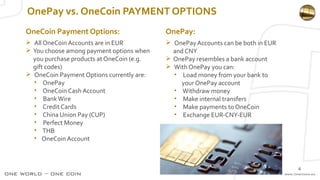
OnePay vs. OneCoin PAYMENT OPTIONS
 All OneCoin Accounts are in EUR
 You choose among payment options when
you purchase products at OneCoin (e.g.
gift codes)
 OneCoin Payment Options currently are:
• OnePay
• OneCoin Cash Account
• BankWire
• Credit Cards
• China Union Pay (CUP)
• Perfect Money
• THB
• OneCoin Account
4
 OnePay Accounts can be both in EUR
and CNY
 OnePay resembles a bank account
 With OnePay you can:
• Load money from your bank to
your OnePay account
• Withdraw money
• Make internal transfers
• Make payments to OneCoin
• Exchange EUR-CNY-EUR
OneCoin Payment Options: OnePay:
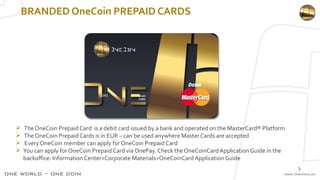
BRANDED OneCoin PREPAID CARDS
 TheOneCoin Prepaid Card is a debit card issued by a bank and operated on the MasterCard® Platform
 TheOneCoin Prepaid Cards is in EUR – can be used anywhere Master Cards are accepted
 Every OneCoin member can apply for OneCoin Prepaid Card
 You can apply for OneCoin Prepaid Card via OnePay. Check the OneCoinCard Application Guide in the
backoffice: Information Center>Corporate Materials>OneCoinCard Application Guide
5
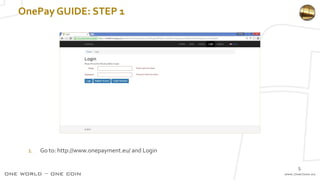
OnePay GUIDE: STEP 1
1. Go to: http://www.onepayment.eu/ and Login
5
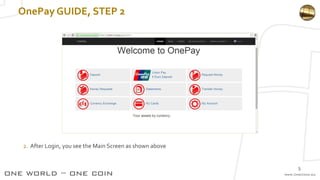
OnePay GUIDE, STEP 2
2. After Login, you see the Main Screen as shown above
5
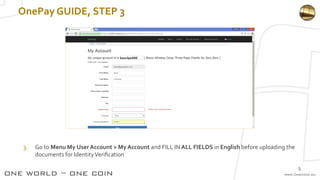
OnePay GUIDE, STEP 3
3. Go to Menu My User Account > My Account and FILL IN ALL FIELDS in English before uploading the
documents for IdentityVerification
5
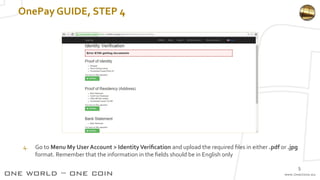
OnePay GUIDE, STEP 4
4. Go to Menu My User Account > IdentityVerification and upload the required files in either .pdf or .jpg
format. Remember that the information in the fields should be in English only
5
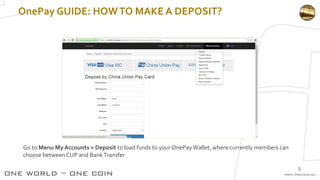
OnePay GUIDE: HOWTO MAKE A DEPOSIT?
Go to Menu My Accounts > Deposit to load funds to your OnePayWallet, where currently members can
choose between CUP and BankTransfer
5
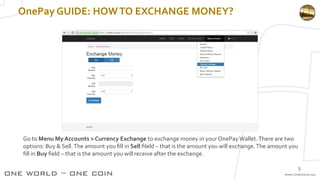
OnePay GUIDE: HOWTO EXCHANGE MONEY?
Go to Menu My Accounts > Currency Exchange to exchange money in your OnePayWallet.There are two
options: Buy & Sell.The amount you fill in Sell fileld – that is the amount you will exchange.The amount you
fill in Buy field – that is the amount you will receive after the exchange.
5
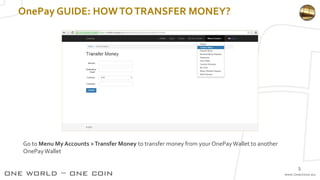
OnePay GUIDE: HOWTOTRANSFER MONEY?
Go to Menu My Accounts >Transfer Money to transfer money from your OnePayWallet to another
OnePayWallet
5
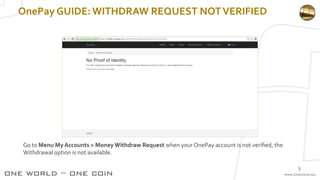
OnePay GUIDE:WITHDRAW REQUEST NOTVERIFIED
Go to Menu My Accounts > Money Withdraw Request when your OnePay account is not verified, the
Withdrawal option is not available.
5
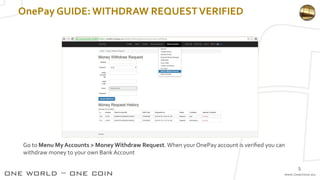
OnePay GUIDE:WITHDRAW REQUESTVERIFIED
Go to Menu My Accounts > Money Withdraw Request.When your OnePay account is verified you can
withdraw money to your own Bank Account
5
OnePay GUIDE:
WHEN WILLYOUR WITHDRAW REQUEST BEVERIFIED?
Your account will beVERIFIED when the
following types of documents:
✔ Proof of Identity,
✔ Proof of Residency (Address),
✔ Bank Statement
are with status: APPROVED
5

OnePay - The recommended OneCoin e-payments system.

  • 1.
  • 2.
    WHAT IS OnePay? Whenyou join OneCoin we automatically create an E-Wallet for you in the payment platform OnePay OnePay is a unique payment solution for easily accessing and transferring funds electronically, an alternative to your bank account but delivered faster, cheaper, easier With OnePay you can:  Load money from your bank to your OnePay account  Withdraw money from your OnePay account or  Make a transfer from your OnePay account to another OnePay member’s account  Make payments to OneCoin 1
  • 3.
    YOUR OnePay ACCOUNT Your OnePay account can be in both EUR and CNY  You can load your OnePay account via: • BankWire (transfer money from your bank) or • China Union Pay (CUP) cards or • You can load funds directly from your OneCoin Cash Account  You can withdraw only EUR to your own bank account  Cash withdrawals are possible only with OneCoin Prepaid Cards  You can exchange EUR – CNY or CNY – EUR in the E-Wallet  You can do internal transfers to another OnePay member’s account from your OnePay account  You can preview your transaction history in your Account Statements 2
  • 4.
    VERIFYYOUR OnePay ACCOUNT 3 OnePay has a KYC procedure to verify allOnePay accounts  You cannot make a withdrawal or apply for the OneCoin Prepaid Card without a verified account  There are three types of document we need to verify: • ID – scan your ID and upload it in OnePay (e.g. passport, driving license, national card ID or any other document that has your full name and picture on it. Make sure it is issued by the government) • Bank Statement – has to be issued by your bank and to contain the name of your bank and your full name • Proof of address – you can provide any utility bill that lists your address
  • 5.
    3  All uploadeddocuments must be in English or transslated in English  Make sure that the documents you upload are in the requested format: either .jpg or .pdf  Before you attach the documents we need in order to verify your account, please make sure to first fill in all personal information requested in the form like full name, address, phone number, etc. VERIFYYOUR OnePay ACCOUNT
  • 6.
    OnePay vs. OneCoinPAYMENT OPTIONS  All OneCoin Accounts are in EUR  You choose among payment options when you purchase products at OneCoin (e.g. gift codes)  OneCoin Payment Options currently are: • OnePay • OneCoin Cash Account • BankWire • Credit Cards • China Union Pay (CUP) • Perfect Money • THB • OneCoin Account 4  OnePay Accounts can be both in EUR and CNY  OnePay resembles a bank account  With OnePay you can: • Load money from your bank to your OnePay account • Withdraw money • Make internal transfers • Make payments to OneCoin • Exchange EUR-CNY-EUR OneCoin Payment Options: OnePay:
  • 7.
    BRANDED OneCoin PREPAIDCARDS  TheOneCoin Prepaid Card is a debit card issued by a bank and operated on the MasterCard® Platform  TheOneCoin Prepaid Cards is in EUR – can be used anywhere Master Cards are accepted  Every OneCoin member can apply for OneCoin Prepaid Card  You can apply for OneCoin Prepaid Card via OnePay. Check the OneCoinCard Application Guide in the backoffice: Information Center>Corporate Materials>OneCoinCard Application Guide 5
  • 8.
    OnePay GUIDE: STEP1 1. Go to: http://www.onepayment.eu/ and Login 5
  • 9.
    OnePay GUIDE, STEP2 2. After Login, you see the Main Screen as shown above 5
  • 10.
    OnePay GUIDE, STEP3 3. Go to Menu My User Account > My Account and FILL IN ALL FIELDS in English before uploading the documents for IdentityVerification 5
  • 11.
    OnePay GUIDE, STEP4 4. Go to Menu My User Account > IdentityVerification and upload the required files in either .pdf or .jpg format. Remember that the information in the fields should be in English only 5
  • 12.
    OnePay GUIDE: HOWTOMAKE A DEPOSIT? Go to Menu My Accounts > Deposit to load funds to your OnePayWallet, where currently members can choose between CUP and BankTransfer 5
  • 13.
    OnePay GUIDE: HOWTOEXCHANGE MONEY? Go to Menu My Accounts > Currency Exchange to exchange money in your OnePayWallet.There are two options: Buy & Sell.The amount you fill in Sell fileld – that is the amount you will exchange.The amount you fill in Buy field – that is the amount you will receive after the exchange. 5
  • 14.
    OnePay GUIDE: HOWTOTRANSFERMONEY? Go to Menu My Accounts >Transfer Money to transfer money from your OnePayWallet to another OnePayWallet 5
  • 15.
    OnePay GUIDE:WITHDRAW REQUESTNOTVERIFIED Go to Menu My Accounts > Money Withdraw Request when your OnePay account is not verified, the Withdrawal option is not available. 5
  • 16.
    OnePay GUIDE:WITHDRAW REQUESTVERIFIED Goto Menu My Accounts > Money Withdraw Request.When your OnePay account is verified you can withdraw money to your own Bank Account 5
  • 17.
    OnePay GUIDE: WHEN WILLYOURWITHDRAW REQUEST BEVERIFIED? Your account will beVERIFIED when the following types of documents: ✔ Proof of Identity, ✔ Proof of Residency (Address), ✔ Bank Statement are with status: APPROVED 5