Observability
Huynh	Quang	Thao	
Trusting	Social
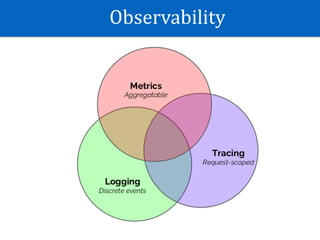
Observability
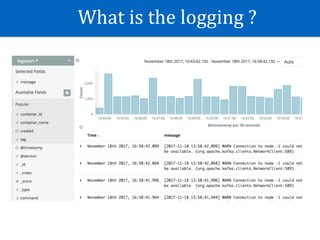
What	is	the	logging	?
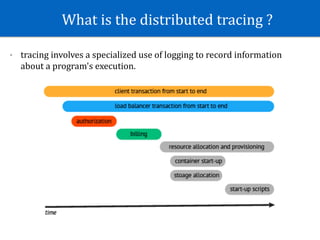
What	is	the	distributed	tracing	?
- tracing	involves	a	specialized	use	of	logging	to	record	information	
about	a	program's	execution.
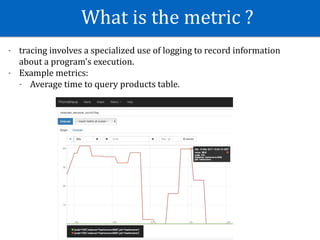
What	is	the	metric	?
- tracing	involves	a	specialized	use	of	logging	to	record	information	
about	a	program's	execution.		
- Example	metrics:		
- Average	time	to	query	products	table.
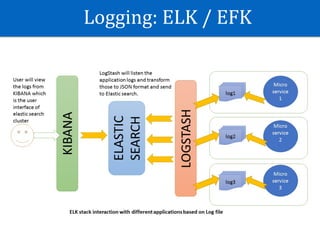
Logging:	ELK	/	EFK
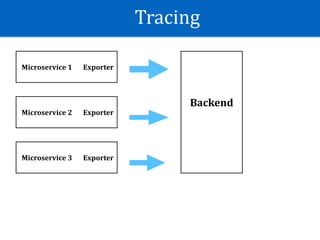
Tracing
Microservice	1 Exporter
BMicroservice	2 Exporter
Microservice	3 Exporter
Backend
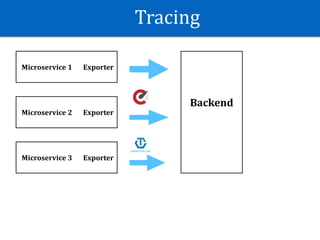
Tracing
Microservice	1 Exporter
BMicroservice	2 Exporter
Microservice	3 Exporter
Backend
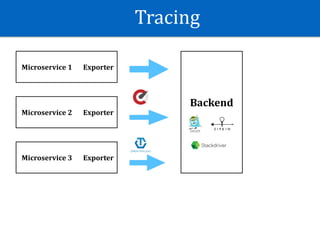
Tracing
Microservice	1 Exporter
BMicroservice	2 Exporter
Microservice	3 Exporter
Backend
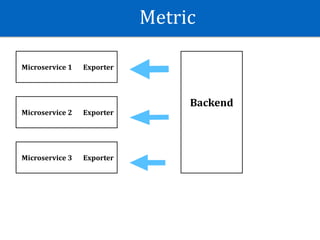
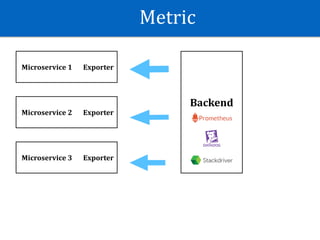
Metric
Microservice	1 Exporter
BMicroservice	2 Exporter
Microservice	3 Exporter
Backend
Metric
Microservice	1 Exporter
BMicroservice	2 Exporter
Microservice	3 Exporter
Backend
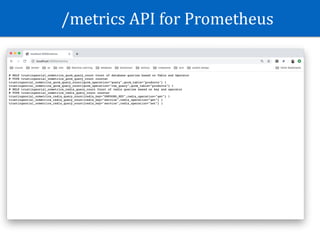
/metrics	API	for	Prometheus
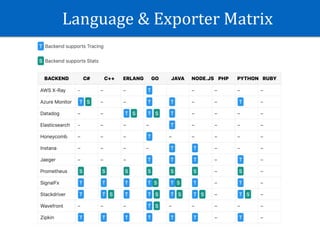
Language	&	Exporter	Matrix
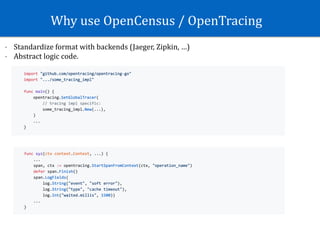
Why	use	OpenCensus	/	OpenTracing
- Standardize	format	with	backends	(Jaeger,	Zipkin,	…)	
- Abstract	logic	code.
Why	use	OpenCensus	/	OpenTracing
- Standard	format	with	backend	(Jaeger,	Zipkin,	…)	
- Abstract	logic	code.
_, span := trace.StartSpan(r.Context(), "child")
defer span.End()
span.Annotate([]trace.Attribute{trace.StringAttribute("key", "value")}, “querying")
span.AddAttributes(trace.StringAttribute("hello", "world"))
je, err := jaeger.NewExporter(jaeger.Options{
AgentEndpoint: agentEndpoint,
CollectorEndpoint: collectorEndpoint,
ServiceName: service,
})
trace.RegisterExporter(je)
Opencensus	
Architecture
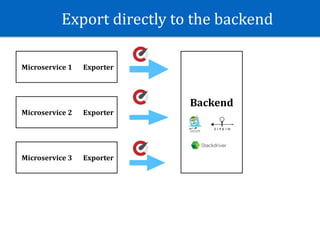
Export	directly	to	the	backend
Microservice	1 Exporter
BMicroservice	2 Exporter
Microservice	3 Exporter
Backend
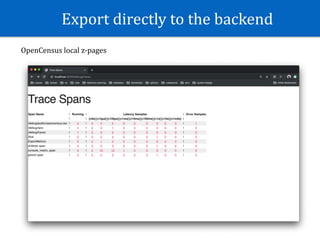
Export	directly	to	the	backend
OpenCensus	local	z-pages
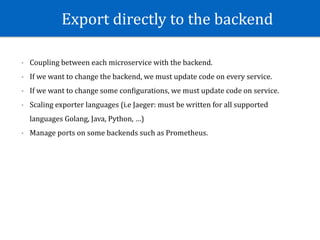
Export	directly	to	the	backend
- Coupling	between	each	microservice	with	the	backend.	
- If	we	want	to	change	the	backend,	we	must	update	code	on	every	service.	
- If	we	want	to	change	some	conWigurations,	we	must	update	code	on	service.	
- Scaling	exporter	languages	(i.e	Jaeger:	must	be	written	for	all	supported	
languages	Golang,	Java,	Python,	…)	
- Manage	ports	on	some	backends	such	as	Prometheus.
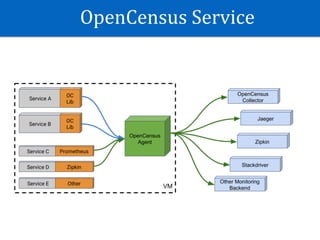
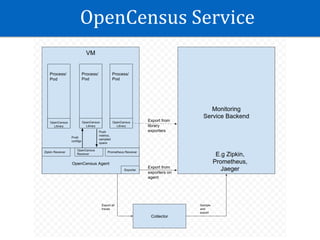
OpenCensus	Service
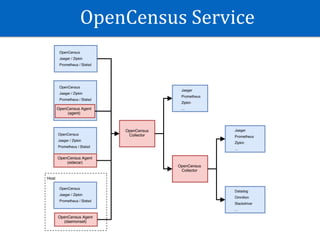
OpenCensus	Service
OpenCensus	Service
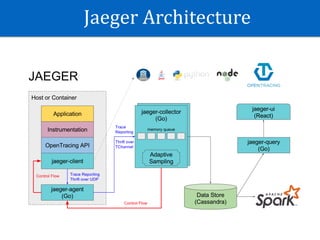
Jaeger	Architecture
OpenCensus	Service
- Decoupling	between	services	and	tracing/metric	backends.	
- OpenCensus	collector	supports	intelligent	sampling.	(tail-based	approach)	
- Preprocess	data	(annotate	span,	update	tags	…)	before	come	to	another	
backends.	
- Don’t	have	much	documentation	now.	But	we	can	get	reference	to	Jaeger	for	
similar	deployment.
Opencensus	
Concepts
Tracing
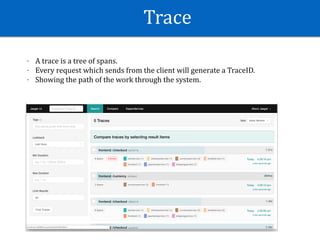
Trace
- A	trace	is	a	tree	of	spans.		
- Every	request	which	sends	from	the	client	will	generate	a	TraceID.	
- Showing	the	path	of	the	work	through	the	system.
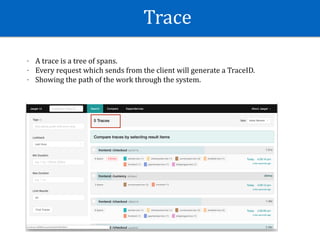
Trace
- A	trace	is	a	tree	of	spans.		
- Every	request	which	sends	from	the	client	will	generate	a	TraceID.	
- Showing	the	path	of	the	work	through	the	system.
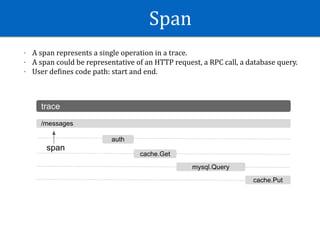
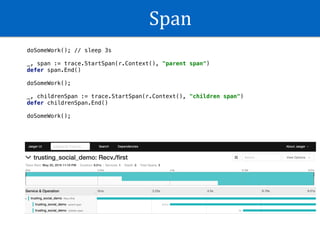
Span
- A	span	represents	a	single	operation	in	a	trace.		
- A	span	could	be	representative	of	an	HTTP	request,	a	RPC	call,	a	database	query.	
- User	deWines	code	path:	start	and	end.
Span
doSomeWork(); // sleep 3s
_, span := trace.StartSpan(r.Context(), "parent span")
defer span.End()
doSomeWork();
_, childrenSpan := trace.StartSpan(r.Context(), "children span")
defer childrenSpan.End()
doSomeWork();
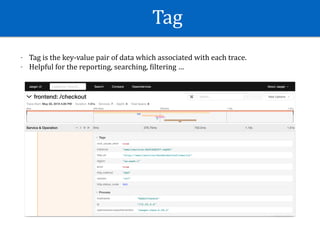
Tag
- Tag	is	the	key-value	pair	of	data	which	associated	with	each	trace.	
- Helpful	for	the	reporting,	searching,	Wiltering	…
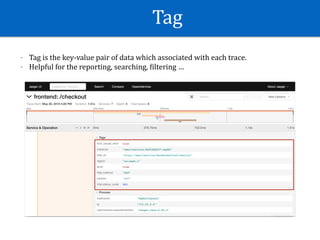
Tag
- Tag	is	the	key-value	pair	of	data	which	associated	with	each	trace.	
- Helpful	for	the	reporting,	searching,	Wiltering	…
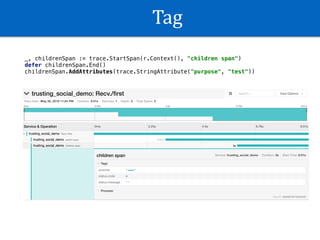
Tag
_, childrenSpan := trace.StartSpan(r.Context(), "children span")
defer childrenSpan.End()
childrenSpan.AddAttributes(trace.StringAttribute("purpose", "test"))
Trace	Sampling
There	are	4	levels:	
- Always	
- Never	
- Probabilistic	
- Rate	limiting		
- Should	be	Probabilistic	/	Rate	limiting		
- Never	for	un-sampling	request.
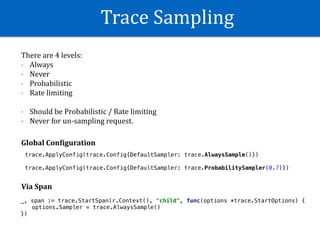
Trace	Sampling
There	are	4	levels:	
- Always	
- Never	
- Probabilistic	
- Rate	limiting		
- Should	be	Probabilistic	/	Rate	limiting		
- Never	for	un-sampling	request.
trace.ApplyConfig(trace.Config{DefaultSampler: trace.AlwaysSample()})
trace.ApplyConfig(trace.Config{DefaultSampler: trace.ProbabilitySampler(0.7)})
Global	Con:iguration
Via	Span
_, span := trace.StartSpan(r.Context(), "child", func(options *trace.StartOptions) {
options.Sampler = trace.AlwaysSample()
})
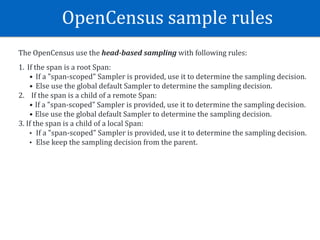
OpenCensus	sample	rules
The	OpenCensus	use	the	head-based	sampling	with	following	rules:	
1. If	the	span	is	a	root	Span:	
• If	a	"span-scoped"	Sampler	is	provided,	use	it	to	determine	the	sampling	decision.	
• Else	use	the	global	default	Sampler	to	determine	the	sampling	decision.	
2.				If	the	span	is	a	child	of	a	remote	Span:	
• If	a	"span-scoped"	Sampler	is	provided,	use	it	to	determine	the	sampling	decision.	
• Else	use	the	global	default	Sampler	to	determine	the	sampling	decision.	
3.	If	the	span	is	a	child	of	a	local	Span:	
• If	a	"span-scoped"	Sampler	is	provided,	use	it	to	determine	the	sampling	decision.	
• Else	keep	the	sampling	decision	from	the	parent.
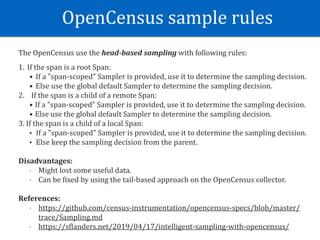
OpenCensus	sample	rules
The	OpenCensus	use	the	head-based	sampling	with	following	rules:	
1. If	the	span	is	a	root	Span:	
• If	a	"span-scoped"	Sampler	is	provided,	use	it	to	determine	the	sampling	decision.	
• Else	use	the	global	default	Sampler	to	determine	the	sampling	decision.	
2.				If	the	span	is	a	child	of	a	remote	Span:	
• If	a	"span-scoped"	Sampler	is	provided,	use	it	to	determine	the	sampling	decision.	
• Else	use	the	global	default	Sampler	to	determine	the	sampling	decision.	
3.	If	the	span	is	a	child	of	a	local	Span:	
• If	a	"span-scoped"	Sampler	is	provided,	use	it	to	determine	the	sampling	decision.	
• Else	keep	the	sampling	decision	from	the	parent.	
Disadvantages:	
- Might	lost	some	useful	data.	
- Can	be	Wixed	by	using	the	tail-based	approach	on	the	OpenCensus	collector.	
References:		
- https://github.com/census-instrumentation/opencensus-specs/blob/master/
trace/Sampling.md		
- https://sWlanders.net/2019/04/17/intelligent-sampling-with-opencensus/
Metrics
Measure
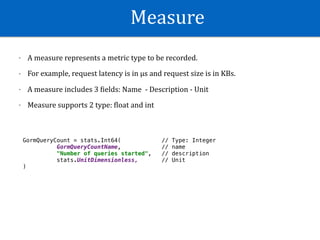
- A	measure	represents	a	metric	type	to	be	recorded.		
- For	example,	request	latency	is	in	µs	and	request	size	is	in	KBs.	
- A	measure	includes	3	Wields:	Name		-	Description	-	Unit	
- Measure	supports	2	type:	Wloat	and	int
GormQueryCount = stats.Int64( // Type: Integer
GormQueryCountName, // name
"Number of queries started", // description
stats.UnitDimensionless, // Unit
)
Measurement
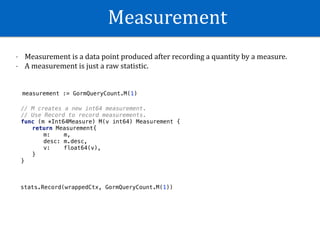
- Measurement	is	a	data	point	produced	after	recording	a	quantity	by	a	measure.		
- A	measurement	is	just	a	raw	statistic.
measurement := GormQueryCount.M(1)
// M creates a new int64 measurement.
// Use Record to record measurements.
func (m *Int64Measure) M(v int64) Measurement {
return Measurement{
m: m,
desc: m.desc,
v: float64(v),
}
}
stats.Record(wrappedCtx, GormQueryCount.M(1))
View
- Views	are	the	coupling	of	an	Aggregation	applied	to	a	Measure	and	optionally	Tags.	
- Supported	aggregation	function:	Count	/	Distribution	/	Sum	/	LastValue.	
- Multiple	views	can	use	same	measure	but	only	when	different	aggregation.	
- 	The	various	tags	used	to	group	and	Wilter	collected	metrics	later	on.
GormQueryCountView = &view.View{
Name: GormQueryCountName,
Description: "Count of database queries based on Table and Operator",
TagKeys: []tag.Key{GormOperatorTag, GormTableTag},
Measure: GormQueryCount,
Aggregation: view.Count(),
}
Metric	Sampling
Stats	are	NOT	sampled	to	be	able	to	represent	uncommon	cases	hence,	stats	
are	ALWAYS	recorded	unless	dropped.
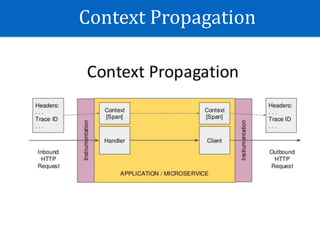
Context	Propagation
Context	Propagation:	B3	Standard
Header	Data:		
X-B3-Sampled:[1]		
X-B3-Spanid:[dacdb2208f874447]		
X-B3-Traceid:[9ca4a513af5f299a856dec51336a051b]
var requestOption = comm.RequestOption{
Transport: &ochttp.Transport{
Propagation: &b3.HTTPFormat{},
Base: &http.Transport{
TLSClientConfig: &tls.Config{InsecureSkipVerify: true},
},
},
}
Context	Propagation:	OpenTracing	Standard
Header	Data:	
Traceparent:[00-a9f4dc05b7a78f6f2f717d7396d9450f-187065dac4cd685c-01]
var requestOption = comm.RequestOption{
Transport: &ochttp.Transport{
Propagation: &tracecontext.HTTPFormat{},
Base: &http.Transport{
TLSClientConfig: &tls.Config{InsecureSkipVerify: true},
},
},
}
Implementation
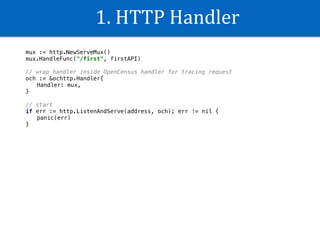
1.	HTTP	Handler
mux := http.NewServeMux()
mux.HandleFunc("/first", firstAPI)
// wrap handler inside OpenCensus handler for tracing request
och := &ochttp.Handler{
Handler: mux,
}
// start
if err := http.ListenAndServe(address, och); err != nil {
panic(err)
}
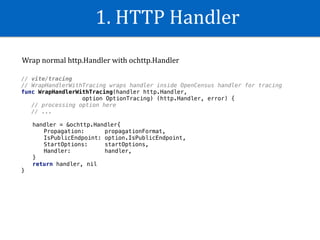
1.	HTTP	Handler
// vite/tracing
// WrapHandlerWithTracing wraps handler inside OpenCensus handler for tracing
func WrapHandlerWithTracing(handler http.Handler,
option OptionTracing) (http.Handler, error) {
// processing option here
// ...
handler = &ochttp.Handler{
Propagation: propagationFormat,
IsPublicEndpoint: option.IsPublicEndpoint,
StartOptions: startOptions,
Handler: handler,
}
return handler, nil
}
Wrap	normal	http.Handler	with	ochttp.Handler
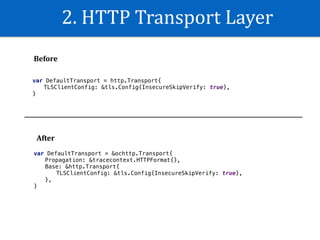
2.	HTTP	Transport	Layer
var DefaultTransport = &ochttp.Transport{
Propagation: &tracecontext.HTTPFormat{},
Base: &http.Transport{
TLSClientConfig: &tls.Config{InsecureSkipVerify: true},
},
}
var DefaultTransport = http.Transport{
TLSClientConfig: &tls.Config{InsecureSkipVerify: true},
}
Before
After
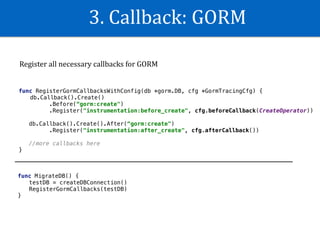
3.	Callback:	GORM
func RegisterGormCallbacksWithConfig(db *gorm.DB, cfg *GormTracingCfg) {
db.Callback().Create()
.Before(“gorm:create")
.Register("instrumentation:before_create", cfg.beforeCallback(CreateOperator))
db.Callback().Create().After(“gorm:create")
.Register("instrumentation:after_create", cfg.afterCallback())
//more callbacks here
}
func MigrateDB() {
testDB = createDBConnection()
RegisterGormCallbacks(testDB)
}
Register	all	necessary	callbacks	for	GORM
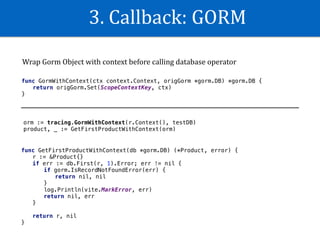
3.	Callback:	GORM
func GormWithContext(ctx context.Context, origGorm *gorm.DB) *gorm.DB {
return origGorm.Set(ScopeContextKey, ctx)
}
Wrap	Gorm	Object	with	context	before	calling	database	operator
orm := tracing.GormWithContext(r.Context(), testDB)
product, _ := GetFirstProductWithContext(orm)
func GetFirstProductWithContext(db *gorm.DB) (*Product, error) {
r := &Product{}
if err := db.First(r, 1).Error; err != nil {
if gorm.IsRecordNotFoundError(err) {
return nil, nil
}
log.Println(vite.MarkError, err)
return nil, err
}
return r, nil
}
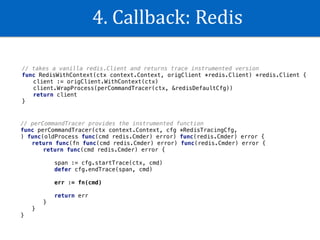
4.	Callback:	Redis
// takes a vanilla redis.Client and returns trace instrumented version
func RedisWithContext(ctx context.Context, origClient *redis.Client) *redis.Client {
client := origClient.WithContext(ctx)
client.WrapProcess(perCommandTracer(ctx, &redisDefaultCfg))
return client
}
// perCommandTracer provides the instrumented function
func perCommandTracer(ctx context.Context, cfg *RedisTracingCfg,
) func(oldProcess func(cmd redis.Cmder) error) func(redis.Cmder) error {
return func(fn func(cmd redis.Cmder) error) func(redis.Cmder) error {
return func(cmd redis.Cmder) error {
span := cfg.startTrace(ctx, cmd)
defer cfg.endTrace(span, cmd)
err := fn(cmd)
return err
}
}
}
4.	Callback:	Redis
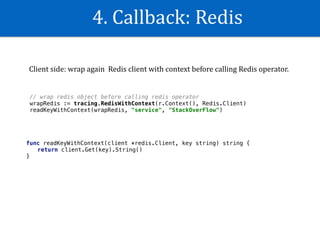
// wrap redis object before calling redis operator
wrapRedis := tracing.RedisWithContext(r.Context(), Redis.Client)
readKeyWithContext(wrapRedis, "service", "StackOverFlow")
func readKeyWithContext(client *redis.Client, key string) string {
return client.Get(key).String()
}
Client	side:	wrap	again		Redis	client	with	context	before	calling	Redis	operator.
5.	Exporter
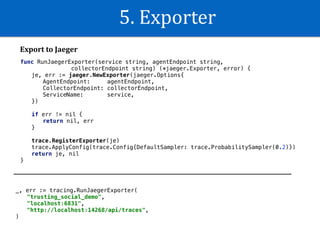
func RunJaegerExporter(service string, agentEndpoint string,
collectorEndpoint string) (*jaeger.Exporter, error) {
je, err := jaeger.NewExporter(jaeger.Options{
AgentEndpoint: agentEndpoint,
CollectorEndpoint: collectorEndpoint,
ServiceName: service,
})
if err != nil {
return nil, err
}
trace.RegisterExporter(je)
trace.ApplyConfig(trace.Config{DefaultSampler: trace.ProbabilitySampler(0.2)})
return je, nil
}
_, err := tracing.RunJaegerExporter(
"trusting_social_demo",
"localhost:6831",
"http://localhost:14268/api/traces",
)
Export	to	Jaeger
5.	Exporter
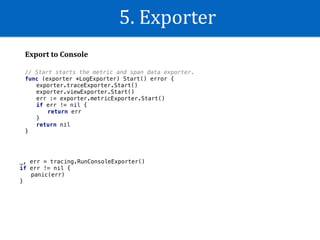
Export	to	Console
_, err = tracing.RunConsoleExporter()
if err != nil {
panic(err)
}
// Start starts the metric and span data exporter.
func (exporter *LogExporter) Start() error {
exporter.traceExporter.Start()
exporter.viewExporter.Start()
err := exporter.metricExporter.Start()
if err != nil {
return err
}
return nil
}
5.	Exporter
Export	to	Prometheus
func RunPrometheusExporter(namespace string) (*prometheus.Exporter, error) {
pe, err := prometheus.NewExporter(prometheus.Options{
Namespace: namespace,
})
view.RegisterExporter(pe)
return pe, nil
}
// add api endpoint for prometheus
app.Mux.Handle("/metrics", pe)
scrape_configs:
- job_name: 'trustingsocial_ocmetrics'
scrape_interval: 5s
static_configs:
- targets: ['host.docker.internal:3000']
Create	entry	point	/metrics	for	prometheus	service	call
Sample	prometheus	conWiguration:
6.	Register	views
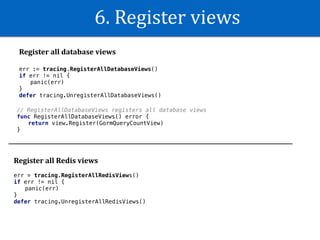
Register	all	database	views
err := tracing.RegisterAllDatabaseViews()
if err != nil {
panic(err)
}
defer tracing.UnregisterAllDatabaseViews()
// RegisterAllDatabaseViews registers all database views
func RegisterAllDatabaseViews() error {
return view.Register(GormQueryCountView)
}
Register	all	Redis	views
err = tracing.RegisterAllRedisViews()
if err != nil {
panic(err)
}
defer tracing.UnregisterAllRedisViews()
Write	custom	
exporter
Export	trace
func (exporter *TraceExporter) ExportSpan(sd *trace.SpanData) {
var (
traceID = hex.EncodeToString(sd.SpanContext.TraceID[:])
spanID = hex.EncodeToString(sd.SpanContext.SpanID[:])
parentSpanID = hex.EncodeToString(sd.ParentSpanID[:])
)
// RunJaegerExporter exports trace to Jaeger
}
func (exporter *TraceExporter) Start() {
trace.RegisterExporter(exporter)
}
1.	Implement	ExportSpan	function
2.	Call	trace.RegisterExporter
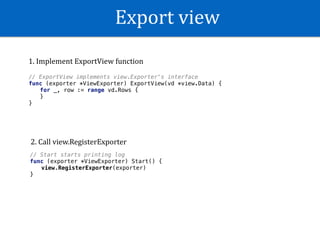
Export	view
// ExportView implements view.Exporter's interface
func (exporter *ViewExporter) ExportView(vd *view.Data) {
for _, row := range vd.Rows {
}
}
// Start starts printing log
func (exporter *ViewExporter) Start() {
view.RegisterExporter(exporter)
}
1.	Implement	ExportView	function
2.	Call	view.RegisterExporter
Export	metric
// ExportMetrics implements metricexport.Exporter's interface.
func (exporter *MetricExporter) ExportMetrics(ctx context.Context,
metrics []*metricdata.Metric) error {
for _, metric := range metrics {
// process each metric
}
return nil
}
// Start starts printing log
func (exporter *MetricExporter) Start() error {
exporter.initReaderOnce.Do(func() {
exporter.intervalReader, _ = metricexport.NewIntervalReader(
exporter.reader,
exporter,
)
})
exporter.intervalReader.ReportingInterval = exporter.reportingInterval
return exporter.intervalReader.Start()
}
1.	Implement	ExportMetrics	function
2.	Interval	polling	to	get	latest	metric	data
How	to	deWine	useful	
metrics
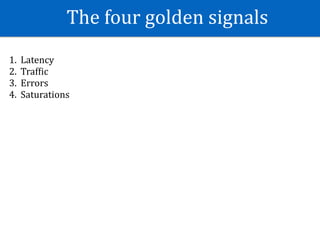
The	four	golden	signals
1. Latency	
2. TrafWic	
3. Errors	
4. Saturations
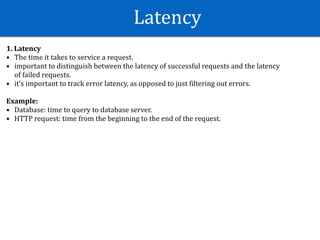
Latency
1.	Latency	
• The	time	it	takes	to	service	a	request.		
• important	to	distinguish	between	the	latency	of	successful	requests	and	the	latency	
of	failed	requests.	
• it’s	important	to	track	error	latency,	as	opposed	to	just	Wiltering	out	errors.	
Example:	
• Database:	time	to	query	to	database	server.	
• HTTP	request:	time	from	the	beginning	to	the	end	of	the	request.
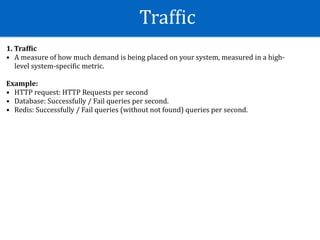
TrafWic
1.	Traf:ic	
• A	measure	of	how	much	demand	is	being	placed	on	your	system,	measured	in	a	high-
level	system-speciWic	metric.	
Example:	
• HTTP	request:	HTTP	Requests	per	second	
• Database:	Successfully	/	Fail	queries	per	second.	
• Redis:	Successfully	/	Fail	queries	(without	not	found)	queries	per	second.
Error
1.	Error	
• The	rate	of	requests	that	fail,	either	explicitly,	implicitly	or	policy.	
• Explicit:	request	with	http	status	code	500.	
• Implicit:	an	HTTP	200	success	response,	but	coupled	with	the	wrong	content)	
• Policy:	If	you	committed	to	one-second	response	times,	any	request	over	one	second	
is	an	error	
 
Example:	
• HTTP	request:	request	with	status	code	not	200	
• Redis:	Queries	that	return	error	code	(without	not	found).	
• Database:	Queries	that	return	error	code	(without	not	found)
Saturation
1.	Error	
• How	"full"	your	service	is:	Explicit,	Implicit	or	Policy	
Explicit:	request	with	http	status	code	500.	
Implicit:	an	HTTP	200	success	response,	but	coupled	with	the	wrong	content)	
Policy:	If	you	committed	to	one-second	response	times,	any	request	over	one	second	is	
an	error	
• Latency	increases	are	often	a	leading	indicator	of	saturation.		
• Measuring	your	99th	percentile	response	time	over	some	small	window	can	give	a	very	
early	signal	of	saturation.	
 
Example:	
• HTTP	request:		System	loads	such	as	CPU,	RAM	…	
• Redis:	Idle	/	Active	/	Inactive	connections	in	connection	pool.	
• Database:	Idle	/	Active	/	Inactive	connections	in	connection	pool.
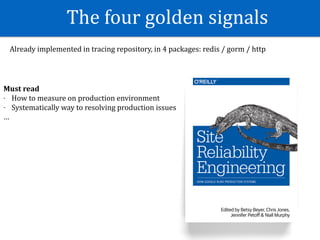
The	four	golden	signals
Already	implemented	in	tracing	repository,	in	4	packages:	redis	/	gorm	/	http	
Must	read	
- How	to	measure	on	production	environment	
- Systematically	way	to	resolving	production	issues	
…
Tracing	Repository
Repository: https://github.com/tsocial/tracing
• Implemented	callbacks	for	Redis,	Gorm	and	HTTP	Handler.	
• DeWined	and	implemented	observability	for	each	package.	
• Implemented	some	exporters	(e.g:	Jaeger,	Prometheus,	…).	
• Implemented	console	exporter	and	simple	exporter	for	testing.		
• Example	project	to	demonstrate	the	usage.	
• Decoupling	with	the	Telco	platform.	Open	Source	?
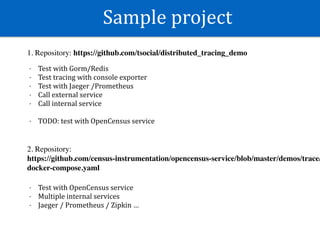
Sample	project
1. Repository: https://github.com/tsocial/distributed_tracing_demo
- Test	with	Gorm/Redis	
- Test	tracing	with	console	exporter	
- Test	with	Jaeger	/Prometheus		
- Call	external	service	
- Call	internal	service	
- TODO:	test	with	OpenCensus	service
2. Repository:
https://github.com/census-instrumentation/opencensus-service/blob/master/demos/trace/
docker-compose.yaml
- Test	with	OpenCensus	service	
- Multiple	internal	services	
- Jaeger	/	Prometheus	/	Zipkin	…
References
-	Documentation:	https://opencensus.io	
-	Examples:	https://github.com/census-instrumentation/opencensus-go/tree/master/examples	
-	How	not	to	measure	latency:	https://www.youtube.com/watch?v=lJ8ydIuPFeU	
-	SpeciWication	for	B3	format:	https://github.com/apache/incubator-zipkin-b3-propagation	
-	SpeciWication	for	OpenTracing	format:		
• https://www.w3.org/TR/trace-context/#dfn-distributed-traces		
• https://github.com/opentracing/speciWication/issues/86	
- Logging	architecture:	https://kubernetes.io/docs/concepts/cluster-administration/logging/	
- Nice	post	about	OpenCensus	vs	OpenTracing:	https://github.com/gomods/athens/issues/392	
- OpenCensus	service	Design:	https://github.com/census-instrumentation/opencensus-service/blob/master/DESIGN.md	
- Distributed	tracing	at	Uber:	https://eng.uber.com/distributed-tracing/		
- Tracing		HTTP	request	latency:	https://medium.com/opentracing/tracing-http-request-latency-in-go-with-
opentracing-7cc1282a100a		
- Context	propagation:	https://medium.com/jaegertracing/embracing-context-propagation-7100b9b6029a	
- Only	book	about	distributed	tracing:	https://www.amazon.com/Mastering-Distributed-Tracing-performance-microservices/
dp/1788628462	
-	https://landing.google.com/sre/sre-book/chapters/monitoring-distributed-systems/#xref_monitoring_golden-signals
Q&A

Observability and its application