communities map {me}
Node.js
cosa succede ad un webserver quando
eseguiamo questa richiesta?
var orders = from o in data.Orders
where o.Amount > 10000
select o;
ShowOrders(orders);
quanto aspettiamo?
» L1-cache 3 cicli
» L2-cache 14 cicli
» RAM 250 cicli
» Disco 41.000.000 cicli
» Rete 240.000.000 cicli
soluzione (?)
web server multithreading
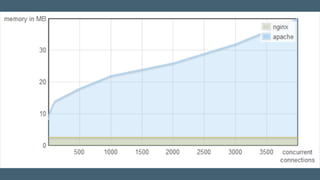
Apache vs NGINX 1
1
http://blog.webfaction.com/2008/12/a-little-holiday-present-10000-reqssec-with-nginx-2/
dov'è la magia?
web server single threaded,
bastato su event loop
prendiamo un modello
monothread,
asincrono
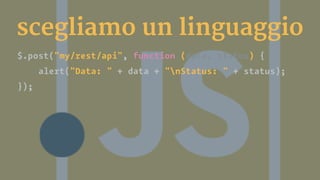
scegliamo un linguaggio
$.post("my/rest/api", function (data, status) {
alert("Data: " + data + "nStatus: " + status);
});
shakeriamo bene...
Node.Js viene presentato2
alla
European JsConf l'8 novembre
2009 da Ryan Dahl
2
https://www.youtube.com/watch?v=ztspvPYybIY
architettura
prima di iniziare...
javascript non è un
optional
scegliete con cura
web application in 5
passi
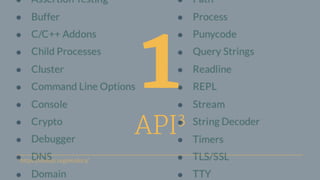
1
API3
3
https://nodejs.org/en/docs/
2
Moduli (CommonJS &
NPM)
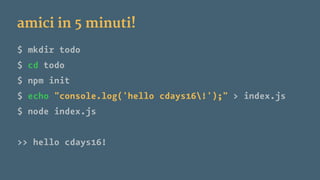
amici in 5 minuti!
$ mkdir todo
$ cd todo
$ npm init
$ echo "console.log('hello cdays16!');" > index.js
$ node index.js
>> hello cdays16!
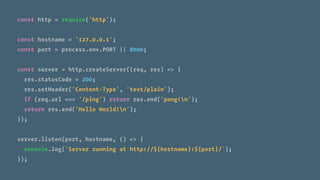
const http = require('http');
const hostname = '127.0.0.1';
const port = process.env.PORT || 8000;
const server = http.createServer((req, res) => {
res.statusCode = 200;
res.setHeader('Content-Type', 'text/plain');
if (req.url === '/ping') return res.end('pong!n');
return res.end('Hello World!n');
});
server.listen(port, hostname, () => {
console.log(`Server running at http://${hostname}:${port}/`);
});
3
web framework
(express)
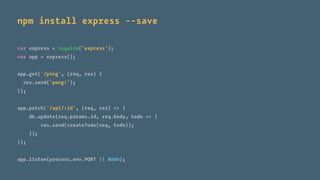
npm install express --save
var express = require('express');
var app = express();
app.get('/ping', (req, res) {
res.send('pong!');
});
app.patch('/api/:id', (req, res) => {
db.update(req.params.id, req.body, todo => {
res.send(createTodo(req, todo));
});
});
app.listen(process.env.PORT || 8000);
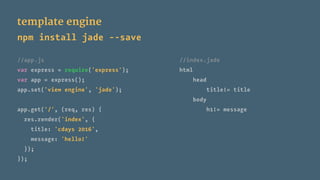
template engine
npm install jade --save
//app.js //index.jade
var express = require('express'); html
var app = express(); head
app.set('view engine', 'jade'); title!= title
body
app.get('/', (req, res) { h1!= message
res.render('index', {
title: 'cdays 2016',
message: 'hello!'
});
});
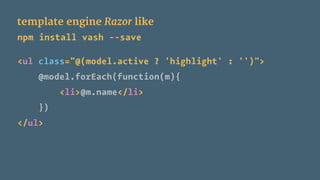
template engine Razor like
npm install vash --save
<ul class="@(model.active ? 'highlight' : '')">
@model.forEach(function(m){
<li>@m.name</li>
})
</ul>
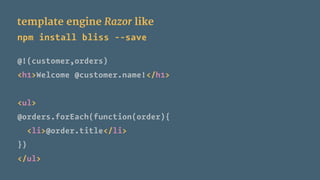
template engine Razor like
npm install bliss --save
@!(customer,orders)
<h1>Welcome @customer.name!</h1>
<ul>
@orders.forEach(function(order){
<li>@order.title</li>
})
</ul>
4
accesso al db (knex
[+bookshelf])
npm install knex mssql pg --save
const knex = require('knex');
const connectionString = process.env.DATABASE_URL || 'postgres://postgres:pwd@localhost:5432/todo';
bug: false});
const db = knex({client: 'pg', connection: connectionString, searchPath:'knex,public'}, {debug: false});
//const db = knex({client: 'mssql',connection: connectionString,searchPath:'knex,public'}, {de
db.schema.createTableIfNotExists('items', table => {
table.increments();
table.string('title', 40).notNullable();
table.boolean('completed').defaultTo(false);
table.integer('order').defaultTo(99999);
}).asCallback((e, r) => (if (e) return console.error(e); else console.log('database ready')));
export function get (id, cb) {
db('items').select().where('id', '=', id)
.asCallback((e, r) => (if (e) return console.error(e); else cb(r[0])));
}
export function create (title, order, cb) {
db.into('items')
.insert([{'title': title, 'order': order}]).returning('*')
.asCallback((e, r) => (if (e) return console.error(e); else cb(r[0])));
}
5
autenticazione
(passport)
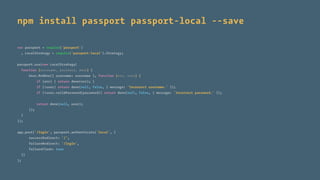
npm install passport passport-local --save
var passport = require('passport')
, LocalStrategy = require('passport-local').Strategy;
passport.use(new LocalStrategy(
function (username, password, done) {
User.findOne({ username: username }, function (err, user) {
if (err) { return done(err); }
if (!user) return done(null, false, { message: 'Incorrect username.' });
if (!user.validPassword(password)) return done(null, false, { message: 'Incorrect password.' });
return done(null, user);
});
}
));
app.post('/login', passport.authenticate('local', {
successRedirect: '/',
failureRedirect: '/login',
failureFlash: true
})
);
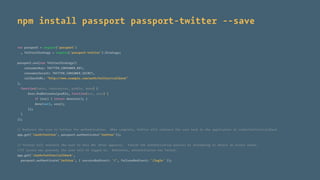
npm install passport passport-twitter --save
var passport = require('passport')
, TwitterStrategy = require('passport-twitter').Strategy;
passport.use(new TwitterStrategy({
consumerKey: TWITTER_CONSUMER_KEY,
consumerSecret: TWITTER_CONSUMER_SECRET,
callbackURL: "http://www.example.com/auth/twitter/callback"
},
function(token, tokenSecret, profile, done) {
User.findOrCreate(profile, function(err, user) {
if (err) { return done(err); }
done(null, user);
});
}
));
// Redirect the user to Twitter for authentication. When complete, Twitter will redirect the user back to the application at /auth/twitter/callback
app.get('/auth/twitter', passport.authenticate('twitter'));
// Twitter will redirect the user to this URL after approval. Finish the authentication process by attempting to obtain an access token.
//If access was granted, the user will be logged in. Otherwise, authentication has failed.
app.get('/auth/twitter/callback',
passport.authenticate('twitter', { successRedirect: '/', failureRedirect: '/login' });
bonus track
unit testing
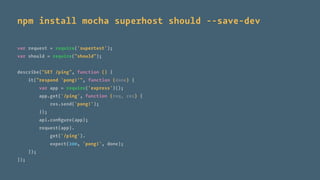
npm install mocha superhost should --save-dev
var request = require('supertest');
var should = require("should");
describe("GET /ping", function () {
it("respond 'pong!'", function (done) {
var app = require('express')();
app.get('/ping', function (req, res) {
res.send('pong!');
});
api.configure(app);
request(app).
get('/ping').
expect(200, 'pong!', done);
});
});
Node.Js cosa ci faccio?
web application
Express
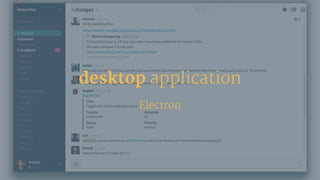
desktop application
Electron
tool e plugin
(es. grunt, gulp, mocha, forever...)
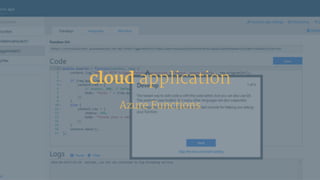
cloud application
Azure Functions
Come lo lancio?
console application
foreverjs
[sudo] npm install -g forever
$ forever
usage: forever [start | stop | stopall | list] [options] SCRIPT [script options]
options:
start start SCRIPT as a daemon
stop stop the daemon SCRIPT
stopall stop all running forever scripts
list list all running forever scripts
$ forever start simple-server.js
$ forever list
[0] simple-server.js [ 24597, 24596 ]
$ forever list
[0] simple-server.js [ 24611, 24596 ]
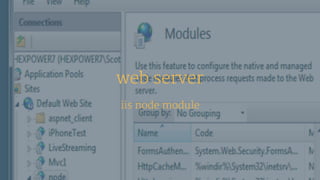
web server
iis node module
cloud
node azure
container
docker
FROM node:6.2.2
RUN mkdir /nodejs
COPy index.js /nodejs/
WORKDIR /nodejs
ENTRYPOINT ["node", "index.js"]
EXPOSE 80
Node.Js quando?
» Tanti I/O (network, files, db…)
» Realtime application (online games, collaboration tools)
» Come «frontoffice» di un batch server (scritto in Java, .NET,
Scala….)
» Vogliamo un unico stack tecnologico tra client e server
» Vogliamo costruire velocemente tools per lo sviluppo
» Processi cpu intensive
» Logica di business complessa
» Se non si conosce bene (o si sottovaluta) JavaScript
Future Decoded - Node.js per sviluppatori .NET

Future Decoded - Node.js per sviluppatori .NET

  • 3.
  • 4.
  • 5.
    cosa succede adun webserver quando eseguiamo questa richiesta? var orders = from o in data.Orders where o.Amount > 10000 select o; ShowOrders(orders);
  • 7.
    quanto aspettiamo? » L1-cache3 cicli » L2-cache 14 cicli » RAM 250 cicli » Disco 41.000.000 cicli » Rete 240.000.000 cicli
  • 8.
  • 10.
    Apache vs NGINX1 1 http://blog.webfaction.com/2008/12/a-little-holiday-present-10000-reqssec-with-nginx-2/
  • 13.
  • 14.
    web server singlethreaded, bastato su event loop
  • 16.
  • 17.
    scegliamo un linguaggio $.post("my/rest/api",function (data, status) { alert("Data: " + data + "nStatus: " + status); });
  • 18.
  • 19.
    Node.Js viene presentato2 alla EuropeanJsConf l'8 novembre 2009 da Ryan Dahl 2 https://www.youtube.com/watch?v=ztspvPYybIY
  • 20.
  • 23.
  • 24.
  • 25.
  • 26.
  • 27.
  • 28.
    amici in 5minuti! $ mkdir todo $ cd todo $ npm init $ echo "console.log('hello cdays16!');" > index.js $ node index.js >> hello cdays16!
  • 29.
    const http =require('http'); const hostname = '127.0.0.1'; const port = process.env.PORT || 8000; const server = http.createServer((req, res) => { res.statusCode = 200; res.setHeader('Content-Type', 'text/plain'); if (req.url === '/ping') return res.end('pong!n'); return res.end('Hello World!n'); }); server.listen(port, hostname, () => { console.log(`Server running at http://${hostname}:${port}/`); });
  • 30.
  • 31.
    npm install express--save var express = require('express'); var app = express(); app.get('/ping', (req, res) { res.send('pong!'); }); app.patch('/api/:id', (req, res) => { db.update(req.params.id, req.body, todo => { res.send(createTodo(req, todo)); }); }); app.listen(process.env.PORT || 8000);
  • 32.
    template engine npm installjade --save //app.js //index.jade var express = require('express'); html var app = express(); head app.set('view engine', 'jade'); title!= title body app.get('/', (req, res) { h1!= message res.render('index', { title: 'cdays 2016', message: 'hello!' }); });
  • 33.
    template engine Razorlike npm install vash --save <ul class="@(model.active ? 'highlight' : '')"> @model.forEach(function(m){ <li>@m.name</li> }) </ul>
  • 34.
    template engine Razorlike npm install bliss --save @!(customer,orders) <h1>Welcome @customer.name!</h1> <ul> @orders.forEach(function(order){ <li>@order.title</li> }) </ul>
  • 35.
    4 accesso al db(knex [+bookshelf])
  • 36.
    npm install knexmssql pg --save const knex = require('knex'); const connectionString = process.env.DATABASE_URL || 'postgres://postgres:pwd@localhost:5432/todo'; bug: false}); const db = knex({client: 'pg', connection: connectionString, searchPath:'knex,public'}, {debug: false}); //const db = knex({client: 'mssql',connection: connectionString,searchPath:'knex,public'}, {de db.schema.createTableIfNotExists('items', table => { table.increments(); table.string('title', 40).notNullable(); table.boolean('completed').defaultTo(false); table.integer('order').defaultTo(99999); }).asCallback((e, r) => (if (e) return console.error(e); else console.log('database ready'))); export function get (id, cb) { db('items').select().where('id', '=', id) .asCallback((e, r) => (if (e) return console.error(e); else cb(r[0]))); } export function create (title, order, cb) { db.into('items') .insert([{'title': title, 'order': order}]).returning('*') .asCallback((e, r) => (if (e) return console.error(e); else cb(r[0]))); }
  • 37.
  • 38.
    npm install passportpassport-local --save var passport = require('passport') , LocalStrategy = require('passport-local').Strategy; passport.use(new LocalStrategy( function (username, password, done) { User.findOne({ username: username }, function (err, user) { if (err) { return done(err); } if (!user) return done(null, false, { message: 'Incorrect username.' }); if (!user.validPassword(password)) return done(null, false, { message: 'Incorrect password.' }); return done(null, user); }); } )); app.post('/login', passport.authenticate('local', { successRedirect: '/', failureRedirect: '/login', failureFlash: true }) );
  • 39.
    npm install passportpassport-twitter --save var passport = require('passport') , TwitterStrategy = require('passport-twitter').Strategy; passport.use(new TwitterStrategy({ consumerKey: TWITTER_CONSUMER_KEY, consumerSecret: TWITTER_CONSUMER_SECRET, callbackURL: "http://www.example.com/auth/twitter/callback" }, function(token, tokenSecret, profile, done) { User.findOrCreate(profile, function(err, user) { if (err) { return done(err); } done(null, user); }); } )); // Redirect the user to Twitter for authentication. When complete, Twitter will redirect the user back to the application at /auth/twitter/callback app.get('/auth/twitter', passport.authenticate('twitter')); // Twitter will redirect the user to this URL after approval. Finish the authentication process by attempting to obtain an access token. //If access was granted, the user will be logged in. Otherwise, authentication has failed. app.get('/auth/twitter/callback', passport.authenticate('twitter', { successRedirect: '/', failureRedirect: '/login' });
  • 40.
  • 41.
    npm install mochasuperhost should --save-dev var request = require('supertest'); var should = require("should"); describe("GET /ping", function () { it("respond 'pong!'", function (done) { var app = require('express')(); app.get('/ping', function (req, res) { res.send('pong!'); }); api.configure(app); request(app). get('/ping'). expect(200, 'pong!', done); }); });
  • 42.
  • 43.
  • 44.
  • 45.
    tool e plugin (es.grunt, gulp, mocha, forever...)
  • 46.
  • 47.
  • 48.
    console application foreverjs [sudo] npminstall -g forever $ forever usage: forever [start | stop | stopall | list] [options] SCRIPT [script options] options: start start SCRIPT as a daemon stop stop the daemon SCRIPT stopall stop all running forever scripts list list all running forever scripts $ forever start simple-server.js $ forever list [0] simple-server.js [ 24597, 24596 ] $ forever list [0] simple-server.js [ 24611, 24596 ]
  • 49.
  • 50.
  • 51.
    container docker FROM node:6.2.2 RUN mkdir/nodejs COPy index.js /nodejs/ WORKDIR /nodejs ENTRYPOINT ["node", "index.js"] EXPOSE 80
  • 52.
  • 53.
    » Tanti I/O(network, files, db…) » Realtime application (online games, collaboration tools) » Come «frontoffice» di un batch server (scritto in Java, .NET, Scala….) » Vogliamo un unico stack tecnologico tra client e server » Vogliamo costruire velocemente tools per lo sviluppo
  • 54.
    » Processi cpuintensive » Logica di business complessa » Se non si conosce bene (o si sottovaluta) JavaScript