NewXAMLComponents
forWindows Developers
Jiri Danihelka
Why build a custom panel?
Do you really need a custom panel?
What about this?
Derive from Panel
• Derive from Panel (or a more specific panel such as Grid)
• Inherits
– Children
– Background, ChildrenTransitions and ItemsHost
• Typically unchanged
• Override and implement (most work here)
– MeasureOverride - not override Measure()
– ArrangeOverride - not override Arrange()
Children
• UIElementCollection (IList<T>)
• Stores contained child elements
• Children.Count may be useful in your layout algorithm
Layout Methods
There are two panel phases:
1. Measure
2. Arrange Measure
Arrange
Measure Phase
• Implemented in MeasureOverride
• Query each child for DesiredSize
– By calling their Measure method
• Determine your DesiredSize
– This is a product of your unique layout
• Do not call base.MeasureOverride();
– It has not native implementation
Page calls
Panel.Measure –
passing available size
Panel calls each
Child.Measure
(recursively) – passing
available size
Child returns to Panel its
Desired Size
Panel calculates layout –
resulting in Desired Size
Panel returns to Page its
Desired Size
Panel.MeasureOverride(Size)
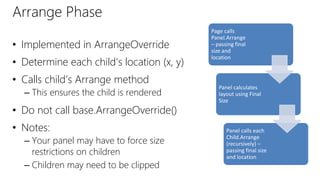
Arrange Phase
• Implemented in ArrangeOverride
• Determine each child’s location (x, y)
• Calls child’s Arrange method
– This ensures the child is rendered
• Do not call base.ArrangeOverride()
• Notes:
– Your panel may have to force size
restrictions on children
– Children may need to be clipped
Page calls
Panel.Arrange
– passing final
size and
location
Panel calculates
layout using Final
Size
Panel calls each
Child.Arrange
(recursively) –
passing final size
and location
Panel.ArrangeOverride(Size)
protected override Size ArrangeOverride(Size finalSize)
{
var height =0d;
foreach (var child in Children)
{
if ((height +child.DesiredSize.Height) > finalSize.Height)
break;
child.Arrange(new Rect(new Point(0, height), child.DesiredSize));
height += child.DesiredSize.Height;
}
return new Size(finalsize.Width, height);
}
• Active Canvas
• Master/Details
• Tabs and Pivots
• Nav Panel
Module Overview
Master / Detail
https://msdn.microsoft.com/en-us/library/windows/apps/dn997765.aspx
Tabs and Pivot
https://msdn.microsoft.com/en-us/library/windows/apps/dn997788.aspxs
Nav Pane
https://msdn.microsoft.com/en-us/library/windows/apps/dn997766.aspx
Recommended Resources
• https://dev.windows.com/
• MSDN Windows 10 XAML Overview
– https://msdn.microsoft.com/en-
us/library/windows/apps/mt185595.aspx

New Xaml components for Windows developers

Editor's Notes

  • #3 SIGNAURE LAYOUT OR EXPERIENCE
  • #5 SIGNAURE LAYOUT OR EXPERIENCE / bring up Radial
  • #14 Side by side viewing of a list of items and content - mail Collapses to a drill down on small screens Great for hierarchal navigation Other things -
  • #16 Tabs and pivots are used for navigating frequently accessed, distinct content categories
  • #18 Great for multi-level navigation Uses SplitView (aka Hamburger Menu) Lots of different menu styles