New Employee iPhone – using your Apple ID
Already have an Apple ID/iTunes Account?
Terrific! Go ahead and use itwiththese precautions:
Do NOT plugyour EcolabdevicesintoyourPCor 1) Setup as new or 2) Restore aniTunesback-up.
If you do,you will lose all EcolabconfigurationsonyouriPhone oriPad. Sign in atStep 2, chooseto
allow yourEcolab devices to mergeinformation,and allow iCloud to Use theLocation of YouriPhone.
You will need to open and confirmtheverification email thatwill be sentto the email you used.
What’s an Apple ID and why do I need one?
The Apple IDis an account that youcan use to access all of Apple'sservices.Youcan use it to buymusic
and appsfrom the iTunesStore. For work,you'll need ittodownloadhelpful orrequiredappsfoundin
the Pest App Store. You’ll alsoneedan Apple IDinorderto use iCloudwhichcan helpyoufind a lost
device. To create a brand new AppleID fromyourEcolab iPhone,follow the stepsbelow.
Method2 instructions:
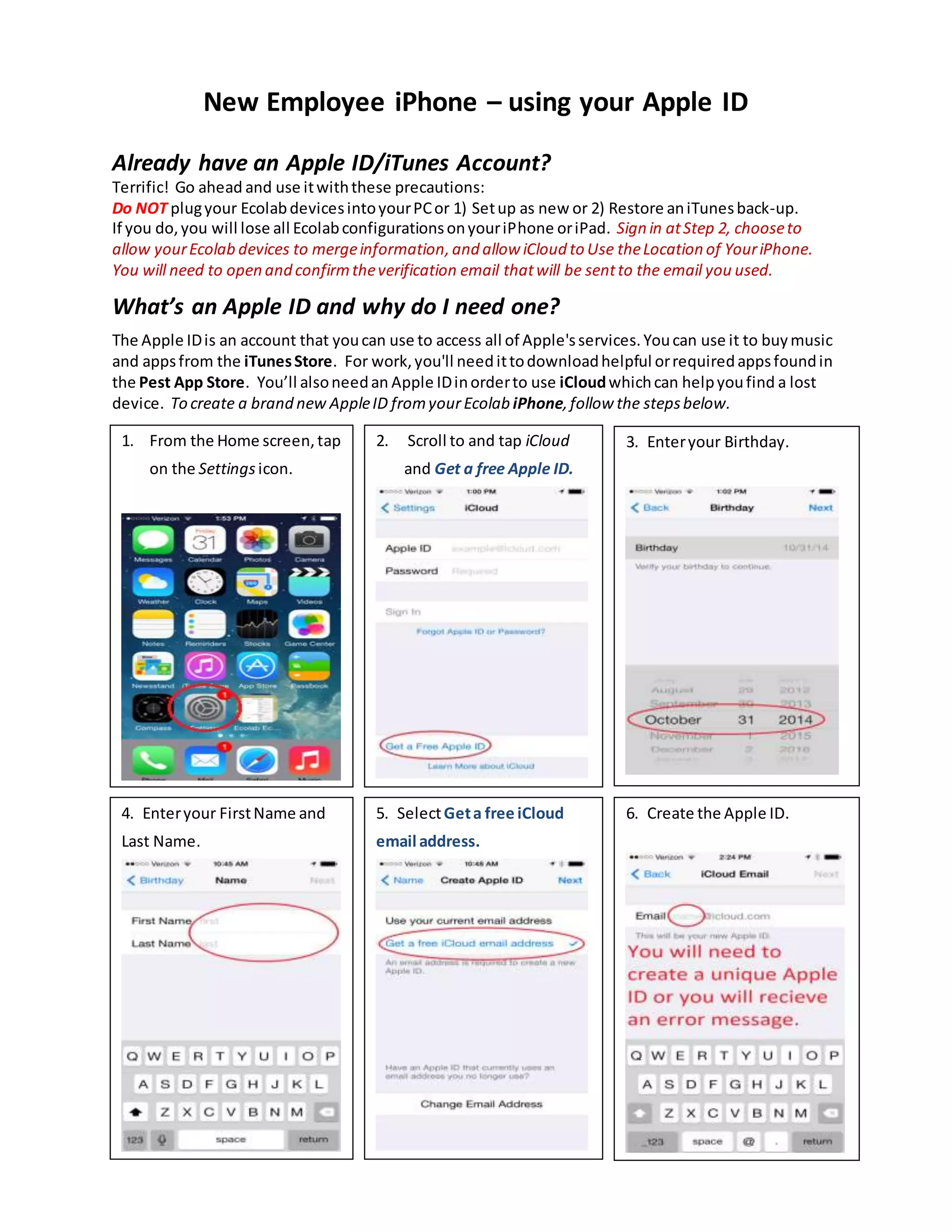
1. From the Home screen,tap
on the Settings icon.
3. Enteryour Birthday.2. Scroll to and tap iCloud
and Get a free Apple ID.
4. Enteryour FirstName and
Last Name.
5. SelectGeta free iCloud
email address.
6. Create the Apple ID.
1.
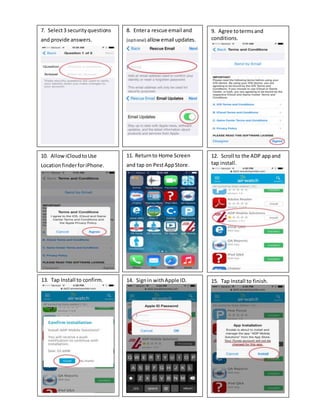
8. Entera rescue email and
(optional) allow email updates.
7. Select3 securityquestions
and provide answers.
9. Agree totermsand
conditions.
11. Returnto Home Screen
and tap on PestAppStore.
10. AllowiCloudtoUse
LocationfinderforiPhone.
12. Scroll to the ADP appand
tap install.
13. Tap Install to confirm. 14. Signin withApple ID. 15. Tap Install to finish.
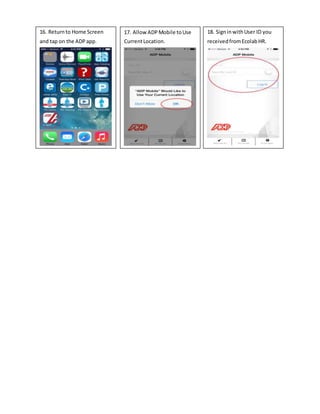
16. Returnto Home Screen
and tap on the ADPapp.
17. Allow ADPMobile toUse
CurrentLocation.
18. SigninwithUser ID you
receivedfromEcolabHR.

New Employee iPhone – using your Apple ID

  • 1.
    New Employee iPhone– using your Apple ID Already have an Apple ID/iTunes Account? Terrific! Go ahead and use itwiththese precautions: Do NOT plugyour EcolabdevicesintoyourPCor 1) Setup as new or 2) Restore aniTunesback-up. If you do,you will lose all EcolabconfigurationsonyouriPhone oriPad. Sign in atStep 2, chooseto allow yourEcolab devices to mergeinformation,and allow iCloud to Use theLocation of YouriPhone. You will need to open and confirmtheverification email thatwill be sentto the email you used. What’s an Apple ID and why do I need one? The Apple IDis an account that youcan use to access all of Apple'sservices.Youcan use it to buymusic and appsfrom the iTunesStore. For work,you'll need ittodownloadhelpful orrequiredappsfoundin the Pest App Store. You’ll alsoneedan Apple IDinorderto use iCloudwhichcan helpyoufind a lost device. To create a brand new AppleID fromyourEcolab iPhone,follow the stepsbelow. Method2 instructions: 1. From the Home screen,tap on the Settings icon. 3. Enteryour Birthday.2. Scroll to and tap iCloud and Get a free Apple ID. 4. Enteryour FirstName and Last Name. 5. SelectGeta free iCloud email address. 6. Create the Apple ID.
  • 2.
    1. 8. Entera rescueemail and (optional) allow email updates. 7. Select3 securityquestions and provide answers. 9. Agree totermsand conditions. 11. Returnto Home Screen and tap on PestAppStore. 10. AllowiCloudtoUse LocationfinderforiPhone. 12. Scroll to the ADP appand tap install. 13. Tap Install to confirm. 14. Signin withApple ID. 15. Tap Install to finish.
  • 3.
    16. Returnto HomeScreen and tap on the ADPapp. 17. Allow ADPMobile toUse CurrentLocation. 18. SigninwithUser ID you receivedfromEcolabHR.