CSS: Separating Design and
Content


Global Information Internship
Program from BUDNET
www.budnetdesign.com
Assumptions
   You know HTML
   You do not know CSS
   You care about aesthetics and
    function
   You have 50 minutes to kill
What We’ll Do
   What is CSS?
   View some code and talk basics
   Why use CSS?
     Advantages to Workflow
     Cost Savings

   Implementations
   Resources
What are Cascading Style Sheets?
   Created by Hakon Wium Lie of MIT
    in 1994
   Has become the W3C standard for
    controlling visual presentation of
    web pages
   Separates design elements from
    structural logic
   You get control and maintain the
    integrity of your data
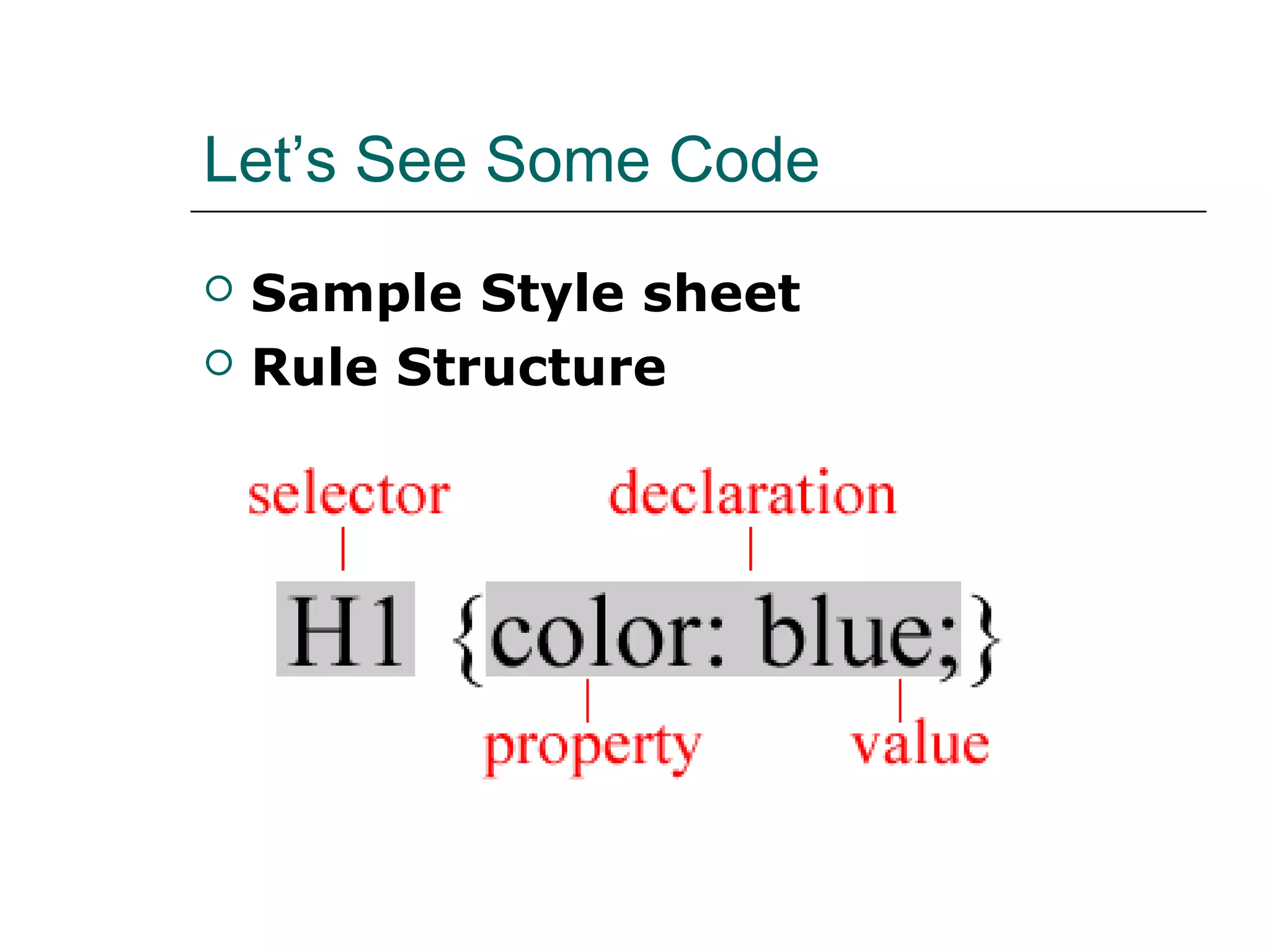
Let’s See Some Code
   Sample Style sheet
   Rule Structure
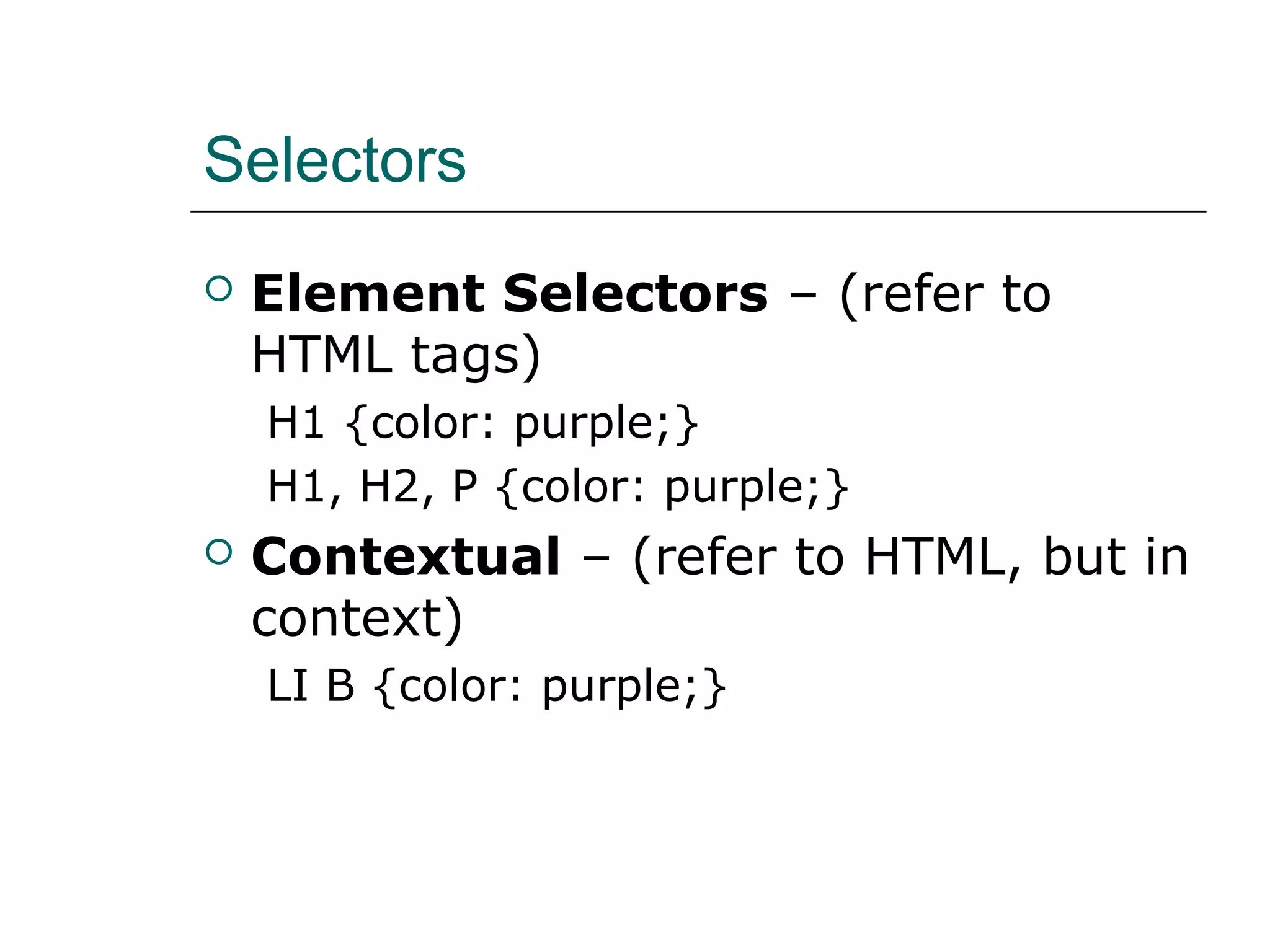
Selectors
   Element Selectors – (refer to
    HTML tags)
    H1 {color: purple;}
    H1, H2, P {color: purple;}
   Contextual – (refer to HTML, but in
    context)
    LI B {color: purple;}
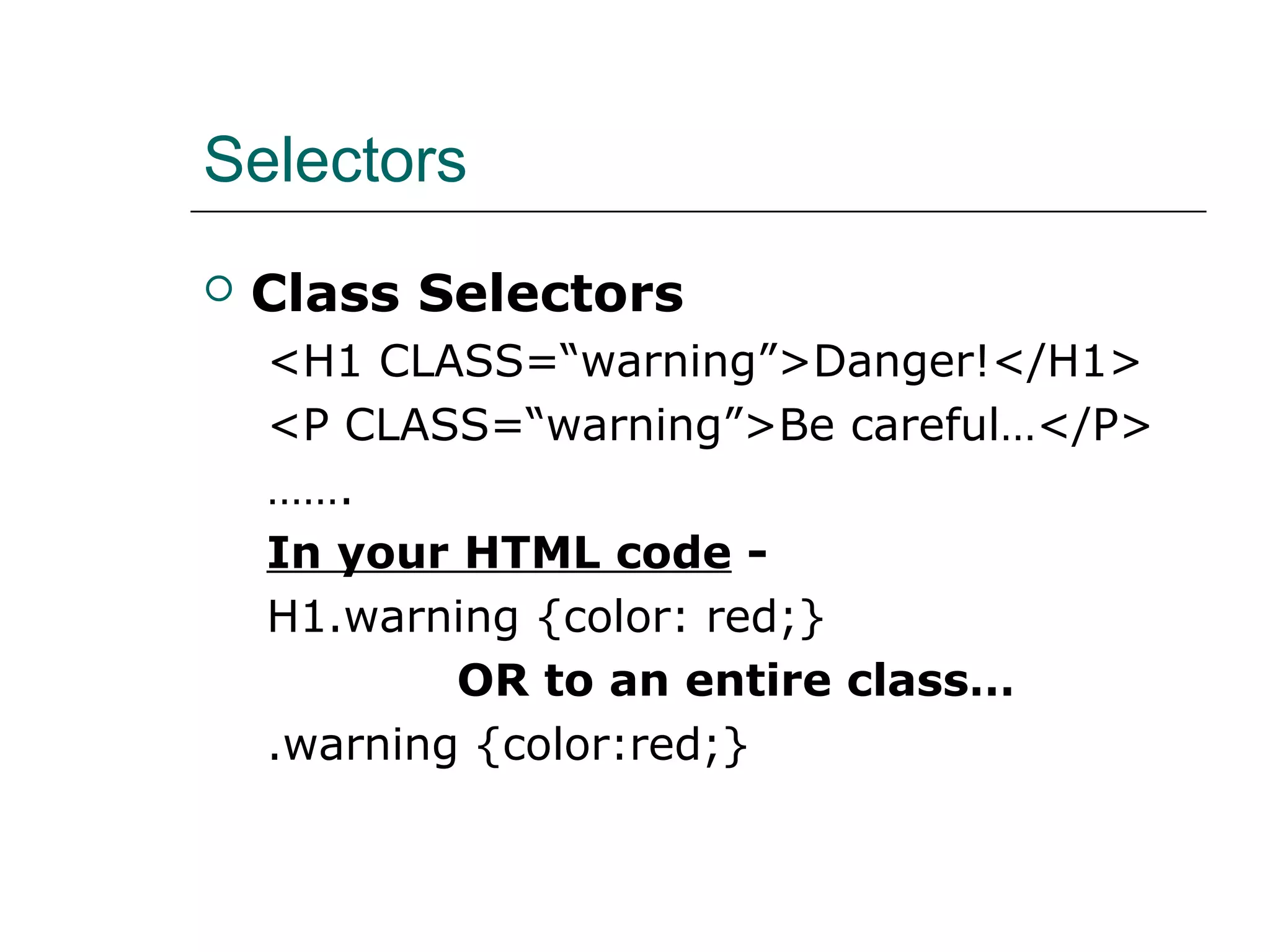
Selectors
   Class Selectors
    <H1 CLASS=“warning”>Danger!</H1>
    <P CLASS=“warning”>Be careful…</P>
    …….
    In your HTML code -
    H1.warning {color: red;}
            OR to an entire class…
    .warning {color:red;}
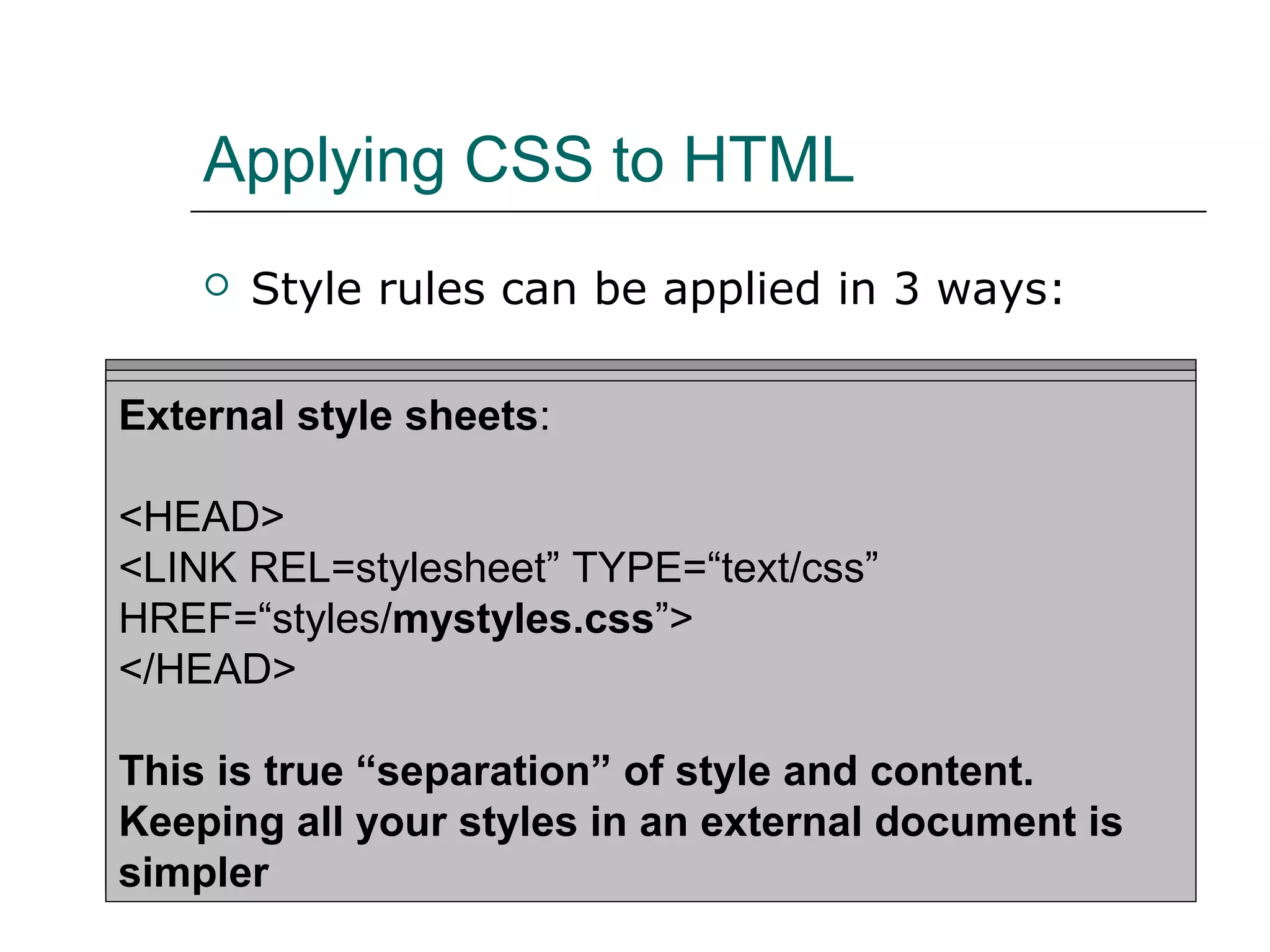
Applying CSS to HTML
       Style rules can be applied in 3 ways:

Inline Styles: sheets:
Embedded style sheets:
External style
<H1 STYLE=“color: blue; font-size: 20pt;”>A large purple
<HTML><HEAD><TITLE>Stylin’!</TITLE>
<HEAD>
Heading</H1>
<STYLE TYPE=“text/css”>
<LINK REL=stylesheet” TYPE=“text/css”
       H1 {color: purple;}
HREF=“styles/mystyles.css”>
For individual elementscolor: gray;}
       P {font-size: 10pt; using the STYLE attribute
</HEAD>
</STYLE>
</HEAD> “separation” of style and content.
This is true
…
Keeping all your styles in an external document is
</HTML>
simpler
Why CSS?
   Advantages to Workflow
   Cost Savings
   You WILL Be Cooler
Advantages of CSS
   Workflow
     Faster downloads
     Streamlined site maintenance

     Global control of design attributes

     Precise control (Advanced)
       Positioning
       Fluid layouts
Advantages of CSS - Cost Savings
   Cost Savings
     Reduced     Bandwidth Costs
         One style sheet called and cached
     Higher    Search Engine Rankings
       Cleaner code is easier for search engines
        to index
       Greater density of indexable content
Advantages of CSS - Cost Savings

   Faster download = better usability
       Web usability redesign can increase the
        sales/conversion rate by 100% (source: Jakob
        Nielson)
       CSS requires less code
       Tables require spacer images
       Entire table has to render before content
       CSS can control the order that elements
        download (content before images)
Advantages of CSS - Cost Savings

   Increased Reach
     CSS   website is compatible w/ many
      different devices
     In 2008 an est. 58 Million PDA’s will be
      sold (Source: eTForecast.com)
     1/3 of the world’s population will own a
      wireless device by 2010
Implementations
   Apply to HTML pages
   Apply to dynamic data
     Format   or style XML
   Use for layout (this is cool)
     See   http://www.csszengarden.com
CSS isn’t perfect (yet)
   CSS support in browsers is still
    uneven
   Make sure your CSS properties are
    supported
Resources
   http://www.csszengarden.com
     This   is CSS at its finest
   http://www.w3.org/Style/CSS/
     The    Official CSS Site
   http://css.maxdesign.com.au/
     Australian   firm, very professional
   http://webmonkey.wired.com/web
    monkey/reference/stylesheet_guide
     Where    I learned CSS and Web Design
Come and see me at 3:30pm!
   “Making Your Web Site More
    Appealing”

New Css style

  • 1.
    CSS: Separating Designand Content Global Information Internship Program from BUDNET www.budnetdesign.com
  • 2.
    Assumptions  You know HTML  You do not know CSS  You care about aesthetics and function  You have 50 minutes to kill
  • 3.
    What We’ll Do  What is CSS?  View some code and talk basics  Why use CSS?  Advantages to Workflow  Cost Savings  Implementations  Resources
  • 4.
    What are CascadingStyle Sheets?  Created by Hakon Wium Lie of MIT in 1994  Has become the W3C standard for controlling visual presentation of web pages  Separates design elements from structural logic  You get control and maintain the integrity of your data
  • 5.
    Let’s See SomeCode  Sample Style sheet  Rule Structure
  • 6.
    Selectors  Element Selectors – (refer to HTML tags) H1 {color: purple;} H1, H2, P {color: purple;}  Contextual – (refer to HTML, but in context) LI B {color: purple;}
  • 7.
    Selectors  Class Selectors <H1 CLASS=“warning”>Danger!</H1> <P CLASS=“warning”>Be careful…</P> ……. In your HTML code - H1.warning {color: red;} OR to an entire class… .warning {color:red;}
  • 8.
    Applying CSS toHTML  Style rules can be applied in 3 ways: Inline Styles: sheets: Embedded style sheets: External style <H1 STYLE=“color: blue; font-size: 20pt;”>A large purple <HTML><HEAD><TITLE>Stylin’!</TITLE> <HEAD> Heading</H1> <STYLE TYPE=“text/css”> <LINK REL=stylesheet” TYPE=“text/css” H1 {color: purple;} HREF=“styles/mystyles.css”> For individual elementscolor: gray;} P {font-size: 10pt; using the STYLE attribute </HEAD> </STYLE> </HEAD> “separation” of style and content. This is true … Keeping all your styles in an external document is </HTML> simpler
  • 9.
    Why CSS?  Advantages to Workflow  Cost Savings  You WILL Be Cooler
  • 10.
    Advantages of CSS  Workflow  Faster downloads  Streamlined site maintenance  Global control of design attributes  Precise control (Advanced)  Positioning  Fluid layouts
  • 11.
    Advantages of CSS- Cost Savings  Cost Savings  Reduced Bandwidth Costs  One style sheet called and cached  Higher Search Engine Rankings  Cleaner code is easier for search engines to index  Greater density of indexable content
  • 12.
    Advantages of CSS- Cost Savings  Faster download = better usability  Web usability redesign can increase the sales/conversion rate by 100% (source: Jakob Nielson)  CSS requires less code  Tables require spacer images  Entire table has to render before content  CSS can control the order that elements download (content before images)
  • 13.
    Advantages of CSS- Cost Savings  Increased Reach  CSS website is compatible w/ many different devices  In 2008 an est. 58 Million PDA’s will be sold (Source: eTForecast.com)  1/3 of the world’s population will own a wireless device by 2010
  • 14.
    Implementations  Apply to HTML pages  Apply to dynamic data  Format or style XML  Use for layout (this is cool)  See http://www.csszengarden.com
  • 15.
    CSS isn’t perfect(yet)  CSS support in browsers is still uneven  Make sure your CSS properties are supported
  • 16.
    Resources  http://www.csszengarden.com  This is CSS at its finest  http://www.w3.org/Style/CSS/  The Official CSS Site  http://css.maxdesign.com.au/  Australian firm, very professional  http://webmonkey.wired.com/web monkey/reference/stylesheet_guide  Where I learned CSS and Web Design
  • 17.
    Come and seeme at 3:30pm!  “Making Your Web Site More Appealing”