Manual Of Networking Alarm Panel
HB-2050G
HB-4040G
HB-5050G
网络报警主机使用说明
1
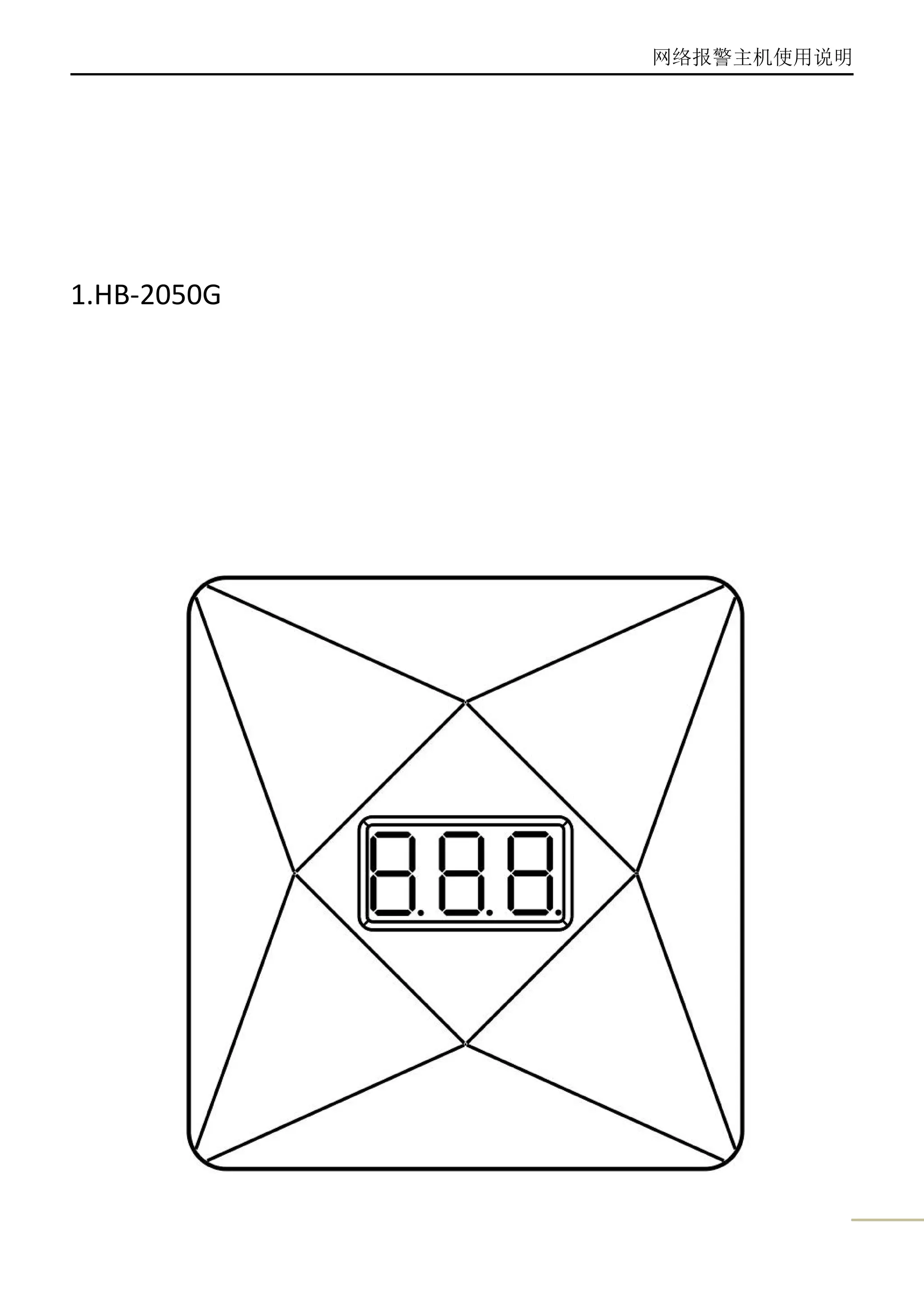
1.HB-2050G
网络报警主机使用说明
2
HB-2050G Connections of cables:
SIM Card Slot: Only 2G SIM Card is available(Mini SIM)
Power Interface:DC15V/1.5A
Output Interface:DC12V/0.5A(Linkage other devices--Siren and etc)
Set Button: Restore to the factory default
Technical Parameters:
Working Voltage DC 15V/1.5A
Wireless Frequency 434.6MHz FSK
GSM Frequency 900/1800/1900/2100 MHz
Dimension 103x110x49(mm)
网络报警主机使用说明
3
2.HB-4040G
网络报警主机使用说明
4
HB-4040G Connections of cables:
网络报警主机使用说明
5
SIM Card Slot: Only 2G SIM Card is available(Mini SIM)
Power Interface:DC15V/1.5A
Output Interface:DC12V/0.5A(Linkage other devices--Siren and etc)
Set Button: Restore to the factory default
Technical Parameters:
Working Voltage DC 15V/1.5A
Backup Battery 4×3.2V LiFePO4 Battery
Wireless Frequency 434.6MHz FSK
GSM Frequency 900/1800/1900/2100 MHz
Dimension 163x146x16(mm)
3.HB-5050G
网络报警主机使用说明
6
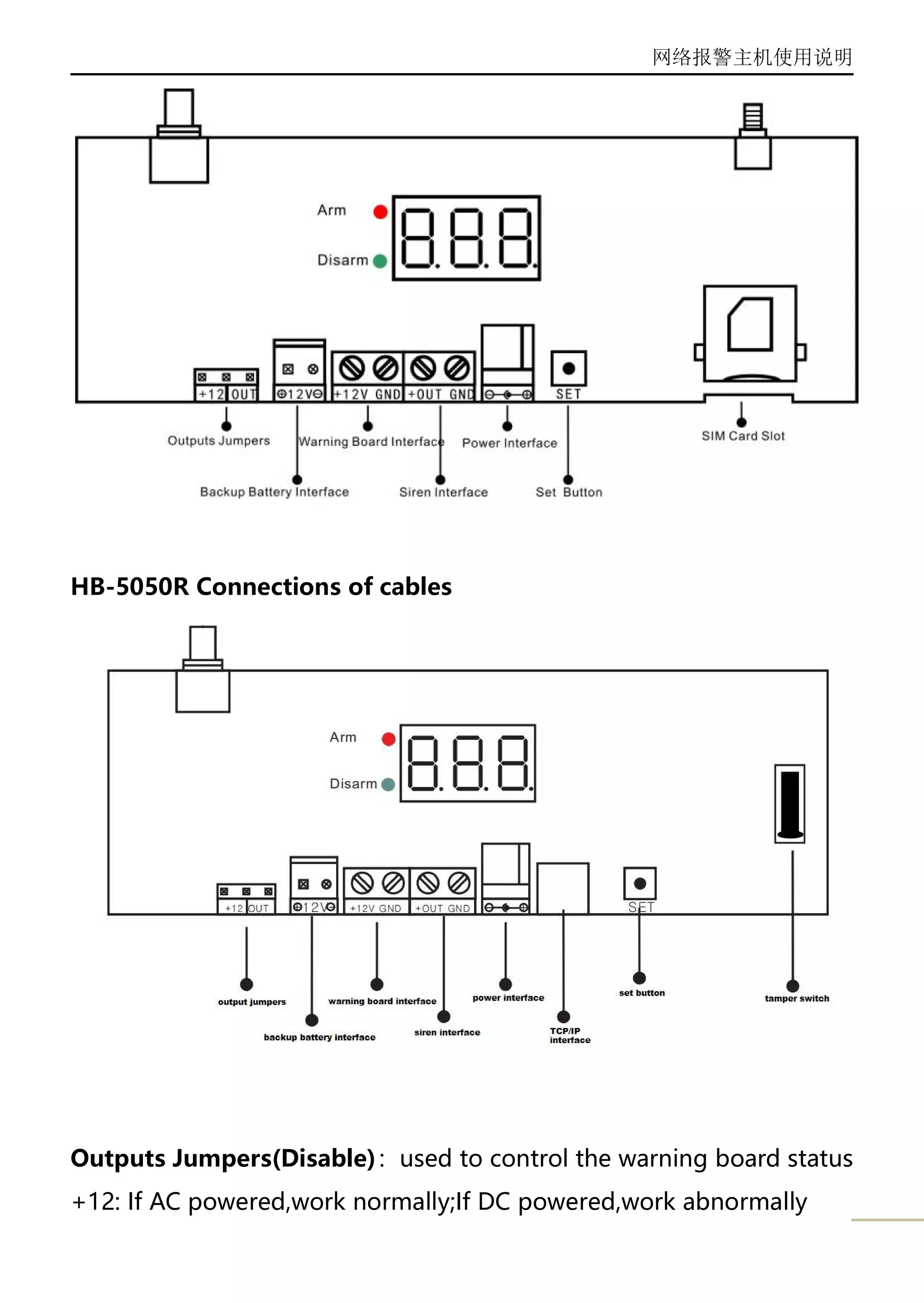
HB-5050G Connections of cables
网络报警主机使用说明
7
HB-5050R Connections of cables
Outputs Jumpers(Disable):used to control the warning board status
+12: If AC powered,work normally;If DC powered,work abnormally
网络报警主机使用说明
8
OUT: Alarming Mode,the warning board will light; Arm or Disarm
Mode,the warning board will blink;
Warning Board Interface:DC12V/0.5A outputs
Siren Interface:DC12V/0.5A outputs
Power Interface:DC15V/1.5A
SIM Card Slot: Only 2G SIM Card is available(Mini SIM)
Set Button: Restore to the factory default
Technical Parameters:
Working Voltage DC 15V/1.5A
Backup Battery 12V/1.3Ah
Wireless Frequency 434.6MHz FSK
GSM Frequency 900/1800/1900/2100 MHz
Dimension 165x175x62(mm)
4.Instructions
LCD Display:
-01/01 (01Blinking) On Setting Mode
-F0 Restored to factory default
-F6 Connected to Server Success
No Display Static working status,alarm panel has been
connected the detectors or remote controls
-XX (-Blinking) learning detector status(XX:01…99 zone number)
_XX Learned detector success(XX:01…99 zone number)
-XX Alarm(XX:01…99 zone number)
-0X (-Blinking) learning remotes status(X: 1-4 zone number)
_0X Learned remotes success(X: 1-4 zone number)
-F5 Emergency Alarm(SOS)
-F7 Connect to server failure
网络报警主机使用说明
9
-F2 Deleted account information success
-F8 SIM card faults
HXX GPRS Signal less than 13(XX: 00-13)
-F1 Tamper
Indicator lights:
Red: Arm Status
White(2050G)/Yellow(4040G)/Green(5050G):Disarm Status
Delete Account Information:Press the “Setting Button”Once,LCD
Display”-01”(01 Blinking),and then hold the “Setting Button”for
5 seconds , Release the “setting button”when the LCD
Display”-F2”;
Restore to factory default:Press the “Setting Button”Once,LCD
Display”-01”(01 Blinking),and then hold the “Setting Button”for
10 seconds , Release the “setting button”when the LCD
Display”-F0”;
5. APP Operation Manuals
5.1 Phone Configuration
Smart Phone
Above Android(4.0) Operating System
≥2G RAM
≥2G Storage Memory
5.2 Phone Setup→
Setting → Permissions → Saferhomee
Write and delete SMS messages → Accept
Read SMS messages → Accept
Change mobile data connectivity → Accept
网络报警主机使用说明
10
Change WLAN connectivity → Accept
Setting → Permissions → Autostart
Set Saferhomee can autostart
5.3 App Interface(Home):
网络报警主机使用说明
11
All Arm: On receiving all the alarm information mode
Disarm: On not receiving normal alarm information mode
Part Arm: Disable
Mute: Make the app silence when alarm
SOS:Emergency Help
5.4 Account Setup(Account)
Press”Account”--- enter password:123456
网络报警主机使用说明
12
SIM Card of the alarm panel supports SMS?Please choose Yes/No
according to functions of the SIM Card(If Yes,please fill the SIM card
number)
SIM Card Number:The SIM Card number of the alarm panel
Alarm Panel ID:Fill the 15-digits Serial Number/Scan the OR Code
Phone Number:The SIM Card number of the phone installed the App
Setup Password:Original password is 123456(Please reset in”Setup”)
Final,Press”Submit “
5.5 Alarm Panel Setup(Setup)
网络报警主机使用说明
13
Phone Number
网络报警主机使用说明
14
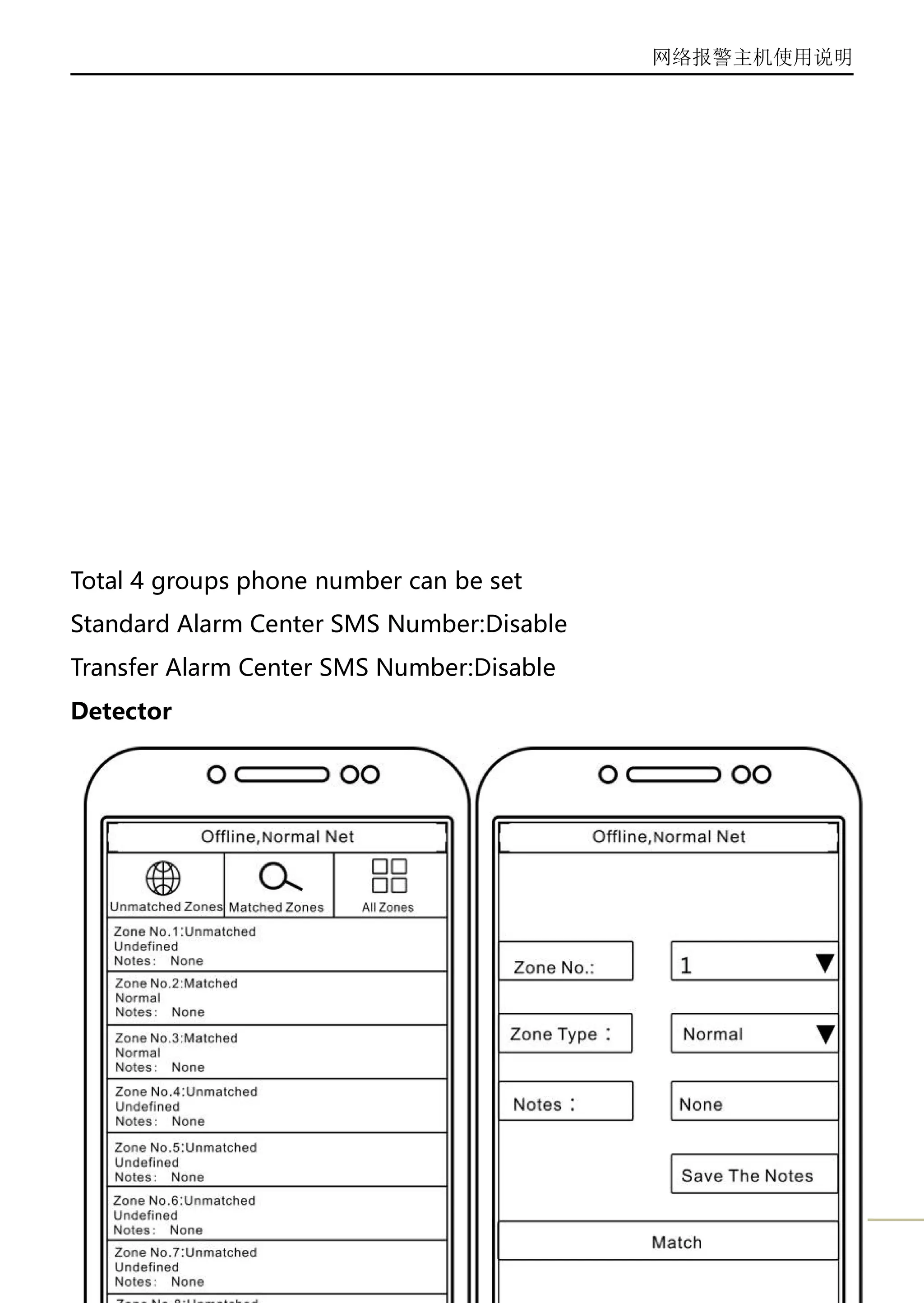
Total 4 groups phone number can be set
Standard Alarm Center SMS Number:Disable
Transfer Alarm Center SMS Number:Disable
Detector
网络报警主机使用说明
15
Select the zone number(1--99)
Select the zone type(Normal,Emergency,Fire,Help,Gas,Water)
Fill the Notes and save the notes
Press”Match “----and then trigger the detector once
SMS Mode
网络报警主机使用说明
16
Factory Default is Enable;If select the “Disable”,the alarm panel and
the app will not keep communication if on offline status..
Remote Control
网络报警主机使用说明
17
Select the remote control(1#--4#)
Press “+” to add the remote control
Press “-” to delete the remote control
Timing Time
网络报警主机使用说明
18
Query Timing Time: Querythe last timing time
2 groups of arm/disarm time can be set...press”√ ”to confirm.
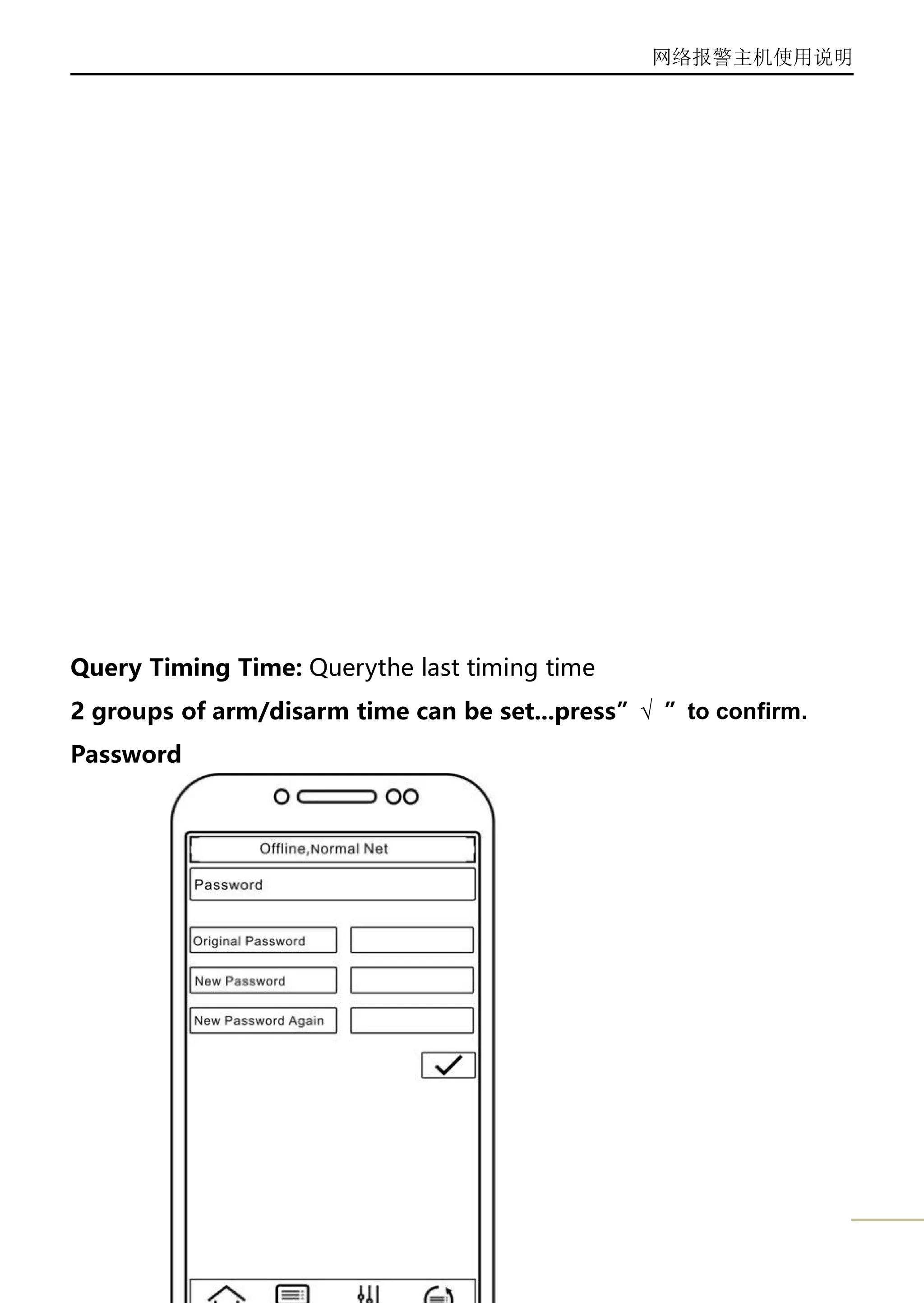
Password
网络报警主机使用说明
19
Note:The password should be 6-digits
Ademco ID &Server’s Domain Address are used to communicate
with the SAFERHOMEE Alarm Software...(Disable)
Time(Disable)

Networking alarm panel manuals

  • 1.
    Manual Of NetworkingAlarm Panel HB-2050G HB-4040G HB-5050G
  • 2.
  • 3.
    网络报警主机使用说明 2 HB-2050G Connections ofcables: SIM Card Slot: Only 2G SIM Card is available(Mini SIM) Power Interface:DC15V/1.5A Output Interface:DC12V/0.5A(Linkage other devices--Siren and etc) Set Button: Restore to the factory default Technical Parameters: Working Voltage DC 15V/1.5A Wireless Frequency 434.6MHz FSK GSM Frequency 900/1800/1900/2100 MHz Dimension 103x110x49(mm)
  • 4.
  • 5.
  • 6.
    网络报警主机使用说明 5 SIM Card Slot:Only 2G SIM Card is available(Mini SIM) Power Interface:DC15V/1.5A Output Interface:DC12V/0.5A(Linkage other devices--Siren and etc) Set Button: Restore to the factory default Technical Parameters: Working Voltage DC 15V/1.5A Backup Battery 4×3.2V LiFePO4 Battery Wireless Frequency 434.6MHz FSK GSM Frequency 900/1800/1900/2100 MHz Dimension 163x146x16(mm) 3.HB-5050G
  • 7.
  • 8.
    网络报警主机使用说明 7 HB-5050R Connections ofcables Outputs Jumpers(Disable):used to control the warning board status +12: If AC powered,work normally;If DC powered,work abnormally
  • 9.
    网络报警主机使用说明 8 OUT: Alarming Mode,thewarning board will light; Arm or Disarm Mode,the warning board will blink; Warning Board Interface:DC12V/0.5A outputs Siren Interface:DC12V/0.5A outputs Power Interface:DC15V/1.5A SIM Card Slot: Only 2G SIM Card is available(Mini SIM) Set Button: Restore to the factory default Technical Parameters: Working Voltage DC 15V/1.5A Backup Battery 12V/1.3Ah Wireless Frequency 434.6MHz FSK GSM Frequency 900/1800/1900/2100 MHz Dimension 165x175x62(mm) 4.Instructions LCD Display: -01/01 (01Blinking) On Setting Mode -F0 Restored to factory default -F6 Connected to Server Success No Display Static working status,alarm panel has been connected the detectors or remote controls -XX (-Blinking) learning detector status(XX:01…99 zone number) _XX Learned detector success(XX:01…99 zone number) -XX Alarm(XX:01…99 zone number) -0X (-Blinking) learning remotes status(X: 1-4 zone number) _0X Learned remotes success(X: 1-4 zone number) -F5 Emergency Alarm(SOS) -F7 Connect to server failure
  • 10.
    网络报警主机使用说明 9 -F2 Deleted accountinformation success -F8 SIM card faults HXX GPRS Signal less than 13(XX: 00-13) -F1 Tamper Indicator lights: Red: Arm Status White(2050G)/Yellow(4040G)/Green(5050G):Disarm Status Delete Account Information:Press the “Setting Button”Once,LCD Display”-01”(01 Blinking),and then hold the “Setting Button”for 5 seconds , Release the “setting button”when the LCD Display”-F2”; Restore to factory default:Press the “Setting Button”Once,LCD Display”-01”(01 Blinking),and then hold the “Setting Button”for 10 seconds , Release the “setting button”when the LCD Display”-F0”; 5. APP Operation Manuals 5.1 Phone Configuration Smart Phone Above Android(4.0) Operating System ≥2G RAM ≥2G Storage Memory 5.2 Phone Setup→ Setting → Permissions → Saferhomee Write and delete SMS messages → Accept Read SMS messages → Accept Change mobile data connectivity → Accept
  • 11.
    网络报警主机使用说明 10 Change WLAN connectivity→ Accept Setting → Permissions → Autostart Set Saferhomee can autostart 5.3 App Interface(Home):
  • 12.
    网络报警主机使用说明 11 All Arm: Onreceiving all the alarm information mode Disarm: On not receiving normal alarm information mode Part Arm: Disable Mute: Make the app silence when alarm SOS:Emergency Help 5.4 Account Setup(Account) Press”Account”--- enter password:123456
  • 13.
    网络报警主机使用说明 12 SIM Card ofthe alarm panel supports SMS?Please choose Yes/No according to functions of the SIM Card(If Yes,please fill the SIM card number) SIM Card Number:The SIM Card number of the alarm panel Alarm Panel ID:Fill the 15-digits Serial Number/Scan the OR Code Phone Number:The SIM Card number of the phone installed the App Setup Password:Original password is 123456(Please reset in”Setup”) Final,Press”Submit “ 5.5 Alarm Panel Setup(Setup)
  • 14.
  • 15.
    网络报警主机使用说明 14 Total 4 groupsphone number can be set Standard Alarm Center SMS Number:Disable Transfer Alarm Center SMS Number:Disable Detector
  • 16.
    网络报警主机使用说明 15 Select the zonenumber(1--99) Select the zone type(Normal,Emergency,Fire,Help,Gas,Water) Fill the Notes and save the notes Press”Match “----and then trigger the detector once SMS Mode
  • 17.
    网络报警主机使用说明 16 Factory Default isEnable;If select the “Disable”,the alarm panel and the app will not keep communication if on offline status.. Remote Control
  • 18.
    网络报警主机使用说明 17 Select the remotecontrol(1#--4#) Press “+” to add the remote control Press “-” to delete the remote control Timing Time
  • 19.
    网络报警主机使用说明 18 Query Timing Time:Querythe last timing time 2 groups of arm/disarm time can be set...press”√ ”to confirm. Password
  • 20.
    网络报警主机使用说明 19 Note:The password shouldbe 6-digits Ademco ID &Server’s Domain Address are used to communicate with the SAFERHOMEE Alarm Software...(Disable) Time(Disable)