Introduction:
Network security is an organization’s strategy that
enables guaranteeing the security of its assets including
all network traffic. Access to the network is managed by
effective network security, which targets a wide range of
threats and then arrests them from entering in the
network.
What is network security?
Network security is the process of taking physical and
software preventative measures to protect the underlying
networking infrastructure from unauthorized access,
misuse, malfunction, modification, destruction, thereby
creating a secure platform for computers, users, and
programs.
Why do we need security?
Network security is needed to:
1.Prevent unauthorized access to the network that is of
potential threat to the network and its resources.
2.Ensure that the authentic users can effectively
access the network and its services.
3.Applications that can protect the network from
unauthorized access are in place.
Goals Of NETWORK SECURITY
1. Ensures the confidentiality of resources
2. Protect the integrity of data
3. Maintain availability of the IT infrastructure
4. Ensure the privacy of personally identifiable data
5. Enforces access control
6. Monitor the IT environment for violations of policy
1.In cryptography, encryption is the process of
transforming information using an algorithm to make
it unreadable to anyone except those possessing
special knowledge, usually referred to as a key.
2.The reverse process, to make the encrypted
information readable again, is referred to as
DECRYPTION.
ENCRYPTION
Types
Symmetric key
-In symmetric-key schemes, the encryption and
decryption keys are the same.
Public key
-In public-key encryption schemes, the
encryption key is published for anyone to use
and encrypt messages.
Uses
1.Encryption can be used to protect data "at rest",
such as files on computers and storage devices
(e.g. USB flash drives).
2.Encryption is also used to protect data in transit
3.Encryption, by itself, can protect the confidentiality
of messages.
1.Disk encryption software
2.File/folder encryption
3.Database encryption
4.Communication encryption software
5.Network traffic encryption tools
1.Generic
2.IPSec based
APPLICATIONS
WIRELESS SECURITY
 Wireless security is the prevention of
unauthorized access or damage to
computers or data using Wireless
networks.
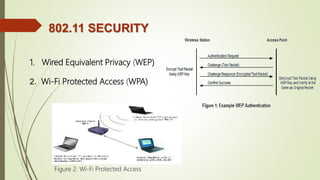
802.11 SECURITY
1. Wired Equivalent Privacy (WEP)
2. Wi-Fi Protected Access (WPA)
Figure 2: Wi-Fi Protected Access
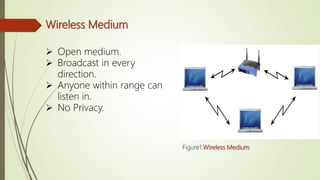
Wireless Medium
 Open medium.
 Broadcast in every
direction.
 Anyone within range can
listen in.
 No Privacy.
Figure1:Wireless Medium
WPA2
WPA2 replaced WPA.
 Began in September, 2004
WPA3
 January 2018, the Wi-Fi Alliance
announced WPA3 as a replacement to
WPA2.
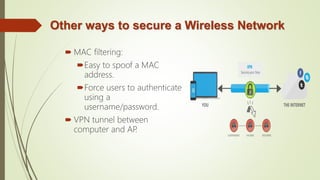
Other ways to secure a Wireless Network
 MAC filtering:
Easy to spoof a MAC
address.
Force users to authenticate
using a
username/password.
 VPN tunnel between
computer and AP.
SECURITY PROCESSES:
Some data is also confidential; not only do you want
to lose it, you don’t want others to even view it
without authorization.
Let’s look at some ways to protect your all important
user data from loss and/or unauthorized
access.
SECURITY PROCESSES: 9 WAYS
 Back up early or often
 Use file-level and share-level security
 Password-Protect Documents
 Use EFS Encryption
 Use Disk Encryption
SECURITY PROCESSES: 9 WAYS
 Make use of a public key infrastructure
 Protect data in transit with IP Security
 Secure Wireless Transmissions
 Use Rights Management to retain Control
Firewall
• A network security system.
• Establishes a barrier.
• Acts as a DHCP server.
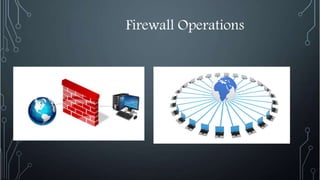
Firewall Operations
Types of firewall
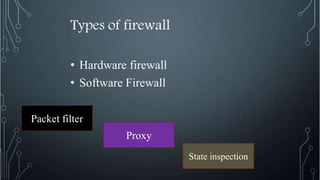
• Hardware firewall
• Software Firewall
Proxy
State inspection
Packet filter
Types of controls
• Service control
• Direction control
• User control
• Behavior Control
Network security

Network security

  • 4.
    Introduction: Network security isan organization’s strategy that enables guaranteeing the security of its assets including all network traffic. Access to the network is managed by effective network security, which targets a wide range of threats and then arrests them from entering in the network.
  • 5.
    What is networksecurity? Network security is the process of taking physical and software preventative measures to protect the underlying networking infrastructure from unauthorized access, misuse, malfunction, modification, destruction, thereby creating a secure platform for computers, users, and programs.
  • 6.
    Why do weneed security? Network security is needed to: 1.Prevent unauthorized access to the network that is of potential threat to the network and its resources. 2.Ensure that the authentic users can effectively access the network and its services. 3.Applications that can protect the network from unauthorized access are in place.
  • 7.
    Goals Of NETWORKSECURITY 1. Ensures the confidentiality of resources 2. Protect the integrity of data 3. Maintain availability of the IT infrastructure 4. Ensure the privacy of personally identifiable data 5. Enforces access control 6. Monitor the IT environment for violations of policy
  • 9.
    1.In cryptography, encryptionis the process of transforming information using an algorithm to make it unreadable to anyone except those possessing special knowledge, usually referred to as a key. 2.The reverse process, to make the encrypted information readable again, is referred to as DECRYPTION. ENCRYPTION
  • 10.
    Types Symmetric key -In symmetric-keyschemes, the encryption and decryption keys are the same. Public key -In public-key encryption schemes, the encryption key is published for anyone to use and encrypt messages.
  • 11.
    Uses 1.Encryption can beused to protect data "at rest", such as files on computers and storage devices (e.g. USB flash drives). 2.Encryption is also used to protect data in transit 3.Encryption, by itself, can protect the confidentiality of messages.
  • 12.
    1.Disk encryption software 2.File/folderencryption 3.Database encryption 4.Communication encryption software 5.Network traffic encryption tools 1.Generic 2.IPSec based APPLICATIONS
  • 14.
    WIRELESS SECURITY  Wirelesssecurity is the prevention of unauthorized access or damage to computers or data using Wireless networks.
  • 15.
    802.11 SECURITY 1. WiredEquivalent Privacy (WEP) 2. Wi-Fi Protected Access (WPA) Figure 2: Wi-Fi Protected Access
  • 16.
    Wireless Medium  Openmedium.  Broadcast in every direction.  Anyone within range can listen in.  No Privacy. Figure1:Wireless Medium
  • 17.
    WPA2 WPA2 replaced WPA. Began in September, 2004 WPA3  January 2018, the Wi-Fi Alliance announced WPA3 as a replacement to WPA2.
  • 18.
    Other ways tosecure a Wireless Network  MAC filtering: Easy to spoof a MAC address. Force users to authenticate using a username/password.  VPN tunnel between computer and AP.
  • 20.
    SECURITY PROCESSES: Some datais also confidential; not only do you want to lose it, you don’t want others to even view it without authorization. Let’s look at some ways to protect your all important user data from loss and/or unauthorized access.
  • 21.
    SECURITY PROCESSES: 9WAYS  Back up early or often  Use file-level and share-level security  Password-Protect Documents  Use EFS Encryption  Use Disk Encryption
  • 22.
    SECURITY PROCESSES: 9WAYS  Make use of a public key infrastructure  Protect data in transit with IP Security  Secure Wireless Transmissions  Use Rights Management to retain Control
  • 24.
    Firewall • A networksecurity system. • Establishes a barrier. • Acts as a DHCP server.
  • 25.
  • 26.
    Types of firewall •Hardware firewall • Software Firewall Proxy State inspection Packet filter
  • 27.
    Types of controls •Service control • Direction control • User control • Behavior Control