
Network SecurityNetwork Security
Jasleen Kaur
OutlineOutline
• Information security
• Attacks, services and mechanisms
• Security attacks
• Security services
• Methods of Defense
• A model for Internetwork Security
• Internet standards and RFCs
Information Security
“Computer Security”
Has undergone two major changes:
• Timesharing systems: multiple users
share the H/W and S/W resources on a
computer.
• Remote login is allowed over phone
lines.
Measures & tools to protect data and
thwart hackers is called
Computer Security
Information Security…
“Network Security”
Computer networks are widely used to
connect computers at distant locations.
Raises additional security problems:
• Data in transmission must be protected.
• Network connectivity exposes each
computer to more vulnerabilities.
Attacks, Services, Mechanisms
Three aspects of Information
Security:
• Security Attack: Any action that
compromises the security of
information.
• Security Mechanism: A mechanism
that is designed to detect, prevent, or
recover from a security attack.
• Security Service: A service that
enhances the security of data
processing systems and information
transfers. A security service makes use
of one or more security mechanisms.
Security AttacksSecurity Attacks
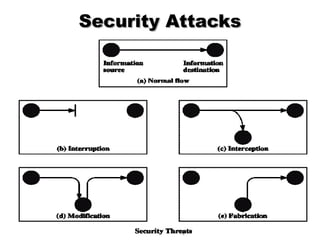
Interruption: An asset of the system is
destroyed or becomes unavailable or
unusable.
•This is an attack on availability.
Examples:
•Destroying some H/W (disk or wire).
•Disabling file system.
•Swamping a computer with jobs or
communication link with packets.
Security AttacksSecurity Attacks
Interception: An unauthorized party
gains access to an asset.
•This is an attack on confidentiality.
Examples:
•Wiretapping to capture data in a
network.
•Illicitly copying data or programs.
Security AttacksSecurity Attacks
Modification: An unauthorized party
gains access and tampers an asset.
•This is an attack on integrity.
Examples:
•Changing data files.
•Altering a program.
•Altering the contents of a message.
Security AttacksSecurity Attacks
Fabrication: An unauthorized party
inserts a counterfeit object into the
system.
•This is an attack on authenticity.
Examples:
•Insertion of records in data files.
•Insertion of spurious messages in a
network. (message replay).
Passive Vs Active Attacks
1. Passive Attacks:
• Eavesdropping on information without
modifying it. (difficult to detect ).
2. Active Attacks:
• Involve modification or creation of
information.
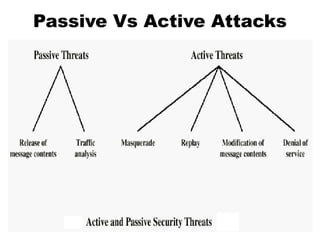
Passive Vs Active Attacks
Passive Threats
• Release of message contents:
Contents of a message are read.
– A message may be carrying sensitive or
confidential data.
• Traffic analysis: An intruder makes
inferences by observing message
patterns.
– Can be done even if messages are encrypted.
– Inferences: location and identity of hosts.
Active Threats
• Masquerade: An entity pretends to
be some other entity. It may
captures an authentication sequence and
replays it later to impersonate the
original entity.
• Replay: Involves capture of a data
unit and its retransmission to
produce an unauthorized effect.
• Modification of messages: A portion
of a legitimate message has been altered
to produce an undesirable effect.
• Denial of service: Inhibits normal use
of computer & communications
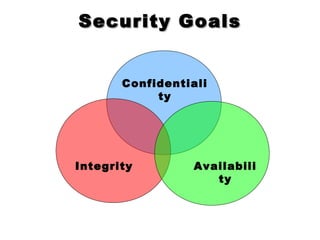
Security GoalsSecurity Goals
Integrity
Confidentiali
ty
Availabili
ty
Methods of DefenceMethods of Defence
• Encryption
• Software Controls (access limitations in
a data base, in operating system protect
each user from other users)
• Hardware Controls (smartcard)
• Policies (frequent changes of
passwords)
• Physical Controls
Common security attacks and
their countermeasures
• Finding a way into the network
– Firewalls
• Exploiting software bugs, buffer
overflows
– Intrusion Detection Systems
• Denial of Service
– Ingress filtering, IDS
• TCP hijacking
– IPSec
Firewalls
• Basic problem – many network
applications and protocols have security
problems that are fixed over time
– Difficult for users to keep up with changes
and keep host secure
– Solution
• Administrators limit access to end hosts by using a
firewall
• Firewall is kept up-to-date by administrators
Firewalls
• A firewall is like a castle with a
drawbridge
– Only one point of access into the network
– This can be good or bad
• Can be hardware or software
– Some routers come with firewall
functionality
– ipfw, ipchains, pf on Unix systems, Windows
XP and Mac OS X have built in firewalls
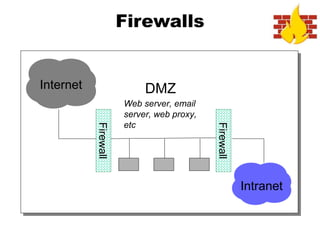
Firewalls
Intranet
DMZInternet
Firewall
Firewall
Web server, email
server, web proxy,
etc
Intrusion Detection
• Used to monitor for “suspicious activity”
on a network
– Can protect against known software exploits,
like buffer overflows
• Open Source IDS: Snort, www.snort.org
• Uses “intrusion signatures”
– Well known patterns of behavior
• Ping sweeps, port scanning, web server indexing,
OS fingerprinting, DoS attempts, etc.
• However, IDS is only useful if
contingency plans are in place to curb
attacks as they are occurring
Dictionary Attack
• We can run a dictionary attack on the
passwords
– The passwords in /etc/passwd are encrypted
with the crypt(3) function (one-way hash)
– Can take a dictionary of words, crypt() them
all, and compare with the hashed passwords
• This is why your passwords should be
meaningless random junk!
– For example, “sdfo839f” is a good password
• That is not my andrew password
• Please don’t try it either
Denial of Service
• Purpose: Make a network service
unusable, usually by overloading the
server or network
• Many different kinds of DoS attacks
– SYN flooding
– SMURF
– Distributed attacks
– Mini Case Study: Code-Red
Denial of Service
• SYN flooding attack sends SYN packets
with bogus source address
• Server responds with SYN ACK and
keeps state about TCP half-open
connection
– Eventually, server memory is exhausted with
this state
• Solution: use “SYN cookies”
– In response to a SYN, create a special
“cookie” for the connection, and forget
everything else
– Then, can recreate the forgotten information
when the ACK comes in from a legitimate
connection
Denial of Service
• SMURF
– Source IP address of a broadcast ping is
forged
– Large number of machines respond back to
victim, overloading it
• Distributed Denial of Service
– Same techniques as regular DoS, but on a
much larger scale
Denial of Service
• How can we protect ourselves?
– Ingress filtering
• If the source IP of a packet comes in on an
interface which does not have a route to that
packet, then drop it
• RFC 2267 has more information about this
– Stay on top of CERT advisories and the latest
security patches
• A fix for the IIS buffer overflow was released
sixteen days before CodeRed had been
deployed!
TCP Attacks
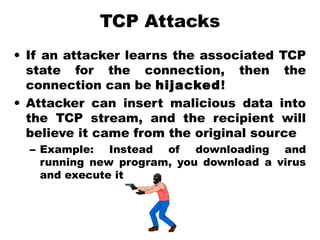
• If an attacker learns the associated TCP
state for the connection, then the
connection can be hijacked!
• Attacker can insert malicious data into
the TCP stream, and the recipient will
believe it came from the original source
– Example: Instead of downloading and
running new program, you download a virus
and execute it
TCP Attacks
• How do we prevent this?
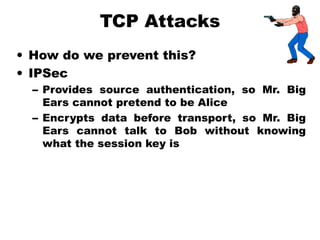
• IPSec
– Provides source authentication, so Mr. Big
Ears cannot pretend to be Alice
– Encrypts data before transport, so Mr. Big
Ears cannot talk to Bob without knowing
what the session key is
Conclusions
• The Internet works only because we
implicitly trust one another
• It is very easy to exploit this trust
• The same holds true for software
• It is important to stay on top of the
latest CERT security advisories to know
how to patch any security holes

Network sec 1

  • 1.
  • 2.
    OutlineOutline • Information security •Attacks, services and mechanisms • Security attacks • Security services • Methods of Defense • A model for Internetwork Security • Internet standards and RFCs
  • 3.
    Information Security “Computer Security” Hasundergone two major changes: • Timesharing systems: multiple users share the H/W and S/W resources on a computer. • Remote login is allowed over phone lines. Measures & tools to protect data and thwart hackers is called Computer Security
  • 4.
    Information Security… “Network Security” Computernetworks are widely used to connect computers at distant locations. Raises additional security problems: • Data in transmission must be protected. • Network connectivity exposes each computer to more vulnerabilities.
  • 5.
    Attacks, Services, Mechanisms Threeaspects of Information Security: • Security Attack: Any action that compromises the security of information. • Security Mechanism: A mechanism that is designed to detect, prevent, or recover from a security attack. • Security Service: A service that enhances the security of data processing systems and information transfers. A security service makes use of one or more security mechanisms.
  • 6.
  • 7.
    Security AttacksSecurity Attacks Interruption:An asset of the system is destroyed or becomes unavailable or unusable. •This is an attack on availability. Examples: •Destroying some H/W (disk or wire). •Disabling file system. •Swamping a computer with jobs or communication link with packets.
  • 8.
    Security AttacksSecurity Attacks Interception:An unauthorized party gains access to an asset. •This is an attack on confidentiality. Examples: •Wiretapping to capture data in a network. •Illicitly copying data or programs.
  • 9.
    Security AttacksSecurity Attacks Modification:An unauthorized party gains access and tampers an asset. •This is an attack on integrity. Examples: •Changing data files. •Altering a program. •Altering the contents of a message.
  • 10.
    Security AttacksSecurity Attacks Fabrication:An unauthorized party inserts a counterfeit object into the system. •This is an attack on authenticity. Examples: •Insertion of records in data files. •Insertion of spurious messages in a network. (message replay).
  • 11.
    Passive Vs ActiveAttacks 1. Passive Attacks: • Eavesdropping on information without modifying it. (difficult to detect ). 2. Active Attacks: • Involve modification or creation of information.
  • 12.
  • 13.
    Passive Threats • Releaseof message contents: Contents of a message are read. – A message may be carrying sensitive or confidential data. • Traffic analysis: An intruder makes inferences by observing message patterns. – Can be done even if messages are encrypted. – Inferences: location and identity of hosts.
  • 14.
    Active Threats • Masquerade:An entity pretends to be some other entity. It may captures an authentication sequence and replays it later to impersonate the original entity. • Replay: Involves capture of a data unit and its retransmission to produce an unauthorized effect. • Modification of messages: A portion of a legitimate message has been altered to produce an undesirable effect. • Denial of service: Inhibits normal use of computer & communications
  • 15.
  • 16.
    Methods of DefenceMethodsof Defence • Encryption • Software Controls (access limitations in a data base, in operating system protect each user from other users) • Hardware Controls (smartcard) • Policies (frequent changes of passwords) • Physical Controls
  • 17.
    Common security attacksand their countermeasures • Finding a way into the network – Firewalls • Exploiting software bugs, buffer overflows – Intrusion Detection Systems • Denial of Service – Ingress filtering, IDS • TCP hijacking – IPSec
  • 18.
    Firewalls • Basic problem– many network applications and protocols have security problems that are fixed over time – Difficult for users to keep up with changes and keep host secure – Solution • Administrators limit access to end hosts by using a firewall • Firewall is kept up-to-date by administrators
  • 19.
    Firewalls • A firewallis like a castle with a drawbridge – Only one point of access into the network – This can be good or bad • Can be hardware or software – Some routers come with firewall functionality – ipfw, ipchains, pf on Unix systems, Windows XP and Mac OS X have built in firewalls
  • 20.
  • 21.
    Intrusion Detection • Usedto monitor for “suspicious activity” on a network – Can protect against known software exploits, like buffer overflows • Open Source IDS: Snort, www.snort.org • Uses “intrusion signatures” – Well known patterns of behavior • Ping sweeps, port scanning, web server indexing, OS fingerprinting, DoS attempts, etc. • However, IDS is only useful if contingency plans are in place to curb attacks as they are occurring
  • 22.
    Dictionary Attack • Wecan run a dictionary attack on the passwords – The passwords in /etc/passwd are encrypted with the crypt(3) function (one-way hash) – Can take a dictionary of words, crypt() them all, and compare with the hashed passwords • This is why your passwords should be meaningless random junk! – For example, “sdfo839f” is a good password • That is not my andrew password • Please don’t try it either
  • 23.
    Denial of Service •Purpose: Make a network service unusable, usually by overloading the server or network • Many different kinds of DoS attacks – SYN flooding – SMURF – Distributed attacks – Mini Case Study: Code-Red
  • 24.
    Denial of Service •SYN flooding attack sends SYN packets with bogus source address • Server responds with SYN ACK and keeps state about TCP half-open connection – Eventually, server memory is exhausted with this state • Solution: use “SYN cookies” – In response to a SYN, create a special “cookie” for the connection, and forget everything else – Then, can recreate the forgotten information when the ACK comes in from a legitimate connection
  • 25.
    Denial of Service •SMURF – Source IP address of a broadcast ping is forged – Large number of machines respond back to victim, overloading it • Distributed Denial of Service – Same techniques as regular DoS, but on a much larger scale
  • 26.
    Denial of Service •How can we protect ourselves? – Ingress filtering • If the source IP of a packet comes in on an interface which does not have a route to that packet, then drop it • RFC 2267 has more information about this – Stay on top of CERT advisories and the latest security patches • A fix for the IIS buffer overflow was released sixteen days before CodeRed had been deployed!
  • 27.
    TCP Attacks • Ifan attacker learns the associated TCP state for the connection, then the connection can be hijacked! • Attacker can insert malicious data into the TCP stream, and the recipient will believe it came from the original source – Example: Instead of downloading and running new program, you download a virus and execute it
  • 28.
    TCP Attacks • Howdo we prevent this? • IPSec – Provides source authentication, so Mr. Big Ears cannot pretend to be Alice – Encrypts data before transport, so Mr. Big Ears cannot talk to Bob without knowing what the session key is
  • 29.
    Conclusions • The Internetworks only because we implicitly trust one another • It is very easy to exploit this trust • The same holds true for software • It is important to stay on top of the latest CERT security advisories to know how to patch any security holes

Editor's Notes

  • #20 Why good? Because it lets you filter what comes in and what goes out. Why bad? If that point goes down, you are cut off from everyone else. Also, may have lots of congestion at that one point.
  • #25 Forge source IP so that the victim can’t figure out who you are.