Network programming in Python
M.DHIVYASHREE
Socket
 A socket is an endpoint of a two-way communication link between
two programs running on a network.
 It allows data to be sent and received between devices, just like
plugging a cable into a port.
 Sockets are the foundation of network programming in Python.
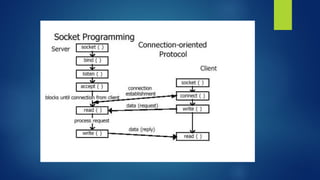
 Socket programming in Python involves using sockets to establish
communication between a server and clients over a network.
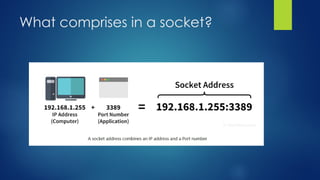
What comprises in a socket?
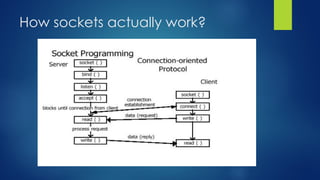
How sockets actually work?
Types of Sockets in Python
 Stream Socket (TCP)
 Datagram Socket (UDP)
Stream Socket (TCP)
•Uses Transmission Control Protocol
•Connection-oriented
•Reliable delivery (data reaches in order, without loss)
•Used for: web servers, chat applications, file transfer
Datagram Socket (UDP)
•Uses User Datagram Protocol
•Connectionless
•Faster but not reliable
•Used for: gaming, video streaming, real-time updates
Two layers for network programming
1. Low-Level Networking (Socket Layer)
2. High-Level Networking (Protocol Libraries)
Low-Level Networking (Socket
Layer)
 At the foundational level, Python gives direct access to the
operating system’s socket interface.
 With this, you can manually build networking applications by
controlling every detail of the connection.
 This level allows you to create both:
1. Connection-oriented communication (e.g., TCP)
2. Connectionless communication (e.g., UDP)
 In this layer, you work with raw sockets, manage IP addresses and
ports yourself, and handle sending/receiving data packets directly.
High-Level Networking (Protocol
Libraries)
 Above the socket layer, Python provides modules that implement
common internet protocols for you.
 Instead of managing sockets manually, you can directly use ready-
made tools to interact with:
1. HTTP (via urllib, requests)
2. FTP (via ftplib)
3. SMTP (via smtplib)
4. And other application-level protocols
 This layer simplifies tasks like downloading web pages, sending
emails, or transferring files because it hides the low-level socket
operations behind user-friendly APIs.
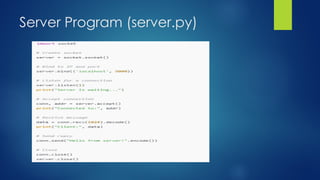
Server Program (server.py)
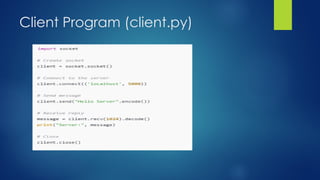
Client Program (client.py)
How to Run?
1. Save both codes in two files:
server.py
client.py
2. Run server:
python server.py
3. Run client (in another terminal):
python client.py
4. You will see messages exchanged between server and client.
Simple Python Socket Programming Exercises
 Exercise 1: Print a Message from Client to Server
 Exercise 2: Send Your Name to the Server
 Exercise 3: Two-Number Addition

Network Programming in Python with the help of socket concept. A simple exercise to demonstrate the working of network communication through sockets.

  • 1.
    Network programming inPython M.DHIVYASHREE
  • 2.
    Socket  A socketis an endpoint of a two-way communication link between two programs running on a network.  It allows data to be sent and received between devices, just like plugging a cable into a port.  Sockets are the foundation of network programming in Python.  Socket programming in Python involves using sockets to establish communication between a server and clients over a network.
  • 3.
  • 4.
  • 5.
    Types of Socketsin Python  Stream Socket (TCP)  Datagram Socket (UDP)
  • 6.
    Stream Socket (TCP) •UsesTransmission Control Protocol •Connection-oriented •Reliable delivery (data reaches in order, without loss) •Used for: web servers, chat applications, file transfer
  • 7.
    Datagram Socket (UDP) •UsesUser Datagram Protocol •Connectionless •Faster but not reliable •Used for: gaming, video streaming, real-time updates
  • 8.
    Two layers fornetwork programming 1. Low-Level Networking (Socket Layer) 2. High-Level Networking (Protocol Libraries)
  • 9.
    Low-Level Networking (Socket Layer) At the foundational level, Python gives direct access to the operating system’s socket interface.  With this, you can manually build networking applications by controlling every detail of the connection.  This level allows you to create both: 1. Connection-oriented communication (e.g., TCP) 2. Connectionless communication (e.g., UDP)  In this layer, you work with raw sockets, manage IP addresses and ports yourself, and handle sending/receiving data packets directly.
  • 10.
    High-Level Networking (Protocol Libraries) Above the socket layer, Python provides modules that implement common internet protocols for you.  Instead of managing sockets manually, you can directly use ready- made tools to interact with: 1. HTTP (via urllib, requests) 2. FTP (via ftplib) 3. SMTP (via smtplib) 4. And other application-level protocols  This layer simplifies tasks like downloading web pages, sending emails, or transferring files because it hides the low-level socket operations behind user-friendly APIs.
  • 12.
  • 13.
  • 14.
    How to Run? 1.Save both codes in two files: server.py client.py 2. Run server: python server.py 3. Run client (in another terminal): python client.py 4. You will see messages exchanged between server and client.
  • 15.
    Simple Python SocketProgramming Exercises  Exercise 1: Print a Message from Client to Server  Exercise 2: Send Your Name to the Server  Exercise 3: Two-Number Addition