MyFOX On NodeJS

         张轩丞(朋春)
       pengchun@taobao.com
        新浪微博:@我是aleafs
关于NodeJS
服务器端的JavaScript

□ Google V8引擎     □ 单线程,高性能
   • 属性访问优化
   • 缓存机器码
   • 垃圾回收
□ libev           □ 事件机制
□ libeio          □ 非阻塞异步IO
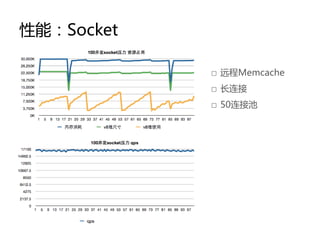
性能:Socket

            □ 远程Memcache
            □ 长连接
            □ 50连接池
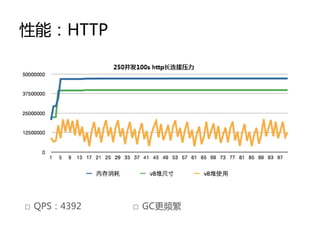
性能:HTTP


□ QPS:4392   □ GC更频繁
什么是MyFOX
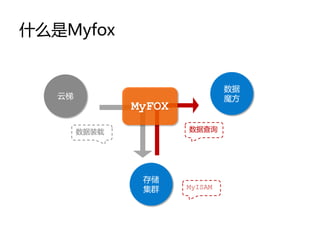
什么是Myfox


                                数据
   云梯                           魔方
               MyFOX
        数据装载           数据查询


                存储
                集群     MyISAM
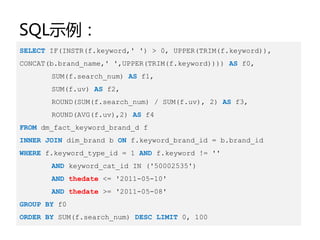
SQL示例:
SELECT IF(INSTR(f.keyword,' ') > 0, UPPER(TRIM(f.keyword)),
CONCAT(b.brand_name,' ',UPPER(TRIM(f.keyword)))) AS f0,
       SUM(f.search_num) AS f1,
       SUM(f.uv) AS f2,
       ROUND(SUM(f.search_num) / SUM(f.uv), 2) AS f3,
       ROUND(AVG(f.uv),2) AS f4
FROM dm_fact_keyword_brand_d f
INNER JOIN dim_brand b ON f.keyword_brand_id = b.brand_id
WHERE f.keyword_type_id = 1 AND f.keyword != ''
       AND keyword_cat_id IN ('50002535')
       AND thedate <= '2011-05-10'
       AND thedate >= '2011-05-08'
GROUP BY f0
ORDER BY SUM(f.search_num) DESC LIMIT 0, 100
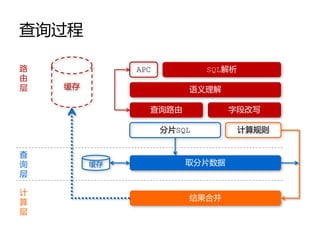
查询过程

路             APC           SQL解析
由
层   缓存                  语义理解

                查询路由            字段改写

                    分片SQL           计算规则


查
询        缓存             取分片数据
层

计
                        结果合并
算
层
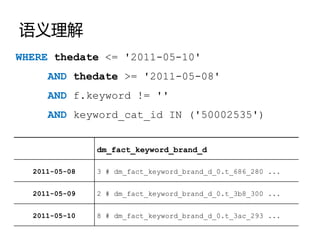
语义理解
WHERE thedate <= '2011-05-10'
     AND thedate >= '2011-05-08'
     AND f.keyword != ''
     AND keyword_cat_id IN ('50002535')


               dm_fact_keyword_brand_d

  2011-05-08   3 # dm_fact_keyword_brand_d_0.t_686_280 ...


  2011-05-09   2 # dm_fact_keyword_brand_d_0.t_3b8_300 ...


  2011-05-10   8 # dm_fact_keyword_brand_d_0.t_3ac_293 ...
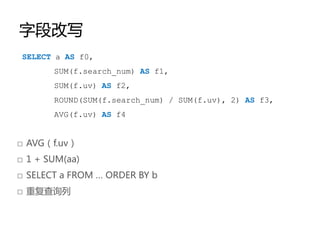
字段改写
 SELECT a AS f0,
       SUM(f.search_num) AS f1,
       SUM(f.uv) AS f2,
       ROUND(SUM(f.search_num) / SUM(f.uv), 2) AS f3,
       AVG(f.uv) AS f4


□ AVG(f.uv)
□ 1 + SUM(aa)
□ SELECT a FROM … ORDER BY b
□ 重复查询列

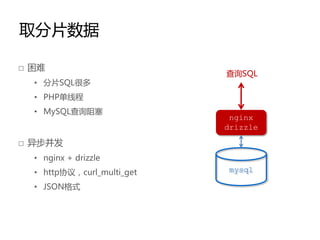
取分片数据

□ 困难
                            查询SQL
  • 分片SQL很多
  • PHP单线程
  • MySQL查询阻塞
                             nginx
                            drizzle

□ 异步并发
  • nginx + drizzle
  • http协议,curl_multi_get    mysql

  • JSON格式
结果合并

□ 局部有序,局部最优
□ 无聚合字段
  • 二路归并
  • LIMIT运算
□ 有聚合字段
  • 聚合规则处理(SUM,MAX,MIN,DISTINCT)
  • 表达式求值
  • 堆排序
  • LIMIT运算
小结:什么是Myfox?

□ 中间层      □ 特点:
 • 被机器访问       • CPU密集
 • 功能单一        • 无文件IO
               • 数据只读
为什么要Node化?
Why?

□ 兴趣,推劢社区发展
□ 榨干CPU,提高并发能力
□ 简化部署
□ 使用连接池
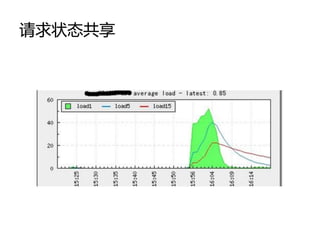
□ 请求状态共享
简化部署
[pengchun]$ cd ${nginx} && ./configure 
--add-module=../drizzle-nginx/ 
--add-module=../rds-json-nginx/ 
--add-module=../nginx-form-input/ 
--add-module=../nginx-devel-kit/ 
--add-module=../nginx-set-misc/


[pengchun]$ cat ./nginx.conf
    location /mysql_06_02 {
        charset utf-8;
        set_form_input $sql '__SQL__';
        set_unescape_uri $sql $sql;
        drizzle_query $sql;
        drizzle_pass cluster_node_06_02;
        rds_json on;
    }
使用连接池
[pengchun]$ netstat –at | wc –l
25694
[pengchun]$ netstat –at | grep –c ‘TIME_WAIT’
13106
[pengchun]$ cat /etc/sysctl.conf
net.ipv4.tcp_tw_recycle = 1
net.ipv4.tcp_tw_reuse = 1
net.ipv4.tcp_fin_timeout = 30


[pengchun]$ tail ~/logs/mysql.log
2011-04-28 16:41:44    WARNING CONNECT_ERROR       -
{"host":“**","port":3306,"user":“**","pass":"3*******2","error":"Can't
connect to MySQL server on '172.23.*.*' (4)“}
请求状态共享
那么,关注什么?

□ 分层设计
□ 连接管理
□ 稳定性
□ 数据缓存
分层设计
为什么要分层?

□ 利用多核
□ 提高并发能力
 • “工作量大的地方多派几个人”
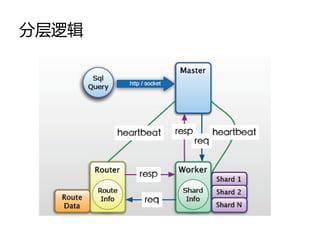
分层逻辑
master

□ 启劢worker和router
□ 心跳检测
□ 监听端口对外服务
□ 权限控制
□ 请求转发给worker
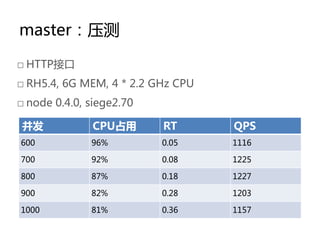
master:压测

□ HTTP接口
□ RH5.4, 6G MEM, 4 * 2.2 GHz CPU
□ node 0.4.0, siege2.70

并发            CPU占用       RT       QPS
600           96%         0.05     1116

700           92%         0.08     1225

800           87%         0.18     1227

900           82%         0.28     1203

1000          81%         0.36     1157
worker

□ 向router要路由
□ 取分片数据
□ 结果汇总计算
□ 分布式缓存管理
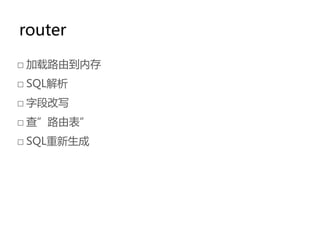
router

□ 加载路由到内存
□ SQL解析
□ 字段改写
□ 查”路由表”
□ SQL重新生成
连接管理
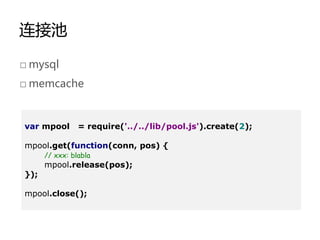
连接池

□ mysql
□ memcache


var mpool       = require('../../lib/pool.js').create(2);

mpool.get(function(conn, pos) {
      // xxx: blabla
      mpool.release(pos);
});

mpool.close();
连接池
get : function(callback){
     if (this.stoped) {
           return;
     }
     this.queue.push(callback);
},

release : function(id) {
     this.stack.push(id);
},

while (this.queue.length > 0 && this.stack.length > 0) {
    var id = this.stack.pop();
    var cb = this.queue.shift();
    cb(this.conn[id], id);

    delete cb, id;
}
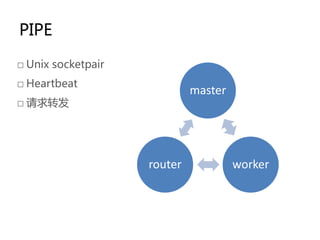
PIPE

□ Unix socketpair
□ Heartbeat
                             master
□ 请求转发


                    router            worker
稳定性
异常处理

process.on('uncaughtException', function(err) {
     console.log('Error : ' + err);
      // 告警
      process.exit(1);
});


[pengchun@edp2 bin]$ nohup ./supervise ${nodefox-dir} &

                                http://cr.yp.to/daemontools/supervise.html
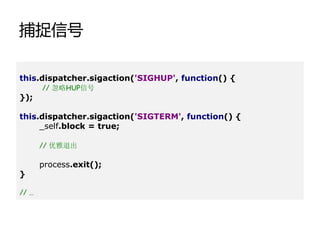
捕捉信号

this.dispatcher.sigaction('SIGHUP', function() {
       // 忽略HUP信号
});

this.dispatcher.sigaction('SIGTERM', function() {
     _self.block = true;

       // 优雅退出

       process.exit();
}

// …
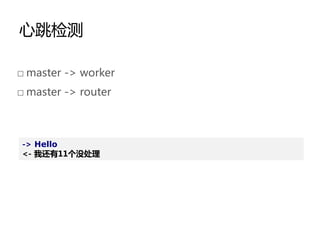
心跳检测

□ master -> worker
□ master -> router


-> Hello
<- 我还有11个没处理
任务分配

□ “闲”者多劳
数据缓存
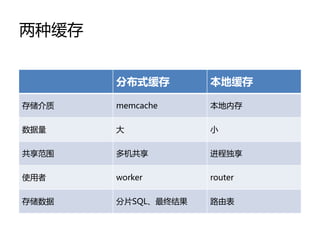
两种缓存


       分布式缓存        本地缓存

存储介质   memcache     本地内存

数据量    大            小

共享范围   多机共享         进程独享

使用者    worker       router

存储数据   分片SQL、最终结果   路由表
本地缓存

var Caches = {};

var Lcache = function(key, ttl) {
   this.prefix = key.toString().trim();
   this.expire = ttl;
}

Lcache.prototype.set = function(key, val, ttl) {
   Caches[this.prefix + key] = {
      'v': val,
      't': time() + (empty(ttl) ? this.expire: ttl),
   };
}
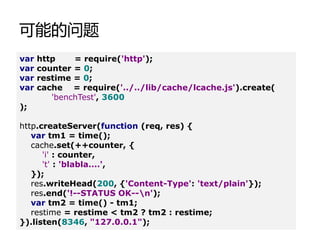
可能的问题
var   http    = require('http');
var   counter = 0;
var   restime = 0;
var   cache = require('../../lib/cache/lcache.js').create(
         'benchTest', 3600
);

http.createServer(function (req, res) {
   var tm1 = time();
   cache.set(++counter, {
      'i' : counter,
      't' : 'blabla....',
   });
   res.writeHead(200, {'Content-Type': 'text/plain'});
   res.end('!--STATUS OK--n');
   var tm2 = time() - tm1;
   restime = restime < tm2 ? tm2 : restime;
}).listen(8346, "127.0.0.1");
可能的问题(续)

console.log('numtheapTotaltheapUsedtrsstvsizetrt');

var mem = process.memoryUsage();
setInterval(function() {
   mem = process.memoryUsage();
   console.log(counter + 't' + mem.heapTotal + 't' +
        mem.heapUsed + 't' + mem.rss + 't' +
        mem.vsize + 't' + restime);
   restime = 0;
}, 1000);


[pengchun@edp2 bin]$ ./siege -c1000 127.0.0.1:8346
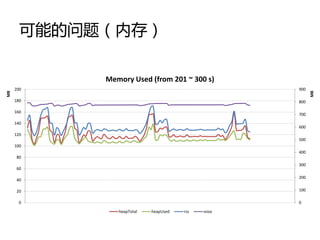
可能的问题(内存)

            Memory Used (from 201 ~ 300 s)
     200                                            900
MB


                                                          MB
     180                                            800

     160
                                                    700
     140
                                                    600
     120
                                                    500
     100
                                                    400
      80
                                                    300
      60
                                                    200
      40

      20                                            100

       0                                            0

               heapTotal   heapUsed   rss   vsize
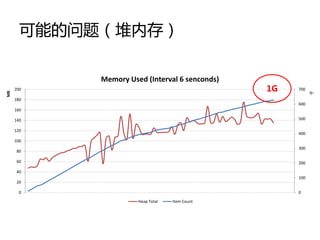
可能的问题(堆内存)

            Memory Used (Interval 6 senconds)
     200                                        1G   700
MB


                                                           千
     180
                                                     600
     160

     140                                             500

     120
                                                     400
     100
                                                     300
      80

      60                                             200

      40
                                                     100
      20

       0                                             0

                      Heap Total   Item Count
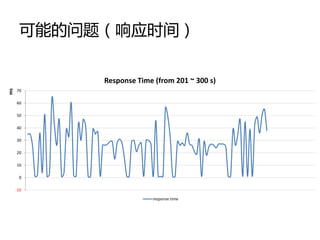
可能的问题(响应时间)

           Response Time (from 201 ~ 300 s)
ms


     70

     60

     50

     40

     30

     20

     10

      0

     -10

                        response time
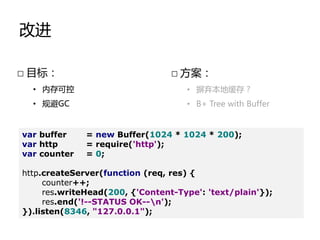
改进

□ 目标:                            □ 方案:
  • 内存可控                            • 摒弃本地缓存?
  • 规避GC                            • B+ Tree with Buffer


var buffer    = new Buffer(1024 * 1024 * 200);
var http      = require('http');
var counter   = 0;

http.createServer(function (req, res) {
     counter++;
     res.writeHead(200, {'Content-Type': 'text/plain'});
     res.end('!--STATUS OK--n');
}).listen(8346, "127.0.0.1");
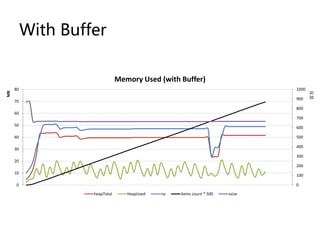
With Buffer

                               Memory Used (with Buffer)
     80                                                                        1000
MB


                                                                                      百万
                                                                               900
     70
                                                                               800
     60
                                                                               700
     50
                                                                               600

     40                                                                        500

                                                                               400
     30
                                                                               300
     20
                                                                               200
     10
                                                                               100

      0                                                                        0

                   heapTotal      heapUsed   rss   items count * 500   vsize
Thanks

Myfox on NodeJS