Copyright © 2018, Oracle and/or its affiliates. All rights reserved. |
Prasenjit Sarkar
Oracle Cloud Infrastructure
July, 2019
Multi-Stage Docker Build for effective
Containers – Why & How
Copyright © 2018, Oracle and/or its affiliates. All rights reserved. |
$ whoami
Product Manager
@oracle.com
Technology Stack:
#Docker #Python #K8S
#Istio #Jenkins
#OpenFaaS
Twitter @stretchcloud
Copyright © 2018, Oracle and/or its affiliates. All rights reserved. |
Multi_Stage_Build == Layers
Copyright © 2018, Oracle and/or its affiliates. All rights reserved. |
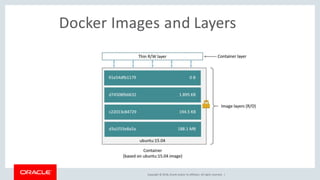
Docker Images and Layers
Copyright © 2018, Oracle and/or its affiliates. All rights reserved. |
Why is it so important?
 Adding more layers will increase the image size.
 Large images not only takes time to build, but also push
and pull from a Docker registry.
 If you build a much smaller image, then it will not only
reduce the build time but also reduce the time to deploy,
either standalone or in Orchestrated Environment.
 Small_Image == Small_Attacker_Surface.
Copyright © 2018, Oracle and/or its affiliates. All rights reserved. |
Docker Multi-Stage Huh?
 Dockerfiles now allow multiple FROM statements.
 Each FROM statement marks the start of a new build
context (accessed by number or name).
 Each new context (FROM) is like starting a new Dockerfile.
 You then copy what you want from any previous context into
the new context. Whichever is the last FROM statement is
the final base image
Copyright © 2018, Oracle and/or its affiliates. All rights reserved. |
Multi-stage builds vs Builder
Pattern
 Multi-stage builds (current): Separate stages in a single
Dockerfile. You can copy the contexts from one stage to the
other. The resultant is a smaller final image.
 Builder Pattern: Build, then copy artifacts over. This results in
a smaller image, but it’s a little more complicated. End result
is often something like Dockerfile.build and Dockerfile.final
Copyright © 2018, Oracle and/or its affiliates. All rights reserved. |
What’s build context?
Once you call docker build, your current directory is the
build context, and gets sent to the Docker daemon. You can
see how much context your sending by looking for a
message like this:
Sending build context to Docker daemon 187.8MB
The more context you send, the bigger your build context will
be, and the larger your image. Avoid including unnecessary
files and directories such as .git, _pycache_ etc.
Copyright © 2018, Oracle and/or its affiliates. All rights reserved. |
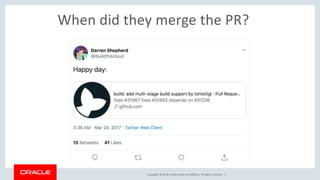
When did they merge the PR?
Copyright © 2018, Oracle and/or its affiliates. All rights reserved. |
Remediation?
• Start from a lighter base image
• Be mindful about what is written on your
writable container layer
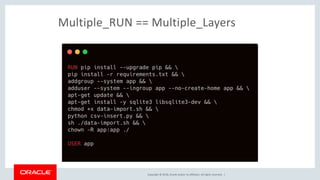
• Chain RUN statements as each RUN creates a layer
• Prevent cache misses at build for as long as
possible
Copyright © 2018, Oracle and/or its affiliates. All rights reserved. |
Docker build
 Dockerfile is a series of instructions for building
an image.
 After each docker build command, you will
get a SINGLE image layer.
 Complete docker build execution generates
SINGLE Docker image.
Copyright © 2018, Oracle and/or its affiliates. All rights reserved. |
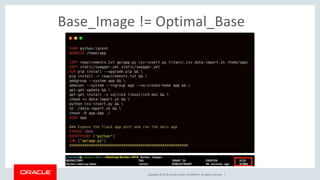
Base_Image != Optimal_Base
Copyright © 2018, Oracle and/or its affiliates. All rights reserved. |
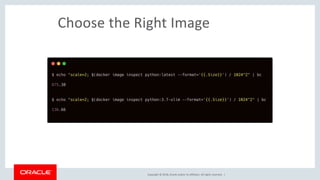
Choose the Right Image
Copyright © 2018, Oracle and/or its affiliates. All rights reserved. |
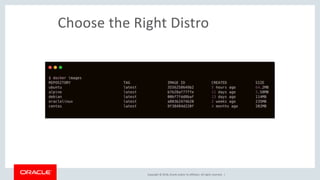
Choose the Right Distro
Copyright © 2018, Oracle and/or its affiliates. All rights reserved. |
But, wait. What about Full OS?
There are multiple reasons, why you
choose a Full OS
 Security
 Compliance
 Developer Friendly
Copyright © 2018, Oracle and/or its affiliates. All rights reserved. |
Problem with Docker Build*
Image we want Image we build
* before Docker 17.05
application
Copyright © 2018, Oracle and/or its affiliates. All rights reserved. |
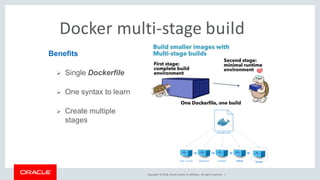
Docker multi-stage build
Benefits
 Single Dockerfile
 One syntax to learn
 Create multiple
stages
Copyright © 2018, Oracle and/or its affiliates. All rights reserved. |
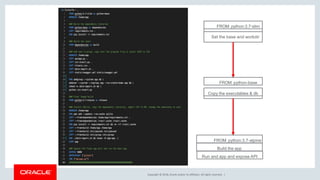
Set the base and workdir
FROM: python:3.7-slim
Copy the executables & db
FROM: python-base
Build the app
FROM: python:3.7-alpine
Run and app and expose API
Copyright © 2018, Oracle and/or its affiliates. All rights reserved. |
Multiple_RUN == Multiple_Layers
Copyright © 2018, Oracle and/or its affiliates. All rights reserved. |
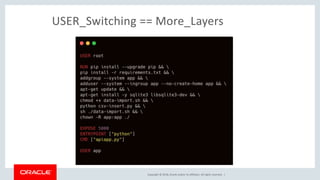
USER_Switching == More_Layers
Copyright © 2018, Oracle and/or its affiliates. All rights reserved. |
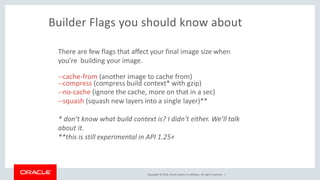
Builder Flags you should know about
There are few flags that affect your final image size when
you’re building your image.
--cache-from (another image to cache from)
--compress (compress build context* with gzip)
--no-cache (ignore the cache, more on that in a sec)
--squash (squash new layers into a single layer)**
* don’t know what build context is? I didn’t either. We’ll talk
about it.
**this is still experimental in API 1.25+
Copyright © 2018, Oracle and/or its affiliates. All rights reserved. |

Multi Stage Docker Build

  • 1.
    Copyright © 2018,Oracle and/or its affiliates. All rights reserved. | Prasenjit Sarkar Oracle Cloud Infrastructure July, 2019 Multi-Stage Docker Build for effective Containers – Why & How
  • 2.
    Copyright © 2018,Oracle and/or its affiliates. All rights reserved. | $ whoami Product Manager @oracle.com Technology Stack: #Docker #Python #K8S #Istio #Jenkins #OpenFaaS Twitter @stretchcloud
  • 3.
    Copyright © 2018,Oracle and/or its affiliates. All rights reserved. | Multi_Stage_Build == Layers
  • 4.
    Copyright © 2018,Oracle and/or its affiliates. All rights reserved. | Docker Images and Layers
  • 5.
    Copyright © 2018,Oracle and/or its affiliates. All rights reserved. | Why is it so important?  Adding more layers will increase the image size.  Large images not only takes time to build, but also push and pull from a Docker registry.  If you build a much smaller image, then it will not only reduce the build time but also reduce the time to deploy, either standalone or in Orchestrated Environment.  Small_Image == Small_Attacker_Surface.
  • 6.
    Copyright © 2018,Oracle and/or its affiliates. All rights reserved. | Docker Multi-Stage Huh?  Dockerfiles now allow multiple FROM statements.  Each FROM statement marks the start of a new build context (accessed by number or name).  Each new context (FROM) is like starting a new Dockerfile.  You then copy what you want from any previous context into the new context. Whichever is the last FROM statement is the final base image
  • 7.
    Copyright © 2018,Oracle and/or its affiliates. All rights reserved. | Multi-stage builds vs Builder Pattern  Multi-stage builds (current): Separate stages in a single Dockerfile. You can copy the contexts from one stage to the other. The resultant is a smaller final image.  Builder Pattern: Build, then copy artifacts over. This results in a smaller image, but it’s a little more complicated. End result is often something like Dockerfile.build and Dockerfile.final
  • 8.
    Copyright © 2018,Oracle and/or its affiliates. All rights reserved. | What’s build context? Once you call docker build, your current directory is the build context, and gets sent to the Docker daemon. You can see how much context your sending by looking for a message like this: Sending build context to Docker daemon 187.8MB The more context you send, the bigger your build context will be, and the larger your image. Avoid including unnecessary files and directories such as .git, _pycache_ etc.
  • 9.
    Copyright © 2018,Oracle and/or its affiliates. All rights reserved. |
  • 10.
    Copyright © 2018,Oracle and/or its affiliates. All rights reserved. | When did they merge the PR?
  • 11.
    Copyright © 2018,Oracle and/or its affiliates. All rights reserved. | Remediation? • Start from a lighter base image • Be mindful about what is written on your writable container layer • Chain RUN statements as each RUN creates a layer • Prevent cache misses at build for as long as possible
  • 12.
    Copyright © 2018,Oracle and/or its affiliates. All rights reserved. | Docker build  Dockerfile is a series of instructions for building an image.  After each docker build command, you will get a SINGLE image layer.  Complete docker build execution generates SINGLE Docker image.
  • 13.
    Copyright © 2018,Oracle and/or its affiliates. All rights reserved. | Base_Image != Optimal_Base
  • 14.
    Copyright © 2018,Oracle and/or its affiliates. All rights reserved. | Choose the Right Image
  • 15.
    Copyright © 2018,Oracle and/or its affiliates. All rights reserved. | Choose the Right Distro
  • 16.
    Copyright © 2018,Oracle and/or its affiliates. All rights reserved. | But, wait. What about Full OS? There are multiple reasons, why you choose a Full OS  Security  Compliance  Developer Friendly
  • 17.
    Copyright © 2018,Oracle and/or its affiliates. All rights reserved. | Problem with Docker Build* Image we want Image we build * before Docker 17.05 application
  • 18.
    Copyright © 2018,Oracle and/or its affiliates. All rights reserved. | Docker multi-stage build Benefits  Single Dockerfile  One syntax to learn  Create multiple stages
  • 19.
    Copyright © 2018,Oracle and/or its affiliates. All rights reserved. | Set the base and workdir FROM: python:3.7-slim Copy the executables & db FROM: python-base Build the app FROM: python:3.7-alpine Run and app and expose API
  • 20.
    Copyright © 2018,Oracle and/or its affiliates. All rights reserved. | Multiple_RUN == Multiple_Layers
  • 21.
    Copyright © 2018,Oracle and/or its affiliates. All rights reserved. | USER_Switching == More_Layers
  • 22.
    Copyright © 2018,Oracle and/or its affiliates. All rights reserved. | Builder Flags you should know about There are few flags that affect your final image size when you’re building your image. --cache-from (another image to cache from) --compress (compress build context* with gzip) --no-cache (ignore the cache, more on that in a sec) --squash (squash new layers into a single layer)** * don’t know what build context is? I didn’t either. We’ll talk about it. **this is still experimental in API 1.25+
  • 23.
    Copyright © 2018,Oracle and/or its affiliates. All rights reserved. |

Editor's Notes

  • #2 This is a Title Slide with Picture slide ideal for including a picture with a brief title, subtitle and presenter information. To customize this slide with your own picture: Right-click the slide area and choose Format Background from the pop-up menu. From the Fill menu, click Picture and texture fill. Under Insert from: click File. Locate your new picture and click Insert. To copy the Customized Background from Another Presentation on PC Click New Slide from the Home tab's Slides group and select Reuse Slides. Click Browse in the Reuse Slides panel and select Browse Files. Double-click the PowerPoint presentation that contains the background you wish to copy. Check Keep Source Formatting and click the slide that contains the background you want. Click the left-hand slide preview to which you wish to apply the new master layout. Apply New Layout (Important): Right-click any selected slide, point to Layout, and click the slide containing the desired layout from the layout gallery. Delete any unwanted slides or duplicates. To copy the Customized Background from Another Presentation on Mac Click New Slide from the Home tab's Slides group and select Insert Slides from Other Presentation… Navigate to the PowerPoint presentation file that contains the background you wish to copy. Double-click or press Insert. This prompts the Slide Finder dialogue box. Make sure Keep design of original slides is unchecked and click the slide(s) that contains the background you want. Hold Shift key to select multiple slides. Click the left-hand slide preview to which you wish to apply the new master layout. Apply New Layout (Important): Click Layout from the Home tab's Slides group, and click the slide containing the desired layout from the layout gallery. Delete any unwanted slides or duplicates.
  • #12 What makes the cache important? If the objects on the file system that Docker is about to produce are unchanged between builds, reusing a cache of a previous build on the host is a great time-saver. It makes building a new container really, really fast. None of those file structures have to be created and written to disk this time — the reference to them is sufficient to locate and reuse the previously built structures. An engineer can run a Docker build with the ‘–no-cache’ option, which completely ignores all cache and thus makes every build take as much time as the first.