高端版优化总结 张 军
优化功能点 搜索联想即时反馈 筛选和排序优化 查看大图功能 自定义详情页
搜索即时反馈 首页的搜索框 顶部搜索 ICON 点开的搜索框
autocomplete  ( on =>  off ) placeholder  = “ 请输入搜索内容” 键盘事件 onkeyup 、 oninput  处理 keyCode 键值
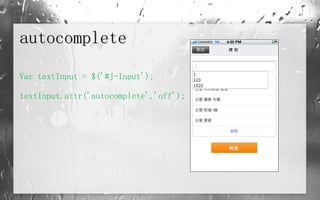
autocomplete Var textInput = $('#J-Input'); textInput.attr('autocomplete','off');
palceholder placeholder=" 请输入搜索内容“  textInput.focus(function(){ if($(this).val() == ''){  $(this).val(''); } });  //  解决 Android Webkit 上的 BUG
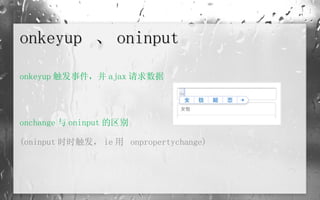
onkeyup  、 oninput onkeyup 触发事件,并 ajax 请求数据 onchange 与 oninput 的区别 (oninput 时时触发, ie 用  onpropertychange)
Keycode 键值 空格  32 Enter  13 if(e.keyCode==13 || e.keyCode==32) return;
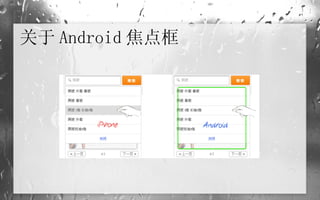
关于 Android 焦点框
关于 Android 焦点框 <div class=&quot;wrap&quot;> <ul> <li rel=“href&quot;><img src=&quot;img&quot; alt=“&quot; /></li>   <li rel=“href&quot;><img src=&quot;img&quot; alt=“&quot; /></li>   <li rel=“href&quot;><img src=&quot;img&quot; alt=“&quot; /></li> </ul> </div>
关于 Android 焦点框 if(navigator.userAgent.match(/iPhone/i)) {   // 如果是 iPhone        $(&quot;#J_Slide .wrap li&quot;).each(function(){               var url = $(this).attr('rel');               $(this).find('img').wrap('<a href=&quot;+ url +&quot;></a>');        }); }else{        $('#J_Slide .wrap li').bind('touchend',function(){             var url = $(this).attr('rel');             location.href = url;             return false;       }); }
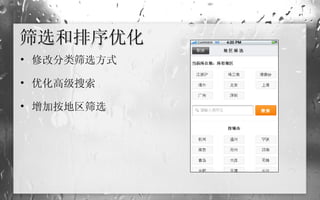
筛选和排序优化 修改分类筛选方式 优化高级搜索 增加按地区筛选
List 点击区域优化  优化 <label> 地区筛选 繁  -> 简
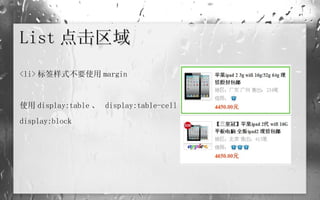
List 点击区域  <li> 标签样式不要使用 margin 使用 display:table 、  display:table-cell ,替代 display:block
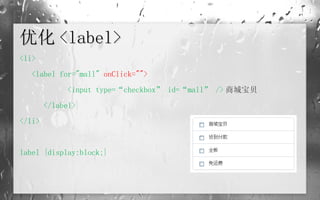
优化 <label> <li> <label for=&quot;mall&quot;  onClick=&quot;&quot;>   <input type=“checkbox” id=“mall” /> 商城宝贝 </label> </li> label {display:block;}
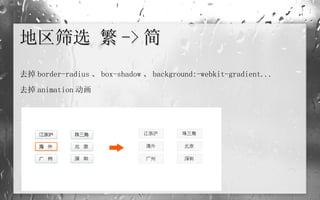
地区筛选 繁 -> 简 去掉 border-radius 、 box-shadow 、 background:-webkit-gradient... 去掉 animation 动画
查看大图功能 启动大图浏览模式 大图模式支持图片拖动功能 支持查看原始尺寸图片
Click 、 touch 事件 设置标识,处理当前状态下的图片样式、链接 图片大小处理(图片尺寸有限  160×160 , 310×310 )
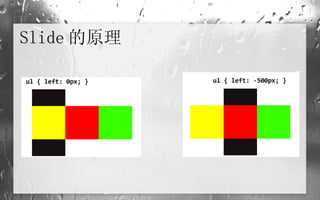
Slide 的原理
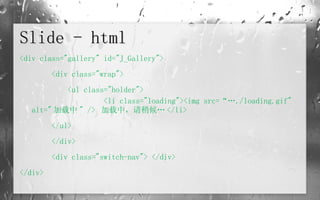
Slide - html <div class=&quot;gallery&quot; id=&quot;J_Gallery&quot;> <div class=&quot;wrap&quot;> <ul class=&quot;holder&quot;>   <li class=&quot;loading&quot;><img src=“…./loading.gif&quot; alt=&quot; 加载中 &quot; />  加载中,请稍候… </li> </ul> </div>  <div class=&quot;switch-nav&quot;> </div> </div>
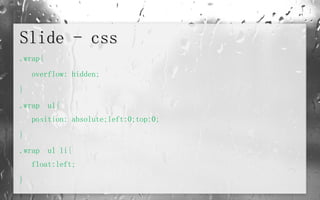
Slide - css .wrap{ overflow: hidden; } .wrap  ul{ position: absolute;left:0;top:0; } .wrap  ul li{ float:left; }
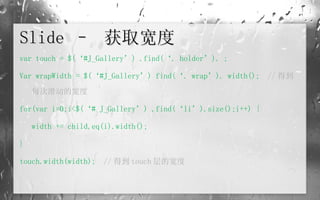
Slide –  获取宽度 var touch = $(‘#J_Gallery’) .find(‘. holder’). ; Var wrapWidth = $(‘#J_Gallery’) find(‘. wrap’). width();  // 得到每次滑动的宽度 for(var i=0;i<$(‘# J_Gallery’) .find(‘li’).size();i++) { width += child.eq(i).width(); } touch.width(width);   // 得到 touch 层的宽度
Slide – 获取动作当前坐标 function getClient(e){  // 获取 touch 事件 event 对象的 clientX var coors = 0;   if (e. changedTouches ){  //iPhone 多根手指情况   coors = e.changedTouches[0].clientX;   else{ coors = e.clientY; } return coors; }
Slide – 拖动事件 touch[0]. ontouchstart  = startDrag; function startDrag(e){   var pos = [touch.position(). left  ,  touch.position(). top ];   var startPoint = getClient(e);  //touch 开始点 …… touch[0]. ontouchmove   = moveDrag; touch[0]. ontouchend  = endDrag; return false; }
Slide – 拖动事件 function  moveDrag(e){   var currentPos = getClient(e);   var newPos = (currentPos - startPoint) + pos[0];   touch[0].style.left = newPos + 'px'; }
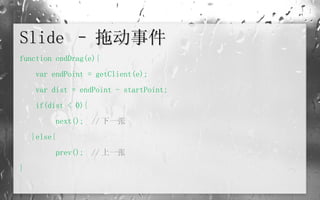
Slide – 拖动事件 function endDrag(e){    var endPoint = getClient(e);   var dist = endPoint - startPoint;   if(dist < 0){     next();  // 下一张 }else{   prev();  // 上一张 }
自定义详情页 自定义详情页增加图片展示 ……
沟  通 pd 开发 SCM 交互 视觉 前 端
谢  谢!

m.taobao.com for iPhone&Android Optimization

  • 1.
  • 2.
  • 3.
  • 4.
    autocomplete (on => off ) placeholder = “ 请输入搜索内容” 键盘事件 onkeyup 、 oninput 处理 keyCode 键值
  • 5.
    autocomplete Var textInput= $('#J-Input'); textInput.attr('autocomplete','off');
  • 6.
    palceholder placeholder=&quot; 请输入搜索内容“ textInput.focus(function(){ if($(this).val() == ''){ $(this).val(''); } }); // 解决 Android Webkit 上的 BUG
  • 7.
    onkeyup 、oninput onkeyup 触发事件,并 ajax 请求数据 onchange 与 oninput 的区别 (oninput 时时触发, ie 用 onpropertychange)
  • 8.
    Keycode 键值 空格 32 Enter 13 if(e.keyCode==13 || e.keyCode==32) return;
  • 9.
  • 10.
    关于 Android 焦点框<div class=&quot;wrap&quot;> <ul> <li rel=“href&quot;><img src=&quot;img&quot; alt=“&quot; /></li> <li rel=“href&quot;><img src=&quot;img&quot; alt=“&quot; /></li> <li rel=“href&quot;><img src=&quot;img&quot; alt=“&quot; /></li> </ul> </div>
  • 11.
    关于 Android 焦点框if(navigator.userAgent.match(/iPhone/i)) {  // 如果是 iPhone        $(&quot;#J_Slide .wrap li&quot;).each(function(){               var url = $(this).attr('rel');               $(this).find('img').wrap('<a href=&quot;+ url +&quot;></a>');        }); }else{        $('#J_Slide .wrap li').bind('touchend',function(){             var url = $(this).attr('rel');             location.href = url;             return false;       }); }
  • 12.
  • 13.
    List 点击区域优化 优化 <label> 地区筛选 繁 -> 简
  • 14.
    List 点击区域 <li> 标签样式不要使用 margin 使用 display:table 、 display:table-cell ,替代 display:block
  • 15.
    优化 <label> <li><label for=&quot;mall&quot; onClick=&quot;&quot;> <input type=“checkbox” id=“mall” /> 商城宝贝 </label> </li> label {display:block;}
  • 16.
    地区筛选 繁 ->简 去掉 border-radius 、 box-shadow 、 background:-webkit-gradient... 去掉 animation 动画
  • 17.
  • 18.
    Click 、 touch事件 设置标识,处理当前状态下的图片样式、链接 图片大小处理(图片尺寸有限 160×160 , 310×310 )
  • 19.
  • 20.
    Slide - html<div class=&quot;gallery&quot; id=&quot;J_Gallery&quot;> <div class=&quot;wrap&quot;> <ul class=&quot;holder&quot;> <li class=&quot;loading&quot;><img src=“…./loading.gif&quot; alt=&quot; 加载中 &quot; /> 加载中,请稍候… </li> </ul> </div> <div class=&quot;switch-nav&quot;> </div> </div>
  • 21.
    Slide - css.wrap{ overflow: hidden; } .wrap ul{ position: absolute;left:0;top:0; } .wrap ul li{ float:left; }
  • 22.
    Slide – 获取宽度 var touch = $(‘#J_Gallery’) .find(‘. holder’). ; Var wrapWidth = $(‘#J_Gallery’) find(‘. wrap’). width(); // 得到每次滑动的宽度 for(var i=0;i<$(‘# J_Gallery’) .find(‘li’).size();i++) { width += child.eq(i).width(); } touch.width(width); // 得到 touch 层的宽度
  • 23.
    Slide – 获取动作当前坐标function getClient(e){ // 获取 touch 事件 event 对象的 clientX var coors = 0; if (e. changedTouches ){ //iPhone 多根手指情况 coors = e.changedTouches[0].clientX; else{ coors = e.clientY; } return coors; }
  • 24.
    Slide – 拖动事件touch[0]. ontouchstart = startDrag; function startDrag(e){ var pos = [touch.position(). left , touch.position(). top ]; var startPoint = getClient(e); //touch 开始点 …… touch[0]. ontouchmove = moveDrag; touch[0]. ontouchend = endDrag; return false; }
  • 25.
    Slide – 拖动事件function moveDrag(e){ var currentPos = getClient(e); var newPos = (currentPos - startPoint) + pos[0]; touch[0].style.left = newPos + 'px'; }
  • 26.
    Slide – 拖动事件function endDrag(e){ var endPoint = getClient(e); var dist = endPoint - startPoint; if(dist < 0){ next(); // 下一张 }else{ prev(); // 上一张 }
  • 27.
  • 28.
    沟 通pd 开发 SCM 交互 视觉 前 端
  • 29.