Introduction to Excel Functions
Top 25 Formulas in Excel You Should Know
By Shruti M
Last updated on Sep 27, 202219992351
Top 25 Excel Formulas You Should Know [Updated]
Table of Contents
What is Excel Formula? Formulas in Excel: an overviewExcel Formulas and FunctionsConclusion
Microsoft Excel is the go-to tool for working with data. There are probably a handful of people who haven’t used Excel, given its immense popularity. Excel is a widely used software application in industries today, built to generate reports and business insights. Excel supports several in-built applications that make it easier to use.
One such feature that allows Excel to stand out is - Excel sheet formulas. Here, we will look into the top 25 Excel formulas that one must know while working on Excel. The topics that we will be covering in this article are as follows:
What is Excel Formula?
Excel Formulas and Functions
What is Excel Formula?
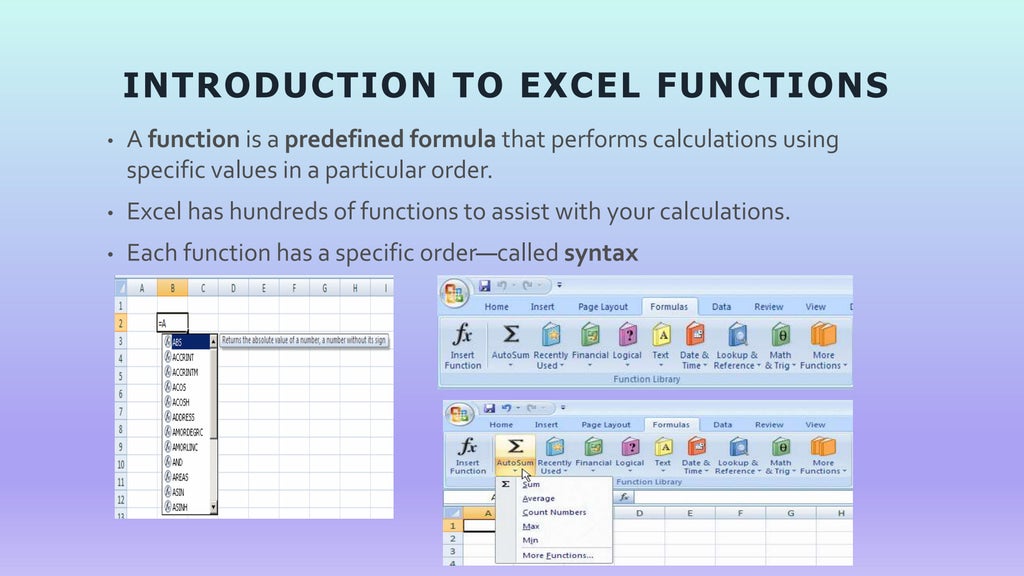
In Microsoft Excel, a formula is an expression that operates on values in a range of cells. These formulas return a result, even when it is an error. Excel formulas enable you to perform calculations such as addition, subtraction, multiplication, and division. In addition to these, you can find out averages and calculate percentages in excel for a range of cells, manipulate date and time values, and do a lot more.
Basic Excel Functions
SUM()
AVERAGE()
COUNT()
CONCATENATE()
MIN()
MAX()

![BASIC EXCEL FUNCTIONS #1: SUM()
• What this function does: Adds all the numbers in a
range of cells.
• Usage: =SUM(number1, [number2], …)
• Example(s):
=SUM(177,239,3,0,1,5,8) [Result: 433]
=SUM(C2:I2)](https://image.slidesharecdn.com/msexcelanditsbasicfunctions-220930141600-efd75ba9/95/MS-Excel-and-it-s-basic-functions-pptx-3-1024.jpg)
![BASIC EXCEL FUNCTIONS #2: AVERAGE()
• What this function does:
Returns the average
(arithmetic mean) of its
arguments, which can be
numbers, arrays, or
references that contain
numbers.
• Usage:
=AVERAGE(number1,
[number2], …)
• Example(s):
=AVERAGE(B2:B6)](https://image.slidesharecdn.com/msexcelanditsbasicfunctions-220930141600-efd75ba9/95/MS-Excel-and-it-s-basic-functions-pptx-4-1024.jpg)
![BASIC EXCEL FUNCTIONS #3: COUNT()
• What this function does:
• It only counts cells containing
numbers. All other cells will be
ignored (texts, dates, blanks).
• Usage:
=COUNT (value1,[value2], …)
• Example(s):
=COUNT(B2:D4)](https://image.slidesharecdn.com/msexcelanditsbasicfunctions-220930141600-efd75ba9/95/MS-Excel-and-it-s-basic-functions-pptx-5-1024.jpg)
![BASIC EXCEL FUNCTIONS #4: CONCATENATE ()
• What this function does:
Joins several strings into one text
string.
• Usage:
=CONCATENATE (text1, [text2], …)
• Example(s):
=CONCATENATE (A1,B1,C1)](https://image.slidesharecdn.com/msexcelanditsbasicfunctions-220930141600-efd75ba9/95/MS-Excel-and-it-s-basic-functions-pptx-6-1024.jpg)
![BASIC EXCEL FUNCTIONS #5: MIN() & MAX()
What this function does:
• Min():
Checks the range of cells and returns
the minimal value.
• Max():
Checks the range of cells and returns
the maximum value.
Usage:
MIN(number1, [number2], …)
MAX(number1, [number2], …)](https://image.slidesharecdn.com/msexcelanditsbasicfunctions-220930141600-efd75ba9/95/MS-Excel-and-it-s-basic-functions-pptx-7-1024.jpg)