History of Java
•The history of Java is very interesting. Java was originally designed for interactive television, but it was too
advanced technology for the digital cable television industry at the time. The history of Java starts with the
Green Team. Java team members (also known as Green Team), initiated this project to develop a language
for digital devices such as set-top boxes, televisions, etc. However, it was best suited for internet
programming. Later, Java technology was incorporated by Netscape.
• The principles for creating Java programming were "Simple, Robust, Portable, Platform-independent,
Secured, High Performance, Multithreaded, Architecture Neutral, Object-Oriented, Interpreted, and
Dynamic". Java
• was developed by James Gosling, who is known as the father of Java, in 1995. James Gosling and his team
members started the project in the early '90s.
• James Gosling - founder of java
• Currently, Java is used in internet programming, mobile devices, games, e-business solutions, etc. Following
are given significant points that describe the history of Java.
4.
1) James Gosling,Mike Sheridan, and Patrick Naughton initiated the Java language project in June 1991. The small team of sun engineers
called Green Team.
2) Initially it was designed for small, embedded systems in electronic appliances like set-top boxes.
3) Firstly, it was called "Greentalk" by James Gosling, and the file extension was .gt.
4) After that, it was called Oak and was developed as a part of the Green project.
Why Java was named as "Oak"?: Java History from Oak to Java
5) Why Oak? Oak is a symbol of strength and chosen as a national tree of many countries like the U.S.A., France, Germany, Romania, etc.
6) In 1995, Oak was renamed as "Java" because it was already a trademark by Oak Technologies.
Why Java Programming named "Java"?
7) Why had they chose the name Java for Java language? The team gathered to choose a new name. The suggested words were "dynamic",
"revolutionary", "Silk", "jolt", "DNA", etc. They wanted something that reflected the essence of the technology: revolutionary, dynamic,
lively, cool, unique, and easy to spell, and fun to say.
According to James Gosling, "Java was one of the top choices along with Silk". Since Java was so unique, most of the team members
preferred Java than other names.
8) Java is an island in Indonesia where the first coffee was produced (called Java coffee). It is a kind of espresso bean. Java name was
chosen by James Gosling while having a cup of coffee nearby his office.
5.
9) Notice thatJava is just a name, not an
acronym.
10) Initially developed by James Gosling
at Sun Microsystems
(which is now a subsidiary of Oracle
Corporation) and released in 1995.
11) In 1995, Time magazine called Java
one of the Ten Best Products of 1995.
12) JDK 1.0 was released on January 23,
1996. After the first release of Java,
there have been many additional
features added to the language. Now
Java is being used in Windows
applications, Web applications,
enterprise applications, mobile
applications, cards, etc. Each new
version adds new features in Java.
Java Version History:Many java versions have been released till now. The
current stable release of Java is Java SE 10.
JDK Alpha and Beta (1995)
JDK 1.0 (23rd Jan 1996)
JDK 1.1 (19th Feb 1997)
J2SE 1.2 (8th Dec 1998)
J2SE 1.3 (8th May 2000)
J2SE 1.4 (6th Feb 2002)
J2SE 5.0 (30th Sep 2004)
Java SE 6 (11th Dec 2006)
Java SE 7 (28th July 2011)
Java SE 8 (18th Mar 2014)
Java SE 9 (21st Sep 2017)
Java SE 10 (20th Mar 2018)
Java SE 11 (September 2018)
Java SE 12 (March 2019)
Java SE 13 (September 2019)
Java SE 14 (Mar 2020)
Java SE 15 (September 2020)
Java SE 16 (Mar 2021)
Java SE 17 (September 2021)
Java SE 18 (to be released by March 2022)
Since Java SE 8 release, the Oracle corporation follows a pattern in which every even
6.
Features of Java
•The primary objective of Java programming language creation was to make it portable, simple and secure
programming language. Apart from this, there are also some excellent features which play an important role in
the popularity of this language. The features of Java are also known as Java buzzwords.
A list of the most important features of the Java language is given below: Java Features
• Simple
• Object-Oriented
• Portable
• Platform independent
• Secured
• Robust
• Architecture neutral
• Interpreted
• High Performance
• Multithreaded
• Distributed
• Dynamic
7.
1.Simple: Java isvery easy to learn, and its syntax is simple, clean and easy to understand. According to Sun
Microsystem, Java language is a simple programming language because:
• Java syntax is based on C++ (so easier for programmers to learn it after C++).
• Java has removed many complicated and rarely-used features, for example, explicit pointers, operator
overloading, etc.
• There is no need to remove unreferenced objects because there is an Automatic Garbage Collection in Java.
2.Object-oriented: Java is an object-oriented programming language. Everything in Java is an object.
Object-oriented means we organize our software as a combination of different types of objects that incorporate
both data and behavior.
Object-oriented programming (OOPs) is a methodology that simplifies software development and maintenance
by providing some rules.
Basic concepts of OOPs are: Object,Class,Inheritance,Polymorphism,Abstraction,Encapsulation
8.
3. Platform Independent
Javais platform independent because it is different from other languages like C, C++,
etc. which are compiled into platform specific machines while Java is a write once, run
anywhere language. A platform is the hardware or software environment in which a
program runs.
There are two types of platforms software-based and hardware-based. Java provides a
software-based platform.
The Java platform differs from most other platforms in the sense that it is a software-
based platform that runs on top of other hardware-based platforms. It has two
components:
1. Runtime Environment
2. API(Application Programming Interface)
Java code can be executed on multiple platforms, for example, Windows, Linux, Sun
Solaris, Mac/OS, etc. Java code is compiled by the compiler and converted into
bytecode. This bytecode is a platform-independent code because it can be run on
multiple platforms, i.e., Write Once and Run Anywhere (WORA).
9.
4. Secured
Java isbest known for its security. With Java, we can develop virus-
free systems. Java is secured because:
• No explicit pointer
• Java Programs run inside a virtual machine sandbox
• Classloader: Classloader in Java is a part of the Java Runtime
Environment (JRE) which is used to load Java classes into the Java
Virtual Machine dynamically. It adds security by separating the
package for the classes of the local file system from those that are
imported from network sources.
• Bytecode Verifier: It checks the code fragments for illegal code
that can violate access rights to objects.
• Security Manager: It determines what resources a class can
access such as reading and writing to the local disk.
Java language provides these securities by default. Some security can
also be provided by an application developer explicitly through SSL,
JAAS, Cryptography, etc.
10.
5.Robust: The Englishmeaning of Robust is strong. Java is robust because:
• It uses strong memory management.
• There is a lack of pointers that avoids security problems.
• Java provides automatic garbage collection which runs on the Java Virtual Machine to get rid of objects which are not
being used by a Java application anymore.
• There are exception handling and the type checking mechanism in Java. All these points make Java robust.
6. Architecture-neutral: Java is architecture neutral because there are no implementation dependent features, for
example, the size of primitive types is fixed.
In C programming, int data type occupies 2 bytes of memory for 32-bit architecture and 4 bytes of memory for 64-bit
architecture. However, it occupies 4 bytes of memory for both 32 and 64-bit architectures in Java.
7. Portable
Java is portable because it facilitates you to carry the Java bytecode to any platform. It doesn't require any
implementation.
8. High-performance
Java is faster than other traditional interpreted programming languages because Java bytecode is "close" to native code. It
is still a little bit slower than a compiled language (e.g., C++). Java is an interpreted language that is why it is slower than
compiled languages, e.g., C, C++, etc.
11.
9.Distributed
Java is distributedbecause it facilitates users to create distributed applications in Java. RMI and EJB are used for creating
distributed applications. This feature of Java makes us able to access files by calling the methods from any machine on
the internet.
10.Multi-threaded
A thread is like a separate program, executing concurrently. We can write Java programs that deal with many tasks at
once by defining multiple threads. The main advantage of multi-threading is that it doesn't occupy memory for each
thread. It shares a common memory area. Threads are important for multi-media, Web applications, etc.
11.Dynamic
Java is a dynamic language. It supports the dynamic loading of classes. It means classes are loaded on demand. It also
supports functions from its native languages, i.e., C and C++.
Java supports dynamic compilation and automatic memory management (garbage collection).
12.
Types of JavaApplications
There are four types of Java applications that can be created using Java programming:
Standalone Applications: Java standalone applications uses GUI components such as
AWT, Swing, and JavaFX. These components contain buttons, list, menu, scroll panel,
etc. It is also known as desktop alienations.
Enterprise Applications: An application which is distributed in nature is called
enterprise applications.
Web Applications: An applications that run on the server is called web applications. We
use JSP, Servlet, Spring, and Hibernate technologies for creating web applications.
Mobile Applications: Java ME is a cross-platform to develop mobile applications which
run across smartphones. Java is a platform for App Development in Android.
13.
Java JDK, JREand JVM
What is JVM?
• JVM (Java Virtual Machine) is an abstract machine that enables your computer to run a
Java program.
• When you run the Java program, Java compiler first compiles your Java code to bytecode.
Then, the JVM translates bytecode into native machine code (set of instructions that a
computer's CPU executes directly).
• Java is a platform-independent language. It's because when you write Java code, it's
ultimately written for JVM but not your physical machine (computer). Since JVM
executes
the Java bytecode which is platform-independent, Java is platform-independent.
14.
What is JRE?
•JRE (Java Runtime Environment) is a software package that provides
Java class libraries, Java Virtual Machine (JVM), and other
components that are required to run Java applications.
• JRE is the superset of JVM.
• If you need to run Java programs, but not develop them, JRE is what
you need.
15.
What is JDK?
JDK(Java Development Kit) is a software development kit required to develop
applications in Java. When you download JDK, JRE is also downloaded with it.
In addition to JRE, JDK also contains a number of development tools
(compilers, JavaDoc, Java Debugger, etc).
If you want to develop Java applications, download JDK.
Java Hello WorldProgram Example
Java is one of the most popular and widely used programming languages and platforms. Java is fast, reliable,
and secure. Java is used in every nook and corner from desktop to web applications, scientific supercomputers
to gaming consoles, cell phones to the Internet.
Java is easy to learn, and its syntax is simple and easy to understand. It is based on C++ (so easier for
programmers who know C++).
The process of Java programming can be simplified in three steps:
• Create the program by typing it into a text editor and saving it to a file – HelloWorld.java.
• Compile it by typing “javac HelloWorld.java” in the terminal window.
• Execute (or run) it by typing “java HelloWorld” in the terminal window.
The below-given program is the most simple program of Java printing “Hello World” to the screen. Let us try to
understand every bit of code step by step.
18.
// This isa simple Java program.
// FileName : "HelloWorld.java".
class HelloWorld
{
// Your program begins with a call to main().
// Prints "Hello, World" to the terminal window.
public static void main(String args[])
{
System.out.println("Hello, World");
}
}
Output
Hello, World
19.
The “Hello World!”program consists of three primary components: the HelloWorld class definition, the main method, and
source code comments. The following explanation will provide you with a basic understanding of the code:
1. Class definition
This line uses the keyword class to declare that a new class is being defined.
class HelloWorld
2. HelloWorld
It is an identifier that is the name of the class. The entire class definition, including all of its members, will be between the
opening curly brace { and the closing curly brace }.
3. main method:
In the Java programming language, every application must contain a main method whose signature is:
public static void main(String[] args)
public: So that JVM can execute the method from anywhere.
static: The main method is to be called without an object. The modifiers public and static can be written in either order.
void: The main method doesn’t return anything.
main(): Name configured in the JVM.
String[]: The main method accepts a single argument, i.e., an array of elements of type String.
20.
Like in C/C++,the main method is the entry point for your application and will
subsequently invoke all the other methods required by your program.
• The next line of code is shown here. Notice that it occurs inside the main() method.
System.out.println("Hello, World");
This line outputs the string “Hello, World” followed by a new line on the screen. Output is
accomplished by the built-in println( ) method. The System is a predefined class that
provides access to the system, and out is the variable of type output stream connected to
the console.
21.
• Comments
They caneither be multiline or single-line comments.
// This is a simple Java program.
// Call this file "HelloWorld.java".
This is a single-line comment. This type of comment must begin with // as in C/C++. For
multiline comments, they must begin from /* and end with */.
Important Points
The name of the class defined by the program is HelloWorld, which is the same as the
name of the file(HelloWorld.java). This is not a coincidence. In Java, all codes must reside
inside a class, and there is at most one public class which contains the main() method.
By convention, the name of the main class(a class that contains the main method) should
match the name of the file that holds the program.
22.
Compiling the program
•After successfully setting up the environment, we can open a terminal in both
Windows/Unix and go to the directory where the file – HelloWorld.java is present.
• Now, to compile the HelloWorld program, execute the compiler – javac, to specify
the name of the source file on the command line, as shown:
javac HelloWorld.java
• The compiler creates a HelloWorld.class (in the current working directory) that
contains the bytecode version of the program. Now, to execute our program,
JVM(Java Virtual Machine) needs to be called using java, specifying the name of
the class file on the command line, as shown:
java HelloWorld
• This will print “Hello World” to the terminal screen.
24.
OOPs (Object OrientedProgramming System)
Object-oriented programming is a way of solving a complex problem by breaking them into a small sub-problem. An object is a
real-world entity. It is easier to develop a program by using an object. In OOPs, we create programs using class and object in a
structured manner.
Class: A class is a template or blueprint or prototype that defines data members and methods of an object. An object is the
instance of the class. We can define a class by using the class keyword.
Object: An object is a real-world entity that can be identified distinctly. For example, a desk, a circle can be considered as
objects. An object has a unique behavior, identity, and state. Data fields with their current values represent the state of an
object (also known as its properties or attributes).
Abstraction: An abstraction is a method of hiding irrelevant information from the user. For example, the driver only knows
how to drive a car; there is no need to know how does the car run. We can make a class abstract by using the keyword
abstract. In Java, we use abstract class and interface to achieve abstraction.
Encapsulation: An encapsulation is the process of binding data and functions into a single unit. A class is an example of
encapsulation. In Java, Java bean is a fully encapsulated class.
Inheritance: Inheritance is the mechanism in which one class acquire all the features of another class. We can achieve
inheritance by using the extends keyword. It facilitates the reusability of the code.
Polymorphism: The polymorphism is the ability to appear in many forms. In other words, single action in different ways. For
example, a boy in the classroom behaves like a student, in house behaves like a son. There are two types of polymorphism:
25.
Java Basic Syntax
AJava program is a collection of objects, and these objects communicate through method calls to each other to work
together. Here is a brief discussion on the Classes and Objects, Method, Instance variables, syntax, and semantics of
Java.
Basic terminologies in Java
1. Object: The object is an instance of a class, have Behavior and state.
Example: A car is an object whose states are: brand, colour, number-plate.
Behavior: Running on the road.
2. Class: The class is a blueprint(plan) of class objects and status.
Example: Blueprint of the house is class.
3. Method: The behavior of an object is the method.
Example: The fuel indicator indicates the amount of fuel left in the car.
4. Instance variables: Every object has its own unique set of instance variables. The state of an object is generally
created by the values that are assigned to these instance variables.
Example: Steps to compile and run a java program in a console
javac Abc.java
26.
The Basic Syntax:
1.Comments in Java: There are three types of comments in Java.
i. Single line Comment
// System.out.println(“Abc!");
ii. Multi-line Comment
/*
System.out.println(“Abc!");
System.out.println("Alice!");
*/
iii. Documentation Comment. Also called a doc comment.
/** documentation */
2. Program File Name
The name of a program file should exactly match the class name with an extension of .java. The name of the file can be
other names if the program does not have any public class. Assume you have a public class Abc.
Abc.java // valid syntax
abc.java // invalid syntax
27.
3. Case Sensitivity
Javais a case-sensitive language, which means that the identifiers AB, Ab, aB, and ab are different in Java.
System.out.println("Alice"); // valid syntax
system.out.println("Alice"); // invalid syntax
4. Class Names
i. The first letter of the class should be in Uppercase
ii. If several words are used to form a name of the class, each inner word’s first letter should be in Upper Case,
Underscore are allowed.
class MyJavaProgram // valid syntax
class myJavaProgram // invalid syntax
5. public static void main(String [] args)
Java program processing starts with the method main().
28.
6. Method Names
i.All the method names should start with a Lower Case letter.
ii. If several words are used to form the name of the method, then each first letter of the inner word should be in
Upper Case, Underscore are allowed. (This is allowed in java and please correct the below example as well both are
correct syntax as per Java but as standard people follow lowercase first char in function name)
public void employeeRecords() // valid syntax
public void EmployeeRecords() // valid syntax
7. Identifiers in java
i. All identifiers can begin with a letter (A to Z or a to z) or an underscore _.
ii. The first character of identifiers can have any combination of characters.
iii. Most importantly identifiers are case-sensitive.
iv. A keyword cannot be used as an identifier since it is a reserved word and has some special meaning.
Legal identifiers: MinNumber, total, ak74, hello_world, $amount, _under_value
Illegal identifiers: 74ak, -amount
29.
8. White-spaces inJava
A line containing only white-spaces, possibly with the
comment, is known as a blank line, and the Java compiler
totally ignores it.
9. Access Modifiers: These modifiers control the scope of
class and methods.
Access Modifiers: default, public, protected, private
Non-access Modifiers: final, abstract, strictfp
10. Java Keywords
Keywords or Reserved words are the words in a language
that are used for some internal process or represent some
predefined actions. These words are therefore not allowed
to use as variable names or objects.
abstract assert boolean break
byte case catch char
class const continue default
do double else enum
extends final finally float
for goto if implements
import instanceof int interface
long native new package
private protected public return
short static strictfp super
switch synchronized this throw
throws transient try void
volatile while
30.
Java Tokens
• InJava, the program contains classes and methods. Further, the
methods contain the expressions and statements required to
perform a specific operation. These statements and expressions are
made up of tokens. In other words, we can say that the expression
and statement is a set of tokens. The tokens are the small building
blocks of a Java program that are meaningful to the Java compiler.
Further, these two components contain variables, constants, and
operators.
What is token in Java?
• The Java compiler breaks the line of code into text (words) is called
Java tokens. These are the smallest element of the Java program
• . The Java compiler identified these words as tokens. These tokens
are separated by the delimiters. It is useful for compilers to detect
errors. Remember that the delimiters are not part of the Java
tokens.
token <= identifier | keyword | separator | operator | literal | comment
31.
For example, considerthe following code.
public class Demo
{
public static void main(String args[])
{
System.out.println(“Centurion ");
}
}
• In the above code snippet, public, class, Demo, {, static, void, main, (, String, args, [, ], ), System, ., out,
println ,Centurion, etc. are the Java tokens.
• The Java compiler translates these tokens into Java bytecode
• Further, these bytecodes are executed inside the interpreted Java environment.
32.
Types of Tokens
Javatoken includes the following:
• Keywords
• Identifiers
• Literals
• Operators
• Separators
• Comments
1.Keywords: These are the pre-defined reserved
words of any programming language. Each
keyword has a special meaning. It is always written
in lower case. Java provides the following
keywords:
keywords
1. abstract 02. boolean 03. byte 04. break 05. class
06. case 07. catch 08. char 09. continue 10. default
11. do 12. double 13. else 14. extends 15. final
16. finally 17. float 18. for 19. if 20.
implements
21. import 22.
instanceof
23. int 24. interface 25. long
26. native 27. new 28. package 29. private 30.
protected
31. public 32. return 33. short 34. static 35. super
36. switch 37.
synchronize
d
38. this 39. thro 40. throws
41. transient 42. try 43. void 44. volatile 45. while
46. assert 47. const 48. enum 49. goto 50. strictfp
33.
2. Identifier: Identifiersare used to name a variable, constant, function, class, and array. It usually defined by the user.
It uses letters, underscores, or a dollar sign as the first character. The label is also known as a special kind of identifier
that is used in the goto statement. Remember that the identifier name must be different from the reserved keywords.
There are some rules to declare identifiers are:
• The first letter of an identifier must be a letter, underscore or a dollar sign. It cannot start with digits but may
contain digits.
• The whitespace cannot be included in the identifier.
• Identifiers are case sensitive.
Some valid identifiers are:
PhoneNumber
PRICE
radius
a
a1
_phonenumber
$circumference
jagged_array
12radius //invalid
34.
3. Literals: Inprogramming literal is a notation that represents a fixed value (constant) in the source code. It can
be categorized as an integer literal, string literal, Boolean literal, etc. It is defined by the programmer. Once it has
been defined cannot be changed. Java provides five types of literals are as follows:
• Integer
• Floating Point
• Character
• String
• Boolean
Literal Type
23 int
9.86 double
false, true boolean
'K', '7', '-' char
"java" String
null any reference type
35.
4. Operators: Inprogramming, operators are the special symbol that tells the compiler to perform a special
operation. Java provides different types of operators that can be classified according to the functionality they
provide. There are eight types of operators in Java , are as follows:
• Arithmetic Operators
• Assignment Operators
• Relational Operators
• Unary Operators
• Logical Operators
• Ternary Operators
• Bitwise Operators
• Shift Operators
Operator Symbols
Arithmetic + , - , / , * , %
Unary ++ , - - , !
Assignment = , += , -= , *= , /= , %= , ^=
Relational ==, != , < , >, <= , >=
Logical && , ||
Ternary (Condition) ? (Statement1) :
(Statement2);
Bitwise & , | , ^ , ~
Shift << , >> , >>>
36.
5.Separators: The separatorsin Java is also known as punctuators. There are nine separators in Java, are as follows:
separator <= ; | , | . | ( | ) | { | } | [ | ]
Note that the first three separators (; , and .) are tokens that separate other tokens, and the last six (3 pairs of
braces) separators are also known as delimiters. For example, Math.pow(9, 3); contains nine tokens.
• Square Brackets []: It is used to define array elements. A pair of square brackets represents the single-
dimensional array, two pairs of square brackets represent the two-dimensional array.
• Parentheses (): It is used to call the functions and parsing the parameters.
• Curly Braces {}: The curly braces denote the starting and ending of a code block.
• Comma (,): It is used to separate two values, statements, and parameters.
• Assignment Operator (=): It is used to assign a variable and constant.
• Semicolon (;): It is the symbol that can be found at end of the statements. It separates the two statements.
• Period (.): It separates the package name form the sub-packages and class. It also separates a variable or method
from a reference variable.
6.Comments: Comments allow us to specify information about the program inside our Java code. Java compiler
recognizes these comments as tokens but excludes it form further processing. The Java compiler treats comments
as whitespaces. Java provides the following two types of comments:
• Line Oriented: It begins with a pair of forwarding slashes (//).
• Block-Oriented: It begins with /* and continues until it founds */.
37.
Variable
• A variableis the name of a reserved area allocated in memory. In other words, it is a name of the
memory location. It is a combination of "vary + able" which means its value can be changed.
• Variable in Java is a data container that saves the data values during Java program execution. Every
variable is assigned a data type that designates the type and quantity of value it can hold. Variable is a
memory location name of the data.
• A variable is a name given to a memory location. It is the basic unit of storage in a program.
• The value stored in a variable can be changed during program execution.
• A variable is only a name given to a memory location, all the operations done on the variable effects that
memory location.
• In Java, all the variables must be declared before use.
38.
1. Declare variables:We can declare variables in java as pictorially depicted below as a visual aid.
syntax: data_type variable_name;
From the image, it can be easily perceived that while declaring a variable, we need to take care of two things that are:
1. Datatype: Type of data that can be stored in this variable.
2. Dataname: Name was given to the variable.
In this way, a name can only be given to a memory location. It can be assigned values in two ways:
• Variable Initialization
• Assigning value by taking input
39.
2. initialize variables:It can be perceived with the help of 3 components that are as follows:
datatype: Type of data that can be stored in this variable.
variable_name: Name given to the variable.
value: It is the initial value stored in the variable.
Syntax: data_type variable_name = value;
Illustrations:
• float simpleInterest;
• // Declaring float variable
• int time = 10, speed = 20;
• // Declaring and Initializing integer variable
• char var = 'h';
• // Declaring and Initializing character variable
40.
Variables naming conventionin java
1) Variables naming cannot contain white spaces, for example: int num ber = 100; is
invalid because the variable name has space in it.
2) Variable name can begin with special characters such as $ and _
3) As per the java coding standards the variable name should begin with a lower case
letter, for example int number; For lengthy variables names that has more than one
words do it like this: int smallNumber; int bigNumber; (start the second word with
capital letter).
4) Variable names are case sensitive in Java.
41.
Types of Variablesin Java
1. Local Variables
2. Instance Variables
3. Static Variables
1. Local Variables
• A variable defined within a block or method or constructor is called
a local variable.
• These variables are created when the block is entered, or the
function is called and destroyed after exiting from the block or
when the call returns from the function.
• The scope of these variables exists only within the block in which
the variable is declared. i.e., we can access these variables only
within that block.
• Initialization of the local variable is mandatory before using it in the
defined scope.
42.
2. Instance Variables:Instance variables are non-static variables and are declared in a class outside any method,
constructor, or block.
• As instance variables are declared in a class, these variables are created when an object of the class is created and
destroyed when the object is destroyed.
• Unlike local variables, we may use access specifier for instance variables. If we do not specify any access specifier,
then the default access specifier will be used.
• Initialization of Instance Variable is not Mandatory. Its default value is 0
• Instance Variable can be accessed only by creating objects.
Note: accessed by using Objectname
3. Static Variables: Static variables are also known as Class variables.
• These variables are declared similarly as instance variables. The difference is that static variables are declared using
the static keyword within a class outside any method constructor or block.
• Unlike instance variables, we can only have one copy of a static variable per class irrespective of how many objects
we create.
• Static variables are created at the start of program execution and destroyed automatically when execution ends.
• Initialization of Static Variable is not Mandatory. Its default value is 0
• If we access the static variable like the Instance variable (through an object), the compiler will show the warning
message, which won’t halt the program. The compiler will replace the object name with the class name automatically.
• If we access the static variable without the class name, the compiler will automatically append the class name.
Note: accessed by using classname
43.
Example to understandthe types of variables in java
public class A
{
static int m=100;//static variable
void method()
{
int n=90;//local variable
}
public static void main(String args[])
{
int data=50;//instance variable
}
}//end of class
44.
Java Variable Example:Add Two Numbers
public class Simple{
public static void main(String[] args)
{
int a=10;
int b=10;
int c=a+b;
System.out.println(c);
}
}
Output:
20
Java Variable Example: Widening
public class Simple{
public static void main(String[] args){
int a=10;
float f=a;
System.out.println(a);
System.out.println(f);
}}
Output:
10
10.0
45.
Java Variable Example:Narrowing
(Typecasting)
public class Simple{
public static void main(String[] args){
float f=10.5f;
//int a=f;//Compile time error
int a=(int)f;
System.out.println(f);
System.out.println(a);
}}
Output:
10.5
10
Java Variable Example: Overflow
class Simple{
public static void main(String[] args){
//Overflow
int a=130;
byte b=(byte)a;
System.out.println(a);
System.out.println(b);
}}
Output:
130
-126
46.
Data Types inJava
Data types specify the different sizes and values that can be stored in the variable. There are two types of
data types in Java:
1. Primitive data types: The primitive data types include boolean, char, byte, short, int, long, float and
double.
2. Non-primitive data types: The non-primitive data types include Classes, Interfaces, and Arrays.
1. Java Primitive Data Types: In Java language, primitive data types are the building blocks of data
manipulation. These are the most basic data types available in Java language.
• Java is a statically-typed programming language. It means, all variables must be declared before its use.
That is why we need to declare variable's type and name.
• There are 8 types of primitive data types:
1. boolean data type
2. byte data type
3. char data type
4. short data type
5. int data type
6. long data type
7. float data type
8. double data type
1. Boolean DataType: The Boolean data type is used to store only two possible values: true and false. This data type is
used for simple flags that track true/false conditions.
The Boolean data type specifies one bit of information, but its "size" can't be defined precisely.
Example: Boolean one = false
2. Byte Data Type
The byte data type is an example of primitive data type. It is an 8-bit signed two's complement integer. Its value-range
lies between -128 to 127 (inclusive). Its minimum value is -128 and maximum value is 127. Its default value is 0.
The byte data type is used to save memory in large arrays where the memory savings is most required. It saves space
because a byte is 4 times smaller than an integer. It can also be used in place of "int" data type.
Example: byte a = 10, byte b = -20
3.Short Data Type: The short data type is a 16-bit signed two's complement integer. Its value-range lies between -
32,768 to 32,767 (inclusive). Its minimum value is -32,768 and maximum value is 32,767. Its default value is 0.
The short data type can also be used to save memory just like byte data type. A short data type is 2 times smaller than
an integer.
Example: short s = 10000, short r = -5000
49.
4. Int DataType
The int data type is a 32-bit signed two's complement integer. Its value-range lies between - 2,147,483,648 (-2^31) to
2,147,483,647 (2^31 -1) (inclusive). Its minimum value is - 2,147,483,648and maximum value is 2,147,483,647. Its
default value is 0.
The int data type is generally used as a default data type for integral values unless if there is no problem about memory.
Example: int a = 100000, int b = -200000
5. Long Data Type
The long data type is a 64-bit two's complement integer. Its value-range lies between -9,223,372,036,854,775,808(-
2^63) to 9,223,372,036,854,775,807(2^63 -1)(inclusive). Its minimum value is - 9,223,372,036,854,775,808and
maximum value is 9,223,372,036,854,775,807. Its default value is 0. The long data type is used when you need a range
of values more than those provided by int.
Example: long a = 100000L, long b = -200000L
50.
6. Float DataType
The float data type is a single-precision 32-bit IEEE 754 floating point. Its value range is unlimited. It is recommended
to use a float (instead of double) if you need to save memory in large arrays of floating point numbers. The float data
type should never be used for precise values, such as currency. Its default value is 0.0F.
Example: float f1 = 234.5f
7.Double Data Type
The double data type is a double-precision 64-bit IEEE 754 floating point. Its value range is unlimited. The double data
type is generally used for decimal values just like float. The double data type also should never be used for precise
values, such as currency. Its default value is 0.0d.
Example: double d1 = 12.3
8. Char Data Type
The char data type is a single 16-bit Unicode character. Its value-range lies between 'u0000' (or 0) to 'uffff' (or
65,535 inclusive).The char data type is used to store characters.
Example: char letterA = 'A'
Why char uses 2 byte in java and what is u0000 ?
It is because java uses Unicode system not ASCII code system. The u0000 is the lowest range of Unicode system.
51.
Unicode System
Unicode isa universal international standard character encoding that is capable of representing most of the world's
written languages.
Why java uses Unicode System?
Before Unicode, there were many language standards:
• ASCII (American Standard Code for Information Interchange) for the United States.
• ISO 8859-1 for Western European Language.
• KOI-8 for Russian.
• GB18030 and BIG-5 for chinese, and so on.
Problem : This caused two problems:
A particular code value corresponds to different letters in the various language standards.
The encodings for languages with large character sets have variable length. Some common characters are encoded as
single bytes, other require two or more byte.
Solution
To solve these problems, a new language standard was developed i.e. Unicode System.
In unicode, character holds 2 byte, so java also uses 2 byte for characters.
• lowest value:u0000
• highest value:uFFFF
52.
Java Basic Inputand Output
1. Java Output: In Java, you can simply use
System.out.println();
or
System.out.print();
or
System.out.printf();
to send output to standard output (screen).
Here,
• System is a class
• out is a public static field: it accepts output data.
Example:
class Test {
public static void main(String[] args) {
System.out.println("Java programming is interesting.");
}
}
Output:
Java programming is interesting.
Here, we have used the println() method
to display the string.
53.
Difference between println(),print() and printf()
print() - It prints string inside the quotes.
println() - It prints string inside the quotes similar like print() method. Then the cursor moves to the beginning of the
next line.
printf() - It provides string formatting (similar to printf in C/C++ programming).
Example: print() and println()
class Output {
public static void main(String[] args) {
System.out.println("1. println ");
System.out.println("2. println ");
System.out.print("1. print ");
System.out.print("2. print");
}
}
Output:
1. println
2. println
1. print 2. print
in the above example, we have shown the working of the print() and println()
54.
Example: Printing Variablesand Literals
class Variables {
public static void main(String[] args) {
double number = -10.6;
System.out.println(5);
System.out.println(number);
}
}
When you run the program, the output will be:
5
-10.6
Here, you can see that we have not used the
quotation marks. It is because to display integers,
variables and so on, we don't use quotation marks.
Example: Print Concatenated Strings
class PrintVariables {
public static void main(String[] args) {
double number = -10.6;
System.out.println("I am " + "awesome.");
System.out.println("Number = " + number);
}
}
Output:
I am awesome.
Number = -10.6
In the above example, notice the line,
System.out.println("I am " + "awesome.");
Here, we have used the + operator to concatenate (join)
the two strings: "I am " and "awesome.".
And also, the line,
System.out.println("Number = " + number);
Here, first the value of variable number is evaluated. Then,
55.
2. Java Input
Javaprovides different ways to get input from the user. However, to get input from user using the object of
Scanner class.
In order to use the object of Scanner, we need to import java.util.Scanner package.
import java.util.Scanner;
Then, we need to create an object of the Scanner class. We can use the object to take input from the user.
// create an object of Scanner
Scanner input = new Scanner(System.in);
// take input from the user
int number = input.nextInt();
56.
Example: Get IntegerInput From the User
import java.util.Scanner;
class Input {
public static void main(String[] args) {
Scanner input = new Scanner(System.in);
System.out.print("Enter an integer: ");
int number = input.nextInt();
System.out.println("You entered " + number);
// closing the scanner object
input.close();
}
}
Output:
Enter an integer: 23
You entered 23
In the above example, we have created an object named input of the Scanner class. We then call the nextInt()
method of the Scanner class to get an integer input from the user.
Similarly, we can use nextLong(), nextFloat(),
nextDouble(), and next() methods to get long, float,
double, and string input respectively from the user.
Note: We have used the close() method to close
the object. It is recommended to close the scanner
object once the input is taken.
Java Program tocalculate simple interest: In the following example we are taking the values of p, r and t from
user and then we are calculating the simple interest based on entered values.
import java.util.Scanner;
public class JavaExample
{
public static void main(String args[])
{
float p, r, t, sinterest;
Scanner scan = new Scanner(System.in);
System.out.print("Enter the Principal : ");
p = scan.nextFloat();
System.out.print("Enter the Rate of interest : ");
r = scan.nextFloat();
System.out.print("Enter the Time period : ");
t = scan.nextFloat();
scan.close();
sinterest = (p * r * t) / 100;
System.out.print("Simple Interest is: " +sinterest);
}
}
Output:
Enter the Principal : 2000
Enter the Rate of interest : 6
Enter the Time period : 3
Simple Interest is: 360.0
59.
Java program tocalculate area of Square
import java.util.Scanner;
class SquareAreaDemo {
public static void main (String[] args)
{
System.out.println("Enter Side of Square:");
//Capture the user's input
Scanner scanner = new Scanner(System.in);
//Storing the captured value in a variable
double side = scanner.nextDouble();
//Area of Square = side*side
double area = side*side;
System.out.println("Area of Square is: "+area);
}
}
Output:
Enter Side of Square:
2.5
Area of Square is: 6.25
60.
Example: Program tofind Quotient and Remainder
In the following program we have two integer numbers num1 and num2 and we are finding the quotient and
remainder when num1 is divided by num2, so we can say that num1 is the dividend here and num2 is the divisor.
public class JavaExample {
public static void main(String[] args) {
int num1 = 15, num2 = 2;
int quotient = num1 / num2;
int remainder = num1 % num2;
System.out.println("Quotient is: " + quotient);
System.out.println("Remainder is: " + remainder);
}
}
61.
Java Program tofind ASCII value of a Character
ASCII is a code for representing English characters as numbers, each letter of english alphabets is assigned a number ranging
from 0 to 127. For example, the ASCII code for uppercase P is 80.
In Java programming, we have two ways to find ASCII value of a character 1) By assigning a character to the int variable 2) By
type casting character value as int
• Example: Program to find ASCII code of a character
public class Demo {
public static void main(String[] args) {
char ch = 'P';
int asciiCode = ch;
// type casting char as int
int asciiValue = (int)ch;
System.out.println("ASCII value of "+ch+" is: " + asciiCode);
System.out.println("ASCII value of "+ch+" is: " + asciiValue);
}
}
Output:
ASCII value of P is: 80
ASCII value of P is: 80
62.
Example : Programto read two integer and print product of them: This program asks user to enter two integer
numbers and displays the product. To understand how to use scanner to take user input, checkout this program:
Program to read integer from system input.
import java.util.Scanner;
public class Demo {
public static void main(String[] args) {
/* This reads the input provided by user
* using keyboard
*/
Scanner scan = new Scanner(System.in);
System.out.print("Enter first number: ");
// This method reads the number provided using keyboard
int num1 = scan.nextInt();
System.out.print("Enter second number: ");
int num2 = scan.nextInt();
// Closing Scanner after the use
scan.close();
// Calculating product of two numbers
int product = num1*num2;
// Displaying the multiplication result
System.out.println("Output: "+product);
}
Output:
Enter first number: 15
Enter second number: 6
Output: 90
63.
Example: Java programto calculate area of Triangle
class AreaTriangleDemo2 {
public static void main(String args[]) {
double base = 20.0;
double height = 110.5;
double area = (base* height)/2;
System.out.println("Area of Triangle is: " + area);
}
}
Output:
Area of Triangle is: 1105.0
64.
// Java Programto Swap Two values using third variable
// using temp variable
// Importing generic libraries
import java.util.*;
class Test {
// Function to swap two numbers
// Using temporary variable
static void swapValuesUsingThirdVariable(int m, int n)
{
// Swapping the values
int temp = m;
m = n;
n = temp;
System.out.println("Value of m is " + m + " and Value of n is " + n);
}
// Main driver code
public static void main(String[] args)
{
// Random integer values
65.
Operators
• Operators aresymbols that perform operations on variables and values. For example, + is an operator used
for addition, while * is also an operator used for multiplication.
Operators in Java can be classified into 5 types:
1. Arithmetic Operators
2. Assignment Operators
3. Relational Operators
4. Logical Operators
5. Unary Operators
6. Bitwise Operators
7. Other operators
66.
1. Java ArithmeticOperators
Arithmetic operators are used to perform arithmetic
operations on variables and data. For example,
a + b;
Here, the + operator is used to add two variables a and b.
Similarly, there are various other arithmetic operators in Java.
Operat
or
Operation
+ Addition
- Subtraction
* Multiplication
/ Division
% Modulo Operation (Remainder after division)
67.
Example 1: ArithmeticOperators
class Main {
public static void main(String[] args) {
// declare variables
int a = 12, b = 5;
// addition operator
System.out.println("a + b = " + (a + b));
// subtraction operator
System.out.println("a - b = " + (a - b));
// multiplication operator
System.out.println("a * b = " + (a * b));
// division operator
System.out.println("a / b = " + (a / b));
// modulo operator
System.out.println("a % b = " + (a % b));
}
}
Output
a + b = 17
a - b = 7
a * b = 60
a / b = 2
a % b = 2
In the above example, we have used +, -, and * operators to compute addition, subtraction,
and multiplication operations.
/ Division Operator
Note the operation, a / b in our program. The /
operator is the division operator.
If we use the division operator with two integers, then
the resulting quotient will also be an integer. And, if
one of the operands is a floating-point number, we will
get the result will also be in floating-point.
In Java,
(9 / 2) is 4
(9.0 / 2) is 4.5
(9 / 2.0) is 4.5
(9.0 / 2.0) is 4.5
% Modulo Operator
The modulo operator % computes the remainder.
When a = 7 is divided by b = 4, the remainder is 3.
Note: The % operator is mainly used with integers.
68.
2. Java AssignmentOperators
Assignment operators are used in Java to assign
values to variables. For example,
int age;
age = 5;
Here, = is the assignment operator. It assigns the
value on its right to the variable on its left. That is, 5 is
assigned to the variable age.
Let's see some more assignment operators available
in Java.
Operator Example Equivalent to
= a = b; a = b;
+= a += b; a = a + b;
-= a -= b; a = a - b;
*= a *= b; a = a * b;
/= a /= b; a = a / b;
%= a %= b; a = a % b;
Example 2: Assignment Operators
class Main {
public static void main(String[] args) {
// create variables
int a = 4;
int var;
// assign value using =
var = a;
System.out.println("var using =: " + var);
// assign value using =+
var += a;
System.out.println("var using +=: " + var);
// assign value using =*
var *= a;
System.out.println("var using *=: " + var);
}
}
Output
var using =: 4
var using +=: 8
var using *=: 32
69.
3. Java RelationalOperators
Relational operators are used to check the relationship
between two operands. For example,
// check if a is less than b
a < b;
Here, < operator is the relational operator. It checks if a is
less than b or not.
It returns either true or false.
Operator Description Example
== Is Equal To 3 == 5 returns false
!= Not Equal To 3 != 5 returns true
> Greater Than 3 > 5 returns false
< Less Than 3 < 5 returns true
>= Greater Than or Equal To 3 >= 5 returns false
<= Less Than or Equal To 3 <= 5 returns true
Example 3: Relational Operators
class Main {
public static void main(String[] args) {
// create variables
int a = 7, b = 11;
// value of a and b
System.out.println("a is " + a + " and b is " + b);
// == operator
System.out.println(a == b); // false
// != operator
System.out.println(a != b); // true
// > operator
System.out.println(a > b); // false
// < operator
System.out.println(a < b); // true
// >= operator
System.out.println(a >= b); // false
// <= operator
System.out.println(a <= b); // true
}
}
Note: Relational operators are used in decision making and loops.
70.
4. Java LogicalOperators
Logical operators are used to check whether an
expression is true or false. They are used in decision
making.
Operator Example Meaning
&& (Logical
AND)
expression1 &&
expression2
true only if both
expression1 and
expression2 are
true
|| (Logical OR)
expression1 ||
expression2
true if either
expression1 or
expression2 is
true
! (Logical NOT) !expression
true if expression
is false and vice
versa
Example 4: Logical Operators
class Main {
public static void main(String[] args) {
// && operator
System.out.println((5 > 3) && (8 > 5)); // true
System.out.println((5 > 3) && (8 < 5)); // false
// || operator
System.out.println((5 < 3) || (8 > 5)); // true
System.out.println((5 > 3) || (8 < 5)); // true
System.out.println((5 < 3) || (8 < 5)); // false
// ! operator
System.out.println(!(5 == 3)); // true
System.out.println(!(5 > 3)); // false
}
}
71.
Working of Program
(5> 3) && (8 > 5) returns true because both (5 > 3) and (8 > 5) are true.
(5 > 3) && (8 < 5) returns false because the expression (8 < 5) is false.
(5 < 3) || (8 > 5) returns true because the expression (8 > 5) is true.
(5 > 3) && (8 > 5) returns true because the expression (5 > 3) is true.
(5 > 3) && (8 > 5) returns false because both (5 < 3) and (8 < 5) are false.
!(5 == 3) returns true because 5 == 3 is false.
!(5 > 3) returns false because 5 > 3 is true.
72.
5. Java UnaryOperators
Unary operators are used with only one operand.
For example, ++ is a unary operator that increases
the value of a variable by 1. That is, ++5 will return
6.
Different types of unary operators are:
Operato
r
Meaning
+
Unary plus: not necessary to use since numbers are positi
without using it
- Unary minus: inverts the sign of an expression
++ Increment operator: increments value by 1
-- Decrement operator: decrements value by 1
! Logical complement operator: inverts the value of a boole
Increment and Decrement Operators
Java also provides increment and decrement
operators: ++ and -- respectively. ++ increases the
value of the operand by 1, while -- decrease it by
1. For example,
int num = 5;
// increase num by 1
++num;
Here, the value of num gets increased to 6 from
its initial value of 5.
Example 5: Incrementand Decrement Operators
class Main {
public static void main(String[] args) {
// declare variables
int a = 12, b = 12;
int result1, result2;
// original value
System.out.println("Value of a: " + a);
// increment operator
result1 = ++a;
System.out.println("After increment: " + result1);
System.out.println("Value of b: " + b);
// decrement operator
result2 = --b;
System.out.println("After decrement: " + result2);
}
}
Output
Value of a: 12
After increment: 13
Value of b: 12
After decrement: 11
In the above program, we have used the ++
and -- operator as prefixes (++a, --b). We can
also use these operators as postfix (a++, b+
+).
There is a slight difference when these
operators are used as prefix versus when
they are used as a postfix.
75.
6. Java BitwiseOperators
Bitwise operators in Java are used to perform operations on
individual bits. For example,
Bitwise complement Operation of 35
35 = 00100011 (In Binary)
~ 00100011
________
11011100 = 220 (In decimal)
Here, ~ is a bitwise operator. It inverts the value of each bit
(0 to 1 and 1 to 0).
The various bitwise operators present in Java are:
Operator Description
~ Bitwise Complement
<< Left Shift
>> Right Shift
>>> Unsigned Right Shift
& Bitwise AND
^ Bitwise exclusive OR
76.
7. Other operators
Besidesthese operators, there are other additional operators in Java.
a. Java instanceof Operator
The instanceof operator checks whether an object is an instanceof a particular class. For example,
class Main {
public static void main(String[] args) {
String str = "Programiz";
boolean result;
// checks if str is an instance of
// the String class
result = str instanceof String;
System.out.println("Is str an object of String? " + result);
}
}
Output
Is str an object of String? true
Here, str is an instance of the String class. Hence, the instanceof operator returns true
77.
b. Java TernaryOperator
The ternary operator (conditional operator) is shorthand for the if-then-else statement. For example,
variable = Expression ? expression1 : expression2
Here's how it works.
If the Expression is true, expression1 is assigned to the variable.
If the Expression is false, expression2 is assigned to the variable.
Let's see an example of a ternary operator.
class Java {
public static void main(String[] args) {
int februaryDays = 29;
String result;
// ternary operator
result = (februaryDays == 28) ? "Not a leap year" : "Leap year";
System.out.println(result);
}
}
Output
Leap year
In the above example, we have used the ternary operator to check if the year is a leap year or not.
78.
Java Operator Precedence
•Operator precedence determines the order in which the operators in an expression are evaluated.
int myInt = 12 - 4 * 2;
• What will be the value of myInt? Will it be (12 - 4)*2, that is, 16? Or it will be 12 - (4 * 2), that is, 4?
• When two operators share a common operand, 4 in this case, the operator with the highest
precedence is operated first.
• In Java, the precedence of * is higher than that of -. Hence, the multiplication is performed before
subtraction, and the value of myInt will be 4.
Operator Precedence
Table
The tablebelow lists the
precedence of operators
in Java; higher it appears
in the table, the higher its
precedence.
Java Operator Precedence
Operators Precedence
postfix increment and decrement ++ --
prefix increment and decrement, and unary ++ -- + - ~ !
multiplicative * / %
additive + -
shift << >> >>>
relational < > <= >= instanceof
equality == !=
bitwise AND &
bitwise exclusive OR ^
bitwise inclusive OR |
logical AND &&
logical OR ||
ternary ? :
assignment
= += -= *= /= %=
&= ^= |= <<= >>= >>>=
81.
Example: Operator Precedence
classPrecedence {
public static void main(String[] args) {
int a = 10, b = 5, c = 1, result;
result = a-++c-++b;
System.out.println(result);
}
}
Output:
2
The operator precedence of prefix ++ is higher than that of - subtraction operator. Hence,
result = a-++c-++b;
is equivalent to
result = a-(++c)-(++b);
When dealing with multiple operators and operands in a single expression, you can use parentheses like in the
above example for clarity. The expression inside the parentheses is evaluated first.
82.
Associativity of Operatorsin Java
• If an expression has two operators with similar precedence, the expression is
evaluated according to its associativity (either left to right, or right to left). Let's
take an example.
a = b = c;
• Here, the value of c is assigned to variable b. Then the value of b is assigned of
variable a. Why? It's because the associativity of = operator is from right to left.
• The table below shows the associativity of Java operators along with their
associativity.
83.
Java Operator Precedenceand Associativity
Operators Precedence Associativity
postfix increment and decrement ++ -- left to right
prefix increment and decrement, and
unary
++ -- + - ~ ! right to left
multiplicative * / % left to right
additive + - left to right
shift << >> >>> left to right
relational < > <= >= instanceof left to right
equality == != left to right
bitwise AND & left to right
bitwise exclusive OR ^ left to right
bitwise inclusive OR | left to right
logical AND && left to right
logical OR || left to right
ternary ? : right to left
assignment = += -= *= /= %=
&= ^= |= <<= >>= >>>=
right to left
84.
Java Comments
• Incomputer programming, comments are a portion of the program that are completely ignored by Java compilers. They are mainly used to help
programmers to understand the code. For example,
// declare and initialize two variables
int a =1;
int b = 3;
// print the output
System.out.println("This is output");
Here, we have used the following comments,
• declare and initialize two variables
• print the output
Types of Comments in Java In Java, there are two types of comments:
1. single-line comment
2. multi-line comment
85.
1. Single-line Comment
Asingle-line comment starts and ends in the same line. To write a single-line comment, we can use the // symbol.
For example,
// "Hello, World!" program example
class Main {
public static void main(String[] args) {
{
// prints "Hello, World!"
System.out.println("Hello, World!");
}
}
Output:
Hello, World!
Here, we have used two single-line comments:
"Hello, World!" program example
prints "Hello World!“
The Java compiler ignores everything from // to the end of line. Hence, it is also known as End of Line comment.
86.
2. Multi-line Comment
Whenwe want to write comments in multiple lines, we can use the multi-line comment. To write multi-line comments,
we can use the /*....*/ symbol. For example,
/* This is an example of multi-line comment.
* The program prints "Hello, World!" to the standard output.
*/
class HelloWorld {
public static void main(String[] args) {
{
System.out.println("Hello, World!");
}
}
Output:
Hello, World!
Here, we have used the multi-line comment:
/* This is an example of multi-line comment.
* The program prints "Hello, World!" to the standard output.
*/
This type of comment is also known as Traditional Comment. In this type of comment, the Java compiler ignores everything from /* to */.
87.
Java Expressionsoperand andoperators
A Java expression consists of variables, operators, literals, and method calls. To know more about method calls,
visit Java methods. For example,
int score;
score = 90;
Here, score = 90 is an expression that returns an int. Consider another example,
Double a = 2.2, b = 3.4, result;
result = a + b - 3.4;
Here, a + b - 3.4 is an expression.
if (number1 == number2)
System.out.println("Number 1 is larger than number 2");
Here, number1 == number2 is an expression that returns a boolean value. Similarly, "Number 1 is larger than
number 2" is a string expression.
88.
Java Statements
In Java,each statement is a complete unit of execution. For example,
int score = 9*5;
Here, we have a statement. The complete execution of this statement involves multiplying integers 9 and 5 and then assigning the result to the variable
score.
In the above statement, we have an expression 9 * 5. In Java, expressions are part of statements.
Expression statements
We can convert an expression into a statement by terminating the expression with a ;. These are known as expression statements. For example,
// expression
number = 10
// statement
number = 10;
In the above example, we have an expression number = 10. Here, by adding a semicolon (;), we have converted the expression into a statement (number
= 10;).
Consider another example,
// expression
++number
// statement
++number;
Similarly, ++number is an expression whereas ++number; is a statement.
89.
Declaration Statements
InJava, declaration statements are used for declaring variables. For example,
Double tax = 9.5;
The statement above declares a variable tax which is initialized to 9.5.
Note: There are control flow statements that are used in decision making and looping in Java. You will learn about
control flow statements in later chapters.
90.
Language constructs/building blocksof java
Statements in java
1.Simple statements-------- sequential flow
2.Compound statements---block---{}
3.Control statements------flow of control/control flow
a. Conditional statements
i. decision making/selection/branching-------- if,if-else,switch
ii.loop/iterative statements/repetitive statements-------for,which,do-
while
b. Unconditional statements/jump--------break,continue….
91.
Java constructs/building blocksof java
Tokens
Identifiers,operators,literals,constants,sdeparators
Variables,datatypes,operatpor precedence&associativity
Simple statement--------int I;
Compound statement------{ }------
Control statements-----
a. Conditional(i. selection statement(if,if-else,nested if,else-if ladder,switch)
ii. loop statements(for,while,do-while,nestedloops)
b. Unconditional(brak,continue)
92.
Java Blocks
A blockis a group of statements (zero or more) that
is enclosed in curly braces { }. For example,
class Main {
public static void main(String[] args) {
String band = "Beatles";
if (band == "Beatles") { // start of block
System.out.print("Hey ");
System.out.print("Jude!");
} // end of block
}
}
Output:
Hey Jude!
In the above example, we have a block if {....}.
Here, inside the block we have two statements:
System.out.print("Hey ");
System.out.print("Jude!");
However, a block may not have any statements. Consider the
following examples,
class Main {
public static void main(String[] args) {
if (10 > 5) { // start of block
} // end of block
}
}
This is a valid Java program. Here, we have a block if {...}.
However, there is no any statement inside this block.
class AssignmentOperator {
public static void main(String[] args) { // start of block
} // end of block
}
Here, we have block public static void main() {...}. However,
similar to the above example, this block does not have any
statement.
93.
Java Control Statements| Control Flow in Java
Java compiler executes the code from top to bottom. The statements in the code are executed according to the
order in which they appear. However, Java provides statements that can be used to control the flow of Java code.
Such statements are called control flow statements. It is one of the fundamental features of Java, which provides
a smooth flow of program.
Java provides three types of control flow statements.
1.Decision Making statements
• if statements
• switch statement
2. Loop statements
• do while loop
• while loop
• for loop
• for-each loop
3. Jump statements
• break statement
• continue statement
94.
Decision-Making statements
• Asthe name suggests, decision-making statements decide which statement to execute and when.
Decision-making statements evaluate the Boolean expression and control the program flow depending
upon the result of the condition provided. There are two types of decision-making statements in Java, i.e.,
If statement and switch statement.
1) If Statement:
In Java, the "if" statement is used to evaluate a condition. The control of the program is diverted depending
upon the specific condition. The condition of the If statement gives a Boolean value, either true or false. In
Java, there are four types of if-statements given below.
Simple if statement
if-else statement
if-else-if ladder
Nested if-statement
95.
1) Simple ifstatement:
It is the most basic statement among all control flow
statements in Java. It evaluates a Boolean expression
and enables the program to enter a block of code if the
expression evaluates to true.
Syntax of if statement is given below.
if(condition) {
statement 1; //executes when condition is true
}
Consider the following example in which we have used
the if statement in the java code.
Student.java
public class Student {
public static void main(String[] args) {
int x = 10;
int y = 12;
if(x+y > 20) {
System.out.println("x + y is greater than 20");
}
}
}
Output:
x + y is greater than 20
96.
2) if-else statement
Theif-else statement is an extension to the if-statement,
which uses another block of code, i.e., else block. The
else block is executed if the condition of the if-block is
evaluated as false.
Syntax:
if(condition) {
statement 1; //executes when condition is true
}
else{
statement 2; //executes when condition is false
}
Consider the following example.
Student.java
public class Student {
public static void main(String[] args) {
int x = 10;
int y = 12;
if(x+y < 10) {
System.out.println("x + y is less than 10");
} else {
System.out.println("x + y is greater than 20");
}
}
}
Output:
x + y is greater than 20
3) if-else-if ladder:
Theif-else-if statement contains the if-statement followed by
multiple else-if statements. In other words, we can say that it
is the chain of if-else statements that create a decision tree
where the program may enter in the block of code where the
condition is true. We can also define an else statement at the
end of the chain.
Syntax of if-else-if statement is given below.
if(condition 1) {
statement 1; //executes when condition 1 is true
}
else if(condition 2) {
statement 2; //executes when condition 2 is true
}
else {
statement 2; //executes when all the conditions are false
}
Consider the following example.
Student.java
public class Student {
public static void main(String[] args) {
String city = "Delhi";
if(city == "Meerut") {
System.out.println("city is meerut");
}else if (city == "Noida") {
System.out.println("city is noida");
}else if(city == "Agra") {
System.out.println("city is agra");
}else {
System.out.println(city);
}
}
}
Output:
Delhi
4. Nested if-statement
Innested if-statements, the if statement can contain a
if or if-else statement inside another if or else-if
statement.
Syntax of Nested if-statement is given below.
if(condition 1) {
statement 1; //executes when condition 1 is true
if(condition 2) {
statement 2; //executes when condition 2 is true
}
else{
statement 2; //executes when condition 2 is false
}
}
Consider the following example.
Student.java
public class Student {
public static void main(String[] args) {
String address = "Delhi, India";
if(address.endsWith("India")) {
if(address.contains("Meerut")) {
System.out.println("Your city is Meerut");
}else if(address.contains("Noida")) {
System.out.println("Your city is Noida");
}else {
System.out.println(address.split(",")[0]);
}
}else {
System.out.println("You are not living in India");
}
}
}
Output:
Delhi
101.
Switch Statement:
In Java,Switch statements are similar to if-else-if statements. The switch
statement contains multiple blocks of code called cases and a single case
is executed based on the variable which is being switched. The switch
statement is easier to use instead of if-else-if statements. It also
enhances the readability of the program.
Points to be noted about switch statement:
• The case variables can be int, short, byte, char, or enumeration. String
type is also supported since version 7 of Java
• Cases cannot be duplicate
• Default statement is executed when any of the case doesn't match the
value of expression. It is optional.
• Break statement terminates the switch block when the condition is
satisfied.
• It is optional, if not used, next case is executed.
• While using switch statements, we must notice that the case
expression will be of the same type as the variable. However, it will
also be a constant value.
The syntax to use the switch statement is
given below.
switch (expression){
case value1:
statement1;
break;
case value2:
statement2;
break;
.
.
case valueN:
statementN;
break;
default:
default statement;
}
102.
Student.java
public class Studentimplements Cloneable {
public static void main(String[] args) {
int num = 2;
switch (num){
case 0:
System.out.println("number is 0");
break;
case 1:
System.out.println("number is 1");
break;
default:
System.out.println(num);
}
}
}
Output:
2
While using switch statements, we must notice that the case expression will be of the same type as the variable.
However, it will also be a constant value. The switch permits only int, string, and Enum type variables to be used.
Loop Statements
• Inprogramming, sometimes we need to execute the block of code repeatedly
while some condition evaluates to true. However, loop statements are used to
execute the set of instructions in a repeated order. The execution of the set of
instructions depends upon a particular condition.
• In Java, we have three types of loops that execute similarly. However, there are
differences in their syntax and condition checking time.
for loop
while loop
do-while loop
Java for loop
InJava, for loop is similar to C and C++. It enables
us to initialize the loop variable, check the
condition, and increment/decrement in a single line
of code. We use the for loop only when we exactly
know the number of times, we want to execute the
block of code.
for(initialization, condition, increment/decrement) {
//block of statements
}
The flow chart for the for-loop is given below.
107.
Calculation.java
public class Calculattion{
public static void main(String[] args) {
// TODO Auto-generated method stub
int sum = 0;
for(int j = 1; j<=10; j++) {
sum = sum + j;
}
System.out.println("The sum of first 10 natural numbers is " + sum);
}
}
Output:
The sum of first 10 natural numbers is 55
108.
Java for-each loop
Javaprovides an enhanced for loop to traverse the data
structures like array or collection. In the for-each loop, we
don't need to update the loop variable. The syntax to use the
for-each loop in java is given below.
for(data_type var : array_name/collection_name){
//statements
}
Consider the following example to understand the
functioning of the for-each loop in Java.
Calculation.java
public class Calculation {
public static void main(String[] args) {
// TODO Auto-generated method stub
String[] names = {"Java","C","C+
+","Python","JavaScript"};
System.out.println("Printing the content of the array
names:n");
for(String name:names) {
System.out.println(name);
}
}
}
Output:
Printing the content of the array names:
Java
C
C++
Python
JavaScript
109.
Java while loop
Thewhile loop is also used to iterate over the number of
statements multiple times. However, if we don't know the
number of iterations in advance, it is recommended to use a
while loop. Unlike for loop, the initialization and
increment/decrement doesn't take place inside the loop
statement in while loop.
It is also known as the entry-controlled loop since the condition
is checked at the start of the loop. If the condition is true, then
the loop body will be executed; otherwise, the statements after
the loop will be executed.
The syntax of the while loop is given below.
while(condition){
//looping statements
}
The flow chart for the while loop is given in the following
image.
110.
Calculation .java
public classCalculation {
public static void main(String[] args) {
// TODO Auto-generated method stub
int i = 0;
System.out.println("Printing the list of first 10 even numbers n");
while(i<=10) {
System.out.println(i);
i = i + 2;
}
}
}
Output:
Printing the list of first 10 even numbers
0
2
4
6
8
10
111.
Java do-while loop
Thedo-while loop checks the condition at the end of the loop after
executing the loop statements. When the number of iteration is not
known and we have to execute the loop at least once, we can use do-
while loop.
It is also known as the exit-controlled loop since the condition is not
checked in advance. The syntax of the do-while loop is given below.
do
{
//statements
} while (condition);
The flow chart of the do-while loop is given in the following image.
112.
Calculation.java
public class Calculation{
public static void main(String[] args) {
// TODO Auto-generated method stub
int i = 0;
System.out.println("Printing the list of first 10 even numbers n");
do {
System.out.println(i);
i = i + 2;
}while(i<=10);
}
}
Output:
Printing the list of first 10 even numbers
0
2
4
6
8
10
113.
Jump Statements
• Jumpstatements are used to transfer the control of the program to the specific statements.
In other words, jump statements transfer the execution control to the other part of the
program. There are two types of jump statements in Java, i.e., break and continue.
Java break statement
• As the name suggests, the break statement is used to break the current flow of the
program and transfer the control to the next statement outside a loop or switch statement.
However, it breaks only the inner loop in the case of the nested loop.
• The break statement cannot be used independently in the Java program, i.e., it can only be
written inside the loop or switch statement.
114.
BreakExample.java
public class BreakExample{
public static void main(String[] args) {
// TODO Auto-generated method stub
for(int i = 0; i<= 10; i++) {
System.out.println(i);
if(i==6) {
break;
}
}
}
}
Output:
0
1
2
3
4
5
6
115.
break statement examplewith labeled for loop
Calculation.java
public class Calculation {
public static void main(String[] args) {
// TODO Auto-generated method stub
a:
for(int i = 0; i<= 10; i++) {
b:
for(int j = 0; j<=15;j++) {
c:
for (int k = 0; k<=20; k++) {
System.out.println(k);
if(k==5) {
break a;
}
}
}
}
}
}
Output:
0
1
2
3
4
5
116.
Java continue statement
Unlikebreak statement, the continue statement doesn't break the
loop, whereas, it skips the specific part of the loop and jumps to the
next iteration of the loop immediately.
Consider the following example to understand the functioning of the
continue statement in Java.
public class ContinueExample {
public static void main(String[] args) {
// TODO Auto-generated method stub
for(int i = 0; i<= 2; i++) {
for (int j = i; j<=5; j++) {
if(j == 4) {
continue;
}
System.out.println(j);
}
}
}
}
Output:
0
1
2
3
5
1
2
3
5
2
3
5
117.
Nested Loops
Place theloop inside the another loop.one loop contains another loop.
outerloop
{ //outerloop body
Inner loop
{
//inner loop body
}
}
We can represent n no of loops inside another loop.

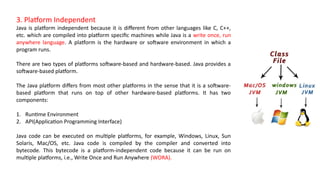
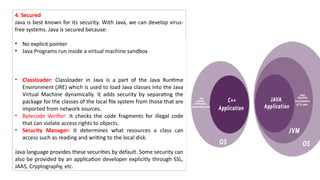
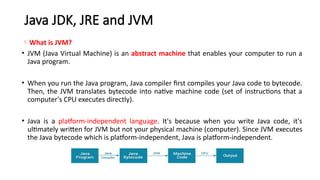
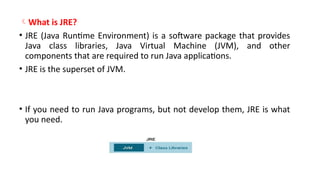
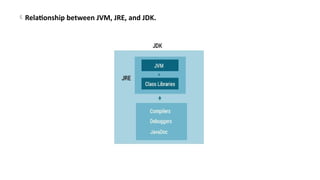
![// This is a simple Java program.
// FileName : "HelloWorld.java".
class HelloWorld
{
// Your program begins with a call to main().
// Prints "Hello, World" to the terminal window.
public static void main(String args[])
{
System.out.println("Hello, World");
}
}
Output
Hello, World](https://image.slidesharecdn.com/module1part1-250706171047-2224c060/85/Module1_htryjtjhkrhdegtfhsfhrdgfhpart1-pptx-18-320.jpg)
![The “Hello World!” program consists of three primary components: the HelloWorld class definition, the main method, and
source code comments. The following explanation will provide you with a basic understanding of the code:
1. Class definition
This line uses the keyword class to declare that a new class is being defined.
class HelloWorld
2. HelloWorld
It is an identifier that is the name of the class. The entire class definition, including all of its members, will be between the
opening curly brace { and the closing curly brace }.
3. main method:
In the Java programming language, every application must contain a main method whose signature is:
public static void main(String[] args)
public: So that JVM can execute the method from anywhere.
static: The main method is to be called without an object. The modifiers public and static can be written in either order.
void: The main method doesn’t return anything.
main(): Name configured in the JVM.
String[]: The main method accepts a single argument, i.e., an array of elements of type String.](https://image.slidesharecdn.com/module1part1-250706171047-2224c060/85/Module1_htryjtjhkrhdegtfhsfhrdgfhpart1-pptx-19-320.jpg)
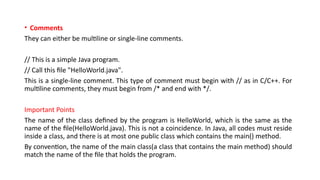
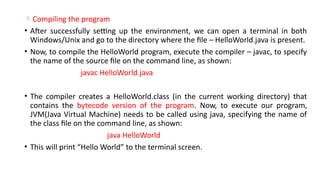
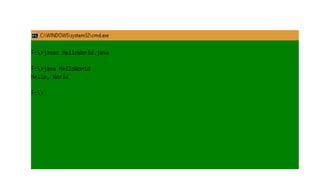
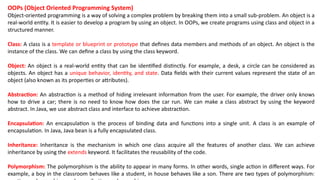
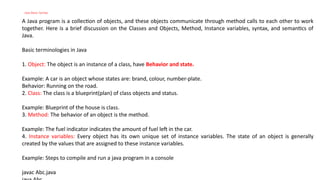
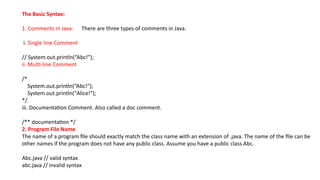
![3. Case Sensitivity
Java is a case-sensitive language, which means that the identifiers AB, Ab, aB, and ab are different in Java.
System.out.println("Alice"); // valid syntax
system.out.println("Alice"); // invalid syntax
4. Class Names
i. The first letter of the class should be in Uppercase
ii. If several words are used to form a name of the class, each inner word’s first letter should be in Upper Case,
Underscore are allowed.
class MyJavaProgram // valid syntax
class myJavaProgram // invalid syntax
5. public static void main(String [] args)
Java program processing starts with the method main().](https://image.slidesharecdn.com/module1part1-250706171047-2224c060/85/Module1_htryjtjhkrhdegtfhsfhrdgfhpart1-pptx-27-320.jpg)
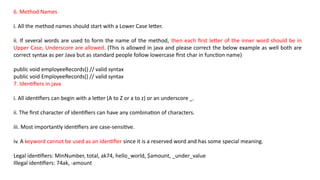
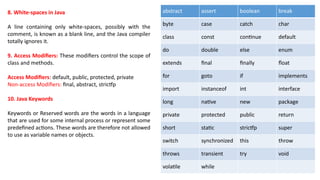
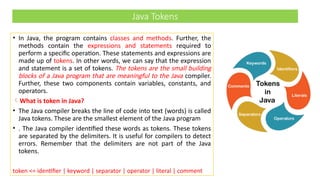
![For example, consider the following code.
public class Demo
{
public static void main(String args[])
{
System.out.println(“Centurion ");
}
}
• In the above code snippet, public, class, Demo, {, static, void, main, (, String, args, [, ], ), System, ., out,
println ,Centurion, etc. are the Java tokens.
• The Java compiler translates these tokens into Java bytecode
• Further, these bytecodes are executed inside the interpreted Java environment.](https://image.slidesharecdn.com/module1part1-250706171047-2224c060/85/Module1_htryjtjhkrhdegtfhsfhrdgfhpart1-pptx-31-320.jpg)
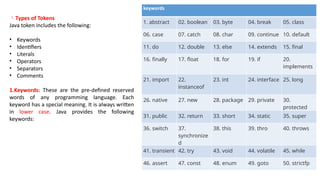
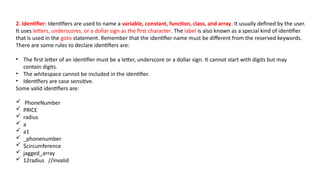
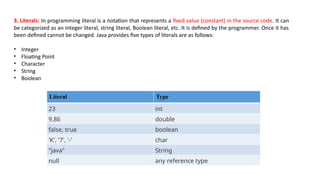
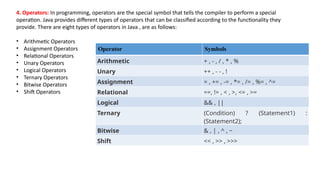
![5.Separators: The separators in Java is also known as punctuators. There are nine separators in Java, are as follows:
separator <= ; | , | . | ( | ) | { | } | [ | ]
Note that the first three separators (; , and .) are tokens that separate other tokens, and the last six (3 pairs of
braces) separators are also known as delimiters. For example, Math.pow(9, 3); contains nine tokens.
• Square Brackets []: It is used to define array elements. A pair of square brackets represents the single-
dimensional array, two pairs of square brackets represent the two-dimensional array.
• Parentheses (): It is used to call the functions and parsing the parameters.
• Curly Braces {}: The curly braces denote the starting and ending of a code block.
• Comma (,): It is used to separate two values, statements, and parameters.
• Assignment Operator (=): It is used to assign a variable and constant.
• Semicolon (;): It is the symbol that can be found at end of the statements. It separates the two statements.
• Period (.): It separates the package name form the sub-packages and class. It also separates a variable or method
from a reference variable.
6.Comments: Comments allow us to specify information about the program inside our Java code. Java compiler
recognizes these comments as tokens but excludes it form further processing. The Java compiler treats comments
as whitespaces. Java provides the following two types of comments:
• Line Oriented: It begins with a pair of forwarding slashes (//).
• Block-Oriented: It begins with /* and continues until it founds */.](https://image.slidesharecdn.com/module1part1-250706171047-2224c060/85/Module1_htryjtjhkrhdegtfhsfhrdgfhpart1-pptx-36-320.jpg)
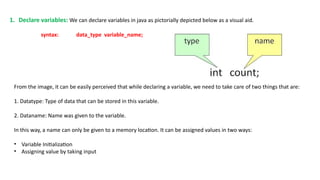
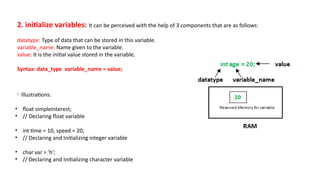
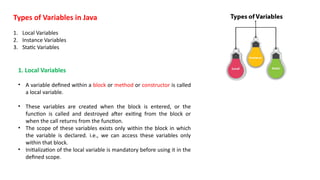
![Example to understand the types of variables in java
public class A
{
static int m=100;//static variable
void method()
{
int n=90;//local variable
}
public static void main(String args[])
{
int data=50;//instance variable
}
}//end of class](https://image.slidesharecdn.com/module1part1-250706171047-2224c060/85/Module1_htryjtjhkrhdegtfhsfhrdgfhpart1-pptx-43-320.jpg)
![Java Variable Example: Add Two Numbers
public class Simple{
public static void main(String[] args)
{
int a=10;
int b=10;
int c=a+b;
System.out.println(c);
}
}
Output:
20
Java Variable Example: Widening
public class Simple{
public static void main(String[] args){
int a=10;
float f=a;
System.out.println(a);
System.out.println(f);
}}
Output:
10
10.0](https://image.slidesharecdn.com/module1part1-250706171047-2224c060/85/Module1_htryjtjhkrhdegtfhsfhrdgfhpart1-pptx-44-320.jpg)
![Java Variable Example: Narrowing
(Typecasting)
public class Simple{
public static void main(String[] args){
float f=10.5f;
//int a=f;//Compile time error
int a=(int)f;
System.out.println(f);
System.out.println(a);
}}
Output:
10.5
10
Java Variable Example: Overflow
class Simple{
public static void main(String[] args){
//Overflow
int a=130;
byte b=(byte)a;
System.out.println(a);
System.out.println(b);
}}
Output:
130
-126](https://image.slidesharecdn.com/module1part1-250706171047-2224c060/85/Module1_htryjtjhkrhdegtfhsfhrdgfhpart1-pptx-45-320.jpg)
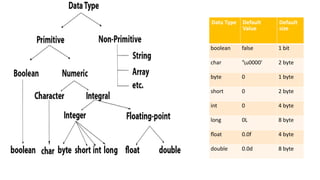
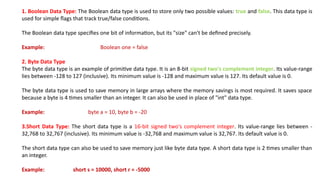
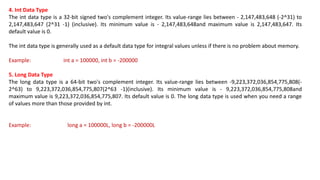
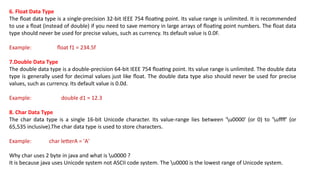
![Java Basic Input and Output
1. Java Output: In Java, you can simply use
System.out.println();
or
System.out.print();
or
System.out.printf();
to send output to standard output (screen).
Here,
• System is a class
• out is a public static field: it accepts output data.
Example:
class Test {
public static void main(String[] args) {
System.out.println("Java programming is interesting.");
}
}
Output:
Java programming is interesting.
Here, we have used the println() method
to display the string.](https://image.slidesharecdn.com/module1part1-250706171047-2224c060/85/Module1_htryjtjhkrhdegtfhsfhrdgfhpart1-pptx-52-320.jpg)
![Difference between println(), print() and printf()
print() - It prints string inside the quotes.
println() - It prints string inside the quotes similar like print() method. Then the cursor moves to the beginning of the
next line.
printf() - It provides string formatting (similar to printf in C/C++ programming).
Example: print() and println()
class Output {
public static void main(String[] args) {
System.out.println("1. println ");
System.out.println("2. println ");
System.out.print("1. print ");
System.out.print("2. print");
}
}
Output:
1. println
2. println
1. print 2. print
in the above example, we have shown the working of the print() and println()](https://image.slidesharecdn.com/module1part1-250706171047-2224c060/85/Module1_htryjtjhkrhdegtfhsfhrdgfhpart1-pptx-53-320.jpg)
![Example: Printing Variables and Literals
class Variables {
public static void main(String[] args) {
double number = -10.6;
System.out.println(5);
System.out.println(number);
}
}
When you run the program, the output will be:
5
-10.6
Here, you can see that we have not used the
quotation marks. It is because to display integers,
variables and so on, we don't use quotation marks.
Example: Print Concatenated Strings
class PrintVariables {
public static void main(String[] args) {
double number = -10.6;
System.out.println("I am " + "awesome.");
System.out.println("Number = " + number);
}
}
Output:
I am awesome.
Number = -10.6
In the above example, notice the line,
System.out.println("I am " + "awesome.");
Here, we have used the + operator to concatenate (join)
the two strings: "I am " and "awesome.".
And also, the line,
System.out.println("Number = " + number);
Here, first the value of variable number is evaluated. Then,](https://image.slidesharecdn.com/module1part1-250706171047-2224c060/85/Module1_htryjtjhkrhdegtfhsfhrdgfhpart1-pptx-54-320.jpg)
![Example: Get Integer Input From the User
import java.util.Scanner;
class Input {
public static void main(String[] args) {
Scanner input = new Scanner(System.in);
System.out.print("Enter an integer: ");
int number = input.nextInt();
System.out.println("You entered " + number);
// closing the scanner object
input.close();
}
}
Output:
Enter an integer: 23
You entered 23
In the above example, we have created an object named input of the Scanner class. We then call the nextInt()
method of the Scanner class to get an integer input from the user.
Similarly, we can use nextLong(), nextFloat(),
nextDouble(), and next() methods to get long, float,
double, and string input respectively from the user.
Note: We have used the close() method to close
the object. It is recommended to close the scanner
object once the input is taken.](https://image.slidesharecdn.com/module1part1-250706171047-2224c060/85/Module1_htryjtjhkrhdegtfhsfhrdgfhpart1-pptx-56-320.jpg)
![Example: Get float, double and String Input
import java.util.Scanner;
class Input {
public static void main(String[] args) {
Scanner input = new Scanner(System.in);
// Getting float input
System.out.print("Enter float: ");
float myFloat = input.nextFloat();
System.out.println("Float entered = " + myFloat);
// Getting double input
System.out.print("Enter double: ");
double myDouble = input.nextDouble();
System.out.println("Double entered = " + myDouble);
// Getting String input
System.out.print("Enter text: ");
String myString = input.next();
System.out.println("Text entered = " + myString);
}
}
Output:
Enter float: 2.343
Float entered = 2.343
Enter double: -23.4
Double entered = -23.4
Enter text: Hey!
Text entered = Hey!](https://image.slidesharecdn.com/module1part1-250706171047-2224c060/85/Module1_htryjtjhkrhdegtfhsfhrdgfhpart1-pptx-57-320.jpg)
![Java Program to calculate simple interest: In the following example we are taking the values of p, r and t from
user and then we are calculating the simple interest based on entered values.
import java.util.Scanner;
public class JavaExample
{
public static void main(String args[])
{
float p, r, t, sinterest;
Scanner scan = new Scanner(System.in);
System.out.print("Enter the Principal : ");
p = scan.nextFloat();
System.out.print("Enter the Rate of interest : ");
r = scan.nextFloat();
System.out.print("Enter the Time period : ");
t = scan.nextFloat();
scan.close();
sinterest = (p * r * t) / 100;
System.out.print("Simple Interest is: " +sinterest);
}
}
Output:
Enter the Principal : 2000
Enter the Rate of interest : 6
Enter the Time period : 3
Simple Interest is: 360.0](https://image.slidesharecdn.com/module1part1-250706171047-2224c060/85/Module1_htryjtjhkrhdegtfhsfhrdgfhpart1-pptx-58-320.jpg)
![Java program to calculate area of Square
import java.util.Scanner;
class SquareAreaDemo {
public static void main (String[] args)
{
System.out.println("Enter Side of Square:");
//Capture the user's input
Scanner scanner = new Scanner(System.in);
//Storing the captured value in a variable
double side = scanner.nextDouble();
//Area of Square = side*side
double area = side*side;
System.out.println("Area of Square is: "+area);
}
}
Output:
Enter Side of Square:
2.5
Area of Square is: 6.25](https://image.slidesharecdn.com/module1part1-250706171047-2224c060/85/Module1_htryjtjhkrhdegtfhsfhrdgfhpart1-pptx-59-320.jpg)
![Example: Program to find Quotient and Remainder
In the following program we have two integer numbers num1 and num2 and we are finding the quotient and
remainder when num1 is divided by num2, so we can say that num1 is the dividend here and num2 is the divisor.
public class JavaExample {
public static void main(String[] args) {
int num1 = 15, num2 = 2;
int quotient = num1 / num2;
int remainder = num1 % num2;
System.out.println("Quotient is: " + quotient);
System.out.println("Remainder is: " + remainder);
}
}](https://image.slidesharecdn.com/module1part1-250706171047-2224c060/85/Module1_htryjtjhkrhdegtfhsfhrdgfhpart1-pptx-60-320.jpg)
![Java Program to find ASCII value of a Character
ASCII is a code for representing English characters as numbers, each letter of english alphabets is assigned a number ranging
from 0 to 127. For example, the ASCII code for uppercase P is 80.
In Java programming, we have two ways to find ASCII value of a character 1) By assigning a character to the int variable 2) By
type casting character value as int
• Example: Program to find ASCII code of a character
public class Demo {
public static void main(String[] args) {
char ch = 'P';
int asciiCode = ch;
// type casting char as int
int asciiValue = (int)ch;
System.out.println("ASCII value of "+ch+" is: " + asciiCode);
System.out.println("ASCII value of "+ch+" is: " + asciiValue);
}
}
Output:
ASCII value of P is: 80
ASCII value of P is: 80](https://image.slidesharecdn.com/module1part1-250706171047-2224c060/85/Module1_htryjtjhkrhdegtfhsfhrdgfhpart1-pptx-61-320.jpg)
![Example : Program to read two integer and print product of them: This program asks user to enter two integer
numbers and displays the product. To understand how to use scanner to take user input, checkout this program:
Program to read integer from system input.
import java.util.Scanner;
public class Demo {
public static void main(String[] args) {
/* This reads the input provided by user
* using keyboard
*/
Scanner scan = new Scanner(System.in);
System.out.print("Enter first number: ");
// This method reads the number provided using keyboard
int num1 = scan.nextInt();
System.out.print("Enter second number: ");
int num2 = scan.nextInt();
// Closing Scanner after the use
scan.close();
// Calculating product of two numbers
int product = num1*num2;
// Displaying the multiplication result
System.out.println("Output: "+product);
}
Output:
Enter first number: 15
Enter second number: 6
Output: 90](https://image.slidesharecdn.com/module1part1-250706171047-2224c060/85/Module1_htryjtjhkrhdegtfhsfhrdgfhpart1-pptx-62-320.jpg)
![Example: Java program to calculate area of Triangle
class AreaTriangleDemo2 {
public static void main(String args[]) {
double base = 20.0;
double height = 110.5;
double area = (base* height)/2;
System.out.println("Area of Triangle is: " + area);
}
}
Output:
Area of Triangle is: 1105.0](https://image.slidesharecdn.com/module1part1-250706171047-2224c060/85/Module1_htryjtjhkrhdegtfhsfhrdgfhpart1-pptx-63-320.jpg)
![// Java Program to Swap Two values using third variable
// using temp variable
// Importing generic libraries
import java.util.*;
class Test {
// Function to swap two numbers
// Using temporary variable
static void swapValuesUsingThirdVariable(int m, int n)
{
// Swapping the values
int temp = m;
m = n;
n = temp;
System.out.println("Value of m is " + m + " and Value of n is " + n);
}
// Main driver code
public static void main(String[] args)
{
// Random integer values](https://image.slidesharecdn.com/module1part1-250706171047-2224c060/85/Module1_htryjtjhkrhdegtfhsfhrdgfhpart1-pptx-64-320.jpg)
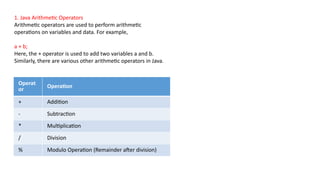
![Example 1: Arithmetic Operators
class Main {
public static void main(String[] args) {
// declare variables
int a = 12, b = 5;
// addition operator
System.out.println("a + b = " + (a + b));
// subtraction operator
System.out.println("a - b = " + (a - b));
// multiplication operator
System.out.println("a * b = " + (a * b));
// division operator
System.out.println("a / b = " + (a / b));
// modulo operator
System.out.println("a % b = " + (a % b));
}
}
Output
a + b = 17
a - b = 7
a * b = 60
a / b = 2
a % b = 2
In the above example, we have used +, -, and * operators to compute addition, subtraction,
and multiplication operations.
/ Division Operator
Note the operation, a / b in our program. The /
operator is the division operator.
If we use the division operator with two integers, then
the resulting quotient will also be an integer. And, if
one of the operands is a floating-point number, we will
get the result will also be in floating-point.
In Java,
(9 / 2) is 4
(9.0 / 2) is 4.5
(9 / 2.0) is 4.5
(9.0 / 2.0) is 4.5
% Modulo Operator
The modulo operator % computes the remainder.
When a = 7 is divided by b = 4, the remainder is 3.
Note: The % operator is mainly used with integers.](https://image.slidesharecdn.com/module1part1-250706171047-2224c060/85/Module1_htryjtjhkrhdegtfhsfhrdgfhpart1-pptx-67-320.jpg)
![2. Java Assignment Operators
Assignment operators are used in Java to assign
values to variables. For example,
int age;
age = 5;
Here, = is the assignment operator. It assigns the
value on its right to the variable on its left. That is, 5 is
assigned to the variable age.
Let's see some more assignment operators available
in Java.
Operator Example Equivalent to
= a = b; a = b;
+= a += b; a = a + b;
-= a -= b; a = a - b;
*= a *= b; a = a * b;
/= a /= b; a = a / b;
%= a %= b; a = a % b;
Example 2: Assignment Operators
class Main {
public static void main(String[] args) {
// create variables
int a = 4;
int var;
// assign value using =
var = a;
System.out.println("var using =: " + var);
// assign value using =+
var += a;
System.out.println("var using +=: " + var);
// assign value using =*
var *= a;
System.out.println("var using *=: " + var);
}
}
Output
var using =: 4
var using +=: 8
var using *=: 32](https://image.slidesharecdn.com/module1part1-250706171047-2224c060/85/Module1_htryjtjhkrhdegtfhsfhrdgfhpart1-pptx-68-320.jpg)
![3. Java Relational Operators
Relational operators are used to check the relationship
between two operands. For example,
// check if a is less than b
a < b;
Here, < operator is the relational operator. It checks if a is
less than b or not.
It returns either true or false.
Operator Description Example
== Is Equal To 3 == 5 returns false
!= Not Equal To 3 != 5 returns true
> Greater Than 3 > 5 returns false
< Less Than 3 < 5 returns true
>= Greater Than or Equal To 3 >= 5 returns false
<= Less Than or Equal To 3 <= 5 returns true
Example 3: Relational Operators
class Main {
public static void main(String[] args) {
// create variables
int a = 7, b = 11;
// value of a and b
System.out.println("a is " + a + " and b is " + b);
// == operator
System.out.println(a == b); // false
// != operator
System.out.println(a != b); // true
// > operator
System.out.println(a > b); // false
// < operator
System.out.println(a < b); // true
// >= operator
System.out.println(a >= b); // false
// <= operator
System.out.println(a <= b); // true
}
}
Note: Relational operators are used in decision making and loops.](https://image.slidesharecdn.com/module1part1-250706171047-2224c060/85/Module1_htryjtjhkrhdegtfhsfhrdgfhpart1-pptx-69-320.jpg)
![4. Java Logical Operators
Logical operators are used to check whether an
expression is true or false. They are used in decision
making.
Operator Example Meaning
&& (Logical
AND)
expression1 &&
expression2
true only if both
expression1 and
expression2 are
true
|| (Logical OR)
expression1 ||
expression2
true if either
expression1 or
expression2 is
true
! (Logical NOT) !expression
true if expression
is false and vice
versa
Example 4: Logical Operators
class Main {
public static void main(String[] args) {
// && operator
System.out.println((5 > 3) && (8 > 5)); // true
System.out.println((5 > 3) && (8 < 5)); // false
// || operator
System.out.println((5 < 3) || (8 > 5)); // true
System.out.println((5 > 3) || (8 < 5)); // true
System.out.println((5 < 3) || (8 < 5)); // false
// ! operator
System.out.println(!(5 == 3)); // true
System.out.println(!(5 > 3)); // false
}
}](https://image.slidesharecdn.com/module1part1-250706171047-2224c060/85/Module1_htryjtjhkrhdegtfhsfhrdgfhpart1-pptx-70-320.jpg)
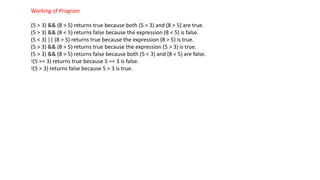
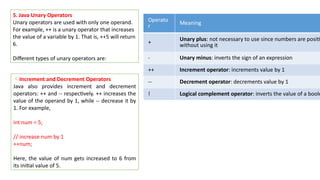
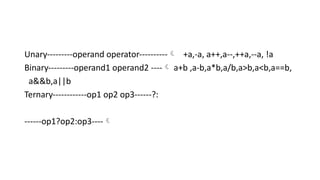
![Example 5: Increment and Decrement Operators
class Main {
public static void main(String[] args) {
// declare variables
int a = 12, b = 12;
int result1, result2;
// original value
System.out.println("Value of a: " + a);
// increment operator
result1 = ++a;
System.out.println("After increment: " + result1);
System.out.println("Value of b: " + b);
// decrement operator
result2 = --b;
System.out.println("After decrement: " + result2);
}
}
Output
Value of a: 12
After increment: 13
Value of b: 12
After decrement: 11
In the above program, we have used the ++
and -- operator as prefixes (++a, --b). We can
also use these operators as postfix (a++, b+
+).
There is a slight difference when these
operators are used as prefix versus when
they are used as a postfix.](https://image.slidesharecdn.com/module1part1-250706171047-2224c060/85/Module1_htryjtjhkrhdegtfhsfhrdgfhpart1-pptx-74-320.jpg)
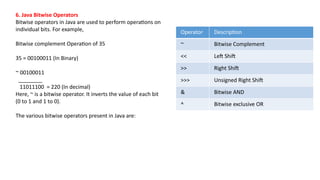
![7. Other operators
Besides these operators, there are other additional operators in Java.
a. Java instanceof Operator
The instanceof operator checks whether an object is an instanceof a particular class. For example,
class Main {
public static void main(String[] args) {
String str = "Programiz";
boolean result;
// checks if str is an instance of
// the String class
result = str instanceof String;
System.out.println("Is str an object of String? " + result);
}
}
Output
Is str an object of String? true
Here, str is an instance of the String class. Hence, the instanceof operator returns true](https://image.slidesharecdn.com/module1part1-250706171047-2224c060/85/Module1_htryjtjhkrhdegtfhsfhrdgfhpart1-pptx-76-320.jpg)
![b. Java Ternary Operator
The ternary operator (conditional operator) is shorthand for the if-then-else statement. For example,
variable = Expression ? expression1 : expression2
Here's how it works.
If the Expression is true, expression1 is assigned to the variable.
If the Expression is false, expression2 is assigned to the variable.
Let's see an example of a ternary operator.
class Java {
public static void main(String[] args) {
int februaryDays = 29;
String result;
// ternary operator
result = (februaryDays == 28) ? "Not a leap year" : "Leap year";
System.out.println(result);
}
}
Output
Leap year
In the above example, we have used the ternary operator to check if the year is a leap year or not.](https://image.slidesharecdn.com/module1part1-250706171047-2224c060/85/Module1_htryjtjhkrhdegtfhsfhrdgfhpart1-pptx-77-320.jpg)
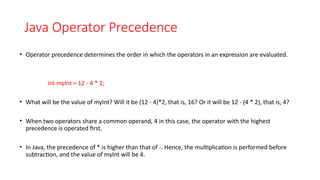
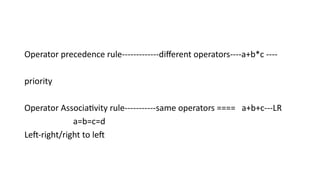
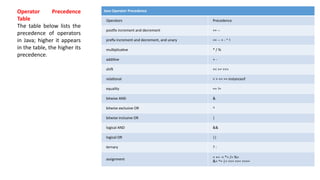
![Example: Operator Precedence
class Precedence {
public static void main(String[] args) {
int a = 10, b = 5, c = 1, result;
result = a-++c-++b;
System.out.println(result);
}
}
Output:
2
The operator precedence of prefix ++ is higher than that of - subtraction operator. Hence,
result = a-++c-++b;
is equivalent to
result = a-(++c)-(++b);
When dealing with multiple operators and operands in a single expression, you can use parentheses like in the
above example for clarity. The expression inside the parentheses is evaluated first.](https://image.slidesharecdn.com/module1part1-250706171047-2224c060/85/Module1_htryjtjhkrhdegtfhsfhrdgfhpart1-pptx-81-320.jpg)
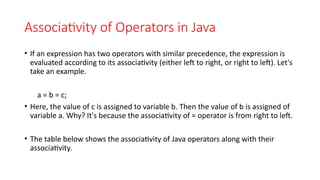
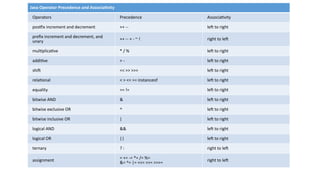
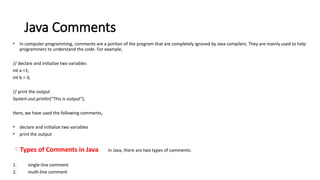
![1. Single-line Comment
A single-line comment starts and ends in the same line. To write a single-line comment, we can use the // symbol.
For example,
// "Hello, World!" program example
class Main {
public static void main(String[] args) {
{
// prints "Hello, World!"
System.out.println("Hello, World!");
}
}
Output:
Hello, World!
Here, we have used two single-line comments:
"Hello, World!" program example
prints "Hello World!“
The Java compiler ignores everything from // to the end of line. Hence, it is also known as End of Line comment.](https://image.slidesharecdn.com/module1part1-250706171047-2224c060/85/Module1_htryjtjhkrhdegtfhsfhrdgfhpart1-pptx-85-320.jpg)
![2. Multi-line Comment
When we want to write comments in multiple lines, we can use the multi-line comment. To write multi-line comments,
we can use the /*....*/ symbol. For example,
/* This is an example of multi-line comment.
* The program prints "Hello, World!" to the standard output.
*/
class HelloWorld {
public static void main(String[] args) {
{
System.out.println("Hello, World!");
}
}
Output:
Hello, World!
Here, we have used the multi-line comment:
/* This is an example of multi-line comment.
* The program prints "Hello, World!" to the standard output.
*/
This type of comment is also known as Traditional Comment. In this type of comment, the Java compiler ignores everything from /* to */.](https://image.slidesharecdn.com/module1part1-250706171047-2224c060/85/Module1_htryjtjhkrhdegtfhsfhrdgfhpart1-pptx-86-320.jpg)
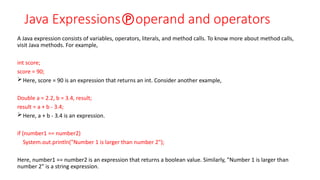
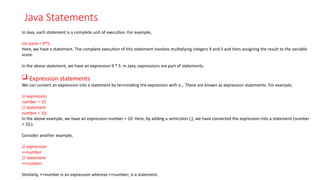
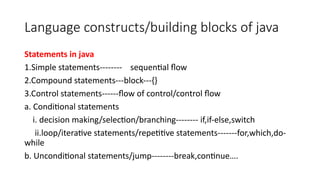
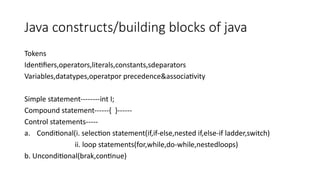
![Java Blocks
A block is a group of statements (zero or more) that
is enclosed in curly braces { }. For example,
class Main {
public static void main(String[] args) {
String band = "Beatles";
if (band == "Beatles") { // start of block
System.out.print("Hey ");
System.out.print("Jude!");
} // end of block
}
}
Output:
Hey Jude!
In the above example, we have a block if {....}.
Here, inside the block we have two statements:
System.out.print("Hey ");
System.out.print("Jude!");
However, a block may not have any statements. Consider the
following examples,
class Main {
public static void main(String[] args) {
if (10 > 5) { // start of block
} // end of block
}
}
This is a valid Java program. Here, we have a block if {...}.
However, there is no any statement inside this block.
class AssignmentOperator {
public static void main(String[] args) { // start of block
} // end of block
}
Here, we have block public static void main() {...}. However,
similar to the above example, this block does not have any
statement.](https://image.slidesharecdn.com/module1part1-250706171047-2224c060/85/Module1_htryjtjhkrhdegtfhsfhrdgfhpart1-pptx-92-320.jpg)
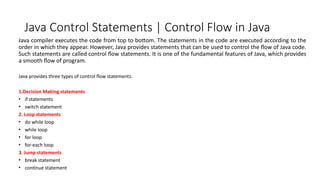
![1) Simple if statement:
It is the most basic statement among all control flow
statements in Java. It evaluates a Boolean expression
and enables the program to enter a block of code if the
expression evaluates to true.
Syntax of if statement is given below.
if(condition) {
statement 1; //executes when condition is true
}
Consider the following example in which we have used
the if statement in the java code.
Student.java
public class Student {
public static void main(String[] args) {
int x = 10;
int y = 12;
if(x+y > 20) {
System.out.println("x + y is greater than 20");
}
}
}
Output:
x + y is greater than 20](https://image.slidesharecdn.com/module1part1-250706171047-2224c060/85/Module1_htryjtjhkrhdegtfhsfhrdgfhpart1-pptx-95-320.jpg)
![2) if-else statement
The if-else statement is an extension to the if-statement,
which uses another block of code, i.e., else block. The
else block is executed if the condition of the if-block is
evaluated as false.
Syntax:
if(condition) {
statement 1; //executes when condition is true
}
else{
statement 2; //executes when condition is false
}
Consider the following example.
Student.java
public class Student {
public static void main(String[] args) {
int x = 10;
int y = 12;
if(x+y < 10) {
System.out.println("x + y is less than 10");
} else {
System.out.println("x + y is greater than 20");
}
}
}
Output:
x + y is greater than 20](https://image.slidesharecdn.com/module1part1-250706171047-2224c060/85/Module1_htryjtjhkrhdegtfhsfhrdgfhpart1-pptx-96-320.jpg)
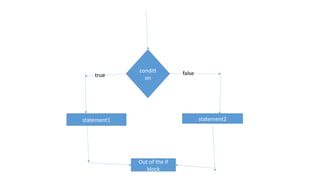
![3) if-else-if ladder:
The if-else-if statement contains the if-statement followed by
multiple else-if statements. In other words, we can say that it
is the chain of if-else statements that create a decision tree
where the program may enter in the block of code where the
condition is true. We can also define an else statement at the
end of the chain.
Syntax of if-else-if statement is given below.
if(condition 1) {
statement 1; //executes when condition 1 is true
}
else if(condition 2) {
statement 2; //executes when condition 2 is true
}
else {
statement 2; //executes when all the conditions are false
}
Consider the following example.
Student.java
public class Student {
public static void main(String[] args) {
String city = "Delhi";
if(city == "Meerut") {
System.out.println("city is meerut");
}else if (city == "Noida") {
System.out.println("city is noida");
}else if(city == "Agra") {
System.out.println("city is agra");
}else {
System.out.println(city);
}
}
}
Output:
Delhi](https://image.slidesharecdn.com/module1part1-250706171047-2224c060/85/Module1_htryjtjhkrhdegtfhsfhrdgfhpart1-pptx-98-320.jpg)
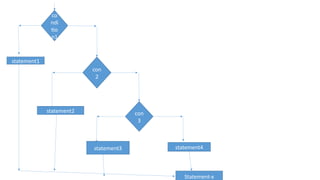
![4. Nested if-statement
In nested if-statements, the if statement can contain a
if or if-else statement inside another if or else-if
statement.
Syntax of Nested if-statement is given below.
if(condition 1) {
statement 1; //executes when condition 1 is true
if(condition 2) {
statement 2; //executes when condition 2 is true
}
else{
statement 2; //executes when condition 2 is false
}
}
Consider the following example.
Student.java
public class Student {
public static void main(String[] args) {
String address = "Delhi, India";
if(address.endsWith("India")) {
if(address.contains("Meerut")) {
System.out.println("Your city is Meerut");
}else if(address.contains("Noida")) {
System.out.println("Your city is Noida");
}else {
System.out.println(address.split(",")[0]);
}
}else {
System.out.println("You are not living in India");
}
}
}
Output:
Delhi](https://image.slidesharecdn.com/module1part1-250706171047-2224c060/85/Module1_htryjtjhkrhdegtfhsfhrdgfhpart1-pptx-100-320.jpg)
![Student.java
public class Student implements Cloneable {
public static void main(String[] args) {
int num = 2;
switch (num){
case 0:
System.out.println("number is 0");
break;
case 1:
System.out.println("number is 1");
break;
default:
System.out.println(num);
}
}
}
Output:
2
While using switch statements, we must notice that the case expression will be of the same type as the variable.
However, it will also be a constant value. The switch permits only int, string, and Enum type variables to be used.](https://image.slidesharecdn.com/module1part1-250706171047-2224c060/85/Module1_htryjtjhkrhdegtfhsfhrdgfhpart1-pptx-102-320.jpg)
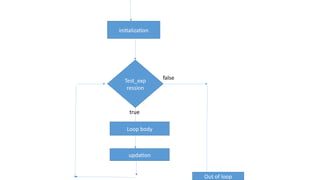
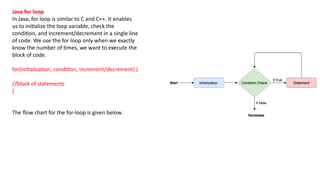
![Calculation.java
public class Calculattion {
public static void main(String[] args) {
// TODO Auto-generated method stub
int sum = 0;
for(int j = 1; j<=10; j++) {
sum = sum + j;
}
System.out.println("The sum of first 10 natural numbers is " + sum);
}
}
Output:
The sum of first 10 natural numbers is 55](https://image.slidesharecdn.com/module1part1-250706171047-2224c060/85/Module1_htryjtjhkrhdegtfhsfhrdgfhpart1-pptx-107-320.jpg)
![Java for-each loop
Java provides an enhanced for loop to traverse the data
structures like array or collection. In the for-each loop, we
don't need to update the loop variable. The syntax to use the
for-each loop in java is given below.
for(data_type var : array_name/collection_name){
//statements
}
Consider the following example to understand the
functioning of the for-each loop in Java.
Calculation.java
public class Calculation {
public static void main(String[] args) {
// TODO Auto-generated method stub
String[] names = {"Java","C","C+
+","Python","JavaScript"};
System.out.println("Printing the content of the array
names:n");
for(String name:names) {
System.out.println(name);
}
}
}
Output:
Printing the content of the array names:
Java
C
C++
Python
JavaScript](https://image.slidesharecdn.com/module1part1-250706171047-2224c060/85/Module1_htryjtjhkrhdegtfhsfhrdgfhpart1-pptx-108-320.jpg)
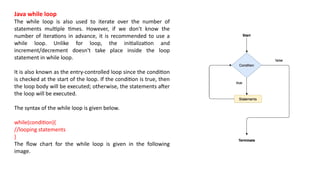
![Calculation .java
public class Calculation {
public static void main(String[] args) {
// TODO Auto-generated method stub
int i = 0;
System.out.println("Printing the list of first 10 even numbers n");
while(i<=10) {
System.out.println(i);
i = i + 2;
}
}
}
Output:
Printing the list of first 10 even numbers
0
2
4
6
8
10](https://image.slidesharecdn.com/module1part1-250706171047-2224c060/85/Module1_htryjtjhkrhdegtfhsfhrdgfhpart1-pptx-110-320.jpg)
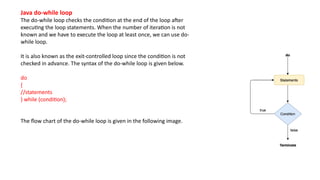
![Calculation.java
public class Calculation {
public static void main(String[] args) {
// TODO Auto-generated method stub
int i = 0;
System.out.println("Printing the list of first 10 even numbers n");
do {
System.out.println(i);
i = i + 2;
}while(i<=10);
}
}
Output:
Printing the list of first 10 even numbers
0
2
4
6
8
10](https://image.slidesharecdn.com/module1part1-250706171047-2224c060/85/Module1_htryjtjhkrhdegtfhsfhrdgfhpart1-pptx-112-320.jpg)
![BreakExample.java
public class BreakExample {
public static void main(String[] args) {
// TODO Auto-generated method stub
for(int i = 0; i<= 10; i++) {
System.out.println(i);
if(i==6) {
break;
}
}
}
}
Output:
0
1
2
3
4
5
6](https://image.slidesharecdn.com/module1part1-250706171047-2224c060/85/Module1_htryjtjhkrhdegtfhsfhrdgfhpart1-pptx-114-320.jpg)
![break statement example with labeled for loop
Calculation.java
public class Calculation {
public static void main(String[] args) {
// TODO Auto-generated method stub
a:
for(int i = 0; i<= 10; i++) {
b:
for(int j = 0; j<=15;j++) {
c:
for (int k = 0; k<=20; k++) {
System.out.println(k);
if(k==5) {
break a;
}
}
}
}
}
}
Output:
0
1
2
3
4
5](https://image.slidesharecdn.com/module1part1-250706171047-2224c060/85/Module1_htryjtjhkrhdegtfhsfhrdgfhpart1-pptx-115-320.jpg)
![Java continue statement
Unlike break statement, the continue statement doesn't break the
loop, whereas, it skips the specific part of the loop and jumps to the
next iteration of the loop immediately.
Consider the following example to understand the functioning of the
continue statement in Java.
public class ContinueExample {
public static void main(String[] args) {
// TODO Auto-generated method stub
for(int i = 0; i<= 2; i++) {
for (int j = i; j<=5; j++) {
if(j == 4) {
continue;
}
System.out.println(j);
}
}
}
}
Output:
0
1
2
3
5
1
2
3
5
2
3
5](https://image.slidesharecdn.com/module1part1-250706171047-2224c060/85/Module1_htryjtjhkrhdegtfhsfhrdgfhpart1-pptx-116-320.jpg)