LOOKING BACK :TRUE / FALSE
1.Windows Firewall filters information coming to your system from the Internet
and blocking potentially harmful programs or network-based threats.
• 2. Access Panel is a component of Microsoft Windows that provides the ability
to view and change system settings.
• 3. User account is an identity created for a person in a computer system.
• 4. Remote screen refers to a software that allows a personal computer's
environment to be run remotely on one system, while being displayed on a
separate client device.
• 5. Container is a subdivision within an Active Directory into which you can
place users, groups, computers, and other organizational units.
PREVENTIVE MAINTENANCE
•is aregular and systematic inspection,
detection, and correction of possible
problems in order to prevent future
system failures on a working device.
6.
THE FOLLOWING AREITS AIMS:
•Ensures that the device operates properly.
•Lessen the likelihood of a system crash or
parts failures.
•Prolong the life of the device and its individual
components.
PASSIVE PREVENTIVE MAINTENANCE
itconsists of
precautionary
activities to protect
the computer from the
environment.
Like the following:
• Using power-protection devices
such as Uninterrupted Power
Supply (UPS) and Automatic
Voltage Regulator (AVR).
• Clean and temperature-
controlled environment.
• •Preventing excessive vibration.
9.
ACTIVE PREVENTIVE MAINTENANCE
itconsists of activities
that promote a longer
trouble-free life for the
device
Like the following:
• • Periodic cleaning of the device
and components.
• • Performing regular file back-up.
• • Scanning of malwares (virus,
spyware, and worms).
• • Disk cleanup and file
defragmentation of hard drives.
10.
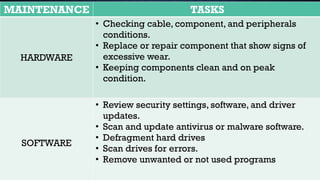
MAINTENANCE TASKS
HARDWARE
• Checkingcable, component, and peripherals
conditions.
• Replace or repair component that show signs of
excessive wear.
• Keeping components clean and on peak
condition.
SOFTWARE
• Review security settings, software, and driver
updates.
• Scan and update antivirus or malware software.
• Defragment hard drives
• Scan drives for errors.
• Remove unwanted or not used programs
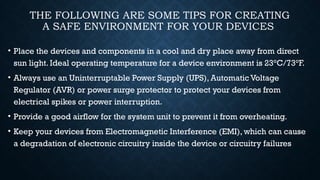
THE FOLLOWING ARESOME TIPS FOR CREATING
A SAFE ENVIRONMENT FOR YOUR DEVICES
• Place the devices and components in a cool and dry place away from direct
sun light. Ideal operating temperature for a device environment is 23°C/73°F.
• Always use an Uninterruptable Power Supply (UPS), Automatic Voltage
Regulator (AVR) or power surge protector to protect your devices from
electrical spikes or power interruption.
• Provide a good airflow for the system unit to prevent it from overheating.
• Keep your devices from Electromagnetic Interference (EMI), which can cause
a degradation of electronic circuitry inside the device or circuitry failures
#6 By implementing this procedure, it will reduce the device down time, increased data protection, extend life of the device and its components, increased stability and save on regular repair and replacement costs.
#9 Note: Preventive Maintenance procedures can be a hardware and software related or both.
#12 Surge Protector potect electrical devices against specific instances of fast high voltage surges.
An AVR provides 24/7 protection to your appliances. It does so by regulating the voltage fluctuations that occur in the power supply. This ensures the output voltage delivered to the appliance remains constant at all times.
A UPS ensures uninterruptible power supply during power outages. This provides sufficient time for you to save data and close down your computer properly.
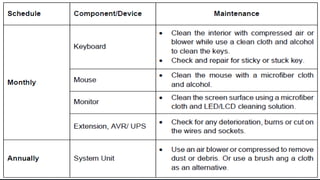
#13 Cleaning the device is essential to keep it on peak condition, extend its life and make the files and data safe. A system unit in a normal working environment should be cleaned at least annually. The table below gives examples of a Preventive Maintenance schedule: