Mobilizing your Enterprise:
  The Why and The How
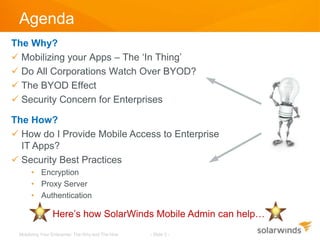
Agenda
The Why?
 Mobilizing your Apps – The ‘In Thing’
 Do All Corporations Watch Over BYOD?
 The BYOD Effect
 Security Concern for Enterprises

The How?
 How do I Provide Mobile Access to Enterprise
  IT Apps?
 Security Best Practices
      • Encryption
      • Proxy Server
      • Authentication

                Here’s how SolarWinds Mobile Admin can help…
 Mobilizing Your Enterprise: The Why and The How   - Slide 2 -
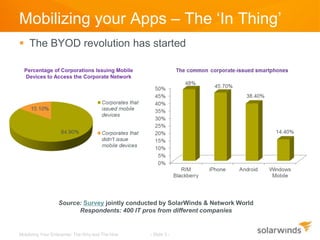
Mobilizing your Apps – The ‘In Thing’
 The BYOD revolution has started

  Percentage of Corporations Issuing Mobile
  Devices to Access the Corporate Network


                  Source: Survey jointly conducted by SolarWinds & Network World
                        Respondents: 400 IT pros from different companies


Mobilizing Your Enterprise: The Why and The How   - Slide 3 -
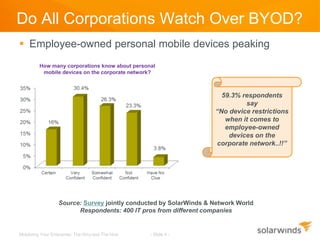
Do All Corporations Watch Over BYOD?
 Employee-owned personal mobile devices peaking
         How many corporations know about personal
          mobile devices on the corporate network?


                                                                     59.3% respondents
                                                                            say
                                                                   “No device restrictions
                                                                      when it comes to
                                                                      employee-owned
                                                                       devices on the
                                                                   corporate network..!!”


                  Source: Survey jointly conducted by SolarWinds & Network World
                        Respondents: 400 IT pros from different companies


Mobilizing Your Enterprise: The Why and The How   - Slide 4 -
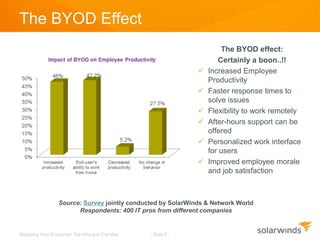
The BYOD Effect
                                                                        The BYOD effect:
                                                                       Certainly a boon..!!
                                                                   Increased Employee
                                                                    Productivity
                                                                   Faster response times to
                                                                    solve issues
                                                                   Flexibility to work remotely
                                                                   After-hours support can be
                                                                    offered
                                                                   Personalized work interface
                                                                    for users
                                                                   Improved employee morale
                                                                    and job satisfaction


                  Source: Survey jointly conducted by SolarWinds & Network World
                        Respondents: 400 IT pros from different companies


Mobilizing Your Enterprise: The Why and The How   - Slide 5 -
Security Concern for Enterprises
 Potential for loss of confidential information via personal
  devices
 Legal issues and regulatory compliance risks
 Introduction of malware threats
 Management burden associated with supporting diverse
  device types
 Ensuring user authentication, security, and encryption
 Policy formulation and enforcement
 Monitoring and management of Wi-Fi access points


Mobilizing Your Enterprise: The Why and The How   - Slide 6 -
How Do I Provide Mobile Access to Enterprise IT Apps?

   Does my current app support mobile access?
   Do I need to hire a developer or can I buy something off-
    the-shelf?
   What are the hardware and software requirements for
    providing mobile access to the application?
   What mobile devices does the application support?
   What kind of security do I need?
   How do I effectively monitor and manage my apps
    remotely?


  Mobilizing Your Enterprise: The Why and The How   - Slide 7 -
Security Best Practices
1. Encryption
         Depending on the type of wireless handheld devices used, mobile
         device encryption can be classified as
         » Encryption using Blackberry Enterprise Server for Blackberry
         » Encryption with VPN (iOS and Android devices)
         » Encryption with HTTPS (iOS, Android and BlackBerry devices)


2. Using proxy to secure your firewall

3. Authentication


Mobilizing Your Enterprise: The Why and The How   - Slide 8 -
1. Encryption
 Encryption Using BlackBerry Enterprise Server
         » all your data is sent over the Mobile Data Service (MDS).
         » automatically encrypted using Triple Data Encryption Standard (TDES or
           3DES).
         » While TDES provides the highest industry standard encryption, you can also
           choose additional layers of encryption.
         » All versions of the BlackBerry Enterprise Server use TDES as the default
           encryption for all data.


 The BlackBerry Enterprise Server 4.1 allows you to choose between
  using TDES and Advanced Encryption Standard (AES), or both.

 While TDES and AES are generally recognized as the most robust
  encryption methods available today, the US Government has also
  certified TDES and AES as compliant with Federal Information
  Processing Standards (FIPS).


Mobilizing Your Enterprise: The Why and The How   - Slide 9 -
1. Encryption (contd.)
 Encryption with VPN for Apple iOS & Android
         »     You can encrypt Apple iOS and Android devices with a Virtual Private
               Network (VPN).
         »     If you use a VPN, all your data is sent over the VPN, and is, by default,
               automatically encrypted.


 Encryption with Hypertext Transfer Protocol – Secured (HTTPS)
         »     Regardless of using the above 2 encryptions, you can also add a layer of
               encryption with Hypertext Transfer Protocol – Secured (HTTPS).
         »     HTTPS is HTTP encrypted with Transport Layer Security (TLS).
         »     Here all data transmitted between the application server and the wireless
               handheld is encrypted.


Mobilizing Your Enterprise: The Why and The How   - Slide 10 -
2. Using Proxy to Secure your Firewall
 If a common proxy service is not used
         » then all SSH/Telnet and RDP/VNC servers must have the appropriate
           firewall configuration.

 If you have a common server for mobile platform integration, a proxy
  service can be used.
         » This helps to lock down your firewall to have fewer openings for users’
           without permission to access servers.

 The proxy service proxies SSH/Telnet and RDP/VNC traffic.

 The mobile app clients authenticate transparently to the proxy
         » if the appropriate rights and permissions have been configured.

 The proxy service can enable access to SSH/Telnet and RDP/VNC
  servers through a central port rather than having to configure access
  to each individual server.


Mobilizing Your Enterprise: The Why and The How   - Slide 11 -
3. Authentication
 Ensure only the users with permission can access the
  company infrastructure
         » Mobile App Login
                • Windows based – user name & password
                • Application specific user name & password

         » Active Directory – only wanted users of the application can
           access it. If you have a central server for mobile application
           access, Active Directory can ensure users get access to the
           applications they need.

         » Device Level Password

         » RSA SecurID/RADIUS


Mobilizing Your Enterprise: The Why and The How   - Slide 12 -
How SolarWinds® Mobile Admin™ can help
  Solve IT issues more effectively (from your mobile device)
   through a single pane of glass

  Support and navigation across 40+ IT management tools

  Diagnose, triage & resolve IT issues in a few clicks from any
   smartphone or tablet

  Delivers real-time alerts and statuses on your Android, iOS, and
   Blackberry devices

  Remote control with SSH, Telnet, VNC, RDP, proxy via Mobile
   Admin Server or direct connect

  Easy to download & deploy, easy to use, & easy on your budget


 Mobilizing Your Enterprise: The Why and The How   - Slide 13 -
Helpful Resources
  For agentless IT management & monitoring from
   any mobile device, we invite you to learn more
         about SolarWinds Mobile Admin


          Watch Video                            See Demo


       Ask Our Community                    Download Free Trial


                  Click any of the links above


                             - Slide 14 -
Author: Jennifer Kuvlesky


    Thank You!

Mobilizing Your Enterprise, Why & How?

  • 1.
    Mobilizing your Enterprise: The Why and The How
  • 2.
    Agenda The Why?  Mobilizingyour Apps – The ‘In Thing’  Do All Corporations Watch Over BYOD?  The BYOD Effect  Security Concern for Enterprises The How?  How do I Provide Mobile Access to Enterprise IT Apps?  Security Best Practices • Encryption • Proxy Server • Authentication Here’s how SolarWinds Mobile Admin can help… Mobilizing Your Enterprise: The Why and The How - Slide 2 -
  • 3.
    Mobilizing your Apps– The ‘In Thing’  The BYOD revolution has started Percentage of Corporations Issuing Mobile Devices to Access the Corporate Network Source: Survey jointly conducted by SolarWinds & Network World Respondents: 400 IT pros from different companies Mobilizing Your Enterprise: The Why and The How - Slide 3 -
  • 4.
    Do All CorporationsWatch Over BYOD?  Employee-owned personal mobile devices peaking How many corporations know about personal mobile devices on the corporate network? 59.3% respondents say “No device restrictions when it comes to employee-owned devices on the corporate network..!!” Source: Survey jointly conducted by SolarWinds & Network World Respondents: 400 IT pros from different companies Mobilizing Your Enterprise: The Why and The How - Slide 4 -
  • 5.
    The BYOD Effect The BYOD effect: Certainly a boon..!!  Increased Employee Productivity  Faster response times to solve issues  Flexibility to work remotely  After-hours support can be offered  Personalized work interface for users  Improved employee morale and job satisfaction Source: Survey jointly conducted by SolarWinds & Network World Respondents: 400 IT pros from different companies Mobilizing Your Enterprise: The Why and The How - Slide 5 -
  • 6.
    Security Concern forEnterprises  Potential for loss of confidential information via personal devices  Legal issues and regulatory compliance risks  Introduction of malware threats  Management burden associated with supporting diverse device types  Ensuring user authentication, security, and encryption  Policy formulation and enforcement  Monitoring and management of Wi-Fi access points Mobilizing Your Enterprise: The Why and The How - Slide 6 -
  • 7.
    How Do IProvide Mobile Access to Enterprise IT Apps?  Does my current app support mobile access?  Do I need to hire a developer or can I buy something off- the-shelf?  What are the hardware and software requirements for providing mobile access to the application?  What mobile devices does the application support?  What kind of security do I need?  How do I effectively monitor and manage my apps remotely? Mobilizing Your Enterprise: The Why and The How - Slide 7 -
  • 8.
    Security Best Practices 1.Encryption Depending on the type of wireless handheld devices used, mobile device encryption can be classified as » Encryption using Blackberry Enterprise Server for Blackberry » Encryption with VPN (iOS and Android devices) » Encryption with HTTPS (iOS, Android and BlackBerry devices) 2. Using proxy to secure your firewall 3. Authentication Mobilizing Your Enterprise: The Why and The How - Slide 8 -
  • 9.
    1. Encryption  EncryptionUsing BlackBerry Enterprise Server » all your data is sent over the Mobile Data Service (MDS). » automatically encrypted using Triple Data Encryption Standard (TDES or 3DES). » While TDES provides the highest industry standard encryption, you can also choose additional layers of encryption. » All versions of the BlackBerry Enterprise Server use TDES as the default encryption for all data.  The BlackBerry Enterprise Server 4.1 allows you to choose between using TDES and Advanced Encryption Standard (AES), or both.  While TDES and AES are generally recognized as the most robust encryption methods available today, the US Government has also certified TDES and AES as compliant with Federal Information Processing Standards (FIPS). Mobilizing Your Enterprise: The Why and The How - Slide 9 -
  • 10.
    1. Encryption (contd.) Encryption with VPN for Apple iOS & Android » You can encrypt Apple iOS and Android devices with a Virtual Private Network (VPN). » If you use a VPN, all your data is sent over the VPN, and is, by default, automatically encrypted.  Encryption with Hypertext Transfer Protocol – Secured (HTTPS) » Regardless of using the above 2 encryptions, you can also add a layer of encryption with Hypertext Transfer Protocol – Secured (HTTPS). » HTTPS is HTTP encrypted with Transport Layer Security (TLS). » Here all data transmitted between the application server and the wireless handheld is encrypted. Mobilizing Your Enterprise: The Why and The How - Slide 10 -
  • 11.
    2. Using Proxyto Secure your Firewall  If a common proxy service is not used » then all SSH/Telnet and RDP/VNC servers must have the appropriate firewall configuration.  If you have a common server for mobile platform integration, a proxy service can be used. » This helps to lock down your firewall to have fewer openings for users’ without permission to access servers.  The proxy service proxies SSH/Telnet and RDP/VNC traffic.  The mobile app clients authenticate transparently to the proxy » if the appropriate rights and permissions have been configured.  The proxy service can enable access to SSH/Telnet and RDP/VNC servers through a central port rather than having to configure access to each individual server. Mobilizing Your Enterprise: The Why and The How - Slide 11 -
  • 12.
    3. Authentication  Ensureonly the users with permission can access the company infrastructure » Mobile App Login • Windows based – user name & password • Application specific user name & password » Active Directory – only wanted users of the application can access it. If you have a central server for mobile application access, Active Directory can ensure users get access to the applications they need. » Device Level Password » RSA SecurID/RADIUS Mobilizing Your Enterprise: The Why and The How - Slide 12 -
  • 13.
    How SolarWinds® MobileAdmin™ can help  Solve IT issues more effectively (from your mobile device) through a single pane of glass  Support and navigation across 40+ IT management tools  Diagnose, triage & resolve IT issues in a few clicks from any smartphone or tablet  Delivers real-time alerts and statuses on your Android, iOS, and Blackberry devices  Remote control with SSH, Telnet, VNC, RDP, proxy via Mobile Admin Server or direct connect  Easy to download & deploy, easy to use, & easy on your budget Mobilizing Your Enterprise: The Why and The How - Slide 13 -
  • 14.
    Helpful Resources For agentless IT management & monitoring from any mobile device, we invite you to learn more about SolarWinds Mobile Admin Watch Video See Demo Ask Our Community Download Free Trial Click any of the links above - Slide 14 -
  • 15.