PinyinPie: a Pie Menu Augmented Soft Keyboard for
Chinese Pinyin Input Methods
Ying Liu1
, Xiantao Chen1
, Lingzhi Wang1
, Hequan Zhang2
, Shen Li3
1
Nokia Research Center Beijing
No.5 Donghuan Zhonglu, BDA
Area Beijing 100176, China
2
China Mobile Research Center
No. 53, Xi Bian Men Nei Da
Jie, Beijing 100053, China
3
Academy of Arts & Design,
Tsinghua University,
Beijing 100084, China
Ying.y.liu, ext-xiantao.chen, ext-lingzhi.wang@nokia.com;
zhanghequan@chinamobile.com;shen.li@me.com
ABSTRACT
Soft keyboard for Chinese pinyin input methods are rarely
studied although it is one of the default methods on devices
with touch screens. Via an analysis of the digraph
frequency of the pinyin system, we discovered a unique
characteristic of the pinyin system: only 10 Roman letters
are needed for the subsequent characters in a pinyin syllable
after the leading letter. Making use of this feature and
existing knowledge on layout optimization of soft
keyboard, pie menu and ShapeWriter, we designed a pie
menu augmented keyboard. We conducted a user study to
compare user performance to test if the pie menu can help
to increase user performance with a working prototype. We
found that after about 2 hours’ use of the pie menu
augmented quasi-QWERTY keyboard, users can reach a
speed of 25 Chinese characters per minute with slightly
lower error rate. Moreover, users can well remember the
layout of the pie menu after about two hours’ use of it.
Author Keywords
Chinese; text input; soft keyboard; pie menu; pinyin.
ACM Classification Keywords
H5.m. Information interfaces and presentation (e.g., HCI):
Miscellaneous.
INTRODUCTION
Mobile phones and tablet computers that incorporate
capacitive touch screens are becoming popular among
users. Entering texts is one of the key challenges of using
such devices, which is also the case for Chinese users.
Chinese text entry methods on such devices are of critical
importance considering the large number of Chinese
speakers worldwide. There are generally two types of
Chinese text entry methods available on devices with touch
screens: pinyin soft keyboard methods and Chinese
handwriting recognition methods.
The pinyin system was proposed by Zhou et al in 1950s
based on Mandarin (aka Northern China) pronunciations of
the Chinese language [31]. It is now the standard
Romanization system for Chinese characters. Pinyin-based
keyboards are the most often used methods with both
computers and mobile phones by hundreds of millions of
users in mainland China [13, 14]. However, academic
studies of pinyin soft keyboard designs are rare despite its
huge amount of users and broad explorations done on
keyboard layout for English input. Although it is
understood that any new keyboard layout need to overcome
significant learning cost, various explorations on optimizing
user performance with soft keyboard have been done for
English [2, 15, 16, 24, 25, 26, 27, 28, 29, 30] based on the
assumption that once learned, the optimized layouts would
pay off in greater efficiency in the long run. Different
approaches have been applied to seek optimal layout for
soft keyboard.
A pinyin syllable corresponds to a Chinese character,
including minimally 1 pinyin letter (e.g. “a” for 阿) and
maximally 6 Roman letters (e.g. “shuang” for 双). There
are a total of 418 pinyin syllables in the pinyin system [14].
In our study, we discovered a surprising pinyin
phenomenon: while 23 of the 26 Roman letters can appear
as the leading character of a pinyin syllable, only 10 Roman
letters (“e, r, u, i, o, a, g, h, v, n”) can appear as subsequent
characters in a pinyin syllable. This is the case for all 418
syllables in the pinyin system.
We designed a pie-menu augmented soft keyboard for
Chinese pinyin input based on the unique feature of the
pinyin system, and existing knowledge on layout
optimization of soft keyboard, pie menu and ShapeWriter.
An 8-cell pie menu accommodating the 10 Roman letters
for all other characters except the leading character in
pinyin syllables were integrated on top of a quasi-
QWERTY keyboard. Once users click the leading character
on the quasi-QWERTY keyboard, the pie menu will pop up
and users can draw a multi-stroke gesture to enter the
subsequent characters to complete a pinyin syllable.
Advanced features like phrasal input were also supported in
the design. We built a prototype on a mobile device and
conducted a user study to compare its user performance
with the keyboard without the pie menu.
Permission to make digital or hard copies of all or part of this work for
personal or classroom use is granted without fee provided that copies are
not made or distributed for profit or commercial advantage and that copies
bear this notice and the full citation on the first page. To copy otherwise,
or republish, to post on servers or to redistribute to lists, requires prior
specific permission and/or a fee.
MobileHCI’12, September 21–24, 2012, San Francisco, CA, USA.
Copyright 2012 ACM 978-1-4503-1105-2/12/09...$10.00.
The user study results show both positive and negative
areas of the pie menu augmented keyboard design. After
two hours’ use of the pie augmented keyboard, users can
reach a speed of 25 Chinese characters per minute.
However, the speeds are still a few characters slower than
those with the keyboard without a pie menu although
participants can well remember the layout of the pie menu
after using the pie menu for about two hours. We discussed
the user study results with our assumptions and identified
the areas for future work.
The rest of the paper is organized as follows. First, we
review relevant works. Second, we present the unique
feature of the pinyin system and design of the pie menu
augmented soft keyboard for pinyin methods. Third, we
present the user study and results. Finally, we discuss the
results and identify the future working areas.
RELATED WORKS
The Pinyin System and Related Works
A pinyin syllable usually consists of a consonant and a
vowel, with the exception of a few syllables that consist of
vowels alone [12, 13, 14, 31]. Table 1 shows the 23
consonants and the 33 vowels.
23
consonants
b p m f d t n l g k h j q x zh ch sh r z c s y w
33 vowels a e i o u v(ü) ai an ao ei en er ia ie in iu ou ua
ue ui un uo ang eng ian iao ing ong uai uan
iang iong uang
Table 1. The consonants and vowels in the pinyin system
Entering Chinese characters with a QWERTY keyboard
requires two steps. First, users type in the pinyin syllable.
Second, the system provides a list of matching Chinese
characters sharing the same pinyin syllable and users select
the target character. Wang, Zhai, and Su conducted an
anatomical study of a QWERTY-based pinyin method and
found that the selection process takes 52% of the total time
when users enter texts with a desktop keyboard in a PC
character by character [22]. Liu and Räihäfound that with
the T9 pinyin method for the 12-key keypad, selecting the
target Chinese character takes more than 65% of the whole
input time with a predictive user model [14]. Thus both
sub-processes, which are the entry of pinyin syllables and
the selection of target character from a list of options, are
important for improvement of user performance when users
enter Chinese texts character by character with pinyin
methods.
Some advanced features are essential and normally
integrated in pinyin input methods, for example, predictive
input and phrasal input. After users enter a Chinese
character, system would provide predictions for the next
character and users can select the target character from it
without entering its pinyin syllable. Phrasal input enables
users to enter a phrase including more than one character at
a time by typing the pinyin syllables of associated
characters. Entering pinyin syllables of a phrase would
decrease the number of matching options for Chinese
characters.
Studies on pinyin input methods with soft keyboards is rare.
Liu et al. conducted a user study to understand performance
of novice users with a QWERTY soft keyboard and a
consonant plus vowel keyboard designed for pinyin
methods when users used a stylus to interact with both
keyboards [12]. In the study, they reported user speeds of
14.32 and 9.66 Chinese characters per minute with
respective QWERTY keyboard and the consonant plus
vowel keyboard. Error rates reported were quite low as
about 5%. Other that the study mentioned above, we did not
find any other studies on soft keyboard of pinyin methods.
Pie (Marking) Menu
Pie menu is a menu format that all menu items are laid
around a central point (see Figure 1) [3]. In the few years
after pie menu was studied by Callahan et al., pie menu had
been heavily studied in HCI field due to its potential to
increase user performance on menu selection tasks [3, 5, 7,
8, 9, 10, 20, 21, 23]. Since movement distance to reach a
menu item is decreased and the width of a menu item is
comparatively enlarged with a pie menu, user performance
with it is supposed to be better than pull down menus
according to Fitts’ law [16, 17, 19]. Marking menu is
another name for pie menu. Marking menu enables users to
quickly choose an item from a pie menu via a stroke gesture
before shown of all menu items. It was believed that
marking menus can assist users to transfer from a novice to
an expert of pie menus [8, 9].
Figure 1. A pie menu
There are challenges to apply a pie menu in user interface
design. First, the round shape does not take a full advantage
of display spaces, for example, the mismatch between the
two-dimensional texts for labeling menu items and the
wedge shape for a menu item often requires a bigger space
than normal pull down menus. To avoid such limitations of
pie menus, some researchers removed the menu edges [19].
Second, a pie menu cannot accommodate too many items. It
was suggested that even numbers of menu items including 4
to 8 items would be better for a pie menu. And a pie menu
can maximally include 12 menu items [19]. Some new
forms of menus are also designed to expand the number of
menu items a pie like menu can accommodate [1, 5]. Third,
how pie menus could support two or more hierarchies of
menu items and how feedbacks can be designed for pie
menus are also challenging [8].
Pie menu has also been studied with different pointing
devices including stylus and mouse. Clicks and stroke
gestures (from the central point to the target menu item) are
two common ways to interact with pie menus. New
interaction methods had also been proposed by different
researchers. For example, Guimbretiere and Winograd
proposed the Flowmenu applying the stroke gesture from
Quickwriting (starting from the central point and ending at
the central point too) on a pie menu to enable users to
access deeper hierarchies of menu items [5, 18]. Pie menu
or marking menu were recognized as a good form for
contextual menus and was widely applied or studied within
many different applications. Pie menu has been
implemented in multimedia content editing applications
(e.g. [5]), for text entry purposes (e.g. [6]), together with
gesture interactions (e.g. [23]). A recent study by Kin,
Hartmann and Agrawala also reported their observations on
user performance while marking menu was applied on
small touch devices [7].
Perhaps the most relevant past works to the current study
were the following. Isokoski (2004) proposed a pie menu
augmented soft keyboard [6]. In his proposal, an 8-cell pie
menu was integrated with a QWERTY keyboard to enhance
user performance of text entry. Users can quickly draw a
stroke with the pie menu to enter the next possible letter
after clicking a key in the QWERTY keyboard. Venolia and
Neiberg proposed a design combining an 8-cell pie menu
with stroke gestures and enabled users to enter texts,
alphabets and symbols [18].
Layout Optimization and ShapeWriter-like Gesture
Soft keyboard is easy to change. Thus many explorations on
how to improve user performance with soft keyboards have
been conducted. Decreasing motor movements is the most
common approach to optimize soft keyboard layouts. For
example, MacKenzie, Zhang and Soukoreff proposed two
new layouts of OPTI I and OPTI II, minimizing the overall
motor movement distance according to Fitts’ law and the
relative frequency of bigrams [15, 16, 17]. The Metropolis
algorithms were also applied to propose optimized soft
keyboard layouts and quasi-QWERTY layouts [2, 27].
Another key inspiration to our work is ShapeWriter, which
was proposed by Zhai and Kristensson in 2003 [28, 29].
With ShapeWriter, users can draw a multi-stroke gesture on
a soft keyboard along the alphabets of an English word or a
short hand stroke with similar shape to enter the word [4, 28,
29]. We call such a gesture on soft keyboard a
“ShapeWriter-like” gesture, or simply gesture, in the rest of
the paper. Moreover, ShapeWriter enables users to transfer
from novice users who draw the stroke across all alphabets
of a word to expert users who draw short hand stroke for
the word [4, 28, 29]. In this paper, we propose to combine
pie menu with the ShapeWriter-like gestures within the pie
menu to enable users to complete pinyin syllables more
efficiently. However, short hand gestures are not supported
in our implementation for the pie menu augmented pinyin
soft keyboard.
THE DESIGN
A Unique Feature of the Pinyin System
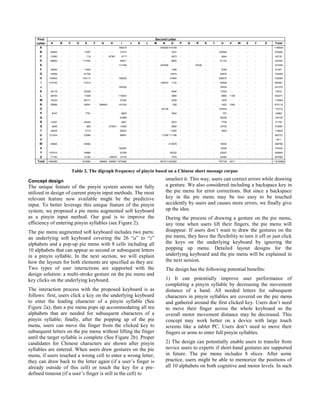
The pinyin coding system is a man-made system. Via an
analysis of the digraph frequency for the pinyin system
based on a Chinese short message corpus1
, we discovered a
unique characteristic of the pinyin system: 23 of the 26
letters from “a” to “z” can be the leading letter for all pinyin
syllables in the pinyin system (“a” to “z” excluding “i”, “u”
and “v”), but only 10 letters are needed for subsequent
characters except the leading one in pinyin syllables.
Figure 2. Screen shots of the pie soft keyboard for Chinese
pinyin method: quasi-QWERTY keyboard and the pie menu
with a fixed layout covering 10 letters
For comparison, language like English does not have such a
feature according to analysis by Soukoreff and MacKenzie
on digraph frequency for English [19]. Although an
alphabet may be more likely to follow some alphabets and
never follow some others in English, there is no clear
pattern on the following relationship as in Pinyin.
1
The corpus includes 630,000 text messages, which was
mainly licensed from a third party.
a) The underlying
quasi-QWERTY
keyboard: three
keys were moved
(“u”, “i” and “k”)
b) A click on “s”
pops up the pie
menu
accommodating
the 10 letters for
subsequent
characters
c) Users draw a
multi-stroke
gesture on the pie
menu along “h-a-
n-g” to enter
“shang”
Concept design
The unique feature of the pinyin system seems not fully
utilized in design of current pinyin input methods. The most
relevant feature now available might be the predictive
input. To better leverage this unique feature of the pinyin
system, we proposed a pie menu augmented soft keyboard
as a pinyin input method. Our goal is to improve the
efficiency of entering pinyin syllables (see Figure 2).
The pie menu augmented soft keyboard includes two parts:
an underlying soft keyboard covering the 26 “a” to “z”
alphabets and a pop-up pie menu with 8 cells including all
10 alphabets that can appear as second or subsequent letters
in a pinyin syllable. In the next section, we will explain
how the layouts for both elements are specified as they are.
Two types of user interactions are supported with the
design solution: a multi-stroke gesture on the pie menu and
key clicks on the underlying keyboard.
The interaction process with the proposed keyboard is as
follows: first, users click a key on the underlying keyboard
to enter the leading character of a pinyin syllable (See
Figure 2a); then a pie menu pops up accommodating all ten
alphabets that are needed for subsequent characters of a
pinyin syllable; finally, after the popping up of the pie
menu, users can move the finger from the clicked key to
subsequent letters on the pie menu without lifting the finger
until the target syllable is complete (See Figure 2b). Proper
candidates for Chinese characters are shown after pinyin
syllables are entered. When users draw gestures on the pie
menu, if users touched a wrong cell to enter a wrong letter,
they can draw back to the letter again (if a user’s finger is
already outside of this cell) or touch the key for a pre-
defined timeout (if a user’s finger is still in the cell) to
unselect it. This way, users can correct errors while drawing
a gesture. We also considered including a backspace key in
the pie menu for error corrections. But since a backspace
key in the pie menu may be too easy to be touched
accidently by users and causes more errors, we finally give
up the idea.
During the process of drawing a gesture on the pie menu,
any time when users lift their fingers, the pie menu will
disappear. If users don’t want to draw the gestures on the
pie menu, they have the flexibility to turn it off or just click
the keys on the underlying keyboard by ignoring the
popping up menu. Detailed layout designs for the
underlying keyboard and the pie menu will be explained in
the next session.
The design has the following potential benefits:
1) It can potentially improve user performance of
completing a pinyin syllable by decreasing the movement
distance of a hand. All needed letters for subsequent
characters in pinyin syllables are covered on the pie menu
and gathered around the first clicked key. Users don’t need
to move their finger across the whole keyboard so the
overall motor movement distance may be decreased. This
concept may work better on a device with large touch
screens like a tablet PC. Users don’t need to move their
fingers or arms to enter full pinyin syllables.
2) The design can potentially enable users to transfer from
novice users to experts if short-hand gestures are supported
in future. The pie menu includes 8 slices. After some
practice, users might be able to memorize the positions of
all 10 alphabets on both cognitive and motor levels. In such
First
Letter
Second Letter
A B C D E F G H I J K L M N O P Q R S T U V W X Y Z Total
A - - - - - - - - 186319 - - - - 545926 414159 - - - - - - - - - - - 1146404
B 84842 - - - 17267 - - - 31573 - - - - - 1637 - - - - - 100583 - - - - - 235902
C 12492 - - - 718 - - 67381 4717 - - - - - 2973 - - - - - 4844 - - - - - 93125
D 88800 - - - 117034 - - - 55871 - - - - - 9693 - - - - - 51122 - - - - - 322520
E - - - - - - - - 112106 - - - - 207008 - - - 18336 - - - - - - - - 337450
F 38064 - - - 11854 - - - - - - - - - 1388 - - - - - 9785 - - - - - 61091
G 40958 - - - 61700 - - - - - - - - - 15518 - - - - - 44879 - - - - - 163055
H 140063 - - - 145117 - - - 168529 - - - - - 47800 - - - - - 226875 - - - - - 728384
I 419155 - - - 51513 - - - - - - - - 156243 1124 - - - - - 54906 - - - - - 682941
J - - - - - - - - 185336 - - - - - - - - - - - 16034 - - - - - 201370
K 30118 - - - 22539 - - - - - - - - - 4546 - - - - - 17030 - - - - - 74233
L 56750 - - - 11469 - - - 174933 - - - - - 2890 - - - - - 6860 1169 - - - - 254071
M 75422 - - - 68171 - - - 27254 - - - - - 2039 - - - - - 1978 - - - - - 174864
N 50566 - - - 38291 - 389905 191330 - - - - - 228 - - - - - 1453 3342 - - - - 675115
O - - - - - - - - - - - - 65138 - - - - - - 107634 - - - - - 172772
P 8747 - - - 7791 - - 9825 - - - - - 7842 - - - - - 757 - - - - - 34962
Q - - - - - - - 61899 - - - - - - - - - - - 38236 - - - - - 100135
R 14257 - - - 24494 - - 2661 - - - - - 2072 - - - - - 7709 - - - - - 51193
S 9945 - - - 885 - - 273531 14525 - - - - - 2958 - - - - - 16753 - - - - - 318597
T 39344 - - - 4712 - - 59233 - - - - - 11506 - - - - - 3825 - - - - - 118620
U 121534 - - - 23088 - - 89651 - - - - 17256 111198 - - - - - - - - - - - 362727
V - - - - - - - - - - - - - - - - - - - - - - - - - 4511
W 40625 - - - 26362 - - - - - - - - 213879 - - - - - 18930 - - - - - 299796
X - - - - - - - 185387 - - - - - - - - - - - 12055 - - - - - 197442
Y 107410 - - - 24896 - - 91259 - - - - - 62332 - - - - - 23007 - - - - - 308904
Z 77193 - - - 14182 - - 128079 18176 - - - - - 7478 - - - - - 22484 - - - - - 267592
Total 1456285 - - - 672083 - 389905 468991 1670584 - - - - 991571 923260 - - - - - 787739 4511 - - - - 11276685
Table 2. The digraph frequency of pinyin based on a Chinese short message corpus
circumstances, users can draw the strokes without waiting
for the appearance of the pie menu.
3) The pie menu is also a flexible user interface element
that can be integrated on top of any underlying keyboards
including a standard QWERTY soft keyboard or a 12-key
soft keyboard. And the combination of a gesture stroke with
key clicks may bring a fun experience.
Layout Design
Based on the concept, we specified the layouts for the
underlying keyboard and the pie menu. For the underlying
keyboard, the QWERTY layout is a natural choice since it
is the most common layout for keyboards. However, with
the QWERTY layout, letters such as “q”, “p” and “a” that
are close to the edges of a display. If users want to complete
a pinyin syllable whose first letter is e.g. “q”, after they
click it, half of the pop-up pie menu would outreach the
display and become invisible for users.
To address the challenge and keep the pie inside the display,
we proposed a quasi-QWERTY layout for the underlying
keyboard. In the layout, two of the three letters that never
appear as the leading character in pinyin syllables, i.e. “i”
and “u”, were moved to the edge of the keyboard but kept
in the same row as they are in the QWERTY layout. The
letter “k” was also moved from the second row to the third
row to keep the three rows of keys balanced. We moved “k”
instead of other letters for two reasons: first, “k” is not the
positioning letters like “f” and “j”, which are used to
indicating finger positions on a hard keyboard; second, “k”
is also one of the less frequently used alphabets in the
second line in pinyin system. All letters that were moved
are indicated in different colors (See Figure 2a).
The design of the pie menu faced a few challenges: how to
accommodate the 10 letters in a pie menu? How to define
an optimal layout for the pie menu? How to decrease the
impacts of the fat finger problems including the interaction
accuracy and possible hide of letters from fingers?
To enable a quick learning of the layout of the pie menu by
users, the layout of the pie menu should be fixed. Past
studies on pie menu already indicated that a pie menu
preferably include even number of cells and its maximum
cell number is 12 [20]. We decided to utilize an 8-cell menu.
To accommodate the 10 letters in an 8-cell pie menu, some
menu cells need to cover more than one letter. We finally
decided to put “g” and “v” into one cell and “h” and “r”
together in another cell in the pie menu. There are two
reasons behind: first, among all 10 letters, the four letter of
“g”, “v”, “h” and “r” are comparatively less frequently used
than the other 6 letters. Second, in a pinyin syllable, “g” and
“v” has no overlaps on their appearing positions and “h”
and “r” will not follow the same alphabets in pinyin
syllables. Besides the leading position in pinyin syllables,
“g” only appears at the third to sixth positions and “v” only
appears as the second character in a pinyin syllable. Thus
once users move their fingers to “gv” for the second
character, the entered character should be “v” instead of “g”.
To avoid possible errors for drawing the gesture stroke on
the small pie menu, we calculated possible layouts for the
pie menu to meet one principle: the next legal alphabets are
not adjacent to the previously entered alphabet in a pinyin
symbol. We didn’t get a layout fully meeting the principle
but we got a few layout options that only two cells adjacent
to each other may appear next to each other in pinyin
symbols. We decided to design the layout based on such
layout options.
Another problem we try to address was the hide from
fingers when draw a gesture on the pie menu. We
considered the problem together with the frequencies of the
8 letter or letter pairs as shown in Table 3. We put the least
used letters or pair of letters on positions that may be easy
to hide by a finger. Considering Chinese users are often
right handed [11], we put “gv” in the southeast cell of the
pie menu. The final layout for the pie menu is shown in
Figure 1. No matter which key is clicked in the underlying
quasi-QWERTY keyboard, the layout of the popping-up pie
menu keeps to be fixed as Figure 1 shows. Thus users can
probably learn and memorize the layout of the pie menu
and draw relevant gestures more efficiently after some use
of the soft keyboard.
Alphabets Frequency Alphabets Frequency
i 4203307 u 1783062
a 3224587 e 1602150
n 2289843 hr 1206050
o 1963079 gv 954998
Table 3. The frequencies of alphabet or alphabet pairs in the
8-cell pie menu
Other Features and the Implementation
Based on the layout designs, we implemented a working
prototype on a Nokia N8 with an engine of the pinyin
method. The user interface is developed with Qt2
on the
Symbian platform. Figure 2 and 3 show the screen shots of
the prototype.
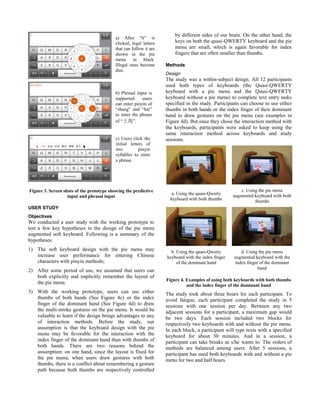
Advanced pinyin input features like the predictive input of
pinyin and Chinese characters, the phrasal input including
the phrasal input with either full pinyin or initial letters only
are also supported (See Figure 3) so as to accommodate
different user habits while using pinyin soft keyboards.
2
Qt is a cross-platform application framework that is
widely used for developing application software with a
graphical user interface.
Figure 3. Screen shots of the prototype showing the predictive
input and phrasal input
USER STUDY
Objectives
We conducted a user study with the working prototype to
test a few key hypotheses in the design of the pie menu
augmented soft keyboard. Following is a summary of the
hypotheses:
1) The soft keyboard design with the pie menu may
increase user performance for entering Chinese
characters with pinyin methods;
2) After some period of use, we assumed that users can
both explicitly and implicitly remember the layout of
the pie menu.
3) With the working prototype, users can use either
thumbs of both hands (See Figure 4c) or the index
finger of the dominant hand (See Figure 4d) to draw
the multi-stroke gestures on the pie menu. It would be
valuable to learn if the design brings advantages to any
of interaction methods. Before the study, our
assumption is that the keyboard design with the pie
menu may be favorable for the interaction with the
index finger of the dominant hand than with thumbs of
both hands. There are two reasons behind the
assumption: on one hand, since the layout is fixed for
the pie menu, when users draw gestures with both
thumbs, there is a conflict about remembering a gesture
path because both thumbs are respectively controlled
by different sides of our brain. On the other hand, the
keys on both the quasi-QWERTY keyboard and the pie
menu are small, which is again favorable for index
fingers that are often smaller than thumbs.
Methods
Design
The study was a within-subject design. All 12 participants
used both types of keyboards (the Quasi-QWERTY
keyboard with a pie menu and the Quasi-QWERTY
keyboard without a pie menu) to complete text entry tasks
specified in the study. Participants can choose to use either
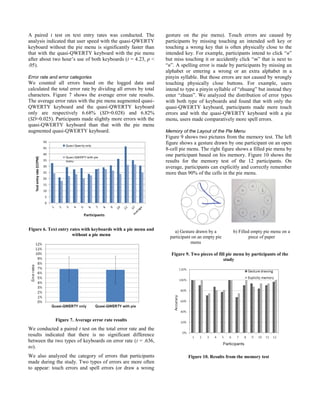
thumbs in both hands or the index finger of their dominant
hand to draw gestures on the pie menu (see examples in
Figure 4d). But once they chose the interaction method with
the keyboards, participants were asked to keep using the
same interaction method across keyboards and study
sessions.
a. Using the quasi-Qwerty
keyboard with both thumbs
c. Using the pie menu
augmented keyboard with both
thumbs
b. Using the quasi-Qwerty
keyboard with the index finger
of the dominant hand
d. Using the pie menu
augmented keyboard with the
index finger of the dominant
hand
Figure 4. Examples of using both keyboards with both thumbs
and the index finger of the dominant hand
The study took about three hours for each participant. To
avoid fatigue, each participant completed the study in 5
sessions with one session per day. Between any two
adjacent sessions for a participant, a maximum gap would
be two days. Each session included two blocks for
respectively two keyboards with and without the pie menu.
In each block, a participant will type texts with a specified
keyboard for about 30 minutes. And in a session, a
participant can take breaks as s/he wants to. The orders of
methods are balanced among users. After 5 sessions, a
participant has used both keyboards with and without a pie
menu for two and half hours.
a) After “h” is
clicked, legal letters
that can follow it are
shown in the pie
menu in black.
Illegal ones become
dim.
b) Phrasal input is
supported: users
can enter pinyin of
“shang” and “hai”
to enter the phrase
of “上海”.
c) Users click the
initial letters of
two pinyin
syllables to enter
a phrase.
Participants
Twelve participants, half male and half female, volunteered
to take part in the study. All are right handed. Their average
age was 24.0 (SD = 1.68). All participants are either student
interns or researchers in Nokia Research Center in Beijing.
All are everyday users of the QWERTY keyboard and can
blindly type texts with a hard QWERTY keyboard on PCs.
All are daily users of pinyin methods on both their PCs and
mobile phones.
Tasks and Materials
In this study, we instructed participants to copy texts
printed on paper to mobile devices with both methods with
and without the pie menu. And the advantages of such texts
copy tasks had been discussed in previous publications so
will not be covered here again [17]. In each session,
participants were asked to enter texts as fast and accurately
as they can. Time tags for key clicks, drawing gestures and
UI changes e.g. pie menu popping up while user enter texts
were automatically logged into a file in the mobile phone
for data analysis afterwards.
Texts materials that users entered in the study were selected
Chinese messages from a short message corpus. The letter
level correlations of the selected messages with the Chinese
short message corpus are all above .90 [17]. Table 4 shows
an example of the used messages in this study.
An example of the used message Letter level
correlation
[17]
老刘,很久不见了,最近忙什么呢,找个时间出来
聚一下吧,明天一起去吃海底捞怎么样?
.902
Pinyin: lao liu, hen jiu bu jian le, zui jin mang
shen me ne, zhao ge shi jian chu lai jv yi xia ba,
ming tian yi qi qu chi hai di lao zen me yang?
Translation: Laoliu, we haven’t met each other
for long! What are you busy with? When do you
have time to meet me? How about meeting at the
restaurant of Haidilao tomorrow?
Table 4. An example of Chinese message used in the study
Apparatus
Nokia N8 (See Figure 4), that integrates a capacitive touch
screen, was used as the test device in this study. We
developed two prototypes respectively for the quasi-
QWERTY keyboard with a pie menu and the quasi-
QWERTY keyboard without a pie menu. The same pinyin
recognition engine was utilized in both prototypes to avoid
involvements of any other factors in the study. With the
quasi-QWERTY keyboard without a pie menu, users just
need to click the associated alphabets for pinyin syllables to
enter Chinese characters. We also record the study sessions
with a video camera with permissions of participants.
Procedure
The study was conducted with a participant and a
coordinator in a quiet lab environment. Besides the text
entry tasks, the first session include two other processes:
first, the coordinator welcomed the participant and
explained the study objectives to the participant; second,
the coordinator asked the participants to try the pie menu
augmented keyboard, observed how they interact with the
new design and collected their comments. In all sessions,
participants were asked to complete specified text entry
tasks as quickly and accurately as they can. During a
session, participants can take breaks as they want to.
After the 5th session, we conducted a memory “test” to see
if participants can implicitly and explicitly memorize the
layout of the pie menu. We did not tell participants about
the test before so they cannot intentionally prepare for it.
The memory test includes two simple tasks: first, we
presented participants tens of 8-cell empty pie menus on an
iPad and asked them to draw gestures for 31 Chinese
characters; second, we present an empty 8-cell empty pie
menu on a piece of paper and asked them to fill the
alphabets or alphabet pairs based on their memory. In the
end, all participants were presented with a gift.
Figure 5. The setting of the user study
Results
Text entry rates
We calculated user performance results based on the
collected user data in the last sessions i.e. after about two
hours’ use of both methods. We use Chinese characters per
minute (CCPM) to present the text entry rate results. Time
for making and correcting errors were removed from the
task completion time when we calculated results of text
entry rate. And two punctuations were counted equaling to
one Chinese character when we calculate the text entry rate.
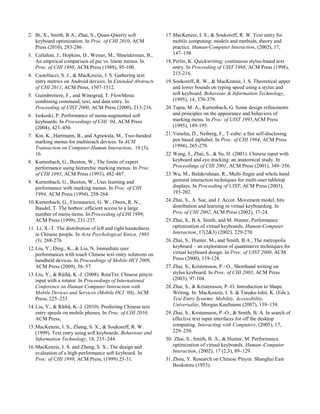
Figure 6 shows the results of text entry rate with both
methods. The average text entry rates for the quasi-
QWERTY keyboard only and the quasi-QWERTY
keyboard with a pie menu were respectively 30.65 CCPM
(SD = 6.53) and 24.95 CCPM (SD = 4.11). After using both
methods for about two hours, participants achieved better
speeds with the Quasi-QWERTY keyboard without the pie
menu.
A paired t test on text entry rates was conducted. The
analysis indicated that user speed with the quasi-QWERTY
keyboard without the pie menu is significantly faster than
that with the quasi-QWERTY keyboard with the pie menu
after about two hour’s use of both keyboards (t = 4.23, p <
.05).
Error rate and error categories
We counted all errors based on the logged data and
calculated the total error rate by dividing all errors by total
characters. Figure 7 shows the average error rate results.
The average error rates with the pie menu augmented quasi-
QWERTY keyboard and the quasi-QWERTY keyboard
only are respectively 6.68% (SD=0.028) and 6.82%
(SD=0.025). Participants made slightly more errors with the
quasi-QWERTY keyboard than that with the pie menu
augmented quasi-QWERTY keyboard.
0
5
10
15
20
25
30
35
40
45
50
Quasi-Qwerty only
Quasi-QWERTY with pie
menu
Textentryrate(CCPM)
Participants
Figure 6. Text entry rates with keyboards with a pie menu and
without a pie menu
Figure 7. Average error rate results
We conducted a paired t test on the total error rate and the
results indicated that there is no significant difference
between the two types of keyboards on error rate (t = .636,
ns).
We also analyzed the category of errors that participants
made during the study. Two types of errors are more often
to appear: touch errors and spell errors (or draw a wrong
gesture on the pie menu). Touch errors are caused by
participants by missing touching an intended soft key or
touching a wrong key that is often physically close to the
intended key. For example, participants intend to click “n”
but miss touching it or accidently click “m” that is next to
“n”. A spelling error is made by participants by missing an
alphabet or entering a wrong or an extra alphabet in a
pinyin syllable. But those errors are not caused by wrongly
touching physically close buttons. For example, users
intend to type a pinyin syllable of “zhuang” but instead they
enter “zhuan”. We analyzed the distribution of error types
with both type of keyboards and found that with only the
quasi-QWERTY keyboard, participants made more touch
errors and with the quasi-QWERTY keyboard with a pie
menu, users made comparatively more spell errors.
Memory of the Layout of the Pie Menu
Figure 9 shows two pictures from the memory test. The left
figure shows a gesture drawn by one participant on an open
8-cell pie menu. The right figure shows a filled pie menu by
one participant based on his memory. Figure 10 shows the
results for the memory test of the 12 participants. On
average, participants can explicitly and correctly remember
more than 90% of the cells in the pie menu.
a) Gesture drawn by a
participant on an empty pie
menu
b) Filled empty pie menu on a
piece of paper
Figure 9. Two pieces of fill pie menu by participants of the
study
Figure 10. Results from the memory test
Effect of interaction method on user performance
Among the 12 participants, 6 participants chose to use their
thumbs to interact with both keyboards while holding the
phone with both hands. The other 6 participants chose to
use the index finger of their dominant hand to interact with
both keyboards while holding the phone in the non-
dominant hand. Due to the limited samples, we conducted a
non-parametric Mann-Whitney test on both text entry and
error rate results. The results indicated that interaction
method did not significantly affect user performance
including text entry rate and error rate with both types of
keyboards (see results in Table 5).
Quasi-Qwerty without
a pie menu
Quasi-Qwerty with a
pie menu
Text entry
rate
Error rate Text entry
rate
Error rate
U scores 14 14 22 10
p .758 .758 .294 .910
Table 5. Mann-Whitney tests results on effect of interaction
methods
DISCUSSIONS
The text entry rate results show that after about two hours
use of the pie augmented quasi-QWERTY keyboard, user
speed reached about 25 CCPM with an average total error
rate of around 6.68%. When a pie menu is not there, the
average user text entry rate can reach 30 CCPM with an
error rate of around 6.90%. The user performance results
are better than those reported in [12], in which immediate
user performance with a pen and two types of pinyin soft
keyboard was more focused on.
The results also indicated that the pie menu does not help to
improve user speed. There might be a few reasons behind:
First, entering Chinese texts with pinyin soft keyboard
includes two sub-processes: entering pinyin syllables and
choosing target Chinese characters. Optimizing only one
sub-process may not help to improve the overall user speed
significantly. Past studies on pinyin input process indicated
that the sub-process of selecting target Chinese characters
take more than half of whole input time with pinyin method
[14, 22]. Wang, Zhai and Su found that selecting target
Chinese characters takes about 52% of the whole input time
when users enter Chinese characters with a pinyin method
without phrasal input using QWERTY keyboard of a PC
[22]. Liu and Räihäfound that with the T9 pinyin method
for the 12-key keypad, selecting the target Chinese
character takes more than 65% of the whole input time with
a predictive user model [14]. Our exploration in this study
focused on optimizing the sub-process of entering pinyin
syllables. We suggest future works in the field consider
optimizing both sub-processes of entering pinyin syllables
and selecting target characters.
Second, via an analysis of a short message corpus, Liu and
Räihäfound that the average numbers of alphabets included
by pinyin syllables are respectively 2.88 and 3.24 when
frequencies of Chinese characters were taken into account
or not [14]. Thus on average, our approach just decreased
motor movement distances from the first alphabet to the
second then to the third one. The decrease of motor
movements may not be tremendous enough. Moreover, the
interaction method in our new design changed to
ShapeWriter-like gestures, which may be slower than key
clicks.
Third, shorthand gestures were not supported in our
implementation. Accurate touch of an alphabet cell was
needed to enter an alphabet. The tradeoff in our design is
not more prone to speed over error rate without supporting
shorthand gestures although the good memory of the layout
by users proved the short hand gestures are applicable.
The exploration is not so successful in terms of improving
user performance. However, we hope that our work
presented in this paper is able to draw more explorations in
the field and serve as a useful start.
CONCLUSION
Soft keyboard for Chinese pinyin input methods are rarely
studied although it is already one of the default methods on
devices with touch screens. Via an analysis of the digraph
frequency of the pinyin system, we discovered a unique
characteristic of it: 23 Roman letters can be the leading
letter in pinyin syllables but only 10 Roman letters are
needed for subsequent characters of a pinyin syllable.
Making use of this feature and existing knowledge on
layout optimization of soft keyboard, pie menu and
ShapeWriter-like gesture, we proposed a pie menu
augmented keyboard. Once users click a key on a Quasi-
QWERTY keyboard, an 8-cell pie menu covering the 10
alphabets would pop up and users can enter a pinyin
syllable via drawing a multi-stroke gesture on the pie menu.
We conducted a comparative user study on it and found
after about 2 hours’ use of the method, users can reach a
speed of 25 Chinese characters per minute with slightly
lower error rate. Although user speeds is still slower than
the keyboard without a pie menu, participants can well
remember the layout of the pie menu.
ACKNOWLEDGMENTS
The work presented in the paper was done during the
internship of the 4th
and 5th
authors in Nokia Research
Center in Beijing. We thank Dr. Shumin Zhai for share of
his knowledge, his comments and revisions of the paper.
We thank to Dr. Zhen Liu for his sponsor of the work.
REFERENCES
1. Bailly, G., Lecolinet, E., Nigay, L. Flower menus: a new
type of marking menu with large meth breadth, within
groups and efficient expert mode memorization. In
Proceeding of AVI 2008, 15-22.
2. Bi, X., Smith, B.A., Zhai, S., Quasi-Qwerty soft
keyboard optimization. In Proc. of CHI 2010, ACM
Press (2010), 283-286.
3. Callahan, J., Hopkins, D., Weiser, M., Shneiderman, B.,
An empirical comparison of pie vs. linear menus. In
Proc. of CHI 1988, ACM Press (1988), 95-100.
4. Castellucci, S. J., & MacKenzie, I. S. Gathering text
entry metrics on Android devices. In Extended Abstracts
of CHI 2011, ACM Press, 1507-1512.
5. Guimbretiere, F., and Winograd, T. FlowMenu:
combining command, text, and data entry. In
Proceeding of UIST 2000, ACM Press (2000), 213-216.
6. Isokoski, P. Performance of menu-augmented soft
keyboards. In Proceedings of CHI ‘04, ACM Press
(2004), 423–430.
7. Kin, K., Hartmann, B., and Agrawala, M., Two-handed
marking menus for multitouch devices. In ACM
Transaction on Computer-Human Interaction, 18 (3),
16.
8. Kurtenbach, G., Buxton, W., The limits of expert
performance using hierarchic marking menus. In Proc.
of CHI 1993, ACM Press (1993), 482-487.
9. Kurtenbach, G., Buxton, W., User learning and
performance with marking menus. In Proc. of CHI
1994, ACM Press (1994), 258-264.
10.Kurtenbach, G., Fitzmaurice, G. W., Owen, R. N.,
Baudel, T. The hotbox: efficient access to a large
number of menu-items. In Proceeding of CHI 1999,
ACM Press (1999), 231-237.
11. Li, X.-T. The distribution of left and right handedness
in Chinese people. In Acta Psychological Sinica, 1983
(3), 268-276.
12.Liu, Y., Ding., K., & Liu, N. Immediate user
performances with touch Chinese text entry solutions on
handheld devices. In Proceedings of Mobile HCI 2009,
ACM Press (2009), 56–57.
13.Liu, Y., & Räihä, K.-J. (2008). RotaTxt: Chinese pinyin
input with a rotator. In Proceedings of International
Conference on Human-Computer Interaction with
Mobile Devices and Services (Mobile HCI ‘08), ACM
Press, 225–233.
14.Liu, Y., & Räihä, K.-J. (2010). Predicting Chinese text
entry speeds on mobile phones. In Proc. of CHI 2010,
ACM Press,
15.MacKenzie, I. S., Zhang, S. X., & Soukoreff, R. W.
(1999). Text entry using soft keyboards. Behaviour and
Information Technology, 18, 235–244.
16.MacKenzie, I. S. and Zhang, S. X., The design and
evaluation of a high-performance soft keyboard. In
Proc. of CHI 1999, ACM Press, (1999) 25-31.
17.MacKenzie, I. S., & Soukoreff, R. W. Text entry for
mobile computing: models and methods, theory and
practice. Human-Computer Interaction, (2002), 17,
147–198.
18.Perlin, K. Quickwriting: continuous stylus-based text
entry. In Proceeding of UIST 1998, ACM Press (1998),
215-216.
19.Soukoreff, R. W., & MacKenzie, I. S. Theoretical upper
and lower bounds on typing speed using a stylus and
soft keyboard. Behaviour & Information Technology,
(1995), 14, 370-379.
20.Tapia, M. A., Kurtenbach, G. Some design refinements
and principles on the appearance and behaviors of
marking menu. In Proc. of UIST 1995,ACM Press
(1995), 189-195.
21.Venolia, D., Neiberg, F., T-cube: a fast self-disclosing
pen based alphabet. In Proc. of CHI 1994, ACM Press
(1994), 265-270.
22.Wang, J., Zhai, S., & Su, H. (2001). Chinese input with
keyboard and eye-tracking: an anatomical study. In
Proceedings of CHI 2001, ACM Press (2001), 349–356.
23.Wu, M., Balakrishnan, R., Multi-finger and whole hand
gestural interaction techniques for multi-user tabletop
displays. In Proceeding of UIST, ACM Press (2003),
193-202.
24.Zhai, S., A. Sue, and J. Accot. Movement model, hits
distribution and learning in virtual keyboarding. In
Proc.of CHI 2002, ACM Press (2002), 17-24.
25.Zhai, S., B.A. Smith, and M. Hunter, Performance
optimization of virtual keyboards. Human-Computer
Interaction, 17(2&3) (2002), 229-270.
26.Zhai, S., Hunter, M., and Smith, B.A., The metropolis
keyboard – an exploration of quantitative techniques for
virtual keyboard design. In Proc. of UIST 2000, ACM
Press (2000), 119-128.
27.Zhai, S., Kristensson, P.- O., Shorthand writing on
stylus keyboard. In Proc. of CHI 2003, ACM Press
(2003), 97-104.
28.Zhai, S., & Kristensson, P.-O. Introduction to Shape
Writing. In: MacKenzie, I. S. & Tanaka-Ishii, K. (Eds.),
Text Entry Systems: Mobility, Accessibility,
Universality, Morgan Kaufmann (2007), 139–158.
29.Zhai, S., Kristensson, P.-O., & Smith, B. A. In search of
effective text input interfaces for off the desktop
computing. Interacting with Computers, (2005), 17,
229–250.
30. Zhai, S., Smith, B. A., & Hunter, M. Performance
optimization of virtual keyboards. Human–Computer
Interaction, (2002), 17 (2,3), 89–129.
31.Zhou, Y. Research on Chinese Pinyin. Shanghai East
Bookstore (1953).
MobileHCI_pie_1.0

MobileHCI_pie_1.0

  • 1.
    PinyinPie: a PieMenu Augmented Soft Keyboard for Chinese Pinyin Input Methods Ying Liu1 , Xiantao Chen1 , Lingzhi Wang1 , Hequan Zhang2 , Shen Li3 1 Nokia Research Center Beijing No.5 Donghuan Zhonglu, BDA Area Beijing 100176, China 2 China Mobile Research Center No. 53, Xi Bian Men Nei Da Jie, Beijing 100053, China 3 Academy of Arts & Design, Tsinghua University, Beijing 100084, China Ying.y.liu, ext-xiantao.chen, ext-lingzhi.wang@nokia.com; zhanghequan@chinamobile.com;shen.li@me.com ABSTRACT Soft keyboard for Chinese pinyin input methods are rarely studied although it is one of the default methods on devices with touch screens. Via an analysis of the digraph frequency of the pinyin system, we discovered a unique characteristic of the pinyin system: only 10 Roman letters are needed for the subsequent characters in a pinyin syllable after the leading letter. Making use of this feature and existing knowledge on layout optimization of soft keyboard, pie menu and ShapeWriter, we designed a pie menu augmented keyboard. We conducted a user study to compare user performance to test if the pie menu can help to increase user performance with a working prototype. We found that after about 2 hours’ use of the pie menu augmented quasi-QWERTY keyboard, users can reach a speed of 25 Chinese characters per minute with slightly lower error rate. Moreover, users can well remember the layout of the pie menu after about two hours’ use of it. Author Keywords Chinese; text input; soft keyboard; pie menu; pinyin. ACM Classification Keywords H5.m. Information interfaces and presentation (e.g., HCI): Miscellaneous. INTRODUCTION Mobile phones and tablet computers that incorporate capacitive touch screens are becoming popular among users. Entering texts is one of the key challenges of using such devices, which is also the case for Chinese users. Chinese text entry methods on such devices are of critical importance considering the large number of Chinese speakers worldwide. There are generally two types of Chinese text entry methods available on devices with touch screens: pinyin soft keyboard methods and Chinese handwriting recognition methods. The pinyin system was proposed by Zhou et al in 1950s based on Mandarin (aka Northern China) pronunciations of the Chinese language [31]. It is now the standard Romanization system for Chinese characters. Pinyin-based keyboards are the most often used methods with both computers and mobile phones by hundreds of millions of users in mainland China [13, 14]. However, academic studies of pinyin soft keyboard designs are rare despite its huge amount of users and broad explorations done on keyboard layout for English input. Although it is understood that any new keyboard layout need to overcome significant learning cost, various explorations on optimizing user performance with soft keyboard have been done for English [2, 15, 16, 24, 25, 26, 27, 28, 29, 30] based on the assumption that once learned, the optimized layouts would pay off in greater efficiency in the long run. Different approaches have been applied to seek optimal layout for soft keyboard. A pinyin syllable corresponds to a Chinese character, including minimally 1 pinyin letter (e.g. “a” for 阿) and maximally 6 Roman letters (e.g. “shuang” for 双). There are a total of 418 pinyin syllables in the pinyin system [14]. In our study, we discovered a surprising pinyin phenomenon: while 23 of the 26 Roman letters can appear as the leading character of a pinyin syllable, only 10 Roman letters (“e, r, u, i, o, a, g, h, v, n”) can appear as subsequent characters in a pinyin syllable. This is the case for all 418 syllables in the pinyin system. We designed a pie-menu augmented soft keyboard for Chinese pinyin input based on the unique feature of the pinyin system, and existing knowledge on layout optimization of soft keyboard, pie menu and ShapeWriter. An 8-cell pie menu accommodating the 10 Roman letters for all other characters except the leading character in pinyin syllables were integrated on top of a quasi- QWERTY keyboard. Once users click the leading character on the quasi-QWERTY keyboard, the pie menu will pop up and users can draw a multi-stroke gesture to enter the subsequent characters to complete a pinyin syllable. Advanced features like phrasal input were also supported in the design. We built a prototype on a mobile device and conducted a user study to compare its user performance with the keyboard without the pie menu. Permission to make digital or hard copies of all or part of this work for personal or classroom use is granted without fee provided that copies are not made or distributed for profit or commercial advantage and that copies bear this notice and the full citation on the first page. To copy otherwise, or republish, to post on servers or to redistribute to lists, requires prior specific permission and/or a fee. MobileHCI’12, September 21–24, 2012, San Francisco, CA, USA. Copyright 2012 ACM 978-1-4503-1105-2/12/09...$10.00.
  • 2.
    The user studyresults show both positive and negative areas of the pie menu augmented keyboard design. After two hours’ use of the pie augmented keyboard, users can reach a speed of 25 Chinese characters per minute. However, the speeds are still a few characters slower than those with the keyboard without a pie menu although participants can well remember the layout of the pie menu after using the pie menu for about two hours. We discussed the user study results with our assumptions and identified the areas for future work. The rest of the paper is organized as follows. First, we review relevant works. Second, we present the unique feature of the pinyin system and design of the pie menu augmented soft keyboard for pinyin methods. Third, we present the user study and results. Finally, we discuss the results and identify the future working areas. RELATED WORKS The Pinyin System and Related Works A pinyin syllable usually consists of a consonant and a vowel, with the exception of a few syllables that consist of vowels alone [12, 13, 14, 31]. Table 1 shows the 23 consonants and the 33 vowels. 23 consonants b p m f d t n l g k h j q x zh ch sh r z c s y w 33 vowels a e i o u v(ü) ai an ao ei en er ia ie in iu ou ua ue ui un uo ang eng ian iao ing ong uai uan iang iong uang Table 1. The consonants and vowels in the pinyin system Entering Chinese characters with a QWERTY keyboard requires two steps. First, users type in the pinyin syllable. Second, the system provides a list of matching Chinese characters sharing the same pinyin syllable and users select the target character. Wang, Zhai, and Su conducted an anatomical study of a QWERTY-based pinyin method and found that the selection process takes 52% of the total time when users enter texts with a desktop keyboard in a PC character by character [22]. Liu and Räihäfound that with the T9 pinyin method for the 12-key keypad, selecting the target Chinese character takes more than 65% of the whole input time with a predictive user model [14]. Thus both sub-processes, which are the entry of pinyin syllables and the selection of target character from a list of options, are important for improvement of user performance when users enter Chinese texts character by character with pinyin methods. Some advanced features are essential and normally integrated in pinyin input methods, for example, predictive input and phrasal input. After users enter a Chinese character, system would provide predictions for the next character and users can select the target character from it without entering its pinyin syllable. Phrasal input enables users to enter a phrase including more than one character at a time by typing the pinyin syllables of associated characters. Entering pinyin syllables of a phrase would decrease the number of matching options for Chinese characters. Studies on pinyin input methods with soft keyboards is rare. Liu et al. conducted a user study to understand performance of novice users with a QWERTY soft keyboard and a consonant plus vowel keyboard designed for pinyin methods when users used a stylus to interact with both keyboards [12]. In the study, they reported user speeds of 14.32 and 9.66 Chinese characters per minute with respective QWERTY keyboard and the consonant plus vowel keyboard. Error rates reported were quite low as about 5%. Other that the study mentioned above, we did not find any other studies on soft keyboard of pinyin methods. Pie (Marking) Menu Pie menu is a menu format that all menu items are laid around a central point (see Figure 1) [3]. In the few years after pie menu was studied by Callahan et al., pie menu had been heavily studied in HCI field due to its potential to increase user performance on menu selection tasks [3, 5, 7, 8, 9, 10, 20, 21, 23]. Since movement distance to reach a menu item is decreased and the width of a menu item is comparatively enlarged with a pie menu, user performance with it is supposed to be better than pull down menus according to Fitts’ law [16, 17, 19]. Marking menu is another name for pie menu. Marking menu enables users to quickly choose an item from a pie menu via a stroke gesture before shown of all menu items. It was believed that marking menus can assist users to transfer from a novice to an expert of pie menus [8, 9]. Figure 1. A pie menu There are challenges to apply a pie menu in user interface design. First, the round shape does not take a full advantage of display spaces, for example, the mismatch between the two-dimensional texts for labeling menu items and the wedge shape for a menu item often requires a bigger space than normal pull down menus. To avoid such limitations of pie menus, some researchers removed the menu edges [19]. Second, a pie menu cannot accommodate too many items. It was suggested that even numbers of menu items including 4 to 8 items would be better for a pie menu. And a pie menu can maximally include 12 menu items [19]. Some new forms of menus are also designed to expand the number of
  • 3.
    menu items apie like menu can accommodate [1, 5]. Third, how pie menus could support two or more hierarchies of menu items and how feedbacks can be designed for pie menus are also challenging [8]. Pie menu has also been studied with different pointing devices including stylus and mouse. Clicks and stroke gestures (from the central point to the target menu item) are two common ways to interact with pie menus. New interaction methods had also been proposed by different researchers. For example, Guimbretiere and Winograd proposed the Flowmenu applying the stroke gesture from Quickwriting (starting from the central point and ending at the central point too) on a pie menu to enable users to access deeper hierarchies of menu items [5, 18]. Pie menu or marking menu were recognized as a good form for contextual menus and was widely applied or studied within many different applications. Pie menu has been implemented in multimedia content editing applications (e.g. [5]), for text entry purposes (e.g. [6]), together with gesture interactions (e.g. [23]). A recent study by Kin, Hartmann and Agrawala also reported their observations on user performance while marking menu was applied on small touch devices [7]. Perhaps the most relevant past works to the current study were the following. Isokoski (2004) proposed a pie menu augmented soft keyboard [6]. In his proposal, an 8-cell pie menu was integrated with a QWERTY keyboard to enhance user performance of text entry. Users can quickly draw a stroke with the pie menu to enter the next possible letter after clicking a key in the QWERTY keyboard. Venolia and Neiberg proposed a design combining an 8-cell pie menu with stroke gestures and enabled users to enter texts, alphabets and symbols [18]. Layout Optimization and ShapeWriter-like Gesture Soft keyboard is easy to change. Thus many explorations on how to improve user performance with soft keyboards have been conducted. Decreasing motor movements is the most common approach to optimize soft keyboard layouts. For example, MacKenzie, Zhang and Soukoreff proposed two new layouts of OPTI I and OPTI II, minimizing the overall motor movement distance according to Fitts’ law and the relative frequency of bigrams [15, 16, 17]. The Metropolis algorithms were also applied to propose optimized soft keyboard layouts and quasi-QWERTY layouts [2, 27]. Another key inspiration to our work is ShapeWriter, which was proposed by Zhai and Kristensson in 2003 [28, 29]. With ShapeWriter, users can draw a multi-stroke gesture on a soft keyboard along the alphabets of an English word or a short hand stroke with similar shape to enter the word [4, 28, 29]. We call such a gesture on soft keyboard a “ShapeWriter-like” gesture, or simply gesture, in the rest of the paper. Moreover, ShapeWriter enables users to transfer from novice users who draw the stroke across all alphabets of a word to expert users who draw short hand stroke for the word [4, 28, 29]. In this paper, we propose to combine pie menu with the ShapeWriter-like gestures within the pie menu to enable users to complete pinyin syllables more efficiently. However, short hand gestures are not supported in our implementation for the pie menu augmented pinyin soft keyboard. THE DESIGN A Unique Feature of the Pinyin System The pinyin coding system is a man-made system. Via an analysis of the digraph frequency for the pinyin system based on a Chinese short message corpus1 , we discovered a unique characteristic of the pinyin system: 23 of the 26 letters from “a” to “z” can be the leading letter for all pinyin syllables in the pinyin system (“a” to “z” excluding “i”, “u” and “v”), but only 10 letters are needed for subsequent characters except the leading one in pinyin syllables. Figure 2. Screen shots of the pie soft keyboard for Chinese pinyin method: quasi-QWERTY keyboard and the pie menu with a fixed layout covering 10 letters For comparison, language like English does not have such a feature according to analysis by Soukoreff and MacKenzie on digraph frequency for English [19]. Although an alphabet may be more likely to follow some alphabets and never follow some others in English, there is no clear pattern on the following relationship as in Pinyin. 1 The corpus includes 630,000 text messages, which was mainly licensed from a third party. a) The underlying quasi-QWERTY keyboard: three keys were moved (“u”, “i” and “k”) b) A click on “s” pops up the pie menu accommodating the 10 letters for subsequent characters c) Users draw a multi-stroke gesture on the pie menu along “h-a- n-g” to enter “shang”
  • 4.
    Concept design The uniquefeature of the pinyin system seems not fully utilized in design of current pinyin input methods. The most relevant feature now available might be the predictive input. To better leverage this unique feature of the pinyin system, we proposed a pie menu augmented soft keyboard as a pinyin input method. Our goal is to improve the efficiency of entering pinyin syllables (see Figure 2). The pie menu augmented soft keyboard includes two parts: an underlying soft keyboard covering the 26 “a” to “z” alphabets and a pop-up pie menu with 8 cells including all 10 alphabets that can appear as second or subsequent letters in a pinyin syllable. In the next section, we will explain how the layouts for both elements are specified as they are. Two types of user interactions are supported with the design solution: a multi-stroke gesture on the pie menu and key clicks on the underlying keyboard. The interaction process with the proposed keyboard is as follows: first, users click a key on the underlying keyboard to enter the leading character of a pinyin syllable (See Figure 2a); then a pie menu pops up accommodating all ten alphabets that are needed for subsequent characters of a pinyin syllable; finally, after the popping up of the pie menu, users can move the finger from the clicked key to subsequent letters on the pie menu without lifting the finger until the target syllable is complete (See Figure 2b). Proper candidates for Chinese characters are shown after pinyin syllables are entered. When users draw gestures on the pie menu, if users touched a wrong cell to enter a wrong letter, they can draw back to the letter again (if a user’s finger is already outside of this cell) or touch the key for a pre- defined timeout (if a user’s finger is still in the cell) to unselect it. This way, users can correct errors while drawing a gesture. We also considered including a backspace key in the pie menu for error corrections. But since a backspace key in the pie menu may be too easy to be touched accidently by users and causes more errors, we finally give up the idea. During the process of drawing a gesture on the pie menu, any time when users lift their fingers, the pie menu will disappear. If users don’t want to draw the gestures on the pie menu, they have the flexibility to turn it off or just click the keys on the underlying keyboard by ignoring the popping up menu. Detailed layout designs for the underlying keyboard and the pie menu will be explained in the next session. The design has the following potential benefits: 1) It can potentially improve user performance of completing a pinyin syllable by decreasing the movement distance of a hand. All needed letters for subsequent characters in pinyin syllables are covered on the pie menu and gathered around the first clicked key. Users don’t need to move their finger across the whole keyboard so the overall motor movement distance may be decreased. This concept may work better on a device with large touch screens like a tablet PC. Users don’t need to move their fingers or arms to enter full pinyin syllables. 2) The design can potentially enable users to transfer from novice users to experts if short-hand gestures are supported in future. The pie menu includes 8 slices. After some practice, users might be able to memorize the positions of all 10 alphabets on both cognitive and motor levels. In such First Letter Second Letter A B C D E F G H I J K L M N O P Q R S T U V W X Y Z Total A - - - - - - - - 186319 - - - - 545926 414159 - - - - - - - - - - - 1146404 B 84842 - - - 17267 - - - 31573 - - - - - 1637 - - - - - 100583 - - - - - 235902 C 12492 - - - 718 - - 67381 4717 - - - - - 2973 - - - - - 4844 - - - - - 93125 D 88800 - - - 117034 - - - 55871 - - - - - 9693 - - - - - 51122 - - - - - 322520 E - - - - - - - - 112106 - - - - 207008 - - - 18336 - - - - - - - - 337450 F 38064 - - - 11854 - - - - - - - - - 1388 - - - - - 9785 - - - - - 61091 G 40958 - - - 61700 - - - - - - - - - 15518 - - - - - 44879 - - - - - 163055 H 140063 - - - 145117 - - - 168529 - - - - - 47800 - - - - - 226875 - - - - - 728384 I 419155 - - - 51513 - - - - - - - - 156243 1124 - - - - - 54906 - - - - - 682941 J - - - - - - - - 185336 - - - - - - - - - - - 16034 - - - - - 201370 K 30118 - - - 22539 - - - - - - - - - 4546 - - - - - 17030 - - - - - 74233 L 56750 - - - 11469 - - - 174933 - - - - - 2890 - - - - - 6860 1169 - - - - 254071 M 75422 - - - 68171 - - - 27254 - - - - - 2039 - - - - - 1978 - - - - - 174864 N 50566 - - - 38291 - 389905 191330 - - - - - 228 - - - - - 1453 3342 - - - - 675115 O - - - - - - - - - - - - 65138 - - - - - - 107634 - - - - - 172772 P 8747 - - - 7791 - - 9825 - - - - - 7842 - - - - - 757 - - - - - 34962 Q - - - - - - - 61899 - - - - - - - - - - - 38236 - - - - - 100135 R 14257 - - - 24494 - - 2661 - - - - - 2072 - - - - - 7709 - - - - - 51193 S 9945 - - - 885 - - 273531 14525 - - - - - 2958 - - - - - 16753 - - - - - 318597 T 39344 - - - 4712 - - 59233 - - - - - 11506 - - - - - 3825 - - - - - 118620 U 121534 - - - 23088 - - 89651 - - - - 17256 111198 - - - - - - - - - - - 362727 V - - - - - - - - - - - - - - - - - - - - - - - - - 4511 W 40625 - - - 26362 - - - - - - - - 213879 - - - - - 18930 - - - - - 299796 X - - - - - - - 185387 - - - - - - - - - - - 12055 - - - - - 197442 Y 107410 - - - 24896 - - 91259 - - - - - 62332 - - - - - 23007 - - - - - 308904 Z 77193 - - - 14182 - - 128079 18176 - - - - - 7478 - - - - - 22484 - - - - - 267592 Total 1456285 - - - 672083 - 389905 468991 1670584 - - - - 991571 923260 - - - - - 787739 4511 - - - - 11276685 Table 2. The digraph frequency of pinyin based on a Chinese short message corpus
  • 5.
    circumstances, users candraw the strokes without waiting for the appearance of the pie menu. 3) The pie menu is also a flexible user interface element that can be integrated on top of any underlying keyboards including a standard QWERTY soft keyboard or a 12-key soft keyboard. And the combination of a gesture stroke with key clicks may bring a fun experience. Layout Design Based on the concept, we specified the layouts for the underlying keyboard and the pie menu. For the underlying keyboard, the QWERTY layout is a natural choice since it is the most common layout for keyboards. However, with the QWERTY layout, letters such as “q”, “p” and “a” that are close to the edges of a display. If users want to complete a pinyin syllable whose first letter is e.g. “q”, after they click it, half of the pop-up pie menu would outreach the display and become invisible for users. To address the challenge and keep the pie inside the display, we proposed a quasi-QWERTY layout for the underlying keyboard. In the layout, two of the three letters that never appear as the leading character in pinyin syllables, i.e. “i” and “u”, were moved to the edge of the keyboard but kept in the same row as they are in the QWERTY layout. The letter “k” was also moved from the second row to the third row to keep the three rows of keys balanced. We moved “k” instead of other letters for two reasons: first, “k” is not the positioning letters like “f” and “j”, which are used to indicating finger positions on a hard keyboard; second, “k” is also one of the less frequently used alphabets in the second line in pinyin system. All letters that were moved are indicated in different colors (See Figure 2a). The design of the pie menu faced a few challenges: how to accommodate the 10 letters in a pie menu? How to define an optimal layout for the pie menu? How to decrease the impacts of the fat finger problems including the interaction accuracy and possible hide of letters from fingers? To enable a quick learning of the layout of the pie menu by users, the layout of the pie menu should be fixed. Past studies on pie menu already indicated that a pie menu preferably include even number of cells and its maximum cell number is 12 [20]. We decided to utilize an 8-cell menu. To accommodate the 10 letters in an 8-cell pie menu, some menu cells need to cover more than one letter. We finally decided to put “g” and “v” into one cell and “h” and “r” together in another cell in the pie menu. There are two reasons behind: first, among all 10 letters, the four letter of “g”, “v”, “h” and “r” are comparatively less frequently used than the other 6 letters. Second, in a pinyin syllable, “g” and “v” has no overlaps on their appearing positions and “h” and “r” will not follow the same alphabets in pinyin syllables. Besides the leading position in pinyin syllables, “g” only appears at the third to sixth positions and “v” only appears as the second character in a pinyin syllable. Thus once users move their fingers to “gv” for the second character, the entered character should be “v” instead of “g”. To avoid possible errors for drawing the gesture stroke on the small pie menu, we calculated possible layouts for the pie menu to meet one principle: the next legal alphabets are not adjacent to the previously entered alphabet in a pinyin symbol. We didn’t get a layout fully meeting the principle but we got a few layout options that only two cells adjacent to each other may appear next to each other in pinyin symbols. We decided to design the layout based on such layout options. Another problem we try to address was the hide from fingers when draw a gesture on the pie menu. We considered the problem together with the frequencies of the 8 letter or letter pairs as shown in Table 3. We put the least used letters or pair of letters on positions that may be easy to hide by a finger. Considering Chinese users are often right handed [11], we put “gv” in the southeast cell of the pie menu. The final layout for the pie menu is shown in Figure 1. No matter which key is clicked in the underlying quasi-QWERTY keyboard, the layout of the popping-up pie menu keeps to be fixed as Figure 1 shows. Thus users can probably learn and memorize the layout of the pie menu and draw relevant gestures more efficiently after some use of the soft keyboard. Alphabets Frequency Alphabets Frequency i 4203307 u 1783062 a 3224587 e 1602150 n 2289843 hr 1206050 o 1963079 gv 954998 Table 3. The frequencies of alphabet or alphabet pairs in the 8-cell pie menu Other Features and the Implementation Based on the layout designs, we implemented a working prototype on a Nokia N8 with an engine of the pinyin method. The user interface is developed with Qt2 on the Symbian platform. Figure 2 and 3 show the screen shots of the prototype. Advanced pinyin input features like the predictive input of pinyin and Chinese characters, the phrasal input including the phrasal input with either full pinyin or initial letters only are also supported (See Figure 3) so as to accommodate different user habits while using pinyin soft keyboards. 2 Qt is a cross-platform application framework that is widely used for developing application software with a graphical user interface.
  • 6.
    Figure 3. Screenshots of the prototype showing the predictive input and phrasal input USER STUDY Objectives We conducted a user study with the working prototype to test a few key hypotheses in the design of the pie menu augmented soft keyboard. Following is a summary of the hypotheses: 1) The soft keyboard design with the pie menu may increase user performance for entering Chinese characters with pinyin methods; 2) After some period of use, we assumed that users can both explicitly and implicitly remember the layout of the pie menu. 3) With the working prototype, users can use either thumbs of both hands (See Figure 4c) or the index finger of the dominant hand (See Figure 4d) to draw the multi-stroke gestures on the pie menu. It would be valuable to learn if the design brings advantages to any of interaction methods. Before the study, our assumption is that the keyboard design with the pie menu may be favorable for the interaction with the index finger of the dominant hand than with thumbs of both hands. There are two reasons behind the assumption: on one hand, since the layout is fixed for the pie menu, when users draw gestures with both thumbs, there is a conflict about remembering a gesture path because both thumbs are respectively controlled by different sides of our brain. On the other hand, the keys on both the quasi-QWERTY keyboard and the pie menu are small, which is again favorable for index fingers that are often smaller than thumbs. Methods Design The study was a within-subject design. All 12 participants used both types of keyboards (the Quasi-QWERTY keyboard with a pie menu and the Quasi-QWERTY keyboard without a pie menu) to complete text entry tasks specified in the study. Participants can choose to use either thumbs in both hands or the index finger of their dominant hand to draw gestures on the pie menu (see examples in Figure 4d). But once they chose the interaction method with the keyboards, participants were asked to keep using the same interaction method across keyboards and study sessions. a. Using the quasi-Qwerty keyboard with both thumbs c. Using the pie menu augmented keyboard with both thumbs b. Using the quasi-Qwerty keyboard with the index finger of the dominant hand d. Using the pie menu augmented keyboard with the index finger of the dominant hand Figure 4. Examples of using both keyboards with both thumbs and the index finger of the dominant hand The study took about three hours for each participant. To avoid fatigue, each participant completed the study in 5 sessions with one session per day. Between any two adjacent sessions for a participant, a maximum gap would be two days. Each session included two blocks for respectively two keyboards with and without the pie menu. In each block, a participant will type texts with a specified keyboard for about 30 minutes. And in a session, a participant can take breaks as s/he wants to. The orders of methods are balanced among users. After 5 sessions, a participant has used both keyboards with and without a pie menu for two and half hours. a) After “h” is clicked, legal letters that can follow it are shown in the pie menu in black. Illegal ones become dim. b) Phrasal input is supported: users can enter pinyin of “shang” and “hai” to enter the phrase of “上海”. c) Users click the initial letters of two pinyin syllables to enter a phrase.
  • 7.
    Participants Twelve participants, halfmale and half female, volunteered to take part in the study. All are right handed. Their average age was 24.0 (SD = 1.68). All participants are either student interns or researchers in Nokia Research Center in Beijing. All are everyday users of the QWERTY keyboard and can blindly type texts with a hard QWERTY keyboard on PCs. All are daily users of pinyin methods on both their PCs and mobile phones. Tasks and Materials In this study, we instructed participants to copy texts printed on paper to mobile devices with both methods with and without the pie menu. And the advantages of such texts copy tasks had been discussed in previous publications so will not be covered here again [17]. In each session, participants were asked to enter texts as fast and accurately as they can. Time tags for key clicks, drawing gestures and UI changes e.g. pie menu popping up while user enter texts were automatically logged into a file in the mobile phone for data analysis afterwards. Texts materials that users entered in the study were selected Chinese messages from a short message corpus. The letter level correlations of the selected messages with the Chinese short message corpus are all above .90 [17]. Table 4 shows an example of the used messages in this study. An example of the used message Letter level correlation [17] 老刘,很久不见了,最近忙什么呢,找个时间出来 聚一下吧,明天一起去吃海底捞怎么样? .902 Pinyin: lao liu, hen jiu bu jian le, zui jin mang shen me ne, zhao ge shi jian chu lai jv yi xia ba, ming tian yi qi qu chi hai di lao zen me yang? Translation: Laoliu, we haven’t met each other for long! What are you busy with? When do you have time to meet me? How about meeting at the restaurant of Haidilao tomorrow? Table 4. An example of Chinese message used in the study Apparatus Nokia N8 (See Figure 4), that integrates a capacitive touch screen, was used as the test device in this study. We developed two prototypes respectively for the quasi- QWERTY keyboard with a pie menu and the quasi- QWERTY keyboard without a pie menu. The same pinyin recognition engine was utilized in both prototypes to avoid involvements of any other factors in the study. With the quasi-QWERTY keyboard without a pie menu, users just need to click the associated alphabets for pinyin syllables to enter Chinese characters. We also record the study sessions with a video camera with permissions of participants. Procedure The study was conducted with a participant and a coordinator in a quiet lab environment. Besides the text entry tasks, the first session include two other processes: first, the coordinator welcomed the participant and explained the study objectives to the participant; second, the coordinator asked the participants to try the pie menu augmented keyboard, observed how they interact with the new design and collected their comments. In all sessions, participants were asked to complete specified text entry tasks as quickly and accurately as they can. During a session, participants can take breaks as they want to. After the 5th session, we conducted a memory “test” to see if participants can implicitly and explicitly memorize the layout of the pie menu. We did not tell participants about the test before so they cannot intentionally prepare for it. The memory test includes two simple tasks: first, we presented participants tens of 8-cell empty pie menus on an iPad and asked them to draw gestures for 31 Chinese characters; second, we present an empty 8-cell empty pie menu on a piece of paper and asked them to fill the alphabets or alphabet pairs based on their memory. In the end, all participants were presented with a gift. Figure 5. The setting of the user study Results Text entry rates We calculated user performance results based on the collected user data in the last sessions i.e. after about two hours’ use of both methods. We use Chinese characters per minute (CCPM) to present the text entry rate results. Time for making and correcting errors were removed from the task completion time when we calculated results of text entry rate. And two punctuations were counted equaling to one Chinese character when we calculate the text entry rate. Figure 6 shows the results of text entry rate with both methods. The average text entry rates for the quasi- QWERTY keyboard only and the quasi-QWERTY keyboard with a pie menu were respectively 30.65 CCPM (SD = 6.53) and 24.95 CCPM (SD = 4.11). After using both methods for about two hours, participants achieved better speeds with the Quasi-QWERTY keyboard without the pie menu.
  • 8.
    A paired ttest on text entry rates was conducted. The analysis indicated that user speed with the quasi-QWERTY keyboard without the pie menu is significantly faster than that with the quasi-QWERTY keyboard with the pie menu after about two hour’s use of both keyboards (t = 4.23, p < .05). Error rate and error categories We counted all errors based on the logged data and calculated the total error rate by dividing all errors by total characters. Figure 7 shows the average error rate results. The average error rates with the pie menu augmented quasi- QWERTY keyboard and the quasi-QWERTY keyboard only are respectively 6.68% (SD=0.028) and 6.82% (SD=0.025). Participants made slightly more errors with the quasi-QWERTY keyboard than that with the pie menu augmented quasi-QWERTY keyboard. 0 5 10 15 20 25 30 35 40 45 50 Quasi-Qwerty only Quasi-QWERTY with pie menu Textentryrate(CCPM) Participants Figure 6. Text entry rates with keyboards with a pie menu and without a pie menu Figure 7. Average error rate results We conducted a paired t test on the total error rate and the results indicated that there is no significant difference between the two types of keyboards on error rate (t = .636, ns). We also analyzed the category of errors that participants made during the study. Two types of errors are more often to appear: touch errors and spell errors (or draw a wrong gesture on the pie menu). Touch errors are caused by participants by missing touching an intended soft key or touching a wrong key that is often physically close to the intended key. For example, participants intend to click “n” but miss touching it or accidently click “m” that is next to “n”. A spelling error is made by participants by missing an alphabet or entering a wrong or an extra alphabet in a pinyin syllable. But those errors are not caused by wrongly touching physically close buttons. For example, users intend to type a pinyin syllable of “zhuang” but instead they enter “zhuan”. We analyzed the distribution of error types with both type of keyboards and found that with only the quasi-QWERTY keyboard, participants made more touch errors and with the quasi-QWERTY keyboard with a pie menu, users made comparatively more spell errors. Memory of the Layout of the Pie Menu Figure 9 shows two pictures from the memory test. The left figure shows a gesture drawn by one participant on an open 8-cell pie menu. The right figure shows a filled pie menu by one participant based on his memory. Figure 10 shows the results for the memory test of the 12 participants. On average, participants can explicitly and correctly remember more than 90% of the cells in the pie menu. a) Gesture drawn by a participant on an empty pie menu b) Filled empty pie menu on a piece of paper Figure 9. Two pieces of fill pie menu by participants of the study Figure 10. Results from the memory test
  • 9.
    Effect of interactionmethod on user performance Among the 12 participants, 6 participants chose to use their thumbs to interact with both keyboards while holding the phone with both hands. The other 6 participants chose to use the index finger of their dominant hand to interact with both keyboards while holding the phone in the non- dominant hand. Due to the limited samples, we conducted a non-parametric Mann-Whitney test on both text entry and error rate results. The results indicated that interaction method did not significantly affect user performance including text entry rate and error rate with both types of keyboards (see results in Table 5). Quasi-Qwerty without a pie menu Quasi-Qwerty with a pie menu Text entry rate Error rate Text entry rate Error rate U scores 14 14 22 10 p .758 .758 .294 .910 Table 5. Mann-Whitney tests results on effect of interaction methods DISCUSSIONS The text entry rate results show that after about two hours use of the pie augmented quasi-QWERTY keyboard, user speed reached about 25 CCPM with an average total error rate of around 6.68%. When a pie menu is not there, the average user text entry rate can reach 30 CCPM with an error rate of around 6.90%. The user performance results are better than those reported in [12], in which immediate user performance with a pen and two types of pinyin soft keyboard was more focused on. The results also indicated that the pie menu does not help to improve user speed. There might be a few reasons behind: First, entering Chinese texts with pinyin soft keyboard includes two sub-processes: entering pinyin syllables and choosing target Chinese characters. Optimizing only one sub-process may not help to improve the overall user speed significantly. Past studies on pinyin input process indicated that the sub-process of selecting target Chinese characters take more than half of whole input time with pinyin method [14, 22]. Wang, Zhai and Su found that selecting target Chinese characters takes about 52% of the whole input time when users enter Chinese characters with a pinyin method without phrasal input using QWERTY keyboard of a PC [22]. Liu and Räihäfound that with the T9 pinyin method for the 12-key keypad, selecting the target Chinese character takes more than 65% of the whole input time with a predictive user model [14]. Our exploration in this study focused on optimizing the sub-process of entering pinyin syllables. We suggest future works in the field consider optimizing both sub-processes of entering pinyin syllables and selecting target characters. Second, via an analysis of a short message corpus, Liu and Räihäfound that the average numbers of alphabets included by pinyin syllables are respectively 2.88 and 3.24 when frequencies of Chinese characters were taken into account or not [14]. Thus on average, our approach just decreased motor movement distances from the first alphabet to the second then to the third one. The decrease of motor movements may not be tremendous enough. Moreover, the interaction method in our new design changed to ShapeWriter-like gestures, which may be slower than key clicks. Third, shorthand gestures were not supported in our implementation. Accurate touch of an alphabet cell was needed to enter an alphabet. The tradeoff in our design is not more prone to speed over error rate without supporting shorthand gestures although the good memory of the layout by users proved the short hand gestures are applicable. The exploration is not so successful in terms of improving user performance. However, we hope that our work presented in this paper is able to draw more explorations in the field and serve as a useful start. CONCLUSION Soft keyboard for Chinese pinyin input methods are rarely studied although it is already one of the default methods on devices with touch screens. Via an analysis of the digraph frequency of the pinyin system, we discovered a unique characteristic of it: 23 Roman letters can be the leading letter in pinyin syllables but only 10 Roman letters are needed for subsequent characters of a pinyin syllable. Making use of this feature and existing knowledge on layout optimization of soft keyboard, pie menu and ShapeWriter-like gesture, we proposed a pie menu augmented keyboard. Once users click a key on a Quasi- QWERTY keyboard, an 8-cell pie menu covering the 10 alphabets would pop up and users can enter a pinyin syllable via drawing a multi-stroke gesture on the pie menu. We conducted a comparative user study on it and found after about 2 hours’ use of the method, users can reach a speed of 25 Chinese characters per minute with slightly lower error rate. Although user speeds is still slower than the keyboard without a pie menu, participants can well remember the layout of the pie menu. ACKNOWLEDGMENTS The work presented in the paper was done during the internship of the 4th and 5th authors in Nokia Research Center in Beijing. We thank Dr. Shumin Zhai for share of his knowledge, his comments and revisions of the paper. We thank to Dr. Zhen Liu for his sponsor of the work. REFERENCES 1. Bailly, G., Lecolinet, E., Nigay, L. Flower menus: a new type of marking menu with large meth breadth, within groups and efficient expert mode memorization. In Proceeding of AVI 2008, 15-22.
  • 10.
    2. Bi, X.,Smith, B.A., Zhai, S., Quasi-Qwerty soft keyboard optimization. In Proc. of CHI 2010, ACM Press (2010), 283-286. 3. Callahan, J., Hopkins, D., Weiser, M., Shneiderman, B., An empirical comparison of pie vs. linear menus. In Proc. of CHI 1988, ACM Press (1988), 95-100. 4. Castellucci, S. J., & MacKenzie, I. S. Gathering text entry metrics on Android devices. In Extended Abstracts of CHI 2011, ACM Press, 1507-1512. 5. Guimbretiere, F., and Winograd, T. FlowMenu: combining command, text, and data entry. In Proceeding of UIST 2000, ACM Press (2000), 213-216. 6. Isokoski, P. Performance of menu-augmented soft keyboards. In Proceedings of CHI ‘04, ACM Press (2004), 423–430. 7. Kin, K., Hartmann, B., and Agrawala, M., Two-handed marking menus for multitouch devices. In ACM Transaction on Computer-Human Interaction, 18 (3), 16. 8. Kurtenbach, G., Buxton, W., The limits of expert performance using hierarchic marking menus. In Proc. of CHI 1993, ACM Press (1993), 482-487. 9. Kurtenbach, G., Buxton, W., User learning and performance with marking menus. In Proc. of CHI 1994, ACM Press (1994), 258-264. 10.Kurtenbach, G., Fitzmaurice, G. W., Owen, R. N., Baudel, T. The hotbox: efficient access to a large number of menu-items. In Proceeding of CHI 1999, ACM Press (1999), 231-237. 11. Li, X.-T. The distribution of left and right handedness in Chinese people. In Acta Psychological Sinica, 1983 (3), 268-276. 12.Liu, Y., Ding., K., & Liu, N. Immediate user performances with touch Chinese text entry solutions on handheld devices. In Proceedings of Mobile HCI 2009, ACM Press (2009), 56–57. 13.Liu, Y., & Räihä, K.-J. (2008). RotaTxt: Chinese pinyin input with a rotator. In Proceedings of International Conference on Human-Computer Interaction with Mobile Devices and Services (Mobile HCI ‘08), ACM Press, 225–233. 14.Liu, Y., & Räihä, K.-J. (2010). Predicting Chinese text entry speeds on mobile phones. In Proc. of CHI 2010, ACM Press, 15.MacKenzie, I. S., Zhang, S. X., & Soukoreff, R. W. (1999). Text entry using soft keyboards. Behaviour and Information Technology, 18, 235–244. 16.MacKenzie, I. S. and Zhang, S. X., The design and evaluation of a high-performance soft keyboard. In Proc. of CHI 1999, ACM Press, (1999) 25-31. 17.MacKenzie, I. S., & Soukoreff, R. W. Text entry for mobile computing: models and methods, theory and practice. Human-Computer Interaction, (2002), 17, 147–198. 18.Perlin, K. Quickwriting: continuous stylus-based text entry. In Proceeding of UIST 1998, ACM Press (1998), 215-216. 19.Soukoreff, R. W., & MacKenzie, I. S. Theoretical upper and lower bounds on typing speed using a stylus and soft keyboard. Behaviour & Information Technology, (1995), 14, 370-379. 20.Tapia, M. A., Kurtenbach, G. Some design refinements and principles on the appearance and behaviors of marking menu. In Proc. of UIST 1995,ACM Press (1995), 189-195. 21.Venolia, D., Neiberg, F., T-cube: a fast self-disclosing pen based alphabet. In Proc. of CHI 1994, ACM Press (1994), 265-270. 22.Wang, J., Zhai, S., & Su, H. (2001). Chinese input with keyboard and eye-tracking: an anatomical study. In Proceedings of CHI 2001, ACM Press (2001), 349–356. 23.Wu, M., Balakrishnan, R., Multi-finger and whole hand gestural interaction techniques for multi-user tabletop displays. In Proceeding of UIST, ACM Press (2003), 193-202. 24.Zhai, S., A. Sue, and J. Accot. Movement model, hits distribution and learning in virtual keyboarding. In Proc.of CHI 2002, ACM Press (2002), 17-24. 25.Zhai, S., B.A. Smith, and M. Hunter, Performance optimization of virtual keyboards. Human-Computer Interaction, 17(2&3) (2002), 229-270. 26.Zhai, S., Hunter, M., and Smith, B.A., The metropolis keyboard – an exploration of quantitative techniques for virtual keyboard design. In Proc. of UIST 2000, ACM Press (2000), 119-128. 27.Zhai, S., Kristensson, P.- O., Shorthand writing on stylus keyboard. In Proc. of CHI 2003, ACM Press (2003), 97-104. 28.Zhai, S., & Kristensson, P.-O. Introduction to Shape Writing. In: MacKenzie, I. S. & Tanaka-Ishii, K. (Eds.), Text Entry Systems: Mobility, Accessibility, Universality, Morgan Kaufmann (2007), 139–158. 29.Zhai, S., Kristensson, P.-O., & Smith, B. A. In search of effective text input interfaces for off the desktop computing. Interacting with Computers, (2005), 17, 229–250. 30. Zhai, S., Smith, B. A., & Hunter, M. Performance optimization of virtual keyboards. Human–Computer Interaction, (2002), 17 (2,3), 89–129. 31.Zhou, Y. Research on Chinese Pinyin. Shanghai East Bookstore (1953).