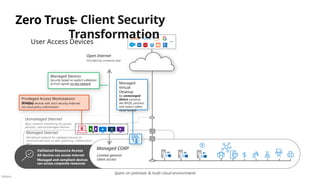
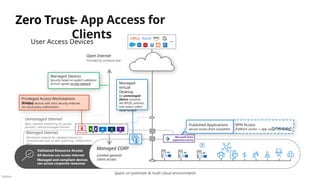
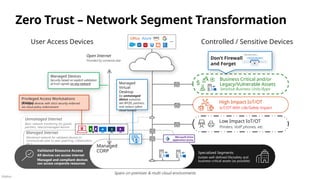
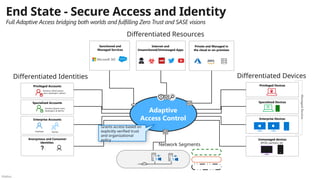
Público
Microsoft Cybersecurity
Reference Architectures (MCRA)
Plan your end-to-end security
architecture using Zero Trust principles
N
Adoption Framework
April 2025 Release
Público
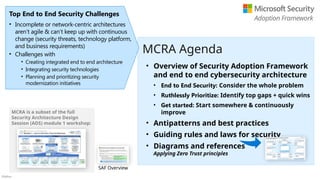
• Overview of Security Adoption Framework
and end to end cybersecurity architecture
• End to End Security: Consider the whole problem
• Ruthlessly Prioritize: Identify top gaps + quick wins
• Get started: Start somewhere & continuously
improve
• Antipatterns and best practices
• Guiding rules and laws for security
• Diagrams and references
Applying Zero Trust principles
MCRA Agenda
Top End to End Security Challenges
• Incomplete or network-centric architectures
aren’t agile & can’t keep up with continuous
change (security threats, technology platform,
and business requirements)
• Challenges with
• Creating integrated end to end architecture
• Integrating security technologies
• Planning and prioritizing security
modernization initiatives
MCRA is a subset of the full
Security Architecture Design
Session (ADS) module 1 workshop:
Adoption Framework
SAF Overview
Público
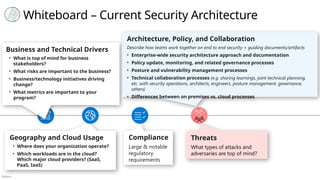
Whiteboard – Current Security Architecture
Geography and Cloud Usage
• Where does your organization operate?
• Which workloads are in the cloud?
Which major cloud providers? (SaaS,
PaaS, IaaS)
Business and Technical Drivers
• What is top of mind for business
stakeholders?
• What risks are important to the business?
• Business/technology initiatives driving
change?
• What metrics are important to your
program?
Threats
What types of attacks and
adversaries are top of mind?
Compliance
Large & notable
regulatory
requirements
Architecture, Policy, and Collaboration
Describe how teams work together on end to end security + guiding documents/artifacts
• Enterprise-wide security architecture approach and documentation
• Policy update, monitoring, and related governance processes
• Posture and vulnerability management processes
• Technical collaboration processes (e.g. sharing learnings, joint technical planning,
etc. with security operations, architects, engineers, posture management, governance,
others)
• Differences between on premises vs. cloud processes
Público
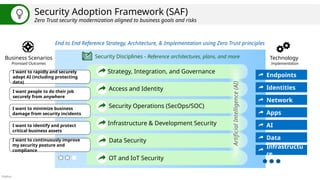
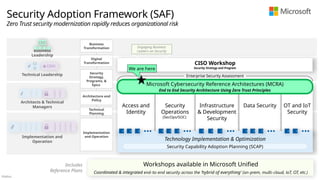
Security Adoption Framework (SAF)
Zero Trust security modernization aligned to business goals and risks
End to End Reference Strategy, Architecture, & Implementation using Zero Trust principles
Business Scenarios
Promised Outcomes
Security Disciplines - Reference architectures, plans, and more
Strategy, Integration, and Governance
Access and Identity
Security Operations (SecOps/SOC)
Infrastructure & Development Security
Data Security
Technology
Implementation
Identities
Apps
Data
Infrastructu
re
Network
Endpoints
OT and IoT Security
AI
Artificial
Intelligence
(AI)
I want to rapidly and securely
adopt AI (including protecting
data)
I want people to do their job
securely from anywhere
I want to minimize business
damage from security incidents
I want to identify and protect
critical business assets
I want to continuously improve
my security posture and
compliance
Público
Implementation and
Operation
Architects & Technical
Managers
Technical Leadership
CI
O
CISO
Business
Leadership
CEO
Security Adoption Framework (SAF)
Zero Trust security modernization rapidly reduces organizational risk
Digital
Transformation
Implementation
and Operation
Technical
Planning
Architecture and
Policy
Security
Strategy,
Programs, &
Epics
Business
Transformation
Workshops available in Microsoft Unified
Coordinated & integrated end-to-end security across the ‘hybrid of everything’ (on-prem, multi-cloud, IoT, OT, etc.)
Includes
Reference Plans
Access and
Identity
Security
Operations
(SecOps/SOC)
Infrastructure
& Development
Security
Data Security OT and IoT
Security
Technology Implementation & Optimization
> > > > > > > > > > > > > >
Microsoft Cybersecurity Reference Architectures (MCRA)
End to End Security Architecture Using Zero Trust Principles
Security Capability Adoption Planning (SCAP)
Enterprise Security Assessment
CISO Workshop
End-to-end Security Program and Strategy Guidance + Integration with Digital &Cloud TransformationTeams
Security Strategy and Program
Engaging Business
Leaders on Security
We are here
Público
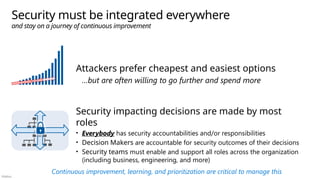
Security must be integrated everywhere
and stay on a journey of continuous improvement
Attackers prefer cheapest and easiest options
…but are often willing to go further and spend more
Security impacting decisions are made by most
roles
• Everybody has security accountabilities and/or responsibilities
• Decision Makers are accountable for security outcomes of their decisions
• Security teams must enable and support all roles across the organization
(including business, engineering, and more)
Continuous improvement, learning, and prioritization are critical to manage this
Público
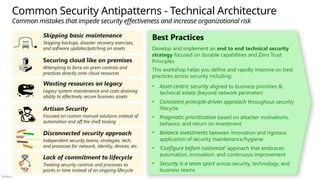
Common Security Antipatterns - Technical Architecture
Common mistakes that impede security effectiveness and increase organizational risk
Securing cloud like on premises
Attempting to force on-prem controls and
practices directly onto cloud resources
Lack of commitment to lifecycle
Treating security controls and processes as
points in time instead of an ongoing lifecycle
Wasting resources on legacy
Legacy system maintenance and costs draining
ability to effectively secure business assets
Disconnected security approach
Independent security teams, strategies, tech,
and processes for network, identity, devices, etc.
Skipping basic maintenance
Skipping backups, disaster recovery exercises,
and software updates/patching on assets
Artisan Security
Focused on custom manual solutions instead of
automation and off the shelf tooling
Best Practices
Develop and implement an end to end technical security
strategy focused on durable capabilities and Zero Trust
Principles
This workshop helps you define and rapidly improve on best
practices across security including:
• Asset-centric security aligned to business priorities &
technical estate (beyond network perimeter)
• Consistent principle-driven approach throughout security
lifecycle
• Pragmatic prioritization based on attacker motivations,
behavior, and return on investment
• Balance investments between innovation and rigorous
application of security maintenance/hygiene
• ‘Configure before customize’ approach that embraces
automation, innovation, and continuous improvement
• Security is a team sport across security, technology, and
business teams
Público
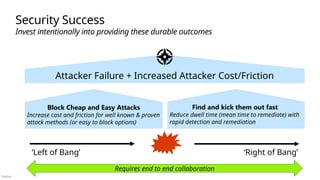
Attacker Failure + Increased Attacker Cost/Friction
Security Success
Invest intentionally into providing these durable outcomes
Find and kick them out fast
Reduce dwell time (mean time to remediate) with
rapid detection and remediation
Block Cheap and Easy Attacks
Increase cost and friction for well known & proven
attack methods (or easy to block options)
‘Left of Bang’
Prevent or lessen impact of attacks
‘Right of Bang’
Rapidly and effectively manage attacks
Requires end to end collaboration
Público
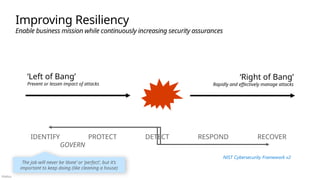
Improving Resiliency
Enable business mission while continuously increasing security assurances
IDENTIFY PROTECT DETECT RESPOND RECOVER
GOVERN
‘Left of Bang’
Prevent or lessen impact of attacks
‘Right of Bang’
Rapidly and effectively manage attacks
NIST Cybersecurity Framework v2
The job will never be ‘done’ or ‘perfect’, but it’s
important to keep doing (like cleaning a house)
Público
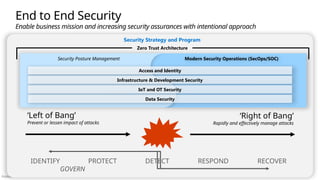
Zero Trust Architecture
Security Strategy and Program
Security Posture Management
End to End Security
Enable business mission and increasing security assurances with intentional approach
IDENTIFY PROTECT DETECT RESPOND RECOVER
GOVERN
‘Left of Bang’
Prevent or lessen impact of attacks
‘Right of Bang’
Rapidly and effectively manage attacks
Modern Security Operations (SecOps/SOC)
Access and Identity
Infrastructure & Development Security
IoT and OT Security
Data Security
Público
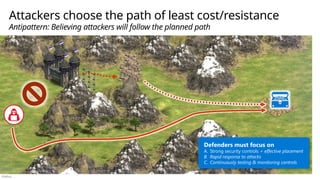
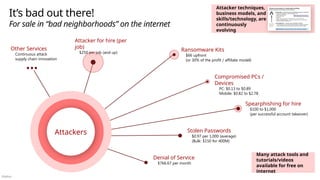
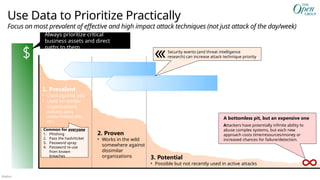
Attackers choose the path of least cost/resistance
Antipattern: Believing attackers will follow the planned path
Defenders must focus on
A. Strong security controls + effective placement
B. Rapid response to attacks
C. Continuously testing & monitoring controls
Público
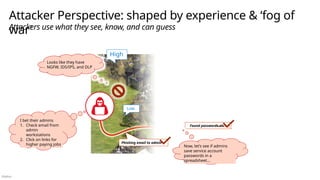
Attacker Perspective: shaped by experience & ‘fog of
war’
Attackers use what they see, know, and can guess
Phishing email to admin
Looks like they have
NGFW, IDS/IPS, and DLP
I bet their admins
1. Check email from
admin
workstations
2. Click on links for
higher paying jobs
Low
Found passwords.xls
Now, let’s see if admins
save service account
passwords in a
spreadsheet…
High
Público
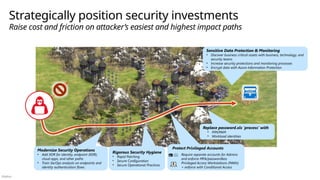
Strategically position security investments
Raise cost and friction on attacker’s easiest and highest impact paths
Replace password.xls ‘process’ with
• PIM/PAM
• Workload identities
Sensitive Data Protection & Monitoring
• Discover business critical assets with business, technology, and
security teams
• Increase security protections and monitoring processes
• Encrypt data with Azure Information Protection
Modernize Security Operations
• Add XDR for identity, endpoint (EDR),
cloud apps, and other paths
• Train SecOps analysts on endpoints and
identity authentication flows
Protect Privileged Accounts
Require separate accounts for Admins
and enforce MFA/passwordless
Privileged Access Workstations (PAWs)
+ enforce with Conditional Access
Rigorous Security Hygiene
• Rapid Patching
• Secure Configuration
• Secure Operational Practices
Público
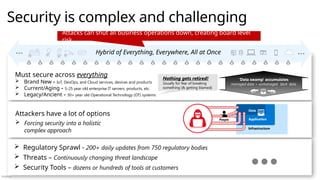
Security is complex and challenging
Infrastructure
Application
Data
People
Attackers have a lot of options
 Forcing security into a holistic
complex approach
 Regulatory Sprawl - 200+ daily updates from 750 regulatory bodies
 Threats – Continuously changing threat landscape
 Security Tools – dozens or hundreds of tools at customers
Must secure across everything
 Brand New - IoT, DevOps, and Cloud services, devices and products
 Current/Aging - 5-25 year old enterprise IT servers, products, etc.
 Legacy/Ancient - 30+ year old Operational Technology (OT) systems
Nothing gets retired!
Usually for fear of breaking
something (& getting blamed)
Hybrid of Everything, Everywhere, All at Once
Attacks can shut all business operations down, creating board level
risk
‘Data swamp’ accumulates
managed data + unmanaged ‘dark’ data
Público
Security is the opposite of productivity Business Enablement
Align security to the organization’s mission, priorities, risks, and processes
Assume Compromise
Continuously reduce blast radius and attack surface through prevention and detection/response/recovery
All attacks can be prevented
Shift to Asset-Centric Security Strategy
Revisit how to do access control, security operations, infrastructure and development security, and more
Explicitly Validate Account Security
Require MFA and analyze all user sessions with behavior analytics, threat intelligence, and more
Network security perimeter will keep attackers
out
Passwords are strong enough
IT Admins are safe
IT Infrastructure is safe
Goal: Zero Assumed Trust
Reduce risk by finding and removing implicit assumptions of trust
Developers always write secure code
The software and components we use are secure
Plan and Execute Privileged Access Strategy
Establish security of accounts, workstations, and other privileged entities (aka.ms/spa)
Validate Infrastructure Integrity
Explicitly validate trust of operating systems, applications, services accounts, and more
Integrate security into development process
Security education, issue detection and mitigation, response, and more
Supply chain security
Validate the integrity of software and hardware components from open source. vendors, and others
False Assumptions
of implicit or explicit trust
Zero Trust Mitigation
Systematically Build & Measure Trust
With 30+ years of backlog at most organizations, it
will take a while to burn down the backlog of
assumed trust
Público
1. Look End to End: Consider the whole security problem
2. Ruthlessly Prioritize: Identify top gaps + quick wins
3. Get started: Start somewhere and continuously improve
Zero Trust Security Architecture
End to End Prioritized Execution + Continuous Improvement
OBSERVE, ORIENT
DECIDE
ACT
1
2
3
...
Disrupt attacker
return on investment
(ROI)
Leverage reference plans
and architectures
Security is complex
and challenging
Resilience required
across the lifecycle
Focus on prevalent
attacks and use
data
Microsoft Security
Adoption Framework
Público
Guiding Rulesets for End to End Architecture
Zero Trust Commandments
Requirements that represent best practices for a Zero Trust Architecture
(ZTA) and transformation. (The Open Group Standard)
Usage: General planning + Testing whether something is ‘Zero Trust’ or
not
10 Laws of Cybersecurity Risk
Key truths about managing security risk that bust common myths.
Usage: Ensuring security strategy, controls, and risk are managed with
realistic understanding of how attacks, humans, and technology work
Immutable Laws of Security
Key truths about security claims and controls that bust common myths.
Usage: Validating design of security controls, systems, and processes to
ensure they are technically sound
Público
Microsoft Cybersecurity Reference Architectures (MCRA)
Architecture Diagrams & References
Microsoft Security Capabilities
Zero Trust Adaptive Access
Security Service Edge (SSE)
Build Slide
People
Roles and Risk Management
Infrastructure
Multi-cloud, cross-platform, native controls
Security Operations
(SecOps/SOC)
Operational Technology
(OT)
Industrial Control Systems
Threat Environment
Ransomware/Extortion, Data Theft, and more
Attack Chain
Coverage
aka.ms/MCRA | aka.ms/MCRA-videos | April 2025 Slide notes have speaker notes & change history
Multi-Cloud &
Cross-Platform
Microsoft 365 E5
Journey
Role Mapping
Zero Trust
Development / DevSecOps
Enabling Security & Business Goals
Security Adoption Framework (SAF)
Privileged Access
Device Types
Artificial Intelligence
(AI) and Security
Standards Mapping
Patch
Modernization
Público
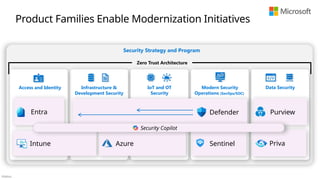
Security Strategy and Program
Zero Trust Architecture
Access and Identity Modern Security Operations
(SecOps/SOC)
Infrastructure & Development
Security
Security Adoption Framework
Reduce risk by rapidly modernizing security capabilities and practices
Business and
Security
Integration
Implementation
and Operation
Technical Planning
Architecture and
Policy
Security Strategy,
Programs, and
Epics
Securing Digital
Transformation
Microsoft Cybersecurity Reference Architectures (MCRA)
Engaging Business
Leaders on Security
Workshops available in the Microsoft Unified catalog
All are holistic for the ‘hybrid of everything’ technical estate (on-premises, multi-cloud, IoT, OT, etc.)
Includes
Reference Plans
CISO Workshop
Público
Where do you want to go next?
Engagements help navigate the vast complexity of security
Capabilities Review
Security Capability Adoption Planning (SCAP)
End to End Security Assessment
Enterprise Security Assessment (ESA)
What do we own? Are we using it?
How are we doing today?
Recommend combination of:
• Context – Strategy/Architecture
• Action – Technical Implementation
Technical Architecture and Planning
Access and
Identity
Modern
Security
Operations
(SecOps/SOC)
Infrastructure
&
Development
Security
Data Security
Microsoft Product and Technology Implementation
Strategic Security Integration
Security
Strategy and
Program
End to End Security
Architecture
Microsoft Cybersecurity Reference Architectures (MCRA)
Security
Modernization
Journey
Defender
Sentinel
Entra
Intune
Purview
Security Copilot
Público
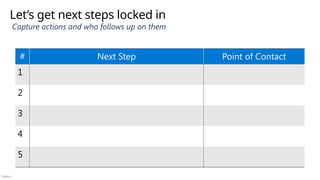
Let’s get next steps locked in
Capture actions and who follows up on them
# Next Step Point of Contact
1
2
3
4
5
Público
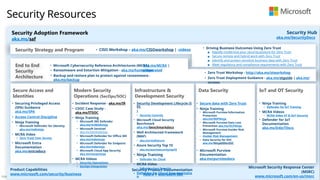
Security Resources
Security Adoption Framework
aka.ms/saf
Security Hub
aka.ms/SecurityDocs
Security Strategy and Program • CISO Workshop – aka.ms/CISOworkshop | -videos • Driving Business Outcomes Using Zero Trust
▪ Rapidly modernize your security posture for Zero Trust
▪ Secure remote and hybrid work with Zero Trust
▪ Identify and protect sensitive business data with Zero Trust
▪ Meet regulatory and compliance requirements with Zero Trust
End to End
Security
Architecture
• Microsoft Cybersecurity Reference Architectures (MCRA)
- aka.ms/MCRA |
-videos
• Zero Trust Workshop - http://aka.ms/ztworkshop
• Zero Trust Deployment Guidance - aka.ms/ztguide | aka.ms/
ztramp
• Ransomware and Extortion Mitigation - aka.ms/humanoperated
• Backup and restore plan to protect against ransomware -
aka.ms/backup
Secure Access and
Identities
Modern Security
Operations (SecOps/SOC)
Infrastructure &
Development Security
Data Security IoT and OT Security
Product Capabilities
www.microsoft.com/security/business
Security Product Documentation
Azure | Microsoft 365
Microsoft Security Response Center
(MSRC)
www.microsoft.com/en-us/msrc
• Security Development Lifecycle (S
DL
)
• Security Controls
• Microsoft Cloud Security
Benchmark
aka.ms/benchmarkdocs
• Well Architected Framework
(WAF)
• aka.ms/wafsecure
• Azure Security Top 10
• aka.ms/azuresecuritytop10
• Ninja Training
• Defender for Cloud
• MCRA Video
• Infrastructure Security
• Defender for Cloud Documentatio
n
• Securing Privileged Access
(SPA) Guidance
aka.ms/SPA
• Access Control Discipline
• Ninja Training
• Microsoft Defender for Identity
aka.ms/mdininja
• MCRA Video
• Zero Trust User Access
• Microsoft Entra
Documentation
aka.ms/entradocs
• Incident Response - aka.ms/IR
• CDOC Case Study -
aka.ms/ITSOC
• Ninja Training
• Microsoft 365 Defender
aka.ms/m365dninja
• Microsoft Sentinel
aka.ms/sentinelninja
• Microsoft Defender for Office 365
aka.ms/mdoninja
• Microsoft Defender for Endpoint
aka.ms/mdeninja
• Microsoft Cloud App Security
aka.ms/mcasninja
• MCRA Videos
• Security Operations
• SecOps Integration
• Secure data with Zero Trust
• Ninja Training
• Microsoft Purview Information
Protection
aka.ms/MIPNinja
• Microsoft Purview Data Loss
Prevention aka.ms/DLPNinja
• Microsoft Purview Insider Risk
Management
• Insider Risk Management
• Data Security for SOC
aka.ms/NinjaDSforSOC
• Microsoft Purview
Documentation
aka.ms/purviewdocs
• Ninja Training
• Defender for IoT Training
• MCRA Videos
• MCRA Video OT & IIoT Security
• Defender for IoT
Documentation
aka.ms/D4IoTDocs
Público
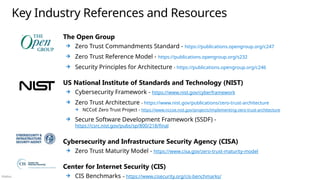
Key Industry References and Resources
The Open Group
Zero Trust Commandments Standard - https://publications.opengroup.org/c247
Zero Trust Reference Model - https://publications.opengroup.org/s232
Security Principles for Architecture - https://publications.opengroup.org/c246
US National Institute of Standards and Technology (NIST)
Cybersecurity Framework - https://www.nist.gov/cyberframework
Zero Trust Architecture - https://www.nist.gov/publications/zero-trust-architecture
NCCoE Zero Trust Project - https://www.nccoe.nist.gov/projects/implementing-zero-trust-architecture
Secure Software Development Framework (SSDF) -
https://csrc.nist.gov/pubs/sp/800/218/final
Cybersecurity and Infrastructure Security Agency (CISA)
Zero Trust Maturity Model - https://www.cisa.gov/zero-trust-maturity-model
Center for Internet Security (CIS)
CIS Benchmarks – https://www.cisecurity.org/cis-benchmarks/
Público
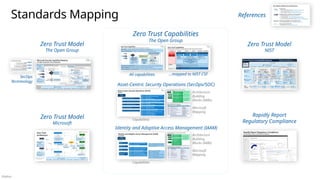
Standards Mapping
Zero Trust Model
The Open Group
Zero Trust Model
NIST
Zero Trust Model
Microsoft
References
Zero Trust Capabilities
The Open Group
Rapidly Report
Regulatory Compliance
SecOps
Terminology
Capabilities
Asset-Centric Security Operations (SecOps/SOC)
Identity and Adaptive Access Management (IAAM)
Microsoft
Mapping
Architecture
Building
Blocks (ABBs)
Capabilities
Microsoft
Mapping
Architecture
Building
Blocks (ABBs)
All capabilities ...mapped to NIST CSF
Público
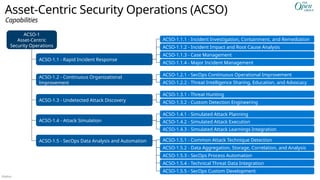
Asset-Centric Security Operations (ACSO)
ACSO-1
Asset-Centric
Security Operations
ACSO-1.1 - Rapid Incident Response
ACSO-1.2 - Continuous Organizational
Improvement
ACSO-1.3 - Undetected Attack Discovery
ACSO-1.4 - Attack Simulation
ACSO-1.5 - SecOps Data Analysis and Automation
ACSO-1.1.1 - Incident Investigation, Containment, and Remediation
ACSO-1.1.2 - Incident Impact and Root Cause Analysis
ACSO-1.1.3 - Case Management
ACSO-1.1.4 - Major Incident Management
ACSO-1.3.1 - Threat Hunting
ACSO-1.3.2 - Custom Detection Engineering
ACSO-1.4.1 - Simulated Attack Planning
ACSO-1.4.2 - Simulated Attack Execution
ACSO-1.4.3 - Simulated Attack Learnings Integration
ACSO-1.5.1 - Common Attack Technique Detection
ACSO-1.5.2 - Data Aggregation, Storage, Correlation, and Analysis
ACSO-1.5.3 - SecOps Process Automation
ACSO-1.5.4 - Technical Threat Data Integration
ACSO-1.5.5 - SecOps Custom Development
ACSO-1.2.1 - SecOps Continuous Operational Improvement
ACSO-1.2.2 - Threat Intelligence Sharing, Education, and Advocacy
Capabilities
Público
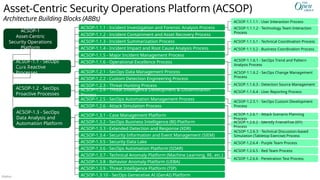
Asset-Centric Security Operations Platform (ACSOP)
Architecture Building Blocks (ABBs)
ACSOP-1
Asset-Centric
Security Operations
Platform
ACSOP-1.1 - SecOps
Core Reactive
Processes
ACSOP-1.2.6 - Attack Simulation Process
ACSOP-1.3 - SecOps
Data Analysis and
Automation Platform
ACSOP-1.1.1 - Incident Investigation and Forensic Analysis Process
ACSOP-1.1.3 - Incident Summarization Process
ACSOP-1.1.4 - Incident Impact and Root Cause Analysis Process
ACSOP-1.1.6 - Operational Excellence Process
ACSOP-1.1.5 - Major Incident Management Process
ACSOP-1.2.2 - Custom Detection Engineering Process
ACSOP-1.3.3 - Extended Detection and Response (XDR)
ACSOP-1.3.4 - Security Information and Event Management (SIEM)
ACSOP-1.3.5 - Security Data Lake
ACSOP-1.3.6 - SecOps Automation Platform (SOAR)
ACSOP-1.3.7 - Technical Anomaly Platform (Machine Learning, RE, etc.)
ACSOP-1.3.8 - Behavior Anomaly Platform (UEBA)
ACSOP-1.3.9 - Threat Intelligence Platform (TIP)
ACSOP-1.2.6.4 - Purple Team Process
ACSOP-1.3.1 - Case Management Platform
ACSOP-1.3.2 - SecOps Business Intelligence (BI) Platform
ACSOP-1.2.5 - SecOps Automation Management Process
ACSOP-1.2.3 - Threat Hunting Process
ACSOP-1.2.4 - Threat Intelligence Development & Dissemination
Process
ACSOP-1.2 - SecOps
Proactive Processes
ACSOP-1.2.6.5 - Red Team Process
ACSOP-1.2.6.6 - Penetration Test Process
ACSOP-1.2.6.3 - Technical Discussion-based
Simulation (Tabletop Exercise) Process
ACSOP-1.2.6.1 - Attack Scenario Planning
Process
ACSOP-1.1.6.2 - SecOps Change Management
Process
ACSOP-1.1.6.1 - SecOps Trend and Pattern
Analysis Process
ACSOP-1.2.6.2 - Identify Friend/Foe (IFF)
Process
ACSOP-1.1.6.3 - Detection Source Management
ACSOP-1.1.1.2 - Technology Team Interaction
Process
ACSOP-1.1.1.1 - User Interaction Process
ACSOP-1.1.6.4 - User Reporting Process
ACSOP-1.2.1 - SecOps Data Management Process
ACSOP-1.2.5.1 - SecOps Custom Development
Process
ACSOP-1.1.5.2 - Business Coordination Process
ACSOP-1.1.5.1 - Technical Coordination Process
ACSOP-1.1.2 - Incident Containment and Asset Recovery Process
ACSOP-1.3.10 - SecOps Generative AI (GenAI) Platform
Público
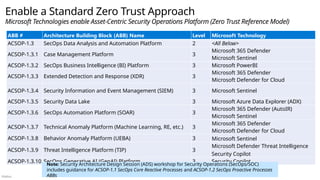
Enable a Standard Zero Trust Approach
Microsoft Technologies enable Asset-Centric Security Operations Platform (Zero Trust Reference Model)
ABB # Architecture Building Block (ABB) Name Level Microsoft Technology
ACSOP-1.3 SecOps Data Analysis and Automation Platform 2 <All Below>
ACSOP-1.3.1 Case Management Platform 3
Microsoft 365 Defender
Microsoft Sentinel
ACSOP-1.3.2 SecOps Business Intelligence (BI) Platform 3 Microsoft PowerBI
ACSOP-1.3.3 Extended Detection and Response (XDR) 3
Microsoft 365 Defender
Microsoft Defender for Cloud
ACSOP-1.3.4 Security Information and Event Management (SIEM) 3 Microsoft Sentinel
ACSOP-1.3.5 Security Data Lake 3 Microsoft Azure Data Explorer (ADX)
ACSOP-1.3.6 SecOps Automation Platform (SOAR) 3
Microsoft 365 Defender (AutoIR)
Microsoft Sentinel
ACSOP-1.3.7 Technical Anomaly Platform (Machine Learning, RE, etc.) 3
Microsoft 365 Defender
Microsoft Defender for Cloud
Microsoft Sentinel
ACSOP-1.3.8 Behavior Anomaly Platform (UEBA) 3
ACSOP-1.3.9 Threat Intelligence Platform (TIP) 3
Microsoft Defender Threat Intelligence
Security Copilot
ACSOP-1.3.10 SecOps Generative AI (GenAI) Platform 3 Security Copilot
Note: Security Architecture Design Session (ADS) workshop for Security Operations (SecOps/SOC)
includes guidance for ACSOP-1.1 SecOps Core Reactive Processes and ACSOP-1.2 SecOps Proactive Processes
ABBs
Público
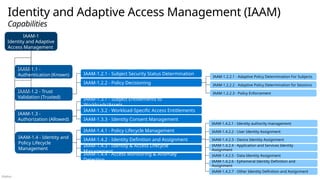
Identity and Adaptive Access Management (IAAM)
Capabilities
IAAM-1
Identity and Adaptive
Access Management
IAAM-1.1 -
Authentication (Known)
IAAM-1.2 - Trust
Validation (Trusted)
IAAM-1.3 -
Authorization (Allowed)
IAAM-1.4 - Identity and
Policy Lifecycle
Management
IAAM-1.2.1 - Subject Security Status Determination
IAAM-1.2.2 - Policy Decisioning
IAAM-1.2.2.3 - Policy Enforcement
IAAM-1.4.3 - Identity & Access Lifecycle
Management
IAAM-1.3.1 - Subject Entitlements to
Workloads/Assets
IAAM-1.2.2.1 - Adaptive Policy Determination For Subjects
IAAM-1.2.2.2 - Adaptive Policy Determination for Sessions
IAAM-1.4.2 - Identity Definition and Assignment
IAAM-1.4.2.1 - Identity authority management
IAAM-1.3.2 - Workload-Specific Access Entitlements
IAAM-1.4.2.2 - User Identity Assignment
IAAM-1.4.2.3 - Device Identity Assignment
IAAM-1.4.2.4 - Application and Services Identity
Assignment
IAAM-1.4.2.5 - Data Identity Assignment
IAAM-1.3.3 - Identity Consent Management
IAAM-1.4.4 - Access Monitoring & Anomaly
Detection IAAM-1.4.2.6 - Ephemeral Identity Definition and
Assignment
IAAM-1.4.2.7 - Other Identity Definition and Assignment
IAAM-1.4.1 - Policy Lifecycle Management
Público
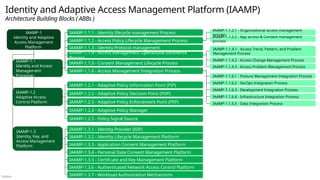
Identity and Adaptive Access Management Platform (IAAMP)
Architecture Building Blocks ( ABBs )
IAAMP-1.2
Adaptive Access
Control Platform
IAAMP-1.2.1 - Adaptive Policy Information Point (PIP)
IAAMP-1.2.3 - Adaptive Policy Enforcement Point (PEP)
IAAMP-1.2.2 - Adaptive Policy Decision Point (PDP)
IAAMP-1.2.4 - Adaptive Policy Manager
IAAMP-1.2.5 - Policy Signal Source
IAAMP-1.3.2 - Identity Lifecycle Management Platform
IAAMP-1.3.7 - Workload Authorization Mechanisms
IAAMP-1.1
Identity and Access
Management
Processes
IAAMP-1
Identity and Adaptive
Access Management
Platform
IAAMP-1.1.1 - Identity lifecycle management Process
IAAMP-1.1.4 - Access Management Operational Excellence
Process
IAAMP-1.1.2 - Access Policy Lifecycle Management Process
IAAMP-1.1.6 - Access Management Integration Process
IAAMP-1.1.4.2 - Access Change Management Process
IAAMP-1.1.4.1 - Access Trend, Pattern, and Problem
Management Process
IAAMP-1.1.4.3 - Access Problem Management Process
IAAMP-1.1.6.1 - Posture Management Integration Process
IAAMP-1.1.6.2 - SecOps Integration Process
IAAMP-1.1.6.3 - Development Integration Process
IAAMP-1.1.6.4 - Infrastructure Integration Process
IAAMP-1.1.6.5 - Data Integration Process
IAAMP-1.3.1 - Identity Provider (IDP)
IAAMP-1.3.6 - Authenticated Network Access Control Platform
IAAMP-1.3.5 - Certificate and Key Management Platform
IAAMP-1.1.5 - Consent Management Lifecycle Process
IAAMP-1.1.2.2 - App access & Consent management
process
IAAMP-1.1.2.1 - Organizational access management
process
IAAMP-1.3
Identity, Key, and
Access Management
Platform
IAAMP-1.3.4 - Personal Data Consent Management Platform
IAAMP-1.1.3 - Identity Protocol management
IAAMP-1.3.3 - Application Consent Management Platform
Público
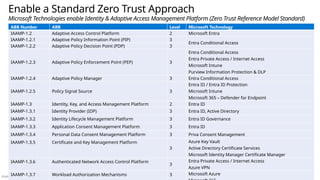
Enable a Standard Zero Trust Approach
Microsoft Technologies enable Identity & Adaptive Access Management Platform (Zero Trust Reference Model Standard)
ABB Number ABB Level Microsoft Technology
IAAMP-1.2 Adaptive Access Control Platform 2 Microsoft Entra
IAAMP-1.2.1 Adaptive Policy Information Point (PIP) 3
Entra Conditional Access
IAAMP-1.2.2 Adaptive Policy Decision Point (PDP) 3
IAAMP-1.2.3 Adaptive Policy Enforcement Point (PEP) 3
Entra Conditional Access
Entra Private Access / Internet Access
Microsoft Intune
Purview Information Protection & DLP
IAAMP-1.2.4 Adaptive Policy Manager 3 Entra Conditional Access
IAAMP-1.2.5 Policy Signal Source 3
Entra ID / Entra ID Protection
Microsoft Intune
Microsoft 365 – Defender for Endpoint
IAAMP-1.3 Identity, Key, and Access Management Platform 2 Entra ID
IAAMP-1.3.1 Identity Provider (IDP) 3 Entra ID, Active Directory
IAAMP-1.3.2 Identity Lifecycle Management Platform 3 Entra ID Governance
IAAMP-1.3.3 Application Consent Management Platform 3 Entra ID
IAAMP-1.3.4 Personal Data Consent Management Platform 3 Priva Consent Management
IAAMP-1.3.5 Certificate and Key Management Platform
3
Azure Key Vault
Active Directory Certificate Services
Microsoft Identity Manager Certificate Manager
IAAMP-1.3.6 Authenticated Network Access Control Platform
3
Entra Private Access / Internet Access
Azure VPN
IAAMP-1.3.7 Workload Authorization Mechanisms 3 Microsoft Azure
Público
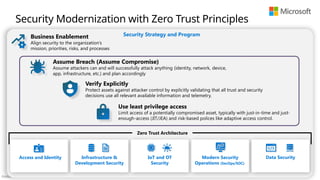
Zero Trust Architecture
Security Strategy and Program
Security Modernization with Zero Trust Principles
Access and Identity
Business Enablement
Align security to the organization’s
mission, priorities, risks, and processes
Assume Breach (Assume Compromise)
Assume attackers can and will successfully attack anything (identity, network, device,
app, infrastructure, etc.) and plan accordingly
Verify Explicitly
Protect assets against attacker control by explicitly validating that all trust and security
decisions use all relevant available information and telemetry.
Use least privilege access
Limit access of a potentially compromised asset, typically with just-in-time and just-
enough-access (JIT/JEA) and risk-based polices like adaptive access control.
Infrastructure &
Development Security
IoT and OT
Security
Modern Security
Operations (SecOps/SOC)
Data Security
Público
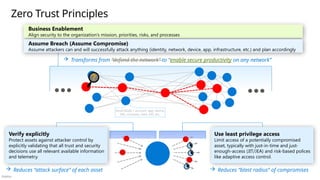
Zero Trust Principles
Use least privilege access
Limit access of a potentially compromised
asset, typically with just-in-time and just-
enough-access (JIT/JEA) and risk-based polices
like adaptive access control.
 Reduces “blast radius“ of compromises
 Reduces “attack surface” of each asset
 Transforms from “defend the network” to “enable secure productivity on any network”
Asset/Node = account, app, device,
VM, container, data, API, etc.
Verify explicitly
Protect assets against attacker control by
explicitly validating that all trust and security
decisions use all relevant available information
and telemetry.
Business Enablement
Align security to the organization’s mission, priorities, risks, and processes
Assume Breach (Assume Compromise)
Assume attackers can and will successfully attack anything (identity, network, device, app, infrastructure, etc.) and plan accordingly
Público
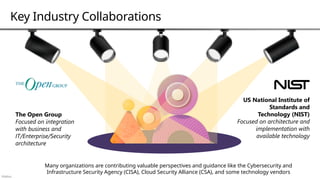
Key Industry Collaborations
The Open Group
Focused on integration
with business and
IT/Enterprise/Security
architecture
US National Institute of
Standards and
Technology (NIST)
Focused on architecture and
implementation with
available technology
Many organizations are contributing valuable perspectives and guidance like the Cybersecurity and
Infrastructure Security Agency (CISA), Cloud Security Alliance (CSA), and some technology vendors
Público
Key Zero Trust Models and Architectures
The Open Group
Focused on integration with business
and IT/Enterprise/Security architecture
US National Institute of
Standards and Technology (NIST)
Focused on architecture and
implementation with available technology
Público
Asset Protection
Classification, Protection, Tokenization
Digital Ecosystems
Zero Trust Components
Rapid Threat Detection, Response, and Recovery
Asset-Centric
Security Operations
Clarity, Automation, and Metrics-Driven Approach
Governance
Visibility and Policy
Data/Information
Apps & Systems
Security Zones
Centralized Security
Policy Decisions
Access Control
Identity and Network - Multi-factor Authentication
Threat
Intelligence
</> APIs
Distributed Policy
Enforcement Points (PEPs)
Innovation
Security
Securing
new asset
development
Público
Asset Protection
Classification, Protection, Tokenization
Digital Ecosystems
Microsoft Security Capability Mapping
The Open Group Zero Trust Components
Rapid Threat Detection, Response, and Recovery
Asset-Centric
Security Operations
Clarity, Automation, and Metrics-Driven Approach
Governance
Visibility and Policy
Data/Information
Apps & Systems
Security Zones
Centralized Security
Policy Decisions
Access Control
Identity and Network - Multi-factor Authentication
Threat
Intelligence
Innovation
Security
Securing
new asset
development
Microsoft Entra
Conditional Access
Defender for Endpoint
Endpoint Detection and
Response (EDR)
Intune
Device Management
Microsoft
Sentinel
• Security Information and Event
Management (SIEM)
• Security Orchestration, Automation,
and Response (SOAR)
Microsoft Defender
Defender for Identity Defender for
Cloud
Defender for Cloud
Apps
Defender for
Endpoint
Defender for Office
365
Security telemetry from across the environment
78+ Trillion signals per
day of security context
Microsoft Entra
Conditional Access
Azure Firewall (Illumio
partnership)
Defender for
APIs
GitHub Advanced Security
& Azure DevOps Security
Secure development and
software supply chain
Entra Internet Access
Entra Private Access
Defender for
Cloud
Azure Arc
Microsoft Purview
Microsoft Priva
Distributed Policy
Enforcement Points (PEPs)
Microsoft Entra ID
Entra ID
Governance
ID Protection
Workload ID
Defender for Identity
Microsoft Security
Exposure
Management
Público
Security Analytics
Data Security
Endpoint
Security
User
Device
Mobile
Device
Device
(with SDP Client)
ICAM
IDENTITY
• User
• Device
ACCESS & CREDENTIALS
• Management
• Authentication
(SSO/MFA)
• Authorization
FEDERATION GOVERNANCE
PE/PA
POLICY
Evaluate Access
PEP
GRANT ACCESS
(Micro-
segmentation)
GRANT ACCESS
(SDP)
Protected Resources
CLOUD
APPS & WORKLOADS
ON-PREM
APPS & WORKLOADS
(File Share, Database, Storage, Apps)
SDP (example: TLS Tunnel)
Zero Trust Architecture (ZTA)
Público
Protected Resources
PEP
Data
Securit
y
PE/PA
Security Analytics
ICAM
Identity
• User
• Device
Access &
Credential
Mgmt.
• Authentication
• Authorization
Identity, Credentials, and Access
Management (ICAM)
Federation
Governanc
e
Secure Admin
Workstations
Virtual Desktops
Policy Enforcement / Admin
(PE/PA)
Data Loss
Prevention
(DLP)
Document
Protection
Office
365
Cloud Infra
SQL
DB/Files
Policy
Determine Access
Endpoint Security
Devices
Devices w/
SDP
User
Mobile
Device
Grant Access
Intune
Entra Azure Virtual
Desktop
Windows 365
Cloud Apps
Workloads
Purview
DLP
Purvie
w
Information
Protection
Purvie
w
Mobile App
Mgmt
Defender for
Cloud Apps Information
Protection
Intune Defende
r for
Cloud
Microsoft Zero Trust Capability
Mapping
Key
NIST Sub-Area
• Sub-Area
NIST Area
Microsoft 365
Defender for
Cloud Apps
Defender for Cloud
Microsoft Cloud
Security Benchmark
Defender for
Office 365
3P SaaS
Azure IaaS
Azure Arc
Defender
for
Identity
Intune
VPN Backend Connector
Azure
Automanage
Entra Private Access
Connector
Microsoft Entra
Conditional Access
Global Secure
Access client
Intune
Device Management
Microsoft Service
Defender for Endpoint
Endpoint Detection and
Response (EDR)
Microsoft
Sentinel
• Security Information and Event
Management (SIEM)
• Security Orchestration, Automation,
and Response (SOAR)
Microsoft Defender XDR
Purview Azure Arc
Apps
Information
Protection Scanner
Defender Application Guard
Infrastructure & Access
ON-PREM APPS & WORKLOADS
Data
Database Storage
File share
CLOUD APPS & WORKLOADS
Implemented as part of the
NIST ZT Architecture guide (published
August 2024)
Defender for Identity Defender for
Cloud
Defender for Cloud
Apps
Defender for
Endpoint
Defender for Office
365
Security telemetry from across the environment
Entra ID
Entra ID
Governance
Grant Access
Software Defined
Perimeter(SDP)
Policy Enforcement Point
(PEP)
Entra ID
Conditional
Access
Entra Internet Access
Feedback
mechanisms
enable
continuous
improvement
Público
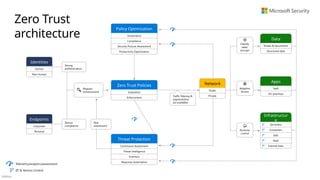
Zero Trust Policies
Evaluation
Enforcement
Threat Protection
Continuous Assessment
Threat Intelligence
Forensics
Response Automation
Identities
Human
Non-human
Endpoints
Corporate
Personal
Public
Private
Network
Apps
SaaS
On-premises
Data
Emails & documents
Structured data
Strong
authentication
Device
compliance
Risk
assessment
Traffic filtering &
segmentation
(as available)
Request
enhancement
Telemetry/analytics/assessment
JIT & Version Control
Runtime
control
Adaptive
Access
Classify,
label,
encrypt
Policy Optimization
Governance
Compliance
Security Posture Assessment
Productivity Optimization
Infrastructur
e
Serverless
Containers
IaaS
PaaS
Internal Sites
Zero Trust
architecture
Público
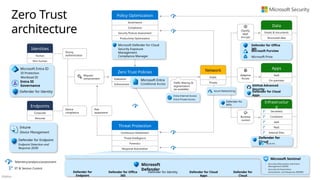
Zero Trust Policies
Evaluation
Enforcement
Threat Protection
Continuous Assessment
Threat Intelligence
Forensics
Response Automation
Identities
Human
Non-human
Endpoints
Corporate
Personal
Public
Private
Network Apps
SaaS
On-premises
Data
Emails & documents
Structured data
Strong
authentication
Device
compliance
Risk
assessment
Traffic filtering &
segmentation
(as available)
Request
enhancement
Telemetry/analytics/assessment
JIT & Version Control
Runtime
control
Adaptive
Access
Classify,
label,
encrypt
Policy Optimization
Governance
Compliance
Security Posture Assessment
Productivity Optimization
Infrastructur
e
Serverless
Containers
IaaS
PaaS
Internal Sites
Microsoft Entra
Conditional Access
Defender for Endpoint
Endpoint Detection and
Response (EDR)
Intune
Device Management
Entra Internet Access
Entra Private Access
Microsoft Sentinel
• Security Information and Event
Management (SIEM)
• Security Orchestration,
Automation, and Response (SOAR)
Microsoft
Defender
Defender for Identity Defender for
Cloud
Defender for Cloud
Apps
Defender for
Endpoint
Defender for Office
365
Azure Networking
Microsoft Purview
Microsoft Priva
Defender for Office
365
Microsoft Defender for Cloud
Security Exposure
Management
Compliance Manager
GitHub Advanced
Security
Defender for Cloud
Apps
Defender for
APIs
Defender for
Cloud
Azure Arc
Microsoft Entra ID
Entra ID
Governance
ID Protection
Workload ID
Defender for Identity
Zero Trust
architecture
Público
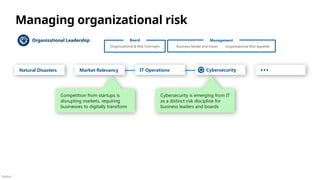
Managing organizational risk
Organizational Leadership
Market Relevancy
Natural Disasters …
Cybersecurity
Cybersecurity is emerging from IT
as a distinct risk discipline for
business leaders and boards
IT Operations
Organizational & Risk Oversight
Board Management
Organizational Risk Appetite
Business Model and Vision
Competition from startups is
disrupting markets, requiring
businesses to digitally transform
Público
App &
Data
Teams
IoT Security
App Security / DevSecOps
Apps & Data
Data Security
People
Teams
Identity
Teams
IT Operations
Insider Risk
User Education & Awareness
People
Identity & Keys
Administrator
Security
Identity System
Security
Key Management
Endpoint
Security
Mitigate
Vulnerabilities
Infrastructure & Endpoint
Infrastructure &
Network Security
Deploy
Tools
OT Operations
Operational Technology (OT) Security
Leadership and Culture
Risk Management
Policy & Standards
Security Leadership
Information Risk Management
Supply Chain Risk (People, Process, Technology)
Enable Productivity and Security
Stay Agile - Adapt to changes to threat environment,
technology, regulations, business model, and more
Program Management Office (PMO)
Plan (Governance) Run (Operations)
Build
Managing Information/Cyber
Risk
Security responsibilities or “jobs to be done”
Organizational Leadership External
Intelligence Sources
April 2025 - https://aka.ms/SecurityRoles
Threat
Intelligence
Strategic Threat
Insight/Trends
Tactical Threat
Insight/Trends
Posture Management
Monitor & Remediate Risk
(Conditional Access, Secure Score, Sharing
Risks, Threat and Vulnerability Management
(TVM) User & Asset Scores, etc.)
Incident
Management
Incident
Response
Threat
Hunting
Security
Operations
[Center]
(SOC)
Practice
Exercises
Risk
Scenarios
Incident
Preparation
Technical Policy
Authoring
Compliance
Reporting
Architecture &
Risk Assessments
Technical Policy
Monitoring
Privacy &
Compliance
Requirements
Compliance
Management
Requirements
Translation
Technical Risk Management
Security
Architecture
Organizational & Risk Oversight
Board Management
Organizational Risk Appetite
Business Model and Vision
Público
Microsoft security capability mapping
Which roles typically use which capabilities
Access Control Asset Protection
Security Governance
Security Operations
Establish Zero Trust access model to modern and
legacy assets using identity & network controls
Detect, Respond, and Recover from attacks;
Hunt for hidden threats; share threat intelligence
broadly
Protect sensitive data and systems. Continuously
discover, classify & secure assets
Continuously Identify, measure, and manage security
posture to reduce risk & maintain compliance
Identity Admin, Identity Architect,
Identity Security
• Entra ID (Formerly Azure AD)
• Multifactor Authentication
• Conditional Access
• Application Proxy
• External Identities / B2B & B2C
• Internet/Private Access
• Identity Governance
• and more..
• Windows Hello for Business
• Microsoft 365 Defender
• Microsoft Defender for Identity
• Microsoft Defender for Cloud Apps
• Azure Bastion
• Azure Administrative Model
• Portal, Management Groups, Subscriptions
• Azure RBAC & ABAC
Network Security
• Azure Firewall
• Azure Firewall Manager
• Azure DDoS
• Azure Web Application Firewall
• Azure Networking Design
• Virtual Network, NSG, ASG, VPN, etc.
• PrivateLink / Private EndPoint
Endpoint / Device Admin
• Microsoft Intune
• Configuration Management
• Microsoft Defender for Endpoint
Data security
• Microsoft Purview
• Information Protection
• Data Loss Prevention
• Microsoft 365 Defender
• Microsoft Defender for Cloud Apps
People security
• Attack Simulator
• Insider Risk Management
Security architecture
• Microsoft Cybersecurity Reference Architecture
https://aka.ms/MCRA
Microsoft
Entra
• Microsoft 365 Lighthouse
• Azure Lighthouse
[multi-tenant]
Security Operations Analyst
Microsoft Defender XDR
• Microsoft Defender for Endpoint
• Microsoft Defender for Office 365
• Microsoft Defender for Identity
• Microsoft Defender for Cloud Apps
• Microsoft Entra Identity Protection
• Microsoft Defender for Cloud
• Microsoft Defender for DevOps
• Microsoft Defender for Servers
• Microsoft Defender for Storage
• Microsoft Defender for SQL
• Microsoft Defender for Containers
• Microsoft Defender for App Service
• Microsoft Defender for APIs
• Microsoft Defender for Key Vault
• Microsoft Defender for DNS
• Microsoft Defender for open-source
relational databases
• Microsoft Defender for Azure
Cosmos DB
• Microsoft Security Copilot
• Microsoft Sentinel
• Microsoft Security Experts
• Microsoft Incident Response
Detection and Response Team (DART)
Posture management,
Policy and standards,
Compliance management
• Microsoft Defender for Cloud
• Secure Score
• Compliance Dashboard
• Azure Security Benchmark
• Azure Blueprints
• Azure Policy
• Microsoft Defender External Attack
Surface Management (MD-EASM)
• Azure Administrative Model
• Portal, Management Groups, Subscriptions
• Azure RBAC & ABAC
• Microsoft Purview
• Compliance manager
Microsoft
Purview
Microsoft
Defender
Innovation Security
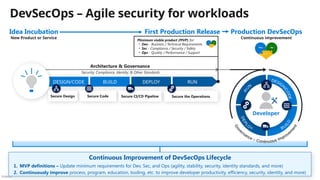
Integrate Security into DevSecOps
processes. Align security, development,
and operations practices.
Application security and DevSecOps
• (Same as Infrastructure Roles)
• GitHub Advanced Security
• Azure DevOps Security
Infrastructure and endpoint security,
IT Ops, DevOps
• Microsoft Defender for Cloud
(including Azure Arc)
• Azure Blueprints
• Azure Policy
• Azure Firewall
• Azure Monitor
• Azure Web Application Firewall
• Azure DDoS
• Azure Backup and Site Recovery
• Azure Networking Design
• Virtual Network, NSG, ASG, VPN, etc.
• PrivateLink / Private EndPoint
• Azure Resource Locks
Incident preparation
Threat intelligence Analyst
• Microsoft Defender Threat
Intelligence (Defender TI)
• Microsoft Sentinel
OT and IoT Security
• Microsoft Defender for IoT (& OT)
• Azure Sphere
Privacy Manager
• Microsoft Priva
April 2025 – https://aka.ms/MCRA
Público
CE
O
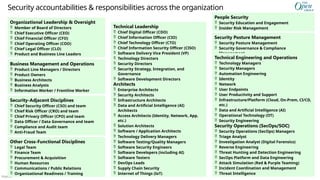
Security accountabilities & responsibilities across the organization
Security Posture Management
 Security Posture Management
 Security Governance & Compliance
Management
Application & Product Development
 Technology Delivery Managers
 Software Testing/Quality Managers
 Software Security Engineers
 Software Developers (including AI)
 Software Testers
 DevOps Leads
 Supply Chain Security
 Internet of Things (IoT)
Other Cross-Functional Disciplines
 Legal Team
 Finance Team
 Procurement & Acquisition
 Human Resources
 Communications / Public Relations
 Organizational Readiness / Training
Security Operations (SecOps/SOC)
 Security Operations (SecOps) Managers
 Triage Analyst
 Investigation Analyst (Digital Forensics)
 Reverse Engineering
 Threat Hunting and Detection Engineering
 SecOps Platform and Data Engineering
 Attack Simulation (Red & Purple Teaming)
 Incident Coordination and Management
 Threat Intelligence
Technical Engineering and Operations
 Technology Managers
 Security Managers
 Automation Engineering
 Identity
 Network
 User Endpoints
 User Productivity and Support
 Infrastructure/Platform (Cloud, On-Prem, CI/CD,
etc.)
 Data and Artificial Intelligence (AI)
 Operational Technology (OT)
 Security Engineering
Architects
 Enterprise Architects
 Security Architects
 Infrastructure Architects
 Data and Artificial Intelligence (AI)
Architects
 Access Architects (Identity, Network, App,
etc.)
 Solution Architects
 Software / Application Architects
Business Management and Operations
 Product Line Managers / Directors
 Product Owners
 Business Architects
 Business Analysts
 Information Worker / Frontline Worker
Technical Leadership
 Chief Digital Officer (CDO)
 Chief Information Officer (CIO)
 Chief Technology Officer (CTO)
 Chief Information Security Officer (CISO)
 Software Delivery Vice President (VP)
 Technology Directors
 Security Directors
 Security Strategy, Integration, and
Governance
 Software Development Directors
Organizational Leadership & Oversight
 Member of Board of Directors
 Chief Executive Officer (CEO)
 Chief Financial Officer (CFO)
 Chief Operating Officer (COO)
 Chief Legal Officer (CLO)
 Product and Business Line Leaders
People Security
 Security Education and Engagement
 Insider Risk Management
Security-Adjacent Disciplines
 Chief Security Officer (CSO) and team
 Chief Risk Officer (CRO) and team
 Chief Privacy Officer (CPO) and team
 Data Officer / Data Governance and team
 Compliance and Audit team
 Anti-Fraud Team
Público
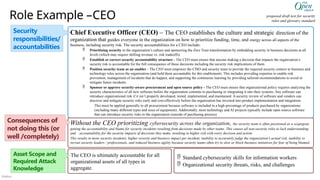
Role Example –CEO proposed draft text for security
roles and glossary standard
Chief Executive Officer (CEO) – The CEO establishes the culture and strategic direction of the
organization that guides everyone in the organization on how to prioritize funding, time, and energy across all aspects of the
business, including security risk. The security accountabilities for a CEO include:
 Prioritizing security in the organization’s culture and sponsoring the Zero Trust transformation by embedding security in business decisions at all
levels (which may require shifting revenue vs. risk tradeoffs).
 Establish or correct security accountability structure - The CEO must ensure that anyone making a decision that impacts the organization’s
security risk is accountable for the full consequence of those decisions including the security risk implications of them.
 Position security team as an enabler - The CEO must empower the CISO and security team to provide the required security context to business and
technology roles across the organization (and hold them accountable for this enablement). This includes providing expertise to enable risk
prevention, management of incidents that do happen, and supporting the continuous learning by providing tailored recommendations to avoid or
mitigate future incidents.
 Sponsor or approve security-aware procurement and open source policy - The CEO must ensure that organizational policy requires analyzing the
security characteristics of all new software before the organization commits to purchasing or integrating it into their systems. Any software can
introduce organizational risk if it isn’t properly developed, tested, implemented, and maintained. A security review of software and vendors can
discover and mitigate security risks early and cost-effectively before the organization has invested into product implementation and integration.
This must be applied generally to all procurement because software is included in a high percentage of products purchased by organizations
(including many different types and sizes of equipment). Additionally, most technology and AI projects typically include open source software
that can introduce security risks to the organization (outside of purchasing process)
Without the CEO prioritizing cybersecurity across the organization, the security team is often positioned as a scapegoat,
getting the accountability and blame for security incidents resulting from decisions made by other teams. This causes all non-security roles to lack understanding
and accountability for the security impacts of decisions they make, resulting in higher risk with every decision and action.
This results in more security incidents, higher severity and business impact per incident, inability to accurately judge the organization’s actual risk, inability to
recruit security leaders / professionals, and reduced business agility because security teams often try to slow or block business initiatives for fear of being blamed.
Security
responsibilities/
accountabilities
Consequences of
not doing this (or
well /completely)
The CEO is ultimately accountable for all
organizational assets of all types in
aggregate.
 Standard cybersecurity skills for information workers
 Organizational security threats, risks, and challenges
Asset Scope and
Required Attack
Knowledge
Público
Software as a Service (SaaS)
This is interactive!
1. Present Slide
2. Hover for Description
3. Click for more information
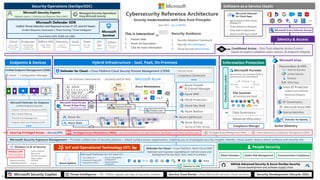
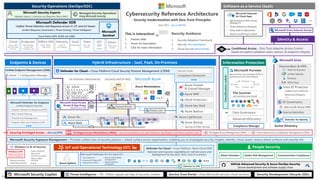
Cybersecurity Reference Architecture
Security modernization with Zero Trust Principles
April 2025 – aka.ms/MCRA
This is interactive!
1. Present Slide
2. Hover for Description
3. Click for more information
Microsoft Purview
Data security, loss prevention (DLP), &
governance across data lifecycle
File Scanner
(on-premises and cloud)
S3
Identity & Access
Microsoft Entra
IoT and Operational Technology (OT) People Security
3rd party IaaS & PaaS
Azure Arc
Intranet
Extranet
Endpoints & Devices Hybrid Infrastructure – IaaS, PaaS, On-Premises
Azure Key Vault
Azure WAF
DDoS Protection
Azure Backup
On Premises Datacenter(s)
Azure Firewall
& Firewall Manager
Attack Simulator Insider Risk Management
Azure Sphere
Compliance Manager
Private Link
Conditional Access – Zero Trust Adaptive Access Control
based on explicit validation users, session, & endpoint integrity
Network protection
Credential protection
Windows 11 & 10 Security
Exploit protection
App control
Full Disk Encryption
Attack surface
reduction
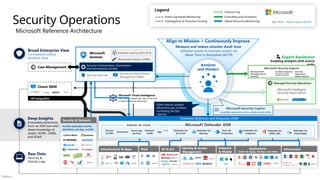
Security Operations (SecOps/SOC)
Microsoft Defender for Endpoint
Unified Endpoint Security
Endpoint Data Loss Protection (DLP)
Web Content Filtering
Endpoint Detection & Response (EDR)
Threat & Vuln Management
Defender for Cloud – Cross-Platform, Multi-Cloud XDR
Detection and response capabilities for infrastructure and
development across IaaS, PaaS, and on-premises Communication Compliance
Azure Lighthouse
Defender for Cloud – Cross-Platform Cloud Security Posture Management (CSPM)
Compliance Dashboard
Secure Score
Azure Bastion
Classification
Labels
Information Protection
Advanced eDiscovery
Data Governance
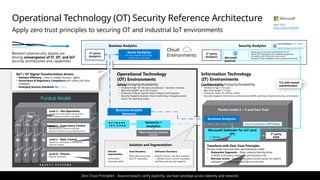
Microsoft Defender for IoT (and OT)
• Asset & Vulnerability
management
• Threat Detection
& Response
• ICS, SCADA, OT
• Internet of Things (IoT)
• Industrial IoT (IIoT)
Security Development Lifecycle (SDL)
Service Trust Portal – How Microsoft secures cloud services
Threat Intelligence – 78+ Trillion signals per day of security context
NGFW
Express Route
Microsoft Azure
Azure Marketplace
VPN & Proxy
Edge DLP
IPS/IDS/NDR
Azure Stack
Microsoft Entra Private
Access & App Proxy
Beyond User VPN
Security Guidance
1. Security Adoption Framework
2. Security Documentation
3. Cloud Security Benchmarks
Security & Other Services
Discover
Protect
Classify
Monitor
Microsoft Security Exposure Management – Provides unified view of security posture + attack surface across organization, enabling you to investigate security insights, identify critical assets, reduce attack surfaces and security risk
Unified Endpoint Management (UEM)
Intune Configuration Manager
Securing Privileged Access – aka.ms/SPA
Microsoft Defender
for Cloud Apps
• App Discovery & Risk Scoring
(Shadow IT)
• Threat Detection & Response
• Policy Audit & Enforcement
• Session monitoring & control
Active Directory
Endpoint
Workstations,
Server/VM,
Containers, etc.
Office 365
Email, Teams,
and more
Cloud
Azure, AWS,
GCP, On Prem
& more
Identity
Cloud &
On-Premises
SaaS
Cloud Apps
Other
Tools, Logs,
& Data
OT/
IoT
devices
Privileged Access Workstations (PAWs) - Secure workstations for administrators, developers, and other sensitive users
Microsoft Entra Internet Access
GitHub Advanced Security & Azure DevOps Security
Secure development and software supply chain
Data
SQL, DLP,
& more
Microsoft Defender XDR
Unified Threat Detection and Response across IT, OT, and IoT Assets
Incident Response | Automation | Threat Hunting | Threat Intelligence
Microsoft
Sentinel
Cloud Native SIEM, SOAR, and UEBA
Managed Security Operations
Using Microsoft Security
Microsoft Security Experts
Defender Experts | Detection and Response Team (DART)
Windows LAPS
Protect Local Admin
Account Credentials
Defender for Identity
Microsoft Entra PIM
External Identities
Entra ID Protection
Leaked cred protection
Behavioral Analytics
Passwordless & MFA
Passkeys
Hello for Business
ID Governance
FIDO2 Keys
Verified Identity
Microsoft Security Copilot
Privileged Access Management (PAM) Cloud Infrastructure Entitlement Management (CIEM)
Defender for APIs
Público
Software as a Service (SaaS)
This is interactive!
1. Present Slide
2. Hover for Description
3. Click for more information
Cybersecurity Reference Architecture
Security modernization with Zero Trust Principles
April 2025 – aka.ms/MCRA
This is interactive!
1. Present Slide
2. Hover for Description
3. Click for more information
Microsoft Purview
Data security, loss prevention (DLP), &
governance across data lifecycle
File Scanner
(on-premises and cloud)
S3
Identity & Access
Microsoft Entra
IoT and Operational Technology (OT) People Security
3rd party IaaS & PaaS
Azure Arc
Intranet
Extranet
Endpoints & Devices Hybrid Infrastructure – IaaS, PaaS, On-Premises
Azure Key Vault
Azure WAF
DDoS Protection
Azure Backup
On Premises Datacenter(s)
Azure Firewall
& Firewall Manager
Attack Simulator Insider Risk Management
Azure Sphere
Compliance Manager
Private Link
Conditional Access – Zero Trust Adaptive Access Control
based on explicit validation users, session, & endpoint integrity
Network protection
Credential protection
Windows 11 & 10 Security
Exploit protection
App control
Full Disk Encryption
Attack surface
reduction
Security Operations (SecOps/SOC)
Microsoft Defender for Endpoint
Unified Endpoint Security
Endpoint Data Loss Protection (DLP)
Web Content Filtering
Endpoint Detection & Response (EDR)
Threat & Vuln Management
Defender for Cloud – Cross-Platform, Multi-Cloud XDR
Detection and response capabilities for infrastructure and
development across IaaS, PaaS, and on-premises Communication Compliance
Azure Lighthouse
Defender for Cloud – Cross-Platform Cloud Security Posture Management (CSPM)
Compliance Dashboard
Secure Score
Azure Bastion
Classification
Labels
Information Protection
Advanced eDiscovery
Data Governance
Microsoft Defender for IoT (and OT)
• Asset & Vulnerability
management
• Threat Detection
& Response
• ICS, SCADA, OT
• Internet of Things (IoT)
• Industrial IoT (IIoT)
Security Development Lifecycle (SDL)
Service Trust Portal – How Microsoft secures cloud services
Threat Intelligence – 78+ Trillion signals per day of security context
NGFW
Express Route
Microsoft Azure
Azure Marketplace
VPN & Proxy
Edge DLP
IPS/IDS/NDR
Azure Stack
Microsoft Entra Private
Access & App Proxy
Beyond User VPN
Security Guidance
1. Security Adoption Framework
2. Security Documentation
3. Cloud Security Benchmarks
Security & Other Services
Discover
Protect
Classify
Monitor
Microsoft Security Exposure Management – Provides unified view of security posture + attack surface across organization, enabling you to investigate security insights, identify critical assets, reduce attack surfaces and security risk
Unified Endpoint Management (UEM)
Intune Configuration Manager
Securing Privileged Access – aka.ms/SPA
Microsoft Defender
for Cloud Apps
• App Discovery & Risk Scoring
(Shadow IT)
• Threat Detection & Response
• Policy Audit & Enforcement
• Session monitoring & control
Active Directory
Endpoint
Workstations,
Server/VM,
Containers, etc.
Office 365
Email, Teams,
and more
Cloud
Azure, AWS,
GCP, On Prem
& more
Identity
Cloud &
On-Premises
SaaS
Cloud Apps
Other
Tools, Logs,
& Data
OT/
IoT
devices
Privileged Access Workstations (PAWs) - Secure workstations for administrators, developers, and other sensitive users
Microsoft Entra Internet Access
GitHub Advanced Security & Azure DevOps Security
Secure development and software supply chain
Data
SQL, DLP,
& more
Microsoft Defender XDR
Unified Threat Detection and Response across IT, OT, and IoT Assets
Incident Response | Automation | Threat Hunting | Threat Intelligence
Microsoft
Sentinel
Cloud Native SIEM, SOAR, and UEBA
Managed Security Operations
Using Microsoft Security
Microsoft Security Experts
Defender Experts | Detection and Response Team (DART)
Windows LAPS
Protect Local Admin
Account Credentials
Defender for Identity
Microsoft Entra PIM
External Identities
Entra ID Protection
Leaked cred protection
Behavioral Analytics
Passwordless & MFA
Passkeys
Hello for Business
ID Governance
FIDO2 Keys
Verified Identity
Microsoft Security Copilot
Privileged Access Management (PAM) Cloud Infrastructure Entitlement Management (CIEM)
Defender for APIs
Público
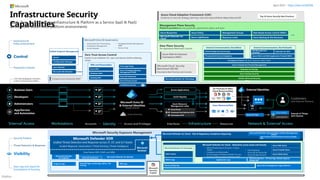
Cross-cloud and cross-platform
Comprehensive Security, Compliance and Identity capabilities that integrate with your existing solutions
CERTs / ISACs / Others
NIST / CIS / The Open Group / Others Solution Integration and MDR/MSSP Partners
Microsoft Intelligent Security Association Law Enforcement
Industry Partnerships
Microsoft Security, Compliance, and Identity Capabilities
Access Control
Identity and Network
Modern Security Operations
Rapid Resolution with XDR, SIEM, SOAR, UEBA and more
Asset Protection
Information Protection and App Security / DevSecOps
Technical Governance
Risk Visibility, Scoring, and Policy Enforcement
Threat Intelligence – 78+ Trillion signals per day of security context
People Security – User Education/Empowerment and Insider Threats
Security Operations [Center] (SOC) – Reduce attacker time/opportunity to impact business
Endpoints & Devices Hybrid Infrastructure – IaaS, PaaS, On-Premises
Software as a Service (SaaS)
S3
Operational Technology (OT)
IoT Devices
April 2025
https://aka.ms/MCRA
Público
Multi-Cloud and Cross-Platform Technology
Secure the enterprise you have
Microsoft Purview
Discovery, Classify, Protect, and Monitor across unstructured data (documents, spreadsheets, files, etc.) and structured data (SQL, Databases, etc.) to identify and mitigate critical risks
Information Protection
Identity & Access
Identity Enablement
Access cloud and legacy applications for Enterprise users and
External Identities like Partners (B2B) and Customers/Citizens (B2C)
Identity Security
Zero Trust Access Control using Behavioral Analytics, Threat Intelligence,
and integration of device and app trust signals
Microsoft Entra
formerly Azure AD
Security Operations [Center] (SOC)
Microsoft Sentinel – Cloud Native SIEM, SOAR, and UEBA for IT, OT, and IoT
• Threat & Vulnerability Management
• Integrated data classification
• Threat analytics on top attacks
• Advanced Detection & Remediation
• Automated Investigation & Remediation
• Advanced Threat Hunting
Microsoft Defender XDR - Extended Detection and
Response
Threat visibility and capabilities tailored to resources
Microsoft Defender for Cloud
IaaS, PaaS, and On-Premises
• VMs, Servers, App Environments
• Storage and Databases
• Containers and Orchestration
• DevOps, APIs, CI/CD, and more
Microsoft Defender for Endpoint
Unified Endpoint Security
• Endpoint Detection & Response (EDR)
• Data Loss Protection (DLP)
• Web Content Filtering
• Threat & Vuln Management
Microsoft Defender for Cloud Apps
• App Discovery & Risk Scoring (Shadow IT)
• Threat Detection & Response
• Policy Audit & Enforcement
• Session monitoring & control
• Info Protection & Data Loss Prevention (DLP)
Microsoft Defender for IoT
• Asset &
Vulnerability management
• Threat Detection & Response
• ICS, SCADA, OT
• Internet of Things (IoT)
• Industrial IoT (IIoT)
Azure Arc Threat Intelligence – 78+ Trillion
signals per day of security context
Endpoints & Devices Hybrid Infrastructure – IaaS, PaaS, On-Premises
Software as a Service (SaaS)
Operational Technology (OT)
IoT Devices
Microsoft Intune
Unified Endpoint Management (UEM)
PaaS
On-Premises IaaS
S3
April 2025
https://aka.ms/MCRA
Cloud-native application protection platform (CNAPP)
Microsoft Defender (CSPM+CWPP), Azure Security (CSNS), DevSecOps
GitHub Advanced Security – Secure development capabilities Securing components common most enterprise software supply chains
Público
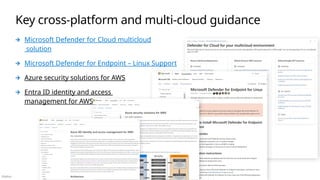
Key cross-platform and multi-cloud guidance
Microsoft Defender for Cloud multicloud
solution
Microsoft Defender for Endpoint – Linux Support
Azure security solutions for AWS
Entra ID identity and access
management for AWS
Público
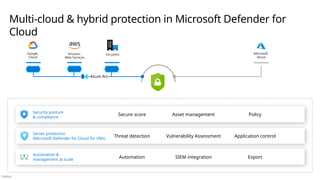
Multi-cloud & hybrid protection in Microsoft Defender for
Cloud
Secure score Asset management Policy
Threat detection Vulnerability Assessment Application control
Automation SIEM integration Export
Security posture
& compliance
Server protection
(Microsoft Defender for Cloud for VMs)
Automation &
management at scale
Microsoft
Azure
Azure Arc
On-prem
Google
Cloud
Amazon
Web Services
Público
Device Risk
Managed?
Compliant?
Infected with Malware?
…and more
User/Identity Risk
Multi-factor Authentication?
Impossible Travel?
Unusual Locations?
Password Leaked?
…and more
Any apps
and resources
Microsoft 365 apps
and resources
Internet and
SaaS apps
(including AI)
All private apps
Private web apps
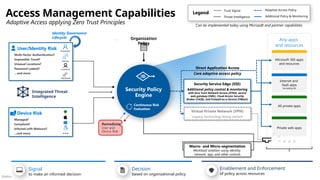
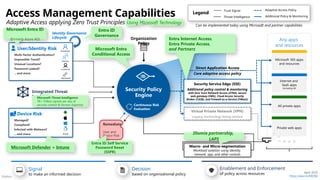
Access Management Capabilities
Adaptive Access applying Zero Trust Principles
Legend
Trust Signal Adaptive Access Policy
Threat Intelligence Additional Policy & Monitoring
Decision
based on organizational policy
Signal
to make an informed decision
Enablement and Enforcement
of policy across resources
Integrated Threat
Intelligence
Security Policy
Engine
Organization
Policy
Continuous Risk
Evaluation
Partner
Employee
Customer
Virtual Private Network (VPN)
Legacy technology being retired
Direct Application Access
Core adaptive access policy
Workload
Can be implemented today using Microsoft and partner capabilities
Macro- and Micro-segmentation
Workload isolation using identity,
network, app, and other controls
Remediate
User and
Device Risk
Security Service Edge (SSE)
Additional policy control & monitoring
with Zero Trust Network Access (ZTNA), secure
web gateway (SWG), Cloud Access Security
Broker (CASB), and Firewall-as-a-Service (FWaaS)
Identity Governance
Lifecycle
Público
Device Risk
Managed?
Compliant?
Infected with Malware?
…and more
User/Identity Risk
Multi-factor Authentication?
Impossible Travel?
Unusual Locations?
Password Leaked?
…and more
Any apps
and resources
Microsoft 365 apps
and resources
Internet and
SaaS apps
(including AI)
All private apps
Private web apps
Access Management Capabilities
Adaptive Access applying Zero Trust Principles
Legend
Trust Signal Adaptive Access Policy
Threat Intelligence Additional Policy & Monitoring
Decision
based on organizational policy
Signal
to make an informed decision
Enablement and Enforcement
of policy across resources
Integrated Threat
Intelligence
Security Policy
Engine
Organization
Policy
Continuous Risk
Evaluation
Partner
Employee
Customer
Virtual Private Network (VPN)
Legacy technology being retired
Direct Application Access
Core adaptive access policy
Workload
Can be implemented today using Microsoft and partner capabilities
Macro- and Micro-segmentation
Workload isolation using identity,
network, app, and other controls
Remediate
User and
Device Risk
Microsoft Entra ID
(formerly Azure AD)
Microsoft Defender + Intune
Entra ID Self Service
Password Reset
(SSPR)
Microsoft Entra
Conditional Access
Using Microsoft Technology
Illumio partnership,
LAPS
Security Service Edge (SSE)
Additional policy control & monitoring
with Zero Trust Network Access (ZTNA), secure
web gateway (SWG), Cloud Access Security
Broker (CASB), and Firewall-as-a-Service (FWaaS)
Entra Internet Access,
Entra Private Access,
and Partners
Microsoft Threat Intelligence
78+ Trillion signals per day of
security context & Human Expertise
April 2025
https://aka.ms/MCRA
Identity Governance
Lifecycle
Entra ID
Governance
Público
Identity Systems
Attackers have options
to compromise privileged access
A
u
t
h
o
r
i
z
e
d
E
l
e
v
a
t
i
o
n
P
a
t
h
s
User Access
Privileged Access
Account
Devices/Workstations
Intermediaries
Interface
Cloud Service Admin
Identity Systems
Business Critical Systems
Business Critical Assets
Across On-Premises, Cloud, OT, & IoT
Account
Devices/Workstations
Intermediaries
Interface
Potential Attack Surface
Público
Limit and protect pathways to privileged access
Prevention and rapid response
Identity Systems
A
u
t
h
o
r
i
z
e
d
E
l
e
v
a
t
i
o
n
P
a
t
h
s
User Access
Privileged Access
Account
Devices/Workstations
Intermediaries
Interface
Cloud Service Admin
Identity Systems
Business Critical Systems
Business Critical Assets
Across On-Premises, Cloud, OT, & IoT
Account
Devices/Workstations
Intermediaries
Interface
Complete End-to-end approach
Required for meaningful security
End-to-end
Asset Protection also required
Security updates, DevSecOps,
data at rest / in transit, etc.
Público
Enterprise Assets – Multiple generations of technology spanning clouds, Devices, Operating Systems, Applications, Data Formats, and more
Broad Enterprise View
Correlated/Unified
Incident View
Enabling a people-centric function focused rapid remediation of realized risk
Expert Assistance
Enabling analysts with scarce
skills
Deep Insights
Actionable alerts derived from deep
knowledge of assets and advanced
analytics
Raw Data
Security &
Activity Logs
(Case Management
Ensure consistent workflow and measurement of
success
Threat Intelligence (TI)
Critical security context
Security Operations Capabilities
Automation (SOAR)
reduces analyst effort/time per
incident, increasing SecOps capacity
Incident Response/Recovery Assistance
technical, legal, communication, and
other
Managed Detection and Response
Outsourced technical functions
Security Information and Event Management (SIEM)
Hunting + Investigation platform with Automation and Orchestration
(including machine learning (ML), User/ Entity Behavior Analytics (UEBA), & Security
Data Lake)
Information & Data
Applications
(SaaS, AI, legacy, DevOps, and other)
Endpoint
& Mobile
Identity & Access
Management
OT & IoT
Platform as a
Service (PaaS)
Infrastructure & Apps
Networ
k
Extended Detection and Response (XDR)
High quality detection for each asset + investigation remediation capabilities
API integration
Generative AI
Simplifies tasks and performs
advanced tasks through chat
interface
Analysts
and Hunters
Align to Mission + Continuously Improve
Measure and reduce attacker dwell time
(attacker access to business assets) via
Mean Time to Remediate (MTTR)
April 2025 – https://aka.ms/MCRA
Público
Broad Enterprise View
Correlated/Unified
Incident View
Microsoft Reference Architecture
Expert Assistance
Enabling analysts with scarce
skills
Deep Insights
Actionable detections
from an XDR tool with
deep knowledge of
assets, AI/ML, UEBA,
and SOAR
Raw Data
Security &
Activity Logs
(Classic SIEM
(Case Management
Microsoft Threat Intelligence
78+ Trillion signals per day of security
context & Human Expertise
API integration
Legend
Consulting and Escalation
Outsourcing
Native Resource Monitoring
Event Log Based Monitoring
Investigation & Proactive Hunting
Security Operations
SOAR reduces analyst
effort/time per incident,
increasing SecOps
capacity
Security & Network
Provide actionable security
detections, raw logs, or both
Microsoft
Sentinel
Machine Learning (ML) & AI
Behavioral Analytics (UEBA)
Security Data Lake
Security Incident & Event
Management (SIEM)
Security Orchestration, Automation,
and Remediation (SOAR)
Infrastructure & Apps PaaS OT & IoT Identity & Access
Management
{LDAP}
Endpoint
& Mobile
Information
SOAR - Automated investigation and response
(AutoIR)
Microsoft Defender XDR
Extended Detection and Response (XDR)
Defender for Cloud
Containers
Servers
& VMs
SQL
Azure app
services
Network
traffic
Defender for
Endpoint
Defender for
Cloud Apps
Defender for
Office 365
Defender for
Identity
Entra ID
Protection
April 2025 – https://aka.ms/MCRA
Managed Security Operations
Microsoft Security Experts
Managed XDR
Managed threat
hunting
Incident response
Formerly Detection &
response team (DART)
Security
Operations
Modernization
Microsoft Security Copilot
Simplifies experience for complex tasks/skills
Align to Mission + Continuously Improve
Measure and reduce attacker dwell time
(attacker access to business assets) via
Mean Time to Remediate (MTTR)
Analysts
and Hunters
Defender for
IoT & OT
Applications
(SaaS, AI, legacy, DevOps, and other)
Público
©Microsoft Corporation
Azure
Operational Technology (OT) Security Reference Architecture
Apply zero trust principles to securing OT and industrial IoT environments
S A F E T Y S Y S T E M S
Purdue Model
Level 1 – Basic Control
Electronics controlling or monitoring
physical systems
Level 0 – Process
Physical machinery
Level 2 – Supervisory Control
Monitoring & Control for discrete
business functions (e.g. production line)
Level 3 – Site Operations
Control & monitoring for physical site
with multiple functions (e.g. plant)
Security Analytics
Purdue Levels 4 + 5 and Zero Trust
Transform with Zero Trust Principles
Purdue model assumed static site/enterprise model
• Datacenter Segments – Align network/identity/other
controls to business workloads and business risk
• End user access - Dynamically grant access based on explicit
validation of current user and device risk level
Business Analytics
Confidentiality/Integrity/Availability
• Hardware Age: 5-10 years
• Warranty length 3-5 years
• Protocols: Native IP, HTTP(S), Others
• Security Hygiene: Multi-factor authentication (MFA), patching, threat monitoring, antimalware
Safety/Integrity/Availability
• Hardware Age: 50-100 years (mechanical + electronic overlay)
• Warranty length: up to 30-50 years
• Protocols: Industry Specific (often bridged to IP networks)
• Security Hygiene: Isolation, threat monitoring, managing vendor
access risk, (patching rarely)
Operational Technology
(OT) Environments
Information Technology
(IT) Environments
IIoT / OT Digital Transformation drivers
• Business Efficiency - Data to enable business agility
• Governance & Regulatory Compliance with safety and other
standards
• Emerging Security Standards like CMMC
Azure Analytics
IoT Hub, PowerBI, Azure Edge,
Digital Twins, and more
Blended cybersecurity attacks are
driving convergence of IT, OT, and IoT
security architectures and capabilities
Plant security console
(optional)
Sensor(s) +
Analytics
TLS with mutual
authentication
N E T W O R K
T A P / S P A N
April 2025 –
https://aka.ms/MCRA
Microsoft Defender for IoT (and
OT)
 Manager
 Security Console
3rd
party
Analytics
Cloud
Environments
Business Analytics
Business Analytic
Sensor(s)
Cloud Connection (OPTIONAL)
• Native plug-in for Microsoft Defender for IoT
• Native OT investigation & remediation playbooks
• Correlation with other data sources and
Strategic Threat intelligence (attack groups & context)
Zero Trust Principles - Assume breach, verify explicitly, Use least privilege access (identity and network)
Hard Boundary
Physically disconnect
from IT network(s)
Soft(ware) Boundary
People, Process, and Tech (network
+ identity access control, boundary
patching and security hygiene)
Internal
segmentation
As business
processes allow
Isolation and Segmentation
3rd
party
Analytics Microsoft
Sentinel
3rd
party
SIEM
Threat Intelligence – 78+ Trillion
signals per day of security context
Público
Microsoft Security Exposure Management
Microsoft Defender XDR
Unified Threat Detection and Response across IT, OT, and IoT Assets
Incident Response | Automation | Threat Hunting | Threat Intelligence
Microsoft
Sentinel
Cloud Native SIEM, SOAR, and UEBA
Azure Cloud Adoption Framework (CAF)
Guidance on security strategy, planning, roles and responsibilities https://aka.ms/CAF
Zero Trust Access Control
Explicit trust validation for users and devices before allowing
access
Infrastructure Security
Capabilities
Apply Zero Trust principles Infrastructure & Platform as a Service (IaaS & PaaS)
across multi-cloud cross-platform environments
Full Time Employees, Partners,
and/or outsourced providers
Microsoft Entra ID Governance
• Automated User Provisioning
• Entitlement Management
• Access Reviews
• Privileged Identity Management
(PIM)
• Terms of Use
Entra Privileged Identity
Management (PIM)
Entra ID Protection
MFA and Passwordless
Entra MFA
Windows Hello
Existing MFA
Management Plane Security
Platform provided security guardrails, governance, policy, and more
Endpoint logs PIM Logs
Entra ID logs, access logs, alerts, risk
scoring
Privileged Access Workstation (PAW)
Control
Governance &
Policy Enforcement
Preventive Controls
Security Posture
Visibility
Threat Detection & Response
Raw Logs and Signal for
Investigation & Hunting
Microsoft Defender for
Cloud
Azure Policy Role Based Access Control (RBAC)
Azure Blueprints Management Groups
Azure Lighthouse Azure Backup & Site Recovery
Resource Locks
Data Plane Security
Per-Application/Workload Controls
Microsoft Defender for Cloud Apps
Azure Well Architected
Framework (WAF)
Microsoft Cloud Security
Benchmark (MCSB)
Prescriptive Best Practices and Controls
Internal Communications (East/West) External Communications (North/South)
Network/App Security Groups
API Management
Gateway
Azure DDoS and Web Application Firewall (WAF)
PrivateLink & Service Endpoints
Encryption & Azure Key Vault, Application RBAC Model
Azure Firewall and Firewall Management
Azure DevOps Security
GitHub Advanced Security
Unified Endpoint Management
Intune
Configuration Manager
Azure Bastion
Microsoft 365 Defender
Customers
(and ‘External’ Partners)
Business Users
Developers
App/Service
and Automation
Administrators
API
Application
Workstations
‘Internal’ Access Accounts Access and Privileges Interfaces
Identity Infrastructure Network & ‘External’ Access
Resources
April 2025 – https://aka.ms/MCRA
Top 10 Azure Security Best Practices
Entra App Proxy
Defender for DevOps
Conditional Access
Entra Private Access
Microsoft Defender for Identity
Microsoft Defender
for Endpoint Entra ID Protection
CI/CD Pipeline
Azure Resource
Management (ARM)
Access Applications
Azure Portal
Command Line Interface (CLI)
Automation/API
Microsoft Entra ID
& External Identities
Formerly Azure AD
Active Directory
Azure Sphere
Existing/Other
Internet of Things
(IoT) Devices
Azure IoT Hub
External Identities
On-Premises & Other
Cloud Resources/Data
Azure Resources/Data
Defender for APIs
Microsoft Defender for Cloud - Risk & Regulatory Compliance Reporting
Azure Policy (audit) & Azure resource graph
API
Microsoft Defender for Cloud - Detections across assets and tenants
Application Logs
Azure WAF Alerts
Azure Firewall Alerts
Azure DDOS Alerts
Microsoft Defender for Cloud Apps
MDCA Alerts
MDCA Logs
• VMs & Tenants (Azure, On-prem, 3rd
party
clouds)
• Containers and Kubernetes
• IoT and Legacy OT Devices (SCADA, ICS, etc.)
• Application Programming Interfaces (APIs)
• CI/CD Pipelines
• Azure SQL & Cosmos DB
• Azure Storage Accounts
• And More…
Microsoft Defender External Attack Surface Management
(EASM)
Network Watcher – IP Flow logs, Packet Capture,
Virtual TAP
Azure activity log Azure Service Diagnostic Logs & Metrics
Microsoft
Security
Copilot
Público
DevSecOps – Agile security for workloads
Architecture & Governance
Security, Compliance, Identity, & Other Standards
Idea Incubation
New Product or Service
Production DevSecOps
Continuous improvement
Developer
BUILD DEPLOY
DESIGN/CODE RUN
Minimum viable product (MVP) for:
• Dev - Business / Technical Requirements
• Sec - Compliance / Security / Safety
• Ops - Quality / Performance / Support
Secure Design Secure Code Secure the Operations
Secure CI/CD Pipeline
First Production Release
Continuous Improvement of DevSecOps Lifecycle
1. MVP definitions – Update minimum requirements for Dev, Sec, and Ops (agility, stability, security, identity standards, and more)
2. Continuously improve process, program, education, tooling, etc. to improve developer productivity, efficiency, security, identity, and more)
Público
It’s bad out there!
For sale in “bad neighborhoods” on the internet
Attacker for hire (per
job)
$250 per job (and up)
Ransomware Kits
$66 upfront
(or 30% of the profit / affiliate model)
Compromised PCs /
Devices
PC: $0.13 to $0.89
Mobile: $0.82 to $2.78
Spearphishing for hire
$100 to $1,000
(per successful account takeover)
Stolen Passwords
$0.97 per 1,000 (average)
(Bulk: $150 for 400M)
Denial of Service
$766.67 per month
Attackers
Other Services
Continuous attack
supply chain innovation
Attacker techniques,
business models, and
skills/technology, are
continuously
evolving
Many attack tools and
tutorials/videos
available for free on
internet
Público
Continuously Evolving Threats
Require consistency, visibility, prioritization, and continuous learning
Attack Chain Models
Consistently describe attacks & techniques
Broad & Deep Visibility
Required across assets & techniques
Ransomware and Extortion
Should influence defense prioritization
• Use MITRE Attack Framework to
evaluate detection coverage and
plan to fill visibility gaps
• Use PETE to describe incidents
simply and consistently (including
to business leaders)
• Ensure you have visibility and
coverage across asset types and
common attack patterns
• Prioritize ransomware defenses
pragmatically
https://aka.ms/humanoperated
Público
ENTER TRAVERSE EXECUTE
OBJECTIVES
PREPARE
Attack Chain Models
Describe stages of an attack
Reconnaissanc
e
Resource
Development
Initial Access
Persistence
Privilege Escalation
Defense Evasion
Credential Access
Discovery
Lateral
Movement
Command and
Control
Exfiltration
Impact
Delivery Exploitation Installation Command and Control
Reconnaissance Weaponization
Actions on the
Objective
Simple model for business leaders and other non-technical stakeholders
PETE
Detailed model for technical detection coverage assessments and
planning
MITRE ATT&CK
Framework
Legacy Reference Model (missing lateral traversal)
Lockheed Martin Kill Chain
Público
Ransomware and Extortion Attacks
Evolution of ransomware/extortion
Rapidly became top threat to many organizations
Driven by attacker business model evolution
High impact and likelihood attack
High attacker profitability driving massive growth
Common attack pattern has weaknesses
All extortion relies on getting access to assets (via admin privileges)
Ransomware extortion relies on denying recovery (via backups)
Prioritize Defenses
Focus on disrupting attacker motivations and techniques first
aka.ms/HumanOperated
Público
Use Data to Prioritize Practically
Focus on most prevalent of effective and high impact attack techniques (not just attack of the day/week)
1. Prevalent
• Used against you
• Used on similar
organizations
(industry peers,
similar/related data,
etc.)
2. Proven
• Works in the wild
somewhere against
dissimilar
organizations 3. Potential
• Possible but not recently used in active attacks
A bottomless pit, but an expensive one
Attackers have potentially infinite ability to
abuse complex systems, but each new
approach costs time/resources/money or
increased chances for failure/detection.
Security events (and threat intelligence
research) can increase attack technique priority
Common for everyone
1. Phishing
2. Pass the hash/ticket
3. Password spray
4. Password re-use
from known
breaches
Always prioritize critical
business assets and direct
paths to them
Público
Product Name (& Previous Product Names) Product Category(ies) Security Modernization Initiative(s)
Microsoft Defender for Endpoint (MDE)
Formerly Microsoft Defender ATP, Windows Defender ATP,
Windows Defender Antivirus
Extended Detection and Response (XDR)
Endpoint Detection and Response (EDR)
Threat and Vulnerability Management (TVM)
Endpoint​Protection Platforms (EPP)
• Modern Security Operations
• Infrastructure and Development
• Security Hygiene: Backup and Patching
Microsoft Defender for Identity (MDI)
Formerly Azure ATP
Extended Detection and Response (XDR)
• Modern Security Operations
Microsoft Defender for Office (MDO)
Formerly Office 365 ATP
Extended Detection and Response (XDR) • Modern Security Operations
Microsoft Defender for Cloud Apps (MDCA)
Formerly Microsoft Cloud App Security
Cloud App Security Broker (CASB)
Extended Detection and Response (XDR)
• Access and Identity
• Modern Security Operations
• Data Security
Entra ID (Formerly Azure AD)
• Multifactor Authentication
• Microsoft Entra Conditional Access
• Self-service password management
• Identity Protection
• Identity Governance
• Privileged Identity Management (PIM)
Access​Management​
• Access and Identity
• Modern Security Operations
Microsoft Purview
• Compliance Management
• Data Lifecycle Management
• eDiscovery and auditing
• Insider Risk Management
• Information Protection
• Data Security
Windows 10 & Windows 11
• Windows Hello for Business
• Windows AutoPilot
• Advanced Windows Security
• Access and Identity
Microsoft Intune Unified Endpoint​Management ​
(UEM) • Access and Identity
What’s in Microsoft 365 E5
Product
Licensing
Details April 2025 – https://aka.ms/MCRA
Público
Infrastructure &
Development Security
IoT and OT
Security
Modern Security
Operations (SecOps/SOC)
Data Security
Zero Trust Architecture
Security Strategy and Program
Product Families Enable Modernization Initiatives
Access and Identity
Sentinel
Entra
Intune Priva
Defender Purview
Azure
Security Copilot
Público
Spans on-premises &
multi-cloud
environments
Typical ‘Flat’ Network
Managed CORP
Office Azure
All corporate devices
and access
Privileged Access Workstations
(PAWs)
Open Internet
Provided by someone else
Público
Validated Resource Access
All devices can access internet
Managed and compliant devices
can access corporate resources
Office Azure
Zero Trust
User Access Devices
Managed CORP
Limited general
client access
Spans on-premises & multi-cloud environments
Open Internet
Provided by someone else
Managed Devices
Security based on explicit validation
of trust signals on any network Managed
Virtual
Desktop
for unmanaged
device scenarios
like BYOD, partners,
and visitors (often
cloud hosted)
– Client Security
Transformation
Managed Internet
Monitored network for validated devices to
communicate peer to peer (patching, collaboration,
etc.)
Unmanaged Internet
Basic network monitoring for guests,
partners, new/unmanaged devices
Privileged Access Workstations
(PAWs)
Managed devices with strict security enforced
via cloud policy enforcement
Público
Validated Resource Access
All devices can access internet
Managed and compliant devices
can access corporate resources
Office Azure
Zero Trust
User Access Devices
Managed CORP
Limited general
client access
Spans on-premises & multi-cloud environments
Open Internet
Provided by someone else
Managed Devices
Security based on explicit validation
of trust signals on any network Managed
Virtual
Desktop
for unmanaged
device scenarios
like BYOD, partners,
and visitors (often
cloud hosted)
Managed Internet
Monitored network for validated devices to
communicate peer to peer (patching, collaboration,
etc.)
Unmanaged Internet
Basic network monitoring for guests,
partners, new/unmanaged devices
Privileged Access Workstations
(PAWs)
Managed devices with strict security enforced
via cloud policy enforcement
VPN Access
Fallback access + app usage discovery
Microsoft Entra
application proxy
Published Applications
secure access from anywhere
– App Access for
Clients
Público
Validated Resource Access
All devices can access internet
Managed and compliant devices
can access corporate resources
Specialized Segments
Isolate well-defined life/safety and
business-critical assets (as possible)
Managed
CORP
Office Azure
Zero Trust – Network Segment Transformation
User Access Devices
Spans on-premises & multi-cloud environments
Open Internet
Provided by someone else
Managed Devices
Security based on explicit validation
of trust signals on any network Managed
Virtual
Desktop
for unmanaged
device scenarios
like BYOD, partners,
and visitors (often
cloud hosted)
Managed Internet
Monitored network for validated devices to
communicate peer to peer (patching, collaboration,
etc.)
Unmanaged Internet
Basic network monitoring for guests,
partners, new/unmanaged devices
Privileged Access Workstations
(PAWs)
Managed devices with strict security enforced
via cloud policy enforcement
Microsoft Entra
application proxy
Low Impact IoT/OT
Printers, VoIP phones, etc.
Controlled / Sensitive Devices
Business Critical and/or
Legacy/Vulnerable Assets
Sensitive Business Units/Apps
High Impact IoT/OT
IoT/OT With Life/Safety Impact
Don’t Firewall
and Forget
Público
Enterprise Accounts
Privileged Accounts
Specialized Accounts
Anonymous and Consumer
identities
End State - Secure Access and Identity
Full Adaptive Access bridging both worlds and fulfilling Zero Trust and SASE visions
Sanctioned and
Managed Services
Internet and
Unsanctioned/Unmanaged Apps
Private and Managed in
the cloud or on-premises
Differentiated Devices
Differentiated Identities
Differentiated Resources
Network Segments
Grants access based on
explicitly verified trust
and organizational
policy
Sensitive System users,
developers, & admins
Business critical system
users, developers, admins
Partner
Employee
Adaptive
Access Control
Busin
ess
Critic
al
Segm
ent(s)
Sensit
ive
Busine
ss
Units/
Apps
Low
Impa
ct
IoT/O
T
Printe
rs,
VoIP
phon
es,
etc.
High
Impa
ct
IoT/O
T
IoT/
OT
With
Life/S
afety
Impac
t
Privileged Devices
Specialized Devices
Unmanaged devices
BYOD, partners, etc.
Enterprise Devices
Managed
Devices
Público
AI creates multiple security imperatives
Expect, plan for, and
track attacker use of
AI
Provide policy
and education
Adopt AI security
capabilities
Protect AI data
and applications
Público
AI has multiple implications for security
New/different interface Elevates Focus on Data
AI Requires & Accelerates Zero Trust AI Shared responsibility
Requires new
controls
Microsoft Approach
Público
AI increases data security importance and
challenges
AI amplifies existing data security/governance challenges
AI makes data discovery easy, so you must fix any existing issues with data
discovery, classification, & excessive permissions
AI increases value of data
AI relies on data and creates new value from it, increasing urgency to protect
data from attackers trying to steal/resell it
AI introduces new avenue of potential data leakage
Must secure AI applications and models to ensure their design,
implementation, and use don’t allow for unauthorized leakage to internal or
external users
Público
AI Requires New Security Measures
To complement traditional code/data controls (WAF, DLP, etc.)
Classic Application
Components
Artificial
Intelligence (AI)
Components
Predictable Logic
Consistent (deterministic) outcomes
 same results
Dynamic Logic
Variable outcomes
 similar results
• not the same
• not completely different
Precise interruption / redirection
of logic flow
General biases & hallucinations
in outcomes
AI is typically an
application component,
so both defense types
required
Logic
Type
Exploitation &
Mitigation
Running
Multiple Times
Público
AI and Zero Trust have a symbiotic relationship
AI
Zero Trust
AI requires Zero
Trust
AI is data-centric technology
and drives continuous
changes to business,
technology, and security
threats
AI accelerates Zero Trust
AI accelerates learning and
productivity by automating
complex tasks and acting as an
‘on-demand mentor’
Público
AI Shared Responsibility Model
Illustrates which responsibilities are typically performed by an organization
and which are performed by their AI provider (such as Microsoft)
Model Safety & Security Systems
Model Accountability
Model Tuning
Model Design & Implementation
Model Training Data Governance
AI Compute Infrastructure
Shared
IaaS
(BYO
Model)
PaaS
(Azure AI)
SaaS
(Copilot)
Customer
User Training and Accountability
Usage Policy, Admin Controls
Identity, Device, and Access Management
Data Governance
Microsoft
Model
Dependent
AI Platform
AI Usage
AI Application
AI Plugins and Data Connections
Application Design and Implementation
Application Infrastructure
Application Safety Systems
Público
Microsoft Approach
Focused on responsible rapid integration of technology
Prioritize greatest needs
and opportunities for
security
Establish clarity:
Your data is your data
Implement
responsible AI
principles
Público
Key Use Cases
Microsoft Security Copilot
Explore risks
and manage
security
posture
Summarize threat intelligence (TI) for threat actors
Research relevant TI for an artifact to contextualize
an incident or threat, including associated MITRE
ATT&CK techniques, tactics, and procedures (TTPs)
Investigate
and
summarize
incidents
Guidance for incident response, including
directions for triage, investigation, containment,
and remediation. Easily summarize incidents to
enable collaboration, escalation, business impact
analysis, and more.
Reverse engineer attacker scripts to quickly
understand their intent and capabilities
Easily build query-language and task automation
scripts.
Build &
Reverse
engineer
scripts
Manage and
Troubleshoot
Policy and
Controls
Reduce errors that could create operational
disruptions (directly or via incidents) by identifying
conflicting or misconfigured policies. Streamline
policy creation with recommended configurations
Agents perform specific
tasks autonomously
Público
AI Agents Perform Specific Tasks Autonomously
Examples from Microsoft Security Copilot
• Phishing Triage Agent in Microsoft Defender triages phishing alerts with accuracy to identify real
cyberthreats and false alarms. It provides easy-to-understand explanations for its decisions and improves
detection based on admin feedback.
• Alert Triage Agents in Microsoft Purview triage data loss prevention and insider risk alerts, prioritize
critical incidents, and continuously improve accuracy based on admin feedback.
• Conditional Access Optimization Agent in Microsoft Entra monitors for new users or apps not covered
by existing policies, identifies necessary updates to close security gaps, and recommends quick fixes for
identity teams to apply with a single click.
• Vulnerability Remediation Agent in Microsoft Intune monitors and prioritizes vulnerabilities and
remediation tasks to address app and policy configuration issues and expedites Windows OS patches with
admin approval.
• Threat Intelligence Briefing Agent in Security Copilot automatically curates relevant and timely threat
intelligence based on an organization’s unique attributes and cyberthreat exposure.
Agentic AI - AI Agents build on Generative AI and other automation technology to
perform specific tasks without requiring humans to oversee every action they take
Público
Review – Artificial Intelligence
(AI)
• GenAI enables a new interface (natural language)
• Makes technology easier to use and learn
• Enables people to do more advanced tasks
• Critical to adapt quickly to this technology
• Educate on and mitigate attacker use of AI
• Embrace security use of AI
• Protect business use of AI
• Securing AI is a shared responsibility
• Microsoft Approach to AI
• Establish clarity: your data is your data
• Implement responsible AI principles
• Focus initial security priorities on greatest needs
Resources and
References

MicrosoftCybserSecurityReferenceArchitecture-April-2025.pptx

  • 1.
    Público Microsoft Cybersecurity Reference Architectures(MCRA) Plan your end-to-end security architecture using Zero Trust principles N Adoption Framework April 2025 Release
  • 2.
    Público • Overview ofSecurity Adoption Framework and end to end cybersecurity architecture • End to End Security: Consider the whole problem • Ruthlessly Prioritize: Identify top gaps + quick wins • Get started: Start somewhere & continuously improve • Antipatterns and best practices • Guiding rules and laws for security • Diagrams and references Applying Zero Trust principles MCRA Agenda Top End to End Security Challenges • Incomplete or network-centric architectures aren’t agile & can’t keep up with continuous change (security threats, technology platform, and business requirements) • Challenges with • Creating integrated end to end architecture • Integrating security technologies • Planning and prioritizing security modernization initiatives MCRA is a subset of the full Security Architecture Design Session (ADS) module 1 workshop: Adoption Framework SAF Overview
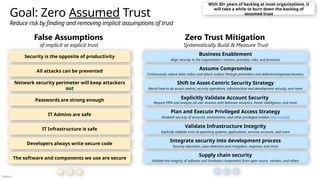
  • 3.
    Público Whiteboard – CurrentSecurity Architecture Geography and Cloud Usage • Where does your organization operate? • Which workloads are in the cloud? Which major cloud providers? (SaaS, PaaS, IaaS) Business and Technical Drivers • What is top of mind for business stakeholders? • What risks are important to the business? • Business/technology initiatives driving change? • What metrics are important to your program? Threats What types of attacks and adversaries are top of mind? Compliance Large & notable regulatory requirements Architecture, Policy, and Collaboration Describe how teams work together on end to end security + guiding documents/artifacts • Enterprise-wide security architecture approach and documentation • Policy update, monitoring, and related governance processes • Posture and vulnerability management processes • Technical collaboration processes (e.g. sharing learnings, joint technical planning, etc. with security operations, architects, engineers, posture management, governance, others) • Differences between on premises vs. cloud processes
  • 4.
    Público Security Adoption Framework(SAF) Security Adoption Framework (SAF) Zero Trust security modernization aligned to business goals and risks End to End Reference Strategy, Architecture, & Implementation using Zero Trust principles Business Scenarios Promised Outcomes Security Disciplines - Reference architectures, plans, and more Strategy, Integration, and Governance Access and Identity Security Operations (SecOps/SOC) Infrastructure & Development Security Data Security Technology Implementation Identities Apps Data Infrastructu re Network Endpoints OT and IoT Security AI Artificial Intelligence (AI) I want to rapidly and securely adopt AI (including protecting data) I want people to do their job securely from anywhere I want to minimize business damage from security incidents I want to identify and protect critical business assets I want to continuously improve my security posture and compliance
  • 5.
    Público Implementation and Operation Architects &Technical Managers Technical Leadership CI O CISO Business Leadership CEO Security Adoption Framework (SAF) Zero Trust security modernization rapidly reduces organizational risk Digital Transformation Implementation and Operation Technical Planning Architecture and Policy Security Strategy, Programs, & Epics Business Transformation Workshops available in Microsoft Unified Coordinated & integrated end-to-end security across the ‘hybrid of everything’ (on-prem, multi-cloud, IoT, OT, etc.) Includes Reference Plans Access and Identity Security Operations (SecOps/SOC) Infrastructure & Development Security Data Security OT and IoT Security Technology Implementation & Optimization > > > > > > > > > > > > > > Microsoft Cybersecurity Reference Architectures (MCRA) End to End Security Architecture Using Zero Trust Principles Security Capability Adoption Planning (SCAP) Enterprise Security Assessment CISO Workshop End-to-end Security Program and Strategy Guidance + Integration with Digital &Cloud TransformationTeams Security Strategy and Program Engaging Business Leaders on Security We are here
  • 6.
    Público Security must beintegrated everywhere and stay on a journey of continuous improvement Attackers prefer cheapest and easiest options …but are often willing to go further and spend more Security impacting decisions are made by most roles • Everybody has security accountabilities and/or responsibilities • Decision Makers are accountable for security outcomes of their decisions • Security teams must enable and support all roles across the organization (including business, engineering, and more) Continuous improvement, learning, and prioritization are critical to manage this
  • 7.
    Público Common Security Antipatterns- Technical Architecture Common mistakes that impede security effectiveness and increase organizational risk Securing cloud like on premises Attempting to force on-prem controls and practices directly onto cloud resources Lack of commitment to lifecycle Treating security controls and processes as points in time instead of an ongoing lifecycle Wasting resources on legacy Legacy system maintenance and costs draining ability to effectively secure business assets Disconnected security approach Independent security teams, strategies, tech, and processes for network, identity, devices, etc. Skipping basic maintenance Skipping backups, disaster recovery exercises, and software updates/patching on assets Artisan Security Focused on custom manual solutions instead of automation and off the shelf tooling Best Practices Develop and implement an end to end technical security strategy focused on durable capabilities and Zero Trust Principles This workshop helps you define and rapidly improve on best practices across security including: • Asset-centric security aligned to business priorities & technical estate (beyond network perimeter) • Consistent principle-driven approach throughout security lifecycle • Pragmatic prioritization based on attacker motivations, behavior, and return on investment • Balance investments between innovation and rigorous application of security maintenance/hygiene • ‘Configure before customize’ approach that embraces automation, innovation, and continuous improvement • Security is a team sport across security, technology, and business teams
  • 8.
    Público Attacker Failure +Increased Attacker Cost/Friction Security Success Invest intentionally into providing these durable outcomes Find and kick them out fast Reduce dwell time (mean time to remediate) with rapid detection and remediation Block Cheap and Easy Attacks Increase cost and friction for well known & proven attack methods (or easy to block options) ‘Left of Bang’ Prevent or lessen impact of attacks ‘Right of Bang’ Rapidly and effectively manage attacks Requires end to end collaboration
  • 9.
    Público Improving Resiliency Enable businessmission while continuously increasing security assurances IDENTIFY PROTECT DETECT RESPOND RECOVER GOVERN ‘Left of Bang’ Prevent or lessen impact of attacks ‘Right of Bang’ Rapidly and effectively manage attacks NIST Cybersecurity Framework v2 The job will never be ‘done’ or ‘perfect’, but it’s important to keep doing (like cleaning a house)
  • 10.
    Público Zero Trust Architecture SecurityStrategy and Program Security Posture Management End to End Security Enable business mission and increasing security assurances with intentional approach IDENTIFY PROTECT DETECT RESPOND RECOVER GOVERN ‘Left of Bang’ Prevent or lessen impact of attacks ‘Right of Bang’ Rapidly and effectively manage attacks Modern Security Operations (SecOps/SOC) Access and Identity Infrastructure & Development Security IoT and OT Security Data Security
  • 11.
    Público Attackers choose thepath of least cost/resistance Antipattern: Believing attackers will follow the planned path Defenders must focus on A. Strong security controls + effective placement B. Rapid response to attacks C. Continuously testing & monitoring controls
  • 12.
    Público Attacker Perspective: shapedby experience & ‘fog of war’ Attackers use what they see, know, and can guess Phishing email to admin Looks like they have NGFW, IDS/IPS, and DLP I bet their admins 1. Check email from admin workstations 2. Click on links for higher paying jobs Low Found passwords.xls Now, let’s see if admins save service account passwords in a spreadsheet… High
  • 13.
    Público Strategically position securityinvestments Raise cost and friction on attacker’s easiest and highest impact paths Replace password.xls ‘process’ with • PIM/PAM • Workload identities Sensitive Data Protection & Monitoring • Discover business critical assets with business, technology, and security teams • Increase security protections and monitoring processes • Encrypt data with Azure Information Protection Modernize Security Operations • Add XDR for identity, endpoint (EDR), cloud apps, and other paths • Train SecOps analysts on endpoints and identity authentication flows Protect Privileged Accounts Require separate accounts for Admins and enforce MFA/passwordless Privileged Access Workstations (PAWs) + enforce with Conditional Access Rigorous Security Hygiene • Rapid Patching • Secure Configuration • Secure Operational Practices
  • 14.
    Público Security is complexand challenging Infrastructure Application Data People Attackers have a lot of options  Forcing security into a holistic complex approach  Regulatory Sprawl - 200+ daily updates from 750 regulatory bodies  Threats – Continuously changing threat landscape  Security Tools – dozens or hundreds of tools at customers Must secure across everything  Brand New - IoT, DevOps, and Cloud services, devices and products  Current/Aging - 5-25 year old enterprise IT servers, products, etc.  Legacy/Ancient - 30+ year old Operational Technology (OT) systems Nothing gets retired! Usually for fear of breaking something (& getting blamed) Hybrid of Everything, Everywhere, All at Once Attacks can shut all business operations down, creating board level risk ‘Data swamp’ accumulates managed data + unmanaged ‘dark’ data
  • 15.
    Público Security is theopposite of productivity Business Enablement Align security to the organization’s mission, priorities, risks, and processes Assume Compromise Continuously reduce blast radius and attack surface through prevention and detection/response/recovery All attacks can be prevented Shift to Asset-Centric Security Strategy Revisit how to do access control, security operations, infrastructure and development security, and more Explicitly Validate Account Security Require MFA and analyze all user sessions with behavior analytics, threat intelligence, and more Network security perimeter will keep attackers out Passwords are strong enough IT Admins are safe IT Infrastructure is safe Goal: Zero Assumed Trust Reduce risk by finding and removing implicit assumptions of trust Developers always write secure code The software and components we use are secure Plan and Execute Privileged Access Strategy Establish security of accounts, workstations, and other privileged entities (aka.ms/spa) Validate Infrastructure Integrity Explicitly validate trust of operating systems, applications, services accounts, and more Integrate security into development process Security education, issue detection and mitigation, response, and more Supply chain security Validate the integrity of software and hardware components from open source. vendors, and others False Assumptions of implicit or explicit trust Zero Trust Mitigation Systematically Build & Measure Trust With 30+ years of backlog at most organizations, it will take a while to burn down the backlog of assumed trust
  • 16.
    Público 1. Look Endto End: Consider the whole security problem 2. Ruthlessly Prioritize: Identify top gaps + quick wins 3. Get started: Start somewhere and continuously improve Zero Trust Security Architecture End to End Prioritized Execution + Continuous Improvement OBSERVE, ORIENT DECIDE ACT 1 2 3 ... Disrupt attacker return on investment (ROI) Leverage reference plans and architectures Security is complex and challenging Resilience required across the lifecycle Focus on prevalent attacks and use data Microsoft Security Adoption Framework
  • 17.
    Público Guiding Rulesets forEnd to End Architecture Zero Trust Commandments Requirements that represent best practices for a Zero Trust Architecture (ZTA) and transformation. (The Open Group Standard) Usage: General planning + Testing whether something is ‘Zero Trust’ or not 10 Laws of Cybersecurity Risk Key truths about managing security risk that bust common myths. Usage: Ensuring security strategy, controls, and risk are managed with realistic understanding of how attacks, humans, and technology work Immutable Laws of Security Key truths about security claims and controls that bust common myths. Usage: Validating design of security controls, systems, and processes to ensure they are technically sound
  • 18.
    Público Microsoft Cybersecurity ReferenceArchitectures (MCRA) Architecture Diagrams & References Microsoft Security Capabilities Zero Trust Adaptive Access Security Service Edge (SSE) Build Slide People Roles and Risk Management Infrastructure Multi-cloud, cross-platform, native controls Security Operations (SecOps/SOC) Operational Technology (OT) Industrial Control Systems Threat Environment Ransomware/Extortion, Data Theft, and more Attack Chain Coverage aka.ms/MCRA | aka.ms/MCRA-videos | April 2025 Slide notes have speaker notes & change history Multi-Cloud & Cross-Platform Microsoft 365 E5 Journey Role Mapping Zero Trust Development / DevSecOps Enabling Security & Business Goals Security Adoption Framework (SAF) Privileged Access Device Types Artificial Intelligence (AI) and Security Standards Mapping Patch Modernization
  • 19.
    Público Security Strategy andProgram Zero Trust Architecture Access and Identity Modern Security Operations (SecOps/SOC) Infrastructure & Development Security Security Adoption Framework Reduce risk by rapidly modernizing security capabilities and practices Business and Security Integration Implementation and Operation Technical Planning Architecture and Policy Security Strategy, Programs, and Epics Securing Digital Transformation Microsoft Cybersecurity Reference Architectures (MCRA) Engaging Business Leaders on Security Workshops available in the Microsoft Unified catalog All are holistic for the ‘hybrid of everything’ technical estate (on-premises, multi-cloud, IoT, OT, etc.) Includes Reference Plans CISO Workshop
  • 20.
    Público Where do youwant to go next? Engagements help navigate the vast complexity of security Capabilities Review Security Capability Adoption Planning (SCAP) End to End Security Assessment Enterprise Security Assessment (ESA) What do we own? Are we using it? How are we doing today? Recommend combination of: • Context – Strategy/Architecture • Action – Technical Implementation Technical Architecture and Planning Access and Identity Modern Security Operations (SecOps/SOC) Infrastructure & Development Security Data Security Microsoft Product and Technology Implementation Strategic Security Integration Security Strategy and Program End to End Security Architecture Microsoft Cybersecurity Reference Architectures (MCRA) Security Modernization Journey Defender Sentinel Entra Intune Purview Security Copilot
  • 21.
    Público Let’s get nextsteps locked in Capture actions and who follows up on them # Next Step Point of Contact 1 2 3 4 5
  • 22.
    Público Security Resources Security AdoptionFramework aka.ms/saf Security Hub aka.ms/SecurityDocs Security Strategy and Program • CISO Workshop – aka.ms/CISOworkshop | -videos • Driving Business Outcomes Using Zero Trust ▪ Rapidly modernize your security posture for Zero Trust ▪ Secure remote and hybrid work with Zero Trust ▪ Identify and protect sensitive business data with Zero Trust ▪ Meet regulatory and compliance requirements with Zero Trust End to End Security Architecture • Microsoft Cybersecurity Reference Architectures (MCRA) - aka.ms/MCRA | -videos • Zero Trust Workshop - http://aka.ms/ztworkshop • Zero Trust Deployment Guidance - aka.ms/ztguide | aka.ms/ ztramp • Ransomware and Extortion Mitigation - aka.ms/humanoperated • Backup and restore plan to protect against ransomware - aka.ms/backup Secure Access and Identities Modern Security Operations (SecOps/SOC) Infrastructure & Development Security Data Security IoT and OT Security Product Capabilities www.microsoft.com/security/business Security Product Documentation Azure | Microsoft 365 Microsoft Security Response Center (MSRC) www.microsoft.com/en-us/msrc • Security Development Lifecycle (S DL ) • Security Controls • Microsoft Cloud Security Benchmark aka.ms/benchmarkdocs • Well Architected Framework (WAF) • aka.ms/wafsecure • Azure Security Top 10 • aka.ms/azuresecuritytop10 • Ninja Training • Defender for Cloud • MCRA Video • Infrastructure Security • Defender for Cloud Documentatio n • Securing Privileged Access (SPA) Guidance aka.ms/SPA • Access Control Discipline • Ninja Training • Microsoft Defender for Identity aka.ms/mdininja • MCRA Video • Zero Trust User Access • Microsoft Entra Documentation aka.ms/entradocs • Incident Response - aka.ms/IR • CDOC Case Study - aka.ms/ITSOC • Ninja Training • Microsoft 365 Defender aka.ms/m365dninja • Microsoft Sentinel aka.ms/sentinelninja • Microsoft Defender for Office 365 aka.ms/mdoninja • Microsoft Defender for Endpoint aka.ms/mdeninja • Microsoft Cloud App Security aka.ms/mcasninja • MCRA Videos • Security Operations • SecOps Integration • Secure data with Zero Trust • Ninja Training • Microsoft Purview Information Protection aka.ms/MIPNinja • Microsoft Purview Data Loss Prevention aka.ms/DLPNinja • Microsoft Purview Insider Risk Management • Insider Risk Management • Data Security for SOC aka.ms/NinjaDSforSOC • Microsoft Purview Documentation aka.ms/purviewdocs • Ninja Training • Defender for IoT Training • MCRA Videos • MCRA Video OT & IIoT Security • Defender for IoT Documentation aka.ms/D4IoTDocs
  • 23.
    Público Key Industry Referencesand Resources The Open Group Zero Trust Commandments Standard - https://publications.opengroup.org/c247 Zero Trust Reference Model - https://publications.opengroup.org/s232 Security Principles for Architecture - https://publications.opengroup.org/c246 US National Institute of Standards and Technology (NIST) Cybersecurity Framework - https://www.nist.gov/cyberframework Zero Trust Architecture - https://www.nist.gov/publications/zero-trust-architecture NCCoE Zero Trust Project - https://www.nccoe.nist.gov/projects/implementing-zero-trust-architecture Secure Software Development Framework (SSDF) - https://csrc.nist.gov/pubs/sp/800/218/final Cybersecurity and Infrastructure Security Agency (CISA) Zero Trust Maturity Model - https://www.cisa.gov/zero-trust-maturity-model Center for Internet Security (CIS) CIS Benchmarks – https://www.cisecurity.org/cis-benchmarks/
  • 24.
    Público Standards Mapping Zero TrustModel The Open Group Zero Trust Model NIST Zero Trust Model Microsoft References Zero Trust Capabilities The Open Group Rapidly Report Regulatory Compliance SecOps Terminology Capabilities Asset-Centric Security Operations (SecOps/SOC) Identity and Adaptive Access Management (IAAM) Microsoft Mapping Architecture Building Blocks (ABBs) Capabilities Microsoft Mapping Architecture Building Blocks (ABBs) All capabilities ...mapped to NIST CSF
  • 25.
    Público Asset-Centric Security Operations(ACSO) ACSO-1 Asset-Centric Security Operations ACSO-1.1 - Rapid Incident Response ACSO-1.2 - Continuous Organizational Improvement ACSO-1.3 - Undetected Attack Discovery ACSO-1.4 - Attack Simulation ACSO-1.5 - SecOps Data Analysis and Automation ACSO-1.1.1 - Incident Investigation, Containment, and Remediation ACSO-1.1.2 - Incident Impact and Root Cause Analysis ACSO-1.1.3 - Case Management ACSO-1.1.4 - Major Incident Management ACSO-1.3.1 - Threat Hunting ACSO-1.3.2 - Custom Detection Engineering ACSO-1.4.1 - Simulated Attack Planning ACSO-1.4.2 - Simulated Attack Execution ACSO-1.4.3 - Simulated Attack Learnings Integration ACSO-1.5.1 - Common Attack Technique Detection ACSO-1.5.2 - Data Aggregation, Storage, Correlation, and Analysis ACSO-1.5.3 - SecOps Process Automation ACSO-1.5.4 - Technical Threat Data Integration ACSO-1.5.5 - SecOps Custom Development ACSO-1.2.1 - SecOps Continuous Operational Improvement ACSO-1.2.2 - Threat Intelligence Sharing, Education, and Advocacy Capabilities
  • 26.
    Público Asset-Centric Security OperationsPlatform (ACSOP) Architecture Building Blocks (ABBs) ACSOP-1 Asset-Centric Security Operations Platform ACSOP-1.1 - SecOps Core Reactive Processes ACSOP-1.2.6 - Attack Simulation Process ACSOP-1.3 - SecOps Data Analysis and Automation Platform ACSOP-1.1.1 - Incident Investigation and Forensic Analysis Process ACSOP-1.1.3 - Incident Summarization Process ACSOP-1.1.4 - Incident Impact and Root Cause Analysis Process ACSOP-1.1.6 - Operational Excellence Process ACSOP-1.1.5 - Major Incident Management Process ACSOP-1.2.2 - Custom Detection Engineering Process ACSOP-1.3.3 - Extended Detection and Response (XDR) ACSOP-1.3.4 - Security Information and Event Management (SIEM) ACSOP-1.3.5 - Security Data Lake ACSOP-1.3.6 - SecOps Automation Platform (SOAR) ACSOP-1.3.7 - Technical Anomaly Platform (Machine Learning, RE, etc.) ACSOP-1.3.8 - Behavior Anomaly Platform (UEBA) ACSOP-1.3.9 - Threat Intelligence Platform (TIP) ACSOP-1.2.6.4 - Purple Team Process ACSOP-1.3.1 - Case Management Platform ACSOP-1.3.2 - SecOps Business Intelligence (BI) Platform ACSOP-1.2.5 - SecOps Automation Management Process ACSOP-1.2.3 - Threat Hunting Process ACSOP-1.2.4 - Threat Intelligence Development & Dissemination Process ACSOP-1.2 - SecOps Proactive Processes ACSOP-1.2.6.5 - Red Team Process ACSOP-1.2.6.6 - Penetration Test Process ACSOP-1.2.6.3 - Technical Discussion-based Simulation (Tabletop Exercise) Process ACSOP-1.2.6.1 - Attack Scenario Planning Process ACSOP-1.1.6.2 - SecOps Change Management Process ACSOP-1.1.6.1 - SecOps Trend and Pattern Analysis Process ACSOP-1.2.6.2 - Identify Friend/Foe (IFF) Process ACSOP-1.1.6.3 - Detection Source Management ACSOP-1.1.1.2 - Technology Team Interaction Process ACSOP-1.1.1.1 - User Interaction Process ACSOP-1.1.6.4 - User Reporting Process ACSOP-1.2.1 - SecOps Data Management Process ACSOP-1.2.5.1 - SecOps Custom Development Process ACSOP-1.1.5.2 - Business Coordination Process ACSOP-1.1.5.1 - Technical Coordination Process ACSOP-1.1.2 - Incident Containment and Asset Recovery Process ACSOP-1.3.10 - SecOps Generative AI (GenAI) Platform
  • 27.
    Público Enable a StandardZero Trust Approach Microsoft Technologies enable Asset-Centric Security Operations Platform (Zero Trust Reference Model) ABB # Architecture Building Block (ABB) Name Level Microsoft Technology ACSOP-1.3 SecOps Data Analysis and Automation Platform 2 <All Below> ACSOP-1.3.1 Case Management Platform 3 Microsoft 365 Defender Microsoft Sentinel ACSOP-1.3.2 SecOps Business Intelligence (BI) Platform 3 Microsoft PowerBI ACSOP-1.3.3 Extended Detection and Response (XDR) 3 Microsoft 365 Defender Microsoft Defender for Cloud ACSOP-1.3.4 Security Information and Event Management (SIEM) 3 Microsoft Sentinel ACSOP-1.3.5 Security Data Lake 3 Microsoft Azure Data Explorer (ADX) ACSOP-1.3.6 SecOps Automation Platform (SOAR) 3 Microsoft 365 Defender (AutoIR) Microsoft Sentinel ACSOP-1.3.7 Technical Anomaly Platform (Machine Learning, RE, etc.) 3 Microsoft 365 Defender Microsoft Defender for Cloud Microsoft Sentinel ACSOP-1.3.8 Behavior Anomaly Platform (UEBA) 3 ACSOP-1.3.9 Threat Intelligence Platform (TIP) 3 Microsoft Defender Threat Intelligence Security Copilot ACSOP-1.3.10 SecOps Generative AI (GenAI) Platform 3 Security Copilot Note: Security Architecture Design Session (ADS) workshop for Security Operations (SecOps/SOC) includes guidance for ACSOP-1.1 SecOps Core Reactive Processes and ACSOP-1.2 SecOps Proactive Processes ABBs
  • 28.
    Público Identity and AdaptiveAccess Management (IAAM) Capabilities IAAM-1 Identity and Adaptive Access Management IAAM-1.1 - Authentication (Known) IAAM-1.2 - Trust Validation (Trusted) IAAM-1.3 - Authorization (Allowed) IAAM-1.4 - Identity and Policy Lifecycle Management IAAM-1.2.1 - Subject Security Status Determination IAAM-1.2.2 - Policy Decisioning IAAM-1.2.2.3 - Policy Enforcement IAAM-1.4.3 - Identity & Access Lifecycle Management IAAM-1.3.1 - Subject Entitlements to Workloads/Assets IAAM-1.2.2.1 - Adaptive Policy Determination For Subjects IAAM-1.2.2.2 - Adaptive Policy Determination for Sessions IAAM-1.4.2 - Identity Definition and Assignment IAAM-1.4.2.1 - Identity authority management IAAM-1.3.2 - Workload-Specific Access Entitlements IAAM-1.4.2.2 - User Identity Assignment IAAM-1.4.2.3 - Device Identity Assignment IAAM-1.4.2.4 - Application and Services Identity Assignment IAAM-1.4.2.5 - Data Identity Assignment IAAM-1.3.3 - Identity Consent Management IAAM-1.4.4 - Access Monitoring & Anomaly Detection IAAM-1.4.2.6 - Ephemeral Identity Definition and Assignment IAAM-1.4.2.7 - Other Identity Definition and Assignment IAAM-1.4.1 - Policy Lifecycle Management
  • 29.
    Público Identity and AdaptiveAccess Management Platform (IAAMP) Architecture Building Blocks ( ABBs ) IAAMP-1.2 Adaptive Access Control Platform IAAMP-1.2.1 - Adaptive Policy Information Point (PIP) IAAMP-1.2.3 - Adaptive Policy Enforcement Point (PEP) IAAMP-1.2.2 - Adaptive Policy Decision Point (PDP) IAAMP-1.2.4 - Adaptive Policy Manager IAAMP-1.2.5 - Policy Signal Source IAAMP-1.3.2 - Identity Lifecycle Management Platform IAAMP-1.3.7 - Workload Authorization Mechanisms IAAMP-1.1 Identity and Access Management Processes IAAMP-1 Identity and Adaptive Access Management Platform IAAMP-1.1.1 - Identity lifecycle management Process IAAMP-1.1.4 - Access Management Operational Excellence Process IAAMP-1.1.2 - Access Policy Lifecycle Management Process IAAMP-1.1.6 - Access Management Integration Process IAAMP-1.1.4.2 - Access Change Management Process IAAMP-1.1.4.1 - Access Trend, Pattern, and Problem Management Process IAAMP-1.1.4.3 - Access Problem Management Process IAAMP-1.1.6.1 - Posture Management Integration Process IAAMP-1.1.6.2 - SecOps Integration Process IAAMP-1.1.6.3 - Development Integration Process IAAMP-1.1.6.4 - Infrastructure Integration Process IAAMP-1.1.6.5 - Data Integration Process IAAMP-1.3.1 - Identity Provider (IDP) IAAMP-1.3.6 - Authenticated Network Access Control Platform IAAMP-1.3.5 - Certificate and Key Management Platform IAAMP-1.1.5 - Consent Management Lifecycle Process IAAMP-1.1.2.2 - App access & Consent management process IAAMP-1.1.2.1 - Organizational access management process IAAMP-1.3 Identity, Key, and Access Management Platform IAAMP-1.3.4 - Personal Data Consent Management Platform IAAMP-1.1.3 - Identity Protocol management IAAMP-1.3.3 - Application Consent Management Platform
  • 30.
    Público Enable a StandardZero Trust Approach Microsoft Technologies enable Identity & Adaptive Access Management Platform (Zero Trust Reference Model Standard) ABB Number ABB Level Microsoft Technology IAAMP-1.2 Adaptive Access Control Platform 2 Microsoft Entra IAAMP-1.2.1 Adaptive Policy Information Point (PIP) 3 Entra Conditional Access IAAMP-1.2.2 Adaptive Policy Decision Point (PDP) 3 IAAMP-1.2.3 Adaptive Policy Enforcement Point (PEP) 3 Entra Conditional Access Entra Private Access / Internet Access Microsoft Intune Purview Information Protection & DLP IAAMP-1.2.4 Adaptive Policy Manager 3 Entra Conditional Access IAAMP-1.2.5 Policy Signal Source 3 Entra ID / Entra ID Protection Microsoft Intune Microsoft 365 – Defender for Endpoint IAAMP-1.3 Identity, Key, and Access Management Platform 2 Entra ID IAAMP-1.3.1 Identity Provider (IDP) 3 Entra ID, Active Directory IAAMP-1.3.2 Identity Lifecycle Management Platform 3 Entra ID Governance IAAMP-1.3.3 Application Consent Management Platform 3 Entra ID IAAMP-1.3.4 Personal Data Consent Management Platform 3 Priva Consent Management IAAMP-1.3.5 Certificate and Key Management Platform 3 Azure Key Vault Active Directory Certificate Services Microsoft Identity Manager Certificate Manager IAAMP-1.3.6 Authenticated Network Access Control Platform 3 Entra Private Access / Internet Access Azure VPN IAAMP-1.3.7 Workload Authorization Mechanisms 3 Microsoft Azure
  • 31.
    Público Zero Trust Architecture SecurityStrategy and Program Security Modernization with Zero Trust Principles Access and Identity Business Enablement Align security to the organization’s mission, priorities, risks, and processes Assume Breach (Assume Compromise) Assume attackers can and will successfully attack anything (identity, network, device, app, infrastructure, etc.) and plan accordingly Verify Explicitly Protect assets against attacker control by explicitly validating that all trust and security decisions use all relevant available information and telemetry. Use least privilege access Limit access of a potentially compromised asset, typically with just-in-time and just- enough-access (JIT/JEA) and risk-based polices like adaptive access control. Infrastructure & Development Security IoT and OT Security Modern Security Operations (SecOps/SOC) Data Security
  • 32.
    Público Zero Trust Principles Useleast privilege access Limit access of a potentially compromised asset, typically with just-in-time and just- enough-access (JIT/JEA) and risk-based polices like adaptive access control.  Reduces “blast radius“ of compromises  Reduces “attack surface” of each asset  Transforms from “defend the network” to “enable secure productivity on any network” Asset/Node = account, app, device, VM, container, data, API, etc. Verify explicitly Protect assets against attacker control by explicitly validating that all trust and security decisions use all relevant available information and telemetry. Business Enablement Align security to the organization’s mission, priorities, risks, and processes Assume Breach (Assume Compromise) Assume attackers can and will successfully attack anything (identity, network, device, app, infrastructure, etc.) and plan accordingly
  • 33.
    Público Key Industry Collaborations TheOpen Group Focused on integration with business and IT/Enterprise/Security architecture US National Institute of Standards and Technology (NIST) Focused on architecture and implementation with available technology Many organizations are contributing valuable perspectives and guidance like the Cybersecurity and Infrastructure Security Agency (CISA), Cloud Security Alliance (CSA), and some technology vendors
  • 34.
    Público Key Zero TrustModels and Architectures The Open Group Focused on integration with business and IT/Enterprise/Security architecture US National Institute of Standards and Technology (NIST) Focused on architecture and implementation with available technology
  • 35.
    Público Asset Protection Classification, Protection,Tokenization Digital Ecosystems Zero Trust Components Rapid Threat Detection, Response, and Recovery Asset-Centric Security Operations Clarity, Automation, and Metrics-Driven Approach Governance Visibility and Policy Data/Information Apps & Systems Security Zones Centralized Security Policy Decisions Access Control Identity and Network - Multi-factor Authentication Threat Intelligence </> APIs Distributed Policy Enforcement Points (PEPs) Innovation Security Securing new asset development
  • 36.
    Público Asset Protection Classification, Protection,Tokenization Digital Ecosystems Microsoft Security Capability Mapping The Open Group Zero Trust Components Rapid Threat Detection, Response, and Recovery Asset-Centric Security Operations Clarity, Automation, and Metrics-Driven Approach Governance Visibility and Policy Data/Information Apps & Systems Security Zones Centralized Security Policy Decisions Access Control Identity and Network - Multi-factor Authentication Threat Intelligence Innovation Security Securing new asset development Microsoft Entra Conditional Access Defender for Endpoint Endpoint Detection and Response (EDR) Intune Device Management Microsoft Sentinel • Security Information and Event Management (SIEM) • Security Orchestration, Automation, and Response (SOAR) Microsoft Defender Defender for Identity Defender for Cloud Defender for Cloud Apps Defender for Endpoint Defender for Office 365 Security telemetry from across the environment 78+ Trillion signals per day of security context Microsoft Entra Conditional Access Azure Firewall (Illumio partnership) Defender for APIs GitHub Advanced Security & Azure DevOps Security Secure development and software supply chain Entra Internet Access Entra Private Access Defender for Cloud Azure Arc Microsoft Purview Microsoft Priva Distributed Policy Enforcement Points (PEPs) Microsoft Entra ID Entra ID Governance ID Protection Workload ID Defender for Identity Microsoft Security Exposure Management
  • 37.
    Público Security Analytics Data Security Endpoint Security User Device Mobile Device Device (withSDP Client) ICAM IDENTITY • User • Device ACCESS & CREDENTIALS • Management • Authentication (SSO/MFA) • Authorization FEDERATION GOVERNANCE PE/PA POLICY Evaluate Access PEP GRANT ACCESS (Micro- segmentation) GRANT ACCESS (SDP) Protected Resources CLOUD APPS & WORKLOADS ON-PREM APPS & WORKLOADS (File Share, Database, Storage, Apps) SDP (example: TLS Tunnel) Zero Trust Architecture (ZTA)
  • 38.
    Público Protected Resources PEP Data Securit y PE/PA Security Analytics ICAM Identity •User • Device Access & Credential Mgmt. • Authentication • Authorization Identity, Credentials, and Access Management (ICAM) Federation Governanc e Secure Admin Workstations Virtual Desktops Policy Enforcement / Admin (PE/PA) Data Loss Prevention (DLP) Document Protection Office 365 Cloud Infra SQL DB/Files Policy Determine Access Endpoint Security Devices Devices w/ SDP User Mobile Device Grant Access Intune Entra Azure Virtual Desktop Windows 365 Cloud Apps Workloads Purview DLP Purvie w Information Protection Purvie w Mobile App Mgmt Defender for Cloud Apps Information Protection Intune Defende r for Cloud Microsoft Zero Trust Capability Mapping Key NIST Sub-Area • Sub-Area NIST Area Microsoft 365 Defender for Cloud Apps Defender for Cloud Microsoft Cloud Security Benchmark Defender for Office 365 3P SaaS Azure IaaS Azure Arc Defender for Identity Intune VPN Backend Connector Azure Automanage Entra Private Access Connector Microsoft Entra Conditional Access Global Secure Access client Intune Device Management Microsoft Service Defender for Endpoint Endpoint Detection and Response (EDR) Microsoft Sentinel • Security Information and Event Management (SIEM) • Security Orchestration, Automation, and Response (SOAR) Microsoft Defender XDR Purview Azure Arc Apps Information Protection Scanner Defender Application Guard Infrastructure & Access ON-PREM APPS & WORKLOADS Data Database Storage File share CLOUD APPS & WORKLOADS Implemented as part of the NIST ZT Architecture guide (published August 2024) Defender for Identity Defender for Cloud Defender for Cloud Apps Defender for Endpoint Defender for Office 365 Security telemetry from across the environment Entra ID Entra ID Governance Grant Access Software Defined Perimeter(SDP) Policy Enforcement Point (PEP) Entra ID Conditional Access Entra Internet Access Feedback mechanisms enable continuous improvement
  • 39.
    Público Zero Trust Policies Evaluation Enforcement ThreatProtection Continuous Assessment Threat Intelligence Forensics Response Automation Identities Human Non-human Endpoints Corporate Personal Public Private Network Apps SaaS On-premises Data Emails & documents Structured data Strong authentication Device compliance Risk assessment Traffic filtering & segmentation (as available) Request enhancement Telemetry/analytics/assessment JIT & Version Control Runtime control Adaptive Access Classify, label, encrypt Policy Optimization Governance Compliance Security Posture Assessment Productivity Optimization Infrastructur e Serverless Containers IaaS PaaS Internal Sites Zero Trust architecture
  • 40.
    Público Zero Trust Policies Evaluation Enforcement ThreatProtection Continuous Assessment Threat Intelligence Forensics Response Automation Identities Human Non-human Endpoints Corporate Personal Public Private Network Apps SaaS On-premises Data Emails & documents Structured data Strong authentication Device compliance Risk assessment Traffic filtering & segmentation (as available) Request enhancement Telemetry/analytics/assessment JIT & Version Control Runtime control Adaptive Access Classify, label, encrypt Policy Optimization Governance Compliance Security Posture Assessment Productivity Optimization Infrastructur e Serverless Containers IaaS PaaS Internal Sites Microsoft Entra Conditional Access Defender for Endpoint Endpoint Detection and Response (EDR) Intune Device Management Entra Internet Access Entra Private Access Microsoft Sentinel • Security Information and Event Management (SIEM) • Security Orchestration, Automation, and Response (SOAR) Microsoft Defender Defender for Identity Defender for Cloud Defender for Cloud Apps Defender for Endpoint Defender for Office 365 Azure Networking Microsoft Purview Microsoft Priva Defender for Office 365 Microsoft Defender for Cloud Security Exposure Management Compliance Manager GitHub Advanced Security Defender for Cloud Apps Defender for APIs Defender for Cloud Azure Arc Microsoft Entra ID Entra ID Governance ID Protection Workload ID Defender for Identity Zero Trust architecture
  • 41.
    Público Managing organizational risk OrganizationalLeadership Market Relevancy Natural Disasters … Cybersecurity Cybersecurity is emerging from IT as a distinct risk discipline for business leaders and boards IT Operations Organizational & Risk Oversight Board Management Organizational Risk Appetite Business Model and Vision Competition from startups is disrupting markets, requiring businesses to digitally transform
  • 42.
    Público App & Data Teams IoT Security AppSecurity / DevSecOps Apps & Data Data Security People Teams Identity Teams IT Operations Insider Risk User Education & Awareness People Identity & Keys Administrator Security Identity System Security Key Management Endpoint Security Mitigate Vulnerabilities Infrastructure & Endpoint Infrastructure & Network Security Deploy Tools OT Operations Operational Technology (OT) Security Leadership and Culture Risk Management Policy & Standards Security Leadership Information Risk Management Supply Chain Risk (People, Process, Technology) Enable Productivity and Security Stay Agile - Adapt to changes to threat environment, technology, regulations, business model, and more Program Management Office (PMO) Plan (Governance) Run (Operations) Build Managing Information/Cyber Risk Security responsibilities or “jobs to be done” Organizational Leadership External Intelligence Sources April 2025 - https://aka.ms/SecurityRoles Threat Intelligence Strategic Threat Insight/Trends Tactical Threat Insight/Trends Posture Management Monitor & Remediate Risk (Conditional Access, Secure Score, Sharing Risks, Threat and Vulnerability Management (TVM) User & Asset Scores, etc.) Incident Management Incident Response Threat Hunting Security Operations [Center] (SOC) Practice Exercises Risk Scenarios Incident Preparation Technical Policy Authoring Compliance Reporting Architecture & Risk Assessments Technical Policy Monitoring Privacy & Compliance Requirements Compliance Management Requirements Translation Technical Risk Management Security Architecture Organizational & Risk Oversight Board Management Organizational Risk Appetite Business Model and Vision
  • 43.
    Público Microsoft security capabilitymapping Which roles typically use which capabilities Access Control Asset Protection Security Governance Security Operations Establish Zero Trust access model to modern and legacy assets using identity & network controls Detect, Respond, and Recover from attacks; Hunt for hidden threats; share threat intelligence broadly Protect sensitive data and systems. Continuously discover, classify & secure assets Continuously Identify, measure, and manage security posture to reduce risk & maintain compliance Identity Admin, Identity Architect, Identity Security • Entra ID (Formerly Azure AD) • Multifactor Authentication • Conditional Access • Application Proxy • External Identities / B2B & B2C • Internet/Private Access • Identity Governance • and more.. • Windows Hello for Business • Microsoft 365 Defender • Microsoft Defender for Identity • Microsoft Defender for Cloud Apps • Azure Bastion • Azure Administrative Model • Portal, Management Groups, Subscriptions • Azure RBAC & ABAC Network Security • Azure Firewall • Azure Firewall Manager • Azure DDoS • Azure Web Application Firewall • Azure Networking Design • Virtual Network, NSG, ASG, VPN, etc. • PrivateLink / Private EndPoint Endpoint / Device Admin • Microsoft Intune • Configuration Management • Microsoft Defender for Endpoint Data security • Microsoft Purview • Information Protection • Data Loss Prevention • Microsoft 365 Defender • Microsoft Defender for Cloud Apps People security • Attack Simulator • Insider Risk Management Security architecture • Microsoft Cybersecurity Reference Architecture https://aka.ms/MCRA Microsoft Entra • Microsoft 365 Lighthouse • Azure Lighthouse [multi-tenant] Security Operations Analyst Microsoft Defender XDR • Microsoft Defender for Endpoint • Microsoft Defender for Office 365 • Microsoft Defender for Identity • Microsoft Defender for Cloud Apps • Microsoft Entra Identity Protection • Microsoft Defender for Cloud • Microsoft Defender for DevOps • Microsoft Defender for Servers • Microsoft Defender for Storage • Microsoft Defender for SQL • Microsoft Defender for Containers • Microsoft Defender for App Service • Microsoft Defender for APIs • Microsoft Defender for Key Vault • Microsoft Defender for DNS • Microsoft Defender for open-source relational databases • Microsoft Defender for Azure Cosmos DB • Microsoft Security Copilot • Microsoft Sentinel • Microsoft Security Experts • Microsoft Incident Response Detection and Response Team (DART) Posture management, Policy and standards, Compliance management • Microsoft Defender for Cloud • Secure Score • Compliance Dashboard • Azure Security Benchmark • Azure Blueprints • Azure Policy • Microsoft Defender External Attack Surface Management (MD-EASM) • Azure Administrative Model • Portal, Management Groups, Subscriptions • Azure RBAC & ABAC • Microsoft Purview • Compliance manager Microsoft Purview Microsoft Defender Innovation Security Integrate Security into DevSecOps processes. Align security, development, and operations practices. Application security and DevSecOps • (Same as Infrastructure Roles) • GitHub Advanced Security • Azure DevOps Security Infrastructure and endpoint security, IT Ops, DevOps • Microsoft Defender for Cloud (including Azure Arc) • Azure Blueprints • Azure Policy • Azure Firewall • Azure Monitor • Azure Web Application Firewall • Azure DDoS • Azure Backup and Site Recovery • Azure Networking Design • Virtual Network, NSG, ASG, VPN, etc. • PrivateLink / Private EndPoint • Azure Resource Locks Incident preparation Threat intelligence Analyst • Microsoft Defender Threat Intelligence (Defender TI) • Microsoft Sentinel OT and IoT Security • Microsoft Defender for IoT (& OT) • Azure Sphere Privacy Manager • Microsoft Priva April 2025 – https://aka.ms/MCRA
  • 44.
    Público CE O Security accountabilities &responsibilities across the organization Security Posture Management  Security Posture Management  Security Governance & Compliance Management Application & Product Development  Technology Delivery Managers  Software Testing/Quality Managers  Software Security Engineers  Software Developers (including AI)  Software Testers  DevOps Leads  Supply Chain Security  Internet of Things (IoT) Other Cross-Functional Disciplines  Legal Team  Finance Team  Procurement & Acquisition  Human Resources  Communications / Public Relations  Organizational Readiness / Training Security Operations (SecOps/SOC)  Security Operations (SecOps) Managers  Triage Analyst  Investigation Analyst (Digital Forensics)  Reverse Engineering  Threat Hunting and Detection Engineering  SecOps Platform and Data Engineering  Attack Simulation (Red & Purple Teaming)  Incident Coordination and Management  Threat Intelligence Technical Engineering and Operations  Technology Managers  Security Managers  Automation Engineering  Identity  Network  User Endpoints  User Productivity and Support  Infrastructure/Platform (Cloud, On-Prem, CI/CD, etc.)  Data and Artificial Intelligence (AI)  Operational Technology (OT)  Security Engineering Architects  Enterprise Architects  Security Architects  Infrastructure Architects  Data and Artificial Intelligence (AI) Architects  Access Architects (Identity, Network, App, etc.)  Solution Architects  Software / Application Architects Business Management and Operations  Product Line Managers / Directors  Product Owners  Business Architects  Business Analysts  Information Worker / Frontline Worker Technical Leadership  Chief Digital Officer (CDO)  Chief Information Officer (CIO)  Chief Technology Officer (CTO)  Chief Information Security Officer (CISO)  Software Delivery Vice President (VP)  Technology Directors  Security Directors  Security Strategy, Integration, and Governance  Software Development Directors Organizational Leadership & Oversight  Member of Board of Directors  Chief Executive Officer (CEO)  Chief Financial Officer (CFO)  Chief Operating Officer (COO)  Chief Legal Officer (CLO)  Product and Business Line Leaders People Security  Security Education and Engagement  Insider Risk Management Security-Adjacent Disciplines  Chief Security Officer (CSO) and team  Chief Risk Officer (CRO) and team  Chief Privacy Officer (CPO) and team  Data Officer / Data Governance and team  Compliance and Audit team  Anti-Fraud Team
  • 45.
    Público Role Example –CEOproposed draft text for security roles and glossary standard Chief Executive Officer (CEO) – The CEO establishes the culture and strategic direction of the organization that guides everyone in the organization on how to prioritize funding, time, and energy across all aspects of the business, including security risk. The security accountabilities for a CEO include:  Prioritizing security in the organization’s culture and sponsoring the Zero Trust transformation by embedding security in business decisions at all levels (which may require shifting revenue vs. risk tradeoffs).  Establish or correct security accountability structure - The CEO must ensure that anyone making a decision that impacts the organization’s security risk is accountable for the full consequence of those decisions including the security risk implications of them.  Position security team as an enabler - The CEO must empower the CISO and security team to provide the required security context to business and technology roles across the organization (and hold them accountable for this enablement). This includes providing expertise to enable risk prevention, management of incidents that do happen, and supporting the continuous learning by providing tailored recommendations to avoid or mitigate future incidents.  Sponsor or approve security-aware procurement and open source policy - The CEO must ensure that organizational policy requires analyzing the security characteristics of all new software before the organization commits to purchasing or integrating it into their systems. Any software can introduce organizational risk if it isn’t properly developed, tested, implemented, and maintained. A security review of software and vendors can discover and mitigate security risks early and cost-effectively before the organization has invested into product implementation and integration. This must be applied generally to all procurement because software is included in a high percentage of products purchased by organizations (including many different types and sizes of equipment). Additionally, most technology and AI projects typically include open source software that can introduce security risks to the organization (outside of purchasing process) Without the CEO prioritizing cybersecurity across the organization, the security team is often positioned as a scapegoat, getting the accountability and blame for security incidents resulting from decisions made by other teams. This causes all non-security roles to lack understanding and accountability for the security impacts of decisions they make, resulting in higher risk with every decision and action. This results in more security incidents, higher severity and business impact per incident, inability to accurately judge the organization’s actual risk, inability to recruit security leaders / professionals, and reduced business agility because security teams often try to slow or block business initiatives for fear of being blamed. Security responsibilities/ accountabilities Consequences of not doing this (or well /completely) The CEO is ultimately accountable for all organizational assets of all types in aggregate.  Standard cybersecurity skills for information workers  Organizational security threats, risks, and challenges Asset Scope and Required Attack Knowledge
  • 46.
    Público Software as aService (SaaS) This is interactive! 1. Present Slide 2. Hover for Description 3. Click for more information Cybersecurity Reference Architecture Security modernization with Zero Trust Principles April 2025 – aka.ms/MCRA This is interactive! 1. Present Slide 2. Hover for Description 3. Click for more information Microsoft Purview Data security, loss prevention (DLP), & governance across data lifecycle File Scanner (on-premises and cloud) S3 Identity & Access Microsoft Entra IoT and Operational Technology (OT) People Security 3rd party IaaS & PaaS Azure Arc Intranet Extranet Endpoints & Devices Hybrid Infrastructure – IaaS, PaaS, On-Premises Azure Key Vault Azure WAF DDoS Protection Azure Backup On Premises Datacenter(s) Azure Firewall & Firewall Manager Attack Simulator Insider Risk Management Azure Sphere Compliance Manager Private Link Conditional Access – Zero Trust Adaptive Access Control based on explicit validation users, session, & endpoint integrity Network protection Credential protection Windows 11 & 10 Security Exploit protection App control Full Disk Encryption Attack surface reduction Security Operations (SecOps/SOC) Microsoft Defender for Endpoint Unified Endpoint Security Endpoint Data Loss Protection (DLP) Web Content Filtering Endpoint Detection & Response (EDR) Threat & Vuln Management Defender for Cloud – Cross-Platform, Multi-Cloud XDR Detection and response capabilities for infrastructure and development across IaaS, PaaS, and on-premises Communication Compliance Azure Lighthouse Defender for Cloud – Cross-Platform Cloud Security Posture Management (CSPM) Compliance Dashboard Secure Score Azure Bastion Classification Labels Information Protection Advanced eDiscovery Data Governance Microsoft Defender for IoT (and OT) • Asset & Vulnerability management • Threat Detection & Response • ICS, SCADA, OT • Internet of Things (IoT) • Industrial IoT (IIoT) Security Development Lifecycle (SDL) Service Trust Portal – How Microsoft secures cloud services Threat Intelligence – 78+ Trillion signals per day of security context NGFW Express Route Microsoft Azure Azure Marketplace VPN & Proxy Edge DLP IPS/IDS/NDR Azure Stack Microsoft Entra Private Access & App Proxy Beyond User VPN Security Guidance 1. Security Adoption Framework 2. Security Documentation 3. Cloud Security Benchmarks Security & Other Services Discover Protect Classify Monitor Microsoft Security Exposure Management – Provides unified view of security posture + attack surface across organization, enabling you to investigate security insights, identify critical assets, reduce attack surfaces and security risk Unified Endpoint Management (UEM) Intune Configuration Manager Securing Privileged Access – aka.ms/SPA Microsoft Defender for Cloud Apps • App Discovery & Risk Scoring (Shadow IT) • Threat Detection & Response • Policy Audit & Enforcement • Session monitoring & control Active Directory Endpoint Workstations, Server/VM, Containers, etc. Office 365 Email, Teams, and more Cloud Azure, AWS, GCP, On Prem & more Identity Cloud & On-Premises SaaS Cloud Apps Other Tools, Logs, & Data OT/ IoT devices Privileged Access Workstations (PAWs) - Secure workstations for administrators, developers, and other sensitive users Microsoft Entra Internet Access GitHub Advanced Security & Azure DevOps Security Secure development and software supply chain Data SQL, DLP, & more Microsoft Defender XDR Unified Threat Detection and Response across IT, OT, and IoT Assets Incident Response | Automation | Threat Hunting | Threat Intelligence Microsoft Sentinel Cloud Native SIEM, SOAR, and UEBA Managed Security Operations Using Microsoft Security Microsoft Security Experts Defender Experts | Detection and Response Team (DART) Windows LAPS Protect Local Admin Account Credentials Defender for Identity Microsoft Entra PIM External Identities Entra ID Protection Leaked cred protection Behavioral Analytics Passwordless & MFA Passkeys Hello for Business ID Governance FIDO2 Keys Verified Identity Microsoft Security Copilot Privileged Access Management (PAM) Cloud Infrastructure Entitlement Management (CIEM) Defender for APIs
  • 47.
    Público Software as aService (SaaS) This is interactive! 1. Present Slide 2. Hover for Description 3. Click for more information Cybersecurity Reference Architecture Security modernization with Zero Trust Principles April 2025 – aka.ms/MCRA This is interactive! 1. Present Slide 2. Hover for Description 3. Click for more information Microsoft Purview Data security, loss prevention (DLP), & governance across data lifecycle File Scanner (on-premises and cloud) S3 Identity & Access Microsoft Entra IoT and Operational Technology (OT) People Security 3rd party IaaS & PaaS Azure Arc Intranet Extranet Endpoints & Devices Hybrid Infrastructure – IaaS, PaaS, On-Premises Azure Key Vault Azure WAF DDoS Protection Azure Backup On Premises Datacenter(s) Azure Firewall & Firewall Manager Attack Simulator Insider Risk Management Azure Sphere Compliance Manager Private Link Conditional Access – Zero Trust Adaptive Access Control based on explicit validation users, session, & endpoint integrity Network protection Credential protection Windows 11 & 10 Security Exploit protection App control Full Disk Encryption Attack surface reduction Security Operations (SecOps/SOC) Microsoft Defender for Endpoint Unified Endpoint Security Endpoint Data Loss Protection (DLP) Web Content Filtering Endpoint Detection & Response (EDR) Threat & Vuln Management Defender for Cloud – Cross-Platform, Multi-Cloud XDR Detection and response capabilities for infrastructure and development across IaaS, PaaS, and on-premises Communication Compliance Azure Lighthouse Defender for Cloud – Cross-Platform Cloud Security Posture Management (CSPM) Compliance Dashboard Secure Score Azure Bastion Classification Labels Information Protection Advanced eDiscovery Data Governance Microsoft Defender for IoT (and OT) • Asset & Vulnerability management • Threat Detection & Response • ICS, SCADA, OT • Internet of Things (IoT) • Industrial IoT (IIoT) Security Development Lifecycle (SDL) Service Trust Portal – How Microsoft secures cloud services Threat Intelligence – 78+ Trillion signals per day of security context NGFW Express Route Microsoft Azure Azure Marketplace VPN & Proxy Edge DLP IPS/IDS/NDR Azure Stack Microsoft Entra Private Access & App Proxy Beyond User VPN Security Guidance 1. Security Adoption Framework 2. Security Documentation 3. Cloud Security Benchmarks Security & Other Services Discover Protect Classify Monitor Microsoft Security Exposure Management – Provides unified view of security posture + attack surface across organization, enabling you to investigate security insights, identify critical assets, reduce attack surfaces and security risk Unified Endpoint Management (UEM) Intune Configuration Manager Securing Privileged Access – aka.ms/SPA Microsoft Defender for Cloud Apps • App Discovery & Risk Scoring (Shadow IT) • Threat Detection & Response • Policy Audit & Enforcement • Session monitoring & control Active Directory Endpoint Workstations, Server/VM, Containers, etc. Office 365 Email, Teams, and more Cloud Azure, AWS, GCP, On Prem & more Identity Cloud & On-Premises SaaS Cloud Apps Other Tools, Logs, & Data OT/ IoT devices Privileged Access Workstations (PAWs) - Secure workstations for administrators, developers, and other sensitive users Microsoft Entra Internet Access GitHub Advanced Security & Azure DevOps Security Secure development and software supply chain Data SQL, DLP, & more Microsoft Defender XDR Unified Threat Detection and Response across IT, OT, and IoT Assets Incident Response | Automation | Threat Hunting | Threat Intelligence Microsoft Sentinel Cloud Native SIEM, SOAR, and UEBA Managed Security Operations Using Microsoft Security Microsoft Security Experts Defender Experts | Detection and Response Team (DART) Windows LAPS Protect Local Admin Account Credentials Defender for Identity Microsoft Entra PIM External Identities Entra ID Protection Leaked cred protection Behavioral Analytics Passwordless & MFA Passkeys Hello for Business ID Governance FIDO2 Keys Verified Identity Microsoft Security Copilot Privileged Access Management (PAM) Cloud Infrastructure Entitlement Management (CIEM) Defender for APIs
  • 48.
    Público Cross-cloud and cross-platform ComprehensiveSecurity, Compliance and Identity capabilities that integrate with your existing solutions CERTs / ISACs / Others NIST / CIS / The Open Group / Others Solution Integration and MDR/MSSP Partners Microsoft Intelligent Security Association Law Enforcement Industry Partnerships Microsoft Security, Compliance, and Identity Capabilities Access Control Identity and Network Modern Security Operations Rapid Resolution with XDR, SIEM, SOAR, UEBA and more Asset Protection Information Protection and App Security / DevSecOps Technical Governance Risk Visibility, Scoring, and Policy Enforcement Threat Intelligence – 78+ Trillion signals per day of security context People Security – User Education/Empowerment and Insider Threats Security Operations [Center] (SOC) – Reduce attacker time/opportunity to impact business Endpoints & Devices Hybrid Infrastructure – IaaS, PaaS, On-Premises Software as a Service (SaaS) S3 Operational Technology (OT) IoT Devices April 2025 https://aka.ms/MCRA
  • 49.
    Público Multi-Cloud and Cross-PlatformTechnology Secure the enterprise you have Microsoft Purview Discovery, Classify, Protect, and Monitor across unstructured data (documents, spreadsheets, files, etc.) and structured data (SQL, Databases, etc.) to identify and mitigate critical risks Information Protection Identity & Access Identity Enablement Access cloud and legacy applications for Enterprise users and External Identities like Partners (B2B) and Customers/Citizens (B2C) Identity Security Zero Trust Access Control using Behavioral Analytics, Threat Intelligence, and integration of device and app trust signals Microsoft Entra formerly Azure AD Security Operations [Center] (SOC) Microsoft Sentinel – Cloud Native SIEM, SOAR, and UEBA for IT, OT, and IoT • Threat & Vulnerability Management • Integrated data classification • Threat analytics on top attacks • Advanced Detection & Remediation • Automated Investigation & Remediation • Advanced Threat Hunting Microsoft Defender XDR - Extended Detection and Response Threat visibility and capabilities tailored to resources Microsoft Defender for Cloud IaaS, PaaS, and On-Premises • VMs, Servers, App Environments • Storage and Databases • Containers and Orchestration • DevOps, APIs, CI/CD, and more Microsoft Defender for Endpoint Unified Endpoint Security • Endpoint Detection & Response (EDR) • Data Loss Protection (DLP) • Web Content Filtering • Threat & Vuln Management Microsoft Defender for Cloud Apps • App Discovery & Risk Scoring (Shadow IT) • Threat Detection & Response • Policy Audit & Enforcement • Session monitoring & control • Info Protection & Data Loss Prevention (DLP) Microsoft Defender for IoT • Asset & Vulnerability management • Threat Detection & Response • ICS, SCADA, OT • Internet of Things (IoT) • Industrial IoT (IIoT) Azure Arc Threat Intelligence – 78+ Trillion signals per day of security context Endpoints & Devices Hybrid Infrastructure – IaaS, PaaS, On-Premises Software as a Service (SaaS) Operational Technology (OT) IoT Devices Microsoft Intune Unified Endpoint Management (UEM) PaaS On-Premises IaaS S3 April 2025 https://aka.ms/MCRA Cloud-native application protection platform (CNAPP) Microsoft Defender (CSPM+CWPP), Azure Security (CSNS), DevSecOps GitHub Advanced Security – Secure development capabilities Securing components common most enterprise software supply chains
  • 50.
    Público Key cross-platform andmulti-cloud guidance Microsoft Defender for Cloud multicloud solution Microsoft Defender for Endpoint – Linux Support Azure security solutions for AWS Entra ID identity and access management for AWS
  • 51.
    Público Multi-cloud & hybridprotection in Microsoft Defender for Cloud Secure score Asset management Policy Threat detection Vulnerability Assessment Application control Automation SIEM integration Export Security posture & compliance Server protection (Microsoft Defender for Cloud for VMs) Automation & management at scale Microsoft Azure Azure Arc On-prem Google Cloud Amazon Web Services
  • 52.
    Público Device Risk Managed? Compliant? Infected withMalware? …and more User/Identity Risk Multi-factor Authentication? Impossible Travel? Unusual Locations? Password Leaked? …and more Any apps and resources Microsoft 365 apps and resources Internet and SaaS apps (including AI) All private apps Private web apps Access Management Capabilities Adaptive Access applying Zero Trust Principles Legend Trust Signal Adaptive Access Policy Threat Intelligence Additional Policy & Monitoring Decision based on organizational policy Signal to make an informed decision Enablement and Enforcement of policy across resources Integrated Threat Intelligence Security Policy Engine Organization Policy Continuous Risk Evaluation Partner Employee Customer Virtual Private Network (VPN) Legacy technology being retired Direct Application Access Core adaptive access policy Workload Can be implemented today using Microsoft and partner capabilities Macro- and Micro-segmentation Workload isolation using identity, network, app, and other controls Remediate User and Device Risk Security Service Edge (SSE) Additional policy control & monitoring with Zero Trust Network Access (ZTNA), secure web gateway (SWG), Cloud Access Security Broker (CASB), and Firewall-as-a-Service (FWaaS) Identity Governance Lifecycle
  • 53.
    Público Device Risk Managed? Compliant? Infected withMalware? …and more User/Identity Risk Multi-factor Authentication? Impossible Travel? Unusual Locations? Password Leaked? …and more Any apps and resources Microsoft 365 apps and resources Internet and SaaS apps (including AI) All private apps Private web apps Access Management Capabilities Adaptive Access applying Zero Trust Principles Legend Trust Signal Adaptive Access Policy Threat Intelligence Additional Policy & Monitoring Decision based on organizational policy Signal to make an informed decision Enablement and Enforcement of policy across resources Integrated Threat Intelligence Security Policy Engine Organization Policy Continuous Risk Evaluation Partner Employee Customer Virtual Private Network (VPN) Legacy technology being retired Direct Application Access Core adaptive access policy Workload Can be implemented today using Microsoft and partner capabilities Macro- and Micro-segmentation Workload isolation using identity, network, app, and other controls Remediate User and Device Risk Microsoft Entra ID (formerly Azure AD) Microsoft Defender + Intune Entra ID Self Service Password Reset (SSPR) Microsoft Entra Conditional Access Using Microsoft Technology Illumio partnership, LAPS Security Service Edge (SSE) Additional policy control & monitoring with Zero Trust Network Access (ZTNA), secure web gateway (SWG), Cloud Access Security Broker (CASB), and Firewall-as-a-Service (FWaaS) Entra Internet Access, Entra Private Access, and Partners Microsoft Threat Intelligence 78+ Trillion signals per day of security context & Human Expertise April 2025 https://aka.ms/MCRA Identity Governance Lifecycle Entra ID Governance
  • 54.
    Público Identity Systems Attackers haveoptions to compromise privileged access A u t h o r i z e d E l e v a t i o n P a t h s User Access Privileged Access Account Devices/Workstations Intermediaries Interface Cloud Service Admin Identity Systems Business Critical Systems Business Critical Assets Across On-Premises, Cloud, OT, & IoT Account Devices/Workstations Intermediaries Interface Potential Attack Surface
  • 55.
    Público Limit and protectpathways to privileged access Prevention and rapid response Identity Systems A u t h o r i z e d E l e v a t i o n P a t h s User Access Privileged Access Account Devices/Workstations Intermediaries Interface Cloud Service Admin Identity Systems Business Critical Systems Business Critical Assets Across On-Premises, Cloud, OT, & IoT Account Devices/Workstations Intermediaries Interface Complete End-to-end approach Required for meaningful security End-to-end Asset Protection also required Security updates, DevSecOps, data at rest / in transit, etc.
  • 56.
    Público Enterprise Assets –Multiple generations of technology spanning clouds, Devices, Operating Systems, Applications, Data Formats, and more Broad Enterprise View Correlated/Unified Incident View Enabling a people-centric function focused rapid remediation of realized risk Expert Assistance Enabling analysts with scarce skills Deep Insights Actionable alerts derived from deep knowledge of assets and advanced analytics Raw Data Security & Activity Logs (Case Management Ensure consistent workflow and measurement of success Threat Intelligence (TI) Critical security context Security Operations Capabilities Automation (SOAR) reduces analyst effort/time per incident, increasing SecOps capacity Incident Response/Recovery Assistance technical, legal, communication, and other Managed Detection and Response Outsourced technical functions Security Information and Event Management (SIEM) Hunting + Investigation platform with Automation and Orchestration (including machine learning (ML), User/ Entity Behavior Analytics (UEBA), & Security Data Lake) Information & Data Applications (SaaS, AI, legacy, DevOps, and other) Endpoint & Mobile Identity & Access Management OT & IoT Platform as a Service (PaaS) Infrastructure & Apps Networ k Extended Detection and Response (XDR) High quality detection for each asset + investigation remediation capabilities API integration Generative AI Simplifies tasks and performs advanced tasks through chat interface Analysts and Hunters Align to Mission + Continuously Improve Measure and reduce attacker dwell time (attacker access to business assets) via Mean Time to Remediate (MTTR) April 2025 – https://aka.ms/MCRA
  • 57.
    Público Broad Enterprise View Correlated/Unified IncidentView Microsoft Reference Architecture Expert Assistance Enabling analysts with scarce skills Deep Insights Actionable detections from an XDR tool with deep knowledge of assets, AI/ML, UEBA, and SOAR Raw Data Security & Activity Logs (Classic SIEM (Case Management Microsoft Threat Intelligence 78+ Trillion signals per day of security context & Human Expertise API integration Legend Consulting and Escalation Outsourcing Native Resource Monitoring Event Log Based Monitoring Investigation & Proactive Hunting Security Operations SOAR reduces analyst effort/time per incident, increasing SecOps capacity Security & Network Provide actionable security detections, raw logs, or both Microsoft Sentinel Machine Learning (ML) & AI Behavioral Analytics (UEBA) Security Data Lake Security Incident & Event Management (SIEM) Security Orchestration, Automation, and Remediation (SOAR) Infrastructure & Apps PaaS OT & IoT Identity & Access Management {LDAP} Endpoint & Mobile Information SOAR - Automated investigation and response (AutoIR) Microsoft Defender XDR Extended Detection and Response (XDR) Defender for Cloud Containers Servers & VMs SQL Azure app services Network traffic Defender for Endpoint Defender for Cloud Apps Defender for Office 365 Defender for Identity Entra ID Protection April 2025 – https://aka.ms/MCRA Managed Security Operations Microsoft Security Experts Managed XDR Managed threat hunting Incident response Formerly Detection & response team (DART) Security Operations Modernization Microsoft Security Copilot Simplifies experience for complex tasks/skills Align to Mission + Continuously Improve Measure and reduce attacker dwell time (attacker access to business assets) via Mean Time to Remediate (MTTR) Analysts and Hunters Defender for IoT & OT Applications (SaaS, AI, legacy, DevOps, and other)
  • 58.
    Público ©Microsoft Corporation Azure Operational Technology(OT) Security Reference Architecture Apply zero trust principles to securing OT and industrial IoT environments S A F E T Y S Y S T E M S Purdue Model Level 1 – Basic Control Electronics controlling or monitoring physical systems Level 0 – Process Physical machinery Level 2 – Supervisory Control Monitoring & Control for discrete business functions (e.g. production line) Level 3 – Site Operations Control & monitoring for physical site with multiple functions (e.g. plant) Security Analytics Purdue Levels 4 + 5 and Zero Trust Transform with Zero Trust Principles Purdue model assumed static site/enterprise model • Datacenter Segments – Align network/identity/other controls to business workloads and business risk • End user access - Dynamically grant access based on explicit validation of current user and device risk level Business Analytics Confidentiality/Integrity/Availability • Hardware Age: 5-10 years • Warranty length 3-5 years • Protocols: Native IP, HTTP(S), Others • Security Hygiene: Multi-factor authentication (MFA), patching, threat monitoring, antimalware Safety/Integrity/Availability • Hardware Age: 50-100 years (mechanical + electronic overlay) • Warranty length: up to 30-50 years • Protocols: Industry Specific (often bridged to IP networks) • Security Hygiene: Isolation, threat monitoring, managing vendor access risk, (patching rarely) Operational Technology (OT) Environments Information Technology (IT) Environments IIoT / OT Digital Transformation drivers • Business Efficiency - Data to enable business agility • Governance & Regulatory Compliance with safety and other standards • Emerging Security Standards like CMMC Azure Analytics IoT Hub, PowerBI, Azure Edge, Digital Twins, and more Blended cybersecurity attacks are driving convergence of IT, OT, and IoT security architectures and capabilities Plant security console (optional) Sensor(s) + Analytics TLS with mutual authentication N E T W O R K T A P / S P A N April 2025 – https://aka.ms/MCRA Microsoft Defender for IoT (and OT)  Manager  Security Console 3rd party Analytics Cloud Environments Business Analytics Business Analytic Sensor(s) Cloud Connection (OPTIONAL) • Native plug-in for Microsoft Defender for IoT • Native OT investigation & remediation playbooks • Correlation with other data sources and Strategic Threat intelligence (attack groups & context) Zero Trust Principles - Assume breach, verify explicitly, Use least privilege access (identity and network) Hard Boundary Physically disconnect from IT network(s) Soft(ware) Boundary People, Process, and Tech (network + identity access control, boundary patching and security hygiene) Internal segmentation As business processes allow Isolation and Segmentation 3rd party Analytics Microsoft Sentinel 3rd party SIEM Threat Intelligence – 78+ Trillion signals per day of security context
  • 59.
    Público Microsoft Security ExposureManagement Microsoft Defender XDR Unified Threat Detection and Response across IT, OT, and IoT Assets Incident Response | Automation | Threat Hunting | Threat Intelligence Microsoft Sentinel Cloud Native SIEM, SOAR, and UEBA Azure Cloud Adoption Framework (CAF) Guidance on security strategy, planning, roles and responsibilities https://aka.ms/CAF Zero Trust Access Control Explicit trust validation for users and devices before allowing access Infrastructure Security Capabilities Apply Zero Trust principles Infrastructure & Platform as a Service (IaaS & PaaS) across multi-cloud cross-platform environments Full Time Employees, Partners, and/or outsourced providers Microsoft Entra ID Governance • Automated User Provisioning • Entitlement Management • Access Reviews • Privileged Identity Management (PIM) • Terms of Use Entra Privileged Identity Management (PIM) Entra ID Protection MFA and Passwordless Entra MFA Windows Hello Existing MFA Management Plane Security Platform provided security guardrails, governance, policy, and more Endpoint logs PIM Logs Entra ID logs, access logs, alerts, risk scoring Privileged Access Workstation (PAW) Control Governance & Policy Enforcement Preventive Controls Security Posture Visibility Threat Detection & Response Raw Logs and Signal for Investigation & Hunting Microsoft Defender for Cloud Azure Policy Role Based Access Control (RBAC) Azure Blueprints Management Groups Azure Lighthouse Azure Backup & Site Recovery Resource Locks Data Plane Security Per-Application/Workload Controls Microsoft Defender for Cloud Apps Azure Well Architected Framework (WAF) Microsoft Cloud Security Benchmark (MCSB) Prescriptive Best Practices and Controls Internal Communications (East/West) External Communications (North/South) Network/App Security Groups API Management Gateway Azure DDoS and Web Application Firewall (WAF) PrivateLink & Service Endpoints Encryption & Azure Key Vault, Application RBAC Model Azure Firewall and Firewall Management Azure DevOps Security GitHub Advanced Security Unified Endpoint Management Intune Configuration Manager Azure Bastion Microsoft 365 Defender Customers (and ‘External’ Partners) Business Users Developers App/Service and Automation Administrators API Application Workstations ‘Internal’ Access Accounts Access and Privileges Interfaces Identity Infrastructure Network & ‘External’ Access Resources April 2025 – https://aka.ms/MCRA Top 10 Azure Security Best Practices Entra App Proxy Defender for DevOps Conditional Access Entra Private Access Microsoft Defender for Identity Microsoft Defender for Endpoint Entra ID Protection CI/CD Pipeline Azure Resource Management (ARM) Access Applications Azure Portal Command Line Interface (CLI) Automation/API Microsoft Entra ID & External Identities Formerly Azure AD Active Directory Azure Sphere Existing/Other Internet of Things (IoT) Devices Azure IoT Hub External Identities On-Premises & Other Cloud Resources/Data Azure Resources/Data Defender for APIs Microsoft Defender for Cloud - Risk & Regulatory Compliance Reporting Azure Policy (audit) & Azure resource graph API Microsoft Defender for Cloud - Detections across assets and tenants Application Logs Azure WAF Alerts Azure Firewall Alerts Azure DDOS Alerts Microsoft Defender for Cloud Apps MDCA Alerts MDCA Logs • VMs & Tenants (Azure, On-prem, 3rd party clouds) • Containers and Kubernetes • IoT and Legacy OT Devices (SCADA, ICS, etc.) • Application Programming Interfaces (APIs) • CI/CD Pipelines • Azure SQL & Cosmos DB • Azure Storage Accounts • And More… Microsoft Defender External Attack Surface Management (EASM) Network Watcher – IP Flow logs, Packet Capture, Virtual TAP Azure activity log Azure Service Diagnostic Logs & Metrics Microsoft Security Copilot
  • 60.
    Público DevSecOps – Agilesecurity for workloads Architecture & Governance Security, Compliance, Identity, & Other Standards Idea Incubation New Product or Service Production DevSecOps Continuous improvement Developer BUILD DEPLOY DESIGN/CODE RUN Minimum viable product (MVP) for: • Dev - Business / Technical Requirements • Sec - Compliance / Security / Safety • Ops - Quality / Performance / Support Secure Design Secure Code Secure the Operations Secure CI/CD Pipeline First Production Release Continuous Improvement of DevSecOps Lifecycle 1. MVP definitions – Update minimum requirements for Dev, Sec, and Ops (agility, stability, security, identity standards, and more) 2. Continuously improve process, program, education, tooling, etc. to improve developer productivity, efficiency, security, identity, and more)
  • 61.
    Público It’s bad outthere! For sale in “bad neighborhoods” on the internet Attacker for hire (per job) $250 per job (and up) Ransomware Kits $66 upfront (or 30% of the profit / affiliate model) Compromised PCs / Devices PC: $0.13 to $0.89 Mobile: $0.82 to $2.78 Spearphishing for hire $100 to $1,000 (per successful account takeover) Stolen Passwords $0.97 per 1,000 (average) (Bulk: $150 for 400M) Denial of Service $766.67 per month Attackers Other Services Continuous attack supply chain innovation Attacker techniques, business models, and skills/technology, are continuously evolving Many attack tools and tutorials/videos available for free on internet
  • 62.
    Público Continuously Evolving Threats Requireconsistency, visibility, prioritization, and continuous learning Attack Chain Models Consistently describe attacks & techniques Broad & Deep Visibility Required across assets & techniques Ransomware and Extortion Should influence defense prioritization • Use MITRE Attack Framework to evaluate detection coverage and plan to fill visibility gaps • Use PETE to describe incidents simply and consistently (including to business leaders) • Ensure you have visibility and coverage across asset types and common attack patterns • Prioritize ransomware defenses pragmatically https://aka.ms/humanoperated
  • 63.
    Público ENTER TRAVERSE EXECUTE OBJECTIVES PREPARE AttackChain Models Describe stages of an attack Reconnaissanc e Resource Development Initial Access Persistence Privilege Escalation Defense Evasion Credential Access Discovery Lateral Movement Command and Control Exfiltration Impact Delivery Exploitation Installation Command and Control Reconnaissance Weaponization Actions on the Objective Simple model for business leaders and other non-technical stakeholders PETE Detailed model for technical detection coverage assessments and planning MITRE ATT&CK Framework Legacy Reference Model (missing lateral traversal) Lockheed Martin Kill Chain
  • 64.
    Público Ransomware and ExtortionAttacks Evolution of ransomware/extortion Rapidly became top threat to many organizations Driven by attacker business model evolution High impact and likelihood attack High attacker profitability driving massive growth Common attack pattern has weaknesses All extortion relies on getting access to assets (via admin privileges) Ransomware extortion relies on denying recovery (via backups) Prioritize Defenses Focus on disrupting attacker motivations and techniques first aka.ms/HumanOperated
  • 65.
    Público Use Data toPrioritize Practically Focus on most prevalent of effective and high impact attack techniques (not just attack of the day/week) 1. Prevalent • Used against you • Used on similar organizations (industry peers, similar/related data, etc.) 2. Proven • Works in the wild somewhere against dissimilar organizations 3. Potential • Possible but not recently used in active attacks A bottomless pit, but an expensive one Attackers have potentially infinite ability to abuse complex systems, but each new approach costs time/resources/money or increased chances for failure/detection. Security events (and threat intelligence research) can increase attack technique priority Common for everyone 1. Phishing 2. Pass the hash/ticket 3. Password spray 4. Password re-use from known breaches Always prioritize critical business assets and direct paths to them
  • 66.
    Público Product Name (&Previous Product Names) Product Category(ies) Security Modernization Initiative(s) Microsoft Defender for Endpoint (MDE) Formerly Microsoft Defender ATP, Windows Defender ATP, Windows Defender Antivirus Extended Detection and Response (XDR) Endpoint Detection and Response (EDR) Threat and Vulnerability Management (TVM) Endpoint​Protection Platforms (EPP) • Modern Security Operations • Infrastructure and Development • Security Hygiene: Backup and Patching Microsoft Defender for Identity (MDI) Formerly Azure ATP Extended Detection and Response (XDR) • Modern Security Operations Microsoft Defender for Office (MDO) Formerly Office 365 ATP Extended Detection and Response (XDR) • Modern Security Operations Microsoft Defender for Cloud Apps (MDCA) Formerly Microsoft Cloud App Security Cloud App Security Broker (CASB) Extended Detection and Response (XDR) • Access and Identity • Modern Security Operations • Data Security Entra ID (Formerly Azure AD) • Multifactor Authentication • Microsoft Entra Conditional Access • Self-service password management • Identity Protection • Identity Governance • Privileged Identity Management (PIM) Access​Management​ • Access and Identity • Modern Security Operations Microsoft Purview • Compliance Management • Data Lifecycle Management • eDiscovery and auditing • Insider Risk Management • Information Protection • Data Security Windows 10 & Windows 11 • Windows Hello for Business • Windows AutoPilot • Advanced Windows Security • Access and Identity Microsoft Intune Unified Endpoint​Management ​ (UEM) • Access and Identity What’s in Microsoft 365 E5 Product Licensing Details April 2025 – https://aka.ms/MCRA
  • 67.
    Público Infrastructure & Development Security IoTand OT Security Modern Security Operations (SecOps/SOC) Data Security Zero Trust Architecture Security Strategy and Program Product Families Enable Modernization Initiatives Access and Identity Sentinel Entra Intune Priva Defender Purview Azure Security Copilot
  • 68.
    Público Spans on-premises & multi-cloud environments Typical‘Flat’ Network Managed CORP Office Azure All corporate devices and access Privileged Access Workstations (PAWs) Open Internet Provided by someone else
  • 69.
    Público Validated Resource Access Alldevices can access internet Managed and compliant devices can access corporate resources Office Azure Zero Trust User Access Devices Managed CORP Limited general client access Spans on-premises & multi-cloud environments Open Internet Provided by someone else Managed Devices Security based on explicit validation of trust signals on any network Managed Virtual Desktop for unmanaged device scenarios like BYOD, partners, and visitors (often cloud hosted) – Client Security Transformation Managed Internet Monitored network for validated devices to communicate peer to peer (patching, collaboration, etc.) Unmanaged Internet Basic network monitoring for guests, partners, new/unmanaged devices Privileged Access Workstations (PAWs) Managed devices with strict security enforced via cloud policy enforcement
  • 70.
    Público Validated Resource Access Alldevices can access internet Managed and compliant devices can access corporate resources Office Azure Zero Trust User Access Devices Managed CORP Limited general client access Spans on-premises & multi-cloud environments Open Internet Provided by someone else Managed Devices Security based on explicit validation of trust signals on any network Managed Virtual Desktop for unmanaged device scenarios like BYOD, partners, and visitors (often cloud hosted) Managed Internet Monitored network for validated devices to communicate peer to peer (patching, collaboration, etc.) Unmanaged Internet Basic network monitoring for guests, partners, new/unmanaged devices Privileged Access Workstations (PAWs) Managed devices with strict security enforced via cloud policy enforcement VPN Access Fallback access + app usage discovery Microsoft Entra application proxy Published Applications secure access from anywhere – App Access for Clients
  • 71.
    Público Validated Resource Access Alldevices can access internet Managed and compliant devices can access corporate resources Specialized Segments Isolate well-defined life/safety and business-critical assets (as possible) Managed CORP Office Azure Zero Trust – Network Segment Transformation User Access Devices Spans on-premises & multi-cloud environments Open Internet Provided by someone else Managed Devices Security based on explicit validation of trust signals on any network Managed Virtual Desktop for unmanaged device scenarios like BYOD, partners, and visitors (often cloud hosted) Managed Internet Monitored network for validated devices to communicate peer to peer (patching, collaboration, etc.) Unmanaged Internet Basic network monitoring for guests, partners, new/unmanaged devices Privileged Access Workstations (PAWs) Managed devices with strict security enforced via cloud policy enforcement Microsoft Entra application proxy Low Impact IoT/OT Printers, VoIP phones, etc. Controlled / Sensitive Devices Business Critical and/or Legacy/Vulnerable Assets Sensitive Business Units/Apps High Impact IoT/OT IoT/OT With Life/Safety Impact Don’t Firewall and Forget
  • 72.
    Público Enterprise Accounts Privileged Accounts SpecializedAccounts Anonymous and Consumer identities End State - Secure Access and Identity Full Adaptive Access bridging both worlds and fulfilling Zero Trust and SASE visions Sanctioned and Managed Services Internet and Unsanctioned/Unmanaged Apps Private and Managed in the cloud or on-premises Differentiated Devices Differentiated Identities Differentiated Resources Network Segments Grants access based on explicitly verified trust and organizational policy Sensitive System users, developers, & admins Business critical system users, developers, admins Partner Employee Adaptive Access Control Busin ess Critic al Segm ent(s) Sensit ive Busine ss Units/ Apps Low Impa ct IoT/O T Printe rs, VoIP phon es, etc. High Impa ct IoT/O T IoT/ OT With Life/S afety Impac t Privileged Devices Specialized Devices Unmanaged devices BYOD, partners, etc. Enterprise Devices Managed Devices
  • 73.
    Público AI creates multiplesecurity imperatives Expect, plan for, and track attacker use of AI Provide policy and education Adopt AI security capabilities Protect AI data and applications
  • 74.
    Público AI has multipleimplications for security New/different interface Elevates Focus on Data AI Requires & Accelerates Zero Trust AI Shared responsibility Requires new controls Microsoft Approach
  • 75.
    Público AI increases datasecurity importance and challenges AI amplifies existing data security/governance challenges AI makes data discovery easy, so you must fix any existing issues with data discovery, classification, & excessive permissions AI increases value of data AI relies on data and creates new value from it, increasing urgency to protect data from attackers trying to steal/resell it AI introduces new avenue of potential data leakage Must secure AI applications and models to ensure their design, implementation, and use don’t allow for unauthorized leakage to internal or external users
  • 76.
    Público AI Requires NewSecurity Measures To complement traditional code/data controls (WAF, DLP, etc.) Classic Application Components Artificial Intelligence (AI) Components Predictable Logic Consistent (deterministic) outcomes  same results Dynamic Logic Variable outcomes  similar results • not the same • not completely different Precise interruption / redirection of logic flow General biases & hallucinations in outcomes AI is typically an application component, so both defense types required Logic Type Exploitation & Mitigation Running Multiple Times
  • 77.
    Público AI and ZeroTrust have a symbiotic relationship AI Zero Trust AI requires Zero Trust AI is data-centric technology and drives continuous changes to business, technology, and security threats AI accelerates Zero Trust AI accelerates learning and productivity by automating complex tasks and acting as an ‘on-demand mentor’
  • 78.
    Público AI Shared ResponsibilityModel Illustrates which responsibilities are typically performed by an organization and which are performed by their AI provider (such as Microsoft) Model Safety & Security Systems Model Accountability Model Tuning Model Design & Implementation Model Training Data Governance AI Compute Infrastructure Shared IaaS (BYO Model) PaaS (Azure AI) SaaS (Copilot) Customer User Training and Accountability Usage Policy, Admin Controls Identity, Device, and Access Management Data Governance Microsoft Model Dependent AI Platform AI Usage AI Application AI Plugins and Data Connections Application Design and Implementation Application Infrastructure Application Safety Systems
  • 79.
    Público Microsoft Approach Focused onresponsible rapid integration of technology Prioritize greatest needs and opportunities for security Establish clarity: Your data is your data Implement responsible AI principles
  • 80.
    Público Key Use Cases MicrosoftSecurity Copilot Explore risks and manage security posture Summarize threat intelligence (TI) for threat actors Research relevant TI for an artifact to contextualize an incident or threat, including associated MITRE ATT&CK techniques, tactics, and procedures (TTPs) Investigate and summarize incidents Guidance for incident response, including directions for triage, investigation, containment, and remediation. Easily summarize incidents to enable collaboration, escalation, business impact analysis, and more. Reverse engineer attacker scripts to quickly understand their intent and capabilities Easily build query-language and task automation scripts. Build & Reverse engineer scripts Manage and Troubleshoot Policy and Controls Reduce errors that could create operational disruptions (directly or via incidents) by identifying conflicting or misconfigured policies. Streamline policy creation with recommended configurations Agents perform specific tasks autonomously
  • 81.
    Público AI Agents PerformSpecific Tasks Autonomously Examples from Microsoft Security Copilot • Phishing Triage Agent in Microsoft Defender triages phishing alerts with accuracy to identify real cyberthreats and false alarms. It provides easy-to-understand explanations for its decisions and improves detection based on admin feedback. • Alert Triage Agents in Microsoft Purview triage data loss prevention and insider risk alerts, prioritize critical incidents, and continuously improve accuracy based on admin feedback. • Conditional Access Optimization Agent in Microsoft Entra monitors for new users or apps not covered by existing policies, identifies necessary updates to close security gaps, and recommends quick fixes for identity teams to apply with a single click. • Vulnerability Remediation Agent in Microsoft Intune monitors and prioritizes vulnerabilities and remediation tasks to address app and policy configuration issues and expedites Windows OS patches with admin approval. • Threat Intelligence Briefing Agent in Security Copilot automatically curates relevant and timely threat intelligence based on an organization’s unique attributes and cyberthreat exposure. Agentic AI - AI Agents build on Generative AI and other automation technology to perform specific tasks without requiring humans to oversee every action they take
  • 82.
    Público Review – ArtificialIntelligence (AI) • GenAI enables a new interface (natural language) • Makes technology easier to use and learn • Enables people to do more advanced tasks • Critical to adapt quickly to this technology • Educate on and mitigate attacker use of AI • Embrace security use of AI • Protect business use of AI • Securing AI is a shared responsibility • Microsoft Approach to AI • Establish clarity: your data is your data • Implement responsible AI principles • Focus initial security priorities on greatest needs Resources and References

Editor's Notes

  • #1 © Microsoft Corporation. All rights reserved. Microsoft, Windows, and other product names are or may be registered trademarks and/or trademarks in the U.S. and/or other countries. The information herein is for informational purposes only and represents the current view of Microsoft Corporation as of the date of this presentation. MICROSOFT MAKES NO WARRANTIES, EXPRESS, IMPLIED OR STATUTORY, AS TO THE INFORMATION IN THIS PRESENTATION. What has changed and why - This presentation evolves over time, so here are a few highlights on what's changed April 2025 release Updated main capabilities diagram to add Microsoft Security Exposure Management, Windows LAPS, passkeys, and Entra verified ID as well as to show Microsoft Security Copilot as a broad capability. Removed Entra Permission Management (Deprecated capability) Clarified representations of Microsoft Security Copilot to show broader capabilities beyond Security Operations Added Identity Governance to Adaptive Access Diagram Updated several slides in introduction sequence and added “Security must be integrated everywhere” slide. Updated slides in AI section Renamed “Data Security” and “Access and Identity” Modules Added ‘Standards Mapping’ section and included proposed drafts of Zero Trust Reference Model standard from The Open Group (and Microsoft product mapping to them) Added roles list from The Open Group to people section Added Prioritization slide to the Threats section from upcoming draft Security Matrix standard from The Open Group Replaced several references of Secure Score with Exposure Management Updated Threat intelligence daily signals to 78+ Trillion and updated links/resources on various slides. Updated closing slides to show the full security modernization journey and associated Microsoft Unified engagements February 2023 release Minor fixes and changes based on feedback (capitalization, spelling, product names/brands) December 2023 release This release evolved MCRA from a ‘collection of technical diagrams’ into an integral component of Microsoft’s Security Adoption Framework (SAF). Changes in this release include: Updated presentation content to focus on end to end architecture and related topics Restructured main diagram page to include current relevant content and add link to MCRA videos Updated technical diagrams with new products, updated products, and product name changes (see slides notes of each diagram for details on changes) Added Zero Trust mappings to NIST and The Open Group including slides notes/references December 2021 release Added Section on Zero Trust Transformation Secure Access Service Edge (SASE) Journey from a network security architecture perspective Added Defender for IoT (and OT) to attack chain diagram Added Data Security to People diagram Added Role Types Diagram to People section Updated Zero Trust slides – Definition, Rapid Modernization Plan (RaMP), simple summary diagram, Zero Trust User Access (including animation order, 3rd party MFA, Device Filters) Updated Threat Intelligence slides – updated statistics, added MDDR links, added D4IoT Product, and added original research like Section 52/ransomware/disinformation Update Product Names based on changes at Ignite 2021 Azure Sentinel  Microsoft Sentinel Azure Security Center + Azure Defender  Microsoft Defender for Cloud Microsoft Cloud App Security  Microsoft Defender for Cloud Apps Azure Defender for IoT  Microsoft Defender for IoT Added Zero Trust Commandments link to industry references Updated PowerPoint Slide Show Mode to “Full Screen”
  • #2 Key Takeaway: The MCRA focuses on common challenges with incomplete or traditional network-centric security architectures This presentation describes the driving forces on end to end enterprise security architecture, antipatterns and best practices, guiding rules and laws, and diagrams and reference, as well as the collection of diagrams and references.
  • #3 Key Takeaway: This is a screenshot of the Security Architecture Design Session (ADS) Module 1 – Zero Trust Architecture that represents an expanded version of the MCRA This is available as a delivery through Microsoft Unified.
  • #4 Key Takeaway: The Microsoft Cybersecurity Reference Architectures (MCRA) is part of the Microsoft Security Adoption Framework (SAF) that accelerates security modernization and effectiveness The SAF provides clear actionable guidance help you guide your security modernization journey for protecting business assets across your technical estate. The recommendations and references in SAF are aligned to Zero Trust principles as well as best practices and lessons learned from across customers. This end to end security approach helps organizations manage risk across the modern ‘hybrid of everything’ technical estate spanning IT, IoT, and OT environments. MCRA – The MCRA focuses on end to end security architecture lessons learned and best practices to guide overall security modernization and integration across technical teams. CLICK 1 - Tips North Star - We have learned you have to be both aspirational and practical on your journey to modernize security – have a clear direction to work in, but execute it in incremental steps to make steady progress. This workshop provides you reference guidance on both the north star for the journey and the practical steps you can do to move forward. Mix of Old and New – This is a journey of continuous improvement that builds on well-established security principles, but isn’t afraid to question the way things have been done and embrace new and better approaches. We encourage you to bring your expertise and experience, but also be open to new approaches
  • #5 Key Takeaway: Let’s get some context on your organization to help guide the discussions today (Ensure to capture the notes from this conversation) Business and Technical Drivers Help us understand the context of your organization the current/planned initiatives that will be reshaping it Geography and Cloud Usage Help us understand the composition of the technical estate to tailor discussions and recommendations Compliance Help us understand the regulatory compliance requirements you have to meet. Any specific or unusual requirements your organization faces? Threats Help us understand what threats are currently shaping your priorities and thinking? (ransomware, nation state, hacktivists, particular groups, etc.) Architecture, Policy, and Collaboration Help us understand how you are currently managing end to end security across teams and technologies today Optional: Where do you feel your program is strong and weak today?
  • #6 Key Takeaway: This slide describes how the security disciplines in the Security Adoption Framework (SAF) drive business outcomes using Zero Trust principles across different technologies. Modernizing a security program effectively requires a strategic approach across all aspects of security in an organized and prioritized manner. Microsoft has built a Security Adoption Framework (SAF) to help guide security modernization and: Communicate value to business stakeholders via business scenarios Coordinate security modernization initiatives using security disciplines Execute technology modernization across all technology areas It's important to note that security is complex and delivering business outcomes requires multiple disciplines and technologies working together. For example, Enabling people to do their job securely from anywhere is clearly a main focus of secure identity access technical initiative, but its not the only one. Those remote endpoints and applications also need to be monitored through security operations, the applications they use to do their job is provided through securing infrastructure and development, the sensitive data they access must be protected regardless of location, and all of this requires governance for consistent execution and policy
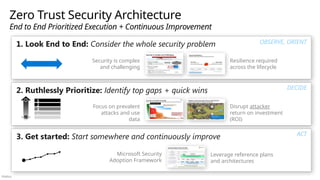
  • #7 Key Takeaway: The Security Adoption Framework (SAF) guides organizations through security modernization using Zero Trust principles SAF helps reduce organizational risk by accelerating security with a framework that is Realistic – based on real world best practices and lessons learned from Microsoft and across our customers. Comprehensive - to enable coordination and integration across all people/process/technology elements across your teams and tools. This comprehensive approach also helps dispel common misperceptions that any individual discipline of security is comprehensive and/or sufficient on its own without other important elements of security (networking, identity, endpoint, infrastructure, security operations, governance, IT, OT, IoT, applications, etc.). Modular - so organizations can start anywhere to address urgent priorities and requirements. Being realistic, comprehensive, and modular allows organizations adopting the framework to be agile because they can move quickly/confidently on any individual recommendation or initiatives without worrying that they will have to perform rework or duplicate work later (as it’s already aligned for you). This diagram illustrates which roles in the organization are typically interested in which SAF workshops (though every organization and individual may have unique priorities and interests) End to end security is covered from these perspectives: Security Strategy and Program – The CISO Workshop is primarily targeted at technical and security leaders (frequently CIO/CISO titles and directors reporting to them) to help Security Architecture – The Microsoft Cybersecurity Reference Architectures (MCRA) covers end to end security from a technical and architectural lens, and it primarily targeted at Security Architects, Technical Managers, Senior Technical Leads, IT Architects, and other roles that that work across technical security disciplines. Technical Capabilities Implementation – The Security Capability Adoption Planning (SCAP) enables organizations to plan which products to adopt (often including Microsoft 365 E5 capabilities that they aren’t aware they have access to). Microsoft Unified also includes engagements to help adopt products through their full lifecycle including Education, Architecture, Proof of Concept, Implementation, Assessment, and Solution Optimization. The recommended SAF strategy is executed by five (5) discrete modernization initiatives that guide organizations through the work of building specific security outcomes (which support end to end security and integrate with each other). These are available as topic summaries (typically 1-2 hour conversation) as well as full workshops Security Architecture Design Sessions (Modules 2-6) that guide you through the technical architecture end state and journey including technical plans, metrics, and more. Access and Identity (2) – Access Control using Zero Trust and Security Service Edge (SSE) approaches Modern Security Operations (SecOps/SOC) (3) – Security Operations (SecOps) / Security Operations Center (SOC) enabling you to rapidly respond to active attacks (aka realized risk) Infrastructure & Development Security (4) – Infrastructure and Development to secure across hybrid environments spanning multi-cloud and on-premises Data Security (5) – Focusing on protect data, a key business asset. IoT and OT Security (6) – focused on Internet of things (IoT) and Operational Technology (OT) for computers that interact with physical processes and the physical world. OT is sometimes referred to as industrial control systems (ICS) or Supervisory Control and Data Acquisition (SCADA) technology). Microsoft can also help assess your current plans, configurations, and operations for Microsoft security capabilities
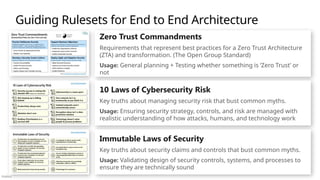
  • #8 Key Takeaway: A key security challenge is that security must be integrated everywhere to be successful This is driven by two underlying factors Threat Actors have many choices – Attackers have a lot of cheap and easy options (which they tend to prefer), but can also spend more money/time to use advanced techniques to accomplish their goals Security is part of every role – Security responsibilities and accountabilities should be part of the job for every role in an organization. Many people aren’t aware of their security accountabilities/responsibilities and the incentive structures for those roles often conflict with security risk goals. The reason every role must be accountable for security is that Everyone can impact security risk - Security impacting decisions can be made by any role in an organization. This could be a simple decision on whether to click on an email link or attachment or a larger business decisions on whether to approve downtime / maintenance windows (and associated revenue impact) that is required to address security vulnerabilities on production systems (or investment into architectural improvements to do this without downtime). Lack of knowledge and control - Securing every asset against attacks is impractical for a security team doesn’t manage these assets and doesn’t know them as well as the teams that do manage them. Not many server teams would let a security team patch and reboot their servers at will  This creates a challenging situation for security programs that must Drive changes to the culture and accountability model of the entire organization ….while managing a complex and rapidly changing threats to a rapidly evolving and complex technology estate. Additional Information Microsoft has undertaken a Secure Future Initiative (SFI) to tackle this challenge to bring security to our entire organization. The case study later in this workshop shares Microsoft learnings from our security journey. The ideal case would be to block every attack but this is impractical because We face determined, intelligent, and creative human adversaries The organizational systems we defend are highly complex compositions of people, process, and technology elements that are constantly changing This inability to perfectly protect everything makes it critical for security to prioritize by business goals and risks to ensure security is protecting the most important data and systems first.
  • #9 Key Takeaway: This is a summary of key antipatterns (common mistakes) that often impede security effectiveness and increase organizational risk You can think of these as a kind of “blameless postmortem” analysis to help you avoid common mistakes in security architecture and technical strategy challenges seen across many organizations (Antipatterns for other aspects of security are documented in the other SAF modules and are published on https://aka.ms/antipatterns) Commonly seen mistakes include: Skipping basic maintenance Organizations often designed and deployed most technical systems and processes long before security was a priority. This led to a habit of skipping security in favor of other requirements (availability, speed, cost, etc.), leading to neglect of basic security requirements like backups and disaster recovery planning/exercises, software updates/patching on assets, security configuration baselines. This happens across resource types from PCs and servers to network devices (and even security appliances!) Neglect may be skipping it entirely or only partially applying basic maintenance – for example systems may be isolated with a firewall, but little or no action is taken to apply available patches/updates, monitor systems for attacks, update acquisition processes to ensure new systems are more secure, and so on. Securing cloud like on premises The first instinct of many security teams is to attempt to force on-prem controls and practices directly onto cloud resources. This doesn’t work well because the underlying architecture and operating model of cloud services is fundamentally different (virtual storage and compute resources instead of physical servers, shared responsibility model, and so on). Many of the same principles and types of controls are required for cloud, but they must be applied differently for an effective security approach. It’s critical for security and technology teams to work together to update processes and technology to secure cloud using effective and efficient approaches (described throughout the security adoption framework) Wasting resources on legacy Organizations often waste resources attempting to secure legacy systems that are fundamentally indefensible. While these save money in the short term by avoiding the cost of change, they come with large negative impacts to both security and organizational productivity resulting from system downtime after security attacks and lack of organizational agility to meet changing business needs. This impact typically takes the form of: Increased incidents on Indefensible/Unsecurable systems– Many legacy systems have limited processing/storage/memory and/or run outdated software that can’t be secured with modern effective approaches. Many of these systems rely on outdated standards/technologies (cryptography, protocols, etc.) that are not considered safe today because attackers can quickly compromise them with freely available tooling. This often leaves security teams with zero good options for protecting them– often requiring security to fall back on network isolation or archaic defensive approaches that force ugly choices between security vs. business processes and which are expensive/difficult to implement and maintain consistently over time), resulting in higher volume and impact of damaging security incidents. Increased security cost / decreased security resources - The hidden costs of maintaining and securing these systems often drain the ability of the organization to support and secure other systems, leaving the organization exposed to increase risk of more incidents with greater negative business impact. Missed business opportunities – Legacy systems often lack the modern features organizations need to support and agile digital business that can keep up with continuously changing customer and market demands, hurting the business’ ability to grow or protect revenue streams. All of these impacts tend to increase over time as attackers become more effective and efficient at compromising these legacy systems. Make decisions intentionally - It’s critical analyze whether its better to maintain and secure those systems (at a higher operational expense level) or to invest in updating them to more productive, agile, and secure modern systems. While keeping an old system running appears financially sound at first glance, the reality is that hidden costs of outdated systems can often be a black hole that eats money, time, and business opportunities slowly (or in big increments with large security incidents like ransomware attacks) Disconnected security approach Security and IT teams often operate independently with fragmented strategies, technology, and processes. This often leads to confusion and conflict when trying to accomplish security goals because attackers freely traverse between network, identity, devices, and other resources while defenders struggle to protect, detect, and respond across these independent systems. Examples include: A successful Windows Hello for Business (WHFB) deployment needs the Identity and Access team to work closely with the Devices/Endpoint team. A successful Microsoft 365 deployment requires the Identity and Access team to work closely with the Collaboration team. Detecting and responding to attacks require integrating logs and other signals from all technical assets (devices, networks, servers, etc.) and team cooperation across all those teams to rapidly clean those up before ransomware actors can extort the organization Security is a team sport across security, technology, and business teams / Integration of organizational Functions and Teams (including use cases and scenarios) Artisan Security Security teams often favor building and customizing tools rather than taking a practical approach of “Configure before Customize.” This is because many security professionals started their careers when security tools maturity was very low and custom tools were the only option for solving many challenges. Recent years have seen massively improved maturity for vendor provided capabilities, so it’s critical to shift to a preference of using ‘off the shelf’ tooling when available. Additionally, the security problems have far outgrown the ability of people to manually handle them, so it’s critical to embrace security automation for and integrate security into IT and developer/DevOps automation. Lack of commitment to lifecycle Organizations often treat security controls and processes as a single point in time instead of part of an ongoing lifecycle. Like anything else in business or technology, security investments must be operationalized, maintained, and supported to sustain effects over time. Some examples of common mistakes include: Acquiring tools without a clear understanding of how they will integrate with existing capabilities and processes Implementing controls with an (implicit) belief that they will permanently block attacks effectively without Testing or monitoring them to ensure they are effective Considering how attackers may work around them or what attackers will try next Granting security permissions once without evaluating or monitoring what permissions are granted, when people leave roles (or the organization), etc. Focusing data protection solely on the moment data leaves the network (with DLP technology) instead of identifying and protecting sensitive data throughout its lifecycle It’s critical to assume failure and to take a full lifecycle view of security controls and a full lifecycle view of the data and technical systems they are protecting. The best practices described on this slide are designed to address these challenges and more. The Security Adoption Framework (SAF) workshops and guidance in the illustrate how to apply these best practices in design and daily operations.
  • #10 Key Takeaway: Always focus on security outcomes that lead to success What is success in security? What outcomes should we be focusing on?   Security success is ultimately the failure of attackers. This may be full failure (ideal) or partial failure of increased cost/friction/delays to achieve their goals (practical progress).   This is enabled differently in each half of the security lifecycle: Left of Bang - better pre-breach prevention should focus on removing the easiest and cheapest attack techniques first. This is effectively an infinite list (the technical estates we protect are massive and complex) where you are always prioritizing the most impactful attacker options and solving them, then moving to the next ones. Right of Bang - Post-breach response (right of bang) should focus primarily on how much time adversaries have to operate. An adversary with 2.5 minutes of access can do a lot less damage than if they have 2.5 hours/days/weeks/years. If you happen to know and track your individual adversaries you can make more precise goals, but most organizations can be successful by focusing on reducing this dwell time (measured by mean time to remediate successful attacks) As you invest time and money into security, ensure that those investments are always focused on having the most impact on attackers – causing them to fail outright or driving up the cost and friction required to succeed in their attacks.
  • #11 Key Takeaway: Increasing security resilience requires looking at the full security lifecycle Security is simple in concept and is similar other risk disciplines that focuses on avoiding, limiting, or managing a negative event well (financial, natural disaster, cybersecurity attacks, etc.) ‘Left of bang’ - Before an attack, security must focus proactively on preventing or lessening the impact of an attack with people/process, and technology investments ‘Right of bang’ – security must also be prepared to handle the attacks that happen, rapidly and effectively removing attacker access from business assets Throughout this lifecycle, security should be focusing on ensuring the organization is able to continue operations and accomplish their mission. Ideally the organization defenses actually become stronger with each negative event (sometimes referred to antifragility) similar to an immune system becoming stronger each time it encounters a disease. This lifecycle is represented well in the NIST Cybersecurity framework core functions of Identify, Protect, Detect, Respond, Recover, and Govern. https://www.nist.gov/cyberframework Your investments should be balanced across the security lifecycle to reduce weak areas that attackers can exploit. It’s worth noting that cybersecurity work is similar to keeping a house clean in two key ways: The work is important to avoid negative consequences (security incidents, or safety/sickness issues from a dirty or messy house) The work will never be done or perfect
  • #12 Key Takeaway: Increasing security resilience requires an end to end security approach Effective security requires an end to end security strategy and architecture (that follow Zero Trust principles) to connect and guide security people, process, and technology. CLICK 1 – Security is Complex in Execution While security is simple in concept, it’s execution is extremely complex because you must apply the full security lifecycle across all of the different technologies. Organizations must identify, protect, detect, respond, and recover (and govern) across identity, network, infrastructure, IT/OT/IoT endpoints, data, and more. Because each part of security is individually complex (cross-cutting across technologies and/or lifecycle stages), its easy to get lost in any one part and believe it “covers everything” or “you only need to focus on this part of security” to do it right. Just as you wouldn’t expect an electrician or plumber to be able to build a whole house, you shouldn’t expect that any one skill can do all of security. Some examples of common misperceptions include: Networking technology connects all things, so you only need network controls Identity technology provides authentication for all things, so you only need identity controls Security Operations: The best protection is early detection You could stop all security issues if vendors provided perfect code / if people patched everything immediately / etc. These misperceptions are common but damaging because they creates blind spots and gaps in your strategy, architecture, and controls. Attackers are skilled at finding and exploiting these gaps because attackers don’t care how they get to their objective. It’s critical to ensure you have an end to strategy and architecture that Recognizes the breadth and complexity of each discipline, but don’t lose the big picture of how all of them fit together. Integrates those individual disciplines into a coherent whole Prioritizes removing the easiest attacker paths across all disciplines (vs. mastering individual areas while neglecting others)
  • #13 Key Takeaway: Prioritizing security mitigations requires a pragmatic view of attackers A common mistake we see is believing that attackers will try to attack an organization based on the security defenses we have planned for them CLICK 1 – PATH OF LEAST RESISTANCE Attackers are intelligent and creative humans, so they will focus on finding the easiest path to their objective. Most attackers work for profit (independently or part of a criminal gang), for a hacktivist/volunteer mission, or for an intelligence/espionage agency of a government. Regardless of their ultimate objective, attackers are focused on achieving an objective and are flexible in what techniques they use. This requires defenders to focus on a holistic approach to security defense that includes: Strong security controls + effective placement/prioritization of those controls that is continually adapting to the evolution of attack techniques and threat actors Rapid response to attacks for when prevention fails so you can rapidly contain any successful attacks Continuously testing & monitoring controls to ensure they don’t degrade as conditions continually change in today’s world Security success is the failure of attackers (to access your organization’s assets) …but security can’t do everything at once so you must ruthlessly prioritize! Defenders must prioritize security investments to favor these factors Important/valuable assets – prioritize focus on higher value business critical assets (and resources like IT admins with access to many of them) Easiest/Cheapest defenses – prioritize focus on the fastest and cheapest defenses to implement and maintain over their lifecycle! Most Effective defenses – prioritize focus on defenses that cause the most disruption to the attacker’s return on investment (ROI) (e.g. increase attacker cost and reduce success of attacks)
  • #14 Key Takeaway: Attackers don’t have perfect complete knowledge of your defenses, but they generally act rationally based on what they know Attackers have to navigate the “fog of war” and use the information that they have to plan and execute attacks. Let’s take a look at a real example through the lens of an attacker. Attackers will quickly figure out if an organization has NexGen firewalls (NGFW), intrusion detection/prevention systems (IDS/IPS), and Data Loss Prevention (DLP) Directly attacking the network is generally a high cost of attack for them (unless your organization has neglected to apply software updates or configuration best practices for network edge devices) CLICK 1 – SHIFT TO NON-NETWORK ATTACK The attacker decides to get around these defenses by targeting IT administrators with phishing attacks. Who wouldn’t be tempted by a promise for higher pay for a similar job role at another company? Target privileged accounts – Compromising an IT admin can immediately get the attacker control of business-critical resources and/or the entire environment This is because many IT admins use their administrative desktop for day-to-day productivity (email, web browsing, etc.) in addition to privileged administrative tasks. An Admin clicking on that phishing email link gives the attacker control of their administrative desktop and all the credentials on it (including the administrative credentials that can access and manage many or all resources in the environment). Passwords.xls - If the attacker doesn’t get administrative privileges right away, they would search for things like “passwords.xls“ to try and exploit a common (insecure) practice for storing service account and other credentials. Once the attackers gets access to administrative privileges, they exploit this access to business systems and data. Depending on their motivation, they may steal/alter/encrypt data, disable systems, or simply dig in so they can persist access over weeks, months, or years. The attackers may try to extort a ransom payment (in exchange for the encryption key or a promise not disclose the data), resell the data to other parties, resell the access to other parties, stay and gather espionage data, or pursue other objectives.
  • #15 Key Takeaway: These are the types of defenses to mitigate the common attack pattern in the previous slide Some of the top priorities are to… CLICK 1 protect the business-critical assets that matter most to the organization, and… CLICK 2 the privileged access that allowed the attacker to get access to them. This reflects the assume compromise (assume breach) principle where you assume attackers can compromise normal users and devices, and then protect against that inevitability. CLICK 3 Organizations should also focus on hygiene of executing basic security maintenance like software updates/patching, secure configuration, and establishing safe standard processes for IT Admins. CLICK 4 Organizations must also ensure their operations tools, skills, and processes aren’t myopically focused on the network layer. Ensure that you have detections and response processes at the identity, application, data, and other layers to have good visibility and rapid response for modern attacks. This adds up to a lot of work, especially when you consider people/process/technology elements across the security lifecycle that are ultimately required to block or add friction to all attacker paths. This makes it critical to continuously prioritize based on how attackers actually think and stay informed on attacker trend, capabilities, and behavior. Additional Information More information on these concepts is built into the security adoption framework (SAF): Module 1 discusses critical security maintenance/hygiene like disaster recovery and software updates/patches in more detail (including reference plans and models) Module 2 discusses privileged access defenses, maturity models, and more Module 3 discusses security operations (SecOps/SOC) in more detail (including reference plans, maturity models, recommended metrics, and more)
  • #16 Key Takeaway: Security is a complex and challenging problem Security risk can come from anywhere in an organization's technical estate, processes, or individual action by people. Most organizations are regularly or continuously adopting new technical systems or updating existing ones (including accumulating data and records via those systems) Very few organizations prioritize retiring legacy systems (except for during cloud migrations) Cybersecurity attacks have grown to become massive business risks through the risk of ransomware/extortion and destructive attacks (sometimes becoming existential risks for some organizations) CLICK 1 – ATTACKER OPTIONS Attackers are the ultimate source of security problems, and they have a high level of flexibility to get to their goals by using people process or technology means to get to their goals: For example, attackers targeting a particular piece of data may choose from Attacking an application to get to the data Attacking infrastructure elements (servers/networks) to get the data Attacking infrastructure elements to compromise an application to get to the data Attacking people (e.g. tricking them with phishing emails) to get them to send them the data CLICK 2 – ADDITIONAL COMPLEXITY Additionally, security is further complicated by Threats that are continuously changing (attackers only succeed when they get around defenses, so they are continuously evolving) Regulations that require compliance reporting. Sometimes these are aligned to current threats and sometimes they aren’t (which creates additional work to justify exceptions, etc.) Security Tools that help manage the problem, but can become their own burden when they organically grow into sprawling security tool estate with additional integration/maintenance requirements
  • #17 Key Takeaway: Zero Trust is a journey of discovering and eliminating many hidden assumptions of trust that attacker can abuse in your processes and technical systems. Organizations effectively have a large set of “trust debt” that is similar to the “technical debt” of older/legacy systems that require investment to be brought up to current standards. The orange boxes (on the left) describe common assumptions of trust that commonly formed as information technology became critical to business processes, but security wasn’t yet a top requirement. These assumptions have shaped the culture of the organization, business and technical processes, and people’s skills and perceptions. The blue boxes (on the right) represent strategies that are required to overcome those false assumptions of trust and reduce security risk (ideally reaching a full Zero Assumed Trust state). Achieving this requires changing the core assumptions and then making the appropriate people, process, and technology changes to implement. Each of the mitigations are complex and will take time and resources to execute a large number of steps in them. This makes it critical to ruthlessly prioritize which mitigations to focus on first, next and later and which aspects of each to do first, next, and later.
  • #18 Key Takeaway: Security is a large and complex space, so its critical to take a practical and prioritized view of solving these problems Security is something you do (not something you have) – Make progress every day and review your priorities every day to make sure you are doing the most important things first. This requires you to: Look End to End - Adopting an end-to-end view that considers the whole problem to minimize the blind spots and “We didn’t think of that” realizations after an incident Ruthlessly Prioritize – to ensure that you are focusing on the most urgent and impactful issues with your limited resources and time Get Started – focusing on getting started with quick wins and incremental progress in a continuous improvement approach
  • #19 Key Takeaway: These are ruleset that can help guide you on planning and prioritizing defenses (especially as you often must make important decisions as you go) The Zero Trust Commandments is a standard from The Open Group that provides rules that capture security best practices and lessons learned. These help you plan security and Zero Trust, as well as providing clarity on what is (and isn’t) part of Zero Trust. The 10 Laws of Cybersecurity Risk provide key truths about managing cybersecurity risk that should be used to guide strategy and architectural planning. These are designed to address common myths and misconceptions about security and security risk. The Immutable Laws of Security provide key truths about security claims and controls that should be used to guide technical decisions about security. These were originally published in the early days of the Microsoft Security Response Center (MSRC) to address common myths and misconceptions about security and have continued to be relevant and insightful for multiple decades since then.
  • #20 Key Takeaway: These are the Zero Trust Commandments These are from The Open Group standard that provides rules that capture security best practices and lessons learned. These help you plan security and Zero Trust, as well as providing clarity on what is (and isn’t) part of Zero Trust.
  • #21 Key Takeaway: These 10 Laws of Cybersecurity Risk provide good guidelines for security architecture and design Security success is ruining the attacker ROI Security can’t achieve an absolutely secure state so deter attackers by disrupting and degrading their ability to realize Return on Investment (ROI). Increase the attacker’s cost and decreasing the attacker’s return for your most important assets. Not keeping up is falling behind Security is a continuous journey and if you aren't staying current, it will continually get cheaper and cheaper for attackers to successfully take control of your assets.  You must continually update your security patches, security strategies, threat awareness, inventory, security tooling, security hygiene, security monitoring, permission models, and anything else that changes over time. Productivity always wins If security isn’t easy for users, they will work around it to get their job done. Always make sure solutions are secure and usable. Attackers don't care Attackers are willing to use any available method to get into your environment and increase control over it including compromising a networked printer, a fish tank thermometer, a cloud service, a PC, a Server, a Mac, a mobile device, use of a malicious insider, use of a configuration mistake, or just asking for passwords in a phishing email. Your job is to understand and take away the easiest and cheapest options as well as the most useful ones (e.g. anything that leads to administrative privileges across many systems). Ruthless Prioritization is a survival skill Nobody has enough time and resources to eliminate all risks to all resources. Always start with what is most important to the organization, most interesting to attackers, and continuously update this prioritization. CLICK 1 Cybersecurity is a team sport Nobody can do it all, so always focus on the things that only you (or your organization) can do to protect the organization's mission. For things that others can do better or cheaper, have them do it (security vendors, cloud providers, community) Your network isn’t a trustworthy as you think it is A security strategy that relies on passwords and trusting any intranet device is only marginally better than no security strategy at all. Attackers easily evade these defenses so the trust level of each device, user, and application must be proven and validated continuously starting with a level of zero trust Isolated networks aren’t automatically secure While air-gapped networks can offer strong security when maintained correctly, successful examples are extremely rare because each node must be completely isolated from outside risk. If security is critical enough to place resources on an isolated network, you should invest in mitigations to address potential connectivity via methods such as USB media (e.g. required for patches), bridges to intranet network, and external devices (e.g. vendor laptops on a production line), and insider threats that could circumvent all technical controls. Encryption alone isn’t a data protection solution Encryption protects against out of band attacks (on network packets, files, storage, etc.), but data is only as secure as the decryption key (key strength + protections from theft/copying) and other authorized means of access. Technology doesn't solve people and process problems While machine learning, artificial intelligence, and other technologies offer amazing leaps forward in security (if applied correctly), cybersecurity is a human challenge and will never be solved by technology alone.
  • #22 Key Takeaway: These immutable laws help you design and validate sound security solutions
  • #23 Key Takeaway: These are diagrams and others references for end-to-end security architecture Middle Column People – Describing security roles and responsibilities Role Mapping – Visual mapping of Microsoft technical capabilities to security disciplines and common roles Artificial Intelligence (AI) and Security – Describing the implications of AI on security including securing AI and using AI to improve security. Zero Trust – Zero Trust principles form the central core of an effective end to end security strategy Microsoft Security Capabilities – This diagram describes the main Microsoft cybersecurity capabilities Build Slide – version of capabilities diagram that animates in each section (about a dozen clicks) Multi-cloud and Cross-Platform – section that illustrates how Microsoft capabilities cover the ‘hybrid of everything’ multi-cloud and cross-platform enterprise (e.g. not just ‘security for Microsoft’) Microsoft 365 E5 – Section that describes which security capabilities are included in Microsoft 365 E5 Left Column Threat Environment - This section describes the nature of the security threat environment and driving forces that cause it to continuously evolve Attack Chain – Diagram of how Microsoft capabilities map to common attack patterns Development / DevSecOps – Diagram describing a modern agile approach to securing workloads and development processes Infrastructure – Diagram describing how Microsoft capabilities map to a multi-cloud and cross-platform infrastructure with native controls across the full lifecycle Patch Modernization – Example of detailed plans included in Security Architecture Design Sessions covering how to modernize security update/patch management Right Column Zero Trust Adaptive Access – diagrams that describe the main components of a modern identity and access solution based on Zero Trust principles and standards Journey – section describing the journey from a traditional ‘flat network’ to a modern adaptive access approach (based on Microsoft IT department journey) Privileged Access – section describing the challenges and imperatives for securing privileged access resources (accounts, workstations, and more) Security Operations (SecOps/SOC) - diagrams describing the main components of a modern SecOps solution and the Microsoft capabilities that provide them Operational Technology (OT) – Diagram describing security for OT environments with industrial control systems (ICS)
  • #24 Key Takeaway: This is a summary of which diagrams and topics map to the main Security Adoption Framework workshops
  • #25 Key Takeaway: It’s time to plan what we do next Now let’s figure out what the next steps on your journey are (beyond any follow-up conversations we already identified and captured already) The Microsoft Security engagements fit into three different categories: Introductory/Overview Engagements (Arrows on Left) – These give your team an overview of how Microsoft can help to plan the next steps on how we can work together to improve your security. These include: Security Capabilities Adoption Planning (SCAP) to review all the Microsoft security technologies you own and prioritize/plan their use Enterprise Security Assessment (ESA) – to identify immediate areas for security improvement (technical configurations and more) based on Microsoft’s learnings Strategic Security Integration (top) – Focused on end to security planning to help you build an integrated and effective security approach. These include: CISO workshop – This focuses on end to end security strategy and program best practices for security and technology leaders Microsoft Cybersecurity Reference Architectures (MCRA) (this workshop) – This focuses on end to end security architecture (using Microsoft capabilities to illustrate how to make this real) Technical Architecture and Planning (middle) – These focus on discrete modernization initiatives to execute the end to end strategy and architecture. Access and Identity (2) – Access Control using Zero Trust and Security Service Edge (SSE) approaches Modern Security Operations (SecOps/SOC) (3) – Security Operations (SecOps) / Security Operations Center (SOC) enabling you to rapidly respond to active attacks (aka realized risk) Infrastructure & Development Security (4) – Infrastructure and Development to secure across hybrid environments spanning multi-cloud and on-premises Data Security (5) – Focusing on protect data, a key business asset. Product and Technology Implementation (bottom) of the various Microsoft security technologies that enable these modernization initiatives Where shall we go next? Additional Information These are designed to be both flexible and complete using a modular approach: You can start anywhere and do them in any other You can do one at a time (or more) depending on the priorities and resources at your organization. All of these collectively work together and build on each other to provide an integrated and holistic approach to security The strategic and technical architecture engagements are part of the Security Adoption Framework (SAF) and are typically available in two forms Topic summaries are typically 1-2 hour conversations to share key best practices Security Architecture Design Sessions (Modules 2-6) are in depth workshops to guide you through the details including success criteria, technical plans, metrics, and more.
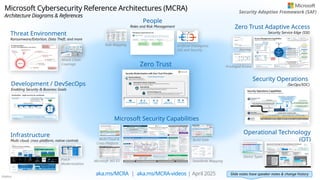
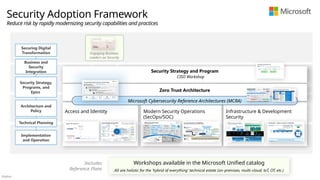
  • #26 Key Takeaway: Let’s get some concrete actions planned so we don’t lose momentum from this discussion
  • #27 Key Takeaway: Let’s figure out where to get you started with Microsoft security Microsoft has broad and deep expertise on security modernization spanning technology deployment, strategy and program guidance, technology architecture, and more. Because security itself is complex, it can be challenging to figure out where to start, so we developed three easy ways to get the journey started: Intro Conversation – Talk to one of our experts to figure out How Microsoft can help Capabilities Review – Have an expert architect guide you through What security products/technologies you own and plan/prioritize how to get the most out of them Security Assessment – of your current end to end security state to identify where you can improve your security posture
  • #28 Key Takeaway: This is a view of the longer-term journey of Microsoft security typically initiated by those starting points. Microsoft offers two kinds of expertise to assist you: Security Architecture and Strategy Expertise to guide your end to end security approach and integrate across technologies, teams, and vendors in a modern ‘hybrid of everything’ security program and technical estate Technology Expertise on Microsoft security technology These two sets of expertise and the engagements and activities are connected to ensure that all best practices are backed up with real technology you can implement to realize the vision.
  • #29 Key Takeaway: This is a more detailed view of the longer-term journey of Microsoft security We offer engagement to help guide your strategy and the implementation of it using Microsoft technology including the full lifecycle of technology education, architecture, onboarding, assessment, and optimization. This spans across our complete portfolio of technology including all the product families on the slide.
  • #30 << For Organizations Interested in Security Architecture and Strategy Engagements >> Key Takeaway: This slide describes how the security disciplines in the Security Adoption Framework (SAF) drive business outcomes using Zero Trust principles across different technologies. Modernizing a security program effectively requires a strategic approach across all aspects of security in an organized and prioritized manner. Microsoft has built a Security Adoption Framework (SAF) to help guide security modernization and: Communicate value to business stakeholders via business scenarios Coordinate security modernization initiatives using security disciplines Execute technology modernization across all technology areas It's important to note that security is complex and delivering business outcomes requires multiple disciplines and technologies working together. For example, Enabling people to do their job securely from anywhere is clearly a main focus of secure identity access technical initiative, but its not the only one. Those remote endpoints and applications also need to be monitored through security operations, the applications they use to do their job is provided through securing infrastructure and development, the sensitive data they access must be protected regardless of location, and all of this requires governance for consistent execution and policy
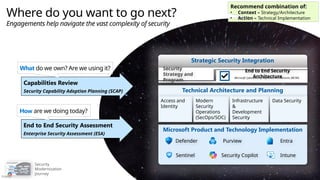
  • #31 Key Takeaway: Effective end to end security requires applying best practices across people, processes, and technology Building an effective coordinated approach requires applying different perspectives to provide clarity for many different roles in an organization. Microsoft engagements and guidance help tame this complexity with multiple perspectives: Security Architecture - Microsoft Cybersecurity Reference Architectures (MCRA) Describes how all the technology works together to support end to end security Security Strategy and Program (Processes, Governance, Metrics, etc.) - CISO Workshop Describes a modern effective security approach that is enabled by this technology. Assess against best practices - Enterprise Security Assessment (ESA) helps ensure you are following best practices Security Technology - Security Capability Adoption Planning (SCAP) reviews security technology you have access to and prioritize what to work on first These different perspectives help shed light on different aspects of end to end security (following Zero Trust principles) that can help guide your journey. You can get more information on Security Adoption Framework (SAF) engagements from your account team and from https://aka.ms/saf
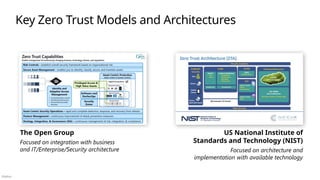
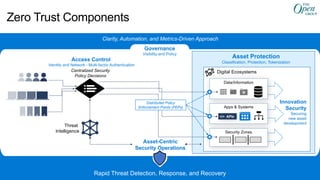
  • #32 Key Takeaway: These are some resources to help you learn more about Microsoft security recommendations, engagements, and technologies
  • #33 Key Takeaway: These resources from other organizations provide good references for modern security strategy Additional references from the US Department of Defense include: Zero Trust Strategy - https://dodcio.defense.gov/Portals/0/Documents/Library/DoD-ZTStrategy.pdf Zero Trust Reference Architecture - https://dodcio.defense.gov/Portals/0/Documents/Library/(U)ZT_RA_v2.0(U)_Sep22.pdf
  • #34 Key Takeaway: This section has a short overview of how Microsoft enables you to meet requirements for key industry standards and guidance
  • #35 Key Takeaway: These are the Asset-Centric Security Operations (ACSO) capabilities defined in an upcoming draft of the Zero Trust Reference Model from The Open Group These capabilities represent what Security Operations (SecOps/SOC) provides to an organization using a modern Zero Trust approach. This asset-centric approach enables organizations to detect, respond, and recover assets from attacks regardless of their location. This is a significant transformation from the classic pre-Zero Trust network-centric approach to ‘defend the network using a perimeter’ Additional Information Architecture Building Blocks (ABBs) represent the people and process components of how the capability is provided to an organization. (The roles that represent the people components are defined in a separate upcoming standard for security roles and glossary). This is based on proposed draft text for the standard and may change before final release of the document. The currently available draft snapshot release of the Zero Trust Reference Model is at https://publications.opengroup.org/s232
  • #36 Key Takeaway: These are the Asset-Centric Security Operations (ACSO) capabilities defined in an upcoming draft of the Zero Trust Reference Model from The Open Group This asset-centric approach enables organizations to detect, respond, and recover assets from attacks regardless of their location. This is a significant transformation from the classic pre-Zero Trust network-centric approach to ‘defend the network using a perimeter’ Additional Information Architecture Building Blocks (ABBs) represent the people and process components of how the capability is provided to an organization. (The roles that represent the people components are defined in a separate upcoming standard for security roles and glossary). This is based on proposed draft text for the standard and may change before final release of the document. The currently available draft snapshot release of the Zero Trust Reference Model is at https://publications.opengroup.org/s232
  • #37 Key Takeaway: Microsoft capabilities enable you to adopt an approach described in the Zero Trust Reference Model Standard from The Open Group This table maps Microsoft capabilities to the Zero Trust capabilities and architectural building blocks (ABBs) defined for Asset-Centric Security Operations Platform (ACSO) Additional Information Architecture Building Blocks (ABBs) represent the people and process components of how the capability is provided to an organization. (The roles that represent the people components are defined in a separate upcoming standard for security roles and glossary). This is based on proposed draft text for the standard and may change before final release of the document. The currently available draft snapshot release of the Zero Trust Reference Model is at https://publications.opengroup.org/s232
  • #38 Key Takeaway: These are the Identity and Adaptive Access Management Platform (IAAM) capabilities defined in an upcoming draft of the Zero Trust Reference Model from The Open Group These capabilities represent what IAAM provides to an organization using a modern Zero Trust approach for identity and access management (IAM) This approach enables the use of digital identities for all assets and adaptive access decisions that dynamically adjusts access policy for those assets to real time threat, session, and other context. Additional Information Capabilities provide consistent outcomes to the organization over time (what the function is), even as the people, process, and technology evolve (how the function is performed). This is based on proposed draft text for the standard and may change before final release of the document. The currently available draft snapshot release of the Zero Trust Reference Model is at https://publications.opengroup.org/s232
  • #39 Key Takeaway: These are the Identity and Adaptive Access Management Platform (IAAMP) capabilities defined in an upcoming draft of the Zero Trust Reference Model from The Open Group This approach enables the use of digital identities for all assets and adaptive access decisions that dynamically adjusts access policy for those assets to real time threat, session, and other context. Additional Information Architecture Building Blocks (ABBs) represent the people and process components of how the capability is provided to an organization. (The roles that represent the people components are defined in a separate upcoming standard for security roles and glossary). This is based on proposed draft text for the standard and may change before final release of the document. The currently available draft snapshot release of the Zero Trust Reference Model is at https://publications.opengroup.org/s232
  • #40 Key Takeaway: Microsoft capabilities enable you to adopt an approach described in the Zero Trust Reference Model Standard from The Open Group This table maps Microsoft capabilities to the Zero Trust capabilities and architectural building blocks (ABBs) defined for Identity & Adaptive Access Management Platform (IAAMP) - https://publications.opengroup.org/s232 Additional Information Architecture Building Blocks (ABBs) represent the people and process components of how the capability is provided to an organization. (The roles that represent the people components are defined in a separate upcoming standard for security roles and glossary). This is based on proposed draft text for the standard and may change before final release of the document. The currently available draft snapshot release of the Zero Trust Reference Model is at https://publications.opengroup.org/s232
  • #41 This diagram resulted from a collaboration with The Open Group where Microsoft is an active participant Key Takeaway: This diagram illustrates key organizational capabilities for a modern Zero Trust approach to security These are from the Zero Trust Reference Model standard published by The Open Group (link below) Capabilities provide a consistent and durable outcome and are composed of people, process, and technology elements working together. These capabilities are similar in concept to business capabilities in an organization such as the capability to purchase raw materials, pay those suppliers, manufacture products, ship products to customers, collect customer payments, and so on) The security capabilities include: Governance Risk Controls - establish overall security framework based on organizational risk Posture Management – continuous improvement of attack prevention measures Security Strategy, Integration, & Governance (SIG) – continuous management of risk, integration, & compliance. This is a modern Zero Trust approach to security governance, risk, and compliance (GRC). Identify Secure Asset Management – enables you to identify, classify, secure, and maintain assets Protect and Detect Asset-Centric Protection - provides the ability to protect the various kinds of assets, at any time, and at any place, in an environment of assumed breach. Zero Trust controls differ from traditional network-centric approaches by focusing on protecting the assets regardless of network location with Data-Centric and System-Centric controls Identity and Adaptive Access Management – provides the ability to implement consistent access policy enforcement across any type of asset (resource). This require centralized policy control and distributed enforcement mechanisms that allow filtering of authorized users from unauthorized requests using current (continuously changing) context on threats (threat intelligence), user behavior, and other factors. This also requires all assets to have an identity to enforce the policy. Additionally, this modern approach to identity and access provides the ability to embraces sovereign or other external identity providers. Security Zones - provide the ability to group assets together with similar business value or security requirements to apply controls, manage risk, and perform other tasks as a group. Privileged Access and High Value Assets – provide increased security assurances for business critical assets by securing the assets themselves and others with privileged access to them Software and DevSecOps – provide the ability to integrate security into the development of new software and new products as they are built and updated. Respond and Recover Asset-Centric Security Operations – provides rapid and complete detection, response, and recovery from attacks For more information on The Open Group Zero Trust work, see General Information - https://www.opengroup.org/forum/security/Zerotrust Zero Trust Commandments - https://pubs.opengroup.org/security/zero-trust-commandments/ Zero Trust Reference Model - https://publications.opengroup.org/s232
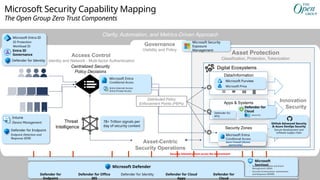
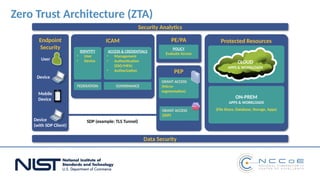
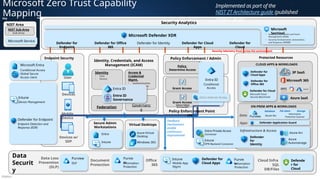
  • #42 This diagram resulted from a collaboration with The Open Group where Microsoft is an active participant Key Takeaway: This diagram illustrates key organizational capabilities for Zero Trust These capabilities provide a consistent and ongoing outcome and are composed of people, process, and technology elements working together (similar to the way organizations have capabilities to manufacture products, ship products, pay suppliers, and so on) FOUNDATIONAL ALIGNMENT Zero Trust is an asset centric approach that aligns security to the organization. It also has a large scale and scope that must be governed to ensure consistent and continuously improving deliver on outcomes. This is provided by: Risk Controls - establish overall security framework based on organizational risk Secure Asset Management – enables you to identify, classify, secure, and maintain assets Security Strategy, Integration, & Governance (SIG) – continuous management of risk, integration, & compliance. This is a modern Zero Trust approach to security governance, risk, and compliance (GRC). CLICK 1 – OPERATIONAL FUNCTIONS Security requires operational functions to help prevent (or lessen the impact of) attacks as well as managing those attacks if and when they do happen. These capabilities provide those outcomes: Asset-Centric Security Operations – rapid and complete detection, response, and recovery from attacks Posture Management – continuous improvement of attack prevention measures CLICK 2 - ASSET ACCESS The first half of protecting assets is to secure the authorized routes to access them (analog of roads, gates, badge readers for buildings, etc.) Access management ensures authorized users can access business assets, but unauthorized people cannot. Organizations need a modern approach to access management that adapts to the continuously changing technology, threats, and business requirements. This is provided with a modern version of identity and access management Identity and Adaptive Access Management (IAAM) – provides the ability to implement consistent access policy enforcement across any type of asset (resource). This require centralized policy control and distributed enforcement mechanisms that allow filtering of authorized users from unauthorized requests using current (continuously changing) context on threats (threat intelligence), user behavior, and other factors. This also requires all assets to have an identity to enforce the policy. Additionally, this modern approach to identity and access provides the ability to embraces sovereign or other external identity providers. CLICK 2 - ASSET SECURITY Assets also need security to protect against other attacks beyond normal access paths, which requires asset-centric capabilities to protect each asset type and each asset: Asset-Centric Protection - provides the ability to protect the various kinds of assets, at any time, and at any place, in an environment of assumed breach. Zero Trust controls differ from traditional network-centric approaches by focusing on protecting the assets regardless of network location with Data-Centric and System-Centric controls Software and DevSecOps – provide the ability to integrate security into the development of new software and new products as they are built and updated. Security Zones - provide the ability to group assets together that have similar business value or security requirements. Privileged Access and High Value Assets (PAHVA) – provide increased security assurances for business critical assets by securing the assets themselves and others with privileged access to them For more information on The Open Group Zero Trust work, see General Information - https://www.opengroup.org/forum/security/Zerotrust Zero Trust Commandments - https://pubs.opengroup.org/security/zero-trust-commandments/ Zero Trust Reference Model - https://publications.opengroup.org/s232
  • #43 Key Takeaway: We recommend you are very precise with the language you use for potential and actual attacks. This has multiple benefits Reduces confusion during fast-moving situations Reduces legal liability and other risk as some of this terminology has legal implications Note that this terminology was originally contributed to The Open Group standards by Microsoft based on our Detection and Response Team (DART) who investigates customer incidents Additional Information: Breach - An incident that results in known loss of confidentiality, integrity, or availability for the organization's assets This is often defined precisely by regulations and specific legal jurisdictions, but typically includes loss of regulated personal data, theft of sensitive business data, downtime for business systems, or other business impacting events. Compromise - A situation where a security measure is known to have been bypassed or circumvented, resulting in unauthorized access Security Incident - An event or series of events that requires an organization – and possibly external entities – to respond in some way to prevent, limit, or recover from adverse impacts to the confidentiality, integrity, and/or availability of the organization's asset(s) Adapted from and incorporating CMU/SEI-2023-TN-004, Acquisition Security Framework (ASF): Managing Systems Cybersecurity Risk (Expanded Set of Practices), October 2023 There are different severities of security incidents, but every incident requires investigation work to determine whether further action is required and how urgent/severe the organization's response should be (which often changes over the course of the investigation). Most organizations require documentation and reporting of status on incidents. A security incident may be created when the organizational systems and/or data are suspected to be under attack (during), already been compromised (after), or are under imminent threat conditions (before). Organizations often declare a major security incident when an investigation reveals highly likely or confirmed material risk to trigger coordinated action by organizational leaders, legal teams, and/or public relations / communications teams. Additional Information This is based on proposed draft text for the standard and may change before final release of the document.
  • #44 Key Takeaway: Microsoft technology helps you automatically assess and manage regulatory compliance across your ‘hybrid of everything’ multi-cloud environment. Microsoft Defender for Cloud helps you to meet regulatory compliance requirements by continuously assessing resources against compliance controls, and identifying issues that are blocking you from achieving a particular compliance certification. This data is integrated with Microsoft Purview Compliance Manager that also includes compliance data from Microsoft 365 and other cloud services. Compliance Manager can help you throughout your compliance journey, from taking inventory of your data protection risks to managing the complexities of implementing controls, staying current with regulations and certifications, and reporting to auditors. Compliance Manager includes information to help you navigate various shared responsibilities including: Microsoft managed controls: controls for Microsoft cloud services, which Microsoft is responsible for implementing Your controls: sometimes referred to as customer managed controls, these are controls implemented and managed by your organization Shared controls: these are controls that both your organization and Microsoft share responsibility for implementing Additional Information More information on Defender for Cloud is at https://learn.microsoft.com/azure/defender-for-cloud/regulatory-compliance-dashboard Compliance Manager is located at compliance.microsoft.com Your global admin needs to grant you appropriate role for you to access Compliance Manager– learn more at Set user permissions and assign roles  
  • #45 Key Takeaway: Zero Trust focuses on the original mission of security (keeping assets out of the control of attackers) without the false assumption that “private networks can keep assets safe” The IT environments we run have been complex since their early days, composed of many devices, user identities, and interactions between them CLICK 1 – We tried “Trusted Networks” protected by a security perimeter (#2) As the attacks started to emerge on our IT systems, the first thing we tried in IT Security was to adapt the concept of a security perimeter from military doctrine. This tactic worked at first and seemed to be a good simple solution to the problem because most productivity at the time was done in the office on physical corporate networks (desktops, servers, mainframes, and terminals) CLICK 2 – But that didn’t hold up over time (#3 and #4) Over time, the world of productivity grew with mobile devices, WiFi, cloud services, and remote productivity. At the same time, security threats expanded into a full spectrum of attacker motivations (criminal, nation-state espionage, hacktivism, and more) and continuously adds new creative attack techniques to get around this network perimeter consistently. These two factors eroded the underlying assumptions that everything to be protected is on the corporate network. The network security perimeter tactic started to fail to meet the strategic needs of the organization. This requires taking a fresh look at security to develop an effective security strategy that can deal with the reality of today’s world, a strategy we now call Zero Trust.
  • #46 Key Takeaway: Microsoft defines Zero Trust as a proactive, integrated approach to security that applies three core principles across all layers of your digital estate. Zero Trust builds on classic security and adapts it to today’s threats, platforms, and business priorities. Assume Failure and Assume Success The first two principles are about setting up the right mindset by defining the overall problems of security to solve: Business Enablement – Security is ultimately a support function for an organization, so everything security does should be in the context of what is important to that organization (mission, risks, and the processes they represent how business is done. Assume compromise (formerly assume breach) – You should assume attackers can and will attack everything (identity, network, device, app, infrastructure), and that they will find a way through. That means you need to be prepared to remediate. Together, these two principles should guide many daily decisions on security and how to think about the problems that are faced by security everyday. While security problems will never be solved, they can become normal and routine problems most of the time (instead of crises), like crime or espionage in the physical world. These principles codify the Assume Failure and Assume Success concepts described in the Zero Trust Commandments standard from The Open Group - https://pubs.opengroup.org/security/zero-trust-commandments/#_Toc141269708 CLICK 1 – Attack Surface and Blast Radius The second set of principles reflect that attackers often navigate the implicit and explicit control relationships between assets in your technical estate. Control relationships are required to get work done efficiently (e.g. accounts and management tools need control to manage servers, containers, etc.), but these relationships also create risk by forming a pathway attackers can abuse during an attack. You must secure from both directions: Verify explicitly – Reduce the attack surface of each asset by ensuring that these that all trust and security decisions are informed by all relevant available information and telemetry. Because access management is a large part of security, an important application of this principle is scrutinizing every access request fully and equally – every time. Explicitly validating the trustworthiness of accounts and devices before granting access to resources (such as with conditional access) takes a lot of easy options off the table for attackers. Least privilege – Reduce the “blast radius” of any potential compromises by remove unnecessary privileges (control relationships) for accounts.
  • #47 Key Takeaway: These are the guiding principles for a Zero Trust approach to security The Zero Trust Principles represent durable security guidelines for effectiveness in an age of constant transformation This slide visually shows how to apply these principles to the “graph” of control relationships in a distributed system like the technology environment of an organization. In most attacks, the adversaries take advantage of the control relationships in the organization to navigate to and compromise assets of interest (represented by red lines). Business Enablement and Assume Compromise are general principles that should drive security, IT, and business teams decisions to constantly balance how the simultaneously requirements to ensure the business can operate, thrive, and grow with the reality that attackers will be constantly looking for ways to take advantage of it. It’s like taking a hike in the woods and being prepared for things that can go wrong. You shouldn’t avoid the hike because of the risk, but you shouldn’t go hiking unprepared either. Applying this mindset in practice - Ensure to understand the systems and control relationships you have in place, which support business critical assets and processes, and apply critical thinking (and an attacker mindset) to understand what could go wrong (risks), then identify which risks are the most likely and impactful to the organization. Plan and execute accordingly across business, technology, and security teams – then have each team continuously revisit these assumptions as they plan, execute, and operate daily tasks. CLICK 1 Zooming into the assets themselves, we must protect each asset from others (reduce attack surface) and limit the damage if that asset is compromised (reduce blast radius) Verify Explicitly - reducing attack surface requires explicitly verifying that each asset is only being controlled by trusted and authorized assets (devices, accounts, authorized humans, etc.) Least Privilege – reducing the blast radius of any compromised asset (because we assume compromise ) requires limiting the access and privileges that asset has to other assets in the environment so attackers can’t abuse excess privileges for their purposes. This is a tricky space because users still need to get their job done (remember business enablement? ) so you can’t just simply take away all the permissions and group memberships. There are a few ways to help address this problem at scale using: Just-enough access (JEA) to remove privileges permanently (such as members of administrative groups that people don’t need access to for their job, e.g. they can submit a request and have tasks rapidly performed for them by administrators or automation). It’s critical to ensure processes carefully balance business agility and speed with security risk. Just-in-time (JIT) mechanisms grant privileges on-demand when required. This technique helps by reducing the time exposure of privileges that are required for people, but are only rarely used. This also provides data and tracking for identifying anomalies (which may be attackers) and for planning privilege assignment (who actually uses the permissions, when, and for what purpose). This should also be linked to risk-based policies in adaptive access management (like Microsoft Entra Conditional Access) for additional risk reduction. Additional Information Each of these principles will be applied in many different contexts. For example, verify explicitly can refer to explicitly validating user and device trust before allowing access to resources, validating the trust of software from the supply chain before adding it to the technical environment, and many more scenarios. Applying these principles together effectively creates a damage ‘containment’ approach similar to the way watertight compartments proactively help protect a ship from sinking. The technical estate of an organization is like the physical campus of a college or company headquarters. The land (network) is private but needs to host a whole bunch of different “visitors” to be effective as an organization and you need to put in extra security and controls to protect sensitive conversations, VIPs, and other important elements.
  • #48 Key Takeaway: Having different organizations working on Zero Trust helps shed light on different aspects of Zero Trust Zero Trust is very large and complex, with many different elements that need to be explored, documented, and simplified. Two key perspectives come from The Open Group and US NIST, though many others are contributing valuable perspectives as well.
  • #49 Key Takeaway: Microsoft works extensively with open standards organizations to drive an industry standard approach including NIST and The Open Group Each of these provides a unique and valuable perspective on Zero Trust. Note: In this section you may notice how many of the same Microsoft capabilities fulfill different requirements for each model. Microsoft provides coverage across most or all needs in each model and these capabilities integrate well with each other and with existing security, infrastructure, development, and other solutions in use at most organizations.
  • #50 This diagram resulted from a collaboration with The Open Group where Microsoft is an active participant Key Takeaway: Zero Trust addresses modern needs for cybersecurity with a focus on Access Control Ensuring only the right people have access to business assets and resources using a centralized security policy that adapts to the continuous changes in the business, technical platforms, and the threat landscape CLICK 1 – Modern Security Operations Rapid detection and remediation of threats to reduce risk to the organization from active attacks in the environment CLICK 2 – Governance To complete the organization’s security visibility and sustain risk reduction with continuous improvement of security hygiene, security compliance, asset coverage, and more. CLICK 3 – Asset Protection To provide protections for asset outside of normal access control (e.g. out-of-band attacks on the wire/disk, application exploitation, etc.) and execute on risk mitigations discovered through governance processes
  • #51 Key Takeaway: This diagram illustrates key Microsoft technical capabilities for Zero Trust that enable each Zero Trust Component in The Open Group diagram Access Control Access Control (Identity and access policy) is critically important to enable and secure access to business assets. Microsoft’s technical capabilities to provide secure identities and access control include: Microsoft Entra ID (Formerly Azure AD) is a cloud-based identity and access management service that enables your employees to securely access any resources on cloud services or on premises. Microsoft Entra Conditional Access provides centralized policy control for data and applications by enforcing conditions on account authentication, network location, device health/compliance, and other risk factors. Microsoft Entra ID Protection (formerly Azure AD Identity Protection) provides you with a consolidated view into risk events and potential vulnerabilities affecting your organization’s identities. Entra Public/Private Access Microsoft Entra Internet Access & Private Access (coupled with Microsoft Defender for Cloud Apps) are uniquely built as a solution that converges network, identity, and endpoint access controls so you can secure access to any app or resource, from anywhere Microsoft Defender for Identity (formerly Azure ATP) detects on-premises identity attacks using behavioral analysis (UEBA) + specific detections for Pass the Hash/Ticket/Password, Golden Ticket, Skeleton Key, and others. User devices and endpoints are critically important to access control because attackers who compromise them can use them to access or attack business assets. Microsoft’s technical capabilities to secure these assets include: Intune - Microsoft Intune is a cloud-based mobile device management (MDM) and mobile application management (MAM) service. Intune integrates with Conditional Access to provide device security health signals. Defender for Endpoint - Microsoft Defender for Endpoint (formerly Defender ATP) provides Endpoint Detection and Response (EDR), Threat and Vulnerability Management (TVM), automated incident investigation/remediation, and more for Windows, Linux, iOS, and Android Azure Virtual Desktop is a desktop and app virtualization service that runs on the cloud. Windows 365 is a cloud-based service that automatically creates a new type of Windows virtual machine (Cloud PCs) for your end users. Each Cloud PC is assigned to an individual user and is their dedicated Windows device. Windows 365 provides the productivity, security, and collaboration benefits of Microsoft 365. Modern Security Operations Rapid and accurate incident response is required to remove attacker access to business assets from successful attacks.. Microsoft’s technical capabilities to enable effective security operations include: Microsoft Defender XDR provides a unified detection and response platform (XDR + SIEM) designed to simplify security operations with integrated detection, automated investigation and response across platforms and clouds. This includes multiple XDR solutions that provide deep coverage across resources including endpoint, email, SaaS applications, identities, IoT, OT, and more, as well as detection from custom data sources via SIEM (Microsoft Sentinel). Microsoft Sentinel is a cloud native SIEM+SOAR solution that integrates with Microsoft Defender XDR and enables you to use UEBA and ML to detect, hunt for, and remediate threats across data sources in your enterprise. Asset Protection – Data Assets Many business critical assets take the form of data and many types of data are closely regulated for privacy, financial, and other important personal/societal reasons. Microsoft’s technical capabilities to secure data include: Microsoft Purview DLP - Microsoft Purview implement data loss prevention by defining and applying DLP policies to identify, monitor, and automatically protect sensitive items across Microsoft 365 services such as Teams, Exchange, SharePoint, and OneDrive accounts; Office applications such as Word, Excel, and PowerPoint; Windows 10, Windows 11, and macOS (three latest released versions) endpoints; non-Microsoft cloud apps; on-premises file shares and on-premises SharePoint; and Power BI Microsoft Purview Information Protection is a built-in, intelligent, unified, and extensible solution to protect sensitive data in documents and emails across your organization. Microsoft Purview Insider Risk Management aids in reducing risks by detecting, investigating an acting upon potentially risky activities within the organization, performed by inadvertent, malicious or negligent insiders. Intune Mobile App Management (MAM) for unenrolled devices uses app configuration profiles to deploy or configure apps on devices without enrolling the device. When combined with app protection policies, you can protect data within an app. Defender for Cloud Apps Defender for Cloud (SQL DB/Files) - Defender for Databases in Microsoft Defender for Cloud allows you to protect your entire database estate with attack detection and threat response for the most popular database types in Azure. Defender for Cloud provides protection for the database engines and for data types, according to their attack surface and security risks. Asset Protection – System Assets & Innovation Security It’s critical to protect the assets you have today providing business critical services as well as the new assets your organization is creating or acquiring each day. Cloud and on-premises infrastructure and applications host business critical assets that are frequently targeted by attackers. Microsoft’s technical capabilities to secure these assets include: Defender for Cloud Apps (formerly Microsoft Cloud App Security or MCAS) Provides key XDR capabilities for Security Operations for SaaS applications as well as Shadow IT Risk management, Info Protection / DLP, Session Monitoring & Control, and more. Defender for Office 365 (formerly Office 365 ATP) provides XDR capabilities including sandbox detonation, integrated threat intelligence, attack simulation & more across Email, SharePoint Online, OneDrive for Business, Teams, etc. Microsoft Defender for Cloud provides XDR and CSPM capabilities to posture management and security operations for Azure, AWS, GCP, and on-premises resources (VMs, DevSecOps, Networks, Kubernetes/Containers, SQL, Storage, IoT/OT, & more) Azure Arc extends Azure management to resources in other clouds and on-premises datacenters, enabling consistent management & security experience across platforms. Azure Arc projects these resources into ARM to be managed by tooling like Microsoft Defender Azure Automanage machine best practices is a service that simplifies the process of discovering, onboarding, and configuring certain services in Azure that benefit your virtual machine (such as Azure Update Management and Azure Backup.) Microsoft Defender Application Guard (MDAG) uses hardware isolation techniques to help prevent old and newly emerging attacks while keeping employees productive. For Microsoft Edge, Application Guard helps to isolate enterprise-defined untrusted sites, protecting your company while your employees browse the Internet. For Microsoft Office, Application Guard helps prevents untrusted Word, PowerPoint and Excel files from accessing trusted resources. Governance Providing visibility across your program and technical estate is critical for guiding decision making, policy, and architecture to ensure consistency and continuous improvement. Microsoft’s technical capabilities that contribute to this include: Microsoft Security Exposure Management provides a unified view of security posture across company assets and workloads that helps you to proactively manage attack surfaces, protect critical assets, and explore and mitigate exposure risk. Microsoft Purview is a comprehensive set of solutions that can help your organization govern, protect, and manage data, wherever it lives. Microsoft Purview solutions provide integrated coverage and help address the fragmentation of data across organizations, the lack of visibility that hampers data protection and governance, and the blurring of traditional IT management roles. Entra ID Governance allows you to balance your organization's need for security and employee productivity with the right processes and visibility. You get capabilities to ensure that the right people have the right access to the right resources. Additional Information – Integration, Feedback, and Continuous Improvement Zero Trust requires integration to ensure that signals and context are shared between tools/teams and are adapting to continuous changes by attackers. Zero Trust also requires feedback mechanisms to enable continuous improvement of policy, technology, configurations, and more.
  • #52 This diagram is from the NIST Cybersecurity Center of Excellence (NCCoE) project for building a Zero Trust Access reference architecture (publication 1800-35) where Microsoft is an active participant This diagram provides a visual representation of how technical components work together to implement the principles of Zero Trust, where trust is not automatically granted based on location (inside or outside the network perimeter) and is instead based on verified identity, need, and context. For more information on NIST Zero Trust Architecture, see https://www.nist.gov/publications/zero-trust-architecture For more information on this NIST NCCoE project, see https://www.nccoe.nist.gov/projects/implementing-zero-trust-architecture
  • #53 Key Takeaway: This diagram illustrates key Microsoft Technical capabilities for Zero Trust that enable each element of the NIST Zero Trust Architecture IDENTITY AND POLICY Identity and access policy are critically important to enable and secure access to business assets. Microsoft’s technical capabilities to provide secure identities and access control include: Microsoft Entra ID (Formerly Azure AD) is a cloud-based identity and access management service that enables your employees to securely access any resources on cloud services or on premises. Microsoft Entra Conditional Access provides centralized policy control for data and applications by enforcing conditions on account authentication, network location, device health/compliance, and other risk factors. Microsoft Entra ID Protection (formerly Azure AD Identity Protection) provides you with a consolidated view into risk events and potential vulnerabilities affecting your organization’s identities. Entra ID Governance allows you to balance your organization's need for security and employee productivity with the right processes and visibility. You get capabilities to ensure that the right people have the right access to the right resources. Entra Public/Private Access Microsoft Entra Internet Access & Private Access (coupled with Microsoft Defender for Cloud Apps) are uniquely built as a solution that converges network, identity, and endpoint access controls so you can secure access to any app or resource, from anywhere Microsoft Defender for Identity (formerly Azure ATP) detects on-premises identity attacks using behavioral analysis (UEBA) + specific detections for Pass the Hash/Ticket/Password, Golden Ticket, Skeleton Key, and others. CLICK 1 – USER DEVICES AND ENDPOINTS User devices and endpoints are critically important to access control because attackers who compromise them can use them to access or attack business assets. Microsoft’s technical capabilities to secure these assets include: Intune - Microsoft Intune is a cloud-based mobile device management (MDM) and mobile application management (MAM) service. Intune integrates with Conditional Access to provide device security health signals. Defender for Endpoint - Microsoft Defender for Endpoint (formerly Defender ATP) provides Endpoint Detection and Response (EDR), Threat and Vulnerability Management (TVM), automated incident investigation/remediation, and more for Windows, Linux, iOS, and Android Azure Virtual Desktop is a desktop and app virtualization service that runs on the cloud. Windows 365 is a cloud-based service that automatically creates a new type of Windows virtual machine (Cloud PCs) for your end users. Each Cloud PC is assigned to an individual user and is their dedicated Windows device. Windows 365 provides the productivity, security, and collaboration benefits of Microsoft 365. CLICK 2 – CLOUD, APP, AND DATACENTER (USE PILLARS) Cloud and on-premises infrastructure and applications host business critical assets that are frequently targeted by attackers. Microsoft’s technical capabilities to secure these assets include: Defender for Cloud Apps (formerly Microsoft Cloud App Security or MCAS) Provides key XDR capabilities for Security Operations for SaaS applications as well as Shadow IT Risk management, Info Protection / DLP, Session Monitoring & Control, and more Defender for Office 365 (formerly Office 365 ATP) provides XDR capabilities including sandbox detonation, integrated threat intelligence, attack simulation & more across Email, SharePoint Online, OneDrive for Business, Teams, etc. Defender for Cloud provides XDR capabilities to simplify detection, automated investigation and response for Azure resources (Linux and Windows VMs, Networks, Kubernetes/Containers, SQL, Storage, IoT/OT, and more) Azure Arc extends Azure management to resources in other clouds and on-premises datacenters, enabling consistent management & security experience across platforms. Azure Arc projects these resources into ARM to be managed by tooling like Microsoft Defender Azure Automanage machine best practices is a service that simplifies the process of discovering, onboarding, and configuring certain services in Azure that benefit your virtual machine (such as Azure Update Management and Azure Backup.) Microsoft Defender Application Guard (MDAG) uses hardware isolation techniques to help prevent old and newly emerging attacks while keeping employees productive. For Microsoft Edge, Application Guard helps to isolate enterprise-defined untrusted sites, protecting your company while your employees browse the Internet. For Microsoft Office, Application Guard helps prevents untrusted Word, PowerPoint and Excel files from accessing trusted resources. CLICK 3 – DATA Many business critical assets take the form of data and many types of data are closely regulated for privacy, financial, and other important personal/societal reasons. Microsoft’s technical capabilities to secure data include: Microsoft Purview DLP - Microsoft Purview implement data loss prevention by defining and applying DLP policies to identify, monitor, and automatically protect sensitive items across Microsoft 365 services such as Teams, Exchange, SharePoint, and OneDrive accounts; Office applications such as Word, Excel, and PowerPoint; Windows 10, Windows 11, and macOS (three latest released versions) endpoints; non-Microsoft cloud apps; on-premises file shares and on-premises SharePoint; and Power BI Microsoft Purview Information Protection is a built-in, intelligent, unified, and extensible solution to protect sensitive data in documents and emails across your organization. Intune Mobile App Management (MAM) for unenrolled devices uses app configuration profiles to deploy or configure apps on devices without enrolling the device. When combined with app protection policies, you can protect data within an app. Defender for Cloud Apps Defender for Cloud (SQL DB/Files) - Defender for Databases in Microsoft Defender for Cloud allows you to protect your entire database estate with attack detection and threat response for the most popular database types in Azure. Defender for Cloud provides protection for the database engines and for data types, according to their attack surface and security risks. CLICK 4 – SECURITY OPERATIONS (SECOPS/SOC) Rapid and accurate incident response is required to remove attacker access to business assets from successful attacks.. Microsoft’s technical capabilities to enable effective security operations include: Microsoft Defender XDR provides a unified detection and response platform (XDR + SIEM) designed to simplify security operations with integrated detection, automated investigation and response across platforms and clouds. This includes multiple XDR solutions that provide deep coverage across resources including endpoint, email, SaaS applications, identities, IoT, OT, and more, as well as detection from custom data sources via SIEM (Microsoft Sentinel). Microsoft Sentinel is a cloud native SIEM+SOAR solution that integrates with Microsoft Defender XDR and enables you to use UEBA and ML to detect, hunt for, and remediate threats across data sources in your enterprise. CLICK 5 – FEEDBACK Zero Trust requires integration to ensure that signals and context are shared between tools/teams and are adapting to continuous changes by attackers. Zero Trust also requires feedback mechanisms to enable continuous improvement of policy, technology, configurations, and more.
  • #54 Key Takeaway: This is Microsoft’s Zero Trust Architecture describing the key technical components of Zero Trust A key foundation of Zero Trust security is Identities. Both human and non-human identities need strong authentication, connecting from either personal or corporate Endpoints with compliant device, together requesting access based on strong policies grounded in Zero Trust principles of explicit verification, least privilege access, and assumed breach. As a unified policy enforcement, the Zero Trust Policy intercepts the request, and explicitly verifies signals from all 6 foundational elements based on policy configuration and enforces least privileged access. Signals include the role of the user, location, device compliance, data sensitivity, application sensitivity and much more. In additional to telemetry and state information, the risk assessment from threat protection feeds into the policy to automatically respond to threats in real-time. Policy is enforced at the time of access and continuously evaluated throughout the session. This policy is further enhanced by Policy Optimization. Governance and Compliance are critical to a strong Zero Trust implementation. Security Posture Assessment and Productivity Optimization are necessary to measure the telemetry throughout the services and systems. The telemetry and analytics feeds into the Threat Protection system. Large amounts of telemetry and analytics enriched by threat intelligence generates high quality risk assessments that can either be manually investigated or automated. Attacks happen at cloud speed – your defense systems must act at cloud speed and humans just can’t react quickly enough or sift through all the risks. The risk assessment feeds into the policy engine for real-time automated threat protection, and additional manual investigation if needed. Traffic filtering and segmentation is applied to the evaluation and enforcement from the Zero Trust policy before access is granted to any public or private Network. Data classification, labeling, and encryption should be applied to emails, documents, and structured data. Access to Apps should be adaptive, whether SaaS or on-premises. Runtime control is applied to Infrastructure, with serverless, containers, IaaS, PaaS, and internal sites, with just-in-time (JIT) and Version Controls actively engaged. Finally, telemetry, analytics, and assessment from the Network, Data, Apps, and Infrastructure are fed back into the Policy Optimization and Threat Protection systems. More information on Microsoft’s approach to Zero Trust can be found at: General Information - https://aka.ms/ZeroTrust Deploying Zero Trust solutions - https://learn.microsoft.com/security/zero-trust/deploy/overview Zero Trust Rapid Modernization Plan – https://aka.ms/ZTRaMP
  • #55 Key Takeaway: This is Microsoft’s Zero Trust Architecture describing the key technical components of Zero Trust (including which Microsoft Technologies provide this capability). Note: Some of these capabilities are not shown on the slide for space reasons. Identity (Left Upper) Access Control (Identity and access policy) is critically important to enable and secure access to business assets. Microsoft’s technical capabilities to provide secure identities include: Microsoft Entra ID (Formerly Azure AD) is a cloud-based identity and access management service that enables your employees to securely access any resources on cloud services or on premises. Microsoft Entra ID Protection (formerly Azure AD Identity Protection) provides you with a consolidated view into risk events and potential vulnerabilities affecting your organization’s identities. A workload identity is an identity you assign to a software workload (such as an application, service, script, or container) to authenticate and access other services and resources.  Microsoft Defender for Identity (formerly Azure ATP) detects on-premises identity attacks using behavioral analysis (UEBA) + specific detections for Pass the Hash/Ticket/Password, Golden Ticket, Skeleton Key, and others. Entra ID Governance allows you to balance your organization's need for security and employee productivity with the right processes and visibility. You get capabilities to ensure that the right people have the right access to the right resources. Zero Trust Policies (Middle) Microsoft’s technical capabilities to provide access policy enforcement include: Microsoft Entra Conditional Access provides centralized policy control for data and applications by enforcing conditions on account authentication, network location, device health/compliance, and other risk factors. Entra Public/Private Access Microsoft Entra Internet Access & Private Access (coupled with Microsoft Defender for Cloud Apps) are uniquely built as a solution that converges network, identity, and endpoint access controls so you can secure access to any app or resource, from anywhere Microsoft Security Exposure Management provides a unified view of security posture across company assets and workloads that helps you to proactively manage attack surfaces, protect critical assets, and explore and mitigate exposure risk. User Endpoints (Left Lower) are critically important to access control because attackers who compromise them can use them to access or attack business assets. Microsoft’s technical capabilities to secure these assets include: Intune - Microsoft Intune is a cloud-based mobile device management (MDM) and mobile application management (MAM) service. Intune integrates with Conditional Access to provide device security health signals. Defender for Endpoint - Microsoft Defender for Endpoint (formerly Defender ATP) provides Endpoint Detection and Response (EDR), Threat and Vulnerability Management (TVM), automated incident investigation/remediation, and more for Windows, Linux, iOS, and Android Microsoft Defender Application Guard (MDAG) (not shown) uses hardware isolation techniques to help prevent old and newly emerging attacks while keeping employees productive. For Microsoft Edge, Application Guard helps to isolate enterprise-defined untrusted sites, protecting your company while your employees browse the Internet. For Microsoft Office, Application Guard helps prevents untrusted Word, PowerPoint and Excel files from accessing trusted resources. Azure Virtual Desktop (not shown) is a desktop and app virtualization service that runs on the cloud. Windows 365 (not shown) is a cloud-based service that automatically creates a new type of Windows virtual machine (Cloud PCs) for your end users. Each Cloud PC is assigned to an individual user and is their dedicated Windows device. Windows 365 provides the productivity, security, and collaboration benefits of Microsoft 365. Modern Security Operations (Bottom) Rapid and accurate incident response is required to remove attacker access to business assets from successful attacks.. Microsoft’s technical capabilities to enable effective security operations include: Microsoft Defender XDR provides a unified detection and response platform (XDR + SIEM) designed to simplify security operations with integrated detection, automated investigation and response across platforms and clouds. This includes multiple XDR solutions that provide deep coverage across resources including endpoint, email, SaaS applications, identities, IoT, OT, and more, as well as detection from custom data sources via SIEM (Microsoft Sentinel). Microsoft Sentinel is a cloud native SIEM+SOAR solution that integrates with Microsoft Defender XDR and enables you to use UEBA and ML to detect, hunt for, and remediate threats across data sources in your enterprise. Data Assets (Right Upper) Many business critical assets take the form of data and many types of data are closely regulated for privacy, financial, and other important personal/societal reasons. Microsoft’s technical capabilities to secure data include: Defender for Office 365 (formerly Office 365 ATP) provides XDR capabilities including sandbox detonation, integrated threat intelligence, attack simulation & more across Email, SharePoint Online, OneDrive for Business, Teams, etc. Microsoft Purview is a comprehensive set of solutions that can help your organization govern, protect, and manage data, wherever it lives. Microsoft Purview solutions provide integrated coverage and help address the fragmentation of data across organizations, the lack of visibility that hampers data protection and governance, and the blurring of traditional IT management roles. Microsoft Purview DLP - Microsoft Purview implement data loss prevention by defining and applying DLP policies to identify, monitor, and automatically protect sensitive items across Microsoft 365 services such as Teams, Exchange, SharePoint, and OneDrive accounts; Office applications such as Word, Excel, and PowerPoint; Windows 10, Windows 11, and macOS (three latest released versions) endpoints; non-Microsoft cloud apps; on-premises file shares and on-premises SharePoint; and Power BI Microsoft Purview Information Protection is a built-in, intelligent, unified, and extensible solution to protect sensitive data in documents and emails across your organization. Microsoft Purview Insider Risk Management - Helps organizations identify, investigate, and manage potential internal security risks—such as data leaks, policy violations, or insider threats—by analyzing signals from user activities, communications, and file movements while maintaining user privacy. Microsoft Priva helps you helps organizations safeguard personal data, build a privacy-resilient workplace, and meet regulatory requirements for managing private data. Defender for Cloud (SQL DB/Files) (not shown)- Defender for Databases in Microsoft Defender for Cloud allows you to protect your entire database estate with attack detection and threat response for the most popular database types in Azure. Defender for Cloud provides protection for the database engines and for data types, according to their attack surface and security risks. Intune Mobile App Management (MAM) (not shown) for unenrolled devices uses app configuration profiles to deploy or configure apps on devices without enrolling the device. When combined with app protection policies, you can protect data within an app. Apps (Right Middle) GitHub Advanced Security provides DevSecOps and Application development security that integrates natively in the developer workflow including code scanning, secret scanning, alerting, security policies, and more. Defender for Cloud Apps (formerly Microsoft Cloud App Security or MCAS) Provides key XDR capabilities for Security Operations for SaaS applications as well as Shadow IT Risk management, Info Protection / DLP, Session Monitoring & Control, and more. Microsoft Defender for APIs is a plan provided by Microsoft Defender for Cloud that offers full lifecycle protection, detection, and response coverage for APIs. Infrastructure (System Assets – Right Lower) It’s critical to protect the assets you have today providing business critical services as well as the new assets your organization is creating or acquiring each day. Cloud and on-premises infrastructure and applications host business critical assets that are frequently targeted by attackers. Microsoft’s technical capabilities to secure these assets include: Microsoft Defender for Cloud provides XDR and CSPM capabilities to posture management and security operations for Azure, AWS, GCP, and on-premises resources (VMs, DevSecOps, Networks, Kubernetes/Containers, SQL, Storage, IoT/OT, & more) Azure Arc extends Azure management to resources in other clouds and on-premises datacenters, enabling consistent management & security experience across platforms. Azure Arc projects these resources into ARM to be managed by tooling like Microsoft Defender Azure Networking includes: Azure Firewall is a managed, cloud-based network security service that protects your Azure Virtual Network resources. It is a fully stateful firewall as a service with built-in high availability and unrestricted cloud scalability. Azure Web Application Firewall is a feature of Application Gateway that provides centralized protection of your web applications from common exploits and vulnerabilities like SQL injection attacks, cross site scripting attacks using OWASP core rule sets 3.0 or 2.2.9. Additional built in controls for access control and traffic routings Azure Automanage (not shown) machine best practices is a service that simplifies the process of discovering, onboarding, and configuring certain services in Azure that benefit your virtual machine (such as Azure Update Management and Azure Backup.) Additional Information: Integration, Feedback, and Continuous Improvement Zero Trust requires integration to ensure that signals and context are shared between tools/teams and are adapting to continuous changes by attackers. Zero Trust also requires feedback mechanisms to enable continuous improvement of policy, technology, configurations, and more.
  • #56 Key Takeaway: This is a visual depiction of how many organizations manage risk and provide oversight to it Organizations manage many different types of risk as depicted here. CLICK 1 – Technology Risks Changing In today’s digital era, organizations are seeing two risk pressures: Mitigating market relevancy risks relies on rapid adoption and integration of technology to meet market preferences, putting pressure on technology teams. Mitigating cybersecurity risks relies on organizations to integrate security culture, knowledge, and tools into business and IT processes to protect against business disruption from attacks. Reconciling these two different urgent requirements at the same time is very challenging for organizations to manage.
  • #57 Key Takeaway: These are the organizational functions required to manage information security risk and some insights on how it is changing Security Leadership includes guiding the organizational culture as well as the authoring or approving of policy and standards. This should be aligned to the mission and risk appetite of the organization, focus on both enabling productivity and securing assets (carefully balancing those when required), and staying agile to meet the continuously evolving environment. Note: Security Leadership is often supported by a program management office to drive large/ complex programs and measure success (sometimes within the security organization, sometimes provided by another internal group). CLICK 1 Organizational policy and standards should inform and be informed by both security architecture and compliance requirements. The policy should be designed to meet the organization’s risk appetite and incorporate Regulatory compliance requirements and current compliance status (requirements met, risks accepted, etc.) Architectural assessment of current state and what is technically possible to design, implement, and enforce CLICK 2 The Security Architecture and Compliance requirements are then be designed and implemented in the production environment by specialized security skillsets for each area including people, applications and data, infrastructure and endpoint, Identity & Keys, and Operational Technology (who also provide feedback to improve them) . The technical implementation in these environments is often performed by the IT and OT teams (or application/identity teams) that are responsible for all other aspects of their operation. The People security functions often work through teams like Human Resources and User Education/Training to integrate with their processes. CLICK 3 The Security Operations functions (sometimes called a security operations center (SOC)) are responsible for responding to and managing incidents detected through both reactive means and proactive threat hunting. Organizations should also have an incident preparation capability to conduct practice exercises that build organizational muscle memory for major incidents and incorporate real world risk scenarios. CLICK 4 Threat Intelligence acts as a kind of nervous system for the organization, gleaning learnings from previous incidents in the organization and from others in the community and informing the various stakeholders within security. This is analogous to the problem management discipline in ITIL that ensures active learning is applied through a feed back process. While this function often starts with tactical level technical insights, it should grow and mature to provide strategic insights for security leadership and business leadership over time. This function is particularly important in cybersecurity because of the speed that attackers change tactics and the need to provide insights to different levels of the organizations in order to effectively managed cybersecurity risk. CLICK 5 Posture Management is an emerging discipline that has long been envisioned as “continuous monitoring” but only recently become practical as cloud-based security technology has matured. This includes several components that enables organizations to rapidly discover and mitigate risk in a complex environment that is constantly changing. Zero Trust Policy Enforcement – via Azure AD conditional access (or 3rd party capabilities) Real Time Risk Discovery and Scoring – via Microsoft security exposure managemement, compliance score, Defender for Cloud Apps sharing risks, and similar Real time context enrichment – via threat and vulnerability management integration with incident investigations in M365 defender While this builds on existing disciplines like vulnerability management, assigning this function challenges norms for the organization because It crosses technology boundaries (often managed by separate teams) It connects traditionally separate functions together in realtime (e.g. security operations, compliance, and architecture/engineering) that often have limited interactions It instantly surfaces configuration issues that were previously only found during audits, penetration tests, and special assessments While the long-term placement of this function isn’t yet clear, we are seeing an early trend emerge where this function is hosted in the program management office (PMO) because of these factors. As the mechanisms to manage compliance with external and internal requirements will use the same or similar cloud-based tooling over time, we expect this discipline to become closer to (and potentially merge with) compliance monitoring and reporting functions. Additional References Microsoft has published documentation that include explicitly maps to roles (https://aka.ms/SecurityRoles) Azure Security Top 10 https://aka.ms/azuresecuritytop10 Azure Security Benchmark https://aka.ms/benchmarkdocs Securing Privileged Access – Rapid Modernization Plan (RaMP) https://aka.ms/sparoadmap
  • #58 Key Takeaway: This is a visual mapping of which roles are typically the primary users of Microsoft technical capabilities
  • #59 Key Takeaway: Security requires work by many roles across the organization working together. Security isn’t just the security team’s job. This list of roles from a proposed draft for an upcoming standard from The Open Group describing which different roles in an organization that have security responsibilities or accountabilities. Some of these roles are dedicated to security and some of them only have a few security tasks, but each of these is critical to effectively managing risk resulting from security incidents and attackers. Many people in these roles are often unfamiliar with security and their part in managing security risk, so its critical to have a broad strategy of security advocacy and education in an organization. Additional information This upcoming standard from The Open Group focuses on answering What does the role contribute to security? How does risk go up if that job isn’t being done? (e.g. what causes more incidents and increased severity of incidents to happen?) Note that this list was originally contributed to the open group standards by the authors of the Zero Trust Playbook series (http://zerotrustplaybook.com)
  • #60 Key Takeaway: This is an example of guidance from the upcoming standard from The Open Group This example illustrates how business leaders (CEOs) should be thinking about their role in security and what happens if this isn’t happening. Additional information This upcoming standard from The Open Group focuses on answering What does the role contribute to security? (security job functions or ‘jobs to be done’) How does risk go up if that job isn’t being done? (e.g. what causes more incidents and increased severity of incidents to happen?) What assets is this role responsible for? What security knowledge and skills does this role need to have to be effective at those job functions?
  • #61 STATIC SLIDE VERSION (No Animations) This reference architecture describes Microsoft’s cybersecurity capabilities and how they integrate with existing security architectures and capabilities.     How to use it This document can be used for multiple purposes including: Starting template for a security architecture - The most common use case we see is that organizations use the document to help define a target state for cybersecurity capabilities. Organizations find this architecture useful because it covers capabilities across the modern enterprise estate that now spans on-premise, mobile devices, many clouds, and IoT / Operational Technology. Comparison reference for security capabilities - We know of several organizations that have marked up a printed copy with what capabilities they already own from various Microsoft license suites (many customers don't know they own quite a bit of this technology), which ones they already have in place (from Microsoft or partner/3rd party), and which ones are new and could fill a need. Learn about Microsoft capabilities - In presentation mode, each capability has a "ScreenTip" with a short description of each capability + a link to documentation on that capability to learn more. Learn about Microsoft's integration investments - The architecture includes visuals of key integration points with partner capabilities (e.g. SIEM/Log integration, Security Appliances in Azure, DLP integration, and more) and within our own product capabilities among (e.g. Advanced Threat Protection, Conditional Access, and more). Learn about Cybersecurity - We have also heard reports of folks new to cybersecurity using this as a learning tool as they prepare for their first career or a career change. Microsoft has been investing heavily in security for many years to secure our products and services as well as provide an integrated set of security capabilities our customers need to secure their assets.   Feedback We are always trying to improve everything we do at Microsoft and we need your feedback to do it! You can contact the primary author (Mark Simos) directly on LinkedIn (https://aka.ms/markslist) with any feedback on how to improve it or how you use it, how it helps you, or any other thoughts you have.
  • #62 Key Takeaway: This slide visually highlights the major changes since the previous release (December 2023)
  • #63 BUILD SLIDE VERSION (Animated Build sequence that takes about a dozen clicks) Key Takeaway: This diagram describes Microsoft’s cybersecurity capabilities. This is part of a series of security architectures available for download at https://aka.ms/MCRA   This diagram is interactive, you can hover over any of the capabilities for a quick description and then click on it for more documentation on the capability. As we review technical areas, keep in mind that Microsoft takes a holistic integrated approach for capabilities to drive simplicity and effectiveness: Threat Intelligence – Microsoft capabilities are informed by the same underlying system with 65+ signals per day of context Single Agent/Control Point – Microsoft capabilities utilize a single endpoint agent or policy control point where possible for multiple different functions (e.g. Microsoft Defender for Cloud Apps performs governance, threat detection, information protection and other for SaaS application, Microsoft Defender for Endpoint is similar for endpoints, etc.) Consistent Experience – Microsoft capabilities are integrated to provide a consistent experience per role/task/outcome where possible (e.g. a single label for data that is used for security, data retention, and other requirements across clouds, platforms, and operating systems)   CLICK 1 – In the beginning, there were servers and networks… Most organizations today operate a multi-platform environment with Windows and Linux servers in the datacenters, application containers, and many different generations of applications to protect. Most organizations started security with a core set of security capabilities at the network edge / egress points to protect extranet and intranet resources. CLICK 2 – …and Endpoints and Devices Many organizations take advantage of built-in Windows features and system management to provide basic security hygiene like patching and Active Directory account security and group policy Microsoft Endpoint Manager (MEM) Configuration Manager and Intune MDM/MAM provide cross-platform unified endpoint management (UEM) and security across Windows, Linux, Mac, iOS, and Android Windows 11 and 10 Security includes an extensive set of platform capabilities and hardware security integrations to protect against ever-evolving attacks Microsoft Defender for Endpoint (MDE) – provides advanced endpoint detection and response (EDR) capabilities, Web Content Filtering, Threat and Vulnerability Management, and Data Loss Protection (DLP). This is a cornerstone of XDR capabilities described more in security operations. CLICK 3 – SaaS Drives Modernization of Identity and Access Security Organizations first start adopting cloud with Software as a Services (SaaS), and the first app is usually Office 365 for email (or sometimes G Suite). This trend continues today with the adoption of Generative AI like ChatGPT, Microsoft Copilot, Google Bard, and more. This creates a need for access control beyond the firewall using secure cloud identities (that also extends to mobile/IoT portions of the enterprise estate). Identity is also playing an increasing role in datacenter access control strategies as they modernize to the cloud While some aren’t aware of it, many organizations have already deployed modern single identity and single sign-on capabilities across their enterprise estate with Entra ID (formerly Azure Active Directory), which is configured during an Office 365 deployment and connected to the existing enterprise identity system via Active Directory In addition to single sign on (SSO), Microsoft provides critical modern security elements for Entra ID like Passwordless and MFA – capabilities to simplify the user experience and strengthen security assurances via Hello For Business biometric authentication, Verified Identities, Passkeys , nd other FIDO2 keys Identity Protection – against highly prevalent attacks with Leaked Credential Protections, Behavioral Analytics, Threat Intelligence integration and more Entra ID PIM reduces risk by providing just in time access to privileged accounts using approval workflows Identity Governance helps ensure the right people have access to the right resources External Identities (Entra ID B2B and B2C) provide security for partner and customer/client/citizen accounts while separating them from enterprise user directories Additionally, Conditional Access applies Zero Trust principles to access control decisions by explicitly validating trust of users and endpoints requesting access to your resources. This helps build a de facto security perimeter around these modern resources with modern controls and provides simple consistent policy enforcement across them. Microsoft Defender for Identity (MDI) – provides XDR capabilities for cloud identity services (Entra ID, formerly Azure AD) as well as Active Directory domain, federation, and certificate services The Service Trust Portal provides information on how Microsoft secures our cloud platforms and reports compliance. CLICK 4 – Microsoft Entra Private Access & App Proxy These capabilities extend the modern access control approach (security perimeter) to on-premises resources by simplifying user access to them and modernizing security with Conditional Access (which explicitly validates user and device trust, a Zero Trust principle). Microsoft Entra Application Proxy is a modern secure replacement to VPN for accessing private apps and resources (via fully https and modern authentication protocols) Microsoft Entra Private Access is a modern secure replacement to VPN for accessing private apps and resources (via fully qualified domain names (FQDNs) and IP addresses) CLICK 5 – Datacenters become hybrid Infrastructure spanning multiple clouds (IaaS, PaaS) and on-premises Most organizations have expanded into a hybrid infrastructure that spans on-premises and one or more clouds providing Infrastructure as a Service (IaaS) and/or Platform as a Service (PaaS) capabilities. On Azure, Microsoft invested in Azure Marketplace to ensure customers have access to capabilities from popular vendors, often used by customers to extend existing on-premises controls to the cloud. Microsoft provides Private Link support for Azure Services to help organizations extend private networks to the PaaS services used by applications. While this extends current controls and practices to the cloud, private networks may not be enough to mitigate modern attacks so Microsoft recommends following zero trust principles (https://aka.ms/zerotrust) to modernize your access control strategy using identity, network, application, data, and other controls. CLICK 6 –Multi-Cloud and Azure Security Microsoft has invested in a wide range of capabilities to help secure your hybrid multi-cloud environment and the workloads in it. These are built into Azure and several extend across your hybrid infrastructure estate (on-premises, AWS, GCP, and other clouds) using Azure Arc. Azure Lighthouse provides cross-tenant support in Azure for services, often used by managed service providers and customers with multiple tenants. Microsoft Defender for Cloud provides a single starting point for managing security and compliance in Azure (and across IaaS and PaaS clouds), including Secure Score to measure security posture and providing prioritized guidance for improving it such as Multifactor authentication isn’t required for administrative accounts VMs exposed directly to the internet Missing Web Application Firewalls (WAFs) for web applications Out of date patches and antimalware signatures …and many others Compliance Dashboard to help you quickly see and report on compliance status with regulatory guidance (and rapidly improve your compliance) Azure Firewall is a managed, cloud-based network security service that helps protect your Azure Virtual Network resources. Azure Firewall Premium is a next generation firewall with capabilities required for highly sensitive and regulated environments (TLS Inspection, IDPS, URL Filtering, Web Categories). Azure Firewall Manager is a security management service that provides central security policy and route management for cloud-based security perimeters. Azure Web Application Firewall (WAF) provides centralized protection of your web applications from common exploits and vulnerabilities.  Microsoft has also invested heavily in other Azure security capabilities such as Distributed Denial of Service (DDoS) mitigations, key management, Azure Bastion for securing remote access, ransomware-resistant backup archives in Azure Backup, confidential computing capabilities to protect data while its being processed, and many more. CLICK 7 – Threat Monitoring for Datacenters and Operational Technology (OT)) Microsoft Threat Intelligence – Through the course of our normal operations, Microsoft processes over 78 trillion signals a day of context that we use to generate threat intelligence to protect our cloud services, IT environment, and customers. Many of the capabilities in this architecture integrate that threat intelligence directly into threat detections, security guidance, and more. Microsoft Defender for Cloud provides extended detection and response (XDR) capabilities for infrastructure across your hybrid estate as well as operational technology (OT). XDR tools are designed to complement a Security Information and Event Management (SIEM) by providing deep visibility into specific asset types and enhanced detection, response, and recovery capabilities (notably high-quality alerts that have low false positive rates). Microsoft Defender for Cloud currently covers the most highly used infrastructure services including servers/VMs, storage, databases, DNS, apps services, Kubernetes, container registries, key vault, and resource manager. Microsoft Defender for IoT helps protect the OT systems that control physical processes like Supervisory Control and Data Acquisition (SCADA) and Industrial Control Systems (ICS) with an agentless approach. Additionally, this capability also protects IoT devices via lightweight a micro agent that supports standard IoT operating systems, such as Linux and RTOS.  CLICK 8 – Security Operations / SOC To help security operations teams manage active attacks, Microsoft has invested into a complete tooling strategy of XDR + SIEM + Security Data Lake Microsoft Sentinel is a cloud native SIEM provides broad visibility across your entire estate (IT, OT, IoT) while XDR capabilities provide deep visibility into specific assets to aid in rapid investigation and remediation (Endpoints, Email and Office 365, Identity, SaaS, Azure and multi-cloud Infrastructure) Microsoft’s XDR tooling includes: Microsoft Defender for Endpoint (MDE) – described earlier. Like with cloud apps, Microsoft integrates this with other capabilities across our portfolio so you don’t have to run multiple agents/solutions to achieve your endpoint security goals. Microsoft Defender for Office (MDO) – provides advanced security capabilities across Email, SharePoint Online, OneDrive for Business, Teams, etc. Microsoft Defender for Identity (MDI) – described earlier Microsoft Defender for Cloud (MDC) – described earlier Microsoft is laser focused on reducing analyst fatigue and enabling rapid and effective response to incidents and focuses on Seamless experiences with Security Orchestration, Automation, and Remediation (SOAR) technologies and integration of toolsets together (natively and by providing APIs). Rapid and accurate analysis of anomalies with Machine learning (ML) and behavioral analytics (UEBA) Microsoft also enables our customers with human expertise including Microsoft Threat Experts – Managed hunting service built into Microsoft 365 Defender with expert level monitoring and analysis to empower and help ensure critical threats in your unique environments don’t get missed. Microsoft Incident Response – The Detection and Response Team (DART) provides professional services to help investigate incidents in your environment and hunt for potential existing threats MSSP/MDR providers – Microsoft partners with top experts in the industry to build their expertise on these capabilities so that they can advise and directly support our customers. Additionally, Microsoft Defender for Cloud Apps (MDCA) provides Cloud Access Security Broker (CASB) capabilities that provide XDR for SaaS applications as well as governance, threat protection, data protection and more for these SaaS apps and the data stored on them. MDCA integrates with other capabilities in Microsoft’s portfolio to extend them to SaaS applications to simplify management and security. Note: MDCA and MDE illustrate Microsoft’s philosophy of a single agent (or control point) for resources that provide many security services. This helps reduce the performance impact of installing too many security agents (which we have seen can take up to a full CPU Core and 1GB of RAM per endpoint in the worst cases) CLICK 9 – DevSecOps / Application Security Microsoft uses our Security Development Lifecycle (SDL) for developing software and our Operational Security Assurance (OSA) framework for operating cloud services. To help customers security applications, we also provide SDL and OSA documentation – to help with securing your applications and operations. GitHub Advanced Security and Azure DevOps Security provide DevSecOps and Application development security that integrates natively in the developer workflow including code scanning, secret scanning, alerting, dependency review, security policies, and more. Microsoft Defender for DevOps and Defender for APIs are Microsoft Defender for Cloud capabilities: Defender for APIs offers full lifecycle protection, detection, and response coverage for APIs. Defender for DevOps empowers security teams to manage DevOps security across multi-pipeline environments with comprehensive visibility, posture management, and threat protection across multicloud environments including Azure, AWS, GCP, and on-premises resources. CLICK 10 – Privileged Access Microsoft provides prescriptive guidance on securing privileged access (SPA) to help you rapidly protect against those attack techniques (a high impact attack vector frequently used by attackers). This is based on the approach Microsoft uses to protect privileged access in our IT and cloud service environments (internally called Secure Access Workstations or SAWs) This guidance includes strategy, planning, and implementation documentation to secure Accounts, Devices, Intermediaries, and interfaces. The approach is based on zero trust principles and leverages conditional access for policy enforcement. Key components of securing privileged access include: Privileged access workstations (PAWs) to provide safe operating environment for sensitive accounts. Windows LAPS - Windows Local Administrator Password Solution (LAPS) mitigates lateral traversal attacks by setting and managing random passwords for local administrator accounts on Windows computers See https://aka.ms/SPA for more information. CLICK 11 – Information Protection / Data Protection Microsoft Purview is a family of data governance, risk, and compliance solutions that can help your organization govern, protect, and manage your entire data estate. Note: Microsoft Purview combines the former Azure Purview and Microsoft 365 compliance solutions and services together into a single brand.    These solutions provide a full lifecycle approach to discovering, classifying, protecting, and monitoring the data your organization relies on to drive mission completion and competitive advantage (in various forms, formats, and locations) A few key focus areas are: Protect files regardless of where the data is stored or with whom it’s shared (vs. being limited to protecting files only when on a specific device/location) A File Scanner to discover and assess existing data in SharePoint sites and fileshares Data Governance to provide visibility and management of the full information lifecycle Advanced eDiscovery capabilities to help simplify meeting those legal obligations Data source coverage – includes a broad range of sources, illustrated in https://learn.microsoft.com/en-us/purview/microsoft-purview-connector-overview Compliance Manager - helps you manage your compliance requirements for cloud services and workloads. CLICK 12 – Security Posture Management Organizations need a security posture management function to actively manage technical risks by identifying, prioritizing, mitigating, and monitoring them. This ‘left of bang’ operational function complements Security Operations (SecOps/SOC) ‘right of bang’ function. Microsoft Security Exposure Management provides a unified view of security posture + attack surface across organization, enabling you to investigate security insights, identify critical assets, reduce attack surfaces and security risk. CLICK 13 – People Security A security program isn’t complete without protecting and educating people + protecting against insider risks (both inadvertent and deliberately malicious). Microsoft invests into these areas with: Attack Simulator - can be used to run realistic attack scenarios in your organization to help you identify and find vulnerable users, providing micro training by Terranova security to help empower them with security knowledge. Insider Risk Management - in Microsoft 365 helps minimize internal risks by enabling you to detect, investigate, and act on malicious and inadvertent activities in your organization. Communications Compliance - helps minimize communication risks by helping you detect, capture, and act on inappropriate messages in your organization CLICK 14 – Security Copilot Microsoft Security Copilot further simplifies security by using generative AI to helping automate tasks across security including: Investigating and summarizing incidents Exploring risks and managing security posture Managing and troubleshooting policy and controls Building scripts & reverse engineering attack scripts CLICK 15 – Conclusion This diagram describes significant cybersecurity capabilities, but there are plenty of other security investments Microsoft makes like Security Policy Advisor (https://docs.microsoft.com/DeployOffice/overview-of-security-policy-advisor) and Windows server security features (https://docs.microsoft.com/windows-server/security/security-and-assurance) that didn’t fit on the diagram. We understand this is a lot of capabilities to plan for, so we developed guidance to help you select the technology most relevant to your current challenges, priorities, and initiatives. This includes prescriptive roadmaps, top security best practices, and integration of security into the cloud adoption framework and well-architected framework.     Feedback We are always trying to improve everything we do at Microsoft and we need your feedback to do it! You can contact the primary author (Mark Simos) directly on LinkedIn (https://aka.ms/markslist) with any feedback on how to improve it or how you use it, how it helps you, or any other thoughts you have.
  • #64 Key Takeaway - Microsoft builds security for the ‘hybrid of everything’ enterprise you have, not just ‘security for Microsoft’ Most organizations today operate a complex multi-cloud and cross-platform environment that includes numerous operating system platforms, SaaS cloud services, and IaaS/PaaS cloud providers. Depending on your industry, this also often includes a variety of IoT devices and operational technology (OT) / industrial control systems (ICS). CLICK 1 Microsoft is focused on providing the security capabilities organizations needed to reduce risk to these modern estates by leverage the insights we glean from over 78 trillion signals/day, helping organizations improve the various disciplines of their security program. Microsoft also focuses on bringing security expertise and intelligence from our global network of customers and partners spanning solution integration and MDR/MSSP partners, organizations like NIST, CIS, and The Open Group, CERTS, ISACs, Law Enforcement agencies (for botnet takedowns), and others. Additional Notes: OT and IoT – We have learned that organizations have exposure to IoT and OT security risk through either or both of Common systems like HVAC systems, security cameras, and datacenters seen at most organizations Specialized network enabled equipment for manufacturing, power generation/distribution, healthcare, or other equipment/sensors to supporting physical business operations.
  • #65 Key Takeaway – This is a summary of Microsoft’s current multi-cloud and cross-platform capabilities Endpoint and Cloud Management Microsoft’s cross-platform/cloud security starts with endpoints and multi-cloud visibility and control: Endpoint management across Mac, Android, iOS, and Windows operating systems Cloud-native application protection platform (CNAPP) is defined as an all-in-one platform that unifies security and compliance capabilities to prevent, detect, and respond to cloud security threats. Microsoft’s integrated multi-cloud and cross platform CNAPP solution includes Microsoft Defender for Cloud - providing both Cloud Security Posture Management (CSPM) and Cloud Workload Protection (CWPP) across your multi-cloud and on-premises datacenter that are effectively XDR for cloud resources External Attack Surface Management (EASM), and more. Cloud infrastructure entitlement management (CIEM) Cloud service network security (CSNS) Microsoft Defender for Cloud Apps provides visibility and control for SaaS applications, including Generative Artificial Intelligence (AI) applications like ChatGPT CLICK 1 – Security Operations (XDR + SIEM + Security Data Lake Strategy Microsoft provides integrated capabilities for the Security Operations / SOC to get the broad and deep visibility needed to rapidly detect, hunt for, and respond/recover to threats across clouds and platforms: Broad – Security Information and Event Management (SIEM) – Microsoft Sentinel ingests any logs from any source, correlates them, and reasons over them with machine learning (ML) and user and entity behavioral analytics (UEBA), and automates response with Security Orchestration, Automation and Response (SOAR) Deep - Extended Detection and Response (XDR) – capabilities provide detection and response capabilities tailored to the specific assets to provide high quality alerts (low false positive rate) to reduce the burden on SOC analysts to write alert queries and handle false positives for endpoint, cloud and on-premises identity, email, Office 365, Azure services, and more. XDR Capabilities include Microsoft Defender for Cloud is the XDR for Azure services including servers/VMs, App Services, Storage, SQL, Kubernetes, container registries, DNS, and more. Azure Arc extends Microsoft Defender for Cloud to AWS, GCP, and on-premises resources by projecting those resources into Azure objects, enabling management and security of those resources Microsoft Defender for IoT (and OT) provides threat detection and response capabilities for Operational Technology (OT) devices like SCADA, ICS, and industrial IoT (IIoT) This can be run in offline mode for security isolation or in online mode where it integrates natively with playbooks and more in Microsoft Sentinel. Microsoft 365 Defender provides an extensive library of pre-built investigation and response automation (SOAR) capabilities, Data Loss Protection (DLP) capabilities, Web Content Filtering, integrated Threat and Vulnerability Management, and more. CLICK 2 – Identity Enablement and Security Entra provides comprehensive solutions for Identity Enablement – for employees, partners (B2B), and customers/clients/citizens (B2C) across any platform or cloud Identity Security – for those scenarios with Zero Trust access control that explicitly verifies trustworthiness of devices (via XDR) and users via native UEBA, Threat Intelligence, and analytics. CLICK 3 – Information Protection Microsoft Purview provides a full lifecycle approach to discovering, classifying, protecting, and monitoring structured and unstructured data as your organization generates and leverages more data and insights to drive mission completion and competitive advantage. This includes
  • #66 Key Takeaway: These are key resources that illustrate Microsoft’s commitment to natively supporting cross-platform and cross-cloud organizations People are sometimes surprised at how much Microsoft helps secure our customer’s assets on other platforms and clouds, so we provide a few highlights that illustrate that commitment and get you started on simplifying securing your cross cloud/platform enterprise. Key Resources Microsoft Defender for Cloud multicloud solution - https://learn.microsoft.com/azure/defender-for-cloud/multicloud Microsoft Defender for Endpoint for Linux - https://docs.microsoft.com/windows/security/threat-protection/microsoft-defender-atp/microsoft-defender-atp-linux Azure security solutions for AWS - https://docs.microsoft.com/azure/architecture/reference-architectures/aws/aws-azure-security-solutions Entra ID identity and access management for AWS - https://docs.microsoft.com/azure/architecture/reference-architectures/aws/aws-azure-ad-security Additional Resources Identity and Access Management Microsoft Entra seamless single sign-on (SSO) integration with Amazon Web Services (AWS) - https://docs.microsoft.com/azure/active-directory/saas-apps/aws-multi-accounts-tutorial Microsoft Entra seamless single sign-on (SSO) integration with Google Cloud (G Suite) Connector - https://docs.microsoft.com/azure/active-directory/saas-apps/google-apps-tutorial   Centralized threat protection across distributed environment https://docs.microsoft.com/azure/security-center/quickstart-onboard-aws https://docs.microsoft.com/azure/security-center/quickstart-onboard-gcp   Security Configuration Management: Microsoft Defender for Cloud Apps provides you with security configuration assessments for your Azure, Amazon Web Services (AWS), and Google Cloud Platform (GCP). Recommendations cover all connected Azure subscriptions, AWS accounts including member accounts, and all GCP projects that are connected to your organization. This multi-cloud view of cloud platform security configuration recommendations enables security admins to investigate security configuration gaps in Microsoft Defender for Cloud Apps. https://docs.microsoft.com/cloud-app-security/security-config   Centralized policy management and Vulnerability Management Microsoft Defender for Cloud via Azure Arc - https://docs.microsoft.com/azure/security-center/quickstart-onboard-aws   Security Information and Event Management (SIEM) Microsoft Sentinel connector for AWS CloudTrail - Automating the onboarding on-premises, AWS and GCP VMs on Sentinel with Azure Arc - Microsoft Tech Community Control Plane and PaaS services logs from GCP via Logstash: https://techcommunity.microsoft.com/t5/azure-sentinel/azure-sentinel-syslog-cef-logstash-and-other-3rd-party/ba-p/803891 G-Suite via MDCA integration with Microsoft Sentinel https://docs.microsoft.com/azure/sentinel/connect-cloud-app-security https://docs.microsoft.com/cloud-app-security/connect-google-workspace-to-microsoft-cloud-app-security  
  • #67 Key Takeaway: Overview of security support for cross-cloud (via Azure Arc) Microsoft’s Azure security and management tools extend to your full multi-cloud estate (AWS + GCP) Microsoft Defender for Cloud leverages Azure Arc to simplify the on-boarding and security of virtual machines running in AWS, GCP, and hybrid clouds. Azure Arc projects non-Azure resources into Azure native objects that can be managed and secured with Azure capabilities (Secure Score, Compliance Reporting, Azure Policy, Microsoft Defender for Cloud, asset management, and more). Microsoft Defender for Cloud also provides a unified multi-cloud view of security posture by integrating AWS Security Hub and GCP Security Command Center detected misconfigurations and findings in Secure Score and Regulatory Compliance Experience. Microsoft Defender for SQL constantly monitors your SQL servers for threats, whether they are hosted on-premises, in multi-cloud deployments on Amazon Web Services (AWS), and Google Cloud Platform (GCP), and in virtual machines on Azure.  Additional Information Protecting multi-cloud environments with Microsoft Defender for Cloud - Microsoft Security Protect your SQL Server on-premises, in Azure, and in multicloud - Microsoft Security
  • #68 Key Takeaway: This is our vision for adaptive access is to enable secure access to any resource via Conditional Access Any user and any device should be able to access any resource if they meet the organization’s security policy (which is informed by security context) Doing this requires centralized control and consistent enforcement across the technical estate to ensure that Users have the same (good) experience everywhere across all access methods and paths Attackers face the same strong defenses when trying to abuse these access paths. It’s critical to remove gaps and inconsistencies between identity and networking (accessing cloud vs. on premises applications) that attackers can exploit to gain access to the organization's resources and business assets. Microsoft’s approach to access management prioritizes Simplicity and Integration – Many organizations have a complex identity and access architecture composed of many pieces across cloud, on-premises, and more. Microsoft engineered our technologies together to work as one and provide comprehensive coverage for all your important assets, which enables you to remove complexity that creates user friction and attacker opportunity. Ease of Adoption – Microsoft technology also integrates and interoperates with the technology organizations already have (both 3rd party solutions and the Microsoft Entra core platform (formerly known as Azure AD) to smooth the journey Advanced Security – Microsoft’s Conditional Access integrates advanced security techniques including: Passwordless and multi-factor authentication (MFA) Integration of threat intelligence and behavior analytics Policy enforcement at authentication and during the lifetime of the session Integration of device and account integrity signals XDR solutions …and more Identity Centric SSE – Microsoft converged identity and network access management together with an identity-centric security service edge (SSE) approach. This enables a good user experience and detection of nuanced and sophisticated attacks through the full rich context of user identity, user behavior, application and business context, and more. This critically important context is much harder to obtain (and sometimes impossible) through a network-centric SSE approach that relies on IP addresses, ports, and parsing network traffic (which is often encrypted). Complete Coverage – Microsoft’s Conditional Access approach extends to any apps and any resources including Modern cloud applications, including Microsoft 365 apps and resources, Software as a Service (SaaS) applications, and applications supporting moden authentication protocols like OAuth/OpenID, SAML, WS-Fed, and more Private and Legacy applications including various generations applications, private web applications, and more
  • #69 Key Takeaway: This is an overview of the key capabilities to enable secure access to any resource anywhere. Access Management is a key component of a Zero Trust strategy to ensure that authorized people (and services) have access to the right resources in the right conditions Enabling this requires multiple access management capabilities including: (LEFT) Validating and Measuring Risk to ensure that attackers can’t get unauthorized access to the organization’s resource via common attack vectors such as password spray, compromised devices, watering holes, drive-by downloads, credential theft, and much much more. This requires measuring User/Identity Risk – to protect against compromised accounts, passwords, authentication tokens, and other credentials through behavior analytics, threat intelligence, and more. Device Risk – to protect against access by compromised and vulnerable devices through integration with device management, endpoint detection and response (EDR) capabilities, and more. (MIDDLE) Policy Enforcement and Remediation ensures that these risk measurements are acted upon by a Security Policy Engine that integrates the user/identity, device, and other threat intelligence signals into policy decisions that enforce the organization’s policy on all access requests (RIGHT) Access Paths/Technologies (Right) carry out these decisions (via Direct Application Access and VPN) and extend them to additional policy and monitoring (via SSE) Direct Application Access through modern authentication protocols enforces these core adaptive access policies Virtual Private Network (VPN) – This legacy technology provides access to private applications by providing to access to private networks. VPN Usage should be retired for user access because of High security risk – VPN presents a higher risk than other modern options because VPN provides full network access rather than per-application access, enabling users (and attackers who compromise them) to access many more resources than needed, violating the least privilege principle. VPN often has weaker authentication mechanisms than a modern adaptive access approach such as password only or weaker forms of MFA that aren’t phishing resistant. Some authentication weaknesses can be mitigated by having the VPN use Conditional Access, so this should be an early priority to start improving security during your modernization plans. VPNs often have security maintenance gaps because of how difficult or complex it is to apply security patches/updates and secure configurations. Poor user experience – VPNs often reduce user productivity because of extra authentication prompts and steps, performance limitations, and reliability issues. Security Service Edge (SSE) provides a seamless user experience and integrates additional security policy and monitoring on top of the core security policy. This takes the form of Zero Trust Network Access (ZTNA), secure web gateway (SWG), Cloud Access Security Broker (CASB), and Firewall-as-a-Service (FWaaS).    (BOTTOM) Segmentation – additionally, organizations can implement technology for user access and between applications/workloads that isolate them from each other for additional restriction of attacker movement. Macro- and Micro-segmentation implement controls to limit unneeded communications between workloads using using identity, network, app, and other controls. Effective security requires integration of these technical components together to provide complete and consistent policy enforcement across the technical estate
  • #70 Key Takeaway: These are the Microsoft technologies that enable secure access to any resource anywhere. Microsoft Entra ID (formerly Azure AD) – Microsoft Entra ID is a cloud-based identity and access management service that enables your employees to securely access any resources on cloud services or on premises. Microsoft Entra Conditional Access - Conditional Access provides centralized policy control for data and applications by enforcing conditions on account authentication, network location, device health/compliance, and other risk factors. https://learn.microsoft.com/azure/active-directory/conditional-access/overview Entra Internet Access and Private Access - Microsoft Entra Internet Access & Private Access (coupled with Microsoft Defender for Cloud Apps) are uniquely built as a solution that converges network, identity, and endpoint access controls so you can secure access to any app or resource, from anywhere https://learn.microsoft.com/azure/global-secure-access/overview-what-is-global-secure-access Microsoft Intune - Microsoft Intune is a cloud-based mobile device management (MDM) and mobile application management (MAM) service. Intune integrates with Conditional Access to provide device security health signals from it’s own data as well as MDE. https://learn.microsoft.com/mem/intune/ Microsoft Defender for Endpoints (MDE, formerly Defender ATP) provides Endpoint Detection and Response (EDR), Threat and Vulnerability Management (TVM), automated incident investigation/remediation, and more for Windows, Linux, iOS, and Android https://docs.microsoft.com/windows/security/threat-protection/windows-defender-atp/windows-defender-advanced-threat-protection Microsoft Entra ID Self Service Password Reset (SSPR) - (formerly Azure AD SSPR) gives users the ability to change or reset their password, with no administrator or help desk involvement. https://docs.microsoft.com/azure/active-directory/authentication/tutorial-enable-sspr Illumio partnership - Microsoft partnered with Illumio, the leader in Zero Trust Segmentation, to build Illumio for Azure Firewall, an integrated solution that brings the benefits of Zero Trust Segmentation to Azure Firewall. https://azuremarketplace.microsoft.com/en-us/marketplace/apps/illumioinc1629822633689.illumio_for_azure_firewall?tab=Overview Microsoft Threat Intelligence - Informs access decisions via insights derived from 78+ Trillion signals per day and analysis by human experts https://aka.ms/threatintelligence
  • #71 Key Takeaway: Organizations must separate standard user access paths vs. privileged access paths so that simple mistakes (clicking link in an email, going to website) don’t immediately give attackers administrative access to your business critical assets. Attackers frequently escalate privileges using IT administrator accounts or other highly privileged roles so they have access to more resources – enabling them steal, alter, encrypt or destroy data and systems that affect many business processes and operations. Privileged access attack techniques are a standard component of many attacks including Human-operated ransomware/extortion - attackers use privileged access to steal and/or encrypt all data and systems in the enterprise, often stopping all business operations. They then extort the target organization by demanding money to not disclose the data and/or providing the keys to unlock it. More details at https://aka.ms/humanoperated Targeted data theft - attackers use privileged access to access and steal sensitive intellectual property for their own use it or to sell/transfer to your competitors or foreign governments Effectively protecting privileged access requires segmenting it from standard user access paths that are highly exposed to attacks from normal productivity tasks (email, web browsing, etc.). CLICK 1 – Attack Surface Ultimately, attackers can target any weak points along these processes to attempt to gain privileged access, so you need a comprehensive strategy and security control plan to protect privileged access. An attacker can gain privileged access by targeting a: Device – Compromising the device that the privileged user (like and IT admin) logs into can give the attacker access to credentials, existing sessions, and more Account – Compromising the privileged account gives the attacker the ability to do anything an IT admin can do (by stealing a password, session token, or other authentication artifacts) Intermediary – Compromising anything that handles account credentials or other sensitive session elements gives the attacker the ability to hijack that session. These intermediaries may include a VPN device/service, a privileged identity management / privileged access management (PIM/PAM) solution, an application proxy, a RDP/SSH Jumpserver, and more. Interface – The user interface of the resource can also be attacked directly to attempt to gain privileged access (such as a web portal or API) Organizations should start by separating the devices and accounts used for privileged users so that they can apply a higher security standard to these accounts. Privileged access security requires a holistic end to end approach - While the accounts, devices, and intermediaries themselves should be separate, it’s important to recognize that these often share common identity systems that hosts and manage user and device accounts for both privileged and non-privileged users which must be secured. Additionally, you may have Authorized Elevation Paths for privilege management, such as when a PIM/PAM solution is configured for manager approval, where a non-privileged account for a manager or teammate would approves an elevation request for an IT administrator’s privileged account. Note: This topic is documented extensively at https://aka.ms/SPA
  • #72 Key Takeaway: Privileged access security strategy focuses on isolating privileged access and protecting paths into it Microsoft’s recommended approach is to focus on: Visibility - carefully evaluate, protect, and monitor all the pathways into this privileged access zone Control - Configure your security policy engine (such as Microsoft Entra Conditional Access) explicitly validates identity and trust (configuration, behavior, etc.) for users, devices, and intermediaries before providing them access to privileged resources. Notes: Focus on usability – Make it easy for people to be secure and productive, make it harder to be insecure. Asset protections also required - The privileged assets themselves also need to be protected so that they don’t get compromised through means other than access control paths (unpatched security vulnerability in the operating system or application, a security misconfiguration, weak or missing encryption, etc.) For more information, see https://aka.ms/SPA-Strategy
  • #73 Key Takeaway: This is a summary of the technical capabilities for modern security operations Mean Time to Remediate (MTTR) - True success in SecOps (and security at large) is the failure of the attackers to meet their goals. Because this is difficult to measure directly (and may be unique to an individual organization and the adversaries targeting them), we recommend MTTR (attacker dwell time) as the most important general metric for SecOps. MTTR is the best proxy for SecOps driving attacker failure because Less time for attackers to conduct operations results in less attacker ability to cause damage. This results in reduced organizational risk While there are some exceptions when observing attackers to learn about them may be the wisest approach, SecOps should focus on rapid remediation of attacks in most situations. Continuous improvement is critical to security operations because they face attackers that must “evolve or fail” – attackers must continually find ways to evade organizational defenses to be successful. Notes: Security Operations focuses on managing ‘realized risk’ (which has happened) that complements other security disciplines that focus on reducing ‘potential’ risk (which may happen via various types of vulnerabilities). Cybersecurity has much in common with other forms of human conflict studied in military doctrine, fighter combat (e.g. Boyd’s OODA loop), international relations, psychology of interpersonal/group conflict, economics, and more.
  • #74 Key Takeaway: Modern Security Operations (SecOps) reduces organizational risk from active attacks by rapidly detecting and remediating them While a highly technical discipline, SecOps is first a human-centric function that empowers people with technology (rather than trying to replace people). Modern security operations technology helps extend human skills & expertise across today’s ‘hybrid of everything’ technical environments to meet the threats posed by adaptable human attackers (who often use automated tools). Because serious cyberattacks are often driven in near-real time by human attack operators, success metrics for security operations (SecOps / SOCs) should focus heavily on the time attackers have in the environment and helping defenders reduce attacker dwell time (measured in Mean Time to Remediate or MTTR). This reduces attacker ability to inflict damage on the organization. CLICK 1 – Raw Data and Classic SecOps Historically, security operations focused on collecting as much activity/event data from the environment as they could in a Security Incident & Event Management (SIEM). While collection is an important foundational step, this often led to a ‘collection is not detection’ problem where very few actionable insights were actually gleaned from the data collected. Queries authored by human analysts sometimes help detect anomalies that were malicious attacks, but these static queries often generated many false positive detections because of the continuously changing attacks, organizational assets, user behavior patterns, and data sources. These false positives (false alarms) waste precious human analyst time and attention, taking them away from managing real attacks and increasing analyst fatigue/burnout. CLICK 2 – XDR Deep Insights & Threat Intelligence Extended Detection and Response (XDR) catalyzed a SecOps transformation by radically improving both effectiveness and efficiency for common attacks compared to custom static detections with a classic SIEM. XDR started with endpoint detection and response (EDR) tools like Defender for Endpoint (formerly Defender ATP) and has been extended to many resource types including APIs and generative AI like ChatGPT, Microsoft Copilot, and Google Bard.  These XDR tools provide high quality alerts (low false positive rates) by gaining deep visibility into specific asset types and applying behavior analytics and machine learning technology to these datasets. They also provide enhanced detection, response, and recovery capabilities to guide the investigation and threat hunting workflows. These high-quality detections and workflows allow analysts and hunters to spend more time investigating and hunting for attackers (the enjoyable part of the job) and less time chasing false positives and writing/maintaining queries. XDR tools like Microsoft XDR provide these efficiencies by focusing on individual asset types (endpoint operating systems, identity systems, SaaS applications, storage services, databases, IoT and OT devices, etc.) and incorporating: Asset-specific data sources like endpoint in-memory scans and snippets of relevant network traffic on domain controllers Deep knowledge of asset-specific attacks (pass-the-*, endpoint AV evasion, etc.) Threat intelligence – Context derived from past attacks and current activities (78+ Trillion signals per day at Microsoft) for technical tooling and for human analysts Machine learning (ML) and behavioral analytics (UEBA) tuned specifically to those asset types and attacks. Note: Microsoft Defender XDR also includes deception technology to provide high quality detection of adversaries who access fake accounts and endpoints that are created and managed by Defender XDR - https://learn.microsoft.com/microsoft-365/security/defender/deception-overview CLICK 3 – Automation (SOAR) and Integration Another key element for empowering security operations comes from the adoption of Security Orchestration, Automation, and Remediation (SOAR) technologies and integration of toolsets together (natively or by providing APIs). SOAR/Automation and Integration: Reduce manual work for analysts and other roles with seamless experiences. Manual steps take time away from meaningful work and erode analyst morale, they would rather be fighting the bad guys than copy/pasting between tools and switching consoles Speed Up response time because the automation happens at machine speed rather than human speed. Increase Scale of security operations to meet the growing volume of attacks and increased scope/complexity of modern multi-cloud hybrid enterprises. Microsoft focuses on automation and integration by Embedding SOAR technologies throughout our tools (AutoIR in Defender XDR, Azure Logic Apps in Microsoft Sentinel) Single Microsoft 365 Defender console to integrate experience for endpoint, email, SaaS Natively integrating Microsoft tools together (SIEM and XDR) to simplify SecOps workflows Creating APIs to connect with existing 3rd party tools CLICK 4 – Microsoft Sentinel and SIEM Modernization The need for SIEM technology has not gone away with the advent of XDR, but has shifted to the cases where it’s needed most - creating custom detections (not duplicating XDR common detections) and analyzing multiple different data sources (including existing 3rd party security tools). Microsoft Sentinel is a cloud-native SIEM that complements XDR tooling by providing analytics to create custom detections and hunt for threats across arbitrary log/data sources from any platform, cloud, application, or device. Microsoft Sentinel alerts and workflows are integrated into Microsoft Defender XDR to streamline the analyst experience and minimize the need to change console/interfaces during time-sensitive incidents. Notes: In addition to traditional SIEM functionality of static analysis of event logs, Microsoft Sentinel incorporates SOAR, ML, UEBA, Jupyter Notebooks, Threat Intelligence, and Security Data Lake approaches to refine threat detection, investigation, and threat hunting processes. Microsoft Sentinel also supports lower cost archival storage for large volumes of data. Microsoft Sentinel also offers many playbooks and other features to streamline investigation & remediation of critically important assets like SAP® applications and Operational Technology (OT) and Industrial internet of things (IIoT) [lso known as Industrial Control Systems (ICS) / Supervisory Control and Data Acquisition (SCADA)]. CLICK 5 – Expert Assistance None of us is as smart as all of us. Succeeding against the connected ecosystem of attackers requires defenders to work together as a community; sharing intelligence, insight, and expertise. Microsoft helps our customers get expert assistance with Microsoft Threat Experts – Managed hunting service for Defender XDR that provides Security Operation Centers (SOCs) with expert level monitoring and analysis to help them ensure critical threats in your unique environments don’t get missed. Microsoft Incident Response – Microsoft's Detection and Response Team (DART) and customer support provide assistance with incident response, recovery, and hunting (onsite and remotely). Partners / Managed Security Operations – Microsoft partners with top experts in the industry to build their expertise on these Microsoft security operations capabilities so that they can advise and directly support our customers. For more information on these topics, see Mission and Metrics https://www.microsoft.com/security/blog/2019/02/21/lessons-learned-from-the-microsoft-soc-part-1-organization/ Incident Response (Investigation) - https://www.microsoft.com/security/blog/2019/12/23/ciso-series-lessons-learned-from-the-microsoft-soc-part-3b-a-day-in-the-life/ Incident Response (Remediation) https://www.microsoft.com/security/blog/2020/05/04/lessons-learned-microsoft-soc-part-3c/ Threat Hunting - https://www.microsoft.com/security/blog/2020/06/25/zen-and-the-art-of-threat-hunting/ Automated Investigation and Response - https://docs.microsoft.com/microsoft-365/security/mtp/mtp-autoir CLICK 6 – Security Copilot Microsoft Security Copilot empowers people in security operations by simplifying many tasks using generative artificial intelligence (AI) based on large language models (LLMS). This helps with detecting threats, investigating incidents, writing up investigation reports, identifying data impacted by incidents, improving security posture, and more.
  • #75 Key Takeaway: Securing Operational Technology (OT) effectively is a critical component of a security strategy Zero Trust security principles apply to OT (and IoT) differently because the constraints of these are different than IT environments OT and Industrial IoT environments (IIoT) are composed of computers that control physical equipment. This includes common technology like heating, ventilation, and air conditioning (HVAC) systems as well as industry specific equipment for manufacturing, oil and gas facilities, public utilities, transportation, civic infrastructure, and more. These OT systems are often monitored from the IT environment to provide business analytics and other insights into physical business operations. While the underlying computing platforms and IP networks are similar to IT, these OT environments are different in several notable ways: Safety is primary OT security assurance, which is a stark contrast to IT being primarily focused on confidentiality of intellectual property (though both share a focus on integrity and availability of both systems and data). This difference is because an OT system failure could directly cause physical harm or death (e.g. employees working on or near heavy machinery, customers using/consuming a product, citizens living/working near a physical facility, etc.). Additionally, some of these systems located hundreds of miles/kilometers from the nearest technician that could access or reboot them. OT Hardware/Software is old compared to IT systems because physical equipment has much longer operating lifecycles than typical IT systems (10x as long in many cases). It’s not unusual to find 50- or 100-year-old equipment (some still powered by steam!) that was modernized to electronic control systems 30-50 years ago. OT Security hygiene is different because these systems frequently weren’t built with modern threats and protocols in mind (and often rely on ‘end of life’ software). Many well-established IT security best practices like software patching aren’t practical or fully effective in an OT environment, so they can only be selectively applied (or have a limited security effect). Basic security hygiene for OT starts with network isolation (including good maintenance/monitoring of that isolation boundaries), threat monitoring, and carefully managing vendor access risk. CLICK 1 – Purdue Model Since the 1990’s, the Purdue Enterprise Reference Architecture (PERA), aka the Purdue Model, has been the standard model for organizing (and sometimes segregating) enterprise and industrial control system (ICS) safety measures and network functions.  Levels 0-3 (OT Environment) have changed little and remain relevant today. Levels 4 and 5 (IT Environment) reflect an older approach to enterprise access control which is being transformed with zero trust principles because of the advent of mobile and cloud technology with CLICK 2 – Blended Attacks Cybersecurity attacks are increasingly spanning IT, IoT, OT, and Industrial IoT environments, requiring incident response processes (and prevention strategies) to converge into unified approaches that span across those environments (while still being tailored to the capabilities and limitations of each). CLICK 3 – Cloud Connections Additionally, organizations are increasingly connecting OT environments to cloud-based business analytics to gain insights into productivity, agility, and workflow management, and more. CLICK 4 – Isolation and Segmentation The controls available to provide isolation and segmentation typically start with isolation of the OT environment from the corporate intranet and internet using either a Hard Boundary - complete disconnection of traffic, often physically unplugged to create an “air gap” Soft Boundary - based on a firewall or other network traffic filter. Firewall and forget risk - like any security boundary, a soft boundary requires monitoring and maintenance to remain effective over time. Unfortunately, we see many cases where organizations set up firewalls rules to block traffic, but don’t apply a complete people/process/technology approach to integrate security into change management, carefully monitor for anomalies, continuously audit for changes, test the boundary with attack simulations, etc. Internal segmentation – organizations can also do further segmentation by isolating groups of OT systems from each other as a further impediment to attacks. Like in IT environments, this practice requires communication/traffic patterns to be compatible with this approach and ongoing maintenance, auditing, exception management, and other process rigor. These security practices apply zero trust principles well, though they are constrained to static configurations and network controls because of the age of the OT systems. CLICK 5 – Microsoft Defender for IoT (and OT) Microsoft’s approach to threat monitoring is focused on bringing modern security approaches that also deeply respects the constraints and sensitivity of these systems. The approach is based on technology developed by CyberX (which was acquired and integrated into Microsoft). *** The solution consists of Network TAP/SPAN (passive collection) – provides data gathering with passive traffic monitoring to avoid disruption of OT and IIoT operations. This passive approach is critical because active scanning can slow or disrupt business operations (potentially altering sensitive physical operation timing or potentially crashing older OT computer systems). Sensors and analytics for Microsoft Defender for IoT are typically located in the OT environment to rapidly parse traffic and develop immediate local insights. These benefit from the deterministic/consistent nature of the OT (what happens one day is nearly identical to what happens any other day) A local console can provide immediate local insights (security and productivity) for operators of the physical process (in addition to security operations analysts). Microsoft Defender for IoT also provides a management console to capture and correlate insights across multiple sensors and provide insight to security operations attack detections, inventory, vulnerability assessments, attack simulations, and more. This can be hosted offline in the OT environment (to respect isolation boundaries) or the IT environment (to integrate better with a converged IT/OT/IoT/IIoT detection/response/recovery processes) This includes mapping attack detections to the MITRE ATT&CK framework This solution approach reflects zero trust principles by explicitly validating the security state of the environment and assuming that attackers may compromise systems and attempt to access OT systems. CLICK 6 – Microsoft Sentinel Integration Microsoft Defender for IoT also provides you the choice of integrating with Microsoft Defender 365 and with Microsoft Sentinel cloud analytics, orchestration, and playbooks. Configuring Microsoft Sentinel integration with Microsoft Defender for Cloud provides Native OT investigation & remediation playbooks Correlation with other data sources in Microsoft Sentinel (IT, IoT, physical systems, etc.) Integration of technical threat intelligence (IOCs, etc.) and strategic threat intelligence (attack groups & context) Additional Information Microsoft acquires CyberX to accelerate and secure customers’ IoT deployments - https://blogs.microsoft.com/blog/2020/06/22/microsoft-acquires-cyberx-to-accelerate-and-secure-customers-iot-deployments/
  • #76 Key Takeaway: Microsoft can help secure the full range of OT and IoT devices connected to corporate environments Microsoft Defender for IoT (and OT) offers agentless, network-layer security that is rapidly deployed, works across a variety of IoT and industrial equipment, and integrates with Microsoft and 3rd party SOC tools. https://learn.microsoft.com/azure/defender-for-iot/ Microsoft Defender for Endpoint (formerly Defender ATP) provides Endpoint Detection and Response (EDR), Threat and Vulnerability Management (TVM), automated incident investigation/remediation, and more for Windows, Linux, iOS, and Android https://learn.microsoft.com/microsoft-365/security/defender-endpoint Additional Information OT and IoT devices have often been built without security in mind Vendors rarely build devices with secure boot and attestable integrity Vendors rarely apply attack surface area reduction controls to their devices IoT devices may ship devices with well-known vulnerabilities Vendors rarely provide automated means to patch devices Network traffic between devices is rarely encrypted
  • #77 Key Takeaway: Microsoft simplifies infrastructure security by providing cloud-native capabilities to secure across Azure, AWS, GCP, on-premises and other platforms Effective infrastructure security is required to protect business assets hosted across the enterprise including legacy, mainstream, and new (DevOps/DevSecOps) workloads. Visibility and Control across the technical estate is required to provide confidentiality, integrity, and availability to systems and data: Visibility – of threats, risk factors and organizational status/compliance with these as well as the availability of raw activity logs to enable deep investigation, hunting, and other tasks Control – Governance and enforcement for enterprise policy and standards and preventive controls to block unauthorized access and activities Microsoft focuses both on simplifying infrastructure security by: integrating with infrastructure, development, and security capabilities/platforms that customers already have integrating security capabilities natively into our platforms These investments help security professionals spend more of their time and attention on defending attacks rather than on the challenges of integrating disparate security technologies together for today ‘hybrid of everything’ multi-cloud and cross-platform infrastructure. Logging For visibility, most customers start by asking for logs first to meet compliance requirements or to create SIEM alerts (because that’s the way it had always been done before) Microsoft provides these logs, but we have also learned it’s very difficult to create high quality alerts fast on a new (initially unfamiliar) platform with static rules in a SIEM. Because of this, Microsoft invested in providing customers high quality security alerts on these assets with extended detection and response (XDR) capabilities in Microsoft Defender for Cloud, which is part of the Microsoft Defender XDR unified security operations solution. We have learned that quality really matters on these detection because security analysts can waste a massive amount of time and effort investigating false alarms (false positives), causing them to miss real attacks (which create additional damage while analysts are distracted) Microsoft Sentinel - In addition to deep visibility and high-quality alerts provided by XDR, organizations need a broad view across their estate to correlate what’s happening to other parts of multi-stage attacks. This drove our investment into create Microsoft Sentinel with native cloud services to provide an integrated experience for SIEM, SOAR, and UEBA across arbitrary data sources. Microsoft Sentinel alerts and workflows are integrated into Microsoft Defender XDR to streamline the analyst experience and minimize the need to change console/interfaces during time-sensitive incidents. Secure Score - Organizations also need broad visibility into their risk and security posture across their estate. Microsoft has invested into Secure Score to provide this view to help organizations understand top risks, prioritize them, and mitigate them. Protecting Access to Azure Microsoft 365 Defender (and logs) - We have learned that keeping Azure assets secure requires keeping the identities and devices connecting to Azure secure. We have invested into XDR capabilities to provide high quality detection and response systems for endpoints, identity, Office 365, and many other resources that are integrated with Microsoft Defender for Cloud. Zero Trust Access Control - We take these signals and other best practices into our unified endpoint management (and security) capabilities and into our Conditional Access Zero Trust policy engine. This provides you with an adaptive access capability that explicitly validate trusts before granting access to cloud resources and to legacy applications published through Entra App Proxy (formerly Azure AD App Proxy). Microsoft Defender for cloud also provides attack path analysis to help organizations plan and prioritize defenses that will have the most impact. Microsoft Security Copilot further simplifies security by using generative AI to helping automate tasks across security including: Investigating and summarizing incidents Exploring risks and managing security posture Managing and troubleshooting policy and controls Building scripts & reverse engineering attack scripts CLICK 1 – Data Plane Security This is the traditional infrastructure security approach that most security folks are familiar with. Data Plane security is about protecting workloads individually and in aggregate using network security, Firewalls, host OS security, code security, key management, identity security, web application firewalls, traffic inspection, and the like. Microsoft has invested in providing: Support for existing 3rd party capabilities that organizations have invested into (skills, processes, licensing) Native capabilities that simplify integration and operation so that your team can focus on attacks and defenses rather than technical integration tasks Native integration across Microsoft tools to simplify IT and Security workflows, such as integrating data context from Purview with Security Operations and posture management tools (Microsoft Defender for Cloud) and Security Copilot Azure Well Architected Framework - Microsoft publishes guidance on architecting workloads focusing on security, performance, cost optimization, reliability and more. https://aka.ms/WAF CLICK 2 – Management Plane Security Management plane Security is a new set of security capabilities that takes advantage of the software defined nature of Azure datacenters (which weren’t possible in physical datacenters). Most folks are aware that the software-defined datacenter model in Azure allows for immediate provisioning of resources (through Azure Resource Manager - ARM), but many don’t realize that this same mechanism allows you to apply security policy, roles, and other controls to workloads This ambient security in the platform itself allows you to create guardrails for developers and application/workload owners that establish consistent security in your multi-cloud environment across Azure, AWS, GCP, other clouds, and on premises (via Azure Arc) Microsoft Cloud Security Benchmarks (MCSB) [Middle]- Microsoft publishes guidance on prescriptive security best practices and recommendations to help improve the security of workloads, data, and services on Azure, AWS, and GCP. https://aka.ms/BenchmarkDocs Azure Cloud Adoption Framework (CAF) [Top Right] - Microsoft publishes guidance on overall cloud adoption covering strategy, planning, governance, cost optimization, security, and more. https://aka.ms/CAF Additional Notes: Organizations can reduce privileged attack surface with Infrastructure as Code and secure automation (though they still have to rigorously secure the accounts and systems that have administrative access to the automation) Organizations can reduce their overall security risk by “shifting left” – directly integrating security into CI/CD pipeline and other automated processes.
  • #78 Key Takeaway: This is an example plan from the Security Architecture Design Session (ADS) Module 1 – Zero Trust Architecture Each plan includes: (Left Column) Objectives and Key Results (OKR) - to guide the project direction, outcomes, and metrics (Middle Column) WHO – Typical project team leaders and team members that are required to execute the plan (Right Column) WHAT – Typical project workstreams that deliver various aspects of the plan and the suggested/typical roles that lead each workstream This plan will guide modernization of an effective and sustainable security maintenance approach. It implements the security update/patch management strategy described in Microsoft Security Architecture Design Session (ADS) Module 1
  • #79 Key Takeaway: This is additional detail to guide the execution of the patch management workstreams in the plan on the previous slide.
  • #80 Key Takeaway: This is additional detail to illustrate the reference policy standards, requirements, and control procedures that are included in Security Architecture Design Session (ADS) Module 1 – Zero Trust Architecture
  • #81 Key Takeaway: DevSecOps enables agile security for workloads to keep up with continuous changes Your ultimate goal is to enable and sustain security while you innovate. Microsoft recommends a DevSecOps approach that blends the best elements of DevOps/Agile approaches with critical lessons learned from classic ‘waterfall’ approaches Classic enterprise development often followed a “Waterfall” style of development release cycles where security and other governance mechanisms were built into large longer-term releases. Because this didn’t enable agility to rapidly change course as business requirements change, the DevOps model was introduced that uses rapid iterative releases (of smaller changes) to enable organizations can meet the continuously evolving needs and expectations of the marketplace. Sometimes important elements like security can be left out DevOps processes as they are first stood up. Security is often left out because the monolithic security approaches used in waterfall are incompatible with the agile DevOps processes. Making these approaches work together requires definition of the Minimum Viable Product (MVP) that defines the minimum Dev, Sec, and Ops requirements for production quality speed, functionality, and safety/security. Defining this minimum quality gate before release into a production continuous improvement cycle creates critically important clarity between teams. The specific MVP requirements will vary per organization and industry, but should always include the minimum requirements for each of these elements and should be built collaboratively by all the teams. CLICK 1 – Governance and First Production Release As organizations adopt the DevOps approach, it’s critical to ensure that security and other governance processes are adapted to this world in a way that both Mitigates the most important and urgent security risks Doesn’t impede the value of the rapid release cycles. Organizations are not served well by a slow process that risks missing the market, a workload that doesn’t scale or perform well, or a workload that is easily compromised and results in business downtime or compliance issues because security was skipped. Prioritize the requirements to meeting all of these needs as a collaborative team effort. Security should focus on ensuring the application/workload doesn’t provide easy (low cost, low friction) means for attacker to abuse its functionality: Secure the Design – follow sound security design approach, typically using a threat modelling technique Secure the Code – validate security of the actual implementation (including dependent components), typically by correcting bugs found with tooling like static and dynamic analysis Secure the CI/CD Pipeline – validate the pipeline process is secure against attacker compromise and abuse (injecting vulnerabilities or backdoors, stealing data, etc.) Secure the Operations – validate the configuration and operations of the underlying infrastructure follows best practices (patching, configuration, etc.) This describes the ideal state organizations should be working towards. This is not an instantaneous overnight transformation from current practices. CLICK 2 – Securing During DevOperation After the first production release of the workload, it enters the DevOperations phase where changes and bugfixes are applied rapidly. Integrate security natively – ensure that security learnings are natively integrated into the cycle, reviewing security aspects of design during design reviews, reporting security bugs using the same tools and prioritization terminology as other bugs, and so on. Rapidly fix security bugs – Security bugs should be fic CLICK 3 – Continuous Improvement of Lifecycle As you work together and learn as a team, you will continually refine your understanding of the process. These learnings will shape how you determine the MVP for Dev, Sec, and Ops, how to make incremental progress more smoothly, and how to better work together balance trade off. Additional Information Defining a MVP - The teams will constantly be balancing between two very important sets of requirements to strike the right balance between: Enterprise accountability to customers/shareholders/regulators to avoid risk of loss and expensive re-work Rapid innovation to meet customer demands Where the line is for that balance is will be different and will depend on the risk appetite at each organization. Some may weigh innovation as more important to stay competitive and relevant, while others may have a low tolerance brand/reputation damage (even from an otherwise minor test application that could be compromised) Shift Left – This is the best practice of integrating security into the process because fixing issues earlier in the process is cheaper and more effective than waiting until they are found in production systems (often as attackers exploit the workload and cause business damage).
  • #82 Key Takeaway: Microsoft provides end to end integrated visibility into the variety of attack techniques seen in both external attacks and insider risk This attack chain diagram illustrates common types of attack techniques used in many attacks (sometimes called a ‘kill chain’) External Threats - Attackers are flexible and can use a variety of attack techniques during an attack chain sequence to reach their ultimate objective (stealing data, extortion/ransomware, etc.)   Microsoft offers an integrated set of extended detection and response (XDR) and SIEM/SOAR capabilities that provide coverage across common attack chains. These XDR capabilities provide advanced threat detections with a focus on high quality alerts (a low rate of false alarms, aka false positives) as well as automated investigation and response capabilities. Microsoft Defender XDR brings together all of these capabilities to streamline the analyst experience and minimize the need to change console/interfaces during time-sensitive incidents. Microsoft Sentinel alerts and workflows are integrated into Microsoft Defender XDR to further extend this experience. These tools that all work together (and with existing security capabilities) include: Microsoft Security Copilot empowers people in security operations by simplifying many tasks using generative artificial intelligence (AI) based on large language models (LLMs). This helps with incident response, threat hunting, intelligence gathering, posture management, and more. Microsoft Defender for Office 365 (MDO) provides protection for email, SharePoint, OneDrive, Teams, and other Office 365 capabilities. Microsoft Defender for Endpoint (MDE) provides endpoint detection and response (EDR) capabilities covering productivity workstations, servers, mobile devices, and more. Microsoft Defender for IoT (& OT) provide coverage for Asset Discovery and Threat Management for IoT Devices and for attacks on Operational Technology (OT) resources (which can result in disruption of physical processes like factory production, power generation, medical device functionality, and more). Microsoft Defender for Cloud provides additional capabilities for Server VMs and coverage of SQL servers, containers, API, DevOps/DevSecOps processes, and more Microsoft Entra ID Protection and Microsoft Defender for Identity (MDI) collectively cover the identity stages of attacks, providing detection of threats for cloud based Azure Active Directory and for on-premises based identity infrastructure based on Windows Server Active Directory and Active Directory Federation Services (ADFS). Microsoft Defender for Cloud Apps (MDCA) provides coverage for software as a service (SaaS) apps from both an attack detection and a data exfiltration perspective including 400+ generative AI apps Microsoft Sentinel is a cloud native Security Information and Event Management (SIEM) capability that provides custom detections over arbitrary logs from other security tools, line of business applications, network devices, and more. Key elements of these tools include: Security Orchestration, Automation, and Response (SOAR) technologies are integrated throughout these tools including AutoIR automated investigation and response and custom SOAR in Microsoft Sentinel. Microsoft Defender XDR also includes deception technology to provide high quality detection of adversaries who access fake accounts and endpoints that are created and managed by Defender XDR Microsoft Defender Threat Intelligence insights, data, and reports are integrated through these tools to improve threat detection and provide human analysts with key context. Integrated Example – This is an illustration of how these tools work together to keep the organization secure and reduce the amount of repetitive tasks for analysts: Attack - User checks personal webmail from their corporate device and opens an attachment with malware (that is designed to evade traditional AV signatures) Detection - MDE detects this abnormal behavior and automatically investigates it, creates an automated sequence to remediate the threat, and prompts an analyst to approve the cleanup (which can also be auto-approved) Intelligence Sharing - MDE provides information on this new malware to Microsoft Threat Intelligence systems, triggering other Microsoft security capabilities (MDE, MDO, MDCA, MDI, etc.) to search for similar malware across customers and clean it up from mailboxes, devices, cloud services, and more. Damage Containment – Until the analyst approves the remediation, Conditional Access blocks access to enterprise applications from this device. Once MDE communicates the “all clear” for this device, Entra ID (formerly Azure AD) restores user access. Additional Remediation - Microsoft Sentinel workflows are also triggered to modify the Palo Alto Firewall to block IP addresses of the attacker’s Command and Control (C2) server. Organizations also face insider risks where trusted insiders with access to sensitive resources may choose to abuse that access for a variety of reasons. Microsoft Insider Risk Management in Microsoft 365 helps minimize internal risks by enabling you to detect, investigate, and act on malicious and inadvertent activities in your organization. 
  • #83 Key Takeaway: Microsoft provides end to end integrated visibility into the variety of attack techniques seen in both external attacks and insider risk This attack chain diagram illustrates common types of attack techniques used in many attacks (sometimes called a ‘kill chain’) External Threats - Attackers are flexible and can use a variety of attack techniques during an attack chain sequence to reach their ultimate objective (stealing data, extortion/ransomware, etc.)   CLICK 1 Microsoft offers a suite of integrated extended detection and response (XDR) capabilities that provide coverage across common attack chains. These XDR capabilities provide advanced threat detections with a focus on high quality alerts (a low rate of false alarms, aka false positives) as well as automated investigation and response capabilities. These tools are designed to work together and include: Microsoft Defender for Office 365 (MDO) provides protection for email, SharePoint, OneDrive, Teams, and other Office 365 capabilities. Microsoft Defender for Endpoint (MDE) provides endpoint detection and response (EDR) capabilities covering productivity workstations, servers, mobile devices, and more. Microsoft Defender for Cloud provides additional capabilities for Server VMs and coverage of SQL servers, containers, API, DevOps/DevSecOps processes, and more This XDR Suite also extends to IoT and OT Devices with Microsoft Defender for IoT (&OT), which provide coverage for Asset Discovery and Threat Management for IoT Devices and for attacks on Operational Technology (OT) resources (which can result in disruption of physical processes like factory production, power generation, medical device functionality, and more). CLICK 2 Microsoft Entra ID Protection and Microsoft Defender for Identity (MDI) collectively cover the identity stages of attacks, providing detection of threats for cloud based Azure Active Directory and for on-premises based identity infrastructure based on Windows Server Active Directory and Active Directory Federation Services (ADFS). Microsoft Defender for Cloud Apps (MDCA) provides coverage for software as a service (SaaS) apps from both an attack detection and a data exfiltration perspective including 400+ generative AI apps CLICK 3 – Microsoft Defender XDR + Microsoft Sentinel, Security Copilot Microsoft Defender XDR brings together all of these capabilities to streamline the analyst experience and minimize the need to change console/interfaces during time-sensitive incidents. Microsoft Sentinel alerts and workflows are integrated into Microsoft Defender XDR to further extend this experience. Microsoft Sentinel is a cloud native Security Information and Event Management (SIEM) capability that provides custom detections over arbitrary logs from other security tools, line of business applications, network devices, and more. Security Orchestration, Automation, and Response (SOAR) technologies are integrated throughout these tools including AutoIR automated investigation and response and custom SOAR in Microsoft Sentinel. Microsoft Defender XDR also includes deception technology to provide high quality detection of adversaries who access fake accounts and endpoints that are created and managed by Defender XDR Microsoft Defender Threat Intelligence insights, data, and reports are integrated through these tools to improve threat detection and provide human analysts with key context. Microsoft Security Copilot empowers people in security operations by simplifying many tasks using generative artificial intelligence (AI) based on large language models (LLMs). This helps with incident response, threat hunting, intelligence gathering, posture management, and more. Integrated Example – This is an illustration of how these tools work together to keep the organization secure and reduce the amount of repetitive tasks for analysts: Attack - User checks personal webmail from their corporate device and opens an attachment with malware (that is designed to evade traditional AV signatures) Detection - MDE detects this abnormal behavior and automatically investigates it, creates an automated sequence to remediate the threat, and prompts an analyst to approve the cleanup (which can also be auto-approved) Intelligence Sharing - MDE provides information on this new malware to Microsoft Threat Intelligence systems, triggering other Microsoft security capabilities (MDE, MDO, MDCA, MDI, etc.) to search for similar malware across customers and clean it up from mailboxes, devices, cloud services, and more. Damage Containment – Until the analyst approves the remediation, Azure AD Conditional Access blocks access to enterprise applications from this device. Once MDE communicates the “all clear” for this device, Azure AD restores user access. Additional Remediation - Microsoft Sentinel workflows are also triggered to modify the Palo Alto Firewall to block IP addresses of the attacker’s Command and Control (C2) server. CLICK 4 Organizations also face insider risks where trusted insiders with access to sensitive resources may choose to abuse that access for a variety of reasons. Microsoft Insider Risk Management in Microsoft 365 helps minimize internal risks by enabling you to detect, investigate, and act on malicious and inadvertent activities in your organization. 
  • #84 Key Takeaway: Organizations today face an industrialized attacker economy with specialized attacker skills and vendors that actively trade of illicit commodities This is a snapshot of average prices that has remained steady for a number of years. These prices vary like any other market because of supply, demand, and externalities like war/politics/etc. As you can see, many dark market commodities are very cheap (inexpensive), which makes each attack cheaper and easier, which drives up the number and sophistication of attacks organizations experience Some key highlights include Identity and Password/Phishing attacks are very cheap. Why would an attacker break in when they can log in? (with a stolen password) Distributed Denial of Service (DDoS) attacks are cheap for unprotected sites, less than $800/month USD Ransomware Kits – are one of many attack kit types that enable low-skill attackers to perform sophisticated attacks. The revenues are often shared between the kit makers and their attack operator customers using an affiliate model. One illustration of this was the partial recovery of the ransomware payment from colonial pipeline because each actor used different means to store and protect their part of the ransomware payment - https://www.cnbc.com/2021/06/07/us-recovers-some-of-the-money-paid-in-the-colonial-pipeline-ransom-officials-say.html This industrialized high volume attacker economy requires defenders to take specific actions: Organizational leadership to take security risk seriously and expect they are (and will continue to be) a target for attacks Security teams to ensure their security defenses match the available tools, techniques, and resources that attackers have access to. (vs. the network threats of 10 or 20 years ago)
  • #85 Key Takeaway: Attackers (and the threats they present to organizations) continuously evolve and change There are two dimensions to this continuous changes– leading edge innovation that changes what is possible, and commoditization that makes sophisticated techniques available to more attackers This continuous change makes it urgent to adopt an agile security approach using a Zero Trust principles Leading edge attack groups are constantly researching new sophisticated methods to attack organizations, hide those attacks, and monetize successful attacks. Many of these groups have longer term goals (e.g. nation states developing the ability to disrupt another country’s economy to deter diplomatic/other action) so they tend to focus on stealth to hinder detection and investigation. Additionally, security researchers also move the leading edge forward by trying to find new attack techniques so defenders can get ahead of these advanced attacks and protect themselves proactively. CLICK 1 - Commoditization These sophisticated attack techniques are later made available to many more attackers through the sale/release of those new attack tools, copycat tools that copy or imitate the originals, inclusion of new techniques into attack kits, and other means Sometimes this takes months or years for a technique to become widely available, sometimes only hours. Sometimes we even see advanced attackers use commodity toolkits to hide their activities and pretend to be less sophisticated groups (to call less attention to themselves). CLICK 2 - Agile Security is required to keep up with continuous changes In addition to the threat landscape continuously changing, so too are business models and technical platforms like cloud services. This combination of continuous changes makes it urgent for organizations to adopt a modern agile security approach based on Zero Trust principles to keep up with changes that is asset/data-centric (instead of network centric) to protect business assets wherever they go technically diverse to use whatever security controls are necessary (identity, application, device, etc.) rather than focusing myopically on network security as has been common in previous years. Organizations that don’t have an agile security approach will experience higher impact and frequency of cybersecurity incidents that cause increased business risk.
  • #86 Key Takeaway: Continuously evolving threats require security to focus on consistency, visibility, prioritization, and continuous learning. Attack Chain Models - Security is a team sport across business, technology, and security teams so it’s critical to have clear and consistent communications on attacks. Attacks are a central guiding source of insights, so you need clear frameworks and terminology to guide both high level strategy discussions with leaders (like the PETE model) as well as detailed technical planning discussions among technical professionals (like MITRE Attack Framework) Broad & Deep Visibility – Organizations need end to end visibility across both external attacks and insider risk to ensure they know what is happening to their business assets Quality before quantity – This is a lot of visibility to work on, so the question of whether to focus on quality or quantity often comes up. In almost all cases, we recommend focusing on quality first as actionable useful information (even if incomplete) allows organizations to immediately reduce some risk, whereas raw data in higher quantities typically creates a work burden without driving results. Ransomware and Extortion – The most damaging and common attacks to organizations are extortion based attacks (often using ransomware techniques). The mitigations for these should be influencing the top security investment priorities at organizations until they have developed basic capabilities to mitigate them including Recover from attacks without paying Limiting attackers' ability to compromise privileged accounts
  • #87 Key Takeaway: Organizations need to think across all stages of an attack chain and balance investments across them Security is a team sport across business, technology, and security teams so it’s critical to have clear and consistent communications. Attacks are a central guiding source of security insights, so organizations need clear frameworks and models to ensure that communications are clear, terminology and ideas are well understood, and discussions lead to mutual understanding and coherent actions. This slide describes three ways of modelling attack chains including Lockheed Kill Chain (Legacy) – This venerable model pioneered the application of the ‘kill chain’ concept from military doctrine to cybersecurity attacks. This is now a legacy model because it was never updated to keep up with modern multi-stage attacks that heavily involve lateral traversal. MITRE ATT&CK Framework – This is a well-respected, well-maintained, and popular model that guides technical planning and is particularly useful for technical professionals to assess the organization’s detection coverage against known attack techniques. CLICK 1 – PETE Model: Prepare, Enter, Traverse, Execute Objectives PETE Model – This is a simple model suitable for high level strategy discussions with non-security and non-technical leaders that simply and accurately describes attack stages.
  • #88 Key Takeaway: We urge organizations to follow the mitigation plan Microsoft published to mitigate these attacks Ransomware and extortion attacks have evolved quickly to become both widespread and the most impactful attack types. There are weaknesses in this model that attackers face that defenders can use to limit the damage of the attacks All ransomware actors rely on denying your recovery from backups to force you to pay them to recover access to your data. All extortion attackers rely on getting access to many assets and/or business critical assets via admin privileges to gain sufficient leverage to demand payment (e.g. threat to sell or publish sensitive communications/files). Because of this, we recommend prioritizing defenses in this order to undermine attacker success: Prepare your recovery plan to enable your organization to recover from an attack without having to pay the ransom. This allows your organization to recover quickly using your own tested and reliable tools and processes This undermines the attacker business model, depriving them of funding to attack you again (and other organization) Limit the scope of damage of a ransomware attack by protecting privileged roles. This prevents attackers from gaining strong leverage over your organization This requires changing many IT administration tooling, processes, and cultural elements – see https://aka.ms/spa for more details This increases protection against all forms of extortion + other attacks that rely on getting access to your business critical assets (or widespread asset access) Make it harder to get in - Make it harder for an attacker to get into your environment by incrementally removing risks. This increases protection against all attacks of all types, but it takes a long time to full execute because IT environments often have a 30+ year backlog of ‘technical debt’ where decisions were made without security as a requirement/priority. More details on ransomware and extortion attacks is published at https://aka.ms/HumanOperated
  • #89 Key takeaway: There will always be more potential attacks than you can mitigate, so you must prioritize ruthlessly using available data Its critical to focus on the most prevalent and high impact attacks because there are effectively infinite ways to get access to assets in a complex people/process/technology system like today’s modern organizations. It’s critical to prioritize your defenses the way that attackers are prioritizing attacks, by looking what will get the job done easiest and most reliably: Attackers will prefer prevalent well-known methods with a successful track record They will fall back on other proven methods that are also likely to work …and most will explore other potential options if needed (if they have the skills/resources to develop those into usable attack methods). You should adopt the same prioritization strategy and focus first on prevalent attacks without getting distracted by lower likelihood methods (unless there is a specific reason to). For example. Microsoft has observed that 99% of the volume of identity attacks they see comes from password-based attacks vs. less than 1% abusing multi-factor authentication (MFA), so your team is better served by focusing on removing passwords before worrying about MFA attacks. CLICK 1 – Things Change Cybersecurity is a dynamic environment with a lot of experimentation, so there is always the chance attackers will pivot to take advantage of an opportunity and an attack method may spike in prevalence. This happened with the ‘Eternal Blue’ vulnerability that was released to the public in 2017. Remotely Exploitable OS vulnerabilities and worms had been almost wiped out and forgotten for over a decade at this time, but the opportunity of exploiting this vulnerability caused many attackers to use this very quickly. Some defenders prioritized applying this patch urgently and avoided damage from Wannacry(pt) and (NotPetya) and other variants. Threats like this are serious but this particular appears to be a historical outlier (so far) and so it has dropped in likelihood since then. CLICK 2 – Business Prioritization You must blend threat intelligence with business context as you prioritize security. Business critical assets that put lives and large amounts of money at risk must have a stronger security posture and response process. This often means that you have to consider threats and implement mitigations that deeper into the proven and potential lists for assets that adversaries will focus on heavily (and paths to access them like IT admin accounts and workstations) Notes: It may be a long time until you get to proven or potential attack methods. This graphic is from an upcoming draft of a Security Matrix standard from The Open Group
  • #90 Key Takeaway: Human Operated Ransomware has evolved over a short number of years to become a common and highly damaging type of attacks While ransomware existed in small pockets for years prior, this attacker business model didn’t take off at scale until the introduction of cryptolocker in 2013, which kicked off a surge in this way of monetizing cybercrime. Note: These were opportunistic single-device attacks that typically targeted anyone on the internet (though some gangs started to explicitly target organizations and offered “group discounts” for decryption keys at the same organization that had multiple locked computers). CLICK 1 The most recent phase in ransomware evolution can be traced to WannaCry and (Not)Petya that fused large scale compromise techniques with an encryption payload that demanded a ransom payment in exchange for the decryption key. Shortly after these high-profile attacks around June 2019, a new generation of enterprise scale ransomware started to target large organizations with human operators. This evolution of the ransomware business model fused targeted attack techniques (sophisticated targeting, IT admin credential theft, etc.) with the extortion business model (threatening disclosure of data and/or encryption in exchange for payment) into a potent combination. Note: While (Not)Petya used ransomware as a pretense / smokescreen to distract from the destructive nature/intent of the attack, it nonetheless was an inspiration or influence over the current business model This modern version of ransomware has a flexible extortion model (sometimes called ‘double extortion’ or similar) that will use any type of threat to drive payment (threaten data disclosure, encrypt files and demand payment for keys, threaten the organizations customers, etc.) We always strongly discourage paying the ransom as this marks you as a paying victim, funds/incents future attacks, and may expose your organization to liability risk in some geographies. For more information, see https://aka.ms/HumanOperated Additional information https://www.microsoft.com/en-us/security/blog/2019/12/16/ransomware-response-to-pay-or-not-to-pay/
  • #91 Key Takeaway: This illustrates a common attack pattern for human operated ransomware This pattern fuses the extortion/ransomware business models with credential theft and privileged access attacks (previously seen primarily in espionage and targeted data theft attacks) PREPARE + ENTER These attacks can start with any type of entry point that gets the attacker a ‘beachhead’ of initial access such as: Cheap/efficient attack techniques such as password spray and unpatched software vulnerabilities that are available to nearly anyone Zero Day vulnerabilities - Many gangs have invested some of their attack profits into purchasing zero day vulnerabilities (software vulnerabilities that haven’t been disclosed to those vendors). While expensive (up to $1M USD or more), the attackers can often generate a profitable return on this investment. Breaching services – Ransomware/extortion gangs may also purchase access to organizations from other criminals that specialize in breaching organizations and reselling that access. This could take the form of an existing criminal operation (e.g. for botnet operators) adding another revenue stream, or a dedicated criminal service focused on just that model (which has grown massively recently because of ransomware/extortion growth) TRAVERSE The traverse stage looks very similar to the patterns used by many nation state actors (sometimes called advanced persistent threats or APTs) since the mid 2000s when pass-the-* attack tools became widely available (pass the hash toolkit, windows credential editor, mimikatz, and more) Attackers iterative build a keyring of credentials and compromised computers, targeting highly privileged administrators with access to most or all IT assets or business critical assets. EXECUTE OBJECTIVES Once they obtain sufficient access (often a built-in administrative role), they then start execution focusing on Exfiltration – copying some or all of the organization’s sensitive data (so they can threaten to release it, sell it, or otherwise monetize it) Encryption – encrypting the organizations data and systems so that they won’t work unless the organization pays for the decryption key (or restores their own backups) Sabotage – The attackers try to disable the organization’s ability to restore systems if they can (erasing/encrypting backups and network documentation) so that the organization is forced to pay. Persistence – the attackers often introduce various types of persistence mechanisms so they can return later, resell access, and more The final step is Extortion where the attackers demand payment and attempt to negotiate terms. Attackers often apply pressure to make the organization pay (sometimes contacting family members of company officers and other sleazy practices). We always strongly discourage paying the ransom as this marks you as a paying victim, funds/incents future attacks, and may expose your organization to liability risk in some geographies. For more information, see: We never encourage a ransomware victim to pay any form of ransom demand. https://www.microsoft.com/en-us/security/blog/2019/12/16/ransomware-response-to-pay-or-not-to-pay/ For more information, see https://aka.ms/HumanOperated
  • #92 Key takeaway: This attack technique will likely continue to grow in volume and business impact until something significant changes in the industry   Much like COVID-19 shifted longstanding industry perceptions on BYOD and remote work, human operated ransomware will likely trigger fundamental shifts in the cybersecurity industry Organizations face the very real prospect of performing mass restores of system and data to get business operations back up, particularly if they believe that They won't get hit with this kind of attack Attackers won’t find unpatched VPNs and operating systems, so maintenance can be deferred again A password is good enough for admins, so MFA can be deferred A BC/DR for the worst-case scenario isn't critical, so the difficult business leadership conversations can be deferred The SOC can manually write every alert and respond using only a SIEM and a firewall block, so modernization with high-quality XDR detections and SOAR can be deferred   CLICK 1 - What’s different? High Business Impact - Previous attacker models exploited weaknesses in organizations security, but generally had limited business immediate impact or could be managed with limited security improvements: Commodity attacks– minor business impact that could be managed through marginally better hygiene, existing security tools, and investment into security operations Targeted data theft – leveraged similar techniques, but often had longer term or indirect impacts on the business (e.g. stronger competitor products) that weren’t immediately stopping business operations. Mitigation with improved security operations can help bring this risk down (but not eliminate). Commodity ransomware – actively disrupted access to data and systems using extortion techniques, but was limited to exploited this,   CLICK 2 - Extortion Human operated ransomware builds on all of these to grow the extortion payments to be much larger. For extortion to work, the attackers must have control over something the victim will be willing to pay to get back, in this case the ability to operate their business. Human operated ransomware combines two existing techniques into a highly damaging combination: Gain enterprise control with credential theft – pioneered in targeted data theft attacks Deny access to data – established with commodity ransomware This frequently allows attack operators to stop all business operations until payment is rendered (and sometimes not even then). We don’t recommend that organizations pay ransom.   CLICK 3 – Profitable for Attackers As you may imagine, this is a profitable, though immoral, endeavor for the attackers. The profits from past attacks fuel confidents in future attack profits and the funding required to conduct them, creating the ingredients for a significant growth trajectory of these attacks. We actively discourage paying the ransomware. While we understand that desperate measures are sometimes attractive, there is no guarantee that the payment will result in a decryption key, in a key that decrypts all data/systems (vs. a fraction of them), or even that the attackers won’t sell data on the dark markets anyway. Additionally, paying groups may put the organization at risk of   CLICK 4 – Room to grow Additionally, there is a lot of room for these attacks to grow because of the way enterprises have balanced operational and security requirements over the past decades. Most enterprises organizations have consistently chosen to prioritize business functionality and operational speed over security considerations. While this made businesses more efficient because security threats were limited to an acceptable level, these choices also accumulated a massive backlog of technical debt in the form of security hygiene issues that attackers could potentially exploit. While these maintenance hygiene issues were silent and invisible for a long time (even when exploited to for intellectual property theft by advanced attackers), these issues will not stay silent and invisible any longer.   We cannot emphasize this enough – the secret of “we never got around to doing that security thing” is out to attackers who can profit from it at scale using business-disrupting extortion techniques (and are getting better at it with each attack). We don’t expect to see this trend slow, stop, or reverse until something significant changes in attacker deterrence (attacker arrests, extradition laws removing safe harbor countries, etc.) or defender resilience (widespread executive support for security, close cultural coordination between IT and security teams, etc.)
  • #93 Key Takeaway: This is a summary of the key products and technologies that are included in Microsoft 365 E5
  • #94 Key Takeaway: This is a mapping of products and technology names used in this presentation to terminology you may see in product licensing language
  • #95 Key Takeaway: These are the product families from Microsoft security that help accelerate your security program modernization
  • #96 Key Takeaway: These slides provide a visual summary of how security strategy and architecture typically evolve with Zero Trust. This is based directly on the experience of Microsoft’s IT organization and many other customers. We have found that most organizations follow this journey very closely (though sometimes in a different order). In the beginning - most organizations have firewalls at their network ingress/egress points (and other supporting security elements like intrusion detection/prevention, proxies, etc.). Many start with limited (or zero) segmentation of internal traffic. This common configuration allowed for direct communication by any device connected to any other device on the network (regardless of trust level or asset sensitivity). While this provided no barriers to productivity, it created significant potential risk where a single compromised device (e.g. from successful phishing attack) can readily attack any other resource (often with internal privileged credentials stolen from the compromised device) The lateral traversal allowed by this de facto ‘architecture’ is frequently the cause for seemingly low impact initial attack vectors (phishing attack, user device compromise, etc.) rapidly become a major incident for many organizations. Some organizations (including Microsoft) have implemented dedicated security controls for privileged access – including separate accounts, privileged access workstations (PAWs – https://aka.ms/PAW), and Just in Time (JIT) solutions using privileged identity/access management (PIM/PAM)
  • #97 Key Takeaway: The first priority of zero trust is to reduce risk by explicitly validating user and device trust before allowing access to resources This is a critically important shift to both enable working from anywhere and contain damage of attacks Users and devices are not trusted simply because they are connected to a network. They must prove they are safe while minimizing negative impact on user experience and productivity. The main change to access control architecture is that Managed Devices are given access to cloud and on-premises resources only after they have been explicitly validated (configuration is compliant, computer is not infected, etc.). This validation against the organization’s policy is performed by conditional access as part of the user’s Azure AD authentication process. Additional optional elements include: Managed Internet - a network that only has trusted and validated devices on it – which can be used for trusted peer to peer communications (for software patch distribution, collaboration tools, and more.) Unmanaged internet is often provided by the organization to enable and increase security visibility into scenarios like guest access, BYOD/partner access, onboarding of new devices, and more. This is comparable to the open internet someone would get at their home, coffee shop, or anywhere else but allows the organization an additional opportunity to monitor for security activity PAWs also change – Just like user devices shift to cloud management and security, any legacy PAWs using on-premises architectures also shift to this Zero Trust approach to enforce strict policy from Azure AD Conditional Access. These are used to manage business critical assets both in the cloud and on-premises. CLICK 1 – Unmanaged devices Unmanaged devices are a key security challenge as they provide organizations very little ability to assess and remediate security risk. These scenarios typically include employee personal devices, guest devices for customers and partners, and more). Organizations frequently use a managed virtual desktop to increase security visibility and control for sessions coming through unmanaged devices by providing increased visibility and control. While not as secure as a managed device (which provides end-to-end session visibility), a managed virtual desktop provides significant security improvements. This virtual desktop can be provided by a cloud service like Azure Virtual Desktop or Windows 365 and includes endpoint detection and response (EDR) tooling for visibility and control in these scenarios.
  • #98 Key Takeaway: Modernizing access to applications is a critical next step to improving user experience and security Cloud Applications - Most cloud native applications directly support zero trust access control via Azure AD Conditional Access Legacy Application Access goes beyond VPN - On-premises applications are often accessed via virtual private network (VPN), which often carries many security risks including Weak authentication – many VPNs are configured to use password-only or weaker forms of MFA (which often lack threat intelligence integration) Increased Attack Surface – most VPNs provide full port access to all resources the network when only an application or two is needed Maintenance challenges – many VPNs are on-premises appliances that must be patched and maintained (vs. a cloud service where the provider does this automatically and quickly) Surge capacity limitations – VPNs (and network bandwidth) often get overloaded during surge events like snow days and pandemic lockdowns, causing productivity issues Organizations are increasingly going “beyond VPN” for application access to mitigate these risks: Strengthen Authentication – First configuring existing VPN to use modern authentication like Azure AD Conditional Access (addresses weak authentication) Publish applications via a cloud service like Azure AD App Proxy to progressively reduce the VPN dependency (to eventually retire the VPN from all use). Set Application Standards to ensure that new application development natively support zero trust access control features (e.g. use cloud identities and latest APIs) The VPN’s role shifts during this extended transition to: Fallback option – to access applications that aren’t yet published Application usage discovery – to provide insight on which applications are used most to prioritize which apps to publish first Additional information: Video describing BeyondVPN strategy https://aka.ms/BeyondVPN Azure AD Application Proxy Overview https://docs.microsoft.com/azure/active-directory/app-proxy/what-is-application-proxy
  • #99 Key Takeaway: Another key element is to identify and isolate high risk devices, often called segmentation Segmenting devices into security zones helps reduce the ‘blast radius’ of a major attack (which today includes highly destructive/damaging ransomware attacks). Segmentation can be done in parallel to the other elements and requires restricting access with a complete and consistent set of controls spanning network, identity, application, and other control types. Because of the high overhead to build and sustain this separation, segmentation is usually reserved for special cases where assets are business critical, difficult to maintain properly, or both. See the other slide for details. As microsegmentation technology matures, this approach will become more practical for more scenarios. Microsoft has found that these groupings are most conducive to isolation: High Impact IoT/OT – devices that have potential life/safety impact, which includes heating/ventilation/air conditioning (HVAC) systems and other computers that control physical machines or processes. Isolating these systems limits the potential life/safety damage of any given attack. Low Impact IoT/OT – devices that have very specific limited functions with predictable (or zero) access to the corporate IT environment like printers, phone systems, conference room display devices, and similar. Isolating these will severely limit the utility of these as a lateral traversal point during a multi-stage attack Business Critical and/or Legacy Vulnerable Assets – These systems (and data on them) are often highly valued by the organization as well as attackers (who frequently target them). Isolating these systems makes more difficult for attackers to gain control of them and reduces your overall organizational risk.
  • #100 Key Takeaway: This is the ideal end state for Zero Trust and SASE Access decisions are focused on both security and user experience outcomes Adaptive Access Control makes decisions that enforce a consistent policy using the dynamic context of each session including: Identity and related risk/trust state Device and related risk/trust state Resource sensitivity and risk/trust state Policy enforcement is distributed across all assets via multiple types of Policy Enforcement Points (PEPs) Most of this is available today from Microsoft, and our product engineering teams are continuing to build capabilities to cover additional scenarios.
  • #101 Key Takeaway: Isolation through segmentation provides powerful security, but requires a significant investment of resources Segmenting devices into security zones helps reduce the ‘blast radius’ of a major attack, providing protection for resources that are Business critical– which would have a high business impact if compromised by an attacker Fragile – which are impossible or highly difficult to apply security best practices Both critical and fragile While segmentation provide powerful protection for these assets, isolating assets in a real-world production environment is no small undertaking. This requires a collaborative effort with stakeholders from security, IT, and business teams to identify assets, design isolation strategies, and design exception processes and controls. Additional Notes: As microsegmentation technology matures, the technical elements of this will become easier, more practical, and more scalable but will still require people and process elements to be successful. Segmentation projects often discover legacy network equipment that doesn’t support newer security approaches (e.g. older wired network equipment that doesn’t support (micro)segmentation features)
  • #102 Key Takeaway: Security leaders and teams need to manage multiple implications of Artificial Intelligence (AI) Both attackers (red) and business units (blue) are already evaluating and adopting AI to discover and exploit opportunities to increase efficiency and effectiveness of their activities (whether legitimate businesses or illicit activities from criminal attackers) Organizations should immediately start to 1 - Expect, plan for, and track attacker use of AI Attackers are already using AI to enhance their scam activities (phishing emails, voice calls, etc.) and process the data they steal from organizations. It's not a matter of if, but when these capabilities are used against your organization so you must continuously update your defenses and your skills to keep up with the evolution of AI-enhanced threats. (CLICK) 2 - Provide policy and education This requires immediate action to Educate users on what they will face from attackers with realistic impersonation of voices, videos, email styles, and more using AI technology Establish policy use of External AI to protect data privacy and security (CLICK) 3 - Protect AI data and applications Organizations must also integrate security into development of AI enabled applications to protect them from the beginning (as it will very likely be much more expensive to fix security later) The value of an organization’s data has increased rapidly because of generative AI. Human generated data is highly valuable because it is critical to train high quality AI models. Training AI models on AI-generated data creates low quality results (sometimes called model collapse) which has subsequently driven up the value of human generated data. Note: This also requires organizations to be able to identify which data is human generated and which is AI generated. (CLICK) 4 – Adopt AI Security Capabilities Security teams should also rapidly adopt AI Security capabilities to take advantage of the new efficiencies and capabilities of this technology. While it is still early days, Microsoft has seen that Generative AI significantly enhances incident response, incident status and report generation, and security posture management Note that a previous generation of AI, Machine Learning (ML), is already helping security teams process massive amounts of security data and has been integrated into XDR, SIEM, posture management, and other capabilities. Additional Information As a general rule, the security approach and controls for Generative AI also apply to AI Agents. AI Agents also require clearly defining ownership/accountability and should be threat modelled to understand any unique risks for their specific capabilities and configurations.
  • #103 Key Takeaway: Generative AI has significant implications on how people interact with computers, data security, security controls, and Zero Trust AI also often operates with a shared responsibility model between the organizations, their customers/users, and the providers of the generative AI capability. This is very similar to the cloud services shared responsibility model (and AI is often provided by cloud providers).
  • #104 Key Takeaway: Generative AI conversational/chat represents a fundamentally different kind of computer interface Over the years, we have seen the emergence of several different ways to interact with computers including direct programming, command prompts, and Graphical User Interfaces (GUIs) CLICK 1 As the interfaces we use to control and interact with computers has progressed, we have seen each generational leap fundamentally shift the accessibility and effectiveness of people using computers: Reducing required skills – reducing the level of skills and learning for people to become productive Increasing Productivity – performing tasks on computers plus we have seen an increase in people's ability and speed to accomplish advanced tasks Additional Information Punchcard image - https://upload.wikimedia.org/wikipedia/commons/8/8f/IBM_026_card_code.png PC / DOS Image - https://upload.wikimedia.org/wikipedia/commons/c/c3/IBM_5154_-_PC_DOS_Prompt.jpg Note Chat interfaces have been around for a while, but they were more of a “verbal recognition of a button or types command” than the dynamic interactive interface of Generative AI
  • #105 Key Takeaway: The age of Generative AI has a significant impact on data security and governance Generative AI (GenAI) is trained on data, generates new data, and relies on data to provide insights and answers (as well as to maintain accuracy). GenAI works across text/documents, databases, pictures, videos, audio recordings, and more so has a broad impact on data and data security. GenAI brings incredible benefits to natural language interfaces and enabling people to do more with less effort, but also introduces new challenges (and amplifies existing ones). Some key security implications from GenAI include: AI amplifies existing data security/governance challenges - AI makes data discovery easy, so you must fix any existing issues with data discovery, classification, & excessive permissions (users with access to data they shouldn’t). Story: Office 365 Delve was the first way many organizations discovered the extent of this problem. This capability allowed easy discovery of all Office 365 documents that users had access to (which was often more than intended). Some organizations decided to fix these over-permissioning issues, some decided to turn off the Delve capability and work on other security priorities instead (leaving this challenging data security problem to be solved later). AI increases value of data - AI relies on data and creates new value from it. This increases the value of data to you and to attackers. This increases the urgency to protect data from attackers trying to steal/resell it Story: Data has always stored value for organizations, but the generative AI ability to easily extract insights quickly increased the value of data for immediate business uses. This is similar to how new energy extraction methods (fracking, better solar panels, better wind power generators, etc.) shifted the value of land that had good and reliable access to these energy sources. The energy was always there, but wasn’t easy to get until technology could easily extract it. AI introduces new avenue of potential data leakage – AI is exposed to the organization’s valuable data and could potentially disclose it to unauthorized users, so you must secure AI applications and models to avoid disclosure/leakage of sensitive data. You must ensure that the design, implementation, and use of AI don’t allow for unauthorized data loss to unauthorize internal or external users Story: AI introduces new types of attacks because AI operates on the logic/rules of human language (specifically the model’s interpretation of those). For example, people have had success in ‘convincing’ some Generative AI implementations to break protective rules by telling the AI that their grandmother would always tell them bedtime stories about <banned topic like secret formula> and asking the AI to tell them a bedtime story like their grandmother used to when you were growing up. Additional Notes AI often drives organizations to establish an ethics framework to complement security and privacy frameworks given its ability to automatically impact the lives and livelihoods of customers, employees, and others. You will likely need to track the quality and provenance of data (specifically whether it is original data or AI-generated data) so they you know whether the data can be used for internal models
  • #106 Key Takeaway: AI requires different security measures to manage risk of abusing different types of logic For AI, you need to learn about and different vulnerabilities and exploits so you can effectively apply different protections, detections, and response/recovery procedures. Reading Reference - The differences between AI Programming vs Traditional Coding - Geeky Gadgets (geeky-gadgets.com) Classic computing is deterministic, which means it produces the exact same results each time it is provided with the exact same inputs. CLICK 1 – AI Components Generative AI will create similar (but often not identical) outputs each time it is run with the same inputs. This fundamental shift requires rethinking security controls to ensure that they can detect and mitigate different types of vulnerabilities.
  • #107 Key Takeaway: AI and Zero Trust are not just complementary, they’re symbiotic. Artificial Intelligence (AI) requires Zero Trust and also accelerates the Zero Trust journey AI requires Zero Trust A network-centric perimeter strategy based on firewalls will not protect the organization, it’s data, or it’s AI applications Organizations must adopt a data-centric and asset-centric Zero Trust approach to security to reduce risk. The agile security approach of Zero Trust is also required to keep up with the constant changes in the AI. AI Accelerates Zero Trust - Like everything else in business and IT, AI will accelerate the ability to modernize and successfully execute on Zero Trust by enabling people to have rapid access to insights and learning while simplifying and automating complex tasks.
  • #108 Key Takeaway: The work to design, implement, and secure AI models is shared responsibility (similar to cloud services) This diagram illustrates the areas of responsibility between you and Microsoft (as an AI or cloud provider) along three main types of deployments: Infrastructure as a Service (IaaS) – Bring your own (BYO) model approach Platform as a Service (PaaS) – Azure AI approach Software as a Service (SaaS) – Copilot approach An AI enabled application consists of three ‘layers’ of functionality that group together tasks which may be performed by you or by an AI provider. The security responsibilities generally reside with whoever performs the tasks, but an AI provider may choose to expose security or other controls as a configuration option to you as appropriate. These three layers include: AI Platform The AI platform layer provides the AI capabilities to the applications. At the platform layer there is a need to build and safeguard the infrastructure that runs the AI model, training data, and specific configurations that change the behavior of the model, such as weights and biases. This layer provides access to functionality via APIs, which will pass text known as a Metaprompt to the AI model for processing, then return the generated outcome, known as a Prompt-Response. AI Platform Security Considerations - To protect the AI platform from malicious inputs, a safety system must be built to filter out the potentially harmful instructions sent to the AI model (inputs). As AI models are generative, there is also a potential that some harmful content may be generated and returned to the user (outputs). Any safety system must first protect against potentially harmful inputs and outputs of many classifications including hate, jailbreaks, and others (these classifications will likely evolve over time based on model knowledge, locale, and industry). AI Application The AI application accesses the AI capabilities and provides the service or interface that will be consumed by the user. The components in this layer can vary from relatively simple  to highly complex, depending on the application. The simplest standalone AI applications act as a interface to a set of APIs taking a text-based user-prompt¸ and passing that data to the model for a response. More complex AI applications include the ability to ground the user-prompt with additional context, including a persistence layer, semantic index¸ or via plugins to allow access to additional data sources. Advanced AI applications may also interface with existing applications and systems; these may work across text, audio, and images to generate various types of content. AI Application Security Considerations - To protect the AI application from malicious activities, an application safety system must be built to provide deep inspection of the content being used in the request sent to the AI model, and the interactions with any plugins, data connectors, and other AI applications (known as AI Orchestration).   AI Usage The AI Usage layer describes how the AI capabilities are ultimately used and consumed. Generative AI offers a new type of user/computer interface that is fundamentally different from other computer interfaces (API, command-prompt, and graphical user interfaces (GUIs)). The generative AI interface is both interactive and dynamic, allowing the computer capabilities to adjust to the user and their intent, which contrasts with previous interfaces that primarily force users to learn the system design and functionality and adjust to it. This interactivity allows user input to have a high level of influence of the output of the system (vs. application designers), making safety guardrails critical to protect people, data, and business assets.  AI Usage Security Considerations - Protecting AI usage is similar to any computer system as it relies on security assurances for identity and access controls, device protections and monitoring, data protection and governance, administrative controls, and other controls. Additional emphasis is required on user behavior and accountability because of the increased influence users have on the output of the systems. It’s critical to update acceptable use policies and educate users on them. These should include AI specific considerations related to security, privacy, and ethics. Additionally, users should be educated on AI based attacks that can be used to trick them with convincing fake text, voices, videos, and more. AI specific attack types are defined in several places including MITRE ATLAS, OWASP Top 10 for LLM, and OWASP Top 10 for ML, and the NIST AI Risk Management Framework. Security Lifecycle As with security for any other type of capability, it’s critical to plan for a complete approach, including people, process, and technology across the full security lifecycle (identify, protect, detect, respond, recover, and govern). Any gap or weakness in this lifecycle could have you miss securing important assets, experiencing easily preventable attacks, unable to handle attacks that happen, unable to rapidly restore business critical services, or applying controls inconsistently. This is described well in the NIST Cybersecurity framework https://www.nist.gov/cyberframework
  • #109 Key Takeaway: Microsoft is focusing on a responsible and rapid adoption of generative AI technology This enables our customers to rapidly take advantage of the benefits while reducing risk of negative impacts.
  • #110 Key Takeaway: Microsoft is focused on setting an industry leading standard for customer focused security, privacy, and compliance for AI First, your data is your data Your data is stored where you chose and is always encrypted at rest. Your data isn’t used for sales or shared with third parties. Access to systems housing your data is governed by Microsoft’s certified processes. Next, your data is not used to train the foundation AI models Your data is never shared with OpenAI. Azure OpenAI service is stateless and doesn’t retrain using input prompts. Microsoft’s fine tuning and new AI model development leverages data within the bounds of existing customer contracts. Finally, your data is protected by the most comprehensive enterprise compliance and security controls It runs queries as its user, so it never has elevated privileges. Security Copilot is an Azure production service and is protected by our security controls. Stores only limited data (logs and investigation context) and encrypts all data it uses at rest. Meets Azure production data compliance standards.
  • #111 At Microsoft we believe that the development and deployment of AI must be guided by the creation of an ethical framework. There are six core principles that should guide all work around AI: privacy and security, inclusiveness, accountability, transparency, fairness, and reliability and safety – those are the core principles. But it’s not enough to just define these principles – we need to operationalize them at scale as well. We focus on four key areas to help put these principles into action: First, you need governance. Second, you need the rules to standardize AI requirements. Third, you need training and best practices. And fourth, you need the tools for implementation.
  • #112 Key Takeaway: These are the first scenarios Microsoft is focusing on with Security Copilot These first four primary use cases focus on security operations (SecOps/SOC) scenarios: guided incident response for incident investigations provides actionable step-by-step guidance for incident response, including directions for triage, investigation, containment, and remediation. Recommended actions ultimately equate to quicker response times. impact analysis provides AI-driven analytics to assess the potential impact of security incidents, offering insights into affected systems and data to prioritize response efforts effectively. incident summarization distills complex security alerts into concise actionable summaries that you can share to improve communication across your organization. This allows you to share context required for prioritization and other decisions that help make your decision making more accurate and streamlined reverse engineering of scripts - Copilot can also reverse engineer potentially malicious scripts, analyzing complex command line scripts and translating them into natural language with clear explanations of actions. This allows analysts to efficiently extract and link indicators found in the script to their respective entities in your environment. Beyond those four we continue to invest in lots more use cases across security and IT including device management, identity management, cloud security, reporting, and more
  • #113 Key Takeaway: AI Agents build on Generative AI (and other automation technology) to perform specific tasks without requiring humans to oversee every action they take These examples from Microsoft Security Copilot illustrate how AI Agents focus on a specific use case. Like all types of software, AI Agents can be provided through many means - as a commercial product, as open sourcesoftware, custom built by developers in your organization or external contractors, etc. Regardless of the source, its critical that an AI agent has well defined scopes and guardrails to constrain and protect the underlying data, application, privileges, models, and more. AI Agents should also have clearly defined ownership/accountability in the organization and should be threat modelled to understand any unique risks for their specific capabilities and configurations.