Sumber artikel : https://senterwebs.com/artikel-130/membuat-simple-captcha-dengan-php.html
Membuat Simple Captcha dengan PHP
Salam coding sahabat Senterwebs.com... semoga kita selalu sehat walafiat ya.. Nah kali ini
penulis akan memberikan source code Captcha yang tentunya dapat menjadi contoh dan referensi
untuk kita. Mungkin masih ada yang belum tahu apa yang dimaksud dengan captcha di
pemrograman web.. ??
Apa yang dimaksud dengan Captcha ?... Bagaimana membuat captcha dengan PHP ... ?
Captcha merupakan suatu bentuk code / sandi dalam bentuk huruf atau angka yang digunakan
sebagai anti spam pada suatu form, Bentuk captcha bermacam-macam, jenis dan gaya desain nya
juga bermacam-macam,, Namun memiliki fungsi yang sama, dengan menggunakan captcha kita
bisa mencegah robot / script robot yang akan merusak sistem kita dengan cara memasukkan nya
berulang-ulang. jika ingin membuat captcha lebih simple baca artikel simple script captcha php
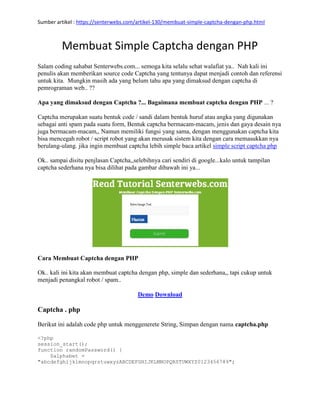
Ok.. sampai disitu penjlasan Captcha,,selebihnya cari sendiri di google...kalo untuk tampilan
captcha sederhana nya bisa dilihat pada gambar dibawah ini ya...
Cara Membuat Captcha dengan PHP
Ok.. kali ini kita akan membuat captcha dengan php, simple dan sederhana,, tapi cukup untuk
menjadi penangkal robot / spam..
Demo Download
Captcha . php
Berikut ini adalah code php untuk menggenerete String, Simpan dengan nama captcha.php
<?php
session_start();
function randomPassword() {
$alphabet =
"abcdefghijklmnopqrstuwxyzABCDEFGHIJKLMNOPQRSTUWXYZ0123456789";
Sumber artikel : https://senterwebs.com/artikel-130/membuat-simple-captcha-dengan-php.html
//remember to declare $pass as an array
$pass = array();
//put the length -1 in cache
$alphaLength = strlen($alphabet) - 1;
for ($i = 0; $i < 4; $i++)
{
$n = rand(0, $alphaLength);
$pass[] = $alphabet[$n];
}
//turn the array into a string
return implode($pass);
}
$code=randomPassword();
$_SESSION["code"]=$code;
//height and width for captcha background
$im = imagecreatetruecolor(100, 50);
//background color blue
$bg = imagecolorallocate($im, 22, 86, 165);
//text color white
$fg = imagecolorallocate($im, 255, 255, 255);
imagefill($im, 0, 0, $bg);
//( $image , $fontsize , $x-distance , $y-distance , $string , $fontcolor )
imagestring($im, 5, 30, 15, $code, $fg);
//generate image
header("Cache-Control: no-cache, must-revalidate");
header('Content-type: image/png');
imagepng($im);
imagedestroy($im);
?>
HTML FORM , Simpan dengan Nama index.php
<html>
<head>
<title>Captcha</title>
</head>
<body>
<form action="validate.php" method="post">
Enter Image Text
<input name="captcha" type="text">
<img src="captcha.php" /><br>
<input name="submit" type="submit" value="Submit">
</form>
</body>
</html>
Validate.php
Sumber artikel : https://senterwebs.com/artikel-130/membuat-simple-captcha-dengan-php.html
<?php
session_start();
if(isset($_POST["captcha"])&&$_POST["captcha"]!=""&&$_SESSION["code"]==$_POST
["captcha"])
{
echo "Captcha Okay!";
//Place other codes here to execute when captcha is passed
}
else
{
die("Wrong Captcha Code!");
}
?>
Style , Css yang digunakan untuk mengatur tampilan nya , Paste diatas tag </body>
<style type="text/css">
/* Button Style */
input#submit{
cursor:pointer;
padding:5px 25px;
background:#35b128;
border:1px solid #33842a;
-moz-border-radius: 10px;
-webkit-border-radius: 10px;
border-radius: 10px;
-webkit-box-shadow: 0 0 4px rgba(0,0,0, .75);
-moz-box-shadow: 0 0 4px rgba(0,0,0, .75);
box-shadow: 0 0 4px rgba(0,0,0, .75);
/*style the text*/
color:#f3f3f3;
font-size:1.1em;
}
/* Button Hover Focus States */
input#submit:hover, input#submit:focus{
background-color :#399630;
-webkit-box-shadow: 0 0 1px rgba(0,0,0, .75);
-moz-box-shadow: 0 0 1px rgba(0,0,0, .75);
box-shadow: 0 0 1px rgba(0,0,0, .75);
}
/* is the style for all elements */
{
margin:20px;
padding:0;
}
#login-form
{
margin-top:70px;
}
table
{
border:solid #dcdcdc 1px;
Sumber artikel : https://senterwebs.com/artikel-130/membuat-simple-captcha-dengan-php.html
padding:25px;
box-shadow: 0px 0px 1px rgba(0,0,0,0.2);
}
table tr,td
{
padding:15px;
}
table tr td input
{
width:97%;
height:45px;
border:solid #e1e1e1 1px;
border-radius:3px;
padding-left:10px;
font-family:Verdana, Geneva, sans-serif;
font-size:16px;
background:#f9f9f9;
transition-duration:0.5s;
box-shadow: inset 0px 0px 1px rgba(0,0,0,0.4);
}
table tr td button
{
width:100%;
height:45px;
border:0px;
background:rgba(12,45,78,11);
background:-moz-linear-gradient(top, #595959 , #515151);
border-radius:3px;
box-shadow: 1px 1px 1px rgba(1,0,0,0.2);
color:#f9f9f9;
font-family:Verdana, Geneva, sans-serif;
font-size:18px;
font-weight:bolder;
text-transform:uppercase;
}
table tr td button:active
{
position:relative;
top:1px;
}
table tr td a
{
text-decoration:none;
color:#00a2d1;
font-family:Verdana, Geneva, sans-serif;
font-size:18px;
}
</style>
Simpan ke 3 file tersebut , index.php, validate.php , captcha.php dalam satu Folder , dan
Jalankan di localhost
Sumber artikel : https://senterwebs.com/artikel-130/membuat-simple-captcha-dengan-php.html
Demikan Cara Membuat Captcha dengan PHP, Silahkan download Linknya dibawah ini :
Demo Download

Membuat Simple Captcha dengan php.pdf

  • 1.
    Sumber artikel :https://senterwebs.com/artikel-130/membuat-simple-captcha-dengan-php.html Membuat Simple Captcha dengan PHP Salam coding sahabat Senterwebs.com... semoga kita selalu sehat walafiat ya.. Nah kali ini penulis akan memberikan source code Captcha yang tentunya dapat menjadi contoh dan referensi untuk kita. Mungkin masih ada yang belum tahu apa yang dimaksud dengan captcha di pemrograman web.. ?? Apa yang dimaksud dengan Captcha ?... Bagaimana membuat captcha dengan PHP ... ? Captcha merupakan suatu bentuk code / sandi dalam bentuk huruf atau angka yang digunakan sebagai anti spam pada suatu form, Bentuk captcha bermacam-macam, jenis dan gaya desain nya juga bermacam-macam,, Namun memiliki fungsi yang sama, dengan menggunakan captcha kita bisa mencegah robot / script robot yang akan merusak sistem kita dengan cara memasukkan nya berulang-ulang. jika ingin membuat captcha lebih simple baca artikel simple script captcha php Ok.. sampai disitu penjlasan Captcha,,selebihnya cari sendiri di google...kalo untuk tampilan captcha sederhana nya bisa dilihat pada gambar dibawah ini ya... Cara Membuat Captcha dengan PHP Ok.. kali ini kita akan membuat captcha dengan php, simple dan sederhana,, tapi cukup untuk menjadi penangkal robot / spam.. Demo Download Captcha . php Berikut ini adalah code php untuk menggenerete String, Simpan dengan nama captcha.php <?php session_start(); function randomPassword() { $alphabet = "abcdefghijklmnopqrstuwxyzABCDEFGHIJKLMNOPQRSTUWXYZ0123456789";
  • 2.
    Sumber artikel :https://senterwebs.com/artikel-130/membuat-simple-captcha-dengan-php.html //remember to declare $pass as an array $pass = array(); //put the length -1 in cache $alphaLength = strlen($alphabet) - 1; for ($i = 0; $i < 4; $i++) { $n = rand(0, $alphaLength); $pass[] = $alphabet[$n]; } //turn the array into a string return implode($pass); } $code=randomPassword(); $_SESSION["code"]=$code; //height and width for captcha background $im = imagecreatetruecolor(100, 50); //background color blue $bg = imagecolorallocate($im, 22, 86, 165); //text color white $fg = imagecolorallocate($im, 255, 255, 255); imagefill($im, 0, 0, $bg); //( $image , $fontsize , $x-distance , $y-distance , $string , $fontcolor ) imagestring($im, 5, 30, 15, $code, $fg); //generate image header("Cache-Control: no-cache, must-revalidate"); header('Content-type: image/png'); imagepng($im); imagedestroy($im); ?> HTML FORM , Simpan dengan Nama index.php <html> <head> <title>Captcha</title> </head> <body> <form action="validate.php" method="post"> Enter Image Text <input name="captcha" type="text"> <img src="captcha.php" /><br> <input name="submit" type="submit" value="Submit"> </form> </body> </html> Validate.php
  • 3.
    Sumber artikel :https://senterwebs.com/artikel-130/membuat-simple-captcha-dengan-php.html <?php session_start(); if(isset($_POST["captcha"])&&$_POST["captcha"]!=""&&$_SESSION["code"]==$_POST ["captcha"]) { echo "Captcha Okay!"; //Place other codes here to execute when captcha is passed } else { die("Wrong Captcha Code!"); } ?> Style , Css yang digunakan untuk mengatur tampilan nya , Paste diatas tag </body> <style type="text/css"> /* Button Style */ input#submit{ cursor:pointer; padding:5px 25px; background:#35b128; border:1px solid #33842a; -moz-border-radius: 10px; -webkit-border-radius: 10px; border-radius: 10px; -webkit-box-shadow: 0 0 4px rgba(0,0,0, .75); -moz-box-shadow: 0 0 4px rgba(0,0,0, .75); box-shadow: 0 0 4px rgba(0,0,0, .75); /*style the text*/ color:#f3f3f3; font-size:1.1em; } /* Button Hover Focus States */ input#submit:hover, input#submit:focus{ background-color :#399630; -webkit-box-shadow: 0 0 1px rgba(0,0,0, .75); -moz-box-shadow: 0 0 1px rgba(0,0,0, .75); box-shadow: 0 0 1px rgba(0,0,0, .75); } /* is the style for all elements */ { margin:20px; padding:0; } #login-form { margin-top:70px; } table { border:solid #dcdcdc 1px;
  • 4.
    Sumber artikel :https://senterwebs.com/artikel-130/membuat-simple-captcha-dengan-php.html padding:25px; box-shadow: 0px 0px 1px rgba(0,0,0,0.2); } table tr,td { padding:15px; } table tr td input { width:97%; height:45px; border:solid #e1e1e1 1px; border-radius:3px; padding-left:10px; font-family:Verdana, Geneva, sans-serif; font-size:16px; background:#f9f9f9; transition-duration:0.5s; box-shadow: inset 0px 0px 1px rgba(0,0,0,0.4); } table tr td button { width:100%; height:45px; border:0px; background:rgba(12,45,78,11); background:-moz-linear-gradient(top, #595959 , #515151); border-radius:3px; box-shadow: 1px 1px 1px rgba(1,0,0,0.2); color:#f9f9f9; font-family:Verdana, Geneva, sans-serif; font-size:18px; font-weight:bolder; text-transform:uppercase; } table tr td button:active { position:relative; top:1px; } table tr td a { text-decoration:none; color:#00a2d1; font-family:Verdana, Geneva, sans-serif; font-size:18px; } </style> Simpan ke 3 file tersebut , index.php, validate.php , captcha.php dalam satu Folder , dan Jalankan di localhost
  • 5.
    Sumber artikel :https://senterwebs.com/artikel-130/membuat-simple-captcha-dengan-php.html Demikan Cara Membuat Captcha dengan PHP, Silahkan download Linknya dibawah ini : Demo Download