Aplikasi Manipulasi Data
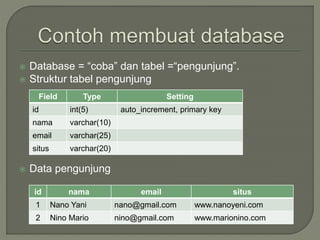
 Database = “coba” dan tabel =“pengunjung”.
 Struktur tabel pengunjung
 Data pengunjung
id nama email situs
1 Nano Yani nano@gmail.com www.nanoyeni.com
2 Nino Mario nino@gmail.com www.marionino.com
Field Type Setting
id int(5) auto_increment, primary key
nama varchar(10)
email varchar(25)
situs varchar(20)
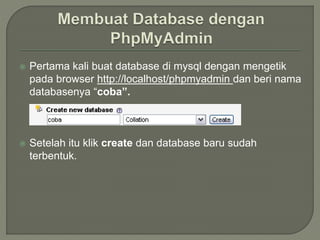
 Pertama kali buat database di mysql dengan mengetik
pada browser http://localhost/phpmyadmin dan beri nama
databasenya “coba”.
 Setelah itu klik create dan database baru sudah
terbentuk.
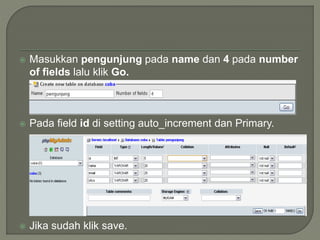
 Masukkan pengunjung pada name dan 4 pada number
of fields lalu klik Go.
 Pada field id di setting auto_increment dan Primary.
 Jika sudah klik save.
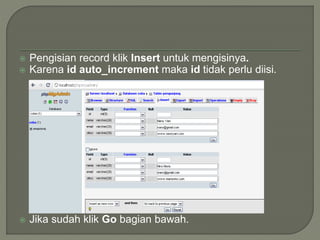
 Pengisian record klik Insert untuk mengisinya.
 Karena id auto_increment maka id tidak perlu diisi.
 Jika sudah klik Go bagian bawah.
Nama file : koneksi.php
<?php
$host = "localhost";
$user = "root";
$pass = "vertrigo";
$koneksi =
mysql_connect("$host","$user","
$pass") or die (“No Connect”);
mysql_select_db("coba");
?>
Nama file : view.php
<?php
include('koneksi.php');
$query = mysql_query("select * from pengunjung");
$jumlah = mysql_num_rows($query);
echo"<h2>Daftar Pengunjung</h2>";
echo"Jumlah pengunjung : $jumlah";
echo"<table border='0' cellspacing='2' cellpadding='3'>";
echo"<tr bgcolor='yellow' align='center'>";
echo"<td width='150'>Nama Pengunjung </td>";
echo"<td width='150'>Email </td>";
echo"<td width='150'>Homepage </td></tr>";
while ($data=mysql_fetch_array($query)) {
echo"<tr><td>$data[nama]</td>";
echo"<td>$data[email]</td>";
echo"<td>$data[situs]</td></tr>";
}
echo"</table>";
?>
 Untuk dapat membuat sebuah halaman yang dapat
memasukkan sebuah inputan maka perlu dibentuk
sebuah form.
 Form tersebut memuat variabel-variabel yang dibutuhkan
yang kemudian di proses dan dimasukkan dalam
database.
<html>
<head><title>Form</title></head>
<body>
<form method="post" action="">
<h2 align="center">Form Input Data </h2>
<?php
if(isset($submit))
{
$nama = $_POST['nama'];
$email = $_POST['email'];
$situs = $_POST['situs'];
if(empty($nama) || empty($email) ||
empty($situs))
{
echo "<center><b>Data tidak
komplit</b></center>";
}else{
include('koneksi.php');
mysql_query("insert into pengunjung
(nama, email, situs) values ('$nama',
'$email', '$situs')");
}
}?>
<table align="center" border="0" width="25%"
cellspacing="3">
<tr><td>Nama </td>
<td>:</td>
<td><input type="text" name="nama"></td>
</tr>
<tr><td>Email </td>
<td>:</td>
<td><input type="text" name="email"></td>
</tr>
<tr><td>Situs </td>
<td>:</td>
<td><input type="text" name="situs"></td>
</tr>
<tr><td align='center' colspan='3'>
<input type="submit" name="submit"
value="Kirim">
<input type="reset" name="reset"
value="Batal"></td>
</tr>
</table></form></body></html>
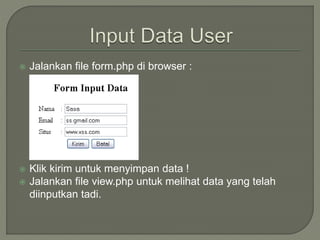
 Jalankan file form.php di browser :
 Klik kirim untuk menyimpan data !
 Jalankan file view.php untuk melihat data yang telah
diinputkan tadi.
 Sebuah database tentunya terdapat revisi-revisi atau
perubahan isi tabel atau record.
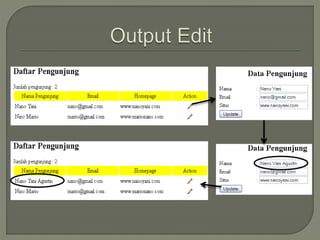
 Maka harusnya terdapat sebuah form yang mampu
mengedit isi yang terdapat dalam database.
 Langkah pertama, harus memodifikasi file view.php agar
dapat mempunyai link untuk menuju sebuah form peng-
editan yang selanjutnya dengan form tersebut akan di
proses dan di update ke dalam database.
<?php
include('koneksi.php');
$query = mysql_query("select * from pengunjung");
$jumlah = mysql_num_rows($query);
echo"<h2>Daftar Pengunjung</h2>";
echo"Jumlah pengunjung : $jumlah";
echo"<table border='0' cellspacing='2' cellpadding='3'>";
echo"<tr bgcolor='yellow' align='center'>";
echo"<td width='150'>Nama Pengunjung </td>";
echo"<td width='150'>Email </td>";
echo"<td width='150'>Homepage </td>";
echo"<td width='100'>Action </td></tr>";
while ($data=mysql_fetch_array($query)) {
echo"<tr><td>$data[nama]</td>";
echo"<td>$data[email]</td>";
echo"<td>$data[situs]</td>";
echo"<td align='center'><a href=edit.php?id=$data[id]><img src='b_edit.png'
title='Edit'></a></td></tr>";
}
echo"</table>"; ?>
Nama file : edit.php
<?php
include('koneksi.php');
$id=$_GET['id'];
$query = mysql_query("select * from pengunjung where id=‘$id’ ");
while ($baris = mysql_fetch_row($query))
{
echo "<h2 align='center'>Data Pengunjung</h2>";
echo "<form method='post' action='update.php'>";
echo "<table align='center' border='0' width='35%' cellspacing='1'> ";
echo "<tr><td>Nama</td><td>:</td><td><input type='text' name='nama'
value='$baris[1]'></td></tr>";
echo "<tr><td>Email</td><td>:</td><td><input type='text' name='email'
value='$baris[2]'></td></tr>";
echo "<tr><td>Situs</td><td>:</td><td><input type='text' name='situs'
value='$baris[3]'></td></tr>";
echo "<tr><td><input type='submit' name='submit' value='Update'>";
echo "<input type='hidden' name='id' value='$baris[0]'></td></tr>";
echo "</table>";
echo "</form>";
} ?>
Nama file : update.php
<?php
include('koneksi.php');
$id=$_POST['id'];
$nama=$_POST['nama'];
$email=$_POST['email'];
$situs=$_POST['situs'];
$query = mysql_query("update pengunjung set nama='$nama',
email='$email', situs='$situs' where id='$id'");
echo "<script>window.location = 'view.php'</script>";
?>
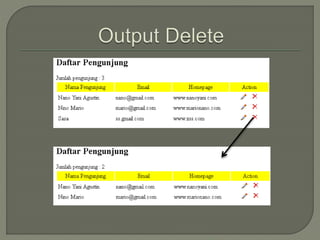
 Record tidak selamanya akan disimpan jika database
yang digunakan bersifat dinamis dan tidak diperlukan
lagi.
 Caranya dengan memodifikasi pada view.php.
<?php
include('koneksi.php');
$query = mysql_query("select * from pengunjung");
$jumlah = mysql_num_rows($query);
echo"<h2>Daftar Pengunjung</h2>";
echo"Jumlah pengunjung : $jumlah";
echo"<table border='0' cellspacing='2' cellpadding='3'>";
echo"<tr bgcolor='yellow' align='center'>";
echo"<td width='150'>Nama Pengunjung </td>";
echo"<td width='150'>Email </td>";
echo"<td width='150'>Homepage </td>";
echo"<td width='100'>Action </td></tr>";
while ($data=mysql_fetch_array($query)) {
echo"<tr><td>$data[nama]</td>";
echo"<td>$data[email]</td>";
echo"<td>$data[situs]</td>";
echo"<td align='center'><a href=edit.php?id=$data[id]><img src='b_edit.png' title='Edit'> </a>
&nbsp;&nbsp;&nbsp; <a href=delete.php?id=$data[id]><img src='b_drop.png'
title='Delete'></a></td></tr>";
} echo"</table>"; ?>
Nama file : delete.php
<?php
include('koneksi.php');
$id=$_GET['id'];
mysql_query("delete from pengunjung where id='$id'");
echo "<script>window.location = 'view.php'</script>";
?>
Pertanyaan ??
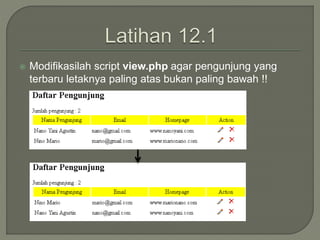
 Modifikasilah script view.php agar pengunjung yang
terbaru letaknya paling atas bukan paling bawah !!

manipulasi data

  • 1.
  • 2.
     Database =“coba” dan tabel =“pengunjung”.  Struktur tabel pengunjung  Data pengunjung id nama email situs 1 Nano Yani nano@gmail.com www.nanoyeni.com 2 Nino Mario nino@gmail.com www.marionino.com Field Type Setting id int(5) auto_increment, primary key nama varchar(10) email varchar(25) situs varchar(20)
  • 3.
     Pertama kalibuat database di mysql dengan mengetik pada browser http://localhost/phpmyadmin dan beri nama databasenya “coba”.  Setelah itu klik create dan database baru sudah terbentuk.
  • 4.
     Masukkan pengunjungpada name dan 4 pada number of fields lalu klik Go.  Pada field id di setting auto_increment dan Primary.  Jika sudah klik save.
  • 5.
     Pengisian recordklik Insert untuk mengisinya.  Karena id auto_increment maka id tidak perlu diisi.  Jika sudah klik Go bagian bawah.
  • 6.
    Nama file :koneksi.php <?php $host = "localhost"; $user = "root"; $pass = "vertrigo"; $koneksi = mysql_connect("$host","$user"," $pass") or die (“No Connect”); mysql_select_db("coba"); ?> Nama file : view.php <?php include('koneksi.php'); $query = mysql_query("select * from pengunjung"); $jumlah = mysql_num_rows($query); echo"<h2>Daftar Pengunjung</h2>"; echo"Jumlah pengunjung : $jumlah"; echo"<table border='0' cellspacing='2' cellpadding='3'>"; echo"<tr bgcolor='yellow' align='center'>"; echo"<td width='150'>Nama Pengunjung </td>"; echo"<td width='150'>Email </td>"; echo"<td width='150'>Homepage </td></tr>"; while ($data=mysql_fetch_array($query)) { echo"<tr><td>$data[nama]</td>"; echo"<td>$data[email]</td>"; echo"<td>$data[situs]</td></tr>"; } echo"</table>"; ?>
  • 7.
     Untuk dapatmembuat sebuah halaman yang dapat memasukkan sebuah inputan maka perlu dibentuk sebuah form.  Form tersebut memuat variabel-variabel yang dibutuhkan yang kemudian di proses dan dimasukkan dalam database.
  • 8.
    <html> <head><title>Form</title></head> <body> <form method="post" action=""> <h2align="center">Form Input Data </h2> <?php if(isset($submit)) { $nama = $_POST['nama']; $email = $_POST['email']; $situs = $_POST['situs']; if(empty($nama) || empty($email) || empty($situs)) { echo "<center><b>Data tidak komplit</b></center>"; }else{ include('koneksi.php'); mysql_query("insert into pengunjung (nama, email, situs) values ('$nama', '$email', '$situs')"); } }?> <table align="center" border="0" width="25%" cellspacing="3"> <tr><td>Nama </td> <td>:</td> <td><input type="text" name="nama"></td> </tr> <tr><td>Email </td> <td>:</td> <td><input type="text" name="email"></td> </tr> <tr><td>Situs </td> <td>:</td> <td><input type="text" name="situs"></td> </tr> <tr><td align='center' colspan='3'> <input type="submit" name="submit" value="Kirim"> <input type="reset" name="reset" value="Batal"></td> </tr> </table></form></body></html>
  • 9.
     Jalankan fileform.php di browser :  Klik kirim untuk menyimpan data !  Jalankan file view.php untuk melihat data yang telah diinputkan tadi.
  • 10.
     Sebuah databasetentunya terdapat revisi-revisi atau perubahan isi tabel atau record.  Maka harusnya terdapat sebuah form yang mampu mengedit isi yang terdapat dalam database.  Langkah pertama, harus memodifikasi file view.php agar dapat mempunyai link untuk menuju sebuah form peng- editan yang selanjutnya dengan form tersebut akan di proses dan di update ke dalam database.
  • 11.
    <?php include('koneksi.php'); $query = mysql_query("select* from pengunjung"); $jumlah = mysql_num_rows($query); echo"<h2>Daftar Pengunjung</h2>"; echo"Jumlah pengunjung : $jumlah"; echo"<table border='0' cellspacing='2' cellpadding='3'>"; echo"<tr bgcolor='yellow' align='center'>"; echo"<td width='150'>Nama Pengunjung </td>"; echo"<td width='150'>Email </td>"; echo"<td width='150'>Homepage </td>"; echo"<td width='100'>Action </td></tr>"; while ($data=mysql_fetch_array($query)) { echo"<tr><td>$data[nama]</td>"; echo"<td>$data[email]</td>"; echo"<td>$data[situs]</td>"; echo"<td align='center'><a href=edit.php?id=$data[id]><img src='b_edit.png' title='Edit'></a></td></tr>"; } echo"</table>"; ?>
  • 12.
    Nama file :edit.php <?php include('koneksi.php'); $id=$_GET['id']; $query = mysql_query("select * from pengunjung where id=‘$id’ "); while ($baris = mysql_fetch_row($query)) { echo "<h2 align='center'>Data Pengunjung</h2>"; echo "<form method='post' action='update.php'>"; echo "<table align='center' border='0' width='35%' cellspacing='1'> "; echo "<tr><td>Nama</td><td>:</td><td><input type='text' name='nama' value='$baris[1]'></td></tr>"; echo "<tr><td>Email</td><td>:</td><td><input type='text' name='email' value='$baris[2]'></td></tr>"; echo "<tr><td>Situs</td><td>:</td><td><input type='text' name='situs' value='$baris[3]'></td></tr>"; echo "<tr><td><input type='submit' name='submit' value='Update'>"; echo "<input type='hidden' name='id' value='$baris[0]'></td></tr>"; echo "</table>"; echo "</form>"; } ?>
  • 13.
    Nama file :update.php <?php include('koneksi.php'); $id=$_POST['id']; $nama=$_POST['nama']; $email=$_POST['email']; $situs=$_POST['situs']; $query = mysql_query("update pengunjung set nama='$nama', email='$email', situs='$situs' where id='$id'"); echo "<script>window.location = 'view.php'</script>"; ?>
  • 15.
     Record tidakselamanya akan disimpan jika database yang digunakan bersifat dinamis dan tidak diperlukan lagi.  Caranya dengan memodifikasi pada view.php.
  • 16.
    <?php include('koneksi.php'); $query = mysql_query("select* from pengunjung"); $jumlah = mysql_num_rows($query); echo"<h2>Daftar Pengunjung</h2>"; echo"Jumlah pengunjung : $jumlah"; echo"<table border='0' cellspacing='2' cellpadding='3'>"; echo"<tr bgcolor='yellow' align='center'>"; echo"<td width='150'>Nama Pengunjung </td>"; echo"<td width='150'>Email </td>"; echo"<td width='150'>Homepage </td>"; echo"<td width='100'>Action </td></tr>"; while ($data=mysql_fetch_array($query)) { echo"<tr><td>$data[nama]</td>"; echo"<td>$data[email]</td>"; echo"<td>$data[situs]</td>"; echo"<td align='center'><a href=edit.php?id=$data[id]><img src='b_edit.png' title='Edit'> </a> &nbsp;&nbsp;&nbsp; <a href=delete.php?id=$data[id]><img src='b_drop.png' title='Delete'></a></td></tr>"; } echo"</table>"; ?>
  • 17.
    Nama file :delete.php <?php include('koneksi.php'); $id=$_GET['id']; mysql_query("delete from pengunjung where id='$id'"); echo "<script>window.location = 'view.php'</script>"; ?>
  • 19.
  • 20.
     Modifikasilah scriptview.php agar pengunjung yang terbaru letaknya paling atas bukan paling bawah !!