Computer Forensics
Infosec Pro Guide
Ch 15
Keyloggers and Malware
Rev. 5-4-15
Topics
• Defining keyloggers and malware
• Detecting keylogger and malware
• Determining how the infection occurred
• Identifying what data was captured
• Finding information about the attacker
Defining Keyloggers and Malware
Keyloggers
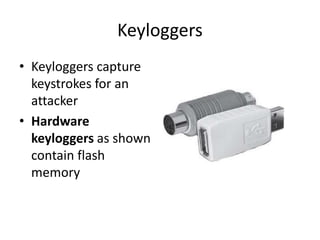
• Keyloggers capture
keystrokes for an
attacker
• Hardware
keyloggers as shown
contain flash
memory
Software Keyloggers
• Programs that capture keystrokes, and often
other user activity, such as screenshots and
mouse actions
• API-based hooks into the OS to capture
keystrokes
• Kernel-based intercepts keystrokes via a
modified keyboard driver
• Form grabbing intercepts Web-form data
before it is sent to the Internet
Malware
• Malicious software
– Includes viruses, Trojans, rootkits, spyware
– Also "Potentially Unwanted Programs"
Detecting Keyloggers and
Malware
Malware Artifacts
• Artifacts may be created in
– System startup
– Running processes
– Services
– Installed or modified drivers
– System files
– More
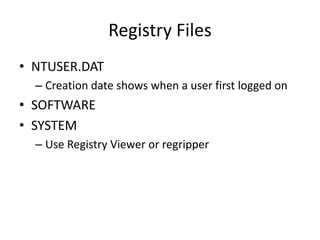
Registry Files
• NTUSER.DAT
– Creation date shows when a user first logged on
• SOFTWARE
• SYSTEM
– Use Registry Viewer or regripper
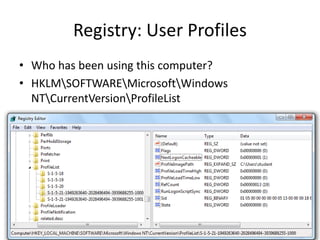
Registry: User Profiles
• Who has been using this computer?
• HKLMSOFTWAREMicrosoftWindows
NTCurrentVersionProfileList
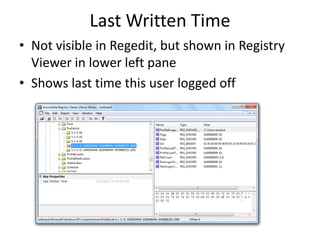
Last Written Time
• Not visible in Regedit, but shown in Registry
Viewer in lower left pane
• Shows last time this user logged off
Run Keys
• Malware often puts itself here to survive a
system reboot
• HKLMSoftwareMicrosoftWindowsCurrent
VersionRun
• HKCUSoftwareMicrosoftWindowsCurrentV
ersionRun
– Many more, as listed in link Ch 15a
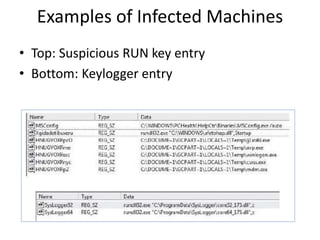
Examples of Infected Machines
• Top: Suspicious RUN key entry
• Bottom: Keylogger entry
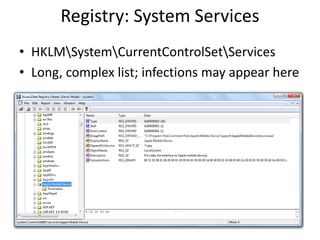
Registry: System Services
• HKLMSystemCurrentControlSetServices
• Long, complex list; infections may appear here
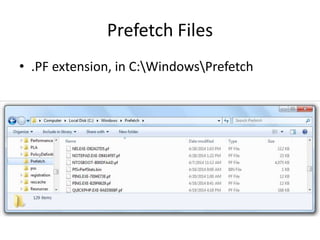
Prefetch Files
• .PF extension, in C:WindowsPrefetch
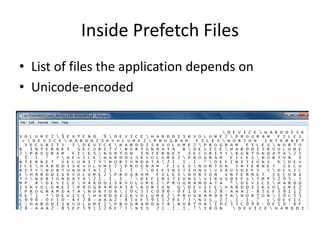
Inside Prefetch Files
• List of files the application depends on
• Unicode-encoded
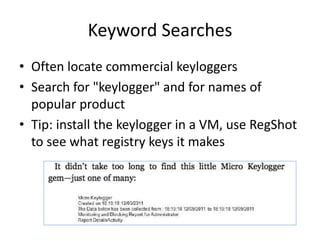
Keyword Searches
• Often locate commercial keyloggers
• Search for "keylogger" and for names of
popular product
• Tip: install the keylogger in a VM, use RegShot
to see what registry keys it makes
Handling Suspicious Files
• Use online scanners like
– virustotal
– Jotti
– Threatexpert (links Ch 15b, c, d)
Determining How the Infection
Occurred
Timing
• Look at creation dates of malware files to
determine time of infection
• What was the user doing at the time of the
infection?
– At work, checking email, surfing the Web?
• Was the user away, perhaps home asleep
during this time?
Other Files
• Sorting files created or modified near that
time will help determine what activity was
taking place
• Check event logs
– Export them from C:WindowsSystem32Config
– View them using Event Viewer from the same OS
they were created in
• Fix corrupted event logs with Fixevt.exe (link
Ch 15e)
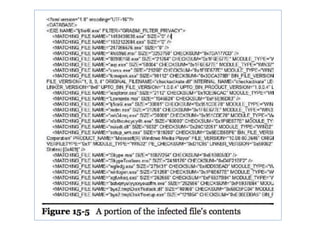
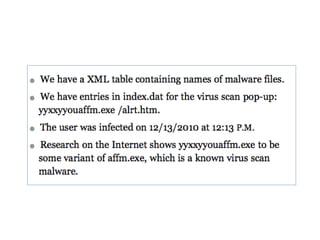
Example: Fake Antivirus
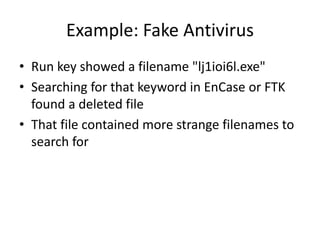
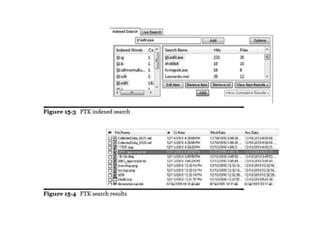
• Run key showed a filename "lj1ioi6l.exe"
• Searching for that keyword in EnCase or FTK
found a deleted file
• That file contained more strange filenames to
search for
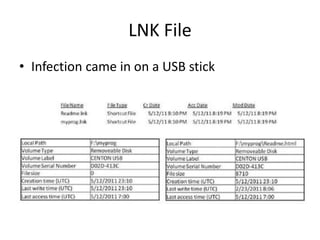
LNK File
• Infection came in on a USB stick
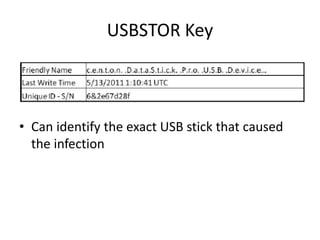
USBSTOR Key
• Can identify the exact USB stick that caused
the infection
How to Get Serial # of USB Stick
• Use a hardware USB write-blocker that will
display the serial number on its screen
• Use forensic imaging software to pull the
serial number
• Use a registry hack to block USB writes on a
test machine, then compare USBSTOR entries
to see if you have a match
Identifying What Data was
Captured
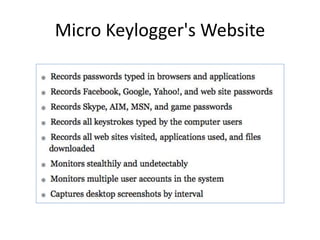
Micro Keylogger's Website
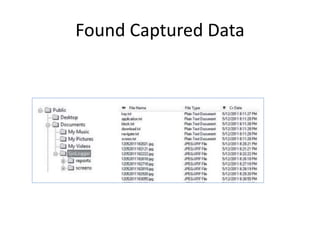
Found Captured Data
Antiforensic Measures
• If you encounter these
– Packed binaries
– Encryption
– Data wiping
– Obfuscation
• You may have better results with live
analysis—infect a virtual machine and watch
the effects
Finding Information About the
Attacker
Help.HTML File
• Left behind by malware
• Examples and directions to connect webmail
accounts and upload to FTP server
• Use keyword search for webmail accounts
– Gmail, Yahoo, Verizon, Hotmail, etc.
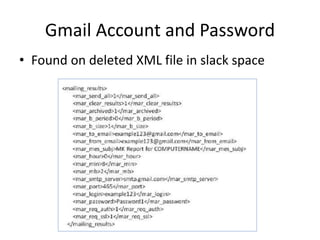
Gmail Account and Password
• Found on deleted XML file in slack space
Don't Log In!
• Just finding the password is NOT legal
authorization to log in to the account
• Report your findings and let legal counsel
decide what the next steps should be

Malware forensics

  • 1.
    Computer Forensics Infosec ProGuide Ch 15 Keyloggers and Malware Rev. 5-4-15
  • 2.
    Topics • Defining keyloggersand malware • Detecting keylogger and malware • Determining how the infection occurred • Identifying what data was captured • Finding information about the attacker
  • 3.
  • 4.
    Keyloggers • Keyloggers capture keystrokesfor an attacker • Hardware keyloggers as shown contain flash memory
  • 5.
    Software Keyloggers • Programsthat capture keystrokes, and often other user activity, such as screenshots and mouse actions • API-based hooks into the OS to capture keystrokes • Kernel-based intercepts keystrokes via a modified keyboard driver • Form grabbing intercepts Web-form data before it is sent to the Internet
  • 6.
    Malware • Malicious software –Includes viruses, Trojans, rootkits, spyware – Also "Potentially Unwanted Programs"
  • 7.
  • 8.
    Malware Artifacts • Artifactsmay be created in – System startup – Running processes – Services – Installed or modified drivers – System files – More
  • 9.
    Registry Files • NTUSER.DAT –Creation date shows when a user first logged on • SOFTWARE • SYSTEM – Use Registry Viewer or regripper
  • 10.
    Registry: User Profiles •Who has been using this computer? • HKLMSOFTWAREMicrosoftWindows NTCurrentVersionProfileList
  • 11.
    Last Written Time •Not visible in Regedit, but shown in Registry Viewer in lower left pane • Shows last time this user logged off
  • 12.
    Run Keys • Malwareoften puts itself here to survive a system reboot • HKLMSoftwareMicrosoftWindowsCurrent VersionRun • HKCUSoftwareMicrosoftWindowsCurrentV ersionRun – Many more, as listed in link Ch 15a
  • 13.
    Examples of InfectedMachines • Top: Suspicious RUN key entry • Bottom: Keylogger entry
  • 14.
    Registry: System Services •HKLMSystemCurrentControlSetServices • Long, complex list; infections may appear here
  • 15.
    Prefetch Files • .PFextension, in C:WindowsPrefetch
  • 16.
    Inside Prefetch Files •List of files the application depends on • Unicode-encoded
  • 17.
    Keyword Searches • Oftenlocate commercial keyloggers • Search for "keylogger" and for names of popular product • Tip: install the keylogger in a VM, use RegShot to see what registry keys it makes
  • 18.
    Handling Suspicious Files •Use online scanners like – virustotal – Jotti – Threatexpert (links Ch 15b, c, d)
  • 19.
    Determining How theInfection Occurred
  • 20.
    Timing • Look atcreation dates of malware files to determine time of infection • What was the user doing at the time of the infection? – At work, checking email, surfing the Web? • Was the user away, perhaps home asleep during this time?
  • 21.
    Other Files • Sortingfiles created or modified near that time will help determine what activity was taking place • Check event logs – Export them from C:WindowsSystem32Config – View them using Event Viewer from the same OS they were created in • Fix corrupted event logs with Fixevt.exe (link Ch 15e)
  • 22.
    Example: Fake Antivirus •Run key showed a filename "lj1ioi6l.exe" • Searching for that keyword in EnCase or FTK found a deleted file • That file contained more strange filenames to search for
  • 26.
    LNK File • Infectioncame in on a USB stick
  • 27.
    USBSTOR Key • Canidentify the exact USB stick that caused the infection
  • 28.
    How to GetSerial # of USB Stick • Use a hardware USB write-blocker that will display the serial number on its screen • Use forensic imaging software to pull the serial number • Use a registry hack to block USB writes on a test machine, then compare USBSTOR entries to see if you have a match
  • 29.
  • 30.
  • 31.
  • 32.
    Antiforensic Measures • Ifyou encounter these – Packed binaries – Encryption – Data wiping – Obfuscation • You may have better results with live analysis—infect a virtual machine and watch the effects
  • 33.
  • 34.
    Help.HTML File • Leftbehind by malware • Examples and directions to connect webmail accounts and upload to FTP server • Use keyword search for webmail accounts – Gmail, Yahoo, Verizon, Hotmail, etc.
  • 35.
    Gmail Account andPassword • Found on deleted XML file in slack space
  • 36.
    Don't Log In! •Just finding the password is NOT legal authorization to log in to the account • Report your findings and let legal counsel decide what the next steps should be