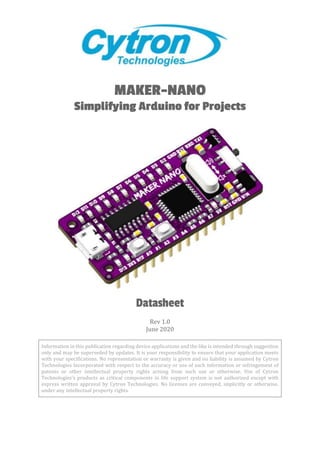
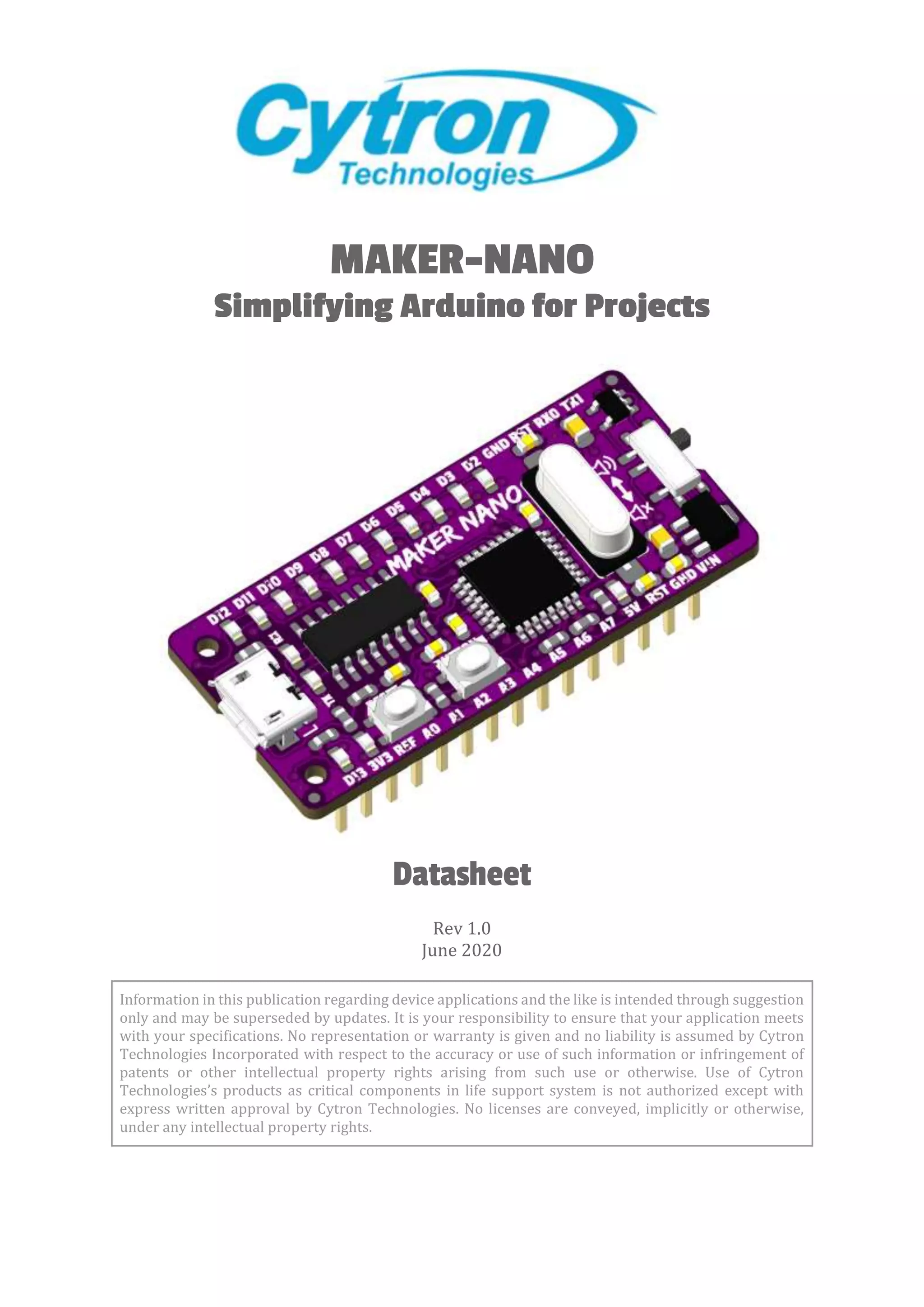
MAKER-NANO
Simplifying Arduino for Projects
Datasheet
Rev 1.0
June 2020
Information in this publication regarding device applications and the like is intended through suggestion
only and may be superseded by updates. It is your responsibility to ensure that your application meets
with your specifications. No representation or warranty is given and no liability is assumed by Cytron
Technologies Incorporated with respect to the accuracy or use of such information or infringement of
patents or other intellectual property rights arising from such use or otherwise. Use of Cytron
Technologies’s products as critical components in life support system is not authorized except with
express written approval by Cytron Technologies. No licenses are conveyed, implicitly or otherwise,
under any intellectual property rights.
ROBOT.HEAD to TOE
Datasheet - MAKER-NANO
Created by Cytron Technologies Sdn Bhd – All Rights Reserved 1
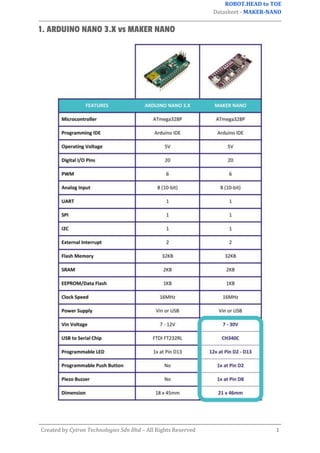
1. ARDUINO NANO 3.X vs MAKER NANO
ROBOT.HEAD to TOE
Datasheet - MAKER-NANO
Created by Cytron Technologies Sdn Bhd – All Rights Reserved 2
2. BOARD LAYOUT & FUNCTION
Figure 1: MAKER-NANO Board Functions (Top)
Function Description
Power LEDs
LED indicator for 3V3 and 5V.
Turn on when powered up.
Digital IO LEDs
(D2-D13)
LED indicator for digital IO D2 - D13.
Turn on when the IO state is high.
Serial Port LEDs
LED indicator for USB serial port activity.
● TX : Turn on when data is transmitted from Maker Nano.
● RX : Turn on when data is received by Maker Nano.
Micro USB Port
Used to upload Arduino program from PC.
Can be used for debugging purpose too (Serial Monitor).
Mute Switch Used to mute the piezo buzzer if pin D8 is used for other purposes.
Reset Button Press to reset the Maker Nano.
User Programmable
Button
Connected to pin D2 internally.
Accessible from the user program.
Table 1: MAKER-NANO Board Functions (Top)
ROBOT.HEAD to TOE
Datasheet - MAKER-NANO
Created by Cytron Technologies Sdn Bhd – All Rights Reserved 3
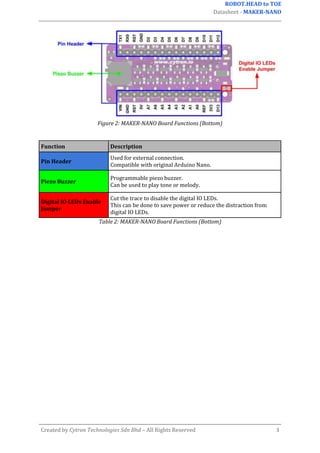
Figure 2: MAKER-NANO Board Functions (Bottom)
Function Description
Pin Header
Used for external connection.
Compatible with original Arduino Nano.
Piezo Buzzer
Programmable piezo buzzer.
Can be used to play tone or melody.
Digital IO LEDs Enable
Jumper
Cut the trace to disable the digital IO LEDs.
This can be done to save power or reduce the distraction from
digital IO LEDs.
Table 2: MAKER-NANO Board Functions (Bottom)
ROBOT.HEAD to TOE
Datasheet - MAKER-NANO
Created by Cytron Technologies Sdn Bhd – All Rights Reserved 4
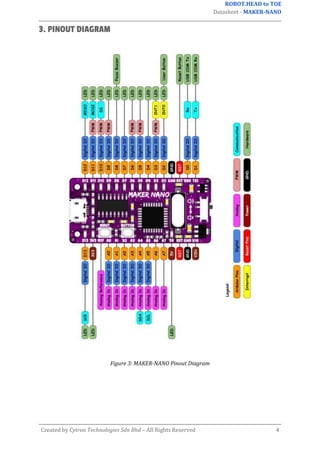
3. PINOUT DIAGRAM
Figure 3: MAKER-NANO Pinout Diagram
ROBOT.HEAD to TOE
Datasheet - MAKER-NANO
Created by Cytron Technologies Sdn Bhd – All Rights Reserved 5
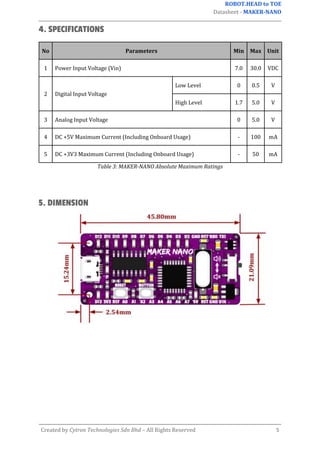
4. SPECIFICATIONS
No Parameters Min Max Unit
1 Power Input Voltage (Vin) 7.0 30.0 VDC
2 Digital Input Voltage
Low Level 0 0.5 V
High Level 1.7 5.0 V
3 Analog Input Voltage 0 5.0 V
4 DC +5V Maximum Current (Including Onboard Usage) - 100 mA
5 DC +3V3 Maximum Current (Including Onboard Usage) - 50 mA
Table 3: MAKER-NANO Absolute Maximum Ratings
5. DIMENSION
ROBOT.HEAD to TOE
Datasheet - MAKER-NANO
Created by Cytron Technologies Sdn Bhd – All Rights Reserved 6
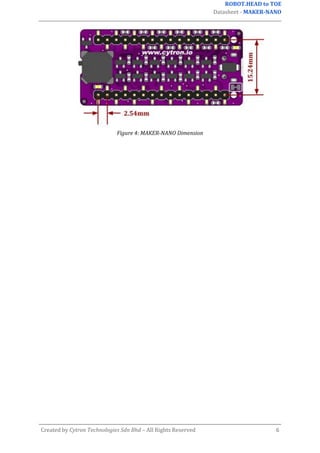
Figure 4: MAKER-NANO Dimension
ROBOT.HEAD to TOE
Datasheet - MAKER-NANO
Created by Cytron Technologies Sdn Bhd – All Rights Reserved 7
Prepared by:
Cytron Technologies Sdn Bhd
www.cytron.io
No. 1, Lorong Industri Impian 1,
Taman Industri Impian,
14000 Bukit Mertajam,
Penang, Malaysia.
Tel: +604 - 548 0668
Fax: +604 - 548 0669
Email:
support@cytron.io
ROBOT.HEAD to TOE
Datasheet - MAKER-NANO
Created by Cytron Technologies Sdn Bhd – All Rights Reserved 8
sales@cytron.io

Maker Nano Datasheet.docx

  • 1.
    MAKER-NANO Simplifying Arduino forProjects Datasheet Rev 1.0 June 2020 Information in this publication regarding device applications and the like is intended through suggestion only and may be superseded by updates. It is your responsibility to ensure that your application meets with your specifications. No representation or warranty is given and no liability is assumed by Cytron Technologies Incorporated with respect to the accuracy or use of such information or infringement of patents or other intellectual property rights arising from such use or otherwise. Use of Cytron Technologies’s products as critical components in life support system is not authorized except with express written approval by Cytron Technologies. No licenses are conveyed, implicitly or otherwise, under any intellectual property rights.
  • 2.
    ROBOT.HEAD to TOE Datasheet- MAKER-NANO Created by Cytron Technologies Sdn Bhd – All Rights Reserved 1 1. ARDUINO NANO 3.X vs MAKER NANO
  • 3.
    ROBOT.HEAD to TOE Datasheet- MAKER-NANO Created by Cytron Technologies Sdn Bhd – All Rights Reserved 2 2. BOARD LAYOUT & FUNCTION Figure 1: MAKER-NANO Board Functions (Top) Function Description Power LEDs LED indicator for 3V3 and 5V. Turn on when powered up. Digital IO LEDs (D2-D13) LED indicator for digital IO D2 - D13. Turn on when the IO state is high. Serial Port LEDs LED indicator for USB serial port activity. ● TX : Turn on when data is transmitted from Maker Nano. ● RX : Turn on when data is received by Maker Nano. Micro USB Port Used to upload Arduino program from PC. Can be used for debugging purpose too (Serial Monitor). Mute Switch Used to mute the piezo buzzer if pin D8 is used for other purposes. Reset Button Press to reset the Maker Nano. User Programmable Button Connected to pin D2 internally. Accessible from the user program. Table 1: MAKER-NANO Board Functions (Top)
  • 4.
    ROBOT.HEAD to TOE Datasheet- MAKER-NANO Created by Cytron Technologies Sdn Bhd – All Rights Reserved 3 Figure 2: MAKER-NANO Board Functions (Bottom) Function Description Pin Header Used for external connection. Compatible with original Arduino Nano. Piezo Buzzer Programmable piezo buzzer. Can be used to play tone or melody. Digital IO LEDs Enable Jumper Cut the trace to disable the digital IO LEDs. This can be done to save power or reduce the distraction from digital IO LEDs. Table 2: MAKER-NANO Board Functions (Bottom)
  • 5.
    ROBOT.HEAD to TOE Datasheet- MAKER-NANO Created by Cytron Technologies Sdn Bhd – All Rights Reserved 4 3. PINOUT DIAGRAM Figure 3: MAKER-NANO Pinout Diagram
  • 6.
    ROBOT.HEAD to TOE Datasheet- MAKER-NANO Created by Cytron Technologies Sdn Bhd – All Rights Reserved 5 4. SPECIFICATIONS No Parameters Min Max Unit 1 Power Input Voltage (Vin) 7.0 30.0 VDC 2 Digital Input Voltage Low Level 0 0.5 V High Level 1.7 5.0 V 3 Analog Input Voltage 0 5.0 V 4 DC +5V Maximum Current (Including Onboard Usage) - 100 mA 5 DC +3V3 Maximum Current (Including Onboard Usage) - 50 mA Table 3: MAKER-NANO Absolute Maximum Ratings 5. DIMENSION
  • 7.
    ROBOT.HEAD to TOE Datasheet- MAKER-NANO Created by Cytron Technologies Sdn Bhd – All Rights Reserved 6 Figure 4: MAKER-NANO Dimension
  • 8.
    ROBOT.HEAD to TOE Datasheet- MAKER-NANO Created by Cytron Technologies Sdn Bhd – All Rights Reserved 7 Prepared by: Cytron Technologies Sdn Bhd www.cytron.io No. 1, Lorong Industri Impian 1, Taman Industri Impian, 14000 Bukit Mertajam, Penang, Malaysia. Tel: +604 - 548 0668 Fax: +604 - 548 0669 Email: support@cytron.io
  • 9.
    ROBOT.HEAD to TOE Datasheet- MAKER-NANO Created by Cytron Technologies Sdn Bhd – All Rights Reserved 8 sales@cytron.io