Magento 2 Theme
Training for Beginners
Author: Pham Van Thao
Date: 07/11/15
Content
1. The new included technologies
2. LESS Language
3. Magento UI Library
4. RequireJS
5. XML
6. Create new a theme in Magento 2
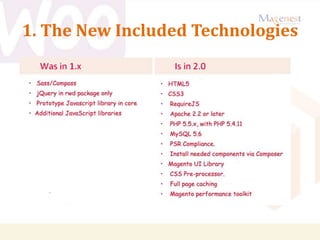
1. The New Included Technologies
2. LESS Language
lLess (sometimes stylized as LESS) is a dynamic style
sheet language that can be compiled into Cascading Style
Sheets (CSS) and run on the client-side or server-side.
lDesigned by Alexis Sellier
lStable release: 2.5.3 - September 25, 2015
lImplementation language: Javascript
2. LESS Language
2. LESS Language
2. LESS Language
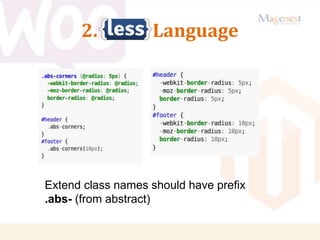
Extend class names should have prefix
.abs- (from abstract)
3. Magento UI Library
lThe Magento UI library is a flexible modular Magento
frontend library that is designed to assist Magento theme
developers.
l The Magento UI library offers the following
characteristics for those who develop or customize
Magento themes. It is:
l Built on LESS preprocessor
l Focused on web standards
l Customizable
l Easy to maintain
l Responsive
l Accessible
3. Magento UI Library
lMagento UI library is located under /lib/web/ folder. It
and employs:
lcss/ folder where the library files are placed
lfonts/ folder where default and icon fonts are placed
limages/ folder where default images are placed
ljquery/ folder where jQuery and jQuery widgets are placed
4. RequireJS
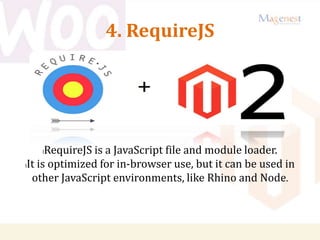
lRequireJS is a JavaScript file and module loader.
lIt is optimized for in-browser use, but it can be used in
other JavaScript environments, like Rhino and Node.
4. RequireJS
l Developed By RequireJS.org
l RequireJS Version In Magento2 : 2.1.11
l RequireJS Current Version : 2.1.20
4. RequireJS
lBenifits
l It’s as few HTTP requests are required.
l The code order doesn’t matter
l Asynchronous JavaScript loading
l The file is easy to understand
l RequireJS can tie them together at compile time
l RequireJS only loads the JS script that the page needs.
4. RequireJS
lFeatures:
lSupports all desktop browsers.
lOptimized for nested dependencies.
lAMD implementation
lOffers all necessary documentation and is easy to use.
lDoes not require a server for getting started
lOffers a RequireJS optimizer designed to minify built files
improving the performance of your projects.
lAll its problems are fixed rapidly.
4. RequireJS
lIn Magento2, There are two mandatory JS.
1. require.js
2. requirejs-config.js
l Path & Script to include require.js
appcodeMagentoThemeviewfrontendlayoutdefaul
t_head_blocks.xml
l<script src=”requirejs/require.js”/>
l requirejs-config.js is used for mapping js, defining
dependencies, defining paths etc.
4. RequireJS
lIn Magento2, There are two mandatory JS.
1. require.js
2. requirejs-config.js
l Path & Script to include require.js
appcodeMagentoThemeviewfrontendlayoutdefaul
t_head_blocks.xml
l<script src=”requirejs/require.js”/>
l requirejs-config.js is used for mapping js, defining
dependencies, defining paths etc.
4. RequireJS
lSeveral levels
l At the library level (lib/web)
l At the module level
(app/code/{Namespace}/{Module}/view/{area}/
web)
l At the theme module level
(app/design/{area}/{Vendor}/{theme}/{Namespa
ce}_{Module}/web)
l At the theme level for all
libraries(app/design/{area}/{Vendor}/{theme}/w
eb).
4. RequireJS
lExample
l Custom Module : Newspace_Hello
l Custom Js :
app/code/Newspace/Hello/view/frontend/web/js/myjs.j
s
l Put below code into your template file
lrequire (['Newspace_Hello/js/myjs'],
lfunction(myjs) {
lmyjs.output ('V Good');
l});
5. XML
lExtensible Markup Language (XML) is a markup
language that defines a set of rules for encoding
documents in a format which is both human-readable
and machine-readable.
6. Create new a Theme
Create new a Theme extend from Magento Blank Theme
1.Create new directory have path:
<magento_dir>/app/design/frontend/Magenest/blank
2. Declare theme: Create a file theme.xml file in folder Theme.
<theme xmlns:xsi="http://www.w3.org/2001/XMLSchema-instance"
xsi:noNamespaceSchemaLocation="../../../../../lib/internal/Magento/Framework/Config/etc/t
heme.xsd">
<title>Magenest Blank</title>
<parent>Magento/blank</parent>
</theme>
6. Create new a Theme
3. Copy three directory: etc, Magento_Theme, web
From
<magento_dir>/app/design/frontend/Magento/blank
To
<magento_dir>/app/design/frontend/Magenest/blank
1.
6. Create new a Theme
Customize template module:
- Example:
Original template file in path:
<magento_dir>/app/code/Magento/Catalog/view/frontend/t
emplates/product/view/review.php
Create new template file with path:
<magento_dir>/app/design/frontend/Magenest/
blank/Magento_Catalog/templates/product/view/
review.php
6. Create new a Theme
Generate .CSS, .JS file using command line below:
1. cd <magento_dir>
2. bin/magento setup:static-content:deploy
Reference Document
1.http://requirejs.org
2.http://lesscss.org/
3.https://en.wikipedia.org/
4.https://firebearstudio.com/blog/advanced-development-with-requirejs-
magento-2-tutorial.html
5.https://rohitguptadotco.wordpress.com/2015/09/24/requirejs-in-magento2-
basics/
6.https://community.magento.com/t5/Programming-Questions/Overriding-a-
block-in-Magento-2/td-p/6831
7.http://blog.magestore.com/how-to-create-theme-in-magento-2-part-1/
8.http://blog.magestore.com/how-to-create-theme-in-magento-2-part-2/
Magento 2 Theme Trainning for Beginners | Magenest

Magento 2 Theme Trainning for Beginners | Magenest

  • 1.
    Magento 2 Theme Trainingfor Beginners Author: Pham Van Thao Date: 07/11/15
  • 2.
    Content 1. The newincluded technologies 2. LESS Language 3. Magento UI Library 4. RequireJS 5. XML 6. Create new a theme in Magento 2
  • 3.
    1. The NewIncluded Technologies
  • 4.
    2. LESS Language lLess(sometimes stylized as LESS) is a dynamic style sheet language that can be compiled into Cascading Style Sheets (CSS) and run on the client-side or server-side. lDesigned by Alexis Sellier lStable release: 2.5.3 - September 25, 2015 lImplementation language: Javascript
  • 5.
  • 6.
  • 7.
    2. LESS Language Extendclass names should have prefix .abs- (from abstract)
  • 8.
    3. Magento UILibrary lThe Magento UI library is a flexible modular Magento frontend library that is designed to assist Magento theme developers. l The Magento UI library offers the following characteristics for those who develop or customize Magento themes. It is: l Built on LESS preprocessor l Focused on web standards l Customizable l Easy to maintain l Responsive l Accessible
  • 9.
    3. Magento UILibrary lMagento UI library is located under /lib/web/ folder. It and employs: lcss/ folder where the library files are placed lfonts/ folder where default and icon fonts are placed limages/ folder where default images are placed ljquery/ folder where jQuery and jQuery widgets are placed
  • 10.
    4. RequireJS lRequireJS isa JavaScript file and module loader. lIt is optimized for in-browser use, but it can be used in other JavaScript environments, like Rhino and Node.
  • 11.
    4. RequireJS l DevelopedBy RequireJS.org l RequireJS Version In Magento2 : 2.1.11 l RequireJS Current Version : 2.1.20
  • 12.
    4. RequireJS lBenifits l It’sas few HTTP requests are required. l The code order doesn’t matter l Asynchronous JavaScript loading l The file is easy to understand l RequireJS can tie them together at compile time l RequireJS only loads the JS script that the page needs.
  • 13.
    4. RequireJS lFeatures: lSupports alldesktop browsers. lOptimized for nested dependencies. lAMD implementation lOffers all necessary documentation and is easy to use. lDoes not require a server for getting started lOffers a RequireJS optimizer designed to minify built files improving the performance of your projects. lAll its problems are fixed rapidly.
  • 14.
    4. RequireJS lIn Magento2,There are two mandatory JS. 1. require.js 2. requirejs-config.js l Path & Script to include require.js appcodeMagentoThemeviewfrontendlayoutdefaul t_head_blocks.xml l<script src=”requirejs/require.js”/> l requirejs-config.js is used for mapping js, defining dependencies, defining paths etc.
  • 15.
    4. RequireJS lIn Magento2,There are two mandatory JS. 1. require.js 2. requirejs-config.js l Path & Script to include require.js appcodeMagentoThemeviewfrontendlayoutdefaul t_head_blocks.xml l<script src=”requirejs/require.js”/> l requirejs-config.js is used for mapping js, defining dependencies, defining paths etc.
  • 16.
    4. RequireJS lSeveral levels lAt the library level (lib/web) l At the module level (app/code/{Namespace}/{Module}/view/{area}/ web) l At the theme module level (app/design/{area}/{Vendor}/{theme}/{Namespa ce}_{Module}/web) l At the theme level for all libraries(app/design/{area}/{Vendor}/{theme}/w eb).
  • 17.
    4. RequireJS lExample l CustomModule : Newspace_Hello l Custom Js : app/code/Newspace/Hello/view/frontend/web/js/myjs.j s l Put below code into your template file lrequire (['Newspace_Hello/js/myjs'], lfunction(myjs) { lmyjs.output ('V Good'); l});
  • 18.
    5. XML lExtensible MarkupLanguage (XML) is a markup language that defines a set of rules for encoding documents in a format which is both human-readable and machine-readable.
  • 19.
    6. Create newa Theme Create new a Theme extend from Magento Blank Theme 1.Create new directory have path: <magento_dir>/app/design/frontend/Magenest/blank 2. Declare theme: Create a file theme.xml file in folder Theme. <theme xmlns:xsi="http://www.w3.org/2001/XMLSchema-instance" xsi:noNamespaceSchemaLocation="../../../../../lib/internal/Magento/Framework/Config/etc/t heme.xsd"> <title>Magenest Blank</title> <parent>Magento/blank</parent> </theme>
  • 20.
    6. Create newa Theme 3. Copy three directory: etc, Magento_Theme, web From <magento_dir>/app/design/frontend/Magento/blank To <magento_dir>/app/design/frontend/Magenest/blank 1.
  • 21.
    6. Create newa Theme Customize template module: - Example: Original template file in path: <magento_dir>/app/code/Magento/Catalog/view/frontend/t emplates/product/view/review.php Create new template file with path: <magento_dir>/app/design/frontend/Magenest/ blank/Magento_Catalog/templates/product/view/ review.php
  • 22.
    6. Create newa Theme Generate .CSS, .JS file using command line below: 1. cd <magento_dir> 2. bin/magento setup:static-content:deploy
  • 23.