



#WTMIndia
#WTMIndia
Introduction to
Machine Learning
and Tensorflow
Lakshya Sivaramakrishnan
Program Coordinator, Women Techmakers
@lakshyas90
#WTMIndia
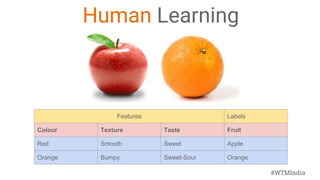
Human Learning
Features Labels
Colour Texture Taste Fruit
Red Smooth Sweet Apple
Orange Bumpy Sweet-Sour Orange
#WTMIndia
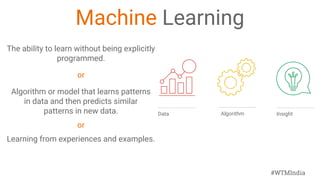
Machine Learning
The ability to learn without being explicitly
programmed.
or
Algorithm or model that learns patterns
in data and then predicts similar
patterns in new data.
or
Learning from experiences and examples.
Algorithm InsightData
#WTMIndia
When is the last
time you
experienced ML ?
#WTMIndia
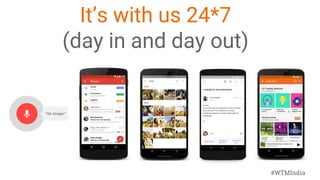
It’s with us 24*7
(day in and day out)
#WTMIndia
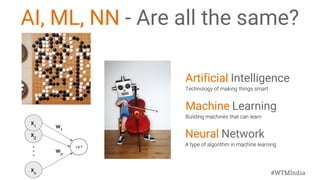
Machine Learning
Artificial Intelligence
Neural Network
AI, ML, NN - Are all the same?
#WTMIndia
Why is ML important?
To solve interesting use cases
● Making speech recognition and machine translation
possible.
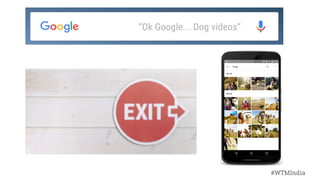
● The new search feature in Google Photos, which
received broad acclaim.
● Recognizing pedestrians and other vehicles in
self-driving cars
#WTMIndia
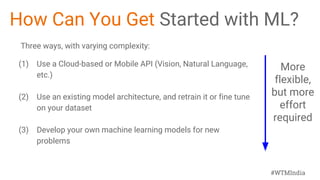
How Can You Get Started with ML?
Three ways, with varying complexity:
(1) Use a Cloud-based or Mobile API (Vision, Natural Language,
etc.)
(2) Use an existing model architecture, and retrain it or fine tune
on your dataset
(3) Develop your own machine learning models for new
problems
More
flexible,
but more
effort
required
#WTMIndia
Review:What/Why/How of ML
WHAT
Algorithms that can generate insights by learning from data.
WHY
Because algorithms can learn faster, cheaper, and better than
humans.
HOW
By finding patterns in data.
#WTMIndia
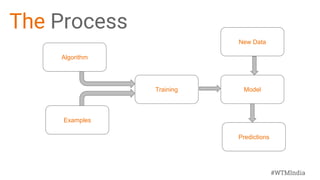
The Process
Algorithm
Model
New Data
Training
Predictions
Examples
#WTMIndia
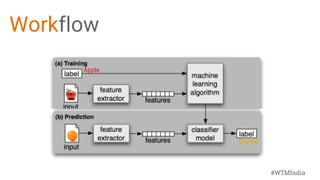
Workflow
Apple
Orange
#WTMIndia
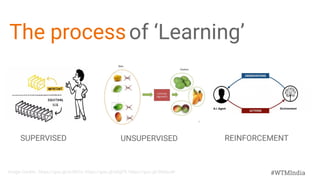
The processof ‘Learning’
SUPERVISED UNSUPERVISED REINFORCEMENT
Image Credits : https://goo.gl/xU5KCv, https://goo.gl/aDjjFR, https://goo.gl/3NGzuW
#WTMIndia
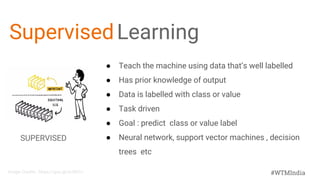
SupervisedLearning
SUPERVISED
● Teach the machine using data that’s well labelled
● Has prior knowledge of output
● Data is labelled with class or value
● Task driven
● Goal : predict class or value label
● Neural network, support vector machines , decision
trees etc
Image Credits : https://goo.gl/xU5KCv
#WTMIndia
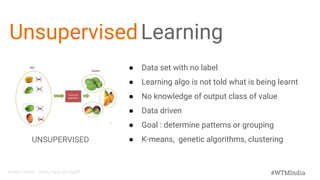
UnsupervisedLearning
UNSUPERVISED
● Data set with no label
● Learning algo is not told what is being learnt
● No knowledge of output class of value
● Data driven
● Goal : determine patterns or grouping
● K-means, genetic algorithms, clustering
Image Credits : https://goo.gl/aDjjFR
#WTMIndia
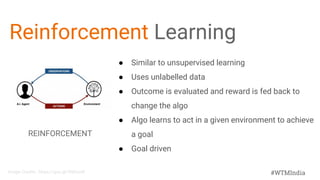
Reinforcement Learning
REINFORCEMENT
● Similar to unsupervised learning
● Uses unlabelled data
● Outcome is evaluated and reward is fed back to
change the algo
● Algo learns to act in a given environment to achieve
a goal
● Goal driven
Image Credits : https://goo.gl/3NGzuW
#WTMIndia
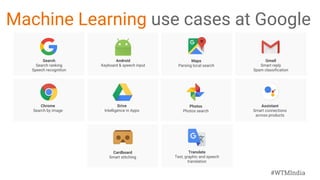
Machine Learning use cases at Google
Search
Search ranking
Speech recognition
Android
Keyboard & speech input
Gmail
Smart reply
Spam classification
Drive
Intelligence in Apps
Chrome
Search by image
Assistant
Smart connections
across products
Maps
Parsing local search
Translate
Text, graphic and speech
translation
Cardboard
Smart stitching
Photos
Photos search
#WTMIndia
Smart reply
in Inbox by Gmail
10%
of all responses
sent on mobile
#WTMIndia
#WTMIndia
#WTMIndia
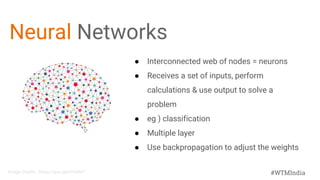
Neural Networks
● Interconnected web of nodes = neurons
● Receives a set of inputs, perform
calculations & use output to solve a
problem
● eg ) classification
● Multiple layer
● Use backpropagation to adjust the weights
Image Credits : https://goo.gl/H7mNnT
#WTMIndia
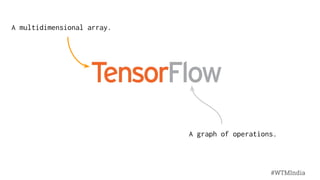
A multidimensional array.
A graph of operations.
#WTMIndia
● Fast, flexible, and scalable
open-source machine learning
library
● For research and production
● Runs on CPU, GPU, Android, iOS,
Raspberry Pi, Datacenters, Mobile
● Apache 2.0 license
https://research.googleblog.com/2016/11/celebrating-tensorflows-first-year.html
#WTMIndia
Sharing our tools with researchers and developers
around the world
repository
for “machine
learning”
category on
GitHub
Released in
Nov. 2015
#WTMIndia
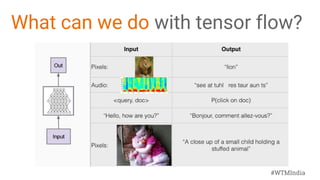
What can we do with tensor flow?
#WTMIndia
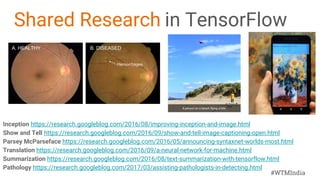
Shared Research in TensorFlow
Inception https://research.googleblog.com/2016/08/improving-inception-and-image.html
Show and Tell https://research.googleblog.com/2016/09/show-and-tell-image-captioning-open.html
Parsey McParseface https://research.googleblog.com/2016/05/announcing-syntaxnet-worlds-most.html
Translation https://research.googleblog.com/2016/09/a-neural-network-for-machine.html
Summarization https://research.googleblog.com/2016/08/text-summarization-with-tensorflow.html
Pathology https://research.googleblog.com/2017/03/assisting-pathologists-in-detecting.html
#WTMIndia
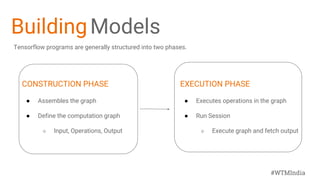
BuildingModels
CONSTRUCTION PHASE
● Assembles the graph
● Define the computation graph
○ Input, Operations, Output
EXECUTION PHASE
● Executes operations in the graph
● Run Session
○ Execute graph and fetch output
Tensorflow programs are generally structured into two phases.
#WTMIndia
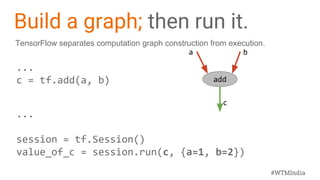
Build a graph; then run it.
...
c = tf.add(a, b)
...
session = tf.Session()
value_of_c = session.run(c, {a=1, b=2})
add
a b
c
TensorFlow separates computation graph construction from execution.
#WTMIndia
Let’s writesome code.
#WTMIndia
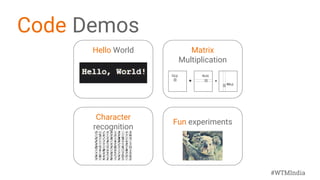
Code Demos
Hello World Matrix
Multiplication
Character
recognition
Fun experiments
#WTMIndia
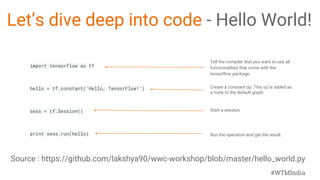
Let’s dive deep into code - Hello World!
import tensorflow as tf
hello = tf.constant('Hello, TensorFlow!')
sess = tf.Session()
print sess.run(hello)
Tell the compiler that you want to use all
functionalities that come with the
tensorflow package.
Create a constant op. This op is added as
a node to the default graph.
Start a session.
Run the operation and get the result.
Source : https://github.com/lakshya90/wwc-workshop/blob/master/hello_world.py
#WTMIndia
Let’s try Matrix Multiplication in TF
import tensorflow as tf
matrix1 = tf.constant([[3, 3]])
matrix2 = tf.constant([[2],[2]])
product = tf.matmul(matrix1, matrix2)
Tell the compiler that you want to use all functionalities
that come with the tensorflow package.
Create a constant op that produces a 1x2 matrix. The op is
added as a node to the default graph.The value returned by
the constructor represents the output of the Constant op.
Create another constant that produces a 2x1 matrix.
Create a matmul op that takes 'matrix1' and 'matrix2' as
inputs. The returned value, 'product', represents the result
of the matrix multiplication.
CONSTRUCTION PHASE
Source : https://github.com/lakshya90/wwc-workshop/blob/master/mat_mul.py
#WTMIndia
Trying Matrix Multiplication in TF
sess = tf.Session()
result = sess.run(product)
print(result)
sess.close()
Launch the default graph.
To run the matmul op we call the session 'run()' method,
passing 'product' which represents the output of the matmul op.
This indicates to the call that we want to get the output of the
matmul op back. All inputs needed by the op are run
automatically by the session. They typically are run in parallel.
The call 'run(product)' thus causes the execution of three ops in
the graph: the two constants and matmul.
The output of the op is returned in 'result' as a numpy `ndarray`
object. ==> [[ 12]]
Close the Session when we are done.
EXECUTION PHASE
Source : https://github.com/lakshya90/wwc-workshop/blob/master/mat_mul.py
#WTMIndia
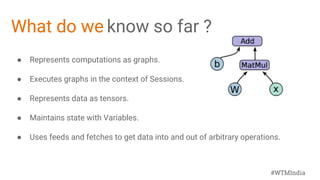
What do we know so far ?
● Represents computations as graphs.
● Executes graphs in the context of Sessions.
● Represents data as tensors.
● Maintains state with Variables.
● Uses feeds and fetches to get data into and out of arbitrary operations.
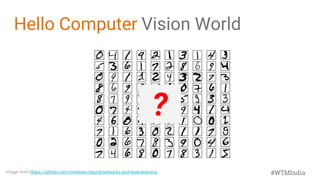
Image from https://github.com/mnielsen/neural-networks-and-deep-learning
?
Hello Computer Vision World
#WTMIndia
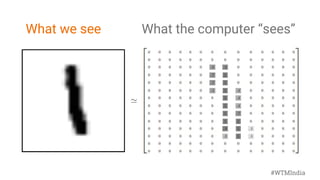
What we see What the computer “sees”
#WTMIndia
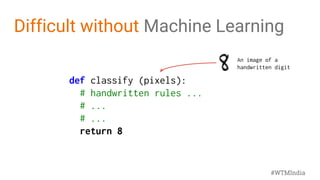
Difficult without Machine Learning
def classify (pixels):
# handwritten rules ...
# ...
# ...
return 8
An image of a
handwritten digit
#WTMIndia
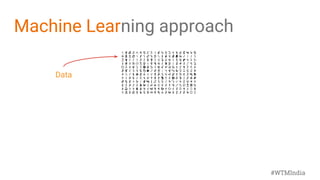
Machine Learning approach
Data
#WTMIndia
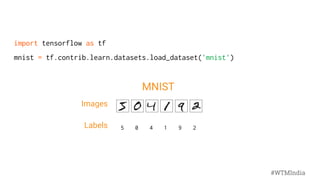
import tensorflow as tf
mnist = tf.contrib.learn.datasets.load_dataset('mnist')
Images
Labels 5 0 4 1 9 2
MNIST
#WTMIndia
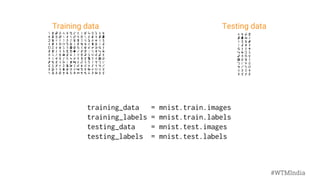
Training data Testing data
training_data = mnist.train.images
training_labels = mnist.train.labels
testing_data = mnist.test.images
testing_labels = mnist.test.labels
#WTMIndia
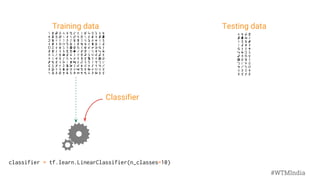
Classifier
Training data Testing data
classifier = tf.learn.LinearClassifier(n_classes=10)
#WTMIndia
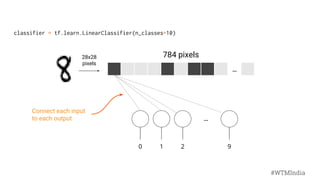
classifier = tf.learn.LinearClassifier(n_classes=10)
...
...
0 1 2 9
28x28
pixels
784 pixels
Connect each input
to each output
#WTMIndia
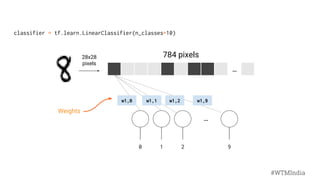
...
...
0 1 2 9
Weights
w1,0 w1,1 w1,2 w1,9
28x28
pixels
784 pixels
classifier = tf.learn.LinearClassifier(n_classes=10)
#WTMIndia
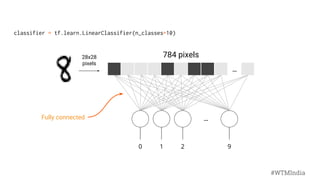
Fully connected
...
...
0 1 2 9
28x28
pixels
784 pixels
classifier = tf.learn.LinearClassifier(n_classes=10)
#WTMIndia
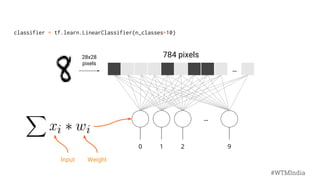
...
...
0 1 2 9
28x28
pixels
784 pixels
classifier = tf.learn.LinearClassifier(n_classes=10)
WeightInput
#WTMIndia
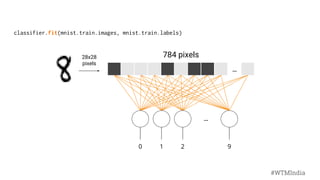
classifier.fit(mnist.train.images, mnist.train.labels)
...
...
0 1 2 9
28x28
pixels
784 pixels
#WTMIndia
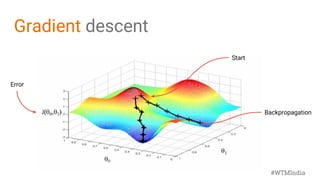
Backpropagation
Error
Start
Gradient descent
#WTMIndia
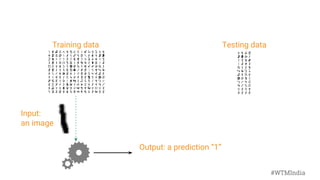
Training data Testing data
Output: a prediction “1”
Input:
an image
#WTMIndia
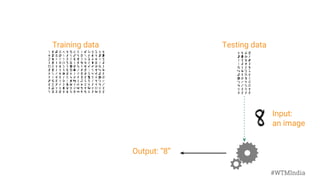
Training data Testing data
Output: “8”
Input:
an image
#WTMIndia
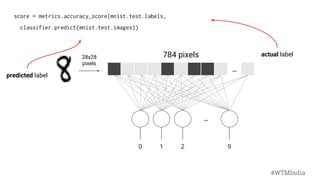
score = metrics.accuracy_score(mnist.test.labels,
classifier.predict(mnist.test.images))
...
...
0 1 2 9
28x28
pixels
784 pixels actual label
predicted label
#WTMIndia
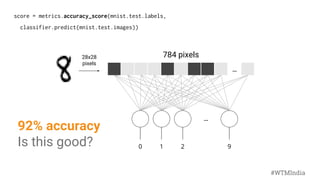
score = metrics.accuracy_score(mnist.test.labels,
classifier.predict(mnist.test.images))
...
...
0 1 2 9
92% accuracy
Is this good?
28x28
pixels
784 pixels
#WTMIndia
#WTMIndia
Using TensorFlow on MNIST
import numpy as np
import tensorflow as tf
import tf.contrib.learn as learn
mnist = learn.datasets.load_dataset('mnist')
data = mnist.train.images
labels = np.asarray(mnist.train.labels, dtype=np.int32)
test_data = mnist.test.images
test_labels = np.asarray(mnist.test.labels, dtype=np.int32)
feature_columns = learn.infer_real_valued_columns_from_input(data)
classifier = learn.LinearClassifier(feature_columns=feature_columns, n_classes=10)
classifier.fit(data, labels, batch_size=100, steps=1000)
classifier.evaluate(test_data, test_labels)
print classifier.evaluate(test_data, test_labels)["accuracy"]
Import required libraries
Import the dataset
Fit a linear classifier
Evaluate accuracy
Source : https://github.com/lakshya90/wwc-workshop/blob/master/mnist.py
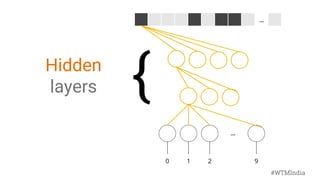
...
...
0 1 2 9
{Hidden
layers
#WTMIndia
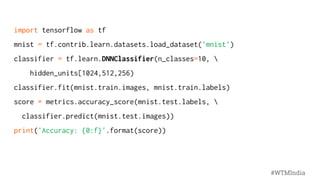
import tensorflow as tf
mnist = tf.contrib.learn.datasets.load_dataset('mnist')
classifier = tf.learn.DNNClassifier(n_classes=10, 
hidden_units[1024,512,256)
classifier.fit(mnist.train.images, mnist.train.labels)
score = metrics.accuracy_score(mnist.test.labels, 
classifier.predict(mnist.test.images))
print('Accuracy: {0:f}'.format(score))
#WTMIndia
#WTMIndia
Using TensorFlow on MNIST
import numpy as np
import tensorflow as tf
import tf.contrib.learn as learn
mnist = learn.datasets.load_dataset('mnist')
data = mnist.train.images
labels = np.asarray(mnist.train.labels, dtype=np.int32)
test_data = mnist.test.images
test_labels = np.asarray(mnist.test.labels, dtype=np.int32)
feature_columns = learn.infer_real_valued_columns_from_input(data)
classifier = learn.DNNClassifier(feature_columns=feature_columns, n_classes=10,
hidden_units = [1024,512,256])
classifier.fit(data, labels, batch_size=100, steps=1000)
classifier.evaluate(test_data, test_labels)
print classifier.evaluate(test_data, test_labels)["accuracy"]
Import required libraries
Import the dataset
Fit a linear classifier
Evaluate accuracy
Source : https://github.com/lakshya90/wwc-workshop/blob/master/mnist_DNN.py
#WTMIndia
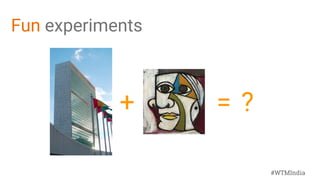
Fun experiments
+ = ?
#WTMIndia
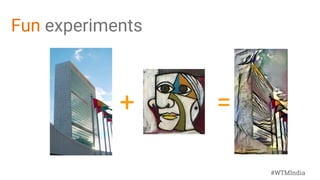
Fun experiments
+ =
#WTMIndia
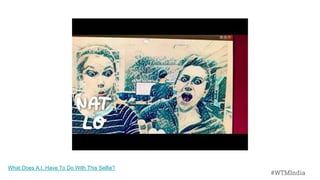
What Does A.I. Have To Do With This Selfie?
#WTMIndia
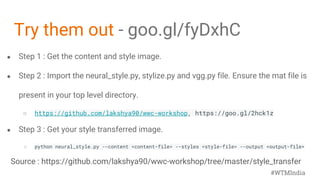
● Step 1 : Get the content and style image.
● Step 2 : Import the neural_style.py, stylize.py and vgg.py file. Ensure the mat file is
present in your top level directory.
○ https://github.com/lakshya90/wwc-workshop, https://goo.gl/2hck1z
● Step 3 : Get your style transferred image.
○ python neural_style.py --content <content-file> --styles <style-file> --output <output-file>
Try them out - goo.gl/fyDxhC
#WTMIndia
Source : https://github.com/lakshya90/wwc-workshop/tree/master/style_transfer
#WTMIndia
Challenge
Push your code to GITHUB
https://guides.github.com/activities/hello-world/
http://rogerdudler.github.io/git-guide/
RESOURCES :
https://github.com/lakshya90/wwc-workshop
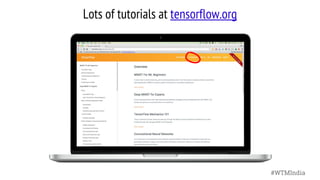
Lots of tutorials at tensorflow.org
#WTMIndia
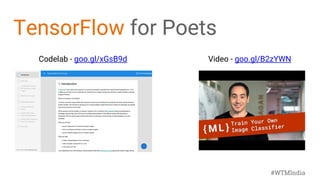
Codelab - goo.gl/xGsB9d Video - goo.gl/B2zYWN
TensorFlow for Poets
#WTMIndia
tensorflow.org
github.com/tensorflow
Want to learn more?
Udacity class on Deep Learning, goo.gl/iHssII
Guides, codelabs, videos
MNIST for Beginners, goo.gl/tx8R2b
TF Learn Quickstart, goo.gl/uiefRn
TensorFlow for Poets, goo.gl/bVjFIL
ML Recipes, goo.gl/KewA03
TensorFlow and Deep Learning without a PhD, goo.gl/pHeXe7
Next steps
#WTMIndia
#WTMIndia
Thank You!
Lakshya Sivaramakrishnan
@lakshyas90

Machine learning workshop

  • 1.
    #WTMIndia #WTMIndia Introduction to Machine Learning andTensorflow Lakshya Sivaramakrishnan Program Coordinator, Women Techmakers @lakshyas90
  • 2.
    #WTMIndia Human Learning Features Labels ColourTexture Taste Fruit Red Smooth Sweet Apple Orange Bumpy Sweet-Sour Orange
  • 3.
    #WTMIndia Machine Learning The abilityto learn without being explicitly programmed. or Algorithm or model that learns patterns in data and then predicts similar patterns in new data. or Learning from experiences and examples. Algorithm InsightData
  • 4.
    #WTMIndia When is thelast time you experienced ML ?
  • 5.
    #WTMIndia It’s with us24*7 (day in and day out)
  • 6.
    #WTMIndia Machine Learning Artificial Intelligence NeuralNetwork AI, ML, NN - Are all the same?
  • 7.
    #WTMIndia Why is MLimportant? To solve interesting use cases ● Making speech recognition and machine translation possible. ● The new search feature in Google Photos, which received broad acclaim. ● Recognizing pedestrians and other vehicles in self-driving cars
  • 8.
    #WTMIndia How Can YouGet Started with ML? Three ways, with varying complexity: (1) Use a Cloud-based or Mobile API (Vision, Natural Language, etc.) (2) Use an existing model architecture, and retrain it or fine tune on your dataset (3) Develop your own machine learning models for new problems More flexible, but more effort required
  • 9.
    #WTMIndia Review:What/Why/How of ML WHAT Algorithmsthat can generate insights by learning from data. WHY Because algorithms can learn faster, cheaper, and better than humans. HOW By finding patterns in data.
  • 10.
  • 11.
  • 12.
    #WTMIndia The processof ‘Learning’ SUPERVISEDUNSUPERVISED REINFORCEMENT Image Credits : https://goo.gl/xU5KCv, https://goo.gl/aDjjFR, https://goo.gl/3NGzuW
  • 13.
    #WTMIndia SupervisedLearning SUPERVISED ● Teach themachine using data that’s well labelled ● Has prior knowledge of output ● Data is labelled with class or value ● Task driven ● Goal : predict class or value label ● Neural network, support vector machines , decision trees etc Image Credits : https://goo.gl/xU5KCv
  • 14.
    #WTMIndia UnsupervisedLearning UNSUPERVISED ● Data setwith no label ● Learning algo is not told what is being learnt ● No knowledge of output class of value ● Data driven ● Goal : determine patterns or grouping ● K-means, genetic algorithms, clustering Image Credits : https://goo.gl/aDjjFR
  • 15.
    #WTMIndia Reinforcement Learning REINFORCEMENT ● Similarto unsupervised learning ● Uses unlabelled data ● Outcome is evaluated and reward is fed back to change the algo ● Algo learns to act in a given environment to achieve a goal ● Goal driven Image Credits : https://goo.gl/3NGzuW
  • 16.
    #WTMIndia Machine Learning usecases at Google Search Search ranking Speech recognition Android Keyboard & speech input Gmail Smart reply Spam classification Drive Intelligence in Apps Chrome Search by image Assistant Smart connections across products Maps Parsing local search Translate Text, graphic and speech translation Cardboard Smart stitching Photos Photos search
  • 17.
    #WTMIndia Smart reply in Inboxby Gmail 10% of all responses sent on mobile
  • 18.
  • 19.
  • 20.
    #WTMIndia Neural Networks ● Interconnectedweb of nodes = neurons ● Receives a set of inputs, perform calculations & use output to solve a problem ● eg ) classification ● Multiple layer ● Use backpropagation to adjust the weights Image Credits : https://goo.gl/H7mNnT
  • 22.
  • 23.
    #WTMIndia ● Fast, flexible,and scalable open-source machine learning library ● For research and production ● Runs on CPU, GPU, Android, iOS, Raspberry Pi, Datacenters, Mobile ● Apache 2.0 license https://research.googleblog.com/2016/11/celebrating-tensorflows-first-year.html
  • 24.
    #WTMIndia Sharing our toolswith researchers and developers around the world repository for “machine learning” category on GitHub Released in Nov. 2015
  • 25.
    #WTMIndia What can wedo with tensor flow?
  • 27.
    #WTMIndia Shared Research inTensorFlow Inception https://research.googleblog.com/2016/08/improving-inception-and-image.html Show and Tell https://research.googleblog.com/2016/09/show-and-tell-image-captioning-open.html Parsey McParseface https://research.googleblog.com/2016/05/announcing-syntaxnet-worlds-most.html Translation https://research.googleblog.com/2016/09/a-neural-network-for-machine.html Summarization https://research.googleblog.com/2016/08/text-summarization-with-tensorflow.html Pathology https://research.googleblog.com/2017/03/assisting-pathologists-in-detecting.html
  • 28.
    #WTMIndia BuildingModels CONSTRUCTION PHASE ● Assemblesthe graph ● Define the computation graph ○ Input, Operations, Output EXECUTION PHASE ● Executes operations in the graph ● Run Session ○ Execute graph and fetch output Tensorflow programs are generally structured into two phases.
  • 29.
    #WTMIndia Build a graph;then run it. ... c = tf.add(a, b) ... session = tf.Session() value_of_c = session.run(c, {a=1, b=2}) add a b c TensorFlow separates computation graph construction from execution.
  • 30.
  • 31.
    #WTMIndia Code Demos Hello WorldMatrix Multiplication Character recognition Fun experiments
  • 32.
    #WTMIndia Let’s dive deepinto code - Hello World! import tensorflow as tf hello = tf.constant('Hello, TensorFlow!') sess = tf.Session() print sess.run(hello) Tell the compiler that you want to use all functionalities that come with the tensorflow package. Create a constant op. This op is added as a node to the default graph. Start a session. Run the operation and get the result. Source : https://github.com/lakshya90/wwc-workshop/blob/master/hello_world.py
  • 33.
    #WTMIndia Let’s try MatrixMultiplication in TF import tensorflow as tf matrix1 = tf.constant([[3, 3]]) matrix2 = tf.constant([[2],[2]]) product = tf.matmul(matrix1, matrix2) Tell the compiler that you want to use all functionalities that come with the tensorflow package. Create a constant op that produces a 1x2 matrix. The op is added as a node to the default graph.The value returned by the constructor represents the output of the Constant op. Create another constant that produces a 2x1 matrix. Create a matmul op that takes 'matrix1' and 'matrix2' as inputs. The returned value, 'product', represents the result of the matrix multiplication. CONSTRUCTION PHASE Source : https://github.com/lakshya90/wwc-workshop/blob/master/mat_mul.py
  • 34.
    #WTMIndia Trying Matrix Multiplicationin TF sess = tf.Session() result = sess.run(product) print(result) sess.close() Launch the default graph. To run the matmul op we call the session 'run()' method, passing 'product' which represents the output of the matmul op. This indicates to the call that we want to get the output of the matmul op back. All inputs needed by the op are run automatically by the session. They typically are run in parallel. The call 'run(product)' thus causes the execution of three ops in the graph: the two constants and matmul. The output of the op is returned in 'result' as a numpy `ndarray` object. ==> [[ 12]] Close the Session when we are done. EXECUTION PHASE Source : https://github.com/lakshya90/wwc-workshop/blob/master/mat_mul.py
  • 35.
    #WTMIndia What do weknow so far ? ● Represents computations as graphs. ● Executes graphs in the context of Sessions. ● Represents data as tensors. ● Maintains state with Variables. ● Uses feeds and fetches to get data into and out of arbitrary operations.
  • 36.
  • 37.
    What we seeWhat the computer “sees” #WTMIndia
  • 38.
    Difficult without MachineLearning def classify (pixels): # handwritten rules ... # ... # ... return 8 An image of a handwritten digit #WTMIndia
  • 39.
  • 40.
    import tensorflow astf mnist = tf.contrib.learn.datasets.load_dataset('mnist') Images Labels 5 0 4 1 9 2 MNIST #WTMIndia
  • 41.
    Training data Testingdata training_data = mnist.train.images training_labels = mnist.train.labels testing_data = mnist.test.images testing_labels = mnist.test.labels #WTMIndia
  • 42.
    Classifier Training data Testingdata classifier = tf.learn.LinearClassifier(n_classes=10) #WTMIndia
  • 43.
    classifier = tf.learn.LinearClassifier(n_classes=10) ... ... 01 2 9 28x28 pixels 784 pixels Connect each input to each output #WTMIndia
  • 44.
    ... ... 0 1 29 Weights w1,0 w1,1 w1,2 w1,9 28x28 pixels 784 pixels classifier = tf.learn.LinearClassifier(n_classes=10) #WTMIndia
  • 45.
    Fully connected ... ... 0 12 9 28x28 pixels 784 pixels classifier = tf.learn.LinearClassifier(n_classes=10) #WTMIndia
  • 46.
    ... ... 0 1 29 28x28 pixels 784 pixels classifier = tf.learn.LinearClassifier(n_classes=10) WeightInput #WTMIndia
  • 47.
  • 48.
  • 49.
    Training data Testingdata Output: a prediction “1” Input: an image #WTMIndia
  • 50.
    Training data Testingdata Output: “8” Input: an image #WTMIndia
  • 51.
    score = metrics.accuracy_score(mnist.test.labels, classifier.predict(mnist.test.images)) ... ... 01 2 9 28x28 pixels 784 pixels actual label predicted label #WTMIndia
  • 52.
    score = metrics.accuracy_score(mnist.test.labels, classifier.predict(mnist.test.images)) ... ... 01 2 9 92% accuracy Is this good? 28x28 pixels 784 pixels #WTMIndia
  • 53.
    #WTMIndia Using TensorFlow onMNIST import numpy as np import tensorflow as tf import tf.contrib.learn as learn mnist = learn.datasets.load_dataset('mnist') data = mnist.train.images labels = np.asarray(mnist.train.labels, dtype=np.int32) test_data = mnist.test.images test_labels = np.asarray(mnist.test.labels, dtype=np.int32) feature_columns = learn.infer_real_valued_columns_from_input(data) classifier = learn.LinearClassifier(feature_columns=feature_columns, n_classes=10) classifier.fit(data, labels, batch_size=100, steps=1000) classifier.evaluate(test_data, test_labels) print classifier.evaluate(test_data, test_labels)["accuracy"] Import required libraries Import the dataset Fit a linear classifier Evaluate accuracy Source : https://github.com/lakshya90/wwc-workshop/blob/master/mnist.py
  • 54.
    ... ... 0 1 29 {Hidden layers #WTMIndia
  • 55.
    import tensorflow astf mnist = tf.contrib.learn.datasets.load_dataset('mnist') classifier = tf.learn.DNNClassifier(n_classes=10, hidden_units[1024,512,256) classifier.fit(mnist.train.images, mnist.train.labels) score = metrics.accuracy_score(mnist.test.labels, classifier.predict(mnist.test.images)) print('Accuracy: {0:f}'.format(score)) #WTMIndia
  • 56.
    #WTMIndia Using TensorFlow onMNIST import numpy as np import tensorflow as tf import tf.contrib.learn as learn mnist = learn.datasets.load_dataset('mnist') data = mnist.train.images labels = np.asarray(mnist.train.labels, dtype=np.int32) test_data = mnist.test.images test_labels = np.asarray(mnist.test.labels, dtype=np.int32) feature_columns = learn.infer_real_valued_columns_from_input(data) classifier = learn.DNNClassifier(feature_columns=feature_columns, n_classes=10, hidden_units = [1024,512,256]) classifier.fit(data, labels, batch_size=100, steps=1000) classifier.evaluate(test_data, test_labels) print classifier.evaluate(test_data, test_labels)["accuracy"] Import required libraries Import the dataset Fit a linear classifier Evaluate accuracy Source : https://github.com/lakshya90/wwc-workshop/blob/master/mnist_DNN.py
  • 57.
  • 58.
  • 60.
    #WTMIndia What Does A.I.Have To Do With This Selfie? #WTMIndia
  • 61.
    ● Step 1: Get the content and style image. ● Step 2 : Import the neural_style.py, stylize.py and vgg.py file. Ensure the mat file is present in your top level directory. ○ https://github.com/lakshya90/wwc-workshop, https://goo.gl/2hck1z ● Step 3 : Get your style transferred image. ○ python neural_style.py --content <content-file> --styles <style-file> --output <output-file> Try them out - goo.gl/fyDxhC #WTMIndia Source : https://github.com/lakshya90/wwc-workshop/tree/master/style_transfer
  • 62.
    #WTMIndia Challenge Push your codeto GITHUB https://guides.github.com/activities/hello-world/ http://rogerdudler.github.io/git-guide/ RESOURCES : https://github.com/lakshya90/wwc-workshop
  • 63.
    Lots of tutorialsat tensorflow.org #WTMIndia
  • 64.
    Codelab - goo.gl/xGsB9dVideo - goo.gl/B2zYWN TensorFlow for Poets #WTMIndia
  • 65.
    tensorflow.org github.com/tensorflow Want to learnmore? Udacity class on Deep Learning, goo.gl/iHssII Guides, codelabs, videos MNIST for Beginners, goo.gl/tx8R2b TF Learn Quickstart, goo.gl/uiefRn TensorFlow for Poets, goo.gl/bVjFIL ML Recipes, goo.gl/KewA03 TensorFlow and Deep Learning without a PhD, goo.gl/pHeXe7 Next steps #WTMIndia
  • 66.