Download to read offline
![LOCATION SCOUTING - PART TWO
!
For each SHOOT LOCATION you have identified, it is necessary to visit and record your
impressions of the location on a LOCATION SCOUTING REPORT.
LOCATION SCOUTING REPORT
SCRIPT LOCATION!
SHOOT LOCATION
Professor's office
SCENE #
DAY [ ]
2
C Block History classrooms
NIGHT [ ]
INTERIOR [ ]
EXTERIOR [ ]
ADDRESS!
CONTACT!
EMAIL
TEL:
INTERIORS
EXTERIORS
1ST IMPRESSIONS
LIGHT SOURCES!
LIGHT SOURCES
Lights
AMBIENT NOISE!
AMBIENT NOISE
N/A
# WINDOWS!
48
# DOORS!
1
# POWER SOURCES!
It may not work
as an office,
but we can
adapt it on
after effects.
TRAFFIC
OBSTRUCTIONS
ACCESS
Plugs
PROBLEMS / LIMITATIONS!
!
!
!
!
!
People might be using the classroom at points.
It doesn't really look like an office.
SET DRESSING!
!
!
!
!
We'll change the posters on the wall
using A/E
DATES / TIMES REQUIRED!
!
Day Time
PERMISSION OBTAINED [ ]!
COPY FILED [ ]](https://image.slidesharecdn.com/locations2-31-131205040212-phpapp02/85/Locations2-3-1-1-320.jpg)
![LOCATION SCOUTING - PART TWO
!
For each SHOOT LOCATION you have identified, it is necessary to visit and record your
impressions of the location on a LOCATION SCOUTING REPORT.
LOCATION SCOUTING REPORT
SCRIPT LOCATION!
SHOOT LOCATION
Professor's office
SCENE #
DAY [ ]
2
C Block History classrooms
NIGHT [ ]
INTERIOR [ ]
EXTERIOR [ ]
ADDRESS!
CONTACT!
EMAIL
TEL:
INTERIORS
EXTERIORS
1ST IMPRESSIONS
LIGHT SOURCES!
LIGHT SOURCES
Lights
AMBIENT NOISE!
AMBIENT NOISE
N/A
# WINDOWS!
48
# DOORS!
1
# POWER SOURCES!
It may not work
as an office,
but we can
adapt it on
after effects.
TRAFFIC
OBSTRUCTIONS
ACCESS
Plugs
PROBLEMS / LIMITATIONS!
!
!
!
!
!
People might be using the classroom at points.
It doesn't really look like an office.
SET DRESSING!
!
!
!
!
We'll change the posters on the wall
using A/E
DATES / TIMES REQUIRED!
!
Day Time
PERMISSION OBTAINED [ ]!
COPY FILED [ ]](https://image.slidesharecdn.com/locations2-31-131205040212-phpapp02/75/Locations2-3-1-1-2048.jpg)
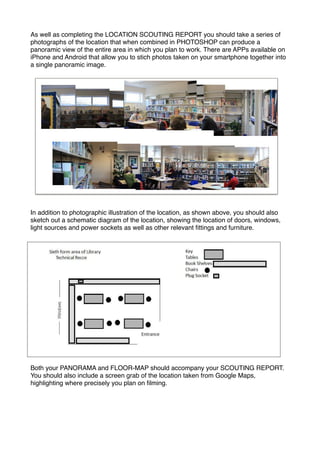

The document provides instructions for location scouting for a film shoot. Location scouting reports should be completed for each identified shoot location and should include details like the script location, address, contact information, impressions of the location, available lighting and power sources, and any issues or additional set dressing needed. Photos of the location stitched into a panoramic image on a smartphone app can provide an illustration. A schematic diagram or floor map of the location should also be included, showing layout details. The scouting report, panorama, and floor map should all accompany each other for each location.


