Power Management and
Linux (3.4.25)
Padmanabha S
<treasure4paddy@gmail.com>
Objective
 Discussing power management in Linux and it's usage
in Embedded Systems
Agenda
 A brief overview on PC power management
 A brief overview on suspand to RAM “STR” and suspend
to disk “SWSUSP” (aka hibernation)
 Fast boot of Embedded Linux using suspend to disk
(aka snapshot booting)
A overview on PC Power
Management
Major motivational factors for Power
management in computer systems
 In earlier days (90's) due to long boot time people left
their desktop PCs on all the time, this led to wastage of
energy
 Once Laptop and battery powered device arrived
(where battery life is a key feature) the need for power
management took commercial incentive
A overview on PC Power
Management
The motivation for POWER Management in
computer system led to multi-vendor
interoperability standards (listed below)
 Advanced Power Management (APM)
➢ Legacy method, also known as BIOS method where
Operating system has no knowledge about APM
➢ Uses device activity time-outs to determine when to
transaction of device into low power states
➢ Vendor specific implementation and maintenance
A overview on PC Power
Management
 Advanced Configuration and Power Interface
(ACPI)
➢ An interface specification which is OS-
controlled/directed Power management (OSPM)
➢ Power management is global in system unlike APM
where it is hidden
➢ ACPI defines power management states and
required functionality at multiple levels of
system as shown in next slide
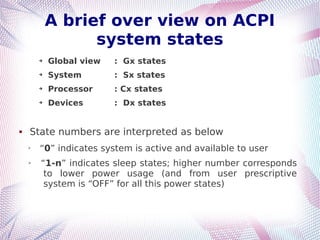
A brief over view on ACPI
system states
➔ Global view : Gx states
➔ System : Sx states
➔ Processor : Cx states
➔ Devices : Dx states
 State numbers are interpreted as below
➢
“0” indicates system is active and available to user
➢ “1-n” indicates sleep states; higher number corresponds
to lower power usage (and from user prescriptive
system is “OFF” for all this power states)
A brief over view on ACPI
system states
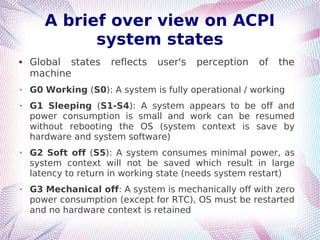
 Global states reflects user's perception of the
machine
➢ G0 Working (S0): A system is fully operational / working
➢ G1 Sleeping (S1-S4): A system appears to be off and
power consumption is small and work can be resumed
without rebooting the OS (system context is save by
hardware and system software)
➢ G2 Soft off (S5): A system consumes minimal power, as
system context will not be saved which result in large
latency to return in working state (needs system restart)
➢ G3 Mechanical off: A system is mechanically off with zero
power consumption (except for RTC), OS must be restarted
and no hardware context is retained
A brief over view on ACPI
system states
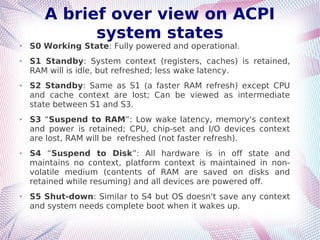
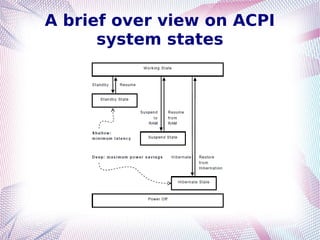
➢ S0 Working State: Fully powered and operational.
➢ S1 Standby: System context (registers, caches) is retained,
RAM will is idle, but refreshed; less wake latency.
➢ S2 Standby: Same as S1 (a faster RAM refresh) except CPU
and cache context are lost; Can be viewed as intermediate
state between S1 and S3.
➢ S3 “Suspend to RAM”: Low wake latency, memory's context
and power is retained; CPU, chip-set and I/O devices context
are lost, RAM will be refreshed (not faster refresh).
➢ S4 “Suspend to Disk”: All hardware is in off state and
maintains no context, platform context is maintained in non-
volatile medium (contents of RAM are saved on disks and
retained while resuming) and all devices are powered off.
➢ S5 Shut-down: Similar to S4 but OS doesn't save any context
and system needs complete boot when it wakes up.
A brief over view on ACPI
system states
A brief over view on ACPI
system states
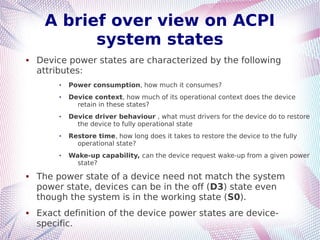
 Device power states are characterized by the following
attributes:
 Power consumption, how much it consumes?
 Device context, how much of its operational context does the device
retain in these states?
 Device driver behaviour , what must drivers for the device do to restore
the device to fully operational state
 Restore time, how long does it takes to restore the device to the fully
operational state?
 Wake-up capability, can the device request wake-up from a given power
state?
 The power state of a device need not match the system
power state, devices can be in the off (D3) state even
though the system is in the working state (S0).
 Exact definition of the device power states are device-
specific.
A brief over view on ACPI
system states
(Device State)
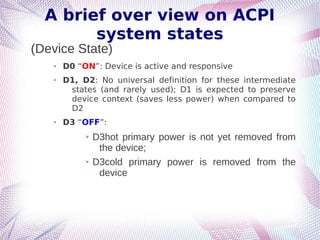
➢ D0 “ON”: Device is active and responsive
➢ D1, D2: No universal definition for these intermediate
states (and rarely used); D1 is expected to preserve
device context (saves less power) when compared to
D2
➢ D3 “OFF”:
➢ D3hot primary power is not yet removed from
the device;
➢ D3cold primary power is removed from the
device
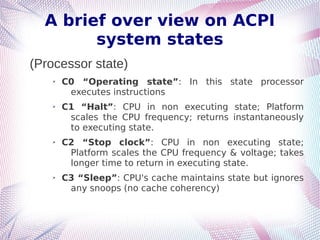
A brief over view on ACPI
system states
(Processor state)
➢ C0 “Operating state”: In this state processor
executes instructions
➢ C1 “Halt”: CPU in non executing state; Platform
scales the CPU frequency; returns instantaneously
to executing state.
➢ C2 “Stop clock”: CPU in non executing state;
Platform scales the CPU frequency & voltage; takes
longer time to return in executing state.
➢ C3 “Sleep”: CPU's cache maintains state but ignores
any snoops (no cache coherency)
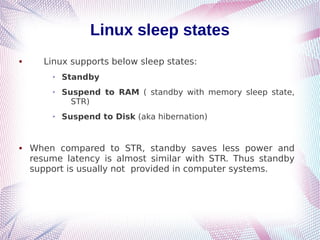
Linux sleep states
 Linux supports below sleep states:
➢ Standby
➢ Suspend to RAM ( standby with memory sleep state,
STR)
➢ Suspend to Disk (aka hibernation)
 When compared to STR, standby saves less power and
resume latency is almost similar with STR. Thus standby
support is usually not provided in computer systems.
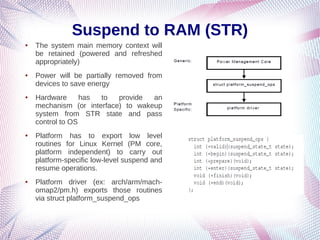
Suspend to RAM (STR)
● The system main memory context will
be retained (powered and refreshed
appropriately)
● Power will be partially removed from
devices to save energy
● Hardware has to provide an
mechanism (or interface) to wakeup
system from STR state and pass
control to OS
● Platform has to export low level
routines for Linux Kernel (PM core,
platform independent) to carry out
platform-specific low-level suspend and
resume operations.
● Platform driver (ex: arch/arm/mach-
omap2/pm.h) exports those routines
via struct platform_suspend_ops
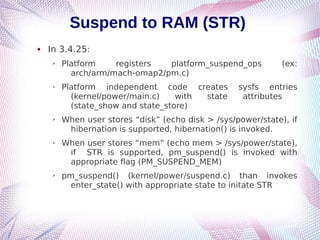
Suspend to RAM (STR)
 In 3.4.25:
➢ Platform registers platform_suspend_ops (ex:
arch/arm/mach-omap2/pm.c)
➢ Platform independent code creates sysfs entries
(kernel/power/main.c) with state attributes
(state_show and state_store)
➢ When user stores “disk” (echo disk > /sys/power/state), if
hibernation is supported, hibernation() is invoked.
➢ When user stores “mem” (echo mem > /sys/power/state),
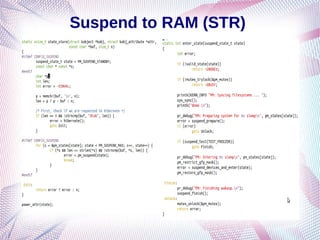
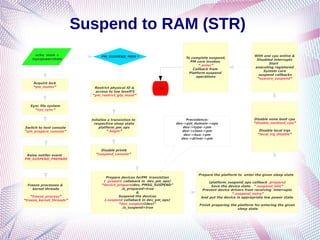
if STR is supported, pm_suspend() is invoked with
appropriate flag (PM_SUSPEND_MEM)
➢ pm_suspend() (kernel/power/suspend.c) than invokes
enter_state() with appropriate state to initate STR
Suspend to RAM (STR)
Raise notifer event
PM_SUSPEND_PREPARE
Freeze processes &
kernel threads
“freeze_process”
“freeze_kernel_threads”
Disable printk
“suspend_console”
Prepare devices forPM transistion
( .prepare callaback in dev_pm_ops)
“device_prepare(dev, PMSG_SUSPEND”
.is_prepared=true
&
Suspend the devices
(.suspend callaback in dev_pm_ops)
“dev_suspend(dev)”
.is_suspend=true
Precedence:
dev->pm_domain->ops
dev->type->pm
dev->class->pm
dev->bus->pm
dev->driver->pm
Sync file system
“sys_sync”
Switch to text console
“pm_prepare_console”
PM_SUSPEND_MEM ?
Acquire lock
“pm_mutex”
Prepare the platform to enter the given sleep state
(platform_suspend_ops callback .prepare)
Save the device state “.suspend_late”
Prevent device drivers from receiving interrupts
“.suspend_noirq”
And put the device in appropriate low power state
Finish preparing the platform for entering the given
sleep state
Disable none boot cpu
“disable_nonboot_cpu”
Disable local irqs
“local_irq_disable”
With one cpu online &
Disabled interrupts
Start
executing registered
System core
suspend callbacks
“syscore_suspend”
To complete suspend,
PM core invokes
“.enter”
Callback from
Platform suspend
operations
echo mem >
/sys/power/state
Initalize a transistion to
respective sleep state
platform_pm_ops
“.begin”
Restrict physical IO &
access to low levelFS
“pm_restrict_gfp_mask”
STR

Linux_swspnd_v0.3_pub1

  • 1.
    Power Management and Linux(3.4.25) Padmanabha S <treasure4paddy@gmail.com>
  • 2.
    Objective  Discussing powermanagement in Linux and it's usage in Embedded Systems Agenda  A brief overview on PC power management  A brief overview on suspand to RAM “STR” and suspend to disk “SWSUSP” (aka hibernation)  Fast boot of Embedded Linux using suspend to disk (aka snapshot booting)
  • 3.
    A overview onPC Power Management Major motivational factors for Power management in computer systems  In earlier days (90's) due to long boot time people left their desktop PCs on all the time, this led to wastage of energy  Once Laptop and battery powered device arrived (where battery life is a key feature) the need for power management took commercial incentive
  • 4.
    A overview onPC Power Management The motivation for POWER Management in computer system led to multi-vendor interoperability standards (listed below)  Advanced Power Management (APM) ➢ Legacy method, also known as BIOS method where Operating system has no knowledge about APM ➢ Uses device activity time-outs to determine when to transaction of device into low power states ➢ Vendor specific implementation and maintenance
  • 5.
    A overview onPC Power Management  Advanced Configuration and Power Interface (ACPI) ➢ An interface specification which is OS- controlled/directed Power management (OSPM) ➢ Power management is global in system unlike APM where it is hidden ➢ ACPI defines power management states and required functionality at multiple levels of system as shown in next slide
  • 6.
    A brief overview on ACPI system states ➔ Global view : Gx states ➔ System : Sx states ➔ Processor : Cx states ➔ Devices : Dx states  State numbers are interpreted as below ➢ “0” indicates system is active and available to user ➢ “1-n” indicates sleep states; higher number corresponds to lower power usage (and from user prescriptive system is “OFF” for all this power states)
  • 7.
    A brief overview on ACPI system states  Global states reflects user's perception of the machine ➢ G0 Working (S0): A system is fully operational / working ➢ G1 Sleeping (S1-S4): A system appears to be off and power consumption is small and work can be resumed without rebooting the OS (system context is save by hardware and system software) ➢ G2 Soft off (S5): A system consumes minimal power, as system context will not be saved which result in large latency to return in working state (needs system restart) ➢ G3 Mechanical off: A system is mechanically off with zero power consumption (except for RTC), OS must be restarted and no hardware context is retained
  • 8.
    A brief overview on ACPI system states ➢ S0 Working State: Fully powered and operational. ➢ S1 Standby: System context (registers, caches) is retained, RAM will is idle, but refreshed; less wake latency. ➢ S2 Standby: Same as S1 (a faster RAM refresh) except CPU and cache context are lost; Can be viewed as intermediate state between S1 and S3. ➢ S3 “Suspend to RAM”: Low wake latency, memory's context and power is retained; CPU, chip-set and I/O devices context are lost, RAM will be refreshed (not faster refresh). ➢ S4 “Suspend to Disk”: All hardware is in off state and maintains no context, platform context is maintained in non- volatile medium (contents of RAM are saved on disks and retained while resuming) and all devices are powered off. ➢ S5 Shut-down: Similar to S4 but OS doesn't save any context and system needs complete boot when it wakes up.
  • 9.
    A brief overview on ACPI system states
  • 10.
    A brief overview on ACPI system states  Device power states are characterized by the following attributes:  Power consumption, how much it consumes?  Device context, how much of its operational context does the device retain in these states?  Device driver behaviour , what must drivers for the device do to restore the device to fully operational state  Restore time, how long does it takes to restore the device to the fully operational state?  Wake-up capability, can the device request wake-up from a given power state?  The power state of a device need not match the system power state, devices can be in the off (D3) state even though the system is in the working state (S0).  Exact definition of the device power states are device- specific.
  • 11.
    A brief overview on ACPI system states (Device State) ➢ D0 “ON”: Device is active and responsive ➢ D1, D2: No universal definition for these intermediate states (and rarely used); D1 is expected to preserve device context (saves less power) when compared to D2 ➢ D3 “OFF”: ➢ D3hot primary power is not yet removed from the device; ➢ D3cold primary power is removed from the device
  • 12.
    A brief overview on ACPI system states (Processor state) ➢ C0 “Operating state”: In this state processor executes instructions ➢ C1 “Halt”: CPU in non executing state; Platform scales the CPU frequency; returns instantaneously to executing state. ➢ C2 “Stop clock”: CPU in non executing state; Platform scales the CPU frequency & voltage; takes longer time to return in executing state. ➢ C3 “Sleep”: CPU's cache maintains state but ignores any snoops (no cache coherency)
  • 13.
    Linux sleep states Linux supports below sleep states: ➢ Standby ➢ Suspend to RAM ( standby with memory sleep state, STR) ➢ Suspend to Disk (aka hibernation)  When compared to STR, standby saves less power and resume latency is almost similar with STR. Thus standby support is usually not provided in computer systems.
  • 14.
    Suspend to RAM(STR) ● The system main memory context will be retained (powered and refreshed appropriately) ● Power will be partially removed from devices to save energy ● Hardware has to provide an mechanism (or interface) to wakeup system from STR state and pass control to OS ● Platform has to export low level routines for Linux Kernel (PM core, platform independent) to carry out platform-specific low-level suspend and resume operations. ● Platform driver (ex: arch/arm/mach- omap2/pm.h) exports those routines via struct platform_suspend_ops
  • 15.
    Suspend to RAM(STR)  In 3.4.25: ➢ Platform registers platform_suspend_ops (ex: arch/arm/mach-omap2/pm.c) ➢ Platform independent code creates sysfs entries (kernel/power/main.c) with state attributes (state_show and state_store) ➢ When user stores “disk” (echo disk > /sys/power/state), if hibernation is supported, hibernation() is invoked. ➢ When user stores “mem” (echo mem > /sys/power/state), if STR is supported, pm_suspend() is invoked with appropriate flag (PM_SUSPEND_MEM) ➢ pm_suspend() (kernel/power/suspend.c) than invokes enter_state() with appropriate state to initate STR
  • 16.
  • 17.
    Suspend to RAM(STR) Raise notifer event PM_SUSPEND_PREPARE Freeze processes & kernel threads “freeze_process” “freeze_kernel_threads” Disable printk “suspend_console” Prepare devices forPM transistion ( .prepare callaback in dev_pm_ops) “device_prepare(dev, PMSG_SUSPEND” .is_prepared=true & Suspend the devices (.suspend callaback in dev_pm_ops) “dev_suspend(dev)” .is_suspend=true Precedence: dev->pm_domain->ops dev->type->pm dev->class->pm dev->bus->pm dev->driver->pm Sync file system “sys_sync” Switch to text console “pm_prepare_console” PM_SUSPEND_MEM ? Acquire lock “pm_mutex” Prepare the platform to enter the given sleep state (platform_suspend_ops callback .prepare) Save the device state “.suspend_late” Prevent device drivers from receiving interrupts “.suspend_noirq” And put the device in appropriate low power state Finish preparing the platform for entering the given sleep state Disable none boot cpu “disable_nonboot_cpu” Disable local irqs “local_irq_disable” With one cpu online & Disabled interrupts Start executing registered System core suspend callbacks “syscore_suspend” To complete suspend, PM core invokes “.enter” Callback from Platform suspend operations echo mem > /sys/power/state Initalize a transistion to respective sleep state platform_pm_ops “.begin” Restrict physical IO & access to low levelFS “pm_restrict_gfp_mask” STR