
Tips and Updates
We all need to update our subject guides for …
 OneSearch
 Maryland AskUsNow
 Current content
We can delete …
 The Research Port Cross Search widget
 The WorldCat FSU box
This will require a separate meeting in August
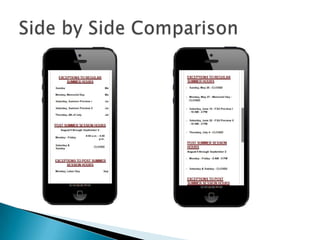
Our LibGuides are part of our mobile website
platform. Formatting is important to keep the
guides mobile-ready.
 Use paragraph format, bullet points, or
numbered lists
 Avoid the use of tables, especially pasted
from MSWord
 Avoid manual tabbing
 Avoid overly large images
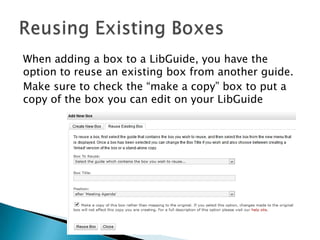
When adding a box to a LibGuide, you have the
option to reuse an existing box from another guide.
Make sure to check the “make a copy” box to put a
copy of the box you can edit on your LibGuide
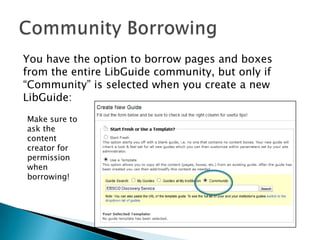
You have the option to borrow pages and boxes
from the entire LibGuide community, but only if
“Community” is selected when you create a new
LibGuide:
Make sure to
ask the
content
creator for
permission
when
borrowing!
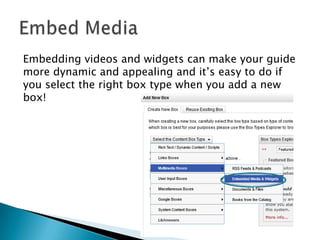
Embedding videos and widgets can make your guide
more dynamic and appealing and it’s easy to do if
you select the right box type when you add a new
box!
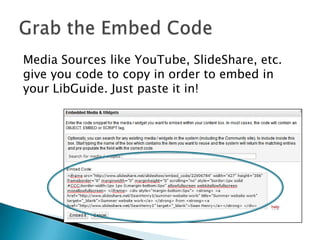
Media Sources like YouTube, SlideShare, etc.
give you code to copy in order to embed in
your LibGuide. Just paste it in!
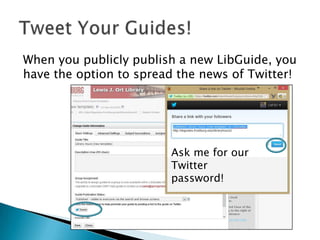
When you publicly publish a new LibGuide, you
have the option to spread the news of Twitter!
Ask me for our
Twitter
password!

Lib guides

  • 1.
  • 2.
    We all needto update our subject guides for …  OneSearch  Maryland AskUsNow  Current content We can delete …  The Research Port Cross Search widget  The WorldCat FSU box This will require a separate meeting in August
  • 3.
    Our LibGuides arepart of our mobile website platform. Formatting is important to keep the guides mobile-ready.  Use paragraph format, bullet points, or numbered lists  Avoid the use of tables, especially pasted from MSWord  Avoid manual tabbing  Avoid overly large images
  • 5.
    When adding abox to a LibGuide, you have the option to reuse an existing box from another guide. Make sure to check the “make a copy” box to put a copy of the box you can edit on your LibGuide
  • 6.
    You have theoption to borrow pages and boxes from the entire LibGuide community, but only if “Community” is selected when you create a new LibGuide: Make sure to ask the content creator for permission when borrowing!
  • 7.
    Embedding videos andwidgets can make your guide more dynamic and appealing and it’s easy to do if you select the right box type when you add a new box!
  • 8.
    Media Sources likeYouTube, SlideShare, etc. give you code to copy in order to embed in your LibGuide. Just paste it in!
  • 9.
    When you publiclypublish a new LibGuide, you have the option to spread the news of Twitter! Ask me for our Twitter password!