Essential
   SAP ABAP Tutorial
Creating a Function Module
      By Jason Thom


            1                Copyrighted 2012 by LeverX, Inc.
Tutorial Overview
   Creation of a function module begins at transaction SE37 or SE80
   SE37 is designed to create a function module while giving the option to
    create a function group
   SE80 is for advanced users and can create and view many other objects
   I will describe the use of transaction code SE37 in this presentation
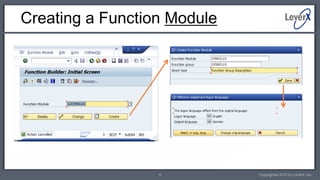
   First, you need to create a function group using the menu bar. Then you
    need to create the function module for the function group using the main
    screen. To complete the process, the user can use the import, export,
    changing, or tables parameters and enter the main code under the source
    code tab.

                                        2                            Copyrighted 2012 by LeverX, Inc.
Using Transaction code SE37
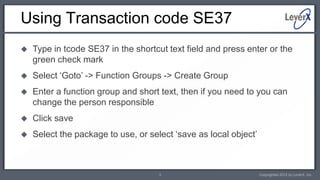
   Type in tcode SE37 in the shortcut text field and press enter or the
    green check mark
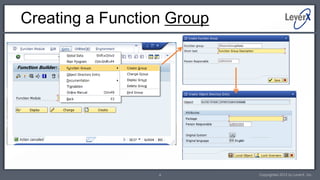
   Select ‘Goto’ -> Function Groups -> Create Group
   Enter a function group and short text, then if you need to you can
    change the person responsible
   Click save
   Select the package to use, or select ‘save as local object’


                                     3                            Copyrighted 2012 by LeverX, Inc.
Creating a Function Group


                  4         Copyrighted 2012 by LeverX, Inc.
Creating a Function Module


                  5          Copyrighted 2012 by LeverX, Inc.
Parameters
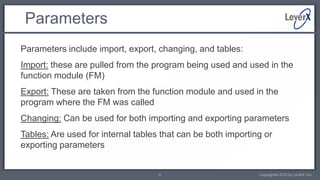
Parameters include import, export, changing, and tables:
Import: these are pulled from the program being used and used in the
function module (FM)
Export: These are taken from the function module and used in the
program where the FM was called
Changing: Can be used for both importing and exporting parameters
Tables: Are used for internal tables that can be both importing or
exporting parameters


                                    6                         Copyrighted 2012 by LeverX, Inc.
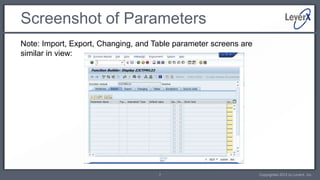
Screenshot of Parameters
Note: Import, Export, Changing, and Table parameter screens are
similar in view:


                                     7                            Copyrighted 2012 by LeverX, Inc.
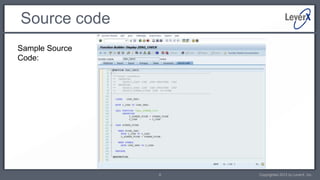
Source code
Sample Source
Code:


                8   Copyrighted 2012 by LeverX, Inc.
Contact Information


Please contact us for more information about our services or solutions available.

                                LeverX, Inc.
                     800 West El Camino Real, Suite 180
                       Mountain View, CA 94040 USA
                           Tel: (650) 625 – 8347
                         Web Site: www.LeverX.com
                                        9                           Copyrighted 2012 by LeverX, Inc.

LeverX SAP ABAP Tutorial Creating Function Modules

  • 1.
    Essential SAP ABAP Tutorial Creating a Function Module By Jason Thom 1 Copyrighted 2012 by LeverX, Inc.
  • 2.
    Tutorial Overview  Creation of a function module begins at transaction SE37 or SE80  SE37 is designed to create a function module while giving the option to create a function group  SE80 is for advanced users and can create and view many other objects  I will describe the use of transaction code SE37 in this presentation  First, you need to create a function group using the menu bar. Then you need to create the function module for the function group using the main screen. To complete the process, the user can use the import, export, changing, or tables parameters and enter the main code under the source code tab. 2 Copyrighted 2012 by LeverX, Inc.
  • 3.
    Using Transaction codeSE37  Type in tcode SE37 in the shortcut text field and press enter or the green check mark  Select ‘Goto’ -> Function Groups -> Create Group  Enter a function group and short text, then if you need to you can change the person responsible  Click save  Select the package to use, or select ‘save as local object’ 3 Copyrighted 2012 by LeverX, Inc.
  • 4.
    Creating a FunctionGroup 4 Copyrighted 2012 by LeverX, Inc.
  • 5.
    Creating a FunctionModule 5 Copyrighted 2012 by LeverX, Inc.
  • 6.
    Parameters Parameters include import,export, changing, and tables: Import: these are pulled from the program being used and used in the function module (FM) Export: These are taken from the function module and used in the program where the FM was called Changing: Can be used for both importing and exporting parameters Tables: Are used for internal tables that can be both importing or exporting parameters 6 Copyrighted 2012 by LeverX, Inc.
  • 7.
    Screenshot of Parameters Note:Import, Export, Changing, and Table parameter screens are similar in view: 7 Copyrighted 2012 by LeverX, Inc.
  • 8.
    Source code Sample Source Code: 8 Copyrighted 2012 by LeverX, Inc.
  • 9.
    Contact Information Please contactus for more information about our services or solutions available. LeverX, Inc. 800 West El Camino Real, Suite 180 Mountain View, CA 94040 USA Tel: (650) 625 – 8347 Web Site: www.LeverX.com 9 Copyrighted 2012 by LeverX, Inc.