In Estimating with Microsoft® Excel, Third Edition, Jay Christofferson , a
recognized expert in computerized estimating, details step-by-step how
you can save money and time by using Microsoft® Excel 2007 to develop
estimates that are reliable enough for your most important management
decisions. The book and CD includes formulas for calculating concrete,
rebar, labor, permits, taxes, and more, and demonstrates how to apply them
apply them in your everyday construction project management.
You’ll learn essential skills for programming basic formulas to automating
Excel to integrate with other software packages— Estimating with
Microsoft® Excel will show you how to eliminate time-consuming steps
and repetitive work by.
Essential Steps
To define an optimization model in Excel you'll follow these essential steps:
1. Organize the data for your problem in the spreadsheet in a logical manner.
2. Choose a spreadsheet cell to hold the value of each decision variable in your model.
3. Create a spreadsheet formula in a cell that calculates the objective function for your model.
4. Create a formulas in cells to calculate the left hand sides of each constraint.
5. Use the dialogs in Excel to tell the Solver about your decision variables, the objective, constraints, and desired bounds
on constraints and variables.
6. Run the Solver to find the optimal solution.
Within this overall structure, you have a great deal of flexibility in how you choose cells to hold your model's decision
variables and constraints, and which formulas and built-in functions you use. In general, your goal should be to create
a spreadsheet that communicates its purpose in a clear and understandable manner.
Let us assume that we are going to sell a mango smoothie with the following information:
Product Information
Product Name/Brand: Pretty Park Mango Smoothie
Company Group/Name: Pretty Park Refreshment
Product Description:
Pretty Park Mango Smoothie is a refreshing creamy beverage using the Guimaras mangoes as the main ingredient. This mango blended juice is made to refresh your mind and
mango blended juice is made to refresh your mind and body.
Ingredients/Materials: Crushed ice , mango juice, condensed milk, sweetener, blended mangoes.
Estimated Sale Price: PHP 35.00
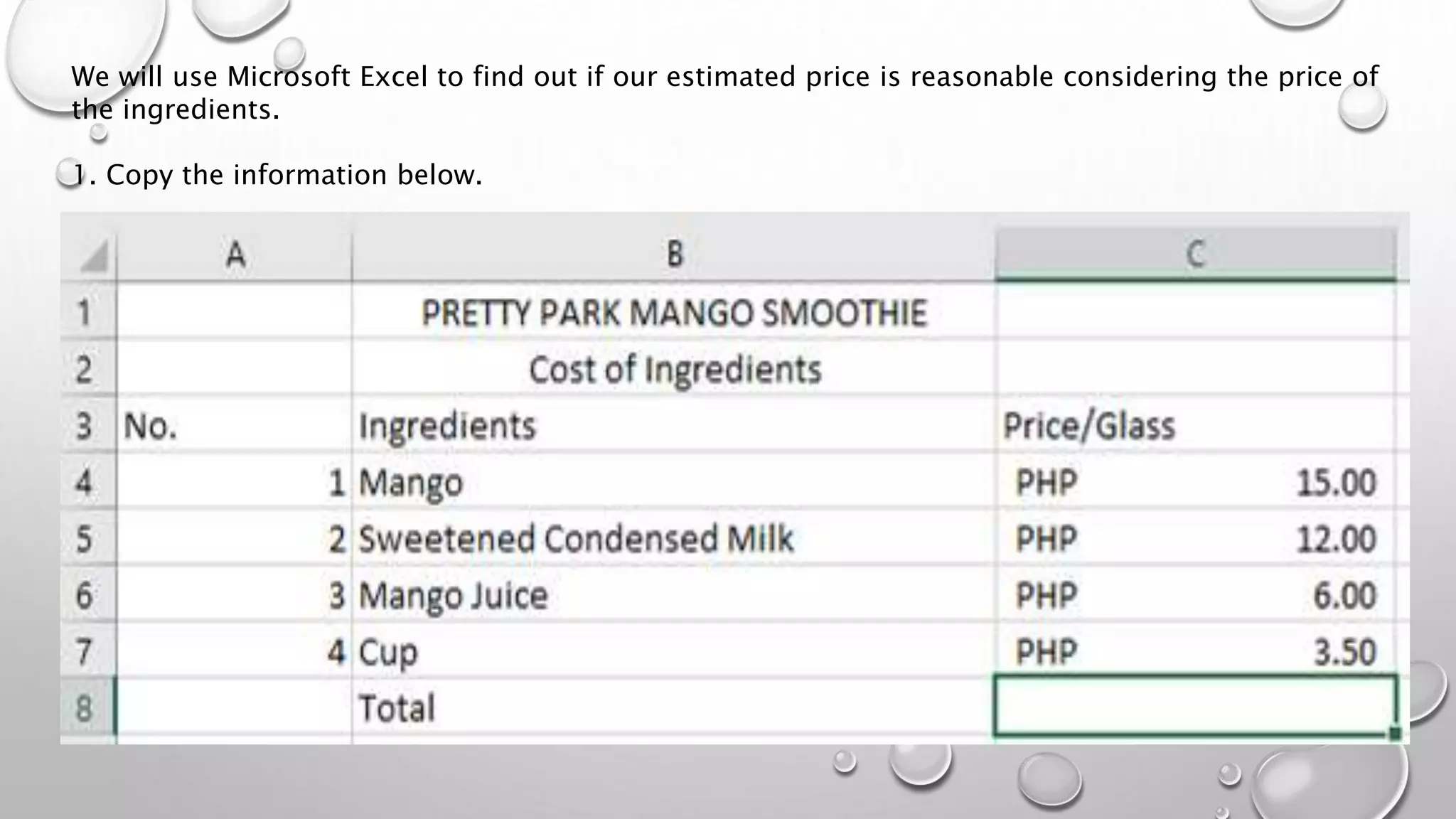
We will use Microsoft Excel to find out if our estimated price is reasonable considering the price of
the ingredients.
1. Copy the information below.
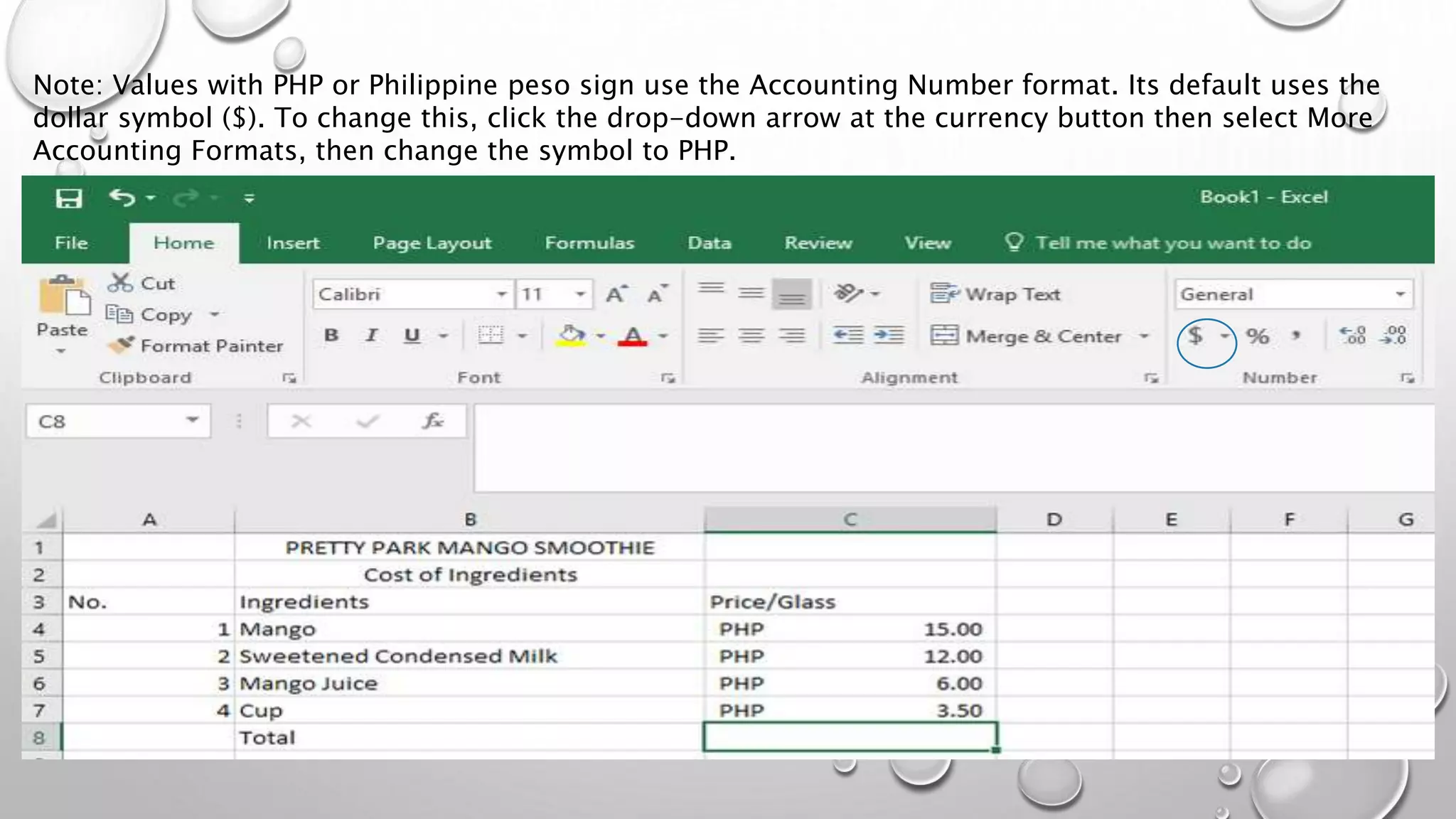
Note: Values with PHP or Philippine peso sign use the Accounting Number format. Its default uses the
dollar symbol ($). To change this, click the drop-down arrow at the currency button then select More
Accounting Formats, then change the symbol to PHP.
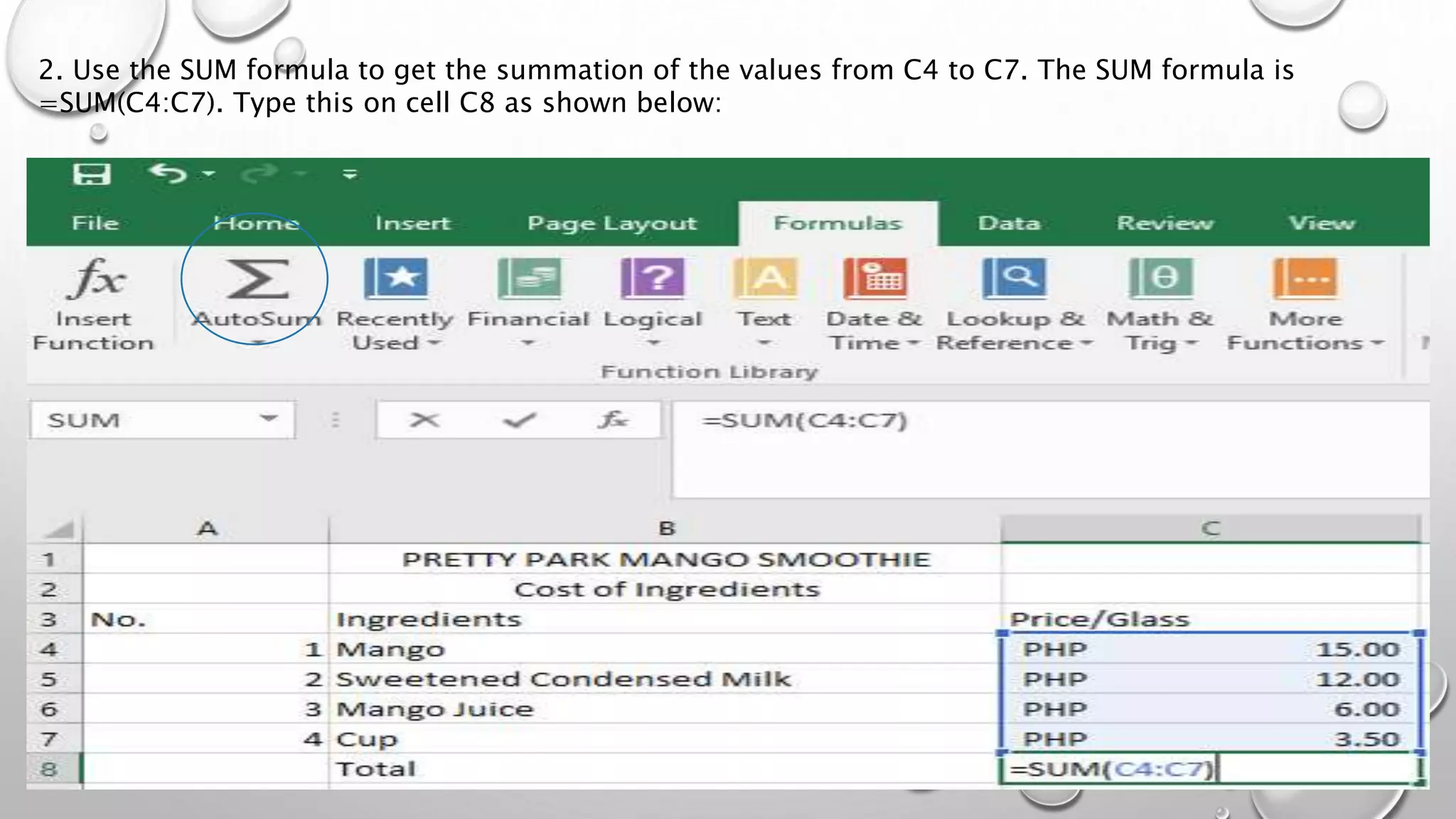
2. Use the SUM formula to get the summation of the values from C4 to C7. The SUM formula is
=SUM(C4:C7). Type this on cell C8 as shown below:
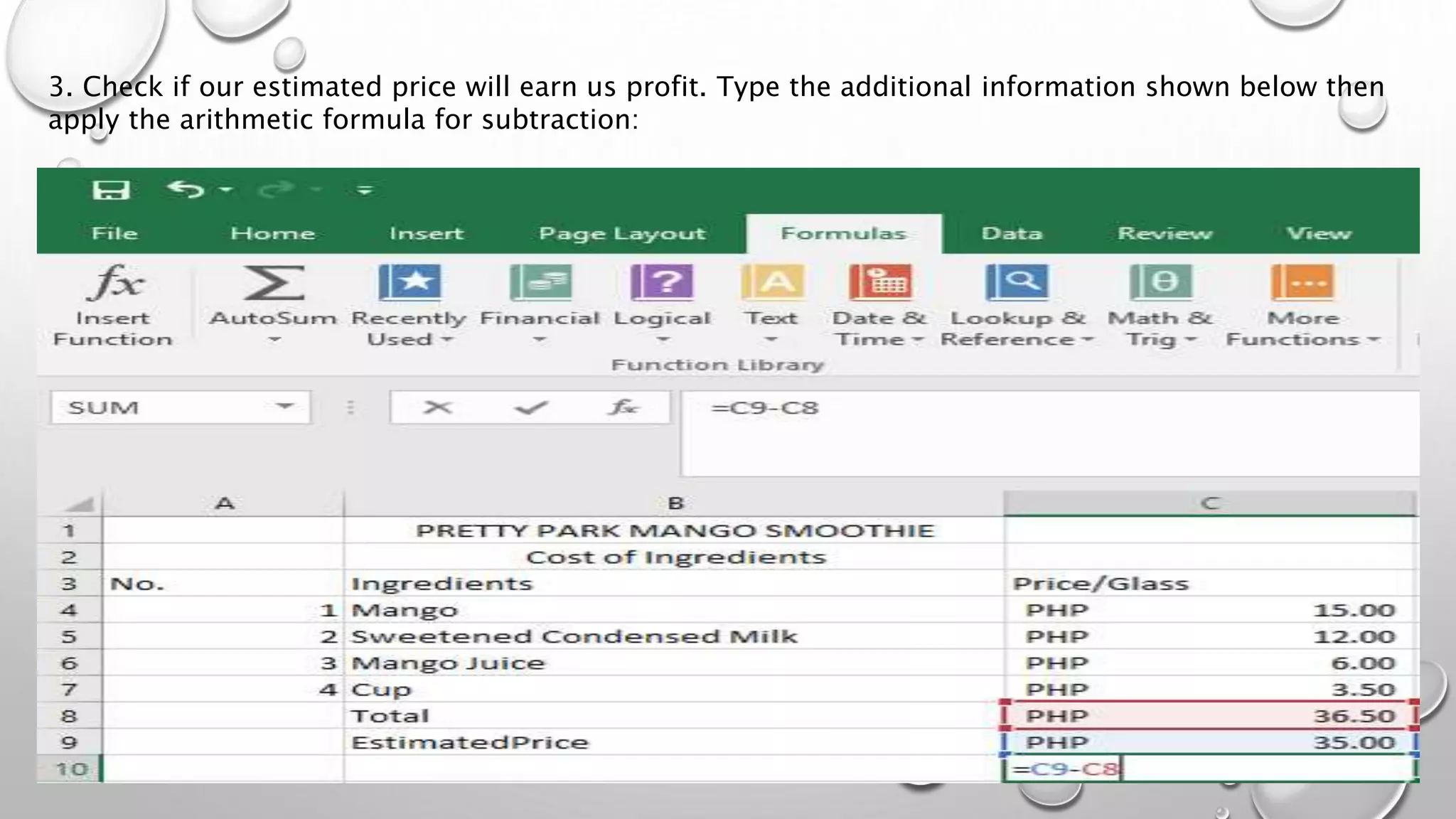
3. Check if our estimated price will earn us profit. Type the additional information shown below then
apply the arithmetic formula for subtraction:
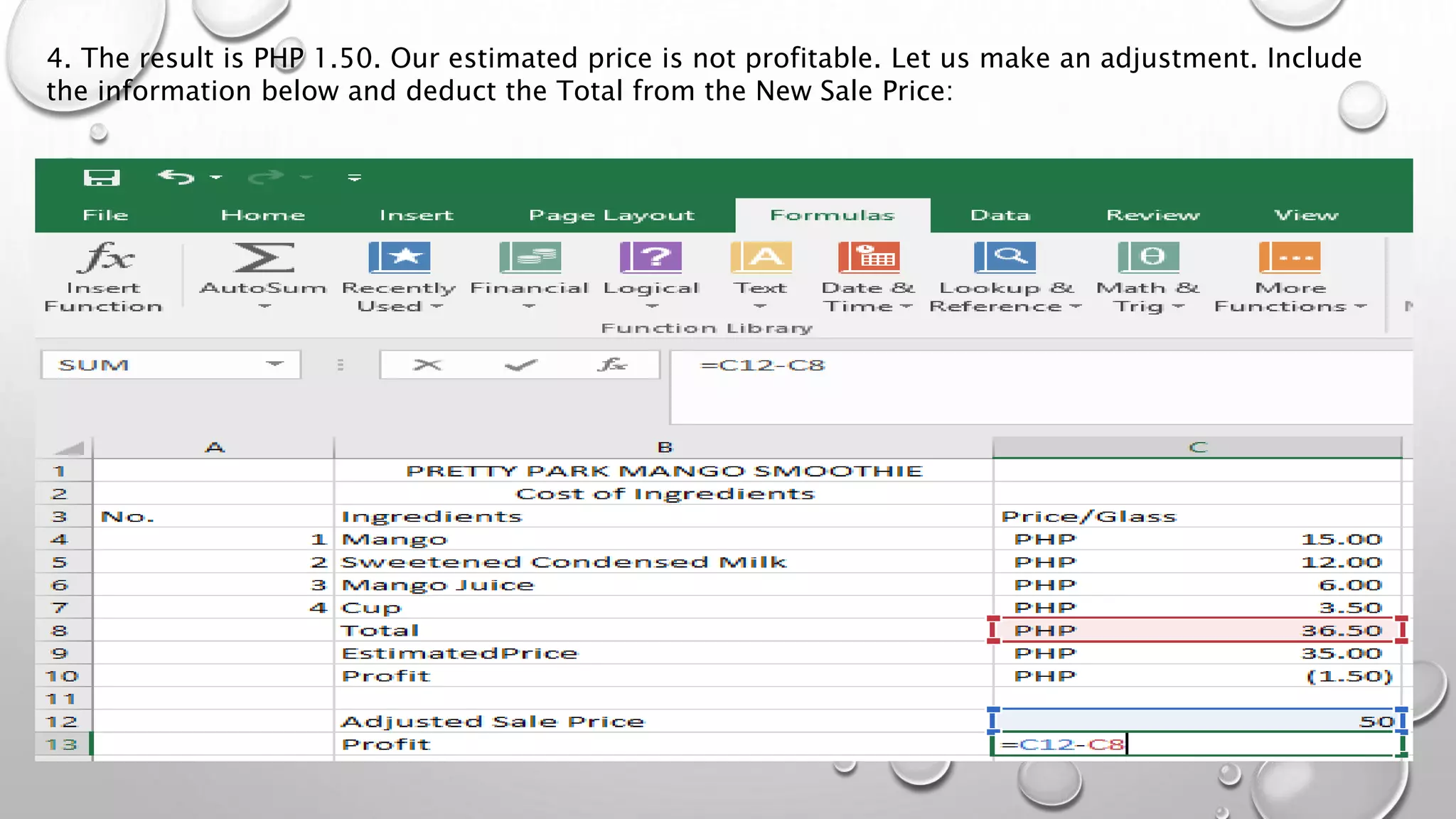
4. The result is PHP 1.50. Our estimated price is not profitable. Let us make an adjustment. Include
the information below and deduct the Total from the New Sale Price:
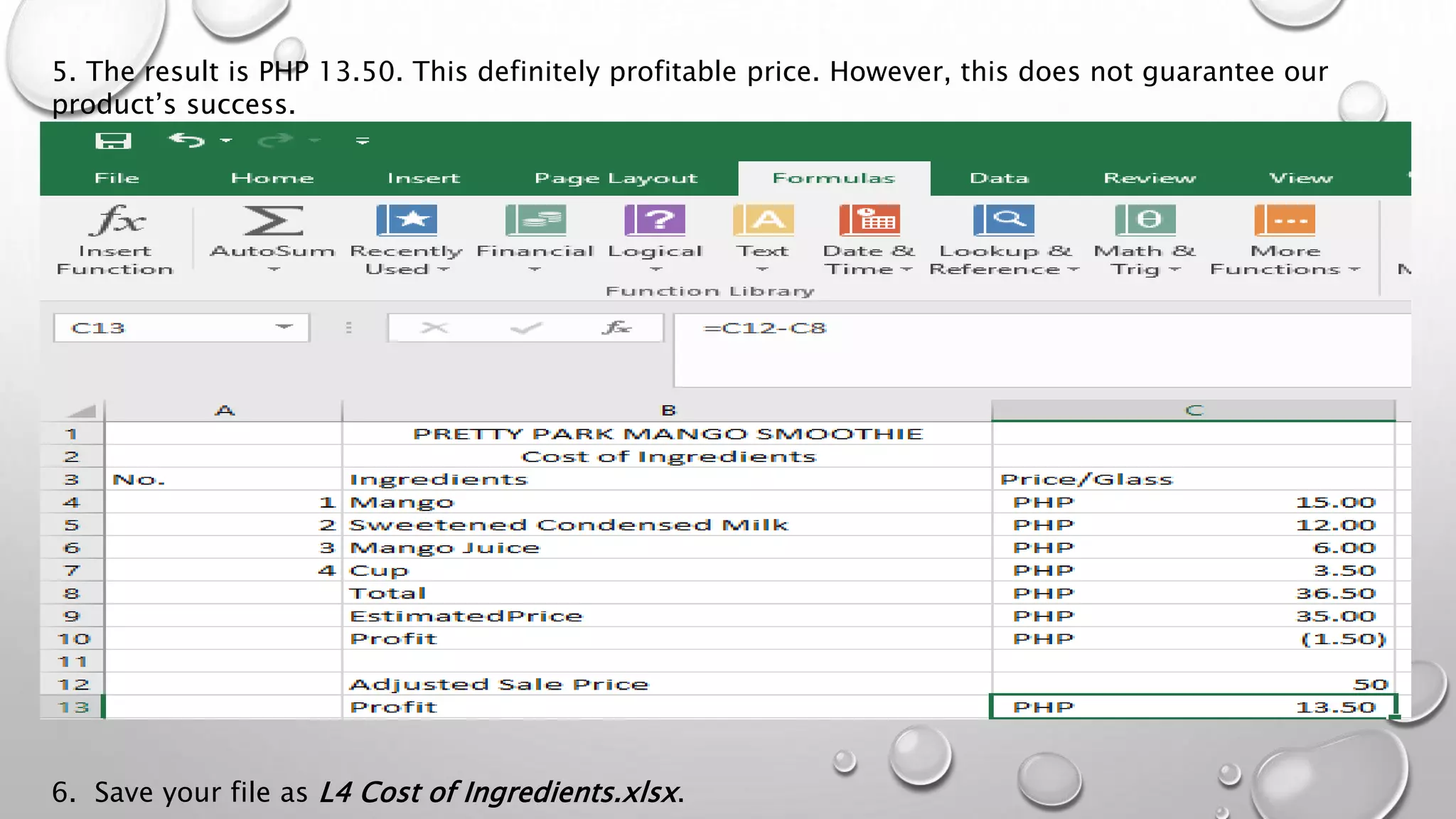
5. The result is PHP 13.50. This definitely profitable price. However, this does not guarantee our
product’s success.
6. Save your file as L4 Cost of Ingredients.xlsx.

Lesson 4 advance spreadsheets skills cost of ingredients.xlsx.

  • 2.
    In Estimating withMicrosoft® Excel, Third Edition, Jay Christofferson , a recognized expert in computerized estimating, details step-by-step how you can save money and time by using Microsoft® Excel 2007 to develop estimates that are reliable enough for your most important management decisions. The book and CD includes formulas for calculating concrete, rebar, labor, permits, taxes, and more, and demonstrates how to apply them apply them in your everyday construction project management. You’ll learn essential skills for programming basic formulas to automating Excel to integrate with other software packages— Estimating with Microsoft® Excel will show you how to eliminate time-consuming steps and repetitive work by.
  • 3.
    Essential Steps To definean optimization model in Excel you'll follow these essential steps: 1. Organize the data for your problem in the spreadsheet in a logical manner. 2. Choose a spreadsheet cell to hold the value of each decision variable in your model. 3. Create a spreadsheet formula in a cell that calculates the objective function for your model. 4. Create a formulas in cells to calculate the left hand sides of each constraint. 5. Use the dialogs in Excel to tell the Solver about your decision variables, the objective, constraints, and desired bounds on constraints and variables. 6. Run the Solver to find the optimal solution. Within this overall structure, you have a great deal of flexibility in how you choose cells to hold your model's decision variables and constraints, and which formulas and built-in functions you use. In general, your goal should be to create a spreadsheet that communicates its purpose in a clear and understandable manner.
  • 4.
    Let us assumethat we are going to sell a mango smoothie with the following information: Product Information Product Name/Brand: Pretty Park Mango Smoothie Company Group/Name: Pretty Park Refreshment Product Description: Pretty Park Mango Smoothie is a refreshing creamy beverage using the Guimaras mangoes as the main ingredient. This mango blended juice is made to refresh your mind and mango blended juice is made to refresh your mind and body. Ingredients/Materials: Crushed ice , mango juice, condensed milk, sweetener, blended mangoes. Estimated Sale Price: PHP 35.00
  • 5.
    We will useMicrosoft Excel to find out if our estimated price is reasonable considering the price of the ingredients. 1. Copy the information below.
  • 6.
    Note: Values withPHP or Philippine peso sign use the Accounting Number format. Its default uses the dollar symbol ($). To change this, click the drop-down arrow at the currency button then select More Accounting Formats, then change the symbol to PHP.
  • 7.
    2. Use theSUM formula to get the summation of the values from C4 to C7. The SUM formula is =SUM(C4:C7). Type this on cell C8 as shown below:
  • 8.
    3. Check ifour estimated price will earn us profit. Type the additional information shown below then apply the arithmetic formula for subtraction:
  • 9.
    4. The resultis PHP 1.50. Our estimated price is not profitable. Let us make an adjustment. Include the information below and deduct the Total from the New Sale Price:
  • 10.
    5. The resultis PHP 13.50. This definitely profitable price. However, this does not guarantee our product’s success. 6. Save your file as L4 Cost of Ingredients.xlsx.