Network and System
   Administration
  Network Assessment
      Lesson 01
      COIS 435
Network Assessment!
•  Every network message on an Ethernet
   segment reaches every host on that segment,
   but usually only the machine with the
   destination IP address listens. A broadcast
   message is a message, which is addressed
   to every host on a network. The usual
   convention for broadcast messages is that all
   the host address bits one wishes to reach are
   set to ones, e.g. 128.39.89.255."

                © 2007 Angel G. Diaz. All Rights Reserved.   2
System Administration
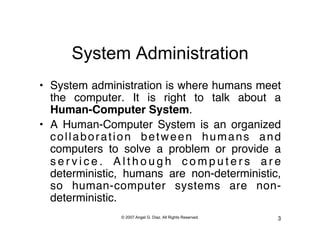
•  System administration is where humans meet
   the computer. It is right to talk about a
   Human-Computer System."
•  A Human-Computer System is an organized
   collaboration between humans and
   computers to solve a problem or provide a
   service. Although computers are
   deterministic, humans are non-deterministic,
   so human-computer systems are non-
   deterministic."
               © 2007 Angel G. Diaz. All Rights Reserved.   3
Components of a Computer Network
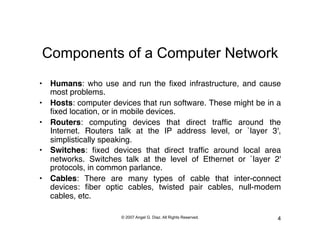
•  Humans: who use and run the fixed infrastructure, and cause
   most problems."
•  Hosts: computer devices that run software. These might be in a
   fixed location, or in mobile devices."
•  Routers: computing devices that direct traffic around the
   Internet. Routers talk at the IP address level, or `layer 3',
   simplistically speaking."
•  Switches: fixed devices that direct traffic around local area
   networks. Switches talk at the level of Ethernet or `layer 2'
   protocols, in common parlance."
•  Cables: There are many types of cable that inter-connect
   devices: fiber optic cables, twisted pair cables, null-modem
   cables, etc."

                      © 2007 Angel G. Diaz. All Rights Reserved.   4
Network Analysis
•    If you become a system administrator somewhere, you will have to get to grips
     with the local network setup there. There are two main things:"

           •  Physical devices: cables, routers, repeaters...subnets"
           •  Services: what is the function of each host in the network?"
           •  There are two kinds of machine in a network: clients and servers.
              Servers offer services and clients make use of the services. We need to
              find out which hosts do what. This is partly operating system
              dependent."
           •  Windows, NT or Macintosh: Each user has a workstation. Only the
              person sitting at the machine can use it. Centralized servers make
              shared resources like disks and printers available over the network."
           •  Unix, IBM OS or Cray OS: Several users can use each host by remote
              login. Any machine can be a server or a client or a workstation. No
              special software is needed.

                             © 2007 Angel G. Diaz. All Rights Reserved.              5
Network Analysis
                                       How to proceed!

      To get an overview of the network you will need to put together information from several
      sources like a jigsaw. These are some of the sources you can use:"
      "
•    Physical Network!
      – You will need a sketch of the topology of the network cables. This has to come from the
      people who wired up the network, since only they know what they did."
•    DNS Data!
      – Start with the DNS database, either in their source file form or use nslookup. Here you
      should find all of the IP addresses, which belong to the domain. "
      – From the DNS you will be able to find out what the local domain's name server (NS) is
      and also where E-mail is sent (MX=Mail Exchanger). You can also find out the mail
      address of a person responsible for the network and other information. If a network is
      shielded by a firewall, this information is not available from outside the local network.


                                © 2007 Angel G. Diaz. All Rights Reserved.                   6
Network Analysis
•    Operating System (Version)!
      –  It is important to know what kind of operating systems are running on your network.
         If something goes wrong you need to know who to contact in order to get the
         machine repaired. Sometimes dangerous bugs are discovered and you need to
         know whether you are vulnerable to these bugs. The command uname –a or
         uname –help is used on modern Unix systems. On older systems you will have to
         use something like arch. NT has to be identified visually since it is not possible to
         log onto the machine remotely. In some cases you will be able to use SNMP tools
         like scotty to discover hardware information about your network, including printers,
         routers and other network devices."
•    Net Configuration!
      –  Get the netmask, broadcast address and default router. The command ifconfig –a is
         used for Unix. The command ipconfig on NT. This command is also used to set the
         hosts IP address when it is booted.


                                 © 2007 Angel G. Diaz. All Rights Reserved.             7
Network Analysis
•    Device Overview!
     –  We can gain some insight into a machine's hardware using the dmesg command.
        This shows the system boot messages. How many CPUs does the machine have,
        have many disks and network interfaces. (See also netstat -i on some unixes) This
        information lies in a binary file (unusual for Unix), which has the disadvantage that
        the file can become corrupt if there is a kernel panic. When this happens running
        dmesg usually wrecks your terminal."
•    Subnets!
     –  I many cases a network will consist of several small network segments called
        subnets. It is important to map out these subnets because hosts which lie on
        different subnets will not necessarily be able to see one another for certain network
        services. The thing, which is important to know about subnets, is the netmask and
        default route because these two things decide which hosts will see which
        messages.


                                © 2007 Angel G. Diaz. All Rights Reserved.              8
Network Analysis
•    Routers!
      –  Routers join together networks and subnets. Each router has an address on every
         network it is connected to. Try looking up nslookup mail.yahoo.com."
      –  Broadcast messages so not usually go through routers to other subnets, unless
         they are so-called directed broadcasts to different physical parts of a common
         network. (This means that certain services like BOOTP and DHCP usually do not
         work across subnet boundaries.)"
•    IP Address!
      –  A host's IP address is set when it boots by calling the ifconfig command. There are
         two ways in which an IP number can be assigned. We can decide once and for all
         which address the host should have (out of the addresses we have at our
         disposition). The address is set during the installation of the host and it is stored on
         disk forever more. The other way is to ask a server to provide the host with an
         unused IP address. This is BOOTP/DHCP. This method is used by hosts, which do
         not have their own disks for instance. When such a host boots it sends a broadcast
         message to the whole subnet asking for some server to tell it what it's address
         should be. An active server will reply with an IP address and then mark that
         address as currently in use.
                                  © 2007 Angel G. Diaz. All Rights Reserved.                9
Network Analysis
•  Services!
   –  After mapping out the hardware configuration of the network
      there is still the issue of software systems. This includes all
      of the network services a host is responsible for. There is no
      easy or obvious way to find out this information, but on a
      well-designed network there are several things, which can
      help us. A naming convention is common. Use the DNS to
      lookup the following names:"

           –    empresas.suagm.edu"
           –    mailhost.empresas.suagm.edu"
           –    dns.empresas.suagm.edu"
           –    ftp.empresas.suagm.edu"


                         © 2007 Angel G. Diaz. All Rights Reserved.   10
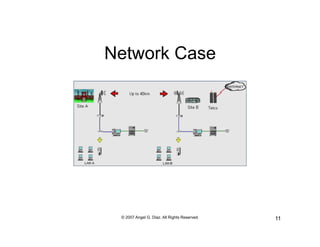
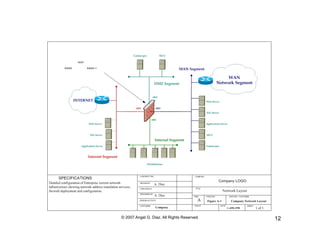
Network Case


 © 2007 Angel G. Diaz. All Rights Reserved.   11
© 2007 Angel G. Diaz. All Rights Reserved.   12
End of Lesson


  © 2007 Angel G. Diaz. All Rights Reserved.   13

Lesson 01 - Network Assessment

  • 1.
    Network and System Administration Network Assessment Lesson 01 COIS 435
  • 2.
    Network Assessment! •  Everynetwork message on an Ethernet segment reaches every host on that segment, but usually only the machine with the destination IP address listens. A broadcast message is a message, which is addressed to every host on a network. The usual convention for broadcast messages is that all the host address bits one wishes to reach are set to ones, e.g. 128.39.89.255." © 2007 Angel G. Diaz. All Rights Reserved. 2
  • 3.
    System Administration •  Systemadministration is where humans meet the computer. It is right to talk about a Human-Computer System." •  A Human-Computer System is an organized collaboration between humans and computers to solve a problem or provide a service. Although computers are deterministic, humans are non-deterministic, so human-computer systems are non- deterministic." © 2007 Angel G. Diaz. All Rights Reserved. 3
  • 4.
    Components of aComputer Network •  Humans: who use and run the fixed infrastructure, and cause most problems." •  Hosts: computer devices that run software. These might be in a fixed location, or in mobile devices." •  Routers: computing devices that direct traffic around the Internet. Routers talk at the IP address level, or `layer 3', simplistically speaking." •  Switches: fixed devices that direct traffic around local area networks. Switches talk at the level of Ethernet or `layer 2' protocols, in common parlance." •  Cables: There are many types of cable that inter-connect devices: fiber optic cables, twisted pair cables, null-modem cables, etc." © 2007 Angel G. Diaz. All Rights Reserved. 4
  • 5.
    Network Analysis •  If you become a system administrator somewhere, you will have to get to grips with the local network setup there. There are two main things:" •  Physical devices: cables, routers, repeaters...subnets" •  Services: what is the function of each host in the network?" •  There are two kinds of machine in a network: clients and servers. Servers offer services and clients make use of the services. We need to find out which hosts do what. This is partly operating system dependent." •  Windows, NT or Macintosh: Each user has a workstation. Only the person sitting at the machine can use it. Centralized servers make shared resources like disks and printers available over the network." •  Unix, IBM OS or Cray OS: Several users can use each host by remote login. Any machine can be a server or a client or a workstation. No special software is needed. © 2007 Angel G. Diaz. All Rights Reserved. 5
  • 6.
    Network Analysis How to proceed! To get an overview of the network you will need to put together information from several sources like a jigsaw. These are some of the sources you can use:" " •  Physical Network! – You will need a sketch of the topology of the network cables. This has to come from the people who wired up the network, since only they know what they did." •  DNS Data! – Start with the DNS database, either in their source file form or use nslookup. Here you should find all of the IP addresses, which belong to the domain. " – From the DNS you will be able to find out what the local domain's name server (NS) is and also where E-mail is sent (MX=Mail Exchanger). You can also find out the mail address of a person responsible for the network and other information. If a network is shielded by a firewall, this information is not available from outside the local network. © 2007 Angel G. Diaz. All Rights Reserved. 6
  • 7.
    Network Analysis •  Operating System (Version)! –  It is important to know what kind of operating systems are running on your network. If something goes wrong you need to know who to contact in order to get the machine repaired. Sometimes dangerous bugs are discovered and you need to know whether you are vulnerable to these bugs. The command uname –a or uname –help is used on modern Unix systems. On older systems you will have to use something like arch. NT has to be identified visually since it is not possible to log onto the machine remotely. In some cases you will be able to use SNMP tools like scotty to discover hardware information about your network, including printers, routers and other network devices." •  Net Configuration! –  Get the netmask, broadcast address and default router. The command ifconfig –a is used for Unix. The command ipconfig on NT. This command is also used to set the hosts IP address when it is booted. © 2007 Angel G. Diaz. All Rights Reserved. 7
  • 8.
    Network Analysis •  Device Overview! –  We can gain some insight into a machine's hardware using the dmesg command. This shows the system boot messages. How many CPUs does the machine have, have many disks and network interfaces. (See also netstat -i on some unixes) This information lies in a binary file (unusual for Unix), which has the disadvantage that the file can become corrupt if there is a kernel panic. When this happens running dmesg usually wrecks your terminal." •  Subnets! –  I many cases a network will consist of several small network segments called subnets. It is important to map out these subnets because hosts which lie on different subnets will not necessarily be able to see one another for certain network services. The thing, which is important to know about subnets, is the netmask and default route because these two things decide which hosts will see which messages. © 2007 Angel G. Diaz. All Rights Reserved. 8
  • 9.
    Network Analysis •  Routers! –  Routers join together networks and subnets. Each router has an address on every network it is connected to. Try looking up nslookup mail.yahoo.com." –  Broadcast messages so not usually go through routers to other subnets, unless they are so-called directed broadcasts to different physical parts of a common network. (This means that certain services like BOOTP and DHCP usually do not work across subnet boundaries.)" •  IP Address! –  A host's IP address is set when it boots by calling the ifconfig command. There are two ways in which an IP number can be assigned. We can decide once and for all which address the host should have (out of the addresses we have at our disposition). The address is set during the installation of the host and it is stored on disk forever more. The other way is to ask a server to provide the host with an unused IP address. This is BOOTP/DHCP. This method is used by hosts, which do not have their own disks for instance. When such a host boots it sends a broadcast message to the whole subnet asking for some server to tell it what it's address should be. An active server will reply with an IP address and then mark that address as currently in use. © 2007 Angel G. Diaz. All Rights Reserved. 9
  • 10.
    Network Analysis •  Services! –  After mapping out the hardware configuration of the network there is still the issue of software systems. This includes all of the network services a host is responsible for. There is no easy or obvious way to find out this information, but on a well-designed network there are several things, which can help us. A naming convention is common. Use the DNS to lookup the following names:" –  empresas.suagm.edu" –  mailhost.empresas.suagm.edu" –  dns.empresas.suagm.edu" –  ftp.empresas.suagm.edu" © 2007 Angel G. Diaz. All Rights Reserved. 10
  • 11.
    Network Case ©2007 Angel G. Diaz. All Rights Reserved. 11
  • 12.
    © 2007 AngelG. Diaz. All Rights Reserved. 12
  • 13.
    End of Lesson © 2007 Angel G. Diaz. All Rights Reserved. 13