Lesson 06

Errors, Error Detection, and Error
              Control

 Data Communications and Computer
Networks: A Business User s Approach
             Sixth Edition
After reading this chapter,
                      you should be able to:
•  Identify the different types of noise commonly
   found in computer networks
•  Specify the different error-prevention techniques,
   and be able to apply an error-prevention
   technique to a type of noise
•  Compare the different error-detection techniques
   in terms of efficiency and efficacy
•  Perform simple parity and longitudinal parity
   calculations, and enumerate their strengths and
   weaknesses
Data Communications and Computer Networks: A Business User's Approach, Sixth Edition   2
After reading this chapter,
          you should be able to (continued):
•  Cite the advantages of arithmetic checksum
•  Cite the advantages of cyclic redundancy
   checksum, and specify what types of errors
   cyclic redundancy checksum will detect
•  Differentiate between the basic forms of error
   control, and describe the circumstances under
   which each may be used
•  Follow an example of a Hamming self-correcting
   code

Data Communications and Computer Networks: A Business User's Approach, Sixth Edition   3
Introduction

•  Noise is always present
•  If a communications line experiences too much
   noise, the signal will be lost or corrupted
•  Communication systems should check for
   transmission errors
•  Once an error is detected, a system may
   perform some action
•  Some systems perform no error control, but
   simply let the data in error be discarded

Data Communications and Computer Networks: A Business User's Approach, Sixth Edition   4
White Noise

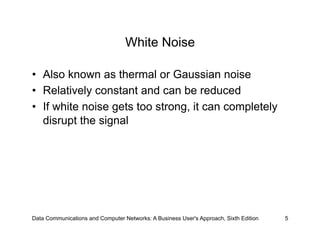
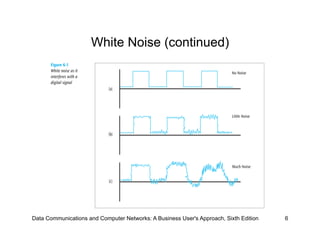
•  Also known as thermal or Gaussian noise
•  Relatively constant and can be reduced
•  If white noise gets too strong, it can completely
   disrupt the signal


Data Communications and Computer Networks: A Business User's Approach, Sixth Edition   5
White Noise (continued)


Data Communications and Computer Networks: A Business User's Approach, Sixth Edition   6
Impulse Noise

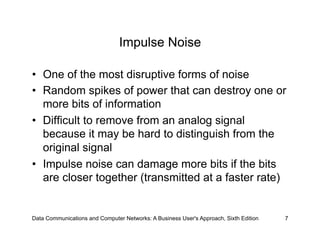
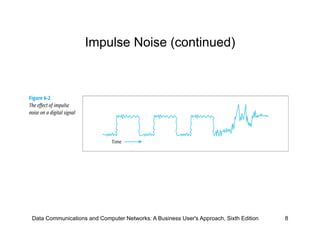
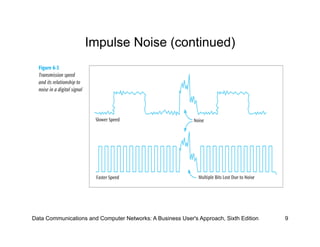
•  One of the most disruptive forms of noise
•  Random spikes of power that can destroy one or
   more bits of information
•  Difficult to remove from an analog signal
   because it may be hard to distinguish from the
   original signal
•  Impulse noise can damage more bits if the bits
   are closer together (transmitted at a faster rate)


Data Communications and Computer Networks: A Business User's Approach, Sixth Edition   7
Impulse Noise (continued)


Data Communications and Computer Networks: A Business User's Approach, Sixth Edition   8
Impulse Noise (continued)


Data Communications and Computer Networks: A Business User's Approach, Sixth Edition   9
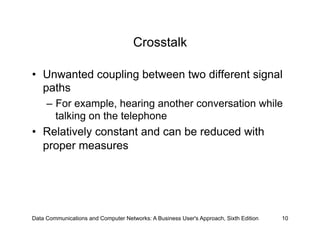
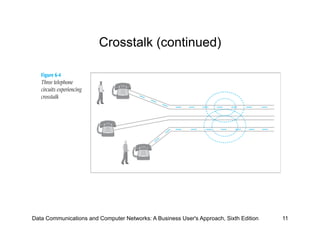
Crosstalk

•  Unwanted coupling between two different signal
   paths
     –  For example, hearing another conversation while
        talking on the telephone
•  Relatively constant and can be reduced with
   proper measures


Data Communications and Computer Networks: A Business User's Approach, Sixth Edition   10
Crosstalk (continued)


Data Communications and Computer Networks: A Business User's Approach, Sixth Edition   11
Echo

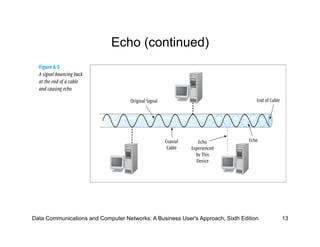
•  The reflective feedback of a transmitted signal
   as the signal moves through a medium
•  Most often occurs on coaxial cable
•  If echo bad enough, it could interfere with
   original signal
•  Relatively constant, and can be significantly
   reduced


Data Communications and Computer Networks: A Business User's Approach, Sixth Edition   12
Echo (continued)


Data Communications and Computer Networks: A Business User's Approach, Sixth Edition   13
Jitter

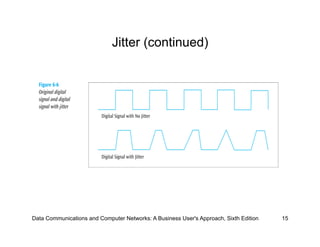
•  The result of small timing irregularities during the
   transmission of digital signals
•  Occurs when a digital signal is repeated over
   and over
•  If serious enough, jitter forces systems to slow
   down their transmission
•  Steps can be taken to reduce jitter


Data Communications and Computer Networks: A Business User's Approach, Sixth Edition   14
Jitter (continued)


Data Communications and Computer Networks: A Business User's Approach, Sixth Edition   15
Delay Distortion

•  Occurs because the velocity of propagation of a
   signal through a medium varies with the
   frequency of the signal
     –  Can be reduced


Data Communications and Computer Networks: A Business User's Approach, Sixth Edition   16
Attenuation

•  The continuous loss of a signal s strength as it
   travels through a medium


Data Communications and Computer Networks: A Business User's Approach, Sixth Edition   17
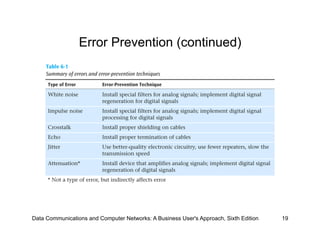
Error Prevention

•  To prevent errors from happening, several
   techniques may be applied:
     –  Proper shielding of cables to reduce interference
     –  Telephone line conditioning or equalization
     –  Replacing older media and equipment with new,
        possibly digital components
     –  Proper use of digital repeaters and analog
        amplifiers
     –  Observe the stated capacities of the media

Data Communications and Computer Networks: A Business User's Approach, Sixth Edition   18
Error Prevention (continued)


Data Communications and Computer Networks: A Business User's Approach, Sixth Edition   19
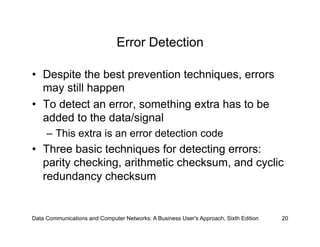
Error Detection

•  Despite the best prevention techniques, errors
   may still happen
•  To detect an error, something extra has to be
   added to the data/signal
     –  This extra is an error detection code
•  Three basic techniques for detecting errors:
   parity checking, arithmetic checksum, and cyclic
   redundancy checksum


Data Communications and Computer Networks: A Business User's Approach, Sixth Edition   20
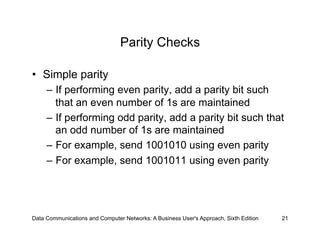
Parity Checks

•  Simple parity
     –  If performing even parity, add a parity bit such
        that an even number of 1s are maintained
     –  If performing odd parity, add a parity bit such that
        an odd number of 1s are maintained
     –  For example, send 1001010 using even parity
     –  For example, send 1001011 using even parity


Data Communications and Computer Networks: A Business User's Approach, Sixth Edition   21
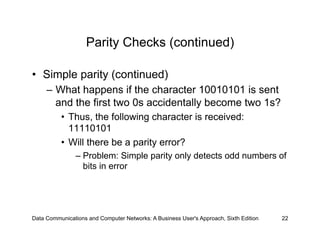
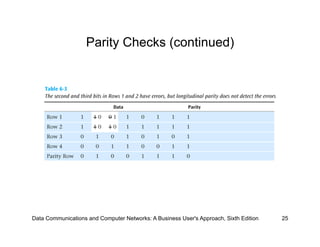
Parity Checks (continued)

•  Simple parity (continued)
     –  What happens if the character 10010101 is sent
        and the first two 0s accidentally become two 1s?
          •  Thus, the following character is received:
             11110101
          •  Will there be a parity error?
                –  Problem: Simple parity only detects odd numbers of
                   bits in error


Data Communications and Computer Networks: A Business User's Approach, Sixth Edition   22
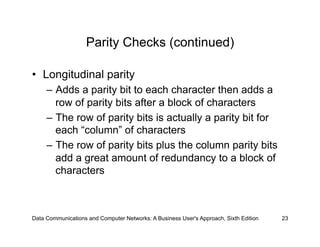
Parity Checks (continued)

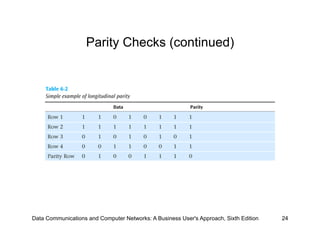
•  Longitudinal parity
     –  Adds a parity bit to each character then adds a
        row of parity bits after a block of characters
     –  The row of parity bits is actually a parity bit for
        each “column” of characters
     –  The row of parity bits plus the column parity bits
        add a great amount of redundancy to a block of
        characters


Data Communications and Computer Networks: A Business User's Approach, Sixth Edition   23
Parity Checks (continued)


Data Communications and Computer Networks: A Business User's Approach, Sixth Edition   24
Parity Checks (continued)


Data Communications and Computer Networks: A Business User's Approach, Sixth Edition   25
Parity Checks (continued)

•  Both simple parity and longitudinal parity do not
   catch all errors
•  Simple parity only catches odd numbers of bit
   errors
•  Longitudinal parity is better at catching errors but
   requires too many check bits added to a block of
   data
•  We need a better error detection method
     –  What about arithmetic checksum?

Data Communications and Computer Networks: A Business User's Approach, Sixth Edition   26
Arithmetic Checksum

•  Used in TCP and IP on the Internet
•  Characters to be transmitted are converted to
   numeric form and summed
•  Sum is placed in some form at the end of the
   transmission


Data Communications and Computer Networks: A Business User's Approach, Sixth Edition   27
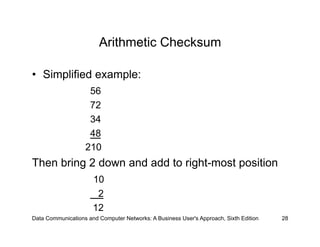
Arithmetic Checksum

•  Simplified example:
                    56
                    72
                    34
                    48
                   210
Then bring 2 down and add to right-most position
                      10
                       2
                      12
Data Communications and Computer Networks: A Business User's Approach, Sixth Edition   28
Arithmetic Checksum

•  Receiver performs same conversion and
   summing and compares new sum with sent sum
•  TCP and IP processes a little more complex but
   idea is the same
•  But even arithmetic checksum can let errors slip
   through. Is there something more powerful yet?


Data Communications and Computer Networks: A Business User's Approach, Sixth Edition   29
Cyclic Redundancy Checksum

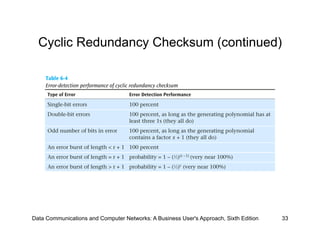
•  CRC error detection method treats the packet of
   data to be transmitted as a large polynomial
•  Transmitter takes the message polynomial and
   using polynomial arithmetic, divides it by a given
   generating polynomial
•  Quotient is discarded but the remainder is
    attached to the end of the message


Data Communications and Computer Networks: A Business User's Approach, Sixth Edition   30
Cyclic Redundancy Checksum (continued)

•  The message (with the remainder) is transmitted
   to the receiver
•  The receiver divides the message and remainder
   by the same generating polynomial
•  If a remainder not equal to zero results, there
   was an error during transmission
•  If a remainder of zero results, there was no error
   during transmission


Data Communications and Computer Networks: A Business User's Approach, Sixth Edition   31
Cyclic Redundancy Checksum (continued)

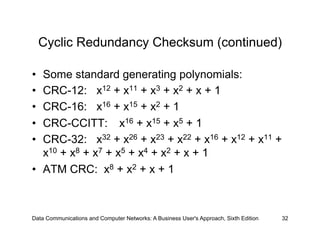
•  Some standard generating polynomials:
•  CRC-12: x12 + x11 + x3 + x2 + x + 1
•  CRC-16: x16 + x15 + x2 + 1
•  CRC-CCITT: x16 + x15 + x5 + 1
•  CRC-32: x32 + x26 + x23 + x22 + x16 + x12 + x11 +
   x10 + x8 + x7 + x5 + x4 + x2 + x + 1
•  ATM CRC: x8 + x2 + x + 1


Data Communications and Computer Networks: A Business User's Approach, Sixth Edition   32
Cyclic Redundancy Checksum (continued)


Data Communications and Computer Networks: A Business User's Approach, Sixth Edition   33
Error Control

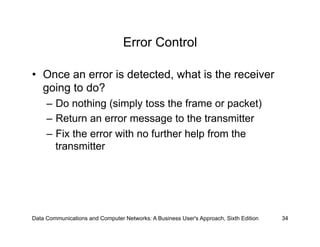
•  Once an error is detected, what is the receiver
   going to do?
     –  Do nothing (simply toss the frame or packet)
     –  Return an error message to the transmitter
     –  Fix the error with no further help from the
        transmitter


Data Communications and Computer Networks: A Business User's Approach, Sixth Edition   34
Do Nothing (Toss the Frame/Packet)

•  Seems like a strange way to control errors but
   some lower-layer protocols such as frame relay
   perform this type of error control
•  For example, if frame relay detects an error, it
   simply tosses the frame
     –  No message is returned
•  Frame relay assumes a higher protocol (such as
   TCP/IP) will detect the tossed frame and ask for
   retransmission


Data Communications and Computer Networks: A Business User's Approach, Sixth Edition   35
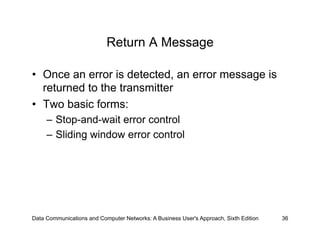
Return A Message

•  Once an error is detected, an error message is
   returned to the transmitter
•  Two basic forms:
     –  Stop-and-wait error control
     –  Sliding window error control


Data Communications and Computer Networks: A Business User's Approach, Sixth Edition   36
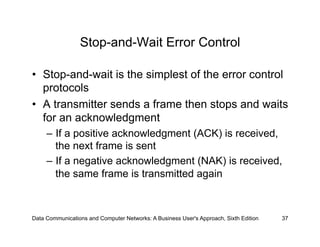
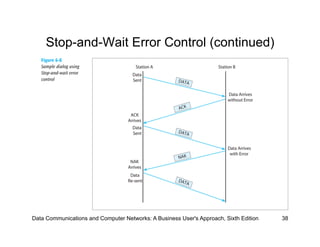
Stop-and-Wait Error Control

•  Stop-and-wait is the simplest of the error control
   protocols
•  A transmitter sends a frame then stops and waits
   for an acknowledgment
     –  If a positive acknowledgment (ACK) is received,
        the next frame is sent
     –  If a negative acknowledgment (NAK) is received,
        the same frame is transmitted again


Data Communications and Computer Networks: A Business User's Approach, Sixth Edition   37
Stop-and-Wait Error Control (continued)


Data Communications and Computer Networks: A Business User's Approach, Sixth Edition   38
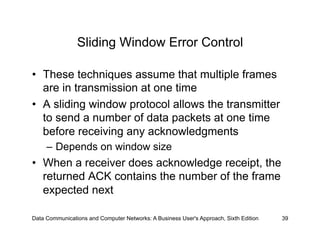
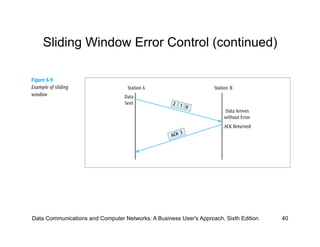
Sliding Window Error Control

•  These techniques assume that multiple frames
   are in transmission at one time
•  A sliding window protocol allows the transmitter
   to send a number of data packets at one time
   before receiving any acknowledgments
     –  Depends on window size
•  When a receiver does acknowledge receipt, the
   returned ACK contains the number of the frame
   expected next

Data Communications and Computer Networks: A Business User's Approach, Sixth Edition   39
Sliding Window Error Control (continued)


Data Communications and Computer Networks: A Business User's Approach, Sixth Edition   40
Sliding Window Error Control (continued)

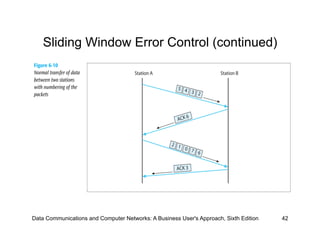
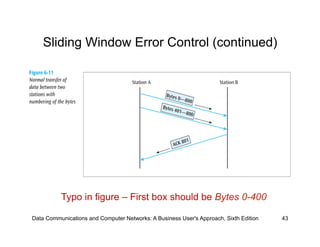
•  Older sliding window protocols numbered each
   frame or packet that was transmitted
•  More modern sliding window protocols number
   each byte within a frame
•  An example in which the packets are numbered,
   followed by an example in which the bytes are
   numbered:


Data Communications and Computer Networks: A Business User's Approach, Sixth Edition   41
Sliding Window Error Control (continued)


Data Communications and Computer Networks: A Business User's Approach, Sixth Edition   42
Sliding Window Error Control (continued)


          Typo in figure – First box should be Bytes 0-400

Data Communications and Computer Networks: A Business User's Approach, Sixth Edition   43
Sliding Window Error Control (continued)

•  Notice that an ACK is not always sent after each
   frame is received
     –  It is more efficient to wait for a few received
        frames before returning an ACK
•  How long should you wait until you return an
   ACK?


Data Communications and Computer Networks: A Business User's Approach, Sixth Edition   44
Sliding Window Error Control (continued)

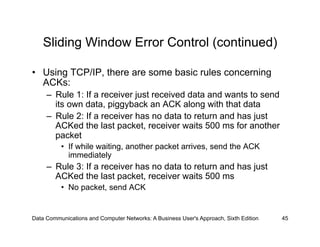
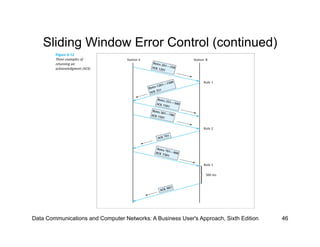
•  Using TCP/IP, there are some basic rules concerning
   ACKs:
     –  Rule 1: If a receiver just received data and wants to send
        its own data, piggyback an ACK along with that data
     –  Rule 2: If a receiver has no data to return and has just
        ACKed the last packet, receiver waits 500 ms for another
        packet
          •  If while waiting, another packet arrives, send the ACK
             immediately
     –  Rule 3: If a receiver has no data to return and has just
        ACKed the last packet, receiver waits 500 ms
          •  No packet, send ACK


Data Communications and Computer Networks: A Business User's Approach, Sixth Edition   45
Sliding Window Error Control (continued)


Data Communications and Computer Networks: A Business User's Approach, Sixth Edition   46
Sliding Window Error Control (continued)

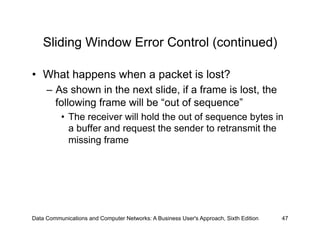
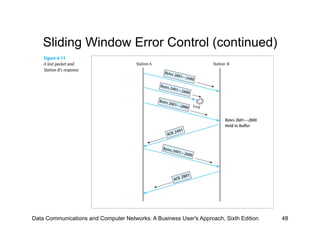
•  What happens when a packet is lost?
     –  As shown in the next slide, if a frame is lost, the
        following frame will be “out of sequence”
          •  The receiver will hold the out of sequence bytes in
             a buffer and request the sender to retransmit the
             missing frame


Data Communications and Computer Networks: A Business User's Approach, Sixth Edition   47
Sliding Window Error Control (continued)


Data Communications and Computer Networks: A Business User's Approach, Sixth Edition   48
Sliding Window Error Control (continued)

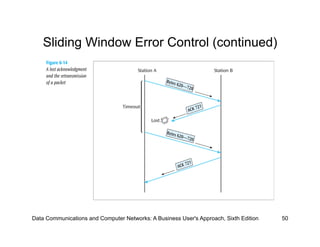
•  What happens when an ACK is lost?
     –  As shown in the next slide, if an ACK is lost, the
        sender will wait for the ACK to arrive and
        eventually time out
          •  When the time-out occurs, the sender will resend
             the last frame


Data Communications and Computer Networks: A Business User's Approach, Sixth Edition   49
Sliding Window Error Control (continued)


Data Communications and Computer Networks: A Business User's Approach, Sixth Edition   50
Correct the Error

•  For a receiver to correct the error with no further
   help from the transmitter requires a large amount
   of redundant information to accompany the
   original data
     –  This redundant information allows the receiver to
        determine the error and make corrections
•  This type of error control is often called forward
   error correction and involves codes called
   Hamming codes

Data Communications and Computer Networks: A Business User's Approach, Sixth Edition   51
Correct the Error (continued)

•  Hamming codes add additional check bits to a
   character
     –  These check bits perform parity checks on various
        bits
•  Example: One could create a Hamming code in
   which 4 check bits are added to an 8-bit character
     –  We can number the check bits c8, c4, c2 and c1
     –  We will number the data bits b12, b11, b10, b9, b7,
        b6, b5, and b3
     –  Place the bits in the following order: b12, b11, b10,
        b9, c8, b7, b6, b5, c4, b3, c2, c1

Data Communications and Computer Networks: A Business User's Approach, Sixth Edition   52
Correct the Error (continued)

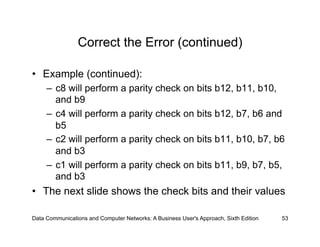
•  Example (continued):
     –  c8 will perform a parity check on bits b12, b11, b10,
        and b9
     –  c4 will perform a parity check on bits b12, b7, b6 and
        b5
     –  c2 will perform a parity check on bits b11, b10, b7, b6
        and b3
     –  c1 will perform a parity check on bits b11, b9, b7, b5,
        and b3
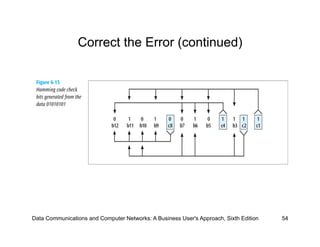
•  The next slide shows the check bits and their values

Data Communications and Computer Networks: A Business User's Approach, Sixth Edition   53
Correct the Error (continued)


Data Communications and Computer Networks: A Business User's Approach, Sixth Edition   54
Correct the Error (continued)

•  The sender will take the 8-bit character and
   generate the 4 check bits as described
     –  The 4 check bits are then added to the 8 data bits
        in the sequence as shown and then transmitted
•  The receiver will perform the 4 parity checks
   using the 4 check bits
     –  If no bits flipped during transmission, then there
        should be no parity errors
•  What happens if one of the bits flipped during
   transmission?
Data Communications and Computer Networks: A Business User's Approach, Sixth Edition   55
Correct the Error (continued)

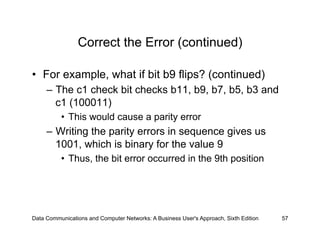
•  For example, what if bit b9 flips?
     –  The c8 check bit checks bits b12, b11, b10, b9 and c8
        (01000)
          •  This would cause a parity error
     –  The c4 check bit checks bits b12, b7, b6, b5 and c4
        (00101)
          •  This would not cause a parity error (even number of 1s)
     –  The c2 check bit checks bits b11, b10, b7, b6, b3 and
        c2 (100111)
          •  This would not cause a parity error


Data Communications and Computer Networks: A Business User's Approach, Sixth Edition   56
Correct the Error (continued)

•  For example, what if bit b9 flips? (continued)
     –  The c1 check bit checks b11, b9, b7, b5, b3 and
        c1 (100011)
          •  This would cause a parity error
     –  Writing the parity errors in sequence gives us
        1001, which is binary for the value 9
          •  Thus, the bit error occurred in the 9th position


Data Communications and Computer Networks: A Business User's Approach, Sixth Edition   57
Error Detection In Action

•  FEC is used in transmission of radio signals,
   such as those used in transmission of digital
   television (Reed-Solomon and Trellis encoding)
   and 4D-PAM5 (Viterbi and Trellis encoding)

•  Some FEC is based on Hamming Codes


Data Communications and Computer Networks: A Business User's Approach, Sixth Edition   58
Summary

•  Noise is always present in computer networks, and if
   the noise level is too high, errors will be introduced
   during the transmission of data
     –  Types of noise include white noise, impulse noise,
        crosstalk, echo, jitter, and attenuation
•  Among the techniques for reducing noise are proper
   shielding of cables, telephone line conditioning or
   equalization, using modern digital equipment, using
   digital repeaters and analog amplifiers, and
   observing the stated capacities of media


Data Communications and Computer Networks: A Business User's Approach, Sixth Edition   59
Summary (continued)

•  Three basic forms of error detection are parity,
   arithmetic checksum, and cyclic redundancy
   checksum
•  Cyclic redundancy checksum is a superior error-
   detection scheme with almost 100 percent
   capability of recognizing corrupted data packets
•  Once an error has been detected, there are
   three possible options: do nothing, return an
   error message, and correct the error

Data Communications and Computer Networks: A Business User's Approach, Sixth Edition   60
Summary (continued)

•  Stop-and-wait protocol allows only one packet to
   be sent at a time
•  Sliding window protocol allows multiple packets
   to be sent at one time
•  Error correction is a possibility if the transmitted
   data contains enough redundant information so
   that the receiver can properly correct the error
   without asking the transmitter for additional
   information


Data Communications and Computer Networks: A Business User's Approach, Sixth Edition   61

Errors, Error Detection, and Error Control

  • 1.
    Lesson 06 Errors, ErrorDetection, and Error Control Data Communications and Computer Networks: A Business User s Approach Sixth Edition
  • 2.
    After reading thischapter, you should be able to: •  Identify the different types of noise commonly found in computer networks •  Specify the different error-prevention techniques, and be able to apply an error-prevention technique to a type of noise •  Compare the different error-detection techniques in terms of efficiency and efficacy •  Perform simple parity and longitudinal parity calculations, and enumerate their strengths and weaknesses Data Communications and Computer Networks: A Business User's Approach, Sixth Edition 2
  • 3.
    After reading thischapter, you should be able to (continued): •  Cite the advantages of arithmetic checksum •  Cite the advantages of cyclic redundancy checksum, and specify what types of errors cyclic redundancy checksum will detect •  Differentiate between the basic forms of error control, and describe the circumstances under which each may be used •  Follow an example of a Hamming self-correcting code Data Communications and Computer Networks: A Business User's Approach, Sixth Edition 3
  • 4.
    Introduction •  Noise isalways present •  If a communications line experiences too much noise, the signal will be lost or corrupted •  Communication systems should check for transmission errors •  Once an error is detected, a system may perform some action •  Some systems perform no error control, but simply let the data in error be discarded Data Communications and Computer Networks: A Business User's Approach, Sixth Edition 4
  • 5.
    White Noise •  Alsoknown as thermal or Gaussian noise •  Relatively constant and can be reduced •  If white noise gets too strong, it can completely disrupt the signal Data Communications and Computer Networks: A Business User's Approach, Sixth Edition 5
  • 6.
    White Noise (continued) DataCommunications and Computer Networks: A Business User's Approach, Sixth Edition 6
  • 7.
    Impulse Noise •  Oneof the most disruptive forms of noise •  Random spikes of power that can destroy one or more bits of information •  Difficult to remove from an analog signal because it may be hard to distinguish from the original signal •  Impulse noise can damage more bits if the bits are closer together (transmitted at a faster rate) Data Communications and Computer Networks: A Business User's Approach, Sixth Edition 7
  • 8.
    Impulse Noise (continued) DataCommunications and Computer Networks: A Business User's Approach, Sixth Edition 8
  • 9.
    Impulse Noise (continued) DataCommunications and Computer Networks: A Business User's Approach, Sixth Edition 9
  • 10.
    Crosstalk •  Unwanted couplingbetween two different signal paths –  For example, hearing another conversation while talking on the telephone •  Relatively constant and can be reduced with proper measures Data Communications and Computer Networks: A Business User's Approach, Sixth Edition 10
  • 11.
    Crosstalk (continued) Data Communicationsand Computer Networks: A Business User's Approach, Sixth Edition 11
  • 12.
    Echo •  The reflectivefeedback of a transmitted signal as the signal moves through a medium •  Most often occurs on coaxial cable •  If echo bad enough, it could interfere with original signal •  Relatively constant, and can be significantly reduced Data Communications and Computer Networks: A Business User's Approach, Sixth Edition 12
  • 13.
    Echo (continued) Data Communicationsand Computer Networks: A Business User's Approach, Sixth Edition 13
  • 14.
    Jitter •  The resultof small timing irregularities during the transmission of digital signals •  Occurs when a digital signal is repeated over and over •  If serious enough, jitter forces systems to slow down their transmission •  Steps can be taken to reduce jitter Data Communications and Computer Networks: A Business User's Approach, Sixth Edition 14
  • 15.
    Jitter (continued) Data Communicationsand Computer Networks: A Business User's Approach, Sixth Edition 15
  • 16.
    Delay Distortion •  Occursbecause the velocity of propagation of a signal through a medium varies with the frequency of the signal –  Can be reduced Data Communications and Computer Networks: A Business User's Approach, Sixth Edition 16
  • 17.
    Attenuation •  The continuousloss of a signal s strength as it travels through a medium Data Communications and Computer Networks: A Business User's Approach, Sixth Edition 17
  • 18.
    Error Prevention •  Toprevent errors from happening, several techniques may be applied: –  Proper shielding of cables to reduce interference –  Telephone line conditioning or equalization –  Replacing older media and equipment with new, possibly digital components –  Proper use of digital repeaters and analog amplifiers –  Observe the stated capacities of the media Data Communications and Computer Networks: A Business User's Approach, Sixth Edition 18
  • 19.
    Error Prevention (continued) DataCommunications and Computer Networks: A Business User's Approach, Sixth Edition 19
  • 20.
    Error Detection •  Despitethe best prevention techniques, errors may still happen •  To detect an error, something extra has to be added to the data/signal –  This extra is an error detection code •  Three basic techniques for detecting errors: parity checking, arithmetic checksum, and cyclic redundancy checksum Data Communications and Computer Networks: A Business User's Approach, Sixth Edition 20
  • 21.
    Parity Checks •  Simpleparity –  If performing even parity, add a parity bit such that an even number of 1s are maintained –  If performing odd parity, add a parity bit such that an odd number of 1s are maintained –  For example, send 1001010 using even parity –  For example, send 1001011 using even parity Data Communications and Computer Networks: A Business User's Approach, Sixth Edition 21
  • 22.
    Parity Checks (continued) • Simple parity (continued) –  What happens if the character 10010101 is sent and the first two 0s accidentally become two 1s? •  Thus, the following character is received: 11110101 •  Will there be a parity error? –  Problem: Simple parity only detects odd numbers of bits in error Data Communications and Computer Networks: A Business User's Approach, Sixth Edition 22
  • 23.
    Parity Checks (continued) • Longitudinal parity –  Adds a parity bit to each character then adds a row of parity bits after a block of characters –  The row of parity bits is actually a parity bit for each “column” of characters –  The row of parity bits plus the column parity bits add a great amount of redundancy to a block of characters Data Communications and Computer Networks: A Business User's Approach, Sixth Edition 23
  • 24.
    Parity Checks (continued) DataCommunications and Computer Networks: A Business User's Approach, Sixth Edition 24
  • 25.
    Parity Checks (continued) DataCommunications and Computer Networks: A Business User's Approach, Sixth Edition 25
  • 26.
    Parity Checks (continued) • Both simple parity and longitudinal parity do not catch all errors •  Simple parity only catches odd numbers of bit errors •  Longitudinal parity is better at catching errors but requires too many check bits added to a block of data •  We need a better error detection method –  What about arithmetic checksum? Data Communications and Computer Networks: A Business User's Approach, Sixth Edition 26
  • 27.
    Arithmetic Checksum •  Usedin TCP and IP on the Internet •  Characters to be transmitted are converted to numeric form and summed •  Sum is placed in some form at the end of the transmission Data Communications and Computer Networks: A Business User's Approach, Sixth Edition 27
  • 28.
    Arithmetic Checksum •  Simplifiedexample: 56 72 34 48 210 Then bring 2 down and add to right-most position 10 2 12 Data Communications and Computer Networks: A Business User's Approach, Sixth Edition 28
  • 29.
    Arithmetic Checksum •  Receiverperforms same conversion and summing and compares new sum with sent sum •  TCP and IP processes a little more complex but idea is the same •  But even arithmetic checksum can let errors slip through. Is there something more powerful yet? Data Communications and Computer Networks: A Business User's Approach, Sixth Edition 29
  • 30.
    Cyclic Redundancy Checksum • CRC error detection method treats the packet of data to be transmitted as a large polynomial •  Transmitter takes the message polynomial and using polynomial arithmetic, divides it by a given generating polynomial •  Quotient is discarded but the remainder is attached to the end of the message Data Communications and Computer Networks: A Business User's Approach, Sixth Edition 30
  • 31.
    Cyclic Redundancy Checksum(continued) •  The message (with the remainder) is transmitted to the receiver •  The receiver divides the message and remainder by the same generating polynomial •  If a remainder not equal to zero results, there was an error during transmission •  If a remainder of zero results, there was no error during transmission Data Communications and Computer Networks: A Business User's Approach, Sixth Edition 31
  • 32.
    Cyclic Redundancy Checksum(continued) •  Some standard generating polynomials: •  CRC-12: x12 + x11 + x3 + x2 + x + 1 •  CRC-16: x16 + x15 + x2 + 1 •  CRC-CCITT: x16 + x15 + x5 + 1 •  CRC-32: x32 + x26 + x23 + x22 + x16 + x12 + x11 + x10 + x8 + x7 + x5 + x4 + x2 + x + 1 •  ATM CRC: x8 + x2 + x + 1 Data Communications and Computer Networks: A Business User's Approach, Sixth Edition 32
  • 33.
    Cyclic Redundancy Checksum(continued) Data Communications and Computer Networks: A Business User's Approach, Sixth Edition 33
  • 34.
    Error Control •  Oncean error is detected, what is the receiver going to do? –  Do nothing (simply toss the frame or packet) –  Return an error message to the transmitter –  Fix the error with no further help from the transmitter Data Communications and Computer Networks: A Business User's Approach, Sixth Edition 34
  • 35.
    Do Nothing (Tossthe Frame/Packet) •  Seems like a strange way to control errors but some lower-layer protocols such as frame relay perform this type of error control •  For example, if frame relay detects an error, it simply tosses the frame –  No message is returned •  Frame relay assumes a higher protocol (such as TCP/IP) will detect the tossed frame and ask for retransmission Data Communications and Computer Networks: A Business User's Approach, Sixth Edition 35
  • 36.
    Return A Message • Once an error is detected, an error message is returned to the transmitter •  Two basic forms: –  Stop-and-wait error control –  Sliding window error control Data Communications and Computer Networks: A Business User's Approach, Sixth Edition 36
  • 37.
    Stop-and-Wait Error Control • Stop-and-wait is the simplest of the error control protocols •  A transmitter sends a frame then stops and waits for an acknowledgment –  If a positive acknowledgment (ACK) is received, the next frame is sent –  If a negative acknowledgment (NAK) is received, the same frame is transmitted again Data Communications and Computer Networks: A Business User's Approach, Sixth Edition 37
  • 38.
    Stop-and-Wait Error Control(continued) Data Communications and Computer Networks: A Business User's Approach, Sixth Edition 38
  • 39.
    Sliding Window ErrorControl •  These techniques assume that multiple frames are in transmission at one time •  A sliding window protocol allows the transmitter to send a number of data packets at one time before receiving any acknowledgments –  Depends on window size •  When a receiver does acknowledge receipt, the returned ACK contains the number of the frame expected next Data Communications and Computer Networks: A Business User's Approach, Sixth Edition 39
  • 40.
    Sliding Window ErrorControl (continued) Data Communications and Computer Networks: A Business User's Approach, Sixth Edition 40
  • 41.
    Sliding Window ErrorControl (continued) •  Older sliding window protocols numbered each frame or packet that was transmitted •  More modern sliding window protocols number each byte within a frame •  An example in which the packets are numbered, followed by an example in which the bytes are numbered: Data Communications and Computer Networks: A Business User's Approach, Sixth Edition 41
  • 42.
    Sliding Window ErrorControl (continued) Data Communications and Computer Networks: A Business User's Approach, Sixth Edition 42
  • 43.
    Sliding Window ErrorControl (continued) Typo in figure – First box should be Bytes 0-400 Data Communications and Computer Networks: A Business User's Approach, Sixth Edition 43
  • 44.
    Sliding Window ErrorControl (continued) •  Notice that an ACK is not always sent after each frame is received –  It is more efficient to wait for a few received frames before returning an ACK •  How long should you wait until you return an ACK? Data Communications and Computer Networks: A Business User's Approach, Sixth Edition 44
  • 45.
    Sliding Window ErrorControl (continued) •  Using TCP/IP, there are some basic rules concerning ACKs: –  Rule 1: If a receiver just received data and wants to send its own data, piggyback an ACK along with that data –  Rule 2: If a receiver has no data to return and has just ACKed the last packet, receiver waits 500 ms for another packet •  If while waiting, another packet arrives, send the ACK immediately –  Rule 3: If a receiver has no data to return and has just ACKed the last packet, receiver waits 500 ms •  No packet, send ACK Data Communications and Computer Networks: A Business User's Approach, Sixth Edition 45
  • 46.
    Sliding Window ErrorControl (continued) Data Communications and Computer Networks: A Business User's Approach, Sixth Edition 46
  • 47.
    Sliding Window ErrorControl (continued) •  What happens when a packet is lost? –  As shown in the next slide, if a frame is lost, the following frame will be “out of sequence” •  The receiver will hold the out of sequence bytes in a buffer and request the sender to retransmit the missing frame Data Communications and Computer Networks: A Business User's Approach, Sixth Edition 47
  • 48.
    Sliding Window ErrorControl (continued) Data Communications and Computer Networks: A Business User's Approach, Sixth Edition 48
  • 49.
    Sliding Window ErrorControl (continued) •  What happens when an ACK is lost? –  As shown in the next slide, if an ACK is lost, the sender will wait for the ACK to arrive and eventually time out •  When the time-out occurs, the sender will resend the last frame Data Communications and Computer Networks: A Business User's Approach, Sixth Edition 49
  • 50.
    Sliding Window ErrorControl (continued) Data Communications and Computer Networks: A Business User's Approach, Sixth Edition 50
  • 51.
    Correct the Error • For a receiver to correct the error with no further help from the transmitter requires a large amount of redundant information to accompany the original data –  This redundant information allows the receiver to determine the error and make corrections •  This type of error control is often called forward error correction and involves codes called Hamming codes Data Communications and Computer Networks: A Business User's Approach, Sixth Edition 51
  • 52.
    Correct the Error(continued) •  Hamming codes add additional check bits to a character –  These check bits perform parity checks on various bits •  Example: One could create a Hamming code in which 4 check bits are added to an 8-bit character –  We can number the check bits c8, c4, c2 and c1 –  We will number the data bits b12, b11, b10, b9, b7, b6, b5, and b3 –  Place the bits in the following order: b12, b11, b10, b9, c8, b7, b6, b5, c4, b3, c2, c1 Data Communications and Computer Networks: A Business User's Approach, Sixth Edition 52
  • 53.
    Correct the Error(continued) •  Example (continued): –  c8 will perform a parity check on bits b12, b11, b10, and b9 –  c4 will perform a parity check on bits b12, b7, b6 and b5 –  c2 will perform a parity check on bits b11, b10, b7, b6 and b3 –  c1 will perform a parity check on bits b11, b9, b7, b5, and b3 •  The next slide shows the check bits and their values Data Communications and Computer Networks: A Business User's Approach, Sixth Edition 53
  • 54.
    Correct the Error(continued) Data Communications and Computer Networks: A Business User's Approach, Sixth Edition 54
  • 55.
    Correct the Error(continued) •  The sender will take the 8-bit character and generate the 4 check bits as described –  The 4 check bits are then added to the 8 data bits in the sequence as shown and then transmitted •  The receiver will perform the 4 parity checks using the 4 check bits –  If no bits flipped during transmission, then there should be no parity errors •  What happens if one of the bits flipped during transmission? Data Communications and Computer Networks: A Business User's Approach, Sixth Edition 55
  • 56.
    Correct the Error(continued) •  For example, what if bit b9 flips? –  The c8 check bit checks bits b12, b11, b10, b9 and c8 (01000) •  This would cause a parity error –  The c4 check bit checks bits b12, b7, b6, b5 and c4 (00101) •  This would not cause a parity error (even number of 1s) –  The c2 check bit checks bits b11, b10, b7, b6, b3 and c2 (100111) •  This would not cause a parity error Data Communications and Computer Networks: A Business User's Approach, Sixth Edition 56
  • 57.
    Correct the Error(continued) •  For example, what if bit b9 flips? (continued) –  The c1 check bit checks b11, b9, b7, b5, b3 and c1 (100011) •  This would cause a parity error –  Writing the parity errors in sequence gives us 1001, which is binary for the value 9 •  Thus, the bit error occurred in the 9th position Data Communications and Computer Networks: A Business User's Approach, Sixth Edition 57
  • 58.
    Error Detection InAction •  FEC is used in transmission of radio signals, such as those used in transmission of digital television (Reed-Solomon and Trellis encoding) and 4D-PAM5 (Viterbi and Trellis encoding) •  Some FEC is based on Hamming Codes Data Communications and Computer Networks: A Business User's Approach, Sixth Edition 58
  • 59.
    Summary •  Noise isalways present in computer networks, and if the noise level is too high, errors will be introduced during the transmission of data –  Types of noise include white noise, impulse noise, crosstalk, echo, jitter, and attenuation •  Among the techniques for reducing noise are proper shielding of cables, telephone line conditioning or equalization, using modern digital equipment, using digital repeaters and analog amplifiers, and observing the stated capacities of media Data Communications and Computer Networks: A Business User's Approach, Sixth Edition 59
  • 60.
    Summary (continued) •  Threebasic forms of error detection are parity, arithmetic checksum, and cyclic redundancy checksum •  Cyclic redundancy checksum is a superior error- detection scheme with almost 100 percent capability of recognizing corrupted data packets •  Once an error has been detected, there are three possible options: do nothing, return an error message, and correct the error Data Communications and Computer Networks: A Business User's Approach, Sixth Edition 60
  • 61.
    Summary (continued) •  Stop-and-waitprotocol allows only one packet to be sent at a time •  Sliding window protocol allows multiple packets to be sent at one time •  Error correction is a possibility if the transmitted data contains enough redundant information so that the receiver can properly correct the error without asking the transmitter for additional information Data Communications and Computer Networks: A Business User's Approach, Sixth Edition 61