Displaying Data  from Multiple Tables
Objectives After completing this lesson, you should be able to  do the following: Write  SELECT  statements to access data from more than one table using equality and nonequality joins View data that generally does not meet a join condition by using outer joins Join a table to itself by using a self join
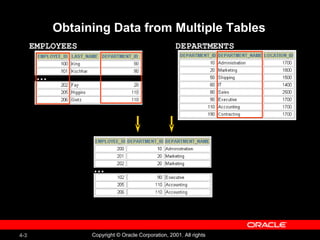
Obtaining Data from Multiple Tables EMPLOYEES   DEPARTMENTS  … …
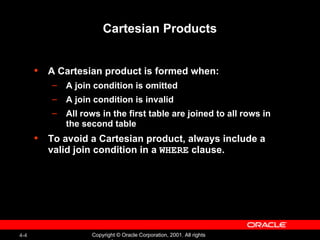
Cartesian Products A Cartesian product is formed when: A join condition is omitted A join condition is invalid All rows in the first table are joined to all rows in the second table To avoid a Cartesian product, always include a valid join condition in a  WHERE  clause.
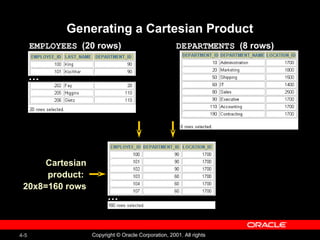
Generating a Cartesian Product EMPLOYEES   (20 rows) DEPARTMENTS   (8 rows) … … Cartesian product:  20x8=160 rows
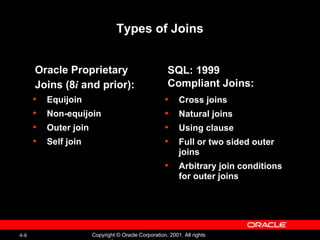
Equijoin Non-equijoin Outer join Self join Types of Joins Cross joins Natural joins Using clause Full or two sided outer joins Arbitrary join conditions for outer joins SQL: 1999  Compliant Joins: Oracle Proprietary  Joins (8 i  and prior):
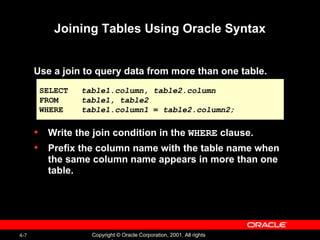
Joining Tables Using Oracle Syntax Use a join to query data from more than one table. Write the join condition in the  WHERE  clause. Prefix the column name with the table name when the same column name appears in more than one table. SELECT table1.column, table2.column FROM table1, table2 WHERE table1.column1  =  table2.column2;
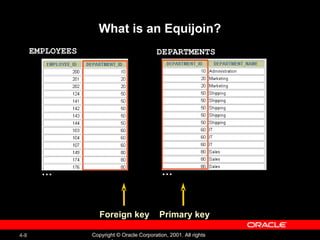
What is an Equijoin? EMPLOYEES   DEPARTMENTS  … … Foreign key Primary key
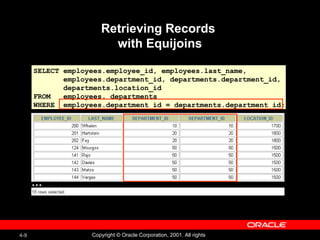
Retrieving Records  with Equijoins SELECT employees.employee_id, employees.last_name,  employees.department_id, departments.department_id, departments.location_id FROM  employees, departments WHERE  employees.department_id = departments.department_id; …
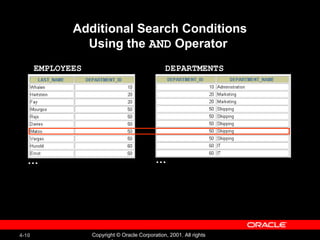
Additional Search Conditions Using the  AND  Operator  EMPLOYEES   DEPARTMENTS   … …
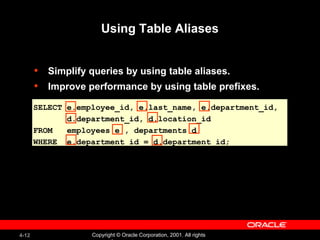
Qualifying Ambiguous  Column Names Use table prefixes to qualify column names that are in multiple tables. Improve performance by using table prefixes. Distinguish columns that have identical names but reside in different tables by using column aliases.
Using Table Aliases Simplify queries by using table aliases. Improve performance by using table prefixes. SELECT e.employee_id, e.last_name, e.department_id, d.department_id, d.location_id FROM  employees e , departments d WHERE  e.department_id = d.department_id;
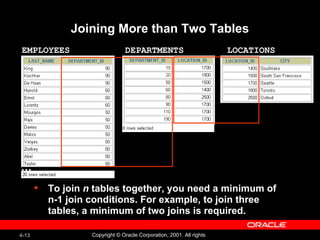
Joining More than Two Tables To join  n  tables together, you need a minimum of n-1 join conditions. For example, to join three tables, a minimum of two joins is required.   EMPLOYEES   LOCATIONS   DEPARTMENTS   …
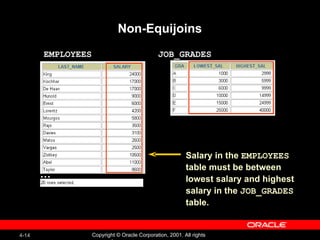
Non-Equijoins EMPLOYEES JOB_GRADES … Salary in the  EMPLOYEES   table must be between  lowest salary and highest  salary in the  JOB_GRADES table.
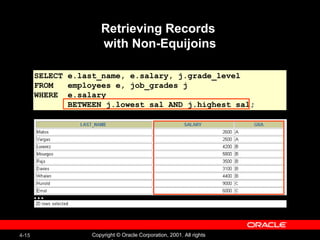
Retrieving Records  with Non-Equijoins SELECT e.last_name, e.salary, j.grade_level FROM  employees e, job_grades j WHERE  e.salary  BETWEEN j.lowest_sal AND j.highest_sal; …
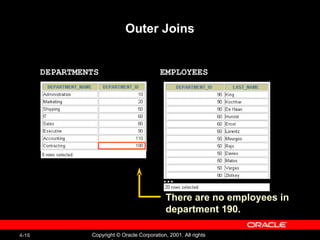
Outer Joins EMPLOYEES DEPARTMENTS … There are no employees in department 190.
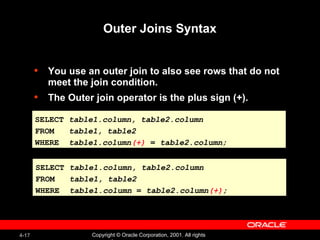
Outer Joins Syntax You use an outer join to also see rows that do not meet the join condition. The Outer join operator is the plus sign (+). SELECT table1.column, table2.column FROM table1, table2 WHERE table1.column (+)   =  table2.column; SELECT table1.column, table2.column FROM table1, table2 WHERE table1.column  =  table2.column (+) ;
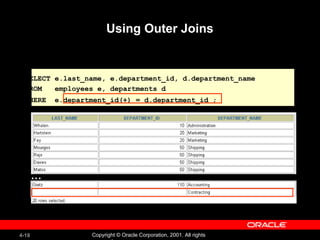
Using Outer Joins SELECT e.last_name, e.department_id, d.department_name FROM  employees e, departments d WHERE  e.department_id(+) = d.department_id ;   …
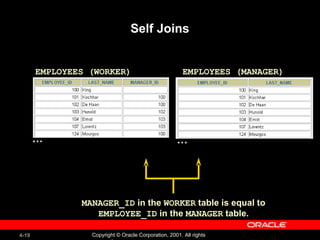
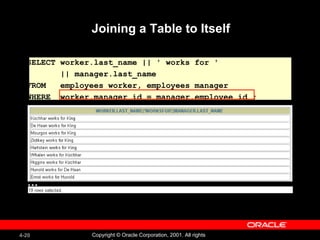
Self Joins EMPLOYEES (WORKER) EMPLOYEES (MANAGER) … … MANAGER_ID  in the  WORKER  table is equal to  EMPLOYEE_ID  in the  MANAGER  table.
Joining a Table to Itself SELECT worker.last_name || ' works for '  || manager.last_name FROM  employees worker, employees manager WHERE  worker.manager_id = manager.employee_id ; …
Practice 4, Part One: Overview This practice covers writing queries to join tables  together using Oracle syntax.
Joining Tables Using SQL: 1999 Syntax Use a join to query data from more than one table. SELECT table1.column, table2.column FROM table1 [CROSS JOIN  table2 ] | [NATURAL JOIN  table2 ] | [JOIN  table2  USING ( column_name )] | [JOIN  table2   ON( table1.column_name  =  table2.column_name )] | [LEFT|RIGHT|FULL OUTER JOIN  table2   ON ( table1.column_name  =  table2.column_name )];
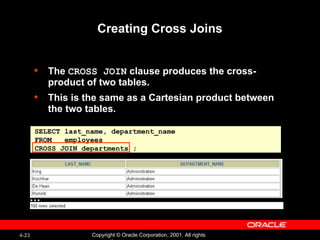
Creating Cross Joins The  CROSS JOIN  clause produces the cross-product of two tables.  This is the same as a Cartesian product between the two tables.  SELECT last_name, department_name FROM  employees CROSS JOIN departments ; …
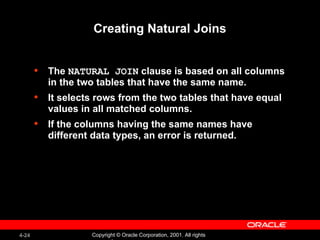
Creating Natural Joins The  NATURAL JOIN  clause is based on all columns in the two tables that have the same name. It selects rows from the two tables that have equal values in all matched columns. If the columns having the same names have different data types, an error is returned.
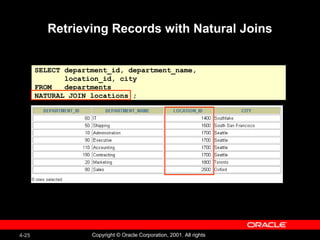
Retrieving Records with Natural Joins SELECT department_id, department_name, location_id, city FROM  departments NATURAL JOIN locations ;
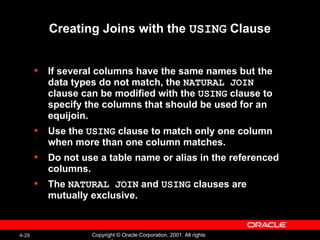
Creating Joins with the  USING  Clause If several columns have the same names but the data types do not match, the  NATURAL JOIN  clause can be modified with the  USING  clause to specify the columns that should be used for an equijoin. Use the  USING  clause to match only one column when more than one column matches. Do not use a table name or alias in the referenced columns. The  NATURAL JOIN  and  USING  clauses are mutually exclusive.
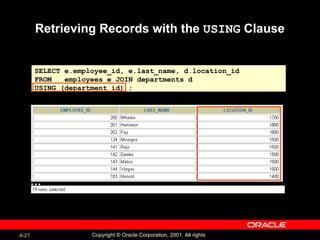
Retrieving Records with the  USING  Clause SELECT e.employee_id, e.last_name, d.location_id FROM  employees e JOIN departments d USING (department_id) ; …
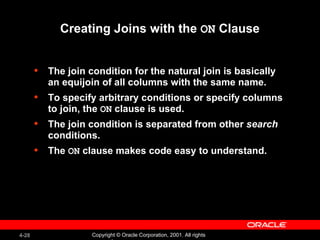
Creating Joins with the  ON  Clause The join condition for the natural join is basically an equijoin of all columns with the same name. To specify arbitrary conditions or specify columns to join, the  ON  clause is used. The join condition is separated from other  search  conditions. The  ON  clause makes code easy to understand.
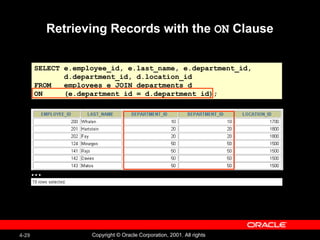
Retrieving Records with the  ON  Clause SELECT e.employee_id, e.last_name, e.department_id,  d.department_id, d.location_id FROM  employees e JOIN departments d ON  (e.department_id = d.department_id); …
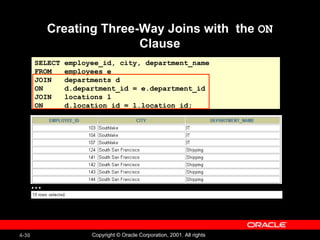
Creating Three-Way Joins with  the  ON  Clause SELECT employee_id, city, department_name FROM  employees e  JOIN  departments d ON  d.department_id = e.department_id  JOIN  locations l ON  d.location_id = l.location_id; …
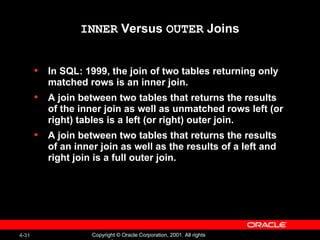
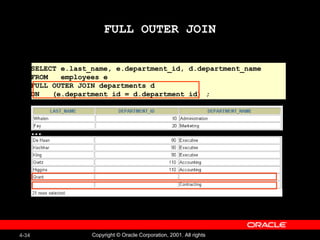
INNER  Versus  OUTER  Joins In SQL: 1999, the join of two tables returning only matched rows is an inner join. A join between two tables that returns the results of the inner join as well as unmatched rows left (or right) tables is a left (or right) outer join. A join between two tables that returns the results of an inner join as well as the results of a left and right join is a full outer join.
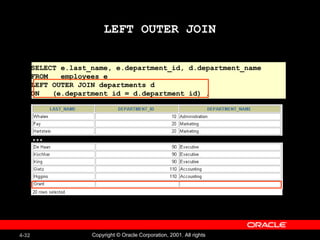
LEFT OUTER JOIN SELECT e.last_name, e.department_id, d.department_name FROM  employees e LEFT OUTER JOIN departments d ON  (e.department_id = d.department_id) ; …
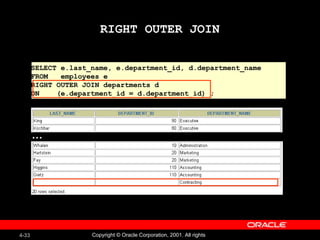
RIGHT OUTER JOIN SELECT e.last_name, e.department_id, d.department_name FROM  employees e RIGHT OUTER JOIN departments d ON  (e.department_id = d.department_id) ; …
FULL OUTER JOIN SELECT e.last_name, e.department_id, d.department_name FROM  employees e FULL OUTER JOIN departments d ON  (e.department_id = d.department_id) ; …
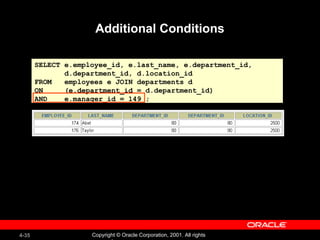
Additional Conditions SELECT e.employee_id, e.last_name, e.department_id,  d.department_id, d.location_id FROM  employees e JOIN departments d ON  (e.department_id = d.department_id) AND  e.manager_id = 149 ;
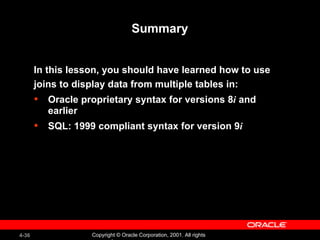
Summary In this lesson, you should have learned how to use joins to display data from multiple tables in: Oracle proprietary syntax for versions 8 i  and earlier SQL: 1999 compliant syntax for version 9 i
Practice 4, Part Two: Overview This practice covers the following topics: Joining tables using an equijoin Performing outer and self joins Adding conditions


Les04

  • 1.
    Displaying Data from Multiple Tables
  • 2.
    Objectives After completingthis lesson, you should be able to do the following: Write SELECT statements to access data from more than one table using equality and nonequality joins View data that generally does not meet a join condition by using outer joins Join a table to itself by using a self join
  • 3.
    Obtaining Data fromMultiple Tables EMPLOYEES DEPARTMENTS … …
  • 4.
    Cartesian Products ACartesian product is formed when: A join condition is omitted A join condition is invalid All rows in the first table are joined to all rows in the second table To avoid a Cartesian product, always include a valid join condition in a WHERE clause.
  • 5.
    Generating a CartesianProduct EMPLOYEES (20 rows) DEPARTMENTS (8 rows) … … Cartesian product: 20x8=160 rows
  • 6.
    Equijoin Non-equijoin Outerjoin Self join Types of Joins Cross joins Natural joins Using clause Full or two sided outer joins Arbitrary join conditions for outer joins SQL: 1999 Compliant Joins: Oracle Proprietary Joins (8 i and prior):
  • 7.
    Joining Tables UsingOracle Syntax Use a join to query data from more than one table. Write the join condition in the WHERE clause. Prefix the column name with the table name when the same column name appears in more than one table. SELECT table1.column, table2.column FROM table1, table2 WHERE table1.column1 = table2.column2;
  • 8.
    What is anEquijoin? EMPLOYEES DEPARTMENTS … … Foreign key Primary key
  • 9.
    Retrieving Records with Equijoins SELECT employees.employee_id, employees.last_name, employees.department_id, departments.department_id, departments.location_id FROM employees, departments WHERE employees.department_id = departments.department_id; …
  • 10.
    Additional Search ConditionsUsing the AND Operator EMPLOYEES DEPARTMENTS … …
  • 11.
    Qualifying Ambiguous Column Names Use table prefixes to qualify column names that are in multiple tables. Improve performance by using table prefixes. Distinguish columns that have identical names but reside in different tables by using column aliases.
  • 12.
    Using Table AliasesSimplify queries by using table aliases. Improve performance by using table prefixes. SELECT e.employee_id, e.last_name, e.department_id, d.department_id, d.location_id FROM employees e , departments d WHERE e.department_id = d.department_id;
  • 13.
    Joining More thanTwo Tables To join n tables together, you need a minimum of n-1 join conditions. For example, to join three tables, a minimum of two joins is required. EMPLOYEES LOCATIONS DEPARTMENTS …
  • 14.
    Non-Equijoins EMPLOYEES JOB_GRADES… Salary in the EMPLOYEES table must be between lowest salary and highest salary in the JOB_GRADES table.
  • 15.
    Retrieving Records with Non-Equijoins SELECT e.last_name, e.salary, j.grade_level FROM employees e, job_grades j WHERE e.salary BETWEEN j.lowest_sal AND j.highest_sal; …
  • 16.
    Outer Joins EMPLOYEESDEPARTMENTS … There are no employees in department 190.
  • 17.
    Outer Joins SyntaxYou use an outer join to also see rows that do not meet the join condition. The Outer join operator is the plus sign (+). SELECT table1.column, table2.column FROM table1, table2 WHERE table1.column (+) = table2.column; SELECT table1.column, table2.column FROM table1, table2 WHERE table1.column = table2.column (+) ;
  • 18.
    Using Outer JoinsSELECT e.last_name, e.department_id, d.department_name FROM employees e, departments d WHERE e.department_id(+) = d.department_id ; …
  • 19.
    Self Joins EMPLOYEES(WORKER) EMPLOYEES (MANAGER) … … MANAGER_ID in the WORKER table is equal to EMPLOYEE_ID in the MANAGER table.
  • 20.
    Joining a Tableto Itself SELECT worker.last_name || ' works for ' || manager.last_name FROM employees worker, employees manager WHERE worker.manager_id = manager.employee_id ; …
  • 21.
    Practice 4, PartOne: Overview This practice covers writing queries to join tables together using Oracle syntax.
  • 22.
    Joining Tables UsingSQL: 1999 Syntax Use a join to query data from more than one table. SELECT table1.column, table2.column FROM table1 [CROSS JOIN table2 ] | [NATURAL JOIN table2 ] | [JOIN table2 USING ( column_name )] | [JOIN table2 ON( table1.column_name = table2.column_name )] | [LEFT|RIGHT|FULL OUTER JOIN table2 ON ( table1.column_name = table2.column_name )];
  • 23.
    Creating Cross JoinsThe CROSS JOIN clause produces the cross-product of two tables. This is the same as a Cartesian product between the two tables. SELECT last_name, department_name FROM employees CROSS JOIN departments ; …
  • 24.
    Creating Natural JoinsThe NATURAL JOIN clause is based on all columns in the two tables that have the same name. It selects rows from the two tables that have equal values in all matched columns. If the columns having the same names have different data types, an error is returned.
  • 25.
    Retrieving Records withNatural Joins SELECT department_id, department_name, location_id, city FROM departments NATURAL JOIN locations ;
  • 26.
    Creating Joins withthe USING Clause If several columns have the same names but the data types do not match, the NATURAL JOIN clause can be modified with the USING clause to specify the columns that should be used for an equijoin. Use the USING clause to match only one column when more than one column matches. Do not use a table name or alias in the referenced columns. The NATURAL JOIN and USING clauses are mutually exclusive.
  • 27.
    Retrieving Records withthe USING Clause SELECT e.employee_id, e.last_name, d.location_id FROM employees e JOIN departments d USING (department_id) ; …
  • 28.
    Creating Joins withthe ON Clause The join condition for the natural join is basically an equijoin of all columns with the same name. To specify arbitrary conditions or specify columns to join, the ON clause is used. The join condition is separated from other search conditions. The ON clause makes code easy to understand.
  • 29.
    Retrieving Records withthe ON Clause SELECT e.employee_id, e.last_name, e.department_id, d.department_id, d.location_id FROM employees e JOIN departments d ON (e.department_id = d.department_id); …
  • 30.
    Creating Three-Way Joinswith the ON Clause SELECT employee_id, city, department_name FROM employees e JOIN departments d ON d.department_id = e.department_id JOIN locations l ON d.location_id = l.location_id; …
  • 31.
    INNER Versus OUTER Joins In SQL: 1999, the join of two tables returning only matched rows is an inner join. A join between two tables that returns the results of the inner join as well as unmatched rows left (or right) tables is a left (or right) outer join. A join between two tables that returns the results of an inner join as well as the results of a left and right join is a full outer join.
  • 32.
    LEFT OUTER JOINSELECT e.last_name, e.department_id, d.department_name FROM employees e LEFT OUTER JOIN departments d ON (e.department_id = d.department_id) ; …
  • 33.
    RIGHT OUTER JOINSELECT e.last_name, e.department_id, d.department_name FROM employees e RIGHT OUTER JOIN departments d ON (e.department_id = d.department_id) ; …
  • 34.
    FULL OUTER JOINSELECT e.last_name, e.department_id, d.department_name FROM employees e FULL OUTER JOIN departments d ON (e.department_id = d.department_id) ; …
  • 35.
    Additional Conditions SELECTe.employee_id, e.last_name, e.department_id, d.department_id, d.location_id FROM employees e JOIN departments d ON (e.department_id = d.department_id) AND e.manager_id = 149 ;
  • 36.
    Summary In thislesson, you should have learned how to use joins to display data from multiple tables in: Oracle proprietary syntax for versions 8 i and earlier SQL: 1999 compliant syntax for version 9 i
  • 37.
    Practice 4, PartTwo: Overview This practice covers the following topics: Joining tables using an equijoin Performing outer and self joins Adding conditions
  • 38.
  • 39.
  • 40.
  • 41.
  • 42.
  • 43.
  • 44.

Editor's Notes

  • #2 Schedule: Timing Topic 55 minutes Lecture 55 minutes Practice 110 minutes Total