[Day Seven]
Responsive Web Design
Course: Web Design and Develop
Date: 2017/05/20
Lecturer: Mohammad Rafi Haidari
Last Lesson Conclusion!
• Name two metadata?
• What come in your mind by the word Layouts?
• What is the purpose of <header> and <nav> ?
• What is the purpose of <article> and <section> ?
• What is the purpose of <aside> and <footer> ?
What is Responsive Web
Design?
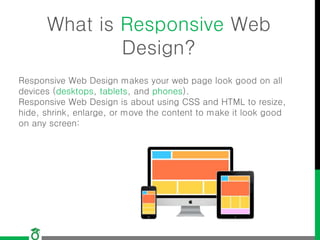
Responsive Web Design makes your web page look good on all
devices (desktops, tablets, and phones).
Responsive Web Design is about using CSS and HTML to resize,
hide, shrink, enlarge, or move the content to make it look good
on any screen:
Create Your Own Responsive
Design
One way to create a responsive design, is to create it yourself:
<meta name="viewport" content="width=device-width, initial-scale=1.0">
And using media queries of CSS.
Using CSS Libraries
Another way to create a responsive design, is to use a responsive
style sheet libraries, like Bootstrap.
Bootstrap makes it easy to develop sites that look nice at any
size; desktop, laptop, tablet, or phone:
Link for CDN here:
http://getbootstrap.com/getting-started/
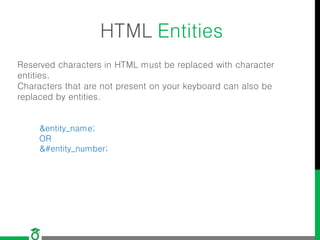
HTML Entities
Reserved characters in HTML must be replaced with character
entities.
Characters that are not present on your keyboard can also be
replaced by entities.
&entity_name;
OR
&#entity_number;
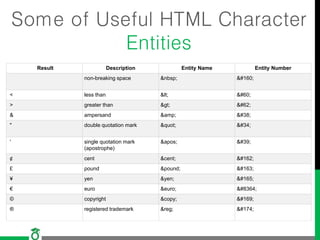
Some of Useful HTML Character
Entities
Result Description Entity Name Entity Number
non-breaking space &nbsp; &#160;
< less than &lt; &#60;
> greater than &gt; &#62;
& ampersand &amp; &#38;
" double quotation mark &quot; &#34;
' single quotation mark
(apostrophe)
&apos; &#39;
¢ cent &cent; &#162;
£ pound &pound; &#163;
¥ yen &yen; &#165;
€ euro &euro; &#8364;
© copyright &copy; &#169;
® registered trademark &reg; &#174;
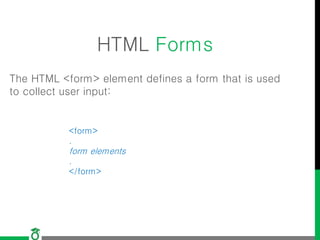
HTML Forms
The HTML <form> element defines a form that is used
to collect user input:
<form>
.
form elements
.
</form>
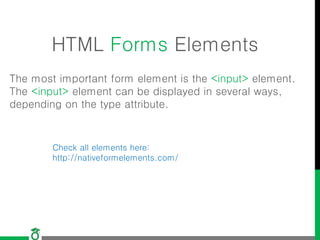
HTML Forms Elements
The most important form element is the <input> element.
The <input> element can be displayed in several ways,
depending on the type attribute.
Check all elements here:
http://nativeformelements.com/
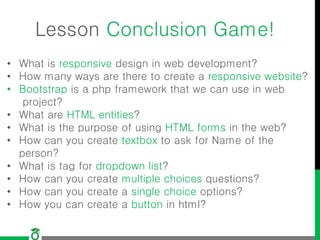
Lesson Conclusion Game!
• What is responsive design in web development?
• How many ways are there to create a responsive website?
• Bootstrap is a php framework that we can use in web
project?
• What are HTML entities?
• What is the purpose of using HTML forms in the web?
• How can you create textbox to ask for Name of the
person?
• What is tag for dropdown list?
• How can you create multiple choices questions?
• How can you create a single choice options?
• How you can create a button in html?
Question?
Thank you!

Lecture7 web design and development

  • 1.
    [Day Seven] Responsive WebDesign Course: Web Design and Develop Date: 2017/05/20 Lecturer: Mohammad Rafi Haidari
  • 2.
    Last Lesson Conclusion! •Name two metadata? • What come in your mind by the word Layouts? • What is the purpose of <header> and <nav> ? • What is the purpose of <article> and <section> ? • What is the purpose of <aside> and <footer> ?
  • 3.
    What is ResponsiveWeb Design? Responsive Web Design makes your web page look good on all devices (desktops, tablets, and phones). Responsive Web Design is about using CSS and HTML to resize, hide, shrink, enlarge, or move the content to make it look good on any screen:
  • 4.
    Create Your OwnResponsive Design One way to create a responsive design, is to create it yourself: <meta name="viewport" content="width=device-width, initial-scale=1.0"> And using media queries of CSS.
  • 5.
    Using CSS Libraries Anotherway to create a responsive design, is to use a responsive style sheet libraries, like Bootstrap. Bootstrap makes it easy to develop sites that look nice at any size; desktop, laptop, tablet, or phone: Link for CDN here: http://getbootstrap.com/getting-started/
  • 6.
    HTML Entities Reserved charactersin HTML must be replaced with character entities. Characters that are not present on your keyboard can also be replaced by entities. &entity_name; OR &#entity_number;
  • 7.
    Some of UsefulHTML Character Entities Result Description Entity Name Entity Number non-breaking space &nbsp; &#160; < less than &lt; &#60; > greater than &gt; &#62; & ampersand &amp; &#38; " double quotation mark &quot; &#34; ' single quotation mark (apostrophe) &apos; &#39; ¢ cent &cent; &#162; £ pound &pound; &#163; ¥ yen &yen; &#165; € euro &euro; &#8364; © copyright &copy; &#169; ® registered trademark &reg; &#174;
  • 8.
    HTML Forms The HTML<form> element defines a form that is used to collect user input: <form> . form elements . </form>
  • 9.
    HTML Forms Elements Themost important form element is the <input> element. The <input> element can be displayed in several ways, depending on the type attribute. Check all elements here: http://nativeformelements.com/
  • 10.
    Lesson Conclusion Game! •What is responsive design in web development? • How many ways are there to create a responsive website? • Bootstrap is a php framework that we can use in web project? • What are HTML entities? • What is the purpose of using HTML forms in the web? • How can you create textbox to ask for Name of the person? • What is tag for dropdown list? • How can you create multiple choices questions? • How can you create a single choice options? • How you can create a button in html?
  • 11.
  • 12.