[Day Four]
Tables, Block Elements
Course: Web Design and Develop
Date: 2017/05/15
Lecturer: Mohammad Rafi Haidari
Last Lesson Conclusion!
• Name two attributes of img tag?
• What is the name of tag for linking?
• Name two attributes of a tag?
• How can you create a bookmark?
• Tags for Ordered list and Unordered list?
• How to create a list item with out any mark?
• What is nested list give some examples?
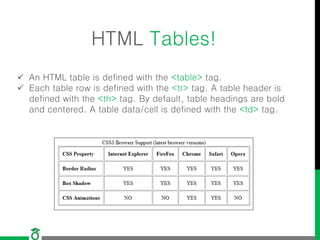
HTML Tables!
 An HTML table is defined with the <table> tag.
 Each table row is defined with the <tr> tag. A table header is
defined with the <th> tag. By default, table headings are bold
and centered. A table data/cell is defined with the <td> tag.
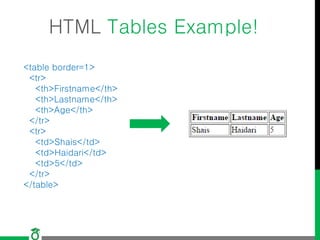
HTML Tables Example!
<table border=1>
<tr>
<th>Firstname</th>
<th>Lastname</th>
<th>Age</th>
</tr>
<tr>
<td>Shais</td>
<td>Haidari</td>
<td>5</td>
</tr>
</table>
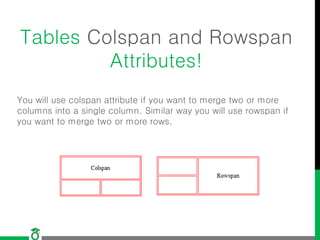
Tables Colspan and Rowspan
Attributes!
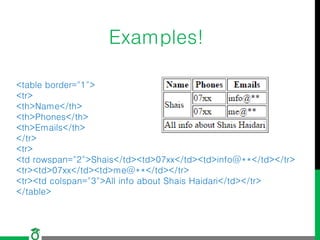
You will use colspan attribute if you want to merge two or more
columns into a single column. Similar way you will use rowspan if
you want to merge two or more rows.
Examples!
<table border="1">
<tr>
<th>Name</th>
<th>Phones</th>
<th>Emails</th>
</tr>
<tr>
<td rowspan="2">Shais</td><td>07xx</td><td>info@**</td></tr>
<tr><td>07xx</td><td>me@**</td></tr>
<tr><td colspan="3">All info about Shais Haidari</td></tr>
</table>
Nested Tables
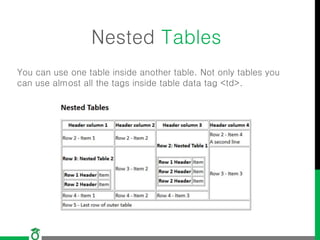
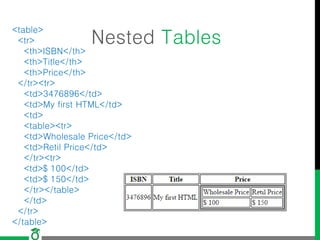
You can use one table inside another table. Not only tables you
can use almost all the tags inside table data tag <td>.
Nested Tables
<table>
<tr>
<th>ISBN</th>
<th>Title</th>
<th>Price</th>
</tr><tr>
<td>3476896</td>
<td>My first HTML</td>
<td>
<table><tr>
<td>Wholesale Price</td>
<td>Retil Price</td>
</tr><tr>
<td>$ 100</td>
<td>$ 150</td>
</tr></table>
</td>
</tr>
</table>
HTML Block and Inline
Elements
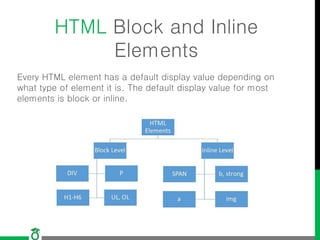
Every HTML element has a default display value depending on
what type of element it is. The default display value for most
elements is block or inline.
Block-level Elements
A block-level element always starts on a new line and takes up
the full width available
Inline Elements
An inline element does not start on a new line and only takes
up as much width as necessary.
The <div> Element
 The <div> element is often used as a container for other HTML
elements.
 The <div> element has no required attributes, but
both style and class are common.
<div style="background-color:black;color:white;padding:20px;">
<h2>London</h2>
<p>London is the capital city of England. It is the most populous
city in the United Kingdom, with a metropolitan area of over 13 million
inhabitants.</p>
</div>
The <span> Element
 The <span> element is often used as a container for some
text.
 The <span> element has no required attributes, but
both style and class are common.
<h1> My <span style="color:red">Important</span> Heading</h1>
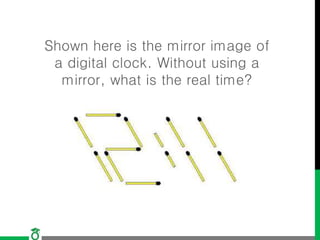
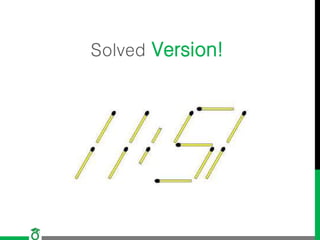
Shown here is the mirror image of
a digital clock. Without using a
mirror, what is the real time?
Solved Version!
Question?
Thank you!

Lecture4 web design and development

  • 1.
    [Day Four] Tables, BlockElements Course: Web Design and Develop Date: 2017/05/15 Lecturer: Mohammad Rafi Haidari
  • 2.
    Last Lesson Conclusion! •Name two attributes of img tag? • What is the name of tag for linking? • Name two attributes of a tag? • How can you create a bookmark? • Tags for Ordered list and Unordered list? • How to create a list item with out any mark? • What is nested list give some examples?
  • 3.
    HTML Tables!  AnHTML table is defined with the <table> tag.  Each table row is defined with the <tr> tag. A table header is defined with the <th> tag. By default, table headings are bold and centered. A table data/cell is defined with the <td> tag.
  • 4.
    HTML Tables Example! <tableborder=1> <tr> <th>Firstname</th> <th>Lastname</th> <th>Age</th> </tr> <tr> <td>Shais</td> <td>Haidari</td> <td>5</td> </tr> </table>
  • 5.
    Tables Colspan andRowspan Attributes! You will use colspan attribute if you want to merge two or more columns into a single column. Similar way you will use rowspan if you want to merge two or more rows.
  • 6.
  • 7.
    Nested Tables You canuse one table inside another table. Not only tables you can use almost all the tags inside table data tag <td>.
  • 8.
    Nested Tables <table> <tr> <th>ISBN</th> <th>Title</th> <th>Price</th> </tr><tr> <td>3476896</td> <td>My firstHTML</td> <td> <table><tr> <td>Wholesale Price</td> <td>Retil Price</td> </tr><tr> <td>$ 100</td> <td>$ 150</td> </tr></table> </td> </tr> </table>
  • 9.
    HTML Block andInline Elements Every HTML element has a default display value depending on what type of element it is. The default display value for most elements is block or inline.
  • 10.
    Block-level Elements A block-levelelement always starts on a new line and takes up the full width available Inline Elements An inline element does not start on a new line and only takes up as much width as necessary.
  • 11.
    The <div> Element The <div> element is often used as a container for other HTML elements.  The <div> element has no required attributes, but both style and class are common. <div style="background-color:black;color:white;padding:20px;"> <h2>London</h2> <p>London is the capital city of England. It is the most populous city in the United Kingdom, with a metropolitan area of over 13 million inhabitants.</p> </div>
  • 12.
    The <span> Element The <span> element is often used as a container for some text.  The <span> element has no required attributes, but both style and class are common. <h1> My <span style="color:red">Important</span> Heading</h1>
  • 13.
    Shown here isthe mirror image of a digital clock. Without using a mirror, what is the real time?
  • 14.
  • 15.
  • 16.