Working with Functions
Intro, Understanding & Defining Functions
Parameters, Returning, Scope
Lectures by Harsh Sharma @ Apni Kaksha
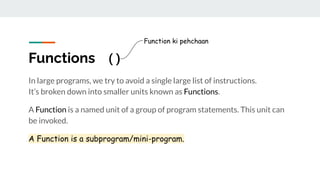
Functions ( )
In large programs, we try to avoid a single large list of instructions.
It’s broken down into smaller units known as Functions.
A Function is a named unit of a group of program statements. This unit can
be invoked.
A Function is a subprogram/mini-program.
Function ki pehchaan
What is a Function?
When we know some things are repetitive or very similar.
To avoid writing same code again and again, we write it once and give it a
name.
This name is the function name, and whenever we call this name the code in
it will run.
Types of Functions
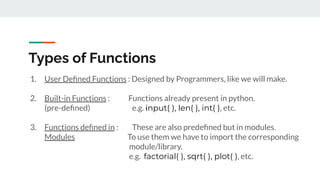
1. User Defined Functions : Designed by Programmers, like we will make.
2. Built-in Functions : Functions already present in python.
(pre-defined) e.g. input( ), len( ), int( ), etc.
3. Functions defined in : These are also predefined but in modules.
Modules To use them we have to import the corresponding
module/library.
e.g. factorial( ), sqrt( ), plot( ), etc.
Minimizing Repetitions
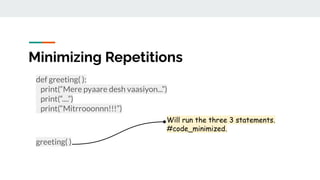
def greeting( ):
print(“Mere pyaare desh vaasiyon...”)
print(“....”)
print(“Mitrrooonnn!!!”)
greeting( )
Will run the three 3 statements.
#code_minimized.
When we have Similar Codes
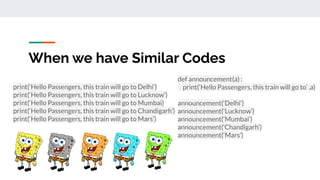
print(‘Hello Passengers, this train will go to Delhi’)
print(‘Hello Passengers, this train will go to Lucknow’)
print(‘Hello Passengers, this train will go to Mumbai)
print(‘Hello Passengers, this train will go to Chandigarh’)
print(‘Hello Passengers, this train will go to Mars’)
def announcement(a) :
print(‘Hello Passengers, this train will go to’ ,a)
announcement(‘Delhi’)
announcement(‘Lucknow’)
announcement(‘Mumbai’)
announcement(‘Chandigarh’)
announcement(‘Mars’)
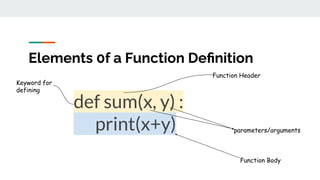
def sum(x, y) :
print(x+y)
Elements 0f a Function Definition
Function Header
Function Body
Keyword for
defining
parameters/arguments
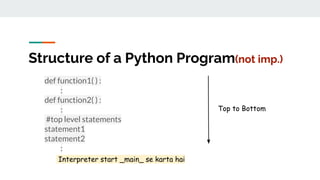
Structure of a Python Program(not imp.)
def function1( ) :
:
def function2( ) :
:
#top level statements
statement1
statement2
:
Interpreter start _main_ se karta hai
Top to Bottom
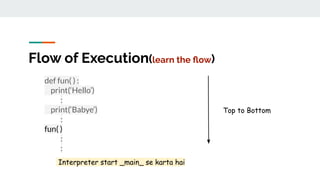
Flow of Execution(learn the flow)
def fun( ) :
print(‘Hello’)
:
print(‘Babye’)
:
fun( )
:
:
Top to Bottom
Interpreter start _main_ se karta hai
Practice Time
Q1. w.a.p. to add two numbers using function. (using return)
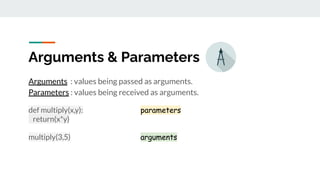
Arguments : values being passed as arguments.
Parameters : values being received as arguments.
def multiply(x,y): parameters
return(x*y)
multiply(3,5) arguments
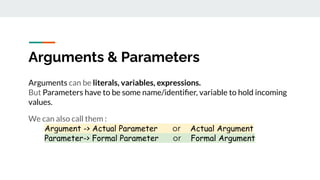
Arguments & Parameters
Arguments can be literals, variables, expressions.
But Parameters have to be some name/identifier, variable to hold incoming
values.
We can also call them :
Argument -> Actual Parameter or Actual Argument
Parameter-> Formal Parameter or Formal Argument
Arguments & Parameters
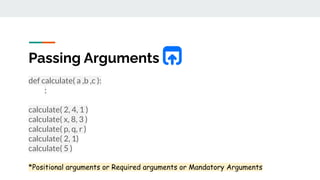
Passing Arguments
def calculate( a ,b ,c ):
:
calculate( 2, 4, 1 )
calculate( x, 8, 3 )
calculate( p, q, r )
calculate( 2, 1)
calculate( 5 )
*Positional arguments or Required arguments or Mandatory Arguments
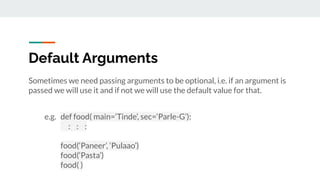
Default Arguments
Sometimes we need passing arguments to be optional, i.e. if an argument is
passed we will use it and if not we will use the default value for that.
e.g. def food( main=‘Tinde’, sec=‘Parle-G’):
: : :
food(‘Paneer’, ‘Pulaao’)
food(‘Pasta’)
food( )
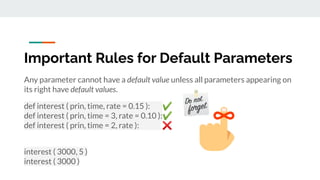
Important Rules for Default Parameters
Any parameter cannot have a default value unless all parameters appearing on
its right have default values.
def interest ( prin, time, rate = 0.15 ): ✔
def interest ( prin, time = 3, rate = 0.10 ):✔
def interest ( prin, time = 2, rate ): ❌
interest ( 3000, 5 )
interest ( 3000 )
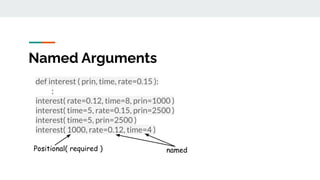
Named Arguments
def interest ( prin, time, rate=0.15 ):
:
interest( rate=0.12, time=8, prin=1000 )
interest( time=5, rate=0.15, prin=2500 )
interest( time=5, prin=2500 )
interest( 1000, rate=0.12, time=4 )
Positional( required ) named
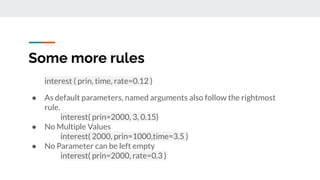
Some more rules
interest ( prin, time, rate=0.12 )
● As default parameters, named arguments also follow the rightmost
rule.
interest( prin=2000, 3, 0.15)
● No Multiple Values
interest( 2000, prin=1000,time=3.5 )
● No Parameter can be left empty
interest( prin=2000, rate=0.3 )
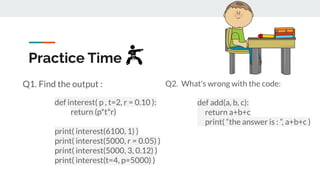
Practice Time
Q1. Find the output :
def interest( p , t=2, r = 0.10 ):
return (p*t*r)
print( interest(6100, 1) )
print( interest(5000, r = 0.05) )
print( interest(5000, 3, 0.12) )
print( interest(t=4, p=5000) )
Q2. What’s wrong with the code:
def add(a, b, c):
return a+b+c
print( “the answer is : ”, a+b+c )
Practice Time
Q. Find the output :
def change(P, Q = 30):
P = P + Q
Q = P - Q
print(P, ‘#’, Q)
return(P)
A = 150
B = 100
A = change( A, B)
print(A, ‘#’, B)
B = change(B)
Q. Find the output :
def fun(s):
k=len(s)
m=‘ ’
for i in range (0,k):
if(s[i].isupper( )):
m = m + s[i].lower( )
elif(s[i].isalpha( )):
m = m + s[i].upper( )
else :
m = m + ‘bb’
print(m)
fun(‘@gmail.com’)

Lecture 8.pdf

  • 1.
    Working with Functions Intro,Understanding & Defining Functions Parameters, Returning, Scope Lectures by Harsh Sharma @ Apni Kaksha
  • 2.
    Functions ( ) Inlarge programs, we try to avoid a single large list of instructions. It’s broken down into smaller units known as Functions. A Function is a named unit of a group of program statements. This unit can be invoked. A Function is a subprogram/mini-program. Function ki pehchaan
  • 3.
    What is aFunction? When we know some things are repetitive or very similar. To avoid writing same code again and again, we write it once and give it a name. This name is the function name, and whenever we call this name the code in it will run.
  • 4.
    Types of Functions 1.User Defined Functions : Designed by Programmers, like we will make. 2. Built-in Functions : Functions already present in python. (pre-defined) e.g. input( ), len( ), int( ), etc. 3. Functions defined in : These are also predefined but in modules. Modules To use them we have to import the corresponding module/library. e.g. factorial( ), sqrt( ), plot( ), etc.
  • 5.
    Minimizing Repetitions def greeting(): print(“Mere pyaare desh vaasiyon...”) print(“....”) print(“Mitrrooonnn!!!”) greeting( ) Will run the three 3 statements. #code_minimized.
  • 6.
    When we haveSimilar Codes print(‘Hello Passengers, this train will go to Delhi’) print(‘Hello Passengers, this train will go to Lucknow’) print(‘Hello Passengers, this train will go to Mumbai) print(‘Hello Passengers, this train will go to Chandigarh’) print(‘Hello Passengers, this train will go to Mars’) def announcement(a) : print(‘Hello Passengers, this train will go to’ ,a) announcement(‘Delhi’) announcement(‘Lucknow’) announcement(‘Mumbai’) announcement(‘Chandigarh’) announcement(‘Mars’)
  • 7.
    def sum(x, y): print(x+y) Elements 0f a Function Definition Function Header Function Body Keyword for defining parameters/arguments
  • 8.
    Structure of aPython Program(not imp.) def function1( ) : : def function2( ) : : #top level statements statement1 statement2 : Interpreter start _main_ se karta hai Top to Bottom
  • 9.
    Flow of Execution(learnthe flow) def fun( ) : print(‘Hello’) : print(‘Babye’) : fun( ) : : Top to Bottom Interpreter start _main_ se karta hai
  • 10.
    Practice Time Q1. w.a.p.to add two numbers using function. (using return)
  • 11.
    Arguments : valuesbeing passed as arguments. Parameters : values being received as arguments. def multiply(x,y): parameters return(x*y) multiply(3,5) arguments Arguments & Parameters
  • 12.
    Arguments can beliterals, variables, expressions. But Parameters have to be some name/identifier, variable to hold incoming values. We can also call them : Argument -> Actual Parameter or Actual Argument Parameter-> Formal Parameter or Formal Argument Arguments & Parameters
  • 13.
    Passing Arguments def calculate(a ,b ,c ): : calculate( 2, 4, 1 ) calculate( x, 8, 3 ) calculate( p, q, r ) calculate( 2, 1) calculate( 5 ) *Positional arguments or Required arguments or Mandatory Arguments
  • 14.
    Default Arguments Sometimes weneed passing arguments to be optional, i.e. if an argument is passed we will use it and if not we will use the default value for that. e.g. def food( main=‘Tinde’, sec=‘Parle-G’): : : : food(‘Paneer’, ‘Pulaao’) food(‘Pasta’) food( )
  • 15.
    Important Rules forDefault Parameters Any parameter cannot have a default value unless all parameters appearing on its right have default values. def interest ( prin, time, rate = 0.15 ): ✔ def interest ( prin, time = 3, rate = 0.10 ):✔ def interest ( prin, time = 2, rate ): ❌ interest ( 3000, 5 ) interest ( 3000 )
  • 16.
    Named Arguments def interest( prin, time, rate=0.15 ): : interest( rate=0.12, time=8, prin=1000 ) interest( time=5, rate=0.15, prin=2500 ) interest( time=5, prin=2500 ) interest( 1000, rate=0.12, time=4 ) Positional( required ) named
  • 17.
    Some more rules interest( prin, time, rate=0.12 ) ● As default parameters, named arguments also follow the rightmost rule. interest( prin=2000, 3, 0.15) ● No Multiple Values interest( 2000, prin=1000,time=3.5 ) ● No Parameter can be left empty interest( prin=2000, rate=0.3 )
  • 18.
    Practice Time Q1. Findthe output : def interest( p , t=2, r = 0.10 ): return (p*t*r) print( interest(6100, 1) ) print( interest(5000, r = 0.05) ) print( interest(5000, 3, 0.12) ) print( interest(t=4, p=5000) ) Q2. What’s wrong with the code: def add(a, b, c): return a+b+c print( “the answer is : ”, a+b+c )
  • 19.
    Practice Time Q. Findthe output : def change(P, Q = 30): P = P + Q Q = P - Q print(P, ‘#’, Q) return(P) A = 150 B = 100 A = change( A, B) print(A, ‘#’, B) B = change(B) Q. Find the output : def fun(s): k=len(s) m=‘ ’ for i in range (0,k): if(s[i].isupper( )): m = m + s[i].lower( ) elif(s[i].isalpha( )): m = m + s[i].upper( ) else : m = m + ‘bb’ print(m) fun(‘@gmail.com’)