Mobile Application
Development
Lecture 1
Introduction
Creating our first Android App
T. Yousef Alamir
01
Basic Java programming
knowledge
02 Object-oriented programming
03 Data structures (Array Lists –
Hash Maps, Etc. )
04 XML
Prerequisite
What is Android?
● Mobile operating system maintained by Google
– originally purchased from Android, Inc. in 2005
● Runs on phones, tablets, watches, TVs, ...
● Based on Java (dev language) and Linux (kernel)
● The 1#mobile OS worldwide
–and now 1#overall OS worldwide!
● Has over 1million apps published in Play Store
● Code is released as open source (periodically)
– easier to customize, license, p
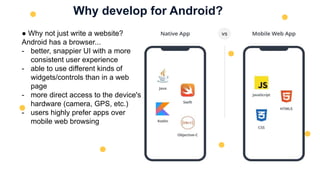
Why develop for Android?
● Why not just write a website?
Android has a browser...
- better, snappier UI with a more
consistent user experience
- able to use different kinds of
widgets/controls than in a web
page
- more direct access to the device's
hardware (camera, GPS, etc.)
- users highly prefer apps over
mobile web browsing
Why not iOS?
Why not write apps for iOS, which runs on iPhones and iPads?.
- Familiar programming language (Java instead of Obj-C or Swift )
- Free developer tools (Apple charges $$$ for theirs)
- More liberated app store (can make an app and put on you phone or others’)
- Android has a larger install base
Android architecture
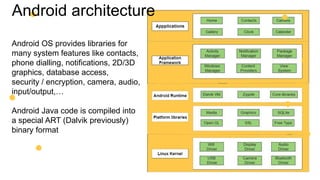
Android OS provides libraries for
many system features like contacts,
phone dialling, notifications, 2D/3D
graphics, database access,
security / encryption, camera, audio,
input/output,…
Android Java code is compiled into
a special ART (Dalvik previously)
binary format
Android architecture
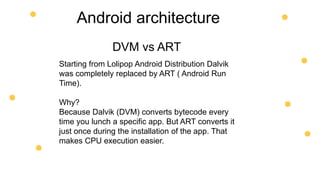
Starting from Lolipop Android Distribution Dalvik
was completely replaced by ART ( Android Run
Time).
Why?
Because Dalvik (DVM) converts bytecode every
time you lunch a specific app. But ART converts it
just once during the installation of the app. That
makes CPU execution easier.
DVM vs ART
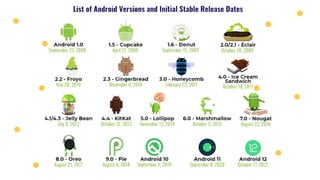
Version issues
Check your phone's version of Android:
Settings → System → About Device → Android version
"Why wouldn't my phone have the newest Android
version? Can't I just update it?“
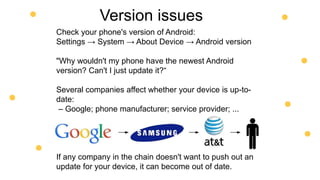
Several companies affect whether your device is up-to-
date:
– Google; phone manufacturer; service provider; ...
If any company in the chain doesn't want to push out an
update for your device, it can become out of date.
Android Studio
Google's official Android IDE, in v1.0 as of November 2014
– replaces previous Eclipse-based environment
– based on IntelliJ IDEA editor; free to download and use
All versions of Android Studio:
https://plugins.jetbrains.com/docs/intellij/android-studio-releases-list.html
Virtual Devices (AVDs)
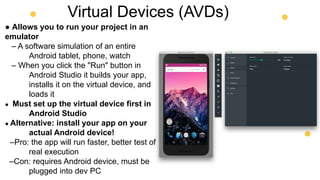
● Allows you to run your project in an
emulator
– A software simulation of an entire
Android tablet, phone, watch
– When you click the "Run" button in
Android Studio it builds your app,
installs it on the virtual device, and
loads it
● Must set up the virtual device first in
Android Studio
● Alternative: install your app on your
actual Android device!
–Pro: the app will run faster, better test of
real execution
–Con: requires Android device, must be
plugged into dev PC
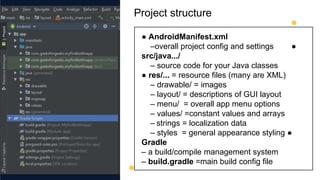
Project structure
● AndroidManifest.xml
–overall project config and settings ●
src/java.../
– source code for your Java classes
● res/... = resource files (many are XML)
– drawable/ = images
– layout/ = descriptions of GUI layout
– menu/ = overall app menu options
– values/ =constant values and arrays
– strings = localization data
– styles = general appearance styling ●
Gradle
– a build/compile management system
– build.gradle =main build config file
Android terminology
● Activity: a single screen of UI that appears in your app
– the fundamental units of GUI in an Android app
● View: items that appear onscreen in an activity
– Widget: GUI control such as a button or text field
– Layout: invisible container that manages positions/sizes of
widgets
● Event: action that occurs when user interacts with widgets
– e.g. clicks, typing, scrolling
● Action bar: a menu of common actions at top of the app
● Notification area: topmost system menu and icons
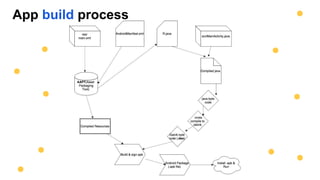
App build process
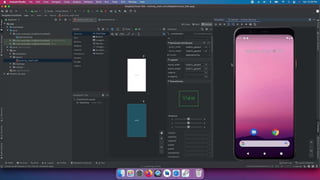
Designing a user interface
● open XML file for your layout (e.g. activity_main.xml)
● drag widgets from the left Palette to the preview image
● set their properties in the lower-right Proprieties panel
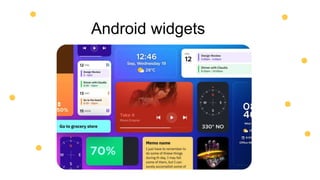
Android widgets
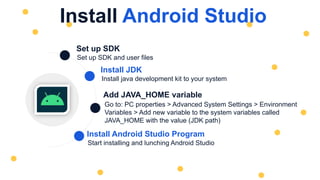
Set up SDK and user files
Set up SDK
Start installing and lunching Android Studio
Install Android Studio Program
Go to: PC properties > Advanced System Settings > Environment
Variables > Add new variable to the system variables called
JAVA_HOME with the value (JDK path)
Add JAVA_HOME variable
Install java development kit to your system
Install JDK
Install Android Studio
Top-down design process
● Let's start with a design of an app that we want to
create and then learn the necessary skills to build that
app.
● "Bigger Number" game:
– user is shown two numbers
– must choose which one is bigger by clicking on the appropriate button
– game pops up a brief "correct" / "incorrect" message after each guess
– get points for each correct answer (lose points for incorrect answers)
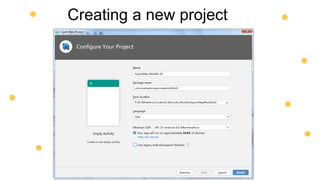
Creating a new project
Thank You
T. Yousef Alamir 2023
http://Yousef.omairtech.com

Lecture 01: Introduction into Android.pptx

  • 1.
  • 2.
    01 Basic Java programming knowledge 02Object-oriented programming 03 Data structures (Array Lists – Hash Maps, Etc. ) 04 XML Prerequisite
  • 3.
    What is Android? ●Mobile operating system maintained by Google – originally purchased from Android, Inc. in 2005 ● Runs on phones, tablets, watches, TVs, ... ● Based on Java (dev language) and Linux (kernel) ● The 1#mobile OS worldwide –and now 1#overall OS worldwide! ● Has over 1million apps published in Play Store ● Code is released as open source (periodically) – easier to customize, license, p
  • 4.
    Why develop forAndroid? ● Why not just write a website? Android has a browser... - better, snappier UI with a more consistent user experience - able to use different kinds of widgets/controls than in a web page - more direct access to the device's hardware (camera, GPS, etc.) - users highly prefer apps over mobile web browsing
  • 5.
    Why not iOS? Whynot write apps for iOS, which runs on iPhones and iPads?. - Familiar programming language (Java instead of Obj-C or Swift ) - Free developer tools (Apple charges $$$ for theirs) - More liberated app store (can make an app and put on you phone or others’) - Android has a larger install base
  • 6.
    Android architecture Android OSprovides libraries for many system features like contacts, phone dialling, notifications, 2D/3D graphics, database access, security / encryption, camera, audio, input/output,… Android Java code is compiled into a special ART (Dalvik previously) binary format
  • 7.
    Android architecture Starting fromLolipop Android Distribution Dalvik was completely replaced by ART ( Android Run Time). Why? Because Dalvik (DVM) converts bytecode every time you lunch a specific app. But ART converts it just once during the installation of the app. That makes CPU execution easier. DVM vs ART
  • 9.
    Version issues Check yourphone's version of Android: Settings → System → About Device → Android version "Why wouldn't my phone have the newest Android version? Can't I just update it?“ Several companies affect whether your device is up-to- date: – Google; phone manufacturer; service provider; ... If any company in the chain doesn't want to push out an update for your device, it can become out of date.
  • 10.
    Android Studio Google's officialAndroid IDE, in v1.0 as of November 2014 – replaces previous Eclipse-based environment – based on IntelliJ IDEA editor; free to download and use All versions of Android Studio: https://plugins.jetbrains.com/docs/intellij/android-studio-releases-list.html
  • 12.
    Virtual Devices (AVDs) ●Allows you to run your project in an emulator – A software simulation of an entire Android tablet, phone, watch – When you click the "Run" button in Android Studio it builds your app, installs it on the virtual device, and loads it ● Must set up the virtual device first in Android Studio ● Alternative: install your app on your actual Android device! –Pro: the app will run faster, better test of real execution –Con: requires Android device, must be plugged into dev PC
  • 13.
    Project structure ● AndroidManifest.xml –overallproject config and settings ● src/java.../ – source code for your Java classes ● res/... = resource files (many are XML) – drawable/ = images – layout/ = descriptions of GUI layout – menu/ = overall app menu options – values/ =constant values and arrays – strings = localization data – styles = general appearance styling ● Gradle – a build/compile management system – build.gradle =main build config file
  • 14.
    Android terminology ● Activity:a single screen of UI that appears in your app – the fundamental units of GUI in an Android app ● View: items that appear onscreen in an activity – Widget: GUI control such as a button or text field – Layout: invisible container that manages positions/sizes of widgets ● Event: action that occurs when user interacts with widgets – e.g. clicks, typing, scrolling ● Action bar: a menu of common actions at top of the app ● Notification area: topmost system menu and icons
  • 15.
  • 16.
    Designing a userinterface ● open XML file for your layout (e.g. activity_main.xml) ● drag widgets from the left Palette to the preview image ● set their properties in the lower-right Proprieties panel
  • 17.
  • 18.
    Set up SDKand user files Set up SDK Start installing and lunching Android Studio Install Android Studio Program Go to: PC properties > Advanced System Settings > Environment Variables > Add new variable to the system variables called JAVA_HOME with the value (JDK path) Add JAVA_HOME variable Install java development kit to your system Install JDK Install Android Studio
  • 19.
    Top-down design process ●Let's start with a design of an app that we want to create and then learn the necessary skills to build that app. ● "Bigger Number" game: – user is shown two numbers – must choose which one is bigger by clicking on the appropriate button – game pops up a brief "correct" / "incorrect" message after each guess – get points for each correct answer (lose points for incorrect answers)
  • 20.
  • 21.
    Thank You T. YousefAlamir 2023 http://Yousef.omairtech.com