
DIGITAL IMAGE PROCESSING
(2ND EDITION)
RAFAEL C. GONZALEZ
RICHARD E.WOODS
Dr Moe Moe Myint
(Assistant Lecturer)
Technological University (Kyaukse)
1
MISCELLANEA
 Lectures: A
 Monday 1:00 – 3:00
 Tuesday 2:00 – 4:00
 Lectures: B
 Monday 8:00 – 10:00
 Wednesday 1:00 – 3:00
 Slideshare: www.slideshare.net/MoeMoeMyint
 E-mail: moemoemyint@moemyanmar.ml
 Blog: drmoemoemyint.blogspot.com
2
CONTENTS FOR CHAPTER 6
6.1 Color Fundamentals
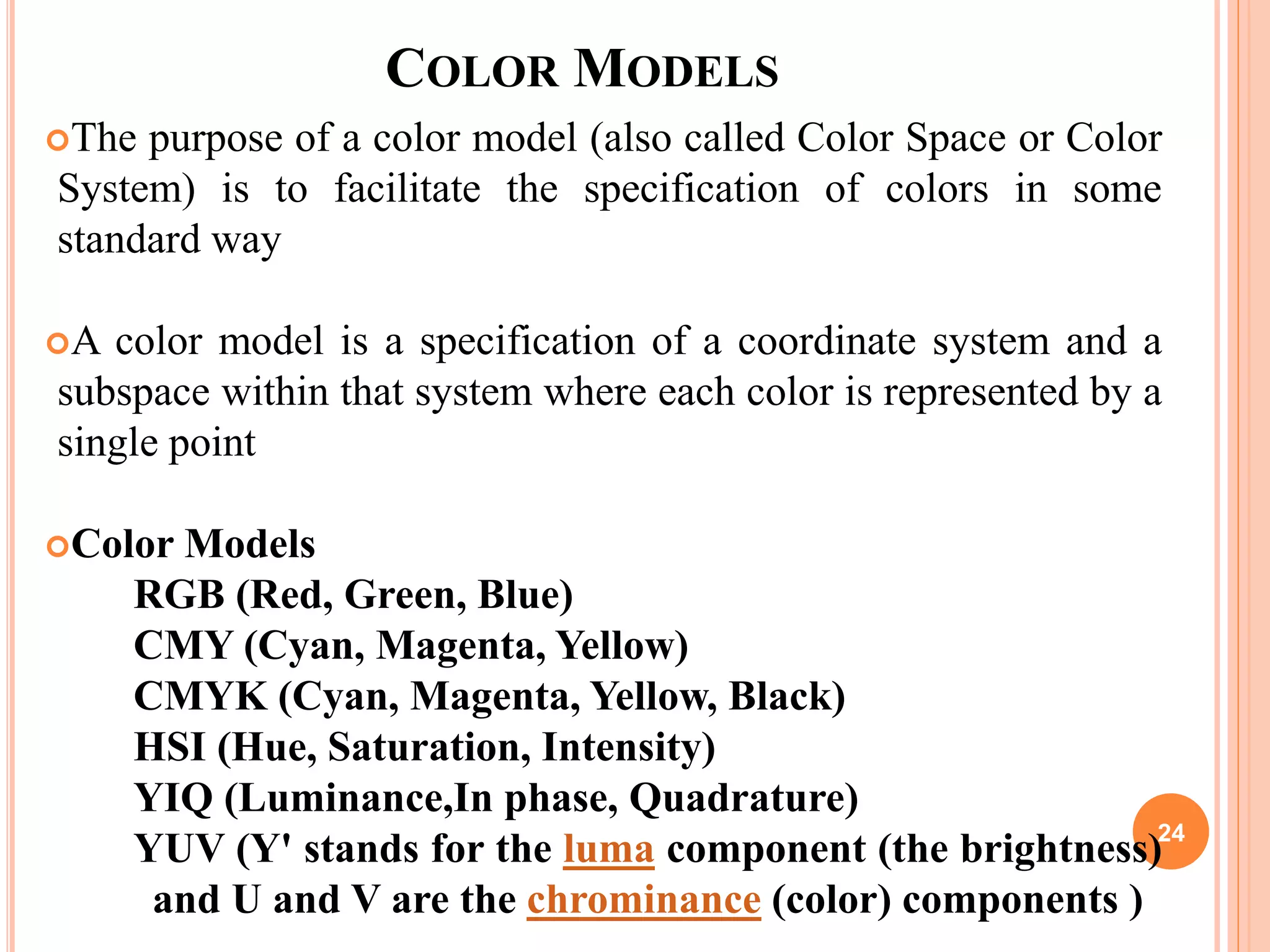
6.2 Color Models
6.3 Pseudo-color Image Processing
6.4 Basics of Full-Color Image Processing
6.5 Color Transformations
6.6 Smoothing and Sharpening
6.7 Color Segmentation
6.8 Noise in Color Images
6.9 Color Image Compression
3
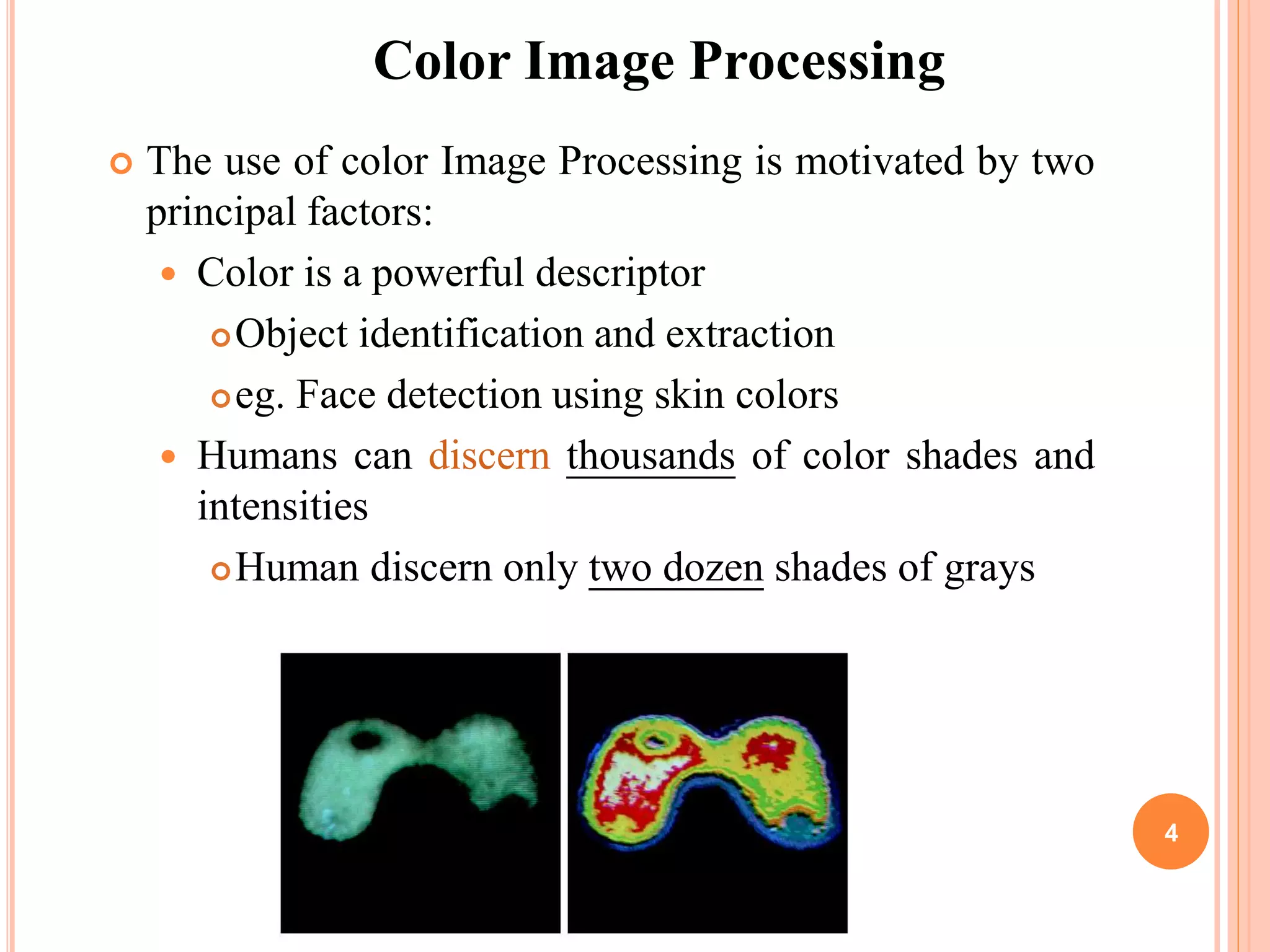
 The use of color Image Processing is motivated by two
principal factors:
 Color is a powerful descriptor
Object identification and extraction
eg. Face detection using skin colors
 Humans can discern thousands of color shades and
intensities
Human discern only two dozen shades of grays
Color Image Processing
4
FULL COLOR PROCESSING VS PSEUDO-COLOR
PROCESSING
 In Full-color Processing, the images are
acquired with a Full-Color sensor e.g. Color TV
camera or Color Scanner
 In Pseudo-color Processing, the problem is one
of assigning a color to a particular monochrome
intensity or a range of intensities
5
COLOR FUNDAMENTALS
 Physical phenomenon
 Physical nature of color is known
 Psysio-psychological phenomenon
 How human brain perceive and interpret color?
6
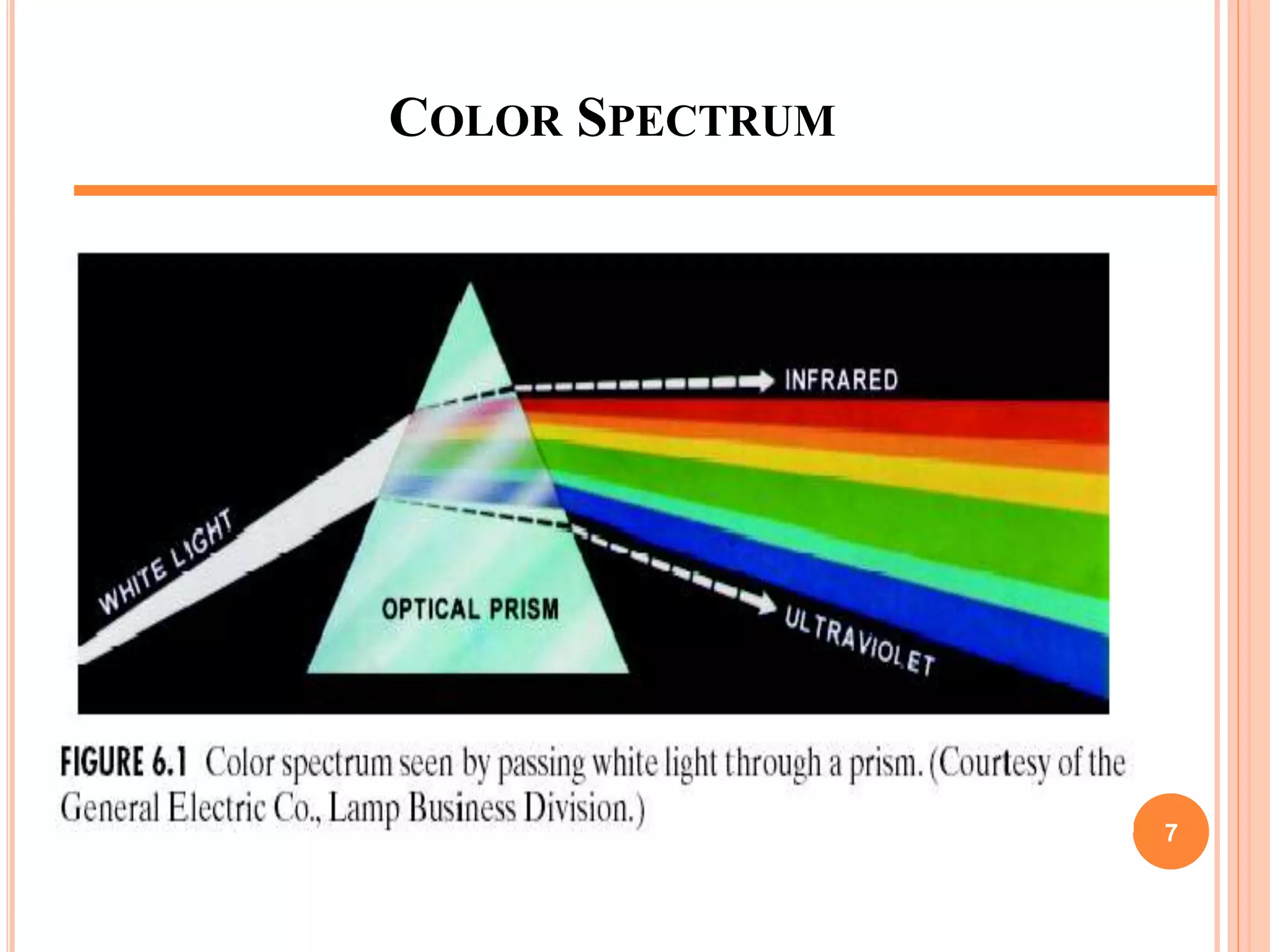
COLOR SPECTRUM
7
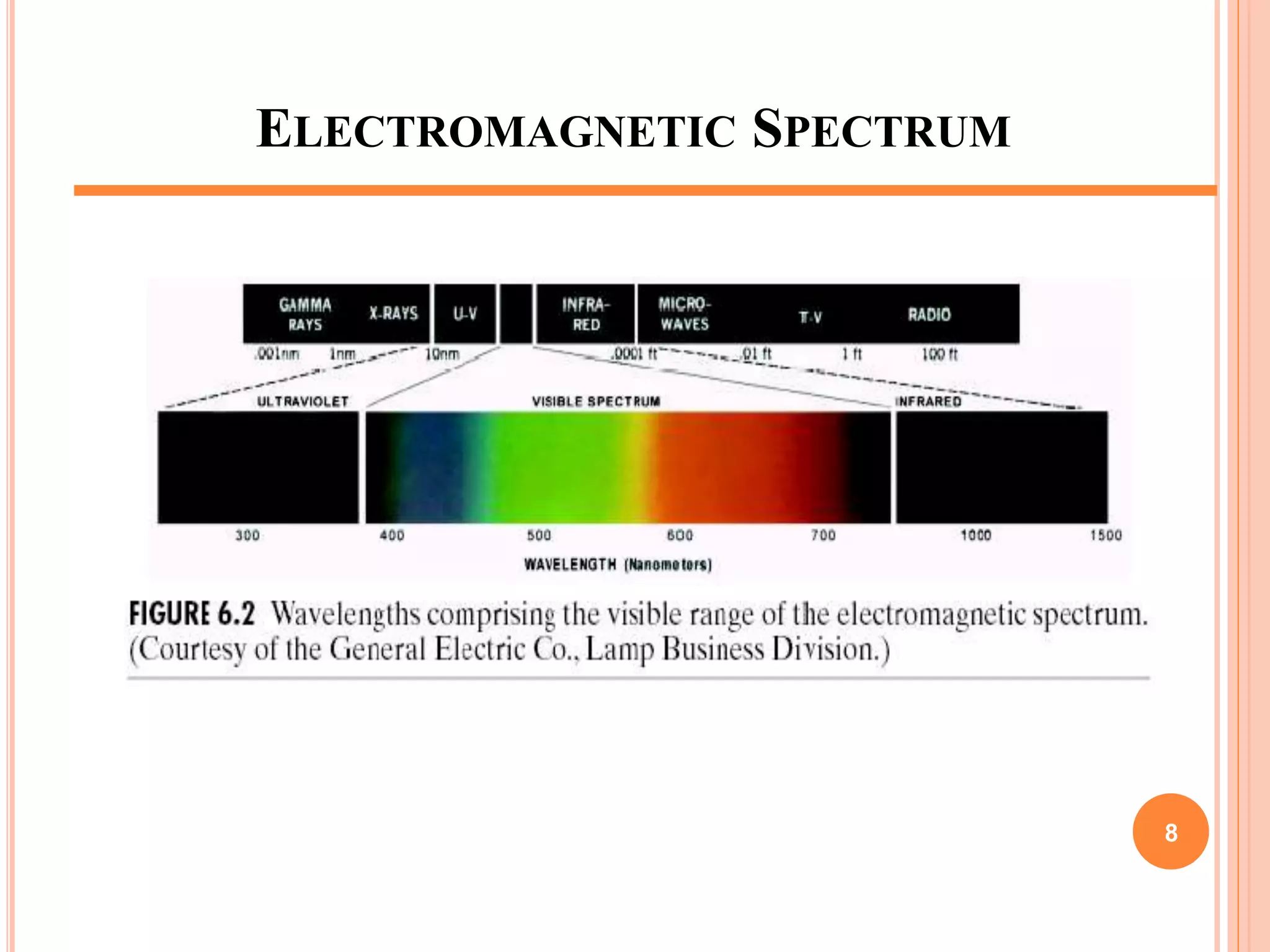
ELECTROMAGNETIC SPECTRUM
8
COLOR FUNDAMENTALS (CONT.)
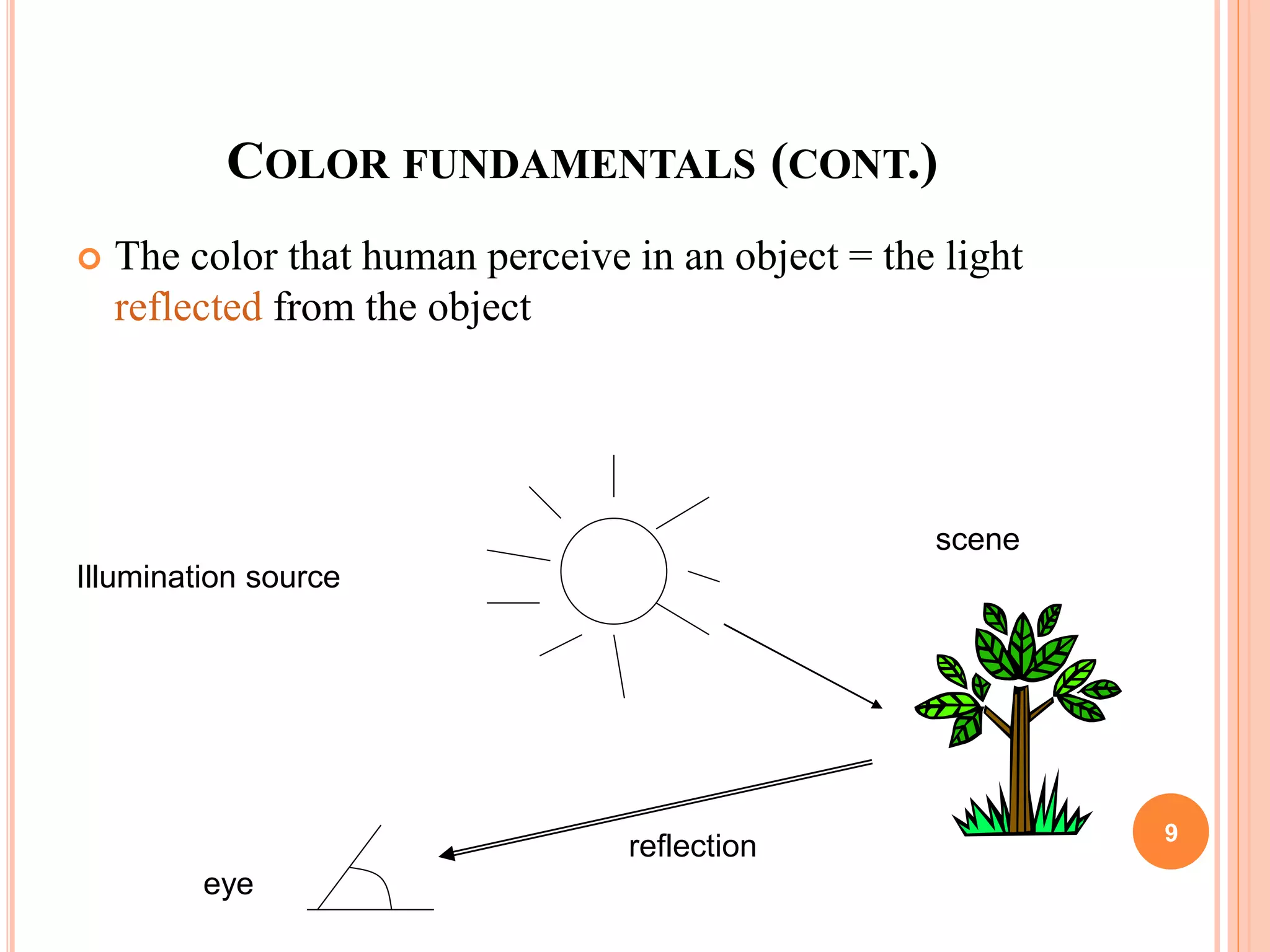
 The color that human perceive in an object = the light
reflected from the object
Illumination source
scene
reflection
eye
9
10
COLOR FUNDAMENTALS
 The colors that humans and some animals perceive in an
object are determined by the nature of light reflected from
the object.
ACHROMATIC VS CHROMATIC LIGHT
 Achromatic (void of color) Light: Its only
contribute is its ‘Intensity’ or amount.
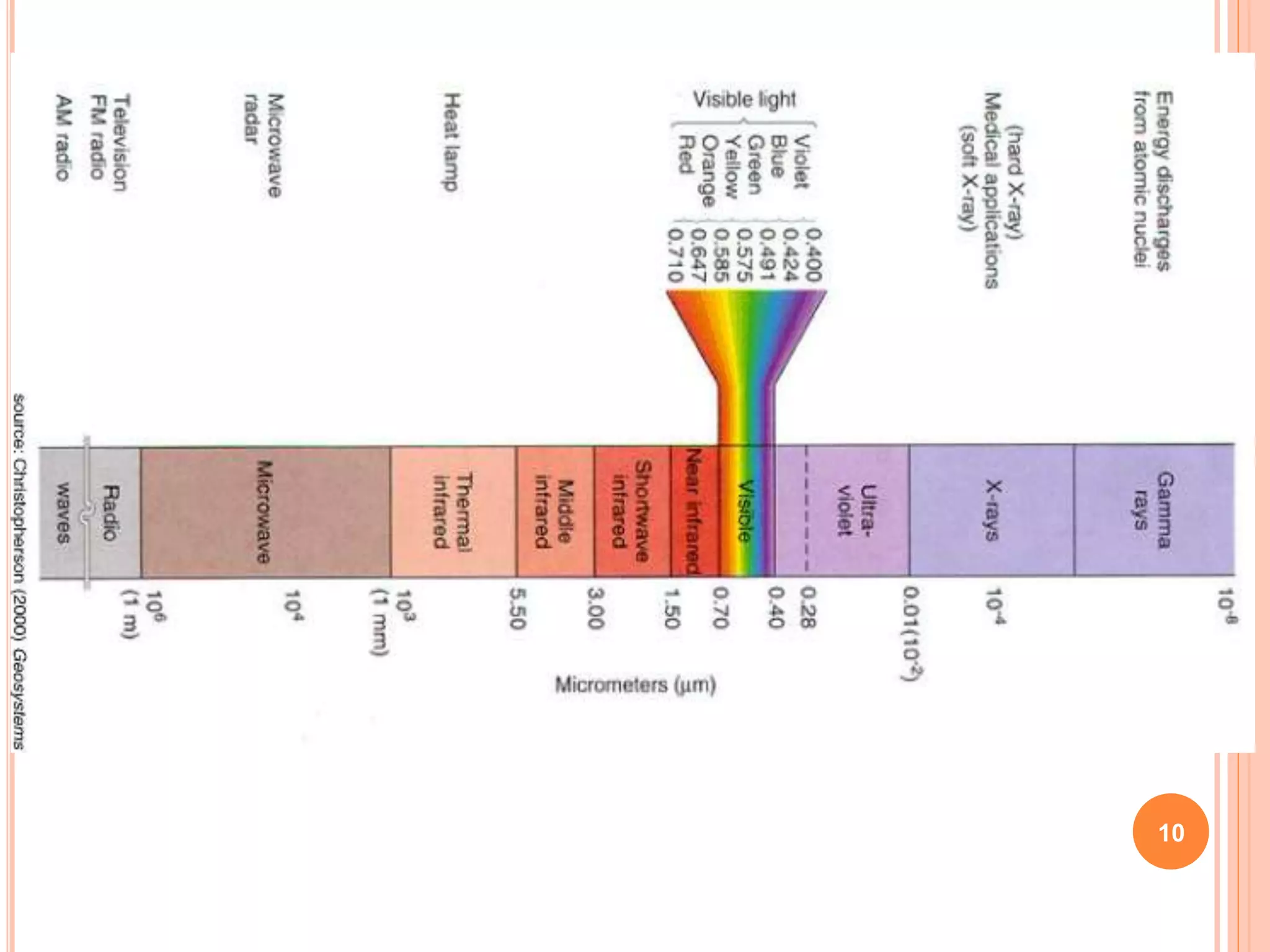
 Chromatic Light: spans the electromagnetic
spectrum from approximately 400 to 700nm.
11
QUANTITIES FOR DESCRIPTION OF QUANTITY OF
CHROMATIC SOURCE OF LIGHT
Three basic quantities are used to describe the quantity of a
chromatic source of light:
 Radiance : The total amount of Energy that flows from a Light
Source
: It is measured in Watts
 Luminance : Luminance gives a measure of amount of energy
an observer perceives from a light source (measured
in Lumens(lm) )
:For example, light emitted from a source operating
in Infrared region of Spectrum could have significant
energy (Radiance) but a human observer will hardly
perceive it so luminance is zero.
 Brightness : It is a subjective measure.
: It embodies the achromatic notion of intensity and
is one of the key factors in describing color sensation
12
HUMAN PERCEPTION
 Detailed experimental evidences has established that the 6 to 7
million cones in the human eye can be divided into three
principal sensing categories, corresponding roughly to red,
green and blue.
 Approximately 65% of all cones are sensitive to Red Light,
33% are sensitive to Green Light and about 2% are sensitive
to Blue Light (most sensitive).
13
HUMAN PERCEPTION
Due to these absorption characteristic of Human Eye colors are
seen as variable combinations of the so-called ‘Primary Colors’
Red, Green and Blue
The primary colors can be added to produce secondary colors of
Light
Magenta (Red+Blue)
Cyan (Green+Blue)
Yellow (Red+Green)
14
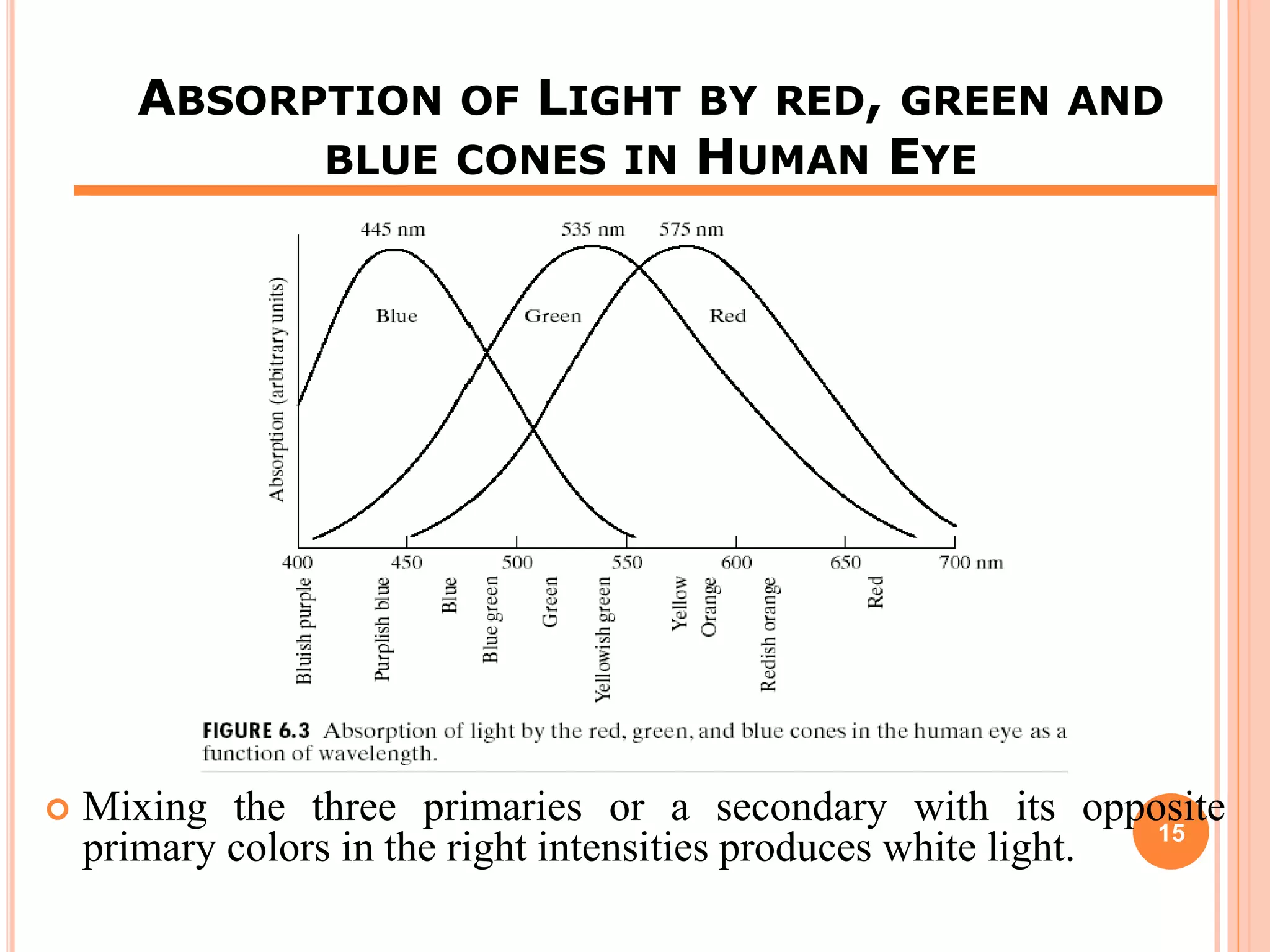
ABSORPTION OF LIGHT BY RED, GREEN AND
BLUE CONES IN HUMAN EYE
 Mixing the three primaries or a secondary with its opposite
primary colors in the right intensities produces white light. 15
PRIMARY COLOR OF LIGHT VS PRIMARY COLOR OF
PIGMENTS
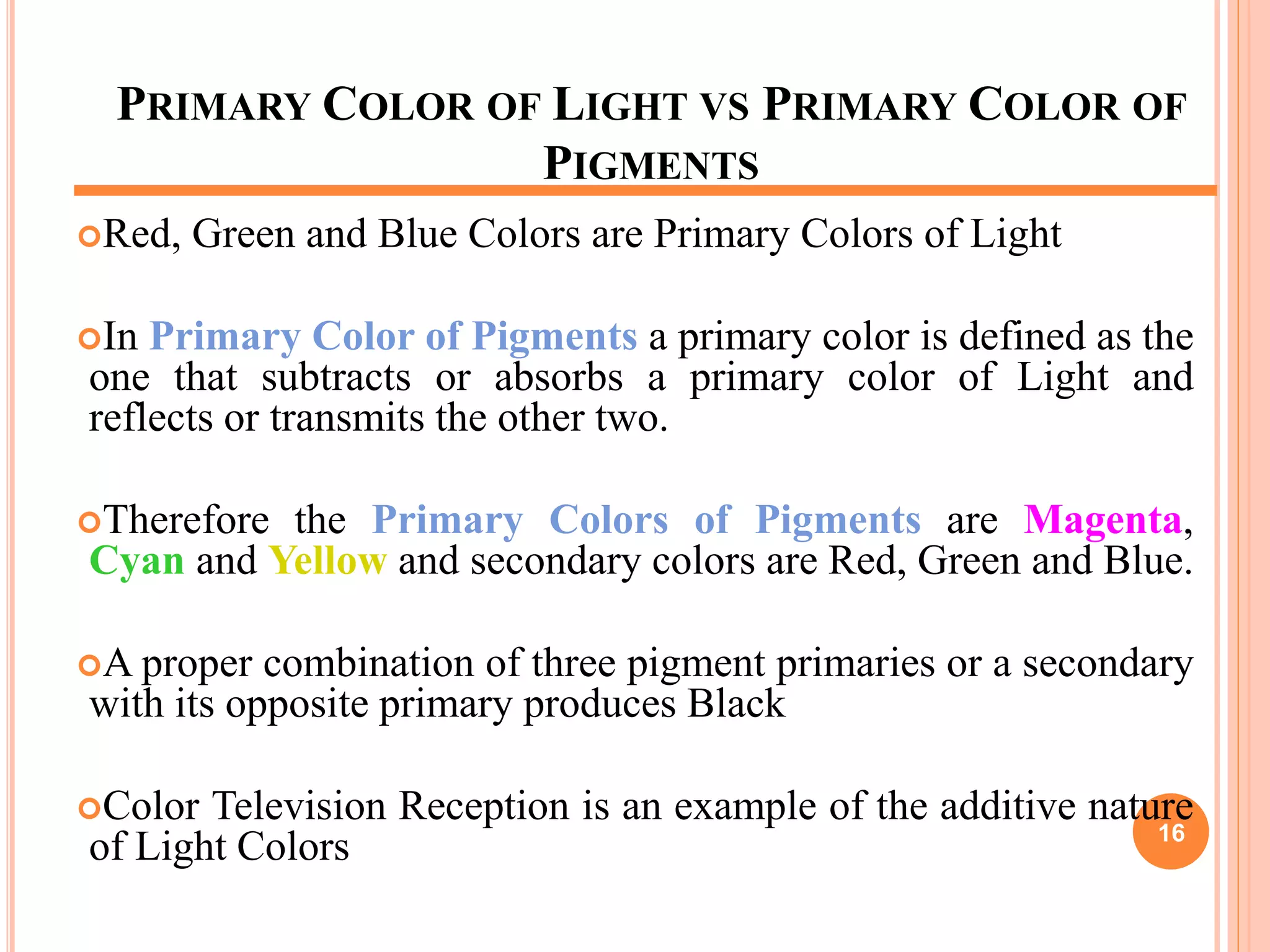
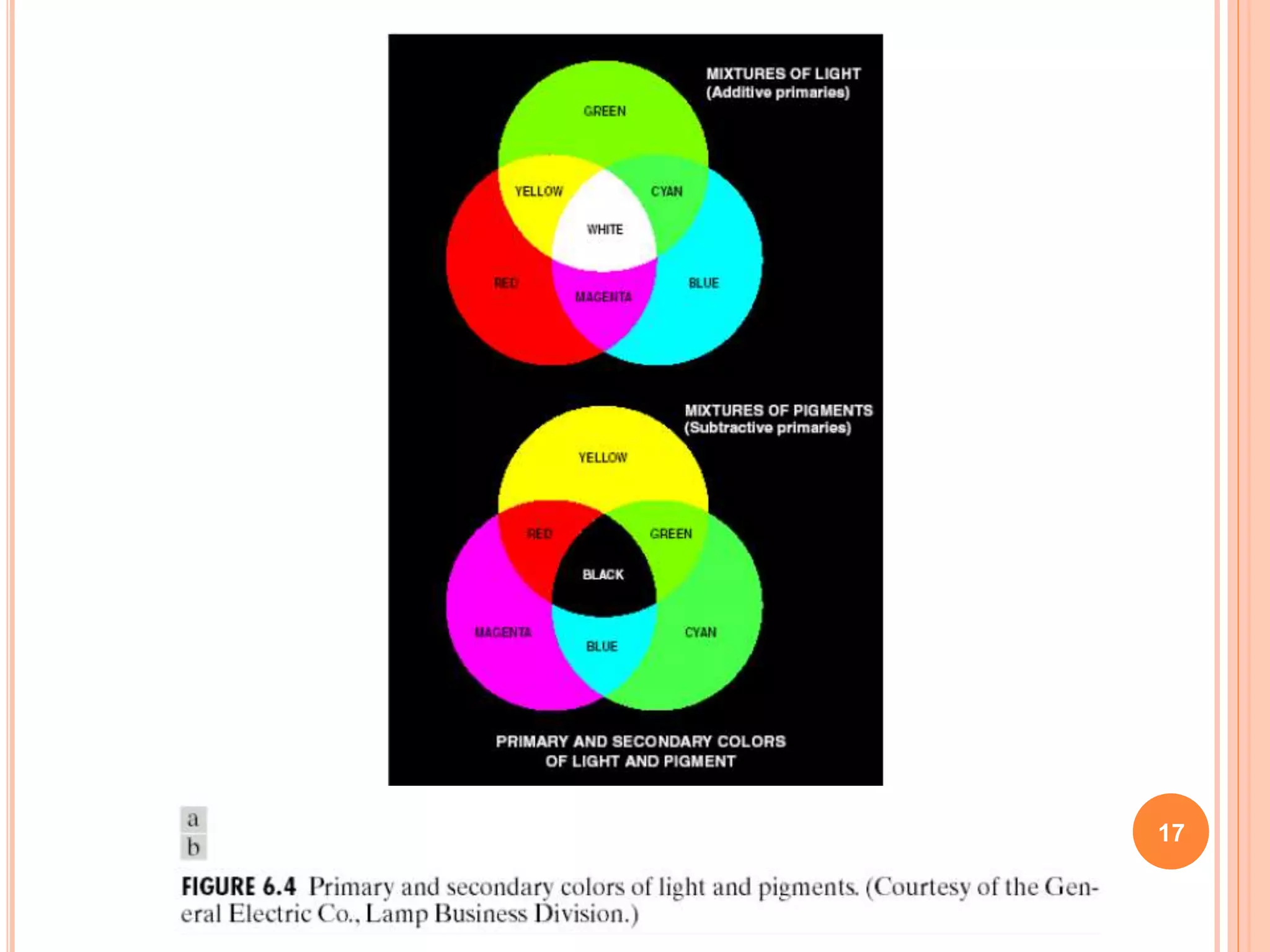
Red, Green and Blue Colors are Primary Colors of Light
In Primary Color of Pigments a primary color is defined as the
one that subtracts or absorbs a primary color of Light and
reflects or transmits the other two.
Therefore the Primary Colors of Pigments are Magenta,
Cyan and Yellow and secondary colors are Red, Green and Blue.
A proper combination of three pigment primaries or a secondary
with its opposite primary produces Black
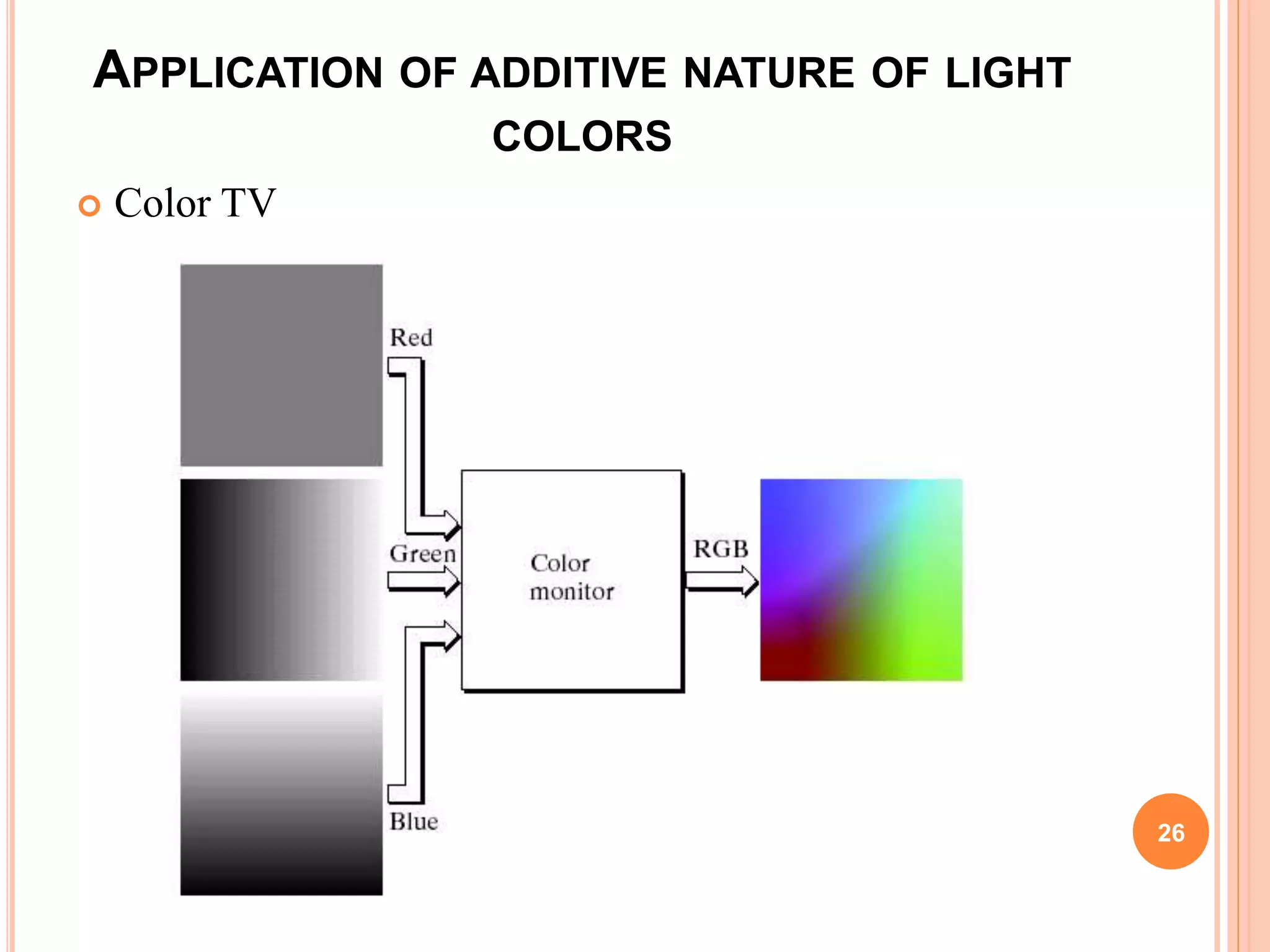
Color Television Reception is an example of the additive nature
of Light Colors 16
17
18
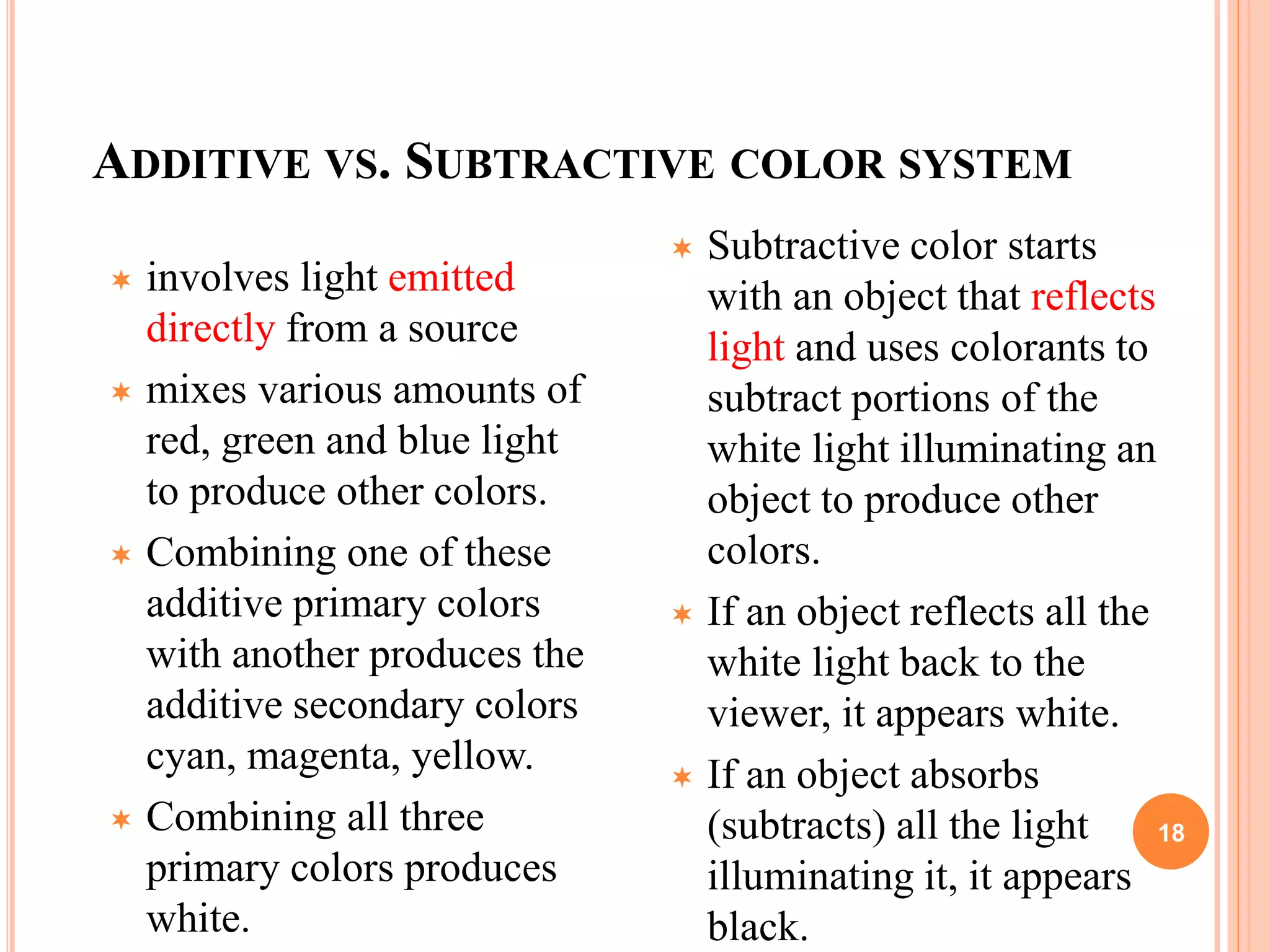
ADDITIVE VS. SUBTRACTIVE COLOR SYSTEM
 involves light emitted
directly from a source
 mixes various amounts of
red, green and blue light
to produce other colors.
 Combining one of these
additive primary colors
with another produces the
additive secondary colors
cyan, magenta, yellow.
 Combining all three
primary colors produces
white.
 Subtractive color starts
with an object that reflects
light and uses colorants to
subtract portions of the
white light illuminating an
object to produce other
colors.
 If an object reflects all the
white light back to the
viewer, it appears white.
 If an object absorbs
(subtracts) all the light
illuminating it, it appears
black.
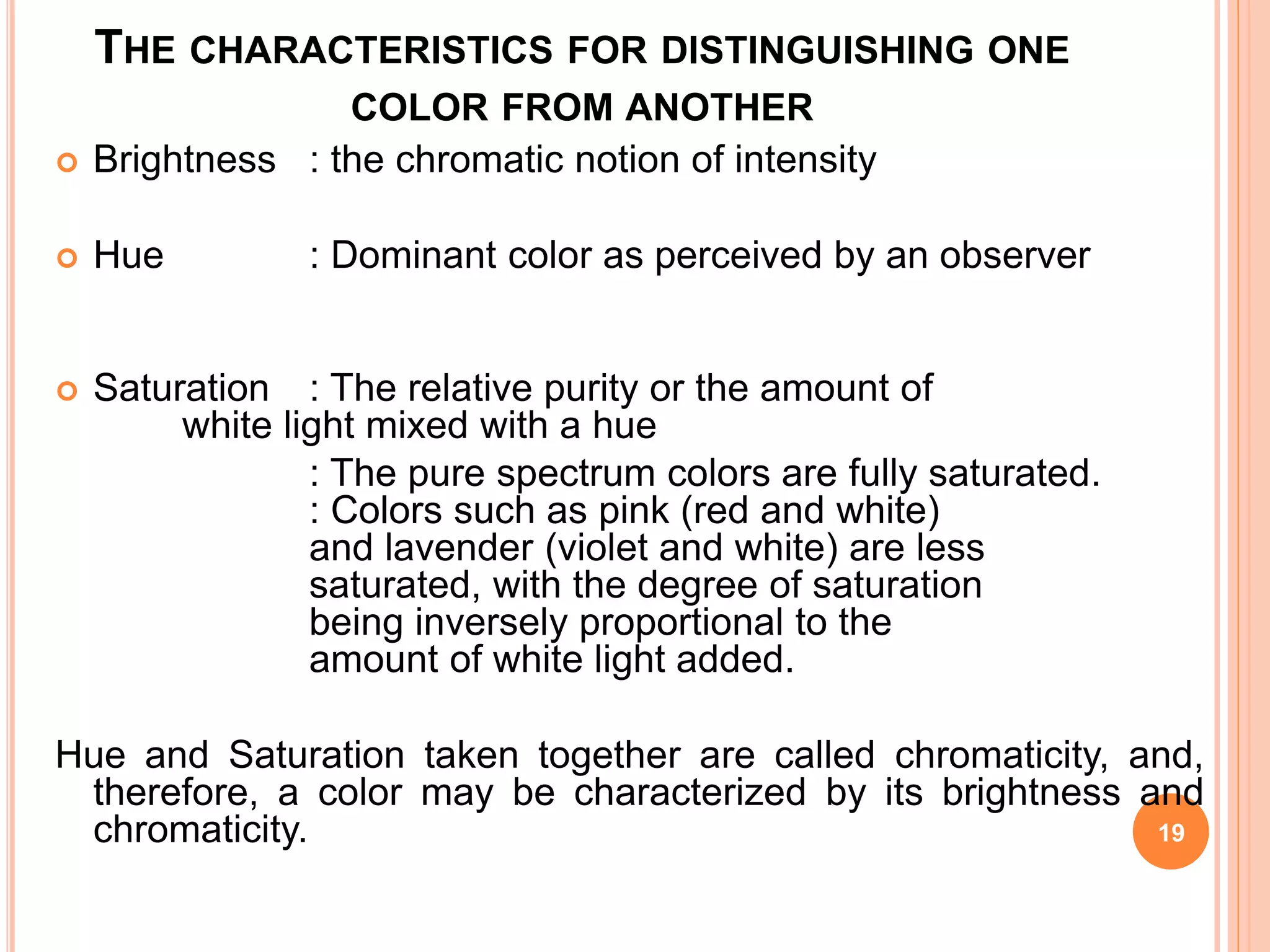
THE CHARACTERISTICS FOR DISTINGUISHING ONE
COLOR FROM ANOTHER
 Brightness : the chromatic notion of intensity
 Hue : Dominant color as perceived by an observer
 Saturation : The relative purity or the amount of
white light mixed with a hue
: The pure spectrum colors are fully saturated.
: Colors such as pink (red and white)
and lavender (violet and white) are less
saturated, with the degree of saturation
being inversely proportional to the
amount of white light added.
Hue and Saturation taken together are called chromaticity, and,
therefore, a color may be characterized by its brightness and
chromaticity. 19
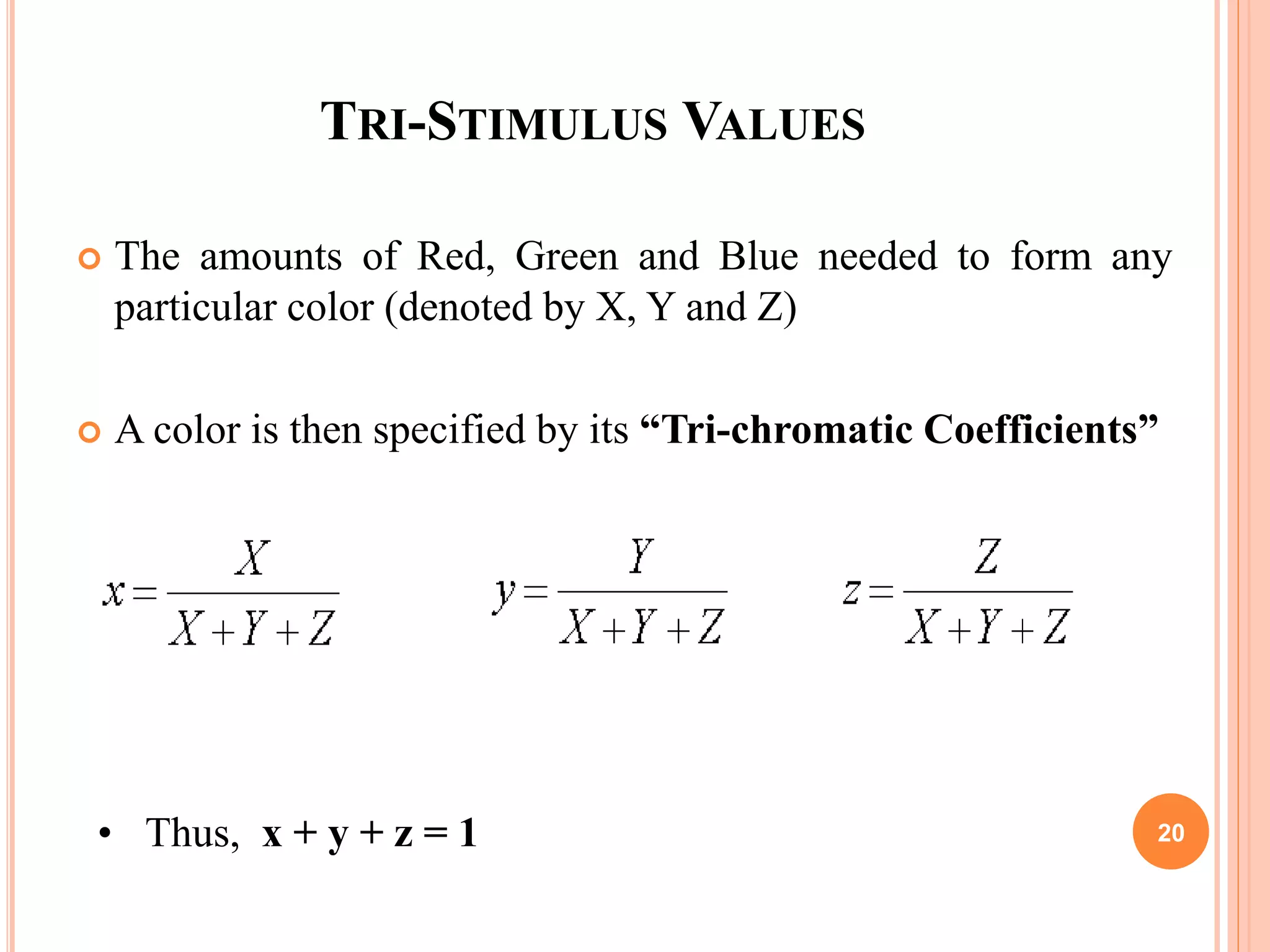
TRI-STIMULUS VALUES
 The amounts of Red, Green and Blue needed to form any
particular color (denoted by X, Y and Z)
 A color is then specified by its “Tri-chromatic Coefficients”
• Thus, x + y + z = 1 20
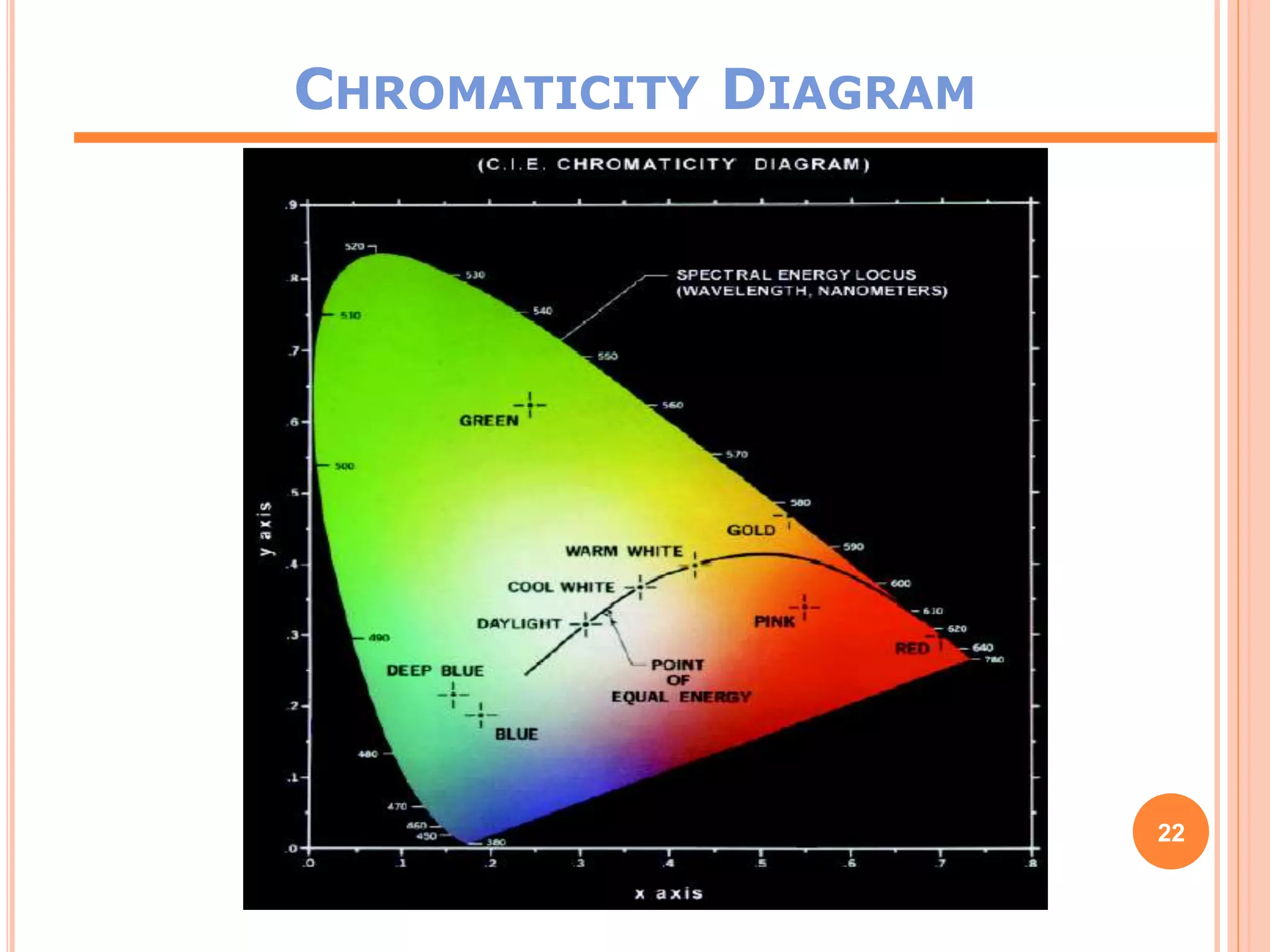
CHROMATICITY DIAGRAM
Another approach for specifying colors is to use chromaticity
diagram
Shows color compositions as a function of x(red) and
y(green)
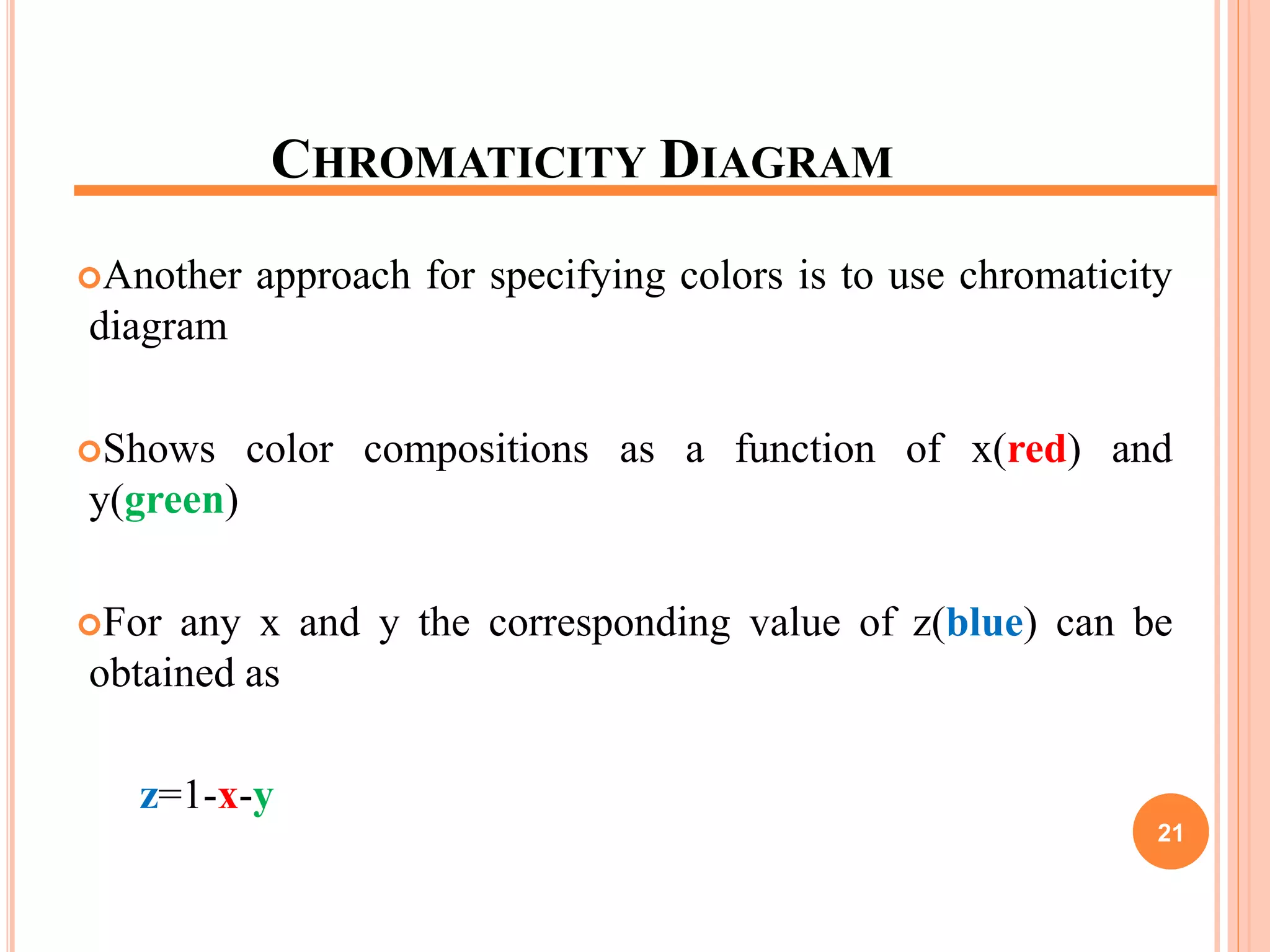
For any x and y the corresponding value of z(blue) can be
obtained as
z=1-x-y
21
CHROMATICITY DIAGRAM
22
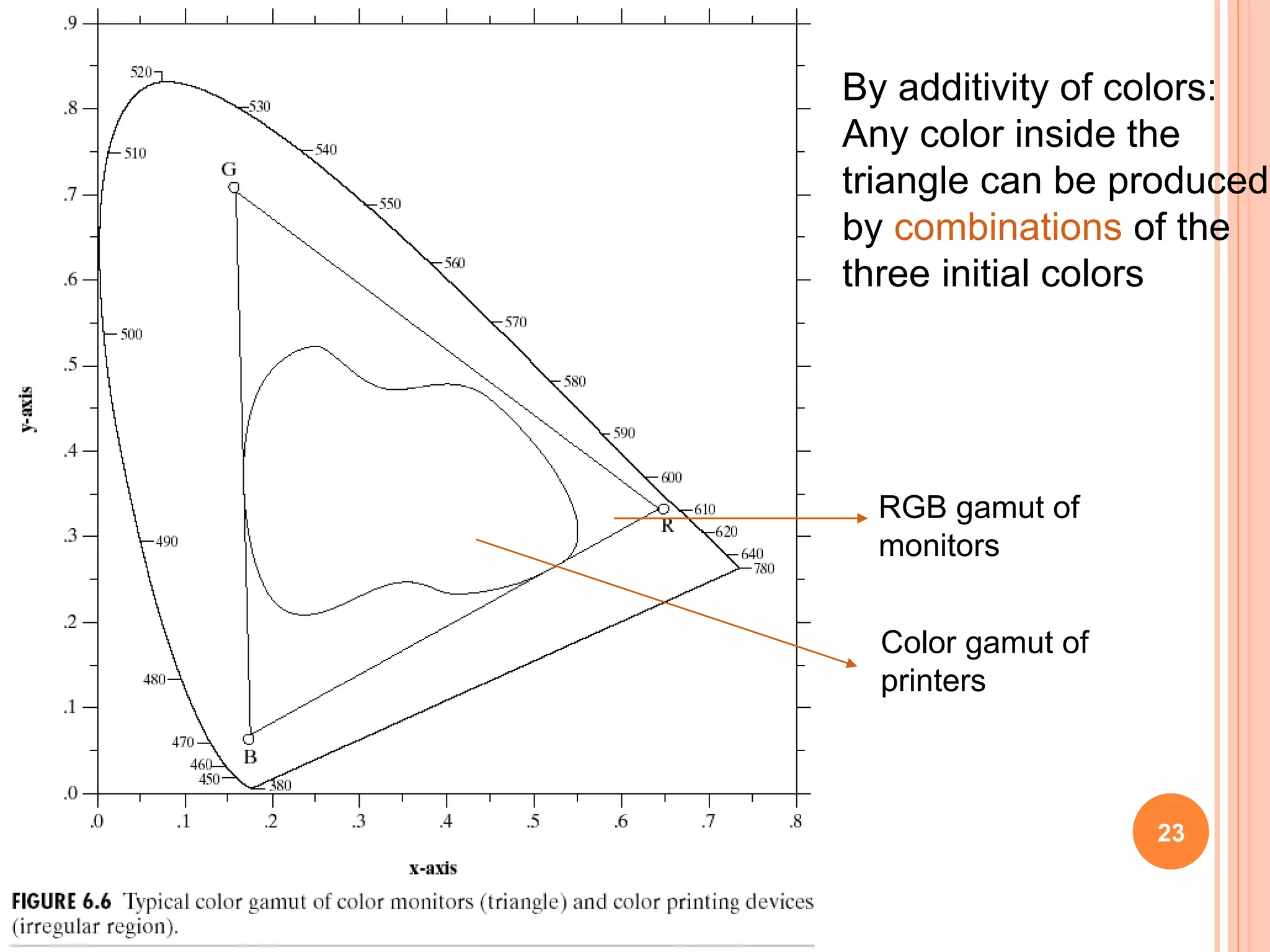
By additivity of colors:
Any color inside the
triangle can be produced
by combinations of the
three initial colors
RGB gamut of
monitors
Color gamut of
printers
23
COLOR MODELS
The purpose of a color model (also called Color Space or Color
System) is to facilitate the specification of colors in some
standard way
A color model is a specification of a coordinate system and a
subspace within that system where each color is represented by a
single point
Color Models
RGB (Red, Green, Blue)
CMY (Cyan, Magenta, Yellow)
CMYK (Cyan, Magenta, Yellow, Black)
HSI (Hue, Saturation, Intensity)
YIQ (Luminance,In phase, Quadrature)
YUV (Y' stands for the luma component (the brightness)
and U and V are the chrominance (color) components )
24
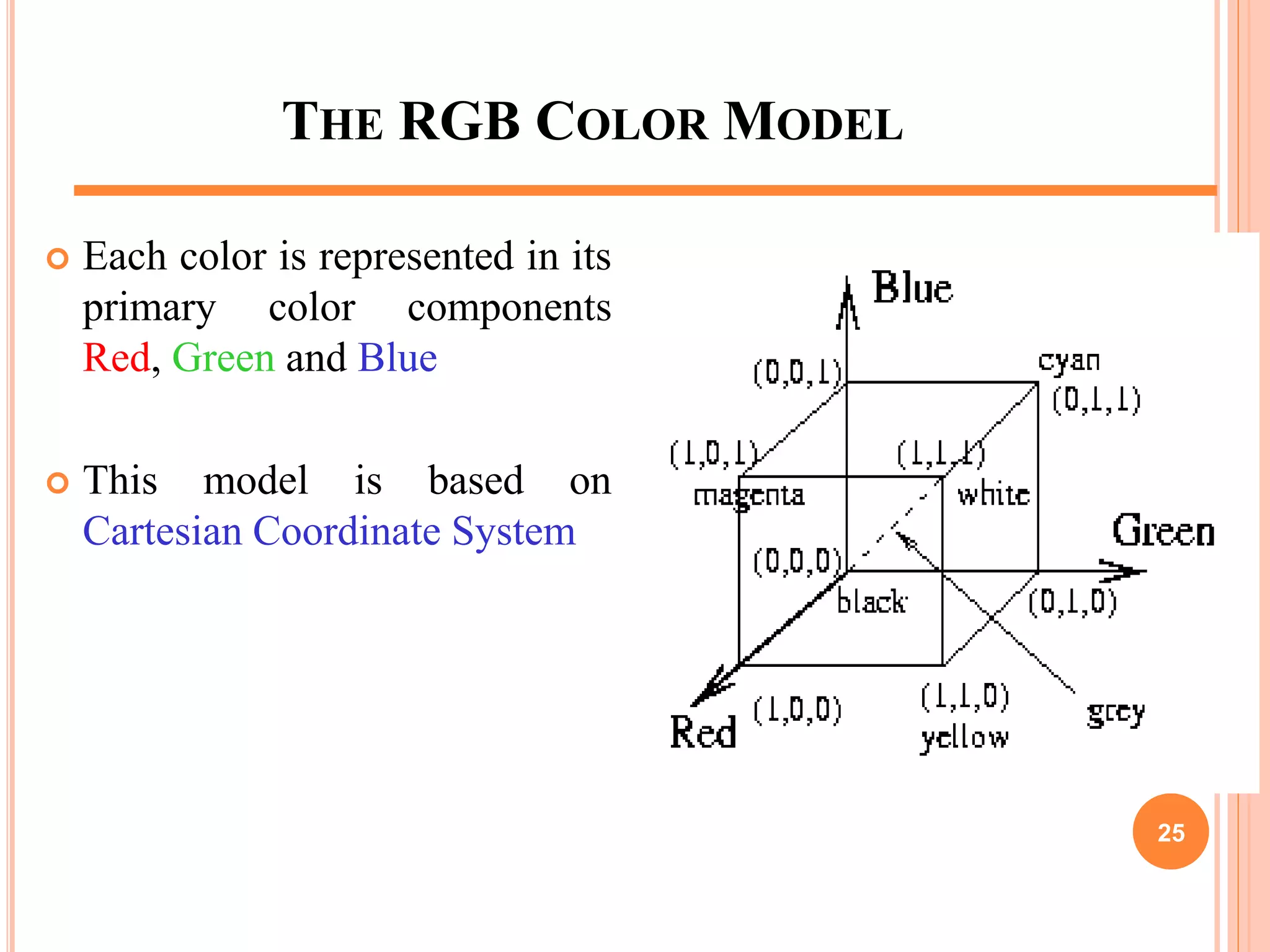
THE RGB COLOR MODEL
 Each color is represented in its
primary color components
Red, Green and Blue
 This model is based on
Cartesian Coordinate System
25
APPLICATION OF ADDITIVE NATURE OF LIGHT
COLORS
 Color TV
26
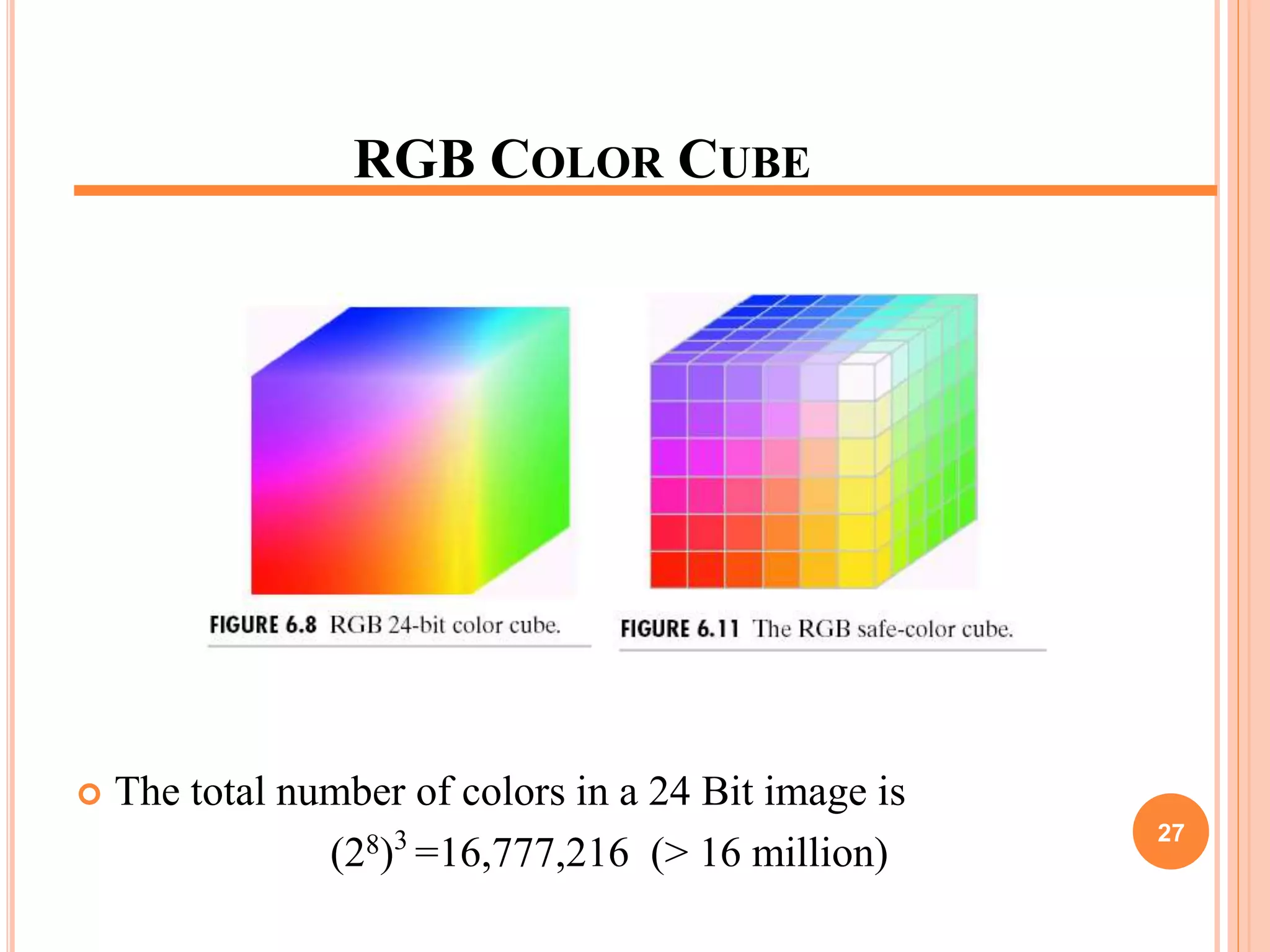
RGB COLOR CUBE
 The total number of colors in a 24 Bit image is
(28)3
=16,777,216 (> 16 million)
27
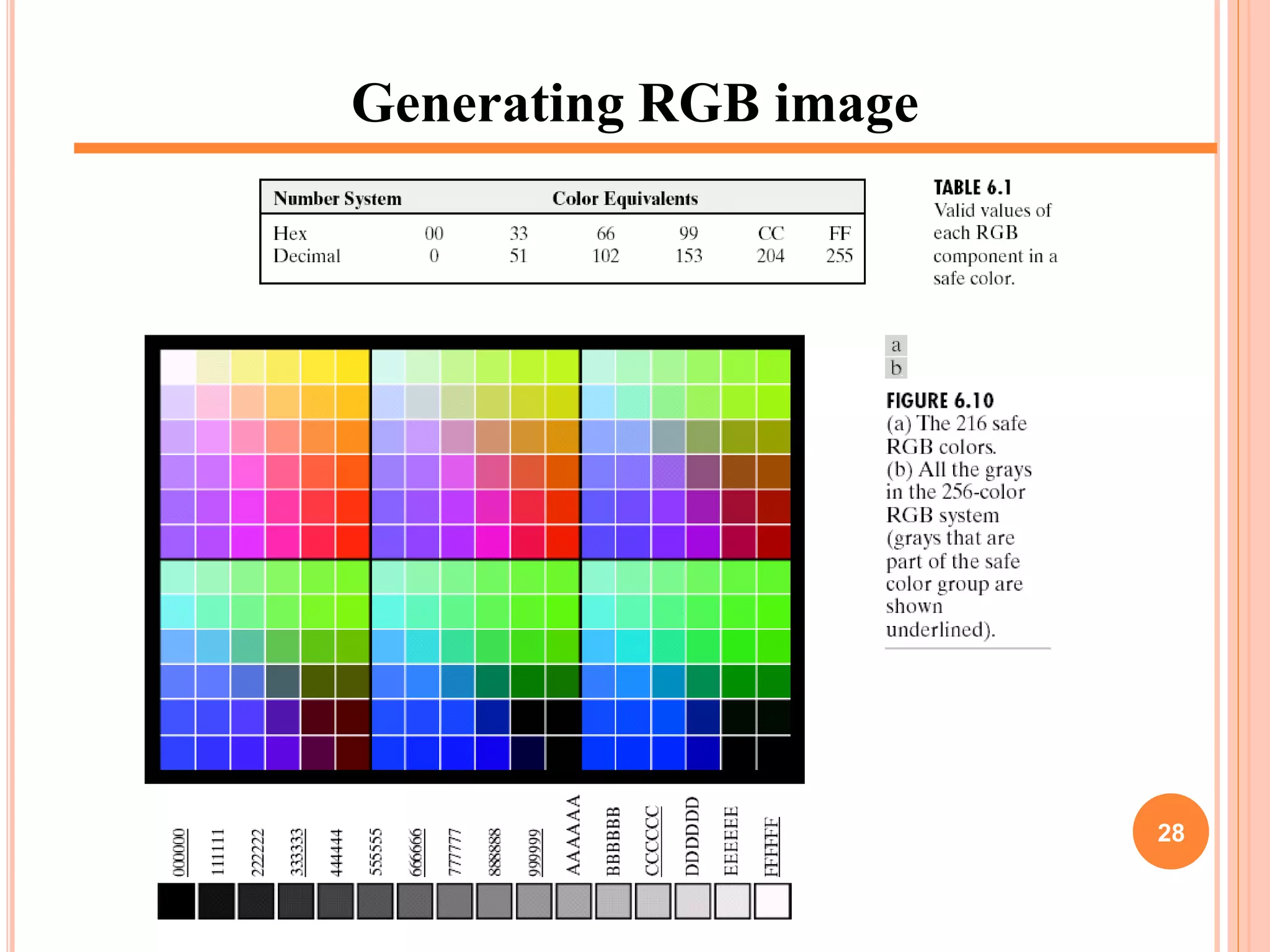
Generating RGB image
28
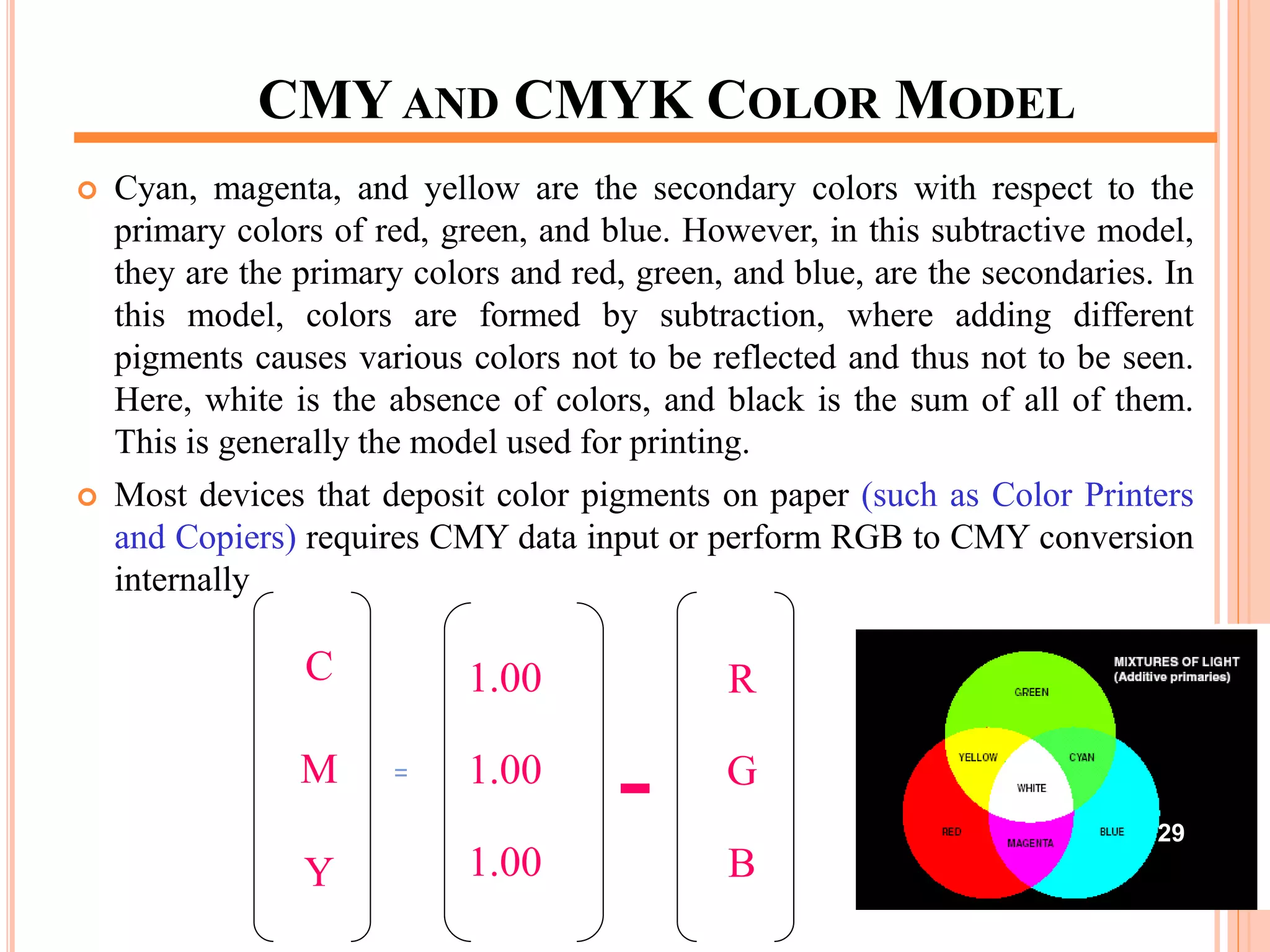
CMY AND CMYK COLOR MODEL
 Cyan, magenta, and yellow are the secondary colors with respect to the
primary colors of red, green, and blue. However, in this subtractive model,
they are the primary colors and red, green, and blue, are the secondaries. In
this model, colors are formed by subtraction, where adding different
pigments causes various colors not to be reflected and thus not to be seen.
Here, white is the absence of colors, and black is the sum of all of them.
This is generally the model used for printing.
 Most devices that deposit color pigments on paper (such as Color Printers
and Copiers) requires CMY data input or perform RGB to CMY conversion
internally
C
M
Y
=
1.00
1.00
1.00
-
R
G
B
29
CMY AND CMYK COLOR MODEL
CMY is a Subtractive Color Model
Equal amounts of Pigment primaries (Cyan, Magenta and
Yellow) should produce Black
In practice combining these colors for printing produces a
“Muddy-Black” color
So in order to produce “True-Black” a fourth color “Black”
is added giving rise to CMYK model
30
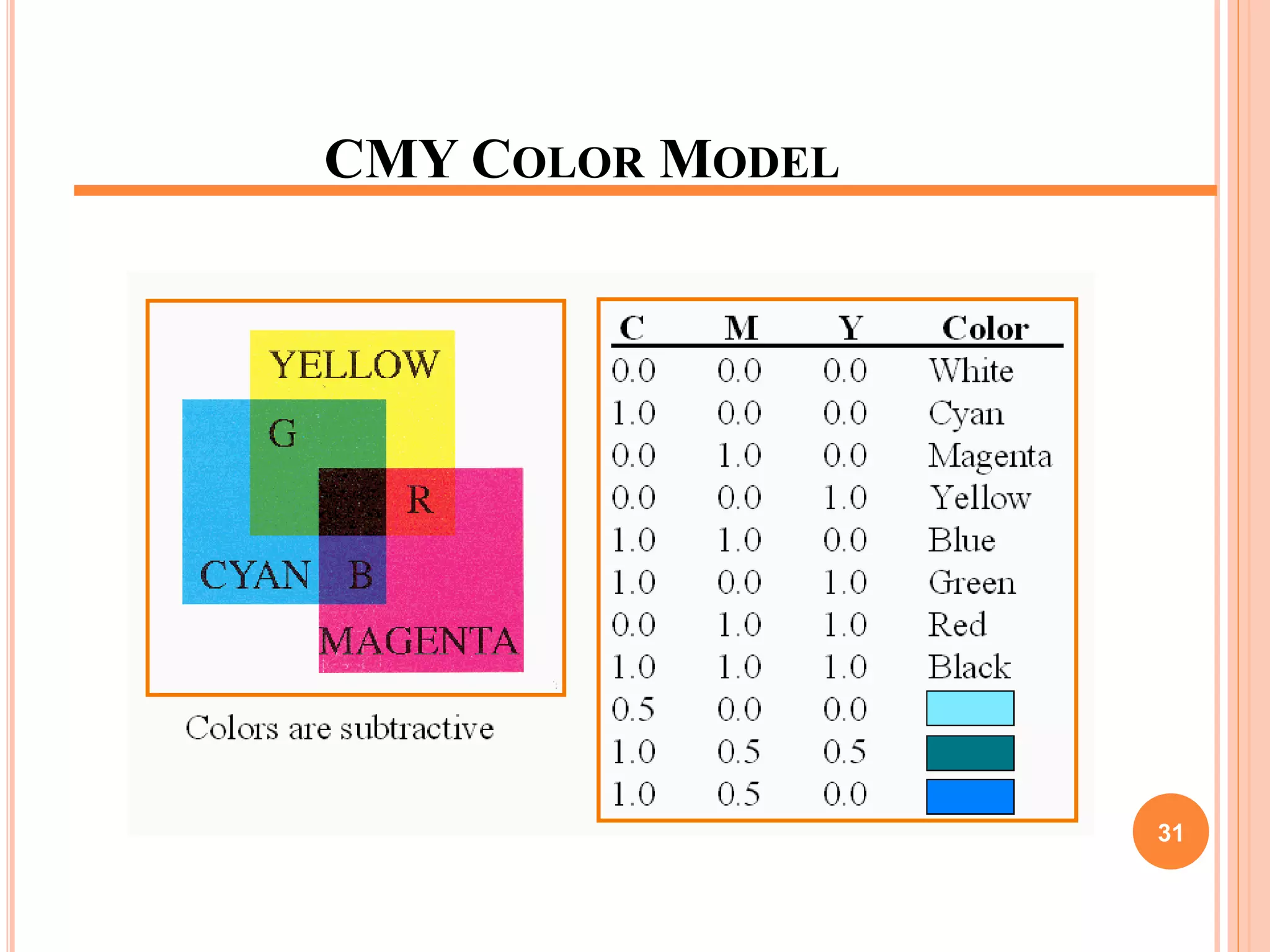
CMY COLOR MODEL
31
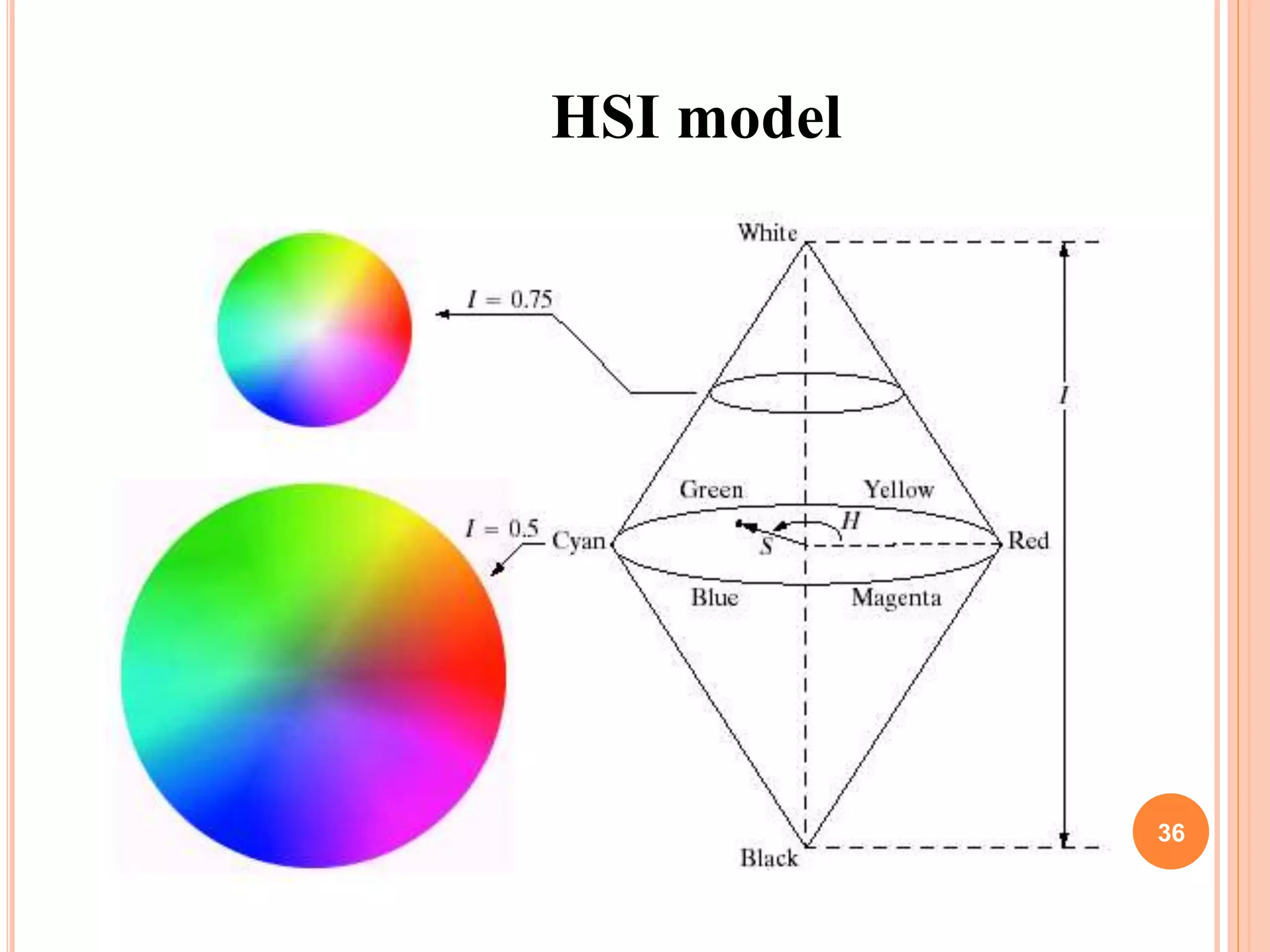
HSI COLOR MODEL
 Hue (dominant colour seen)
 Wavelength of the pure colour observed in the signal.
 Distinguishes red, yellow, green, etc.
 More the 400 hues can be seen by the human eye.
 Saturation (degree of dilution)
 Inverse of the quantity of “white” present in the signal. A pure
colour has 100% saturation, the white and grey have 0%
saturation.
 Distinguishes red from pink, marine blue from royal blue, etc.
 About 20 saturation levels are visible per hue.
 Intensity
 Distinguishes the gray levels.
32
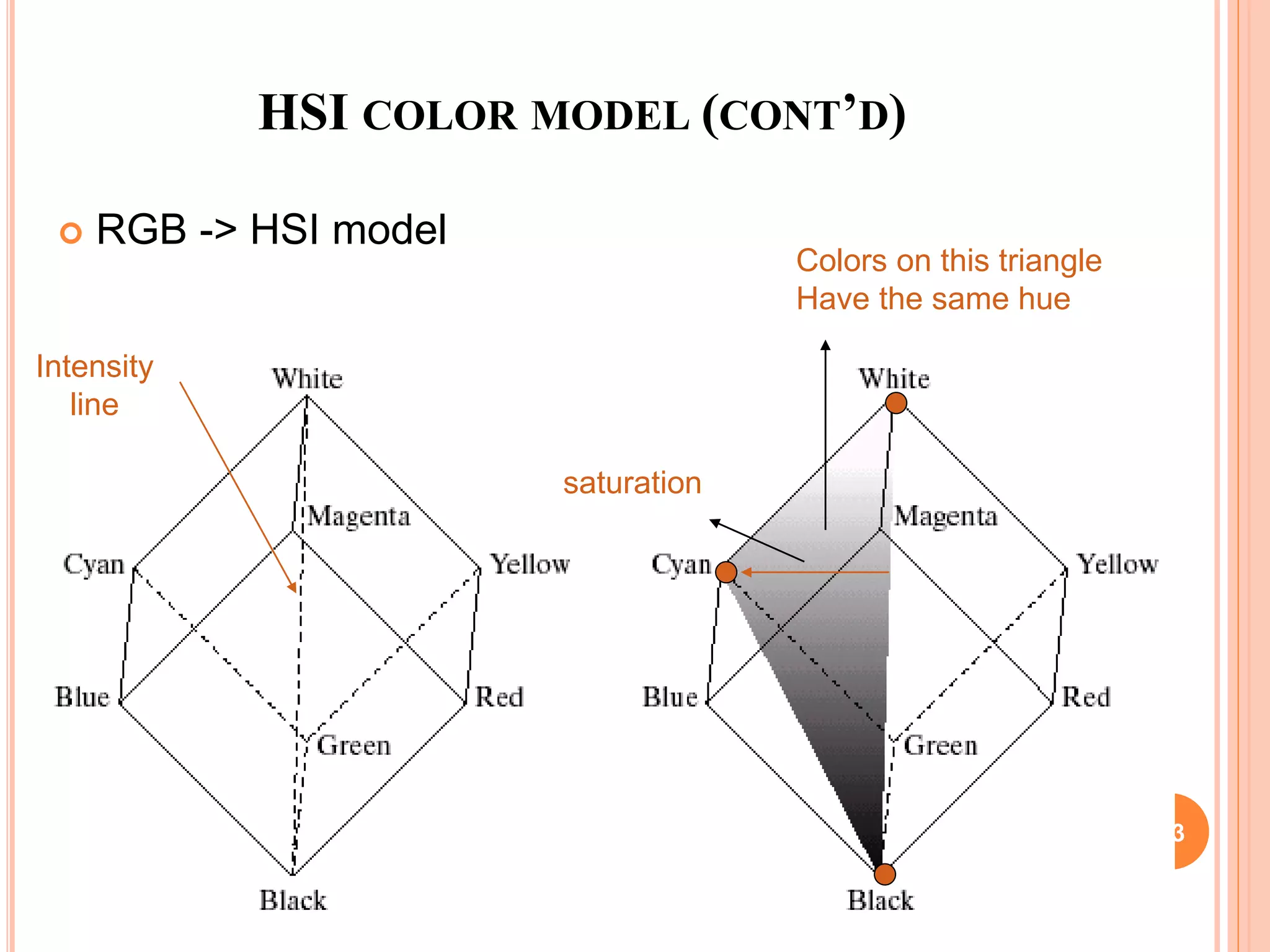
HSI COLOR MODEL (CONT’D)
 RGB -> HSI model
Intensity
line
saturation
Colors on this triangle
Have the same hue
33
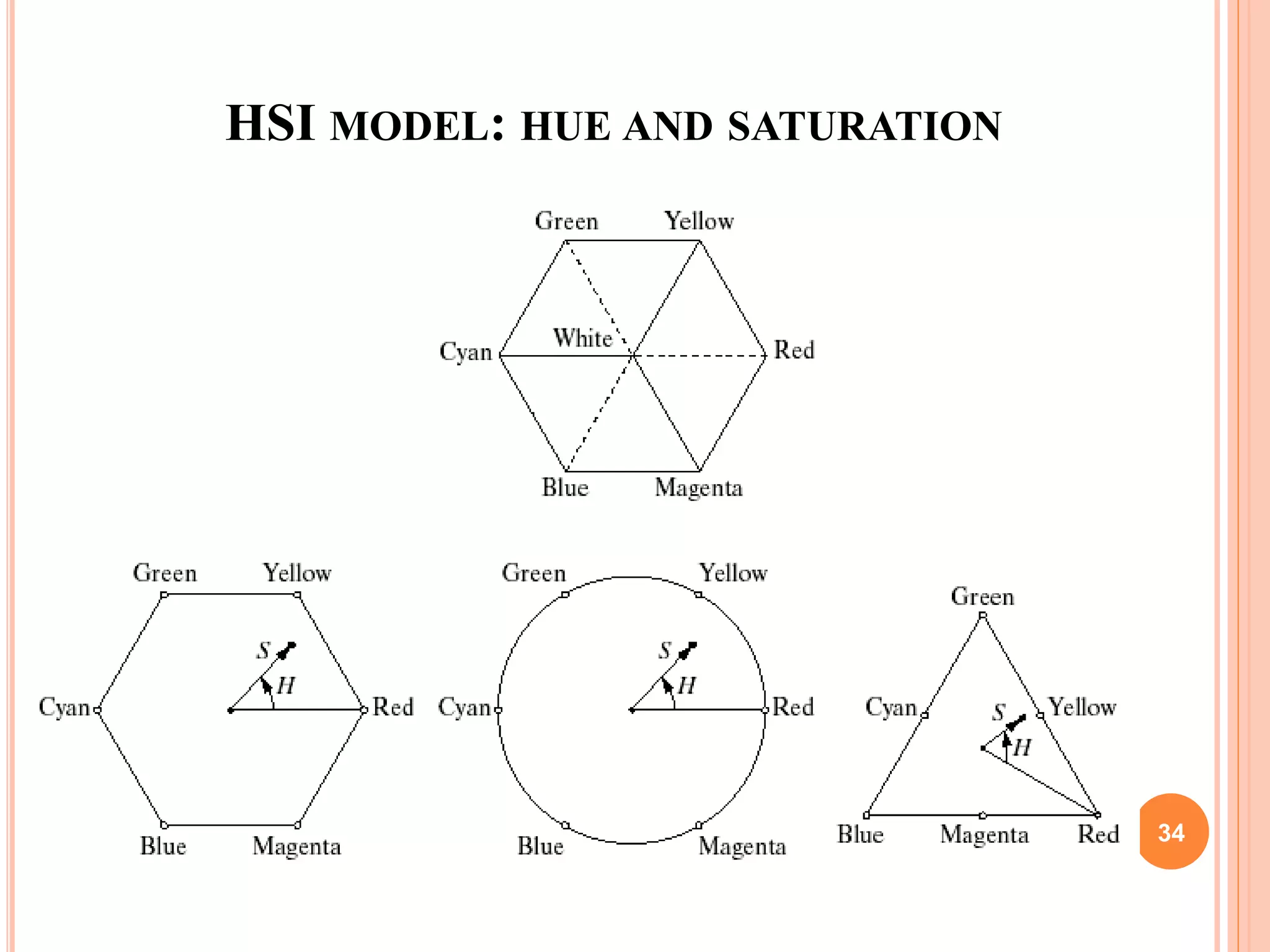
HSI MODEL: HUE AND SATURATION
34
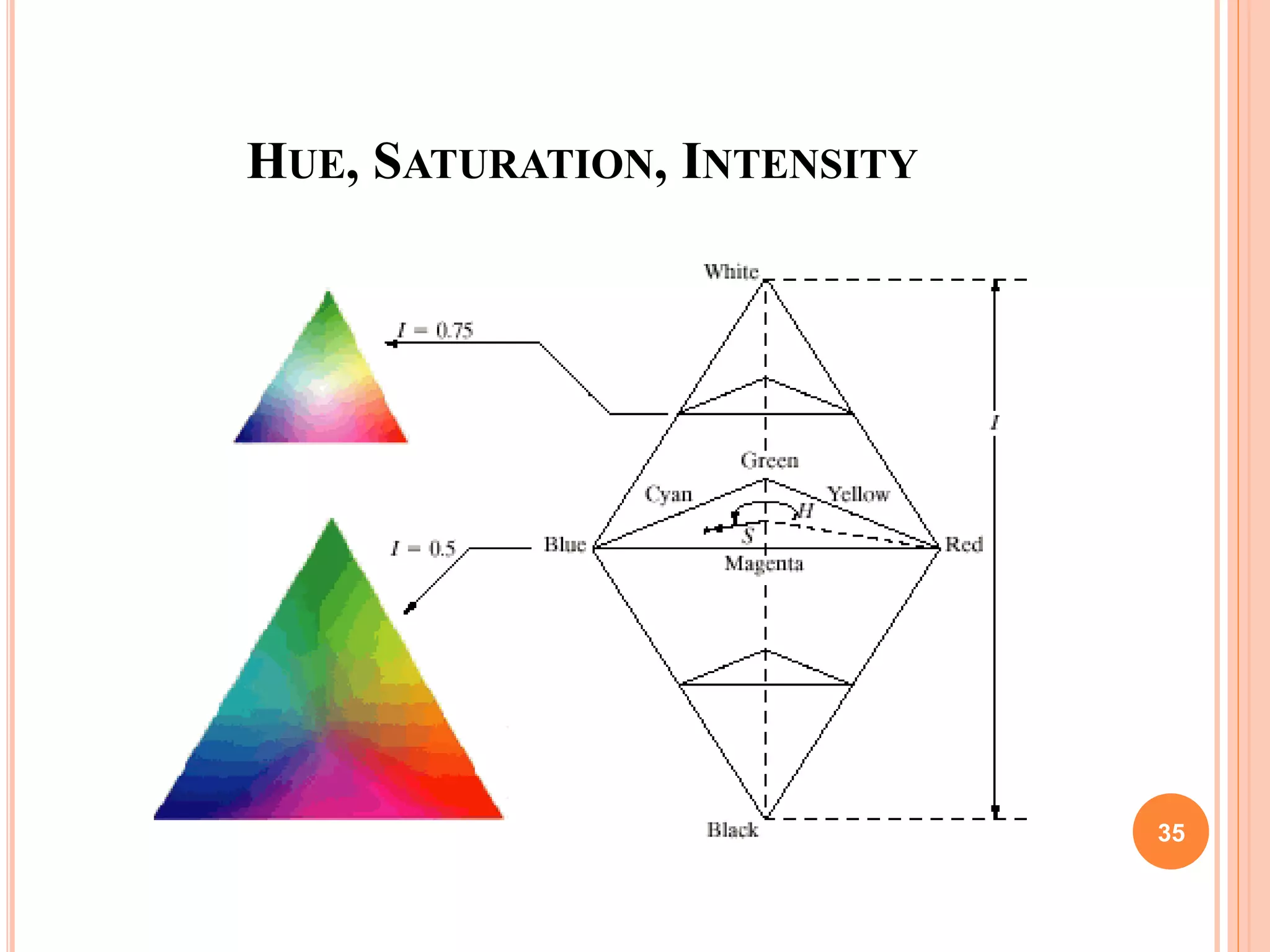
HUE, SATURATION, INTENSITY
35
HSI model
36
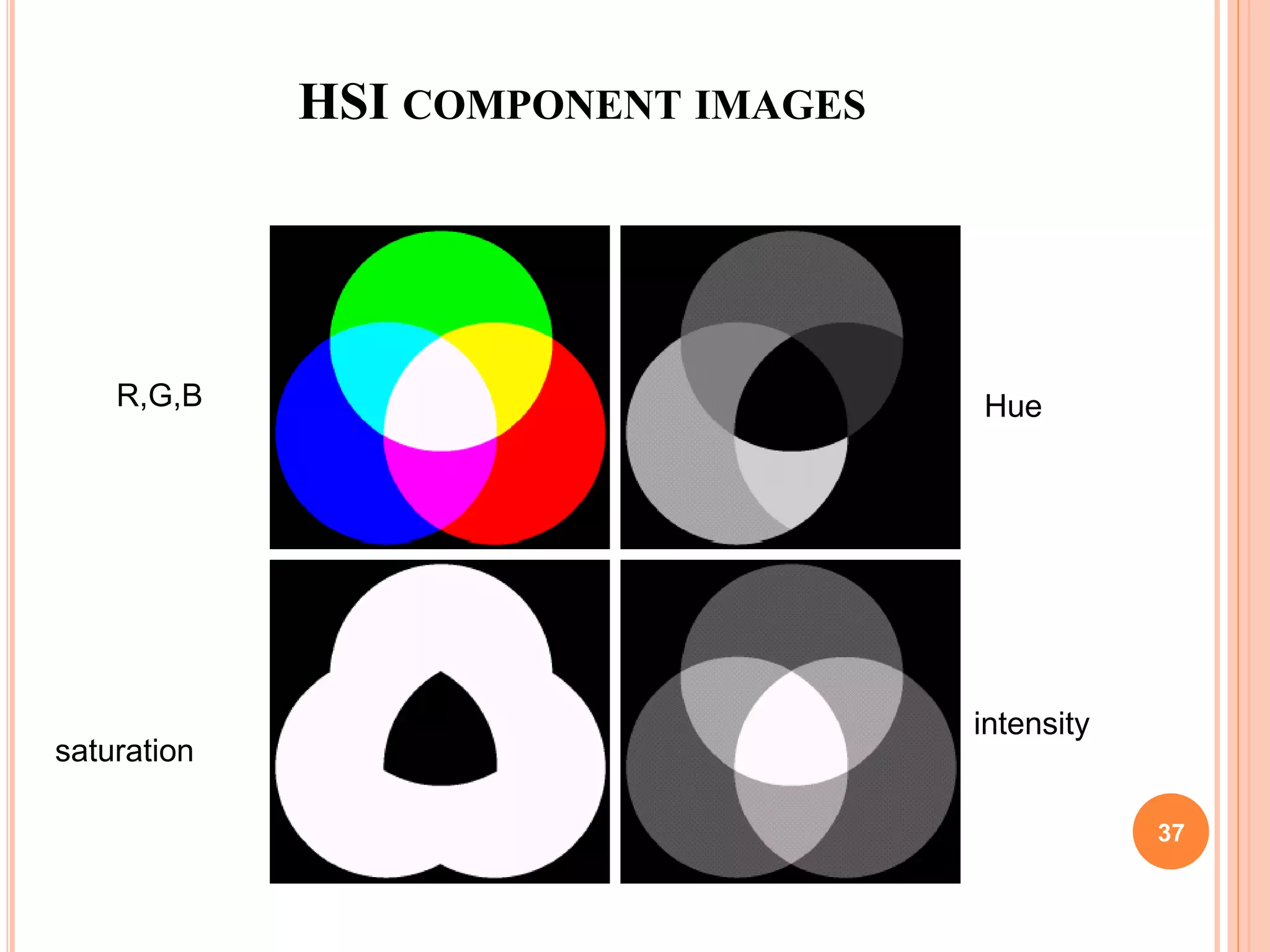
HSI COMPONENT IMAGES
R,G,B Hue
saturation
intensity
37
PSEUDO-COLOR IMAGE PROCESSING
 Assign colors to gray values based on a specified
criterion
 Differentiate the process of assigning colors to
monochrome images
 For human visualization and interpretation of gray-
scale events
 Intensity slicing
 Gray level to color transformations
38
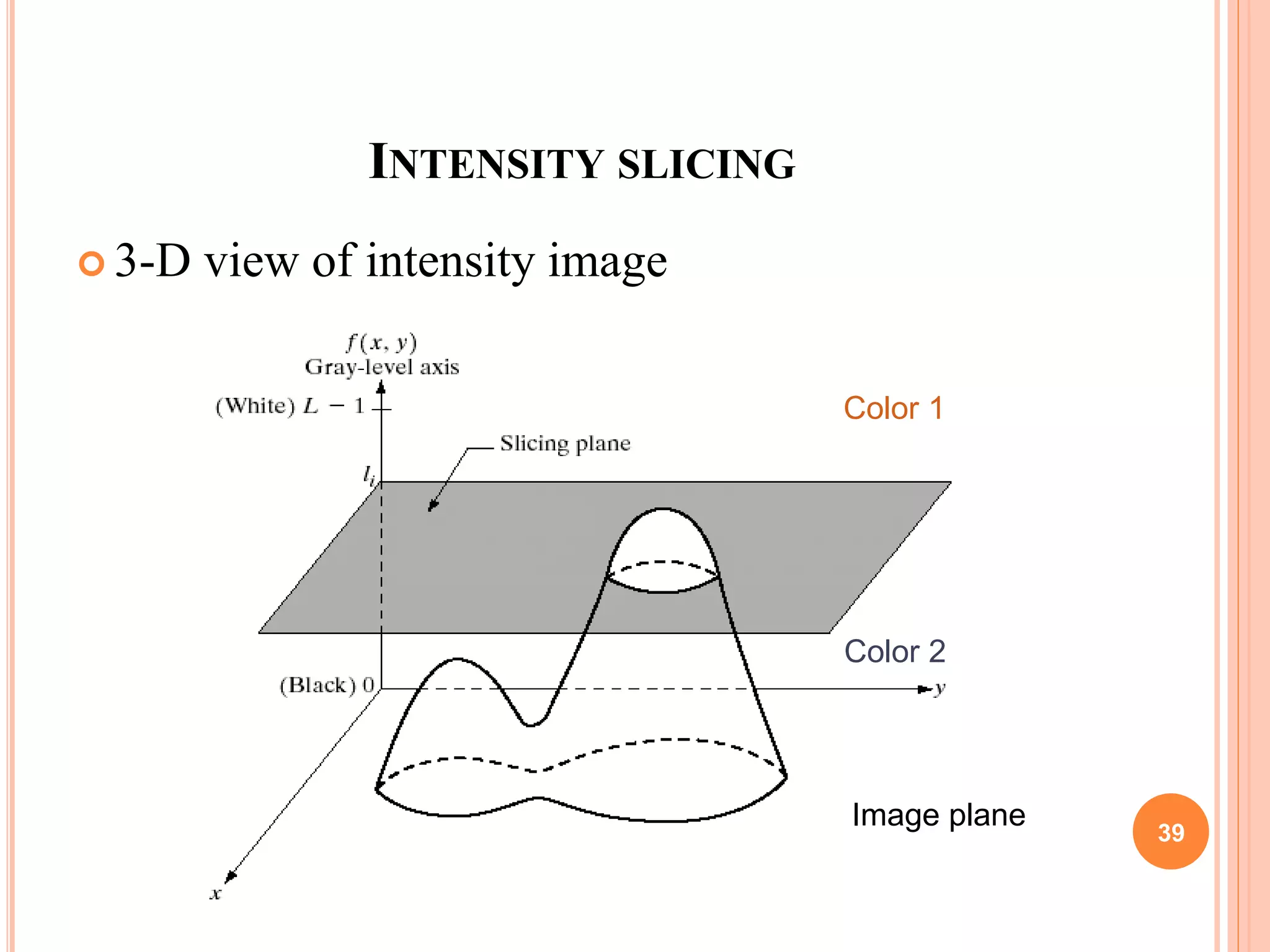
INTENSITY SLICING
 3-D view of intensity image
Image plane
Color 1
Color 2
39
INTENSITY SLICING (CONT’D)
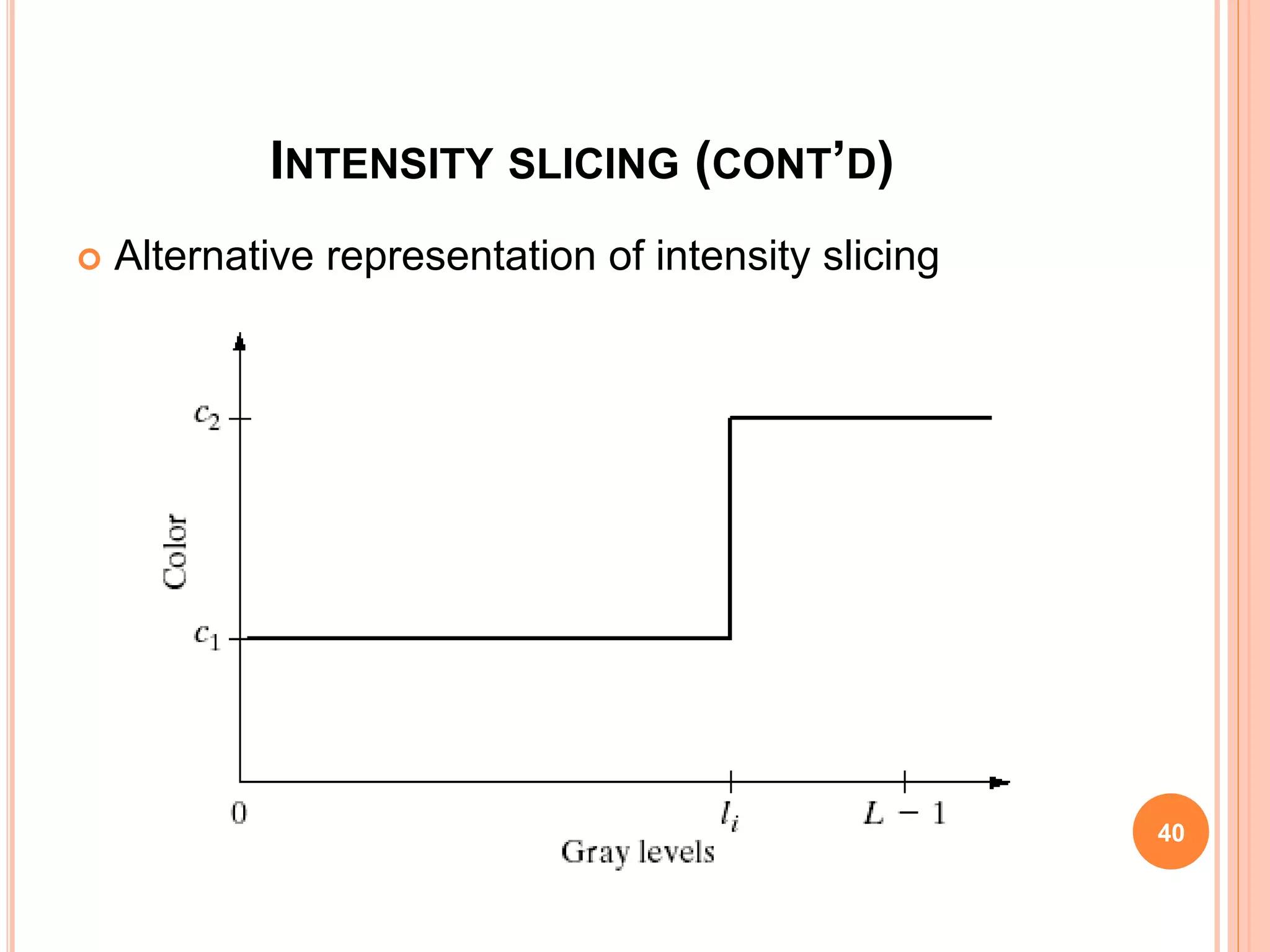
 Alternative representation of intensity slicing
40
INTENSITY SLICING (CONT.)
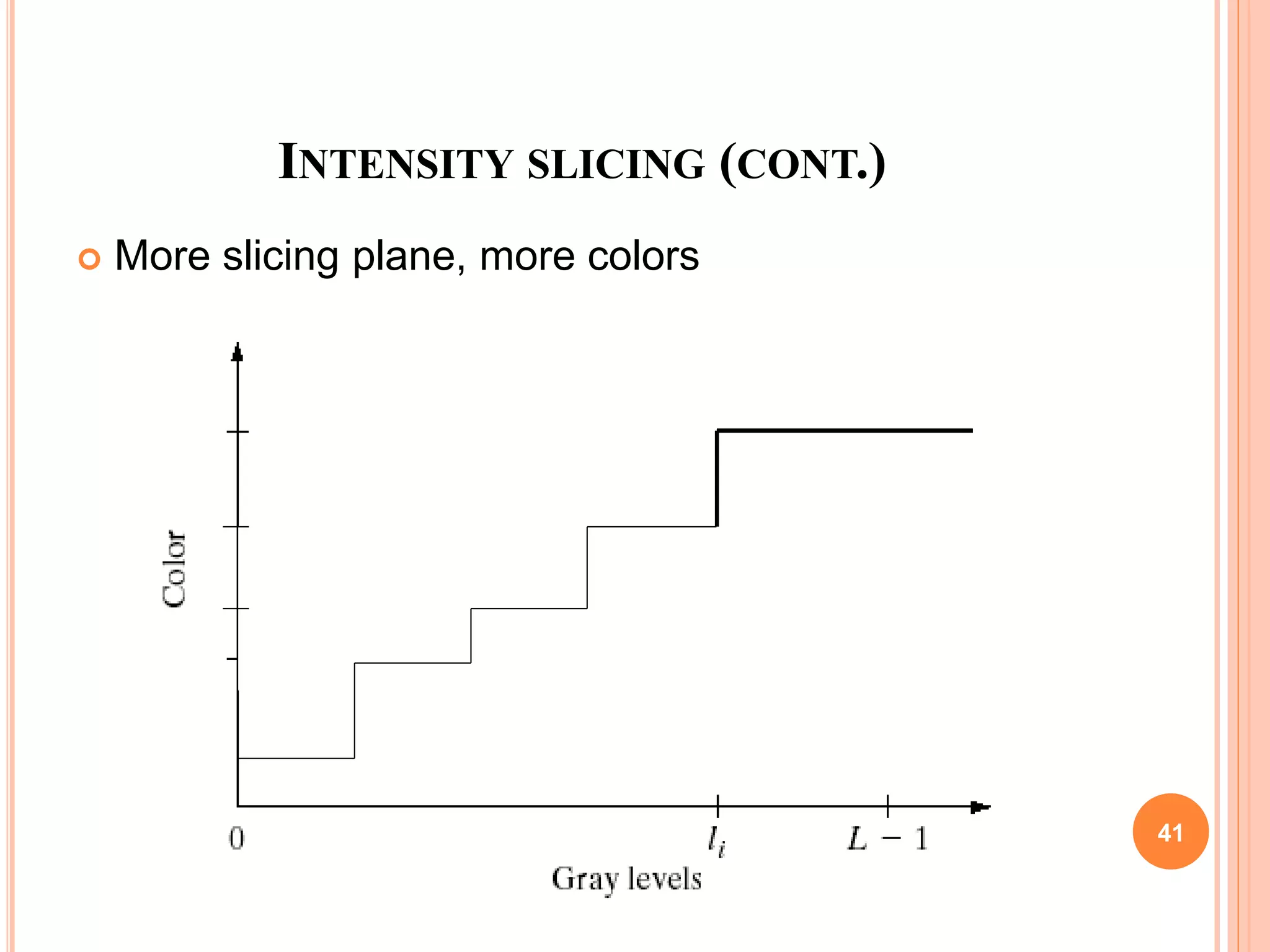
 More slicing plane, more colors
41
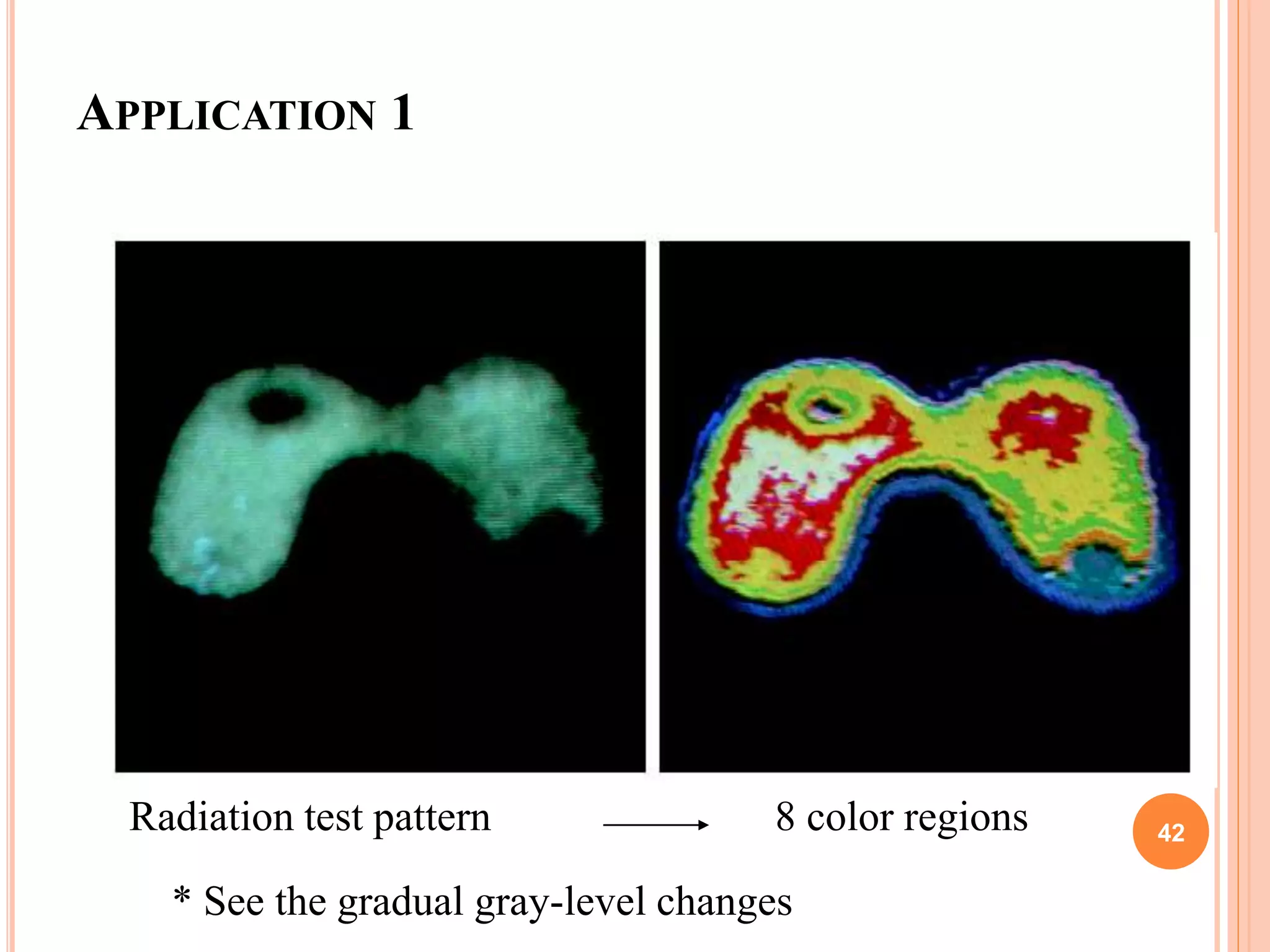
APPLICATION 1
8 color regionsRadiation test pattern
* See the gradual gray-level changes
42
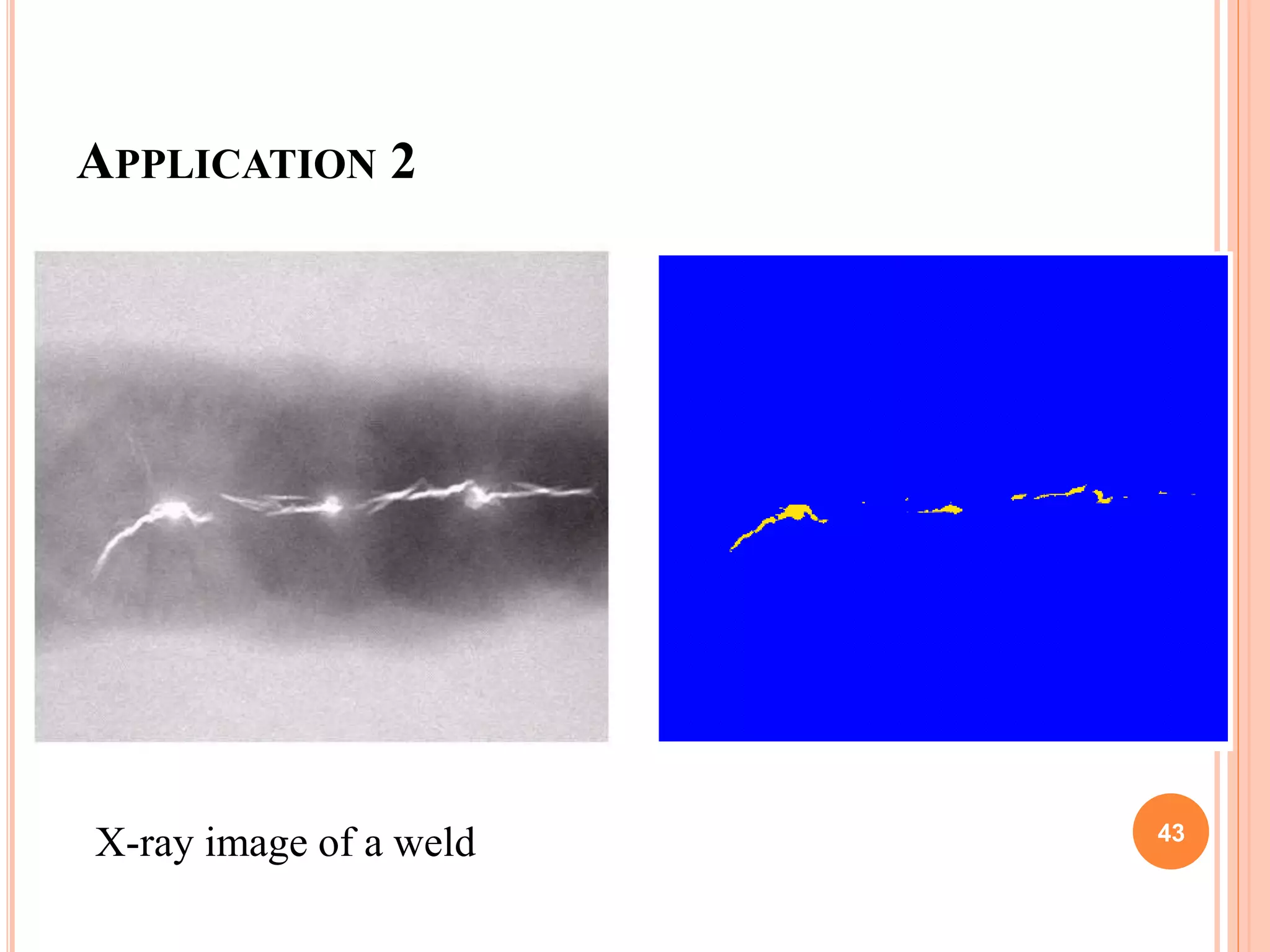
APPLICATION 2
X-ray image of a weld 43
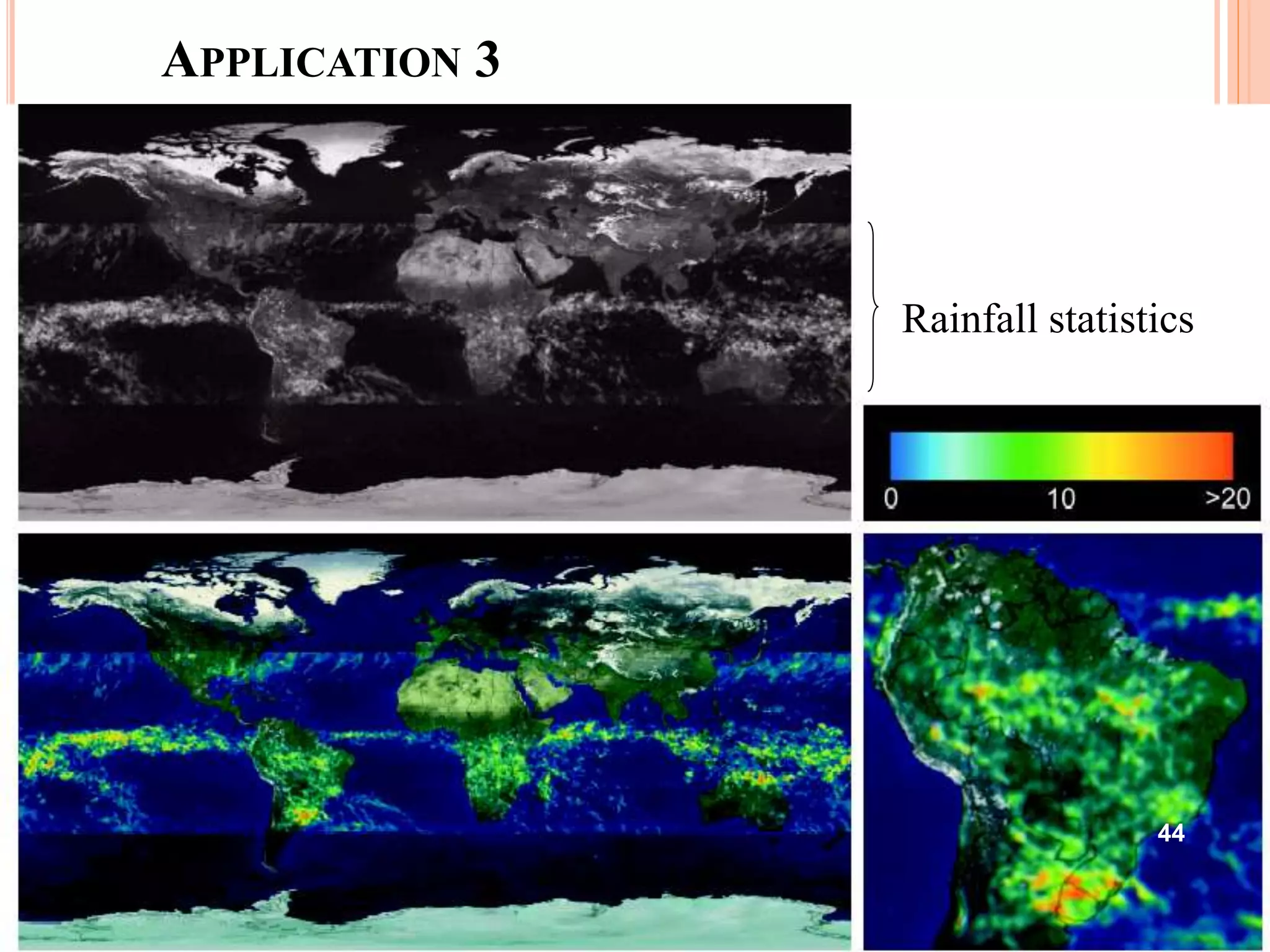
APPLICATION 3
Rainfall statistics
44
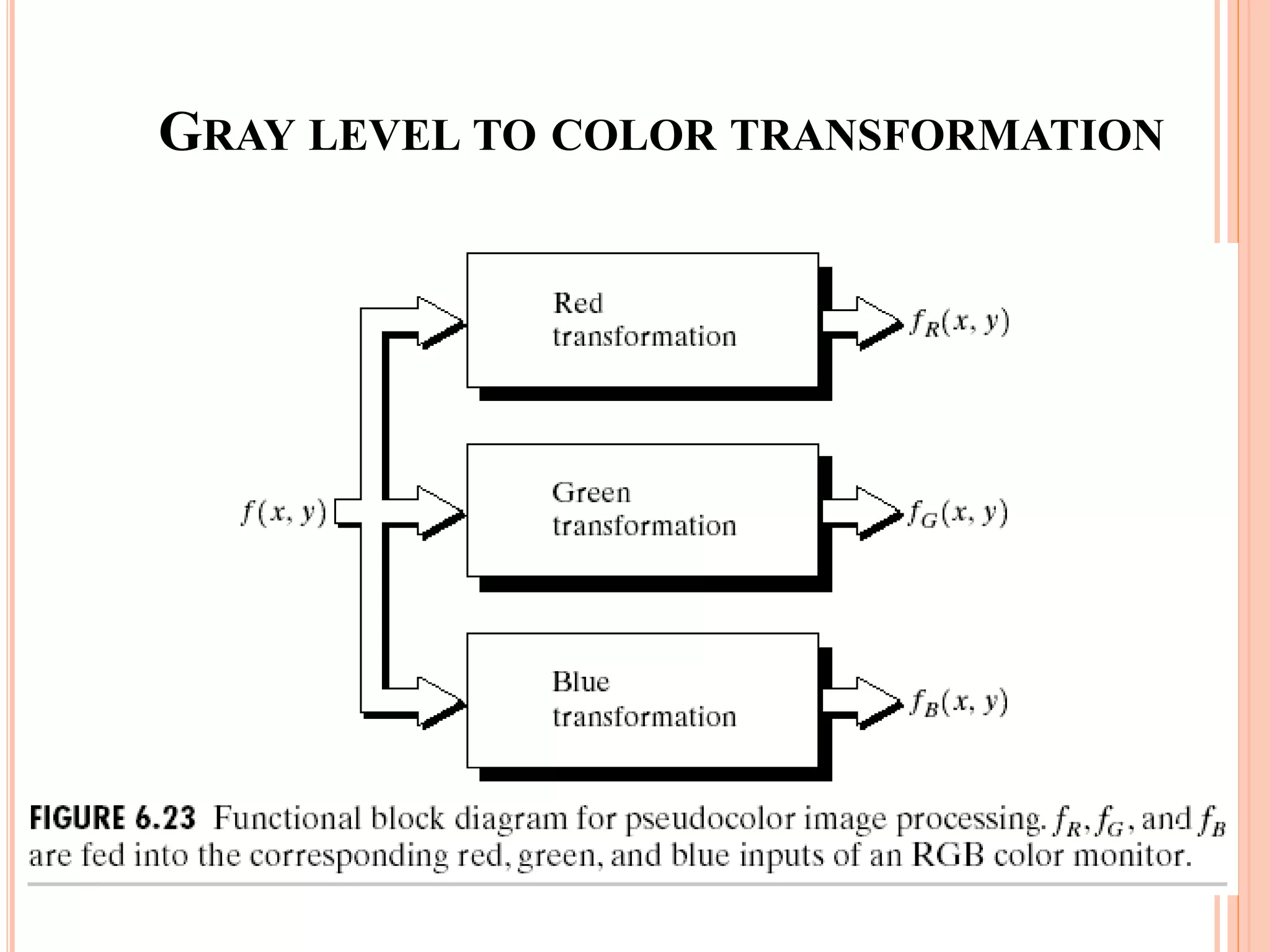
GRAY LEVEL TO COLOR TRANSFORMATION
45
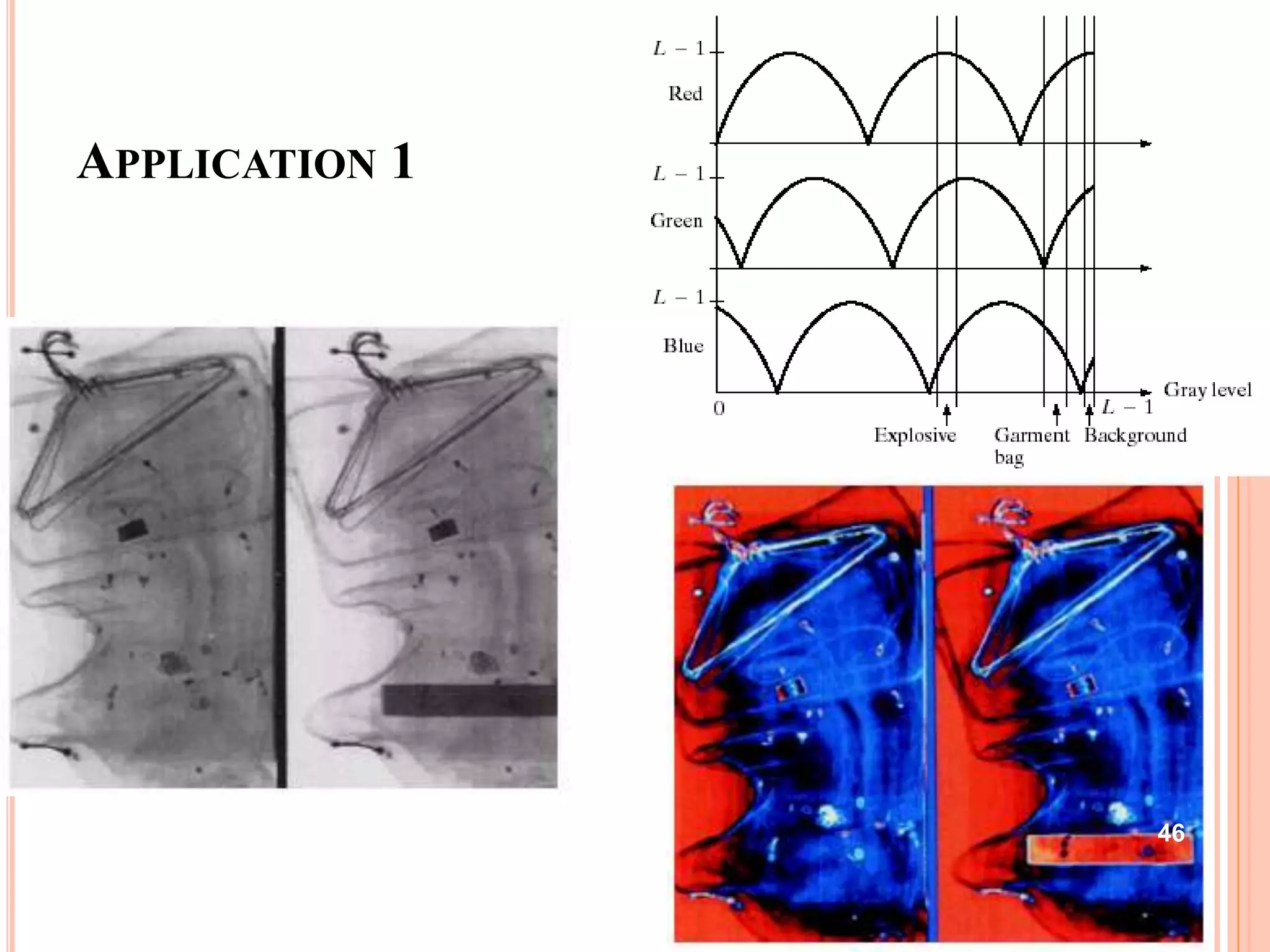
APPLICATION 1
46
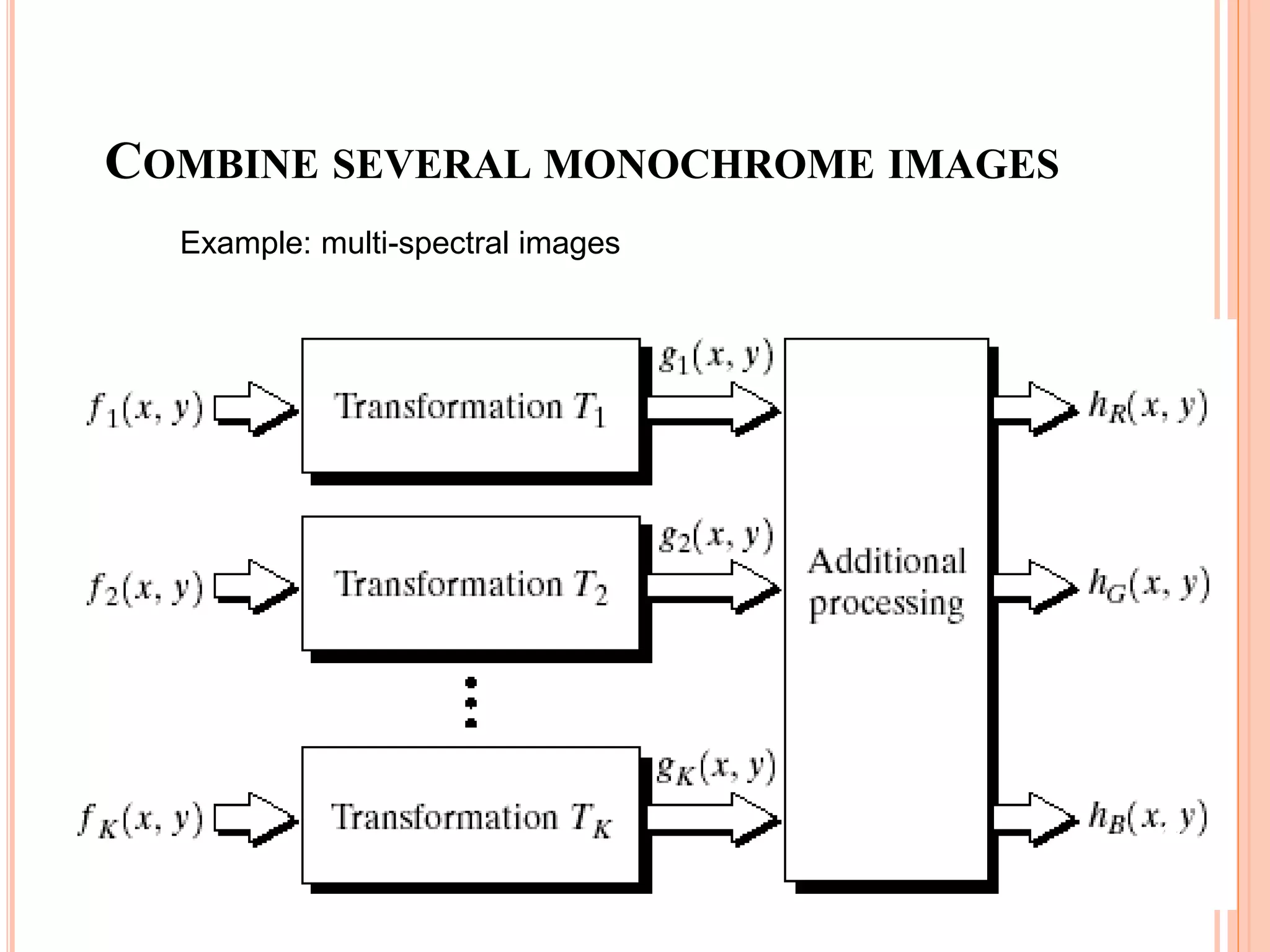
COMBINE SEVERAL MONOCHROME IMAGES
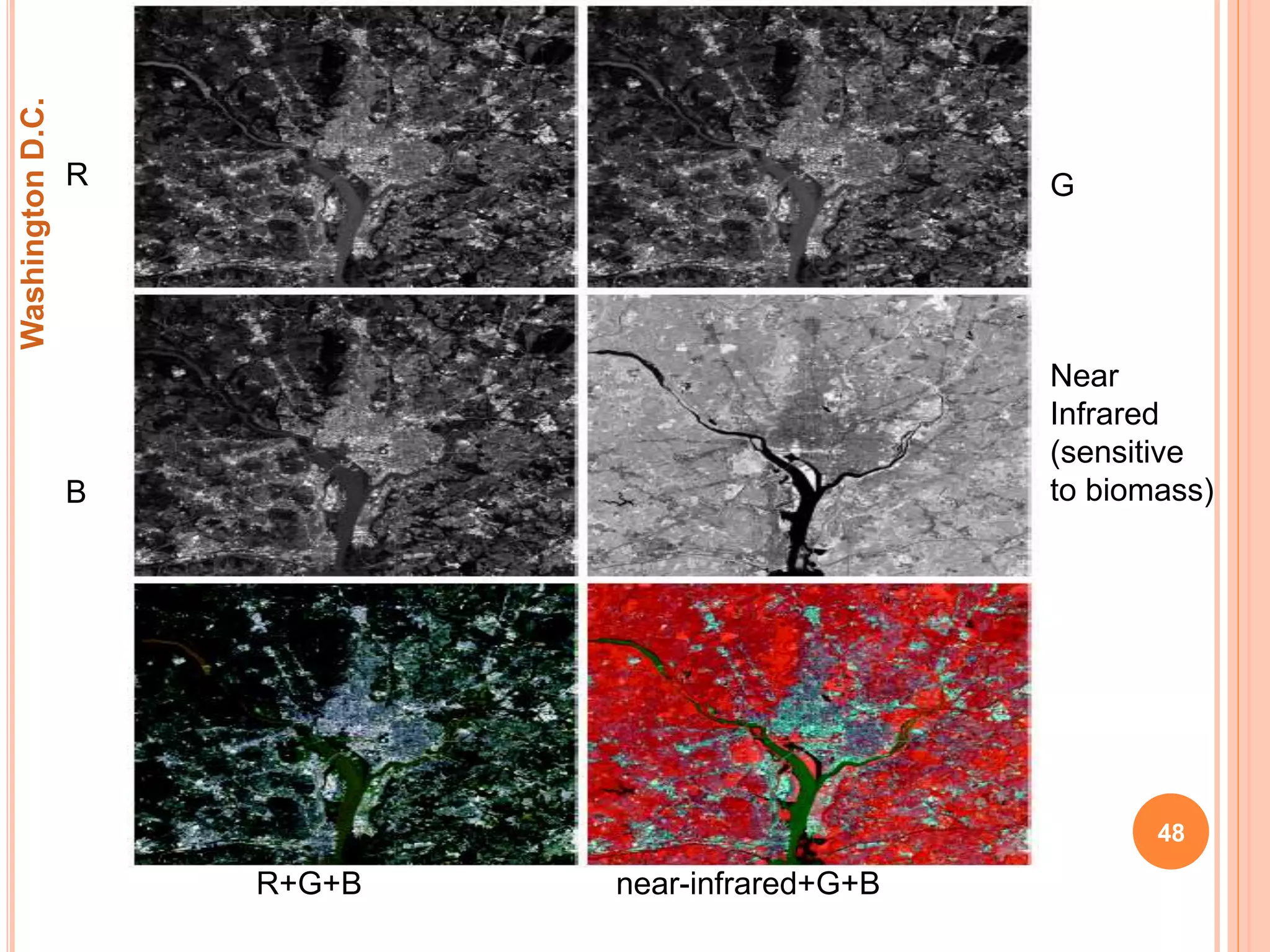
Example: multi-spectral images
47
R G
B
Near
Infrared
(sensitive
to biomass)
R+G+B near-infrared+G+B
WashingtonD.C.
48
BASICS OF FULL COLOR IMAGE PROCESSING
 Full color image processing fall into 2 categories.
 In 1st category we process each component image
individually and then form a composite processed color
image from the individually processed component.
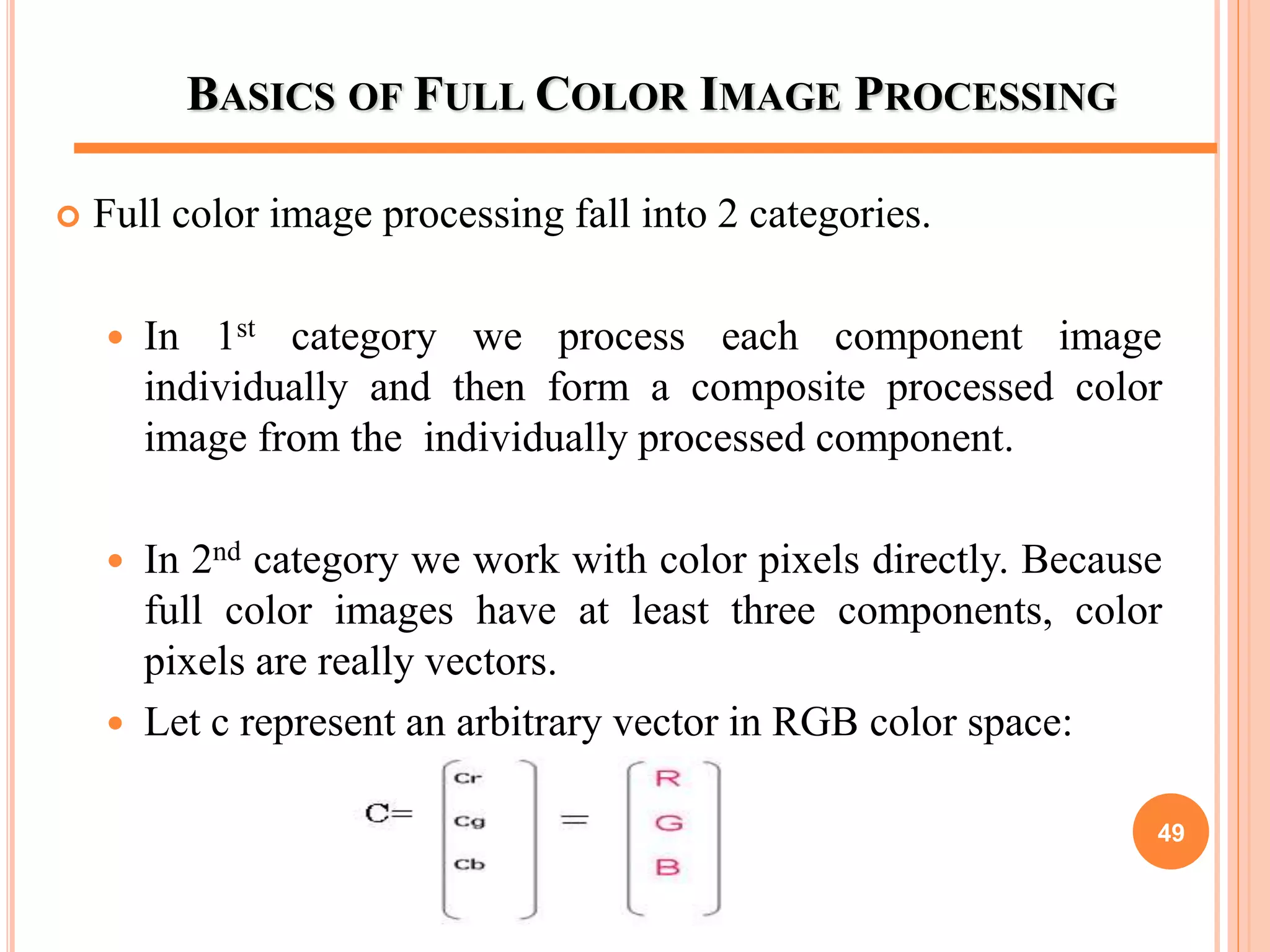
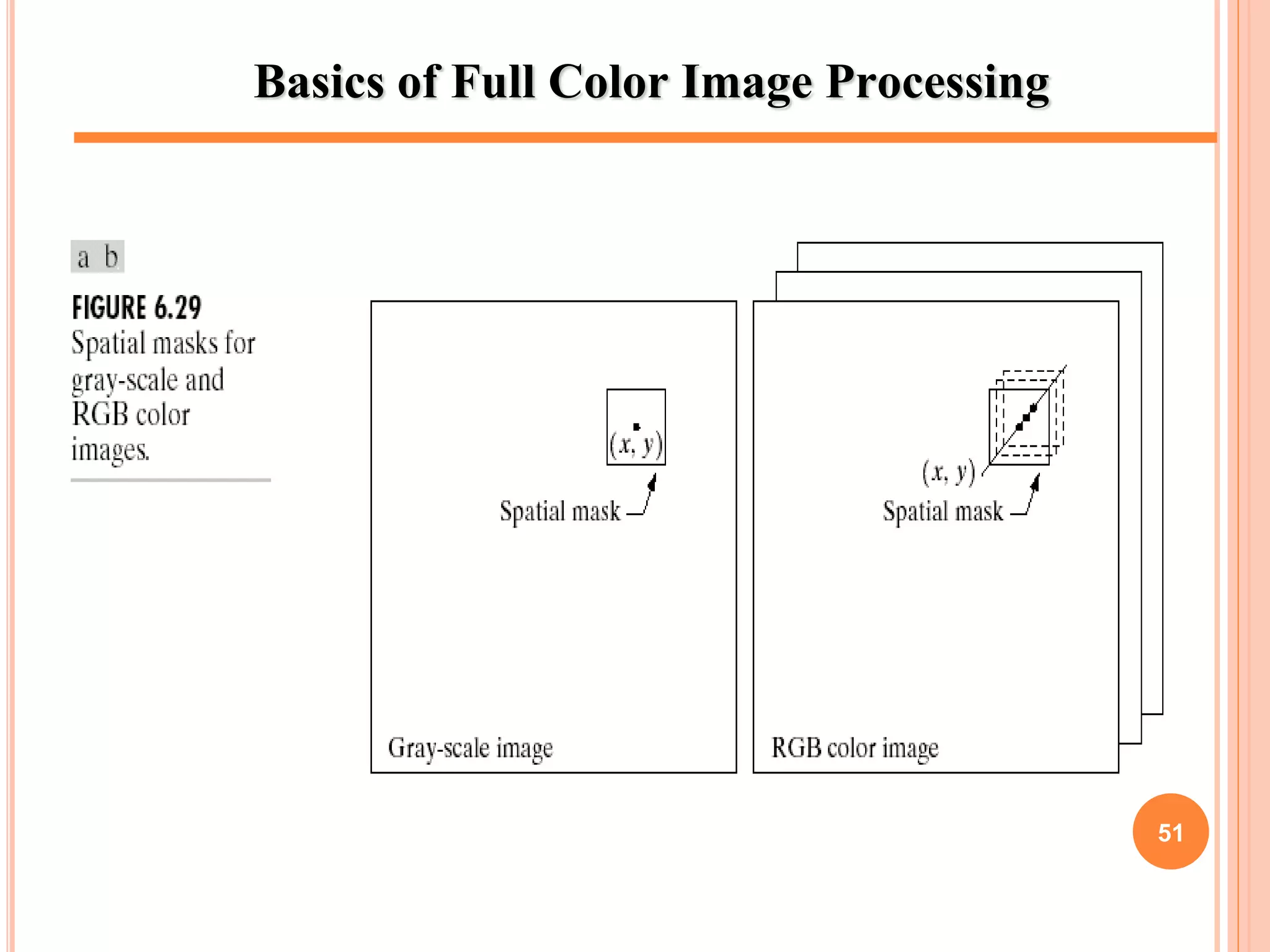
 In 2nd category we work with color pixels directly. Because
full color images have at least three components, color
pixels are really vectors.
 Let c represent an arbitrary vector in RGB color space:
49
BASICS OF FULL COLOR IMAGE PROCESSING
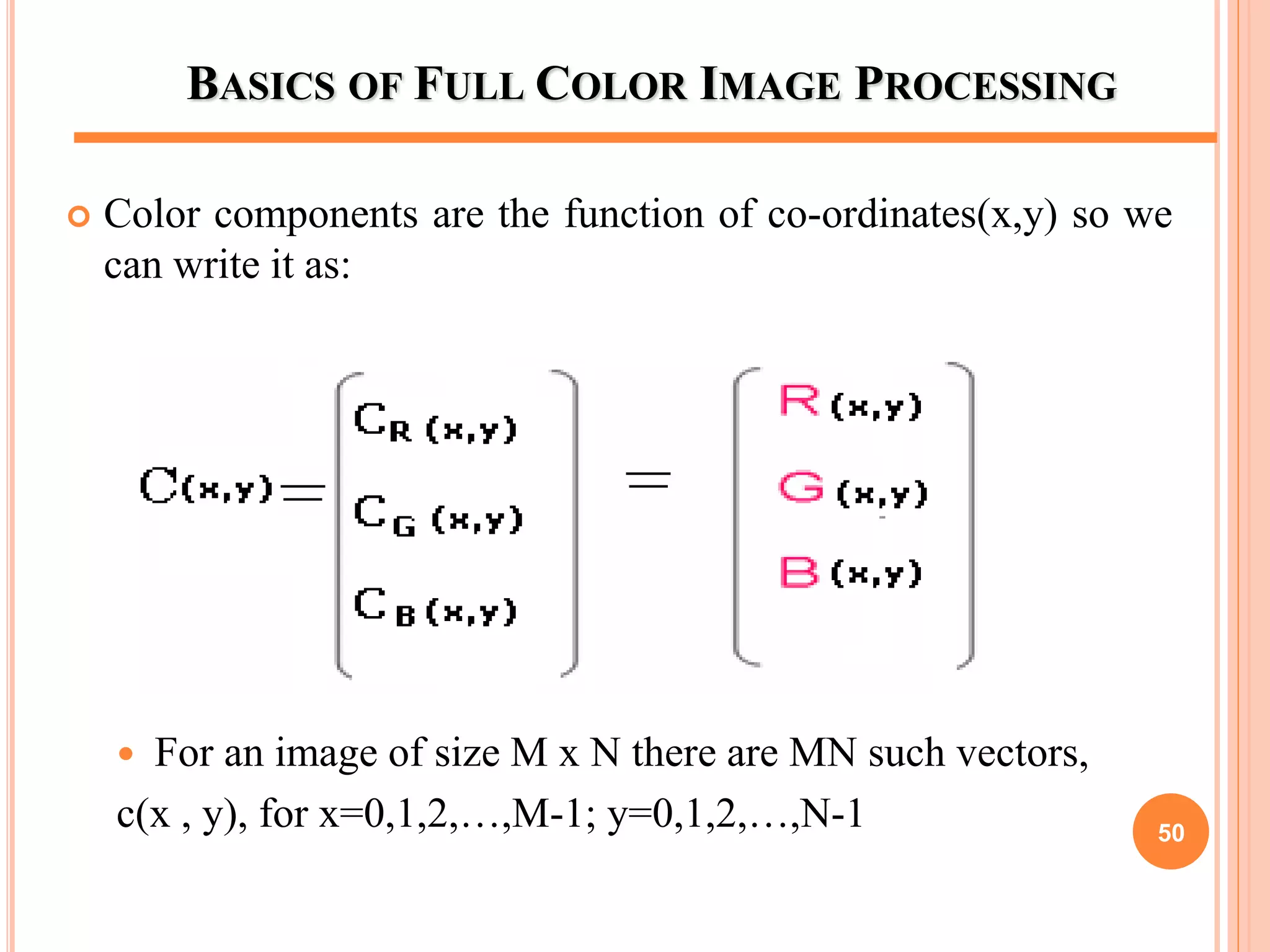
 Color components are the function of co-ordinates(x,y) so we
can write it as:
 For an image of size M x N there are MN such vectors,
c(x , y), for x=0,1,2,…,M-1; y=0,1,2,…,N-1 50
Basics of Full Color Image Processing
51
COLOR TRANSFORMATIONS
 Color transformation can be represented by the expression ::
g(x , y) = T [ f (x , y) ]
f( x , y): input image
g(x , y): processed (output) image
T[ * ]: an operator on f defined over neighborhood of (x , y).
The pixel values here are triplets or quartets (i. e group of 3 or
4 values)
52
COLOR TRANSFORMATIONS
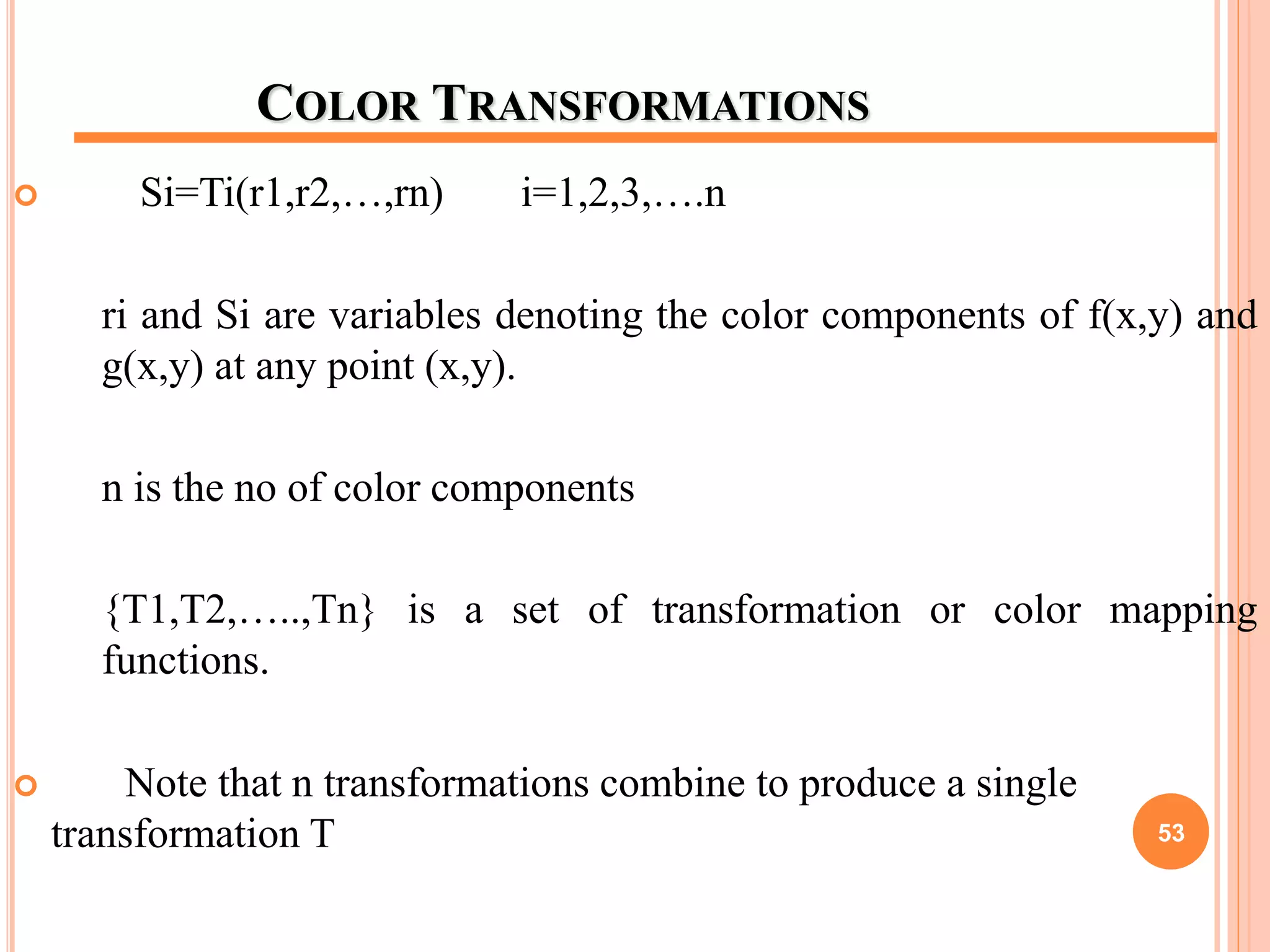
 Si=Ti(r1,r2,…,rn) i=1,2,3,….n
ri and Si are variables denoting the color components of f(x,y) and
g(x,y) at any point (x,y).
n is the no of color components
{T1,T2,…..,Tn} is a set of transformation or color mapping
functions.
 Note that n transformations combine to produce a single
transformation T 53
COLOR TRANSFORMATIONS
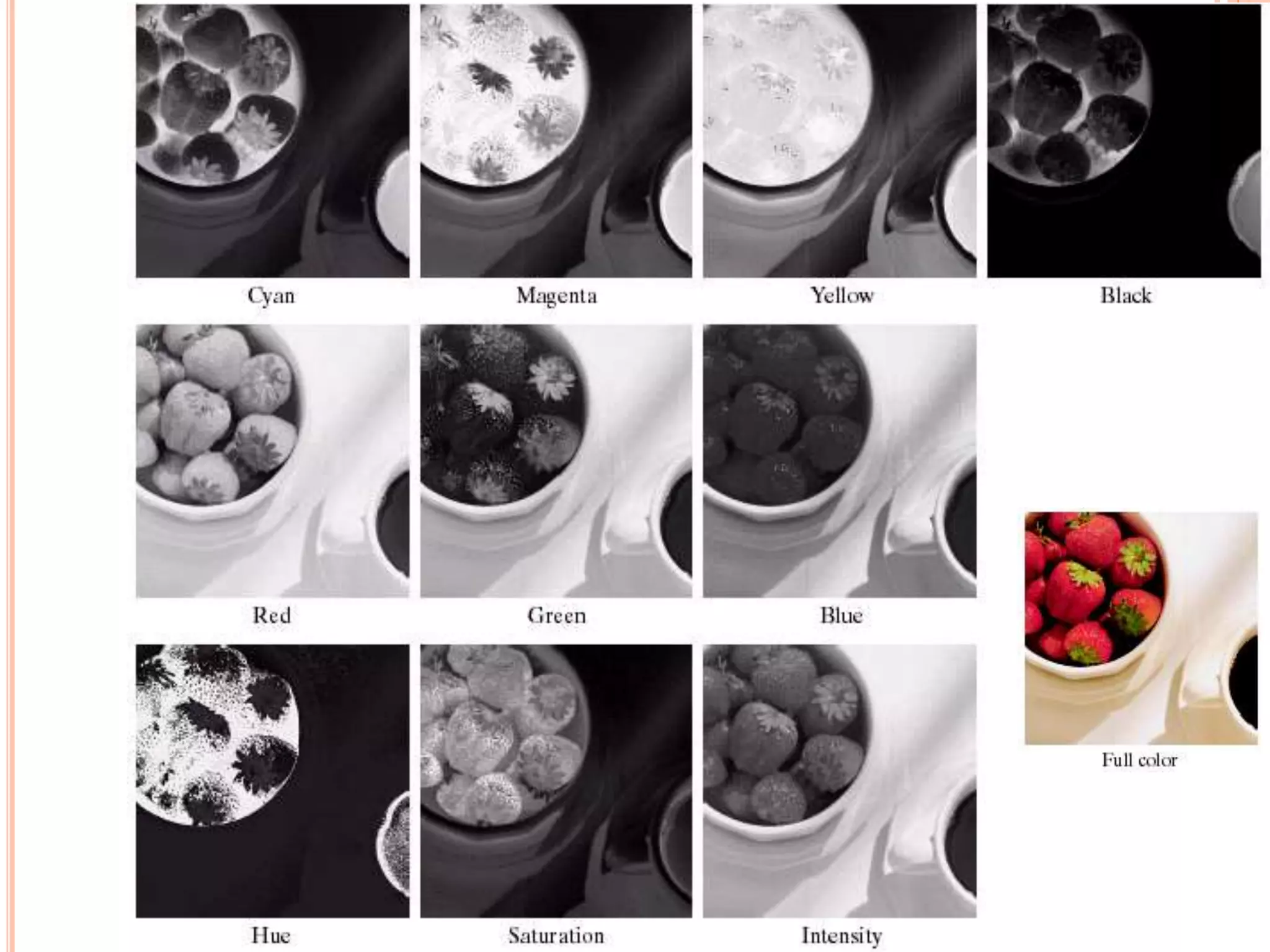
 The color space chosen determine the value of n.
 If RGB color space is selected then n=3 & r1,r2,r3 denotes the red, blue and
green components of the image.
 If CMYK color space is selected then n=4 & r1,r2,r3,r4 denotes the cyan,
hue, magenta and black components of the image.
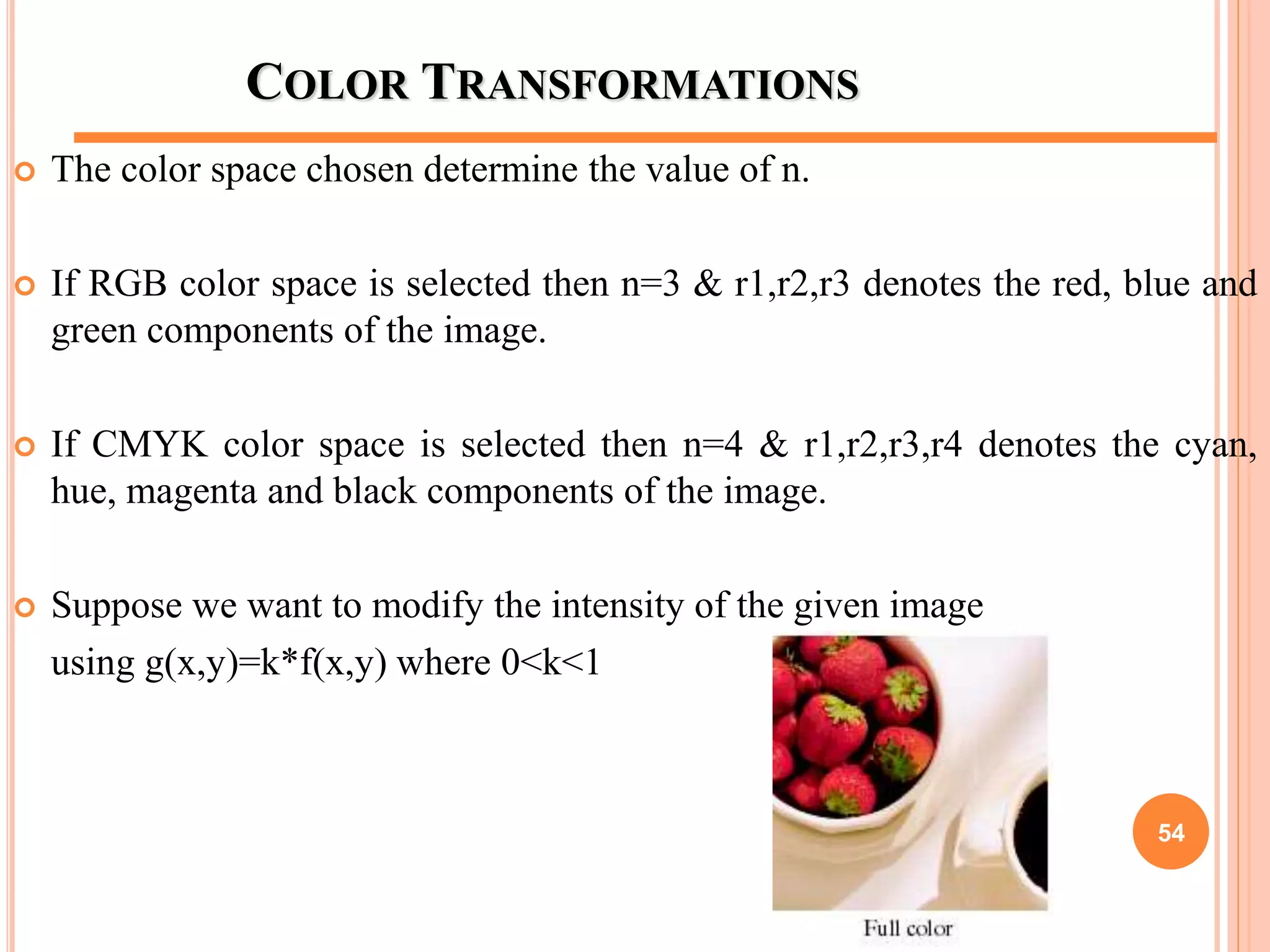
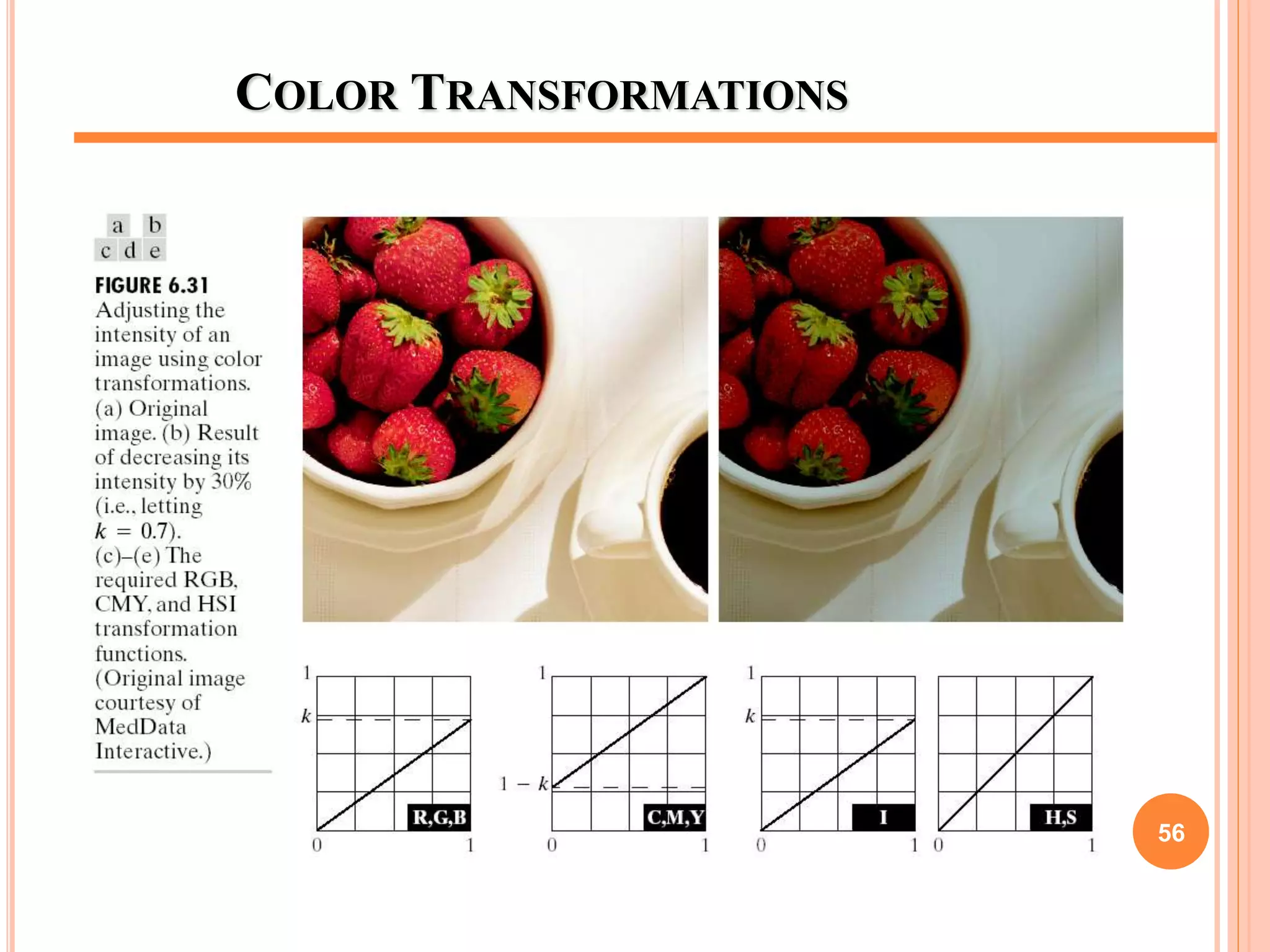
 Suppose we want to modify the intensity of the given image
using g(x,y)=k*f(x,y) where 0<k<1
54
55
COLOR TRANSFORMATIONS
56
COLOR COMPLEMENTS
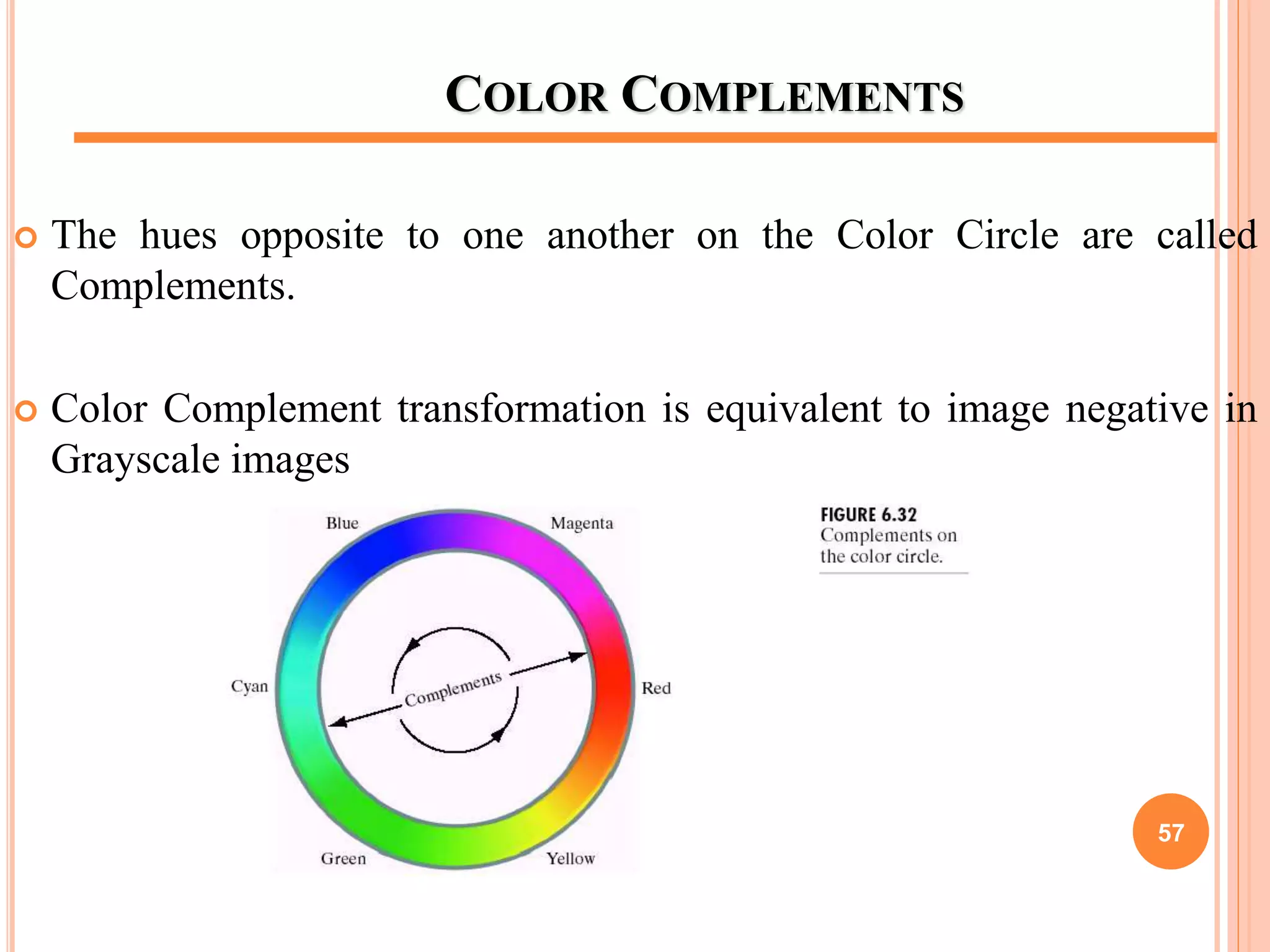
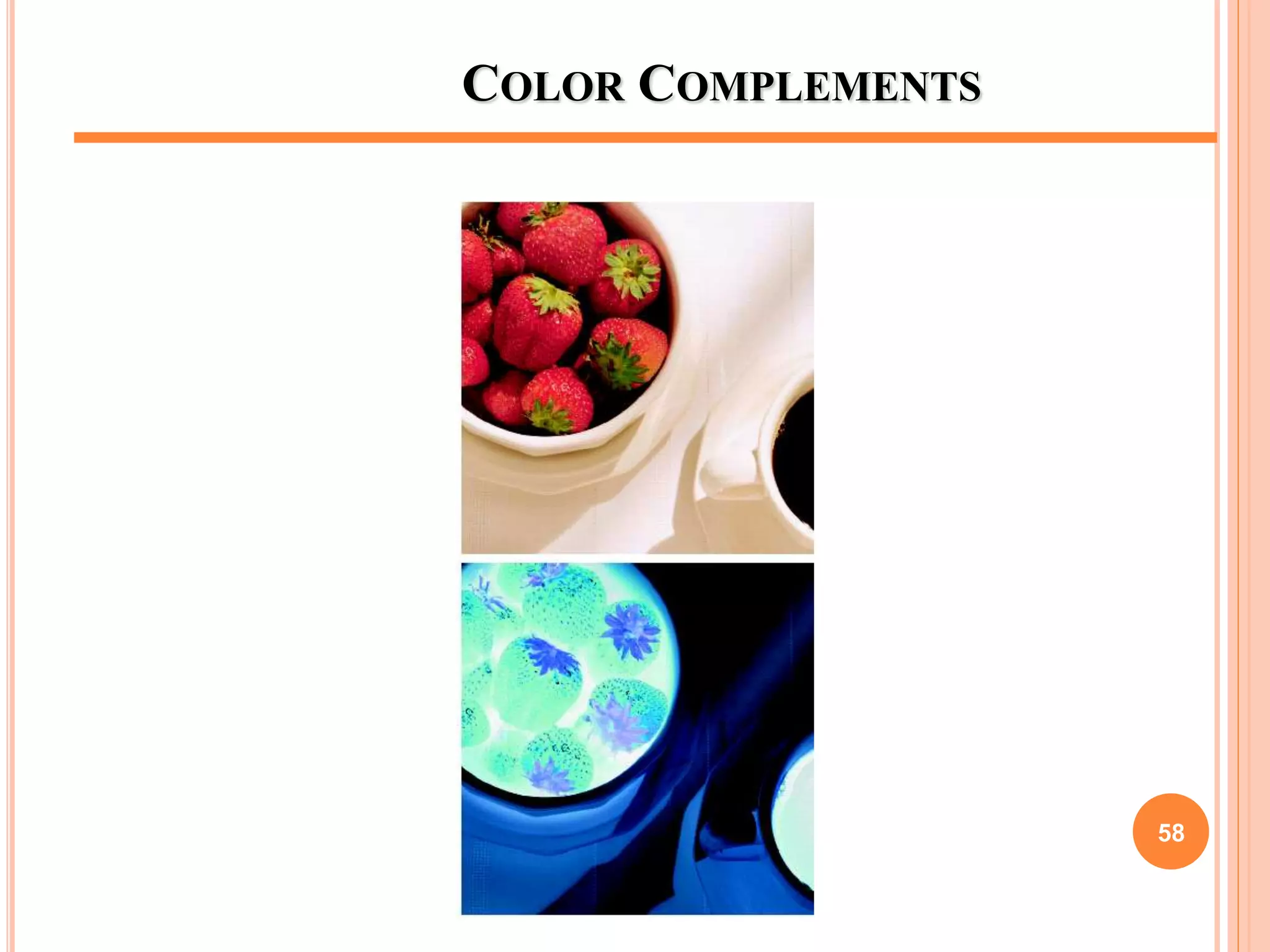
 The hues opposite to one another on the Color Circle are called
Complements.
 Color Complement transformation is equivalent to image negative in
Grayscale images
57
COLOR COMPLEMENTS
58
COLOR SLICING
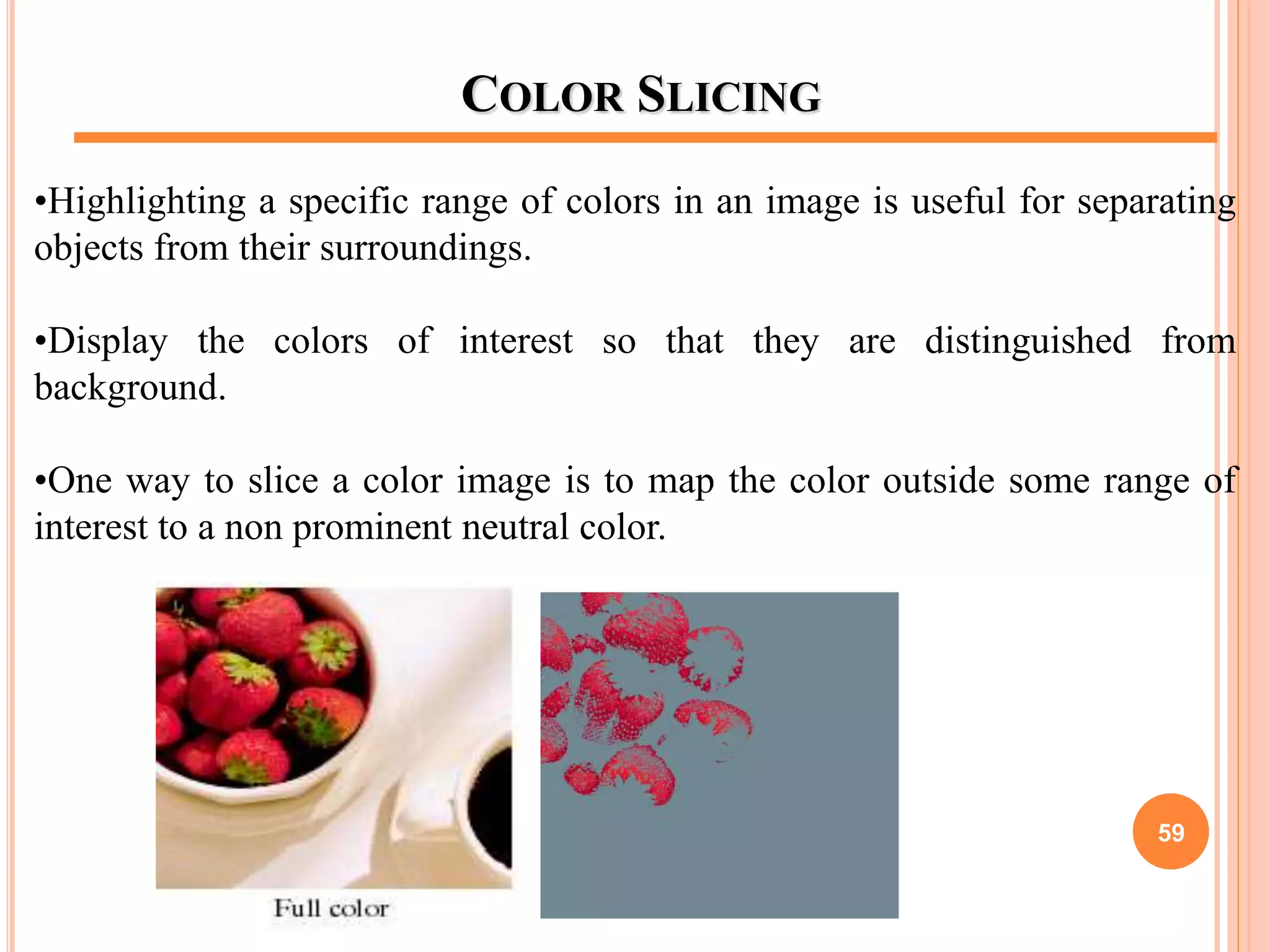
•Highlighting a specific range of colors in an image is useful for separating
objects from their surroundings.
•Display the colors of interest so that they are distinguished from
background.
•One way to slice a color image is to map the color outside some range of
interest to a non prominent neutral color.
59
HISTOGRAM PROCESSING
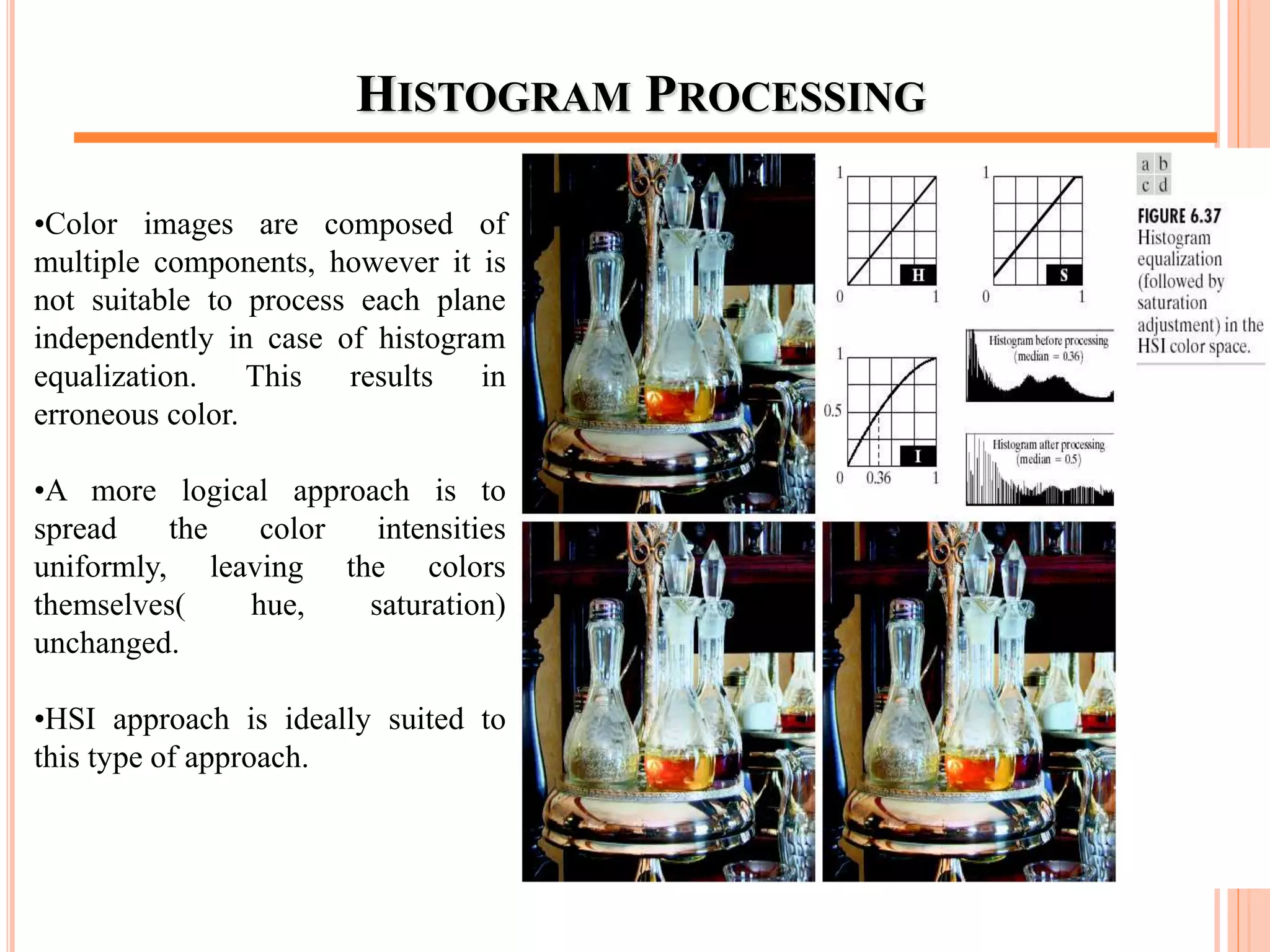
•Color images are composed of
multiple components, however it is
not suitable to process each plane
independently in case of histogram
equalization. This results in
erroneous color.
•A more logical approach is to
spread the color intensities
uniformly, leaving the colors
themselves( hue, saturation)
unchanged.
•HSI approach is ideally suited to
this type of approach.
60
COLOR IMAGE SMOOTHING
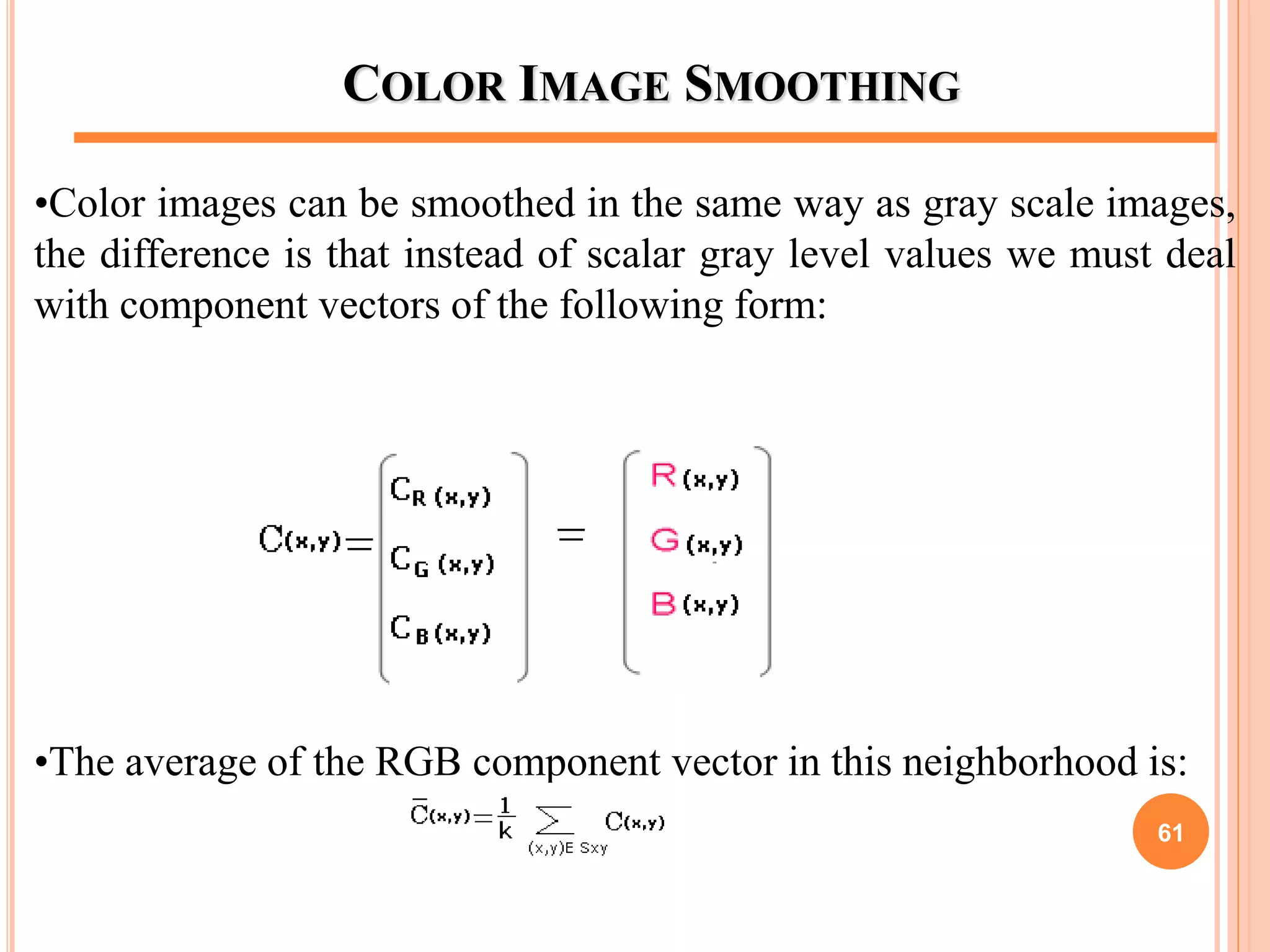
•Color images can be smoothed in the same way as gray scale images,
the difference is that instead of scalar gray level values we must deal
with component vectors of the following form:
•The average of the RGB component vector in this neighborhood is:
61
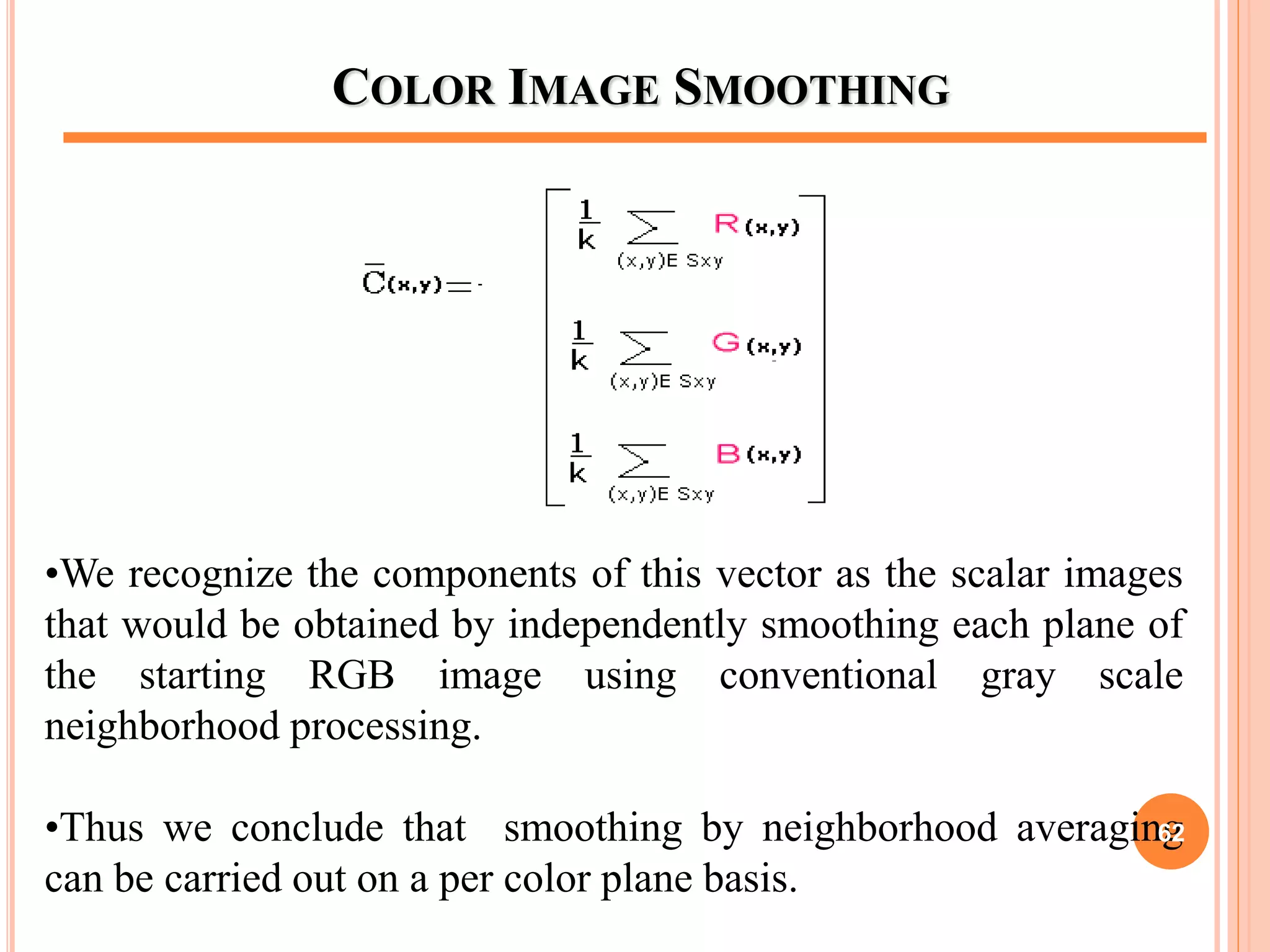
COLOR IMAGE SMOOTHING
•We recognize the components of this vector as the scalar images
that would be obtained by independently smoothing each plane of
the starting RGB image using conventional gray scale
neighborhood processing.
•Thus we conclude that smoothing by neighborhood averaging
can be carried out on a per color plane basis.
62
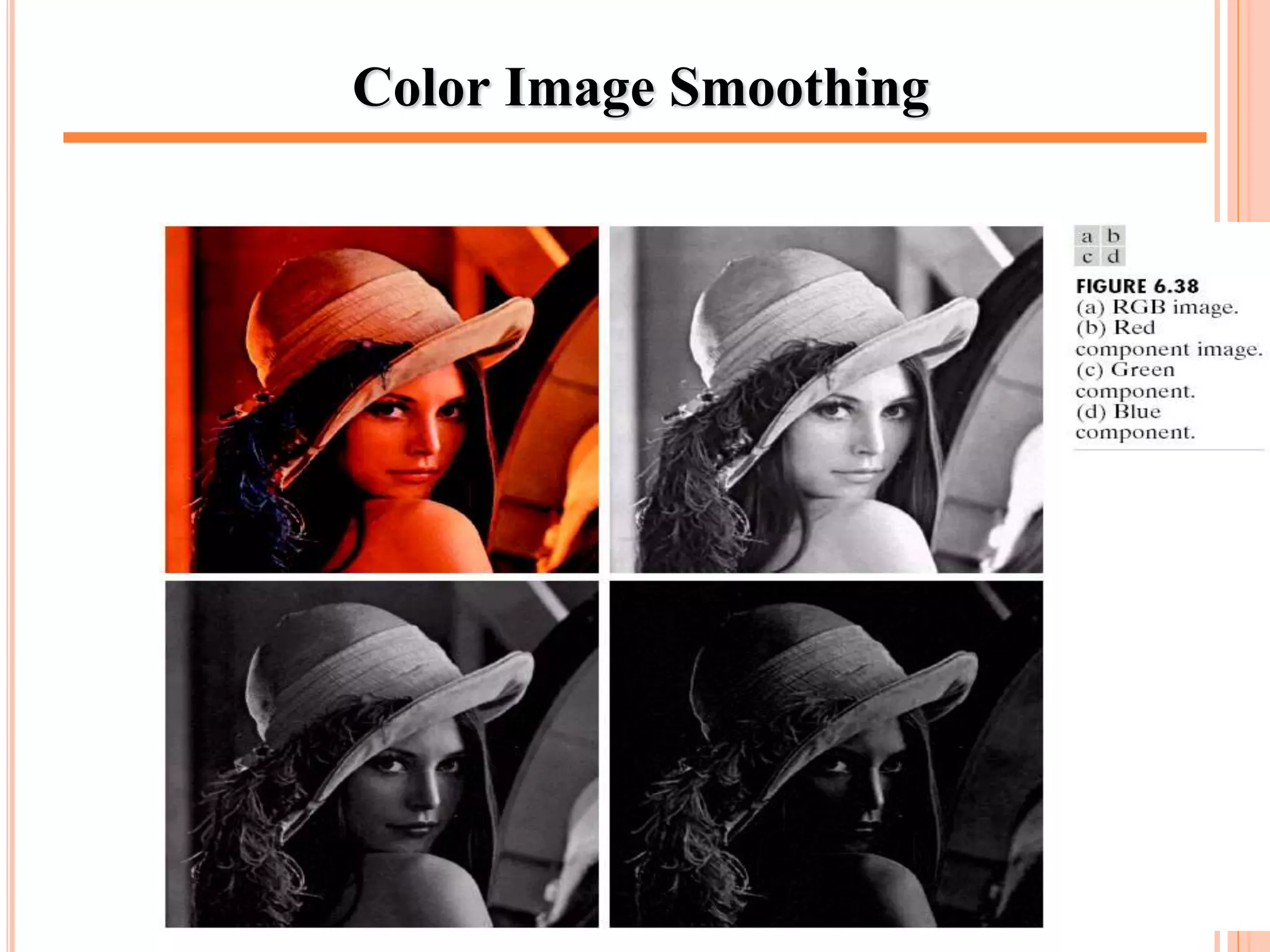
Color Image Smoothing
63
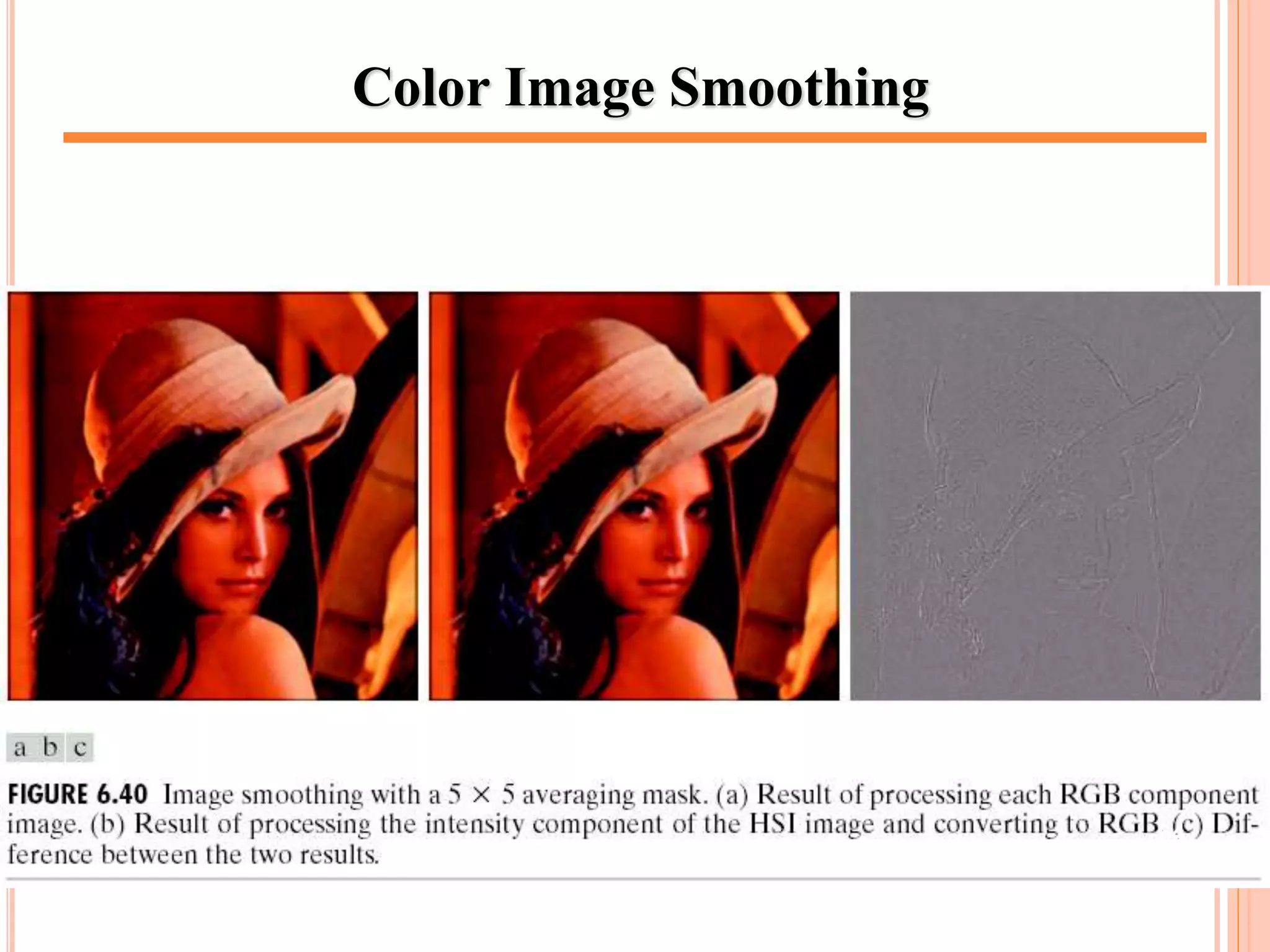
Color Image Smoothing
64
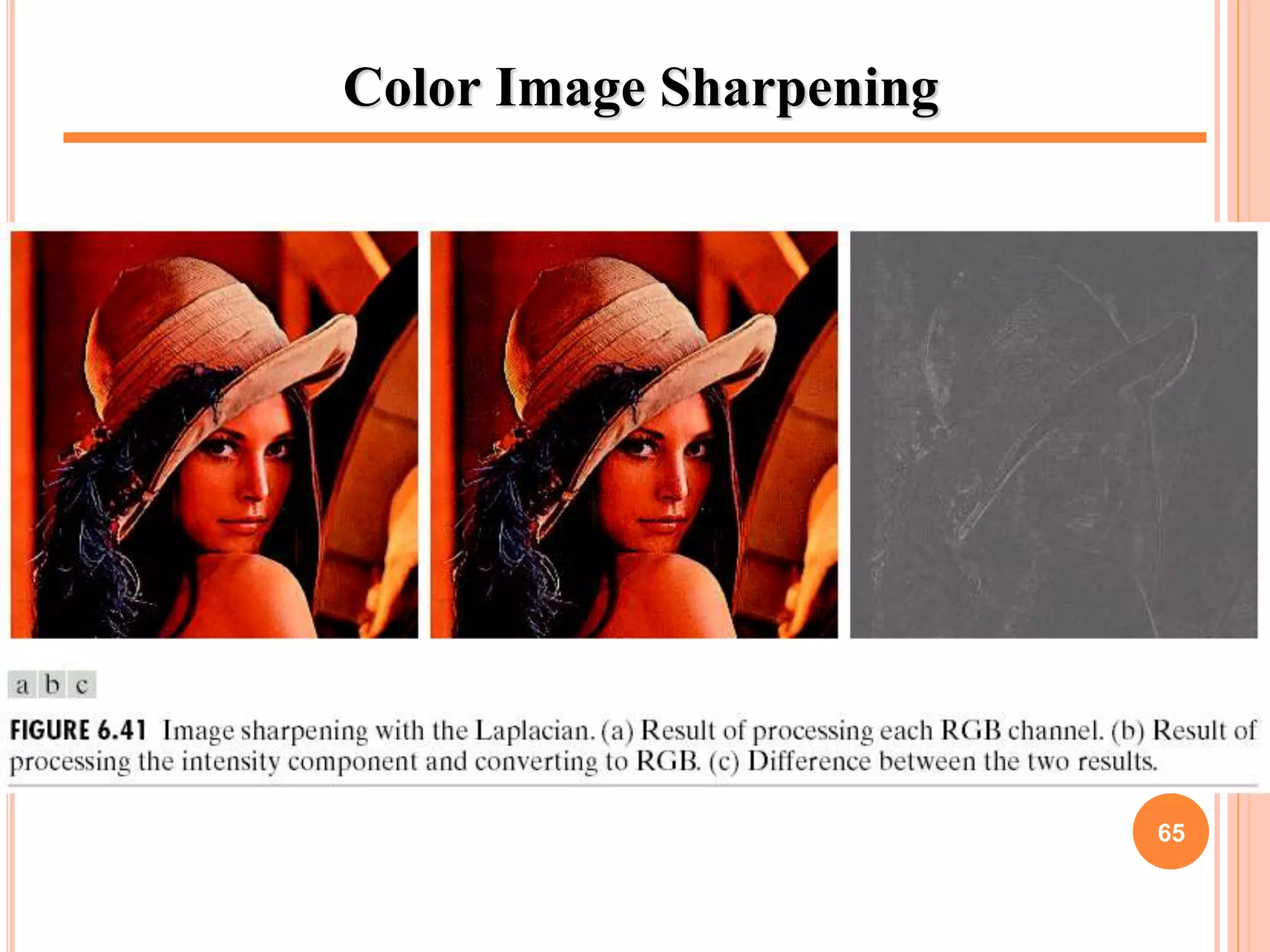
Color Image Sharpening
65
NOISE IN COLOR IMAGES
•Noise in color images can be removed through various noise
models which we use in Image Restoration in case the noise content
of a color image has the same characteristics in each color channel.
•But it is possible for color channels to be affected differently by
noise so in this case noise are removed from the image by
independently processing each plane
•Remove noise by applying smoothing filters (e.g gaussian,
average, median) to each plane individually and then combine the
result.
66
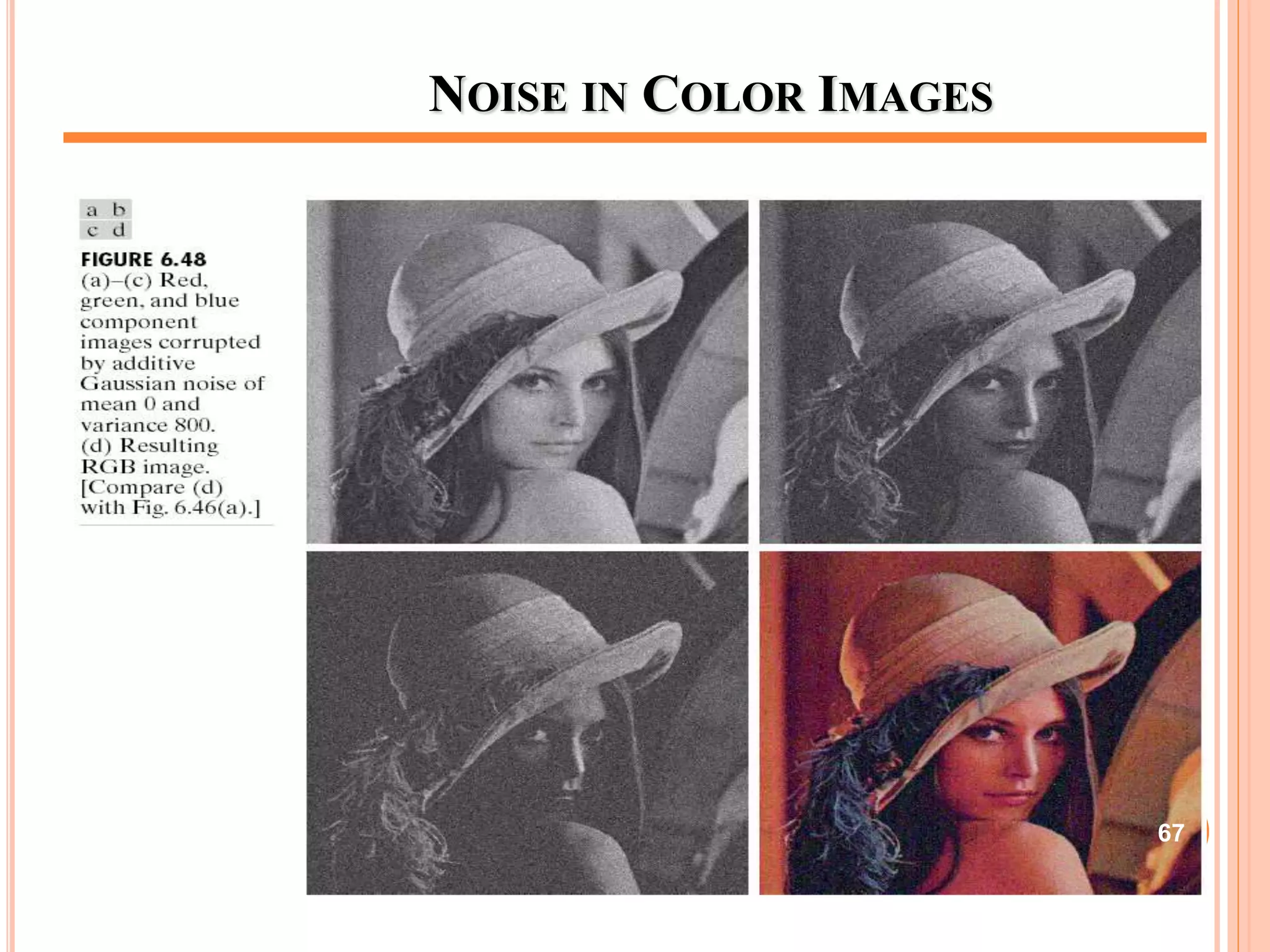
NOISE IN COLOR IMAGES
67
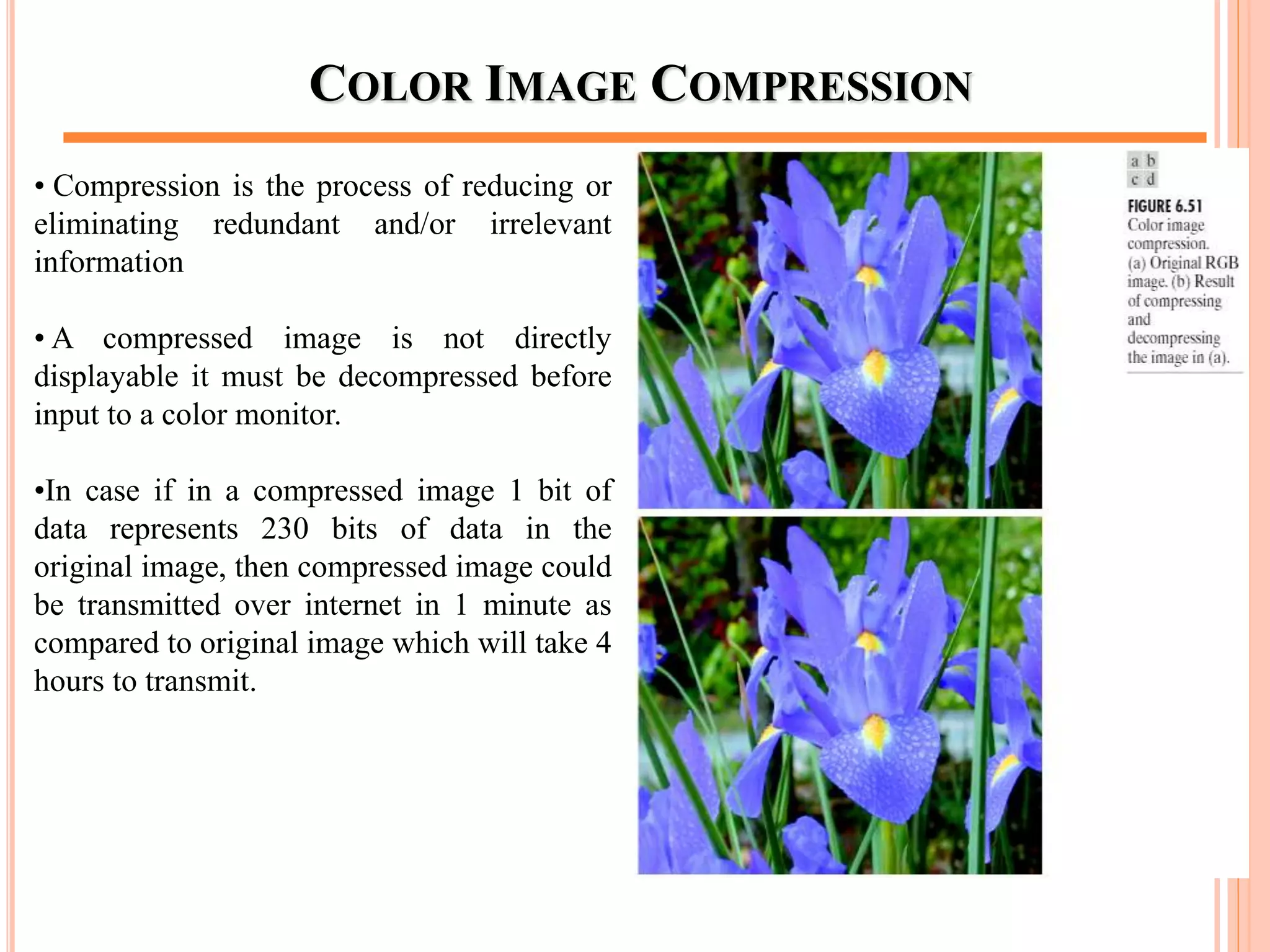
COLOR IMAGE COMPRESSION
• Compression is the process of reducing or
eliminating redundant and/or irrelevant
information
• A compressed image is not directly
displayable it must be decompressed before
input to a color monitor.
•In case if in a compressed image 1 bit of
data represents 230 bits of data in the
original image, then compressed image could
be transmitted over internet in 1 minute as
compared to original image which will take 4
hours to transmit.
68
REFERENCES
 “Digital Image Processing”, 2/ E, Rafael C. Gonzalez & Richard
E. Woods, www.prenhall.com/gonzalezwoods.
 Only Original Owner has full rights reserved for copied
images.
 This PPT is only for fair academic use.
69
Any question
CHAPTER 6 – THE END
70

Lect 06

  • 1.
    DIGITAL IMAGE PROCESSING (2NDEDITION) RAFAEL C. GONZALEZ RICHARD E.WOODS Dr Moe Moe Myint (Assistant Lecturer) Technological University (Kyaukse) 1
  • 2.
    MISCELLANEA  Lectures: A Monday 1:00 – 3:00  Tuesday 2:00 – 4:00  Lectures: B  Monday 8:00 – 10:00  Wednesday 1:00 – 3:00  Slideshare: www.slideshare.net/MoeMoeMyint  E-mail: moemoemyint@moemyanmar.ml  Blog: drmoemoemyint.blogspot.com 2
  • 3.
    CONTENTS FOR CHAPTER6 6.1 Color Fundamentals 6.2 Color Models 6.3 Pseudo-color Image Processing 6.4 Basics of Full-Color Image Processing 6.5 Color Transformations 6.6 Smoothing and Sharpening 6.7 Color Segmentation 6.8 Noise in Color Images 6.9 Color Image Compression 3
  • 4.
     The useof color Image Processing is motivated by two principal factors:  Color is a powerful descriptor Object identification and extraction eg. Face detection using skin colors  Humans can discern thousands of color shades and intensities Human discern only two dozen shades of grays Color Image Processing 4
  • 5.
    FULL COLOR PROCESSINGVS PSEUDO-COLOR PROCESSING  In Full-color Processing, the images are acquired with a Full-Color sensor e.g. Color TV camera or Color Scanner  In Pseudo-color Processing, the problem is one of assigning a color to a particular monochrome intensity or a range of intensities 5
  • 6.
    COLOR FUNDAMENTALS  Physicalphenomenon  Physical nature of color is known  Psysio-psychological phenomenon  How human brain perceive and interpret color? 6
  • 7.
  • 8.
  • 9.
    COLOR FUNDAMENTALS (CONT.) The color that human perceive in an object = the light reflected from the object Illumination source scene reflection eye 9
  • 10.
  • 11.
    COLOR FUNDAMENTALS  Thecolors that humans and some animals perceive in an object are determined by the nature of light reflected from the object. ACHROMATIC VS CHROMATIC LIGHT  Achromatic (void of color) Light: Its only contribute is its ‘Intensity’ or amount.  Chromatic Light: spans the electromagnetic spectrum from approximately 400 to 700nm. 11
  • 12.
    QUANTITIES FOR DESCRIPTIONOF QUANTITY OF CHROMATIC SOURCE OF LIGHT Three basic quantities are used to describe the quantity of a chromatic source of light:  Radiance : The total amount of Energy that flows from a Light Source : It is measured in Watts  Luminance : Luminance gives a measure of amount of energy an observer perceives from a light source (measured in Lumens(lm) ) :For example, light emitted from a source operating in Infrared region of Spectrum could have significant energy (Radiance) but a human observer will hardly perceive it so luminance is zero.  Brightness : It is a subjective measure. : It embodies the achromatic notion of intensity and is one of the key factors in describing color sensation 12
  • 13.
    HUMAN PERCEPTION  Detailedexperimental evidences has established that the 6 to 7 million cones in the human eye can be divided into three principal sensing categories, corresponding roughly to red, green and blue.  Approximately 65% of all cones are sensitive to Red Light, 33% are sensitive to Green Light and about 2% are sensitive to Blue Light (most sensitive). 13
  • 14.
    HUMAN PERCEPTION Due tothese absorption characteristic of Human Eye colors are seen as variable combinations of the so-called ‘Primary Colors’ Red, Green and Blue The primary colors can be added to produce secondary colors of Light Magenta (Red+Blue) Cyan (Green+Blue) Yellow (Red+Green) 14
  • 15.
    ABSORPTION OF LIGHTBY RED, GREEN AND BLUE CONES IN HUMAN EYE  Mixing the three primaries or a secondary with its opposite primary colors in the right intensities produces white light. 15
  • 16.
    PRIMARY COLOR OFLIGHT VS PRIMARY COLOR OF PIGMENTS Red, Green and Blue Colors are Primary Colors of Light In Primary Color of Pigments a primary color is defined as the one that subtracts or absorbs a primary color of Light and reflects or transmits the other two. Therefore the Primary Colors of Pigments are Magenta, Cyan and Yellow and secondary colors are Red, Green and Blue. A proper combination of three pigment primaries or a secondary with its opposite primary produces Black Color Television Reception is an example of the additive nature of Light Colors 16
  • 17.
  • 18.
    18 ADDITIVE VS. SUBTRACTIVECOLOR SYSTEM  involves light emitted directly from a source  mixes various amounts of red, green and blue light to produce other colors.  Combining one of these additive primary colors with another produces the additive secondary colors cyan, magenta, yellow.  Combining all three primary colors produces white.  Subtractive color starts with an object that reflects light and uses colorants to subtract portions of the white light illuminating an object to produce other colors.  If an object reflects all the white light back to the viewer, it appears white.  If an object absorbs (subtracts) all the light illuminating it, it appears black.
  • 19.
    THE CHARACTERISTICS FORDISTINGUISHING ONE COLOR FROM ANOTHER  Brightness : the chromatic notion of intensity  Hue : Dominant color as perceived by an observer  Saturation : The relative purity or the amount of white light mixed with a hue : The pure spectrum colors are fully saturated. : Colors such as pink (red and white) and lavender (violet and white) are less saturated, with the degree of saturation being inversely proportional to the amount of white light added. Hue and Saturation taken together are called chromaticity, and, therefore, a color may be characterized by its brightness and chromaticity. 19
  • 20.
    TRI-STIMULUS VALUES  Theamounts of Red, Green and Blue needed to form any particular color (denoted by X, Y and Z)  A color is then specified by its “Tri-chromatic Coefficients” • Thus, x + y + z = 1 20
  • 21.
    CHROMATICITY DIAGRAM Another approachfor specifying colors is to use chromaticity diagram Shows color compositions as a function of x(red) and y(green) For any x and y the corresponding value of z(blue) can be obtained as z=1-x-y 21
  • 22.
  • 23.
    By additivity ofcolors: Any color inside the triangle can be produced by combinations of the three initial colors RGB gamut of monitors Color gamut of printers 23
  • 24.
    COLOR MODELS The purposeof a color model (also called Color Space or Color System) is to facilitate the specification of colors in some standard way A color model is a specification of a coordinate system and a subspace within that system where each color is represented by a single point Color Models RGB (Red, Green, Blue) CMY (Cyan, Magenta, Yellow) CMYK (Cyan, Magenta, Yellow, Black) HSI (Hue, Saturation, Intensity) YIQ (Luminance,In phase, Quadrature) YUV (Y' stands for the luma component (the brightness) and U and V are the chrominance (color) components ) 24
  • 25.
    THE RGB COLORMODEL  Each color is represented in its primary color components Red, Green and Blue  This model is based on Cartesian Coordinate System 25
  • 26.
    APPLICATION OF ADDITIVENATURE OF LIGHT COLORS  Color TV 26
  • 27.
    RGB COLOR CUBE The total number of colors in a 24 Bit image is (28)3 =16,777,216 (> 16 million) 27
  • 28.
  • 29.
    CMY AND CMYKCOLOR MODEL  Cyan, magenta, and yellow are the secondary colors with respect to the primary colors of red, green, and blue. However, in this subtractive model, they are the primary colors and red, green, and blue, are the secondaries. In this model, colors are formed by subtraction, where adding different pigments causes various colors not to be reflected and thus not to be seen. Here, white is the absence of colors, and black is the sum of all of them. This is generally the model used for printing.  Most devices that deposit color pigments on paper (such as Color Printers and Copiers) requires CMY data input or perform RGB to CMY conversion internally C M Y = 1.00 1.00 1.00 - R G B 29
  • 30.
    CMY AND CMYKCOLOR MODEL CMY is a Subtractive Color Model Equal amounts of Pigment primaries (Cyan, Magenta and Yellow) should produce Black In practice combining these colors for printing produces a “Muddy-Black” color So in order to produce “True-Black” a fourth color “Black” is added giving rise to CMYK model 30
  • 31.
  • 32.
    HSI COLOR MODEL Hue (dominant colour seen)  Wavelength of the pure colour observed in the signal.  Distinguishes red, yellow, green, etc.  More the 400 hues can be seen by the human eye.  Saturation (degree of dilution)  Inverse of the quantity of “white” present in the signal. A pure colour has 100% saturation, the white and grey have 0% saturation.  Distinguishes red from pink, marine blue from royal blue, etc.  About 20 saturation levels are visible per hue.  Intensity  Distinguishes the gray levels. 32
  • 33.
    HSI COLOR MODEL(CONT’D)  RGB -> HSI model Intensity line saturation Colors on this triangle Have the same hue 33
  • 34.
    HSI MODEL: HUEAND SATURATION 34
  • 35.
  • 36.
  • 37.
    HSI COMPONENT IMAGES R,G,BHue saturation intensity 37
  • 38.
    PSEUDO-COLOR IMAGE PROCESSING Assign colors to gray values based on a specified criterion  Differentiate the process of assigning colors to monochrome images  For human visualization and interpretation of gray- scale events  Intensity slicing  Gray level to color transformations 38
  • 39.
    INTENSITY SLICING  3-Dview of intensity image Image plane Color 1 Color 2 39
  • 40.
    INTENSITY SLICING (CONT’D) Alternative representation of intensity slicing 40
  • 41.
    INTENSITY SLICING (CONT.) More slicing plane, more colors 41
  • 42.
    APPLICATION 1 8 colorregionsRadiation test pattern * See the gradual gray-level changes 42
  • 43.
  • 44.
  • 45.
    GRAY LEVEL TOCOLOR TRANSFORMATION 45
  • 46.
  • 47.
    COMBINE SEVERAL MONOCHROMEIMAGES Example: multi-spectral images 47
  • 48.
    R G B Near Infrared (sensitive to biomass) R+G+Bnear-infrared+G+B WashingtonD.C. 48
  • 49.
    BASICS OF FULLCOLOR IMAGE PROCESSING  Full color image processing fall into 2 categories.  In 1st category we process each component image individually and then form a composite processed color image from the individually processed component.  In 2nd category we work with color pixels directly. Because full color images have at least three components, color pixels are really vectors.  Let c represent an arbitrary vector in RGB color space: 49
  • 50.
    BASICS OF FULLCOLOR IMAGE PROCESSING  Color components are the function of co-ordinates(x,y) so we can write it as:  For an image of size M x N there are MN such vectors, c(x , y), for x=0,1,2,…,M-1; y=0,1,2,…,N-1 50
  • 51.
    Basics of FullColor Image Processing 51
  • 52.
    COLOR TRANSFORMATIONS  Colortransformation can be represented by the expression :: g(x , y) = T [ f (x , y) ] f( x , y): input image g(x , y): processed (output) image T[ * ]: an operator on f defined over neighborhood of (x , y). The pixel values here are triplets or quartets (i. e group of 3 or 4 values) 52
  • 53.
    COLOR TRANSFORMATIONS  Si=Ti(r1,r2,…,rn)i=1,2,3,….n ri and Si are variables denoting the color components of f(x,y) and g(x,y) at any point (x,y). n is the no of color components {T1,T2,…..,Tn} is a set of transformation or color mapping functions.  Note that n transformations combine to produce a single transformation T 53
  • 54.
    COLOR TRANSFORMATIONS  Thecolor space chosen determine the value of n.  If RGB color space is selected then n=3 & r1,r2,r3 denotes the red, blue and green components of the image.  If CMYK color space is selected then n=4 & r1,r2,r3,r4 denotes the cyan, hue, magenta and black components of the image.  Suppose we want to modify the intensity of the given image using g(x,y)=k*f(x,y) where 0<k<1 54
  • 55.
  • 56.
  • 57.
    COLOR COMPLEMENTS  Thehues opposite to one another on the Color Circle are called Complements.  Color Complement transformation is equivalent to image negative in Grayscale images 57
  • 58.
  • 59.
    COLOR SLICING •Highlighting aspecific range of colors in an image is useful for separating objects from their surroundings. •Display the colors of interest so that they are distinguished from background. •One way to slice a color image is to map the color outside some range of interest to a non prominent neutral color. 59
  • 60.
    HISTOGRAM PROCESSING •Color imagesare composed of multiple components, however it is not suitable to process each plane independently in case of histogram equalization. This results in erroneous color. •A more logical approach is to spread the color intensities uniformly, leaving the colors themselves( hue, saturation) unchanged. •HSI approach is ideally suited to this type of approach. 60
  • 61.
    COLOR IMAGE SMOOTHING •Colorimages can be smoothed in the same way as gray scale images, the difference is that instead of scalar gray level values we must deal with component vectors of the following form: •The average of the RGB component vector in this neighborhood is: 61
  • 62.
    COLOR IMAGE SMOOTHING •Werecognize the components of this vector as the scalar images that would be obtained by independently smoothing each plane of the starting RGB image using conventional gray scale neighborhood processing. •Thus we conclude that smoothing by neighborhood averaging can be carried out on a per color plane basis. 62
  • 63.
  • 64.
  • 65.
  • 66.
    NOISE IN COLORIMAGES •Noise in color images can be removed through various noise models which we use in Image Restoration in case the noise content of a color image has the same characteristics in each color channel. •But it is possible for color channels to be affected differently by noise so in this case noise are removed from the image by independently processing each plane •Remove noise by applying smoothing filters (e.g gaussian, average, median) to each plane individually and then combine the result. 66
  • 67.
    NOISE IN COLORIMAGES 67
  • 68.
    COLOR IMAGE COMPRESSION •Compression is the process of reducing or eliminating redundant and/or irrelevant information • A compressed image is not directly displayable it must be decompressed before input to a color monitor. •In case if in a compressed image 1 bit of data represents 230 bits of data in the original image, then compressed image could be transmitted over internet in 1 minute as compared to original image which will take 4 hours to transmit. 68
  • 69.
    REFERENCES  “Digital ImageProcessing”, 2/ E, Rafael C. Gonzalez & Richard E. Woods, www.prenhall.com/gonzalezwoods.  Only Original Owner has full rights reserved for copied images.  This PPT is only for fair academic use. 69
  • 70.
    Any question CHAPTER 6– THE END 70

Editor's Notes

  • #25 YIQ is the color space used by the NTSC color TV system, employed mainly in North and Central America, and Japan