TRƯỜNG ĐẠI HỌC CÔNG NGHỆ THÔNG TIN
KHOA CÔNG NGHỆ PHẦN MỀM
LẬP TRÌNH JDBC
(JAVA DATABASE CONNECTIVITY)
NỘI DUNG
 Khái niệm cơ bản
 Kiến trúc JDBC & JDBC APIs
 Các bước làm việc với Database dùng JDBC
 Một số lớp và phương thức cơ bản trong JDBC API
 Các loại JDBC Drivers
 Ví dụ minh họa
3
Giới thiệu về JDBC
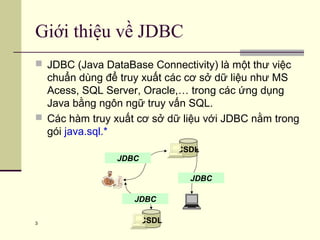
 JDBC (Java DataBase Connectivity) là một thư việc
chuẩn dùng để truy xuất các cơ sở dữ liệu như MS
Acess, SQL Server, Oracle,… trong các ứng dụng
Java bằng ngôn ngữ truy vấn SQL.
 Các hàm truy xuất cơ sở dữ liệu với JDBC nằm trong
gói java.sql.*
CSDL
JDBC
JDBC
CSDL
JDBC
Tại sao cần JDBC?
 JDBC giúp các Java Developers tạo nên các ứng dụng truy
xuất cơ sở dữ liệu mà không cần phải học và sử dụng các
APIs do các công ty sản xuất phần mềm khác nhau bên thứ
ba cung cấp. JDBC đảm bảo rằng bạn sẽ có thể phát triển
nên các ứng dụng truy cập cơ sở dữ liệu có khả năng truy
cập đến các RDBMS khác nhau bằng cách sử dụng các
JDBC driver khác nhau.
Kiến trúc JDBC
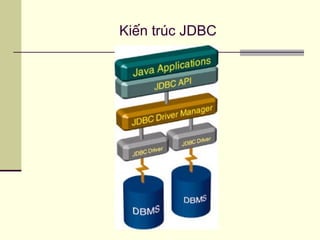
 JDBC API: là một API hoàn toàn dựa trên Java.
 JDBC DriverManager: là trình quản lý JDBC
giao tiếp trực tiếp với các trình điều khiển cơ sở
dữ liệu cụ thể - giao tiếp thực sự với cơ sở dữ
liệu.
 Các RDBMS hay các nhà sản xuất phần mềm
thứ 3 phát triển các drivers cho java đều phải
tuân thủ đặc tả JDBC của SUN.
 Các java developers dùng các JDBC drivers để
phát triển các ứng dụng có truy cập, thao tác
CSDL.
Các khái niệm cơ bản
JDBC Dirvers
 Là một chương trình máy tính giúp truy cập đến các
hệ DBMS khác nhau dùng kỹ thuật JDBC
 Do các hãng xây dựng DBMS hoặc một đơn vị thứ 3
khác cung cấp.
http://industry.java.sun.com/products/jdbc/drivers.
Các loại JDBC Dirvers
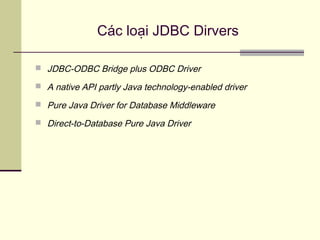
 JDBC-ODBC Bridge plus ODBC Driver
 A native API partly Java technology-enabled driver
 Pure Java Driver for Database Middleware
 Direct-to-Database Pure Java Driver
Các loại JDBC Dirvers
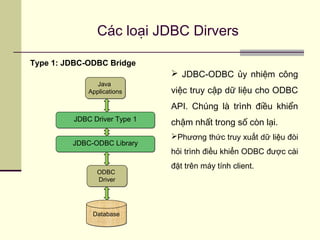
Type 1: JDBC-ODBC Bridge
DatabaseDatabase
ODBC
Driver
ODBC
Driver
Java
Applications
Java
Applications
JDBC Driver Type 1JDBC Driver Type 1
 JDBC-ODBC ủy nhiệm công
việc truy cập dữ liệu cho ODBC
API. Chúng là trình điều khiển
chậm nhất trong số còn lại.
Phương thức truy xuất dữ liệu đòi
hỏi trình điều khiển ODBC được cài
đặt trên máy tính client.
JDBC-ODBC LibraryJDBC-ODBC Library
Các loại JDBC Dirvers
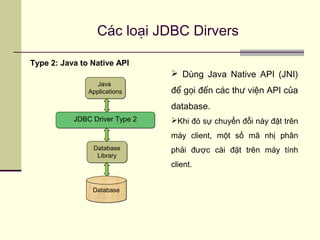
Type 2: Java to Native API
DatabaseDatabase
Database
Library
Database
Library
Java
Applications
Java
Applications
JDBC Driver Type 2JDBC Driver Type 2
 Dùng Java Native API (JNI)
để gọi đến các thư viện API của
database.
Khi đó sự chuyển đỗi này đặt trên
máy client, một số mã nhị phân
phải được cài đặt trên máy tính
client.
Các loại JDBC Dirvers
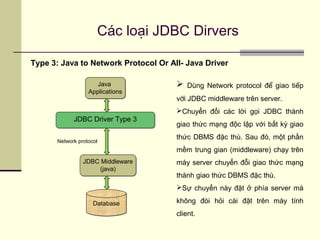
Type 3: Java to Network Protocol Or All- Java Driver
DatabaseDatabase
JDBC Middleware
(java)
JDBC Middleware
(java)
Java
Applications
Java
Applications
JDBC Driver Type 3JDBC Driver Type 3
 Dùng Network protocol để giao tiếp
với JDBC middleware trên server.
Chuyển đổi các lời gọi JDBC thành
giao thức mạng độc lập với bất kỳ giao
thức DBMS đặc thù. Sau đó, một phần
mềm trung gian (middleware) chạy trên
máy server chuyển đỗi giao thức mạng
thành giao thức DBMS đặc thù.
Sự chuyển này đặt ở phía server mà
không đòi hỏi cài đặt trên máy tính
client.
Network protocol
Các loại JDBC Dirvers
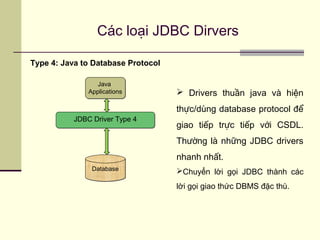
Type 4: Java to Database Protocol
DatabaseDatabase
Java
Applications
Java
Applications
JDBC Driver Type 4JDBC Driver Type 4
 Drivers thuần java và hiện
thực/dùng database protocol để
giao tiếp trực tiếp với CSDL.
Thường là những JDBC drivers
nhanh nhất.
Chuyển lời gọi JDBC thành các
lời gọi giao thức DBMS đặc thù.
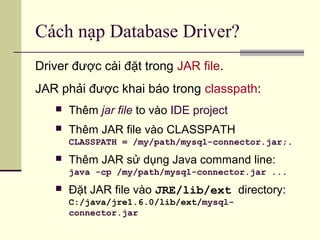
Cách nạp Database Driver?
Driver được cài đặt trong JAR file.
JAR phải được khai báo trong classpath:
 Thêm jar file to vào IDE project
 Thêm JAR file vào CLASSPATH
CLASSPATH = /my/path/mysql-connector.jar;.
 Thêm JAR sử dụng Java command line:
java -cp /my/path/mysql-connector.jar ...
 Đặt JAR file vào JRE/lib/ext directory:
C:/java/jre1.6.0/lib/ext/mysql-
connector.jar
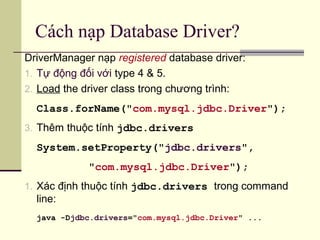
Cách nạp Database Driver?
DriverManager nạp registered database driver:
1. Tự động đối với type 4 & 5.
2. Load the driver class trong chương trình:
Class.forName("com.mysql.jdbc.Driver");
3. Thêm thuộc tính jdbc.drivers
System.setProperty("jdbc.drivers",
"com.mysql.jdbc.Driver");
1. Xác định thuộc tính jdbc.drivers trong command
line:
java -Djdbc.drivers="com.mysql.jdbc.Driver" ...
JDBC API
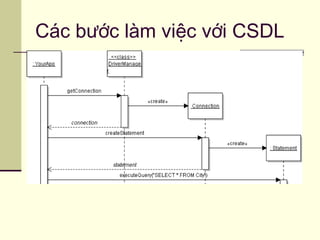
Các bước làm việc với CSDL
 Bước 1: nạp JDBC driver
 Bước 2: tạo kết nối với CSDL dùng driver đã nạp ở bước 1
 Bước 3: thao tác với CSDL
Các bước làm việc với CSDL
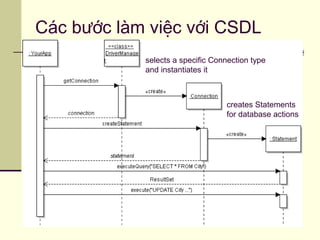
creates Statements
for database actions
selects a specific Connection type
and instantiates it
 DriverManager - Nạp các JDBC driver vào trong bộ nhớ. Có
thể sử dụng nó để mở các kết nối tới một nguồn dữ liệu.
 Connection - Biểu thị một kết nối đến một nguồn dữ liệu. Được
dùng để tạo ra các đối tượng Statement, PreparedStatement và
CallableStatement.
 Statement - Biểu diễn một lệnh SQL tĩnh. Có thể sử dụng nó
để thu về đối tượng ResultSet.
 PreparedStatement - Một giải pháp thay thế hoạt động tốt
hơn đối tượng Statement, thực thi một câu lệnh SQL đã được
biên dịch trước.
Một số lớp và phương thức cơ bản
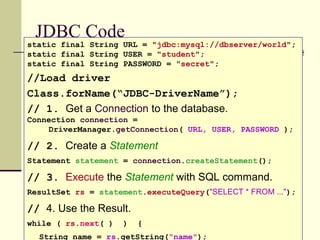
JDBC Code
static final String URL = "jdbc:mysql://dbserver/world";
static final String USER = "student";
static final String PASSWORD = "secret";
//Load driver
Class.forName(“JDBC-DriverName”);
// 1. Get a Connection to the database.
Connection connection =
DriverManager.getConnection( URL, USER, PASSWORD );
// 2. Create a Statement
Statement statement = connection.createStatement();
// 3. Execute the Statement with SQL command.
ResultSet rs = statement.executeQuery("SELECT * FROM ...");
// 4. Use the Result.
while ( rs.next( ) ) {
String name = rs.getString("name");
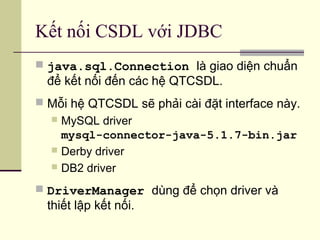
Kết nối CSDL với JDBC
 java.sql.Connection là giao diện chuẩn
để kết nối đến các hệ QTCSDL.
 Mỗi hệ QTCSDL sẽ phải cài đặt interface này.
 MySQL driver
mysql-connector-java-5.1.7-bin.jar
 Derby driver
 DB2 driver
 DriverManager dùng để chọn driver và
thiết lập kết nối.
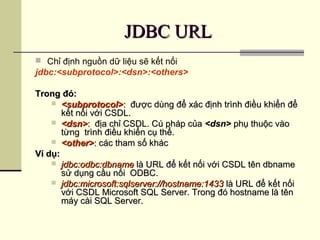
JDBC URLJDBC URL
 Chỉ định nguồn dữ liệu sẽ kết nối
jdbc:<subprotocol>:<dsn>:<others>
Trong đó:Trong đó:
 <subprotocol><subprotocol>:: được dùng để xác định trình điều khiển đểđược dùng để xác định trình điều khiển để
kết nối với CSDL.kết nối với CSDL.
 <dsn><dsn>:: địa chỉ CSDL. Cú pháp củađịa chỉ CSDL. Cú pháp của <dsn><dsn> phụ thuộc vàophụ thuộc vào
từng trình điều khiển cụ thể.từng trình điều khiển cụ thể.
 <other><other>:: các tham số kháccác tham số khác
Ví dụ:Ví dụ:
 jdbc:odbc:dbnamejdbc:odbc:dbname là URL để kết nối với CSDL tên dbnamelà URL để kết nối với CSDL tên dbname
sử dụng cầu nối ODBC.sử dụng cầu nối ODBC.
 jdbc:microsoft:sqlserver://hostname:1433jdbc:microsoft:sqlserver://hostname:1433 là URL để kết nốilà URL để kết nối
với CSDL Microsoft SQL Server. Trong đó hostname là tênvới CSDL Microsoft SQL Server. Trong đó hostname là tên
máy cài SQL Server.máy cài SQL Server.
23
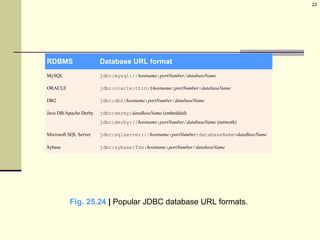
RDBMS Database URL format
MySQL jdbc:mysql://hostname:portNumber/databaseName
ORACLE jdbc:oracle:thin:@hostname:portNumber:databaseName
DB2 jdbc:db2:hostname:portNumber/databaseName
Java DB/Apache Derby jdbc:derby:dataBaseName (embedded)
jdbc:derby://hostname:portNumber/databaseName (network)
Microsoft SQL Server jdbc:sqlserver://hostname:portNumber;databaseName=dataBaseName
Sybase jdbc:sybase:Tds:hostname:portNumber/databaseName
Fig. 25.24 | Popular JDBC database URL formats.
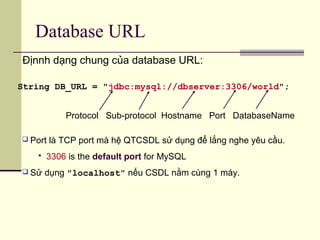
Database URL
String DB_URL = "jdbc:mysql://dbserver:3306/world";
Địnnh dạng chung của database URL:
Protocol Sub-protocol Hostname Port DatabaseName
 Port là TCP port mà hệ QTCSDL sử dụng để lắng nghe yêu cầu.
 3306 is the default port for MySQL
 Sử dụng "localhost" nếu CSDL nằm cùng 1 máy.
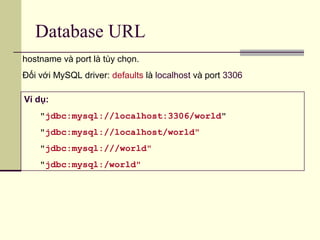
Database URL
Ví dụ:
"jdbc:mysql://localhost:3306/world"
"jdbc:mysql://localhost/world"
"jdbc:mysql:///world"
"jdbc:mysql:/world"
hostname và port là tùy chọn.
Đối với MySQL driver: defaults là localhost và port 3306
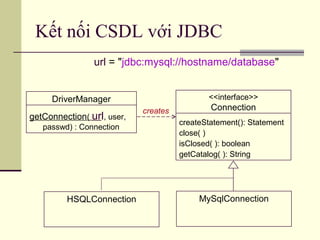
Kết nối CSDL với JDBC
DriverManager
getConnection( url, user,
passwd) : Connection
<<interface>>
Connection
createStatement(): Statement
close( )
isClosed( ): boolean
getCatalog( ): String
MySqlConnection
creates
url = "jdbc:mysql://hostname/database"
HSQLConnection
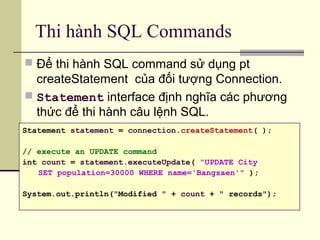
Thi hành SQL Commands
 Để thi hành SQL command sử dụng pt
createStatement của đối tượng Connection.
 Statement interface định nghĩa các phương
thức để thi hành câu lệnh SQL.
Statement statement = connection.createStatement( );
// execute an UPDATE command
int count = statement.executeUpdate( "UPDATE City
SET population=30000 WHERE name='Bangsaen'" );
System.out.println("Modified " + count + " records");
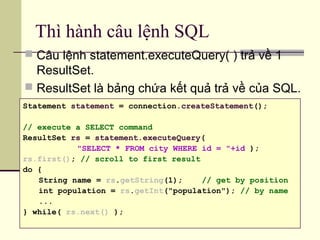
Thì hành câu lệnh SQL
 Câu lệnh statement.executeQuery( ) trả về 1
ResultSet.
 ResultSet là bảng chứa kết quả trả về của SQL.
Statement statement = connection.createStatement();
// execute a SELECT command
ResultSet rs = statement.executeQuery(
"SELECT * FROM city WHERE id = "+id );
rs.first(); // scroll to first result
do {
String name = rs.getString(1); // get by position
int population = rs.getInt("population"); // by name
...
} while( rs.next() );
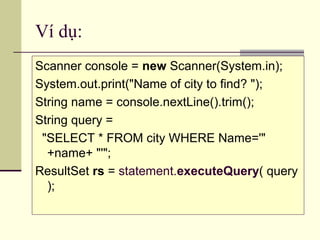
Ví dụ:
Scanner console = new Scanner(System.in);
System.out.print("Name of city to find? ");
String name = console.nextLine().trim();
String query =
"SELECT * FROM city WHERE Name='"
+name+ "'";
ResultSet rs = statement.executeQuery( query
);
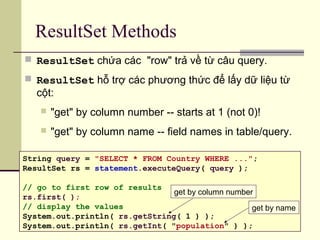
ResultSet Methods
 ResultSet chứa các "row" trả về từ câu query.
 ResultSet hỗ trợ các phương thức để lấy dữ liệu từ
cột:
 "get" by column number -- starts at 1 (not 0)!
 "get" by column name -- field names in table/query.
String query = "SELECT * FROM Country WHERE ...";
ResultSet rs = statement.executeQuery( query );
// go to first row of results
rs.first( );
// display the values
System.out.println( rs.getString( 1 ) );
System.out.println( rs.getInt( "population" ) );
get by column number
get by name
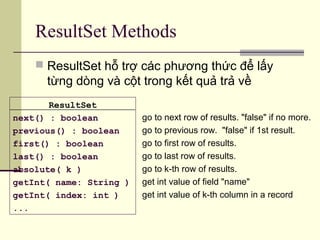
ResultSet Methods
go to next row of results. "false" if no more.
go to previous row. "false" if 1st result.
go to first row of results.
go to last row of results.
go to k-th row of results.
get int value of field "name"
get int value of k-th column in a record
ResultSet
next() : boolean
previous() : boolean
first() : boolean
last() : boolean
absolute( k )
getInt( name: String )
getInt( index: int )
...
 ResultSet hỗ trợ các phương thức để lấy
từng dòng và cột trong kết quả trả về
ResultSet Methods for Getting
Data
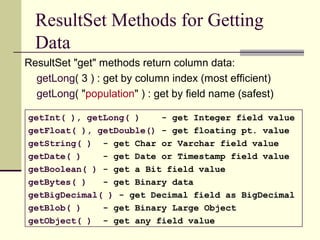
ResultSet "get" methods return column data:
getLong( 3 ) : get by column index (most efficient)
getLong( "population" ) : get by field name (safest)
getInt( ), getLong( ) - get Integer field value
getFloat( ), getDouble() - get floating pt. value
getString( ) - get Char or Varchar field value
getDate( ) - get Date or Timestamp field value
getBoolean( ) - get a Bit field value
getBytes( ) - get Binary data
getBigDecimal( ) - get Decimal field as BigDecimal
getBlob( ) - get Binary Large Object
getObject( ) - get any field value
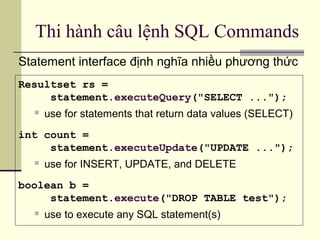
Thi hành câu lệnh SQL Commands
Statement interface định nghĩa nhiều phương thức
Resultset rs =
statement.executeQuery("SELECT ...");
 use for statements that return data values (SELECT)
int count =
statement.executeUpdate("UPDATE ...");
 use for INSERT, UPDATE, and DELETE
boolean b =
statement.execute("DROP TABLE test");
 use to execute any SQL statement(s)
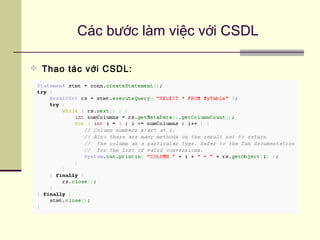
Các bước làm việc với CSDL
 Thao tác với CSDL:
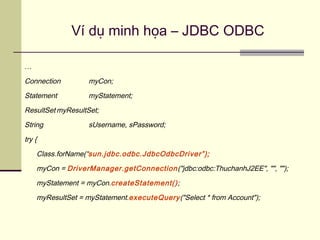
Ví dụ minh họa – JDBC ODBC
…
Connection myCon;
Statement myStatement;
ResultSet myResultSet;
String sUsername, sPassword;
try {
Class.forName(“sun.jdbc.odbc.JdbcOdbcDriver”);
myCon = DriverManager.getConnection("jdbc:odbc:ThuchanhJ2EE", "", "");
myStatement = myCon.createStatement();
myResultSet = myStatement.executeQuery("Select * from Account");
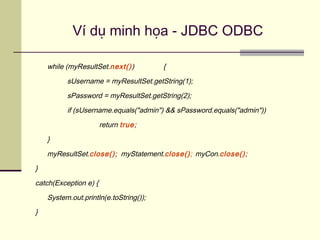
Ví dụ minh họa - JDBC ODBC
while (myResultSet.next()) {
sUsername = myResultSet.getString(1);
sPassword = myResultSet.getString(2);
if (sUsername.equals("admin") && sPassword.equals("admin"))
return true;
}
myResultSet.close(); myStatement.close(); myCon.close();
}
catch(Exception e) {
System.out.println(e.toString());
}
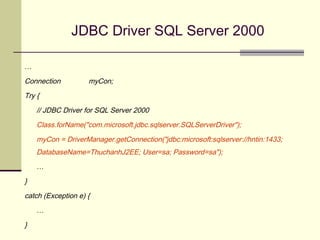
JDBC Driver SQL Server 2000
…
Connection myCon;
Try {
// JDBC Driver for SQL Server 2000
Class.forName("com.microsoft.jdbc.sqlserver.SQLServerDriver");
myCon = DriverManager.getConnection("jdbc:microsoft:sqlserver://hntin:1433;
DatabaseName=ThuchanhJ2EE; User=sa; Password=sa");
…
}
catch (Exception e) {
…
}
JDBC Driver SQL Server 2000
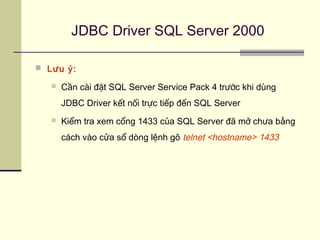
 Lưu ý:
 Cần cài đặt SQL Server Service Pack 4 trước khi dùng
JDBC Driver kết nối trực tiếp đến SQL Server
 Kiểm tra xem cổng 1433 của SQL Server đã mở chưa bằng
cách vào cửa sổ dòng lệnh gõ telnet <hostname> 1433
39
PreparedStatement
 Đối tượng PreparedStatement chứa 1 câu
lệnh SQL đã được biên dịch trước.
 Khi thực thi DBMS không cần phải biên dịch câu
lệnh SQL.
 Thường được dùng với các câu lệnh SQL có
tham số.
PreparedStatements
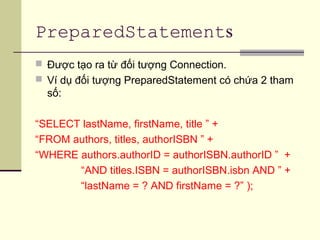
 Được tạo ra từ đối tượng Connection.
 Ví dụ đối tượng PreparedStatement có chứa 2 tham
số:
“SELECT lastName, firstName, title ” +
“FROM authors, titles, authorISBN ” +
“WHERE authors.authorID = authorISBN.authorID ” +
“AND titles.ISBN = authorISBN.isbn AND ” +
“lastName = ? AND firstName = ?” );
41
Cung cấp giá trị cho tham số của
PreparedStatement
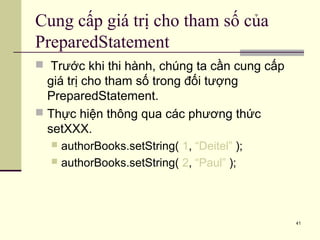
 Trước khi thi hành, chúng ta cần cung cấp
giá trị cho tham số trong đối tượng
PreparedStatement.
 Thực hiện thông qua các phương thức
setXXX.
 authorBooks.setString( 1, “Deitel” );
 authorBooks.setString( 2, “Paul” );
42
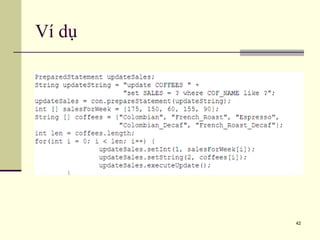
Ví dụ
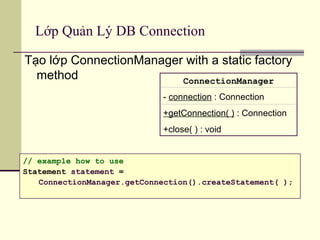
Lớp Quản Lý DB Connection
Tạo lớp ConnectionManager with a static factory
method ConnectionManager
- connection : Connection
+getConnection( ) : Connection
+close( ) : void
// example how to use
Statement statement =
ConnectionManager.getConnection().createStatement( );
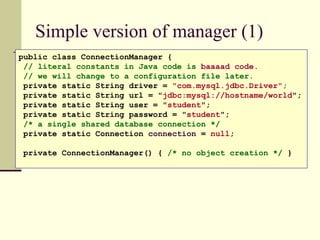
Simple version of manager (1)
public class ConnectionManager {
// literal constants in Java code is baaaad code.
// we will change to a configuration file later.
private static String driver = "com.mysql.jdbc.Driver";
private static String url = "jdbc:mysql://hostname/world";
private static String user = "student";
private static String password = "student";
/* a single shared database connection */
private static Connection connection = null;
private ConnectionManager() { /* no object creation */ }
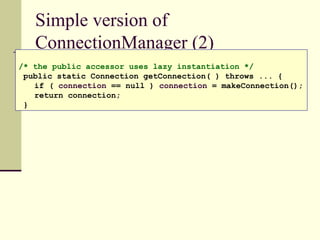
Simple version of
ConnectionManager (2)
/* the public accessor uses lazy instantiation */
public static Connection getConnection( ) throws ... {
if ( connection == null ) connection = makeConnection();
return connection;
}
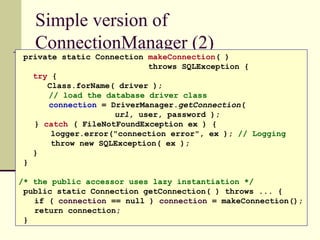
Simple version of
ConnectionManager (2)
private static Connection makeConnection( )
throws SQLException {
try {
Class.forName( driver );
// load the database driver class
connection = DriverManager.getConnection(
url, user, password );
} catch ( FileNotFoundException ex ) {
logger.error("connection error", ex ); // Logging
throw new SQLException( ex );
}
}
/* the public accessor uses lazy instantiation */
public static Connection getConnection( ) throws ... {
if ( connection == null ) connection = makeConnection();
return connection;
}
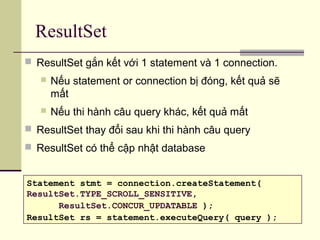
ResultSet
 ResultSet gắn kết với 1 statement và 1 connection.
 Nếu statement or connection bị đóng, kết quả sẽ
mất
 Nếu thi hành câu query khác, kết quả mất
 ResultSet thay đổi sau khi thi hành câu query
 ResultSet có thể cập nhật database
Statement stmt = connection.createStatement(
ResultSet.TYPE_SCROLL_SENSITIVE,
ResultSet.CONCUR_UPDATABLE );
ResultSet rs = statement.executeQuery( query );
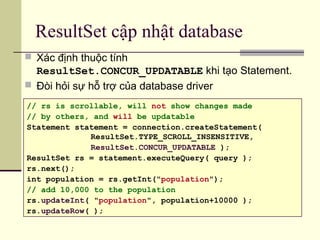
ResultSet cập nhật database
 Xác định thuộc tính
ResultSet.CONCUR_UPDATABLE khi tạo Statement.
 Đòi hỏi sự hỗ trợ của database driver
// rs is scrollable, will not show changes made
// by others, and will be updatable
Statement statement = connection.createStatement(
ResultSet.TYPE_SCROLL_INSENSITIVE,
ResultSet.CONCUR_UPDATABLE );
ResultSet rs = statement.executeQuery( query );
rs.next();
int population = rs.getInt("population");
// add 10,000 to the population
rs.updateInt( "population", population+10000 );
rs.updateRow( );
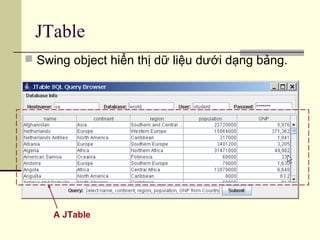
JTable
 Swing object hiển thị dữ liệu dưới dạng bảng.
A JTable
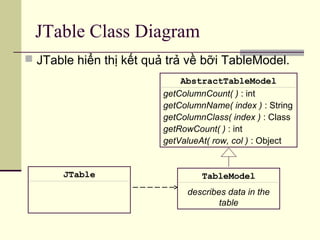
JTable Class Diagram
 JTable hiển thị kết quả trả về bỡi TableModel.
JTable TableModel
describes data in the
table
AbstractTableModel
getColumnCount( ) : int
getColumnName( index ) : String
getColumnClass( index ) : Class
getRowCount( ) : int
getValueAt( row, col ) : Object
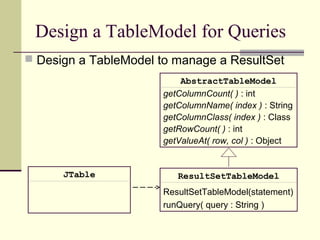
Design a TableModel for Queries
 Design a TableModel to manage a ResultSet
JTable ResultSetTableModel
ResultSetTableModel(statement)
runQuery( query : String )
AbstractTableModel
getColumnCount( ) : int
getColumnName( index ) : String
getColumnClass( index ) : Class
getRowCount( ) : int
getValueAt( row, col ) : Object
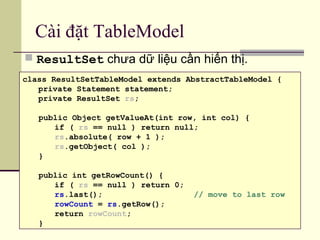
Cài đặt TableModel
 ResultSet chưa dữ liệu cần hiển thị.
class ResultSetTableModel extends AbstractTableModel {
private Statement statement;
private ResultSet rs;
public Object getValueAt(int row, int col) {
if ( rs == null ) return null;
rs.absolute( row + 1 );
rs.getObject( col );
}
public int getRowCount() {
if ( rs == null ) return 0;
rs.last(); // move to last row
rowCount = rs.getRow();
return rowCount;
}
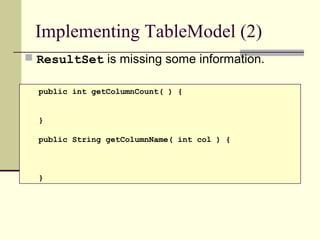
Implementing TableModel (2)
 ResultSet is missing some information.
public int getColumnCount( ) {
}
public String getColumnName( int col ) {
}
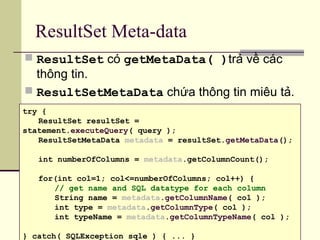
ResultSet Meta-data
 ResultSet có getMetaData( )trả về các
thông tin.
 ResultSetMetaData chứa thông tin miêu tả.
try {
ResultSet resultSet =
statement.executeQuery( query );
ResultSetMetaData metadata = resultSet.getMetaData();
int numberOfColumns = metadata.getColumnCount();
for(int col=1; col<=numberOfColumns; col++) {
// get name and SQL datatype for each column
String name = metadata.getColumnName( col );
int type = metadata.getColumnType( col );
int typeName = metadata.getColumnTypeName( col );
} catch( SQLException sqle ) { ... }
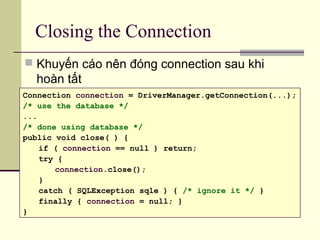
Closing the Connection
 Khuyến cáo nên đóng connection sau khi
hoàn tất
Connection connection = DriverManager.getConnection(...);
/* use the database */
...
/* done using database */
public void close( ) {
if ( connection == null ) return;
try {
connection.close();
}
catch ( SQLException sqle ) { /* ignore it */ }
finally { connection = null; }
}

Laptrinh jdbc

  • 1.
    TRƯỜNG ĐẠI HỌCCÔNG NGHỆ THÔNG TIN KHOA CÔNG NGHỆ PHẦN MỀM LẬP TRÌNH JDBC (JAVA DATABASE CONNECTIVITY)
  • 2.
    NỘI DUNG  Kháiniệm cơ bản  Kiến trúc JDBC & JDBC APIs  Các bước làm việc với Database dùng JDBC  Một số lớp và phương thức cơ bản trong JDBC API  Các loại JDBC Drivers  Ví dụ minh họa
  • 3.
    3 Giới thiệu vềJDBC  JDBC (Java DataBase Connectivity) là một thư việc chuẩn dùng để truy xuất các cơ sở dữ liệu như MS Acess, SQL Server, Oracle,… trong các ứng dụng Java bằng ngôn ngữ truy vấn SQL.  Các hàm truy xuất cơ sở dữ liệu với JDBC nằm trong gói java.sql.* CSDL JDBC JDBC CSDL JDBC
  • 4.
    Tại sao cầnJDBC?  JDBC giúp các Java Developers tạo nên các ứng dụng truy xuất cơ sở dữ liệu mà không cần phải học và sử dụng các APIs do các công ty sản xuất phần mềm khác nhau bên thứ ba cung cấp. JDBC đảm bảo rằng bạn sẽ có thể phát triển nên các ứng dụng truy cập cơ sở dữ liệu có khả năng truy cập đến các RDBMS khác nhau bằng cách sử dụng các JDBC driver khác nhau.
  • 5.
  • 6.
     JDBC API:là một API hoàn toàn dựa trên Java.  JDBC DriverManager: là trình quản lý JDBC giao tiếp trực tiếp với các trình điều khiển cơ sở dữ liệu cụ thể - giao tiếp thực sự với cơ sở dữ liệu.  Các RDBMS hay các nhà sản xuất phần mềm thứ 3 phát triển các drivers cho java đều phải tuân thủ đặc tả JDBC của SUN.  Các java developers dùng các JDBC drivers để phát triển các ứng dụng có truy cập, thao tác CSDL. Các khái niệm cơ bản
  • 7.
    JDBC Dirvers  Làmột chương trình máy tính giúp truy cập đến các hệ DBMS khác nhau dùng kỹ thuật JDBC  Do các hãng xây dựng DBMS hoặc một đơn vị thứ 3 khác cung cấp. http://industry.java.sun.com/products/jdbc/drivers.
  • 8.
    Các loại JDBCDirvers  JDBC-ODBC Bridge plus ODBC Driver  A native API partly Java technology-enabled driver  Pure Java Driver for Database Middleware  Direct-to-Database Pure Java Driver
  • 9.
    Các loại JDBCDirvers Type 1: JDBC-ODBC Bridge DatabaseDatabase ODBC Driver ODBC Driver Java Applications Java Applications JDBC Driver Type 1JDBC Driver Type 1  JDBC-ODBC ủy nhiệm công việc truy cập dữ liệu cho ODBC API. Chúng là trình điều khiển chậm nhất trong số còn lại. Phương thức truy xuất dữ liệu đòi hỏi trình điều khiển ODBC được cài đặt trên máy tính client. JDBC-ODBC LibraryJDBC-ODBC Library
  • 10.
    Các loại JDBCDirvers Type 2: Java to Native API DatabaseDatabase Database Library Database Library Java Applications Java Applications JDBC Driver Type 2JDBC Driver Type 2  Dùng Java Native API (JNI) để gọi đến các thư viện API của database. Khi đó sự chuyển đỗi này đặt trên máy client, một số mã nhị phân phải được cài đặt trên máy tính client.
  • 11.
    Các loại JDBCDirvers Type 3: Java to Network Protocol Or All- Java Driver DatabaseDatabase JDBC Middleware (java) JDBC Middleware (java) Java Applications Java Applications JDBC Driver Type 3JDBC Driver Type 3  Dùng Network protocol để giao tiếp với JDBC middleware trên server. Chuyển đổi các lời gọi JDBC thành giao thức mạng độc lập với bất kỳ giao thức DBMS đặc thù. Sau đó, một phần mềm trung gian (middleware) chạy trên máy server chuyển đỗi giao thức mạng thành giao thức DBMS đặc thù. Sự chuyển này đặt ở phía server mà không đòi hỏi cài đặt trên máy tính client. Network protocol
  • 12.
    Các loại JDBCDirvers Type 4: Java to Database Protocol DatabaseDatabase Java Applications Java Applications JDBC Driver Type 4JDBC Driver Type 4  Drivers thuần java và hiện thực/dùng database protocol để giao tiếp trực tiếp với CSDL. Thường là những JDBC drivers nhanh nhất. Chuyển lời gọi JDBC thành các lời gọi giao thức DBMS đặc thù.
  • 13.
    Cách nạp DatabaseDriver? Driver được cài đặt trong JAR file. JAR phải được khai báo trong classpath:  Thêm jar file to vào IDE project  Thêm JAR file vào CLASSPATH CLASSPATH = /my/path/mysql-connector.jar;.  Thêm JAR sử dụng Java command line: java -cp /my/path/mysql-connector.jar ...  Đặt JAR file vào JRE/lib/ext directory: C:/java/jre1.6.0/lib/ext/mysql- connector.jar
  • 14.
    Cách nạp DatabaseDriver? DriverManager nạp registered database driver: 1. Tự động đối với type 4 & 5. 2. Load the driver class trong chương trình: Class.forName("com.mysql.jdbc.Driver"); 3. Thêm thuộc tính jdbc.drivers System.setProperty("jdbc.drivers", "com.mysql.jdbc.Driver"); 1. Xác định thuộc tính jdbc.drivers trong command line: java -Djdbc.drivers="com.mysql.jdbc.Driver" ...
  • 15.
  • 16.
    Các bước làmviệc với CSDL  Bước 1: nạp JDBC driver  Bước 2: tạo kết nối với CSDL dùng driver đã nạp ở bước 1  Bước 3: thao tác với CSDL
  • 17.
    Các bước làmviệc với CSDL
  • 18.
    Các bước làmviệc với CSDL creates Statements for database actions selects a specific Connection type and instantiates it
  • 19.
     DriverManager -Nạp các JDBC driver vào trong bộ nhớ. Có thể sử dụng nó để mở các kết nối tới một nguồn dữ liệu.  Connection - Biểu thị một kết nối đến một nguồn dữ liệu. Được dùng để tạo ra các đối tượng Statement, PreparedStatement và CallableStatement.  Statement - Biểu diễn một lệnh SQL tĩnh. Có thể sử dụng nó để thu về đối tượng ResultSet.  PreparedStatement - Một giải pháp thay thế hoạt động tốt hơn đối tượng Statement, thực thi một câu lệnh SQL đã được biên dịch trước. Một số lớp và phương thức cơ bản
  • 20.
    JDBC Code static finalString URL = "jdbc:mysql://dbserver/world"; static final String USER = "student"; static final String PASSWORD = "secret"; //Load driver Class.forName(“JDBC-DriverName”); // 1. Get a Connection to the database. Connection connection = DriverManager.getConnection( URL, USER, PASSWORD ); // 2. Create a Statement Statement statement = connection.createStatement(); // 3. Execute the Statement with SQL command. ResultSet rs = statement.executeQuery("SELECT * FROM ..."); // 4. Use the Result. while ( rs.next( ) ) { String name = rs.getString("name");
  • 21.
    Kết nối CSDLvới JDBC  java.sql.Connection là giao diện chuẩn để kết nối đến các hệ QTCSDL.  Mỗi hệ QTCSDL sẽ phải cài đặt interface này.  MySQL driver mysql-connector-java-5.1.7-bin.jar  Derby driver  DB2 driver  DriverManager dùng để chọn driver và thiết lập kết nối.
  • 22.
    JDBC URLJDBC URL Chỉ định nguồn dữ liệu sẽ kết nối jdbc:<subprotocol>:<dsn>:<others> Trong đó:Trong đó:  <subprotocol><subprotocol>:: được dùng để xác định trình điều khiển đểđược dùng để xác định trình điều khiển để kết nối với CSDL.kết nối với CSDL.  <dsn><dsn>:: địa chỉ CSDL. Cú pháp củađịa chỉ CSDL. Cú pháp của <dsn><dsn> phụ thuộc vàophụ thuộc vào từng trình điều khiển cụ thể.từng trình điều khiển cụ thể.  <other><other>:: các tham số kháccác tham số khác Ví dụ:Ví dụ:  jdbc:odbc:dbnamejdbc:odbc:dbname là URL để kết nối với CSDL tên dbnamelà URL để kết nối với CSDL tên dbname sử dụng cầu nối ODBC.sử dụng cầu nối ODBC.  jdbc:microsoft:sqlserver://hostname:1433jdbc:microsoft:sqlserver://hostname:1433 là URL để kết nốilà URL để kết nối với CSDL Microsoft SQL Server. Trong đó hostname là tênvới CSDL Microsoft SQL Server. Trong đó hostname là tên máy cài SQL Server.máy cài SQL Server.
  • 23.
    23 RDBMS Database URLformat MySQL jdbc:mysql://hostname:portNumber/databaseName ORACLE jdbc:oracle:thin:@hostname:portNumber:databaseName DB2 jdbc:db2:hostname:portNumber/databaseName Java DB/Apache Derby jdbc:derby:dataBaseName (embedded) jdbc:derby://hostname:portNumber/databaseName (network) Microsoft SQL Server jdbc:sqlserver://hostname:portNumber;databaseName=dataBaseName Sybase jdbc:sybase:Tds:hostname:portNumber/databaseName Fig. 25.24 | Popular JDBC database URL formats.
  • 24.
    Database URL String DB_URL= "jdbc:mysql://dbserver:3306/world"; Địnnh dạng chung của database URL: Protocol Sub-protocol Hostname Port DatabaseName  Port là TCP port mà hệ QTCSDL sử dụng để lắng nghe yêu cầu.  3306 is the default port for MySQL  Sử dụng "localhost" nếu CSDL nằm cùng 1 máy.
  • 25.
  • 26.
    Kết nối CSDLvới JDBC DriverManager getConnection( url, user, passwd) : Connection <<interface>> Connection createStatement(): Statement close( ) isClosed( ): boolean getCatalog( ): String MySqlConnection creates url = "jdbc:mysql://hostname/database" HSQLConnection
  • 27.
    Thi hành SQLCommands  Để thi hành SQL command sử dụng pt createStatement của đối tượng Connection.  Statement interface định nghĩa các phương thức để thi hành câu lệnh SQL. Statement statement = connection.createStatement( ); // execute an UPDATE command int count = statement.executeUpdate( "UPDATE City SET population=30000 WHERE name='Bangsaen'" ); System.out.println("Modified " + count + " records");
  • 28.
    Thì hành câulệnh SQL  Câu lệnh statement.executeQuery( ) trả về 1 ResultSet.  ResultSet là bảng chứa kết quả trả về của SQL. Statement statement = connection.createStatement(); // execute a SELECT command ResultSet rs = statement.executeQuery( "SELECT * FROM city WHERE id = "+id ); rs.first(); // scroll to first result do { String name = rs.getString(1); // get by position int population = rs.getInt("population"); // by name ... } while( rs.next() );
  • 29.
    Ví dụ: Scanner console= new Scanner(System.in); System.out.print("Name of city to find? "); String name = console.nextLine().trim(); String query = "SELECT * FROM city WHERE Name='" +name+ "'"; ResultSet rs = statement.executeQuery( query );
  • 30.
    ResultSet Methods  ResultSetchứa các "row" trả về từ câu query.  ResultSet hỗ trợ các phương thức để lấy dữ liệu từ cột:  "get" by column number -- starts at 1 (not 0)!  "get" by column name -- field names in table/query. String query = "SELECT * FROM Country WHERE ..."; ResultSet rs = statement.executeQuery( query ); // go to first row of results rs.first( ); // display the values System.out.println( rs.getString( 1 ) ); System.out.println( rs.getInt( "population" ) ); get by column number get by name
  • 31.
    ResultSet Methods go tonext row of results. "false" if no more. go to previous row. "false" if 1st result. go to first row of results. go to last row of results. go to k-th row of results. get int value of field "name" get int value of k-th column in a record ResultSet next() : boolean previous() : boolean first() : boolean last() : boolean absolute( k ) getInt( name: String ) getInt( index: int ) ...  ResultSet hỗ trợ các phương thức để lấy từng dòng và cột trong kết quả trả về
  • 32.
    ResultSet Methods forGetting Data ResultSet "get" methods return column data: getLong( 3 ) : get by column index (most efficient) getLong( "population" ) : get by field name (safest) getInt( ), getLong( ) - get Integer field value getFloat( ), getDouble() - get floating pt. value getString( ) - get Char or Varchar field value getDate( ) - get Date or Timestamp field value getBoolean( ) - get a Bit field value getBytes( ) - get Binary data getBigDecimal( ) - get Decimal field as BigDecimal getBlob( ) - get Binary Large Object getObject( ) - get any field value
  • 33.
    Thi hành câulệnh SQL Commands Statement interface định nghĩa nhiều phương thức Resultset rs = statement.executeQuery("SELECT ...");  use for statements that return data values (SELECT) int count = statement.executeUpdate("UPDATE ...");  use for INSERT, UPDATE, and DELETE boolean b = statement.execute("DROP TABLE test");  use to execute any SQL statement(s)
  • 34.
    Các bước làmviệc với CSDL  Thao tác với CSDL:
  • 35.
    Ví dụ minhhọa – JDBC ODBC … Connection myCon; Statement myStatement; ResultSet myResultSet; String sUsername, sPassword; try { Class.forName(“sun.jdbc.odbc.JdbcOdbcDriver”); myCon = DriverManager.getConnection("jdbc:odbc:ThuchanhJ2EE", "", ""); myStatement = myCon.createStatement(); myResultSet = myStatement.executeQuery("Select * from Account");
  • 36.
    Ví dụ minhhọa - JDBC ODBC while (myResultSet.next()) { sUsername = myResultSet.getString(1); sPassword = myResultSet.getString(2); if (sUsername.equals("admin") && sPassword.equals("admin")) return true; } myResultSet.close(); myStatement.close(); myCon.close(); } catch(Exception e) { System.out.println(e.toString()); }
  • 37.
    JDBC Driver SQLServer 2000 … Connection myCon; Try { // JDBC Driver for SQL Server 2000 Class.forName("com.microsoft.jdbc.sqlserver.SQLServerDriver"); myCon = DriverManager.getConnection("jdbc:microsoft:sqlserver://hntin:1433; DatabaseName=ThuchanhJ2EE; User=sa; Password=sa"); … } catch (Exception e) { … }
  • 38.
    JDBC Driver SQLServer 2000  Lưu ý:  Cần cài đặt SQL Server Service Pack 4 trước khi dùng JDBC Driver kết nối trực tiếp đến SQL Server  Kiểm tra xem cổng 1433 của SQL Server đã mở chưa bằng cách vào cửa sổ dòng lệnh gõ telnet <hostname> 1433
  • 39.
    39 PreparedStatement  Đối tượngPreparedStatement chứa 1 câu lệnh SQL đã được biên dịch trước.  Khi thực thi DBMS không cần phải biên dịch câu lệnh SQL.  Thường được dùng với các câu lệnh SQL có tham số.
  • 40.
    PreparedStatements  Được tạora từ đối tượng Connection.  Ví dụ đối tượng PreparedStatement có chứa 2 tham số: “SELECT lastName, firstName, title ” + “FROM authors, titles, authorISBN ” + “WHERE authors.authorID = authorISBN.authorID ” + “AND titles.ISBN = authorISBN.isbn AND ” + “lastName = ? AND firstName = ?” );
  • 41.
    41 Cung cấp giátrị cho tham số của PreparedStatement  Trước khi thi hành, chúng ta cần cung cấp giá trị cho tham số trong đối tượng PreparedStatement.  Thực hiện thông qua các phương thức setXXX.  authorBooks.setString( 1, “Deitel” );  authorBooks.setString( 2, “Paul” );
  • 42.
  • 43.
    Lớp Quản LýDB Connection Tạo lớp ConnectionManager with a static factory method ConnectionManager - connection : Connection +getConnection( ) : Connection +close( ) : void // example how to use Statement statement = ConnectionManager.getConnection().createStatement( );
  • 44.
    Simple version ofmanager (1) public class ConnectionManager { // literal constants in Java code is baaaad code. // we will change to a configuration file later. private static String driver = "com.mysql.jdbc.Driver"; private static String url = "jdbc:mysql://hostname/world"; private static String user = "student"; private static String password = "student"; /* a single shared database connection */ private static Connection connection = null; private ConnectionManager() { /* no object creation */ }
  • 45.
    Simple version of ConnectionManager(2) /* the public accessor uses lazy instantiation */ public static Connection getConnection( ) throws ... { if ( connection == null ) connection = makeConnection(); return connection; }
  • 46.
    Simple version of ConnectionManager(2) private static Connection makeConnection( ) throws SQLException { try { Class.forName( driver ); // load the database driver class connection = DriverManager.getConnection( url, user, password ); } catch ( FileNotFoundException ex ) { logger.error("connection error", ex ); // Logging throw new SQLException( ex ); } } /* the public accessor uses lazy instantiation */ public static Connection getConnection( ) throws ... { if ( connection == null ) connection = makeConnection(); return connection; }
  • 47.
    ResultSet  ResultSet gắnkết với 1 statement và 1 connection.  Nếu statement or connection bị đóng, kết quả sẽ mất  Nếu thi hành câu query khác, kết quả mất  ResultSet thay đổi sau khi thi hành câu query  ResultSet có thể cập nhật database Statement stmt = connection.createStatement( ResultSet.TYPE_SCROLL_SENSITIVE, ResultSet.CONCUR_UPDATABLE ); ResultSet rs = statement.executeQuery( query );
  • 48.
    ResultSet cập nhậtdatabase  Xác định thuộc tính ResultSet.CONCUR_UPDATABLE khi tạo Statement.  Đòi hỏi sự hỗ trợ của database driver // rs is scrollable, will not show changes made // by others, and will be updatable Statement statement = connection.createStatement( ResultSet.TYPE_SCROLL_INSENSITIVE, ResultSet.CONCUR_UPDATABLE ); ResultSet rs = statement.executeQuery( query ); rs.next(); int population = rs.getInt("population"); // add 10,000 to the population rs.updateInt( "population", population+10000 ); rs.updateRow( );
  • 49.
    JTable  Swing objecthiển thị dữ liệu dưới dạng bảng. A JTable
  • 50.
    JTable Class Diagram JTable hiển thị kết quả trả về bỡi TableModel. JTable TableModel describes data in the table AbstractTableModel getColumnCount( ) : int getColumnName( index ) : String getColumnClass( index ) : Class getRowCount( ) : int getValueAt( row, col ) : Object
  • 51.
    Design a TableModelfor Queries  Design a TableModel to manage a ResultSet JTable ResultSetTableModel ResultSetTableModel(statement) runQuery( query : String ) AbstractTableModel getColumnCount( ) : int getColumnName( index ) : String getColumnClass( index ) : Class getRowCount( ) : int getValueAt( row, col ) : Object
  • 52.
    Cài đặt TableModel ResultSet chưa dữ liệu cần hiển thị. class ResultSetTableModel extends AbstractTableModel { private Statement statement; private ResultSet rs; public Object getValueAt(int row, int col) { if ( rs == null ) return null; rs.absolute( row + 1 ); rs.getObject( col ); } public int getRowCount() { if ( rs == null ) return 0; rs.last(); // move to last row rowCount = rs.getRow(); return rowCount; }
  • 53.
    Implementing TableModel (2) ResultSet is missing some information. public int getColumnCount( ) { } public String getColumnName( int col ) { }
  • 54.
    ResultSet Meta-data  ResultSetcó getMetaData( )trả về các thông tin.  ResultSetMetaData chứa thông tin miêu tả. try { ResultSet resultSet = statement.executeQuery( query ); ResultSetMetaData metadata = resultSet.getMetaData(); int numberOfColumns = metadata.getColumnCount(); for(int col=1; col<=numberOfColumns; col++) { // get name and SQL datatype for each column String name = metadata.getColumnName( col ); int type = metadata.getColumnType( col ); int typeName = metadata.getColumnTypeName( col ); } catch( SQLException sqle ) { ... }
  • 55.
    Closing the Connection Khuyến cáo nên đóng connection sau khi hoàn tất Connection connection = DriverManager.getConnection(...); /* use the database */ ... /* done using database */ public void close( ) { if ( connection == null ) return; try { connection.close(); } catch ( SQLException sqle ) { /* ignore it */ } finally { connection = null; } }