CS331 - Database Management Systems


Dr. Lilia Sfaxi


6 novembre 2019


Cassandra


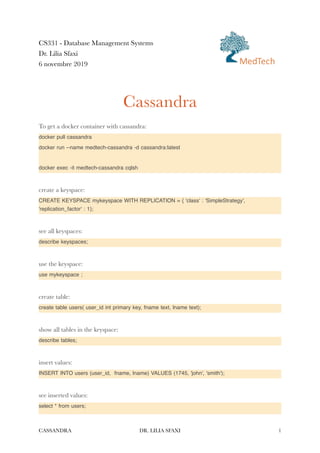
To get a docker container with cassandra:


docker pull cassandra


docker run --name medtech-cassandra -d cassandra:latest


docker exec -it medtech-cassandra cqlsh


create a keyspace:


CREATE KEYSPACE mykeyspace WITH REPLICATION = { 'class' : 'SimpleStrategy',
'replication_factor' : 1};


see all keyspaces:


describe keyspaces;


use the keyspace:


use mykeyspace ;


create table:


create table users( user_id int primary key, fname text, lname text);


show all tables in the keyspace:


describe tables;


insert values:


INSERT INTO users (user_id, fname, lname) VALUES (1745, 'john', 'smith');


see inserted values:


select * from users;


CASSANDRA DR. LILIA SFAXI 1
MedTech
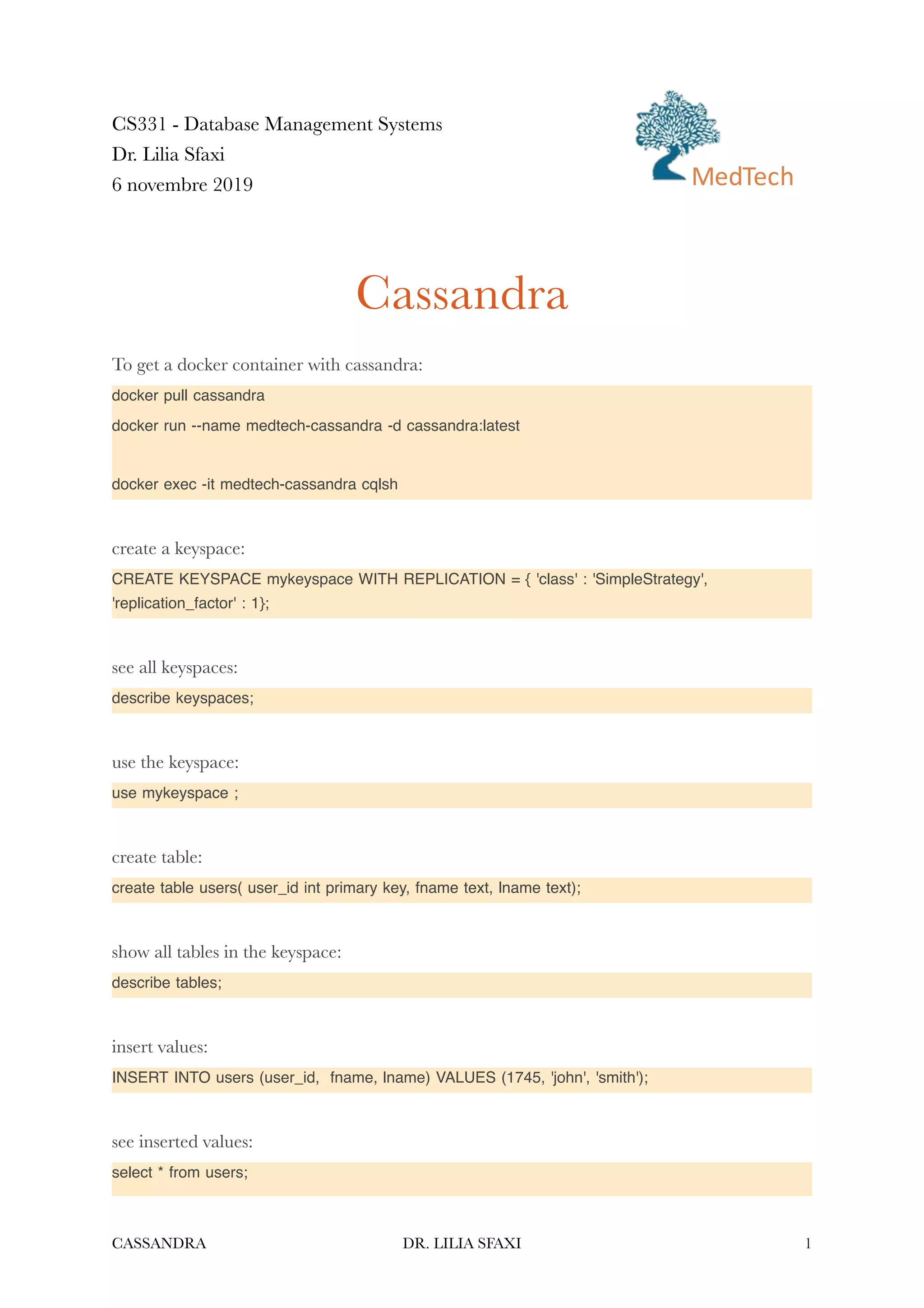
read requests (see the results)


select * from users where user_id < 2000;


select * from users where user_id = 1745;


select * from users where lname = 'smith';


indexing columns:


CREATE INDEX ON users (lname);


SELECT * FROM users WHERE lname = 'smith';


Create a table with composite key :


CREATE TABLE tab2 (


id1 int,


id2 int,


fi
rst_name varchar,


last_name varchar,


PRIMARY KEY (id1, id2));


Add a new column to the table:


ALTER TABLE users ADD telephone text;


Alter the value of a row:


UPDATE users SET telephone = '21212121' where user_id = 1745;


Empty a table:


TRUNCATE users;


Delete a table:


DROP table users;


Create a table with sets:


CREATE TABLE users (user_id int PRIMARY KEY, fname text, lname text,emails set<text>);


Insert values in a set:


CASSANDRA DR. LILIA SFAXI 2
INSERT INTO users (user_id, fname, lname, emails)VALUES(1234, 'Frodo', 'Baggins',
{'f@baggins.com', 'baggins@gmail.com'});


Add an element to a set:


UPDATE users SET emails = emails + {'fb@friendsofmordor.org'} WHERE user_id = 1234;


Extract email addresses:


SELECT user_id, emails FROM users WHERE user_id = 1234;


Delete an element from the set:


UPDATE users SET emails = emails - {'fb@friendsofmordor.org'} WHERE user_id = 1234;


To delete all elements:


UPDATE users SET emails = {} WHERE user_id = 1234;


or


DELETE emails FROM users WHERE user_id = 1234;


create a list:


ALTER TABLE users ADD top_places list<text>;


insert elements in the list:


UPDATE users SET top_places = [ 'rivendell', 'rohan' ] WHERE user_id = 1234;


to add a new element in the list:


UPDATE users SET top_places = top_places + [ 'mordor' ] WHERE user_id = 1234;


to insert an element at a given position (old value will be replaced):


UPDATE users SET top_places[1] = 'riddermark' WHERE user_id = 1234;


delete an element from the list, using its index:


DELETE top_places[2] FROM users WHERE user_id = 1234;


delete all elements with a given value:


UPDATE users SET top_places = top_places - ['riddermark'] WHERE user_id = 1234;


CASSANDRA DR. LILIA SFAXI 3
create a map:


ALTER TABLE users ADD todo map<timestamp, text> ;


insert an element in the map:


UPDATE users SET todo = { '2012-9-24' : 'enter mordor', '2012-10-2 12:00' : 'throw ring into
mount doom', toTimestamp(now()): 'die!'} WHERE user_id = 1234;


insert a speci
fi
c element by id:


UPDATE users SET todo['2012-10-2 12:00'] = 'throw my precious into mount doom' WHERE
user_id = 1234;


replace the whole map with insert:


INSERT INTO users (user_id,todo) VALUES ( 1234, { '2013-9-22 12:01' : 'birthday wishes to
Bilbo', '2013-10-1 18:00' : 'Check into Inn of Prancing Pony' });


delete an element in the map:


DELETE todo['2012-9-24'] FROM users WHERE user_id = 1234;


Activity


- Design the enrollment example for a column-based database like cassandra


- Create the tables and run some queries to test
CASSANDRA DR. LILIA SFAXI 4

Lab1-DB-Cassandra

  • 1.
    CS331 - DatabaseManagement Systems Dr. Lilia Sfaxi 6 novembre 2019 Cassandra To get a docker container with cassandra: docker pull cassandra docker run --name medtech-cassandra -d cassandra:latest docker exec -it medtech-cassandra cqlsh create a keyspace: CREATE KEYSPACE mykeyspace WITH REPLICATION = { 'class' : 'SimpleStrategy', 'replication_factor' : 1}; see all keyspaces: describe keyspaces; use the keyspace: use mykeyspace ; create table: create table users( user_id int primary key, fname text, lname text); show all tables in the keyspace: describe tables; insert values: INSERT INTO users (user_id, fname, lname) VALUES (1745, 'john', 'smith'); see inserted values: select * from users; CASSANDRA DR. LILIA SFAXI 1 MedTech
  • 2.
    read requests (seethe results) select * from users where user_id < 2000; select * from users where user_id = 1745; select * from users where lname = 'smith'; indexing columns: CREATE INDEX ON users (lname); SELECT * FROM users WHERE lname = 'smith'; Create a table with composite key : CREATE TABLE tab2 ( id1 int, id2 int, fi rst_name varchar, last_name varchar, PRIMARY KEY (id1, id2)); Add a new column to the table: ALTER TABLE users ADD telephone text; Alter the value of a row: UPDATE users SET telephone = '21212121' where user_id = 1745; Empty a table: TRUNCATE users; Delete a table: DROP table users; Create a table with sets: CREATE TABLE users (user_id int PRIMARY KEY, fname text, lname text,emails set<text>); Insert values in a set: CASSANDRA DR. LILIA SFAXI 2
  • 3.
    INSERT INTO users(user_id, fname, lname, emails)VALUES(1234, 'Frodo', 'Baggins', {'f@baggins.com', 'baggins@gmail.com'}); Add an element to a set: UPDATE users SET emails = emails + {'fb@friendsofmordor.org'} WHERE user_id = 1234; Extract email addresses: SELECT user_id, emails FROM users WHERE user_id = 1234; Delete an element from the set: UPDATE users SET emails = emails - {'fb@friendsofmordor.org'} WHERE user_id = 1234; To delete all elements: UPDATE users SET emails = {} WHERE user_id = 1234; or DELETE emails FROM users WHERE user_id = 1234; create a list: ALTER TABLE users ADD top_places list<text>; insert elements in the list: UPDATE users SET top_places = [ 'rivendell', 'rohan' ] WHERE user_id = 1234; to add a new element in the list: UPDATE users SET top_places = top_places + [ 'mordor' ] WHERE user_id = 1234; to insert an element at a given position (old value will be replaced): UPDATE users SET top_places[1] = 'riddermark' WHERE user_id = 1234; delete an element from the list, using its index: DELETE top_places[2] FROM users WHERE user_id = 1234; delete all elements with a given value: UPDATE users SET top_places = top_places - ['riddermark'] WHERE user_id = 1234; CASSANDRA DR. LILIA SFAXI 3
  • 4.
    create a map: ALTERTABLE users ADD todo map<timestamp, text> ; insert an element in the map: UPDATE users SET todo = { '2012-9-24' : 'enter mordor', '2012-10-2 12:00' : 'throw ring into mount doom', toTimestamp(now()): 'die!'} WHERE user_id = 1234; insert a speci fi c element by id: UPDATE users SET todo['2012-10-2 12:00'] = 'throw my precious into mount doom' WHERE user_id = 1234; replace the whole map with insert: INSERT INTO users (user_id,todo) VALUES ( 1234, { '2013-9-22 12:01' : 'birthday wishes to Bilbo', '2013-10-1 18:00' : 'Check into Inn of Prancing Pony' }); delete an element in the map: DELETE todo['2012-9-24'] FROM users WHERE user_id = 1234; Activity - Design the enrollment example for a column-based database like cassandra - Create the tables and run some queries to test CASSANDRA DR. LILIA SFAXI 4