NARASU’S SARATHY INSTITUTE OF TECHNOLOGY, SALEM

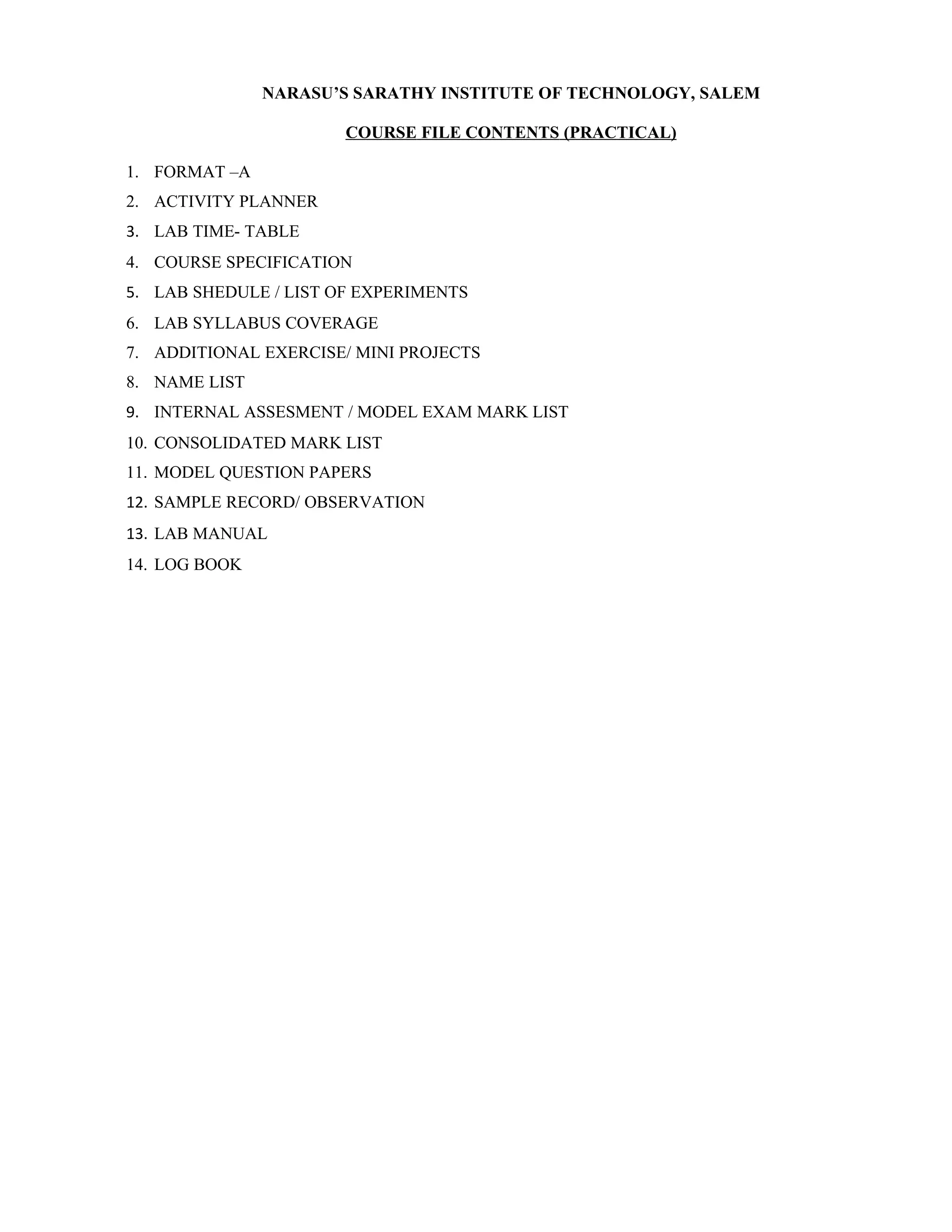
                       COURSE FILE CONTENTS (PRACTICAL)

1. FORMAT –A
2. ACTIVITY PLANNER
3. LAB TIME- TABLE
4. COURSE SPECIFICATION
5. LAB SHEDULE / LIST OF EXPERIMENTS
6. LAB SYLLABUS COVERAGE
7. ADDITIONAL EXERCISE/ MINI PROJECTS
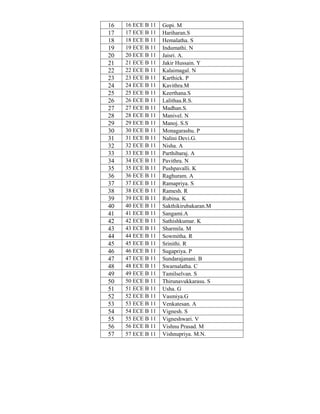
8. NAME LIST
9. INTERNAL ASSESMENT / MODEL EXAM MARK LIST
10. CONSOLIDATED MARK LIST
11. MODEL QUESTION PAPERS
12. SAMPLE RECORD/ OBSERVATION
13. LAB MANUAL
14. LOG BOOK
NARASU’S SARATHY INSTITUTE OF TECHNOLOGY, SALEM

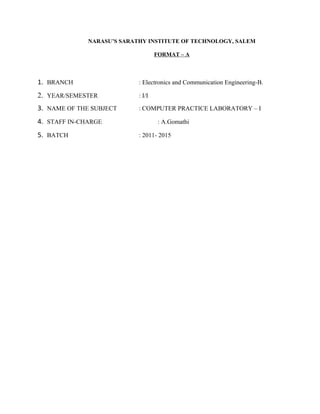
                                    FORMAT – A


1. BRANCH                   : Electronics and Communication Engineering-B.

2. YEAR/SEMESTER            : I/I

3. NAME OF THE SUBJECT      : COMPUTER PRACTICE LABORATORY – I

4. STAFF IN-CHARGE                   : A.Gomathi

5. BATCH                    : 2011- 2015
NARASU’S SARATHY INSTITUTE OF TECHNOLOGY, SALEM

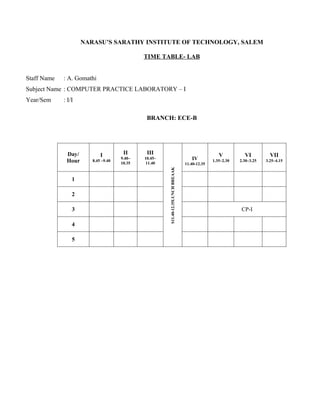
                                             TIME TABLE- LAB


Staff Name   : A. Gomathi
Subject Name : COMPUTER PRACTICE LABORATORY – I
Year/Sem     : I/I

                                              BRANCH: ECE-B


              Day/          I         II      III                                                 V          VI          VII
              Hour      8.45 –9.40
                                     9.40–   10.45–                                 IV         1.35–2.30   2.30–3.25   3.25–4.15
                                     10.35    11.40                              11.40-12.35

                                                      S11.40-12.35LUNCH BREAAK
                 1

                 2

                 3                                                                                          CP-I

                 4

                 5
NARASU’S SARATHY INSTITUTE OF TECHNOLOGY, SALEM

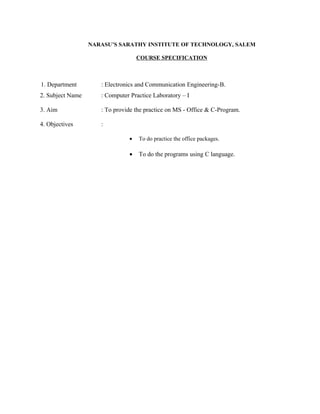
                                   COURSE SPECIFICATION


1. Department        : Electronics and Communication Engineering-B.
2. Subject Name      : Computer Practice Laboratory – I

3. Aim               : To provide the practice on MS - Office & C-Program.

4. Objectives        :

                               •   To do practice the office packages.

                               •   To do the programs using C language.
NARASU’S SARATHY INSTITUTE OF TECHNOLOGY, SALEM
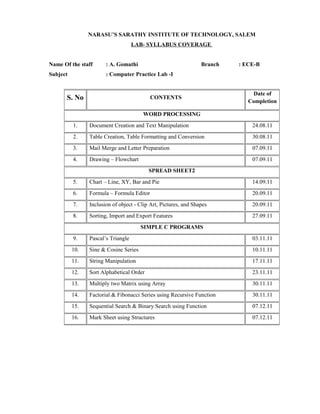
                                    LAB- SYLLABUS COVERAGE


Name Of the staff      : A. Gomathi                              Branch   : ECE-B
Subject                : Computer Practice Lab -I


                                                                              Date of
      S. No                                CONTENTS
                                                                             Completion

                                       WORD PROCESSING
          1.    Document Creation and Text Manipulation                       24.08.11
          2.    Table Creation, Table Formatting and Conversion               30.08.11
          3.    Mail Merge and Letter Preparation                             07.09.11
          4.    Drawing – Flowchart                                           07.09.11
                                          SPREAD SHEET2
          5.    Chart – Line, XY, Bar and Pie                                 14.09.11
          6.    Formula – Formula Editor                                      20.09.11
          7.    Inclusion of object - Clip Art, Pictures, and Shapes          20.09.11
          8.    Sorting, Import and Export Features                           27.09.11
                                       SIMPLE C PROGRAMS
          9.    Pascal’s Triangle                                             03.11.11
          10.   Sine & Cosine Series                                          10.11.11
          11.   String Manipulation                                           17.11.11
          12.   Sort Alphabetical Order                                       23.11.11
          13.   Multiply two Matrix using Array                               30.11.11
          14.   Factorial & Fibonacci Series using Recursive Function         30.11.11
          15.   Sequential Search & Binary Search using Function              07.12.11
          16.   Mark Sheet using Structures                                   07.12.11
NARASU’S SARATHY INSTITUTE OF TECHNOLOGY, SALEM
                        LAB SHEDULE / LIST OF EXERCISES

Name Of the staff   : A. Gomathi                 Branch   : ECE-B
Subject             : Computer Practice Lab -I
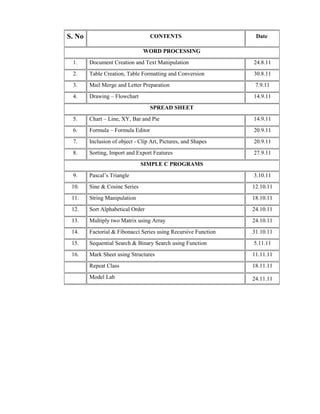
S. No                              CONTENTS                      Date

                               WORD PROCESSING
 1.     Document Creation and Text Manipulation                 24.8.11
 2.     Table Creation, Table Formatting and Conversion         30.8.11
 3.     Mail Merge and Letter Preparation                        7.9.11
 4.     Drawing – Flowchart                                     14.9.11
                                   SPREAD SHEET
 5.     Chart – Line, XY, Bar and Pie                           14.9.11
 6.     Formula – Formula Editor                                20.9.11
 7.     Inclusion of object - Clip Art, Pictures, and Shapes    20.9.11
 8.     Sorting, Import and Export Features                     27.9.11
                               SIMPLE C PROGRAMS
 9.     Pascal’s Triangle                                       3.10.11
 10.    Sine & Cosine Series                                    12.10.11
 11.    String Manipulation                                     18.10.11
 12.    Sort Alphabetical Order                                 24.10.11
 13.    Multiply two Matrix using Array                         24.10.11
 14.    Factorial & Fibonacci Series using Recursive Function   31.10.11
 15.    Sequential Search & Binary Search using Function        5.11.11
 16.    Mark Sheet using Structures                             11.11.11
        Repeat Class                                            18.11.11
        Model Lab                                               24.11.11
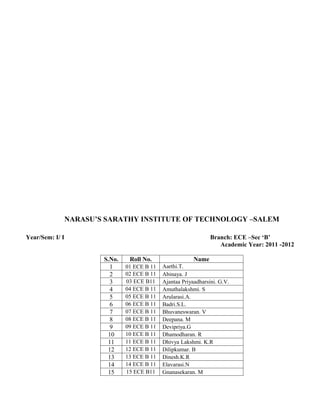
NARASU’S SARATHY INSTITUTE OF TECHNOLOGY –SALEM

Year/Sem: I/ I                                                     Branch: ECE –Sec ‘B’
                                                                      Academic Year: 2011 -2012

                         S.No.    Roll No.                  Name
                           1     01 ECE B 11   Aarthi.T.
                           2     02 ECE B 11   Abinaya. J
                           3     03 ECE B11    Ajantaa Priyaadharsini. G.V.
                           4     04 ECE B 11   Amuthalakshmi. S
                           5     05 ECE B 11   Arularasi.A.
                           6     06 ECE B 11   Badri.S.L.
                           7     07 ECE B 11   Bhuvaneswaran. V
                           8     08 ECE B 11   Deepana. M
                           9     09 ECE B 11   Devipriya.G
                          10     10 ECE B 11   Dhamodharan. R
                          11     11 ECE B 11   Dhivya Lakshmi. K.R
                          12     12 ECE B 11   Dilipkumar. B
                          13     13 ECE B 11   Dinesh.K.R
                          14     14 ECE B 11   Elavarasi.N
                          15     15 ECE B11    Gnanasekaran. M
16   16 ECE B 11   Gopi. M
17   17 ECE B 11   Hariharan.S
18   18 ECE B 11   Hemalatha. S
19   19 ECE B 11   Indumathi. N
20   20 ECE B 11   Jaisri. A.
21   21 ECE B 11   Jakir Hussain. Y
22   22 ECE B 11   Kalaimagal. N
23   23 ECE B 11   Karthick. P
24   24 ECE B 11   Kavithra.M
25   25 ECE B 11   Keerthana.S
26   26 ECE B 11   Lalithaa.R.S.
27   27 ECE B 11   Madhan.S.
28   28 ECE B 11   Manivel. N
29   29 ECE B 11   Manoj. S.S
30   30 ECE B 11   Monagarashu. P
31   31 ECE B 11   Nalini Devi.G.
32   32 ECE B 11   Nisha. A
33   33 ECE B 11   Parthibaraj. A
34   34 ECE B 11   Pavithra. N
35   35 ECE B 11   Pushpavalli. K
36   36 ECE B 11   Raghuram. A
37   37 ECE B 11   Ramapriya. S
38   38 ECE B 11   Ramesh. R
39   39 ECE B 11   Rubina. K
40   40 ECE B 11   Sakthikirubakaran.M
41   41 ECE B 11   Sangami.A
42   42 ECE B 11   Sathishkumar. K
43   43 ECE B 11   Sharmila. M
44   44 ECE B 11   Sowmitha. R
45   45 ECE B 11   Srinithi. R
46   46 ECE B 11   Sugapriya. P
47   47 ECE B 11   Sundarajanani. B
48   48 ECE B 11   Swarnalatha. C
49   49 ECE B 11   Tamilselvan. S
50   50 ECE B 11   Thirunavukkarasu. S
51   51 ECE B 11   Usha. G
52   52 ECE B 11   Vasmiya.G
53   53 ECE B 11   Venkatesan. A
54   54 ECE B 11   Vignesh. S
55   55 ECE B 11   Vigneshwari. V
56   56 ECE B 11   Vishnu Prasad. M
57   57 ECE B 11   Vishnupriya. M.N.
Staff I/C


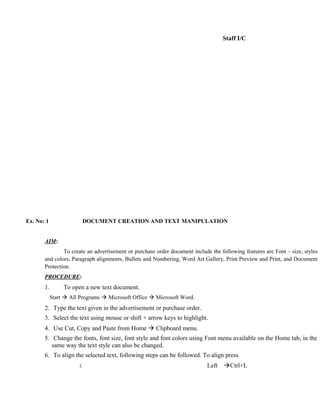
Ex. No: 1                   DOCUMENT CREATION AND TEXT MANIPULATION


       AIM:
               To create an advertisement or purchase order document include the following features are Font – size, styles
       and colors, Paragraph alignments, Bullets and Numbering, Word Art Gallery, Print Preview and Print, and Document
       Protection.
       PROCEDURE:
       1.        To open a new text document.
            Start  All Programs  Microsoft Office  Microsoft Word.
       2. Type the text given in the advertisement or purchase order.
       3. Select the text using mouse or shift + arrow keys to highlight.
       4. Use Cut, Copy and Paste from Home  Clipboard menu.
       5. Change the fonts, font size, font style and font colors using Font menu available on the Home tab, in the
          same way the text style can also be changed.
       6. To align the selected text, following steps can be followed. To align press
                       i.                                                   Left   Ctrl+L
ii.          Right Ctrl+R
                     iii.                                                       CentreCtrl+E
                     iv.                                                        JustifyCtrl+J
      7. To justify the text, choose paragraph menu from Home tab. In that choose justified         option from
         alignment pull down list.
      8. To use Bullets and Numbering choose paragraph menu from Home tab and click once on the numbering
         icon.
      9. To choose the appropriate WordArt Gallery to place the text in boxes click Insert  Text menu.
     10. You can see a preview, on screen of what you wish to print. Choose Office Button  Print  Press Print
         Preview option.
     11. To print the document. Choose Office Button  Print  Press Print option.
     12. After completing the formatting process save the document by pressing ctrl+s or click Office Button 
         Save.
     13. To protect a document using password click Office Button  Prepare  Encrypt Document. A text box
         appears on the screen prompting for a password. Enter the password you want.
     14. To open a saved document again, click Office Button  Open, when you click on the file name you want
         to open a document the computer prompts you for your password.
     15. Your saved document is opened.


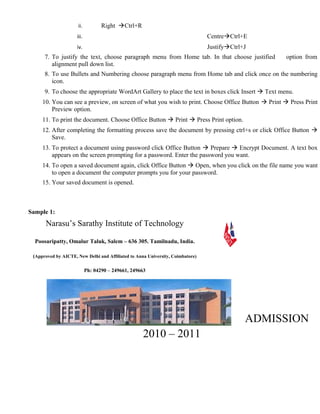
Sample 1:
      Narasu’s Sarathy Institute of Technology

  Poosaripatty, Omalur Taluk, Salem – 636 305. Tamilnadu, India.

 (Approved by AICTE, New Delhi and Affiliated to Anna University, Coimbatore)

                            Ph: 04290 – 249661, 249663


                                                                                             ADMISSION
                                                    2010 – 2011
 Computer Science & Engineering
                                                Electronics & Communication Engineering
                                                Electrical & Electronics Engineering
                                                Information Tecnology
                                                Mechanical Engineering


                                                                   100%
                                                                Placement


                        Aggregate marks in Maths, Physics & Chemistry


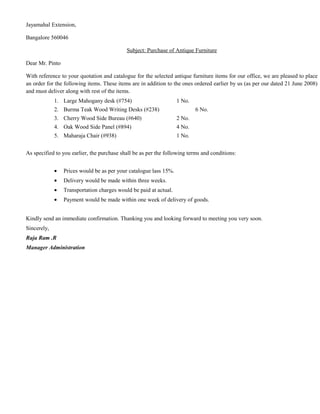
Sample 2:

Ideas Unlimited Pvt. Ltd.

                                                       C 100, Defense Colony,

                                                       New Delhi 110024.

                                                       Phone: 91-011-6949001

                                                       Fax: 91-011-6949002

                                                                                        August 3, 1999

Mr. M.J.Pinto

Antique Arts,

13, Mayfair Building,
Jayamahal Extension,

Bangalore 560046

                                            Subject: Purchase of Antique Furniture

Dear Mr. Pinto

With reference to your quotation and catalogue for the selected antique furniture items for our office, we are pleased to place
an order for the following items. These items are in addition to the ones ordered earlier by us (as per our dated 21 June 2008)
and must deliver along with rest of the items.
             1. Large Mahogany desk (#754)                         1 No.
             2. Burma Teak Wood Writing Desks (#238)                       6 No.
             3. Cherry Wood Side Bureau (#640)                     2 No.
             4. Oak Wood Side Panel (#894)                         4 No.
             5. Maharaja Chair (#938)                              1 No.


As specified to you earlier, the purchase shall be as per the following terms and conditions:


             •   Prices would be as per your catalogue lass 15%.
             •   Delivery would be made within three weeks.
             •   Transportation charges would be paid at actual.
             •   Payment would be made within one week of delivery of goods.


Kindly send an immediate confirmation. Thanking you and looking forward to meeting you very soon.
Sincerely,
Raja Ram .R
Manager Administration
Ex. No: 2                TABLE CREATION, TABLE FORMATTING AND CONVERSION


       AIM:
                 To create a table for an employee details, use table formatting and conversions.


       PROCEDURE:
       1. Open a new text document.
            START  ALL PROGRAMS  MICROSOFT OFFICE  MICROSOFT OFFICE WORD.
       2. To insert Header and Footer, click Insert  Header/Footer menu. Enter a header/footer that      repeats on
            all pages in your document.
       3. To insert a table, click on Insert  Table menu. Enter the number of rows and columns required, on the
            text box that appears on the screen. Now a table with specified number of rows and columns is created.
       4. To insert another rows and columns, highlight any blank rows/columns by choosing Layout 
            Rows/Columns from menu. Click on the icon repeatedly, another blank row/column would automatically
            inserted.
       5. Select the cells of table where formula appears in that Layout  Date menu. The formula dialog box
            contains formula and number formats.
       6. For example, create table with the column for Employee Name, Basic Pay, DA, HRA and Total Salary,
          enter the given data in the created table for 5 employees and calculate the following using formula.
                 a. To find the Total Salary for each employee using the formula [=SUM (LEFT)].
                 b. To find the Grand Salary, calculate the sum of all Total Salary using the formula [=SUM
                    (ABOVE)].
                 c. To find the Maximum and Minimum of Total Salary using the formula
                    [=MAX (ABOVE)] or [=MIN (ABOVE)].
       7. To split cell, select the split cell option from the Layout  Merge menu. The dialog box appears and then
            enters your choice to split cell.
       8. To merge cell, highlight the cell and select the merge cell option from the Layout  Merge menu.
       9. To convert the table to text and vice versa, select a table/text in a document. Choose the convert – Table
          to Text/Text to Table option from Layout  Date menu.
      10. The Autofit option in the Table menu is used to specify the automatic column and row width and is also
           useful for distributing the rows and columns evenly.
      11. After completing the process save the document by pressing ctrl+s or click
             Office Button  Save.
      12. To open a saved document again, click Office Button  Open, Your saved document is opened.
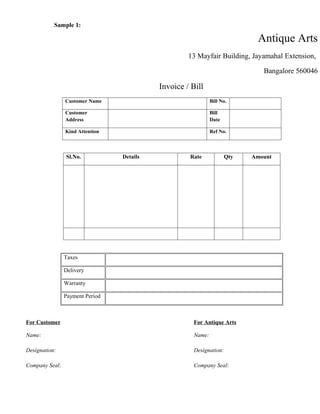
Sample 1:

                                                                           Antique Arts
                                                    13 Mayfair Building, Jayamahal Extension,

                                                                             Bangalore 560046

                                           Invoice / Bill
                Customer Name                                Bill No.

                Customer                                     Bill
                Address                                      Date

                Kind Attention                               Ref No.


                Sl.No.           Details            Rate            Qty   Amount


                Taxes

                Delivery

                Warranty

                Payment Period


For Customer                                         For Antique Arts

Name:                                                Name:

Designation:                                         Designation:

Company Seal:                                        Company Seal:
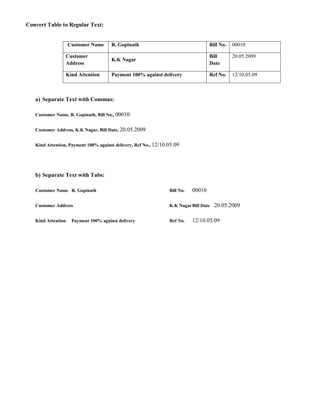
Convert Table to Regular Text:


                    Customer Name       R. Gopinath                                 Bill No.   00010

                    Customer                                                        Bill       20.05.2009
                                        K.K Nagar
                    Address                                                         Date

                    Kind Attention      Payment 100% against delivery               Ref No.    12/10.05.09


   a) Separate Text with Commas:

   Customer Name, R. Gopinath, Bill No., 00010


   Customer Address, K.K Nagar, Bill Date, 20.05.2009


   Kind Attention, Payment 100% against delivery, Ref No., 12/10.05.09


   b) Separate Text with Tabs:

   Customer Name R. Gopinath                                     Bill No.   00010

   Customer Address                                              K.K Nagar Bill Date   20.05.2009

   Kind Attention     Payment 100% against delivery              Ref No.    12/10.05.09
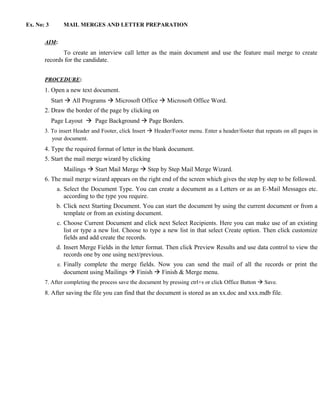
Ex. No: 3       MAIL MERGES AND LETTER PREPARATION


       AIM:
              To create an interview call letter as the main document and use the feature mail merge to create
       records for the candidate.


       PROCEDURE:
       1. Open a new text document.
            Start  All Programs  Microsoft Office  Microsoft Office Word.
       2. Draw the border of the page by clicking on
            Page Layout  Page Background  Page Borders.
       3. To insert Header and Footer, click Insert  Header/Footer menu. Enter a header/footer that repeats on all pages in
          your document.
       4. Type the required format of letter in the blank document.
       5. Start the mail merge wizard by clicking
                Mailings  Start Mail Merge  Step by Step Mail Merge Wizard.
       6. The mail merge wizard appears on the right end of the screen which gives the step by step to be followed.
              a. Select the Document Type. You can create a document as a Letters or as an E-Mail Messages etc.
                 according to the type you require.
             b. Click next Starting Document. You can start the document by using the current document or from a
                template or from an existing document.
              c. Choose Current Document and click next Select Recipients. Here you can make use of an existing
                 list or type a new list. Choose to type a new list in that select Create option. Then click customize
                 fields and add create the records.
             d. Insert Merge Fields in the letter format. Then click Preview Results and use data control to view the
                records one by one using next/previous.
              e. Finally complete the merge fields. Now you can send the mail of all the records or print the
                document using Mailings  Finish  Finish & Merge menu.
       7. After completing the process save the document by pressing ctrl+s or click Office Button  Save.
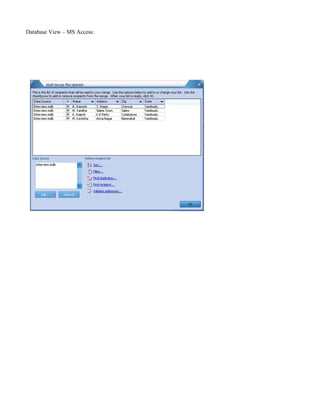
       8. After saving the file you can find that the document is stored as an xx.doc and xxx.mdb file.
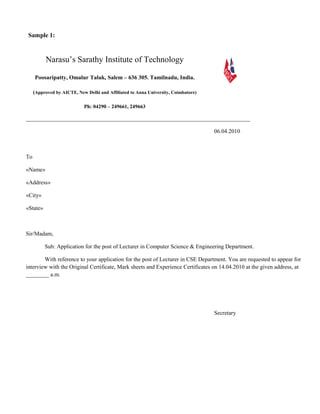
Sample 1:


          Narasu’s Sarathy Institute of Technology

     Poosaripatty, Omalur Taluk, Salem – 636 305. Tamilnadu, India.

     (Approved by AICTE, New Delhi and Affiliated to Anna University, Coimbatore)

                            Ph: 04290 – 249661, 249663

______________________________________________________________________________

                                                                                    06.04.2010


To

«Name»

«Address»

«City»

«State»


Sir/Madam,

          Sub: Application for the post of Lecturer in Computer Science & Engineering Department.

        With reference to your application for the post of Lecturer in CSE Department. You are requested to appear for
interview with the Original Certificate, Mark sheets and Experience Certificates on 14.04.2010 at the given address, at
________ a.m.


                                                                                    Secretary
Database View – MS Access:
Ex. No: 4                     DRAWING – FLOWCHART


       AIM:
               To draw a flow chart containing all flow chart symbols.


       PROCEDURE:
       1. Open a new text document.
            Start  All Programs  Microsoft Office  Microsoft Office Word.
       2. Draw the border of the page by clicking on
            Page Layout  Page Background  Page Borders.
       3. Type the question to draw the flowchart.
       4. For various flow chart symbols click on Insert  Illustrations  Shapes, a number of flowcharts appear
            on the drop down list box.
       5. Select the symbol by clicking on them to satisfy the needs of your flow chart.
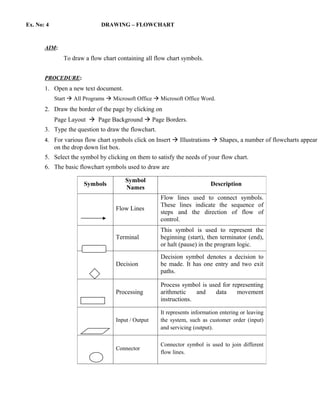
       6. The basic flowchart symbols used to draw are

                                         Symbol
                       Symbols                                             Description
                                         Names
                                                      Flow lines used to connect symbols.
                                                      These lines indicate the sequence of
                                    Flow Lines
                                                      steps and the direction of flow of
                                                      control.
                                                      This symbol is used to represent the
                                    Terminal          beginning (start), then terminator (end),
                                                      or halt (pause) in the program logic.
                                                      Decision symbol denotes a decision to
                                    Decision          be made. It has one entry and two exit
                                                      paths.

                                                      Process symbol is used for representing
                                    Processing        arithmetic    and   data     movement
                                                      instructions.

                                                      It represents information entering or leaving
                                    Input / Output    the system, such as customer order (input)
                                                      and servicing (output).

                                                      Connector symbol is used to join different
                                    Connector
                                                      flow lines.
7. You can change the size of the symbol by double clicking on it
      8. To enter text inside the symbols, right click on it and select ADD TEXT option.
      9. You can also group the symbols by selecting a number of symbols and select
                                  Start

            GROUPING  GROUP from the right click popup menu.
      10. Now the required flow charty, z created. After completing save the document by pressing ctrl+s or click
                               Read x, is
          Office Button  Save.
      11. To open a saved document again, click Office Button  Open, Your saved document is opened.
                                        big = x


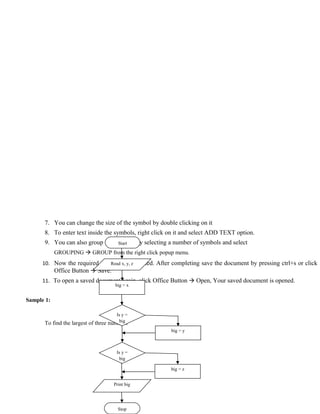
Sample 1:

                                        Is y =
                                         big
      To find the largest of three   numbers
                                                        big = y


                                         Is y =
                                          big

                                                        big = z


                                       Print big


                                         Stop
Yes


                                No


Sample 2:


      The find the length of the String


                                              Start


                                          Read x, y, z


                                     For len=0; str[len]!
                                     =’/0’; len++


                                            Print len


                                              Stop
Ex. No: 5                       CHART – LINE, XY, BAR AND PIE


       AIM:
                To create a worksheet to analyze the students mark list of a class with appropriate chart.


       PROCEDURE:
       1. To open a new spreadsheet
                Start  All Program  Microsoft Office  Microsoft Excel
       2. The cell pointer (thick rectangular box) indicates the active cell in the worksheet. The cells are referred
          by the cell address as A1, A2, etc.
       3. To insert and delete cells of rows/columns, choose Home  Cells menu.
       4. To insert new worksheet press shift+F11 function key.
       5. For editing data in Worksheet, Choose the active cell in which you want to edit data, then Double click
          on it or press F2 function key.
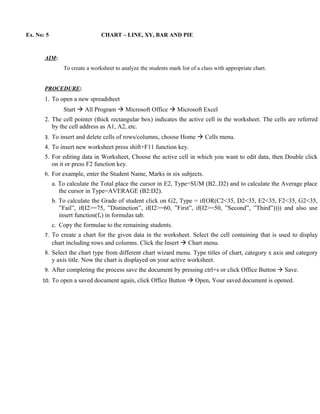
       6. For example, enter the Student Name, Marks in six subjects.
            a. To calculate the Total place the cursor in E2, Type=SUM (B2..D2) and to calculate the Average place
               the cursor in Type=AVERAGE (B2:D2).
            b. To calculate the Grade of student click on G2, Type = if(OR(C2<35, D2<35, E2<35, F2<35, G2<35,
               ”Fail”, if(I2>=75, ”Distinction”, if(I2>=60, ”First”, if(I2>=50, ”Second”, ”Third”)))) and also use
               insert function(fx) in formulas tab.
            c. Copy the formulae to the remaining students.
       7. To create a chart for the given data in the worksheet. Select the cell containing that is used to display
            chart including rows and columns. Click the Insert  Chart menu.
       8. Select the chart type from different chart wizard menu. Type titles of chart, category x axis and category
          y axis title. Now the chart is displayed on your active worksheet.
       9. After completing the process save the document by pressing ctrl+s or click Office Button  Save.
      10. To open a saved document again, click Office Button  Open, Your saved document is opened.
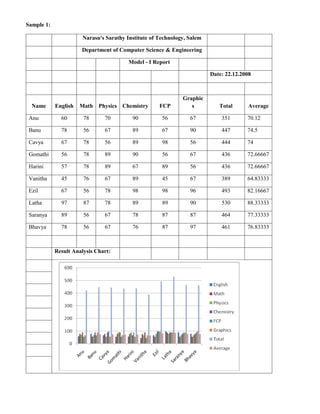
Sample 1:

                       Narasu's Sarathy Institute of Technology, Salem

                      Department of Computer Science & Engineering

                                         Model - I Report

                                                                         Date: 22.12.2008


                                                              Graphic
  Name      English   Math Physics Chemistry         FCP         s          Total      Average

 Anu          60       78      70         90          56         67          351       70.12

 Banu         78       56      67         89          67         90          447       74.5

 Cavya        67       78      56         89          98         56          444       74

 Gomathi      56       78      89         90          56         67          436       72.66667

 Harini       57       78      89         67          89         56          436       72.66667

 Vanitha      45       76      67         89          45         67          389       64.83333

 Ezil         67       56      78         98          98         96          493       82.16667

 Latha        97       87      78         89          89         90          530       88.33333

 Saranya      89       56      67         78          87         87          464       77.33333

 Bhavya       78       56      67         76          87         97          461       76.83333


            Result Analysis Chart:
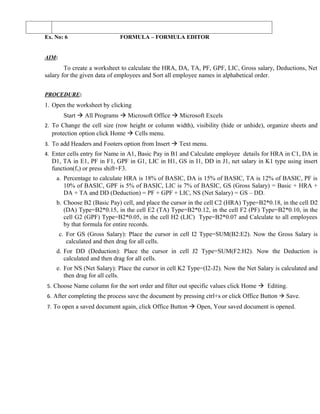
Ex. No: 6                    FORMULA – FORMULA EDITOR


AIM:
        To create a worksheet to calculate the HRA, DA, TA, PF, GPF, LIC, Gross salary, Deductions, Net
salary for the given data of employees and Sort all employee names in alphabetical order.


PROCEDURE:
1. Open the worksheet by clicking
        Start  All Programs  Microsoft Office  Microsoft Excels
2. To Change the cell size (row height or column width), visibility (hide or unhide), organize sheets and
  protection option click Home  Cells menu.
3. To add Headers and Footers option from Insert  Text menu.
4. Enter cells entry for Name in A1, Basic Pay in B1 and Calculate employee details for HRA in C1, DA in
  D1, TA in E1, PF in F1, GPF in G1, LIC in H1, GS in I1, DD in J1, net salary in K1 type using insert
  function(fx) or press shift+F3.
    a. Percentage to calculate HRA is 18% of BASIC, DA is 15% of BASIC, TA is 12% of BASIC, PF is
        10% of BASIC, GPF is 5% of BASIC, LIC is 7% of BASIC, GS (Gross Salary) = Basic + HRA +
        DA + TA and DD (Deduction) = PF + GPF + LIC, NS (Net Salary) = GS – DD.
    b. Choose B2 (Basic Pay) cell, and place the cursor in the cell C2 (HRA) Type=B2*0.18, in the cell D2
       (DA) Type=B2*0.15, in the cell E2 (TA) Type=B2*0.12, in the cell F2 (PF) Type=B2*0.10, in the
       cell G2 (GPF) Type=B2*0.05, in the cell H2 (LIC) Type=B2*0.07 and Calculate to all employees
       by that formula for entire records.
       c. For GS (Gross Salary): Place the cursor in cell I2 Type=SUM(B2:E2). Now the Gross Salary is
          calculated and then drag for all cells.
    d. For DD (Deduction): Place the cursor in cell J2 Type=SUM(F2:H2). Now the Deduction is
       calculated and then drag for all cells.
    e. For NS (Net Salary): Place the cursor in cell K2 Type=(I2-J2). Now the Net Salary is calculated and
       then drag for all cells.
5. Choose Name column for the sort order and filter out specific values click Home  Editing.
6. After completing the process save the document by pressing ctrl+s or click Office Button  Save.
7. To open a saved document again, click Office Button  Open, Your saved document is opened.
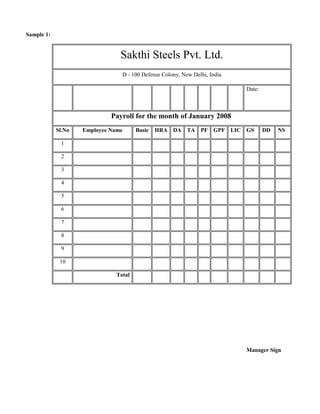
Sample 1:


                                Sakthi Steels Pvt. Ltd.
                                 D - 100 Defense Colony, New Delhi, India

                                                                            Date:


                             Payroll for the month of January 2008
            Sl.No   Employee Name      Basic   HRA DA TA PF GPF LIC GS              DD   NS

             1

             2

             3

             4

             5

             6

             7

             8

             9

             10

                               Total


                                                                            Manager Sign
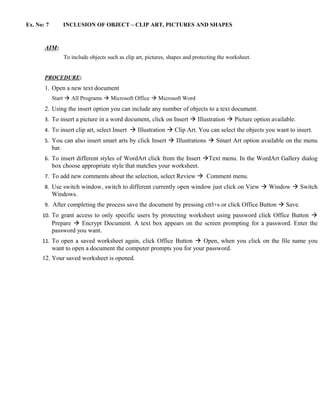
Ex. No: 7          INCLUSION OF OBJECT – CLIP ART, PICTURES AND SHAPES


       AIM:
                   To include objects such as clip art, pictures, shapes and protecting the worksheet.


       PROCEDURE:
       1. Open a new text document
            Start  All Programs  Microsoft Office  Microsoft Word
       2. Using the insert option you can include any number of objects to a text document.
       3. To insert a picture in a word document, click on Insert  Illustration  Picture option available.
       4. To insert clip art, select Insert  Illustration  Clip Art. You can select the objects you want to insert.
       5. You can also insert smart arts by click Insert  Illustrations  Smart Art option available on the menu
            bar.
       6. To insert different styles of WordArt click from the Insert Text menu. In the WordArt Gallery dialog
            box choose appropriate style that matches your worksheet.
       7. To add new comments about the selection, select Review  Comment menu.
       8. Use switch window, switch to different currently open window just click on View  Window  Switch
            Windows.
       9. After completing the process save the document by pressing ctrl+s or click Office Button  Save.
      10. To grant access to only specific users by protecting worksheet using password click Office Button 
            Prepare  Encrypt Document. A text box appears on the screen prompting for a password. Enter the
            password you want.
      11. To open a saved worksheet again, click Office Button  Open, when you click on the file name you
            want to open a document the computer prompts you for your password.
      12. Your saved worksheet is opened.
Sample 1:


            Insert Object:   SMART LEARNING CENTRE
                                  CHENNAI - 10
                    Information
                    Technology
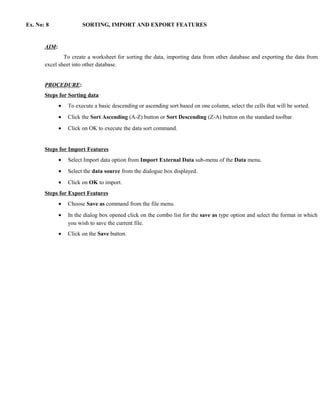
Ex. No: 8               SORTING, IMPORT AND EXPORT FEATURES


       AIM:
               To create a worksheet for sorting the data, importing data from other database and exporting the data from
       excel sheet into other database.


       PROCEDURE:
       Steps for Sorting data
              •   To execute a basic descending or ascending sort based on one column, select the cells that will be sorted.
              •   Click the Sort Ascending (A-Z) button or Sort Descending (Z-A) button on the standard toolbar.
              •   Click on OK to execute the data sort command.


       Steps for Import Features
              •   Select Import data option from Import External Data sub-menu of the Data menu.
              •   Select the data source from the dialogue box displayed.
              •   Click on OK to import.
       Steps for Export Features
              •   Choose Save as command from the file menu.
              •   In the dialog box opened click on the combo list for the save as type option and select the format in which
                  you wish to save the current file.
              •   Click on the Save button.
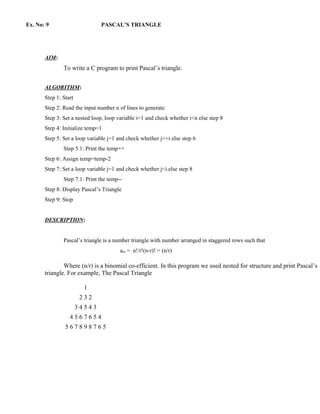
Ex. No: 9                      PASCAL’S TRIANGLE


       AIM:
               To write a C program to print Pascal’s triangle.


       ALGORITHM:
       Step 1: Start
       Step 2: Read the input number n of lines to generate
       Step 3: Set a nested loop, loop variable i=1 and check whether i<n else step 8
       Step 4: Initialize temp=1
       Step 5: Set a loop variable j=1 and check whether j<=i else step 6
               Step 5.1: Print the temp++
       Step 6: Assign temp=temp-2
       Step 7: Set a loop variable j=1 and check whether j<i else step 8
               Step 7.1: Print the temp--
       Step 8: Display Pascal’s Triangle
       Step 9: Stop


       DESCRIPTION:


               Pascal’s triangle is a number triangle with number arranged in staggered rows such that
                                        anr = n!/r!(n-r)! = (n/r)

               Where (n/r) is a binomial co-efficient. In this program we used nested for structure and print Pascal’s
       triangle. For example, The Pascal Triangle

                         1
                        232
                       34543
                  4567654
                567898765
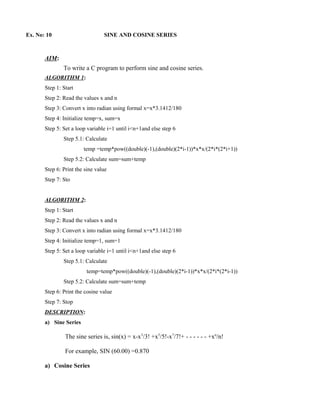
Ex. No: 10                       SINE AND COSINE SERIES


       AIM:
               To write a C program to perform sine and cosine series.
       ALGORITHM 1:
       Step 1: Start
       Step 2: Read the values x and n
       Step 3: Convert x into radian using formal x=x*3.1412/180
       Step 4: Initialize temp=x, sum=x
       Step 5: Set a loop variable i=1 until i<n+1and else step 6
               Step 5.1: Calculate
                        temp =temp*pow((double)(-1),(double)(2*i-1))*x*x/(2*i*(2*i+1))
               Step 5.2: Calculate sum=sum+temp
       Step 6: Print the sine value
       Step 7: Sto


       ALGORITHM 2:
       Step 1: Start
       Step 2: Read the values x and n
       Step 3: Convert x into radian using formal x=x*3.1412/180
       Step 4: Initialize temp=1, sum=1
       Step 5: Set a loop variable i=1 until i<n+1and else step 6
               Step 5.1: Calculate
                         temp=temp*pow((double)(-1),(double)(2*i-1))*x*x/(2*i*(2*i-1))
               Step 5.2: Calculate sum=sum+temp
       Step 6: Print the cosine value
       Step 7: Stop
       DESCRIPTION:
       a) Sine Series

                The sine series is, sin(x) = x-x3/3! +x5/5!-x7/7!+ - - - - - - +xn/n!

                For example, SIN (60.00) =0.870

       a) Cosine Series
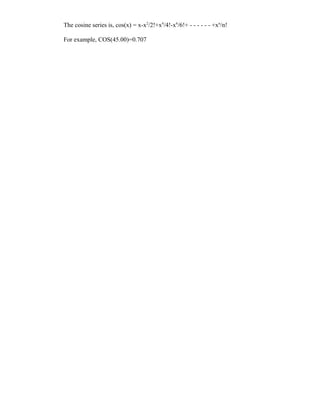
The cosine series is, cos(x) = x-x2/2!+x4/4!-x6/6!+ - - - - - - +xn/n!

For example, COS(45.00)=0.707
Ex. No: 11                              STRING MANIPULATION

       AIM:
               To write a C program to perform string manipulation function like string concatenation, comparison,
       find the length and string copy without using library functions.
ALGORITHM:
       Step 1: Start
       Step 2: Declare character array string1[n], string2[n], string3[n]
       Step 3: Set a infinite loop and Create a menu driven to perform string manipulation function
       Step 4: Enter a choice and Perform string copy, string compare, string concatenation   and string length
       Step 5: Print the result
       Step 8: Stop
       DESCRIPTION:


               The program string manipulation includes all the string operations like
                a) String copy: The string copy use to one string to another. It assigns the contents of each character from
                   string2 to string1 until null character occurrence and place null character ‘0’ at the end of destination
                   string1. For example,
                        Read the string1: lotus
                        The copied string is lotus


                b) String compare: The string comparison compares string1 and string2 for their equality, if both are equal
                   then print “The strings are equal” or print “The strings are not equal”. Here each array character from one
                   string can be checked for equality with another string until null character ‘0’ is read. For example,
                        Read the string1: piece
                        Read the string2: peace
                        The given two strings are not equal


                c) String concatenation: The string concatenation forms string1 and string2 together. The concatenation
                   string can be obtained by adding each character from the string1 into string3 after finished this then add
                   string2 each character into string3 and place null character ‘0’ at the end of the string3. For example,
                        Read the string1: good
                        Read the string2: day
                        The concatenated string is good day


                d) String length: The string length counts the number of character presented in the string arrays until null
                   character is read. For example,
                        Read a string1: rose
                        The length of rose is 4
Ex. No: 12                      SORTING ALPHABETICAL ORDER


       AIM:
               To write a C program to arrange names in alphabetical order.


       ALGORITHM:
       Step 1: Start
       Step 2: Declare character array name[n][m] and temp[n]
       Step 3: Read n number alphabet to sort and Initialize name[n]
       Step 4: Set a nested loop variable i=1 and j=i+1 to iterate
       Step 5: Compare element and do swapping,
               Step 5.1: temp=name[i]
               Step 5.2: name[i]=name[j]
               Step 5.3: name[j]=temp
       Step 6: Print the sorted array name[n]
       Step 7: Stop


       DESCRIPTION:


                Arranging the names in the ascending/descending order using string sorting. Each string is read using a
       scanf() function with %s format. The alphabet of each name is checked according to the alphabetical order. The order
       is checked by comparing each name by strcmp() function and if it gives greater than zero comparison result then we
       use strcpy() function to swap variable with another variable. Print the sorted list of name. For example,
               Read unsorted array of items:
                       London     Delhi    Chennai    Paris   Bombay
               Print sorted alphabetical List:
                       Bombay Chennai Delhi          London     Paris
Ex. No: 13                                 MATRIX MULTIPLICATION


       AIM:
               To write a ‘C’ program to perform matrix multiplication.


       ALGORITHM:
       Step 1: Start
       Step 2: Declare two dimensional array for the matrix A, matrix B and matrix C
       Step 3: Read the size and elements for the row and column of the A matrix and B
               matrix
       Step 4: Set a nested for loop to iterate and calculate C[i][j]=C[i][j]+A[i][k]*B[k][j]
               i.e., row size of first matrix A and columns size of matrix B
       Step 5: Print the elements of the matrix A and matrix B in matrix form
       Step 6: Print the resultant matrix C
       Step 7: Stop


       DESCRIPTION:


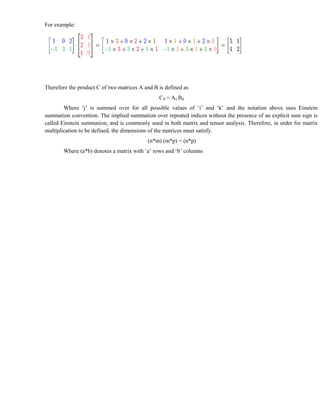
                This is the most often used and most important way to multiply matrices. It is defined between two matrices
       only if the number of columns of the first matrix is the same as the number of rows of the second matrix.


       Formally, for
                                       ,
       then


       where the elements of A.B are given by


       for each pair i and j with 1 ≤ i ≤ m and 1 ≤ j ≤ p. The algebraic system of "matrix units" summarizes the abstract
       properties of this kind of multiplication.
For example:


Therefore the product C of two matrices A and B is defined as
                                                Cik = Aij Bjk
        Where ‘j’ is summed over for all possible values of ‘i’ and ‘k’ and the notation above uses Einstein
summation convention. The implied summation over repeated indices without the presence of an explicit sum sign is
called Einstein summation, and is commonly used in both matrix and tensor analysis. Therefore, in order for matrix
multiplication to be defined, the dimensions of the matrices must satisfy.
                                           (n*m) (m*p) = (n*p)
        Where (a*b) denotes a matrix with ‘a’ rows and ‘b’ columns
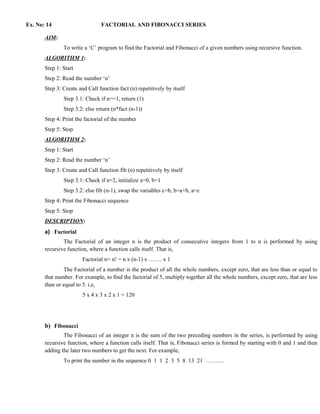
Ex. No: 14                      FACTORIAL AND FIBONACCI SERIES

       AIM:
               To write a ‘C’ program to find the Factorial and Fibonacci of a given numbers using recursive function.
       ALGORITHM 1:
       Step 1: Start
       Step 2: Read the number ‘n’
       Step 3: Create and Call function fact (n) repetitively by itself
               Step 3.1: Check if n==1, return (1)
               Step 3.2: else return (n*fact (n-1))
       Step 4: Print the factorial of the number
       Step 5: Stop
       ALGORITHM 2:
       Step 1: Start
       Step 2: Read the number ‘n’
       Step 3: Create and Call function fib (n) repetitively by itself
               Step 3.1: Check if n=2, initialize a=0, b=1
               Step 3.2: else fib (n-1), swap the variables c=b, b=a+b, a=c
       Step 4: Print the Fibonacci sequence
       Step 5: Stop
       DESCRIPTION:
       a) Factorial
               The Factorial of an integer n is the product of consecutive integers from 1 to n is performed by using
       recursive function, where a function calls itself. That is,
                        Factorial n= n! = n x (n-1) x ……. x 1
               The Factorial of a number is the product of all the whole numbers, except zero, that are less than or equal to
       that number. For example, to find the factorial of 5, multiply together all the whole numbers, except zero, that are less
       than or equal to 5. i.e,
                        5 x 4 x 3 x 2 x 1 = 120


       b) Fibonacci
               The Fibonacci of an integer n is the sum of the two preceding numbers in the series, is performed by using
       recursive function, where a function calls itself. That is, Fibonacci series is formed by starting with 0 and 1 and then
       adding the later two numbers to get the next. For example,
               To print the number in the sequence 0 1 1 2 3 5 8 13 21 ……….
Ex. No: 15                       SEQUENTIAL AND BINARY SEARCH


       AIM:
               To write a C program to perform Sequential and Binary Search using function.


       ALGORITHM 1:
       Step 1: Start
       Step 2: Read the size and number into array arr[n]
       Step 3: Create and call function seq(arr[n],n)
               Step 3.1: Set a loop variable i and iterate n times
               Step 3.2: Check if(k=arr[i]) print element found in position, assign x=2
               Step 3.3: Check if(x=1) print not found
       Step 4: Print the element position found or not in the array arr[n]
       Step 5: Stop


       ALGORITHM 2:
       Step 1: Start
       Step 2: Read the size and number into array arr[n]
       Step 3: Create and call function bin(arr[n],n)
               Step 3.1: Set a while loop and evaluate (first<=1)
               Step 3.2: Calculate middle=(first+last)/2
               Step 3.3: Check if(key<arr[middle])calculate last=middle-1
               Step 3.4: Else if(key>arr[middle])calculate first = middle +1
       Step 4: Print the element position found or not in the array arr[n]
       Step 5: Stop


       DESCRIPTION:


       a) Sequential Search

               Linear search, also known as sequential search, means starting at the beginning of the data and
       checking each item in turn until either the desired item is found or the end of the data is reached. This is the
       simplest known technique for searching an array for a particular data element and scans the element one by
       one until the end of array. If search is successful then it will return the location of element, otherwise it will
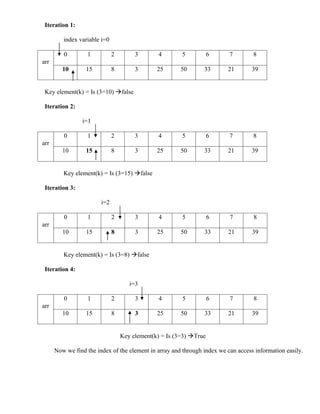
       return the element not found. For example, Find the key element 3 in the array arr[9].
Iteration 1:

         index variable i=0

         0         1          2        3       4        5           6     7        8
arr
         10       15          8        3       25      50       33       21        39


 Key element(k) = Is (3=10) false

 Iteration 2:

                 i=1

         0         1          2        3       4        5           6     7        8
arr
         10       15          8        3       25      50       33       21        39


         Key element(k) = Is (3=15) false

 Iteration 3:

                        i=2

         0         1          2        3       4        5           6     7        8
arr
         10       15          8        3       25      50       33       21        39


         Key element(k) = Is (3=8) false

 Iteration 4:

                                     i=3

         0         1          2        3       4        5           6     7        8
arr
         10       15          8        3       25      50       33       21        39


                                  Key element(k) = Is (3=3) True

      Now we find the index of the element in array and through index we can access information easily.
b) Binary Search

         The binary search is the simpler and faster than the linear search. Binary search is called so became
 on each search the array to be searched is divided into parts, one of which is ignored as it will not contain
 the required element.

         The condition for binary search is that all the data should be in sorted array. We compare the
 element with middle element of the array. If it is less than the middle element then we search it in the left
 portion of the array and if it is greater than the middle element then search will be in the right portion of the
 array. Now we will take that portion only for search and compare with middle element of that portion. This
 process will be in iteration until we find element or middle element has no left or right portion to search. For
 example, Find the key element 49 in the array arr[10].

 Iteration 1:

        First=0                 Middle=(0+9)/2=4                                Last=9

        0         1      2        3        4         5           6      7       8           9
arr
       10         18     19      20       25         30         49      57      64       72


 Iteration 2:

                                               First=5       Middle=(5+9)/2=7   Last=9

        0         1      2        3        4             5       6      7       8           9
arr
       10         18     19      20       25         30         49      57      64          72


 Iteration 3:

                                                   First=5                         Last=9

        0         1      2        3        4             5       6      7       8           9
arr
       10         18     19      20       25         30         49      57      64       72


                                                                Middle=(5+7)/2=6
                                Key element

        Now we find the index of the element in array and through index we can access information easily.
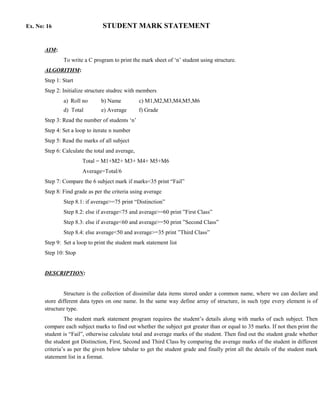
Ex. No: 16                      STUDENT MARK STATEMENT


       AIM:
               To write a C program to print the mark sheet of ‘n’ student using structure.
       ALGORITHM:
       Step 1: Start
       Step 2: Initialize structure studrec with members
               a) Roll no       b) Name           c) M1,M2,M3,M4,M5,M6
               d) Total         e) Average        f) Grade
       Step 3: Read the number of students ‘n’
       Step 4: Set a loop to iterate n number
       Step 5: Read the marks of all subject
       Step 6: Calculate the total and average,
                       Total = M1+M2+ M3+ M4+ M5+M6
                       Average=Total/6
       Step 7: Compare the 6 subject mark if marks<35 print “Fail”
       Step 8: Find grade as per the criteria using average
               Step 8.1: if average>=75 print “Distinction”
               Step 8.2: else if average<75 and average>=60 print ”First Class”
               Step 8.3: else if average<60 and average>=50 print ”Second Class”
               Step 8.4: else average<50 and average>=35 print ”Third Class”
       Step 9: Set a loop to print the student mark statement list
       Step 10: Stop


       DESCRIPTION:


                Structure is the collection of dissimilar data items stored under a common name, where we can declare and
       store different data types on one name. In the same way define array of structure, in such type every element is of
       structure type.
                The student mark statement program requires the student’s details along with marks of each subject. Then
       compare each subject marks to find out whether the subject got greater than or equal to 35 marks. If not then print the
       student is “Fail”, otherwise calculate total and average marks of the student. Then find out the student grade whether
       the student got Distinction, First, Second and Third Class by comparing the average marks of the student in different
       criteria’s as per the given below tabular to get the student grade and finally print all the details of the student mark
       statement list in a format.
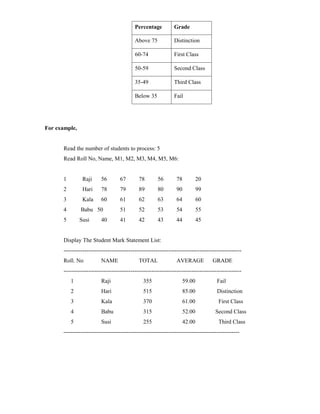
Percentage          Grade

                                            Above 75            Distinction

                                            60-74               First Class

                                            50-59               Second Class

                                            35-49               Third Class

                                            Below 35            Fail


For example,


       Read the number of students to process: 5
       Read Roll No, Name, M1, M2, M3, M4, M5, M6:


       1        Raji      56        67        78        56        78         20
       2        Hari      78        79        89        80        90         99
       3        Kala      60        61        62        63        64         60
       4        Babu 50             51        52        53        54         55
       5       Susi       40        41        42        43        44         45


       Display The Student Mark Statement List:
       ---------------------------------------------------------------------------------------------
       Roll. No           NAME                TOTAL               AVERAGE           GRADE
       ---------------------------------------------------------------------------------------------
           1              Raji                  355                  59.00             Fail
           2              Hari                  515                  85.00             Distinction
           3              Kala                  370                  61.00              First Class
           4              Babu                  315                  52.00            Second Class
           5              Susi                  255                  42.00              Third Class
      --------------------------------------------------------------------------------------------

Lab cf

  • 1.
    NARASU’S SARATHY INSTITUTEOF TECHNOLOGY, SALEM COURSE FILE CONTENTS (PRACTICAL) 1. FORMAT –A 2. ACTIVITY PLANNER 3. LAB TIME- TABLE 4. COURSE SPECIFICATION 5. LAB SHEDULE / LIST OF EXPERIMENTS 6. LAB SYLLABUS COVERAGE 7. ADDITIONAL EXERCISE/ MINI PROJECTS 8. NAME LIST 9. INTERNAL ASSESMENT / MODEL EXAM MARK LIST 10. CONSOLIDATED MARK LIST 11. MODEL QUESTION PAPERS 12. SAMPLE RECORD/ OBSERVATION 13. LAB MANUAL 14. LOG BOOK
  • 2.
    NARASU’S SARATHY INSTITUTEOF TECHNOLOGY, SALEM FORMAT – A 1. BRANCH : Electronics and Communication Engineering-B. 2. YEAR/SEMESTER : I/I 3. NAME OF THE SUBJECT : COMPUTER PRACTICE LABORATORY – I 4. STAFF IN-CHARGE : A.Gomathi 5. BATCH : 2011- 2015
  • 3.
    NARASU’S SARATHY INSTITUTEOF TECHNOLOGY, SALEM TIME TABLE- LAB Staff Name : A. Gomathi Subject Name : COMPUTER PRACTICE LABORATORY – I Year/Sem : I/I BRANCH: ECE-B Day/ I II III V VI VII Hour 8.45 –9.40 9.40– 10.45– IV 1.35–2.30 2.30–3.25 3.25–4.15 10.35 11.40 11.40-12.35 S11.40-12.35LUNCH BREAAK 1 2 3 CP-I 4 5
  • 4.
    NARASU’S SARATHY INSTITUTEOF TECHNOLOGY, SALEM COURSE SPECIFICATION 1. Department : Electronics and Communication Engineering-B. 2. Subject Name : Computer Practice Laboratory – I 3. Aim : To provide the practice on MS - Office & C-Program. 4. Objectives : • To do practice the office packages. • To do the programs using C language.
  • 5.
    NARASU’S SARATHY INSTITUTEOF TECHNOLOGY, SALEM LAB- SYLLABUS COVERAGE Name Of the staff : A. Gomathi Branch : ECE-B Subject : Computer Practice Lab -I Date of S. No CONTENTS Completion WORD PROCESSING 1. Document Creation and Text Manipulation 24.08.11 2. Table Creation, Table Formatting and Conversion 30.08.11 3. Mail Merge and Letter Preparation 07.09.11 4. Drawing – Flowchart 07.09.11 SPREAD SHEET2 5. Chart – Line, XY, Bar and Pie 14.09.11 6. Formula – Formula Editor 20.09.11 7. Inclusion of object - Clip Art, Pictures, and Shapes 20.09.11 8. Sorting, Import and Export Features 27.09.11 SIMPLE C PROGRAMS 9. Pascal’s Triangle 03.11.11 10. Sine & Cosine Series 10.11.11 11. String Manipulation 17.11.11 12. Sort Alphabetical Order 23.11.11 13. Multiply two Matrix using Array 30.11.11 14. Factorial & Fibonacci Series using Recursive Function 30.11.11 15. Sequential Search & Binary Search using Function 07.12.11 16. Mark Sheet using Structures 07.12.11
  • 6.
    NARASU’S SARATHY INSTITUTEOF TECHNOLOGY, SALEM LAB SHEDULE / LIST OF EXERCISES Name Of the staff : A. Gomathi Branch : ECE-B Subject : Computer Practice Lab -I
  • 7.
    S. No CONTENTS Date WORD PROCESSING 1. Document Creation and Text Manipulation 24.8.11 2. Table Creation, Table Formatting and Conversion 30.8.11 3. Mail Merge and Letter Preparation 7.9.11 4. Drawing – Flowchart 14.9.11 SPREAD SHEET 5. Chart – Line, XY, Bar and Pie 14.9.11 6. Formula – Formula Editor 20.9.11 7. Inclusion of object - Clip Art, Pictures, and Shapes 20.9.11 8. Sorting, Import and Export Features 27.9.11 SIMPLE C PROGRAMS 9. Pascal’s Triangle 3.10.11 10. Sine & Cosine Series 12.10.11 11. String Manipulation 18.10.11 12. Sort Alphabetical Order 24.10.11 13. Multiply two Matrix using Array 24.10.11 14. Factorial & Fibonacci Series using Recursive Function 31.10.11 15. Sequential Search & Binary Search using Function 5.11.11 16. Mark Sheet using Structures 11.11.11 Repeat Class 18.11.11 Model Lab 24.11.11
  • 8.
    NARASU’S SARATHY INSTITUTEOF TECHNOLOGY –SALEM Year/Sem: I/ I Branch: ECE –Sec ‘B’ Academic Year: 2011 -2012 S.No. Roll No. Name 1 01 ECE B 11 Aarthi.T. 2 02 ECE B 11 Abinaya. J 3 03 ECE B11 Ajantaa Priyaadharsini. G.V. 4 04 ECE B 11 Amuthalakshmi. S 5 05 ECE B 11 Arularasi.A. 6 06 ECE B 11 Badri.S.L. 7 07 ECE B 11 Bhuvaneswaran. V 8 08 ECE B 11 Deepana. M 9 09 ECE B 11 Devipriya.G 10 10 ECE B 11 Dhamodharan. R 11 11 ECE B 11 Dhivya Lakshmi. K.R 12 12 ECE B 11 Dilipkumar. B 13 13 ECE B 11 Dinesh.K.R 14 14 ECE B 11 Elavarasi.N 15 15 ECE B11 Gnanasekaran. M
  • 9.
    16 16 ECE B 11 Gopi. M 17 17 ECE B 11 Hariharan.S 18 18 ECE B 11 Hemalatha. S 19 19 ECE B 11 Indumathi. N 20 20 ECE B 11 Jaisri. A. 21 21 ECE B 11 Jakir Hussain. Y 22 22 ECE B 11 Kalaimagal. N 23 23 ECE B 11 Karthick. P 24 24 ECE B 11 Kavithra.M 25 25 ECE B 11 Keerthana.S 26 26 ECE B 11 Lalithaa.R.S. 27 27 ECE B 11 Madhan.S. 28 28 ECE B 11 Manivel. N 29 29 ECE B 11 Manoj. S.S 30 30 ECE B 11 Monagarashu. P 31 31 ECE B 11 Nalini Devi.G. 32 32 ECE B 11 Nisha. A 33 33 ECE B 11 Parthibaraj. A 34 34 ECE B 11 Pavithra. N 35 35 ECE B 11 Pushpavalli. K 36 36 ECE B 11 Raghuram. A 37 37 ECE B 11 Ramapriya. S 38 38 ECE B 11 Ramesh. R 39 39 ECE B 11 Rubina. K 40 40 ECE B 11 Sakthikirubakaran.M 41 41 ECE B 11 Sangami.A 42 42 ECE B 11 Sathishkumar. K 43 43 ECE B 11 Sharmila. M 44 44 ECE B 11 Sowmitha. R 45 45 ECE B 11 Srinithi. R 46 46 ECE B 11 Sugapriya. P 47 47 ECE B 11 Sundarajanani. B 48 48 ECE B 11 Swarnalatha. C 49 49 ECE B 11 Tamilselvan. S 50 50 ECE B 11 Thirunavukkarasu. S 51 51 ECE B 11 Usha. G 52 52 ECE B 11 Vasmiya.G 53 53 ECE B 11 Venkatesan. A 54 54 ECE B 11 Vignesh. S 55 55 ECE B 11 Vigneshwari. V 56 56 ECE B 11 Vishnu Prasad. M 57 57 ECE B 11 Vishnupriya. M.N.
  • 10.
    Staff I/C Ex. No:1 DOCUMENT CREATION AND TEXT MANIPULATION AIM: To create an advertisement or purchase order document include the following features are Font – size, styles and colors, Paragraph alignments, Bullets and Numbering, Word Art Gallery, Print Preview and Print, and Document Protection. PROCEDURE: 1. To open a new text document. Start  All Programs  Microsoft Office  Microsoft Word. 2. Type the text given in the advertisement or purchase order. 3. Select the text using mouse or shift + arrow keys to highlight. 4. Use Cut, Copy and Paste from Home  Clipboard menu. 5. Change the fonts, font size, font style and font colors using Font menu available on the Home tab, in the same way the text style can also be changed. 6. To align the selected text, following steps can be followed. To align press i. Left Ctrl+L
  • 11.
    ii. Right Ctrl+R iii. CentreCtrl+E iv. JustifyCtrl+J 7. To justify the text, choose paragraph menu from Home tab. In that choose justified option from alignment pull down list. 8. To use Bullets and Numbering choose paragraph menu from Home tab and click once on the numbering icon. 9. To choose the appropriate WordArt Gallery to place the text in boxes click Insert  Text menu. 10. You can see a preview, on screen of what you wish to print. Choose Office Button  Print  Press Print Preview option. 11. To print the document. Choose Office Button  Print  Press Print option. 12. After completing the formatting process save the document by pressing ctrl+s or click Office Button  Save. 13. To protect a document using password click Office Button  Prepare  Encrypt Document. A text box appears on the screen prompting for a password. Enter the password you want. 14. To open a saved document again, click Office Button  Open, when you click on the file name you want to open a document the computer prompts you for your password. 15. Your saved document is opened. Sample 1: Narasu’s Sarathy Institute of Technology Poosaripatty, Omalur Taluk, Salem – 636 305. Tamilnadu, India. (Approved by AICTE, New Delhi and Affiliated to Anna University, Coimbatore) Ph: 04290 – 249661, 249663 ADMISSION 2010 – 2011
  • 12.
     Computer Science& Engineering  Electronics & Communication Engineering  Electrical & Electronics Engineering  Information Tecnology  Mechanical Engineering 100% Placement Aggregate marks in Maths, Physics & Chemistry Sample 2: Ideas Unlimited Pvt. Ltd. C 100, Defense Colony, New Delhi 110024. Phone: 91-011-6949001 Fax: 91-011-6949002 August 3, 1999 Mr. M.J.Pinto Antique Arts, 13, Mayfair Building,
  • 13.
    Jayamahal Extension, Bangalore 560046 Subject: Purchase of Antique Furniture Dear Mr. Pinto With reference to your quotation and catalogue for the selected antique furniture items for our office, we are pleased to place an order for the following items. These items are in addition to the ones ordered earlier by us (as per our dated 21 June 2008) and must deliver along with rest of the items. 1. Large Mahogany desk (#754) 1 No. 2. Burma Teak Wood Writing Desks (#238) 6 No. 3. Cherry Wood Side Bureau (#640) 2 No. 4. Oak Wood Side Panel (#894) 4 No. 5. Maharaja Chair (#938) 1 No. As specified to you earlier, the purchase shall be as per the following terms and conditions: • Prices would be as per your catalogue lass 15%. • Delivery would be made within three weeks. • Transportation charges would be paid at actual. • Payment would be made within one week of delivery of goods. Kindly send an immediate confirmation. Thanking you and looking forward to meeting you very soon. Sincerely, Raja Ram .R Manager Administration
  • 14.
    Ex. No: 2 TABLE CREATION, TABLE FORMATTING AND CONVERSION AIM: To create a table for an employee details, use table formatting and conversions. PROCEDURE: 1. Open a new text document. START  ALL PROGRAMS  MICROSOFT OFFICE  MICROSOFT OFFICE WORD. 2. To insert Header and Footer, click Insert  Header/Footer menu. Enter a header/footer that repeats on all pages in your document. 3. To insert a table, click on Insert  Table menu. Enter the number of rows and columns required, on the text box that appears on the screen. Now a table with specified number of rows and columns is created. 4. To insert another rows and columns, highlight any blank rows/columns by choosing Layout  Rows/Columns from menu. Click on the icon repeatedly, another blank row/column would automatically inserted. 5. Select the cells of table where formula appears in that Layout  Date menu. The formula dialog box contains formula and number formats. 6. For example, create table with the column for Employee Name, Basic Pay, DA, HRA and Total Salary, enter the given data in the created table for 5 employees and calculate the following using formula. a. To find the Total Salary for each employee using the formula [=SUM (LEFT)]. b. To find the Grand Salary, calculate the sum of all Total Salary using the formula [=SUM (ABOVE)]. c. To find the Maximum and Minimum of Total Salary using the formula [=MAX (ABOVE)] or [=MIN (ABOVE)]. 7. To split cell, select the split cell option from the Layout  Merge menu. The dialog box appears and then enters your choice to split cell. 8. To merge cell, highlight the cell and select the merge cell option from the Layout  Merge menu. 9. To convert the table to text and vice versa, select a table/text in a document. Choose the convert – Table to Text/Text to Table option from Layout  Date menu. 10. The Autofit option in the Table menu is used to specify the automatic column and row width and is also useful for distributing the rows and columns evenly. 11. After completing the process save the document by pressing ctrl+s or click Office Button  Save. 12. To open a saved document again, click Office Button  Open, Your saved document is opened.
  • 15.
    Sample 1: Antique Arts 13 Mayfair Building, Jayamahal Extension, Bangalore 560046 Invoice / Bill Customer Name Bill No. Customer Bill Address Date Kind Attention Ref No. Sl.No. Details Rate Qty Amount Taxes Delivery Warranty Payment Period For Customer For Antique Arts Name: Name: Designation: Designation: Company Seal: Company Seal:
  • 16.
    Convert Table toRegular Text: Customer Name R. Gopinath Bill No. 00010 Customer Bill 20.05.2009 K.K Nagar Address Date Kind Attention Payment 100% against delivery Ref No. 12/10.05.09 a) Separate Text with Commas: Customer Name, R. Gopinath, Bill No., 00010 Customer Address, K.K Nagar, Bill Date, 20.05.2009 Kind Attention, Payment 100% against delivery, Ref No., 12/10.05.09 b) Separate Text with Tabs: Customer Name R. Gopinath Bill No. 00010 Customer Address K.K Nagar Bill Date 20.05.2009 Kind Attention Payment 100% against delivery Ref No. 12/10.05.09
  • 17.
    Ex. No: 3 MAIL MERGES AND LETTER PREPARATION AIM: To create an interview call letter as the main document and use the feature mail merge to create records for the candidate. PROCEDURE: 1. Open a new text document. Start  All Programs  Microsoft Office  Microsoft Office Word. 2. Draw the border of the page by clicking on Page Layout  Page Background  Page Borders. 3. To insert Header and Footer, click Insert  Header/Footer menu. Enter a header/footer that repeats on all pages in your document. 4. Type the required format of letter in the blank document. 5. Start the mail merge wizard by clicking Mailings  Start Mail Merge  Step by Step Mail Merge Wizard. 6. The mail merge wizard appears on the right end of the screen which gives the step by step to be followed. a. Select the Document Type. You can create a document as a Letters or as an E-Mail Messages etc. according to the type you require. b. Click next Starting Document. You can start the document by using the current document or from a template or from an existing document. c. Choose Current Document and click next Select Recipients. Here you can make use of an existing list or type a new list. Choose to type a new list in that select Create option. Then click customize fields and add create the records. d. Insert Merge Fields in the letter format. Then click Preview Results and use data control to view the records one by one using next/previous. e. Finally complete the merge fields. Now you can send the mail of all the records or print the document using Mailings  Finish  Finish & Merge menu. 7. After completing the process save the document by pressing ctrl+s or click Office Button  Save. 8. After saving the file you can find that the document is stored as an xx.doc and xxx.mdb file.
  • 18.
    Sample 1: Narasu’s Sarathy Institute of Technology Poosaripatty, Omalur Taluk, Salem – 636 305. Tamilnadu, India. (Approved by AICTE, New Delhi and Affiliated to Anna University, Coimbatore) Ph: 04290 – 249661, 249663 ______________________________________________________________________________ 06.04.2010 To «Name» «Address» «City» «State» Sir/Madam, Sub: Application for the post of Lecturer in Computer Science & Engineering Department. With reference to your application for the post of Lecturer in CSE Department. You are requested to appear for interview with the Original Certificate, Mark sheets and Experience Certificates on 14.04.2010 at the given address, at ________ a.m. Secretary
  • 19.
  • 20.
    Ex. No: 4 DRAWING – FLOWCHART AIM: To draw a flow chart containing all flow chart symbols. PROCEDURE: 1. Open a new text document. Start  All Programs  Microsoft Office  Microsoft Office Word. 2. Draw the border of the page by clicking on Page Layout  Page Background  Page Borders. 3. Type the question to draw the flowchart. 4. For various flow chart symbols click on Insert  Illustrations  Shapes, a number of flowcharts appear on the drop down list box. 5. Select the symbol by clicking on them to satisfy the needs of your flow chart. 6. The basic flowchart symbols used to draw are Symbol Symbols Description Names Flow lines used to connect symbols. These lines indicate the sequence of Flow Lines steps and the direction of flow of control. This symbol is used to represent the Terminal beginning (start), then terminator (end), or halt (pause) in the program logic. Decision symbol denotes a decision to Decision be made. It has one entry and two exit paths. Process symbol is used for representing Processing arithmetic and data movement instructions. It represents information entering or leaving Input / Output the system, such as customer order (input) and servicing (output). Connector symbol is used to join different Connector flow lines.
  • 21.
    7. You canchange the size of the symbol by double clicking on it 8. To enter text inside the symbols, right click on it and select ADD TEXT option. 9. You can also group the symbols by selecting a number of symbols and select Start GROUPING  GROUP from the right click popup menu. 10. Now the required flow charty, z created. After completing save the document by pressing ctrl+s or click Read x, is Office Button  Save. 11. To open a saved document again, click Office Button  Open, Your saved document is opened. big = x Sample 1: Is y = big To find the largest of three numbers big = y Is y = big big = z Print big Stop
  • 22.
    Yes No Sample 2: The find the length of the String Start Read x, y, z For len=0; str[len]! =’/0’; len++ Print len Stop
  • 24.
    Ex. No: 5 CHART – LINE, XY, BAR AND PIE AIM: To create a worksheet to analyze the students mark list of a class with appropriate chart. PROCEDURE: 1. To open a new spreadsheet Start  All Program  Microsoft Office  Microsoft Excel 2. The cell pointer (thick rectangular box) indicates the active cell in the worksheet. The cells are referred by the cell address as A1, A2, etc. 3. To insert and delete cells of rows/columns, choose Home  Cells menu. 4. To insert new worksheet press shift+F11 function key. 5. For editing data in Worksheet, Choose the active cell in which you want to edit data, then Double click on it or press F2 function key. 6. For example, enter the Student Name, Marks in six subjects. a. To calculate the Total place the cursor in E2, Type=SUM (B2..D2) and to calculate the Average place the cursor in Type=AVERAGE (B2:D2). b. To calculate the Grade of student click on G2, Type = if(OR(C2<35, D2<35, E2<35, F2<35, G2<35, ”Fail”, if(I2>=75, ”Distinction”, if(I2>=60, ”First”, if(I2>=50, ”Second”, ”Third”)))) and also use insert function(fx) in formulas tab. c. Copy the formulae to the remaining students. 7. To create a chart for the given data in the worksheet. Select the cell containing that is used to display chart including rows and columns. Click the Insert  Chart menu. 8. Select the chart type from different chart wizard menu. Type titles of chart, category x axis and category y axis title. Now the chart is displayed on your active worksheet. 9. After completing the process save the document by pressing ctrl+s or click Office Button  Save. 10. To open a saved document again, click Office Button  Open, Your saved document is opened.
  • 25.
    Sample 1: Narasu's Sarathy Institute of Technology, Salem Department of Computer Science & Engineering Model - I Report Date: 22.12.2008 Graphic Name English Math Physics Chemistry FCP s Total Average Anu 60 78 70 90 56 67 351 70.12 Banu 78 56 67 89 67 90 447 74.5 Cavya 67 78 56 89 98 56 444 74 Gomathi 56 78 89 90 56 67 436 72.66667 Harini 57 78 89 67 89 56 436 72.66667 Vanitha 45 76 67 89 45 67 389 64.83333 Ezil 67 56 78 98 98 96 493 82.16667 Latha 97 87 78 89 89 90 530 88.33333 Saranya 89 56 67 78 87 87 464 77.33333 Bhavya 78 56 67 76 87 97 461 76.83333 Result Analysis Chart:
  • 26.
    Ex. No: 6 FORMULA – FORMULA EDITOR AIM: To create a worksheet to calculate the HRA, DA, TA, PF, GPF, LIC, Gross salary, Deductions, Net salary for the given data of employees and Sort all employee names in alphabetical order. PROCEDURE: 1. Open the worksheet by clicking Start  All Programs  Microsoft Office  Microsoft Excels 2. To Change the cell size (row height or column width), visibility (hide or unhide), organize sheets and protection option click Home  Cells menu. 3. To add Headers and Footers option from Insert  Text menu. 4. Enter cells entry for Name in A1, Basic Pay in B1 and Calculate employee details for HRA in C1, DA in D1, TA in E1, PF in F1, GPF in G1, LIC in H1, GS in I1, DD in J1, net salary in K1 type using insert function(fx) or press shift+F3. a. Percentage to calculate HRA is 18% of BASIC, DA is 15% of BASIC, TA is 12% of BASIC, PF is 10% of BASIC, GPF is 5% of BASIC, LIC is 7% of BASIC, GS (Gross Salary) = Basic + HRA + DA + TA and DD (Deduction) = PF + GPF + LIC, NS (Net Salary) = GS – DD. b. Choose B2 (Basic Pay) cell, and place the cursor in the cell C2 (HRA) Type=B2*0.18, in the cell D2 (DA) Type=B2*0.15, in the cell E2 (TA) Type=B2*0.12, in the cell F2 (PF) Type=B2*0.10, in the cell G2 (GPF) Type=B2*0.05, in the cell H2 (LIC) Type=B2*0.07 and Calculate to all employees by that formula for entire records. c. For GS (Gross Salary): Place the cursor in cell I2 Type=SUM(B2:E2). Now the Gross Salary is calculated and then drag for all cells. d. For DD (Deduction): Place the cursor in cell J2 Type=SUM(F2:H2). Now the Deduction is calculated and then drag for all cells. e. For NS (Net Salary): Place the cursor in cell K2 Type=(I2-J2). Now the Net Salary is calculated and then drag for all cells. 5. Choose Name column for the sort order and filter out specific values click Home  Editing. 6. After completing the process save the document by pressing ctrl+s or click Office Button  Save. 7. To open a saved document again, click Office Button  Open, Your saved document is opened.
  • 27.
    Sample 1: Sakthi Steels Pvt. Ltd. D - 100 Defense Colony, New Delhi, India Date: Payroll for the month of January 2008 Sl.No Employee Name Basic HRA DA TA PF GPF LIC GS DD NS 1 2 3 4 5 6 7 8 9 10 Total Manager Sign
  • 28.
    Ex. No: 7 INCLUSION OF OBJECT – CLIP ART, PICTURES AND SHAPES AIM: To include objects such as clip art, pictures, shapes and protecting the worksheet. PROCEDURE: 1. Open a new text document Start  All Programs  Microsoft Office  Microsoft Word 2. Using the insert option you can include any number of objects to a text document. 3. To insert a picture in a word document, click on Insert  Illustration  Picture option available. 4. To insert clip art, select Insert  Illustration  Clip Art. You can select the objects you want to insert. 5. You can also insert smart arts by click Insert  Illustrations  Smart Art option available on the menu bar. 6. To insert different styles of WordArt click from the Insert Text menu. In the WordArt Gallery dialog box choose appropriate style that matches your worksheet. 7. To add new comments about the selection, select Review  Comment menu. 8. Use switch window, switch to different currently open window just click on View  Window  Switch Windows. 9. After completing the process save the document by pressing ctrl+s or click Office Button  Save. 10. To grant access to only specific users by protecting worksheet using password click Office Button  Prepare  Encrypt Document. A text box appears on the screen prompting for a password. Enter the password you want. 11. To open a saved worksheet again, click Office Button  Open, when you click on the file name you want to open a document the computer prompts you for your password. 12. Your saved worksheet is opened.
  • 29.
    Sample 1: Insert Object: SMART LEARNING CENTRE CHENNAI - 10 Information Technology
  • 30.
    Ex. No: 8 SORTING, IMPORT AND EXPORT FEATURES AIM: To create a worksheet for sorting the data, importing data from other database and exporting the data from excel sheet into other database. PROCEDURE: Steps for Sorting data • To execute a basic descending or ascending sort based on one column, select the cells that will be sorted. • Click the Sort Ascending (A-Z) button or Sort Descending (Z-A) button on the standard toolbar. • Click on OK to execute the data sort command. Steps for Import Features • Select Import data option from Import External Data sub-menu of the Data menu. • Select the data source from the dialogue box displayed. • Click on OK to import. Steps for Export Features • Choose Save as command from the file menu. • In the dialog box opened click on the combo list for the save as type option and select the format in which you wish to save the current file. • Click on the Save button.
  • 31.
    Ex. No: 9 PASCAL’S TRIANGLE AIM: To write a C program to print Pascal’s triangle. ALGORITHM: Step 1: Start Step 2: Read the input number n of lines to generate Step 3: Set a nested loop, loop variable i=1 and check whether i<n else step 8 Step 4: Initialize temp=1 Step 5: Set a loop variable j=1 and check whether j<=i else step 6 Step 5.1: Print the temp++ Step 6: Assign temp=temp-2 Step 7: Set a loop variable j=1 and check whether j<i else step 8 Step 7.1: Print the temp-- Step 8: Display Pascal’s Triangle Step 9: Stop DESCRIPTION: Pascal’s triangle is a number triangle with number arranged in staggered rows such that anr = n!/r!(n-r)! = (n/r) Where (n/r) is a binomial co-efficient. In this program we used nested for structure and print Pascal’s triangle. For example, The Pascal Triangle 1 232 34543 4567654 567898765
  • 32.
    Ex. No: 10 SINE AND COSINE SERIES AIM: To write a C program to perform sine and cosine series. ALGORITHM 1: Step 1: Start Step 2: Read the values x and n Step 3: Convert x into radian using formal x=x*3.1412/180 Step 4: Initialize temp=x, sum=x Step 5: Set a loop variable i=1 until i<n+1and else step 6 Step 5.1: Calculate temp =temp*pow((double)(-1),(double)(2*i-1))*x*x/(2*i*(2*i+1)) Step 5.2: Calculate sum=sum+temp Step 6: Print the sine value Step 7: Sto ALGORITHM 2: Step 1: Start Step 2: Read the values x and n Step 3: Convert x into radian using formal x=x*3.1412/180 Step 4: Initialize temp=1, sum=1 Step 5: Set a loop variable i=1 until i<n+1and else step 6 Step 5.1: Calculate temp=temp*pow((double)(-1),(double)(2*i-1))*x*x/(2*i*(2*i-1)) Step 5.2: Calculate sum=sum+temp Step 6: Print the cosine value Step 7: Stop DESCRIPTION: a) Sine Series The sine series is, sin(x) = x-x3/3! +x5/5!-x7/7!+ - - - - - - +xn/n! For example, SIN (60.00) =0.870 a) Cosine Series
  • 33.
    The cosine seriesis, cos(x) = x-x2/2!+x4/4!-x6/6!+ - - - - - - +xn/n! For example, COS(45.00)=0.707
  • 34.
    Ex. No: 11 STRING MANIPULATION AIM: To write a C program to perform string manipulation function like string concatenation, comparison, find the length and string copy without using library functions. ALGORITHM: Step 1: Start Step 2: Declare character array string1[n], string2[n], string3[n] Step 3: Set a infinite loop and Create a menu driven to perform string manipulation function Step 4: Enter a choice and Perform string copy, string compare, string concatenation and string length Step 5: Print the result Step 8: Stop DESCRIPTION: The program string manipulation includes all the string operations like a) String copy: The string copy use to one string to another. It assigns the contents of each character from string2 to string1 until null character occurrence and place null character ‘0’ at the end of destination string1. For example, Read the string1: lotus The copied string is lotus b) String compare: The string comparison compares string1 and string2 for their equality, if both are equal then print “The strings are equal” or print “The strings are not equal”. Here each array character from one string can be checked for equality with another string until null character ‘0’ is read. For example, Read the string1: piece Read the string2: peace The given two strings are not equal c) String concatenation: The string concatenation forms string1 and string2 together. The concatenation string can be obtained by adding each character from the string1 into string3 after finished this then add string2 each character into string3 and place null character ‘0’ at the end of the string3. For example, Read the string1: good Read the string2: day The concatenated string is good day d) String length: The string length counts the number of character presented in the string arrays until null character is read. For example, Read a string1: rose The length of rose is 4
  • 35.
    Ex. No: 12 SORTING ALPHABETICAL ORDER AIM: To write a C program to arrange names in alphabetical order. ALGORITHM: Step 1: Start Step 2: Declare character array name[n][m] and temp[n] Step 3: Read n number alphabet to sort and Initialize name[n] Step 4: Set a nested loop variable i=1 and j=i+1 to iterate Step 5: Compare element and do swapping, Step 5.1: temp=name[i] Step 5.2: name[i]=name[j] Step 5.3: name[j]=temp Step 6: Print the sorted array name[n] Step 7: Stop DESCRIPTION: Arranging the names in the ascending/descending order using string sorting. Each string is read using a scanf() function with %s format. The alphabet of each name is checked according to the alphabetical order. The order is checked by comparing each name by strcmp() function and if it gives greater than zero comparison result then we use strcpy() function to swap variable with another variable. Print the sorted list of name. For example, Read unsorted array of items: London Delhi Chennai Paris Bombay Print sorted alphabetical List: Bombay Chennai Delhi London Paris
  • 36.
    Ex. No: 13 MATRIX MULTIPLICATION AIM: To write a ‘C’ program to perform matrix multiplication. ALGORITHM: Step 1: Start Step 2: Declare two dimensional array for the matrix A, matrix B and matrix C Step 3: Read the size and elements for the row and column of the A matrix and B matrix Step 4: Set a nested for loop to iterate and calculate C[i][j]=C[i][j]+A[i][k]*B[k][j] i.e., row size of first matrix A and columns size of matrix B Step 5: Print the elements of the matrix A and matrix B in matrix form Step 6: Print the resultant matrix C Step 7: Stop DESCRIPTION: This is the most often used and most important way to multiply matrices. It is defined between two matrices only if the number of columns of the first matrix is the same as the number of rows of the second matrix. Formally, for , then where the elements of A.B are given by for each pair i and j with 1 ≤ i ≤ m and 1 ≤ j ≤ p. The algebraic system of "matrix units" summarizes the abstract properties of this kind of multiplication.
  • 37.
    For example: Therefore theproduct C of two matrices A and B is defined as Cik = Aij Bjk Where ‘j’ is summed over for all possible values of ‘i’ and ‘k’ and the notation above uses Einstein summation convention. The implied summation over repeated indices without the presence of an explicit sum sign is called Einstein summation, and is commonly used in both matrix and tensor analysis. Therefore, in order for matrix multiplication to be defined, the dimensions of the matrices must satisfy. (n*m) (m*p) = (n*p) Where (a*b) denotes a matrix with ‘a’ rows and ‘b’ columns
  • 38.
    Ex. No: 14 FACTORIAL AND FIBONACCI SERIES AIM: To write a ‘C’ program to find the Factorial and Fibonacci of a given numbers using recursive function. ALGORITHM 1: Step 1: Start Step 2: Read the number ‘n’ Step 3: Create and Call function fact (n) repetitively by itself Step 3.1: Check if n==1, return (1) Step 3.2: else return (n*fact (n-1)) Step 4: Print the factorial of the number Step 5: Stop ALGORITHM 2: Step 1: Start Step 2: Read the number ‘n’ Step 3: Create and Call function fib (n) repetitively by itself Step 3.1: Check if n=2, initialize a=0, b=1 Step 3.2: else fib (n-1), swap the variables c=b, b=a+b, a=c Step 4: Print the Fibonacci sequence Step 5: Stop DESCRIPTION: a) Factorial The Factorial of an integer n is the product of consecutive integers from 1 to n is performed by using recursive function, where a function calls itself. That is, Factorial n= n! = n x (n-1) x ……. x 1 The Factorial of a number is the product of all the whole numbers, except zero, that are less than or equal to that number. For example, to find the factorial of 5, multiply together all the whole numbers, except zero, that are less than or equal to 5. i.e, 5 x 4 x 3 x 2 x 1 = 120 b) Fibonacci The Fibonacci of an integer n is the sum of the two preceding numbers in the series, is performed by using recursive function, where a function calls itself. That is, Fibonacci series is formed by starting with 0 and 1 and then adding the later two numbers to get the next. For example, To print the number in the sequence 0 1 1 2 3 5 8 13 21 ……….
  • 39.
    Ex. No: 15 SEQUENTIAL AND BINARY SEARCH AIM: To write a C program to perform Sequential and Binary Search using function. ALGORITHM 1: Step 1: Start Step 2: Read the size and number into array arr[n] Step 3: Create and call function seq(arr[n],n) Step 3.1: Set a loop variable i and iterate n times Step 3.2: Check if(k=arr[i]) print element found in position, assign x=2 Step 3.3: Check if(x=1) print not found Step 4: Print the element position found or not in the array arr[n] Step 5: Stop ALGORITHM 2: Step 1: Start Step 2: Read the size and number into array arr[n] Step 3: Create and call function bin(arr[n],n) Step 3.1: Set a while loop and evaluate (first<=1) Step 3.2: Calculate middle=(first+last)/2 Step 3.3: Check if(key<arr[middle])calculate last=middle-1 Step 3.4: Else if(key>arr[middle])calculate first = middle +1 Step 4: Print the element position found or not in the array arr[n] Step 5: Stop DESCRIPTION: a) Sequential Search Linear search, also known as sequential search, means starting at the beginning of the data and checking each item in turn until either the desired item is found or the end of the data is reached. This is the simplest known technique for searching an array for a particular data element and scans the element one by one until the end of array. If search is successful then it will return the location of element, otherwise it will return the element not found. For example, Find the key element 3 in the array arr[9].
  • 40.
    Iteration 1: index variable i=0 0 1 2 3 4 5 6 7 8 arr 10 15 8 3 25 50 33 21 39 Key element(k) = Is (3=10) false Iteration 2: i=1 0 1 2 3 4 5 6 7 8 arr 10 15 8 3 25 50 33 21 39 Key element(k) = Is (3=15) false Iteration 3: i=2 0 1 2 3 4 5 6 7 8 arr 10 15 8 3 25 50 33 21 39 Key element(k) = Is (3=8) false Iteration 4: i=3 0 1 2 3 4 5 6 7 8 arr 10 15 8 3 25 50 33 21 39 Key element(k) = Is (3=3) True Now we find the index of the element in array and through index we can access information easily.
  • 41.
    b) Binary Search The binary search is the simpler and faster than the linear search. Binary search is called so became on each search the array to be searched is divided into parts, one of which is ignored as it will not contain the required element. The condition for binary search is that all the data should be in sorted array. We compare the element with middle element of the array. If it is less than the middle element then we search it in the left portion of the array and if it is greater than the middle element then search will be in the right portion of the array. Now we will take that portion only for search and compare with middle element of that portion. This process will be in iteration until we find element or middle element has no left or right portion to search. For example, Find the key element 49 in the array arr[10]. Iteration 1: First=0 Middle=(0+9)/2=4 Last=9 0 1 2 3 4 5 6 7 8 9 arr 10 18 19 20 25 30 49 57 64 72 Iteration 2: First=5 Middle=(5+9)/2=7 Last=9 0 1 2 3 4 5 6 7 8 9 arr 10 18 19 20 25 30 49 57 64 72 Iteration 3: First=5 Last=9 0 1 2 3 4 5 6 7 8 9 arr 10 18 19 20 25 30 49 57 64 72 Middle=(5+7)/2=6 Key element Now we find the index of the element in array and through index we can access information easily.
  • 42.
    Ex. No: 16 STUDENT MARK STATEMENT AIM: To write a C program to print the mark sheet of ‘n’ student using structure. ALGORITHM: Step 1: Start Step 2: Initialize structure studrec with members a) Roll no b) Name c) M1,M2,M3,M4,M5,M6 d) Total e) Average f) Grade Step 3: Read the number of students ‘n’ Step 4: Set a loop to iterate n number Step 5: Read the marks of all subject Step 6: Calculate the total and average, Total = M1+M2+ M3+ M4+ M5+M6 Average=Total/6 Step 7: Compare the 6 subject mark if marks<35 print “Fail” Step 8: Find grade as per the criteria using average Step 8.1: if average>=75 print “Distinction” Step 8.2: else if average<75 and average>=60 print ”First Class” Step 8.3: else if average<60 and average>=50 print ”Second Class” Step 8.4: else average<50 and average>=35 print ”Third Class” Step 9: Set a loop to print the student mark statement list Step 10: Stop DESCRIPTION: Structure is the collection of dissimilar data items stored under a common name, where we can declare and store different data types on one name. In the same way define array of structure, in such type every element is of structure type. The student mark statement program requires the student’s details along with marks of each subject. Then compare each subject marks to find out whether the subject got greater than or equal to 35 marks. If not then print the student is “Fail”, otherwise calculate total and average marks of the student. Then find out the student grade whether the student got Distinction, First, Second and Third Class by comparing the average marks of the student in different criteria’s as per the given below tabular to get the student grade and finally print all the details of the student mark statement list in a format.
  • 43.
    Percentage Grade Above 75 Distinction 60-74 First Class 50-59 Second Class 35-49 Third Class Below 35 Fail For example, Read the number of students to process: 5 Read Roll No, Name, M1, M2, M3, M4, M5, M6: 1 Raji 56 67 78 56 78 20 2 Hari 78 79 89 80 90 99 3 Kala 60 61 62 63 64 60 4 Babu 50 51 52 53 54 55 5 Susi 40 41 42 43 44 45 Display The Student Mark Statement List: --------------------------------------------------------------------------------------------- Roll. No NAME TOTAL AVERAGE GRADE --------------------------------------------------------------------------------------------- 1 Raji 355 59.00 Fail 2 Hari 515 85.00 Distinction 3 Kala 370 61.00 First Class 4 Babu 315 52.00 Second Class 5 Susi 255 42.00 Third Class --------------------------------------------------------------------------------------------