

Chapter 3


Error Handling


                 http://www.java2all.com
Introduction


               http://www.java2all.com
We already know about error and exception.

   In JSP there are 2 types of exception
1.      Translation time errors
2.      Run Time Exception
       Translation error occurs during page
   compilation, this results in an Internal Server Error
   (500).
       An exception on other hand occurs when page is
   compiled and servlet is running.
       Exception can be handled in JSP in three ways:

                                             http://www.java2all.com
a.) Java Exception Handling mechanism

b.) Dealing with exception with page directive

c.) Dealing with exception in Deployment
    Descriptor.


                                     http://www.java2all.com
By Mechanism


               http://www.java2all.com
Java Exception handling mechanism

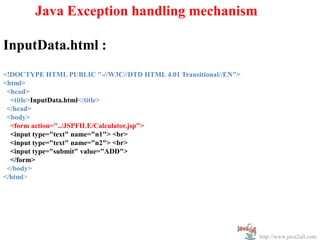
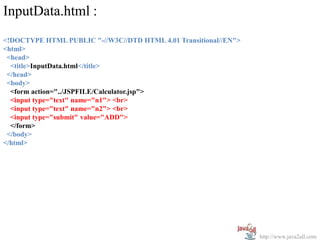
InputData.html :
<!DOCTYPE HTML PUBLIC "-//W3C//DTD HTML 4.01 Transitional//EN">
<html>
 <head>
  <title>InputData.html</title>
 </head>
 <body>
  <form action="../JSPFILE/Calculator.jsp">
  <input type="text" name="n1"> <br>
  <input type="text" name="n2"> <br>
  <input type="submit" value="ADD">
  </form>
 </body>
</html>


                                                                  http://www.java2all.com
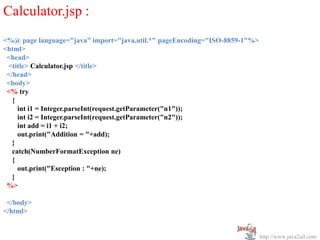
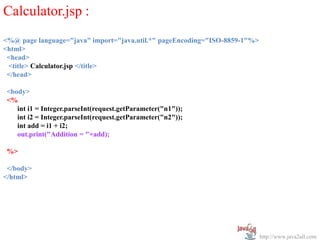
Calculator.jsp :
<%@ page language="java" import="java.util.*" pageEncoding="ISO-8859-1"%>
<html>
 <head>
 <title> Calculator.jsp </title>
 </head>
 <body>
 <% try
   {
     int i1 = Integer.parseInt(request.getParameter("n1"));
     int i2 = Integer.parseInt(request.getParameter("n2"));
     int add = i1 + i2;
     out.print("Addition = "+add);
   }
   catch(NumberFormatException ne)
   {
     out.print("Esception : "+ne);
   }
 %>

 </body>
</html>


                                                                            http://www.java2all.com
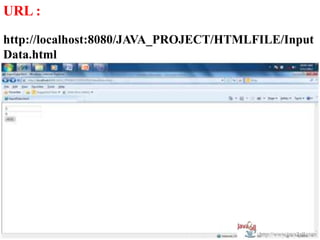
URL :
http://localhost:8080/JAVA_PROJECT/HTMLFILE/Input
Data.html


                                        http://www.java2all.com
                                        http://www.java2all.com
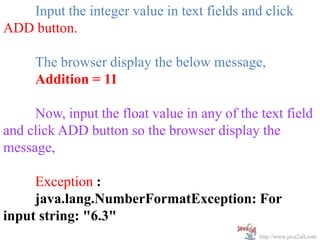
Input the integer value in text fields and click
ADD button.

     The browser display the below message,
     Addition = 11

     Now, input the float value in any of the text field
and click ADD button so the browser display the
message,

     Exception :
     java.lang.NumberFormatException: For
input string: "6.3"
                                              http://www.java2all.com
http://www.java2all.com
 http://www.java2all.com
By Page Directive


                    http://www.java2all.com
Dealing exception with page directive :

      The two attributes of page directive
errorPage and isErrorPage are used to deal with
exception.
InputData.html :
<!DOCTYPE HTML PUBLIC "-//W3C//DTD HTML 4.01 Transitional//EN">
<html>
 <head>
  <title>InputData.html</title>
 </head>
 <body>
  <form action="../JSPFILE/Calculator.jsp">
  <input type="text" name="n1"> <br>
  <input type="text" name="n2"> <br>
  <input type="submit" value="ADD">
  </form>
 </body>
</html>
                                                                  http://www.java2all.com
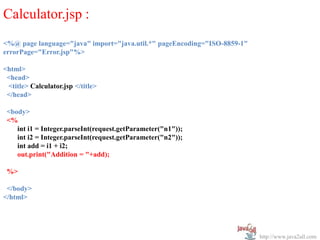
Calculator.jsp :
<%@ page language="java" import="java.util.*" pageEncoding="ISO-8859-1"
errorPage="Error.jsp"%>

<html>
 <head>
 <title> Calculator.jsp </title>
 </head>

 <body>
 <%
    int i1 = Integer.parseInt(request.getParameter("n1"));
    int i2 = Integer.parseInt(request.getParameter("n2"));
    int add = i1 + i2;
    out.print("Addition = "+add);

 %>

 </body>
</html>


                                                                          http://www.java2all.com
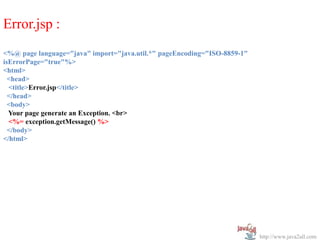
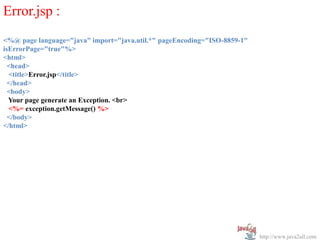
Error.jsp :
<%@ page language="java" import="java.util.*" pageEncoding="ISO-8859-1"
isErrorPage="true"%>
<html>
  <head>
  <title>Error.jsp</title>
  </head>
  <body>
  Your page generate an Exception. <br>
  <%= exception.getMessage() %>
  </body>
</html>


                                                                          http://www.java2all.com
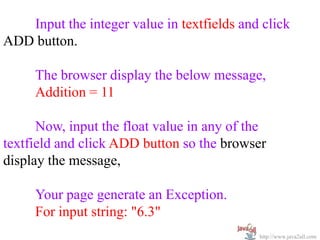
Input the integer value in textfields and click
ADD button.

     The browser display the below message,
     Addition = 11

      Now, input the float value in any of the
textfield and click ADD button so the browser
display the message,

     Your page generate an Exception.
     For input string: "6.3"
                                            http://www.java2all.com
In Deployment Descriptor


                      http://www.java2all.com
InputData.html :
<!DOCTYPE HTML PUBLIC "-//W3C//DTD HTML 4.01 Transitional//EN">
<html>
 <head>
  <title>InputData.html</title>
 </head>
 <body>
  <form action="../JSPFILE/Calculator.jsp">
  <input type="text" name="n1"> <br>
  <input type="text" name="n2"> <br>
  <input type="submit" value="ADD">
  </form>
 </body>
</html>


                                                                  http://www.java2all.com
Calculator.jsp :
<%@ page language="java" import="java.util.*" pageEncoding="ISO-8859-1"%>
<html>
 <head>
 <title> Calculator.jsp </title>
 </head>

 <body>
 <%
    int i1 = Integer.parseInt(request.getParameter("n1"));
    int i2 = Integer.parseInt(request.getParameter("n2"));
    int add = i1 + i2;
    out.print("Addition = "+add);

 %>

 </body>
</html>


                                                                            http://www.java2all.com
Error.jsp :
<%@ page language="java" import="java.util.*" pageEncoding="ISO-8859-1"
isErrorPage="true"%>
<html>
  <head>
  <title>Error.jsp</title>
  </head>
  <body>
  Your page generate an Exception. <br>
  <%= exception.getMessage() %>
  </body>
</html>


                                                                          http://www.java2all.com
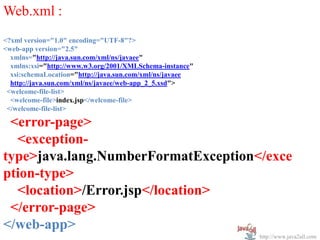
Web.xml :
<?xml version="1.0" encoding="UTF-8"?>
<web-app version="2.5"
  xmlns="http://java.sun.com/xml/ns/javaee"
  xmlns:xsi="http://www.w3.org/2001/XMLSchema-instance"
  xsi:schemaLocation="http://java.sun.com/xml/ns/javaee
  http://java.sun.com/xml/ns/javaee/web-app_2_5.xsd">
 <welcome-file-list>
  <welcome-file>index.jsp</welcome-file>
 </welcome-file-list>

 <error-page>
  <exception-
type>java.lang.NumberFormatException</exce
ption-type>
  <location>/Error.jsp</location>
 </error-page>
</web-app>
                                                          http://www.java2all.com
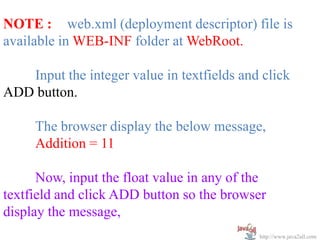
NOTE : web.xml (deployment descriptor) file is
available in WEB-INF folder at WebRoot.

   Input the integer value in textfields and click
ADD button.

     The browser display the below message,
     Addition = 11

      Now, input the float value in any of the
textfield and click ADD button so the browser
display the message,
                                            http://www.java2all.com
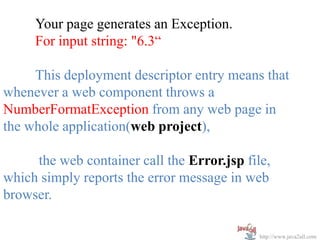
Your page generates an Exception.
     For input string: "6.3“

     This deployment descriptor entry means that
whenever a web component throws a
NumberFormatException from any web page in
the whole application(web project),

     the web container call the Error.jsp file,
which simply reports the error message in web
browser.

                                             http://www.java2all.com

JSP Error handling

  • 1.
    Chapter 3 Error Handling http://www.java2all.com
  • 2.
    Introduction http://www.java2all.com
  • 3.
    We already knowabout error and exception. In JSP there are 2 types of exception 1. Translation time errors 2. Run Time Exception Translation error occurs during page compilation, this results in an Internal Server Error (500). An exception on other hand occurs when page is compiled and servlet is running. Exception can be handled in JSP in three ways: http://www.java2all.com
  • 4.
    a.) Java ExceptionHandling mechanism b.) Dealing with exception with page directive c.) Dealing with exception in Deployment Descriptor. http://www.java2all.com
  • 5.
    By Mechanism http://www.java2all.com
  • 6.
    Java Exception handlingmechanism InputData.html : <!DOCTYPE HTML PUBLIC "-//W3C//DTD HTML 4.01 Transitional//EN"> <html> <head> <title>InputData.html</title> </head> <body> <form action="../JSPFILE/Calculator.jsp"> <input type="text" name="n1"> <br> <input type="text" name="n2"> <br> <input type="submit" value="ADD"> </form> </body> </html> http://www.java2all.com
  • 7.
    Calculator.jsp : <%@ pagelanguage="java" import="java.util.*" pageEncoding="ISO-8859-1"%> <html> <head> <title> Calculator.jsp </title> </head> <body> <% try { int i1 = Integer.parseInt(request.getParameter("n1")); int i2 = Integer.parseInt(request.getParameter("n2")); int add = i1 + i2; out.print("Addition = "+add); } catch(NumberFormatException ne) { out.print("Esception : "+ne); } %> </body> </html> http://www.java2all.com
  • 8.
    URL : http://localhost:8080/JAVA_PROJECT/HTMLFILE/Input Data.html http://www.java2all.com http://www.java2all.com
  • 9.
    Input the integervalue in text fields and click ADD button. The browser display the below message, Addition = 11 Now, input the float value in any of the text field and click ADD button so the browser display the message, Exception : java.lang.NumberFormatException: For input string: "6.3" http://www.java2all.com
  • 10.
  • 11.
    By Page Directive http://www.java2all.com
  • 12.
    Dealing exception withpage directive : The two attributes of page directive errorPage and isErrorPage are used to deal with exception. InputData.html : <!DOCTYPE HTML PUBLIC "-//W3C//DTD HTML 4.01 Transitional//EN"> <html> <head> <title>InputData.html</title> </head> <body> <form action="../JSPFILE/Calculator.jsp"> <input type="text" name="n1"> <br> <input type="text" name="n2"> <br> <input type="submit" value="ADD"> </form> </body> </html> http://www.java2all.com
  • 13.
    Calculator.jsp : <%@ pagelanguage="java" import="java.util.*" pageEncoding="ISO-8859-1" errorPage="Error.jsp"%> <html> <head> <title> Calculator.jsp </title> </head> <body> <% int i1 = Integer.parseInt(request.getParameter("n1")); int i2 = Integer.parseInt(request.getParameter("n2")); int add = i1 + i2; out.print("Addition = "+add); %> </body> </html> http://www.java2all.com
  • 14.
    Error.jsp : <%@ pagelanguage="java" import="java.util.*" pageEncoding="ISO-8859-1" isErrorPage="true"%> <html> <head> <title>Error.jsp</title> </head> <body> Your page generate an Exception. <br> <%= exception.getMessage() %> </body> </html> http://www.java2all.com
  • 15.
    Input the integervalue in textfields and click ADD button. The browser display the below message, Addition = 11 Now, input the float value in any of the textfield and click ADD button so the browser display the message, Your page generate an Exception. For input string: "6.3" http://www.java2all.com
  • 16.
    In Deployment Descriptor http://www.java2all.com
  • 17.
    InputData.html : <!DOCTYPE HTMLPUBLIC "-//W3C//DTD HTML 4.01 Transitional//EN"> <html> <head> <title>InputData.html</title> </head> <body> <form action="../JSPFILE/Calculator.jsp"> <input type="text" name="n1"> <br> <input type="text" name="n2"> <br> <input type="submit" value="ADD"> </form> </body> </html> http://www.java2all.com
  • 18.
    Calculator.jsp : <%@ pagelanguage="java" import="java.util.*" pageEncoding="ISO-8859-1"%> <html> <head> <title> Calculator.jsp </title> </head> <body> <% int i1 = Integer.parseInt(request.getParameter("n1")); int i2 = Integer.parseInt(request.getParameter("n2")); int add = i1 + i2; out.print("Addition = "+add); %> </body> </html> http://www.java2all.com
  • 19.
    Error.jsp : <%@ pagelanguage="java" import="java.util.*" pageEncoding="ISO-8859-1" isErrorPage="true"%> <html> <head> <title>Error.jsp</title> </head> <body> Your page generate an Exception. <br> <%= exception.getMessage() %> </body> </html> http://www.java2all.com
  • 20.
    Web.xml : <?xml version="1.0"encoding="UTF-8"?> <web-app version="2.5" xmlns="http://java.sun.com/xml/ns/javaee" xmlns:xsi="http://www.w3.org/2001/XMLSchema-instance" xsi:schemaLocation="http://java.sun.com/xml/ns/javaee http://java.sun.com/xml/ns/javaee/web-app_2_5.xsd"> <welcome-file-list> <welcome-file>index.jsp</welcome-file> </welcome-file-list> <error-page> <exception- type>java.lang.NumberFormatException</exce ption-type> <location>/Error.jsp</location> </error-page> </web-app> http://www.java2all.com
  • 21.
    NOTE : web.xml(deployment descriptor) file is available in WEB-INF folder at WebRoot. Input the integer value in textfields and click ADD button. The browser display the below message, Addition = 11 Now, input the float value in any of the textfield and click ADD button so the browser display the message, http://www.java2all.com
  • 22.
    Your page generatesan Exception. For input string: "6.3“ This deployment descriptor entry means that whenever a web component throws a NumberFormatException from any web page in the whole application(web project), the web container call the Error.jsp file, which simply reports the error message in web browser. http://www.java2all.com