Javascript & NodeJS
An Introduction
“JavaScript is 18...
now it’s not my responsibility;
it can go out, vote, join the Navy,
get drunk and gamble in most states.”
BRENDAN EICH
MOZILLA, 2013
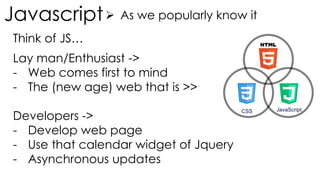
Javascript As we popularly know it
CSS JavaScript
Lay man/Enthusiast ->
- Web comes first to mind
- The (new age) web that is >>
Developers ->
- Develop web page
- Use that calendar widget of Jquery
- Asynchronous updates
Think of JS…
Javascript History
Web in 1995
“We aimed to provide a
“glue language” for the
Web designers and part time
programmers who were
building Web content from
components such as images,
plugins, and Java applets.”
“We saw Java as the
“component language”
used by higher-priced
programmers.”
- Netscape
BRENDAN EICH
An ex Silicon Graphics (7 years) Joined
Netscape in April 1995
prototyped language (Mocha >
LiveScript > JS) and SpiderMonkey
compiler in 10 days in May 1995.
DHTML
FORM VALIDATION
DYNAMIC HTML
Javascript Evolution Web 1995-2K
TICKERS & POP UPSROLLOVERS
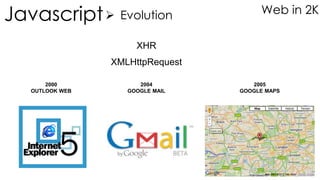
Javascript Evolution Web in 2K
XHR
2005
GOOGLE MAPS
2004
GOOGLE MAIL
2000
OUTLOOK WEB
XMLHttpRequest
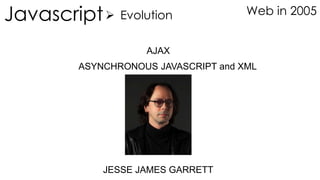
AJAX
JESSE JAMES GARRETT
ASYNCHRONOUS JAVASCRIPT and XML
Javascript Evolution Web in 2005
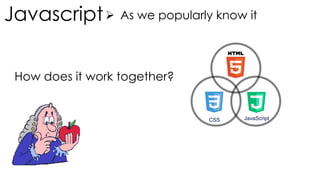
Javascript As we popularly know it
CSS JavaScript
How does it work together?
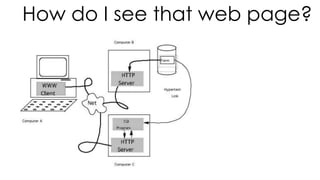
How do I see that web page?
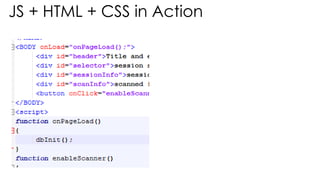
JS + HTML + CSS in Action
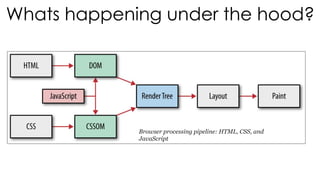
Browser processing pipeline: HTML, CSS, and
JavaScript
Whats happening under the hood?
JS Code – Getting used to
Asynchronous Programming
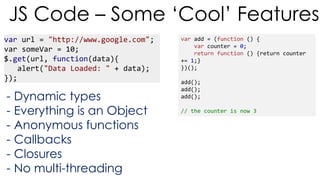
var url = "http://www.google.com";
var someVar = 10;
$.get(url, function(data){
alert("Data Loaded: " + data);
});
JS Code – Some ‘Cool’ Features
- Dynamic types
- Everything is an Object
- Anonymous functions
- Callbacks
- Closures
- No multi-threading
var add = (function () {
var counter = 0;
return function () {return counter
+= 1;}
})();
add();
add();
add();
// the counter is now 3
NodeJS – JS on Server Side
- JS as a language breaks shackles; no longer
associated only with Web
- Runs on v8 engine – wait! Isnt that what Chrome
browser has?
- Event loop architecture…no multi-threading
mess
- Everything is asynchronous
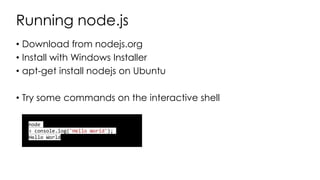
Running node.js
• Download from nodejs.org
• Install with Windows Installer
• apt-get install nodejs on Ubuntu
• Try some commands on the interactive shell
node
> console.log('Hello World');
Hello World
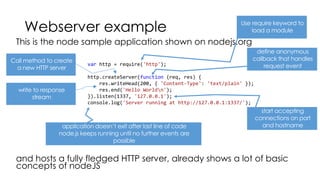
Webserver example
This is the node sample application shown on nodejs.org
and hosts a fully fledged HTTP server, already shows a lot of basic
concepts of nodeJS
var http = require('http');
http.createServer(function (req, res) {
res.writeHead(200, { 'Content-Type': 'text/plain' });
res.end('Hello Worldn');
}).listen(1337, '127.0.0.1');
console.log('Server running at http://127.0.0.1:1337/');
node.js modules
• developers know libraries, in node.js modules serve a similar function
• put different functionalities in different *.js files and allow usage from
other *.js files
• Helps structuring application
• use exports keyword to expose functions to other modules
• use require keyword to import modules
node.js modules
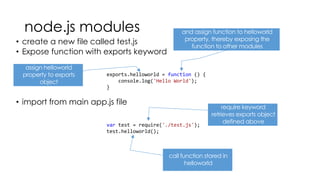
• create a new file called test.js
• Expose function with exports keyword
• import from main app.js file
exports.helloworld = function () {
console.log('Hello World');
}
var test = require('./test.js');
test.helloworld();
node.js modules
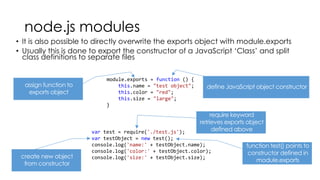
• It is also possible to directly overwrite the exports object with module.exports
• Usually this is done to export the constructor of a JavaScript ‘Class’ and split
class definitions to separate files
module.exports = function () {
this.name = "test object";
this.color = "red";
this.size = "large";
}
var test = require('./test.js');
var testObject = new test();
console.log('name:' + testObject.name);
console.log('color:' + testObject.color);
console.log('size:' + testObject.size);
node.js modules
• apart from self written modules, it is also possible to install
modules from a repository with a package manager
• This package manager is npm
• Similar command syntax to apt
• npm install <module name>
• npm update
• huge amount of public packages (74,753 as of 24th May 2014)
• everyone can contribute
20
structure of a node.js application
You need a *.js file that serves as application entry point
Run it directly with node *.js
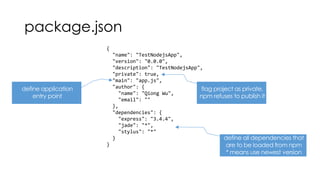
package.json
package.json
{
"name": "TestNodejsApp",
"version": "0.0.0",
"description": "TestNodejsApp",
"private": true,
"main": "app.js",
"author": {
"name": "Qiong Wu",
"email": ""
},
"dependencies": {
"express": "3.4.4",
"jade": "*",
"stylus": "*"
}
}
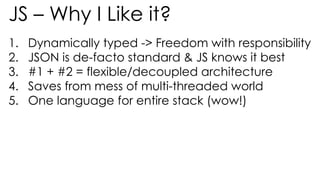
JS – Why I Like it?
1. Dynamically typed -> Freedom with responsibility
2. JSON is de-facto standard & JS knows it best
3. #1 + #2 = flexible/decoupled architecture
4. Saves from mess of multi-threaded world
5. One language for entire stack (wow!)
console.log(“Thank You ”);

JS & NodeJS - An Introduction

  • 1.
    Javascript & NodeJS AnIntroduction “JavaScript is 18... now it’s not my responsibility; it can go out, vote, join the Navy, get drunk and gamble in most states.” BRENDAN EICH MOZILLA, 2013
  • 2.
    Javascript As wepopularly know it CSS JavaScript Lay man/Enthusiast -> - Web comes first to mind - The (new age) web that is >> Developers -> - Develop web page - Use that calendar widget of Jquery - Asynchronous updates Think of JS…
  • 3.
    Javascript History Web in1995 “We aimed to provide a “glue language” for the Web designers and part time programmers who were building Web content from components such as images, plugins, and Java applets.” “We saw Java as the “component language” used by higher-priced programmers.” - Netscape BRENDAN EICH An ex Silicon Graphics (7 years) Joined Netscape in April 1995 prototyped language (Mocha > LiveScript > JS) and SpiderMonkey compiler in 10 days in May 1995.
  • 4.
    DHTML FORM VALIDATION DYNAMIC HTML JavascriptEvolution Web 1995-2K TICKERS & POP UPSROLLOVERS
  • 5.
    Javascript Evolution Webin 2K XHR 2005 GOOGLE MAPS 2004 GOOGLE MAIL 2000 OUTLOOK WEB XMLHttpRequest
  • 6.
    AJAX JESSE JAMES GARRETT ASYNCHRONOUSJAVASCRIPT and XML Javascript Evolution Web in 2005
  • 7.
    Javascript As wepopularly know it CSS JavaScript How does it work together?
  • 8.
    How do Isee that web page?
  • 9.
    JS + HTML+ CSS in Action
  • 10.
    Browser processing pipeline:HTML, CSS, and JavaScript Whats happening under the hood?
  • 11.
    JS Code –Getting used to Asynchronous Programming
  • 12.
    var url ="http://www.google.com"; var someVar = 10; $.get(url, function(data){ alert("Data Loaded: " + data); }); JS Code – Some ‘Cool’ Features - Dynamic types - Everything is an Object - Anonymous functions - Callbacks - Closures - No multi-threading var add = (function () { var counter = 0; return function () {return counter += 1;} })(); add(); add(); add(); // the counter is now 3
  • 13.
    NodeJS – JSon Server Side - JS as a language breaks shackles; no longer associated only with Web - Runs on v8 engine – wait! Isnt that what Chrome browser has? - Event loop architecture…no multi-threading mess - Everything is asynchronous
  • 14.
    Running node.js • Downloadfrom nodejs.org • Install with Windows Installer • apt-get install nodejs on Ubuntu • Try some commands on the interactive shell node > console.log('Hello World'); Hello World
  • 15.
    Webserver example This isthe node sample application shown on nodejs.org and hosts a fully fledged HTTP server, already shows a lot of basic concepts of nodeJS var http = require('http'); http.createServer(function (req, res) { res.writeHead(200, { 'Content-Type': 'text/plain' }); res.end('Hello Worldn'); }).listen(1337, '127.0.0.1'); console.log('Server running at http://127.0.0.1:1337/');
  • 16.
    node.js modules • developersknow libraries, in node.js modules serve a similar function • put different functionalities in different *.js files and allow usage from other *.js files • Helps structuring application • use exports keyword to expose functions to other modules • use require keyword to import modules
  • 17.
    node.js modules • createa new file called test.js • Expose function with exports keyword • import from main app.js file exports.helloworld = function () { console.log('Hello World'); } var test = require('./test.js'); test.helloworld();
  • 18.
    node.js modules • Itis also possible to directly overwrite the exports object with module.exports • Usually this is done to export the constructor of a JavaScript ‘Class’ and split class definitions to separate files module.exports = function () { this.name = "test object"; this.color = "red"; this.size = "large"; } var test = require('./test.js'); var testObject = new test(); console.log('name:' + testObject.name); console.log('color:' + testObject.color); console.log('size:' + testObject.size);
  • 19.
    node.js modules • apartfrom self written modules, it is also possible to install modules from a repository with a package manager • This package manager is npm • Similar command syntax to apt • npm install <module name> • npm update • huge amount of public packages (74,753 as of 24th May 2014) • everyone can contribute
  • 20.
    20 structure of anode.js application You need a *.js file that serves as application entry point Run it directly with node *.js package.json
  • 21.
    package.json { "name": "TestNodejsApp", "version": "0.0.0", "description":"TestNodejsApp", "private": true, "main": "app.js", "author": { "name": "Qiong Wu", "email": "" }, "dependencies": { "express": "3.4.4", "jade": "*", "stylus": "*" } }
  • 22.
    JS – WhyI Like it? 1. Dynamically typed -> Freedom with responsibility 2. JSON is de-facto standard & JS knows it best 3. #1 + #2 = flexible/decoupled architecture 4. Saves from mess of multi-threaded world 5. One language for entire stack (wow!)
  • 23.

Editor's Notes

  • #2 http://blog.carbonfive.com/2013/10/27/the-javascript-event-loop-explained/ http://www.slideshare.net/TelerikAcademy/13-javascriptintroduction?qid=ad73d215-6714-490e-9264-9a3bc827128b&v=qf1&b=&from_search=5 http://www.slideshare.net/Freundschaft/4-nodejs-basics?qid=9dc6e10c-ba37-4ba8-a2ec-ecc69d8aeece&v=default&b=&from_search=3