www.webstackacademy.com
DOM Handling
jQuery
www.webstackacademy.comwww.webstackacademy.com
DOM handling - jQuery
(Write less, Do more)
www.webstackacademy.com
Document Object Model (DOM)
• The W3C Document Object Model (DOM) is a platform and language-neutral interface
that allows programs and scripts to dynamically access and update the content,
structure, and style of a document
• jQuery provides multiple methods to manipulate DOM
• Using these methods it is easy to access and manipulate elements and attributes
• It also provides methods to change browser window dimensions
www.webstackacademy.com
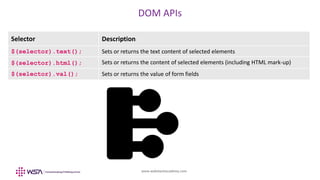
DOM APIs
Selector Description
$(selector).text(); Sets or returns the text content of selected elements
$(selector).html(); Sets or returns the content of selected elements (including HTML mark-up)
$(selector).val(); Sets or returns the value of form fields
www.webstackacademy.com
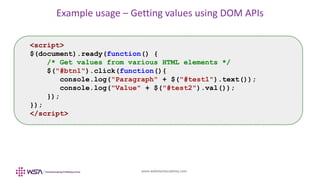
Example usage – Getting values using DOM APIs
<script>
$(document).ready(function() {
/* Get values from various HTML elements */
$("#btn1").click(function(){
console.log("Paragraph" + $("#test1").text());
console.log("Value" + $("#test2").val());
});
});
</script>
www.webstackacademy.com
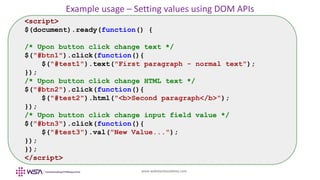
Example usage – Setting values using DOM APIs
<script>
$(document).ready(function() {
/* Upon button click change text */
$("#btn1").click(function(){
$("#test1").text("First paragraph - normal text");
});
/* Upon button click change HTML text */
$("#btn2").click(function(){
$("#test2").html("<b>Second paragraph</b>");
});
/* Upon button click change input field value */
$("#btn3").click(function(){
$("#test3").val("New Value...");
});
});
</script>
www.webstackacademy.com
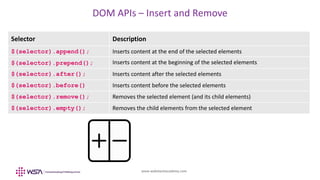
DOM APIs – Insert and Remove
Selector Description
$(selector).append(); Inserts content at the end of the selected elements
$(selector).prepend(); Inserts content at the beginning of the selected elements
$(selector).after(); Inserts content after the selected elements
$(selector).before() Inserts content before the selected elements
$(selector).remove(); Removes the selected element (and its child elements)
$(selector).empty(); Removes the child elements from the selected element
www.webstackacademy.com
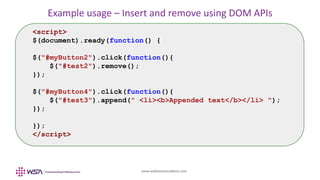
Example usage – Insert and remove using DOM APIs
<script>
$(document).ready(function() {
$("#myButton2").click(function(){
$("#test2").remove();
});
$("#myButton4").click(function(){
$("#test3").append(" <li><b>Appended text</b></li> ");
});
});
</script>
www.webstackacademy.com
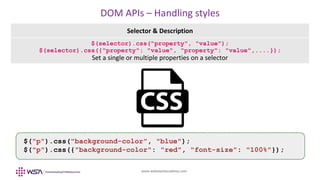
DOM APIs – Handling styles
Selector & Description
$(selector).css("property", "value");
$(selector).css({"property": "value", "property": "value",....});
Set a single or multiple properties on a selector
$("p").css("background-color", "blue");
$("p").css({"background-color": "red", "font-size": "100%"});
www.webstackacademy.comwww.webstackacademy.com
Dimension APIs
(Write less, Do more)
www.webstackacademy.com
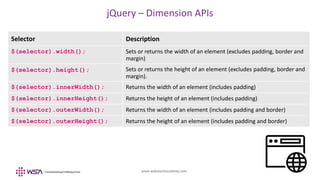
jQuery – Dimension APIs
Selector Description
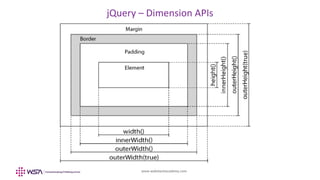
$(selector).width(); Sets or returns the width of an element (excludes padding, border and
margin)
$(selector).height(); Sets or returns the height of an element (excludes padding, border and
margin).
$(selector).innerWidth(); Returns the width of an element (includes padding)
$(selector).innerHeight(); Returns the height of an element (includes padding)
$(selector).outerWidth(); Returns the width of an element (includes padding and border)
$(selector).outerHeight(); Returns the height of an element (includes padding and border)
www.webstackacademy.com
jQuery – Dimension APIs
www.webstackacademy.com
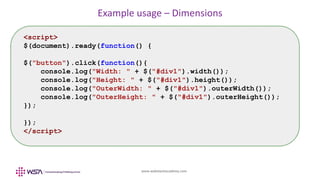
Example usage – Dimensions
<script>
$(document).ready(function() {
$("button").click(function(){
console.log("Width: " + $("#div1").width());
console.log("Height: " + $("#div1").height());
console.log("OuterWidth: " + $("#div1").outerWidth());
console.log("OuterHeight: " + $("#div1").outerHeight());
});
});
</script>
www.webstackacademy.comwww.webstackacademy.com
DOM Traversal - jQuery
(Write less, Do more)
www.webstackacademy.com
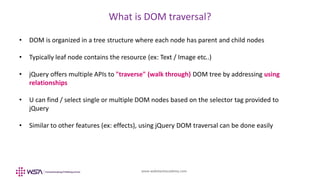
What is DOM traversal?
• DOM is organized in a tree structure where each node has parent and child nodes
• Typically leaf node contains the resource (ex: Text / Image etc..)
• jQuery offers multiple APIs to "traverse" (walk through) DOM tree by addressing using
relationships
• U can find / select single or multiple DOM nodes based on the selector tag provided to
jQuery
• Similar to other features (ex: effects), using jQuery DOM traversal can be done easily
www.webstackacademy.com
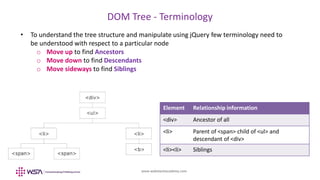
DOM Tree - Terminology
• To understand the tree structure and manipulate using jQuery few terminology need to
be understood with respect to a particular node
o Move up to find Ancestors
o Move down to find Descendants
o Move sideways to find Siblings
Element Relationship information
<div> Ancestor of all
<li> Parent of <span> child of <ul> and
descendant of <div>
<li><li> Siblings
www.webstackacademy.com
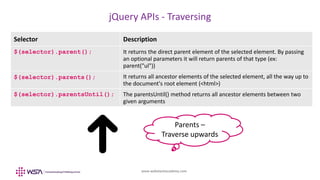
jQuery APIs - Traversing
Selector Description
$(selector).parent(); It returns the direct parent element of the selected element. By passing
an optional parameters it will return parents of that type (ex:
parent("ul"))
$(selector).parents(); It returns all ancestor elements of the selected element, all the way up to
the document's root element (<html>)
$(selector).parentsUntil(); The parentsUntil() method returns all ancestor elements between two
given arguments
Parents –
Traverse upwards
www.webstackacademy.com
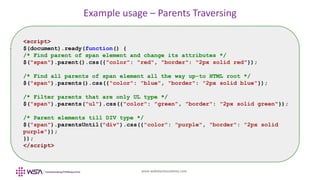
Example usage – Parents Traversing
<script>
$(document).ready(function() {
/* Find parent of span element and change its attributes */
$("span").parent().css({"color": "red", "border": "2px solid red"});
/* Find all parents of span element all the way up-to HTML root */
$("span").parents().css({"color": "blue", "border": "2px solid blue"});
/* Filter parents that are only UL type */
$("span").parents("ul").css({"color": "green", "border": "2px solid green"});
/* Parent elements till DIV type */
$("span").parentsUntil("div").css({"color": "purple", "border": "2px solid
purple"});
});
</script>
www.webstackacademy.com
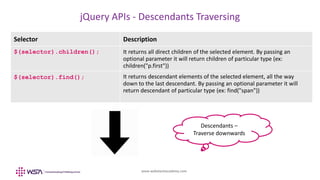
jQuery APIs - Descendants Traversing
Selector Description
$(selector).children(); It returns all direct children of the selected element. By passing an
optional parameter it will return children of particular type (ex:
children("p.first"))
$(selector).find(); It returns descendant elements of the selected element, all the way
down to the last descendant. By passing an optional parameter it will
return descendant of particular type (ex: find("span"))
Descendants –
Traverse downwards
www.webstackacademy.com
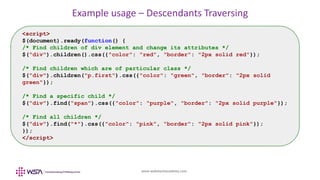
Example usage – Descendants Traversing
<script>
$(document).ready(function() {
/* Find children of div element and change its attributes */
$("div").children().css({"color": "red", "border": "2px solid red"});
/* Find children which are of particular class */
$("div").children("p.first").css({"color": "green", "border": "2px solid
green"});
/* Find a specific child */
$("div").find("span").css({"color": "purple", "border": "2px solid purple"});
/* Find all children */
$("div").find("*").css({"color": "pink", "border": "2px solid pink"});
});
</script>
www.webstackacademy.com
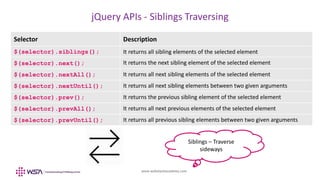
jQuery APIs - Siblings Traversing
Selector Description
$(selector).siblings(); It returns all sibling elements of the selected element
$(selector).next(); It returns the next sibling element of the selected element
$(selector).nextAll(); It returns all next sibling elements of the selected element
$(selector).nextUntil(); It returns all next sibling elements between two given arguments
$(selector).prev(); It returns the previous sibling element of the selected element
$(selector).prevAll(); It returns all next previous elements of the selected element
$(selector).prevUntil(); It returns all previous sibling elements between two given arguments
Siblings – Traverse
sideways
www.webstackacademy.com
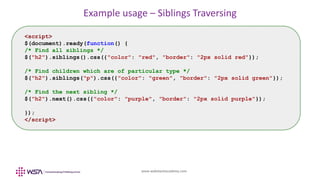
Example usage – Siblings Traversing
<script>
$(document).ready(function() {
/* Find all siblings */
$("h2").siblings().css({"color": "red", "border": "2px solid red"});
/* Find children which are of particular type */
$("h2").siblings("p").css({"color": "green", "border": "2px solid green"});
/* Find the next sibling */
$("h2").next().css({"color": "purple", "border": "2px solid purple"});
});
</script>
www.webstackacademy.com
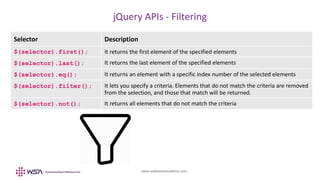
jQuery APIs - Filtering
Selector Description
$(selector).first(); It returns the first element of the specified elements
$(selector).last(); It returns the last element of the specified elements
$(selector).eq(); It returns an element with a specific index number of the selected elements
$(selector).filter(); It lets you specify a criteria. Elements that do not match the criteria are removed
from the selection, and those that match will be returned.
$(selector).not(); It returns all elements that do not match the criteria
www.webstackacademy.com
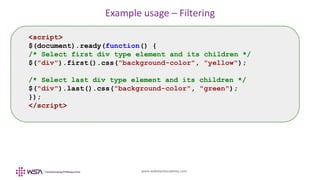
Example usage – Filtering
<script>
$(document).ready(function() {
/* Select first div type element and its children */
$("div").first().css("background-color", "yellow");
/* Select last div type element and its children */
$("div").last().css("background-color", "green");
});
</script>
www.webstackacademy.com
WebStack Academy
#83, Farah Towers,
1st Floor, MG Road,
Bangalore – 560001
M: +91-809 555 7332
E: training@webstackacademy.com
WSA in Social Media:

jQuery - Chapter 4 - DOM Handling

  • 1.
  • 2.
  • 3.
    www.webstackacademy.com Document Object Model(DOM) • The W3C Document Object Model (DOM) is a platform and language-neutral interface that allows programs and scripts to dynamically access and update the content, structure, and style of a document • jQuery provides multiple methods to manipulate DOM • Using these methods it is easy to access and manipulate elements and attributes • It also provides methods to change browser window dimensions
  • 4.
    www.webstackacademy.com DOM APIs Selector Description $(selector).text();Sets or returns the text content of selected elements $(selector).html(); Sets or returns the content of selected elements (including HTML mark-up) $(selector).val(); Sets or returns the value of form fields
  • 5.
    www.webstackacademy.com Example usage –Getting values using DOM APIs <script> $(document).ready(function() { /* Get values from various HTML elements */ $("#btn1").click(function(){ console.log("Paragraph" + $("#test1").text()); console.log("Value" + $("#test2").val()); }); }); </script>
  • 6.
    www.webstackacademy.com Example usage –Setting values using DOM APIs <script> $(document).ready(function() { /* Upon button click change text */ $("#btn1").click(function(){ $("#test1").text("First paragraph - normal text"); }); /* Upon button click change HTML text */ $("#btn2").click(function(){ $("#test2").html("<b>Second paragraph</b>"); }); /* Upon button click change input field value */ $("#btn3").click(function(){ $("#test3").val("New Value..."); }); }); </script>
  • 7.
    www.webstackacademy.com DOM APIs –Insert and Remove Selector Description $(selector).append(); Inserts content at the end of the selected elements $(selector).prepend(); Inserts content at the beginning of the selected elements $(selector).after(); Inserts content after the selected elements $(selector).before() Inserts content before the selected elements $(selector).remove(); Removes the selected element (and its child elements) $(selector).empty(); Removes the child elements from the selected element
  • 8.
    www.webstackacademy.com Example usage –Insert and remove using DOM APIs <script> $(document).ready(function() { $("#myButton2").click(function(){ $("#test2").remove(); }); $("#myButton4").click(function(){ $("#test3").append(" <li><b>Appended text</b></li> "); }); }); </script>
  • 9.
    www.webstackacademy.com DOM APIs –Handling styles Selector & Description $(selector).css("property", "value"); $(selector).css({"property": "value", "property": "value",....}); Set a single or multiple properties on a selector $("p").css("background-color", "blue"); $("p").css({"background-color": "red", "font-size": "100%"});
  • 10.
  • 11.
    www.webstackacademy.com jQuery – DimensionAPIs Selector Description $(selector).width(); Sets or returns the width of an element (excludes padding, border and margin) $(selector).height(); Sets or returns the height of an element (excludes padding, border and margin). $(selector).innerWidth(); Returns the width of an element (includes padding) $(selector).innerHeight(); Returns the height of an element (includes padding) $(selector).outerWidth(); Returns the width of an element (includes padding and border) $(selector).outerHeight(); Returns the height of an element (includes padding and border)
  • 12.
  • 13.
    www.webstackacademy.com Example usage –Dimensions <script> $(document).ready(function() { $("button").click(function(){ console.log("Width: " + $("#div1").width()); console.log("Height: " + $("#div1").height()); console.log("OuterWidth: " + $("#div1").outerWidth()); console.log("OuterHeight: " + $("#div1").outerHeight()); }); }); </script>
  • 14.
  • 15.
    www.webstackacademy.com What is DOMtraversal? • DOM is organized in a tree structure where each node has parent and child nodes • Typically leaf node contains the resource (ex: Text / Image etc..) • jQuery offers multiple APIs to "traverse" (walk through) DOM tree by addressing using relationships • U can find / select single or multiple DOM nodes based on the selector tag provided to jQuery • Similar to other features (ex: effects), using jQuery DOM traversal can be done easily
  • 16.
    www.webstackacademy.com DOM Tree -Terminology • To understand the tree structure and manipulate using jQuery few terminology need to be understood with respect to a particular node o Move up to find Ancestors o Move down to find Descendants o Move sideways to find Siblings Element Relationship information <div> Ancestor of all <li> Parent of <span> child of <ul> and descendant of <div> <li><li> Siblings
  • 17.
    www.webstackacademy.com jQuery APIs -Traversing Selector Description $(selector).parent(); It returns the direct parent element of the selected element. By passing an optional parameters it will return parents of that type (ex: parent("ul")) $(selector).parents(); It returns all ancestor elements of the selected element, all the way up to the document's root element (<html>) $(selector).parentsUntil(); The parentsUntil() method returns all ancestor elements between two given arguments Parents – Traverse upwards
  • 18.
    www.webstackacademy.com Example usage –Parents Traversing <script> $(document).ready(function() { /* Find parent of span element and change its attributes */ $("span").parent().css({"color": "red", "border": "2px solid red"}); /* Find all parents of span element all the way up-to HTML root */ $("span").parents().css({"color": "blue", "border": "2px solid blue"}); /* Filter parents that are only UL type */ $("span").parents("ul").css({"color": "green", "border": "2px solid green"}); /* Parent elements till DIV type */ $("span").parentsUntil("div").css({"color": "purple", "border": "2px solid purple"}); }); </script>
  • 19.
    www.webstackacademy.com jQuery APIs -Descendants Traversing Selector Description $(selector).children(); It returns all direct children of the selected element. By passing an optional parameter it will return children of particular type (ex: children("p.first")) $(selector).find(); It returns descendant elements of the selected element, all the way down to the last descendant. By passing an optional parameter it will return descendant of particular type (ex: find("span")) Descendants – Traverse downwards
  • 20.
    www.webstackacademy.com Example usage –Descendants Traversing <script> $(document).ready(function() { /* Find children of div element and change its attributes */ $("div").children().css({"color": "red", "border": "2px solid red"}); /* Find children which are of particular class */ $("div").children("p.first").css({"color": "green", "border": "2px solid green"}); /* Find a specific child */ $("div").find("span").css({"color": "purple", "border": "2px solid purple"}); /* Find all children */ $("div").find("*").css({"color": "pink", "border": "2px solid pink"}); }); </script>
  • 21.
    www.webstackacademy.com jQuery APIs -Siblings Traversing Selector Description $(selector).siblings(); It returns all sibling elements of the selected element $(selector).next(); It returns the next sibling element of the selected element $(selector).nextAll(); It returns all next sibling elements of the selected element $(selector).nextUntil(); It returns all next sibling elements between two given arguments $(selector).prev(); It returns the previous sibling element of the selected element $(selector).prevAll(); It returns all next previous elements of the selected element $(selector).prevUntil(); It returns all previous sibling elements between two given arguments Siblings – Traverse sideways
  • 22.
    www.webstackacademy.com Example usage –Siblings Traversing <script> $(document).ready(function() { /* Find all siblings */ $("h2").siblings().css({"color": "red", "border": "2px solid red"}); /* Find children which are of particular type */ $("h2").siblings("p").css({"color": "green", "border": "2px solid green"}); /* Find the next sibling */ $("h2").next().css({"color": "purple", "border": "2px solid purple"}); }); </script>
  • 23.
    www.webstackacademy.com jQuery APIs -Filtering Selector Description $(selector).first(); It returns the first element of the specified elements $(selector).last(); It returns the last element of the specified elements $(selector).eq(); It returns an element with a specific index number of the selected elements $(selector).filter(); It lets you specify a criteria. Elements that do not match the criteria are removed from the selection, and those that match will be returned. $(selector).not(); It returns all elements that do not match the criteria
  • 24.
    www.webstackacademy.com Example usage –Filtering <script> $(document).ready(function() { /* Select first div type element and its children */ $("div").first().css("background-color", "yellow"); /* Select last div type element and its children */ $("div").last().css("background-color", "green"); }); </script>
  • 25.
    www.webstackacademy.com WebStack Academy #83, FarahTowers, 1st Floor, MG Road, Bangalore – 560001 M: +91-809 555 7332 E: training@webstackacademy.com WSA in Social Media: